I Ranked This Tiny, Cheap Robot Vacuum Higher Than a Dyson That Costs Three Times More

We may earn a commission from links on this page.

If you’re looking for a robot vacuum, you’ve likely considered the Dyson 360 Vis Nav, a premium vacuum-only robot. I’d like to suggest that, instead, you consider the Switchbot K10+ Pro, a zippy little vacuum that is on sale for $299.99 (50% off) right now, compared to the Dyson’s $999.99 price tag.

I frequently read Reddit forums for people shopping for robot vacuums, and I’m generally surprised by two things. First, the number of people who are still looking for a robot that will only vacuum, not mop, and second, that Switchbot almost never comes up in the conversation. 

Small size trumps smart design

Switchbot K10+ Pro
Switchbot K10+ Pro Tower is tiny
Credit: Amanda Blum

Neither the 360 Vis Nav nor the K10+ Pro are traditional looking robots. The Dyson is U-shaped and sports bright colors. It has a deconstructed look, in gunmetal grey, red, and purple. The Switchbot is a mini robot, only eight inches across. Both designs deviated from the norm to give the robots better access to areas of the home, but despite all the research that I’m sure went into the Dyson’s shape, the Switchbot achieves the goal with more success. Simply, the diminutive size of the Switchbot allows it to make a tighter radius around chair legs and fit into smaller crevices between furniture.

A self-emptying tower is always better than no self-emptying tower
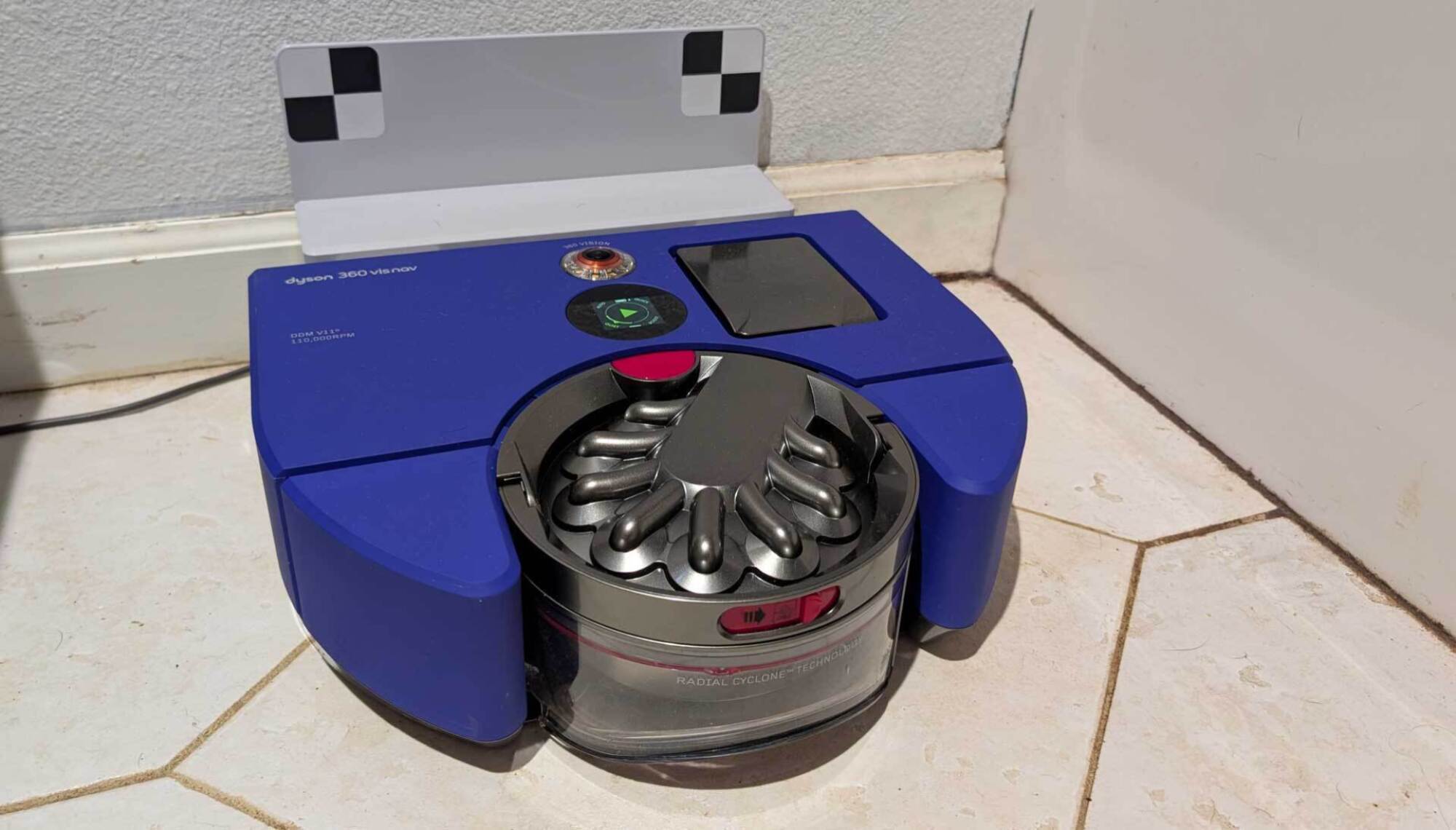
Dyson360 Vis Nav
The 360 Vis Nav on the dock.
Credit: Amanda Blum

Personally, I’d need a real good reason to purchase a robot vacuum without a self-emptying tower—if the point of a robot is autonomy, I shouldn’t have to endure the indignity of emptying a dust canister over the trash can. The Switchbot K10+ Pro has such a tower, and like the robot itself, it is adorably small. Still, it is effective, evacuating all the debris from the K10+ Pro. The size has made it easy to park the tower almost anywhere; it is currently servicing my bedroom and closet, where the dock sits next to, and is dwarfed by, a pair of boots. 

The Dyson has no tower, replacing it instead with a charging dock. In my review of the 360 Vis Nav, I wrote about how annoying I found the fact that the dock could not stay put, and was often pushed around by the robot attempting to dock. While the dock is smaller than the Switchbot tower, it is garish, with black and white checks that apparently help the robot navigate to the dock. I’d be remiss if I didn’t explain that the Dyson robot had the best and easiest canister to empty of any vacuum I’d tried: You hold it inside the trash can, press a button and the dust is yeeted out at warp speed into the can. Still, I’d prefer to not bother with it at all.

Dyson canister being emptied
The Dyson canister is well designed for minimal mess.
Credit: Amanda Blum

Features count, when it comes to apps
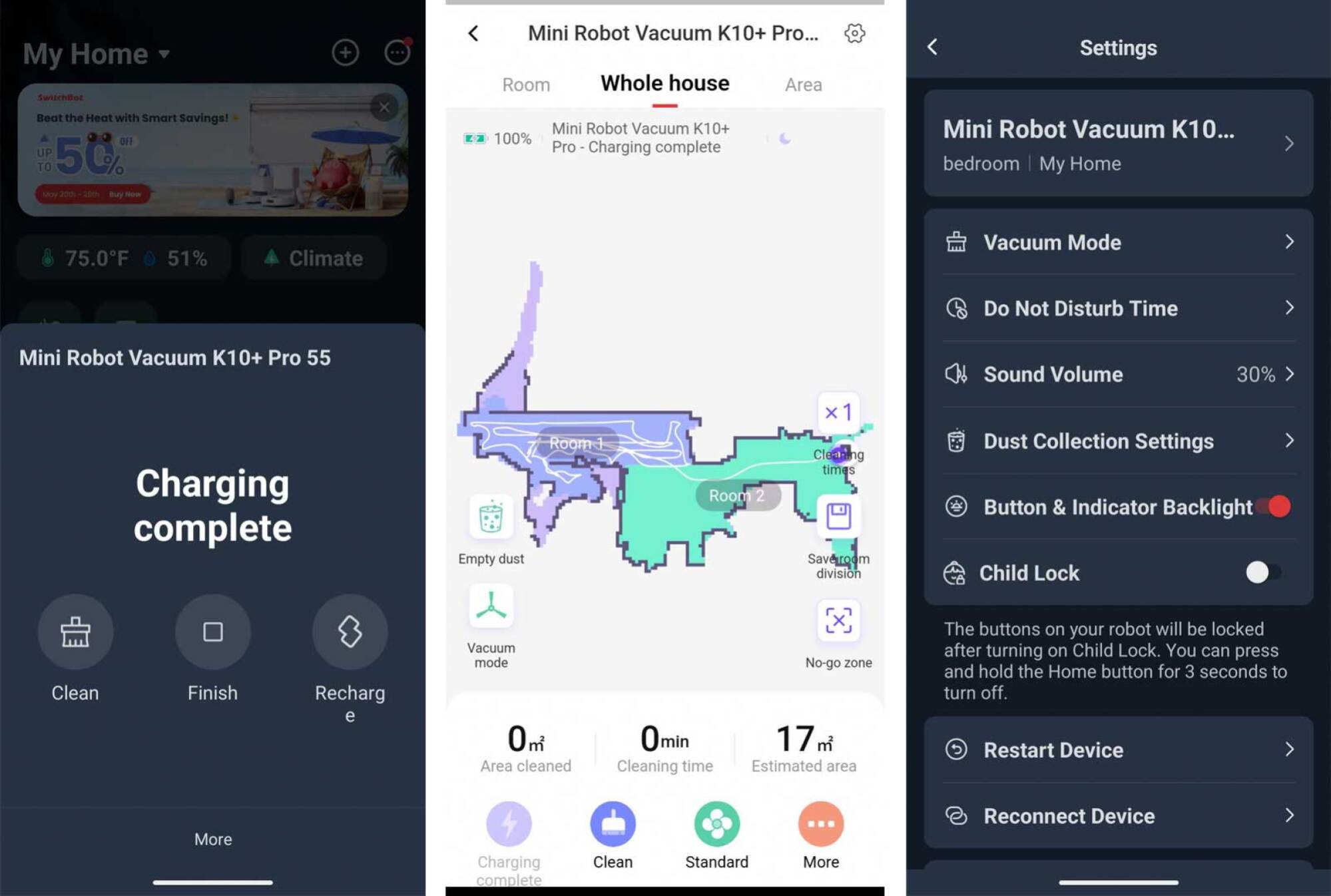
Switchbot app screenshots

Credit: Amanda Blum

One of the charms of the K10+ Pro is that it behaves like a premium vacuum, particularly as you use the app, despite its low price. Similarly, an annoyance of the 360 Vis Nav is that it lacks many features of a premium vacuum, despite costing the same price as one. The Dyson app is, to be sure, beautifully designed with a clean, dark interface. Dyson has set the 360 Vis Nav up to be easy to use, and as such, there simply aren’t a lot of extras. You can set a schedule, decide the power with which the vacuum will work, and create/edit maps. But features like Pin and Go (set a pin and the robot proceeds there to clean) and remote control are absent, as are advanced settings for obstacle avoidance or a camera view from the robot. 
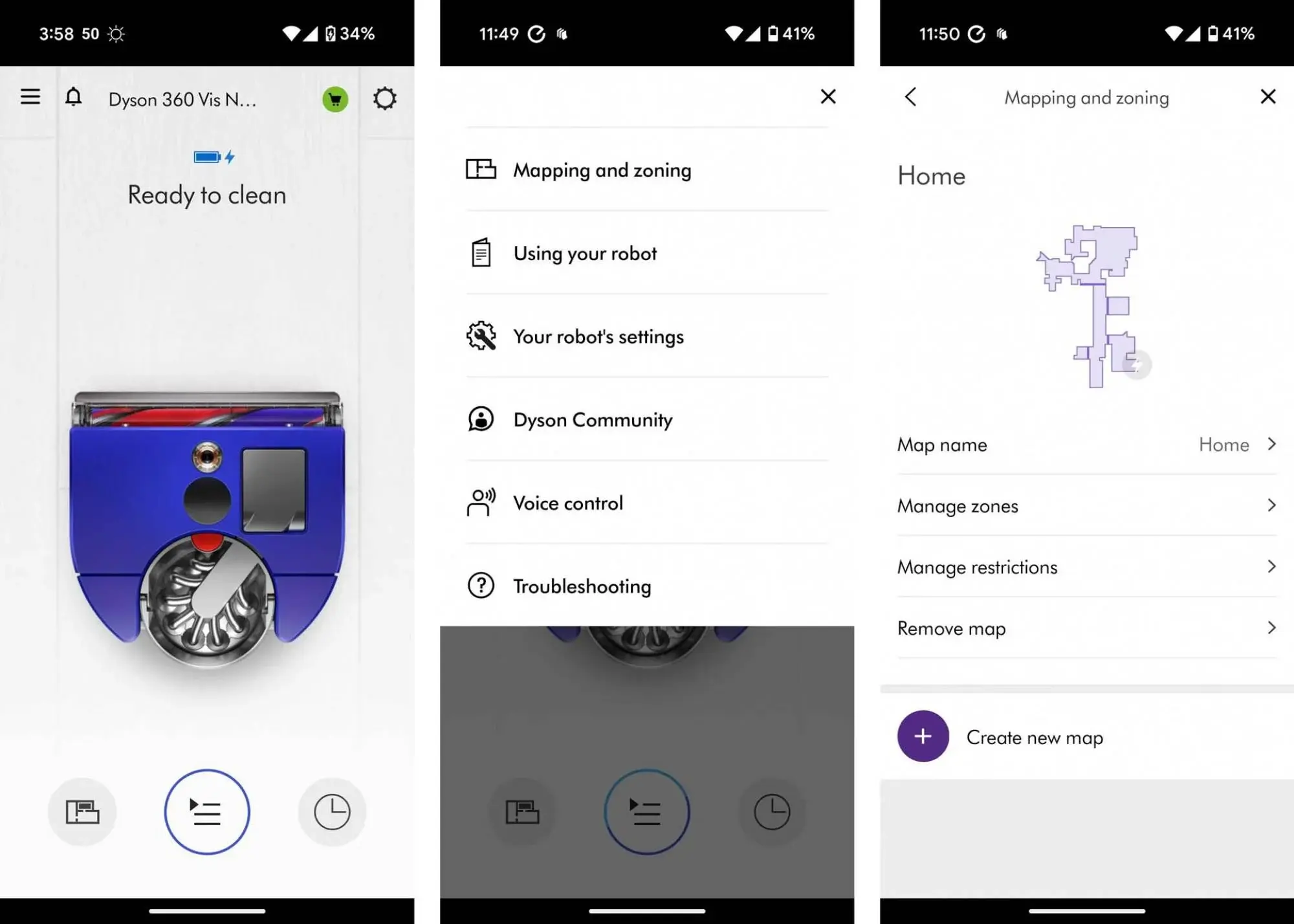
screenshots from the dyson app

Credit: Amanda Blum

While some of those features, like Pin and Go, are very useful, they’re not necessary. However, I have to point out that most robots in the price range of the 360 Vis Nav would have those features and more. To be fair, Switchbot has the remote control feature (useful when a vacuum is stuck under a couch), and though it lacks Pin and Go, the Switchbot is less than half the price and has some cool features I haven’t seen elsewhere. You can pair NFC tags with various robot functions, which is neat. 

About equal in vacuuming prowress

Neither the 360 Vis Nav or the K10+ Pro are the best vacuums I’ve experienced on a robot. Switchbot’s K10+ Pro has about 20000Pa suction power on board, and Dyson’s 360 Vis Nav has 22000Pa. The K10+ Pro does a perfectly respectable job on micro and medium sized particles and struggles with large particles. What impressed me most was how effective the Switchbot was on carpet, which is where it ended up earning a permanent home in my house. Despite its size, it effectively picks up pet hair, human hair, dust, and most other items left behind and creates vacuum tracks, which soothe my inner clean freak. 

In contrast, the Dyson did great with micro and medium-small debris, and struggled with anything larger than that due to the design of the vacuum. The space between the plastic housing of the robot and roller that moves debris into the vacuum is simply too small to allow anything medium sized or larger. The robot also left nice tracks on the carpet, but struggled to get around as easily. The Dyson did have one advantage, though: the K10+ Pro doesn’t have extending arms of any kind, but the Dyson 360 Vis Nav has a side vent that allows it to get close to the wall when vacuuming. This was most noticeable over carpet, actually. The Dyson got a lot of dog hair right at the edge of the carpet that the Switchbot skipped.

An easy choice

If you were going off name recognition or reputation, Dyson is almost unparalleled in the vacuum industry for expensive but value-heavy models that vacuum better than others. I was disappointed in how little that translated to the 360 Vis Nav. In every single way that counts, the Switchbot K10+ Pro beats the Dyson 360 Vis Nav’s handily. Even better, it does it for $700 less.


Staten Island GameStop Stapled Receipts To Switch 2s And Punctured The Screens Because Nintendo Boxed Them In The Weirdest Way Possible

Imagine you were up at midnight to pre-order the Switch 2. You waited months for the official launch day. Then you waited again in line at midnight to be one of the first to pick it up and play the new Nintendo hardware. But as you open it, the long-awaited moment of joy turns to horror as you find that someone…

Read more…

Sony Unveils Project Defiant Wireless Fight Stick For Low-Latency Brawls On PS5 And PC

Sony Unveils Project Defiant Wireless Fight Stick For Low-Latency Brawls On PS5 And PC
For those reading the headline and hoping for 1:1 nunchucks or light saber battles in the living room with your buddies—sorry to say, Sony’s new surprise “Project Defiant” reveal is anything but. Instead, it’s simply the company’s first ever wireless arcade fight stick designed specifically for PlayStation 5 consoles and PC platforms. Unveiled

Data Center Boom May End Up Being ‘Irrational,’ Investor Warns

A prominent venture capitalist has warned that the technology industry’s massive buildout of AI data centers risks becoming “irrational” and could end in disaster, particularly as companies pursue small nuclear reactors to power the facilities. Josh Wolfe, co-founder and partner at Lux Capital, compared the current infrastructure expansion to previous market bubbles in fiber-optic networking and cloud computing. While individual actions by hyperscale companies to build data center infrastructure remain rational, Wolfe said the collective effort “becomes irrational” and “will not necessarily persist.”

The warning comes as Big Tech companies pour tens of billions into data centers and energy sources, with Meta announcing just this week a deal to purchase power from an operating nuclear station in Illinois that was scheduled to retire in 2027. Wolfe said he is worried that speculative capital is flowing into small modular reactors based on presumed energy demands from data centers. “I think that that whole thing is going to end in disaster, mostly because as cliched as it is, history doesn’t repeat. It rhymes,” he said.


Read more of this story at Slashdot.

A Look Inside Meta’s ‘Aria’ Research Glasses Shows What Tech Could Come to Future AR Glasses

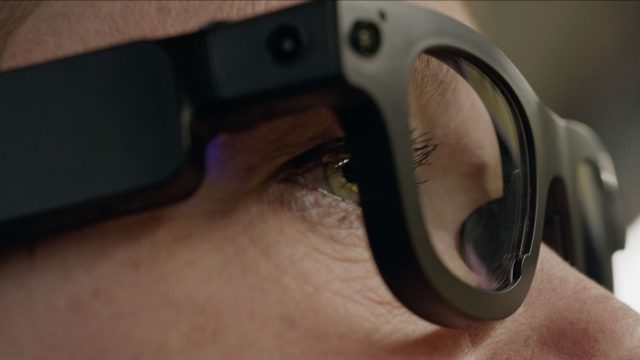
Earlier this year, Meta unveiled Aria Gen 2, the next iteration of its research glasses. At the time, Meta was pretty sparse with details, however now the company is gearing up to release the device to third-party researchers sometime next year, and in the process, showing what might come to AR glasses in the future.

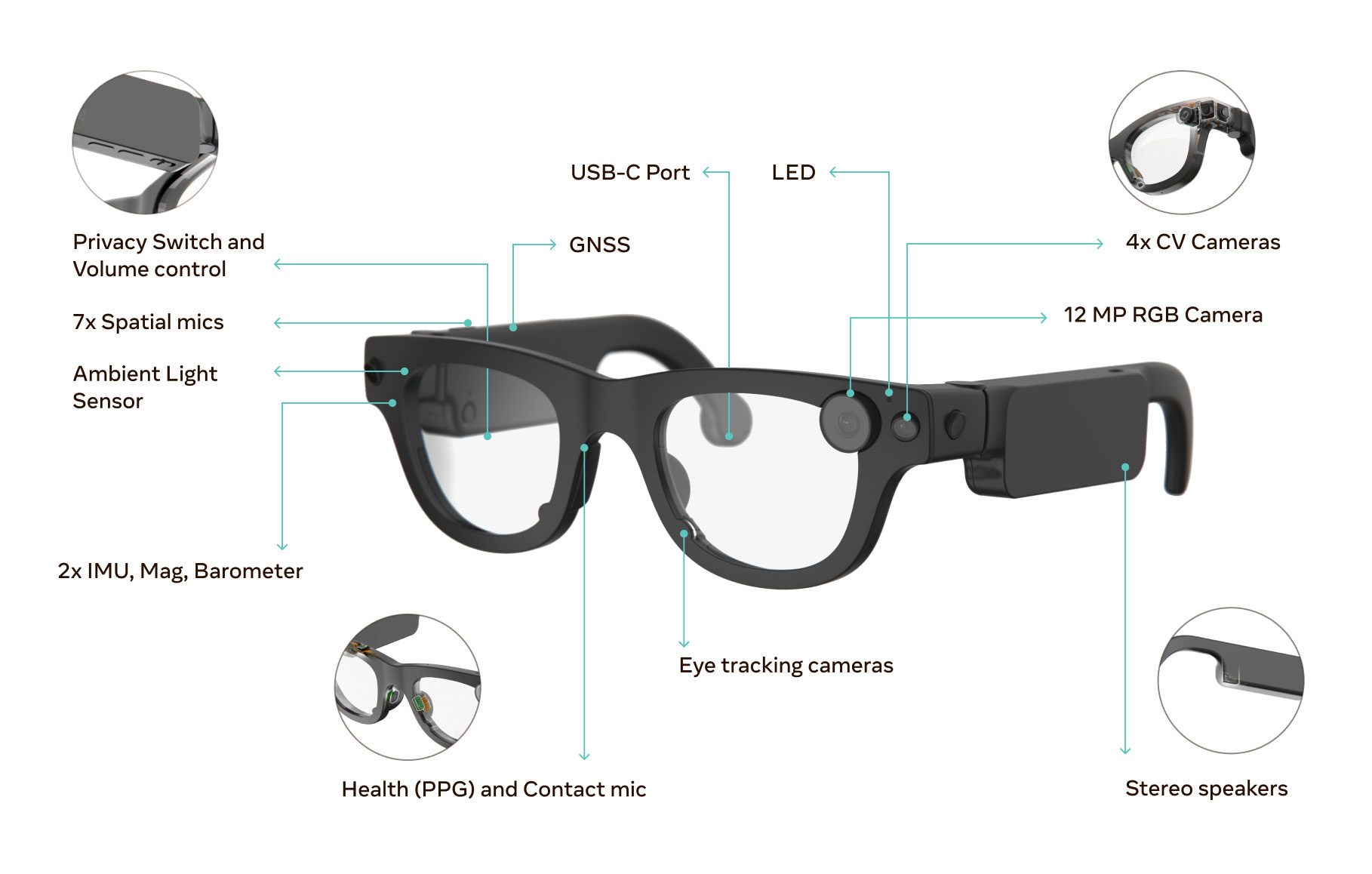
Meta revealed more about Aria Gen 2 in recent blog post, filling in some details about the research glasses’ form factor, audio, cameras, sensors, and on-device compute.

Although Aria Gen 2 can’t do the full range of augmented reality tasks since it lacks any sort of display, much of what goes into Meta’s latest high-tech specs are leading the way for AR glasses of the future.

Better Computer Vision Capabilities

One of the biggest features all-day-wearable AR glasses of the future will undoubtedly need is robust computer vision (CV), such as mapping an indoor space and recognizing objects.

In terms of computer vision, Meta says Aria Gen 2 doubles the number of CV cameras (now four) over Gen 1, features a 120 dB HDR global shutter, an expanded field of view, and 80° stereo overlap—dramatically enhancing 3D tracking and depth perception.

To boot, Meta showed off the glasses in action inside of a room as it performed simultaneous localization and mapping (SLAM):

New Sensors & Smarter Compute

Other features include sensor upgrades, such as a calibrated ambient light sensor, a contact microphone embedded in the nosepad for clearer audio in noisy environments, and a heart rate sensor (PPG) for physiological data.

Additionally, Meta says Aria Gen 2’s on-device compute has also seen a leap over Gen 1, with real-time machine perception running on Meta’s custom coprocessor, including:

  • Visual-Inertial Odometry (VIO) for 6DOF spatial tracking
  • Advanced eye tracking (gaze, vergence, blink, pupil size, etc.)
  • 3D hand tracking for precise motion data and annotation
  • New SubGHz radio tech enables sub-millisecond time alignment between devices, crucial for multi-device setups.

And It’s Light

Aria Gen 2 may contain the latest advancements in computer vision, machine learning, and sensor technology, but they’re also remarkably light at just 74-76g. For reference, a pair of typical eyeglasses can weigh anywhere from 20-50g, depending on materials used and lens thickness.

Aria Gen 2 | Image courtesy Meta

The device’s 2g weight variation is due to Meta offering eight size variants, which the company says will help users get the right fit for head and nose bridge size. And like regular glasses, they also fold for easy storage and transport.

Notably, the company hasn’t openly spoken about battery life, although it does feature a UBS-C port on the glasses’ right arm, which could possibly be used to tether to a battery pack.

Human Perception Meets Machine Vision

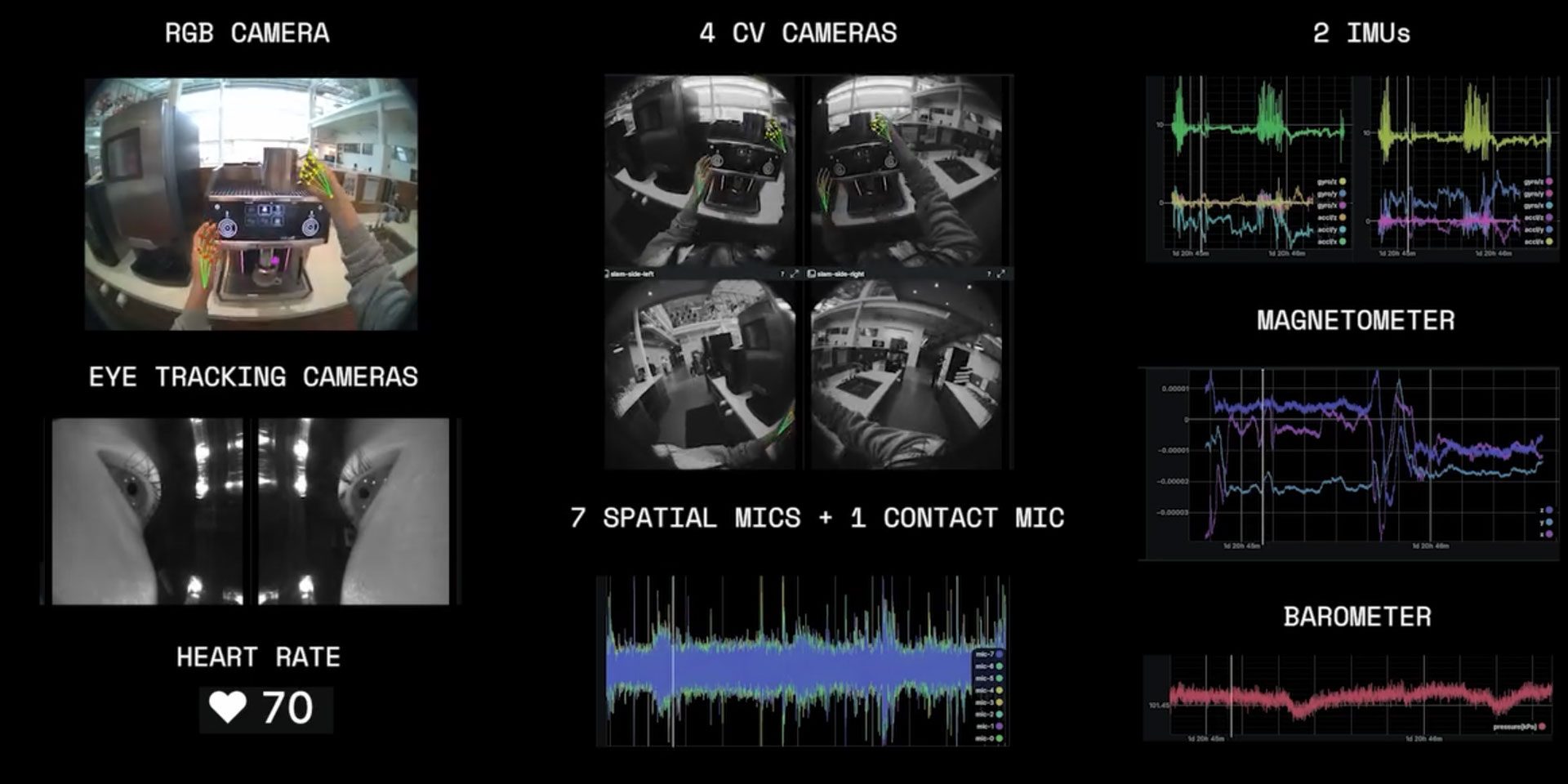
Essentially, Aria Gen 2 not only tracks and analyses the user’s environment, but also the user’s physical perception of that environment, like the user preparing a coffee in the image below.

Image courtesy Meta

While the device tracks a user’s eye gaze and heart rate—both of which could indicate reaction to stimulus—it also captures the relative position and movement through the environment, which is informed by its CV cameras, magnetometer, two inertial measurement units (IMUs) and barometer.

That makes for a mountain of useful data for human-centric research projects, but also the sort of info AR glasses will need (and likely collect) in the future.

The Road to AR Glasses

According to Meta, Aria Gen 2 glasses will “pave the way for future innovations that will define the next computing platform,” which is undoubtedly set to be AR. That said, supplanting smartphones in any meaningful way is probably still years away.

Meta’s Orion AR Glasses Prototype | Image courtesy Meta

Despite some early consumer AR glasses out there already, such as XREAL One Pro, packing in thin displays, powerful processors, and enough battery to run it all-day isn’t a trivial feat—something Meta is trying to address both with Aria as well as its Orion AR prototype, which tethers to a wireless compute unit.

Still, Meta CTO and Reality Labs chief Andrew Bosworth says an AR device based on Orion is coming this decade, and will likely shoot for a price point somewhere north of a smartphone.

We’re likely to learn more about Aria Gen 2 soon. Meta says it’s showcasing the device at CVPR 2025 in Nashville, which will include interactive demos. We’ll have our eyes out for more to come from CVPR, which is taking place June 11th – 15th, 2025 at the Music City Center in Nashville TN.

The post A Look Inside Meta’s ‘Aria’ Research Glasses Shows What Tech Could Come to Future AR Glasses appeared first on Road to VR.

Someone Built an AI Agent for the iPhone Before Apple Could

Agentic AI is the next big step forward for artificial intelligence: bots that don’t just respond with (often inaccurate) guidance and instruction, but can actually take actions on our behalf. Imagine ChatGPT, if it could research hotel prices and book your vacation, or Gemini being able to order the groceries you need on the web.

This technology is still in its nascent stage, but AI tools tend to progress rather rapidly these days, and we’ve already seen previews of browsers that can do your browsing for you, and bots that will find a new apartment for you and your roommates. These agents are going to be available very soon.

This all raises important questions: Do you want to give AI access to your calendar and credit card? Do you trust your favorite bot to pick the best restaurant in town? The promise is that you’ll save time on these tasks, but AI makes mistakes and can’t really be trusted for anything important right now.

Now we have an early AI agent for the iPhone, built by coder Rounak Jain (as reported by 9to5Google). It’s not available as an app, but you can test it out if you’re prepared to put in a bit of work and spend a few cents on OpenAI credits.

Our phone agent future?

The PhoneAgent assistant, which Jain originally put together as part of an OpenAI hackathon last year, is still rough—the programmer himself says this is experimental software that can “get things wrong sometimes.” However, it does give us a glimpse of where Apple, Google, OpenAI, and the rest may soon take us.

The tool connects to OpenAI models, so you can tap into the same kind of resources you would get with ChatGPT, besides being able to take action on your iPhone. This can be particularly handy when you need to create text in an email, message, or document, which can be generated with a quick prompt.

In his demo, Jain gets the app to take a photo, share it with his friend Ron, and attach a generic haiku to the message. In another request, the agent messages flight details to Ron (that guy again!), before booking an Uber to the airport, figuring out from the flight number that the Delta terminal was needed. System-level operations are also possible, such as opening the Control Center and turning on the flashlight.

Commands can be issued via voice or typed text, and a notification gets displayed when each task is completed—you can actually reply to this notification with follow-up commands (to turn the flashlight off, for example).

In my testing, the PhoneAgent was occasionally buggy and always quite slow, but that’s to be expected when you’re testing early-stage software like this. On the whole, it carried out my commands as intended: I got it to send a message to my friend Beth expressing how much I was looking forward to seeing her, and managed to take a photo with the Camera and open it up in the Photos editing interface with a single command.

PhoneAgent test
I got AI to tell Beth how much I was looking forward to seeing her.
Credit: Lifehacker

App support is (understandably) a bit patchy, and I wasn’t able to use the agent to play the latest Self Esteem album on Spotify, or take a photo and automatically attach it to a note. Third-party integrations are going to be crucial, as devices like the Rabbit R1 have shown, but it’s not clear exactly how much access app makers will want to give to AI bots.

If this is what Siri and Gemini eventually evolve into, I can see it making a significant difference: Imagine being able to check where your next meeting is and get directions there with a single command, or having AI book your car service while you’re busy with something else. There are still a lot of hurdles to overcome, though—Jony Ive and Sam Altman, take note.

How to get it working

The process of getting PhoneAgent working is a little involved, but it’s not too difficult—and it’s free, apart from the OpenAI credits you need to spend to access its models. (I ran a few dozen commands through the software, which ended up costing me around $1 in credits.) First, you’ll need to install Xcode (from the macOS App Store) and GitHub Desktop on your Mac, and a free GitHub account, if you don’t already have one.

From GitHub Desktop, clone the PhoneAgent repository: Choose Clone a Repository from the Internet from the opening screen, or open the File menu and pick Clone Repository. Switch to the URL tab, paste “https://github.com/rounak/PhoneAgent.git” into the URL field, pick a destination folder on your Mac, then click Clone.

macOS Xcode
You need to get PhoneAgent installed in Xcode on a Mac.
Credit: Lifehacker

You’ve now got the PhoneAgent code on your Mac. Head to the folder you saved it to in Finder, double-click on the PhoneAgent.xcodeproj file, and it should open in Xcode. You’re then ready to transfer it to your iPhone to test it out: Connect your phone to your Mac with a cable, unlock the phone, and choose to trust the computer if prompted. Then head to Privacy & Security from iOS Settings, and turn on Developer Mode.

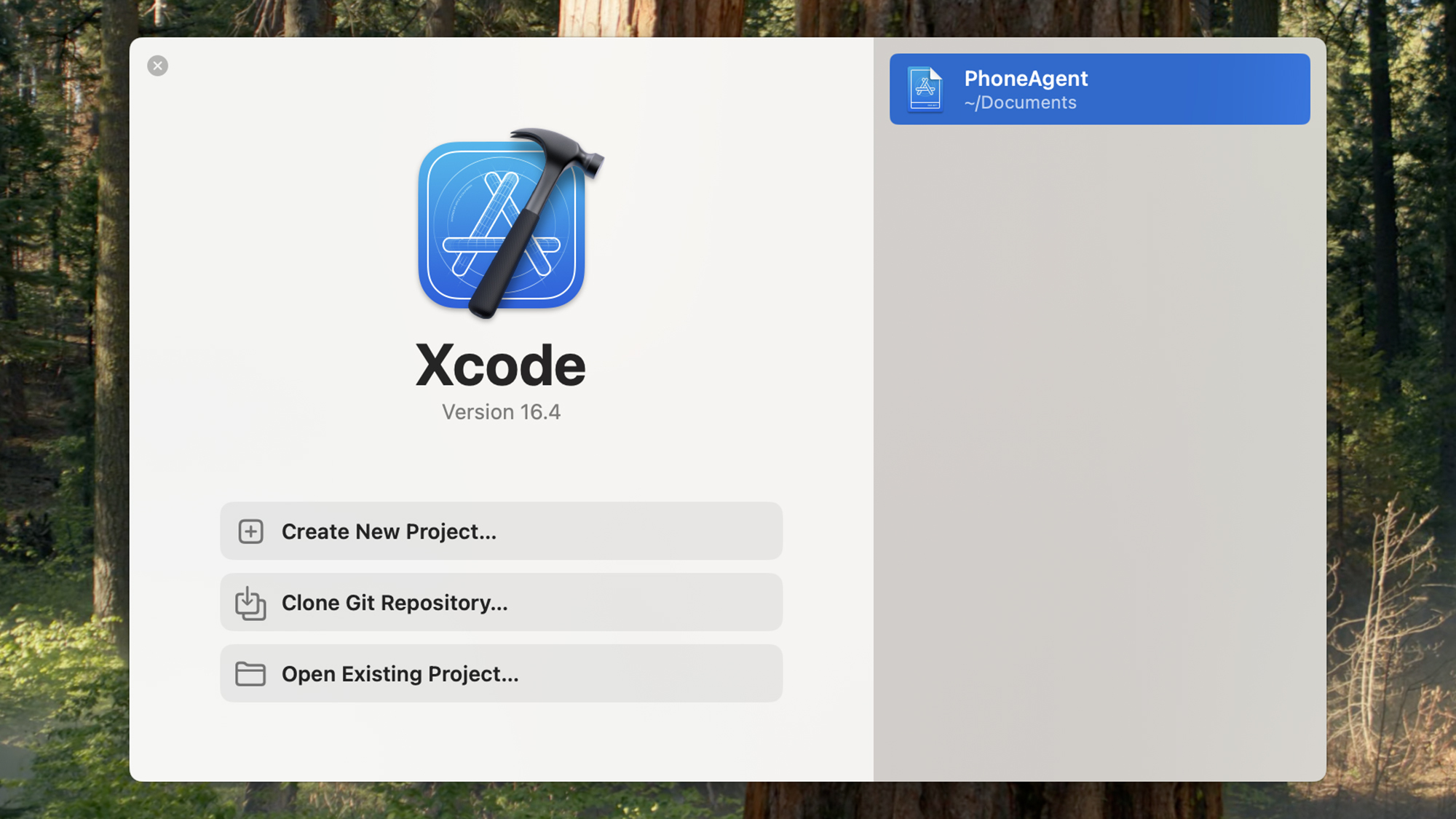
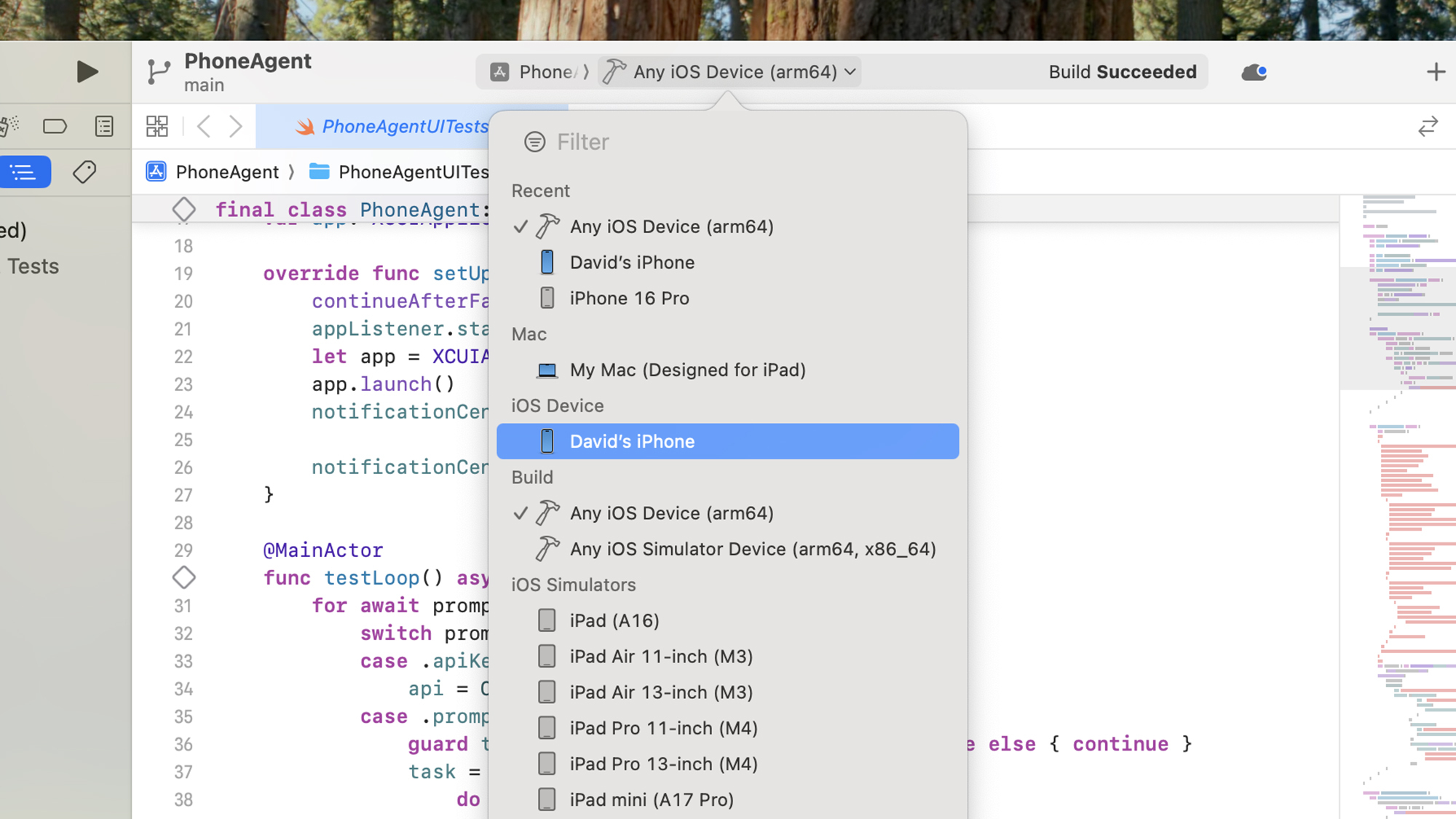
After your iPhone restarts, open the drop-down menu at the top of Xcode on macOS (to the right of PhoneAgent), and pick your iPhone from the list. Then, select PhoneAgent at the top of the left-hand navigation pane, switch to the Signing & Capabilities tab, and use Add Account to enter your Apple credentials. With that done, choose your name from the Team drop-down under Signing & Capabilities. You also need to change the Bundle identifier to something unique.

Next, select PhoneAgentUITests.swift from the left-hand pane, and look for the “func testLoop()” entry in the code (just a little way down). If you hover over the code line label to the immediate left, it should turn into a play button: Click this to run PhoneAgent on your iPhone.

macOS Xcode
Choose your iPhone as the app destination.
Credit: Lifehacker

The first screen you see will prompt you for an OpenAI key. In a web browser, sign up for an OpenAI account, then head to this page: Add payment details and buy credits to use the service (the minimum spend is $5). After that, switch to the API keys page, and click Create new secret key to get a key you can give to the PhoneAgent (make sure you keep a copy of this key somewhere safe, too).

You can then start entering commands by tapping the mic button or tapping the text at the bottom of the screen and telling the agent what you want it to do.

Buying A Switch 2? Watch Out For Stapled Receipts Puncturing The Display

Buying A Switch 2? Watch Out For Stapled Receipts Puncturing The Display
I don’t know which is the worse scenario—lining up for the midnight launch of Nintendo’s Switch 2 console and having it sell out before you can get your hands on one (womp womp), or scoring one of the most anticipated consoles of all time, only to discover that the clerk damaged it by stapling a receipt to the retail box (yikes!). It may sound

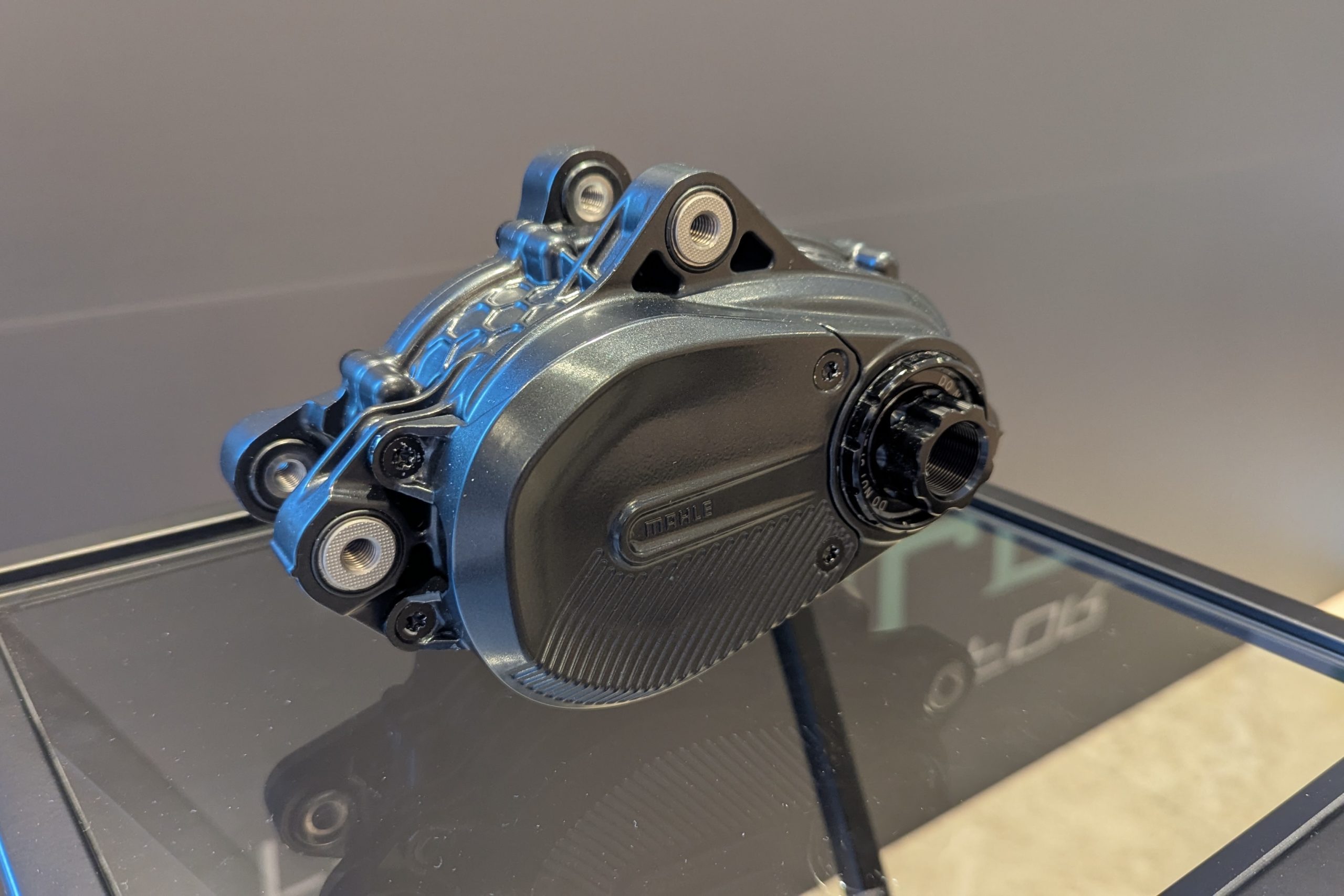
New, ultra-sensitive Mahle M40 has a whopping 850W peak power – could this be the ebike motor of the future?

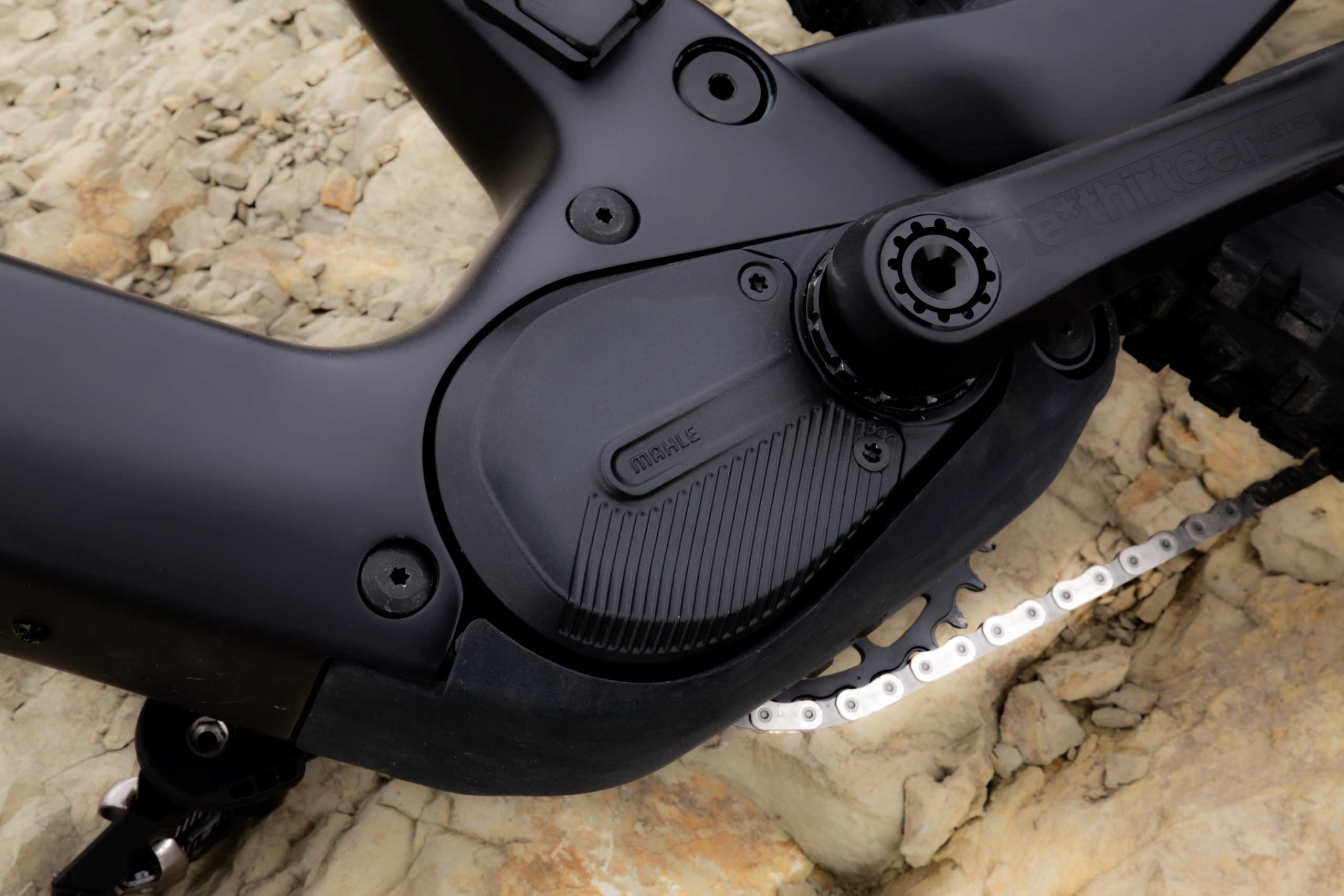
While Mahle might not be on the tip of ebikers’ tongues when it comes to considering which motor they’d like in their next bike, the introduction of the new M40 motor may change things.

That’s thanks to some impressive performance stats – 105Nm of torque, 850W maximum power and a weight of 2.5kg.

Mahle isn’t the best-known brand in the electric mountain bike motor space. The brand is better known in the assisted road bike market, thanks to a range of hub-drive motors mounted in bikes from the likes of Merida, Bianchi, Wilier and Ribble. However, Mahle does manufacture the motor in the Specialized Turbo Levo SL.

As with the likes of Bosch, Gates and Magura, the bike division is only a small part of a large conglomerate, with Mahle’s technology extending far into the electric automotive world. Some 68,000 people work for this huge company.

Mahle M40 motor clean
Mahle’s M40 motor sits neatly in the frame. Mahle

The introduction of the M40 puts Mahle’s flag in the electric mountain bike ground, and we’re excited to see which brands pick up this new motor.

Current partners are listed as “Abums, Labyrinth, Messingschlager, Sants and Titan Racing”. However, we believe more will be announced at Eurobike 2025.

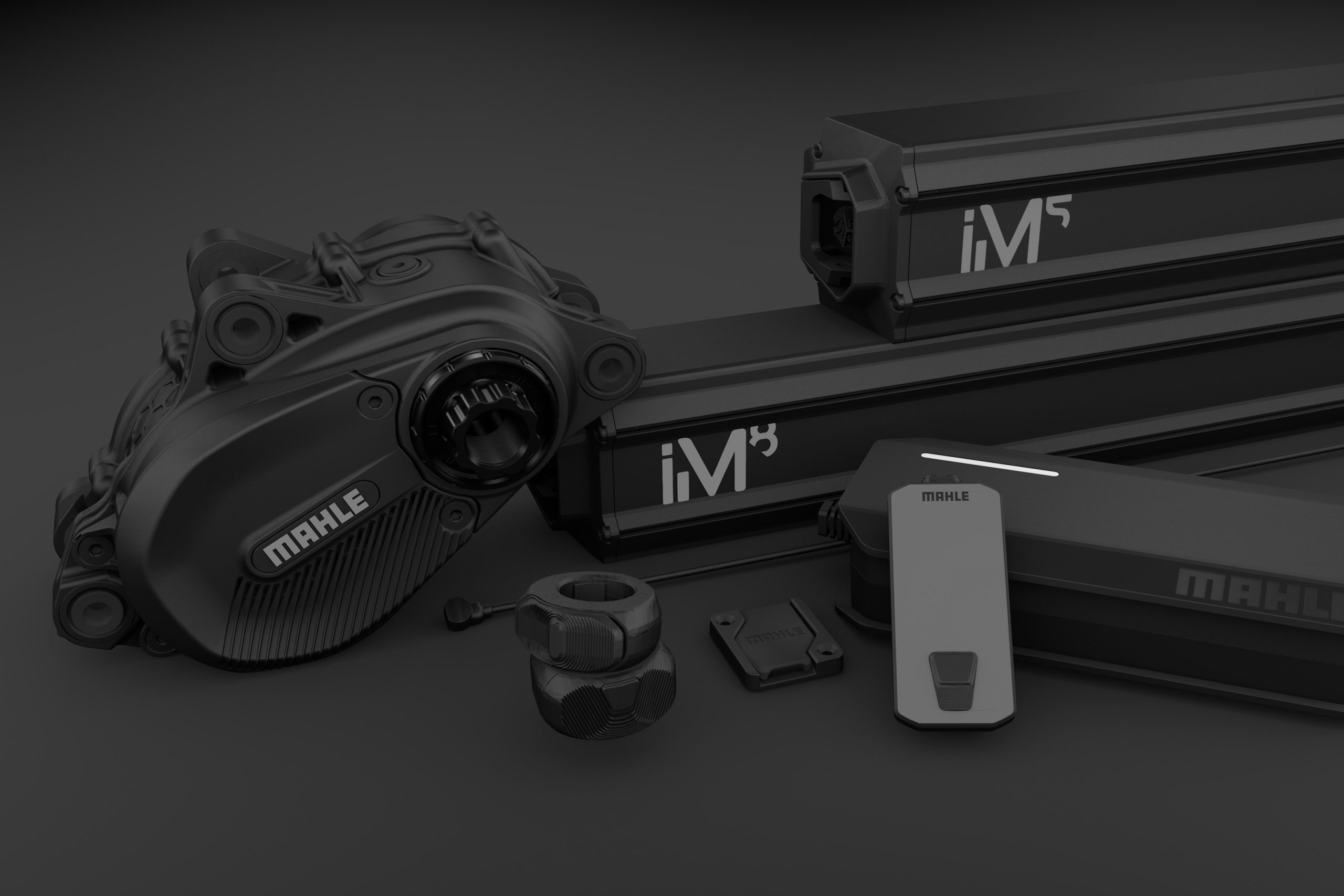
The M40 is a mid-mount motor (as per the majority of eMTB motors), comes with a pair of new batteries and features some interesting technology.

Mahle M40 stats

Mahle M40 system
The Mahle M40 family of components. Mahle

Key when it comes to ebike motor performance are the torque and power outputs.

DJI’s Avinox motor set the market alight with its impressive 120Nm and 1,000W max outputs, with updates and new motors from competitors clamouring to reach such figures.

However, it’s worth bearing in mind potential EU legislation could limit these figures down the line, with support from Bosch.

For now, Mahle’s M40 hits some high numbers. 105Nm of torque and 850W maximum power are not to be sniffed at, placing the new motor on the powerful performance leaderboard.

It’ll kick out up to 400% of assistance – if you put in 100W, it’ll add another 400W – up to that 850W max.

Its peak performance is delivered with a cadence of 90-120rpm, however, below this speed, there’s still plenty on offer.

The motor weighs in at 2.5kg – in line with the most recent full-power motors from other brands, thanks to its lightweight magnesium casing.

Mahle M40 motor casing
The magnesium casing keeps weight as low as possible. Tom Marvin / OurMedia

The M40 is said to benefit from Mahle’s Decoupling Mounting System, which reduces the transmission of vibrations from the motor to the frame.

Cranks attach via the ETOR standard, enabling a wide range of cranks from the major manufacturers to be fitted.

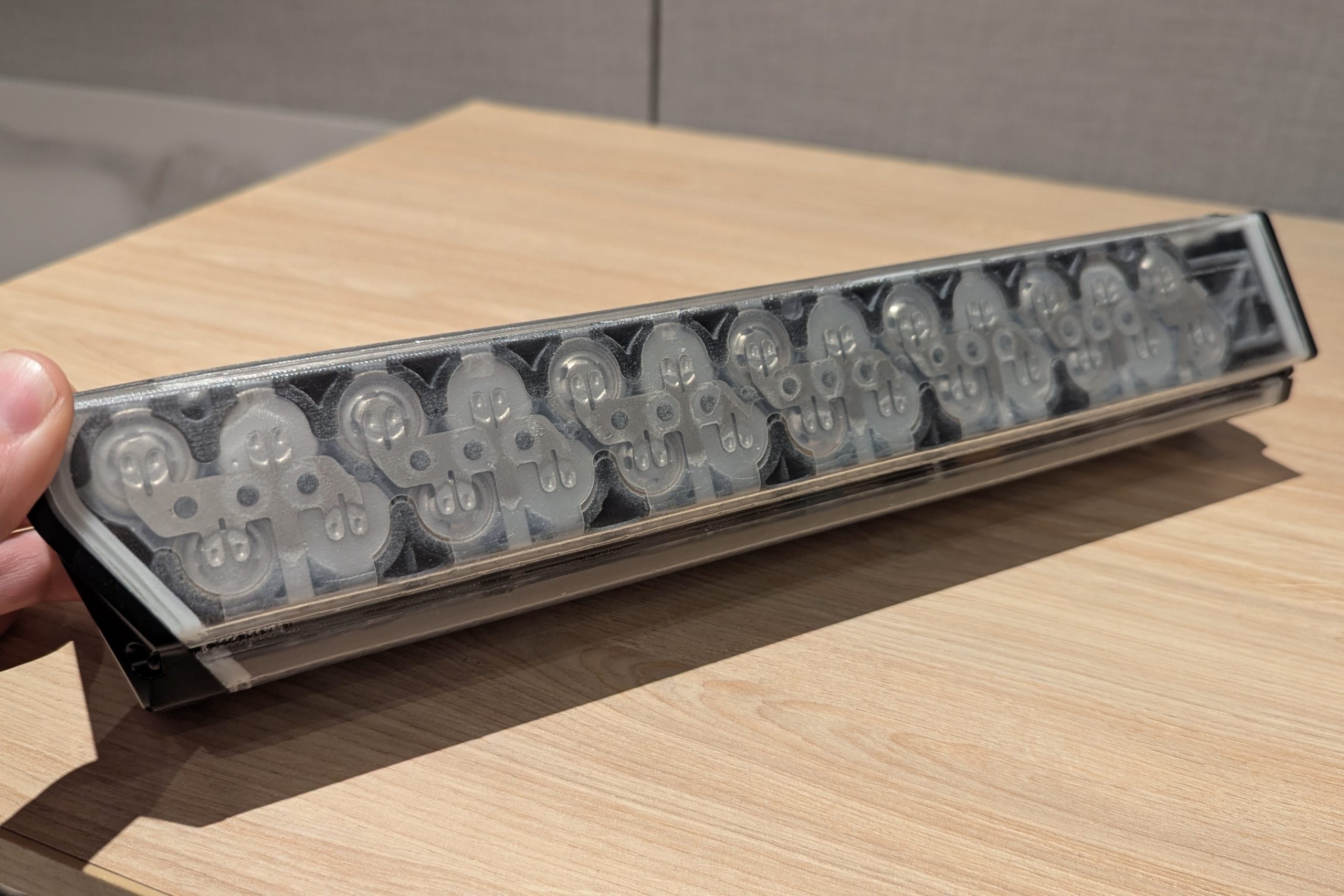
Mahle M40 battery internals
Multiple individual cells, almost AA battery-like, form the internals of the ebike battery. Tom Marvin / OurMedia

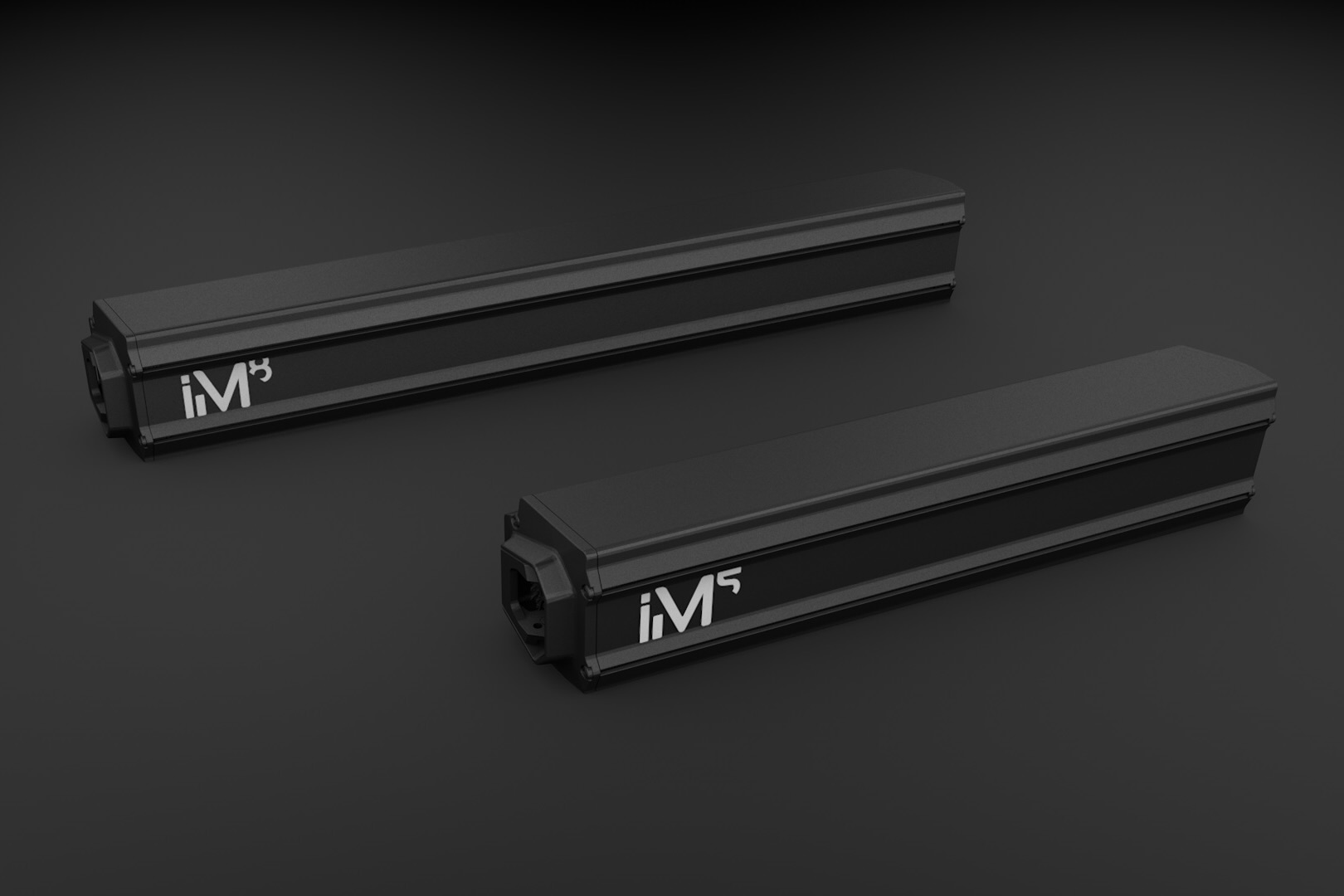
Brands will have the option of the 534Wh iM5 battery, which weighs 2.5kg, or the heavier iM8, with 850Wh of capacity, aimed at those looking for an optimised range of up to 150km, or 2,500m of ascent.

Both batteries share the same form factor, so should fit in the same frames.

Keeping it rolling

Mahle M40 battery options
Two batteries will be offered on Mahle-equipped eMTBs. Mahle

There’s quite a lot more involved in making a decent eMTB motor, namely how – and how consistently – the power is delivered.

Although it’s not often mentioned, temperature control is important when it comes to ebike motors – getting them too hot by asking for consistently high power can degrade performance.

When this happens, motors can turn off, or drastically reduce their output until things cool down a little.

Mahle is keen to point out that its heat management systems should prevent this from happening.

When the temperature gets towards the limit, the maximum power is limited to 750W with the aim of lessening the chance of overheating, without drastically impacting the ride experience.

Perhaps more interesting are the internal sensors – and what they mean for current and future performance.

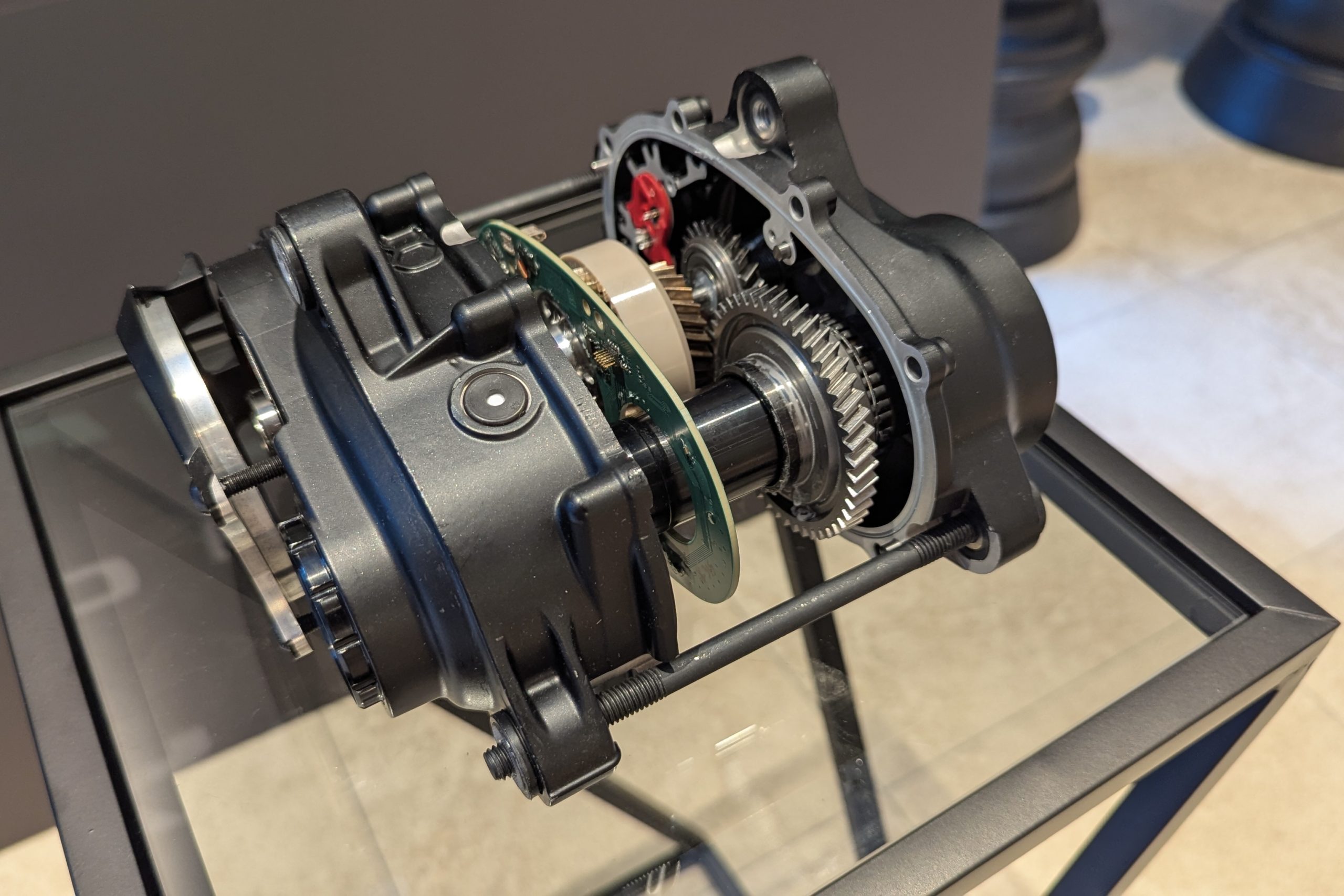
Inside the motor are various accelerometers, torque meters and gyroscopes.

There’s also a rear-wheel speed sensor that has a high degree of resolution. With a 27.5in wheel, the system can detect your speed every 3cm of trail – thanks to 84 readings per revolution.

Mahle M40 speed sensor ring
The speed sensor is key to the motor’s sensitivity. Tom Marvin / OurMedia

In contrast, if your ebike has a magnet mounted to the wheel or rotor, that’s only reading your speed once per wheel revolution.

These sensors are able, therefore, to detect a large amount of data pertaining to what your bike is doing, and then adjust the motor’s attitude to your power input accordingly.

For example, if the system detects the rear wheel suddenly speeding up while climbing, it’s a fair assumption that the wheel is spinning and not gripping. Power can then be reduced to regain control.

On descents, if the bike is leant over, the kick of any power input can be reduced to prevent the loss of control.

Likewise, the motor’s ‘Dynamic Overrun’ alters how much the motor continues to pull the chain round once you stop pedalling, depending on the speed and whether you’re climbing or descending.

Mahle M40 internals
The inner workings of the M40. Tom Marvin / OurMedia

Doing this is said to improve the motor’s climbing performance.

Mahle tells us it is continuously monitoring user data to improve the software and thus performance.

For example, in time, it should be able to tell the difference between a bike that’s looping out by accident on a climb, and when someone is intentionally popping a wheelie.

Extra assistance

Mahle M40 controller on bike
The remote has three buttons, to give plenty of on-bar control. Mahle

The walk mode is engaged by holding the ‘down’ button on the wireless on-bar controller. This spins the cranks to rotate the rear wheel.

Additionally, there’s a hill-start function. By gently pushing down on the cranks while the bike is facing uphill, the motor engages and prevents the bike from rolling backwards.

The neat on-bar Trio Remote, which features LED status displays, is supplemented by a 1.9in top-tube mounted head unit and display, which shows a multitude of data via its colour screen. A second Trio Remote can be added to the bar for additional functionality.

Data is customisable, while additional data can be found in the accompanying app.

While OEMs (bike brands to you and I) will have around 100 customisable parameters, to match the motor’s performance to their individual bikes, riders will also be able to tweak a second, narrower layer of motor performance.

Mahle M40 display
The 1.9in colour screen has plenty of data fields on offer. Mahle

Mahle has a suite of additional items in its ebike ecosystem, including neat wall-mounted chargers, mirroring those in the automotive world.

Mahle M40 motor initial impressions

MAHLE M40 Press Event test ride
It’s always refreshing on a launch to be able to ride ‘real’ trails. Javier Martínez de la Puente/Zubiko Photography / Mahle

I only spent a little while riding the motor, which was fitted to a frame that Mahle had built specifically for the launch – expect more partner brands to be announced at Eurobike 2025.

Much like DJI’s Avinox, what is immediately obvious is how reactive the motor is to human and trail impacts.

While it’s a cliche, it has a very natural feel, with easily controllable power to the rear wheel.

At those higher, ideal cadences, the power delivery is punchy and smooth, easily powering you up steep, loose and technical climbs.

Mahle M40 riding over rock
Climbing performance impressed during my initial ride on a range of surfaces. Javier Martínez de la Puente/Zubiko Photography / Mahle

The overrun doesn’t boost you uncontrollably into sections you want to take more care in – rather, it supplements what you’re trying to achieve in a subtle manner.

At lower cadences, there’s still ample grunt to get you up steep pitches. In fact, on the steepest pitches, I used lower cadences to keep the bike as stable as possible, rather than pedalling manically at a high rate and relying on the torque to get me up.

During descents, I didn’t find the motor pushed me beyond speeds I wanted to be at – the overrun is subtle and the kick of power when I did put pedal strokes in was smooth.

MAHLE M40 Press Event test ride
Dropping in to a fun rocky shoot during our test ride. Picture by Javier Martínez de la Puente/Zubiko Photography / Mahle

The hardware seems solid. The remote controller is well-shaped and doesn’t take over the bar, while the feedback through the buttons is ample.

The screen is bright and readable in sunny conditions.

I’m excited to see which brands pick up this motor. It’s a crowded space, and it’s difficult to think of bikes that are due a refresh. However, whichever bikes come equipped with the M40 shouldn’t find their performance compromised by the motor.

[$] Fending off unwanted file descriptors

One of the more obscure features provided by Unix-domain sockets is the
ability to pass a file descriptor from one process to another. This
feature is often used to provide access to a specific file or network
connection to a process running in a relatively unprivileged context. But
what if the recipient doesn’t want a new file descriptor? A feature
added for the 6.16 release makes it possible to refuse that offer.

GeForce RTX 5050 Desktop GPU May Arrive With A VRAM Twist For Budget Gaming

GeForce RTX 5050 Desktop GPU May Arrive With A VRAM Twist For Budget Gaming
As of this moment, NVIDIA’s stack of desktop graphics cards for gamers based on Blackwell stands six models high, or seven models if you count the 16GB and 8GB variants of the GeForce RTX 5060 Ti separately. However you want to audit the lineup, you can add one more to the mix, as rumors are swirling of a GeForce RTX 5050 in desktop form being

Five Shows to Watch While You Wait for the Next Season of ‘Hacks’

We may earn a commission from links on this page.

Since its premiere in 2021, HBO Max’s comedy Hacks has earned near-universal acclaim, an Emmy for Best Comedy Series, and an army of fans. The show follows legendary (read: “older”) stand-up comic Deborah Vance (Jean Smart) as she reluctantly teams up with young, disgraced comedy writer Ava (Hannah Einbinder) in a desperate bid to revive her career.

Hacks has maintained its sharp writing and great performances over four seasons—a rare TV trait. HBO confirmed that a fifth season is on the way, but no release date has been announced, so Hacks fans will have to put on their waiting shoes. In the meantime, here are five shows that can help fill the Hacks-shaped hole in your viewing schedule and your heart.

Broad City (2014-2019)

If you only watch one show while you wait for Hacks, make it Broad City. The two shows share comedy DNA: Hacks show-runner and co-creator Paul W. Downs was a writer and executive producer on Broad City; Hacks co-creator Jen Statsky was a writer and producer on Broad City, and Hack’s third co-creator, Lucia Aniello, served as executive producer, writer, and director on the earlier series. It’s not just the creatives behind the scenes: Both Hacks and Broad City focus on the experiences and relationships of female lead characters, but if Hacks is about surviving in showbiz, Broad City is about surviving your 20s, with a similar blend of messy friendships, self-discovery, and sharp observations. You can stream Broad City on Hulu, Paramount+, Roku, Disney+, and Prime Video.

The Studio (2025-present)

Seth Rogen-created comedy The Studio and Hacks may stream from competing platforms, but they take place in the same fictional universe. The Hacks crew makes a cameo on a Studio episode set at the Golden Globes, and Rogen appears as himself on Deborah’s late-night show on Hacks. It’s like that time George Jetson visited The Flintstones, but with more passive-aggression and fewer dinosaurs who wash dishes. Beyond the shared fictional universe, both shows offer an of-the-moment, meta take on the entertainment industry and feature characters navigating the choppy waters of the unique personalities and practices of the business of show. You can stream The Studio on Apple TV+.

The Marvelous Mrs. Maisel (2017-2023)

The Marvelous Mrs. Maisel is a spiritual prequel to Hacks. Rachel Brosnahan plays Miriam “Midge” Maisel, a comic on the come-up in early 1960s New York. While the timeline doesn’t work out for it to actually be Deborah’s backstory, the parallels are clear: Both women are whip-smart performers fighting for relevance in a male-dominated comedy world. Maisel captures the same spirit of a woman fighting to make it in the male-dominated world of comedy. Maisel’s stylized take on the entertainment business contextualizes the world Deborah Vance and Ava Daniels live in. It’s also an often painful reminder of how little has changed. You can stream Marvelous Mrs. Maisel on Prime Video.

Absolutely Fabulous (1992-1995)

Early 90s British cult-sensation Absolutely Fabulous features a faster pace and broader humor than Hacks, but the relationship between fashion P.R. maven Edina and her no-nonsense daughter Saffron mirrors the push and pull between Deborah and Ava in Hacks. Both Ab Fab and Hacks explore the challenges of aging in industries obsessed with youth, and both feature brash women fighting against irrelevance. Just don’t expect any sentimental heart-to-heart talks on the more biting Absolutely Fabulous. You can watch Absolutely Fabulous on Peacock, BritBox, Hulu, Prime Video, and Disney+.

Barry (2018-2023)

If you like Hacks‘ dark take on the entertainment industry, why not go even darker with HBO’s Barry? Barry’s title character, played by Bill Hader, is an excellent hitman who becomes a terrible actor with the help of a washed-up acting coach played by Henry Winkler. Like Hacks, Barry revolves around the collision between ambition and self-delusion, framed through the relationship between a struggling artist and an older mentor. Like Hacks, Barry excels at finding humor in the often brutal realities of trying to make it in entertainment—though Barry takes that darkness to considerably more extreme places. You can stream Barry on HBO Max.

How to turn your old iPad into a digital picture frame

If you have an old iPad and you’re interested in externalizing some of the thousands of photos in your iCloud account, this guide’s for you. Instead of buying a new digital picture frame, you can turn your retired iPad into a dedicated photo display without much effort. You’ll need to change a few settings, download a photo frame app and decide how you want to prop up your new display — which can be as simple as using a stand or as complicated as getting out the drill and modding an analog frame. Here’s how (and why) to upcycle your old iPad into a digital picture frame.

Upcycled iPad versus a digital picture frame

An actual digital picture frame has a few obvious advantages: the necessary software is already there, it’s display-ready, complete with a frame and matted display, and, as a unitasker, it won’t display Gmail notifications over your photos. But the resolution for most smart frames tops out at 1,280 by 800 pixels. Even the standard iPad (9th gen) from 2021 has a resolution of 2,160 by 1,620. Plus, your old iPad is already yours. A decent digital frame will cost you around $100. And, since your iPad is certainly not a single-purpose device — it can take a FaceTime call or play an episode of Poker Face if the need arises.

A single image is shown on the iPad using the Re-Frame digital picture frame app.
Amy Skorheim for Engadget

How to turn your old iPad into a digital picture frame

I figured I’d be able to use Apple’s built-in software to do something as simple as creating a looping slideshow of images, but the experience wasn’t quite what I was looking for. Playing a slideshow within the Photos app does so as a Memory, complete with music, and there’s no way to turn that music off (though you can mute it). You can loop a Memory, but you can’t randomize the images and the interval between images is far too short (anything less than ten minutes feels like yet another screen blinking at you). So, to turn an iPad into a randomized, always-on and silent digital picture frame with a decent display length, you’ll have better luck with a third-party app.

I tried a few and my favorite is Synched Photo Frame by Re-frame ($10, lifetime access). It doesn’t pack a ton of features — no transitions, no image effects, no time and date overlay options and it’ll only access images from your Photos app — but it does the best job of making photos look good on an iPad.

It lets you set the viewing interval from 10 seconds to 24 hours and there’s a programmable sleep function so it doesn’t beam smiling pictures into the 3AM void of your living room. If your iPad is oriented differently than a photo, it shows two side-by-side images (i.e., two portrait images next to each other if your iPad is in landscape or two stacked horizontal pics if your tablet is vertical). A clean white border surrounds each split image; full-screen images go edge to edge. Images are cropped slightly to fit, which means they may lose a few details around the borders, but I think the effect is more attractive than blurred extended edges or black bars. The two-up solution is how our top pick for a digital photo frame, the Aura Carver, handles images with different aspect ratios — but you can’t set that device in portrait mode.

LiveFrame is another option and it’s actually cheaper at $5 for lifetime access. It has more features like transitions and image filters, but there’s no option for having two images up at the same time like in Re-Frame. Instead it can blur the edges, add bars or (hideously) stretch the image. I also experienced a number of glitches with the app and found the navigation a little tougher than it should be. I also tried Digital Photo Frame Slideshow but, at $30 annually, it’s too expensive for my taste and it doesn’t have a sleep function.

How to prepare your iPad for photo frame mode

Step one: Create an album

Most photo display apps will pull from albums you select in Photos. You probably already know how to make a new album, but there are a couple of elements to consider as you create one for a digital photo frame app on an iPad. All instructions are for iPadOS 18. If you’re working with an older version, the steps may be slightly different.

Select the Aspect Ratio Grid in the View Options menu of the Photos app so you can see which images are horizontal and which are vertical to more easily create your album.
Amy Skorheim for Engadget
  1. Open Photos and tap the side bar icon in the upper left corner.

  2. Under Albums, tap + New Album at the bottom of that list.

  3. Name the album something memorable, as you’ll likely have to search for it within the photo frame app. Tap Create Album, then the blue plus sign.

  4. If you want to only (or mostly) add a specific orientation (landscape or portrait), tap the up/down arrow icon at the bottom left of the pop up menu.

  5. Tap View Options, then Aspect Ratio Grid. This will show the shape of each image so you can more easily select only the ones with the orientation you want. You can also use the View Options menu to zoom in on the thumbnails to get a better view of each picture.

  6. Select the images you want and tap Add in the upper right.

Step two: Adjust your iPad settings

Adjusting a couple of settings will ensure your iPad keeps playing all day, interruption-free. Simply having the digital photo frame app playing should be enough to prevent your iPad from going dark, but your iPad may auto-lock when the app’s sleep mode kicks in, requiring you to unlock it in the morning to start the app back up. You’ll also want to make sure your slideshow isn’t interrupted with notifications from other apps.

  1. Turn off Auto-Lock: Open Settings, tap Display & Brightness, tap Auto-Lock, select Never. You may get a warning that this setting will impact battery life, but since your iPad will stay plugged in, it won’t be an issue.

  2. Turn off all Notifications: You’ll need to turn off notifications for every app on your iPad. Go to Settings> Notifications > Notification style, toggle off Allow Notifications for every app. Note: Using the Do Not Disturb Focus will enable DND on all your connected Apple devices, unless you toggle off Share Across Devices in Settings > Focus. But turning off notifications is still the better option.

Step three: Don’t let randos get at your stuff

Since you’ll probably want to display your new picture frame somewhere that people can see, there’s a risk of someone attempting to use your iPad. To prevent this, you can use an Accessibility feature called Guided Access. Apple designed it so parents could hand an iPad to their child without also giving them access to additional apps. We’re repurposing it for photo frame security to prevent anyone from navigating to your home screen or anywhere else. People can still tap on the screen to use the photo frame app’s controls or you can disable touch altogether.

Turn on Guided Access in the Accessibility section of the Settings app to prevent other people from accessing your iPad
Amy Skorheim for Engadget
  1. Enable Guided Access: Open Settings, tap Accessibility then Guided Access. Set an unlock code, then set Display Auto-Lock to Never.

  2. Turn on Guided Access: While the picture frame app is playing your slideshow, triple click the side button. A grey circle will appear, tap X to close it.

  3. Enable or disable touch: If you still want to allow others to use functions within the photo frame app, toggle the Touch option on. If you want no response when the screen is touched, toggle it off. To access the Options menu, triple click the side button and enter your passcode. Tap Options in the lower left corner.

  4. Note: Guided Access is turned on and off via the side button, so this option might not be feasible if you decide to put your iPad in a frame. One rather extreme workaround is to reset your iPad and set it up with a brand new Apple ID connected to family sharing that allows access to a shared Photos Library.

With your photo frame app open, triple click the iPad's top button to enable Guided Access.
With your photo frame app open, triple click the iPad’s top button to enable Guided Access.
Amy Skorheim for Engadget

Put your new digital photo frame on display

This can be as simple as finding a stand you like and calling it a day. An Etsy seller called Event Frame makes custom frames for iPads. They aren’t cheap, going for around $100 each, but it’s one of the only companies I’ve found that actually offers model- and generation-specific sizing. I also considered the Snap Float Folio from Moft, as I’ve been impressed with some of the brand’s other origami-inspired accessories. If you’re crafty, you can take inspiration from this person’s Instructables and make your own frame from a physical media picture frame. Personally, I just got a right-angled USB-C cable and stuck my iPad in a collapsible stand I already had. The pictures are pretty enough.

Two landscape images shown side-by-side when the iPad is in portrait orientation.
Amy Skorheim for Engadget

This article originally appeared on Engadget at https://www.engadget.com/mobile/tablets/how-to-turn-your-old-ipad-into-a-digital-picture-frame-130017314.html?src=rss

Waymo Set To Double To 20 Million Rides As Self-Driving Reaches Tipping Point

Google’s self-driving taxi service Waymo has surpassed 10 million total paid rides, marking a significant milestone in the transition of autonomous vehicles from novelty to mainstream transportation option. The company’s growth trajectory, WSJ argues, shows clear signs of exponential scaling, with weekly rides jumping from 10,000 in August 2023 to over 250,000 currently. Waymo is on track to hit 20 million rides by the end of 2025. The story adds: This is not just because Waymo is expanding into new markets. It’s because of the way existing markets have come to embrace self-driving cars.

In California, the most recent batch of quarterly data reported by the company was the most encouraging yet. It showed that Waymo’s number of paid rides inched higher by roughly 2% in both January and February — and then increased 27% in March. In the nearly two years that people in San Francisco have been paying for robot chauffeurs, it was the first time that Waymo’s growth slowed down for several months only to dramatically speed up again. Waymo currently operates in Phoenix, Los Angeles, and San Francisco, with expansion planned for Austin, Atlanta, Miami, and Washington D.C. The service faces incoming competition from Tesla, which plans to launch its own robotaxi service in Austin this month. Waymo remains unprofitable despite raising $5.6 billion in funding last year.


Read more of this story at Slashdot.

The Google Pixel Tablet Is $140 Off Right Now

We may earn a commission from links on this page. Deal pricing and availability subject to change after time of publication.

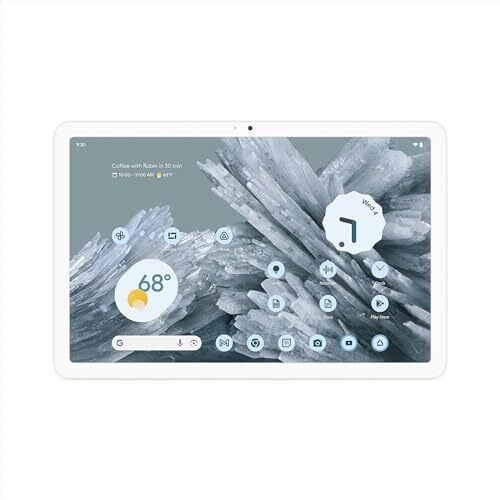
The Google Pixel Tablet is down to $359 right now for the 256GB version, the lowest price it’s been so far, according to price trackers. Originally priced at $499, this $140 discount puts it in a good spot for anyone who wants a tablet that pulls double duty.

The Pixel Tablet is designed to be a solid Android tablet first, but it also works as a smart display when you’re not using it. If you grab the speaker dock, you get a stand that charges the tablet and gives it a serious upgrade in sound quality.

The tablet itself is clean and straightforward. It has an 11-inch display with 2,560 by 1,600 resolution, a 60Hz refresh rate, and can hit 500 nits of peak brightness—plenty for reading, streaming, or casual browsing even in brighter rooms. Battery life is reasonable for the price range. In PCMag’s tests, it ran about five hours and 25 minutes of HD video playback at full brightness, which could stretch longer under less demanding use. The cameras—both front and rear—are 8MP with a wide 84-degree field of view and can shoot 1080p video at 30fps: fine for video calls and casual snaps, but nothing you’d replace your phone camera with.

The Pixel Tablet runs Android well, with many popular apps optimized for the larger screen. And like other Pixel devices, Google promises at least five years of security updates, which isn’t something every mid-range tablet can guarantee. If you want a tablet that doesn’t gather dust when you’re not actively using it, the Pixel Tablet’s ability to turn into a smart display gives it more reason to stay in sight—and the current price makes it a lot easier to justify.

AMD’s AI Ascendancy: Why the ML300 and ML325 are Shaking NVIDIA’s H100 Throne

For too long, the AI hardware landscape has felt like a one-horse race, with NVIDIA’s H100 GPUs dominating the field. But here in Bend, Oregon, where a healthy dose of competition keeps everyone sharp, AMD is increasingly proving that not only are they in the race, but they’re making a strong bid for the lead. Their recent MLPerf Training submission, highlighting the prowess of the AMD Instinct MI300 and the upcoming MI325X GPUs, signals a significant shift in the AI training arena. In an era of hardware availability constraints, all AMD has to be is “good enough” – and they are clearly outperforming that bar, pushing the boundaries and offering compelling alternatives.

A Major Milestone: AMD’s MLPerf Training Debut

AMD’s recent entry into the MLPerf Training v5.0 benchmarks marks a pivotal moment. This wasn’t just a quiet submission; it was a loud declaration of intent, showcasing the strength of their platform with competitive performance on both the Instinct MI300X and the Instinct MI325X GPUs. The chosen workload, fine-tuning the Llama 2-70B-LoRA model, is no lightweight; it’s a widely adopted and critical task for customizing large language models in today’s generative AI landscape. This highlights AMD’s focus on real-world, highly relevant AI workloads rather than abstract benchmarks.

The debut results are particularly impressive: the Instinct MI325X platform actually outperformed an average of six OEM submissions using NVIDIA’s H200 platform by up to 8% when fine-tuning Llama 2-70B-LoRA, a widely adopted workload for customizing large language models. This isn’t just “good enough”; this is superior performance in a crucial segment. The Instinct MI300X platforms also delivered competitive performance against NVIDIA H100 on the same workload, validating both GPU platforms in the Instinct MI300 Series as strong contenders across a broad range of training needs, from enterprise applications to cloud-scale environments.

Industry-Wide Validation and Ecosystem Strength

What truly amplifies AMD’s MLPerf debut is the industry-wide validation from its ecosystem partners. In addition to AMD’s own submission, six OEM partners submitted MLPerf Training results using AMD Instinct MI300 Series GPUs. This demonstrates that AMD Instinct performance is not just a lab benchmark; it’s reproducible and robust across a wide range of diverse platforms and configurations. These partner results reinforce the consistent performance of the MI300X and MI325X across various infrastructure environments, even setting new industry milestones in several cases.

A standout example comes from Supermicro, which became the first company ever to submit training results to MLPerf using a liquid-cooled AMD Instinct solution (Supermicro liquid-cooled MI325X MLPerf). Their liquid-cooled Instinct MI325X platform achieved an impressive time-to-train score of 21.75 minutes, not only showcasing top-tier performance but also highlighting the thermal efficiency and scaling potential of advanced cooling solutions in dense AI deployments. MangoBoost further raised the bar with groundbreaking multi-node submissions, demonstrating the scalability of the MI300X platform in distributed AI infrastructure. Dell, Oracle, Gigabyte, and QCT also contributed strong results, collectively proving the power, flexibility, and openness of AMD Instinct GPUs, which are clearly being embraced and pushed to new heights by innovators across the ecosystem.

ROCm Software: The Open-Source Secret Sauce

The remarkable performance gains showcased by AMD are significantly powered by the rapid evolution of AMD ROCm™ v6.5 software, AMD’s open software stack. Over the past year, ROCm has matured into a robust training platform. In the Llama 2-70B-LoRA fine-tuning task, ROCm was key to unlocking top-tier performance on Instinct MI325X and MI300X GPUs, with critical improvements like Flash Attention, Transformer Engine support, and optimizer-level tuning. AMD has even released optimized docker containers used in this work, along with easy-to-use reproduction instructions, empowering developers. These results provide strong evidence that an open software stack, backed by deep engineering optimizations, can indeed rival and, in some cases, outperform proprietary ecosystems. For customers scaling generative AI, ROCm software delivers the performance, flexibility, and developer support needed to move fast and efficiently.

A Significant Generational Leap

In AI infrastructure, staying current is essential. Organizations investing in AI expect meaningful performance gains with each new platform. The AMD Instinct MI325X GPU sets a new standard for what a generational leap can deliver. In platform (8-GPU) fine-tuning workloads like Llama 2-70B-LoRA, the Instinct MI325X offers up to a 30% performance uplift compared to the Instinct MI300X, a significant generational advancement that dramatically accelerates large-scale AI development and shortens training timelines.

Wrapping Up: The Future is Open and Accelerated with AMD

AMD’s debut MLPerf training submission marks a major milestone, signaling that their Instinct MI300 Series GPUs provide customers with compelling new options for scaling AI innovation. With competitive, and in some cases, superior performance on key AI workloads, and a robust, open ROCm software stack, AMD is rapidly closing the gap on NVIDIA’s long-standing dominance. In a market where hardware availability can often be a constraint, AMD’s ability to be “good enough” has now evolved into being a genuine leader in crucial AI training workloads. As models grow larger and AI use cases expand, AMD’s commitment to open, high-performance solutions promises to empower customers to train, fine-tune, and deploy AI faster and more flexibly than ever before. The momentum behind AMD Instinct is real, and it’s just getting started

Astro Bot is getting five new (and free) levels this July

Team Asobi is releasing five new levels for Astro Bot, and you can get all of them for free. The developer has announced that the brand new levels will drop on July 10 at 9AM Eastern time. Like the speedrun levels and the previous levels the developer released at no cost, the new ones will be part of the Vicious Void Galaxy. Four of the new levels are called Twin-Frog Trouble, Suck It Up, Handhold Havoc and High Inflation, but Team Asobi is keeping the last one a secret. Each one will come with its own Special Bot, including a “revengeful newcomer.” The developer also hinted that finishing all five levels will lead to “something really cool.”

Astro Bot is a 3D platformer, wherein you control a small robot named Astro across levels set in different galaxies and planets. It features unique and creative uses of the DualSense controller, such as having to hold down the analog triggers and physically tilting the device in order to move Astro’s spaceship. Team Asobi has released several free levels before these new ones since the game launched in late 2024, and so far, Astro Bot has over 90 levels that you can play. 

In addition to announcing the freebies at PlayStation State of Play, Team Asobi has also revealed that it’s launching an updated version of the Astro Bot Limited Edition DualSense wireless controller later this year. The developer promised more details in the future, but for now, you can see that the controller will come with Astro’s smiling eyes on its touchpad. 

Astro Bot controller.
Team Asobi / Sony

This article originally appeared on Engadget at https://www.engadget.com/gaming/playstation/astro-bot-is-getting-five-new-and-free-levels-this-july-123008291.html?src=rss

This Tool for Runners Quickly Measures the Incline of Any Hill

I’ve written before about why hill repeats are an excellent thing to add to your run training, and how to get started. But one of the trickier aspects is finding the perfect hill, or even knowing how steep the incline of that hill is. A tool I recently started using makes this super easy. 

The tool is officially called On the Go Map, but you can easily search for it by its nickname, “How Far Did I Run?” To use it, click the start and end points of your hill. (I use the walking icon, which snaps the path to walkable roads and paths, but you can also draw straight lines if you prefer.) 

You can use this tool to measure the distance and elevation of any running route—like a free version of MapMyRun—but when it comes to your favorite hill, all you have to do is create that mini route that goes up your hill, and then click the elevation icon in the bottom left corner of the screen. (It looks like a mountain.) Then a pane opens up at the bottom of the screen, showing the overall grade of the hill as a percentage. 

This percentage is the same as what you’ll see when you select the incline on a treadmill. 1% or 2% would be a very mild hill, a gentle rolling grade. My favorite “I would like to die doing hill repeats today” hill is 8%, and anybody going over 10% on a regular basis is a certified maniac. Most gym treadmills top out around 12%. 

In the example picture at the top of this article, I’ve selected a portion of hill in a local park. On the Go Map helpfully tells me how long that segment is (0.17 miles, so a little less than a lap of a quarter-mile track) and how much elevation I’ll gain going up it (85 feet). To find the percent grade, look in the upper right hand corner of the elevation pane. This hill is a 9.5% grade. 

If you haven’t found the perfect hill to measure yet, tap the menu icon and choose “terrain” as your map style. Any road that crosses multiple contour lines is going to be a steep one. Pan around until you find a promising looking hill, and then measure it.