As part of a wider software rebranding effort, Apple’s visionOS is jumping from version 2 to 26 with a new software update announced during the company’s developer conference this week.
visionOS 26 will reach Vision Pro users later this year, and it focuses on refining the focus of the device based on how users are actually using it rather than whatever wild ideas the company had during its initial development—including addressing common complaints about how the Vision Pro doesn’t support some features of popular competing mixed-reality headsets.
For example, the headset will soon support native playback of 3D video recorded by people other than Apple and downloaded from anywhere on the Internet—something you had to use a few, somewhat janky third-party apps to do until now, but which is an easier-to-access feature of some other mixed-reality headsets.
iPadOS 26 is coming to supercharge your tablet’s productivity. At WWDC 2025, Applepreviewed what it called the iPad’s biggest software update yet. You can finally resize app windows dynamically. Meanwhile, the menu bar brings drop-downs for more organized controls. It’s all wrapped in Apple’s new Liquid Glass redesign. All in all, iPad users craving a more Mac-like experience have plenty to chew on here.
The rumors about a Mac-like multitasking overhaul came to fruition. The new windowing system lets you “seamlessly close, minimize, resize, or tile [your] windows.” The resizing options aren’t limited like in the previous version of Stage Manager. You can resize them by dragging a handle on the lower right. Or, flick to tile all your windows toward the screen edges. Long-pressing reveals more tiling options. And when you reopen the app, your windows will return to their last position.
Exposé also makes its way over from Apple’s desktop. It shows your open windows in a tiled array, making it easier to jump between them.
Apple
The menu bar, a Mac mainstay from the get-go, arrives on the iPad. When using touch controls, you can use it by swiping down from the top. Or, click with your cursor when using a trackpad or mouse. As on the Mac, the active app includes familiar menu entries like File, Edit, View, Window, Format, Arrange and Help.
The Files app gets an update to keep pace with the iPad’s new productivity chops. It has an updated List view that displays more information about your documents. It includes resizable columns and collapsible folders. You can also choose default apps for specific file types. (For example, edit photos with Photoshop, Darkroom, or Pixelmator.) You can even drag folders to the dock, like on macOS.
The Preview app also arrives in iPadOS 26, allowing you to view and edit PDFs. Using Apple Pencil Markup or touch, you can mark up your documents. It also has AutoFill, letting you fill out PDF forms without third-party software.
Apple
The big productivity overhaul follows years of subtler nudges in that direction. When it arrived 15 years ago, the iPad worked with physical keyboards, but only for typing. Trackpad support didn’t come until 10 years later. Later, iPadOS 15 added a context menu for window management. And the first Stage Manager brought a more mature multitasking environment. But each of those moves was only incremental. Power users begging Apple for something more “Pro” were left wanting. The new iPadOS 19 features look like a giant leap by comparison.
iPadOS 26 is wrapped in Liquid Glass redesign coming to all of Apple’s new software at WWDC 2025. You’ll see translucent effects and rounder icons to match device corners. It’s all inspired by the software for Apple’s mixed reality headset.
Of course, the software’s naming scheme is also new. Apple unified its upcoming software by giving them all the “26” number. Before, the version ticked up once each year. But since the company’s platforms were on different numbers, it could confuse some. So, from now on, all Apple software will carry the name of the upcoming year. (Although the update arrives this fall, it will be the de facto software for the bulk of 2026.) Pour one out for the “iPadOS 19” that will never be.
Apple
There are also plenty of smaller updates. iPadOS 26 also includes Apple’s new dedicated Games app. The Phone app arrives, letting you make and receive calls from your tablet.
Expect the first iPadOS 26 developer beta to arrive soon after the keynote ends. Public betas will follow in July. The software’s final version will land this fall, likely in or around September.
Developing…
This article originally appeared on Engadget at https://www.engadget.com/mobile/tablets/ipados-26-makes-apples-tablets-more-like-macs-174904597.html?src=rss
ChatGPT and its friends are great for researching, as assistants, or meme image creators, but if you need actual smarts, what you really want is a 1977-vintage Atari 2600 console. That’s the ultimate finding of Robert Caruso, a Citrix engineer who pitted the venerable console that started it all against one of the latest-and-greatest AIs on
Apple isn’t planning on releasing iOS 26 to the public until some time this fall. However, you can try it out right now, if you have a compatible iPhone. That’s because Apple has officially released the first developer beta for iOS 26. The thing is, I wouldn’t recommend you try it out.
You probably shouldn’t install the iOS 26 developer beta
Betas, by their nature, are unfinished software. The whole point of a beta is to test a new update to look for bugs, instability, and incompatibility. Developers then fix those issues before releasing the software to the public at large.
Apple’s latest beta is even more specific, though—it’s a developer beta, which means it’s exclusively meant for software developers to install and test their apps with iOS 26. That way, they can update their own apps to work well with the new OS update, and report any OS-level issues back to Apple.
This is the buggiest iOS 26 will ever be, since Apple has another three months or so until their public release. As such, I recommend you avoid this version of iOS 26. It’s tempting, considering all the new features and changes Apple added this year, but you’ll be introducing an unstable version of iOS to your iPhone. You might find your iPhone difficult to use, or, in the worst case scenario, impossible to use. And if you need to wipe the beta from your iPhone, you’ll likely need to install a clean version of iOS 18, which could result in data loss if you normally rely on a backup.
Unless you have a spare iPhone lying around to test, I wouldn’t risk it. Apple will release the public beta in July, which, while not perfect, has at least gone through more testing and debugging than this beta.
How to install the iOS 26 developer beta
Apple’s developer betas used to be exclusive to developers with a paid $99 license. That barred most of the public from trying it out early, though some found downloads on the internet anyway. But in recent years, Apple made it free to at least sign up to be a developer, which is now all you need to access the dev beta.
To start, you’ll need to enroll your Apple ID in the Apple Developer program. Sign in with your Apple ID here, and agree to any terms. From here, open the Settings app, then go to General > Software Update > Beta Updates. Here, you should have the option to select iOS 26 Developer Beta once it’s available. Hit Back in the top left, allow iOS to load the beta, then hit Update Now.
Which iPhones are compatible with iOS 26?
Of course, in order to install iOS 26, your iPhone needs to be compatible with it. Unfortunately, Apple axed the iPhone XS, XS Max, and XR from this year’s update. That means the following iPhones are compatible with iOS 26:
iPhone 16e
iPhone 16
iPhone 16 Plus
iPhone 16 Pro
iPhone 16 Pro Max
iPhone 15
iPhone 15 Plus
iPhone 15 Pro
iPhone 15 Pro Max
iPhone 14
iPhone 14 Plus
iPhone 14 Pro
iPhone 14 Pro Max
iPhone 13
iPhone 13 mini
iPhone 13 Pro
iPhone 13 Pro Max
iPhone 12
iPhone 12 mini
iPhone 12 Pro
iPhone 12 Pro Max
iPhone 11
iPhone 11 Pro
iPhone 11 Pro Max
iPhone SE (2nd generation)
iPhone SE (3rd generation)
What’s new with iOS 26?
Apple announced a host of new features for this software update. There’s an all new design called “Liquid Glass,” which is based on the way light and objects appear through glass. That might sound pretentious, but, to be honest, I dig the design: It’s minimalist, and seems to have some great attention to detail. I’m looking forward to testing this one out.
Live Translation can translate audio and text alike, so you can have bilingual conversations without knowing another language. Visual intelligence, which lets you analyze subjects with your camera, now works with anything on your iPhone’s screen, which should make the feature even more useful. Genmoji and Image Playground now lets you combine two AI images into one, and Shortcuts now has Apple Intelligence support.
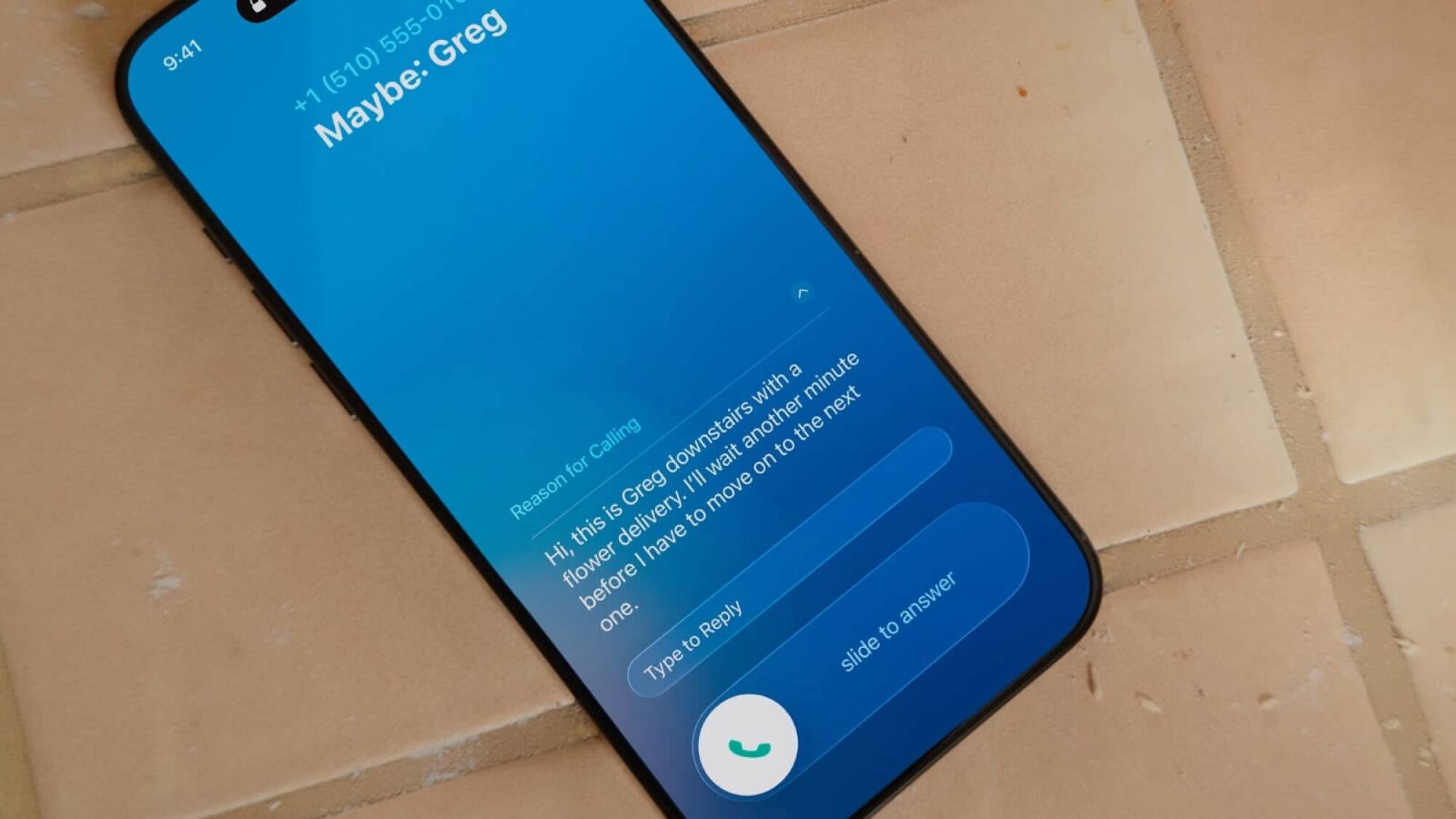
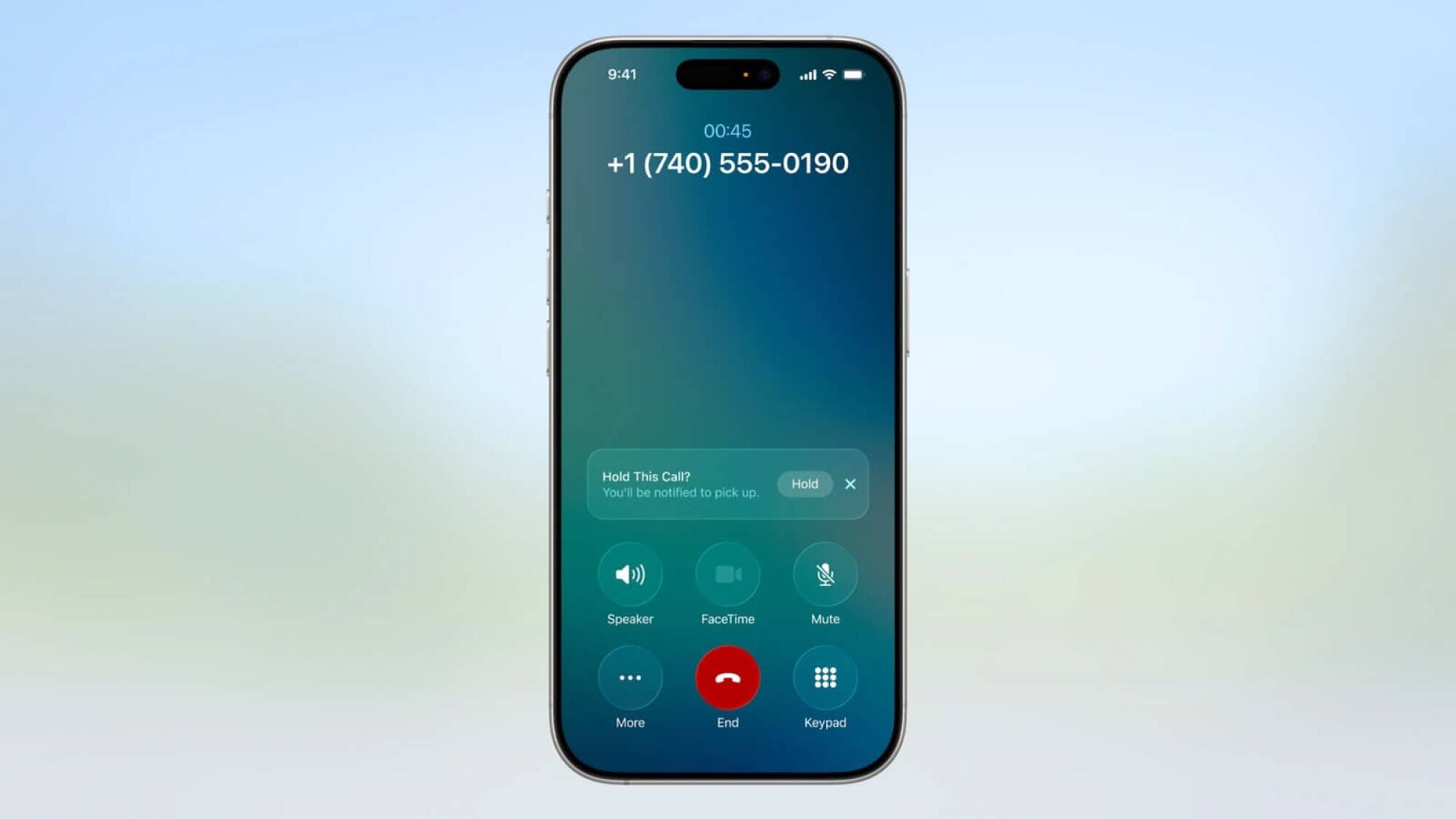
The Phone app gets a redesign, as well as some new features that should cut down on spam: Call Screening, which asks callers for their info before patching them through to you, and Hold Assist, which lets you know when a live agent is available on a call. You can screen texts in the Messages app, too, and implement custom backgrounds and generate polls. Group chats now support typing indicators.
Remakes continue to be a safe bet for publishers, with classics such as The Elder Scrolls IV: Oblivion achieving strong sales numbers. Microsoft is looking to keep the momentum of these revivals going with Tony Hawk’s Pro Skater 3 + 4. With the game’s launch approaching, the company gave another another glimpse of the varied roster fans can
Way back when VIA introduced the Mini-ITX standard in 2001, it was initially aimed at low-power systems and highly-integrated machines. VIA’s designers probably never imagined a future where you could slap a 150-watt 16-core CPU and a 575W 32GB GPU into a Mini-ITX machine. That’s exactly the use case for something like the new MSI MPG B850I
An anonymous reader quotes a report from Ars Technica: YouTube videos may be getting a bit more pernicious soon. Google’s dominant video platform has spent years removing discriminatory and conspiracy content from its platform in accordance with its usage guidelines, but the site is now reportedly adopting a lighter-touch approach to moderation. A higher bar for content removal will allow more potentially inflammatory content to remain up in the “public interest.” […]
Beginning late last year, YouTube began informing moderators they should err on the side of caution when removing videos that are in the public interest. That includes user uploads that discuss issues like elections, race, gender, sexuality, abortion, immigration, and censorship. Previously, YouTube’s policy told moderators to remove videos if one-quarter or more of the content violated policies. Now, the exception cutoff has been increased to half. In addition, staff are now told to bring issues to managers if they are uncertain rather than removing the content themselves.
“Recognizing that the definition of ‘public interest’ is always evolving, we update our guidance for these exceptions to reflect the new types of discussion we see on the platform today,” YouTube’s Nicole Bell told the New York Times. “Our goal remains the same: to protect free expression on YouTube while mitigating egregious harm.”
Most of the videos hosted on YouTube won’t be affected by this change, the company says. “These exceptions apply to a small fraction of the videos on YouTube, but are vital for ensuring important content remains available,” a YouTube spokesperson tells Ars. “This practice allows us to prevent, for example, an hours-long news podcast from being removed for showing one short clip of violence.”
The iOS 26 update announced at WWDC 25 isn’t just about the new Liquid Glass redesign. Apple is using this opportunity to redesign some fundamental features in the Phone and Messages apps, something that the company hasn’t done in, well, forever.
Apple is clearly taking inspiration from Google’s Pixel phones here, bringing in call screening features and a new multi-view layout that combines your favorites, recent calls, and voicemails all on one page. It’s the same story in Messages, where you’ll find some Pixel and WhatsApp style features like custom backgrounds.
Apple’s Phone app brings a new view, Call Screening, and Hold Assist
Credit: Apple
First, there’s a new design for the Phone app, and a new tab bar with a big Search icon that could come in handy. The new Phone screen shows your Favorites pinned to the top, and then you’ll see all your recent calls and voicemails in a single view. According to Apple, though, this is going to be an optional feature, so it should be possible to roll back to the old look, although we don’t exactly know how that will work yet.
Next is Call Screening, a feature similar to one on the Google’s Pixel phone series. When you get a call from an unknown number, your iPhone will pick up the call in the background, and will hear what the caller saying. If it’s something actually useful, and not spam, your iPhone will ring, and you’ll see a transcription of what the caller is saying. You can then choose to answer the call, if you wish.
Credit: Apple
Lastly, there’s the Hold Assist feature, which could help save you from hours of hold music. This feature automatically detects hold music and activates a background mode for the call. You are now free to leave the Phone app, or even lock your phone. When an agent connects, your iPhone will call you, and will also tell you when what the Agent said while you were away.
Live translate in phone, messages, and everywhere
iMessage chats are about to get livelier, too. Like on WhatsApp and Telegram, you’ll now be able to set custom backgrounds for any chat. There’s also a new Polls feature, something that’s really popular on WhatsApp.
In group chats, you’ll also finally see typing indicators. And you’ll be able to send a receive Apple Cash directly in group chats.
The Live Translate feature is also coming to Messages, so you’ll be able to automatically translate audio messages and text on the fly.
Apple is even bringing a spin on its call screening features to Messages. Texts from unknown senders will be sent to a dedicated new folder, and they won’t be added to your main texts list until you accept them. However, this won’t apply to things like one-time passwords, delivery updates and other important information.
While text messages are an easy way to communicate with people, one of the downsides is unsolicited or unwanted messages—particularly ones that are trying to scam you. But today at WWDC 2025, Apple introduced a new way to handle them in the Messages app.
With iOS 26 (the new naming scheme for Apple’s software), the Messages app will now include on-device spam detection, allowing you to screen spam text messages as they come through. The Messages app will automatically flag texts from unfamiliar numbers in a separate folder under Unknown Senders. From there, you can mark a phone number as known, get more info, or delete it; messages from these Unknown Senders will be silenced until a user accepts them.
The Messages app will let you easily filter out those spam messages so then they’re not in your main conversation view and you can focus on your important threads. Apple says the new on-device spam detection feature in the Messages app will be launching with iOS 26, which is coming later this year for compatible iPhones.
For more WWDC 2025 announcements, follow our live blog.
Apple unveiled the next version of macOS today during the Worldwide Developers Conference. Codenamed Tahoe, macOS 26 gets a visual refresh with the same “Liquid Glass” look that Apple is introducing across all of its operating systems this year. Apple has also changed the version number, jumping directly from version 14 to version 26 as it shifts to unified year-based version numbering across all of its operating systems.
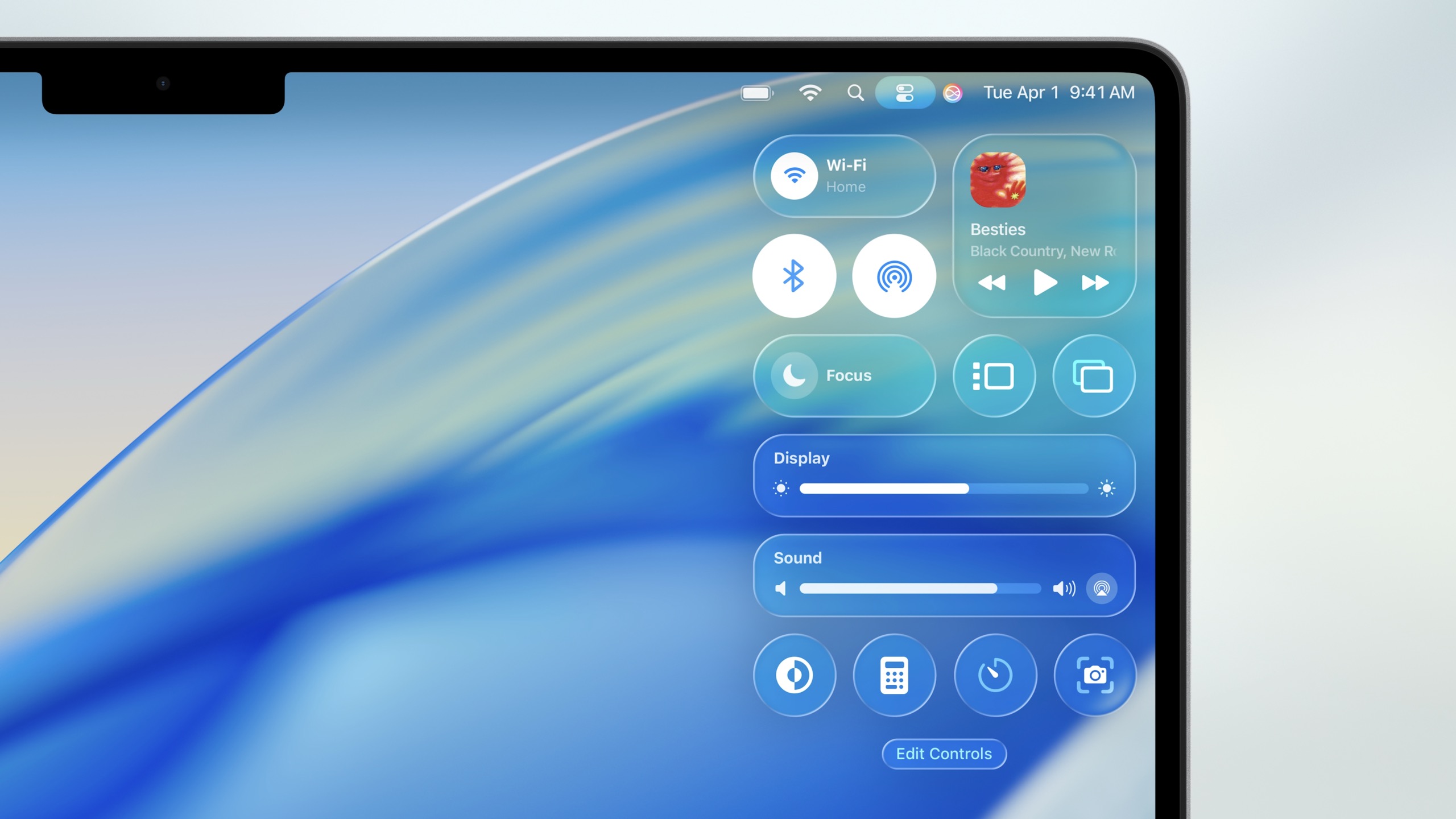
Liquid Glass goes all-in on translucency and transparency, changing the look of icons and windows across the operating system. Most significantly, the macOS menu bar has become entirely invisible, and the Control Center has adopted a new, glassy, translucent appearance. The same color-tinting customization features available on iOS and iPadOS are coming to the Mac this year, giving users multiple customization options on top of the standard light and dark modes and accent colors.
The invisible menu bar and glassy Control Center in macOS Tahoe.
Credit:
Apple
The new look will probably define the release in the minds of most users, but it’s bringing the standard handful of new features and refinements across the built-in apps. For the Finder, folders can be customized with colors and emoji labels to help them stand out from a big list of folders.
Apple continues to improve gaming features on Macs with Metal 4 for Apple Silicon on its latest version of macOS Tahoe 26 announced at WWDC 26. The new graphics platform introduces two new technologies designed to make graphics look better and run faster, MetalFX Frame Interpolation and MetalFX denoising.
MetalFX Frame Interpolation generates an intermediate frame for every two input frames to boost frame rates with minimal computing overhead, while MetalFX Denoising “makes real-time ray tracing and path tracing possible in the most advanced games,” the company said. It pointed out that upcoming titles like Crimson Desert and InZOI will use technologies like MetalFX Upscaling to improve performance and visuals via technology like ray-tracing available with the company’s M3 and M4 family of chips.
Apple put a fair amount of emphasis on gaming during this year’s developer conference. It revealed the new Games app that will come pre-installed on Mac, iPhone and iPad with macOS Tahoe 26 and iOS 26 this fall. The company also reminded us of new games arriving on macOS, including Cyberpunk 2077, Cronos: The New Dawn, Architect: Land of Exiles,Lies of P: Overture, HITMAN World of Assassination, EVE Frontier and Where Winds Meet.
This article originally appeared on Engadget at https://www.engadget.com/gaming/metal-4-for-macos-tahoe-26-introduces-new-gaming-features-like-frame-interpolation-183247623.html?src=rss
Apple is bringing Preview, macOS’s built-in image and PDF viewer, to the iPad. Starting with iPadOS 26, Preview will now come preinstalled on iPads. On desktop, Preview allows users to view and edit documents and images; Apple is bringing this functionality to its tablet by leveraging Apple Pencil.
Using Apple Pencil Markup, users can annotate and edit PDFs and images. If you don’t have an Apple Pencil, touch will work as well. Preview will have direct access to compatible documents and pictures saved in iPadOS’s Files folder so users can select what to work on without leaving the app.
Another common use of the Preview app is filling out PDF forms, which iPadOS will support with AutoFill. Once edits are complete, Preview can export your file in a number of different formats and sizes.
Apple kicked off WWDC 2025 today where it announced a slew of new software features across mobile and desktop devices as well as updates to Apple Intelligence and more. AI integration has been the main focal point at this year’s developer conference, along with a top-to-bottom UI redesign that unifies all OS versions in the Apple device lineup.
This article originally appeared on Engadget at https://www.engadget.com/mobile/smartphones/apple-is-bringing-preview-to-ipados-175643371.html?src=rss
Monster Hunter Wilds certainly loves to hide things for players to discover. From exclusive weapon mechanics to unmapped areas, there is always something you’ve yet to learn about. The recently added Grand Hub is no exception, as the discovery of a humongous Downy Crake made waves across the community. Here’s how to…
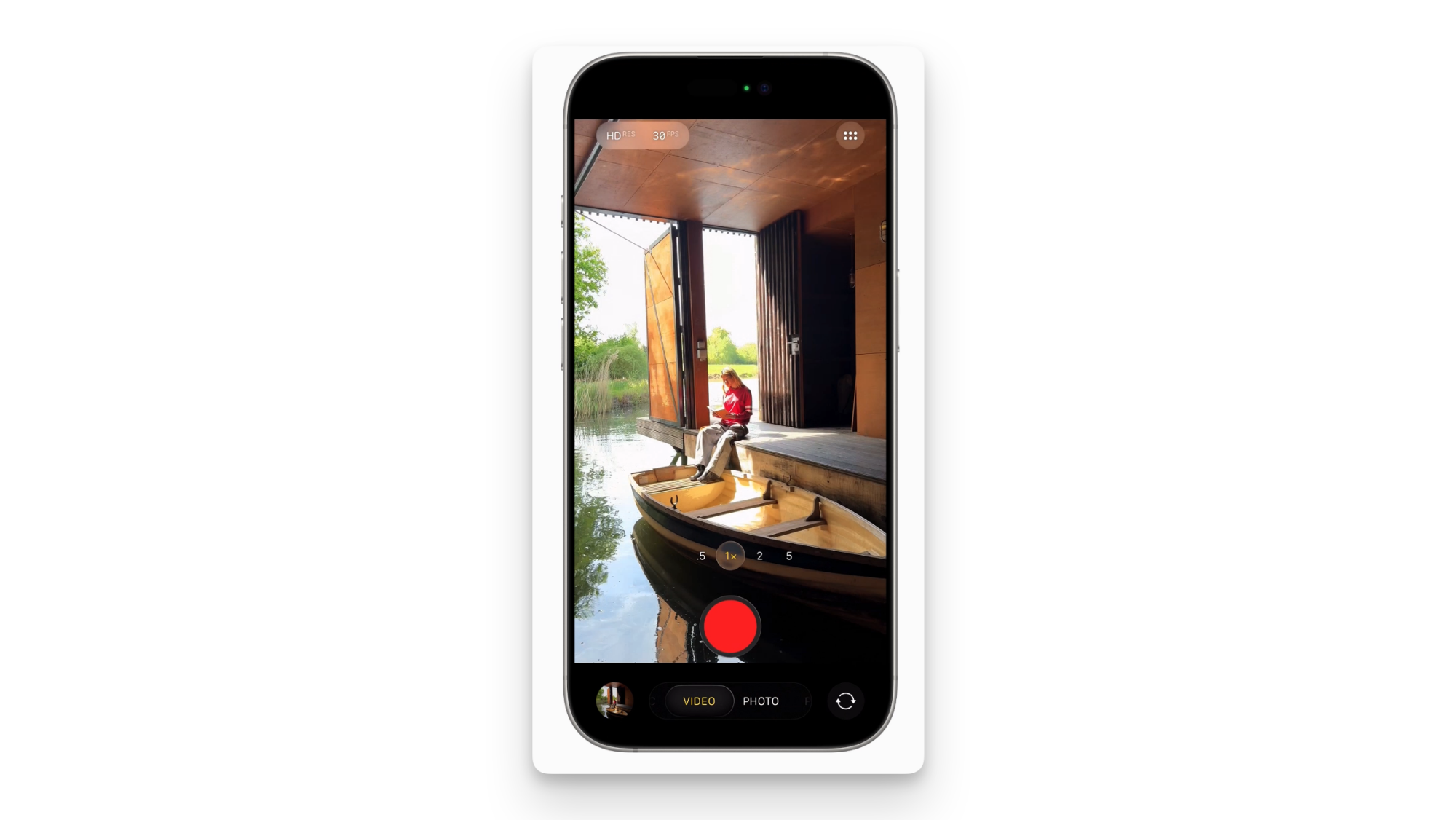
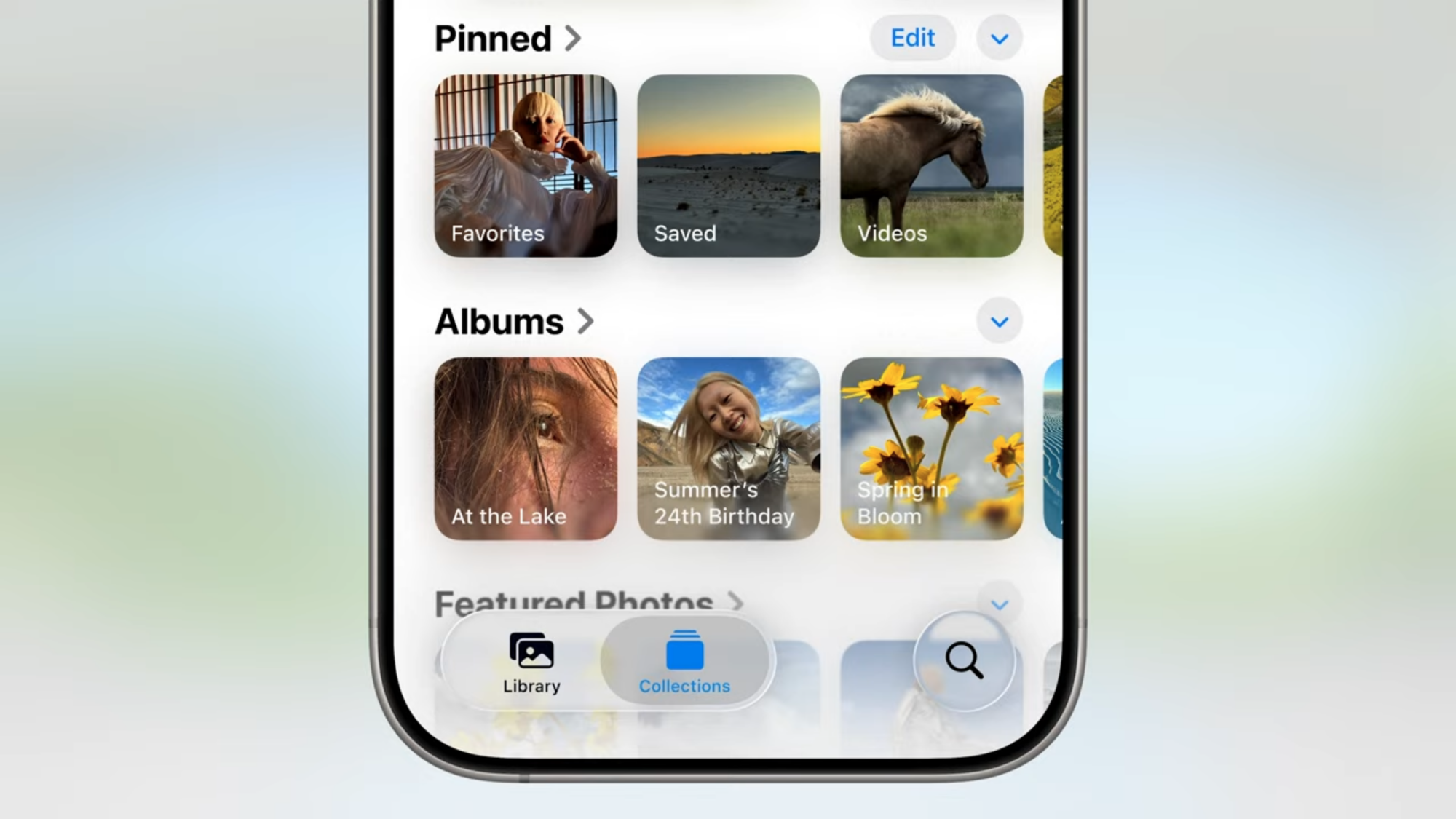
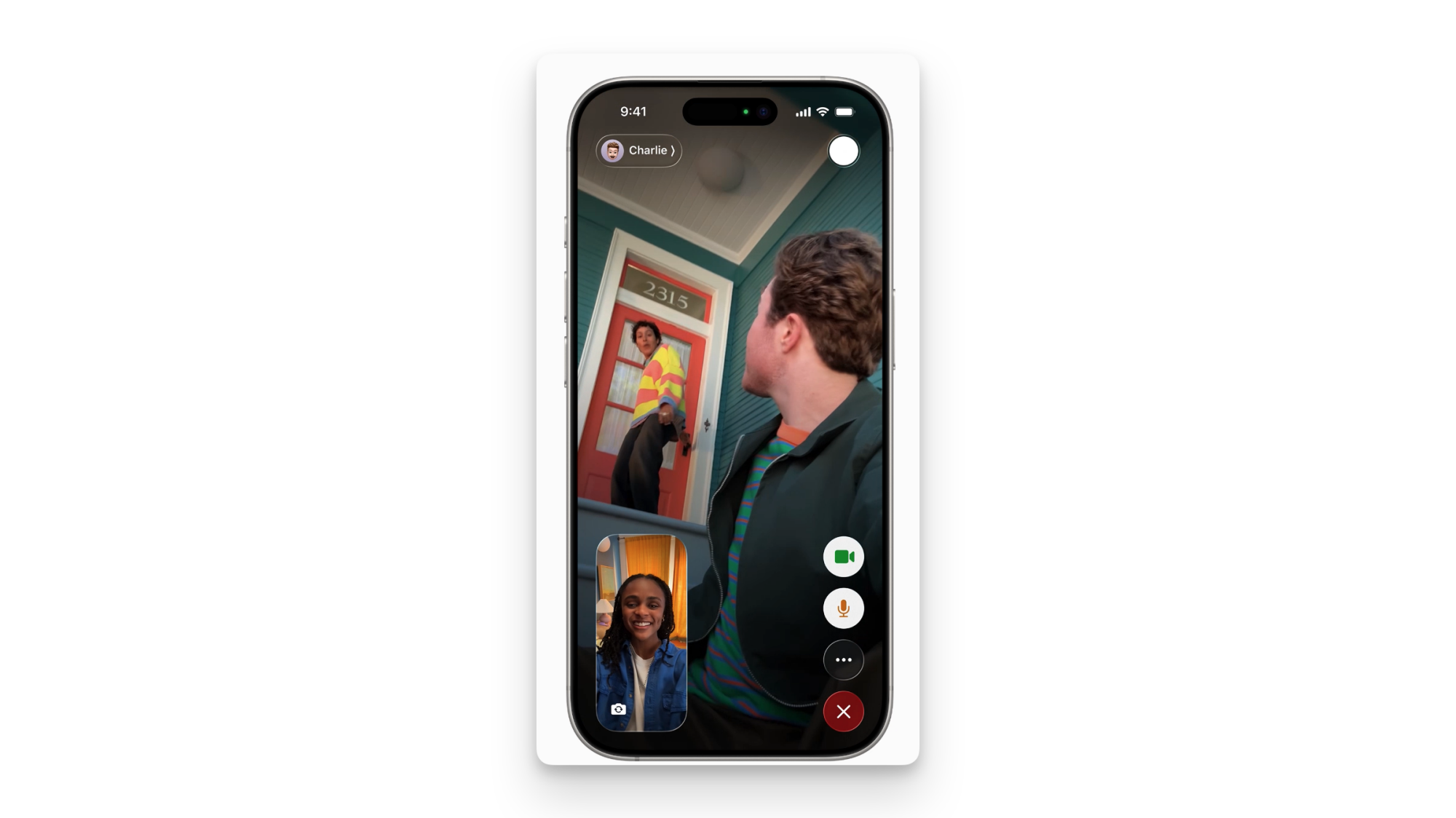
During the WWDC 2025 keynote, Apple unveiled a big design revamp for iOS 26, the successor to iOS 18. The Liquid Glass redesign takes a lot from visionOS, and adopts a glass-like transparent look for key UI elements. Three apps that have benefited from this new look are Camera, Photos, and FaceTime.
The Camera app streamlines controls
Credit: Apple
The Camera app in particular has been in need of streamlining for a while, and Apple has made an attempt to address it, and the Photos app, which already got a redesign last year, now has a bit more refinement with iOS 26, starting with a new icon, which looks quite a bit like the camera lens from Apple’s good old Aperture for Mac. This is a significant improvement over the rather generic iOS Camera icon that’s been around for a few years.
Apple has also given the Camera app a simplified design, which highlights just the two buttons, one for photos and the other for videos. Tapping these buttons opens up more options, which makes it easier to navigate. When you’re in the Videos tab, you can swipe to access different video modes, and the same thing applies to the Photos tab. You’ll see the Liquid Glass design show up when you’re trying to select video recording modes, for example.
The Photos app builds on that controversial redesign
Credit: Apple
The Photos app also has a few neat changes for iOS 26, building upon the changes in the controversial overhaul the app received last year. The biggest change, other than the Liquid Glass UI, is the positioning of the buttons. Apple has moved the search button to the bottom-right corner of the display, where you can actually tap it without stretching your finger like a yogi. Two other buttons, Library and Collections, are in the bottom-left corner, and all three buttons follow the Liquid Glass design, obviously.
FaceTime moves things around
Credit: Apple
FaceTime also has embraced iOS 26’s Liquid Glass redesign. All the call controls buttons have been moved to the bottom right, which is a welcome change given how big iPhones have become over the years. The FaceTime photo (aka screenshot) button has moved to the top-right, and the buttons fade out once the call begins, but you can tap the screen to access them again.
Apple‘s WWDC isn’t usually known for a lot of a hardware news, but the company previewed a couple intriguing updates coming to AirPods with its latest batch of software updates. The earbuds are getting built-in camera control features that allow you to snap photos or control video recording.
With the update, users will be able to control the camera on iPhones, iPads and compatible third-party camera apps by pressing and holding on the stems of their AirPods. No word yet on which non-Apple camera apps might support this feature, but it could be particularly handy for creators if it’s widely adopted by social media and video editing apps.
Another AirPods update likely to appeal to content creators is the addition of “studio quality recording” for AirPods. According to Apple, the change will allow “interviewers, podcasters, singers, and other creators can record their content with greater sound quality” even in noisy environments. The company is also improving audio quality for phone calls and FaceTime, as well as third-party CallKit-enabled apps. Other apps will also benefit from AirPods’ improved audio, including the camera app, Voice Memos, Messages (specifically, its dictation features), as well as third-party camera and video conferencing apps.
All of the upgrades will arrive as a firmware update that’s part of iOS 26, PadOS 26 and macOS Tahoe 26 and will be available for AirPods 4, AirPods 4 with ANC and the second-gen AirPods Pro. While those updates won’t officially drop until later this year, developers enrolled in Apple’s beta program will be able to start experimenting with the changes today, while those registered for the company’s public betas will be able to get their hands on it next month.
This article originally appeared on Engadget at https://www.engadget.com/audio/headphones/apple-is-adding-a-camera-remote-and-upgrading-audio-recording-on-airpods-180211014.html?src=rss
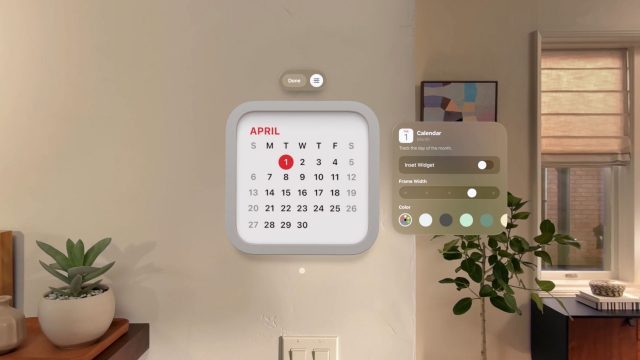
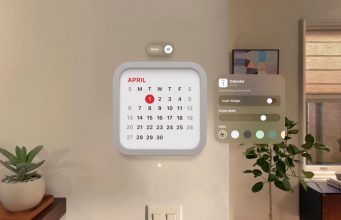
Apple today announced at WWDC that Vision Pro is getting spatialized Widgets, coming along when visionOS 26 drops later this year.
On basically all of Apple’s devices, Widgets are designed to offer up personalized and useful info at a glance.
Now Apple says Vision Pro is also getting spatial Widgets too, which will let you place a variety of these mini-apps around your house which reappear every time you put on Vision Pro.
Apple says Widgets in visionOS 26 are “customizable, with a variety of options for frame width, color, and depth. Beautiful new widgets — including Clock, Weather, Music, and Photos — all offer unique interactions and experiences.”
Essentially, you’ll be able to decorate you space with things like spatial photos, clocks with distinctive face designs, a calendar with your events, and also quick access to music playlists and songs so you can, say, keep your favorite track in a specific part of your room.
Notably, Apple says developers will be able to create their own widgets using WidgetKit. There’s no word on exactly when visionOS 26 releases, although the company says we can expect it sometime later this year.
This story is breaking. We’re currently at WWDC today, and will report back when we learn more about all things Vision Pro.
Apple just announced visionOS 26 for Apple Vision Pro at WWDC25.
visionOS26 will bring PlayStation VR2 Sense controllers & Logitech Muse stylus support, much more realistic Personas, spatial Widgets, volumetric Spatial Scenes, local SharePlay, and much more.
0:00
/0:12
While you might have expected the next version of Vision Pro’s operating system to be visionOS 3, Apple has switched to a unified year-based naming system for all of its operating systems. While visionOS 26 will launch later this year, most of its lifecycle will span through 2026.
Here’s everything coming in visionOS 26:
PlayStation VR2 Sense Controllers
As rumored for months now, visionOS 26 will add native support for the PlayStation VR2 Sense controllers, which Sony will sell separately from the headset.
Apple says this will bring “a new class of games” to Vision Pro.
0:00
/0:05
PS VR2 controller support will include 6DoF positional tracking, capacitive finger touch detection, and “vibration support”. It’s unclear whether precision haptics will be supported, nor the unique resistive triggers of the PS VR2 Sense controllers.
Photorealistic Personas
In visionOS 26, Apple says Personas, the platform’s face-tracked realistic avatars, have been “transformed to feel more natural and familiar” thanks to “industry-leading volumetric rendering and machine learning technology”.
0:00
/0:16
Apple claims these new more realistic Personas have “striking expressivity and sharpness, offering a full side profile view, and remarkably accurate hair, lashes, and complexion”. The company has also expanded the eyewear options for your Persona to include over 1000 variations of glasses.
Apple says the new Personas are still generated in a matter of seconds via holding the headset up to let it scan your face.
Spatial Widgets
visionOS 26 will bring persistent Widgets to the platform. You position these widgets in your physical space, and they reappear every time you put on the headset.
0:00
/0:07
Apple says visionOS Widgets are customizable with options for “frame width, color, and depth”.
0:00
/0:09
Built-in widgets will include Clock, Weather, Music, and Photos, and developers will be able to build their own using WidgetKit.
Volumetric ‘Spatial Scenes’
Since the launch of Apple Vision Pro the headset has been able to capture and display 3D photos, which Apple calls Spatial Photos, and visionOS 2 added the ability to convert any 2D image into a Spatial Photo using machine learning.
visionOS 26 is set to go much further. It introduces Spatial Scenes, which leverages “a new generative AI algorithm and computational depth to create spatial scenes with multiple perspectives, letting users feel like they can lean in and look around”.
0:00
/0:14
Spatial Scenes can be viewed in Photos app, Spatial Gallery app, and Safari, and developers will be able to add them to their visionOS apps using a new Spatial Scene API.
Local Shared Spatial Experiences
Currently, it’s not possible to build visionOS apps that let multiple Vision Pro headsets automatically see the same objects and interfaces in the same locations in the same physical space, a feature known as colocation on Quest and Pico.
0:00
/0:11
Dassault Systèmes 3DLive app.
visionOS 26 will bring this capability to Vision Pro, leveraging the existing SharePlay technology and APIs that today let Vision Pro owners share experiences remotely.
Logic Muse Spatial Stylus
visionOS 26 adds support for the upcoming Logitech Muse accessory, a spatial stylus for Apple Vision Pro.
0:00
/0:11
Apple says Logitech Muse “enables precise input and new ways to interact with collaboration apps like Spatial Analogue”.
It looks to be very similar to the existing Logitech MX Ink spatial stylus for Meta’s Quest headsets.
Spatial Browsing In Safari
visionOS 26 is set to bring significant upgrades to Safari on Vision Pro.
The new Safari will allow web developers to embed 3D models in web pages, and the user can “manipulate” these 3D models directly in the page.
0:00
/0:08
As a user, you’ll also be able to “transform articles on Safari, hide distractions, and reveal spatial scenes that come alive as they scroll”.
Native 180° & 360° Video Support
visionOS 26 will add native support for traditional 2D 180° and 360° video, not just Apple’s own 3D Apple Immersive Video format.
0:00
/0:12
Apple says this allows you to easily watch content captured on affordable 180 and 360 cameras from companies like Insta360, GoPro, and Canon.
This news is breaking, and this will be updated to reflect the developing news as Apple reveals more details of visionOS 26.
During Apple‘s WWDC keynote event today in Cupertino, company execs announced, among other things, the latest Apple Watch software: watchOS 12, er, watchOS 26. Like iOS, macOS, iPadOS and the rest, the latest generation of watchOS will now be appended with the upcoming year, instead of a sequential number. What would have been watchOS 12, is now watchOS 26.
Aside from the new name, there’s a new look for watchOS, too. Apple gave its entire suite of software a redesign, one that takes aesthetic cues and the “physicality and richness” of visionOS, the software used in the company’s VR headset, the Vision Pro. It’s the biggest redesign since iOS 7. The look is called “liquid glass” and dynamically reacts to movement and responds to the content on screen. Menus now better fit to the rounded corners of the hardware. Notifications and other information now involve translucent backgrounds, giving the interface a glass-like appearance.
The watchOS 26 also brings new features including Workout Buddy, an AI that will verbally talk you through your next run while also congratulating you on your accomplishments. The text-to-speech model is built on the voices of Fitness+ trainers and draws on data from your Workout and Health history. This is one of the first significant applications of Apple Intelligence to the Apple Watch.
Workout Buddy will be available on Apple Watches Series 6 or later, the Apple Watch SE (2nd generation), and Apple Watch Ultra and Ultra 2 and you’ll need an Apple Intelligence-supported iPhone nearby along with Bluetooth headphones connected to your watch.
Apple Intelligence upgrades will also make the Smart Stack more useful with a predictive algorithm that gathers information such as your location, time of day and routine to better bring up relevant apps in the Stack. The example given was showing you a workout card when you arrive at the gym in the morning.
Apple’s AI will also make Messages smarter in watchOS 26. Now, an analysis of your incoming messages will generate suggested replies, expanding on the current suite of quick replies — meaning you may actually want to use one of the canned responses. That should make it easier to communicate without puling out your phone.
Apple
A new gesture will also let you dismiss messages — or other notifications — that you’re not ready to deal with by flicking your wrist. A quick twist of your wrist away from you and back will return you to the watch screen. The wrist flick is available on the Series 9, Series 10 and Apple Watch Ultra 2.
This latest suite of features join those announced during last year’s WWDC, in which Apple previewed watchOS 11. The best of the bunch (for me anyway) was the ability to pause your Rings for a day in the Activity app. Other features included a Training Load metric that rates your efforts during exercise, comparing it with your output over time, and the Vitals app, which tracks overnight health metrics for those who wear their watch to bed.
This story is developing, refresh for the latest updates…
This article originally appeared on Engadget at https://www.engadget.com/wearables/watchos-26-everything-apple-announced-for-its-wearable-at-wwdc-2025-174915653.html?src=rss
Last year, Apple introduced Visual Intelligence, which uses your camera to translate text, identify objects, or start searches by pointing your phone at something. But if the thing you want to know about is on your phone instead of in front of it, you’ve been out of luck. Until today’s WWDC announcement, that is.
The new Visual Intelligence update will let users take a screenshot of what’s on their phone and perform searches on the image’s content. If you’re looking at an object, the feature can search to find where you might be able to buy it online. You can also pull up a ChatGPT box to ask questions about what you’re looking at.
Perhaps the most useful, Visual Intelligence can suggest calendar events from images you screenshot. So, you can remember all those music festivals, conventions, or shows at your local bar that you find on Instagram. Frankly, this might be the coolest, most helpful AI feature I’ve seen on any platform in a while.
Apple ‘Personas’ on Vision Pro are already the most likelife real-time avatars you can find on any headset today, but in the next version of visionOS, they’re taking another step forward.
Apple today announced that its Persona avatars for Vision Pro will get a major visual upgrade with the launch of visionOS 26, due out later this year.
Personas on Vision Pro are generated on-device after users take a short scan of their face using the headset. Once generated, the avatar is used for social experiences like FaceTime.
Currently, they’re the most lifelike real-time avatars available on any headset today. Although they impressively capture subtle motion from the user, they have always felt somewhat blurry or ghostly.
VisionOS 26 promises a big visual update that will greatly reduce that ghostly look, and present a more complete view of the user’s head, including a “full side profile view.” Apple is also promising more realistic hair and lashes, and more than 1,000 variations of glasses, so glasses-wearers can find something that looks just right.
Although visionOS 26 will be available as a developer beta starting today, it isn’t yet clear if the Personas upgrade will be available in the first version, or roll out in later versions of the beta.
Beyond the visual upgrade to Personas, visionOS 26 will also make improvements to how social experiences work on the headset. New developer tools will allow for the creation of co-located virtual experiences; meaning two headset users in the same physical space will be able to see a shared virtual experience that’s visually anchored in the same space for both. That same system will allow for remote participants to join as Persona avatars, making for a mixture of in-person headset users and remote participants in the same virtual experience.