
Yes, Linux can be installed and run on MacBook computers, especially on older models with Intel processors, but chances are you will have no sound out of the box and only a dummy output, so here’s how to fix it.
Monthly Archives: June 2025
Watch 22 minutes of Death Stranding 2 gameplay from Summer Games Fest
Hideo Kojima doesn’t really go for half measures. Following a 10-minute trailer that unveiled some early details, the game creator participated in a beefy 80-minute panel discussion with Geoff Keighley about Death Stranding 2: On the Beach on the final day of Summer Games Fest 2025.
The wide-ranging conversation included some clips from the sequel to the acclaimed Death Stranding, including its first five minutes, which sparked lots of cheers as people recognized performers’ names in the opening credits. Kojima also showed the English language version of a scene that was revealed during the Tokyo Game Show, highlighting the performances of Elle Fanning as Tomorrow and Shioli Kutsuna as Rainy. Fans also got a chance to see Tomorrow in action as she literally gets down and dirty in the tar to take out some robotic combatants. There was also a live gameplay demo, first showing Sam in combat with a blood boomerang and a tar cannon, then a more challenging fight against Neil that showed off some stealth attacks as well as some more weaponry.
Death Stranding 2: On the Beach will be available on PlayStation 5 starting June 26.
This article originally appeared on Engadget at https://www.engadget.com/gaming/watch-22-minutes-of-death-stranding-2-gameplay-from-summer-games-fest-224814307.html?src=rss
Ohio University Says All Students Will Be Required To Train and ‘Be Fluent’ In AI
Ohio State University is launching a campus-wide AI fluency initiative requiring all students to integrate AI into their studies, aiming to make them proficient in both their major and the responsible use of AI. “Ohio State has an opportunity and responsibility to prepare students to not just keep up, but lead in this workforce of the future,” said the university’s president, Walter “Ted” Carter Jr. He added: “Artificial intelligence is transforming the way we live, work, teach and learn. In the not-so-distant future, every job, in every industry, is going to be [affected] in some way by AI.” The Guardian reports: The university said its program will prioritize the incoming freshman class and onward, in order to make every Ohio State graduate “fluent in AI and how it can be responsibly applied to advance their field.” […] Steven Brown, an associate professor of philosophy at the university, told NBC News that after students turned in the first batch of AI-assisted papers he found “a lot of really creative ideas.”
“My favorite one is still a paper on karma and the practice of returning shopping carts,” Brown said. Brown said that banning AI from classwork is “shortsighted,” and he encouraged his students to discuss ethics and philosophy with AI chatbots. “It would be a disaster for our students to have no idea how to effectively use one of the most powerful tools that humanity has ever created,” Brown said. “AI is such a powerful tool for self-education that we must rapidly adapt our pedagogy or be left in the dust.”
Separately, Ohio’s AI in Education Coalition is working to develop a comprehensive strategy to ensure that the state’s K-12 education system, encompassing the years of formal schooling from kindergarten through 12th grade in high school, is prepared for and can help lead the AI revolution. “AI technology is here to stay,” then lieutenant governor Jon Husted said last year while announcing an AI toolkit for Ohio’s K-12 school districts that he added would ensure the state “is a leader in responding to the challenges and opportunities made possible by artificial intelligence.”


Read more of this story at Slashdot.
Apple details the end of Intel Mac support and a phaseout for Rosetta 2
The support list for macOS Tahoe still includes Intel Macs, but it’s been whittled down to just four models, all released in 2019 or 2020. We speculated that this meant that the end was near for Intel Macs, and now we can confirm just how near it is: macOS Tahoe will be the last new macOS release to support any Intel Macs. All new releases starting with macOS 27 will require an Apple Silicon Mac.
Apple will provide additional security updates for Tahoe until fall 2028, two years after it is replaced with macOS 27. That’s a typical schedule for older macOS versions, which all get one year of major point updates that include security fixes and new features, followed by two years of security-only updates to keep them patched but no longer receive new features.
Apple is also planning changes to Rosetta 2, the Intel-to-Arm app translation technology created to ease the transition between the Intel and Apple Silicon eras. Rosetta will continue to work as a general-purpose app translation tool in both macOS 26 and macOS 27.
Apple’s walled garden is the iPad’s biggest roadblock to becoming a Mac
iPadOS 26 makes Apple‘s tablet much more like macOS. Better windowing? Check. The menu bar? Yup. There’s even a more fine-tuned Files app, along with document editing in Preview. It’s as if Apple took a checklist of longtime power-user requests and fulfilled them all. It’s enough that the App Store’s walled garden could be the last remaining reason to stick with your Mac.
For me, the iPad’s productivity changes were the most intriguing part of Apple’s WWDC 2025 keynote. Years ago, when Apple first made iPadOS more work-friendly, I tried to replace my MacBook with the iPad Pro. After reviewing several Microsoft Surfaces, I wanted an Apple equivalent, dammit. So, despite the iPad’s obvious limits, I gave it a shot.
For most things I did, it was… fine. But there were always tasks that slowed me down. Apple’s Split View, which places two apps side by side, was solid. Stage Manager added even more windowing nuance. But it still wasn’t the same as arranging windows manually. All I had to do was hop back on a Mac, and things became clear: The iPad was nowhere near ready for my workflow. I was trying to fit a square peg into a round hole.
The changes in iPadOS 26 will finally bring the tablet close to something that could replace a Mac. For many, I suspect it will be more than enough. You can place windows anywhere and resize them fluidly. The menu bar will make it easier to access the finer controls of apps. You can tile windows and see them all in a grid with Exposé. The Files app catches up with the Mac’s Finder. The new Preview app should make document editing a breeze. And you can easily return to full-screen iPad simplicity at any time.
Apple
That raises the question: Where does iPadOS still fall short of macOS? It’s the lock-in, stupid.
The Mac grew up in an era when you could install apps from anywhere. First, it was discs. Then, the internet. Sure, Apple made changes in the last decade that make macOS a bit more restricted. System Integrity Protection (SIP) comes to mind. Gatekeeper, too. However, on the whole, it remains a relatively open environment. Getting your apps from anywhere often means a broader selection, faster updates and fewer restrictions.
The iPad, on the other hand, evolved from the iPhone. (Those old enough may recall the “It’s just a big iPod touch” commentary mocking the first model.) The App Store has always been the only official way to install apps on the iPad (EU exceptions notwithstanding). That remains so in iPadOS 26.
The tablet software also prevents apps from overriding security and privacy restrictions. While that may not sound like a good idea, it can be a killer feature for trusted Mac apps.
Stairways Software
For example, Keyboard Maestro on macOS can automate almost anything you can do with a keyboard and mouse. BetterTouchTool also offers a (nearly) endless list of customizations, including window controls. (My favorite is changing the yellow “traffic light” button so that it hides apps instead of minimizing them.) Karabiner-Elements lets you remap any key. A clipboard manager can, with a single keystroke, display everything you’ve copied.
Then there are Mac apps that let you use alternatives to Apple’s versions. Third-party launchers like Raycast and Alfred are like Spotlight on steroids. (Their extension libraries are so vast, they have their own storefronts.) Apps like Rectangle and Moom give you alternatives to Apple’s window management. Many Mac apps offer more flexible text replacement than Apple’s built-in solution.
Apple
What iPadOS 26 does is draw a line between two types of power users. Like before, Mac power users will use some combination of the above examples. Meanwhile, a new class of iPad power users will enjoy the tablet’s desktop capabilities. But the latter will still be limited to Apple’s version of, well, everything. The power is much stronger now; openness, however, isn’t.
For that reason alone, I’ll likely remain a Mac-first guy for the foreseeable future. But iPadOS 26 will surely tempt me to experiment.
This article originally appeared on Engadget at https://www.engadget.com/mobile/tablets/apples-walled-garden-is-the-ipads-biggest-roadblock-to-becoming-a-mac-223014619.html?src=rss
The Phone app in macOS 26 is another baby step towards a cellular Mac
While it still remains more of a dream than an obvious stop on Apple’s product roadmap, the company’s updates in macOS Tahoe 26 offer new evidence that Apple could one day sell Macs with cellular connectivity. Sure, the biggest takeaway from WWDC 2025 will probably be the new Liquid Glass design language the company is sprinkling over all of its operating systems, but based on the addition of a Phone app to macOS, Apple’s laptops and phones are converging in more ways than one.
The new Phone app, which combines recent phone calls, favorite contacts and voicemails all in one interface, will offer the same features in both iOS and macOS. That’s a first for Apple’s desktop operating system, which has a FaceTime app, but otherwise primarily interacts with phone calls through Continuity features. Currently, iPhone calls can be relayed and answered on a Mac, and you can place calls from the FaceTime app, but it’s far from intuitive. That should change in macOS 26. The Phone app lets you make calls, listen to voicemails and even use new features like Hold Assist as easily as you would on an iPhone.
Apple
Every year Apple nudges its platforms together, like letting you access your iPhone from your desktop with iPhone Mirroring or use your iPhone as a webcam with Continuity Camera. But porting apps directly from the iPhone feels like a more significant step. On iPad, which is sold in Wi-Fi and Cellular configurations, adding the Phone app (as Apple is with iPadOS 26) makes sense. The iPhone and iPad share a lot of similarities from both a software and hardware perspective. The Mac does not — at least, not yet.
In December 2024, Bloomberg’s Mark Gurman reported that Apple was “investigating the idea of bringing cellular connectivity to the Mac.” Apple has been trying to move away from relying on Qualcomm’s cellular modems for years. The company bought Intel’s smartphone modem team in pursuit of that idea in 2019, and debuted the iPhone 16e, its first device with a custom Apple C1 modem, earlier this year. A cellular Mac seems like a perfect opportunity to put future versions of that modem, say a C2 or C3, to the test.
Even with better multitasking, there’s still plenty of tasks that are easier on a Mac than on an iPad. A cellular Mac could let you upload a professionally edited video out in the field, or communicate with your team without having to be tethered to a Wi-Fi hotspot. Both are possible on an iPad, but would feel more natural on a Mac.
Gurman suggests the company wouldn’t try to bring its custom modem to devices other than the iPhone until 2026 at the earliest, but Apple could be laying the groundwork from a software perspective right now. Macs already use Apple’s custom chips, and they’ll soon feature software that’s increasingly similar to the iPhone. All that’s missing is a modem that can connect to cellular networks.
This article originally appeared on Engadget at https://www.engadget.com/computing/laptops/the-phone-app-in-macos-26-is-another-baby-step-towards-a-cellular-mac-220854738.html?src=rss
Mercedes’ next electric GLC rides great—we’ve driven the prototype
IMMENDINGEN, Germany—The Mercedes-Benz Testing and Technology Center in Immendingen, Germany, isn’t a top-secret facility because of its location. It’s top secret because of what happens on the 520 hectares of land. Its 62-kilometer track is where Mercedes engineers can develop and hone every new vehicle in conditions experienced all around the world. Experiencing those conditions in a prototype is why I was there on an annoyingly rainy day.
After receiving the tour in a new Mercedes-Benz S-Class, I settled into the driving seat of the all-new Mercedes-Benz GLC with EQ Technology—that’s the electric one. Being a prototype, it was still wearing camouflage, and the interior was covered in black fabric, so I couldn’t see everything. But I was assured that the ride, handling, and performance are all sorted. The infotainment software and interior details are still being finalized.
The upcoming GLC is slightly longer than its gasoline-powered counterpart to accommodate the 94.5 kWh battery pack. Mercedes is estimating 650 kilometers of range on the optimistic WLTP testing cycle. Based on some rough math, 330 miles on the EPA cycle seems about right.
Warner Bros. Discovery Splits Streaming From Cable TV
Warner Bros Discovery will split into two separate publicly traded companies — one focused on its studios and streaming assets like HBO, DC Studios, and HBO Max, and the other on its declining cable networks including CNN and TNT Sports. The move, which unwinds the 2022 WarnerMedia-Discovery merger, is expected by mid-2026 and is “the latest unraveling of decades of media consolidation that created global conglomerates spanning content creation, distribution and in some cases, telecommunications,” reports Reuters. From the report: The new streaming-and-studios company will include Warner Bros, DC Studios and HBO Max – the crown jewels of WBD’s entertainment library. The networks unit, which will hold up to a 20% stake in its counterpart, will house CNN, TNT Sports and Bleacher Report. CEO David Zaslav will lead the streaming and studios unit, while CFO Gunnar Wiedenfels will head the networks unit. The separation will be structured as a tax-free transaction and is expected to be completed by mid-2026.
“We’ve continued to analyze how our industry is evolving,” Zaslav told investors. “The right path forward became increasingly clear … to separate global networks and streaming and studios into two independent, publicly traded companies.” Most of the company’s debt would be held by the global networks company. WBD had gross debt of $38 billion as of March. The company said it secured a $17.5 billion bridge loan from J.P. Morgan that it would use to restructure its debt.


Read more of this story at Slashdot.
Apple tiptoes with modest AI updates while rivals race ahead
On Monday, Apple announced a series of incremental Apple Intelligence updates at its annual Worldwide Developers Conference, focusing on practical features like live phone call translation and visual search rather than the ambitious race for AI breakthroughs that rivals have been promoting.
Notably absent was any concrete update on the much-needed “more personalized” Siri that Apple first announced at last year’s WWDC but has yet to demo publicly or provide specifics about. (Siri still feels woefully outdated after using ChatGPT’s Advanced Voice Mode, for example.)
In our WWDC keynote preview from last week, we pointed out that Apple has faced intense pressure to deliver on AI after overpromising features it wasn’t ready to launch—a controversy that led to an executive reshuffle of those handling Apple’s AI efforts.
I Miss When Handheld Gaming Was Its Own Thing
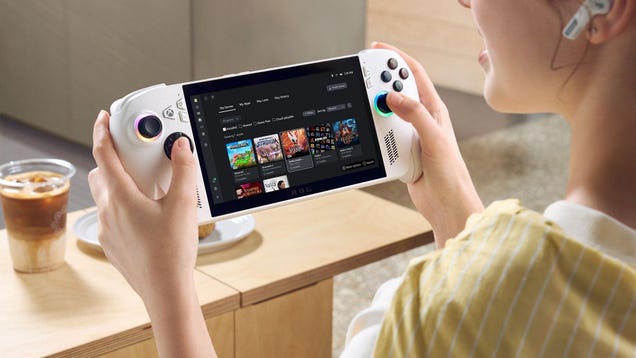
Microsoft’s new ROG Xbox Ally has a lot to prove in the market of handheld consoles. The Switch 2 was only days old when the company officially unveiled its competitor during the Xbox showcase. With PlayStation’s Portal mostly being a streaming device that offers a very specific, incredibly niche player benefit…
Anti-vaccine advocate RFK Jr. fires entire CDC panel of vaccine advisors
Anti-vaccine advocate and current US health secretary Robert F. Kennedy Jr. has taken the extraordinary action of firing all 17 vaccine experts on a federal committee that advises the Centers for Disease Control and Prevention on immunization practices.
In an opinion piece published Monday in the Wall Street Journal, Kennedy announced that he had cleared out the committee, accusing them of being “plagued with persistent conflicts of interest” and a group that has “become little more than a rubber stamp for any vaccine.”
“Without removing the current members, the current Trump administration would not have been able to appoint a majority of new members until 2028,” Kennedy added.
MariaDB 11.8 LTS Lands with Vector Search and Extended Timestamp Support
MariaDB 11.8 LTS open-source RDBMS is out, featuring full MariaDB Vector support, faster backups, improved replication, and more.
Xbox’s First Gaming Handheld Feels Like a Missed Opportunity
Nintendo did it. Sony did it. Even Sega did it. And now, Microsoft finally has launched its own dedicated handheld gaming device…kind of.
Revealed yesterday during the summer Xbox Games Showcase, the Asus ROG Xbox Ally is closer to a Steam Deck than a PSP or Nintendo Switch. Essentially, it’s a spin on Asus’ existing handheld gaming PC, the ROG Ally, but with Xbox style grips, an Xbox button, and a sleeker approach to Windows that skips most of the guff and takes you right to a game launcher (where you’ll find all your various game stores, including Steam and Epic) that you can navigate entirely with your controller.
In other words, it isn’t a portable Xbox, it’s a handheld gaming PC with Xbox branding.
A better Windows-based gaming experience, for a price
Even if that might be disappointing to Xbox diehards, on the surface, it’s at least potentially great news—maybe even everything PC gamers have been asking Windows-based gaming handhelds to do for a while, as that operating system as it currently exists is no fun to navigate with a controller-based device. And loading right into the Xbox app isn’t only more immediate; Microsoft says the handheld will actually skip loading certain parts of Windows, which could make the OS more lightweight and actually boost performance. Finally, systems running Microsoft’s OS could potentially compete with the likes of the Steam Deck, especially because Microsoft says the new Xbox handheld gaming PC experience is coming soon to other devices, including some are already on the market.
And yet, Microsoft doesn’t have to compete with just the Steam Deck anymore. Notably, this announcement came on the weekend after the Nintendo Switch 2 launched, and it’s hard not to see it as at least a little out-of-date.
Also, the ROG Xbox Ally is ugly. While official dimensions aren’t out yet, it also appears to be a little thick, and on the heavier side.Pricing hasn’t been revealed yet either, but based on the specs Microsoft offered up, and the existing ROG Ally pricing, we can probably expect the two models of this thing (the ROG Xbox Ally and ROG Xbox Ally X) to come in at around $600 and $1,000, respectively.
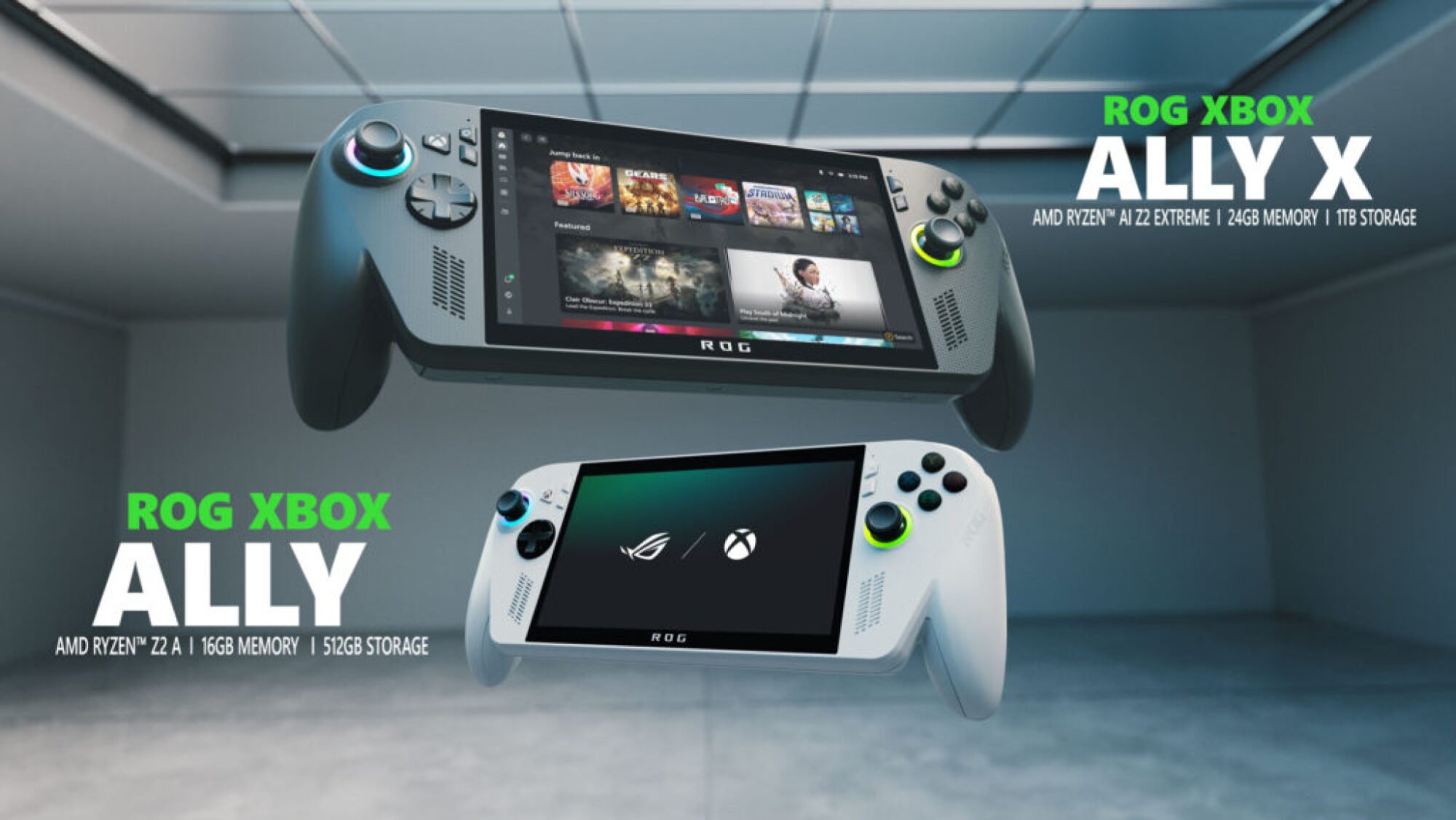
Credit: Michelle Ehrhardt
That might sound reasonable to hardcore gamers, but next to the sleek, Apple-eqsue, $450 Nintendo Switch 2, or even the $400 Steam Deck, it’s a big ask, and puts me in mind of other pricey Steam Deck competitors we’ve seen before. Especially because, according to an interview Asus consumer vice president Shawn Yen had with Game File, Microsoft says the new device will target between 720p and 900p to 1080p (depending on your model), which is roughly equivalent to what’s on the Steam Deck now. Games might run at a slightly higher frame rate, but this won’t be a total game changer. Casual players might not even notice a difference.
In short, it’s a more iterative change, which is unfortunate for a debut handheld. There are benefits to a more usable Windows-based gaming handheld—notably, the Steam Deck can’t run games with anti-cheat, plus the Xbox experience is supposed to make it quicker to run games that aren’t from Steam than they’ll run on the Steam Deck (which can also run games from other launchers, but only after jumping through a few hoops). But the Steam Deck has always been my go-to handheld gaming PC recommendation for a reason: it’s affordable, simple to use, and has good-enough performance. The ROG Xbox Ally seems poised to take the mantle of simplicity, but I’m skeptical that the performance bumps (it will use a newer processor than the Steam Deck) will be enough to justify the cost.
Not really a handheld Xbox
The result? An Xbox handheld that won’t be the go-to portable gaming experience for Xbox fans, but rather an Xbox skin on top of a boutique option, ideal for only the most dedicated of fans. That’s not the worst thing in the world, but a missed opportunity, especially when compared to the shiny new Switch 2.
Speaking of, I’ve been playing with the Switch 2 over the weekend, and this thing is sleek. My full review is still forthcoming, but in summary, it’s thin, light, looks a heck of a lot better than the Xbox handheld, runs like a dream, and is still cheaper than the forthcoming Xbox device. Sure, it’s limited in ways a full PC isn’t, but that also makes it more approachable. The Switch 2 feels like a peek at the future of mainstream handheld gaming, while Xbox’s handheld feels more like a stopgap. (Though I’d still recommend the Steam Deck to most handheld PC gamers, and the Switch 2 to any console fans looking for a new handheld.)
Maybe I’m expecting too much. It’s a lot, thinking that Xbox might be able to compete with Nintendo on its first handheld attempt. But the company’s “This is an Xbox” campaign has also been adamant on pushing its cloud streaming and Game Pass experiences over its hardware, and a sleeker, more affordable Xbox handheld could have been a great compliment to that, and helped it carve out a niche as a Steam Deck-alike for people coming from console gaming, or the handheld for Switch gamers who want something a bit more hardcore. Instead, it seems like a nice upgrade for people who were already sold on the idea of the ROG Ally, and nobody else.
Apple Lets Developers Tap Into Its Offline AI Models
An anonymous reader quotes a report from TechCrunch: Apple is launching what it calls the Foundation Models framework, which the company says will let developers tap into its AI models in an offline, on-device fashion. Onstage at WWDC 2025 on Monday, Apple VP of software engineering Craig Federighi said that the Foundation Models framework will let apps use on-device AI models created by Apple to drive experiences. These models ship as a part of Apple Intelligence, Apple’s family of models that power a number of iOS features and capabilities.
“For example, if you’re getting ready for an exam, an app like Kahoot can create a personalized quiz from your notes to make studying more engaging,” Federighi said. “And because it happens using on-device models, this happens without cloud API costs [] We couldn’t be more excited about how developers can build on Apple intelligence to bring you new experiences that are smart, available when you’re offline, and that protect your privacy.”
In a blog post, Apple says that the Foundation Models framework has native support for Swift, Apple’s programming language for building apps for its various platforms. The company claims developers can access Apple Intelligence models with as few as three lines of code. Guided generation, tool calling, and more are all built into the Foundation Models framework, according to Apple. Automattic is already using the framework in its Day One journaling app, Apple says, while mapping app AllTrails is tapping the framework to recommend different hiking routes.


Read more of this story at Slashdot.
Update These Five Switch 2 Settings Before You Start Playing
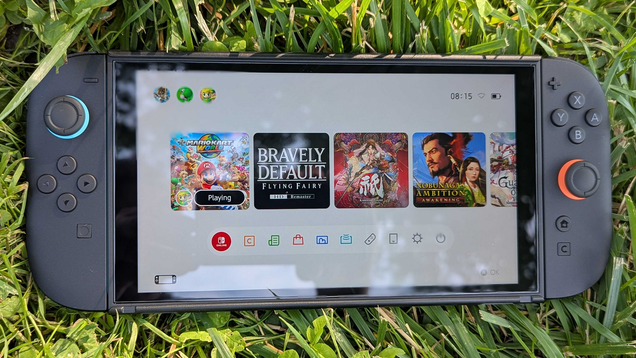
The Switch 2 has a ton of new features and a much more detailed list of settings you can tinker with than its predecessor. Here are four you should change right from the jump to improve your overall experience with Nintendo’s new Mario Kart World machine. Just go into the settings menu inside the gear icon near the…
All the iOS 26 Features Apple Barely Mentioned at WWDC 2025
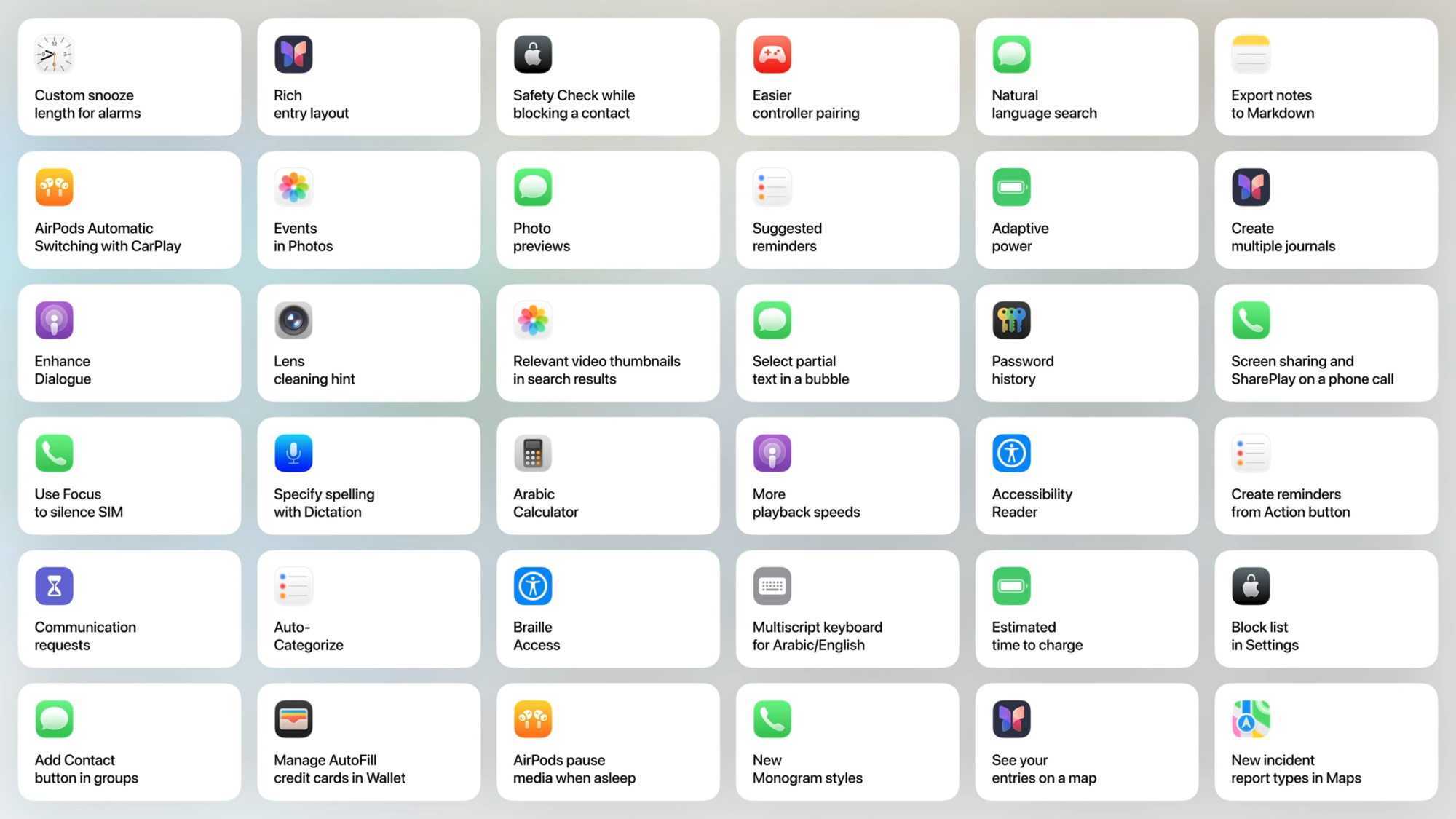
iOS gains so many new features with each version update that it’s impractical to condense everything into a single keynote. While the big iOS 26 features, including ones that Apple borrowed from others, got all the attention, I think some of the most exciting features were buried during the WWDC 2025 keynote. Apple briefly showed a slide containing all these hidden features, and I’ve compiled them here:
36 hidden iOS 26 features
Credit: Apple
The above slide is all we have to go on for these features. Some of them are obvious from the title alone, but others aren’t so clear. I’ve tried to add context wherever I can, but there is some speculation necessary here until we know more about iOS 26:
-
Custom snooze length for alarms: If you want to snooze for more or less than the standard nine minutes, this feature could be really useful.
-
AirPods Automatic Switching with CarPlay: Automatic switching lets you quickly connect your AirPods to the Apple device you’re actively using. It looks like Apple is extending it to CarPlay, too.
-
Enhance Dialogue: This feature should mean Apple Podcasts can boost vocals in podcasts and suppress background noises. All of the best podcast apps must have this feature.
-
Use Focus to silence SIM: It looks like iOS 26 will let you use Focuses to silence one SIM, which is great for those who use two numbers on their iPhone.
-
Communication requests: Screen Time could be getting support for requests to use messaging apps. This may allow parents to better regulate who their children are talking to.
-
‘Add Contact’ button in groups: This could make it easy to add people to your contacts from a group in the Messages app.
-
Rich entry layout: The Journal app is getting a better layout for starting a new entry, but we don’t quite know what that is yet.
-
Events in Photos: It looks like iOS 26 will add support for events in the Photos app.
-
Lens cleaning hint: If your iPhone or iPad’s camera lens is dirty, iOS 26’s Camera app will ask you to clean it.
-
Specify spelling with Dictation: A neat way to reduce typos when you’re using Dictation to type.
-
Auto-Categorize: Reminders will be able to automatically sort your to-dos.
-
Manage AutoFill credit cards in Wallet: It appears that Apple is moving stored credit card data to the Wallet app.
-
Safety Check while blocking a contact: Safety Check removes other people’s access to shared iPhone data, such as your location. Apple seems to be adding Safety Check prompts when you block a contact as another way to ensure your safety.
-
Photo previews: Messages is gaining the ability to show image previews on your iPhone, though it’s not clear exactly how that compares to the current system.
-
Relevant video thumbnails in search results: Based on this description, it looks like search results in Photos may now include specific parts of a video that are relevant to the search term.
-
Arabic Calculator: The calculator app is getting a new mode.
-
Braille Access: A braille note taker is coming to your iPhone.
-
AirPods pause media when asleep: Your AirPods can detect when you’ve dozed off and pause media accordingly. This detection likely ties to Apple Watch.
-
Easier controller pairing: Apple’s making it easy to pair gaming controllers with your iPhone and iPad.
-
Suggested reminders: iOS 26 might suggest reminders based on your iPhone activity.
-
Select partial text in a bubble: In iOS 18, the Messages app lets you copy an entire text you’ve sent or received, but it doesn’t allow you to select a part of the message. That’s about to change with iOS 26.
-
More playback speeds: Apple Podcasts in iOS 18 supports playback speeds from 0.75x to 2x. It’s going to get more speed options in iOS 26, though we don’t know which or how many yet.
-
Multiscript keyboard for Arabic/English: For easier switching between the two languages.
-
New Monogram styles: The Phone app now supports more Monogram options.
-
Natural language search: It might be easier to search in Messages. Natural language could let you narrow down searches even if you don’t remember the correct search operators.
-
Adaptive power: Your iPhone will make small changes, such as lowering brightness, to improve battery life.
-
Password history: Apple Passwords will remember older passwords used with any login item.
-
Accessibility Reader: This makes it easy to read small text in any app.
-
Estimated time to charge: This tells you how long you need to wait until your iPhone’s battery is fully charged.
-
See your entries on a map: The Journal app will save location metadata to help you find entries by location.
-
Export Notes to Markdown: Apple Notes is gaining support for Markdown exports.
-
Create multiple journals: The Journal app will now let you create more than one journal.
-
Screen sharing and SharePlay on a phone call: It looks like these features are no longer exclusive to FaceTime calls.
-
Create reminders from Action button: The Action button gets yet another useful action.
-
Block list in Settings: This appears to be an improvement to the way blocked contacts are handled.
-
New incident report types in Maps: When you want to report an incident in Apple Maps, you’ll find more report types in the app in iOS 26.
Why That USB-C Cable Isn’t Charging Your Device Quickly Enough
When USB-C first arrived, it seemed like we had finally achieved the digital dream of one, universal plug that could do everything. The reality, however, is much more annoying. While everything from your laptop to tablet to phone can connect to the same cable or charger, they can get very different results, depending on which charger or cable you’re using. Worse yet, it’s not always clear why.
This issue stems from two major problems. The first are cables that conform to different USB specifications, without necessarily being labeled as such. And the second is charging blocks that provide different levels of power, more often with at least some kind of label, but less clarity on what those labels mean.
There’s a decent chance that you’ve encountered this problem without even realizing it. A friend of mine, for example, had an external portable monitor that connected to her laptop solely via a USB-C cable—a specific cable she called the “magic cable.” She called it this because, for reasons she couldn’t figure out, any other cable would simply not work. Those other cables were useful for charging a phone or connecting a peripheral, but not for this portable monitor.
If you’ve found yourself in a similar situation, here’s what makes those cables so magic.
Why not all USB-C cables are created equal
To demonstrate the main issue here, what do you imagine when I say “USB-C”? If you pictured a squat little oval connector, you’re right! If you pictured that oval connected to a cable, however, well that’s a bit of a different story. Technically—and for this explanation, we’re gonna have to get pretty technical—”USB-C” refers only to the port and connector type itself.
Beyond that, USB specifications are used to denote minimum data transfer speeds and power supplied. This can get complicated, but the important part for charging purposes is a cable or charger’s Power Delivery rating.
Power Delivery (often written as USB-PD) is a subset of USB specifications that allows a cable to provide enough power to charge your devices. “Enough” is a pretty relative term, though. Every USB port provides a little bit of power—that’s why your wired mouse or keyboard turn on when you plug them in, after all—but when it comes to charging devices like your smartphone or tablet, the electricity demands get higher.
Why using the right charger matters
Power Delivery was a feature added to the USB specifications so that manufacturers can’t denote just how much power a particular charger can supply. This is usually measured in watts (or W). For example, a laptop might come with a 100W power supply, while a smartphone might only require a 20W charger for fast charging.
That also brings us to another complicating factor: fast charging. Technically, if you plug a lower-wattage charger into a higher-power device, it can still charge off of it; it just might take a long time. A 5W charger might power up your phone overnight, while a 20W charger will fill its battery over an hour or two.
For devices like laptops or tablets, the amount of power you consume just by using your device can actually exceed how much power a slow-charging cable can provide. This is why my friend’s portable monitor needed a specific cable. Powering on a bright screen takes quite a bit of power, and the non-magic cables were likely only designed for things like plugging in a mouse or charging headphones. If the device you’ve plugged in demands more power than the cable or charging block can provide, it will either continue to drain the battery (though perhaps a bit slower), or shut off entirely.
If you’re plugging a cable into a standalone charging block, that’s another important piece of the puzzle. Charging blocks that connect to a wall outlet don’t always provide the maximum amount of power to the cables plugged into them. Some blocks that have multiple outlets might even provide different levels of power to different plugs.
It’s important to make sure that whatever you’re using to charge your devices, you make sure that every step in the chain is up to the task. The power outlet in your home provides enough power (we’d hope), but beyond that, the charging block, the cable, and even the device itself all need to support the amount of power delivery you need.
So, how do you find the right charging cable?
The most annoying part about all of this is that between the standards agency that manages USB specifications, and manufacturers trying to distinguish their own products, labeling USB cables has become a nightmare. To put it in perspective, cables that are capable of transferring up to 5Gbps have, over the last decade or so, been referred to as USB 3.0, USB 3.1 Gen 1, and USB 3.2 Gen 1. These labels all, somehow, refer to basically the same thing.
So, forget all of that. If all you’re concerned with is how fast you charge your gadgets, there are two main things you should look for:
-
What charger came with the device? This is the easiest one. If a charger or cable came with your device, that’s the one that will probably charge it the fastest. If you use a slower cable, the device will slow down to match it, and if you use a faster one, the device won’t charge faster than it’s programmed to do.
-
What is the wattage of the charger? If you’re buying third-party, many manufacturers will list the maximum wattage of their products. This is usually a bit more common for charging blocks than cables themselves, but in general, higher is better. Your phone absolutely does not need a 100W charger, but your laptop might. And, as mentioned before, your devices will default to the slowest element in the chain.
In some cases, you can find a label on a charger that lists how much power it supplies, like “100W,” though if it’s not printed directly on a device, you can look up its model online. Another handy trick, if a cable doesn’t have a label but you know what device it came with, is to look up the product itself. If, say, your smartphone says it requires a 20W charger for fast charging, then it’s safe to assume that any cables it came with support at least that much.
What happens if you use the “wrong” charger?
The good news is, in the vast majority of cases, you won’t damage your devices if you use the wrong charger on them. A 100W charger can still fast charge your phone even if it doesn’t use its full capacity. Even a too-slow charger will provide power; it just might take a while. In fact, if you had a smartphone before companies started advertising “fast charging,” that’s basically what was happening.
The only major way things can go wrong is if you try to use your device to do something that takes more power than the charger can provide. Gaming laptops are particularly susceptible to this. Even high-powered 100W USB-C chargers can’t always provide enough energy to offset the demand from AAA games that run your GPU hot. Incidentally, this is why gaming laptops are one of the few devices that still come with a giant honking charging brick.
Even in that case, you’re not likely to damage your device, but it will rely on whatever battery power it has to keep going. It will drain more slowly, since it’s trying to draw power from both the battery and the wall at once, but if you’re doing anything too demanding, it will eventually die.
When it comes to peripherals—like my friend’s portable monitor—that don’t have their own batteries, however, they simply won’t turn on. If you’re plugging in a device that needs power via USB, but it won’t turn on, there’s a good chance you’re either using a cable that’s not rated to transfer enough power, or the device you’re plugging it into isn’t able to give it enough.
macOS Spatial Rendering For Vision Pro Sounds Like Apple’s Version Of PC VR
visionOS 26 will also bring support for “macOS spatial rendering”.
According to Apple, this will let you “use the power of your Mac to render and stream immersive content directly to Vision Pro”.
While the company hasn’t yet said how this will work, it sounds like it will be the Apple equivalent of wireless PC VR, leveraging the power of your Mac for rendering.
ALVR: SteamVR Streaming For Apple Vision Pro Now On App Store
ALVR, the SteamVR streaming app for Apple Vision Pro, has graduated from TestFlight to the visionOS App Store.
 UploadVRDavid Heaney
The open-source tool ALVR already lets you use Apple Vision Pro as a SteamVR headset, but SteamVR doesn’t support macOS, having dropped support for the platform in 2020.
As well as supporting Apple’s own desktop operating system, macOS spatial rendering sounds like it will be deeply integrated into the company’s technology ecosystem.
Apple Vision Pro’s M2 chip is more powerful than what’s available in any other standalone headset, but that chip is only the base of Apple’s offering, with the M2 Pro, M2 Max, and M2 Ultra offering progressively greater performance. And of course, the M2 series has since been superseded by M3 and M4, with Apple’s M3 Max offering 3x the multithreaded CPU performance, more than 5x the GPU performance, and up to 512GB of unified memory.
Thus, macOS spatial rendering could allow for rendering significantly higher fidelity virtual experiences with deeper simulation and interactivity, leveraging this extra power.
As well as its potential for enthusiast prosumer gaming, we expect enterprise companies will have particular interest in macOS spatial rendering, allowing them to for example render photorealistic 1:1 recreations of products and components they’re developing. Thus, macOS spatial rendering could be significant competition for companies like Varjo.
visionOS 26 To Bring PS VR2 Controllers, Photorealistic Personas, Spatial Scenes & More
Just announced, visionOS 26 will bring PS VR2 controllers & Logitech Muse stylus support, much more realistic Personas, spatial Widgets, volumetric Spatial Scenes, local SharePlay, and much more.
 UploadVRDavid Heaney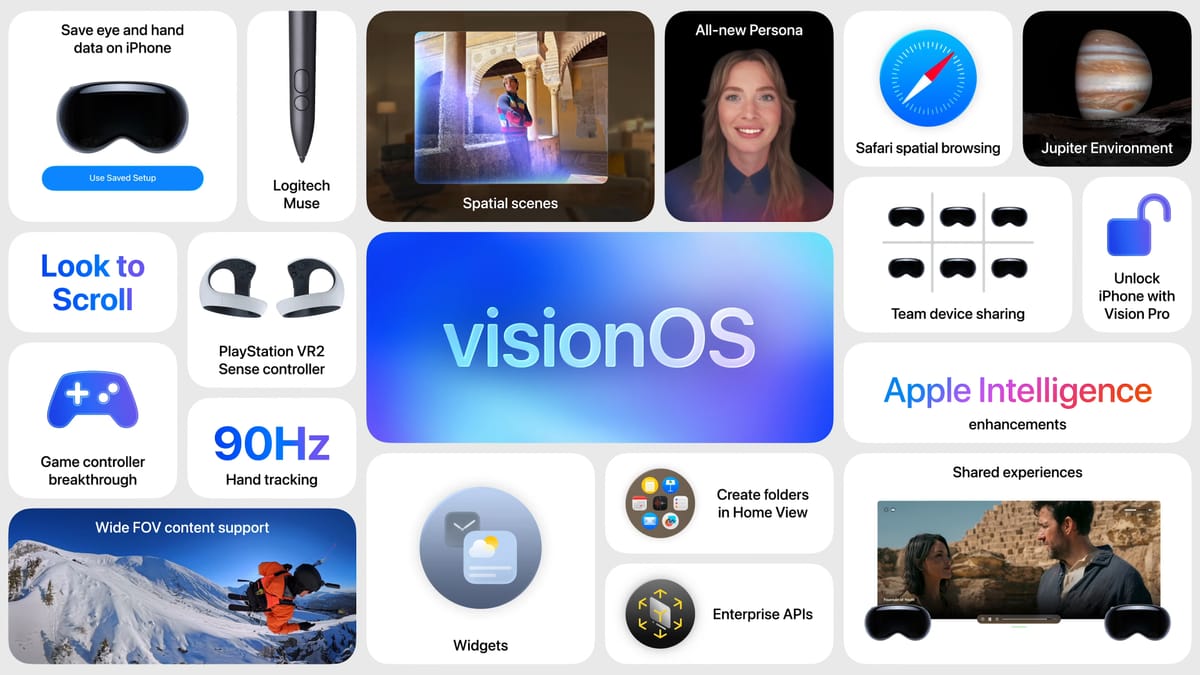
For more about visionOS 26, read our article covering the many changes set to arrive in Apple’s biggest Vision Pro software update yet.
Spatial Photos on Vision Pro Are Getting a Volumetric Upgrade for Greater Immersion


At WWDC today, Apple announced the headlining features of visionOS 26, its next big OS release for Vision Pro. Among them is a new revamped spatial photos feature that ought to make them even more immersive.
Vision Pro launched with the ability to view spatial photos, captured either with the headset itself or with iPhone 16, 15 Pro and Pro Max. These spatial photos created a sense of depth and dimensionality by combining stereo capture and applying depth mapping to the image.
Now, Apple says it’s applied a new generative AI algorithm to create “spatial scenes with multiple perspectives, letting users feel like they can lean in and look around,” essentially ‘guessing’ at details not actually captured on camera.
With visionOS 26, Vision Pro users will be able to view spatial scenes in the Photos app, Spatial Gallery app, and Safari. The company says developers will also be able to use the Spatial Scene API to add the feature into their apps.
To show off the new AI-assisted spatial photos feature, real-estate marketplace Zillow says it’s adopting Spatial Scene API in the Zillow Immersive app for Vision Pro, which lets users to see spatial images of homes and apartments.
Apple’s visionOS 26 is slated to arrive sometime later this year, although the company says testing is already underway.
The post Spatial Photos on Vision Pro Are Getting a Volumetric Upgrade for Greater Immersion appeared first on Road to VR.
Apple Unveils a Dedicated Games App
At WWDC 2025, Apple announced a new dedicated Games app coming to Mac, iPhone, and iPad with features like leaderboards, matchmaking, and integration with Apple Arcade. Engadget’s Jessica Conditt describes it as “a revamp of Game Center” that behaves “more like a modern gaming hub, a la Xbox or GOG Galaxy.” From the report: You can see what your friends are playing and challenge them to specific feats in certain titles. The library tab will include every game you’ve ever downloaded from the App Store, allowing you to booth them up right there. On Mac, a Games app overlay makes communication tools, audio controls, Bluetooth connections and live battery levels accessible at any time.


Read more of this story at Slashdot.