Tesla will start offering public Robotaxi rides in Austin on June 22, says Elon Musk

Tesla CEO Elon Musk says that Robotaxi service is “tentatively” set to begin in Austin, Texas on June 22. This comes after the company said last month that it had already begun testing driverless Model Ys in Austin. Shortly after that, Bloomberg reported that Tesla had internally discussed a launch date of June 12, though the only publicly shared timeline has been sometime in June.

The first Robotaxi Model Y operating without a person in the driver’s seat was spotted on South Congress in Austin yesterday. It sported a decal on the side of the vehicle that read “Robotaxi” in the same font as Tesla’s stylized version of Cybertruck. In the video, a person sitting in the passenger seat can be seen, though it’s unclear what their role is. 

HOLY CRAP ITS A #ROBOTAXI!!@SawyerMerritt @WholeMarsBlog @DirtyTesLa @niccruzpatane pic.twitter.com/slfAsu0AQl

— Terrapin Terpene Col (@TerrapinTerpene) June 10, 2025

The driverless Model Y was followed closely behind by a Model Y with a driver, though again, their role and identity are unclear. Musk had previously said that Robotaxis will be remotely monitored at first and geofenced to areas of Austin that are the safest for the vehicles to navigate.

Musk, who has a history of playing fast and loose with timelines, had originally promised in 2019 that there would be one million Robotaxis on the road by 2020. He now says the company will start with about 10 taxis in Austin, before expanding rapidly.

Reuters recently attempted to gather more information on Tesla’s planned launch and vehicles from the City of Austin, but city officials were blocked from releasing any information by Tesla and the Texas Attorney General.

This article originally appeared on Engadget at https://www.engadget.com/transportation/evs/tesla-will-start-offering-public-robotaxi-rides-in-austin-on-june-22-says-elon-musk-161801916.html?src=rss

HP reveals first Google Beam 3D video conferencing setup, priced at $25,000

Amid all the Gemini hype at Google I/O last month, the company also turned one of its experiments into a (kind of) real product. Project Starline was reborn as Google Beam, a 3D video conferencing system that makes it look like you’re in the same room with the other party. Google said HP would reveal the first Beam setup, and now it has. The HP Dimension is coming this year, and the price tag is a predictably hefty $24,999.

Google Beam calls for a lot of advanced hardware, so the high price isn’t a surprise. The HP Dimension uses six high-speed cameras positioned around the display to capture the speaker from multiple angles. This visual data is then fed into Google’s proprietary volumetric video model, which merges the streams together into a 3D reconstruction of the speaker.

Eventually, there will be Beam systems of various sizes, but the HP model comes with a big 65-inch display. All Beam systems will use light field screen technology, which can show the volumetric model in 3D, eliminating the need to wear a headset or glasses for the 3D effect. Google says Beam can show minute details at 60 fps with millimeter-scale precision.

Read full article

Comments

Major Telescope Hosts World’s Largest Digital Camera

The Vera C. Rubin Observatory in Chile will begin full operations in the coming months with the world’s largest digital camera, capturing 3,200-megapixel images that would require several hundred HD television screens to display at full resolution. The $810 million facility will map the entire southern sky every three to four nights, observing each location approximately 800 times over its planned decade of operations.

The telescope’s unusual design allows it to photograph an area equivalent to 45 full moons in each shot and swing between different sky locations every 40 seconds. Its digital camera, roughly the size of a small car, will generate eight million alerts per night when it detects astronomical objects that move or change brightness, according to Tony Tyson, the University of California, Davis astronomer who conceived the project in the 1990s. Astrophysicist Federica Bianco, who received a preview of the telescope’s first full-color image, described her reaction simply: “There are so many stars!” The team plans to unveil that inaugural image on June 23.


Read more of this story at Slashdot.

These Are the Best Tools on Sale at Lowe’s for Father’s Day

We may earn a commission from links on this page. Deal pricing and availability subject to change after time of publication.

Even if you’re shopping for yourself instead of a dad, Father’s Day is one of the best times of year to buy tools. To upgrade your tool kit or to get a start on your DIY adventures, Lowe’s has deals on hand tools and cordless power tools up to 54% off this week. Here are some of the best savings.

DeWalt power tools

DeWalt is a trusted brand in power tools, specializing in cordless tools as well as miter saws. For a home shop, a decent saw and a cordless tool set are indispensable. Here are a few of the best deals on DeWalt tools.

  • The DeWalt 12-inch, 15-amp miter saw is on sale for $399, 36% off its regular price. This saw can cut compound angles and comes with a starter blade and a dust bag. This is a corded tool, so you’ll need power to use it on moulding, shelving, and all your other DIY projects.

  • The DeWalt 20-volt cordless oscillating tool is on sale for $99, 54% off its usual price. This is a versatile tool that can be used for plunge cutting, sanding in tight corners, and on a variety of materials. The set comes with one battery, a charger, a wood-cutting blade, a multi-material blade, an accessory adapter, and a tool bag.

  • The DeWalt 20-volt cordless drill is on sale for $99, 37% off its usual price. A good quality drill can be used for driving hardware as well as drilling holes, and is an essential part of a cordless tool set. This set comes with a 20-volt battery, a charger, and a tool bag.

Batteries and accessories

If you’ve had a cordless tool set for a few years, your batteries could be wearing out and need replacing. New batteries are often one of the most expensive and overlooked costs of owning a cordless tool set, as are accessories for your tools. Here are a few of the best deals from Lowe’s on power tool accessories for Father’s Day.

  • A four-pack of 20-volt DeWalt batteries is on sale for $149, 54% off its regular price. The set includes two 2-amp-hour batteries and two 4-amp-hour batteries, but no charger, so this is only a good deal if you already have a DeWalt set.

  • A two-pack of DeWalt 8-amp-hour batteries is on sale for $199, 33% off its usual price. This is a good set if you want to work for longer without a power source, as higher capacity batteries will last longer. This set is battery-only, so you’ll need a 20-volt DeWalt charger for them.

  • The DeWalt 110-piece bit set is on sale for $29.98, 40% off its typical price. The set includes a variety of bit heads, a magnetic extension sleeve, and a variety of drill bits. This is a good set for regular maintenance around the house.

Hand tools

Hand tools are an indispensable part of your home shop set-up. Whether you plan to do simple maintenance or larger projects, having the right wrenches and drivers is key. Here are some of the best deals on hand tools on sale at Lowe’s for Father’s Day.

  • The Craftsman 230-piece SAE wrench set is on sale for $99, 50% off its regular price. This set includes three sizes of ratchets, a range of sockets, a driver base, a set of box wrenches, and a toolbox. It’s a great starter set of wrenches.

  • The Craftsman 20-piece SAE ratchet set is on sale for $19.98, 46% off its usual price. This is a set of sockets and a ratchet, a good addition to a small maintenance kit or an expansion of a larger tool kit.

  • The Craftsman ⅜-inch drive torque wrench is on sale for $54.98, 44% off its typical price. A torque wrench is good for vehicle maintenance and can be used to apply a specific amount of pressure when driving nuts.

Best tools under $5

Not all tools need to cost a lot of money, and in fact, some of the most useful ones are really rather cheap. Here are the best budget-friendly tool deals under $5 at Lowe’s for Father’s Day.

Disney and Universal Studios file suit against Midjourney for copyright infringement

Disney and NBCUniversal have filed a joint suit against AI company Midjourney alleging copyright infringement on their various properties. The complaint, filed in federal district court in Los Angeles, includes images created by Midjourney that feature a wide variety of protected characters from each company’s various properties, including Star Wars, Shrek, The Simpsons, Despicable Me and others. The 110-page suit alleges that the AI company “helped itself to countless” copyrighted works when training its models that have been creating and disseminating “innumerable” copies of these characters via AI-generated images.

In the lawsuit Midjourney is described as “the quintessential copyright free-rider and a bottomless pit of plagiarism.” Disney and NBCUniversal are the first major Hollywood players to enter the now crowded field of AI copyright infringement lawsuits; it comes against the backdrop of similar lawsuits against OpenAI, Meta and Perplexity AI.

The intersection of art and artificial intelligence continues to be battled out in court, though a suit brought by two of the largest names in media properties carries immense weight. “We are bullish on the promise of A.I. technology and optimistic about how it can be used responsibly as a tool to further human creativity,” said Horacio Gutierrez, Disney’s general counsel, in an email to The New York Times. “But piracy is piracy, and the fact that it’s done by an A.I. company does not make it any less infringing.”

In a separate email to The New York Times, Kim Harris, general counsel for NBCUniversal, said, “We are bringing this action today to protect the hard work of all the artists whose work entertains and inspires us and the significant investment we make in our content.”

We’ve reached out to Midjourney for comment and will update if we hear back.

Read the lawsuit below:

This article originally appeared on Engadget at https://www.engadget.com/entertainment/disney-and-universal-studios-file-suit-against-midjourney-for-copyright-infringement-154206053.html?src=rss

Disney, NBCU Sue AI Image Generator Midjourney Over Copyright Infringement

Disney and NBCUniversal have filed a copyright infringement lawsuit against AI image generator firm Midjourney in U.S. District Court in Los Angeles, marking the first time major Hollywood studios have taken legal action against a generative AI company.

The entertainment giants accuse Midjourney, founded in 2021, of training its software on “countless” copyrighted works without permission and enabling users to create images that “blatantly incorporate and copy” famous characters including Darth Vader, the Minions, Frozen’s Elsa, Shrek, and Homer Simpson.

The companies claim they attempted to resolve the matter privately, but Midjourney “continued to release new versions” with “even higher quality infringing images” according to the complaint. Disney’s general counsel used the word “piracy,” to describe Midjourney’s practice, while NBCUniversal’s general counsel characterized it as “blatant infringement.”


Read more of this story at Slashdot.

The Six Most Exciting New Apple TV Features in tvOS 26

The Apple TV streaming box has a relatively small user base, and as such, it doesn’t get as much of Apple’s attention at the company’s big keynotes. WWDC 2025 was no different, but tvOS 26 is still getting quite a few fun new features that are worth highlighting. Here are the biggest new tvOS 26 features coming to your Apple TV this fall.

A new Apple Music karaoke mode

On the Apple TV, Apple Music is getting a new karaoke feature called Sing. This lets you use your iPhone as a mic and tasks you to sing along to lyrics displayed on the Apple TV. The streaming box will then amplify your voice, making for a fun way to host a karaoke party at home. Of course, you’ll need to be running iOS 26 on your iPhone in addition to tvOS 26 on the Apple TV to access this. Additionally, foreign lyrics will be translated into your language and even come with pronunciation guides.

Liquid Glass design

tvOS 26 is also on the Liquid Glass train, and the TV may just be the place where this design philosophy will truly shine. With the bigger screen comes bigger design elements, where those new translucent widgets and icons should feel right at home. Plus, Apple is promising you’ll be able to see more shows and movies at once.

Choose your Apple TV profile on wake

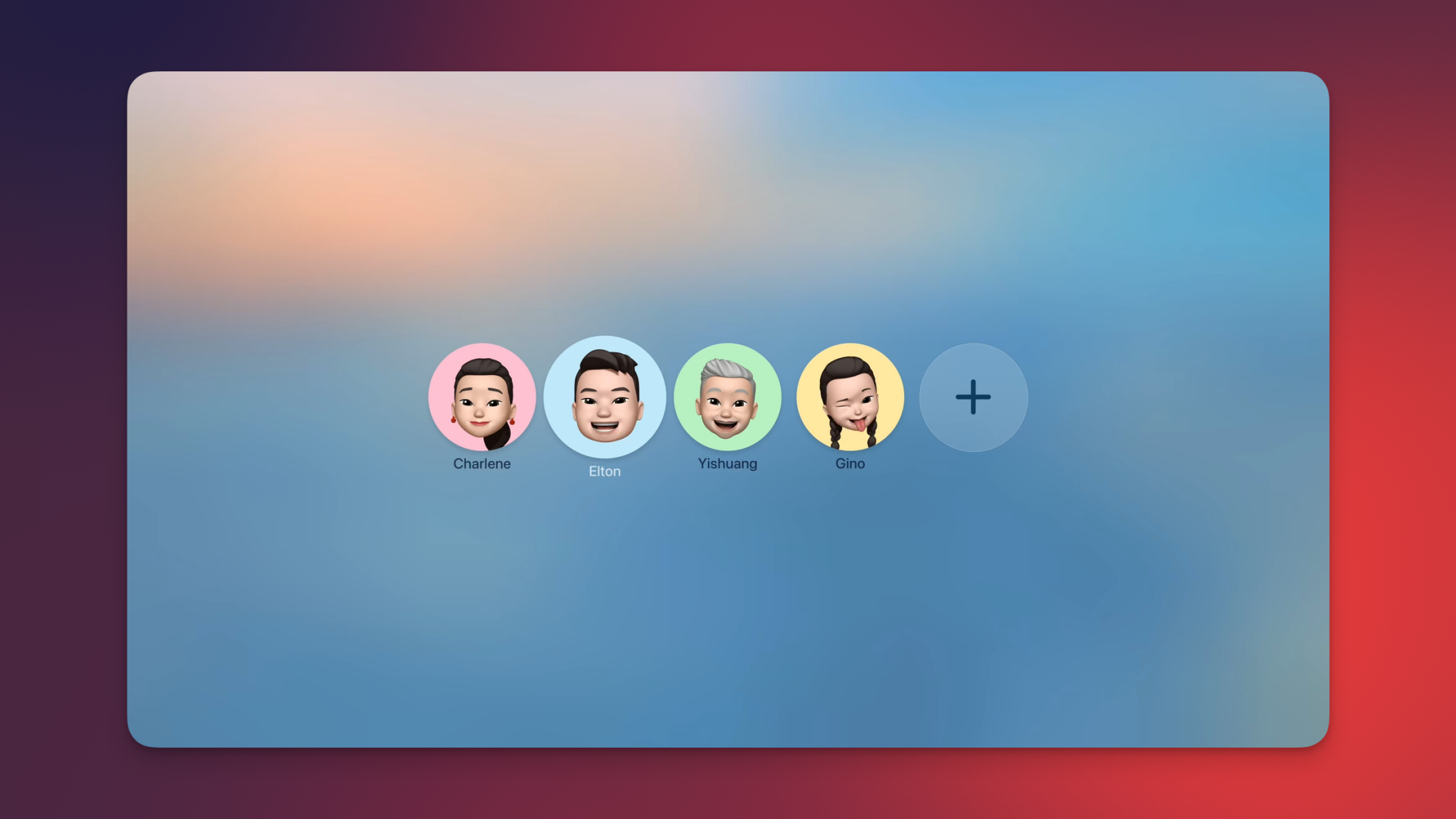
The user profile selection page in tvOS 26.

Credit: Apple

Each time you wake your Apple TV from sleep mode, you’ll be able to choose to show the profile selection page. This is great for a device that’s meant to be shared between multiple members of a household, so that each person can get back to the content on their respective watch list.

Permanently connect to your favorite speaker

This is possibly my favorite upcoming Apple TV feature. You’ll be able to go to tvOS Settings and choose to permanently connect to your favorite speaker. This way, each time the Apple TV wakes up, it’ll pick the right speaker without requiring you to fiddle with settings or manually connect to it. The only catch is that the speaker needs to support AirPlay for this feature to work.

Call and FaceTime enhancements

If you use your Apple TV for calls, then you’ll be happy about this. Apple is promising call notifications for the device, which means that you’ll be able to answer calls using your Apple TV. The redesigned contact cards from the Phone app will also come to tvOS 26. Separately, FaceTime on tvOS 26 will support more Live Captions languages.

New screensavers from India

Apple TV's new India screensaver showing green hills among the clouds.

Credit: Apple

One of my favorite Apple TV features is the video screensavers that display a slow overhead shot of various locations when the TV is not in use. It’s an incredibly aesthetic choice that makes my living room feel a lot more peaceful. With tvOS 26, Apple TV is getting new aerial screensavers from India, which is quite exciting as someone who lives in the country. India’s natural beauty and geographical variety is unrivaled, and it’s nice to see some of that coming to the Apple TV.

Noble’s Mozart-Inspired FoKus Amadeus Earbuds Arirve To Challenge Apple’s AirPods

Noble's Mozart-Inspired FoKus Amadeus Earbuds Arirve To Challenge Apple's AirPods
Seemingly on a roll this year, Noble Audio has announced yet ANOTHER new product—the FoKus Amadeus. Drawing inspiration from the classical genius Wolfgang Amadeus Mozart and his distinctive sartorial style (i.e. rocking that puffy shirt 100%), these new earbuds promise a blend of cutting-edge tech and sophisticated design reminiscent of the

GeForce RTX 5050 Gaming Laptop Listings Point To Multiple VRAM Configs

GeForce RTX 5050 Gaming Laptop Listings Point To Multiple VRAM Configs
There is a bit of mystery and intrigue surrounding NVIDIA’s upcoming GeForce RTX 5050 GPU, and a handful of early retail listings (as well as a leak by Acer) of gaming laptops outfitted with the mobile variant either shed light on the situation, or add to the intrigue. How so? The memory configuration is not the same across all of the early

The USB-C Apple Pencil is on sale for $60 right now

The USB-C Apple Pencil is on sale via Woot for just $60. This is a discount of 24 percent and a record low price, as it typically costs $79. This serves as the company’s “budget” stylus and was originally released at the tail-end of 2023.

Despite being the most reasonably priced Apple Pencil, there’s still plenty to like here. It’s the only Pencil that’s compatible with nearly every iPad in Apple’s lineup. This includes the iPad Air (M2), iPad Pro (M4), iPad (10th gen) and iPad mini (6th gen). It even works with the older 12.9-inch iPad Pro (3rd-6th gen), 11-inch iPad Pro (1st-4th gen) and iPad Air (4th and 5th gen). Of course, it also integrates nicely with the recently-released iPad mini (7th gen.)

The model offers tilt sensitivity and will attach to the side of iPads with magnetic holders. This is a great option for casual users who just want a stylus for casual writing or for navigating around a device. This is especially true for owners of the iPad (10th gen.) That tablet doesn’t work with either of Apple’s higher-end stylus options.

However, there are some downgrades when compared to the Pencil Pro and the second-gen Pencil. The USB-C Apple Pencil can’t handle pressure sensitivity, which limits options for illustrators. It also won’t charge while magnetically attached. It charges via a USB-C cable. The accessory is slightly-shorter than the higher-end models and that could be an issue for those with large hands. Otherwise, this is a fine stylus for Apple devices.

Check out our coverage of the best Apple deals for more discounts, and follow @EngadgetDeals on X for the latest tech deals and buying advice.

This article originally appeared on Engadget at https://www.engadget.com/deals/the-usb-c-apple-pencil-is-on-sale-for-60-right-now-151630786.html?src=rss

Resident Evil Requiem has a third-person view for fewer cheap jump scares

The biggest surprise of SGF 2025 was the reveal of a new Resident Evil. The “ninth” game of the series broke cover on the first day of the gaming show. After a fake-out tease from Capcom executives halfway through SGF Live, the show closed with a brief trailer for the Resident Evil Requiem.

Resident Evil Requiem will center on a new character, Grace Ashcroft. Ahead of the hands-off gameplay presentation, game director Koshi Nakanishi outlined how Grace isn’t a combat-hardened soldier or survival expert of episodes past. In that way, she’s more exposed and under constant threat, at least judging from the early gameplay demo.

The audience collectively chuckled at Grace equipping herself with an empty medicine bottle. That is not likely to be enough. Apparently, though, her detective skills will come into use in the game, although we didn’t see that during Capcom’s presentation – she was mostly just trying not to die.

The gameplay demo starts with Grace, strapped to a hospital bed. She’s seemingly soaking wet, injured and to add insult to those injuries, she’s also upside down. As she struggles to escape her restraints, a sense of constant tension and stress builds – it feels like the whole place is a threat, and I kept a careful eye on the closed door of the room intently as she finally broke free. The demo then plays out from Grace’s first-person perspective, a la Resident Evil 7 and Village. Things remain tense as she cautiously explores the mystery locale.

The gameplay focused on simple object interaction, like Resident Evil series past. Survival horror staples, like screwdrivers, broken fuses and overly ornate keys are still here as Grace sculked and breathed heavily around what appeared to be a run-down hotel.

Resident Evil Requiem demo
Capcom

Much of the demo involves the fear of being attacked rather than actual attacks. Dark hallways, light switches that didn’t work, and barely any hints or objects to give Grace context about where she’s ended up.

Eventually, an infected corpse fell out of a door onto Grace, momentarily relieving the tension. Finally, a threat! But the dead body isn’t really the threat: a giant creepy hand swings across to grab the corpse, and it’s attached to giant ogre woman-beast that bites the head clean off. Grace spent the remainder of the demo fleeing the creature, which managed to bite her shoulder. This creature could even destroy the ceiling to create new paths. The demo concluded with Grace seemingly facing her demise, armed only with the medicine bottle.

The game starts up again, but with a twist. The camera pans out to offer a ‘classic’ third-person perspective to Grace’s nightmare. The audience during my screening went wild. (A quick now that Resident Evil Village‘s expansion added its own third-person mode, so it’s not an entirely new shift.)

A Capcom spokesperson said you’d be able to transition between the views throughout Resident Evil Reqiuem, offering, if not a difficulty setting, more of a jump scare setting. My take is that a third-person view is a little less scary, so I’ll probably be using that. 

Resident Evil Requiem is set to launch February 27, 2026.

This article originally appeared on Engadget at https://www.engadget.com/gaming/resident-evil-requiem-gameplay-demo-first–and-third-person-views-sgf-2025-150009510.html?src=rss

Onimusha: Way of the Sword brings Japanese cinematic royalty to the samurai fantasy series

While the surprise of a new Resident Evil might have been Capcom’s biggest story at SGF, it’s got other series – and other sequels – to show off, like Onimusha. Previously a banner PS2 series, Onimusha spanned four mainline games between 2001 and 2006. We’ve since seen remastered editions of the first two episodes. 

Still, a true sequel was long overdue, especially after games like Sekiro and Ghost of Tsushima showed a renewed appetite for feudal Japan swordplay. Through a theater presentation during SGF 2025, I got a closer look at Onimusha: Way of the Sword, which features a new hero and a new setting. Also, no more static backgrounds.

Players will control Miyamoto Musashi, a legendary (but historically real) Japanese swordsman, artist and writer. This is interesting, but the more compelling wrinkle is that his face is modeled on the legendary (but historically real) actor Toshiro Mifune, who passed away in 1997. Mifune was a leading actor in several Akira Kurosawa movies in the 1950s and ‘60s, including Rashomon, Seven Samurai and Yojimbo. In short, he was arguably the most famous samurai actor there ever was. I’m not counting Tom Cruise. (Mifune, while alive, portrayed the same character, Musashi, in three separate movies.)

Several gameplay features have carried over to the latest edition of the Onimusha series. Once again, you’re equipped with the Oni gauntlet, now possessing its own sentient voice. The gauntlet is crucial to collecting different types of orbs from enemies. Some will repair health, while others add experience points, skill points and more. We were also shown some mild puzzle-solving, using the power of the Oni gauntlet to see invisible demons and unlock areas that were spiritually blocked. Absorbing sinister dark masses will let Musashi relive harrowing scenes from the past, powered by his cursed gauntlet.

The early gameplay demo focused on swordplay, mainly, with barely any mystical attacks and special moves. Like in previous games, you’ll have to balance attack, movement, guarding and counters. Once again, Issen attacks (both through interrupting sword strikes and well-timed guards) are key to applying major damage to waves of attacking demons. Musashi can also apply Issen attacks multiple times to finish off groups of enemies – if your timing is good enough. He can also parry arrows and send them back to where they came from. 

Environmental damage can also prove useful against enemies, like fire. At times, you’ll even be able to wield objects for defense, like a raised tatami mat to block arrow fire. It seems we were only glimpsing the basics of Onimusha battle dynamics and attacks.

The guard system appears relatively forgiving, and I saw Musashi block light sword attacks from behind without even turning around. I’m intrigued to see how the game’s difficulty will scale in an era of Soulslikes.

Onimusha: Way of the Sword
Capcom

Fans of those games will be more intrigued with boss battles, in particular, ones where you face off against Ganryu, seen above. He appears to be Musashi’s swordsman rival – and one that’s been gifted his very own Oni gauntlet. The confrontation between the two was a valuable opportunity to demonstrate how Break Issen operates. After wearing down the guard gauge of enemies, you can perform a severe attack which can be channeled to specific areas or body parts. Do you go for the head to hit for maximum damage, or the sword arm to reduce damage going forward? I also love having an antagonist to face off against, each time upping the ante. Ganryu, who seems a bit of a dick, is that guy.

Onimusha: Way of the Sword is scheduled for release in 2026 on PS5, Xbox Series S|X, and PC.

This article originally appeared on Engadget at https://www.engadget.com/gaming/onimusha-way-of-the-sword-gameplay-demo-cinematic-royalty-150007292.html?src=rss

Pragmata is a satisfying sci-fi shooter with an intriguing double act

Capcom’s odd-couple sci-fi action game, Pragmata, is almost here. At SGF 2025, I finally got to steer Hugh (the human) lumbering around in a military spacesuit, with the adorable android, Diana piggybacking along.

First announced in 2020 during the PS5 reveal stream, Pragmata is set on a lunar base, where an industrial mishap turns security droids hostile, while lines of communication back to Earth have been severed. The USP here is how you fight your threats: by teaming up with a small synthetic girl who can hack into hostile robots while you shoot away at them with a collection of weapons.

Hugh starts off with a simple pistol with unlimited ammo but soon acquires additional firearms, including a shotgun-like energy gun that inflicts severe damage up close and restraining webbing to slow down multiple enemies, giving Diana more time to hack.

I was intrigued to see how Capcom would balance Pragmata’s gameplay premise of controlling and fighting with both characters. I thought it would involve a lot of tagging between each character, or worse, steering each with a different analog stick. Fortunately, Pragmata’s implementation is an elegant one.

The player primarily controls the human, Hugh. While he runs and guns, Diana’s powers involve locking onto an enemy and making hacking attacks by navigating a two-dimensional grid with the DualSense’s main buttons. Triangle for up, Circle for right .etc. While getting from point A to B inside this grid will ‘break’ a robot’s defenses, you’ll want to pass through other nodes on the way, increasing damage and even adding buffs. The limit here is ensuring Hugh remains out of danger long enough to focus on Diana’s efforts.

Thankfully, Hugh’s equipped with dodges and rocket dashes to keep his distance from enemies. Expect to use walls and structures as cover, too, especially when facing multiple enemies at once. It’s probably possible to take down enemies without hacking, but it will take a lot more time. Hacking also interrupts the robots’ attacks and movement — it’s mandatory in most confrontations in Pragmata. 

The rest of the demo involved exploring the area, releasing multiple locks to progress further into the lunar base. Hugh can jump and boost himself for longer gaps or just some controlled hovering. Pick-ups between battles were mostly health boosts and secondary weapons. Most one-on-one encounters could be dealt with using the low-damage pistol, but when there are two, three, or five enemies, swapping between the slow-down weapons or the powerful shotgun was very much necessary. It’s a satisfying battle system, but I’m curious as to how deep this system will go. (Also, I wish I’d got to try some boss battles during the demo.)

Pragmata
Capcom

When Diana hacks and successfully breaks a robot’s defenses, certain parts and systems are highlighted in yellow, suggesting possible weak points. It’s a little similar to Horizon’s scanning mechanic, and while I couldn’t get an answer during my hands-on demo, it’ll be interesting to see whether that offers some more depth to combat. I’d appreciate the ability to focus on neutralizing a heavy-duty weapon or slowing an enemy down by aiming at their legs.

As the company teased in the latest trailer, Pragmata’s been a long time coming. Capcom is now aiming for a 2026 release.

This article originally appeared on Engadget at https://www.engadget.com/gaming/pragmata-hands-on-demo-sgf-2025-150005007.html?src=rss

I Tried the AI Tool That Made Those Viral Videos, and It’s Not As Good As You’d Think

We know that AI tech is progressing at a rapid rate, and Google’s recent unveiling of the Veo 3 video generator highlighted this once again. Veo 3 is a step up in terms of realism, and adds audio for the first time. Much of the time, the outputs from Veo 3 are pretty much indistinguishable from real videos.

It’s not perfect yet, but Veo 3 is taking the internet by storm, with viral clips covering everything from street interviews to incompetent Stormtroopers. Depicting soldiers of the Galactic Empire is at least one way of ensuring consistency between clips, because of course they all look the same.

Google itself has provided a showreel of impressive-looking video clips as well, which include a sailor at sea and a classical violinist. You need to look very, very hard to tell that these videos are AI, and even then it’s not always possible.

But those are the end results. What about the creation process? If you pay Google for an AI subscription, then you can produce Veo 3 videos of your own, and there are a couple of ways to go about it, which I’ll get into here.

All this AI video creation needs to be put into context each time: There are question marks around the technology in terms of energy use, copyright infringement, the threat to the creative industries, and misinformation spreading, all of which we’ve written about extensively before.

Creating videos with Veo 3

If you pay $20 a month for the Google AI Pro plan, then you get three Veo 3 video generations per day in the Gemini app, using the faster, lower-quality Veo 3 Fast model. If you’ve gone big with the $250-per-month Google AI Ultra plan, you get the “highest limits” for full Veo 3 access—Google doesn’t quantify this exactly, so there may be no hard ceiling, and it may well fluctuate based on demand. Each video is fixed at eight seconds long.

If you’re using the Flow and Whisk tools for your video creation, rather than the Gemini chatbot, it’s a bit different: You get 1,000 AI credits on the Pro plan per month, and 12,500 credits on the Ultra plan. A standard Veo 3 video will set you back 100 credits, and a Veo 3 Fast video is going to cost you 20 credits—and in these tools, the resolution can be upscaled to 1080p (it’s 720p if you’re using the Gemini app).

Gemini app
Creating videos in the Gemini app.
Credit: Lifehacker

As per Google’s Josh Woodward, Veo 3 Fast is faster (obviously), less demanding in terms of processing, and sticks to the same 720p resolution as normal Veo 3. It’s not clear exactly what trade-offs there are in terms of quality (the Google team wouldn’t elaborate when I asked via email), but anecdotally, it seems some of the textures, lighting, and details aren’t as good. Inside the Flow app, there’s a label saying Veo 3 Fast is a fifth the quality of Veo 3.

To start making videos, if you’re a Google AI Pro subscriber like me, you need to head to the Gemini app on the web (mobile video creation is limited to Google AI Ultra subscribers for now). Click the model picker in the top left corner, then choose 2.5 Pro (preview) or whatever the latest model is by the time you’re reading this: You can then select Video in the text input box and you’re ready to do some prompting.

Previously, I used Veo 2 to try and recreate the old Sony TV ad, where thousands of colored bouncy balls get thrown down the streets of San Francisco. The results weren’t great, so I gave Veo 3 Fast the same challenge. As you can see below, I got a better video back. It could almost pass as something that had been filmed in real life (the sun through the trees is great), but it still ignores most of my prompt instructions, and is nowhere near as good as Sony’s ad.

This brings us back to the nature of generative AI, which is to mimic what it’s seen before. I’m guessing Veo 3 has been trained on lots and lots of street interview vox pops, and not many ads where bouncy balls are cascading down hills. It also highlights that it can take a lot of prompting to get what you want, and throughout my AI video tests, getting tools to follow the prompts is an ongoing challenge.

With only two Veo 3 generations left for the day, I tasked Veo 3 Fast with recreating the classic “welcome to Jurassic Park” scene in Spielberg’s movie. Again, it’s better than the Veo 2 effort, but there are problems with prompt adherence, and there are too many paleontologists. The dinosaurs (and the dinosaur sounds) are well done, though.

Using Flow to create longer movies

Google also offers Whisk for animations and Flow for longer movie projects, using the same AI models as you’ll find in the Gemini app, corresponding to the plan you’re subscribed to. If you don’t want to make videos of your own, or you’re a free Google Gemini user, you can watch what other people have made via Flow TV.

Once you get into Flow in your web browser, click New project to get started. You can then start prompting, using the settings button in the top right of the prompt box to choose the model you want to use—you’ll see how many credits the generation is going to use up as well, before you do any rendering.

Google Flow
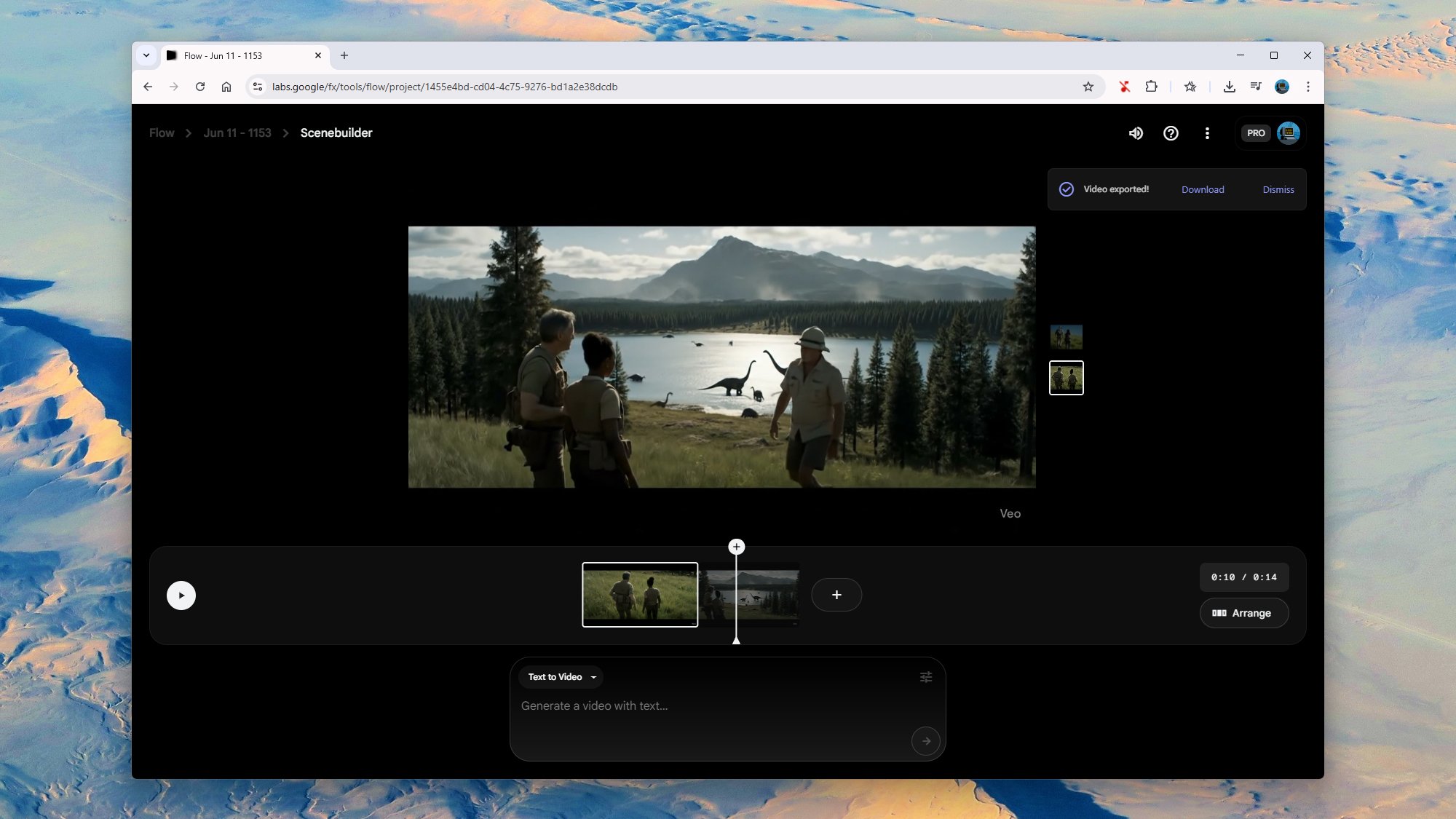
Creating videos in Flow.
Credit: Lifehacker

I decided to splash out on 100 credits for a proper, full Veo 3 clip in an attempt to better produce the Jurassic Park scene in full and get my AI movie making career off the ground. I added a little more detail to the prompt, as well as some dialog, and what came out the other end was about on a par with the Veo 2 output. You actually get two generations to choose between, which you can see here and here.

Again, we have the usual problems, in that the AI generator doesn’t really know what it’s supposed to be doing here, or how to construct a scene beyond what it’s seen in other videos. Our intrepid adventurers are looking in the wrong direction when one of them delivers the “wow… would you look at that” line, and everything from the dinosaurs to the trees looks generic.

The difference with Flow and creating extended videos is that you can click Add to scene on any of these generated videos and start building something longer, made up of eight-second chunks. Scenes can then be extended and arranged as needed, with the same characters and environments carried over from one clip to the next.

My attempts to get John Hammond to enter the scene didn’t really work. The original characters stayed in place well enough, but our new character appeared out of nowhere and all sound was suddenly cut out because Flow had somehow switched me back to Veo 2. We also got a freak camera shake half way through. It’s clear that I’m not going to be able to switch from tech journalism to AI film directing anytime soon, especially with just 1,000 credits per month.

Veo 3 is still at an early stage, and Google has put “experimental” labels all over it and the Flow interface. However, at the moment you’re going to have to spend a lot of credits and a lot of time working on prompts to get something that’s consistent and realistic. It’s likely that hours of effort and trial runs went into the polished AI videos you see populating your social media feeds.