Elon Musk’s strategy of suing or threatening to sue companies that don’t buy advertising on X has reportedly paid off in at least a few cases. A Wall Street Journal report yesterday said that Verizon and other companies started advertising on X after lawsuit threats.
X sued some advertisers last year over what it claims is an illegal boycott and reportedly threatened to add other companies to the lawsuit if they didn’t buy ads. The WSJ article said that Verizon, which hadn’t advertised on X since 2022, was told late last year that it would be added to the lawsuit if it didn’t buy ads. Verizon subsequently pledged to spend at least $10 million on the platform this year, the article said.
“Fashion company Ralph Lauren also agreed to resume buying ads on X after receiving a lawsuit threat, people familiar with the matter said,” according to the report. “All told, at least six companies that had either received lawsuit threats or were motivated in part by pressure tactics have struck ad deals with X, according to people familiar with the negotiations. The agreements include both firm ad-spending commitments and nonbinding targets.”
The iPhone’s battery features are getting an upgrade in iOS 26. For years now, Android phones have prominently featured how long charging to full will take you. The info is available on the Lock Screen, and it’s incredibly handy. Finally, along with a new adaptive battery mode, Apple will offer this as well. These are just a few of the iOS 26 features that Apple is borrowing from the competition, and they’re all part of a newly redesigned Battery section in the Settings app.
iOS 26 is currently available as a developer beta. If you want to test it out, you are free to download and install it, but for stability’s sake, I generally recommend you wait until at least the Public beta that’s going to be out sometime in mid-July.
Time to charge
The first change is the easiest to spot, but only if you pay attention. On iOS 26, when you plug in your iPhone, you’ll see the regular charging indicator. But, for a second or two, Apple will flash how long it will take to charge your iPhone to 80% or 100% (depending on your max charge setting). This will be right above the clock, where the day and date usually are. It’s blink-and-you’ll-miss-it, unfortunately, because it’ll disappear in just a second or two.
The new Battery section in Settings
Credit: Khamosh Pathak
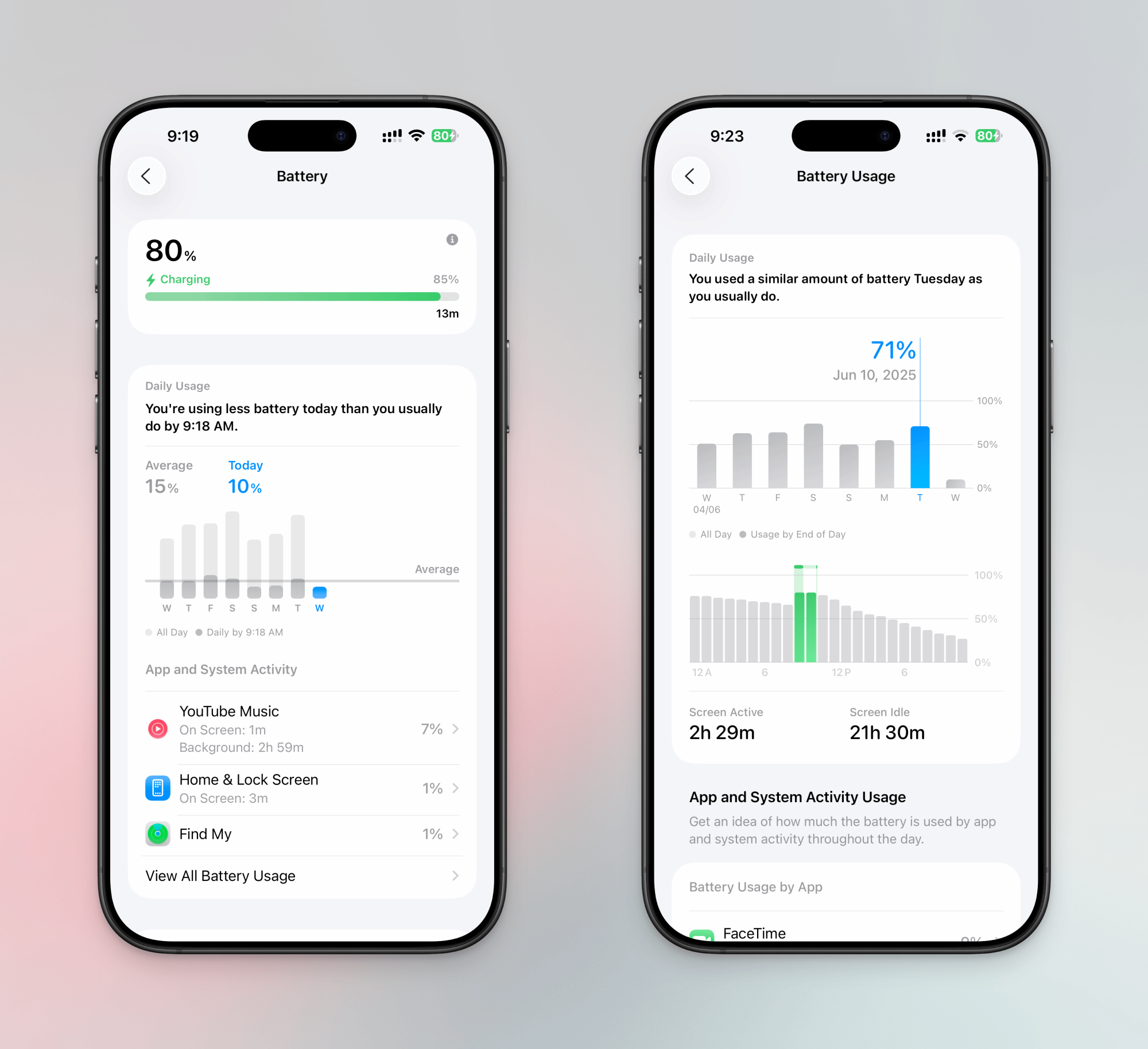
In iOS 26, when you head over to Settings > Battery, you’ll find a newly redesigned Battery screen. Up top, you’ll see a battery bar. If your iPhone is charging, you’ll see how long it will take to charge to 80%, and then to 100%.
Credit: Khamosh Pathak
Below, you’ll notice that your Battery charts are now displayed in a simple Weekly view, just like with Screen Time.
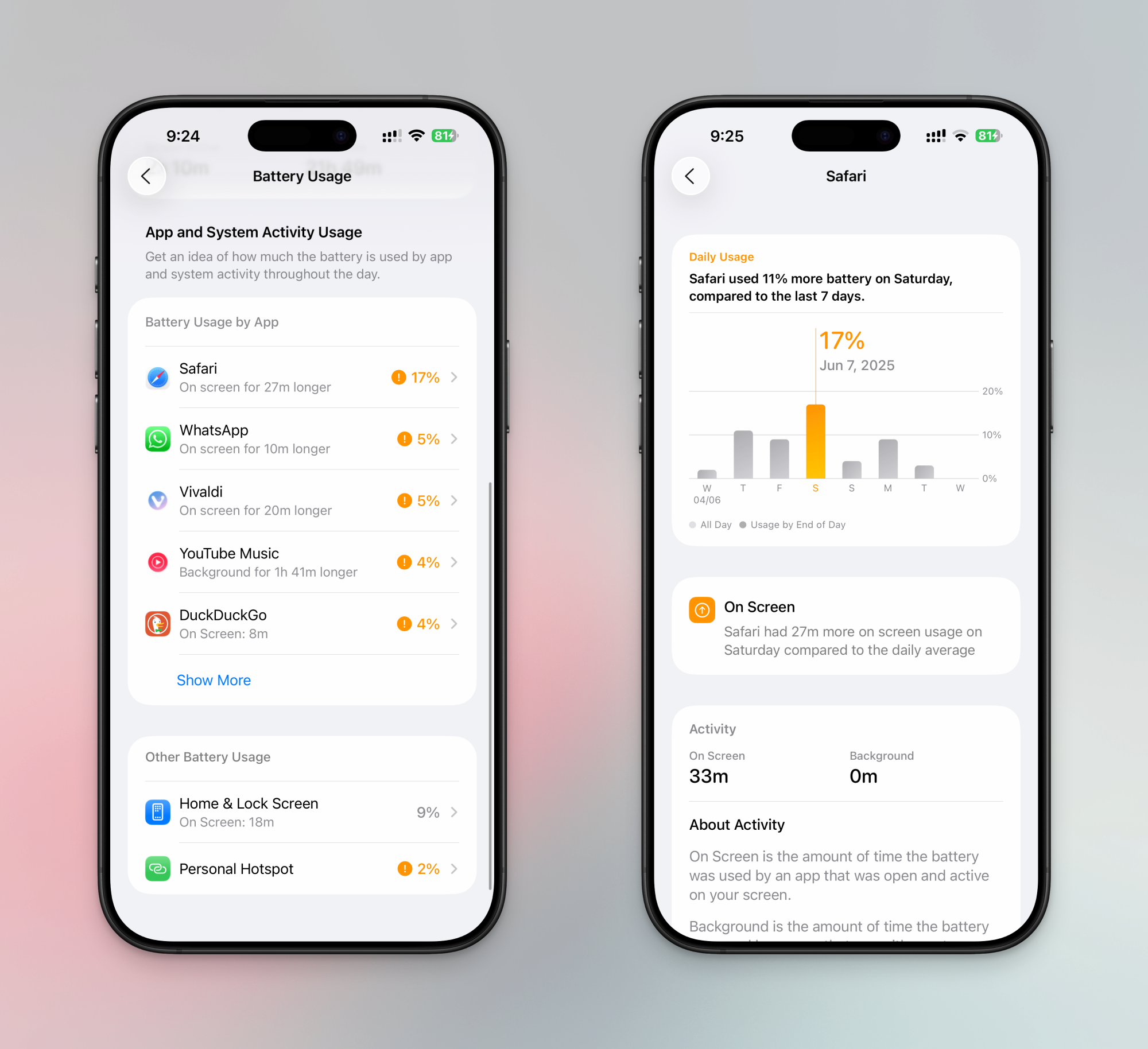
The new weekly charts are quite detailed, too. Apple will analyze and compare your battery usage across the week, telling you how your current usage compares with a typical day. Some days, you might use a lot more battery than you usually do, and the charts will take note of that. They’ll also tell you which apps are draining your battery the most.
For more detail, you can tap on the View All Battery Usage button to access a detailed interactive chart. Here, tap on any day to see more granular looks into your battery usage and charging history. You can scroll down to see how much juice each of your apps used, and how they compared with a weekly average. You can also choose a single app to see its battery history throughout the week. Quite cool.
Adaptive power mode
Credit: Khamosh Pathak
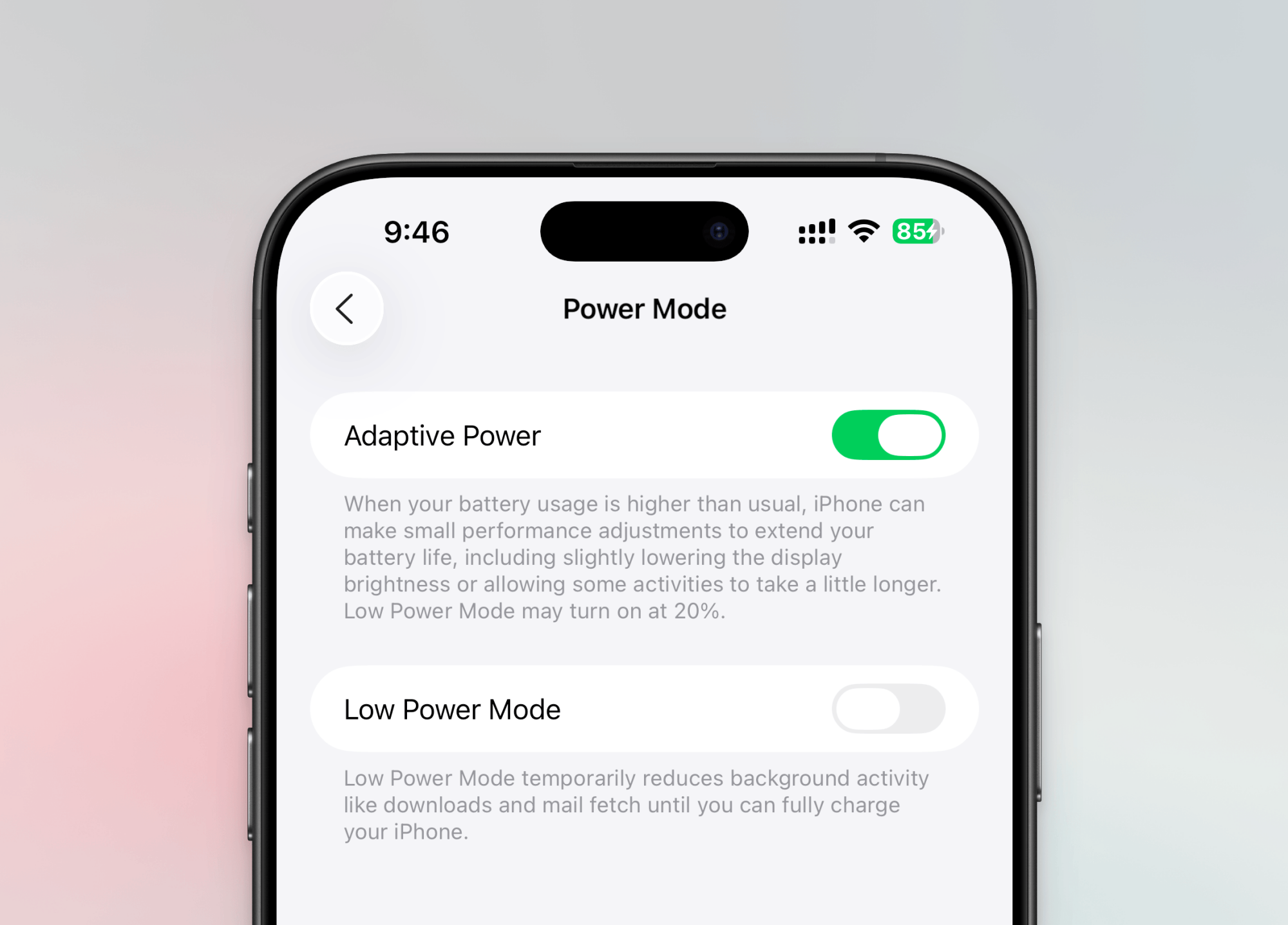
And finally, there’s the optional Adaptive Power Mode, found in Battery > Power Mode. This is Apple’s new battery saving feature, disabled by default, and it uses all your battery analysis data to make intelligent decisions on battery management. Say you’re having a heavier day than usual, and the chances of making it back home with 10% charge left are slim. In that case, your iPhone will start to make small tweaks like reducing performance slightly, reducing screen brightness, or taking more time to process some intensive tasks. Also, if this feature is enabled, your phone will automatically turn on low power mode when your battery reaches 20 percent.
Disney and NBCUniversal are going after Midjourney, a generative-AI tool trained on internet data that can be used to make everything from silly memes to short films made entirely of AI slop. The two Hollywood companies filed a lawsuit against the self-funded startup in Federal Court on Tuesday “to stop its theft of…
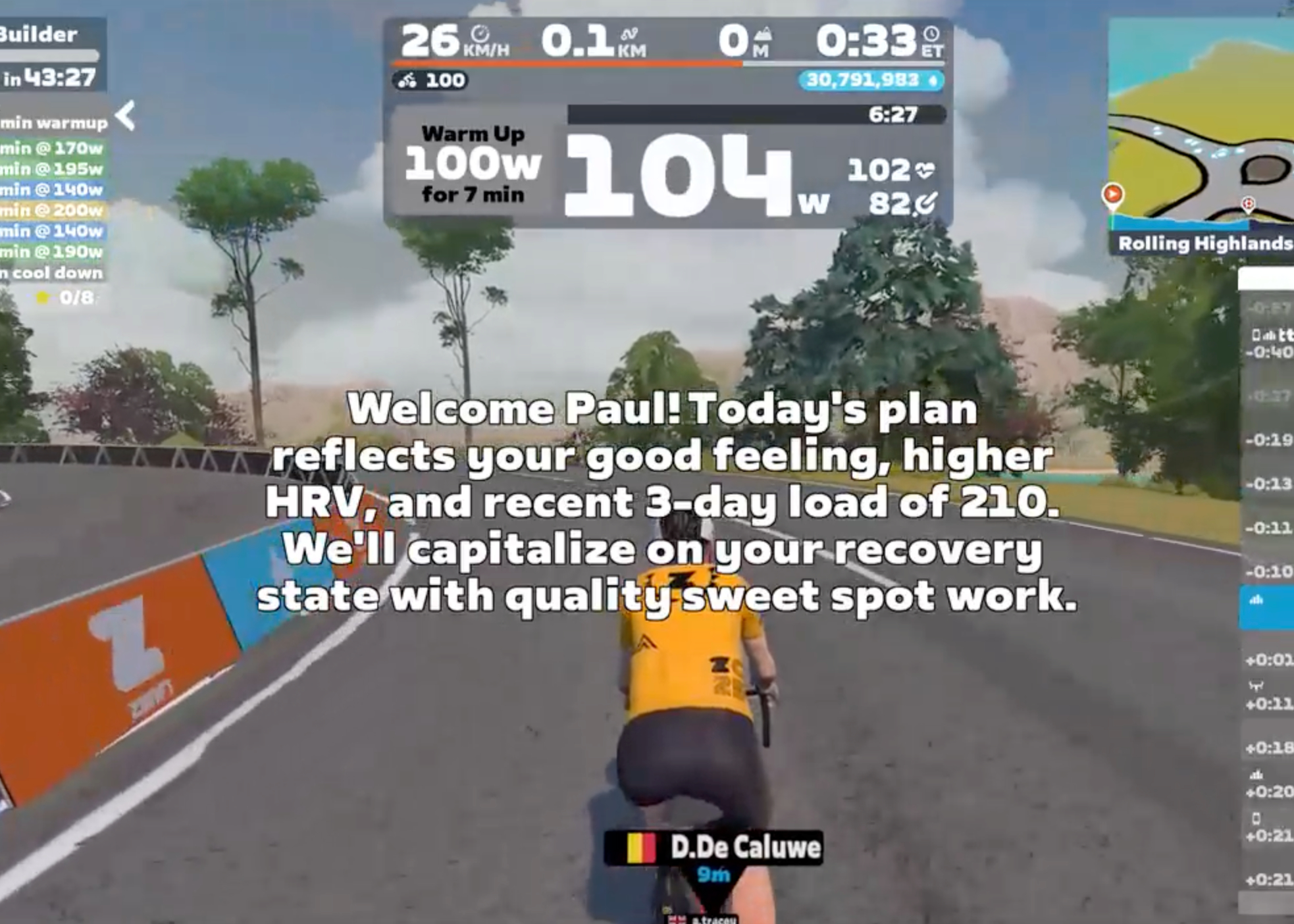
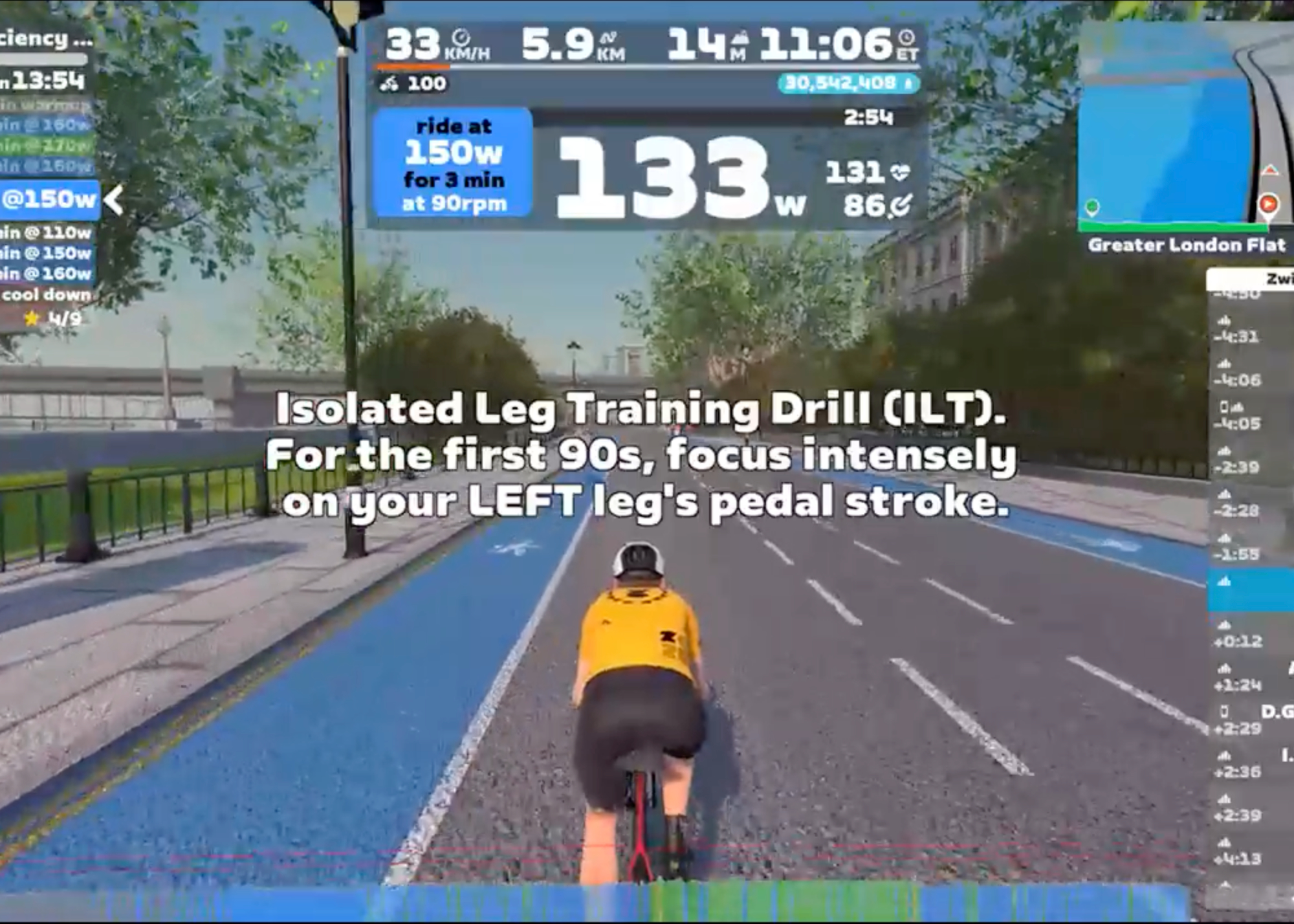
Ever finish a Zwift workout and think, “That was good, but not quite what I needed today?” Or maybe you’ve scrolled endlessly through the workout library, wishing for something perfectly tailored to your current goal or how your legs are really feeling?
Zwift offers a strong library of workouts and flexible training plans, and many riders find real value in them. But sometimes you want a workout that reflects your current goals, recovery state, and fitness — something that adapts to you in the moment. That’s where ZwiftFit comes in.
Every ZwiftFit workout is dynamically generated based on your profile and inputs, meaning even if you request the same workout type twice, you’ll get a different version each time — always targeting the same goal, but never repeating exactly. It’s about keeping your training fresh and specific, every time you ride.
That’s the idea behind ZwiftFit, a new AI-powered web app that creates truly personalized ZWO-format workouts based on your profile, goals, and how you’re feeling today. As an avid Zwifter and independent developer, I built ZwiftFit to solve a problem I personally felt. Now I’m sharing it with the community.
Why ZwiftFit?
While there’s no shortage of workouts on Zwift, finding the right one to match your immediate goals and energy can feel like guesswork. And let’s be honest, repeating the same old sessions can quickly lead to boredom. We’ve all been there: scrolling through lists, picking a workout that looked good on paper, only to find it didn’t quite hit the mark for that specific day.
ZwiftFit solves this by generating workouts tailored to:
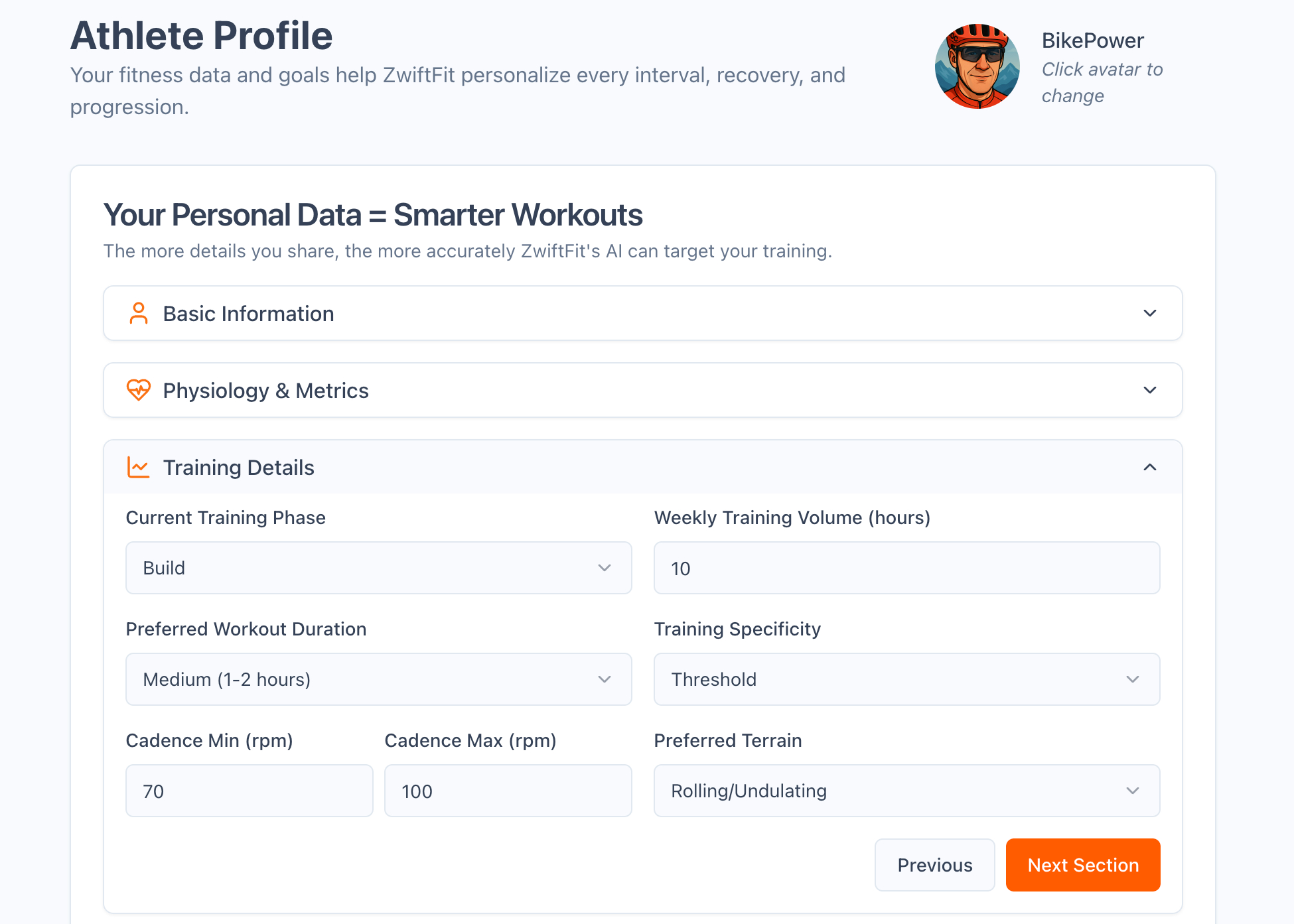
Your FTP, gender, age, and training load
Your training goals (e.g., improve climbing ability late in long rides, increase flatland power, sharpen race finish)
Strengths and weaknesses defined in your user profile
Physical limitations or injuries you’ve specified
An upcoming race or event
Daily readiness, HRV, and resting HR
Even how you feel that day — from “Very Tired” to “Excellent”
It’s not about scrolling through a library. It’s about telling ZwiftFit who you are and what you need — and letting it create the session.
Two Ways to Create a Workout
ZwiftFit supports two core paths:
1. Quick Workouts
Choose from 9 workout types including:
Endurance Ride
HIIT Session
Sprint Session
Climbing Challenge
Threshold Intervals
Race Warm-Up
Event Cooldown
With one click, you get a workout tailored to your current profile settings and duration preferences.
2. Custom Workouts
Need more control? Go custom. Custom Workouts give you a much deeper level of customization than Quick Workouts. There are seven main workout categories — like Recovery & Endurance, High-Intensity Intervals, and Strength & Skill Development — and within those, over two dozen specific workout types to choose from.
Once you’ve selected a type, ZwiftFit adapts it further based on your current profile and the specific workout options shown on the Custom Workout screen. Unlike your profile settings — which tend to remain stable over time — these session-specific options allow you to adjust key variables for the ride you’re about to do. You can specify:
Workout duration (fixed or range) – so you can fit in the perfect session whether you have 30 minutes or two hours.
Current feeling (Very Tired to Excellent) – ensuring your workout matches your actual recovery state, not just a pre-set plan.
Resting heart rate and heart rate variability (HRV)
3-day and 7-day training load
Warm-up and cool-down length (Short, Normal, Long)
You can even add custom instructions — whether you want motivational tips, fun cycling trivia, or a focus on specific aspects of execution like cadence, pacing, or technique. ZwiftFit incorporates this input to further personalize your session in real time.
Event Prep & AI Flexibility
Beyond crafting the core of your session, ZwiftFit offers some useful additions designed to seamlessly integrate with your Zwift life and give you even more control.
One of ZwiftFit’s standout practical features, especially for the racing Zwifter, is its event-specific warm-ups. These are invaluable not only for races (which often start hard right from the gun) but also for a variety of other Zwift activities. To meet these diverse needs, ZwiftFit provides a range of targeted warm-up types, including: Race Warm-Up, Climb Preparation, Group Ride Primer, TT Preparation, Sprint Activation, Long Ride Preparation, and Hard Start Readiness. Each is designed to address the specific physical demands you’ll encounter in those events.
To complement the warm-ups, ZwiftFit also offers targeted Zwift Event Cooldowns to enhance recovery immediately following your rides or competitive efforts. These short routines are carefully structured to gradually lower intensity, aiding in the removal of metabolic byproducts and easing muscle tension. Options include Race Recovery, Climbing Recovery, Sprint Recovery, and Endurance Ride Recovery.
You can also choose the duration of these warm-up and cooldown sessions based on your available time and personal preference. For the best experience, generate both the warm-up and cooldown sessions ahead of time. That way, you can smoothly transition from race prep to recovery without needing to leave Zwift or revisit the app. It’s a convenient and practical addition that supports readiness and recovery across a wide range of Zwift activities.
Multiple AI models are available, each offering a distinct style for generating workouts. Some models might emphasize structured intervals, while others introduce more variety or different types of challenges. You’ll also find variations in the verbosity of instructions—some are more concise, others more detailed—and subtle differences in tone. For example, one model might suggest a straightforward “2×20 at threshold,” while another adds pacing cues, motivational prompts, or mental focus tips throughout the session. This variety allows you to select a model that aligns with your personal preference for a particular session or to simply change models periodically to keep your training stimulating and engaging. Whether you want to stick with your favorite or switch it up to explore different approaches, having multiple models gives ZwiftFit a unique adaptability.
Simple and Affordable
There’s no subscription. Just a credit system:
New users get 30 free credits after signing up and verifying email.
Earn 30 more credits by generating one Quick Workout, one Custom Workout, and then downloading either of those workout files.
A 300-credit package costs just $2.99 — typically enough for 30–40 workouts (that’s less than 10 cents a session!)
For now, credit purchases are U.S.-only due to international tax complexity, but international users can still use the free credits and the FIT to CSV tool.
Bonus Tool: FIT to CSV Conversion
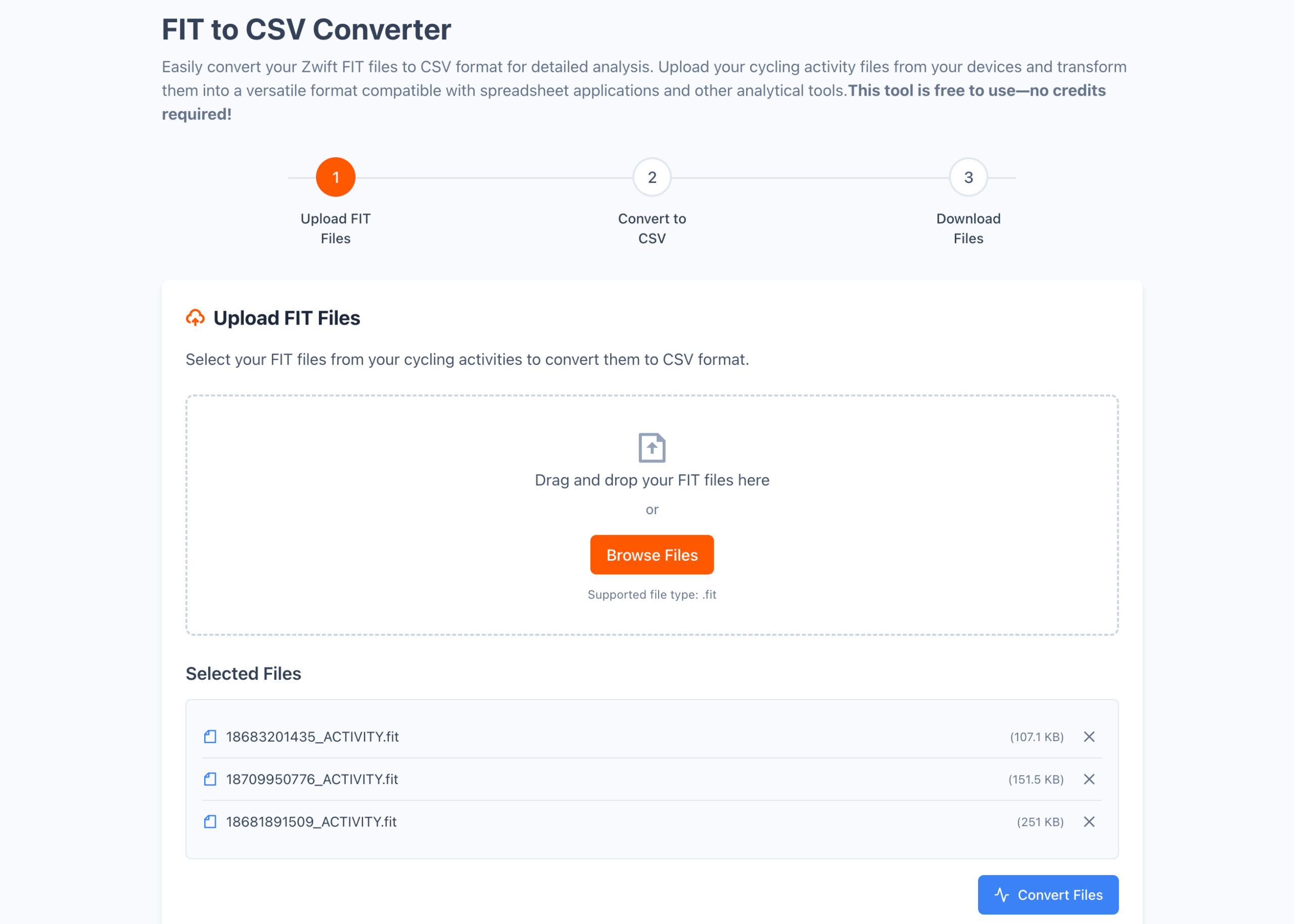
For data-driven riders who like digging into their workout files, ZwiftFit includes a free utility that converts your FIT files into CSV format. This makes it easy to import your Zwift workout data into spreadsheets or other analysis tools. There’s no cost and no credits required — just upload your FIT file and download the structured data. It’s a small but powerful addition for those who want more control over how they visualize and track performance.
Try It + Promo Video
ZwiftFit is available now at zwiftfit.com. You can also watch a short 30-second promo video below:
Final Thoughts
ZwiftFit is still evolving, but I hope it fills a real need in the Zwift training ecosystem — helping riders at every level get more out of their workouts with less friction.
If you give it a try, I’d love your feedback! Share your experiences or suggestions via my contact form or tag me @ZwiftFit on Instagram. Your feedback will help shape its future!
Meta’s impressive Movie Gen AI editing tool is starting to bear fruit. On Tuesday, the company launched a new editor for short videos, “inspired by” the technology. The editor lets you transform your clothing, location, style and more. The examples the company showcased are head-turning. We’re getting closer to Hollywood-level CG effects that anyone can produce in a few seconds.
The editor lets you choose from over 50 preset prompts. You can transform your video’s subject into things like comic art, a marble statue or a video game character. Or, transport them to a beach or a snowy scene. You can also add dreamy lighting effects and color overlays.
You can’t yet type custom prompts. However, those are scheduled for later this year.
Meta
The AI editor is the first commercial spawn of Meta’s Movie Gen tech. Previewed last year as a private research tool, its results are surprisingly realistic. Like the tool Meta launched today, it can edit non-AI videos. But it can also generate videos from scratch and turn photos into videos. (Don’t be shocked if those capabilities migrate to Meta’s consumer products, too.)
For now, the new editing tool is available on the Meta AI app, Meta.AI website and the Edits app. It’s also coming to Instagram “over time,” according to platform head Adam Mosseri. (He also teased the feature last year.) Mosseri’s demo video shows some wild examples of the effects you can try.
This article originally appeared on Engadget at https://www.engadget.com/ai/meta-launches-a-surreal-ai-video-editor-173907584.html?src=rss
The Wikimedia Foundation halted an experiment that would have displayed AI-generated summaries atop Wikipedia articles after the platform’s volunteer editor community delivered an overwhelmingly negative response to the proposal. The foundation announced the two-week mobile trial on June 2 and suspended it just one day later following dozens of critical comments from editors.
The experiment, called “Simple Article Summaries,” would have used Cohere’s open-weight Aya model to generate simplified versions of complex Wikipedia articles. The AI-generated summaries would have appeared at the top of articles with a yellow “unverified” label, requiring users to click to expand and read them. Editors responded with comments including “very bad idea,” “strongest possible oppose,” and simply “Yuck.”
Samsung Galaxy S25 Edge – Starting At $1,099, Find It On Samsung.com Samsung’s Galaxy S25 Edge is a 5.8mm thin phone that offers flagship specs for a flagship price at the expense of camera zoom performance and battery life.. Thin and light design Gorgeous display Superb main camera Quality speakers Solid performance Feature-rich software…
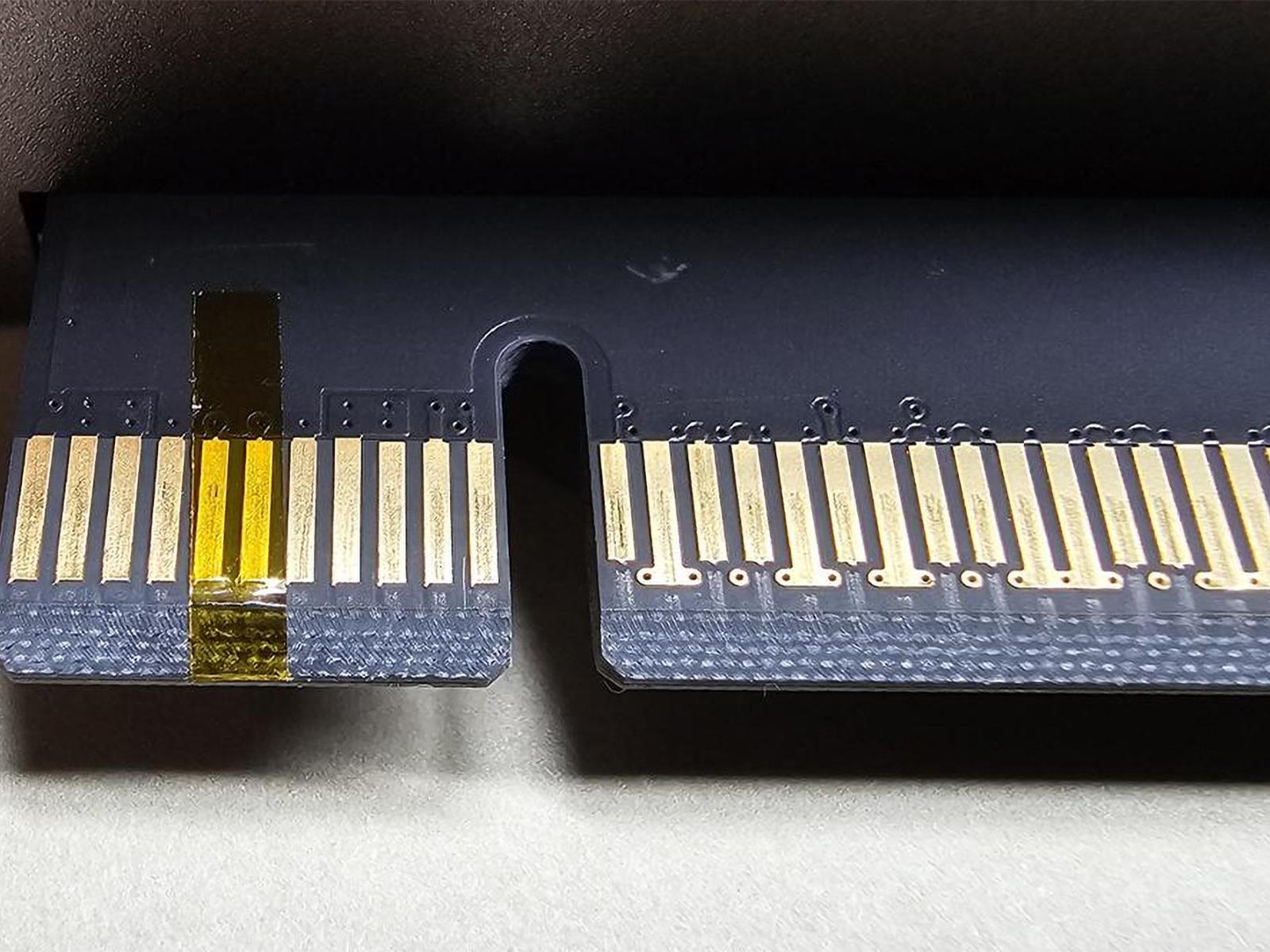
If you’ve been in PC building and the electronics world for long enough, you’ll know that kapton tape solves a lot of problems. This time around, it’s to fix an incompatibility between NVIDIA RTX 50 series cards and some EVGA Z690 motherboards (and possibly Z790 as well) that causes the system to not boot entirely.
The Browser Company’s new AI-powered browser is now available in an invite-only beta. Called Dia, the browser was first announced towards the end of 2024, and is built around the deep integration of what its maker calls “the most personal AI on the market”.
Dia allows you to “chat with your tabs” and will adapt and learn the more you use it. You can open an AI chat on any webpage without having to leave the tab, where the built-in bot can search the web, compare websites, answer questions about the content displayed, and even draft a document in the tone of a specific webpage. You can set preferences to customize the chatbot’s tone and style for writing tasks, as well as its coding language and how it talks to you.
All of these features live within Dia’s URL bar, with the idea being that you don’t need to visit dedicated pages for other LLM chatbots such as ChatGPT to get things done with AI. The Browser Company has plenty of rivals, though, not least Google, which last month announced that it will soon bring its Gemini AI assistant to Chrome, which will be able to do many of the same things as Dia’s own chatbot. Opera’s upcoming Neon browser also comes with an integrated AI and is being billed as “fully agentic”.
Back in May, The Browser Company confirmed that it had stopped active development on its Arc web browser, shifting its focus to Dia instead. Arc members get instant access to the new browser and invite friends to join once they’re signed up to Dia. If you’re not a member of either browser you can join the waiting list here.
This article originally appeared on Engadget at https://www.engadget.com/ai/the-browser-companys-new-ai-browser-rolls-out-to-private-beta-testers-170311014.html?src=rss
But every year, there are features that don’t make it into Apple’s big keynote presentation. These smaller changes are sometimes my favorite, because while they aren’t flashy enough to get a spotlight during the event, many are quirky, fun, or otherwise worth highlighting in their own right.
The Camera app has one such feature. Despite Apple’s focus on the app during the keynote, this feature wasn’t mentioned directly. Instead, Apple included it in a slide of 36 iOS 26 features they didn’t have time to talk about. I’m not sure why they didn’t take ten seconds to show it off during the Camera app segment, because not only is it a small change, it’s a very helpful one at that. With iOS 26, the Camera app will now alert you when your camera lens is dirty.
You can see how this works in this Reddit post. When iOS 26 detects that the lens is smudged or otherwise obstructed, it’ll display a small pop-up at the top of the viewfinder. In this case, it reads “Clean Back Camera,” but I presume it will also issue a similar warning for the front camera when taking a selfie.
From various Reddit discussions, it does appear that this feature isn’t available on all iPhones running iOS 26. While Apple supports devices as old as the iPhone 11 with this latest OS, the oldest iPhone I’ve seen mentioned that’s compatible with this feature is the iPhone 15 Pro. That user suggests it might be an AI feature, which makes sense—Apple reserves Apple Intelligence features for iPhone 15 Pro and newer.
Again, this is an iOS 26 feature, which means you won’t see it on your compatible iPhone until either Apple releases the OS in the fall, or you decide to install the iOS 26 beta on your device. I don’t recommend the latter, though, as the current developer beta comes with too many risks that might result in a glitchy iPhone or even data loss. If you want to try out iOS 26 early, I recommend at least waiting until the public beta, which Apple says will launch next month.
How to turn lens cleaning hints on or off
While the alert has an X you can tap to dismiss it when it appears, Apple also has a new on/off toggle for this option if you’d prefer not to see it all. To find it, head to Settings > Camera, then scroll down until you see Lens Cleaning Hints. Tap the toggle to enable or disable the feature.
On Tuesday, OpenAI announced that o3-pro, a new version of its most capable simulated reasoning model, is now available to ChatGPT Pro and Team users, replacing o1-pro in the model picker. The company also reduced API pricing for o3-pro by 87 percent compared to o1-pro while cutting o3 prices by 80 percent. While “reasoning” is useful for some analytical tasks, new studies have posed fundamental questions about what the word actually means when applied to these AI systems.
We’ll take a deeper look at “reasoning” in a minute, but first, let’s examine what’s new. While OpenAI originally launched o3 (non-pro) in April, the o3-pro model focuses on mathematics, science, and coding while adding new capabilities like web search, file analysis, image analysis, and Python execution. Since these tool integrations slow response times (longer than the already slow o1-pro), OpenAI recommends using the model for complex problems where accuracy matters more than speed. However, they do not necessarily confabulate less than “non-reasoning” AI models (they still introduce factual errors), which is a significant caveat when seeking accurate results.
Beyond the reported performance improvements, OpenAI announced a substantial price reduction for developers. O3-pro costs $20 per million input tokens and $80 per million output tokens in the API, making it 87 percent cheaper than o1-pro. The company also reduced the price of the standard o3 model by 80 percent.
It’s been five years since the Steven Universe saga ended, via a final season and movie that took the story into the future. Now, it’s coming back, according to a report by Deadline. Prime Video is working on a sequel series, with franchise creator Rebecca Sugar in tow as an executive producer (and hopefully as a songwriter.)
This doesn’t look to be a straight sequel series, in that the focus is shifting away from Steven, the Crystal Gems and Beach City. Instead, the tentatively-titled Steven Universe: Lars of the Stars will follow punk rock slacker Lars Barriga and his ragtag band of space pirates.
Spoiler time: Just about every character got a cool arc in the main series, but Lars was one of the standouts. He started as a selfish jerk stuck at a dead-end job, but finished the show as the captain of an actual starship trying to make a difference in the universe.
Deadline says the new episodes will follow the “space outlaw as he and his pirate crew smuggle contraband, evade the authorities and uncover the darkest secrets of the fallen Gem Empire.” So this looks to be a series that will largely take place in space, exploring the fallout of the final episodes of the main show. We don’t know which, if any, of Steven Universe’s main characters will show up or in what capacity.
The news was revealed by Sugar at the Annecy International Animation Film Festival. She went on to say that she misses “my world and my characters” and that she “can’t wait to share [the sequel] with you and can’t thank you enough for all your support.” Sugar’s long-time production partner, Ian Jones-Quartey, is also involved.
We don’t have a release date for this, which gives you plenty of time to catch up on the OG show and the movie. There are 160 episodes, so buckle up. Once that’s done, there are several affiliated video gamesto dig into.
This article originally appeared on Engadget at https://www.engadget.com/entertainment/tv-movies/theres-a-steven-universe-sequel-series-in-the-works-at-prime-video-164211472.html?src=rss
HP has unveiled the first commercial hardware for Google Beam, the Android-maker’s 3D video conferencing technology formerly known as Project Starline, with a price tag of $24,999. The HP Dimension features a 65-inch light field display paired with six high-speed cameras positioned around the screen to capture speakers from multiple angles, creating what the companies describe as a lifelike 3D representation without requiring headsets or glasses.
The system processes visual data through Google’s proprietary volumetric video model, which merges camera streams into 3D reconstructions with millimeter-scale precision at 60 frames per second. Beyond the hardware cost, users must purchase a separate Google Beam license for cloud processing, though pricing for that service remains undisclosed.
Whether you’re running a new build, trying out a new class, or returning to Diablo IV after an extended break, (a break in which you were likely playing Path of Exile 2, right? I know I wasn’t alone in farming Exalted Orbs!) Whatever the case, learning how to level up fast in Diablo IV should help you check out…
Logitech today announced the launch of the Logitech Flip Folio, a unique take on a protective case (with a magnetically-storable Bluetooth keyboard) designed specifically for the Apple iPad Pro and iPad Air. Breaking away from traditional keyboard cases, the Flip Folio emphasizes flexibility, portability, and multi-device connectivity in an
You’ve probably heard the horror stories about people running down children in inZoi. Well, the developer quickly put a stop to that glaring issue. But that doesn’t mean you can’t still kill a Zoi in other ways. At least, those you control. You can’t murder, and the studio said they’d never include such a mechanic.…
We may earn a commission from links on this page. Deal pricing and availability subject to change after time of publication.
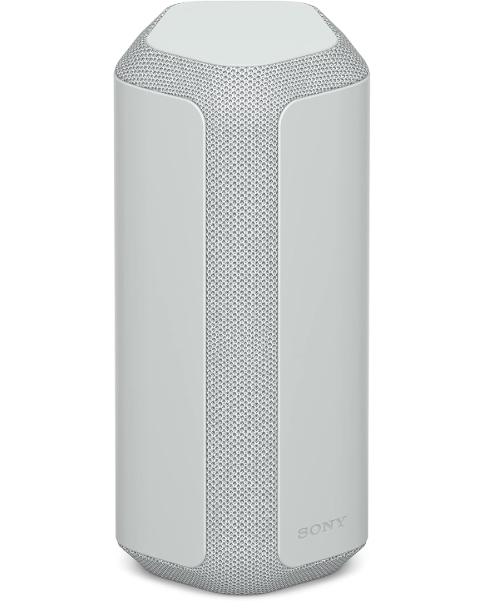
The Sony SRS-XE300 is now down to $88 from its original $199.99 on Amazon (its lowest price ever, according to online price tracking tools), making it a decent time to check it out if you’ve been thinking about a portable speaker that can handle the occasional splash and still keep the music going.
Sony gave the outdoor-friendlyXE300 a different design approach than most speakers: It’s shaped to stand upright but also works fine lying on its side. Inside are dual drivers with passive radiators at each end, aimed at giving you deeper bass and less distortion. The sound, though, is more directional than Sony probably intended—better aimed at you than trying to fill a big space.
It defaults to mono audio, but you can switch to stereo using the app if you prefer. It also supports LDAC for high-res Bluetooth streaming if you have an Android device, though it skips the AptX codec. The companion app isn’t much to look at, but it gives you access to an adjustable EQ and other sound tweaks, notes this PCMag review. Where the XE300 really holds up is in how tough it is. It has an IP67 rating, so dust, rain, or a quick dip in the pool won’t faze it. As for battery life, Sony claims up to 24 hours of usage, but your mileage will vary depending on volume and settings.
Sound-wise, it delivers decent bass and clear highs, though the directional setup means you’ll get a better experience when it’s aimed right at you. Also, the stereo mode doesn’t dramatically widen the soundstage, but in a multi-speaker setup, it holds up well. At moderate volumes, it puts out a nice thump and keeps the highs clear without much distortion creeping in. It’s not going to give you a wall-shaking, subwoofer feel, but for a speaker you can toss in a bag and forget about until you need it, the XE300 handles itself well, especially at this price. For more options, check out our roundup of the best Bluetooth speakers.
Former PlayStation executive Shuhei Yoshida revealed a VR adaptation of Jumping Flash was in early development before being cancelled.
Speaking to VGC, Shuhei Yoshida – the Sony Interactive Entertainment (SIE) veteran who served as President of SIE Worldwide Studios (now PlayStation Studios) between 2008 until 2019 before leaving the company earlier this year – shared the news in an upcoming interview. Before Sony explored modern licensing deals, Yoshida informed VGC that the company had previously considered licensing dormant franchises for VR adaptations.
Asked about which franchises were considered for PlayStation VR, Yoshida confirmed an adaptation of the 1995 1st person platformer Jumping Flash by Exact and Ultra was in the “very early” stages of development. While he didn’t confirm which developer was working on this game or when this was cancelled, he advised VGC that, “some developers wanted to license Jumping Flash to develop it into a part of their new VR game.”
Though Jumping Flash VR didn’t get any further, Yoshida points out one game that did get through is Fantavision 202X, which rebooted the 2000 puzzle game from the now-defunct PlayStation Japan Studio. This became one of 2023’s PlayStation VR2 launch games before later receiving a Steam release. Developed by Cosmo Machia, this included optional VR support on both platforms.
After retiring from Sony back in January, Yoshida has remained an advocate for PlayStation VR2. While he previously apologized for being “wrong” about Sony’s latest headset in a Kinda Funny interview, he continued by expressing his love for Synapseand Before Your Eyes. Since then, he’s recently been seen at Summer Game Fest with nDreams to support its upcoming game, Reach.
Resident Evil Requiem, aka the game we are all going to refer to as Resident Evil 9, was revealed during last week’s Summer Game Fest. The trailer didn’t confirm what perspective Requiem will use, but now we know via a hands-off demo that when Capcom’s latest horror game arrives in February 2026, it will feature both…