8BitDo’s Ultimate 2C controller drops to $25

If you’re looking for a versatile new wireless controller that isn’t exclusive to a particular platform, 8BitDo’s various pads are always worth considering. And Amazon’s current deal on the brand’s Ultimate 2C Wireless Controller is nearly the cheapest we’ve seen. Right now, if you pick up the controller in either its Purple or Green colorways, you’ll pay $25.49, as opposed to $30 or above (the special edition Black Wukong version costs $35) for the other available colors. The lowest price we’ve ever seen this model at is $25.

If you’re a console gamer you’ll need to look elsewhere, but the Ultimate 2C plays nice with Android devices and Windows PCs, connecting either via Bluetooth in the case of the former, or over 2.4G or a wired connection for PC. There’s also a mode switch button to make it easy to hop between devices. The controller offers extra bumpers that sit next to the standard left and right bumpers, and these can be remapped without the need for additional software, while the Hall Effect joysticks are precise and reassuringly durable.

The Ultimate 2C is compatible with devices running Windows 10 and above, and Android 9.0 or above. You can expect 32 hours of playtime over a Bluetooth connection, or 19 hours when using the wireless 2.4G adapter.

Follow @EngadgetDeals on X for the latest tech deals and buying advice.

This article originally appeared on Engadget at https://www.engadget.com/gaming/8bitdos-ultimate-2c-controller-drops-to-25-144020474.html?src=rss

World Bank Lifts Ban on Funding Nuclear Energy in Boost To Industry

The World Bank is lifting its decades-long ban on financing nuclear energy, in a policy shift aimed at accelerating development of the low-emissions technology to meet surging electricity demand in the developing world. From a report: In an email to staff on Wednesday, Ajay Banga, the World Bank president, said it would “begin to re-enter the nuclear energy space” [non-paywalled source] in partnership with the International Atomic Energy Agency, the UN nuclear watchdog which works to prevent proliferation of nuclear weapons.

“We will support efforts to extend the life ofÂexisting reactors in countries that already have them, and help support grid upgrades andÂrelated infrastructure,” the email said. The shift follows advocacy from the pro-nuclear Trump administration and a change of government in Germany, which previously opposed financing atomic energy due to domestic political opposition to the technology. It is part of a wider strategy aimed at tackling an expected doubling of electricity demand in the developing world by 2035. Meeting this demand would require annual investment in generation, grids and storage to rise from $280 billion today to $630 billion, Banga said in the memo seen by the Financial Times.


Read more of this story at Slashdot.

The Pixel Watch 2 Is at Its Lowest Price Ever Right Now

We may earn a commission from links on this page. Deal pricing and availability subject to change after time of publication.

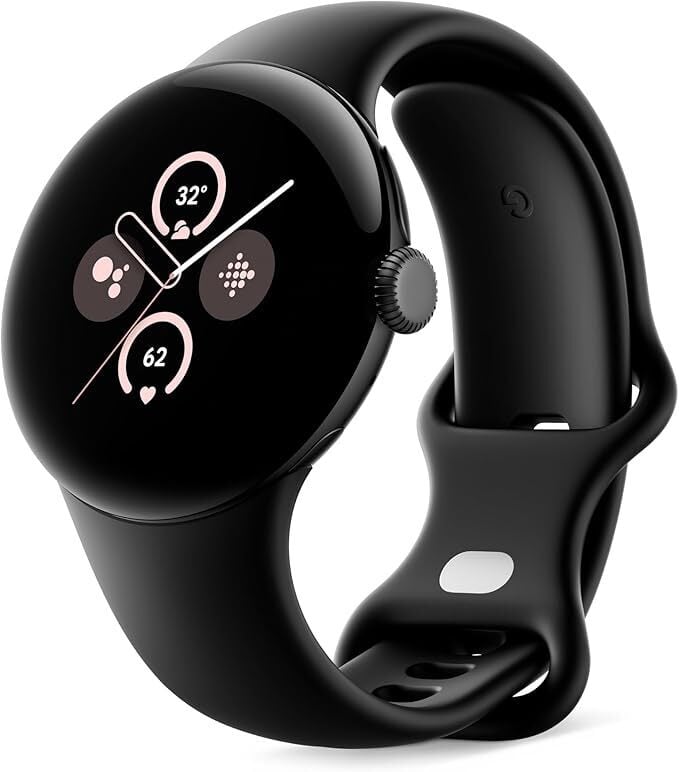
The Pixel Watch 2 isn’t Google’s newest gadget anymore, but at $149, it’s $100 off its launch price—and the lowest it’s ever been, according to price trackers.

It’s the follow-up to Google’s original Pixel Watch, which had a few first-gen stumbles (check out the differences between the Pixel Watch and Pixel Watch 2 here). With the second-gen Pixel Watch, Google cleaned up a lot of what felt unfinished in the first model, and this time around, it leans harder into Fitbit’s strengths. Daily health tracking, fitness insights, and wellness alerts come baked in, while Wear OS keeps the app experience smooth and familiar. Read this in-depth review of the Pixel Watch 2 to learn more about it.

At 41mm, the watch is small and wears light on the wrist. You’re still getting an always-on AMOLED display that holds up well in sunlight, and about 33 hours of battery life—just enough to stretch through a full day and night if you’re careful, but charging overnight still becomes part of the routine. The Pixel Watch 2 still runs Google’s Wear OS, so there’s tight integration with your Android apps and features, from Assistant to Gmail to Maps. You can start a workout, check your calendar, and swipe through your day without much lag or fuss. Plus, it has all the standard fitness smartwatch essentials, including GPS, heart rate tracking, skin temperature, blood oxygen levels, and a stress sensor. You’ll need a Fitbit Premium subscription ($9.99/month) to unlock all the insights, though. Without it, you’re still getting basic tracking, but not the full reports and coaching.

The Pixel Watch 2 holds its own against pricier competition like the Galaxy Watch 6, especially if you prioritize comfort and Google integration over raw specs. PCMag gave it an “Excellent” rating, mainly for the improved performance (thanks to the Qualcomm 5100 processor), smarter health tools, and durability (it’s IP68 rated). That said, this watch won’t be for everyone. There’s only one size (if you want a Pixel Watch for a bigger wrist, you might want to check out the Pixel Watch 3), and if you’re after big visuals or long stretches away from the charger, it’ll come up short. And some of the more advanced health metrics—such as stress responses and deeper sleep analysis—sit behind a paywall, which can feel like a letdown on an already premium device (even when on sale). Also, just a heads up: This is the wifi version of the watch, not LTE, but for most Android users, that won’t matter much.

Rare Deep Sea Squid Captured On Video For First Time

Another day, another never-before-seen video of an underwater alien (previously: a colossal squid). This time, a living specimen of a Gonatus antarcticus squid that was filmed at a depth of 7,000-feet in the Southern Ocean while shooting a video for National Geographic. The species was only previously described via dead specimens. The squid was identified as Gonatus Antarcticus thanks to the hook it has at the end of each tentacle, an adaptation that presumably evolved for attaching to the deck railing of pirate ships to pull them down to Davey Jones’s locker. I’m kidding, this thing is only 3-feet long. With nothing in the video for scale though, feel free to send it to your friends and tell them it’s the length of three school buses and was spotted near the beach where they vacation.

Fujifilm Unveils Sleek And Compact X-E5 Mirrorless Camera For Enthusiasts

Fujifilm Unveils Sleek And Compact X-E5 Mirrorless Camera For Enthusiasts
Fujifilm has lifted the wraps off its X-E5, one of the most capable classic rangefinder-type mirrorless digital camera on the market. Launched globally today with an August 2025 release, the X-E5 arrives hot on the heels of the incredibly popular X100VI. Packed with a 40-megapixel sensor, EVF with “Classic Display” retro information mode,

[$] Parallelizing filesystem writeback

Writeback for filesystems is the process of flushing the “dirty” (written)
data in the page cache to storage. At
the 2025 Linux Storage,
Filesystem, Memory Management, and BPF Summit (LSFMM+BPF), Anuj Gupta led a
combined storage and filesystem session on some work that has been done
to parallelize the writeback process. Some of the performance problems
that have been seen with the existing single-threaded writeback came up in
a session at last year’s summit, where the
idea of doing writeback in parallel was discussed.

How to Give Passwordless Root Privileges to a Normal User

Granting passwordless root privileges can streamline workflows, especially when managing multiple automated processes or scripts that require administrative access. If you’re already familiar with changing a user’s default shell, the next step in managing user permissions effectively is understanding how to safely give sudo access without a password prompt.

Before continuing, it’s a good idea to review related foundational topics, such as creating and removing directories, opening files from the terminal, using the Linux yes command, manually creating users, or these basic Linux commands that every admin should know. All of these tools work together to give you a complete understanding of Linux system administration.

The post How to Give Passwordless Root Privileges to a Normal User appeared first on Linux Today.

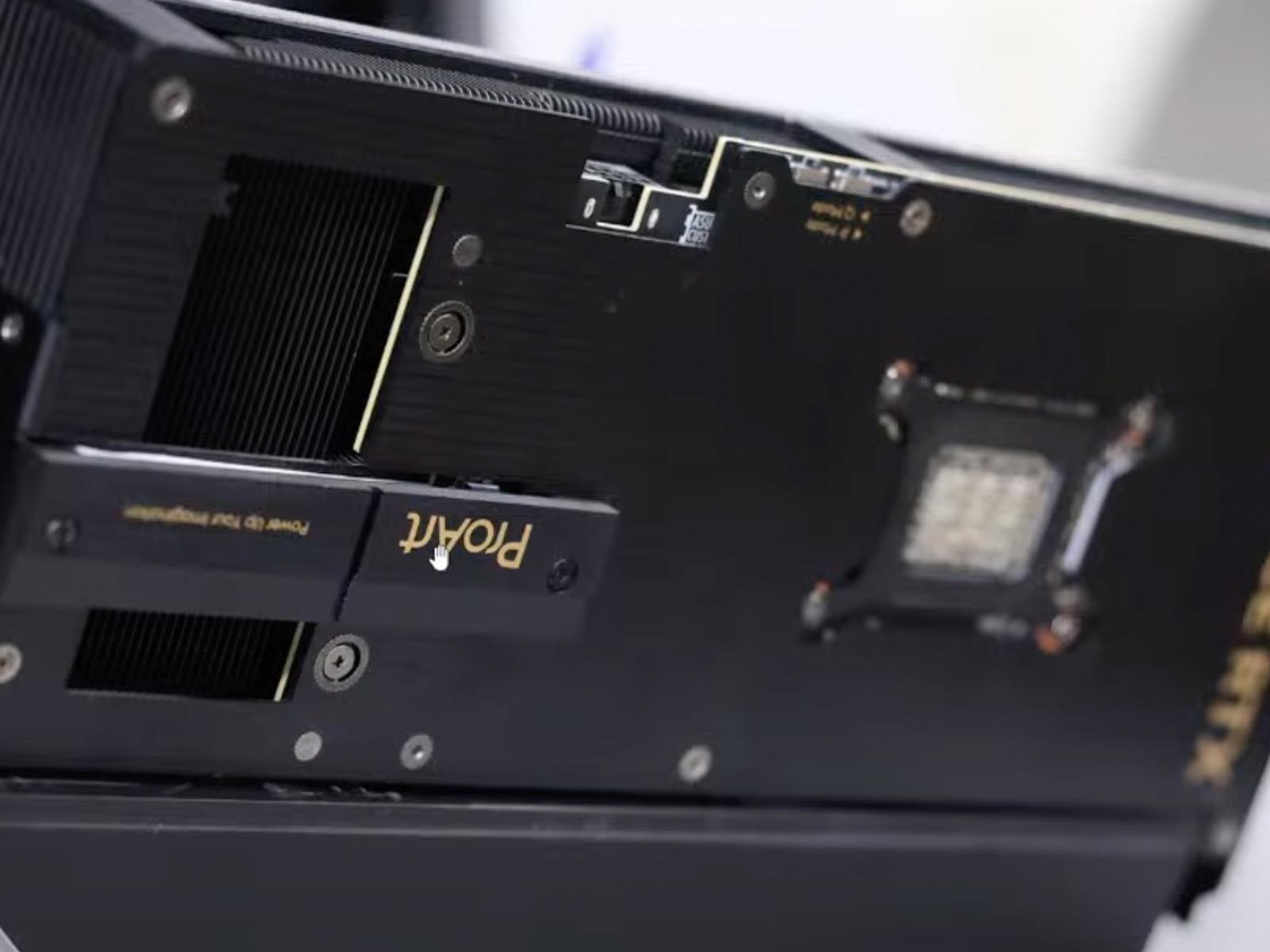
ASUS Unveils ProArt RTX 5080 With Built-In SSD And A Literal GPU Twist

ASUS Unveils ProArt RTX 5080 With Built-In SSD And A Literal GPU Twist
Now that NVIDIA’s GeForce RTX 50 series has been out in the wild for a few months, we’re seeing new versions pop up with some interesting and unique features. So it goes with ASUS, one of NVIDIA’s leading add-in board (AIB) partners (especially with EVGA having bowed out of the GPU market), with a distinct lineup of interesting GPUs. One of

The Olto is a future-forward e-bike that can accommodate two passengers

Infinite Machine made waves with its retro-futuristic P1 electric bike. That one was built for speed, but the company is back with something that’s more for urbanites commuting to and from work. The Olto boasts 40 miles of range and a top speed of 33 MPH, with a 20 MPH limit while riding in the bike lane.

Just like the P1, the Olto e-bike looks both futuristic and retro, with a design that can only be described as “Cybertruck meets a scooter from Tron.” This bike could be a boon for commuters, as it can accommodate two riders at the same time. The design is also fairly modular, so riders can add accessories like child carriers, rear racks and baskets, among other items. 

The battery is easily removed with one hand, for nighttime charging, and can reach 50 percent in just an hour at the outlet. This removable battery also helps with security, as the battery is typically one of the most expensive components of an e-bike.

A battery sliding out.
Infinite Machine

However, that’s not the only security feature that Infinite Machine has implemented here. The company claims the Olto “virtually theft-proof.” Each bike is connected to the internet and tracked in real time with precise GPS coordinates. There’s an app to keep an eye on things and the vehicle features a dedicated slot for AirTags.

Once parked, the bike automatically locks the steering and wheels, making it difficult to move. If someone tampers with the vehicle, an alarm will sound and an alert gets sent to the owner’s phone. The phone also doubles as the key.

Now for some bad news. All of these high-tech features come with a high-end price tag. The Olto costs $3,495. Preorders are available right now, with shipments going out later in the year.

This article originally appeared on Engadget at https://www.engadget.com/transportation/the-olto-is-a-future-forward-e-bike-that-can-accommodate-two-passengers-140044468.html?src=rss

Don’t Fall for This TikTok Donation Scam

Social media is rife with content that captures animal lovers’ attention, and scammers are capitalizing on this with campaigns that solicit donations to fake charitable causes. The Better Business Bureau (BBB) is alerting users to a new scam on TikTok that purports to sell handmade crafts in order to raise funds for animal shelters.

Here’s how to spot this donation scam (and others like it).

What the TikTok donation scam looks like

According to the BBB, this TikTok campaign involves videos of older adults making crafts, such as cat toys, with background music and a message that goes something like, “Please don’t scroll for 12 seconds to help my failing animal shelter.” The video further explains that they are selling these items to help fund a shelter for cats or other animals (which may also be shown).

The video description includes a link to donate to the cause or purchase the item—which, of course, you’ll never receive, nor will the funds actually be used to help animals in need. The BBB cites a report from its Scam Tracker of a TikTok account run by user FlappyBirdUS, though there are likely plenty of other scammers employing similar tactics on TikTok and other social media platforms. Note that these videos may be AI-generated or use content stolen from other accounts.

How to spot donation scams

Scams of all kinds play on emotions—fear, greed, sympathy—to get victims to act, whether that involves handing over personal information or donating money to “charitable” causes. If you see content on TikTok or elsewhere that makes you feel something and urges you to act now, resist that urge.

Instead, do some research about the person or organization: Look up the name, contact information, and website, and type the information into a search with the term “scam” to see if anyone has identified it as fraudulent. You can also search for charitable organizations on sites like Charity Navigator, GuideStar, and Give.org and look for their verified social media accounts. If an organization isn’t listed, that doesn’t mean it isn’t legit, but you should dig further before donating or making a purchase. Alternatively, consider seeking out local organizations or mutual aid groups engaged in causes or action you care about in your area.

You should also look out for signs of AI-generated videos, which are used in numerous types of scams. As we’ve noted, though, we are easily swayed by things we want to believe, such as videos of cute animals in need, making AI content particularly difficult to spot.

Finally, there are of course other iterations of the donation scam out there, some of which use social media posts to solicit Venmo donations to fraudulent accounts in the name of legitimate individuals or organizations. The same rules for avoiding these scams apply.

AOSP Isn’t Dead, But Google Just Landed a Huge Blow To Custom ROM Developers

Google has removed device trees and driver binaries for Pixel phones from the Android 16 source code release, significantly complicating custom ROM development for those devices. The Android-maker intentionally omitted these resources as it shifts its Android Open Source Project reference target from Pixel hardware to a virtual device called “Cuttlefish.”

The change forces custom ROM developers to reverse-engineer configurations they previously received directly from Google. Nolen Johnson from LineageOS said the process will become “painful,” requiring developers to “blindly guess and reverse engineer from the prebuilt binaries what changes are needed each month.” Google also squashed the Pixel kernel source code’s commit history, eliminating another reference point developers used for features and security patches.

Google VP Seang Chau dismissed speculation that AOSP itself is ending, stating the project “is NOT going away.” However, the changes effectively bring Pixel devices down to the same difficult development level as other Android phones.


Read more of this story at Slashdot.

I Found My Passion in Car Culture, and Now I Share It With Others

We may earn a commission from links on this page.

As the son of two pastors growing up in San Diego, money was always a limiting factor. We didn’t have a lot, but somehow always found a way to make the most of it. Our one splurge each year was when my dad would take my brother and me to the San Diego Auto Show. This is where it all started for me. 

After spending hours at the convention center snagging every announcement document and brochure that I could get my hands on, I’d get home and run up to my room to read through every single one. I’d memorize horsepower numbers, cargo space, pricing, and any key details that set one model year apart from the next. I even based my sixth grade research project on what I learned, doing an A-Z of automotive manufacturers (Z was for Zündapp, in case you were wondering).

Then I got older and had to think about how I was going to afford college. I focused on lacrosse in hopes of getting an athletic scholarship (which I did), and cars became a side project, a quiet hobby of mine. Injuries cut my lacrosse career short. And then, right when I needed a new purpose the most, the pandemic hit.

Now I was completely lost. No job, no potential prospects, and a communications degree that felt as useful as firewood. What was I supposed to do now?

I went back to what I loved

With the $300 I had left in my bank account from graduation, I purchased a camera drone off Facebook Marketplace. I started going out to empty parks and practicing how to film, while also reaching out to car clubs, real estate agencies, and anyone who might give me a chance to work for them. 

I was fortunate enough that a few amazing people did exactly that. Businesses and friends gave me access to vehicles I would’ve only dreamed about, and trusted me to document them in creative and sometimes unorthodox ways. I was reminded why my younger self used to read all those brochures in his bedroom. My love of cars (and the tech behind them) transcended any other dream I had, and I couldn’t let that go again.

Over the next four years, I began building my online presence as a content creator in the automotive space. With my parents’ garage as my base of operations, I would spend hours on my computer looking for socially-distanced car meetups and events where I could gain a foothold in the San Diego automotive community. I’d ask event organizers if they needed any drone photography or promotion, and show up with a backpack full of business cards and camera gear wherever I was needed. I’d even travel hundreds of miles out of my way simply for the opportunity to get access to some of the west coast’s amazing vehicles.

At that time, I was barely making enough to cover the cost of my gas. There wasn’t much money to be made in the pro-bono car content space, but I always had a feeling that something was just around the corner, as long as I kept trying to make something of this dream.

My creator footprint created new opportunities

It wasn’t until 2022 that things really started to take off. A local company that manufactured car upgrades needed a media specialist to join their team, and I was more than happy to be a part of it. With them, I attended some of the biggest car conferences in the world, acted as a brand ambassador, and jumped at every chance to level up my knowledge and connections in the industry.

Sometimes, the role could be a bit daunting, from hanging out of a car with my drone flying above, to riding jet skis with a camera strapped to me for a surf-themed car shoot. But even so, there wasn’t a thing they could pitch that I would’ve turned down. At my core, this was what I had always wanted, and opportunities like that were once-in-a-lifetime, no matter the complexity or chaos that came along with it.

Over time, my account grew from just under 3,000 followers to now over 25,000, and I built a company that now manages media for racing teams and drivers alike. I finally found a way to meld my passion for vehicles, videography, and writing into a career that excites and challenges me every single day.

View this post on Instagram

A post shared by Sam McPeak (@xammcpeak)

From deciding on your next car purchase, to finding cool car hacks that make your life easier, to creator life at home and on the go, my goal is to empower you to make the best possible decisions for a better life on the road. There’s a ton of information out there, and it can be truly overwhelming to try and navigate it all.

To me, cars are not just a hobby. They’re interwoven with my identity. My hunger for knowledge about all things automotive drives me from the moment I wake up until the moment I fall asleep. Some might think it’s obsessive, and to a certain extent, they’d be right. But that obsession has led to both a sense of purpose and a passion to share it with others.

I’ve Traveled to 88 Countries and Always Pack This Extension Cord That’s $16 Right Now

We may earn a commission from links on this page.

I’ve been a digital nomad for nine years, and have now visited nearly 90 countries. Although my zip code often changes, the need to keep all my gadgets powered up does not, and wall outlets can sometimes be fleeting. Packing an extension cord is one way I navigate travel uncertainty.

I used to travel with an individual charging cord and adapter for each device until five years ago, when I realized the value of packing lighter. Watching YouTube travel vloggers showed me I could save time (no checked bags) and take up less space by avoiding clutter. When I saw one vlogger talk about the practicality of using an extension cord, I made the switch, and haven’t looked back since.

Several extension cords have made it into my bag over the years, but my current go-to is the Anker 321 power strip. Here’s why this $15.99 (38% off right now) extension cord makes it into my carry-on every time.

Ports that cover all my charging needs

The value of a travel extension cord is that I can charge all my devices without needing lots of separate smaller cords. I use gadgets with several different charging ports, including USB, USB-C, lightning, and more. I like the Anker 321 power strip because it has plugs for multiple cord adapters.

This 20W fast-charging extension cord has a USB-C port, three outlets, and USB-C charging for Apple and other USB-C devices. It’s five feet long, enough to plug in anywhere I’m staying without feeling restricted. I power up all my devices from one place and enjoy traveling lighter.

Of course, if you can’t plug this extension cord into the wall in your destination country, it won’t do much good. For that, consider also getting a power adapter that will work for many countries. The one I use is the EPICKA universal travel adapter ($49.99).

Small enough to fit into all of my travel bags

The adapter kit and extension cord don’t add much weight to your travel backpack. The combination of the extension cord and adapters has ensured I can work as I travel, watch entertainment on my devices, and stay connected to my kids back in the United States.

The Anker 321 power strip is light; it fits in my laptop, backpack, or carry-on. Most of the time, I have it in my laptop bag for easy access and quick charging. I like that I can fit it in any of my travel bags without worrying about it weighing them down.

An extension cord is not a common travel item, but it should be. Traveling with one power source that can power multiple gadgets helps declutter your travel bags, and fewer outlets are needed in the places where you’re staying.

If you’re going on an adventure this year, consider picking up this underappreciated convenience so you can keep everything charged up as you travel.

I’m a Full-Time Digital Nomad, and This Wifi Hotspot Device Ensures High-Speed Internet on the Go

We may earn a commission from links on this page.

One of the challenges of living a full-time travel life is figuring out the logistics of where and how I’ll work. Regularly traveling to new countries is exciting, but I still have to take Zoom meetings and send updates on a regular basis. I’m self-employed, and nearly all of my business takes place online, so a fast, secure, and reliable internet connection wherever I travel is a must.

There have been many times when I had no other options and had to tether my phone for an internet connection, which wore down my battery.

Even if you’re just traveling for fun, unexpectedly poor internet can be a bummer. Eventually, I invested in a mobile hotspot device. After doing my research, I landed on the SIMO Solis 5G wifi mobile hotspot device, which is currently $299, and also has a 4G model for $159.

If you need high-speed internet on the go, here’s why this mobile wifi device should be in your travel bag.

I have to balance work and play 

Digital nomadism is a delicate balance between enjoying your travels and fulfilling work obligations that help you take care of yourself and your family. I still work six to eight hours daily during the workweek, no matter where I travel, and want to make the most of it so that I can close my laptop with confidence and explore new parts of the world on evenings and weekends.

I first discovered the convenience and practicality of mobile wifi devices six years ago in Japan, where they were common and could be rented at airports. When I got back to the United States, I tested various devices to see which gave me the best value. Since purchasing the Solis, I’ve taken it on my travels to dozens of countries and have used it to work remotely from cafes, restaurants, hotel lobbies, and co-working spaces.

I like this hotspot because no SIM card is required to use it—you just activate the service online. You’re not required to sign a contract to use the device, as it works on multi-carrier networks. You can also use the device as little or as much as you want without being locked into a long-term contract.

I’m sometimes on the go for many hours in a row

One thing I’ve discovered about traveling to foreign countries is that the wifi connection experience can be mixed. I’ve gone to countries where the wifi connection was blazing fast and others where the signal seemed nonexistent. I need that connection to work, so I prefer to control my destiny when it comes to a wifi connection.

The Solis gives me global coverage. This light, portable hotspot covers 140+ countries with a network of over 300 carriers, and can connect 16 devices, which is plenty for what I need. The device has 24 hours of battery life as well as a mobile power bank that can charge other devices.

The portable 5G hotspot includes data. You get 1GB per month of high-speed data for the life of the unit, and you can purchase additional data later if you find that you need it.

I also found this device easy to use. Simply download the Solis app and register your device, then start using your lifetime data plan to safely and privately connect to available signals. The device connects to the strongest available network in the area. 

I don’t have to wonder if the café wifi will be good

Public networks can be unreliable or nonexistent. I used to hope for the best when traveling, only to be disappointed and unable to work, which created a lot of stress. Switching to using a mobile wifi device helps me stay connected and stream on the go.

The Solis has been a great hotspot device for me, and you can currently add it to your travel kit by clicking here.

Report: Samsung’s Project Moohan XR Headset May Get a Launch Date at Unpacked Next Month

Samsung Unpacked is expected to kick off next month with the usual slate of hardware announcements, which this year could include the company’s latest foldable smartphones, Galaxy Z Flip 7 and Fold 7, and its latest Galaxy Watch 8. Rumors suggest though the company is also looking to put its upcoming XR headset, Project Moohan, in the spotlight too.

Project Moohan was announced alongside Android XR back in December 2024, which will be the first device to run Google’s upcoming XR operating system. Samsung has said in the past that consumers should expect Project Moohan’s launch sometime this year, although it still doesn’t have a specific date or official name scheme.

Now, Samsung serial leaker ‘Panda Flash‘ reports the company’s upcoming mixed reality headset could finally get a release date there.

While were initially expecting to hear something about Project Moohan at Google I/O last month (we didn’t), Samsung might be keeping the device a little closer to home than initially thought.

Samsung Project Moohan | Image courtesy The Verge

Panda Flash, who has been following Galaxy Z Flip 7 and Fold 7 leaks and supply chain rumors, additionally reports the headset will launch first in South Korea, and then gradually launch globally sometime afterwards—essentially mirroring Apple’s US-first launch of Vision Pro before heading into other markets.

Samsung has shown its supposed Vision Pro competitor at a number of events over the past year, which includes our opportunity to go hands-on with Project Moohan in December, although the company has largely stayed mum on revealing the XR headset’s full spec sheet.

So far, we know the Android XR headset is packing in a Qualcomm Snapdragon XR2 + Gen 2, Sony-sourced micro‑OLED panels (resolution still TBA), pancake lenses, automatic interpupillary distance (IPD) adjustment, support for eye and hand-tracking, optional magnetically-attached light shield, and a removable external battery pack. It also supports VR motion controllers of some sort, although we haven’t seen those either.

We’re also hoping to learn more about the company’s smart glasses efforts; Samsung is reportedly working on a pair of smart glasses that could launch sometime this year—ostensibly looking to serve up competition to Ray-Ban Meta Smart Glasses.

Whatever the case, we’ll be looking out for official dates for Samsung Unpacked, which is expected to take place sometime early next month in New York City.

The post Report: Samsung’s Project Moohan XR Headset May Get a Launch Date at Unpacked Next Month appeared first on Road to VR.

I’m a Full-Time Creator, and Here’s How I Use the Different ChatGPT Models

We may earn a commission from links on this page.

As a content creator, I use ChatGPT on a daily basis, from ideation and research to generating drafts for emails and video scripts. In the 2.5 years since ChatGPT has been introduced to the public, a total of 16 different models have been released. People are excited, but also overwhelmed.

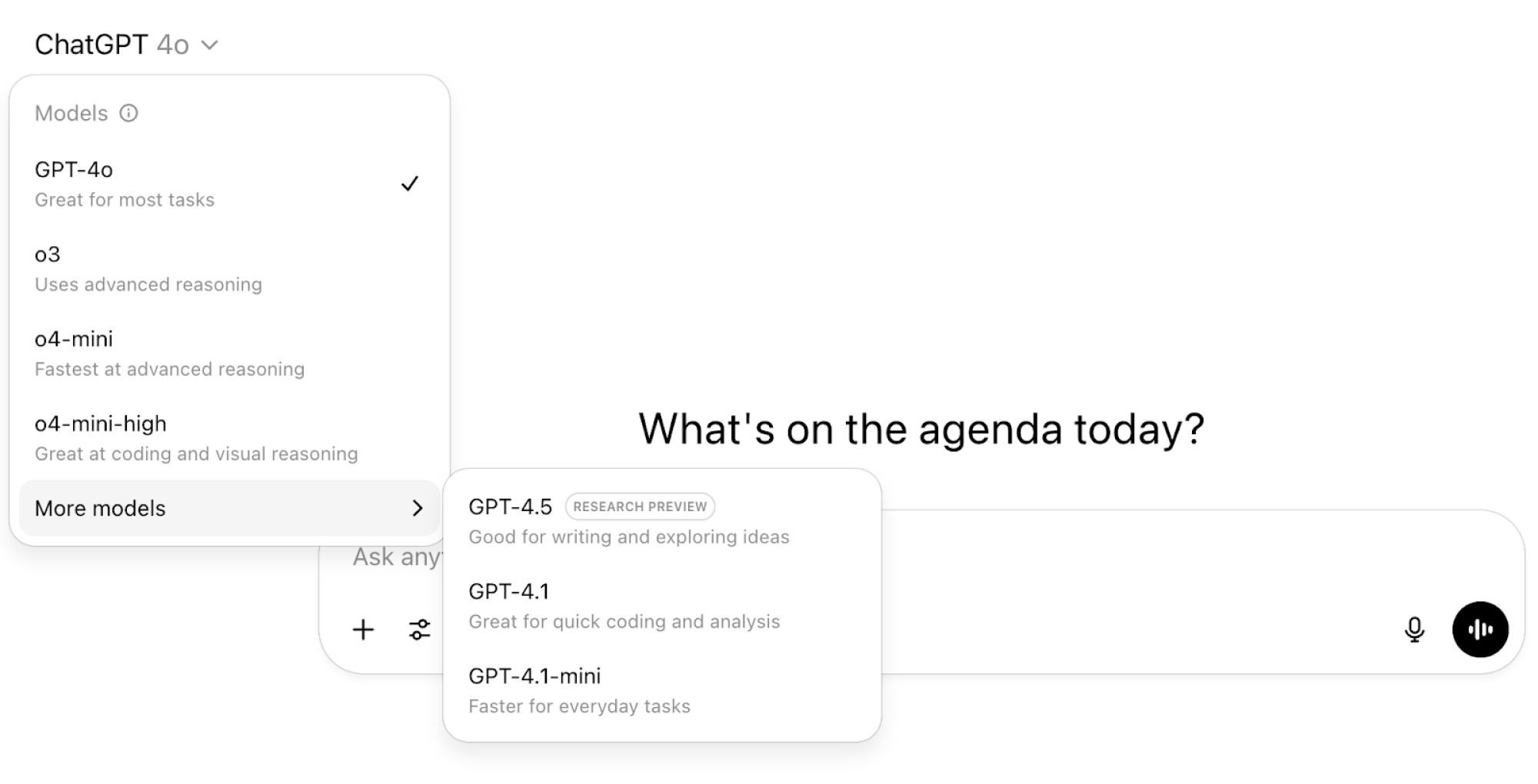
The model names aren’t exactly intuitive, either. OpenAI’s naming and versioning strategy for ChatGPT models has evolved over time to reflect improvements in speed, cost, reasoning abilities, and multimodal capabilities. In ChatGPT, you can select the model you want from the drop-down window, but many aren’t sure how or why they should use different models for different tasks.

screenshot of chatgpt output

Credit: Screenshot: Fei Wu

Here’s a bit more about four of the current options available in ChatGPT and how I personally use them in my day-to-day work.

(Disclosure: Lifehacker’s parent company, Ziff Davis, filed a lawsuit against OpenAI in April, alleging it infringed Ziff Davis copyrights in training and operating its AI systems.)

GPT-4o: An Everyday Genius

I think of GPT-4o as the “everyday genius” because it can handle most of my daily tasks and questions. GPT-4o has multimodal model capabilities in processing and generating text, images, and audio. When you can’t decide which GPT model to use, 4o should be your go-to AI companion.

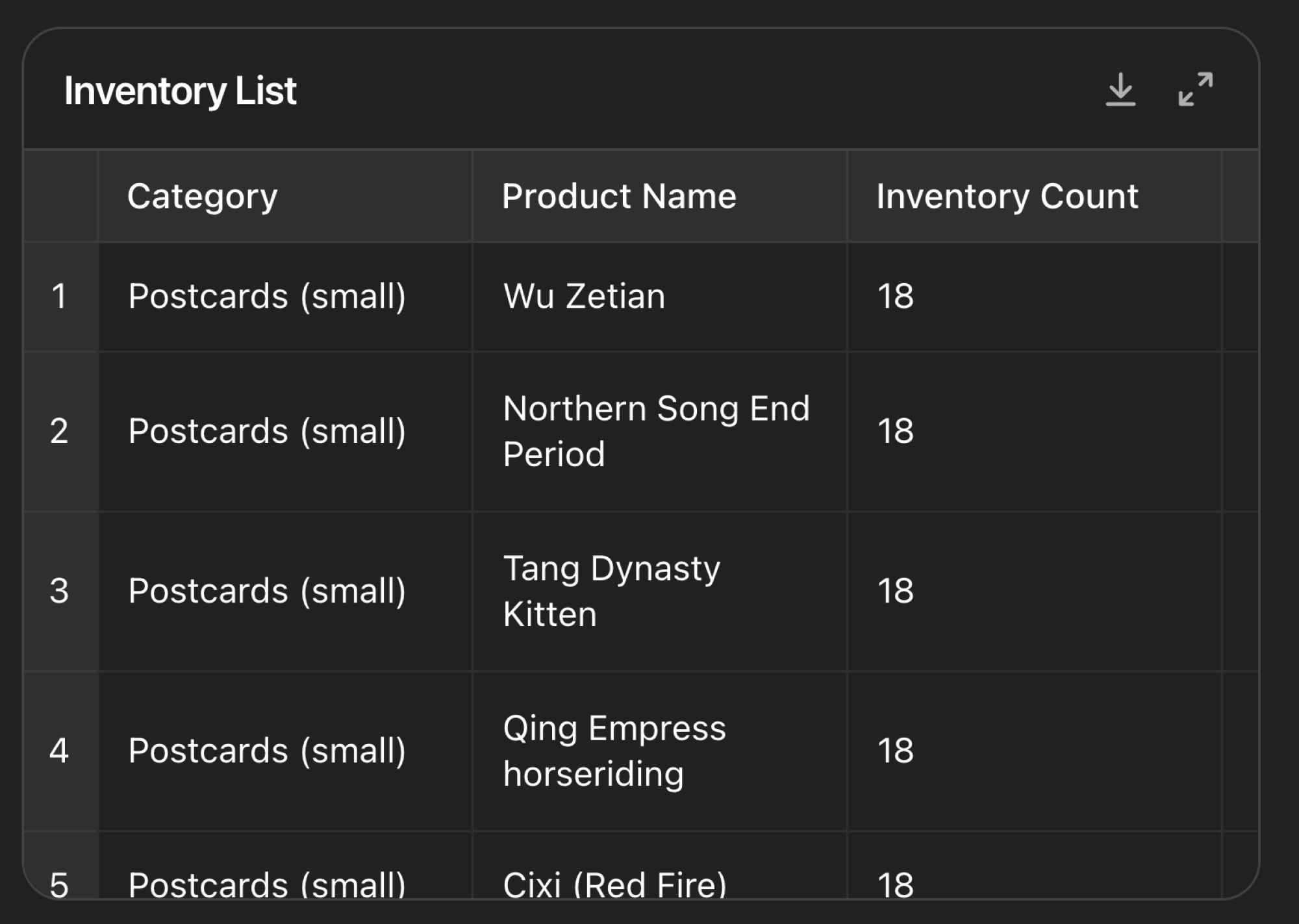
One discovery I had recently was uploading photos of handwritten inventory sheets from a merchandise drop off for my mom’s art business, Xiang Li Art. GPT-4o extracted the details and turned the photos into a clean and accurate spreadsheet in seconds. This helped me save a lot of time compared to manual data entry.

photo of inventory list written on paper

Credit: Image: Fei Wu

screenshot of chatgpt output
The author used ChatGPT to digitize physical records quickly.
Credit: Screenshot: Fei Wu

Another way my household uses GPT-4o is voice translation between my Mandarin-speaking mother and my English-speaking partner Adam. This can work in real time using the advanced voice feature, or I can upload a document or paste a transcript and GPT-4o instantly helps me bridge the language gap with accuracy and tone sensitivity.

Advanced voice requires a paid plan, but there’s also standard voice mode available on free plans.

o4-mini: Good for quick wins 

If you are using the free tier of ChatGPT, you may hit your daily usage cap with GPT-4o fairly quickly. This is where o4-mini comes in. Creators on a budget can turn to o4-mini for fast, quality results.

I use o4-mini for bursts of creativity such as Instagram posts, YouTube title variations, and even ideas for quick air fryer recipes based on what I have left in the fridge. For tasks that are less important and urgent, o4-mini is my go-to.

According to OpenAI’s website, the free tier usage limit on o4-mini refreshes every five hours. A note that this model is in the process of being replaced with GPT-4.1 mini for users at all tiers.

o4-mini-high: Good for extended context and visual reasoning 

For my business Feisworld Media, I only use o4-mini-high occasionally when I need to process and understand longer documents with multimedia inputs, complex charts, and diagrams. I use o4-mini-high to process full workshop documents and transcripts, analyzing the content to extract key moments, quotes, and themes for highlight videos or articles. This model is not available through the free tier, so you’ll need to upgrade to the Plus plan to use it.

One way we used o4-mini-high recently was to navigate complex art grant details for Xiang Li Art that spanned multiple web pages and PDFs. Grant applications and databases are inherently dense; this is where o4-mini-high shines, because it has better contextual reasoning and longer memory storage. With o4-mini-high, we were able to easily parse out which grants Xiang Li Art qualified for, how she could uniquely stand out based on her background, and even the specific art collection she could present for a particular grant.

If you aren’t managing tasks at this complexity, I recommend you stick with GPT-4o or o4-mini instead. But if you want to upload existing assets or materials, then reference them in future prompts, o4-mini-high can be very helpful.

GPT-4.5: Good for strategy and deeper insights 

As part of the paid Plus plan, I also have access to GPT-4.5. For daily tasks and brainstorms of ideas, you do not need access to this model. However, it can be very powerful for crafting complex content or navigating higher-stakes situations when voice and tone are crucial for the output.

Earlier, I talked about using o4-mini-high to parse out important information for a grant. When it came time to apply for the grant, I chose to use GPT-4.5 instead to help develop a first draft of a grant proposal that included an artist statement, project description, audience engagement, community impact, and narratives. We needed strong storytelling, cultural sensitivity, and precision. GPT-4.5 did a lot of this initial legwork, freeing us up to spend our energy on finessing details and applying final touches before submission. By saving time, we were able to apply for more grants last year and get my mom’s artwork out into the world.

It’s important to note that no model from ChatGPT can replace the hard work artists, creators, and businesses need to do to thrive. Your artistic instinct and business acumen still matter so much. Think of ChatGPT as a way to get a running start so you can focus on what matters most. 

Final thoughts

Whether you’re sketching out video scripts, translating a conversation with your mom, or crafting a high-stakes grant proposal, there’s a ChatGPT model built for the job.

Experiment with the different engines and stay creative. It may take a bit of trial and error before you feel comfortable with these various models of ChatGPT. Once you learn to let them handle the busywork, you can focus on your creative vision. No matter which tier you choose, these tools are here to amplify your creativity and inner genius, not replace it.

And if you’re doing something interesting on ChatGPT, reach out to me on YouTube, LinkedIn, or Instagram to say hello.

Ten Amazon Father’s Day Tech Gift Ideas Dad’s Will Love You For

Ten Amazon Father’s Day Tech Gift Ideas Dad’s Will Love You For
It’s almost Father’s Day and if you find yourself scrambling for gift ideas, we have you covered. We’ve rounded up a bunch of deals on items that are likely to bring a far bigger grin to your dad’s mug than an actual mug, or a tie or whatever else you might have as backup gift idea. And for this roundup, we ventured a little off the beaten

Five Ways I Use ChatGPT as a Full-Time Creator to Get More Done

We may earn a commission from links on this page.

I’ve been a full-time creator for over ten years, so I’m always looking for ways to save time and use technology to make my life easier. One of my recent priorities has been to learn my way around ChatGPT and its many different use cases. Here, I’ll share a few ways I’m using the chatbot in my everyday life.

ChatGPT surpassed 400 million weekly active users earlier this year and is now one of the top ten most-visited websites in the world, according to SimilarWeb. But many people aren’t familiar with everything that chatbots can now do, and what has changed or improved over the last year. Going from a novice to an intermediate user, I’m eager to share what I have learned and how ChatGPT has transformed the way I work.

Here are five ways I use AI to lighten my workload.

(Disclosure: Lifehacker’s parent company, Ziff Davis, filed a lawsuit against OpenAI in April, alleging it infringed Ziff Davis copyrights in training and operating its AI systems.)

No. 1. Transforming written content into YouTube scripts

Before we get started, I want to clarify that the prompts used in this article will work for most ChatGPT models. 4o is the default model on both the free and the paid tier. It’s sufficient in most cases, and if you want more intense reasoning, the paid tier has o1, o3, and other models to explore.

As a content creator who enjoys writing articles and creating videos about AI and tech, I find it easier to start with the written piece first. Once I’m ready, I import my writing into ChatGPT to help me create a concise and engaging script for a YouTube video.

I ask for a specific length – “Rewrite this content as a 7-minute YouTube script” – then tweak the results to fit my voice and add any personal anecdotes or visuals. This helps me save time by repurposing existing content into various formats, and the output is flexible; I can ask for a 5-minute, 7-minute, or 10-minute version of the script, depending on my needs.

No. 2. Understanding complex documents

Like many other creators who have built a following on their platforms, I regularly work with companies to produce sponsored articles and videos on my website and YouTube channel. More often than not, I need to sign a contract with a brand before taking on a sponsored project.

I’m a firm believer that we should always read and try to understand the contract to our best ability. But contracts can have a lot of jargon, and hiring a lawyer to break things down, as I’ve done before, can be time-consuming and expensive. ChatGPT helps me interpret clauses and understand what I’m signing up for. (Remember that ChatGPT is not a substitute for professional legal advice.)

First, I copy and paste the contract text or upload the contract file directly into ChatGPT. Then I prompt the bot by asking it to summarize the contract for me in a few paragraphs, as well as point out anything in the contract I should be cautious about.

After working as a content creator for over a decade, I’ve found that most brand contracts offer fair and reasonable terms. But ChatGPT helps me understand certain legal language a lot better and raise red flags earlier. It can even help me prepare an email response back to the brand manager in case of concerns, and how we might go about revising certain parts of the contract.

No. 3. Crafting grant proposals and art submissions

Since early 2024, I have taken on an important project called Xiang Li Art. Xiang Li is my mom, and she has devoted the last 12 years to painting a series of Chinese empresses on silk using gemstone watercolor. So far we’ve been able to exhibit her work at the Harvard Museum of Natural History, the Museum of Fine Arts in Boston, Worcester Art Museum, Cambridge Library, and even a window display at the historic Denholm’s building in downtown Worcester.

Since then, so many artists have reached out to us to inquire about how to make their art seen by more people and share their struggles with pursuing art submissions and grants. In order to showcase artists’ work successfully at various locations, they need to enter a large number of online “call for art” submissions. That’s exactly where ChatGPT can come into play. 

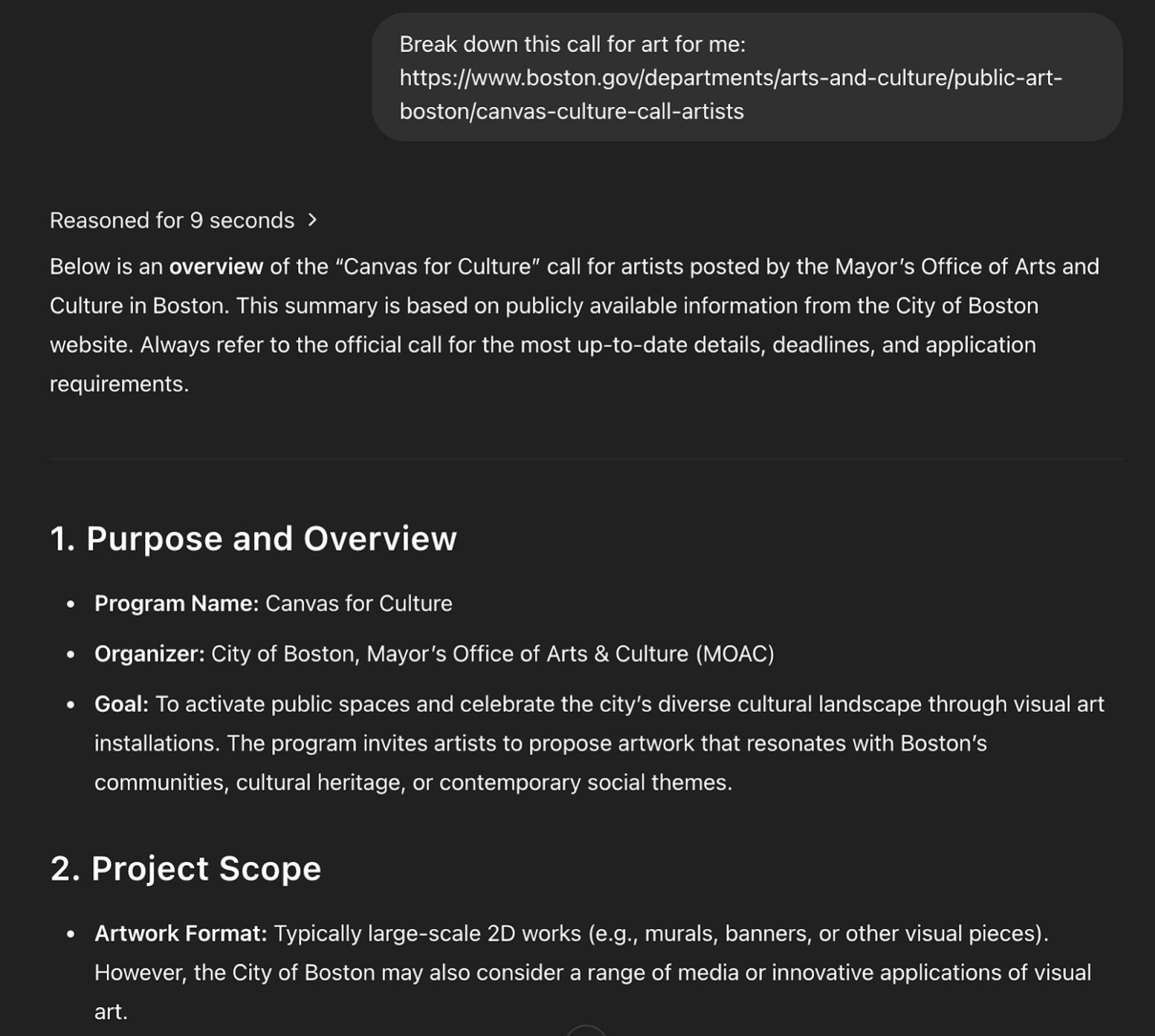
How we do it is we first find the website link that contains detailed information related to the desired call for art. We then open up ChatGPT, give it the website link, and enter a simple prompt to break down the details.

Below is an example of the results I got from ChatGPT after analyzing the city of Boston’s “A Canvas of Culture Call to Artists”. I chose this example because of the complexity of this project and requirements for artists.

screenshot of chatgpt output

Credit: Screenshot: Fei Wu

ChatGPT can also provide high-quality first drafts of the content you need in order to submit for the call. For example, artists are often required to share an artist statement of interests, as well as a statement about the art they chose for the exhibit and how it relates to a certain theme. This process can be both daunting and time-consuming, and that’s where AI can help you get a running start.

My workflow looked like this: “Break down this call for art: [link to website]. Now study my art and background at [link to portfolio]. Now help me write an artist statement under 500 words that highlights my Chinese empress collection and gemstone watercolor technique on silk.”

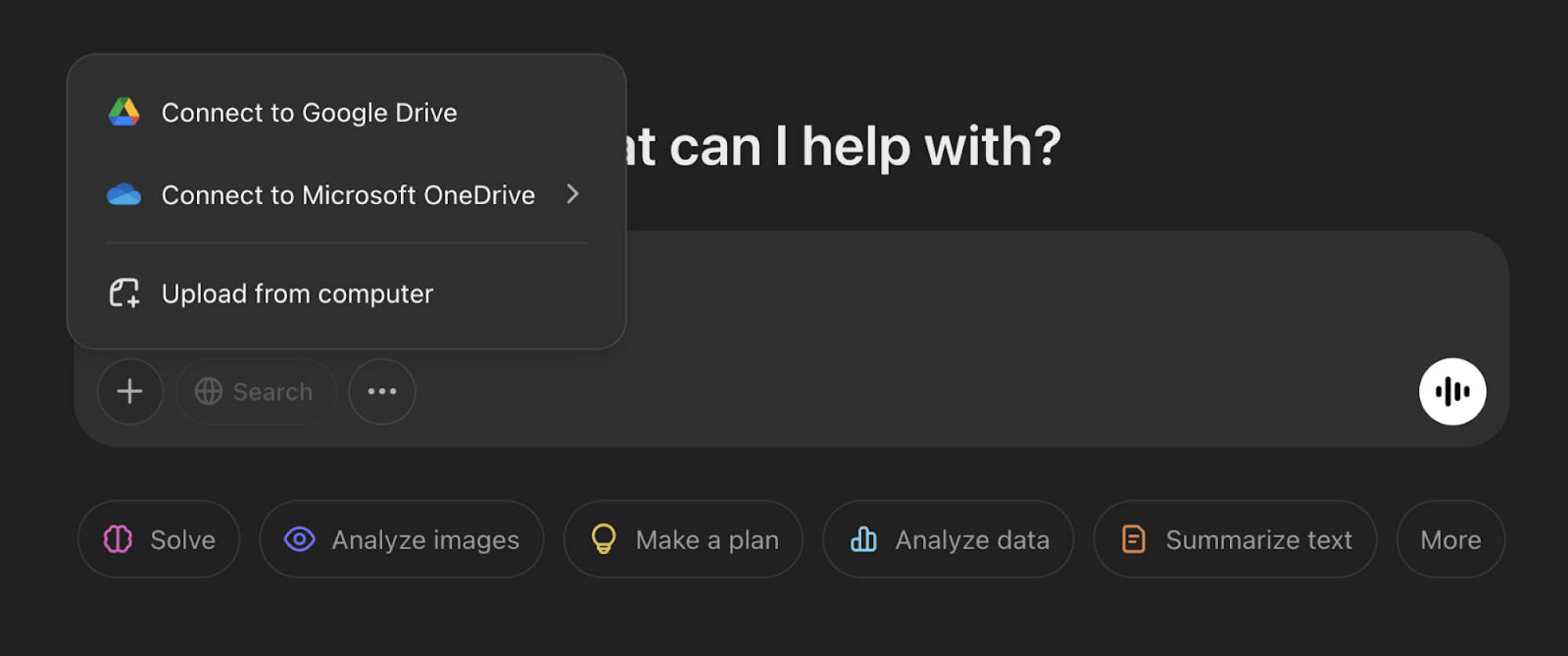
The more context you give ChatGPT, the better your results. Remember that you can upload documents, images, PDFs, or even videos to offer deeper insight into your work.

screenshot of chatgpt output

Credit: Screenshot: Fei Wu

When it comes to working with any LLM (not just ChatGPT), the more context you can provide, the better results you will get.

No. 4. In-depth analysis and comparison

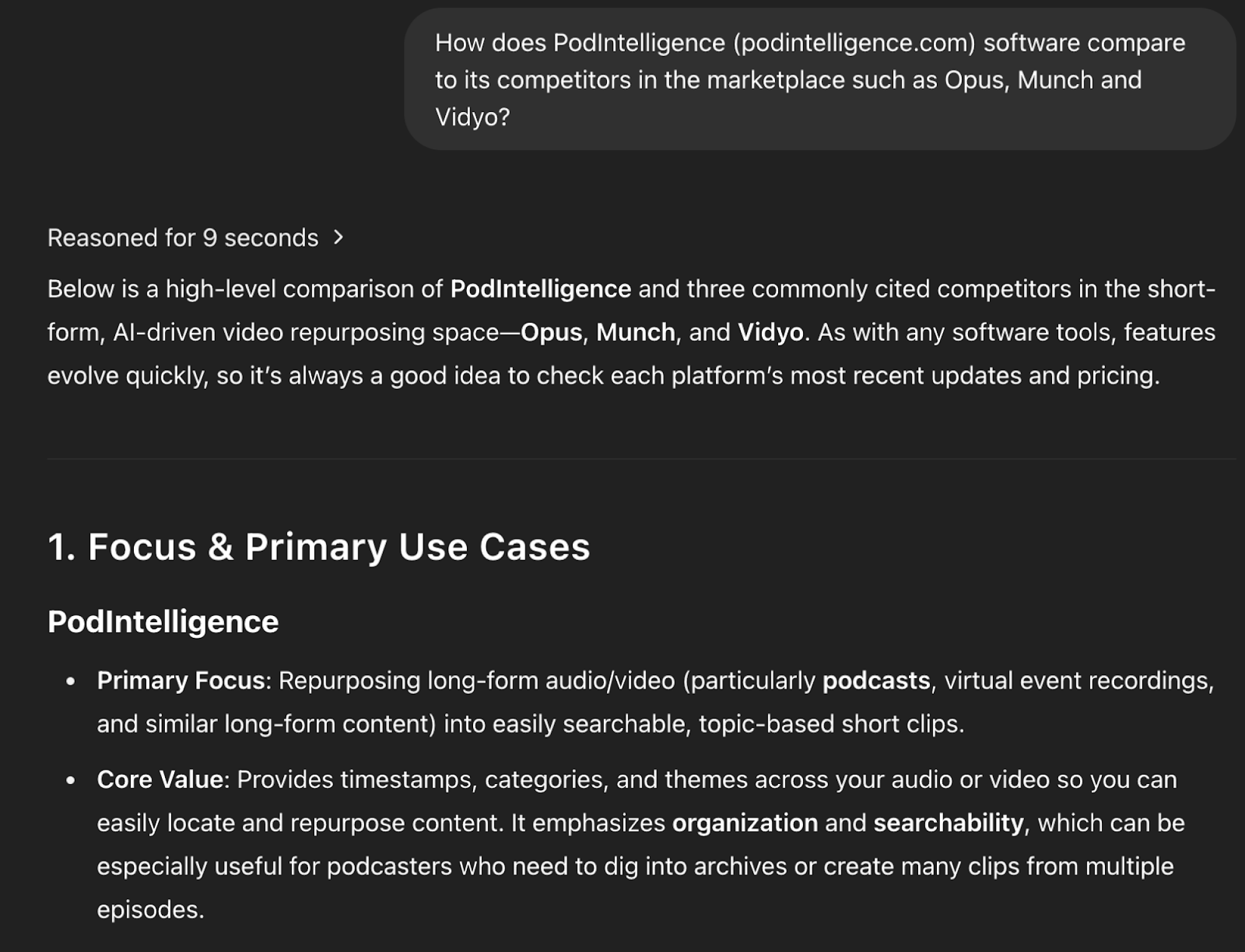
When my partner and I launched PodIntelligence, a software tool for breaking down long-form videos and podcasts, we often needed to compare our features with those of competing content-repurposing platforms like Opus, Munch, or Vidyo.

ChatGPT can generate side-by-side comparisons, highlight feature differences, and even produce tables, which helped us save us hours of market research. Here’s the result from ChatGPT o1 (you can also link to ChatGPT’s output results as web URLs, like I did just now, for future reference).

screenshot of chatgpt output

Credit: Screenshot: Fei Wu

You could also use the comparison feature to get an initial sense of different products or services you’re thinking about purchasing. 

For example, if you are deciding between a MacBook Air and a Dell XPS, ChatGPT can help you break down specs like battery life, weight, and screen size. Or perhaps you might use ChatGPT to choose a travel destination, breaking down travel costs, weather, food, and cultural highlights.

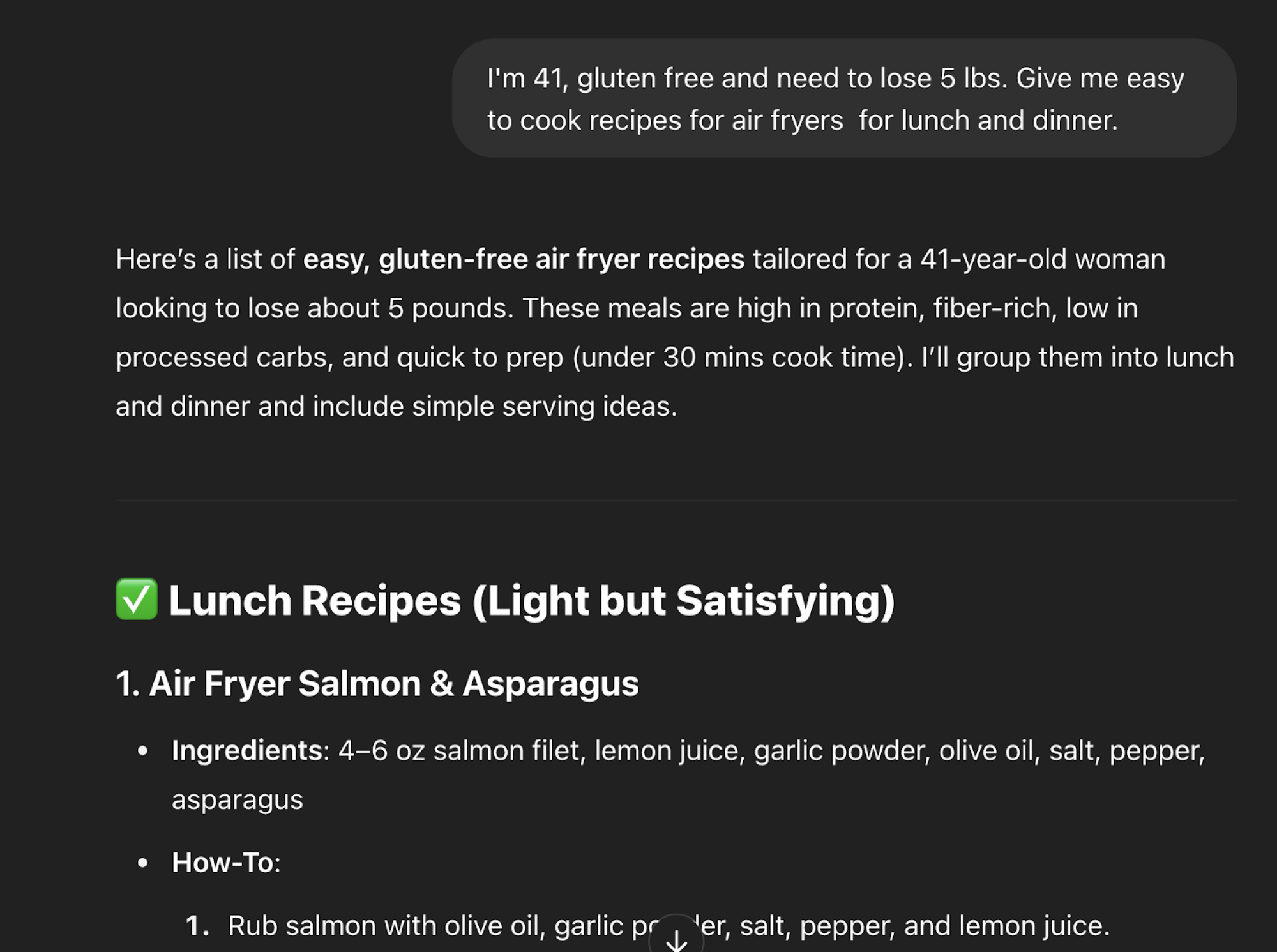
One of my favorite recent use cases of ChatGPT is meal planning based on diet. It compares pros and cons, health benefits, and sample meals tailored to your health goals like weight loss, heart health, or energy levels. 

I explained to the chatbot that I’m 41, gluten free, and want to lose five pounds, and asked it to give me easy air fryer recipes for lunch and dinner.

screenshot of chatgpt output

Credit: Screenshot: Fei Wu

No. 5: Interactive translation

Before ChatGPT was available, Google Translate was my go-to translator for free text, images, documents, and websites. It’s quick, functional, and accurate.

However, I find ChatGPT to provide translation similar in speed and accuracy. Instead of a straightforward translation for your document, ChatGPT can offer cultural nuance, interpreting complex and creative content. I like to give feedback to ChatGPT’s translation and use prompts to ask questions.

For example, I uploaded images of decades-old documents for Xiang Li Art and asked ChatGPT to translate. The resulting translations were impressively accurate, needing minimal edits. ChatGPT also parsed any visible logos or branding, summarizing those details in the translation.

screenshot of chatgpt output

Credit: Screenshot: Fei Wu

When used effectively, ChatGPT can streamline your workflow and help catalyze creative breakthroughs. It helps me save time, but more importantly helps me discover new ideas or possibilities I hadn’t previously considered.

These real-world examples shared here come straight from my own ChatGPT prompts. I’d love to know how you’re using ChatGPT in your everyday life or creative work—find me on YouTube and Instagram and let’s connect.