Engineer creates first custom motherboard for 1990s PlayStation console

Last week, electronics engineer Lorentio Brodesco announced the completion of a mock-up for nsOne, reportedly the first custom PlayStation 1 motherboard created outside of Sony in the console’s 30-year history. The fully functional board accepts original PlayStation 1 chips and fits directly into the original console case, marking a milestone in reverse-engineering for the classic console released in 1994.

Brodesco’s motherboard isn’t an emulator or FPGA-based re-creation—it’s a genuine circuit board designed to work with authentic PlayStation 1 components, including the CPU, GPU, SPU, RAM, oscillators, and voltage regulators. The board represents over a year of reverse-engineering work that began in March 2024 when Brodesco discovered incomplete documentation while repairing a PlayStation 1.

“This isn’t an emulator. It’s not an FPGA. It’s not a modern replica,” Brodesco wrote in a Reddit post about the project. “It’s a real motherboard, compatible with the original PS1 chips.”

Read full article

Comments

The Nothing Phone 3 will be available in the US via Amazon

The Nothing Phone 3 is getting an official release for US customers. The handset will be available to purchase from Amazon or directly from the company, according to a report by TechCrunch. Nothing CEO Carl Pei has been teasing this news since April, but now it’s official.

Canadians will also be able to get in on the retail action, as Nothing has inked a deal with Best Buy to sell the new handset in the region. The phone goes on sale next month.

The company has produced eight handsets since forming back in 2020, but only the Phone 2 has made it to general sale in the US. For the other models, users would have to buy a unit via a beta program and there was no after-sale support. So this is good news for North Americans who are tired of Samsung and Apple. 

Phone (3). It’s a magic number.

Coming July 2025. pic.twitter.com/WEQ7Vcf72H

— Nothing (@nothing) May 20, 2025

“The smartphone market in the US is dominated by two players, but a lot of people are hungry for something different,” Pei told TechCrunch. “This is the right product, and the right moment, to start scaling in North America.”

The downside here? The phone will only be available from Amazon and Nothing, so there will be no option to purchase from a carrier for a discount. However, it’ll support 4G and 5G with AT&T and T-Mobile. There’s no explicit support for Verizon, but the Phone 2 worked well with its network and the same thing will likely be true here.

There’s no official US price yet. Pei recently said that it would cost £800 in England at launch, which would translate to around $1,080 in US dollars. This is far and away the most expensive handset the company has ever released, as it has primarily been known for mid-tier offerings. Pei says the higher cost accounts for “premium materials, major performance upgrades and software that really levels things up.”

We don’t have actual specs yet, but a recent leak certainly points to the kind of leveled up experience Pei was talking about. A reliable leaker suggested that it’ll include a “flagship Snapdragon chipset” from Qualcomm and a new camera system with a triple-lens module on the rear. The battery is also reportedly on the larger side, with indications it’ll likely exceed the 5,000 mAh mark. The Nothing Phone 2 shipped with a 4,700 mAh battery.

That’s not the only product the company is bringing stateside. It’s making some over-ear headphones that will be available to purchase for US and Canadian residents.

This article originally appeared on Engadget at https://www.engadget.com/mobile/smartphones/the-nothing-phone-3-will-be-available-in-the-us-via-amazon-184534970.html?src=rss

Here’s How to Use Each Head on Your Massage Gun Most Effectively

We may earn a commission from links on this page.

If you have a massage gun, you probably have a favorite attachment. I know that when I have the option for the heat therapy head, I’m hard-pressed to swap it out for one of the ball, bullet, or fork heads instead. But this means I’m not making the most of the tools available to me: Each massage gun head serves a specific purpose, and understanding them is crucial for safe and effective use.

While more and more versatility is a big selling point , there are four primary attachments you’ll find with most massage guns, each designed for different muscle groups and treatment goals. Here’s how you can use them to maximize your massage gun’s potential while avoiding common mistakes that could lead to injury.

First, some massage gun basics

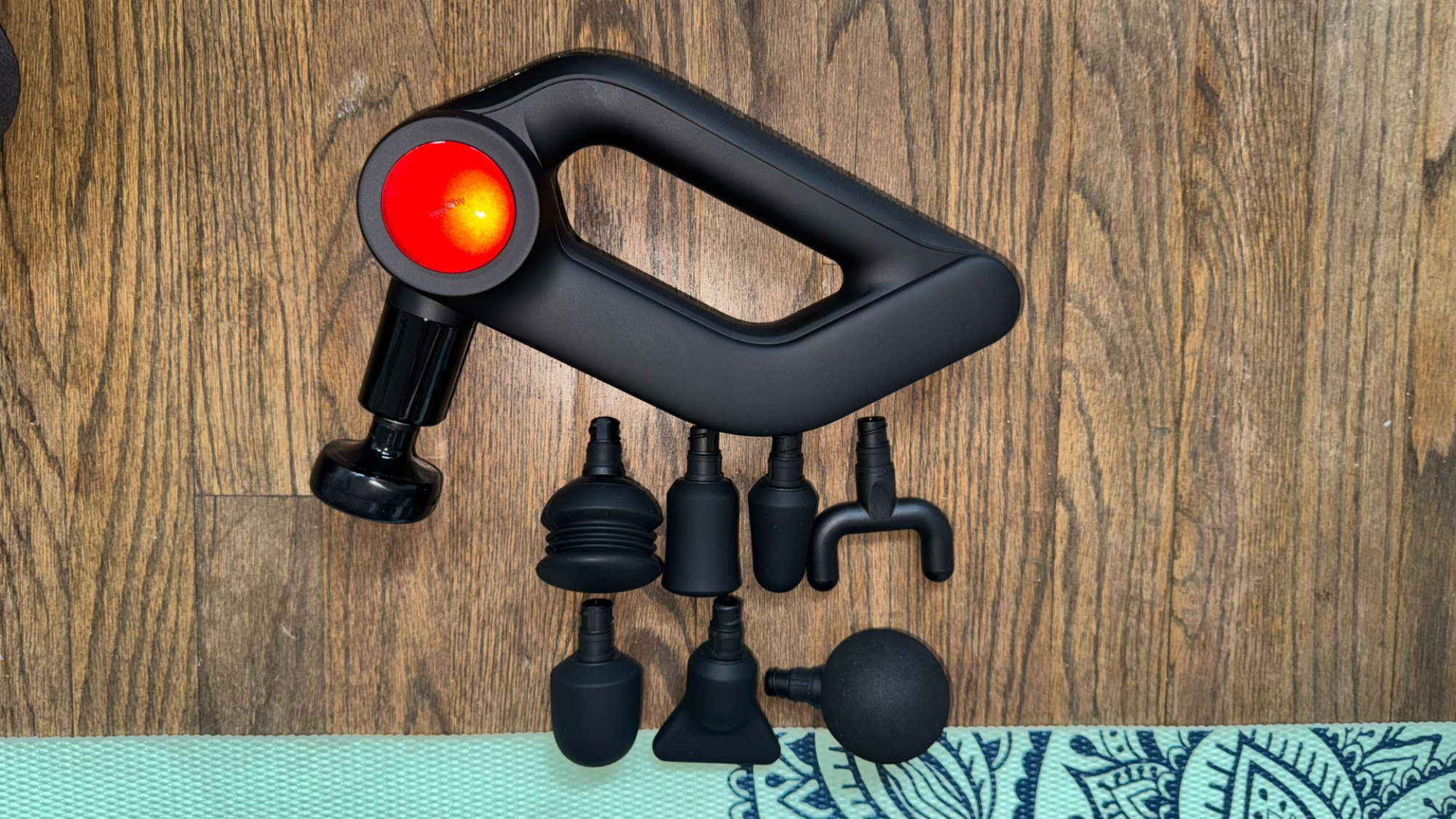
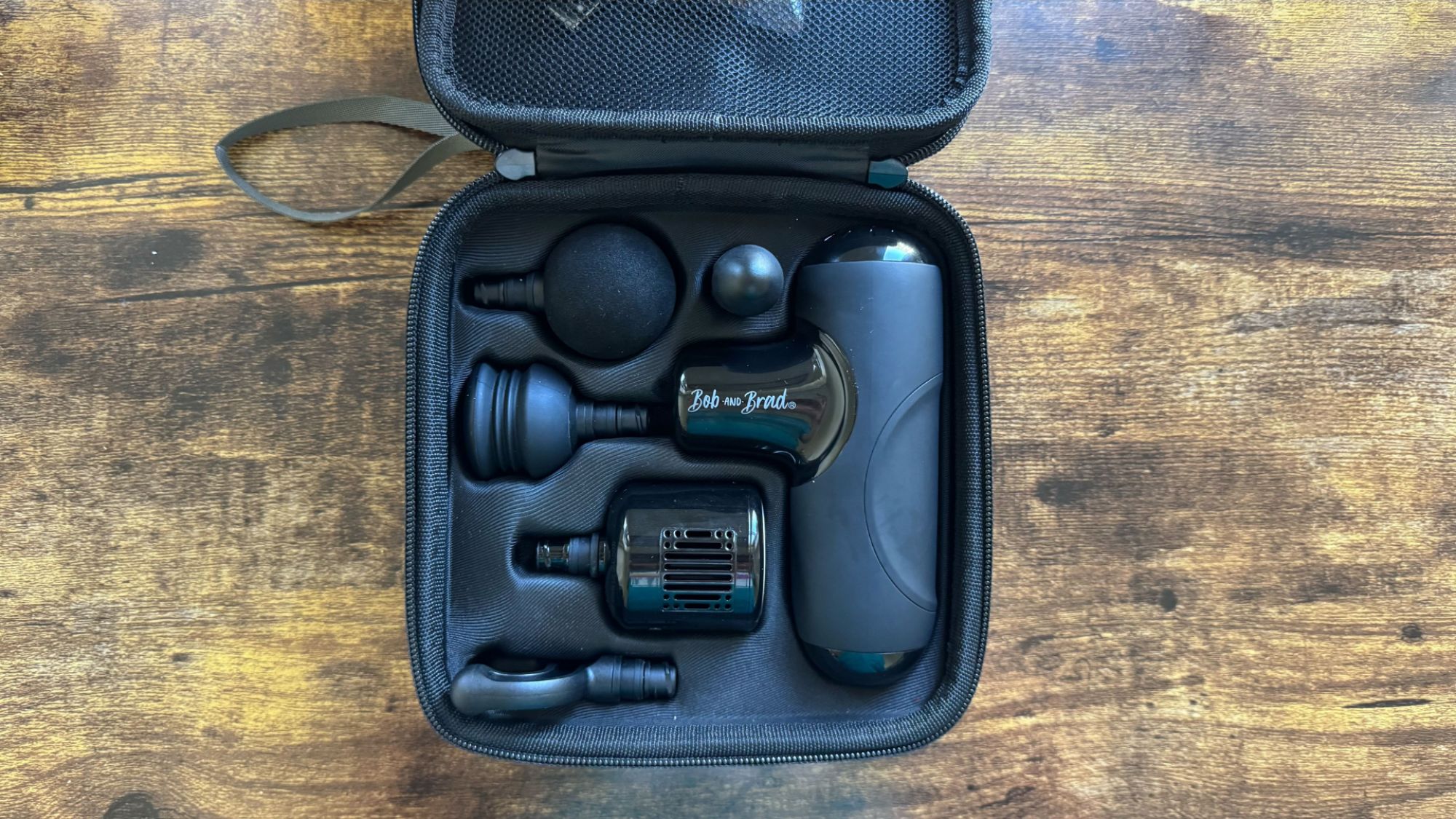
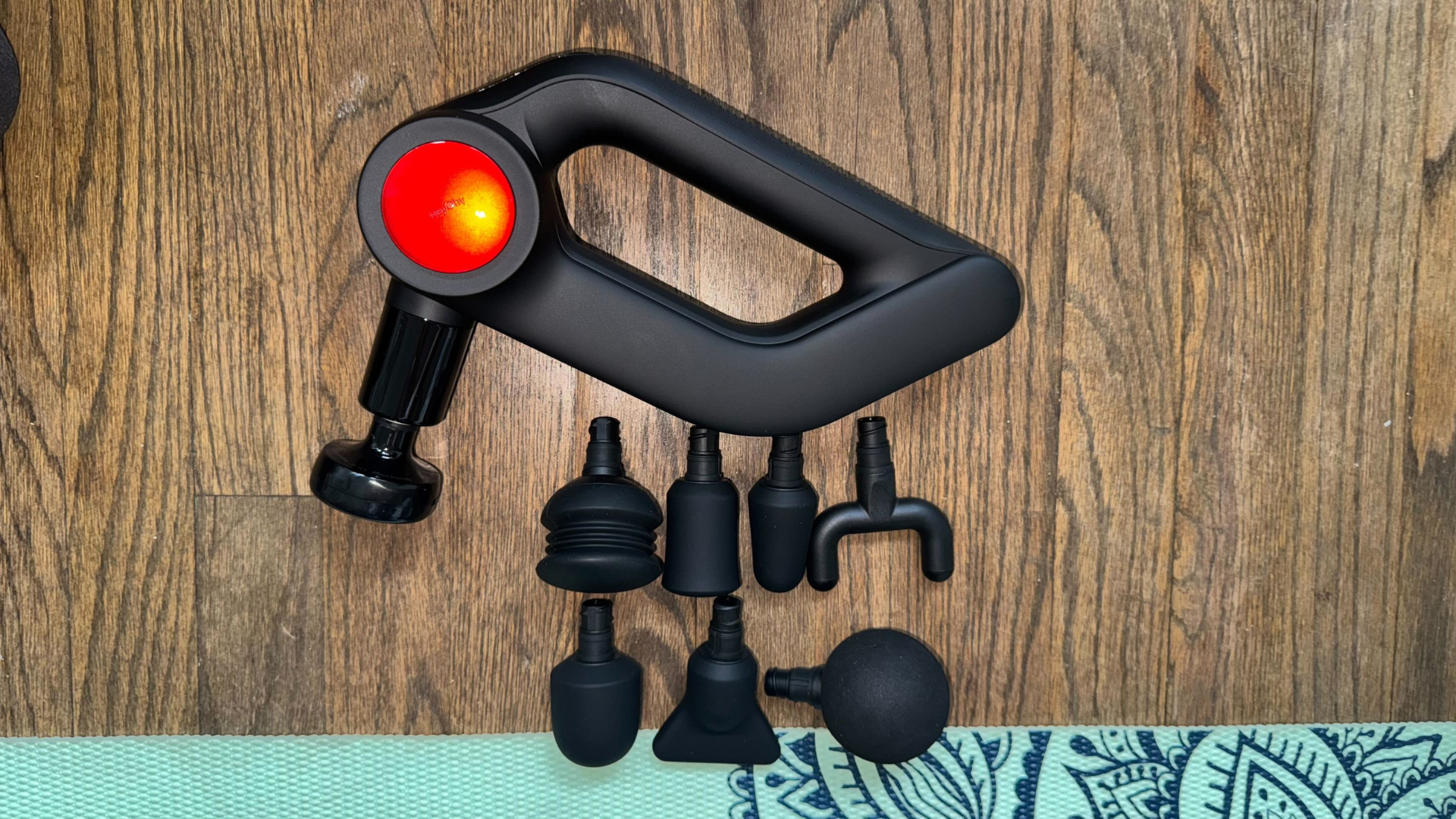
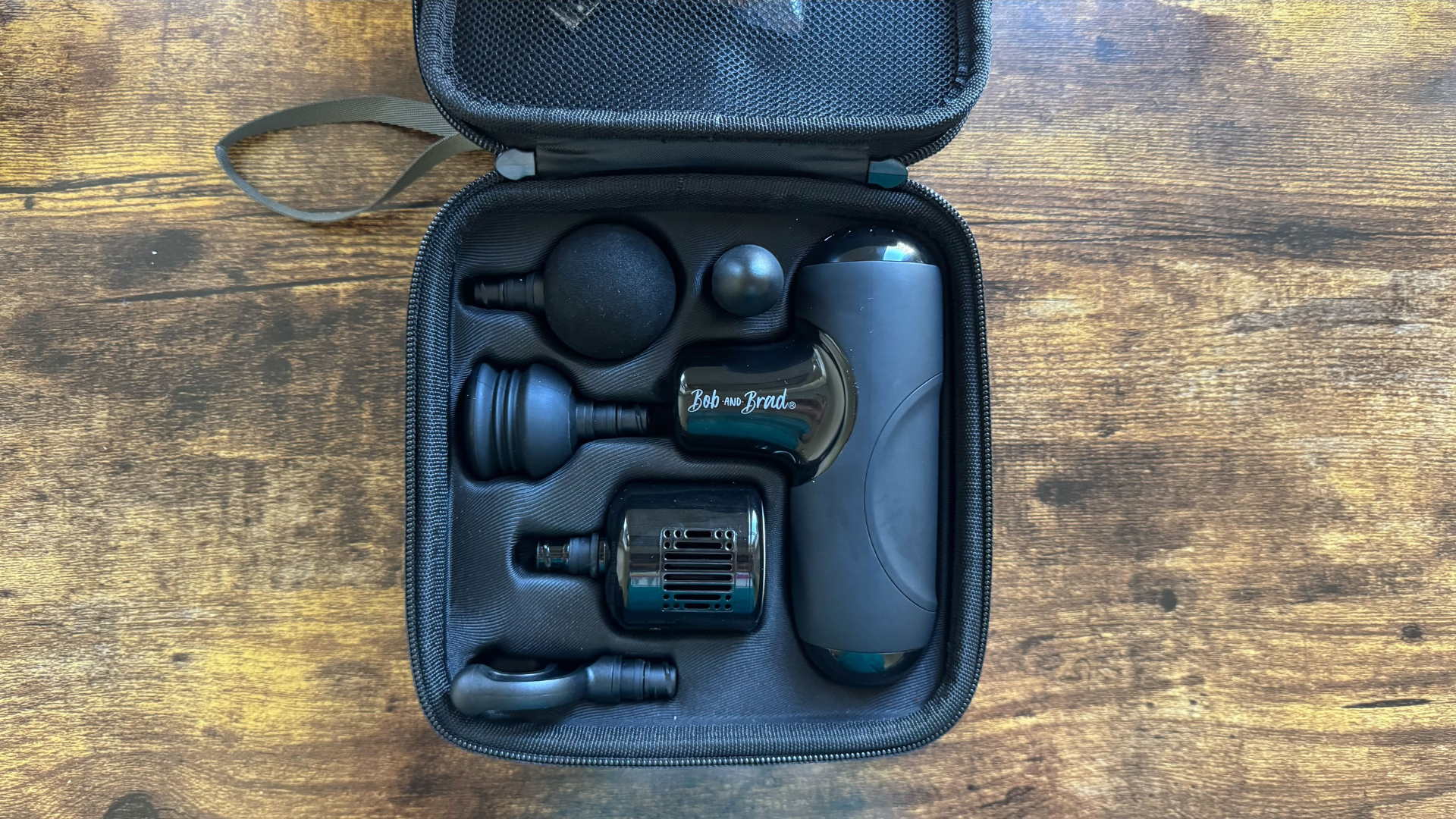
When I’m marathon training, I use a massage gun before and after my runs. In the photos below, you can see all the attachments that come with two of my massage guns, the Bob and Brad Q2 Pro Mini and the HeyChy D5 Pro. Here’s what I’ve learned using them over the years.

HeyChy D5 Pro
Attachments available for the HeyChy D5 Pro.
Credit: Meredith Dietz

The Bob and Brad Q2 Pro Mini
Attachments available for the Bob and Brad Q2 Pro Mini.
Credit: Meredith Dietz

How hard to press when using a massage gun

One of the most common mistakes with massage gun use is applying too much pressure. “Remember to let the gun do the work,” advises Amanda Grimm, a sports and remedial massage therapist and physical therapist. “Don’t press hard, move it slowly across the targeted area and limit its use to 1-2 minutes per muscle group.”

Use soft heads on sensitive tissues, and heavier heads on deeper muscles. It’s the device’s percussive action that provides the therapeutic benefit, not the pressure you apply. If you find yourself pressing hard to “feel” the effect, you’re likely using too much force and risking injury or excessive soreness.

How often to use a massage gun

While it’s tempting to use the massage gun daily, giving muscles time to recover between sessions is important. Use it as part of your warm-up routine before exercise or for recovery afterward, but avoid daily intensive treatment of the same areas.

National Academy of Sports Medicine-certified trainer Baltazar Villanueva recommends pairing massage gun therapy with active movement to maximize benefits. This approach helps reinforce the increased range of motion and flexibility gained from the percussive therapy. Try to move the treated area through its range of motion immediately after massage gun therapy. This helps your body “remember” the improved mobility and can make the benefits more persistent than using the massage gun alone.

However, when you encounter a specific knot or trigger point, the approach changes slightly. Use the bullet head attachment and apply gentle, sustained pressure for 10-15 seconds before slowly moving away. Remember, more intensity doesn’t necessarily mean better results.

Now, let’s get into the specifics of which attachments help which parts of your body.

The ball head: Your go-to for large muscle groups

The ball head attachment is the workhorse of massage gun therapy. Its rounded, cushioned surface makes it ideal for treating expansive muscle areas without causing discomfort. As Grimm explains, the ball head excels because it distributes force more evenly across the treatment area, making it perfect for general recovery on large muscle groups like the quadriceps, glutes, and hamstrings.

The ball head’s design allows for comfortable pressure distribution, making it perfect for post-workout recovery sessions on your major muscle groups according to Villanueva. Its versatility also makes it suitable for treating broad areas of muscle tension, though care should be taken to avoid bony areas like the kneecap.

The flat head: Has your back

The flat head attachment features a wider, level surface that’s specifically engineered for broader muscle areas. As Grimm explains, this makes it exceptional for back muscles, where its design can cover more territory with each pass. The flat head works particularly well on the upper back and shoulder blade area, where muscle tension often spreads across wide zones.

The flat head is particularly effective for denser muscle tissue and is an excellent choice for people who are more sensitive to vibration, as its broader surface area distributes the percussive force more gently than other attachments.

When using the flat head on your back, focus on the muscle tissue rather than the spine itself. The attachment’s broad surface helps ensure you’re treating muscle rather than risking contact with bony structures.

The bullet head: Precision targeting for problem areas

The bullet head is your precision instrument, designed with a smaller, more focused contact point. This attachment provides concentrated pressure that makes it particularly effective for targeting trigger points and specific problem areas. However, as Grimm cautions, the bullet head should be used with extra care, especially around bony areas, due to its concentrated force delivery.

This focused pressure makes the bullet head ideal for working on specific tension spots in smaller muscle groups like the calves, but it requires more careful handling than broader attachments. Use lighter pressure and shorter duration to avoid overstimulation of sensitive tissues, and always be mindful of underlying bone structures.

The fork head: Spine-safe muscle relief

The fork head features a unique design with two prongs that create a channel down the middle. This shape allows you to work on muscles alongside the spine without making direct contact with the vertebrae. Villanueva notes that the fork head is excellent for treating areas around the spine, such as the trapezius muscles, and can even be used effectively on the Achilles tendon area, as its design specifically avoids direct contact with bone.

This attachment addresses a common problem: how to treat back muscles without risking spine injury. The fork head’s design ensures you can provide effective treatment to paraspinal muscles while maintaining safe distance from the spine itself, making it an essential tool for addressing upper back tension and other areas where bone proximity is a concern.

Start slow

Understanding the specific purpose of each massage gun attachment will help you gain maximum benefit while minimizing risk. Always prioritize safety over intensity. If you’re new to massage gun therapy, start conservatively. Begin with the lowest intensity setting and use the ball head attachment on large, less sensitive muscle groups like the quadriceps or glutes. Try gentle pressure and slow movements, paying attention to how your body responds.

As you become more comfortable with the device and understand your body’s response, you can gradually explore other attachments and muscle groups. Always listen to your body, and if something doesn’t feel right, stop immediately.

Finally, massage guns work best as part of a more comprehensive recovery routine. Combine their use with proper hydration, adequate sleep, stretching, and movement correction. The gun addresses symptoms, but underlying issues like poor posture or movement patterns need separate attention.


AMD Supercharges AI Data Centers With Powerful MI350 GPU At Advancing AI 2025

AMD Supercharges AI Data Centers With Powerful MI350 GPU At Advancing AI 2025
At the Advancing AI event, currently underway in San Jose, California, CEO Dr. Lisa Su, along with an array of company execs and partners, disclosed AMD’s latest integrated AI platform vision and unveiled new rack-scale AI systems, in additional to details regarding its forthcoming Instinct MI350 series AI accelerators, Pensando Pollara…

AI Overviews hallucinates that Airbus, not Boeing, involved in fatal Air India crash

When major events occur, most people rush to Google to find information. Increasingly, the first thing they see is an AI Overview, a feature that already has a reputation for making glaring mistakes. In the wake of a tragic plane crash in India, Google’s AI search results are spreading misinformation claiming the incident involved an Airbus plane—it was actually a Boeing 787.

Travelers are more attuned to the airliner models these days after a spate of crashes involving Boeing’s 737 lineup several years ago. Searches for airline disasters are sure to skyrocket in the coming days, with reports that more than 200 passengers and crew lost their lives in the Air India Flight 171 crash. The way generative AI operates means some people searching for details may get the wrong impression from Google’s results page.

Not all searches get AI answers, but Google has been steadily expanding this feature since it debuted last year. One searcher on Reddit spotted a troubling confabulation when searching for crashes involving Airbus planes. AI Overviews, apparently overwhelmed with results reporting on the Air India crash, stated confidently (and incorrectly) that it was an Airbus A330 that fell out of the sky shortly after takeoff. We’ve run a few similar searches—some of the AI results say Boeing, some say Airbus, and some include a strange mashup blaming both Airbus and Boeing. It’s a mess.

Read full article

Comments

Barbie Goes AI As Mattel Teams With OpenAI To Reinvent Playtime

BrianFagioli writes: Barbie is getting a brain upgrade. Mattel has officially partnered with OpenAI in a move that brings artificial intelligence to the toy aisle. Yes, you read that right, folks. Barbie might soon be chatting with your kids in full sentences, powered by ChatGPT.

This collaboration brings OpenAI’s advanced tools into Mattel’s ecosystem of toys and entertainment brands. The goal? To launch AI-powered experiences that are fun, safe, and age-appropriate. Mattel says it wants to keep things magical while also respecting privacy and security. Basically, Barbie won’t be data-mining your kids… yet.


Read more of this story at Slashdot.

VoIPster Communications President Launches Open-Source Voice Dictation Solution for Linux

Andrew Mitchell, President and Senior Network Engineer of VoIPster Communications, Inc., has officially announced the release of the Linux Dictation Project, an open-source voice dictation and voice command interface tailored for Linux users with accessibility in mind. Available now on GitHub, the project aims to empower users—especially those with physical disabilities—by enabling full voice-driven text entry and computer control using natural speech.

The tool integrates OpenAI’s Whisper for transcription and features command modes for controlling applications such as LibreOffice, window navigation, text selection, and even keyboard shortcuts using voice input.

“As someone living with cerebral palsy, I’ve experienced firsthand the barriers that traditional computing interfaces present,” said Mitchell. “This project is about giving back and creating a reliable, fully customizable, offline-capable dictation system that respects user privacy and works natively on Linux.”

Key features include:
– Offline transcription powered by Whisper
– Text dictation mode and command control mode
– Voice-controlled selection and editing functions
– Support for modifier key operations (Shift, Ctrl, Alt, Super)
– Systemd integration for always-on startup on Linux systems

The Linux Dictation Project is designed to be extensible and is freely available under an open-source license to foster collaboration and further innovation within the community.

Join the Movement Contributions, feedback, and collaboration are welcome. Developers, accessibility advocates, and users are encouraged to explore the repository, report issues, or suggest new features.

GitHub Repository: https://github.com/wheeler01/Linux-Dictation-Project

The post VoIPster Communications President Launches Open-Source Voice Dictation Solution for Linux appeared first on Linux Today.

Every New Detail About Dragon Age: The Veilguard’s Development Shows Why It’s A Defining Game For BioWare

With every new report about Dragon Age: The Veilguard’s troubled development, it feels like a miracle that the game came out at all. A new story from Bloomberg outlines how the Dragon Age team was jerked around by publisher Electronic Arts and forced to make pivots with limited resources and time, making it impossible…

Read more…

I Like iOS 26’s New Back Gesture Better Than Android’s (When It Works)

Unlike Android, the iPhone has never had a physical back button. You need some way to go back to the previous page in various apps, and rather than a button, Apple found a decent solution in the back gesture. It requires you to swipe from the left edge of the iPhone’s screen towards the right, and while it doesn’t work in all apps, most have adopted it. As good as this gesture is, it can be hard to reach for right-handed people (especially on large iPhones) since it requires you to extend your thumb all the way to the left. iOS 26 makes this a lot easier.

Once you start using iOS 26, you’ll notice that the back gesture has changed. You can swipe right from pretty much anywhere on the screen to go back. This feels much more intuitive than swiping from the left edge. I tried this in a bunch of Apple’s own apps, including Mail, Podcasts, and Settings, and it works quite well in all cases. One notable holdout is Safari, which retains the old back gesture. That’s understandable: Safari lets you go back a page if you swipe right from the left edge, and it also lets you go forward a page by swiping towards the left from the right edge of the screen.

Back gestures on iOS 26 vs. Android

In some ways, iOS 26’s back gesture is better than Android’s back gesture. While Android OS lets you swipe from either edge of your phone’s screen to go back—assuming gesture-based navigation is enabled on your phone—the iOS 26 back gesture is easier to remember: swipe right to go back, no matter which part of the screen you’re on. This gesture has already become a part of my daily routine on my iPhone 12 Pro Max, where reaching the opposite edge of the screen is a task and a half. 

That said, I do get frustrated with the current implementation of this gesture because it doesn’t always work. When I open a chat in Messages, I still have to swipe right from the left edge. In other apps, sometimes you may encounter a conflicting gesture that may stop you from going back. For example, in Mail, you need to swipe over an empty part of the screen to go back. If you swipe over any of your emails, then you trigger Mail’s default right-swipe gesture, and it shows you the option to mark a mail read or to snooze the email.

It might be a matter of adapting to the various quirks of iOS, but it’s also worth keeping in mind that iOS 26 is still in its first developer beta, so some rough edges are to be expected. I’m quite excited to see how it gets polished through the beta cycle, and most importantly, how well third-party apps use the gesture to their advantage.

“Two years of work in two months”: States cope with Trump broadband overhaul

The Trump administration has upended plans that state governments made to distribute $42 billion in federal broadband funding, forcing state officials to scrap much of the preparation work they did over the previous couple of years.

Secretary of Commerce Howard Lutnick essentially put the Broadband Equity, Access, and Deployment (BEAD) program on hold earlier this year and last week announced details of a rules overhaul that requires states to change how they distribute money to Internet service providers. To find out how this affects states, we spoke with Andrew Butcher, president of the Maine Connectivity Authority (MCA).

“We had been in position to be making awards this month, but for [the Trump administration’s] deliberations and program changes, so it’s pretty unfortunate,” Butcher told Ars. Established by a 2021 state law, the MCA is a quasi-governmental agency that oversees Maine’s BEAD planning and other programs that increase broadband access.

Read full article

Comments

[$] FAIR package management for WordPress

Matt
Mullenweg—WordPress
co-founder and CEO of WordPress hosting company Automattic—started a messy public spat with
WP Engine. After that, it
seemed inevitable that the larger WordPress community would seek to
untangle itself from its dependence on the WordPress.org plugin and
theme repository. That shoe finally dropped on June 6,

At the AltCtrlOrg conference in Basel,
Switzerland, a short walk away from WordCamp Europe 2025,
a group of WordPress community participants unveiled FAIR.pm,
backed by the Linux Foundation. and is
designed to be