Google co-founder Sergey Brin admits to ‘mistakes’ over Google Glass

Before augmented reality was ever a thing, there was Google Glass: a much hyped experiment that was ultimately a failure over issues like privacy (and just looking like a dork). At an I/O session yesterday with Deepmind CEO Demis Hassabis, Google co-founder Sergey Brin admitted that he made “mistakes” with Google Glass in several areas.

“I just didn’t know anything about consumer electronic supply chain chains, really, and how hard it would be to build that and have it it at a reasonable price point and managing all the manufacturing and so forth,” he said during the session.

Brin said that he’s still a believer in the form factor, though, adding that Xreal’s latest device looks like “normal glasses” without “that thing in front.” He noted that rather than going it alone as before, Google now has “great partners” in Samsung (the Project Moohan headset) and Xreal (Project Aura glasses) as part of the Android XR extended reality program. 

There was also a “technology gap” when Google Glass came along in 2013 that no longer exists, according to Brin. “Now in the AI world, the things that these glasses can do to help you out without constantly distracting you, that capability is much higher,” he said

Google Glass wasn’t a complete flop. It’s easy to forget that the product soldiered on for many years after its debut, largely as an enterprise device, and was only fully discontinued in 2023. It also paved a path for future VR and AR wearables like the Oculus Rift, HTC Vive, Meta Quest and Apple Vision Pro. Come to think of it, though, none of those projects have exactly set the world on fire, either. 

This article originally appeared on Engadget at https://www.engadget.com/ar-vr/google-co-founder-sergey-brin-admits-to-mistakes-over-google-glass-110659349.html?src=rss

Starfish Space Announces Plans For First Commercial Satellite Docking

Starfish Space plans to perform the first commercial satellite docking in orbit with its Otter Pup 2 mission, aiming to connect to an unprepared D-Orbit ION spacecraft using an electrostatic capture mechanism and autonomous navigation software. NASASpaceFlight.com reports: This follows the company’s first attempt, which saw the Otter Pup 1 mission unable to dock with its target due to a thruster failure. The Otter Pup 2 spacecraft will be deployed from a quarter plate on the upper stage adapter of the SpaceX Falcon 9 rocket, placing it into a sun synchronous orbit altitude of 510 km inclined 97.4 degrees. The target will be a D-Orbit ION spacecraft which will simulate a client payload, which is not equipped with a traditional docking adapter or capture plate as you might see aboard a space station or other rendezvous target. Instead, Starfish Space’s Nautilus capture mechanism will feature a special end effector connected to the end of the capture mechanism. This end effector will enable Otter Pup 2 to dock with the ION through electrostatic adhesion.

“An electromagnet will be integrated into the end effector and will be used as a backup option to the electrostatic end effector, to dock with the ION through magnetic attraction,” the company notes. The goal is to eventually commission its Otter satellite servicing vehicle to allow for servicing of previously launched satellites. The company’s first Otter missions include customers such as NASA, the U.S. Space Force, and Intelsat, with the goal of flying those missions as soon as 2026. […] Following the thruster issues on the first mission, this flight will feature two ThrustMe thrusters, which use an electric propulsion system based on gridded ion thruster technology.


Read more of this story at Slashdot.

Into The Radius 2 Is Out Now In Early Access On Quest 3

VR survival shooter Into the Radius 2 is now available in early access on Quest 3 and 3S.

Playable alone or in co-op, Into the Radius 2 is a survival shooter where you’re tasked with navigating the hostile Pechorsk Security Zone. Previously launched on Steam Early Access, we’ve known for several months that Estonian studio CM Games would be bringing it to Quest 3 too. Before going live, the studio released a first look at Quest 3 gameplay footage, which you can see below.

0:00

/0:59

Quest 3 teaser trailer

As confirmed two weeks ago, today’s launch on Quest 3 doesn’t have complete feature parity straight away with PC VR. Quest 3 players can’t access the Pechorsk Outskirts location or the Distortion Zones, while progression and difficulty levels have been adjusted in light of these changes. Cross-platform multiplayer isn’t currently supported, though CM Games previously advised it plans to bring the Quest version “closer to feature parity in future updates.”

Into the Radius 2 is out now on Steam Early Access and Quest 3, and using the code “ITR2_EA-501CA6” on the Quest store offers a 15% discount at checkout until June 9.

Update Notice

This article was updated shortly after publication to include the launch discount code and further information about the current Into the Radius 2 differences between Quest 3 and PC VR.

Sony is ending its PlayStation Stars loyalty program

Sony is opting out of its PlayStation Stars loyalty program. Starting today, you can no longer sign up for the program. If you’re a member and cancel your membership, you won’t be able to sign up again.

Current members can still earn points and digital collectibles and level up their status until July 23 at 9:59 PM ET. After that, all campaigns and rewards will be kaput. The program will be entirely discontinued on November 2. But if you keep your membership until then, you can still redeem your points after that, provided they haven’t expired.

Sony launched PlayStation Stars in 2022. The company’s first loyalty program lets you earn points by playing games and making purchases on the PlayStation Store. You can redeem points for items like PSN wallet funds and select store products.

The company will now “refocus” its approach to rewards. (How, we don’t know.) “We want to thank all of our players for supporting PlayStation Stars since the launch in 2022,” Sony wrote on the PlayStation Blog. “As we explore new ways to evolve our loyalty program efforts for the future, we’ll continue to celebrate all of our players through the various community activities we have planned.”

This article originally appeared on Engadget at https://www.engadget.com/gaming/playstation/sony-is-ending-its-playstation-stars-loyalty-program-164514310.html?src=rss

Windows 11 To Get Apple-Style App Continuity

Microsoft is introducing a new “Cross Device Resume” feature for Windows 11, enabling app developers to let users seamlessly continue activity between devices in a manner closely mirroring Apple’s Handoff for Macs and iPhones. Unveiled at Build 2025 during a session titled “Create Seamless Cross-Device Experiences with Windows for your app,” the feature was demonstrated — before the session was quietly edited to remove this segment — by showing Spotify playing a song on an Android phone, then surfacing the Spotify app in the Windows taskbar with a phone icon; clicking this launches Spotify on the PC at precisely the same point in the app as on the phone, preserving playback position for uninterrupted use.


Read more of this story at Slashdot.

Senua’s Saga: Hellblade 2 is coming to PS5 this summer

Senua’s Saga: Hellblade 2 is coming to PS5 this summer, though we don’t have a concrete release date just yet. Ninja Theory says it will be optimized for both the standard-issue PS5 and the beefier PS5 Pro.

The company also says it launches alongside a free update that’ll be available for all platforms, including PS5, Xbox Series X/S and PC. We don’t know much about this update, but the developer promises “new features.” There’s a trailer that discusses the update, but is also devoid of any real details.

This is something of a homecoming for the franchise, as Hellblade: Senua’s Sacrifice was originally released for PS4 back in 2017. Ninja Theory says it’s “excited to bring Senua back to where her journey began and for PlayStation players to be able to experience the next chapter in her brutal saga of survival.”

For the uninitiated, Senua’s Saga: Hellblade 2 is a brutal and gorgeous game that first hit the Xbox and PC in 2024. It’s a third-person adventure set in Iceland during the 10th century. We called it an outstanding “interactive brutality visualizer” in our original review, going on to say it features “an extended, extremely anxious and violent vibe.” Good times!

The combat is decent, though not groundbreaking, and the puzzles are just average. The sheer violence, however, is epic. The protagonist Senua screams with each swing of the sword and every fight is close combat. This is for those who revel in simulated physical violence. We’ll let you know when we have an actual summer release date for this gem.

This article originally appeared on Engadget at https://www.engadget.com/gaming/playstation/senuas-saga-hellblade-2-is-coming-to-ps5-this-summer-163539229.html?src=rss

Microsoft blames Apple for Xbox mobile store delays

According to a report by The Verge, Microsoft says Apple‘s App Store rules are to blame for the continued delay of the Xbox mobile app store it announced last summer. The store would have allowed users to buy Microsoft mobile games through the Xbox web store on iOS. In an amicus brief filed this week, Microsoft expressed support for Epic Games in the companies’ long-running bout against Apple. The company also expressed concern that Apple could succeed in overturning the injunction that has opened the floodgates for payments outside of apps that circumvent Apple’s 30 percent fee.

Apple filed an appeal against the injunction earlier this month, and just a few days later it asked the Ninth Circuit to halt enforcement of the original ruling while it works through its appeal. Microsoft, for its part, is urging the court to enforce the injunction while the courts handle the appeal. The company points out that Apple itself has said that the policy changes it made in response to the injunction “can be undone,” raising concern that without firm enforcement by the courts, Apple could pull the rug at any given moment.

As of this writing, Microsoft’s filing is not yet publicly available, but The Verge has details on the brief’s contents. It reads, in part: “The district court’s injunction allows Apple to maintain its in-app exclusivity but at least should have enabled Microsoft to offer consumers a workable solution by launching its own online store — accessible via link-out — for in-app items to be purchased off-app and used in games or other apps. And that is what Microsoft wants to do. But even this solution has been stymied by Apple.”

While things are moving quickly, with apps like Fortnite already returning to the App Store in the US, Microsoft remains in a holding pattern awaiting a firm outcome in the case. It seems they want to avoid a situation where the Xbox mobile store is released, only to be taken down should Apple win on appeal.

This article originally appeared on Engadget at https://www.engadget.com/big-tech/microsoft-blames-apple-for-xbox-mobile-store-delays-162413207.html?src=rss

What’s New on Netflix in June 2025

The third and final season of dystopian survival series Squid Game—one of Netflix’s most-watched shows—is coming in June. The South Korean thriller picks up after last season’s cliffhanger, with Gi-hun (Player 456) at the center of the new game. The new season will be available on June 27.

Also on June’s lineup is the return of FUBAR (June 12), the action series starring Arnold Schwarzenegger and Monica Barbaro as a father and daughter who both work for the CIA. Carrie-Anne Moss joins the cast this season as a former East German spy.

On the documentary side, Netflix will stream Titan: The OceanGate Disaster (June 11) following its premiere at the Tribeca Festival just a few days earlier. The feature uses first-hand accounts of former OceanGate employees to create a portrait of CEO Stockton Rush and the history leading up to the submersible’s failure in 2023.

The platform will also drop three new installments of its anthology series Trainwreck, which covers major news events gone wrong. This month’s stories cover the deaths at 2021’s Astroworld music festival (The Astroworld Tragedy, June 10), the rise and fall of former Toronto mayor Rob Ford (Mayor of Mayhem, June 17), and the ill-fated “poop cruise” (Poop Cruise, June 24).

Sports docs this month include Power Moves with Shaquille O’Neal (June 4), a series that follows Shaq in his role as president of Reebok Basketball alongside Allen Iverson, and season two of AMERICA’S SWEETHEARTS: Dallas Cowboys Cheerleaders (June 18).

Netflix comedy specials in June include Justin Willman: Magic Lover (June 17) and Steph Tolev: Filth Queen (June 24).

Here’s everything coming to Netflix in June, and everything that’s leaving.

What’s coming to Netflix in June 2025

Available soon

Available June 1

  • The American

  • Barbarian

  • Bee Movie

  • The Birds

  • The Blues Brothers

  • The Devil’s Own

  • Dune (1984)

  • The Equalizer

  • Family Plot

  • Focus

  • Frenzy

  • The Great Outdoors

  • Hitchcock

  • Hop

  • The Legend of Zorro

  • The Man Who Knew Too Much

  • Neighbors

  • Now You See Me

  • Now You See Me 2

  • The Nutty Professor

  • Pokémon The Series: XY

  • Pokémon The Series: XY: XY: Kalos Quest

  • Pokémon The Series: XY: XYZ

  • Rear Window

  • The Theory of Everything

  • The Town

  • U-571

  • Us

  • Vertigo

Available June 3

Available June 4

Available June 5

Available June 6

Available June 7

  • Boys on the Side

  • Piece by Piece

Available June 9

Available June 10

Available June 11

Available June 12

  • The Fairly OddParents: A New Wish: Season 2

  • FUBAR: Season 2—Netflix Series

  • Plane

Available June 13

Available June 14

  • Grey’s Anatomy: Season 21

Available June 16

  • The Last Witch Hunter

Available June 17

Available June 18

Available June 19

Available June 20

Available June 22

  • The Intern

Available June 24

Available June 25

Available June 27

What’s leaving Netflix in June 2025

Leaving June 1

  • Batman Begins

  • Beginners

  • Burlesque

  • Closer

  • Cult of Chucky

  • Daddy Day Care

  • The Dark Knight

  • The Dark Knight Rises

  • Den of Thieves

  • From Prada to Nada

  • GoodFellas

  • Ma

  • Magic Mike XXL

  • Pride & Prejudice

  • Ted

  • Ted 2

  • Two Weeks Notice

Leaving June 11

  • Gran Turismo: Based on a True Story

  • Trap

Leaving June 14

  • Godzilla x Kong: The New Empire

Leaving June 16

  • The Equalizer: Seasons 1-3

  • Won’t You Be My Neighbor?

Leaving June 17

  • Carol

Leaving June 19

  • Migration

Leaving June 21

  • American Sniper

Leaving June 22

  • Brain on Fire

Leaving June 26

  • Ordinary People

Encounter Dinosaurs On visionOS Shows Value Of Light Interaction

Iron Man and Elf Director Jon Favreau attached his name to a couple experiences in headset over the years and they’re delightful explorations of light interaction.

In 2016, he sat down with me for an interview at the initial release of Gnomes & Goblins, saying “Nothin’ is going to come out and try to eat ya.” When I asked what I should tell my kids about the PC VR experience, he made it clear to my family: “Don’t worry, nothing scary is gonna happen.”

The app resizes to the player and you can be playful with the creatures you encounter, picking up a nut off the ground with Vive controllers and tossing it over.

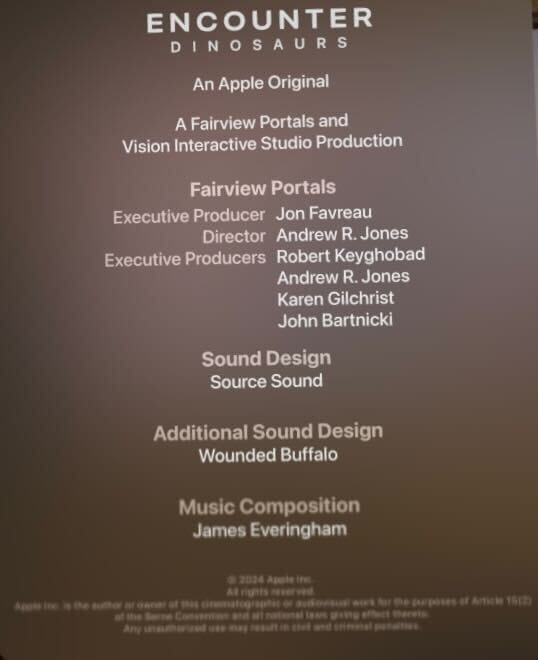
Nearby a decade later, visionOS follows in the dinosaur footsteps of Dreamdeck for Oculus Rift in introducing players to the large creatures in headset. Encounter Dinosaurs, also headed by Favreau, sees a portal open from which a large raptor-sized dinosaur emerges. The encounter was first demoed with Vision Pro before release and has been available since launch of the headset last year.

0:00

/0:59

Captured by UploadVR on Apple Vision Pro

There are two types of dinos in the experience, with the first being sized much more like that creature I met on Vive in 2016. The encounter in visionOS features interactions so light they don’t consciously register.

With the larger dino, you can absolutely watch the creature lock eyes. Or you can try and slap the big guy, choosing a more forceful interaction. The dino is animated with such fidelity, as its tail whips into your personal bubble seconds later, that you don’t notice even on multiple watches how scripted some aspects of this interaction are, even as the dinosaur scrabbles along the rocks to make an exit for the second or third time.

The story told in this introduction to Apple’s spatial computing platform is the same as 2016’s Gnomes & Goblins. “Nothing is going to come out and try to eat ya”, even if this time around one of the dinosaurs is big enough to snap at you just a little bit.

Even with impressively physical creatures like Dots running around on Quest 3, their animations frequently find themselves at odds with the physical environment. Their feet might seem to run across the ground for a few steps, but then they wiggle around and seem to teleport when colliding with a wall.

0:00

/1:43

Captured by UploadVR on Apple Vision Pro

Encounter Dinosaurs carefully frames its portal into the environment so this problem never occurs. The creature basically only sticks its head and tail out of the portal, but the spatial intrusion is enough to feel like Dorothy let something pop into her room from Oz instead of walking through that doorway leaving Kansas.

A doorway leaving mixed reality for full VR is the exact mechanic explored by Stay: Forever Home on Quest, and the grinding video game mechanic you find within seconds of traveling to your virtual destination is immediately off-putting there, more-so than the creature’s occasionally awkward interactions with the physical environment. Vacuuming up a Dot’s footsteps from your physical floor is only marginally less grindy, but not being forced to go into a virtual environment to unlock things feels like a relief.

There’s a reason one of the best virtual destinations, Raptor Cliff’s from Walkabout, turns its dinosaurs into roadside attractions and architectural fixtures. It’s hard to make interactive characters. A visit to an Alien Zoo at Dreamscape Immersive on a large moving platform absolutely captures the scale of Jurassic Park’s iconic first encounter with dinosaurs, complete with soaring music, but Dino Hab on Quest 3 again suffers in trying to gamify dinosaurs.

What Gnomes & Goblins & Encounter Dinosaurs each understand about virtual reality is that our default interaction with an alien environment is far lighter and more nuanced than most creators make space for. Oh sure it’s neat to shape landscapes in No Man’s Sky or Minecraft, but we don’t have those superpowers in the physical world. It’s a great power trip and instantaneous creative outlet to reshape landscapes, but simply tossing scraps to a hungry creature that comes by every so often is an expression of something deeply human about our tendency toward curious nurturing.

It doesn’t take much more than human wonder to hold your hand out when you see a butterfly. If you accept that invitation with a literal open hand in headsets, you’ll begin to understand why light interaction is a powerful path to storytelling in headset.

Meta Targets More ‘Underperformers’ in Mid-Year Reviews

An anonymous reader shares a report: Meta is expanding the ranks of its lowest-rated employees in mid-year performance reviews, a move that could lead to more performance-based cuts. Meta is telling managers to put more employees in “Below Expectations”, the lowest performance bucket during this year’s mid-year performance reviews, according to a memo shared on Meta’s internal forum on May 14, which was viewed by Business Insider. For teams of 150 or more, Meta wants managers to put 15-20% of employees in the bottom bucket compared to 12-15% last year.

The expanded range includes employees who have already left the company as part of “non-regrettable attrition”, Meta’s term for staff considered non-critical to operations, including those who resigned or were dismissed for underperformance. The mid-year performance review process is “an opportunity to make exit decisions”, according to the memo. It added that “there will be no company-wide performance terminations, unlike earlier this year,” and leaders are expected to manage the performance of their reports.


Read more of this story at Slashdot.

Raise Dinosaurs In Dino Hab On Quest 3 & 3S

Prehistoric eco-aware educational sim Dino Hab is now available for Meta Quest and we went hands-on for some impressions.

Dino Hab aims to be a full ecosystem building tool blended with entertainment, containing a heavy emphasis on learning aimed toward younger explorers and dinosaur fans.

0:00

/0:29

Video captured by UploadVR

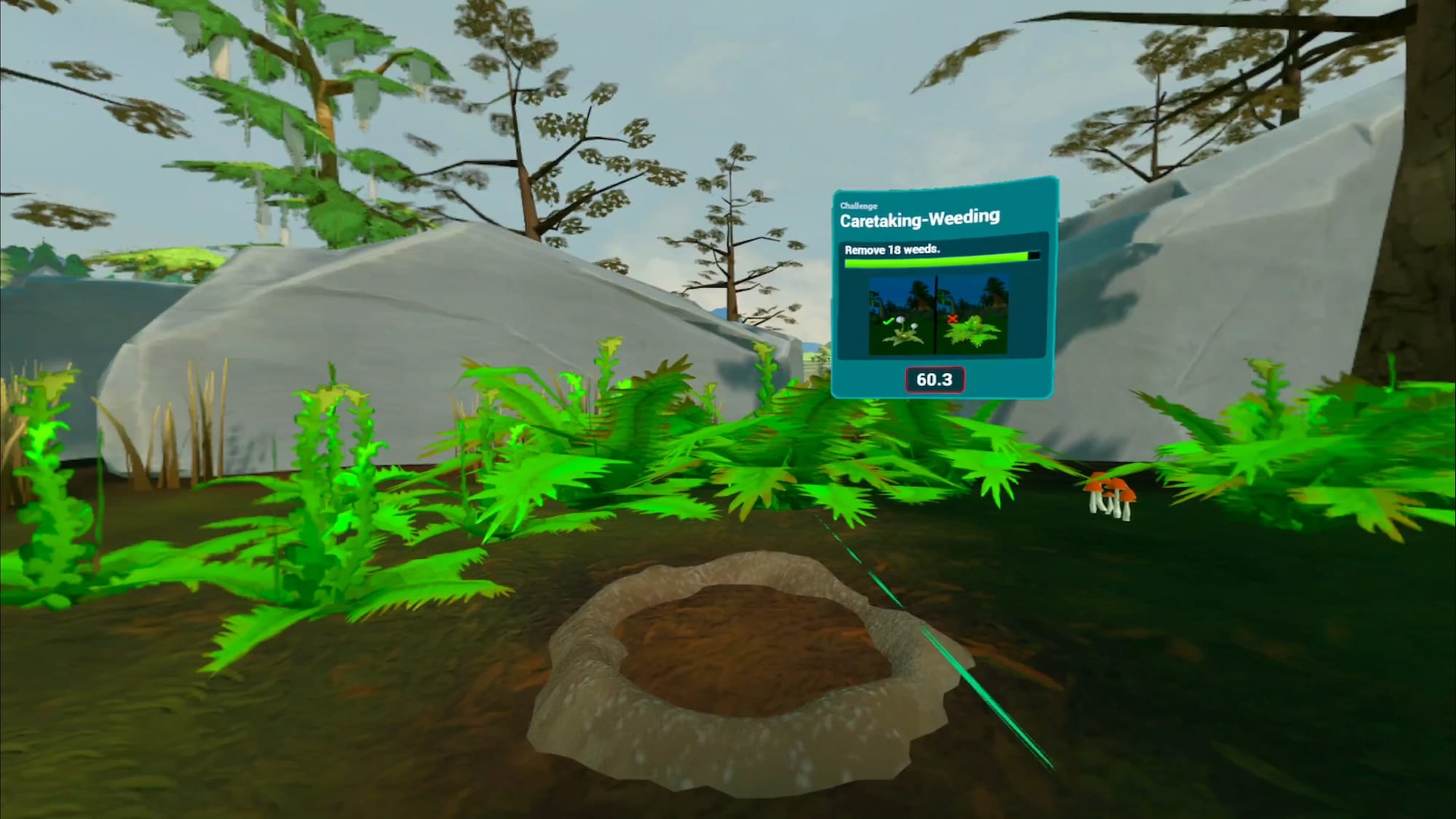
After an intense opening scene that has a T.Rex charging toward you full speed, Dino Hab tasks players with raising various dinosaurs from infancy to adulthood while carefully overseeing their habitats. Throughout Dino Hab’s gameplay, you gain the fundamentals of ecological relationships in a fun and interactive way, although some of it can be repetitive and feel more like a grind as the experience progresses.

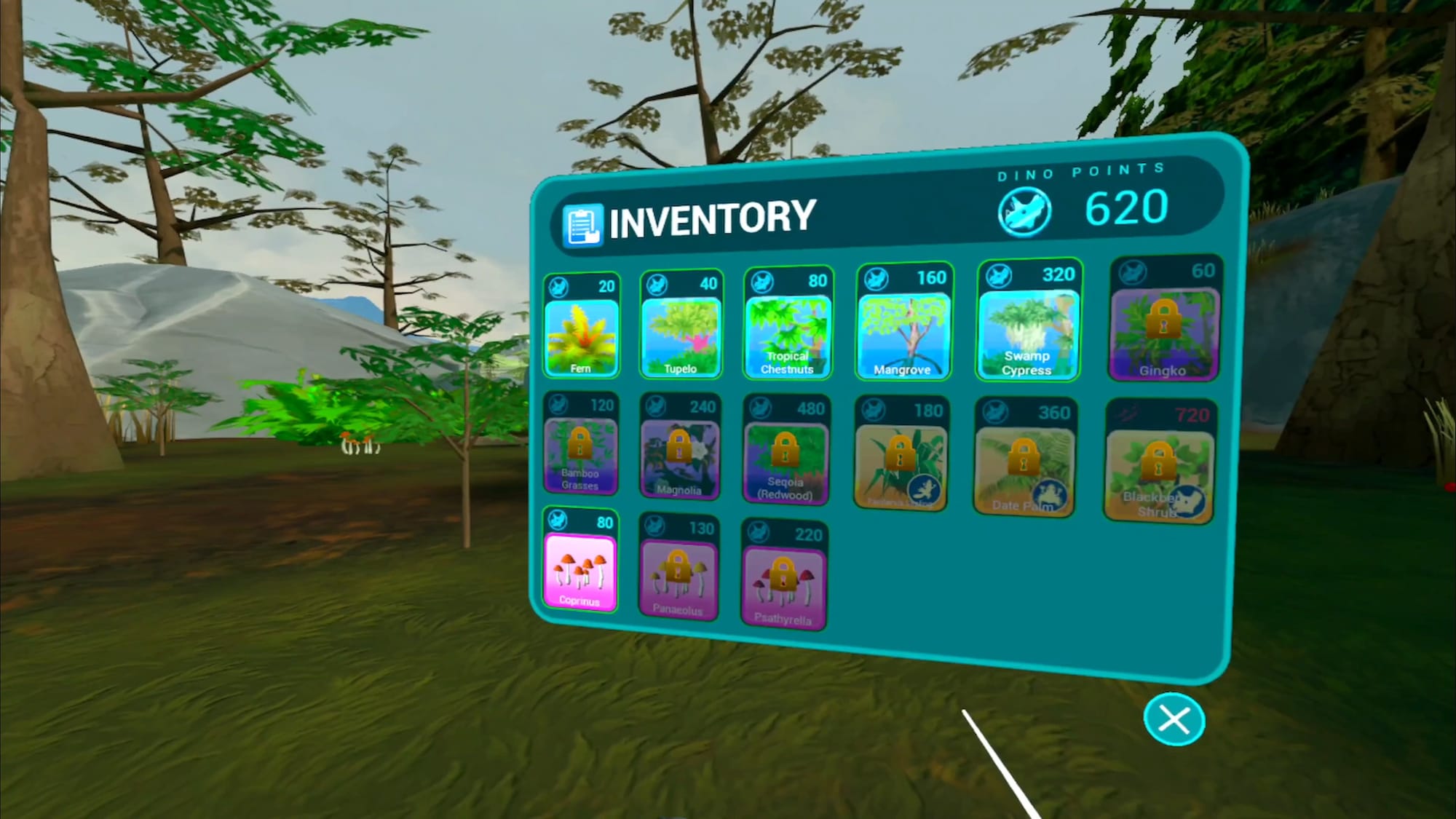
Dino Hab screenshot shows a menu with your inventory

Balancing plant life and managing resources leads to a better understanding of how even small environmental changes can impact animal welfare and devastate entire ecosystems. After playing the first hour of the game, I can see potential in this experience for younger children to understand how habitats keep animals alive. There’s delight to be found in caring for these prehistoric hatchlings.

Dino Hab’s visual presentation looks good but the overall presentation lacks polish. Animations seem fluid, but environmental details are on the sparser side with simple texturing. The various habitats I’ve experienced so far in the game feel basic and the overall effect dulled my sense of immersion.

The repetitive nature of building and repairing ecosystems might turn gameplay into a grind, and potentially lose impatient players. As noted in one of the reviews on the Meta Store, the game could really use a sandbox mode for players who might just want to play with the dinosaurs without the grind of the ecosystem construction.

0:00

/0:34

We’ll be on the lookout for updates to Dino Hab, so let us know if you have more dinosaur-themed experiences. Dino Hab could be a great way to experience a world lost in time, and learn a little something while there.

Screw the Windows Search Bar, and Use Command Palette Instead

Mac users are spoiled when it comes to searching their computers. Macs have Spotlight search built-in, which they can use to open apps, search for files, perform calculations, and search the web. Windows has the Search Bar, but when you compare what they can do, it’s not exactly the same.

Now, though, there’s a new tool called Command Palette, and it’s a keyboard launcher designed specifically for developers and power users alike. It replaces a similar feature called PowerToys Run, and offers way more features, including the ability to run commands, search the web, search for files, and add custom bookmarks and global keyboard shortcuts.

How to install and enable Command Palette

Command Palette is part of PowerToys, which is a suite of powerful apps and utilities created by Microsoft itself. These are open source and are updated much faster than any built-in Windows feature. You can download and install PowerToys from the GitHub page, the Microsoft Store, or using Windows Package Manager.

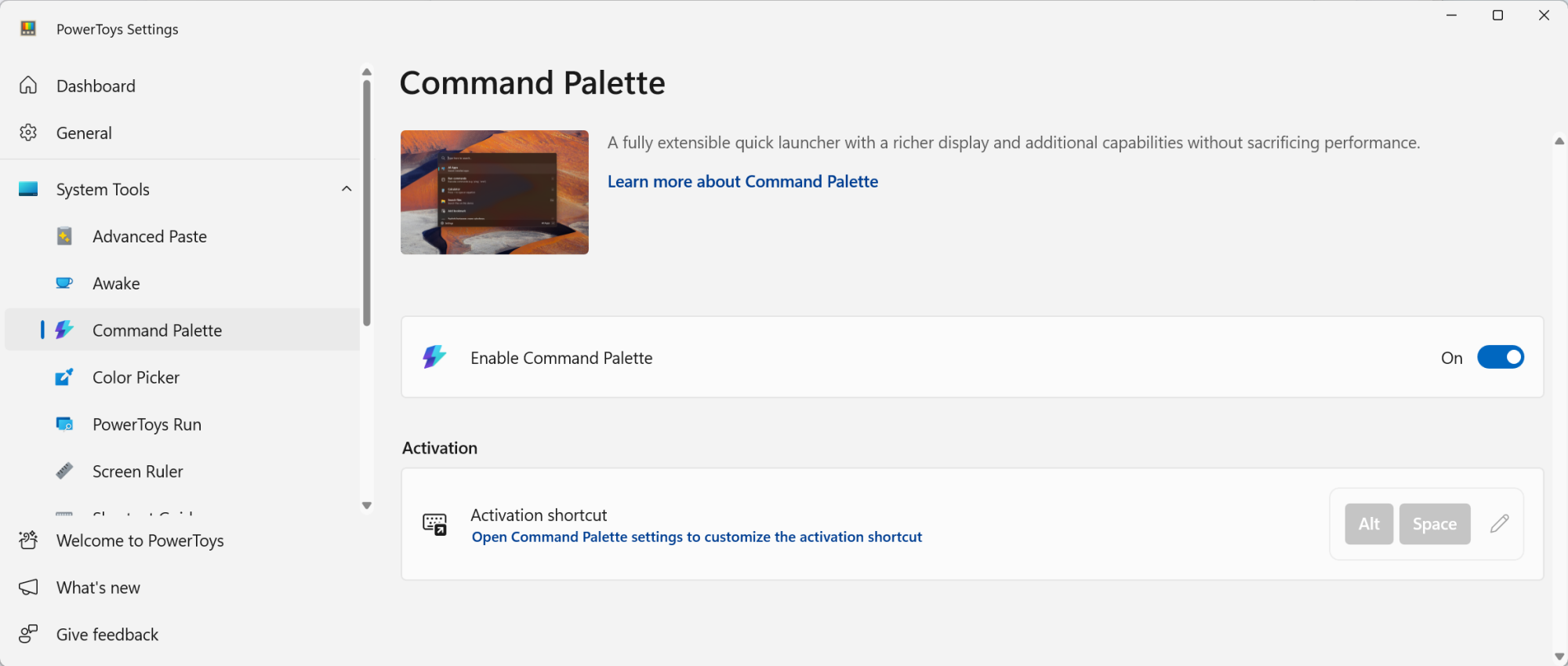
Once PowerToys is installed (or updated to the version 0.9 or higher), open the app and find the Command Palette option from the sidebar. If you don’t see the app window, right-click the PowerToys utility in the Windows taskbar and click Settings.

Enabling Command Palette from PowerToys.

Credit: Khamosh Pathak

From the Command Palette screen, make sure the extension is enabled. Here, you’ll see the default keyboard shortcut for Command Palette, which is Windows + Alt + Space, but you are free to change it to anything you want.

Customizing the Command Palette shortcut and other settings

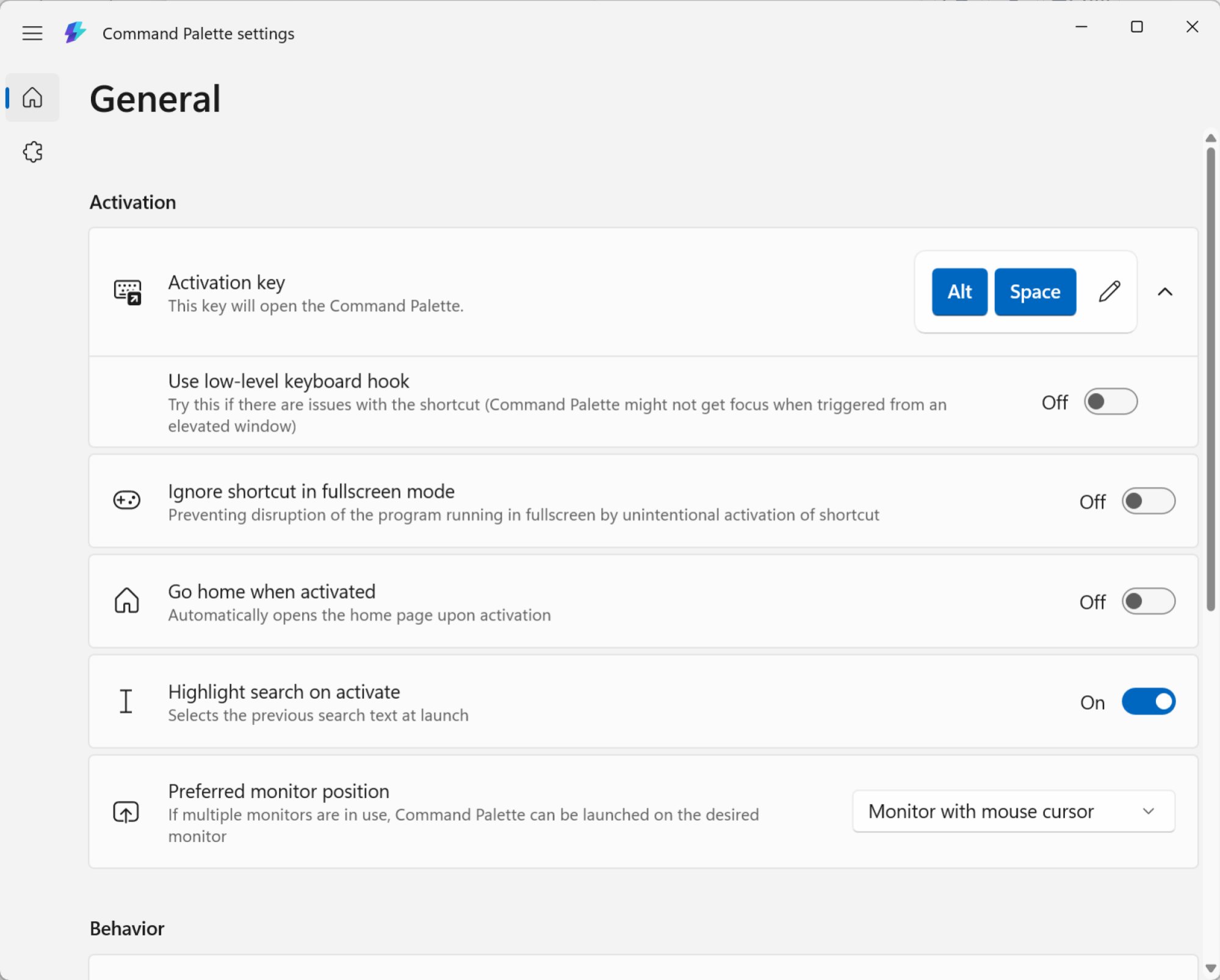
First, open Command Palette using the keyboard shortcut, and then click the Settings button in the bottom-right corner. From here, you can use the Activation key option to remap the keyboard shortcut to something simpler, like Alt + Space.

Command Palette Settings.

Credit: Khamosh Pathak

While you’re here, you can also customize the behavior of Command Palette. The features I find most useful is the ability to use Backspace to go back, but your mileage may vary.

Now, let’s see everything Command Palette can do.

System settings and file search

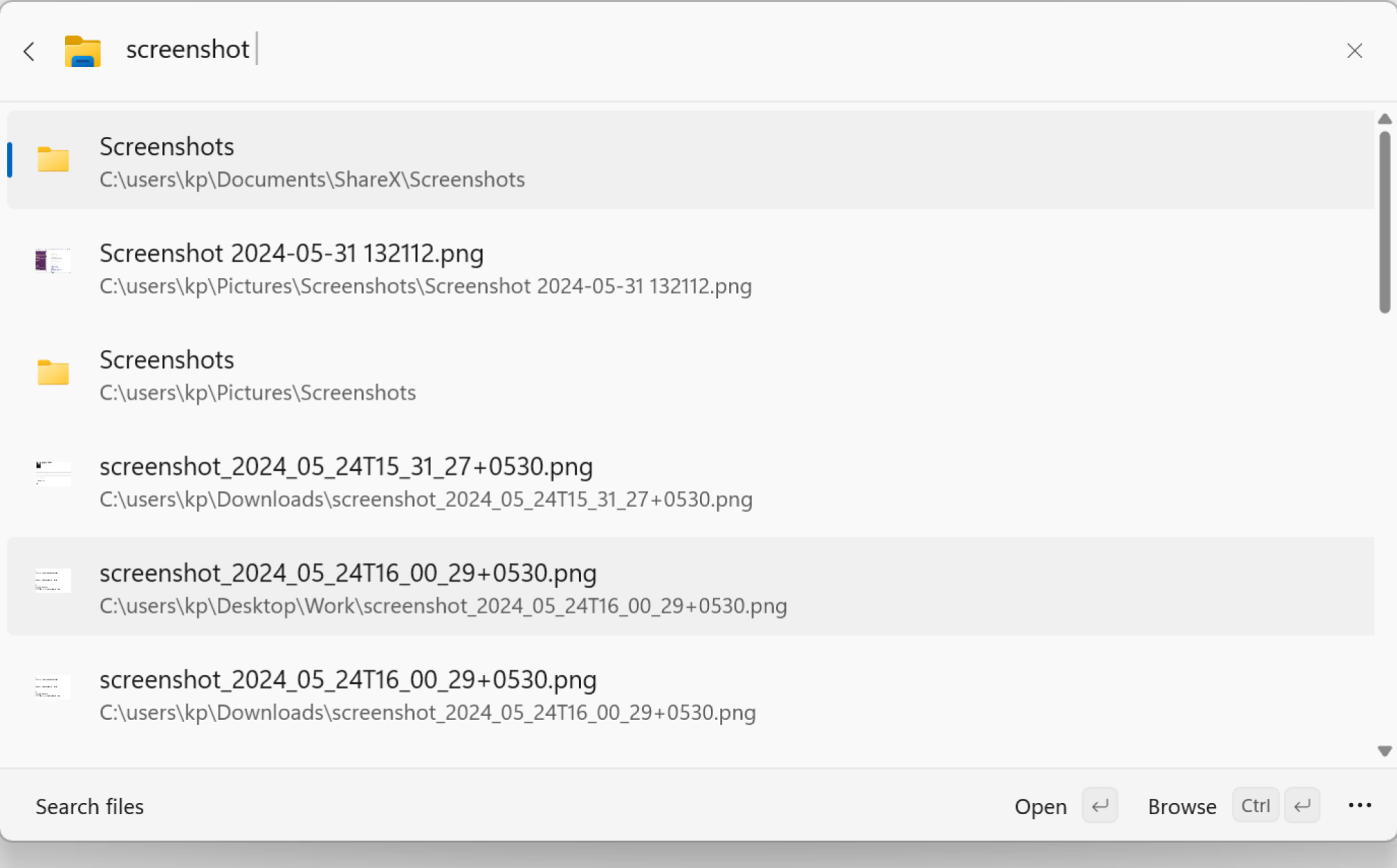
Search for files in Command Palette.

Credit: Khamosh Pathak

Open the Command Palette and start typing. Everything you’d want from a basic keyboard launcher is here. You can use Command Palette to open apps, and to search for files and folders.

You can start searching for apps directly. But when it comes to files and folders, it’s better to first choose the File search option. Just type “file“, choose the option, and then start searching. Similarly, if you use the “=” key, you’ll enter calculator mode.

Switch between open windows

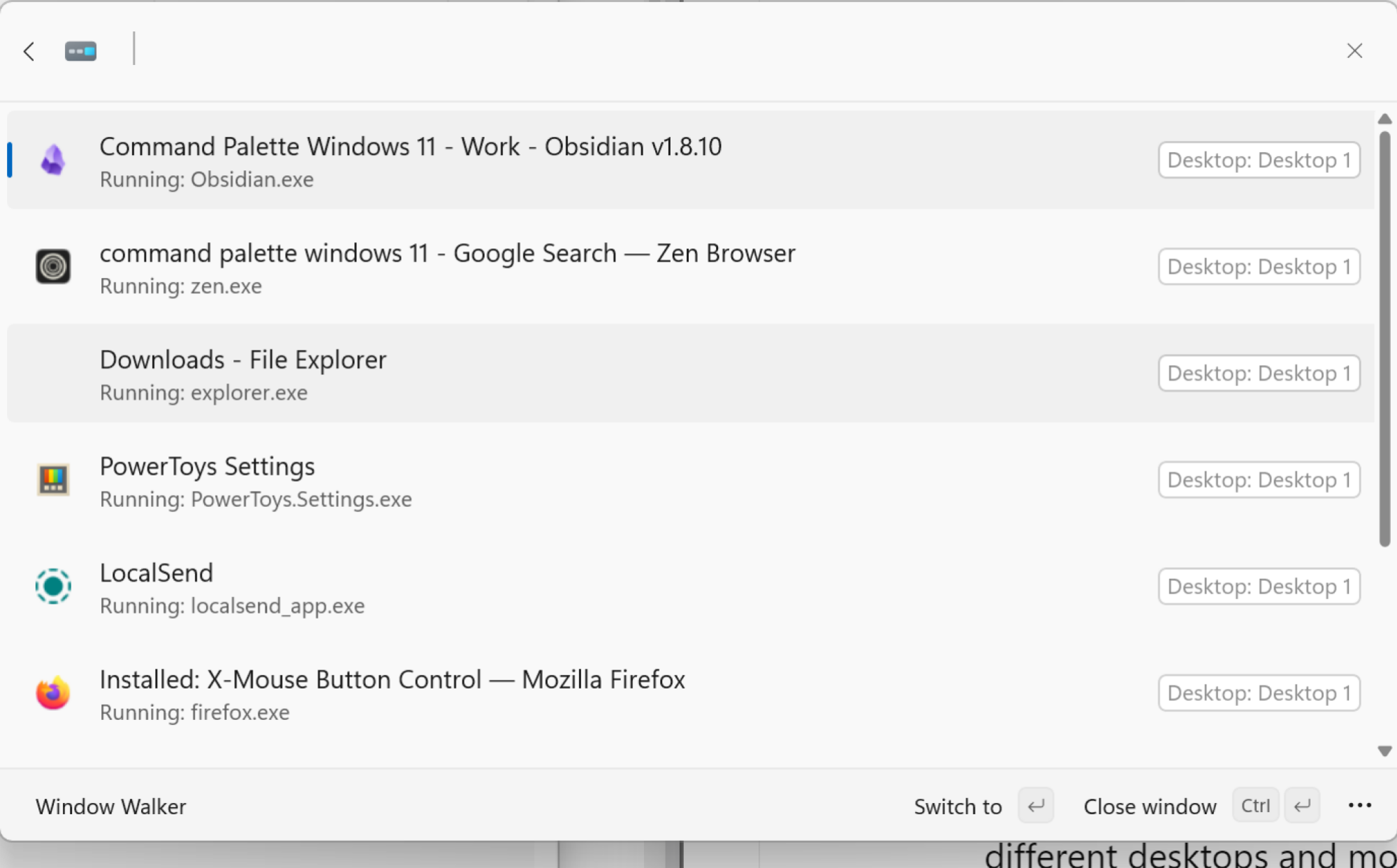
Window switcher in Command Palette

Credit: Khamosh Pathak

Command Palette has a built-in window switcher, and it can show all windows across different desktops and monitors. Open the Command Palette and type the less-than symbol () and you’ll see a list of all open windows and apps. You can scroll or search through this, or you can just enter the name of a specific app or window to highlight it, then press Enter to quickly switch to it.

Use Bookmarks to open any folder or website

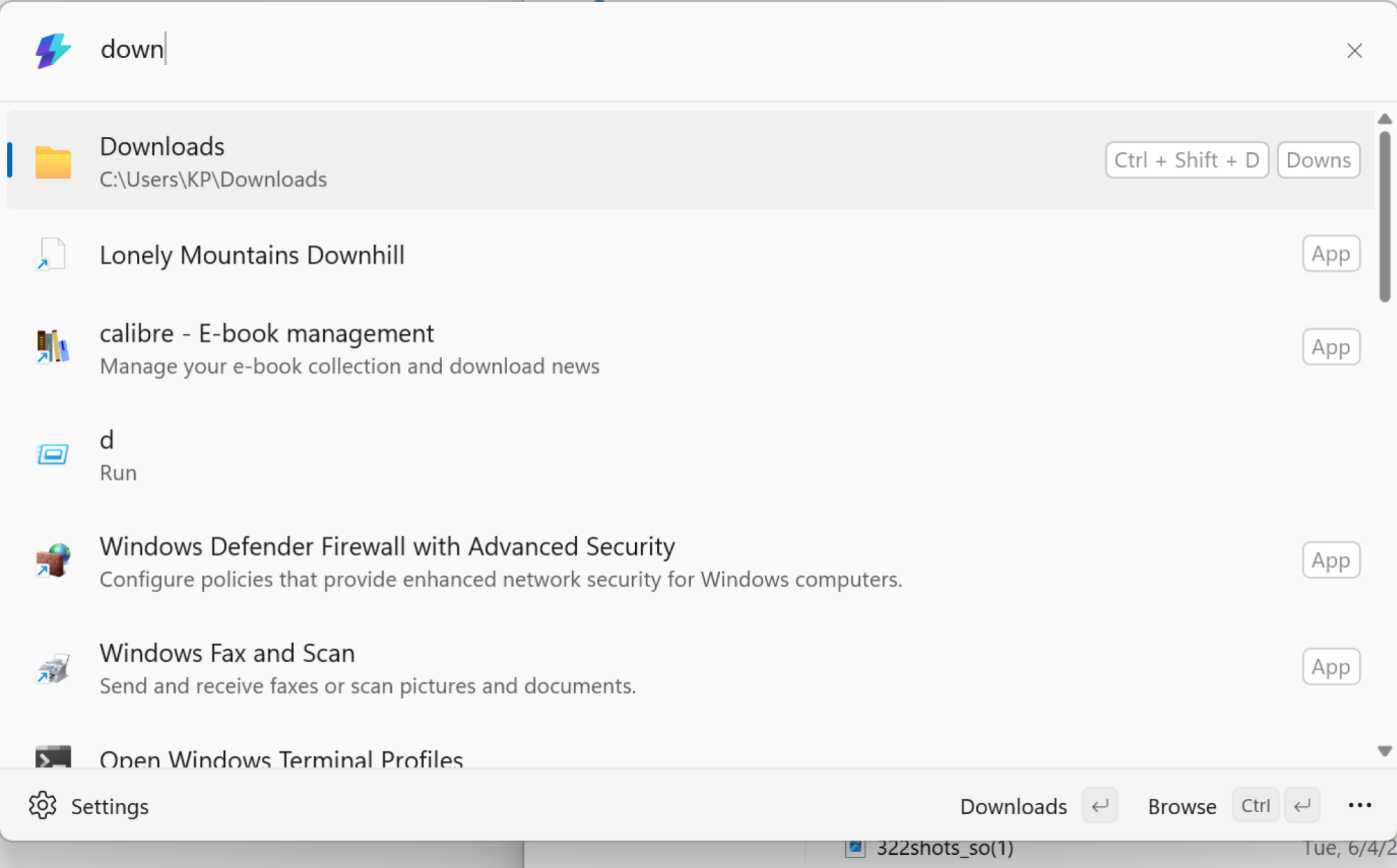
Opening Downloads folder using a shortcut and alias.

Credit: Khamosh Pathak

Bookmarks might be the best feature in Command Palette. The file search is definitely useful, but most often, you find yourself opening the same folders and files over and over again throughout the day. For me, it’s the Screenshots folder and the Downloads folder. Now, I can use Command Palette to make these easier to open.

Namely, I can create a bookmark that opens the Downloads folder with just a couple of letters, or using a global keyboard shortcut. This works for any Folder or File path, and even a website URL.

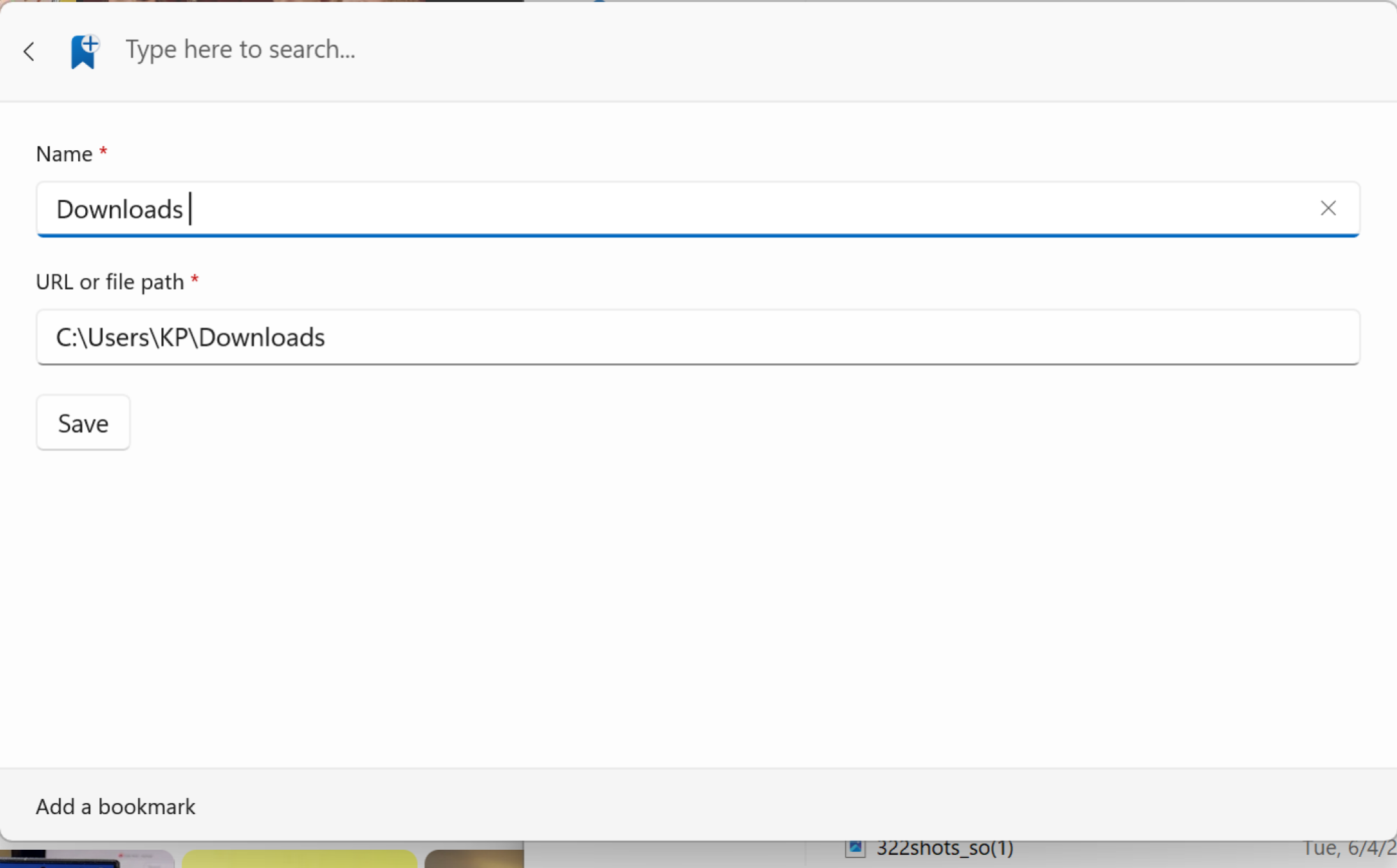
First, navigate to the folder you want to assign a shortcut to, right-click on the folder at the top, and choose Copy Address to copy the file path. In Command Palette, use the Add Bookmark option. Here, paste in the file path and give it a name.

Adding a Bookmark.

Credit: Khamosh Pathak

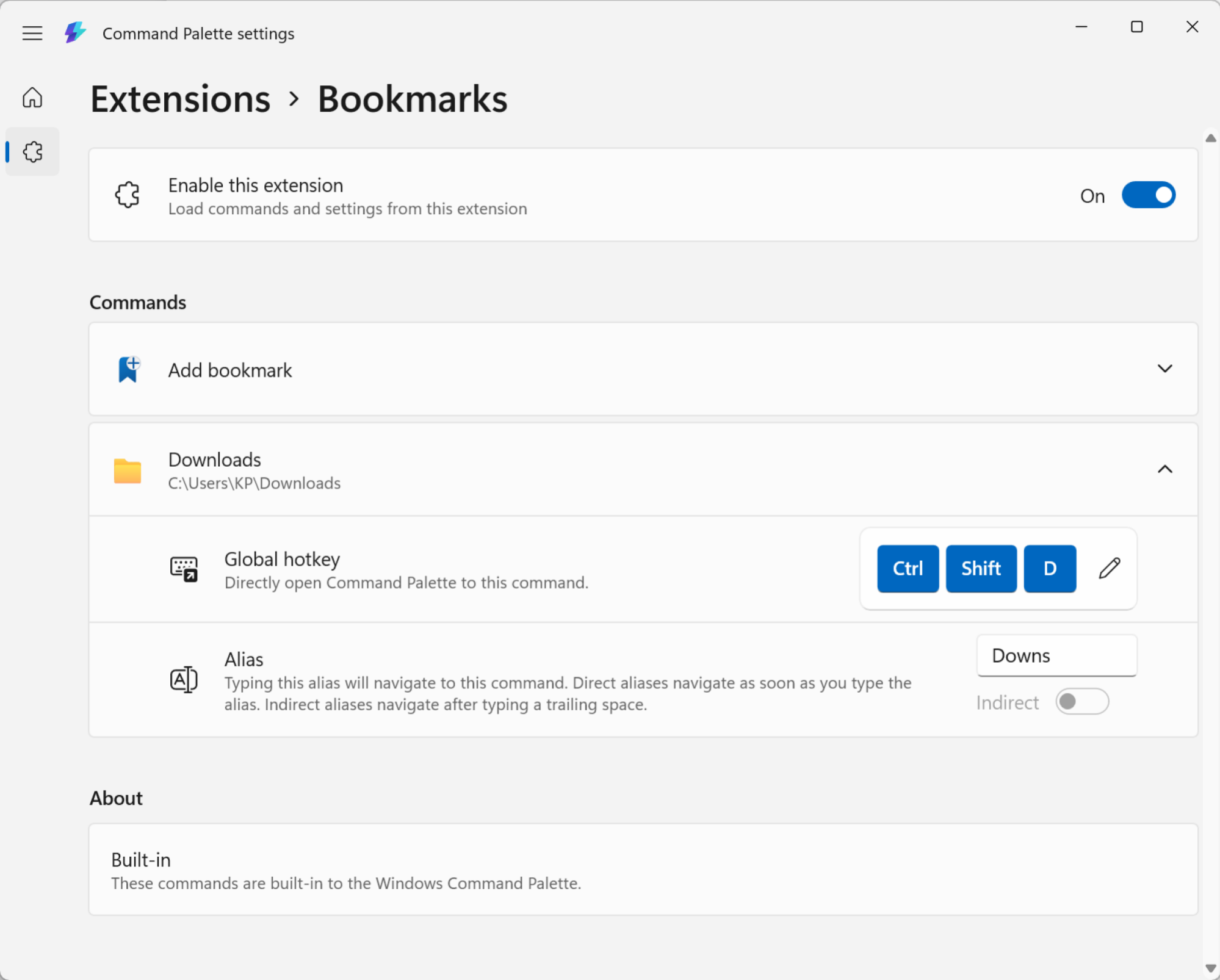
Now, you can give it a unique alias and a global shortcut. Go to Command Palette Settings, and from the sidebar, choose Extensions > Bookmarks. You’ll see your newly created bookmark here.

Settings for Bookmarks.

Credit: Khamosh Pathak

Click on it, and you can now record a unique global hotkey, or give it an alias that makes it faster to find in Command Palette.

Search the web

Searching on the web in Command Palette.

Credit: Khamosh Pathak

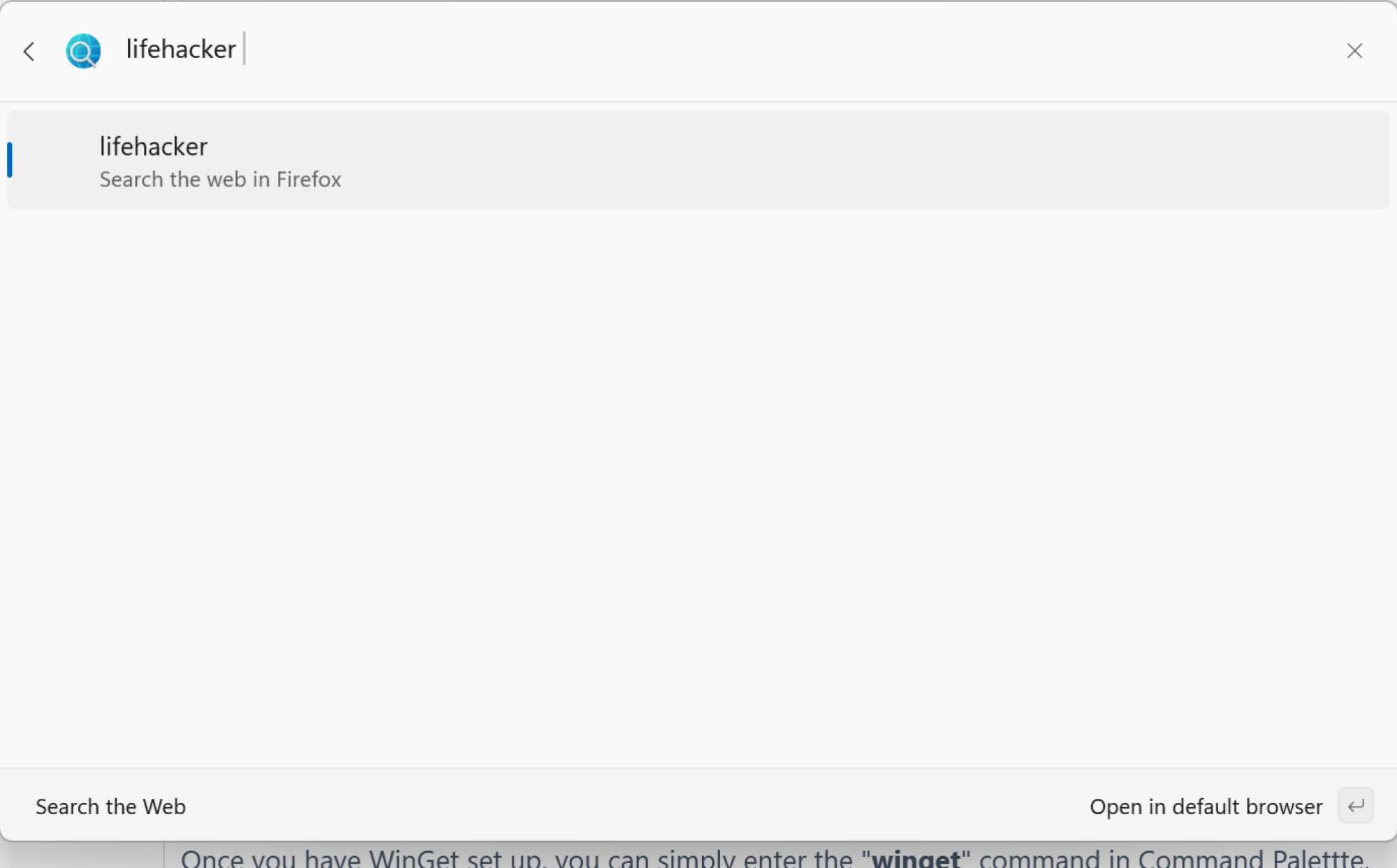
Command Palette has a quick way to search the web that opens directly in your default browser. Enter “??” and then type out your query. Press Enter, and that’s it.

Run any Terminal command

Running a terminal command in Command Palette.

Credit: Khamosh Pathak

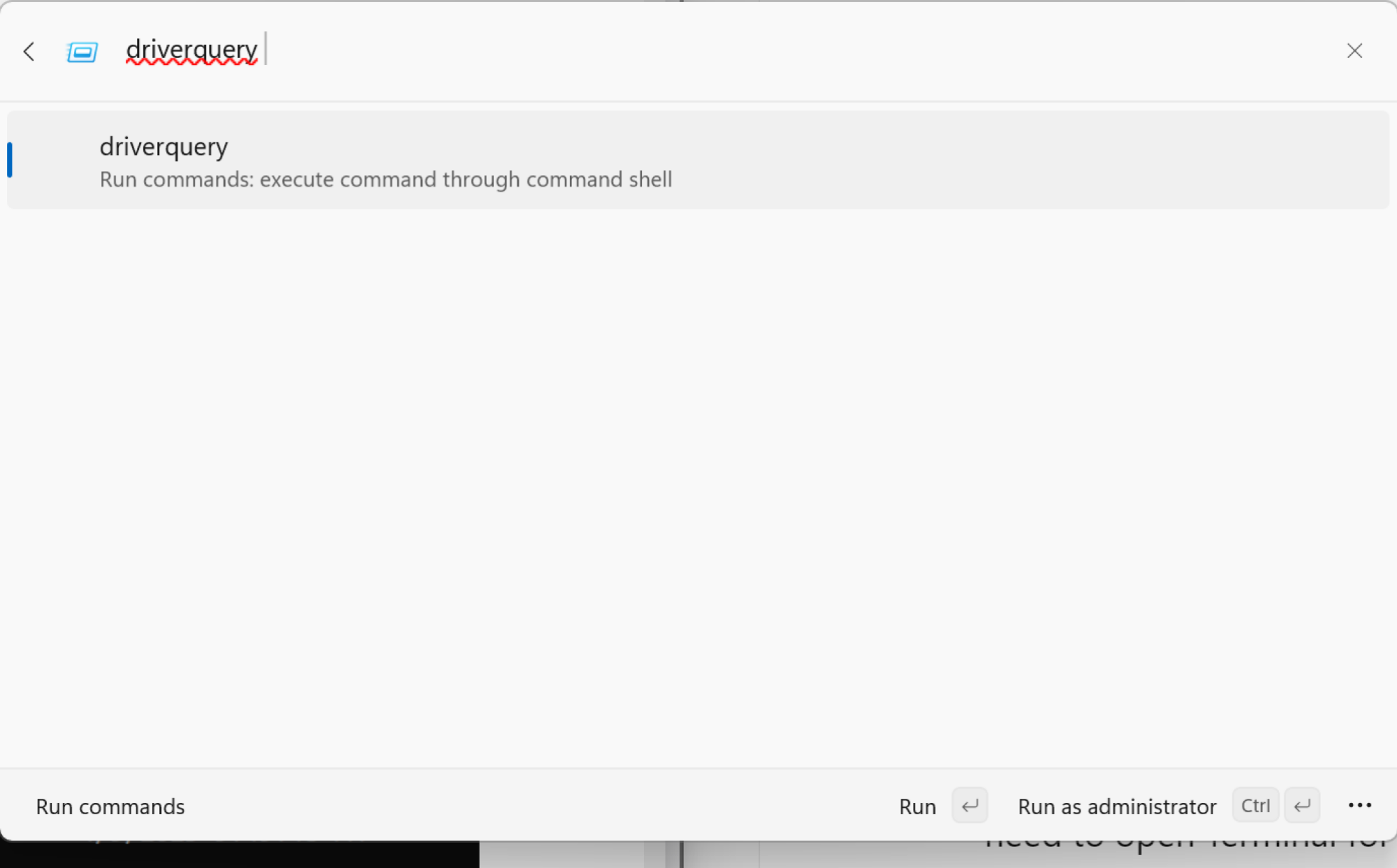
If you use the greater-than sign (>) before you start typing in Command Palette, you’ll enter Terminal mode. From here, you can enter any command, and it will open in the Terminal app, where it will execute the command for you.

Install apps using WinGet

We’ve already talked about WinGet, the hidden package manager inside Windows that lets you install any package or an app using a single command. Well, now you don’t even need to open Terminal for this. Once you have WinGet set up, you can simply enter the “winget” command in Command Palette, followed by the package you want to install. Command Palette will search for and start installing the package for you.

Use extensions to add even more features

Lastly, you can use third-party extensions to add even more functionality to Command Palette. As the feature is new, the collection is quite limited, but here’s hoping that developers add new extensions in the future. To see your extensions, open the Command Palette and search for Extensions. You can find extensions on WinGet, or on the Microsoft Store.

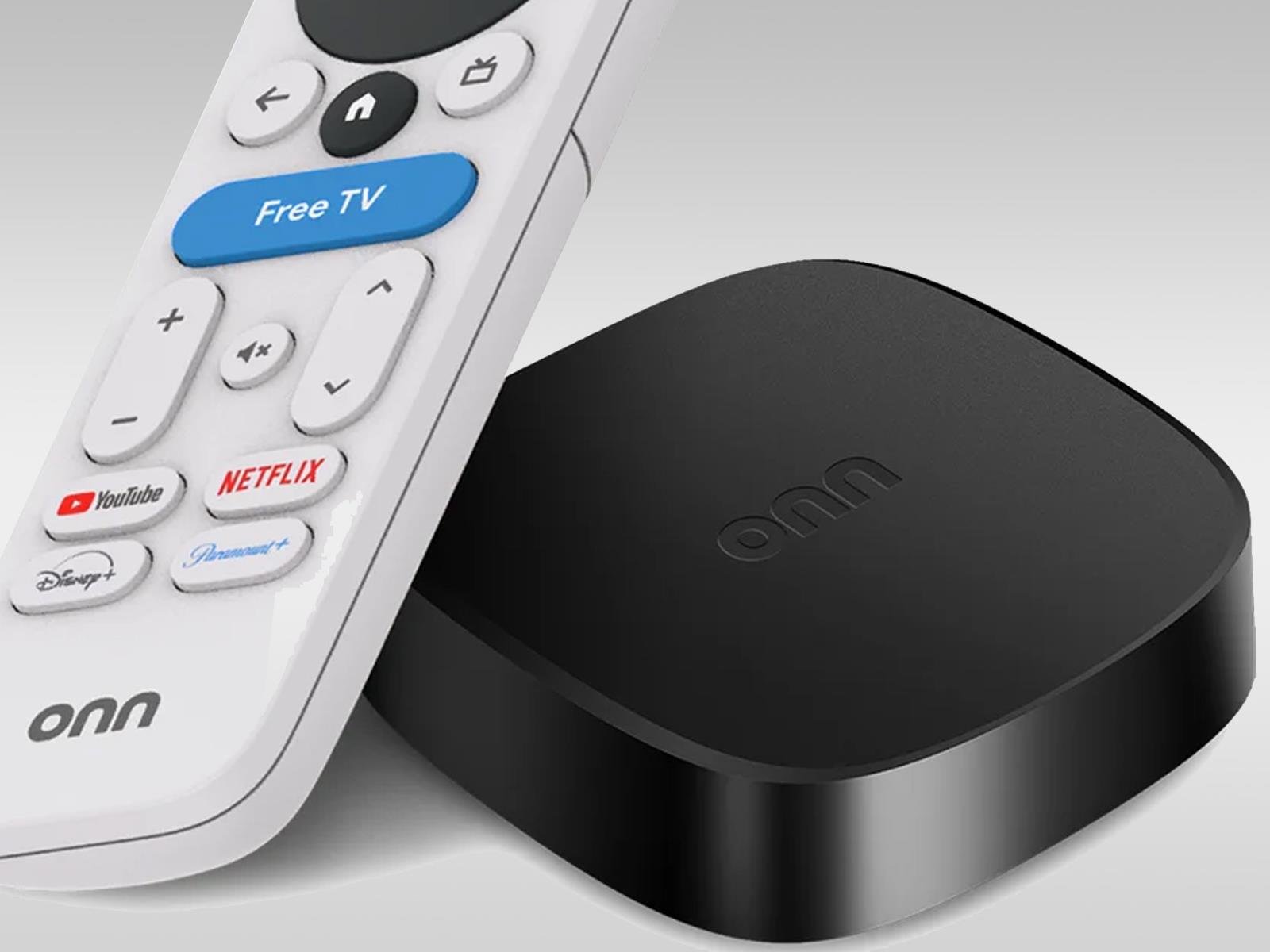
Life After Chromecast: Walmart’s New 4K Google TV Streamer Is Super Affordable

Life After Chromecast: Walmart's New 4K Google TV Streamer Is Super Affordable
In some respects, it’s been a bit of a rough patch for fans of Google’s Chromecast dongle. For one, Google effectively killed the Chromecast in favor of its new Google TV Streamer hardware priced at $99.99 MSRP (slightly cheaper on the street). Then more recently, owners of Google’s second-generation Chromecast as well as Chromecast Audio

Status report on optional Rust in FreeBSD support

Shawn Webb has published a status
report
on work to provide basic support in FreeBSD for userland components
written in Rust.

We introduced a new BSD makefile, located at share/mk/bsd.rust.mk,
that enables building a Rust application during buildworld. As of this
writing, we only support building and installing Rust
applications. Supporting library crates is planned (we would like to
be able to build/install library crates that expose an FFI, like for
C/C++ compatibility). Normal library crates build and install just
fine. Support for cdylib Rust library crates specifically is what’s
missing, but is desired and planned.

We do NOT currently support Rust in the kernel. Kernel support
requires more work that we deemed out-of-scope for this initial
proof-of-concept/work-in-progress patchset. We also do NOT support
building multiple programs in the same BSD Makefile (like with
bsd.progs.mk), though that is also a desired feature.

LWN covered a
discussion about including Rust in the FreeBSD base system in August
2024.