
Oracle engineers have released the first public beta of the upcoming VirtualBox 7.2 virtualization software release for Windows, Linux, macOS, and Solaris systems…
Monthly Archives: May 2025
Trump admin tells SCOTUS: ISPs shouldn’t be forced to boot alleged pirates
The Trump administration is backing cable company Cox in a battle that could determine whether Internet service providers are forced to disconnect users accused of piracy.
Cox, which says ISPs shouldn’t have to terminate customers based on unproven allegations of copyright infringement, has been seeking Supreme Court review of Sony’s victory in the underlying lawsuit. The court asked the US solicitor general to file a brief expressing the views of the United States government. Solicitor General John Sauer, a Trump nominee, filed a brief yesterday.
The Supreme Court “should grant certiorari to address the first question presented in Cox’s petition: whether an ISP materially contributes to copyright infringement by continuing to provide Internet access to particular subscribers after receiving notice that copyright infringement has occurred on their accounts,” Sauer wrote.
Roll7’s OlliOlli World and Rollerdrome are back on Steam
Their creators might be gone, but OlliOlli World and Rollerdrome are finally back on Steam, based on listings spotted by Eurogamer. Both games were delisted from storefronts like Steam and the Xbox Games Store following publisher Take-Two’s decision to shutdown developer Roll7, Intercept Games and publishing label Private Division a little over a year ago.
OlliOlli World and Rollerdrome represent diverging, but equally great examples of what made Roll7 special. They’re thoughtful, visually stylish games about skateboarding and rollerblading that capture the zen-like state you can enter pulling off multiple tricks in a row (plus or minus a mascot costume and a shotgun).
Eurogamer notes that Take-Two always planned to put both games back on sale when it originally delisted them, it just took a lot longer to bring them back than expected. 2K, another Take-Two subsidiary, is now serving as the publisher.
When the company closed Private Division, not every game stayed at Take-Two. The publisher continues to back games like No Rest for the Wicked from the developer of Ori and the Blind Forest, but a collection of other in-development projects were sold to Haveli Investments, Bloomberg reports. The investment firm brought on former Annapurna Interactive staff to manage the slate following the implosion of that indie-focused publisher and developer in September 2024.
This article originally appeared on Engadget at https://www.engadget.com/gaming/pc/roll7s-olliolli-world-and-rollerdrome-are-back-on-steam-193536731.html?src=rss
Monster Hunter Wilds’ Electric Wyvern Is Harder To Beat In Its New Form, But It Can Be Done

Whether you’re a veteran of the series or are just someone grinding out their first hunts, everyone reaches a point of wanting more batt;es and harder challenges in Monster Hunter Wilds. While the Blossomdance Festival has provided plenty of the former, the latter is being answered with the addition of Arch-Tempered…
Apple may switch its OS numbering system to match the release year, turning iOS 19 into iOS 26
It seems that Apple is giving its operating systems a significant overhaul this year, and not just on the visual and usability fronts. It was expected that the next major versions of iOS and iPadOS would be followed by the number 19, Macs would move onto macOS 15 and so on. That would continue the numbering system Apple has used for many years.
That could be about to change, according to Bloomberg. The next versions of the operating systems may be earmarked by the year, according to the publication’s sources. That means we could soon see the debut of iOS 26, iPadOS 26, macOS 26, watchOS 26, tvOS 26 and visionOS 26.
The numbers would align with the year after each major OS release, since Apple typically rolls out the first public versions of those each fall. So the versions of iOS, iPadOS and so on that arrive this September or October may be named after 2026.
We’ll know for sure whether this shift is happening on June 9, when the keynote of Apple’s Worldwide Developers Conference takes place. It’s widely expected that Apple will be giving its operating systems a major user interface overhaul to deliver a more unified experience across various devices.
It seems like a wise move to align the branding of all of the various operating systems. The software powering Apple Watch devices is currently up to watchOS 11. Apple Vision Pro is running visionOS 2. It’s a little messy as is. Applying the same numbering to all of the operating systems and aligning it with the release year should make things easier for everyone to keep up with.
This article originally appeared on Engadget at https://www.engadget.com/mobile/smartphones/apple-may-switch-its-os-numbering-system-to-match-the-release-year-turning-ios-19-into-ios-26-193424796.html?src=rss
Five Ways to Get Better Battery Life From Your Steam Deck
After the Nintendo Switch, the Steam Deck might be the most impressive gaming handheld of the last decade. It brings Steam games—most of which were initially designed to run on Windows PCs—to a remarkably designed portable device. The only problem? Battery life can be rough on some games. If you’re struggling to stay charged, here are some tips to help you out.
When it comes to your Steam Deck’s battery life, you’re going to notice a lot of variability, even from one game to another. AAA games that rely on high-end GPUs will typically guzzle power. On laptops or desktops, that’s usually not as much of a concern, but on the Steam Deck—when those games run at all—they can burn through the battery quickly.
So, while we have plenty of tips to get the best battery life, it’s important to keep in mind some games will simply burn through your power no matter what. Fortunately, SteamOS is already pretty power efficient (at least compared to other operating systems), and there are several handy tools to help.
First, learn what, exactly, is draining your battery
There are a few common culprits for battery drain in games, and it’s helpful to understand them before diving into solutions. This is because what works for one game with minimal performance impact, could make another game unplayable. With that in mind, here are a few key things that drain your battery:
-
Your hardware settings. The display on your Steam Deck is always a pretty big battery drain, and turning down the brightness can help. Wireless radios like wifi or Bluetooth are always sipping power, even if you’re not using them, so you can sometimes turn these off if you don’t need them.
-
Your refresh rate and FPS. Your Steam Deck has to update the screen dozens of times every second, and for some games it might be way more than necessary. 60 to 90 frames per second might be necessary for a fast-paced game like Doom Eternal, but it’s overkill for Stardew Valley.
-
Your processor’s TDP. Thermal Design Power (or TDP) is a complicated metric, but it serves as a shorthand for how much power your processor is using. On the Steam Deck, you can limit this directly, which is a blunt way of saving battery, but it can help sometimes.
The most useful tool to help you diagnose your biggest battery drains is the Performance Overlay. Press the three-dot menu button while in a game and navigate to the Performance section and you’ll see an option to enable this overlay. There are several levels of detail, ranging from a simple frame rate counter, to real-time power consumption and temperature readouts. The Performance tab is also where you’ll find several useful features we’ll discuss (under Advanced View), so it’s good to make friends with this tab.
Dive into your game’s display settings
While the Steam Deck has a lot of useful features for managing battery life, you’re still going to find some of your best options in your game’s settings. Most games have presets to lower graphics settings with one quick toggle—like switching from Ultra to Medium—and some have even more advanced settings.
This is particularly important to keep in mind if you play Steam games on multiple devices. Some games will try to sync settings between them, which can lead to your game rendering at a higher resolution or frame rate than the Steam Deck is even capable of displaying.
In general, here are a few settings you should take a look at:
-
Resolution: The Steam Deck has a 1280×800 resolution, so unless you’re using an external monitor, there’s no reason to set your game to a higher resolution. Most games won’t let you go higher anyway, but it’s worth it to double check. You can also go lower for some games, if you don’t need as much detail.
-
Frame rate: Many games offer the ability to cap how many frames the game generates, even if your display is capable of showing more. This can have a substantial impact on your battery life, especially for games that need to perform a lot of complex calculations (like graphics-heavy shooters) for every new frame.
-
Graphical presets: If your game has a preset slider, try starting on the lowest preset and working your way up to see how the game performs. The Performance Overlay can be a huge help here, to see how much power your system is drawing on different presets. If your eye can’t tell the difference, but your battery can, drop the settings.
You can play around to find the right balance for you, and it will vary greatly by game. In some games, you might want more graphical detail, but fewer frames per second, while others would benefit from the exact opposite. Try a few options to see what works best.
Adjust your refresh rate and FPS in tandem with the Frame Limit slider
As mentioned above, the number of times your game updates the screen per second can be a huge factor in battery drain. This is affected by both the screen’s refresh rate (how many times the display physically updates the pixel you see) and your game’s frames per second (or FPS, the number of times the GPU generates a new frame per second). To complicate matters further, your refresh rate can have an effect on your input latency, meaning it’s important to strike a delicate balance.
To simplify this, the Steam Deck has a slider called Frame Limit that can impose a limit on how many frames your game displays and strike that balance for you. It automatically adjusts your refresh rate to be evenly divisible by the FPS limit, avoiding unnecessary (and asynchronous) refreshes, while still maintaining the highest refresh rate possible to reduce input lag.
It’s a workaround that’s placed somewhat late in the pipeline, and it’s sometimes better to adjust your game’s settings directly, but it simplifies a complicated process. If you’d rather adjust your display’s refresh rate directly, you can toggle Disable Frame Limit and adjust the refresh rate from 45Hz to 90Hz directly. Keep in mind, though, you might still need to adjust some game settings to avoid generating frames your display will just throw out.
Put a cap on your Thermal Design Power (TDP), if you must
Tweaking your game’s graphics settings can adjust your power consumption with scalpel-like precision. By comparison, the TDP limit is a hammer. But even hammers have their uses. By design, the TDP slider on the Steam Deck will put a hard limit on how much power the CPU/GPU can draw from the battery. You can’t get much more direct battery savings than that.
The problem is that games typically, you know, need power. And even games with really fine-grain settings don’t generally ask the user to decide how much electricity to draw. For some, especially graphics-heavy games, putting a hard limit on TDP can cause massive performance drops or even game crashes.
Less demanding games, though, can benefit from playing with this setting. A useful rule of thumb is that if the game you’re playing is already struggling to maintain a consistent frame rate, try something else before touching TDP. But for games like Stardew Valley, where you’re never really concerned with frame rate, you can experiment with lowering the TDP limit to 10W or even 5W to see how well the game performs.
Of course, setting a TDP limit only matters if it’s below what your game was using in the first place. This is another area where the performance overlay comes in handy. You can get a sense of how much power your system is drawing during your games, and use that to gauge how low you want your TDP limit to be.
Don’t forget per-game battery setting profiles
On top of all these settings, you can also set game-specific profiles to change your battery settings automatically based on the title you’re playing. I can’t recommend this feature enough, especially if you tend to play games with very different power demands. Few things are more annoying than forgetting you set a low TDP limit for a simple game, then launching a more demanding game that strains against that limit.
To use this, it’s one simple toggle on the Performance tab. Enable “Use per-game profile” and the Steam Deck will automatically create a profile for every game you use. You can disable this toggle to switch back to the default, if you ever decide you prefer one consistent profile.
Keep in mind the profiles only account for the Steam Deck’s settings itself, not any game-specific settings. But it’s still a handy tool. It can be overwhelming to keep track of all the different buttons and knobs you can fiddle with to get extra battery life, but the Steam Deck manages to balance a ton of customization options with the simplicity of straight-forward, user-friendly tools so you can game longer.
The 2025 Indoor Skydiving Championship 4-Person Winning Performance
Note: Video is a must-watch, totally wild.
This is a video of Team Singapore’s winning 4-way free routine at the 5th FAI World Indoor Skydiving Championships in Belgium. Such precision! I bet they’d make an accurate watch. Me? I used to wear a watch for fashion, but– “Fashion is dead.” Okay I was going to say it got stolen, but the truth is I pawned it– “To hire a hit man!” To pay a dental bill. Thank God this isn’t The Newlywed Game, because there isn’t a snowball’s chance between the devil’s butt cheeks we’re winning that second honeymoon.
Linux 6.16 GPU Driver Changes Land: NVIDIA Blackwell, Asahi UAPI, Intel Xe Fan Speeds
The hearty set of Direct Rendering Manager (DRM) kernel graphics/display driver changes were merged today for the in-development Linux 6.16 kernel. Most notable is preliminary NVIDIA Blackwell and Hopper GPU support atop the mainline kernel with an open-source driver but there are also big ticket items added for the AMD Radeon/Instinct and Intel graphics drivers too as well as the other smaller drivers…
Samsung drops Android 16 beta for Galaxy S25 with more AI you probably don’t want
The next version of Android is expected to hit Pixel phones in June, but it’ll take longer for devices from other manufacturers to see the new OS. However, Samsung is making unusually good time this cycle. Owners of the company’s Galaxy S25 phones can get an early look at One UI 8 (based on Android 16) in the new open beta program. Samsung promises a lot of upgrades, but it may not feel that way.
Signing up for the beta is a snap—just open the Samsung Members app, and the beta signup should be right on the main landing page. From there, the OTA update should appear on your device within a few minutes. It’s pretty hefty at 3.4GB, but the installation is quick, and none of your data should be affected. That said, backups are always advisable when using beta software.
You must be in the US, Germany, Korea, or the UK to join the beta, and US phones must be unlocked or the T-Mobile variants. The software is compatible with the Galaxy S25, S25+, and S25 Ultra—the new S25 Edge need not apply (for now).
Black Panther Game Cancelled As EA Shuts Down Studio By Ex-Monolith Devs

A Black Panther action game that was in development at Electronic Arts has been killed and the studio behind it is no more. The Madden publisher announced it’s shutting down Cliffhanger Games, previously formed by ex-Monolith Productions leadership, according to a new report by IGN.
Kunitsu-Gami: Path of the Goddess is getting a new mode to coincide with the Switch 2 launch
Capcom just announced that Kunitsu-Gami: Path of the Goddess is getting a new mode to coincide with its launch-day release for the Switch 2, which is June 5. It’s called Otherworldly Ventures and introduces some roguelike mechanics to the action/strategy game.
In other words, it’s essentially an endless mode. You start off with limited abilities and choose from various upgrades when defeating waves of enemies. Lots of games do something like this, including titles like Vampire Survivors and Downwell. It will also introduce a scoring element, for those who want to ascend a leaderboard.
To make the roguelike-inspired mechanics work, the developers have simplified other aspects of the gameplay. Protagonist Soh won’t have to rescue villagers and crystals will accumulate more quickly than in the standard game. Also, Yoshiro will make her own way to the gate, instead of having to be guided. The whole thing looks pretty fun.
Despite launching alongside the Switch 2, Otherworldly Ventures will be available for every version of the game on June 5. This includes PS4, PS5, Xbox One, Xbox Series X/S, Windows and Steam. It’s also free, which is always nice.
For the uninitiated, Kunitsu-Gami: Path of the Goddess is a fun hybrid of third-person combat and tower-defense. We heaped praise on the game in our official review, calling it “perfectly balanced, lovingly crafted and metal as hell.”
This article originally appeared on Engadget at https://www.engadget.com/gaming/kunitsu-gami-path-of-the-goddess-is-getting-a-new-mode-to-coincide-with-the-switch-2-launch-190406167.html?src=rss
The Arc Browser Is Dead, but the Firefox-Based Zen Is a Great Alternative
Arc, the much-hyped privacy-forward internet browser, won’t be getting any more new features. This fact was announced months ago by its developer, The Browser Company, and clarified yesterday in a blog post in which the venture capital-backed entity that built Arc announced plans to focus on an as yet unreleased AI-based browser instead.
For now, Arc will still be getting security updates, most of them inherited from the open-source Chromium project, but it’s understandable that some dedicated Arc users may be looking for an alternative, and I know of a good one: the open source Zen Browser, currently in beta.
Zen is beautiful in the same way Arc is, with its elegant vertical tabs located on the left side. Like Arc, it supports multiple workspaces and offers a compact mode with no toolbars or tabs. It also offers theming, split view, and link previews. Even better, it’s built on the same browser engine as Firefox—and not Chromium—meaning it supports legitimate ad and privacy blockers like uBlock Origin.
One Arc feature Zen lacks is any kind of AI integration; whether that’s a downside or an upside will depend on your feelings about AI in your browsing experience.
How to get started with the Zen Browser
When you install Zen it will offer to import your bookmarks, history, and even your passwords from another browser on your system. It then ask you to choose a color scheme, and select the key tabs you’d like to pin to the top of your workspaces(). After that you can start browsing the internet, just the way you’re used to.
Arc users won’t need to adjust much when switching to Zen—I daresay everything will feel pretty familiar. (I personally appreciate that it shares the the command bar approach to typing addresses or searching, as it saves space when compared to an address bar that’s constantly taking up space whether you’re typing into it or not.)

Credit: Justin Pot
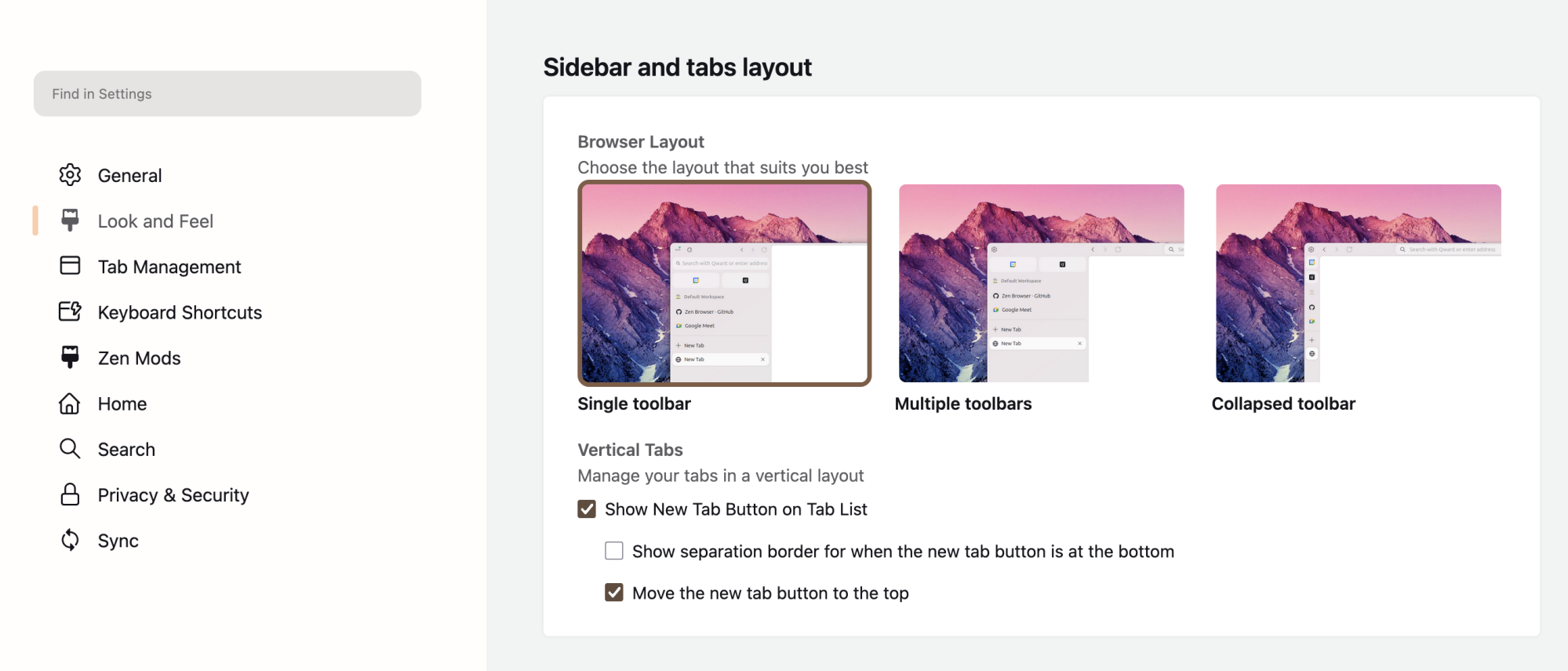
There are a couple of ways to customize Zen. In the settings you can choose between a single, multiple, or collapsed toolbar. If you want more fine tuning, there are Zen Mods, community-made plugins that let you customize all sorts of things about the user interface. More importantly, the browser offers full support for Firefox extensions, meaning you can also browse the Firefox Extensions gallery and install anything you want.
Credit: Justin Pot
The bottom line: Zen is a clean, speedy alternative browser. If you like Firefox but hate its UI, I recommend checking it out, and the same goes for anyone seeking an alternative to Arc that is still actively being developed.
Over 200 PS5 Games Are On Sale Right Now On The PlayStation Store

Sony’s massive Days of Play sales event is live now on the PlayStation Store, and it contains some great (and not so great) PS5 games marked down to super low prices.
Archinstall 3.0.7 Arch Linux Menu-Based Installer Adds Support for Btrfs Snapshots
Archinstall 3.0.7 has been released today as the latest stable version of Arch Linux’s menu-based installer adding a couple of new features and fixing various bugs and other issues.
Google Photos gets new AI features for its 10-year anniversary
Google Photos is 10 years old. To honor the anniversary, the company revamped the app’s editor. Naturally, AI plays a leading role.
The redesigned Photos adds AI-powered editors previously exclusive to the Pixel 9’s Magic Editor. That includes Auto Frame, which suggests crops for your pics. If that requires new parts, it will use AI to generate them.
Also moving over from the Pixel is Reimagine. That’s where you can add elements like fall leaves or green grass that weren’t there. It can be equal parts neat and unsettling. We described it as “blurring the line between which of your memories are real and which are not.” The results are convincing enough that Google recently began watermarking them as AI-generated.
Google
The Google Photos update also adds a new AI Enhance feature. As The Verge notes, selecting it produces three edits. (It generates them with existing tweaks like sharpening and object removal.) Then, you pick the result you like best. The new AI Enhance feature sits in the Edit menu, alongside the app’s existing Enhance and Dynamic buttons.
Google also made it easier to share albums. You can now generate a QR code linking to your album. Let a friend scan it directly, or print it out in a group setting.
The redesigned editor arrives on Android devices in June. Google says the iOS version will follow “later this year.”
This article originally appeared on Engadget at https://www.engadget.com/ai/google-photos-gets-new-ai-features-for-its-10-year-anniversary-185523431.html?src=rss
Is Intel Still Planning To Release An Arc B770 GPU? Here’s The Latest

In what has become the most notorious will-they-or-won’t-they saga of the graphics market this year, rumors have yet again revived the idea that Intel will launch the Arc B770 sometime in Q3 or Q4. We first heard whispers of the BMG-G31 GPU way back in July of last year, but then, usually-reliable Intel leaker Jaykihn said it was scrapped
How to watch Apple’s WWDC 2025 event
Apple‘s Worldwide Developers Conference is from June 9 to 13 this year, and the company has a lot to answer for. Apple Intelligence hasn’t exactly lived up to its original pitch, but Apple will have its WWDC keynote presentation at 1PM ET / 10AM PT on June 9 to make the case for why that might not matter. You can tune in right here once the livestream kicks off to see that and lots of announcements tied to macOS, iOS, iPadOS and all the other platforms the company manages.
One way Apple could reportedly smooth over any ill feelings about AI is by completely redesigning its operating systems to make them more cohesive, easier to use and reminiscent of visionOS. The iPad could also receive some attention, with reports suggesting Apple will introduce yet another approach to multitasking and window management in an effort to make the tablet Mac-like. Add in new battery management feature and a “virtual health coach,” and the company may have a raft of updates not immediately Apple Intelligence-related to get excited about.
To find out what Apple has planned for yourself, you can watch the WWDC 2025 keynote on its website, its YouTube channel and right here once the livestream is up. Apple will also host developer sessions online for more in-depth, technical overviews of the new software features it announces.
And for even deeper analysis of everything that gets announced at WWDC 2025, Engadget will be on-the-ground liveblogging Apple’s keynote and learning more about its operating systems updates before they roll out later this year.
This article originally appeared on Engadget at https://www.engadget.com/big-tech/how-to-watch-apples-wwdc-2025-event-184227177.html?src=rss
Japanese Authorities Refer ‘Spoiler Website’ Operators To Prosecutors in Rare Corporate Copyright Case
Japanese police referred five individuals and a company to prosecutors last week for allegedly operating a website that published detailed movie plots without permission from rights holders. The Miyagi Prefectural Police Headquarters and Minamisanriku Police Station sent the case to the Sendai District Public Prosecutors Office on suspicion of violating the Copyright Act.
The Content Overseas Distribution Association described the case as having “very few precedents for a corporation being referred to the prosecutor’s office on suspicion of violating the Copyright Act, making this an extremely rare case.”
The website posted detailed content from films including “Godzilla Minus One” and four others copyrighted by Toho, “Shin Kamen Rider” and two others by Toei, “Neck” and one other by KADOKAWA, and “Shin Ultraman” by Tsuburaya Productions. The site listed more than 8,000 films with complete storylines, character names, dialogue, and scene descriptions.


Read more of this story at Slashdot.
Microsoft launches Copilot for Gaming in mobile beta
Microsoft will begin testing its Copilot for Gaming app in a beta version that launches on mobile devices today. The intelligent gaming assistant was announced earlier this year and promised to help make players faster and sharpen their skills. The app that was launched today allows players to ask the gaming assistant questions about in-game strategy and controls using voice or text. Users can also ask for game recommendations and specific questions about their Xbox accounts and subscriptions.
AI-assisted gaming has been a hot topic as companies like Microsoft and Razer have entered the space. These tools could replace strategy guides as they help walk you through a particularly tough spot in a campaign or advise you on tactics during a raid in an MMORPG.
The app’s launch on mobile is designed to serve as a second screen while playing your game on Xbox. Taylor O’Malley, principal program manager at Xbox, said, “The companion knows what game you’re playing and understands your Xbox activity, so it can answer any questions about the games you’re interested in, provide links to more information when its response includes web sources or answer questions based on your account, play history and achievements.”
The early preview version of Copilot for Gaming will be initially available through the beta version of the Xbox app in over 50 regions. Android and iOS users who already have Xbox beta downloaded will be able to give feedback on Copilot for Gaming by grading responses and marking incorrect ones.
Android users who don’t already have the Xbox beta app downloaded can do so through the Google Play Store. iOS users can no longer download the Xbox beta app if they don’t already have it. Microsoft says that the Copilot for Gaming beta will also be coming soon to Game Bar on Windows PCs, with wider availability planned for the full Xbox app in the future.
This article originally appeared on Engadget at https://www.engadget.com/gaming/xbox/microsoft-launches-copilot-for-gaming-in-mobile-beta-183344187.html?src=rss
You Can Sign up Now to Try Opera’s Mysterious AI Browser
The company behind the Opera browser is launching yet another AI tool with Opera Neon, an agentic AI browser. This basically means that it’s a browser with an AI agent built in, which can go beyond answering questions and will purportedly be able to browse the internet for you to help you get various things done. This includes helping you plan trips, booking vacations, and even creating web apps with simple natural language prompts. Oddly enough, this isn’t Opera’s first go at agentic AI, as it follows the announcement for the standard Opera browser’s Browser Operator tool. Technically, Browser Operator isn’t released yet, but it seems the difference is that Neon’s use cases will be a bit broader, as the AI will supposedly even able to generate content in the cloud while you’re offline.
The catch is that Neon isn’t free, and is currently invite-only. Opera says it’ll require a paid subscription when it launches, and while the company hasn’t revealed the pricing or the launch date yet, you can join a waitlist to get notified about details closer to release, plus get in line for an invite.
Opera says you’ll be able to use the integrated AI as a chatbot and it will be able to search the web to find answers for you. It’ll also be able to handle repetitive tasks such as filling forms and shopping. The biggest draw seems to be its ability to create content, though. On the Opera Neon website, a sample screenshot shows a someone requesting the AI to make a “retro snake game” for them.
One plus going for this product is that it claims to be able to analyze webpages without recording your screen all the time (looking at you, Recall). Opera also claims that your browsing history, website data, and login information will be stored locally on your computer, which is good for anyone with privacy concerns.
It goes without saying that all of these features will only be as useful as the AI model is accurate. The last thing I’d want is to have a faceless AI model book an overpriced hotel in a shady location, so I’ll be taking all these trip planning claims with a pinch of salt until I see Neon in action.
While launching new products always gets more attention, the sheer number of Opera’s recent releases means that its browser lineup is getting a bit confusing. Opera currently has the following browsers listed on its website: Opera Browser, Opera GX, Opera Air, and Opera Mini. This makes Opera Neon the fifth product in the lineup. Each has its own specialty, but I’m starting to feel a little choice paralysis here.