VR is helping to make daunting medical treatments more bearable for patients

Stanley Johnson is not a fan of needles. The 67-year-old Air Force veteran has endured his fair share of pokes over the years, but when it was decided that IV infusions would be the best course of action to treat his iron deficiency, going into that first session felt nerve-wracking. So he brought along what’s become a staple in his personal anxiety toolkit: his Apple Vision Pro.

Johnson has taken to using the immersive wellness app, Tripp, to ease his anxiety, and he says it was a big help in getting through his treatments, especially in the beginning. The app offers a number of relaxation and mindfulness experiences for AR/VR headsets and mobile, from guided meditation to calming soundscapes and breathwork. “That first time, I was anxious,” Johnson said. “I’d do the breathing exercises to put my mind into what environment Tripp puts me in. Then I started watching movies.”

When it comes to infusion therapy, the treatments can be long, the chairs uncomfortable and passing the time without a distraction is difficult. Watching a movie in the headset “instead of looking at this little screen that they had up on the wall,” Johnson said, is “phenomenal.” It’s transportive.

“I can see it better than I can in a theater,” he said. “That’s one of the things that I realized when I started the IV infusions… You have this IV that’s in you for an hour, two hours — might as well watch a movie, and pick the one that I want rather than one that’s randomly up there, or the food channel or something like that.”

Since the inception of virtual and augmented reality devices, there’s been interest in how the technology could be used in healthcare settings, both to improve patients’ experiences and as a training and enhanced visualization tool for medical practitioners. Studies going back to 2000 have investigated VR’s potential to aid in stress reduction, pain management, physical therapy and more.

But only in the last decade has it become feasible enough to explore in earnest, thanks to the rise of consumer VR headsets, a wave ushered in by the original Oculus Rift. Today, at-home VR, AR and mixed reality systems (and what Apple calls “spatial computing”) aren’t hard to come by. And with options like Meta’s $300 Quest 3S, it’s possible to get a decent VR setup for a relatively low cost. Not only can patients bring their own headsets, but some clinics and hospitals have already begun their own studies with this tech.

In a trial conducted from late 2021 to 2023, the results of which were published recently in the Clinical Journal of Oncology Nursing, researchers recruited 90 patients who were receiving chemotherapy at the Vanderbilt-Ingram Cancer Center’s infusion clinic in Nashville and provided half of them with headsets for a 12-minute VR session during their treatment, while the other half served as the control group. Patients in the VR group were shown narrated tours of places such as Venice, Agra and the Ecuadorian Amazon. All participants recorded their stress levels, pain and mood before and after the sessions.

“Across the board, there was improvement in the study group versus the control group,” said Cody Stansel, one of the study’s authors. “We saw that it positively impacted the patient’s side effects. It reduced their stress levels. Generally, we didn’t see patients that were experiencing a whole lot of pain, but there was still a reduction in the amount of pain they’re experiencing, so we saw results from that as well… It went really well, patients responded very favorably.”

In addition to the self-reported ratings the patients provided, the researchers measured their heart rates before and halfway through the 12-minute sessions, and found the measurements supported their feelings of reduced stress. The difference was significant between the control group and patients who’d used VR, with heart rates among the latter group decreasing by an average of 6.6 beats per minute at the midway check, according to the paper. Crucially, the patients also reported whether they’d experienced cybersickness, the condition similar to motion sickness that VR induces in some people.

“What we found is patients didn’t really experience any measurable motion sickness,” Stansel said. “All of the responses across the board were really low with that, but we were intentional when we chose the programming to choose ones that had a low motion sickness rating to begin with. We had chosen these tourism videos where they’re basically just standing there, because we wanted to avoid any of that — cancer patients, because of the chemotherapy and things, can be more prone to nausea, so we definitely didn’t want to make anything worse if they’re already experiencing that.”

According to the researchers, the findings suggest VR could be an effective and accessible distraction tool for patients undergoing treatments like chemotherapy. Even if patients don’t bring their own devices, for a clinic, the cost of entry is low, “a few hundred bucks to get started,” Stansel notes. “As long as you clean [the headsets] well and take care of them, they’ll last quite a while.” But the potential benefits — alleviating stress and pain — are great.

“Modern day virtual reality consumes so many of your senses that it’s very easy to kind of temporarily forget about where you are and what you’re going through, and so the patients are really just able to focus on the experience,” Stansel said. “It kind of takes their mind off all the other things they have going on.”

More research into the subject could shed light on VR’s efficacy in providing relief for patients experiencing higher pain levels, or if other types of content would work better for certain situations. For patients already strapping into immersive virtual worlds to help them get through difficult days, though, it’s proven invaluable.

On Reddit, Johnson shared a selfie of him wearing his Apple Vision Pro during an infusion, and other users chimed in to share where they’d brought their own headsets to pass the time: four-hour dialysis sessions; chemo; a hospital stay in the isolation ward. Whether a person is playing games, watching a movie or using an app to calm down, people “need a distraction, something that they enjoy,” Johnson said. “Ultimately, if you’re in that type of environment, you want to distract yourself from the pain.”

This article originally appeared on Engadget at https://www.engadget.com/ar-vr/vr-is-helping-to-make-daunting-medical-treatments-more-bearable-for-patients-161505375.html?src=rss

Google prepares to start testing AI Mode with regular Search users

When Google debuted AI Mode at the start of March, the company promised to work quickly on bringing the feature to more users, and now it’s doing exactly. Following a smaller expansion last month, the company says AI Mode is now available to all Labs users, with no wait list in place to limit access. As a reminder, AI Mode is a new chatbot that Google has built directly into Search. Labs, meanwhile, is a program you can sign up for to try out new Search features before they’re widely available.      

With today’s expansion, Google is also updating AI Mode to add new visual cards that will appear when you ask the chatbot for information related to places and products. “For local spots, like restaurants, salons and stores, you can quickly see info like ratings, reviews, and opening hours, and if you’re looking for a product, you’ll see shoppable options with real-time prices (including the latest promotions), images, shipping details and local inventory,” Google says of the new feature.

AI Mode GIF
Google

On desktop, Google is also adding a search history tool, allowing users to revisit and continue previous conversations they’ve had with AI Mode. The idea here is to allow people to pick up on research they might have left unfinished. 

If you’re not enrolled in Labs and live in the US, there’s a chance you might see AI Mode appear in Search sometime in the coming weeks. Google says it’s doing this because the response to the feature has been “incredibly positive,” and it wants to collect additional feedback before a broader rollout.     

This article originally appeared on Engadget at https://www.engadget.com/ai/google-prepares-to-start-testing-ai-mode-with-regular-search-users-160027861.html?src=rss

Amazon CEO Jassy Warns of AI’s Unprecedented Adoption Speed, Education Shortfalls

Amazon CEO Andy Jassy has this week sounded the alarm on AI adoption speeds. Though self-described as an AI optimist, Jassy cautioned that this technological shift “may be quicker than other technology transitions in the past.”

Jassy pointed directly to declining education quality as “one of the biggest problems” facing AI implementation, not the technology itself. He questioned whether schools are adequately preparing students for future tool use, including coding applications.


Read more of this story at Slashdot.

Insanely Surreal AI Generated Music Video For IGORRR’s ‘ADHD’

This is the music video for French musician IGORRR’s ‘ADHD’, a surreal trip made by The Meat Department using vintage movie clips and a bunch of AI generated WTFery. Some more details about the video while I watch it again looking for the hidden message AI is trying to send me about our impending doom:

…we explored the possibilities of AI for this new Igorrr music video: “ADHD”. We embraced almost all existing tools, both proprietary and open source, diverting and mixing them with our 3D tools. This video is a symbolic journey into an experimental therapy for treating a patient with ADHD…

I’m not going to lie, watching it made me anxious. Granted, I’m an anxious person. Almost everything makes me anxious, especially anything that involves leaving the house. I do still mow the lawn, but constantly worried I’m going to get poison ivy and ticks and cut off all my toes.

Roku’s Latest Updates Are for Sports Fans, Filmgoers, and Trivia Nerds

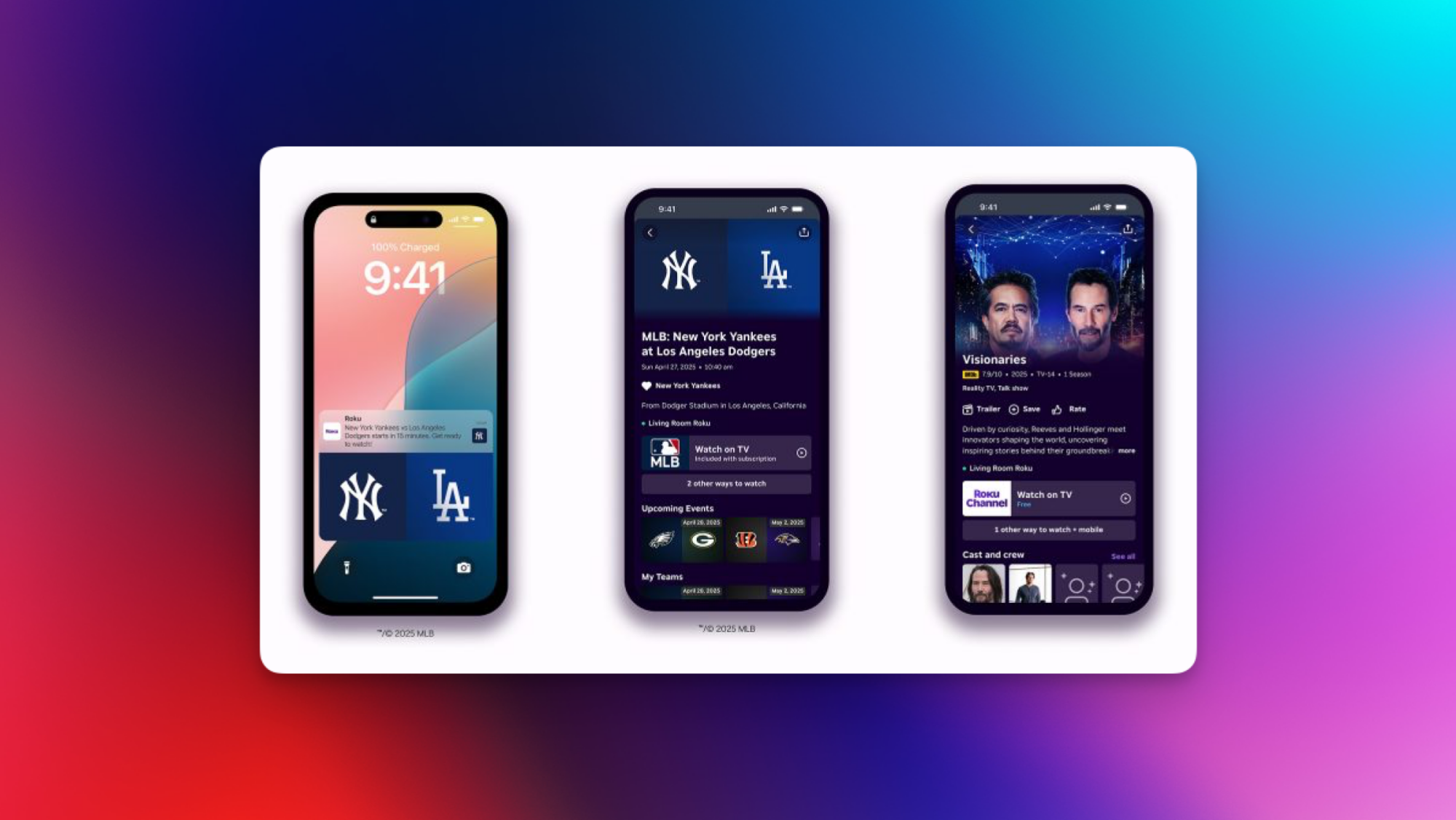
Roku has a few new features coming to its devices. These includes an alert when new movies hit streaming services, badges for award-winning films, and sports highlights for the teams you support. These updates will be rolling out over the coming months, the company said. Here are all the new features Roku announced in its most recent blog post.

An easier way to find and watch movies

Roku is releasing a feature called Coming Soon to Theaters, which displays the biggest theatrical releases from Hollywood in a new row on the home screen. You can use this to quickly discover interesting new movies that you’d like to watch the next time you visit a theater. If you’d rather watch it at home, you can add those movies to your Save List on Roku, after which the device will notify you the moment that movie is available on a streaming service. In a related feature, Roku’s adding a new badge for award-winning films, making it easier to spot films worth watching. 

A more personalized sports experience

Roku's sports updates in a screenshot.

Credit: Roku

Roku is also bringing in a personalized highlights row in the Sports Zone section, a hub for all sports-related videos. With improved personalization, you’ll be able to see clips from your favorite teams front-and-center. You’ll also be able to turn on notifications for when your favorite teams from various sports are playing. Additionally, Roku said it’s adding Sports Zone to more regions across the world, starting with Mexico. 

More short-form content on display

In the All Things Food and All Things Home sections, Roku will show dedicated rows for short videos. If you’d like to watch short clips related to food or homes, Roku will make it easy to do so. 

An upgraded Roku app

Roku's mobile apps, with all the new features highlighted.

Credit: Roku

Roku’s mobile app is getting the ability to use your phone as a remote for the TV. The app is also adding more details to its content pages, such as cast, crew, trailers, and IMDb ratings. This will let you get useful information about the content you’re watching without having to leave the app.

A trivia game for nerds

Roku’s Daily Trivia game is back after a brief pause. The game shows you 10 questions every day and after you’re done, you can take a look at content related to the topics in the quiz. The trivia section now boasts improved visuals, and lets you access questions from older quizzes as well.

Access Roku City whenever you want to

The Roku City screensaver is quite popular among users of the company’s devices. It’s a fake city that appears if your Roku is idling. With these updates, a Roku City tile will appear on the device’s home screen, allowing you to visit the fictional locale whenever you want to. Roku also announced that Backdrops, its wallpapers functionality, is coming to its devices in Canada. The feature has been available in the US for a while now.

Apple ordered to pay $502 million to Optis by UK courts

Apple has been ordered to pay a $502 million lump sum payment by UK courts for infringing on patents owned by Optis Cellular Technology LLC, based out of Texas. When you include interest and fees, Optis estimates the total sum to be in excess of $700 million. This particular company is not an aggrieved innovator, but instead what is referred to as a “patent troll.” That’s a company that buys up niche patents with the specific intent to seek damages for infringement from lucrative defendants like Apple, and it’s not their first time being awarded damages from the Cupertino giant.

This lawsuit was originally filed through London courts in 2019 over patents governing cellular technology, including 4G, that Optis says was improperly used in iPads and iPhones. In 2023, London’s High Court ruled in Optis’ favor and ordered Apple to pay just over $56 million plus interest to settle the dispute, inclusive of past and future sales that featured the offending tech. Optis successfully argued that this was far too low a sum, leading to the half-a-billion-dollars in damages ordered today.

The iPhone maker has found itself in court over patent infringements time and time again in the past — not only with patent trolls, but also fellow industry stalwarts. The ability for enormous tech companies to (allegedly) infringe on design or utility patents and pay pennies on the dollar for the damage done years later seems to be a feature, not a bug.

Apple has unsurprisingly responded by promising to appeal the court’s decision, to which Optis insisted it will fight to defend its intellectual property.

Optis provided Engadget with the following statement: 

“We’re pleased the UK Court of Appeals has recognized and corrected a clearly flawed prior ruling and has made meaningful progress toward affirming the true value of our patents to Apple devices. In addition to ordering payment that exceeds $700 million with interest and fees, the Court has judged that ‘Apple’s significant negotiating strength leads some parties to agree lower rates than would be agreed between a willing licensor/willing licensee’ thereby gaining an unfair advantage. We will continue to ensure fair compensation for the Optis intellectual property that enables high-speed connectivity for millions of devices around the world.”

Update, May 1, 2025, 11:53AM ET: This story was updated with a statement from Optis and details about the total compensation inclusive of fees and interest. 

This article originally appeared on Engadget at https://www.engadget.com/big-tech/apple-ordered-to-pay-502-million-to-optis-by-uk-courts-153053338.html?src=rss

Nvidia and Anthropic Publicly Clash Over AI Chip Export Controls

Nvidia publicly criticized AI startup Anthropic on Thursday over claims about Chinese smuggling tactics, just days before the Biden-era “AI Diffusion Rule” takes effect on May 15. The confrontation highlights growing tensions between AI hardware providers and model developers over export controls.

“American firms should focus on innovation and rise to the challenge, rather than tell tall tales that large, heavy, and sensitive electronics are somehow smuggled in ‘baby bumps’ or ‘alongside live lobsters,'” an Nvidia spokesperson said, responding to Anthropic’s Wednesday blog post.

The Amazon and Google-backed AI startup had called for tighter restrictions and enforcement, arguing that “maintaining America’s compute advantage through export controls is essential for national security.” Anthropic specifically proposed lowering export thresholds for Tier 2 countries to prevent China from gaining ground in AI development.

Nvidia countered that policy shouldn’t be used to limit competitiveness: “China, with half of the world’s AI researchers, has highly capable AI experts at every layer of the AI stack. America cannot manipulate regulators to capture victory in AI.”


Read more of this story at Slashdot.

Raycast Finally Has an iPhone App, but It’s Pretty Limited

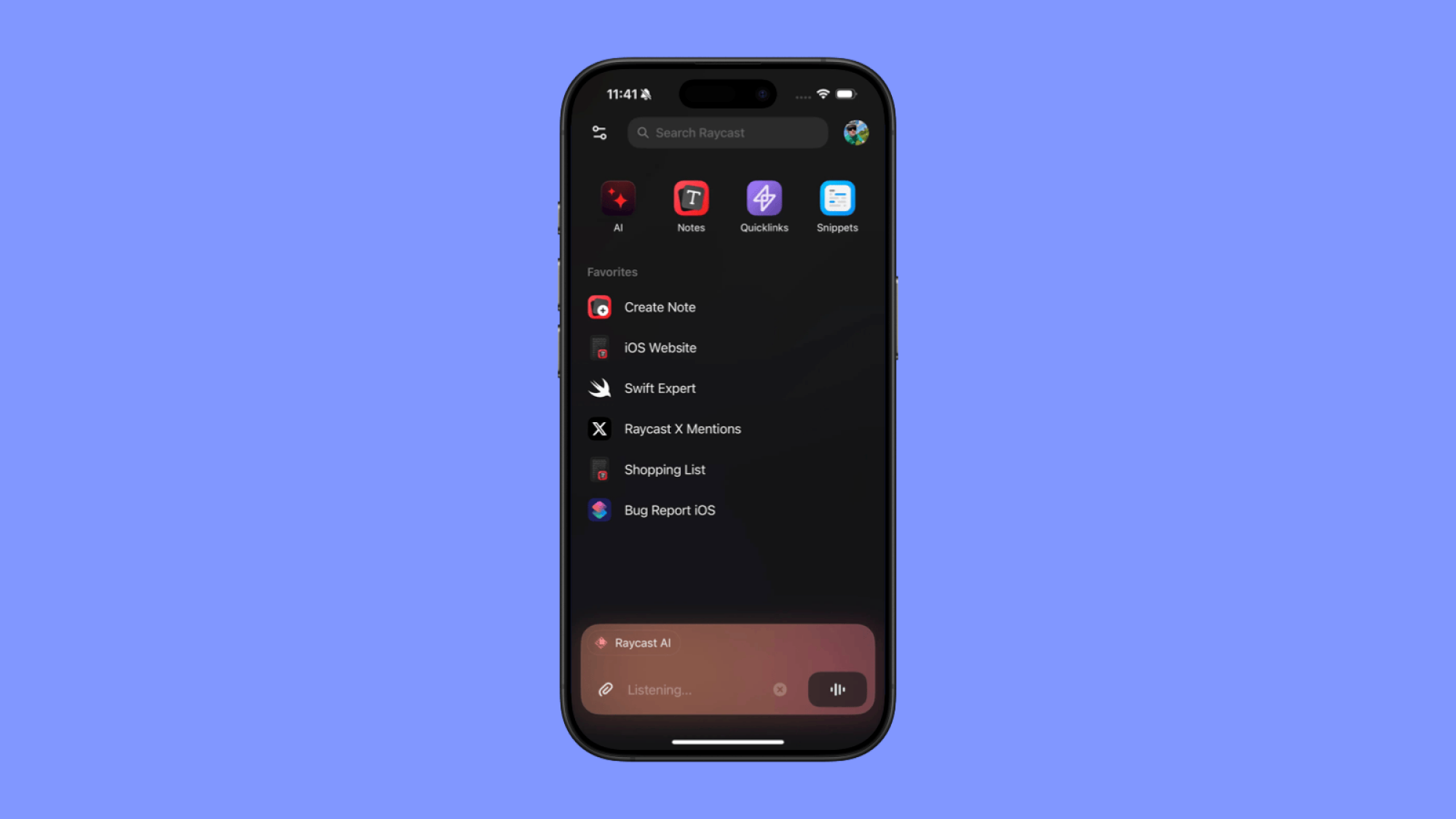
Raycast on the Mac is a powerful keyboard-based launcher. It’s quite popular in Mac productivity circles, and you can think of it as a customizable version of Spotlight. You can add extensions to it, use it for math, create custom shortcuts with it, search for files, and now, of course, talk to AI, using a floating window on top of anything on your Mac.

Apple users have requested an iPhone version of Raycast for a long time. But things that Raycast can do on the Mac, like access the clipboard, trigger extensions, and manage windows and files, just aren’t possible on the iPhone and iPad. But Raycast for iPhone is finally here after all, and it’s just the beginning.

Raycast AI on iPhone

Raycast Home screen interface.

Credit: Raycast

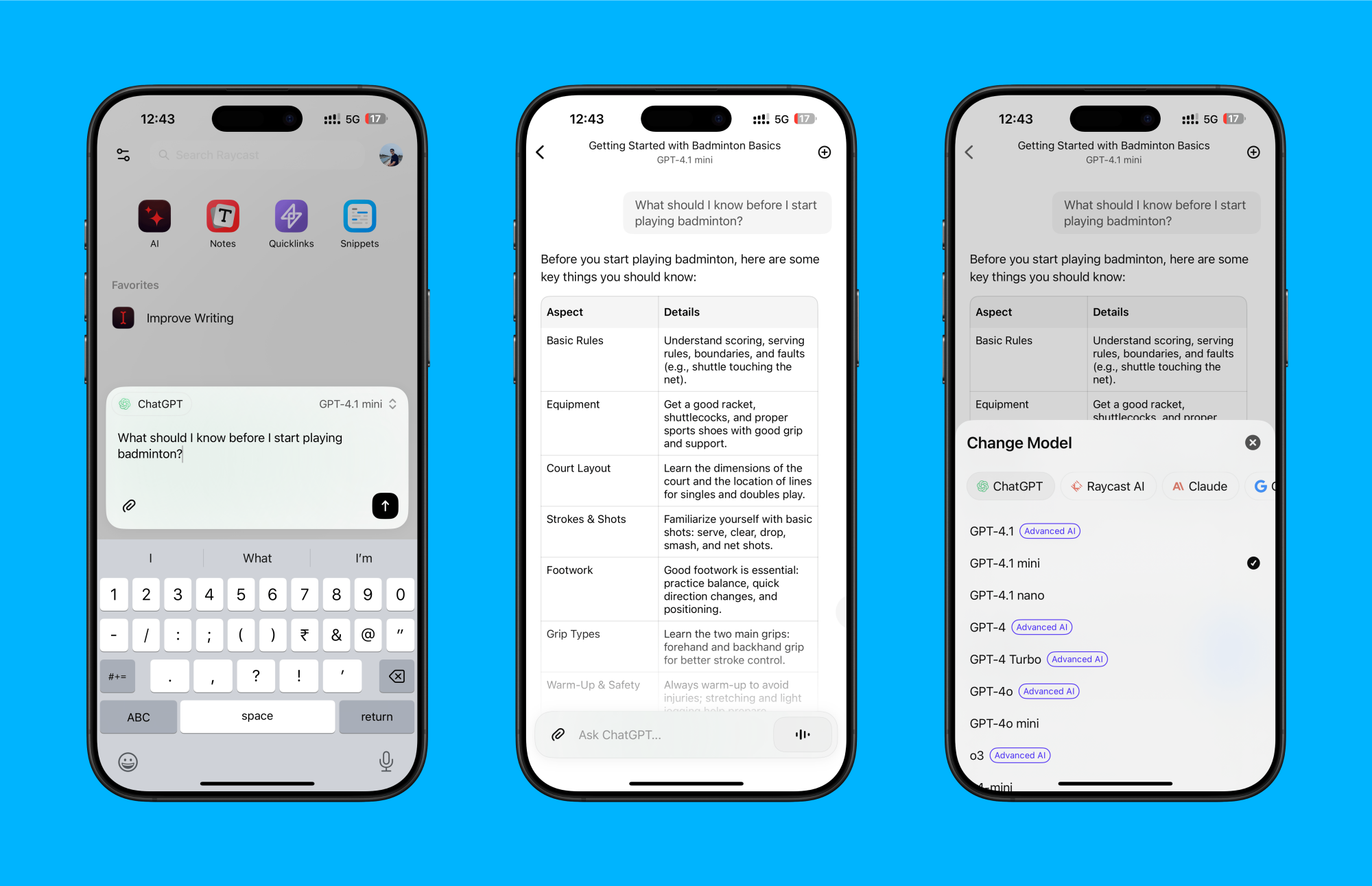
Recently, Raycast has become kind of an all-in-one AI tool, providing you with access to the latest and greatest models from ChatGPT, Gemini, Claude, Deepseek, and more at one low monthly price. You get 50 messages for free, and the $10/month Raycast Pro plan provides you with access to smaller models like GPT mini and Claude 3.5 Haiku. The $20/month plan opens that up to the models like Claude 3.7 Sonnet, GPT-4.1, Gemini 2.5 Pro, and more.

Raycast AI in iPhone app.

Credit: Khamosh Pathak

Raycast on the iPhone carries the same design language as the Raycast app on the Mac. When you open the Raycast app on iPhone, you’ll see a text box at the bottom, and a Voice button. On the top of the page, there are shortcuts to view all your AI conversations, Notes, Snippets, and Quicklinks. The middle part can be customized to add any AI or Raycast action shortcut that you wish.

By default, you’ll talk to Raycast AI using the app’s own Ray model, which is based on GPT-4. But you can tap on the Model button to switch to any available model, including any custom AI models that you might have built on Mac. You can also add attachments, ask follow up questions, and more.

Notes, Quicklinks and Snippets

Raycast Notes and QuickLinks

Credit: Raycast

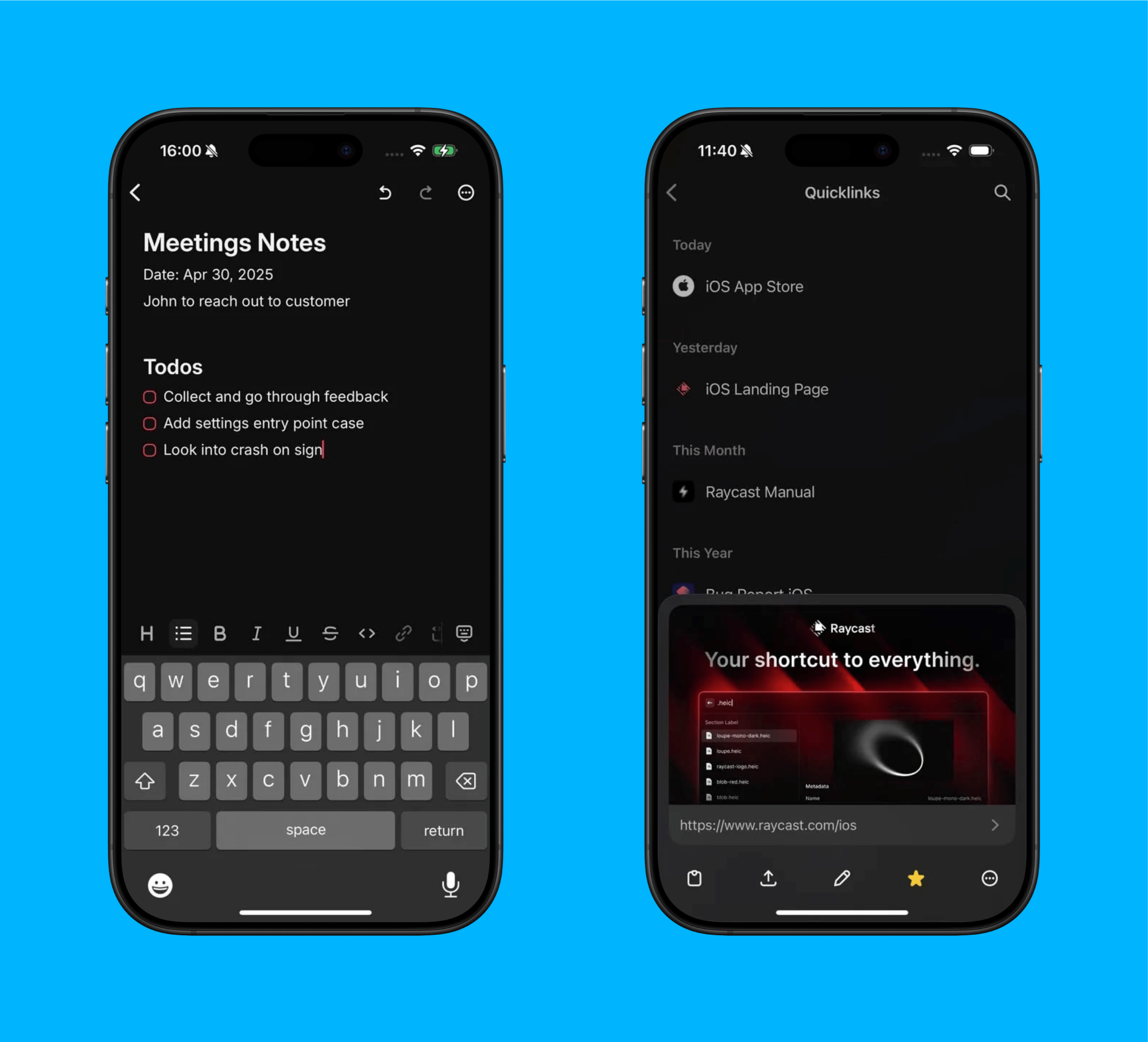
When it comes to productivity, the Raycast iPhone app brings over three Mac features: Notes, Quicklinks, and Snippets. If you’re paying for the $10/month Raycast Pro subscription, you’ll see that all your notes, Quicklinks and Snippets from your Mac will show up automatically on the iPhone (using the Cloud Sync feature).

But even if you aren’t, you can still use these features for free on the iPhone; they just won’t sync to your Mac. You can create 5 notes for free using Raycast Notes.

You’ll also be able to export notes in HTML, Markdown and in rich text.

Quicklinks and Snippets are let you do a bit more, though. Quicklinks let you create shortcuts for launching any URL with a tap. This URL can take you directly to a part of an app, or website.

Snippets is Raycast’s version of a text expansion tool, and is a more robust version of the built-in Text Replacement tool on iPhone and Mac. Here, you can create text-based shortcuts that expand into any saved text, like your address, or a work email template, easily.

A ways to go

And that’s all there is so far. Currently, Raycast thinks of the iPhone app mostly as a companion to the more powerful Raycast utility on the Mac. According to an interview with Raycast co-founder Petr Nikolaev (via The Verge) the goal for the Raycast app was to put something in front of Raycast users and see how they respond. The developers plan to build on top of this foundation using the feedback from users. If the Raycast app on iPhone is successful, they also plan to build an Android app (a the Windows app is already in the works).

Currently, Raycast supports the Shortcuts framework that makes it easy to open the AI chat and other features directly from Control Center, or the Lock screen. But it’s not the same as replacing Siri or Spotlight Search. According to the co-founders, they would love to bring extensions support to the iPhone app, but Apple’s sandboxed environment won’t allow for it. Although, they are excited about a potential custom keyboard implementation that would let them bring some of the Raycast features into other apps using the system keyboard.

Apple’s iPad Air M3 is $100 off

The recently-released Apple iPad Air M3 is already on sale via Amazon. You can pick up the 11-inch model starting at $499 and the 13-inch version starting at $699. Both discounts mark the lowest prices we’ve tracked. If Amazon isn’t your bag, these deals are also available at Best Buy.

The Air topped our list of the best iPads, as we called it the ideal choice for most Apple tablet buyers. The M3 chip is extremely powerful, which increases performance and multitasking when compared to the base iPad. It offers support for the Apple Pencil Pro and Magic Keyboard, which is nice, and the overall design is lovely.

The battery can last up to 12 hours, which is a decent metric for a modern tablet. The two 12MP cameras won’t be winning any awards, but they get the job done. These are also fairly lightweight, which makes sense given the name. The 11-inch version weighs around a pound and the 13-inch model shoots up to 1.36 pounds. That’s light enough for long-term use without any real issues.

While the screen is certainly above-average, it’s not quite on the level of the iPad Pro’s OLED panel. It also maxes out with a 60Hz refresh rate, which is rather basic. It’s worth noting that the $499 base price for the 11-inch model gets you a healthy 128GB of storage and 8GB of RAM. Other variations are on sale, but the cost can add up. For instance, the 13-inch version with a 1TB drive will set you back $1,200.

Check out our coverage of the best Apple deals for more discounts, and follow @EngadgetDeals on X for the latest tech deals and buying advice.

This article originally appeared on Engadget at https://www.engadget.com/deals/apples-ipad-air-m3-is-100-off-151340723.html?src=rss

‘Milk Street Backroads Italy’ Makes Italian Food New Again

We may earn a commission from links on this page.

Welcome to “Cookbook of the Week.” This is a series where I highlight cookbooks that are unique, easy to use, or just special to me. While finding a particular recipe online serves a quick purpose, flipping through a truly excellent cookbook has a magic all its own. 

Another Italian cookbook—I know. But trust me, you’ll want to be here for this one. Milk Street Backroads Italy is a cookbook that may make you question some of your “rules” about cooking Italian food. Constantly stirring polenta? Adding slabs of mozzarella to your eggplant parm? Loading Italian wedding soup with meatballs? While I will probably continue putting mini meatballs in everything, this latest volume from Milk Street has done something unexpected—it’s made Italian food new for me again. 

A bit about the book

This absolutely packed cookbook by Christopher Kimball and J.M. Hirsch just published on April 15, and it’s fresh in more ways than that. You get a hint from the name, Backroads Italy, that you’re about to see a different side of the country’s cuisine. This has been attempted by many, and why not? Italian food is usually easy to make, delicious, and relatively reliable to duplicate across regions. What this cookbook does differently is give you a host of dishes you probably aren’t familiar with (I wasn’t), and truly helpful tips at every turn. 

As for the dishes you thought you knew well, Milk Street Backroads Italy shows you a new way to make it. A new way that doesn’t make you grumpy about the change, but instead, intrigued by the possibility of an alternative favorite.

It’s important to mention that these “new” methods aren’t actually new—they’ve been in use for generations. But they’re finally making their way to us from different regions in Italy—from Italian chefs that Kimball and Hirsch cooked with and learned from—occasionally with an adjustment in favor of science, or a spin on technique for the sake of ease in the American kitchen. 

A great cookbook for a different look at Italian food

I admit, I usually find an excess of stories in cookbooks a little tiresome—I like to get on with the recipes—but the stories in this cookbook drew my attention nearly every time. Instead of meandering anecdotes (which is when I usually flip), these excerpts are descriptive with a clear intention. They provide vital information about what you’re about to see on the next page, and why it’s going to be different from what you’re used to. 

I especially enjoyed reading about No-Fry Neapolitan Eggplant Parmesan (Parmigiana di Melanzane), classic polenta, and the Milanese technique for quick-cooking risotto. Each dish traditionally has an annoying but supposedly written in stone, must-do step. For example, the eggplant must be breaded in a coating of egg and bread crumbs. For polenta, it’s consistent stirring and boosting it with lots of cheese and butter. For risotto, much of the same slow and consistent stirring while slowly ladling in chicken broth. Well Milk Street Backroads Italy showed me that not only can you ditch the annoying steps, but the meal might actually be better for it. 

While Italian food is often known for hearty, tomato-sauce-laden pastas and, of course, pizza, the authors here relish in unearthing the little-known recipes of Italy—and the enthusiasm is contagious. 

I love the idea of making a soup that’s jam-packed with herbs instead of meat, swapping spaghetti with chickpeas for my vongole, or giving tomatoes a break and dousing rigatoni with a bright green broccoli sauce. Don’t get me wrong: There are familiar pasta dishes, risotto, focaccia, and pizza galore in this book. Just be open to the twists and turns on these backroads. You’ll be happy you did.

The dish I made this week

A bowl of broccoli pasta on a wooden table.

Credit: Allie Chanthorn Reinmann

I browsed the offerings in this cookbook for days, and I stopped often to gander at a gorgeous picture here or peruse the ingredient list there. But I kept coming back to page 179, Rigatoni con Salsa di Broccoli. Something about the creamy green sauce with big pasta tubes and even bigger broccoli florets was irresistible. Plus the ingredient list was a reasonable length of 10 ingredients, none of them difficult to source. 

Essentially, the sauce is made from the often-jettisoned broccoli stem with some key flavoring ingredients added. They all get blended into a furiously jade-hued sauce and tossed with the cooked rigatoni and blanched broccoli florets. It’s a simple recipe, made even less busy by using a single pot of boiling water for all of the work. I appreciated not having multiple pots and pans going at once (and not having to clean them all later).

The inside of a blender container with green broccoli sauce.

Credit: Allie Chanthorn Reinmann

When I caught a whiff of the sauce out of the blender, I knew: There would be no hope for leftovers. I took one bite and was gobsmacked. This dish is upsettingly delicious. The broccoli flavor is to be expected—it’s the star—but the sauce is actually built on layers of flavor. Small, powerful ingredients—capers, garlic, and lemon zest specifically—get blended in at the perfect ratio to lift each other up without overwhelming the eater. This recipe is a problem. My neighborhood is about to run out of broccoli.

Where to buy the book

You can get 36% off if you buy the hardcover of Milk Street Backroads Italy from Milk Street’s online store, compared to the hardcover at other online retailers. But consider the more subtle ebook for an even lower price. Extra imaginary points from me if you solicit your local real-life bookstore too.

Meta Now Forces AI Data Collection Through Ray-Ban Smart Glasses

Meta has eliminated key privacy protections for Ray-Ban Meta smart glasses users in a policy update that took effect April 29th. The company now permanently enables Meta AI with camera functionality unless “Hey Meta” voice commands are completely disabled, while simultaneously removing users’ ability to opt out of having their voice recordings stored in the cloud.

These recordings are kept for up to a year for Meta’s product development, with the company only deleting accidental voice interactions after 90 days. Users can manually delete individual recordings but cannot prevent the initial collection.


Read more of this story at Slashdot.

Microsoft raises prices on Xbox hardware, says “some” holiday games will be $80

Microsoft is increasing the recommended asking price of Xbox hardware and accessories worldwide starting today and will start charging $79.99 for some new first-party games this holiday season. The announcement comes after “careful consideration given market conditions and the rising cost of development,” Microsoft said.

In the United States, this means Microsoft’s premiere Xbox Series X will now cost $599.99 for a unit with a disc drive (up from $499.99), while the Digital version will cost $549.99 (up from $449.99). On the lower end, a 1 TB Xbox Series S will now cost $429.99 (up from $349.99), while a 512GB unit will cost $379.99 (up from $299.99).

The new prices are already reflected on Microsoft’s official online store, and Microsoft says it will “provide updated recommended pricing to local retailers.” That might leave a small window where you can get Xbox hardware and accessories from those retailers at the older, lower price while supplies remain available.

Read full article

Comments

Microsoft Just Raised Prices on Xbox Consoles and Games

Everything seems to be getting more expensive these days, and video games are no exception. Case in point: Microsoft, just jacked up the recommended prices on its video game products. Xbox consoles and games alike are seeing cost increases—all of which go into effect today, May 1.

You can find the full list of price changes on Microsoft’s official pricing update blog post. But for those of us in the United States, here are the new prices we can expect to pay for Xbox products going forward, in addition to the original prices provided by IGN when available:

Xbox consoles

  • Xbox Series S 512: $379.99 (originally $299.99)

  • Xbox Series S 1TB: $429.99 (originally $349.99)

  • Xbox Series X Digital: $549.99 (originally $449.99)

  • Xbox Series X: $599.99 (originally $499.99)

  • Xbox Series X 2TB Galaxy Black Special Edition: $729.99 (originally $599.99)

Xbox controllers and headsets

  • Xbox Wireless Controller — Limited Edition: $89.99 (originally $79.99)

  • Xbox Elite Wireless Controller Series 2 (Core): $149.99 (originally $139.99)

  • Xbox Elite Wireless Controller Series 2 (Full): $199.99 (originally $179.99)

  • Xbox Wireless Controller (Core): $64.99

  • Xbox Wireless Controller (Color): $69.99

  • Xbox Wireless Controller — Special Edition: $79.99

  • Xbox Stereo Headset: $64.99

Which Xbox games are now more expensive?

Microsoft hasn’t said yet, though no existing games will cost more than they currently do. The company noted that they will raise the cost of some new first-party games to $79.99 this holiday season. That puts the price in line with the Switch 2’s most premiere titles, like Mario Kart World. It seems $80 is the new standard in AAA video game pricing.

Note that Xbox Game Pass pricing is not changing at this time.

Why is Microsoft raising prices?

According to the company, these MSRP hikes are due to “market conditions and the rising cost of development.” To those of us following the news, however, it seems a likely culprit is the Trump administration and its widespread tariffs imposed on trading partners across the globe. Microsoft doesn’t directly blame tariffs, so we can’t say for sure, but these import duties are certainly impacting “market conditions” in a major way.

Microsoft isn’t alone in raising prices, even among video game manufacturers. Sony increased the MSRPs of PS5 consoles in markets around the world—though notably omitted the U.S. from that list. Nintendo also raised prices on Switch 2 accessories, though opted to keep the console’s original $449.99 price tag intact.

Windows Recall Is Back (but Should You Use It?)

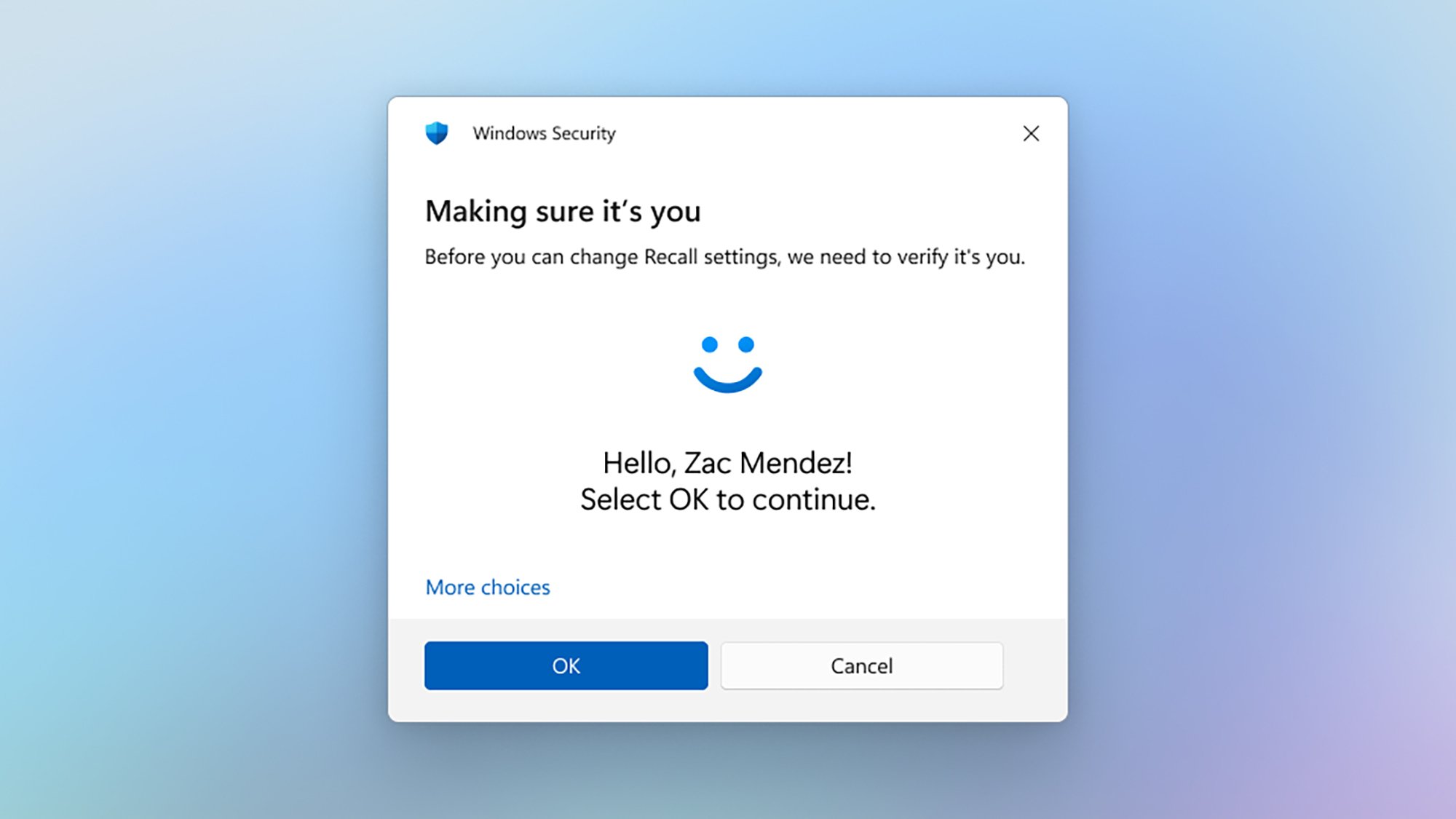
Originally launched by Microsoft last July, Windows Recall was swiftly pulled in response to a barrage of security and privacy complaints. Now it’s back, with some tweaks to make it more palatable for users—but there remain plenty of concerns about what happens when it’s enabled.

If you’re new to the story, Recall is an AI-powered feature that acts like a memory for your computer. It regularly snaps and analyzes screenshots of whatever you’re doing. It’s handy if you want to get back to a document or message you vaguely remember from three weeks ago, while at the same time sounding several alarm bells in terms of having all your past Windows activity stored on your system.

I tested an early version of Windows Recall at the end of last year, and found it to be genuinely useful at times—for those prepared to put up with the security and privacy problems. Back then it was still in a rather unfinished form, with some basic features missing, such as the option to filter snapshots by app.

Windows Recall
Recall lets you search through captured images.
Credit: Microsoft

To get Recall today, you need to have a Copilot+ PC, with all the necessary AI processing power: If you have a compatible computer with the latest version of Windows, you’ll find the Recall app on the Start menu. It won’t be enabled by default; making the feature opt-in is one of the changes Microsoft has made after the wave of criticism directed towards Recall when it was first unveiled.

Microsoft has made other changes, too. The data stored by Recall is now more securely encrypted; Windows Hello authentication is required each and every time you want to access it; and sensitive information such as passwords, credit card numbers, and official IDs are filtered out—though it remains to be seen how effectively that works.

Are the changes enough to win back trust for Windows Recall? It’s certainly now much harder for someone else to get at the screenshots that Recall stores, but there remain questions about how well they’re protected—not just on your own computer, but on the computers of anyone else you might be communicating with.

Recall still has problems

Security researcher Kevin Beaumont has been digging into the latest version of Recall, and there are still some worrying problems here. The first is that someone else can access your PC and Recall using your computer PIN, if they can guess it or trick you into revealing it: While biometric authentication is required to set Recall up, you can fall back to using a PIN whenever you need to see or search through the screenshots.

Now this isn’t too different from someone hacking into your phone using your PIN, and you might be confident that no one else will even get hold of your set of digits. However, if they do, Recall gives these unauthorized visitors instant access to everything you’ve ever done on your PC since you set up the feature.

Secondly, Beaumont found that the sensitive data filtering is hit and miss (something I noticed in my own testing too): You can’t really rely on it to wipe out details of your credit cards or your medical histories. That’s not a huge issue if you’re the only one looking at this information, but that’s difficult to guarantee.

Windows Recall
Recall can be accessed via facial recognition—or a simple PIN.
Credit: Microsoft

There’s another problem here, highlighted by Ars Technica: If someone you know enables Recall, and is syncing photos and chats you’ve sent them to their computer, all that information then gets snapped and sorted on their PC (think Signal for Windows, for example). Your data is more likely to be exposed, and you’ve not even had any say in it.

It seems as though insisting on biometric authentication every time Recall is accessed is an obvious fix Microsoft could apply here—making it much harder for someone else to get at your data, whether it’s on your PC or the PC of someone you know. It still feels wrong that your emails, photos, or chats might be getting collected together in someone else’s Recall library, though.

More robust filtering tools would certainly help as well. Windows Recall already lets you exempt certain sites and apps from being screenshotted, but it’s a rather clunky system, and better automatic censoring would be welcome. In the meantime, you not only need to decide if you’re going to enable Recall, you need to check in with family and friends to see what they’re doing as well.

Apple sends spyware warnings to iPhone users in 100 countries

Apple has been warning possible victims of spyware attacks, according to several alleged recipients of the messages. At the time of writing there appears to be at least two people who have confirmed they’ve been notified by Apple, and that the warning itself says that users in 100 countries have received similar alerts. The company does not offer any specifics as to how many people may have been targeted, or where the attacks are coming from

As reported by TechCrunch, one recipient of the warning message is the Italian journalist Ciro Pellegrino, who works for an online news outlet called Fanpage in his native country. The other (as far as we know right now) is Dutch right-wing commentator Eva Vlaardingerbroek, who posted screenshots and a video of the alleged warning message on X.

According to Vlaardingerbroek, Apple informed her that it had detected a targeted mercenary spyware attack against her iPhone. The message she says she received said: “This attack is likely targeting you specifically because of who you are and what you do. Although it’s never possible to achieve absolute certainty when detecting such attacks, Apple has high confidence in this warning — please take it seriously.”

Posting the iMessage with the threat notification I got from @Apple here (4 out of 5 screenshots) pic.twitter.com/sbYWkfMr0A

— Eva Vlaardingerbroek (@EvaVlaar) April 30, 2025

The warning does not say where the alleged spyware attack originated, but Vlaardingerbroek claims that Apple used the Israeli cyber-arms company NSO Group’s Pegasus software as an example. She goes on to say that the attack, if genuine, is likely an attempt to intimidate and silence her.

Apple’s official guidelines about threat notifications match the screenshots on Vlaardingerbroek’s video, where it also explains that “mercenary spyware attacks cost millions of dollars and often have a short shelf life, making them much harder to detect and prevent. The vast majority of users will never be targeted by such attacks.” The same guidelines state that targeted users will be notified with an alert at the top of the page when signing into their Apple account, as well as by email and iMessage using the email addresses and phone numbers associated with that account.

Last year, Apple device users in as many as 92 countries were sent spyware attack warnings of a similar nature, and since 2021, individuals in over 150 countries have been contacted. But Apple hasn’t given more details on how many people are targeted in such attacks, only the number of countries where it contacted affected users.

This article originally appeared on Engadget at https://www.engadget.com/cybersecurity/apple-sends-spyware-warnings-to-iphone-users-in-100-countries-142547474.html?src=rss

Microsoft Hikes Xbox Console Prices By Up To $100, Games To Hit $80

Microsoft is raising prices for Xbox consoles globally, with the flagship Series X jumping $100 to $599.99 in the US. The more affordable Series S will increase by $80 to $379.99, while game prices will reach $80 later this year.

The company cited “market conditions and the rising cost of development” in a statement, adding that it continues to focus on “offering more ways to play more games across any screen and ensuring value for Xbox players.”


Read more of this story at Slashdot.

Timelapse Of Oklahoma Supercell Thunderstorm

This is a timelapse video of a powerful supercell thunderstorm in Oklahoma captured by storm chaser Chad Casey earlier this week. With the storm above and all those blinking red lights below it looks like a modern day Mordor. And maybe it is, I’ve never been to Oklahoma. It definitely looks like the sort of place I wouldn’t simply walk into though.

ASUS adds, then removes, the ability to detect sagging in its latest ROG Astral GPUs

Anyone rocking a recent-gen high-end GPU like an RTX 4090 or 5090 knows that these behemoths of rendering power are heavy enough to knock out a would-be PC thief. As GPUs get larger and heavier, sagging has become a growing concern for PC builders and GPU manufacturers, and ASUS briefly let on just how aware of this issue the company is.

ASUS quietly added a function called “Equipment Installation Check” to its GPU Tweak III monitoring software back in January. Included in this toolset was a measurement named “VGA Horizontal Status” that precisely measured the angle at which the installed GPU was tilting down. Users could set a custom warning if the GPU tilted down beyond a degree threshold set by the user.

In mid-April, Taiwanese publication UNIKO’s Hardware published a teardown of the latest ROG Astral 50-series cards, which highlights what they suspect to be a Bosch Sensortec chip. Bosch describes it as “a general purpose, low-power IMU that combines precise acceleration and angular rate (gyroscopic) measurement with intelligent on-chip motion-triggered interrupt features.” The technicians at UNIKO’s Hardware believe this chip is what powers the tilting detection tool.

Curiously, the most recent mentions of this feature on ASUS forums point out that as of the latest release of the Tweak III software, dated April 11, the Equipment Installation Check button is no longer there. Users had begun reporting what they believed to be false positives, confident that their GPUs were level despite the software saying they were sagging. Engadget reached out to ASUS to understand if this feature is being deprecated or if it wasn’t reporting accurate readings but did not receive a response.

Whether the feature is gone for good or angling for a comeback, the risk of sagging GPUs is all too real for many PC gamers today. PCIe slots were not exactly designed with today’s six-plus GPUs in mind, which has led to gamers finding creative solutions to hold up their enormous graphics cards and prevent potential damage.

This article originally appeared on Engadget at https://www.engadget.com/computing/asus-adds-then-removes-the-ability-to-detect-sagging-in-its-latest-rog-astral-gpus-134508930.html?src=rss

This Portable Bluetooth Speaker Is $37 Right Now

We may earn a commission from links on this page. Deal pricing and availability subject to change after time of publication.

The Ultimate Ears Wonderboom Play borrows the same compact, round design as the brand’s more expensive models, like the Wonderboom 4, but dials back on a few key features to hit a lower price point. Currently at $36.99 on Woot—its lowest price yet according to price trackers and well below the $89.99 list price (and $59.49 on Amazon)—this deal runs for two days or until it sells out.

Despite the low price, it holds onto the signature IP67 durability, meaning it can handle dust, splashes, and even short dips in water. And with over 14 hours of tested battery life, it’s built to last through full-day outings.

Functionally, it’s stripped down. There’s no fancy stereo pairing, EQ presets, or assistant support. You get a single mono speaker, no companion app, and no mic. The control layout is intuitive, though, with top-mounted volume buttons that are easy to use even if you’ve got the strap looped around your hand. It charges via USB-C and powers down after 15 minutes of inactivity, which helps stretch that already generous battery life. Build-wise, the Wonderboom Play feels solid. The design is clearly meant for travel, and the elastic strap is thick enough to hook onto a backpack or belt loop without worry.

Now, about the sound. If you’re coming in expecting rich, room-filling 360-degree audio, this probably isn’t the speaker for you. The single-driver setup means sound is directional—stand too far off to the side, and you’ll notice the drop in clarity. It also doesn’t get very loud and reportedly starts to compress if you push the volume too high. That makes it less ideal for parties or big outdoor hangouts where multiple people are listening from different angles. If you just want something affordable and rugged for basic listening without fiddling with apps or customizations, this might be worth considering. Otherwise, if you care about full-room sound or volume punch, something like the JBL Flip 6 might make a good alternative.

You Can Get These 2nd Gen Apple AirPods Pro for $160 Right Now

We may earn a commission from links on this page. Deal pricing and availability subject to change after time of publication.

If you’ve been considering upgrading your earbuds without shelling out top dollar, a pair of refurbished Apple AirPods Pro (2nd Gen) could be the smarter way in. They’re $159.99 on StackSocial right now (a noticeable cut from buying new) and come with a Grade “A” refurbished rating, meaning they might come with a little cosmetic wear but are guaranteed to work like new. They ship free across the contiguous U.S. and come backed by a third-party 30-day parts and labor warranty—not as reassuring as AppleCare, but enough to cover any immediate surprises. And while they’re not brand-new, the price undercuts what you’d typically expect to pay for a pair that still offers Apple’s top-tier audio performance.

In terms of what you’re getting, the second-gen AirPods Pro deliver some real upgrades over the originals. Active noise cancellation is stronger, transparency mode sounds more natural, and Adaptive Audio now smartly blends noise control depending on your surroundings. If you’re used to older AirPods, the fit here feels tighter and more secure thanks to the extra ear tip sizes (though people with non-standard ear shapes might still find long sessions uncomfortable). Battery life holds okay too, with an estimated six hours of listening on a single charge and around 30 hours when you factor in top-ups from the MagSafe case. The shift to USB-C charging is also a bonus if you’re already moving away from Lightning cables with newer Apple devices, notes this PCMag review.

Still, there are a few things to keep in mind. Refurbished means you’re not getting a brand-new battery, so while it should be close to full health, it won’t have the same lifespan as something straight out of the box. Also, while the AirPods Pro are excellent for iPhone users with features like Personalized Spatial Audio and Find My tracking, they’re less impressive on Android devices, where you lose out on some of the ecosystem perks.