These Websites Demanding a Fee for Your Employer Identification Number Are a Scam

Scammers can make good money by selling you something you can actually get for free—like government services. The Federal Trade Commission is alerting consumers to fraudulent websites that are claiming to be associated with the IRS and charging up to $300 to file paperwork for obtaining an Employer Identification Number (EIN).

The EIN application is available for free on the real IRS website and requires just a few minutes to complete. An EIN, which is a corporate identifier for filing taxes, is required for anyone opening a business, estate, or nonprofit as well as those with household employees (such as a family hiring a nanny).

How the EIN scam works

The services identified by the FTC are impersonating the IRS or misrepresenting their affiliation in one or more of the following ways:

  • Using IRS seals, logos, formatting, colors, fonts, layouts, and imagery on their websites and ads

  • Using “IRS” in their domain names or on their websites

  • Using the term “EIN Assistant”

  • Failing to disclose that they are not affiliated with the IRS

  • Failing to disclose that payments are 100% service fees, as EINs are free

This also isn’t the only way scammers are profiting off of “helping” consumers apply for government services. The Better Business Bureau has tracked online services that charge people to enroll in the Department of Homeland Security’s Trusted Traveler Programs, such as TSA PreCheck and Global Entry. These programs do cost money, but you don’t have to pay for the application itself. (Note that TSA PreCheck contracts with several third-party enrollment providers, with total fees varying slightly from $67 to $78.)

How to apply for an EIN—for free

If you do need an EIN, you can complete the application using the IRS’ EIN Assistant tool. You’ll need to provide information about the legal structure of your business as well as personal information like your name, address, contact information, and tax ID.

Your EIN is generated immediately upon completion and verification, and the whole process takes fewer than 15 minutes if you have all of your information ready.

FTC Bans Hidden Fees For Live Events and Short-Term Rentals

An anonymous reader quotes a report from TechCrunch: The U.S. Federal Trade Commission (FTC) on Monday released new documentation detailing its new “Rule on Unfair or Deceptive Fees.” The rule, set to take effect on May 12, prohibits hidden fees for live events, hotels, and short-term rentals. It also bans practices such as “bait-and-switch pricing” and any actions that conceal or misrepresent total prices and fees.

In a newly published FAQ, the FTC offers a guide for these types of businesses, providing detailed information about pricing transparency. The rule will impact businesses, including live-event ticket sellers and short-term lodging providers, like hotels, motels, Airbnb, or VRBO. Third-party platforms, resellers, and travel agents are also covered by the new regulation. (Airbnb already updated its service in advance of this new regulation to show users the total cost of their stay upfront.) […]

Also included in the FTC’s new FAQ are the types of fees that can be excluded, such as taxes or government fees, shipping charges, and charges for optional goods or services people may select to buy as part of the same transaction. (Note that handling charges aren’t on this list.) However, the FTC notes that businesses must disclose that it has excluded charges from the total price before asking for payment. For example, if a business excludes shipping charges from the advertised price, it’s required to clearly state the amount and purpose of those charges.


Read more of this story at Slashdot.

AMD Smashes Q1 Earnings As Profit More Than Quadruples Year-Over-Year

AMD Smashes Q1 Earnings As Profit More Than Quadruples Year-Over-Year
AMD just delivered its biggest Q1 earnings in the history of the company, with revenue increasing 36% year-over-year to $7.44 billion. Even more impressive, AMD’s net income tallied $709 billion, for an impressive 47% sequential gain and a mind-boggling 476% jump year-over-year. At this point, AMD is pretty much firing on all cylinders, save

AMD Strix Point & Intel Lunar Lake: Windows 11 vs. Ubuntu 25.04 Linux Performance

Last month was a fresh look at the Intel Lunar Lake graphics performance between Windows and Linux while this article is Microsoft Windows 11 Pro vs. Ubuntu 25.04 again but looking at the CPU performance between these competing operating systems. For additional reference, some of the recently completed AMD Strix Point Windows vs. Linux benchmarks were also included for additional insight.

Tesla starts selling cheaper Model Y EVs in the US

Tesla has started offering a cheaper configuration of its refreshed 2025 Model Y electric vehicle in the US. As first noticed by Electrek, you can now get a Long Range Rear-Wheel Drive Model Y in the US with prices starting at $37,490 if it’s with $7,500 in tax credits. Without tax credits, prices start at $44,990. The automaker was only previously offering the Long Range All-Wheel Drive version in the country for at least $48,990 without tax credits. 

The updated Model Y retains the old version’s proportions, but it has rounder edges and smaller headlights, as well as taillights bookending a redesigned lightbar. It has ambient lighting wrapping around most of the car inside, and it also comes with ventilated seats and a 15.4-inch touchscreen display in the front. Passengers in the backseat have access to a Bluetooth-enabled 8-inch display. The new rear-wheel drive model has an EPA-estimated range of 357 miles on a single charge, 30 miles longer than the all-wheel drive’s 327-mile range. They have the same top speed of 125 mph, but the all-wheel drive has a faster acceleration rate and can go from zero to 60 mph in 4.6 seconds. It will take the rear-wheel drive 5.4 seconds to reach 60 mph.

Delivery for the Long Range Rear-Wheel Drive Model Y in the US starts in the next three to five weeks. As Electrek noted, the automaker has already started deliveries in China and Europe. Tesla’s sales continue to plunge across Europe, however, and have plummeted to their lowest in years for certain regions, including the UK and Germany. Elon Musk’s politics and his backing of far-right political candidates in the continent have sparked backlash and inspired protests against the company. In addition, Tesla is facing increasing competition from Chinese rivals, such as BYD, which is the best-selling EV car brand from the country. 

This article originally appeared on Engadget at https://www.engadget.com/transportation/evs/tesla-starts-selling-cheaper-model-y-evs-in-the-us-124506011.html?src=rss

ASUS and Microsoft’s Xbox-branded handheld appears in leaked FCC photos

New photos leaked from the FCC appear to confirm that an Xbox-branded handheld gaming console is coming soon. A listing shows two versions of ASUS’s ROG Ally 2 handheld, a dark model with a dedicated Xbox labeled button at the top left and a white version with the same button blacked out. The latter could carry a different function or be removed altogether from the production model, according to the leak (related to Wi-Fi modules) from Videocardz seen by The Verge. 

The models otherwise look identical but carry different specs, according to other parts of the listing. Both have 7-inch 120Hz displays, but the ROG Ally 2 Xbox version (RC73X1) will come with an AMD 8-Core 36W Ryzen Z2 Extreme and 64GB LPDDR5X memory, while the regular model (RC73YA) will pack an AMD 4-core 20W AMD Aeirth Plus chip (memory unknown). Compared to the ROG Ally, the Rog Ally 2 has a thicker design and more rounded grips. It also offers a pair of USB-C controllers, along with HDMI and 3.5mm connectors, according to the rear view.

It’s not yet known what the Xbox button will do, but Microsoft is expected to add features like support for the Xbox Game Bar, Play Anywhere functionality and Game Pass Ultimate. It could go even deeper, possibly launching the Xbox app on Windows, according to Videocardz. Some peripherals like the Backbone One already carry an Xbox button to open up the Xbox guide, show available games and more.

We’ll have to wait and see more details, but as Engadget’s Sam Rutherford put it, “the case for an Xbox handheld seems so obvious it’s kind of surprising Microsoft didn’t announce one years ago.” 

This article originally appeared on Engadget at https://www.engadget.com/gaming/asus-and-microsofts-xbox-branded-handheld-appears-in-leaked-fcc-photos-123021510.html?src=rss

All the Gardening Tasks I’m Tackling in May

There is no place more joyous than a garden center in May. The shelves are full of annuals, vegetables, and perennials ready to go home with you. Gardeners everywhere are waiting with bated breath, trying to find the perfect day to get plants in the ground. Pops of color are emerging as tulips, irises, peonies, and lilacs fill yards.

What you do this month will determine how successful your summer garden is, so strap into your overalls, grab your sunhat and spade, and get outside. Let’s install a summer garden. I’ll go over the maintenance tasks you should tackle first, then get into the details on what you should plant and how to do it.

Perform a few garden maintenance tasks first

Your watering systems may have taken a hit during winter, so it’s vital to check each line before you turn on irrigation for the summer. Often, I’ve found that I am the problem, having nicked lines while weeding or digging around in spring.

Ensure that the controller is working by standing outside, testing each zone and walking around to check each end point. You can usually hear a leak, so keep an ear out for loud gushing or hissing while also scanning visually.

If you use a hose bib setup, check that as well. We’ve had a hot spell early on the west coast, meaning my irrigation went on earlier than ever this year. (For plants growing in full sun, water in the morning and aim for 1 to 2 inches of water per week.)

irrigation line repair

Credit: Amanda Blum

Your established beds can benefit from a layer of compost, which will act as a general fertilizer, as well as create volume back in your beds if they’ve experienced erosion during the winter. Follow the compost with a layer of mulch. Spending this time spreading the compost and mulch will give you the opportunity to size up each part of your garden, so take notes as you go for which areas need weeding, are experiencing pests, or have plants that look like they might not have survived the winter. 

Shrubs, trees, and vines

A number of shrubs go through blooming cycles in spring, like lilac and forsythia. Once they’ve bloomed, you can prune them back, and in some cases, like lilac, this may trigger a second bloom later in the season. In either case, it will take one fall task off your list and keep the garden looking tidier. 

lilac bush
Lilac in bloom.
Credit: Amanda Blum

This is a good time to plant new woody shrubs and trees—the weather is mild and the ground should be soft from the rains. For your existing trees, make sure you feed them with a fertilizer that is appropriate for them this month. Your garden center can help identify which fertilizer is best for the trees you have. Each of these trees will be creating shoots this month, and you should prune them back as necessary to maintain the shape of the tree and to keep fruit to an amount the tree can reasonably support.

Ensure you are only using clean pruners or loppers—carry diluted bleach or Lysol with you in a spray bottle while outside. Cleaning your tools in between plants ensures that you do not transmit virus, fungus or disease between plants.

Clematis climbing wall
Clematis plant climbing the wall.
Credit: Amanda Blum

Finally, climbing perennial vines like clematis, roses, and honeysuckle should be coming out of their slumber at this point, and you’ll want to ensure you’re supporting them by tying them loosely to their trellises as they climb. 

Annual flowers

Annual flowers
Annuals at the nursery.
Credit: Amanda Blum

It is finally time to put some annuals in the ground, which provide pops of color and can last all summer if you treat them right.

Garden centers should be full of annuals at this point of the year, including petunias, lobelia, marigolds, and begonias. Annuals are a bit more tender than perennials, so you want to wait until you are past the risk of freezing to plant. Annuals can fill an area with color in the space and time between perennials blooming, and are ideal for window boxes and planters, where it might be hard for annuals to survive the winter.

Most hanging baskets have annuals for the same reason—they’re too exposed for perennials or anything else to survive winter. Make sure that the beds you’re planting into have a slow release fertilizer like Osmacote in them, and that they will get regularly watered.

Perennial flowers

Most people will have tulips in bloom or just completed at this point—remember not to cut them down after bloom. Tulips need their leaves in order to come back next year, so let them compost in place. Once the foliage has yellowed, it’s OK to divide or move the bulbs. Once the tulip has bloomed, it’s a great time for a bulb fertilizer, so they’ll be strong next year. You can also plant summer bulbs like dahlias and cannas now, if the risk of frost is gone.

irises in bloom
You can divide irises now.
Credit: Amanda Blum

If you didn’t get new perennials planted in April, you can still do so now, or divide the perennials you have. The ground should be very workable now, and you may be noticing which plants are ready to be divided as you move about the garden. If you’d like them to bloom this summer, you’ll want to get this task done in May. As you plant, ensure you’re using slow release fertilizer in the ground where you plant. 

This time of year, be vigilant in checking your garden center, grocer, and anywhere else that has a “sad plant shelf” (SPS). Stores will discount these plants that don’t look especially happy at 50% off or more, and because they’re perennials, that’s a deal. Plant them as you would any other, and while they might not come back this year, they will next year. Delphiniums and agastache are my favorite SPS finds.

Your roses need a spring fertilizer and might need some shaping at this point or help attaching to the trellis. Look for signs of stress or pests and ensure you’re treating them with appropriate treatments. Your garden center can help. 

Vegetables

Onto the main event! Gardeners across the country wait for the precise moment to put their tomatoes, peppers, and eggplants into the ground, and sometime this month, that day will arrive. Here on the west coast, it’s usually Mother’s Day, but what you’re actually waiting for is steady overnight temps over 50 degrees.

If in doubt, join a local gardening group, because this will be the main topic of conversation this time of year. That means it’s time to begin hardening off vegetables like tomatoes, peppers, and eggplants as appropriate.

asparagus growing in the garden

Credit: Amanda Blum

Perennial vegetables like asparagus and artichokes should be active now. Remember to harvest asparagus daily, taking only spears that are larger than your pinky. Once spears become thinner, it’s time to leave the plant alone for next year. Watch your artichoke plants for ants or aphid infestations, which may be sprayed off, but will return without further treatment like neem oil or nearby trap flowers like nasturtiums. Both asparagus beds and artichokes will benefit from a spring fertilizer. 

Nasturtiums growing
Nasturtiums are excellent trap plants.
Credit: Amanda Blum

By mid to late May, almost all regions should be planting their warm weather crops. Tomatoes, eggplants, and peppers, but also beans, corn, cucumbers, and everything else. Your beans and corn can be direct seeded, as can melon, pumpkin, and both winter and summer squash, but using starts will give you a leg up for the summer.

If you planted potatoes in the spring, it’s likely time to hill up earth around the sprouts. 

Strawberry plants
Strawberry plants that need to be thinned.
Credit: Amanda Blum

Thin out your strawberry beds of runners and give your strawberry beds a dusting of fertilizer. Strawberry plants can either focus their energy on producing these runners or on fruit, but aren’t very good at doing both. Each spring the beds must be thinned to create better and larger fruit. You can give away the runners or plant them elsewhere.

Pest control

Reduce snail and slug populations by putting out traps and going on regular evening hunts. Doing this now, as the rains cease, will greatly reduce problems later this summer. Hang pheromone traps in your fruit trees now, which will control pests this summer and protect your fruit. 

Netflix overhauls its TV app with a fresh UI and responsive recommendations

Netflix is giving its TV user interface a major overhaul. Alongside a fresh, cleaner look, you’ll see recommendations that adapt to your activity as Netflix tries to better gauge what you might be in the mood to watch. The company plans to roll out the update over the coming weeks and months.

It seems that the aim here, as has long been a goal for Netflix, is to help you find something you want to watch faster. That way, you won’t spend an eternity scrolling through the various options while struggling to figure out what to start streaming.

Netflix originally designed its TV user interface for shows and movies, but it had to evolve to better handle new entertainment offerings, such as live events and cloud gaming. The company has been working on the new TV experience since last year, according to Eunice Kim, Netflix’s chief product officer. “Our redesigned TV home page is simpler, more intuitive and better represents the breadth of entertainment on Netflix today,” Kim said on a call with reporters. 

The new tiles for each show, movie and so on are much larger. Rather than having information about a highlighted title appear at the top of the screen, the redesign brings everything together. 

Each tile includes more at-a-glance contextual details as to why you might want to watch something. It might indicate that a show or movie was recently added, is in Netflix’s top 10 list of the most-watched titles, has won awards or is leaving the service soon. Otherwise, Netflix might believe that you’ll love the suggestion. 

As you move between tiles, the animations will look snappier and more fluid than at present, Kim said. The new UI also makes it easier for Netflix to highlight live events — such as Christmas Day NFL games, WWE programming and Everybody’s Live with John Mulaney — at the top of the home screen.

The main navigation bar is now at the top of the screen, with tabs including including home, shows, movies, games and My Netflix (where you’ll find your “continue watching” row, My List, reminders and so on). The search function, which is where you can still browse through categories, is up there too. Handily, you’ll be able to switch to the top navigation bar by simply tapping the back button on your TV remote. 

As you browse, Netflix will adapt its recommendations on the fly. So, if you happen to give Squid Game a double thumbs-up to indicate you love the show, Netflix might on the fly add a row filled with similar titles a little further down the home screen. Trailers you watch and your searches will affect these responsive recommendations too. This all happens behind the scenes in the hope of making everything feel seamless.

Netflix has long integrated factors like viewing habits into personalized suggestions. “What’s new about the responsive recommendations is active browsing behavior,” Elizabeth Stone, the company’s chief technology officer, said. “It could also include things like time of day, as one example. It may also, over time, include situations where a member’s able to give an explicit input in terms of what they’re looking for.”

Screenshots of Netflix's generative AI search feature
Netflix

Elsewhere, Netflix recently started testing a generative AI search feature powered by OpenAI. The idea here is to let you search for titles depending on your mood. So, you might ask for something that’s both a little scary and a little funny, but not too much of either (horror comedy is the best film genre after all), and you’ll get some relevant suggestions. Some users in Australia and New Zealand were the first to get access to this tool. Netflix is rolling it out to more subscribers starting this week as an opt-in beta. 

The company will also start a global test of a vertical video feature on mobile in the coming weeks. The feed will include clips and trailers, and it will be accessible from a row on the app’s home screen. You’ll be able to tap to watch the show or movie right away or add it to My List. There’s an option to share the clip too. Netflix has tried similar feeds of comedy clips and snippets from kids shows over the last few years.

Meanwhile, when asked if Netflix will follow the likes of Spotify in allowing signups from its iOS app after Apple was forced to change its App Store payment policies, Kim said the company is keeping a close eye on the situation but didn’t have any updates to share for now. In the meantime, Netflix will “continue to abide by the App Store policies until we hear more about how to best implement any changes going forward.”

This article originally appeared on Engadget at https://www.engadget.com/entertainment/streaming/netflix-overhauls-its-tv-app-with-a-fresh-ui-and-responsive-recommendations-121511958.html?src=rss

Ghosts Of Tabor Hits $30M Revenue, Out Now On PlayStation VR2

Ghosts of Tabor is now available on PlayStation VR2, and the VR extraction shooter has reached $30 million in revenue.

Developed by Combat Waffle Studios, the extraction shooter had previously targeted a 2023 launch on PlayStation VR2 before later targeting 2024. While that eventually got delayed too, the studio confirmed that it’s launching today on Sony’s headset. You’ll need to squad up with others or fight solo as you scavenge for gear, food, and other supplies. Cross-platform multiplayer is also supported across every platform.

0:00

/1:37

Today’s port comes from PlayStation VR2 veterans VRMonkey, and publisher Beyond Frames Entertainment informed UploadVR that it’s targeting 90fps performance. Foveated rendering is supported at launch, while adaptive trigger support for “select weapons” is coming in the first patch. PS5 Pro enhancements are not mentioned on the store page, either.

Initially launched in 2023 through early access, Ghosts of Tabor soon became one of Quest App Lab’s big success stories before landing on the main Store. Having reached $20 million in revenue, Beyond Frames confirmed it’s now surpassed $30 million in revenue and has hit over 1 million players. It was also #30 in Meta’s best-selling Quest games of all-time list.

This also follows news that Combat Waffle Studios recently launched a custom-built anti-cheat solution designed for standalone VR called ‘Tomahawk.’ In a recent post, CEO Scott Albright confirmed it’s “exceeding expectations” and states Tomahawk’s detected and blocked “hundreds” of cheaters in its first week alone.

Ghosts of Tabor is available now on Quest, PlayStation VR2, SteamVR, Rift, and Pico.

Amazon’s newest fulfillment robot has a sense of touch

Amazon has deployed over 750,000 robots to its fulfillment centers over the last decade or so, but now there’s a new, shall we say, more sensitive addition. The company has announced Vulcan, its first robot with a sense of touch. It’s one in a series of new robots introduced today at Amazon’s Delivering the Future event in Germany. 

Vulcan uses force feedback sensors to monitor how much it’s pushing or holding on to an object and, ideally, not damage it. “In the past, when industrial robots have unexpected contact, they either emergency stop or smash through that contact. They often don’t even know they have hit something because they cannot sense it.” Aaron Parness, Amazon director, applied science, stated in the release. “Vulcan represents a fundamental leap forward in robotics. It’s not just seeing the world, it’s feeling it, enabling capabilities that were impossible for Amazon robots until now.” 

Of course, there’s an AI component, with Amazon training Vulcan’s AI on physical data around touch and force. Vulcan also uses algorithms to determine what it can handle, identify different products and find space in the fulfillment center. The machine has “tackled thousands” of objects and tasks, like moving electronics and picking up socks. The system can also learn from its mistakes, with Amazon stating the robot will become more capable as time goes on. 

Amazon, which has faced continual reports of endangering worker safety, also claims it’s introducing Vulcan for efficiency and worker safety. The robot should focus on inventory in the top rows of storage pods, about eight feet in the air, and just above floor level. Theoretically, this means less time employees need to spend on ladders or crouching down, and more time working with product at their level. Amazon says the robot is already in use in Spokane, Washington and Hamburg, Germany. 

This article originally appeared on Engadget at https://www.engadget.com/big-tech/amazons-newest-fulfillment-robot-has-a-sense-of-touch-120050449.html?src=rss

How QLED and OLED Displays Work, and Which Is Right for You

Of all the confusing display tech terms, few are easier to mix up than OLED and QLED. Barely half a letter separates them, but they work very differently, and those differences can matter a lot when it comes to the quality of your TV or monitor. Let’s break down the differences, and why you should care when display shopping.

There are a lot of sub-categories in both of these display types, but for the purposes of this article, I’m going to mainly focus on the core distinctions between these two main groups. It’s also worth pointing out that while you may sometimes see OLED panels in smartphones, there aren’t any QLED smartphones just yet.

OLED vs. QLED: The simple version

If you’re TV shopping and just need the briefest breakdown, here it is: OLED displays use pixels that emit their own light individually, which provides perfect blacks, greater contrast, and vivid displays, but a greater risk of picture burn-in. OLED displays typically struggle to be as bright as competing display tech, and can have a shorter lifespan (though it’s still typically measured in many years).

Meanwhile, QLED displays use a blue backlight and “quantum dot” pixels to turn that light into red, green, or blue light. This allows QLED displays to be much brighter than OLED, making it easier to see in sunny rooms with a lot of natural lighting. They’re also less prone to burn-in, though they’re usually thicker than OLED (making them ill-suited for smartphones) and have worse black levels.

Easy, right? Well, it can get a bit more complicated than that, so let’s dive deeper.

How do OLED displays work?

Typical liquid crystal display (LCD) screens use a backlight shining through liquid crystals that filter the color of the backlight to create each pixel’s hue. The downside to this technique is that those liquid crystals can’t fully block the backlight, which is why even when your monitor shows a completely black screen, it still looks “on.”

Organic Light Emitting Diode (OLED) displays get around this problem by using pixels that light up individually, with no backlight required. This means that if a part of the screen displays pure black, those pixels will just be off. At that point, the only light coming from that part of the screen will be any ambient light bouncing off of it.

Why should I get an OLED display?

There are several advantages to this type of display:

  • Perfect black levels and incredible contrast: Since there’s no backlight, black levels on OLED displays are technically perfect. Or, more accurately, they’re as dark as the room you’re watching in. It also means that the contrast between dark and light parts of the screen can be much, much higher.

  • Wide viewing angles: Since you’re looking at pixels that are effectively a series of tiny lights without any filters, there are fewer issues with viewing angles. You can watch an OLED TV from way off to the side and still see it clearly.

  • Thinner displays: Since OLEDs don’t require a separate backlight, the displays can be made super thin. Many smartphones use this type of display, for exactly this (and other) reasons.

  • Lower power consumption (sometimes): Technically, OLED displays consume more power to reach similar levels of uniform brightness compared to LCDs, however, the per-pixel lighting means they don’t always need to. Some smartphones take advantage of this by offering minimal ambient displays that light up a few pixels to show the time or notifications while keeping the rest of the display dark to save power. This also means, in some cases, switching to dark mode can actually make your phone last a bit longer.

That said, there are some downsides to OLEDs as well. The biggest issue is burn-in. While modern OLEDs have gotten better at handling this, images that stay on your screen for long periods of time (like menus, taskbars, or lower-thirds) can leave “ghosts” of the image that persist even when they’re no longer being shown. 

They also cost more than LCDs, and that cost scales the bigger the display. For smartphones, that might not be a big deal (even some budget phones have OLED panels now), but for TVs that can mean several hundred or thousands of dollars for the biggest screens. Since OLED displays can also have a shorter lifespan, it’s worth considering before making a huge investment.

How do QLEDs work, and what are quantum dots?

So, what makes Quantum Light Emitting Diode (QLED) displays different? To explain that, we need to talk about quantum dots. Without getting too deep into the physics of how they work, quantum dots are nanoparticles that emit different colored light based on how large they are (on an atomic scale).

In practice, QLED displays start with a blue backlight—since blue light has the shortest wavelength and thus highest energy—which then hits the quantum dot layer. This layer contains a mixture of quantum dots sized to produce either green or red light when struck by the backlight. 

This subtle distinction can make a big difference when creating vivid, bright displays. With white backlights, all color wavelengths are present, and LCDs create specific colors by blocking the light the wavelengths that aren’t needed. In a quantum dot display, you only need to start with blue light, then let the quantum dot layer essentially “slow” it down to red or green wavelengths.

So, why should I get a QLED display?

This process is more energy efficient than using pure white backlights, which means it can make colors that are much more saturated and vivid than regular LCD displays. It still doesn’t achieve the pure black levels of OLED displays, but it can result in much better contrast than LCD displays without a quantum dot layer.

Also, notice how I keep saying “LCD display”? That’s right, despite “QLED” sounding similar to “OLED,” they’re still LCD panels. The blue backlights are LEDs, but these displays still use an LCD layer to filter light. Some manufacturers have started using quantum dots on OLED panels, and those are called QD-OLED. Which isn’t confusing at all.

QLED displays have some useful advantages compared to OLED panels. Including: 

  • High peak brightness: QLED TVs can get much brighter than comparable OLED displays, making them best suited for large, bright rooms. If you have a lot of windows in your living room, for example, you might want one of these.

  • A wide, vibrant color gamut: Since quantum dots reproduce colors more efficiently, you can get really vibrant and accurate colors from a QLED panel. This is great for high-dynamic range content that makes all your colorful movies and shows really pop.

  • No risk of burn-in: QLED displays don’t suffer from burn-in issues since the inorganic quantum dots don’t degrade like OLED pixels can. This also leads to a longer lifespan for your TV overall.

  • Larger TVs for lower costs: Generally speaking, OLED TVs can get super pricey when you start looking at bigger sizes. QLEDs, however, will usually be more accessible without sacrificing size.

One of the biggest downsides of QLED TVs compared to OLED is that some models have shorter viewing angles, meaning your friend on the far side of the couch might have a worse view. Some TV manufacturers use features like local dimming—basically, making the backlight dimmer for darker parts of the image—to improve black levels, but those will vary by manufacturer.

To make matters more confusing, some manufacturers use quantum dots for their LCD displays, but don’t call them “QLED.” Hisense, for example, uses the ULED label. The company says this term refers to a “special sauce” of different TV technologies, but that combination includes quantum dots with an LED backlight and LCD matrix.

It’s annoying to get lost in the marketing jargon, but if you’re looking for a bright TV that can compete with the sunshine coming through your windows, QLED TVs are gonna be your best bet. Otherwise, if you prefer really deep contrast, usually watch in a darker room, and maybe have a bit too much money to spend, OLED TVs will be more your speed.

Scientists Identify New Mutation That Enables Three-Hour Sleepers

Researchers have discovered a mutation in the SIK3 gene that enables some people to function normally on just three to six hours of sleep. The finding, published this week in PNAS, adds to a growing list of genetic variants linked to naturally short sleepers.

When University of California, San Francisco scientists introduced the mutation to mice, the animals required 31 minutes less sleep daily. The modified enzyme showed highest activity in brain synapses, suggesting it might support brain homeostasis — the resetting process thought to occur during sleep.

“These people, all these functions our bodies are doing while we are sleeping, they can just perform at a higher level than we can,” said Ying-Hui Fu, the study’s co-author. This marks the fifth mutation across four genes identified in naturally short sleepers. Fu’s team hopes these discoveries could eventually lead to treatments for sleep disorders by revealing how sleep regulation functions in humans.


Read more of this story at Slashdot.

All About the New Giant TCR Advanced SL 2025 Frame on Zwift

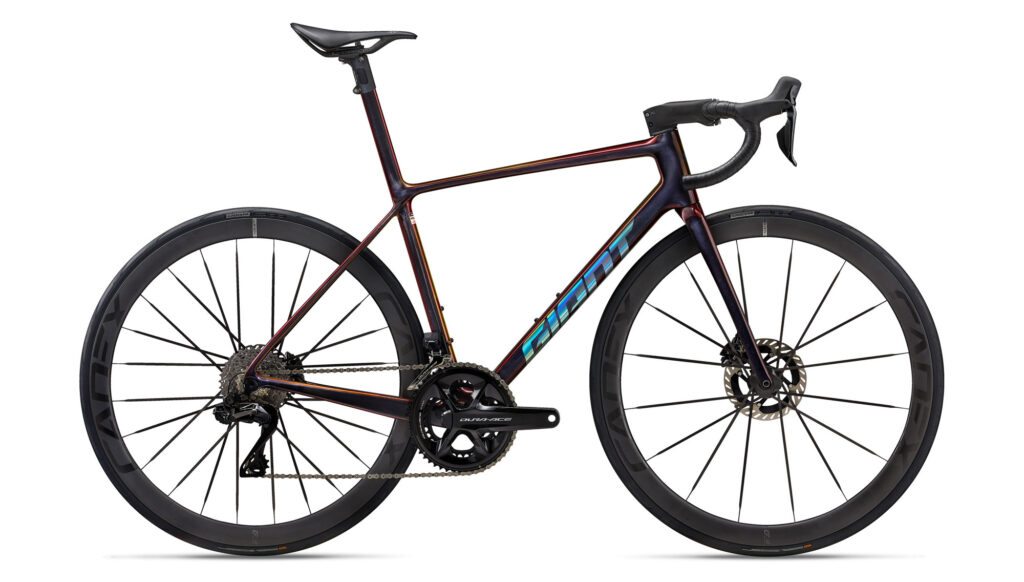
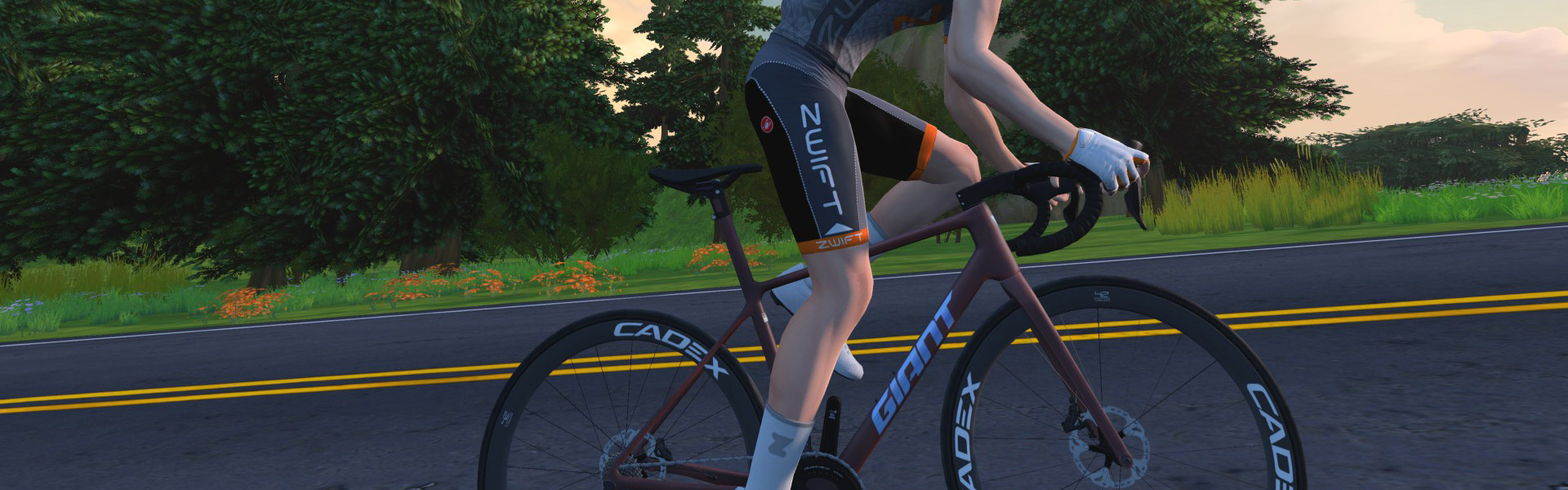
Zwift’s latest update includes a new frame from Giant, the TCR Advanced SL 2025. This update also renamed the game’s existing TCR Advanced SL to the “TCR Advanced SL 2021”, making it clear that this frame is the new version of Giant’s popular TCR Advanced SL road racing frame. Here’s what it looks like IRL:

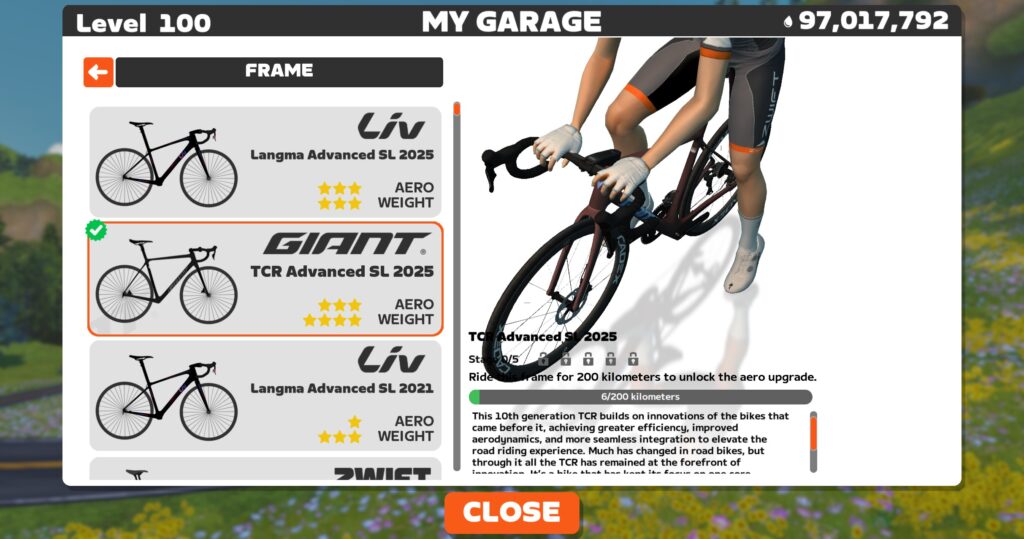
On Zwift, you’ll need to be updated to game version 1.89+ to see the TCR Advanced SL 2025 in the Drop Shop. You’ll also need to be at level 25+ with 1,100,000 Drops to buy it. Here’s how it’s described in the Drop Shop:

“This 10th generation TCR builds on innovations of the bikes that came before it, achieving greater efficiency, improved aerodynamics, and more seamless integration to elevate the road riding experience. Much has changed in road bikes, but through it all the TCR has remained at the forefront of innovation. It’s a bike that has kept its focus on one core mission: to give riders a competitive edge.”

See our master list of all frames in Zwift >

It’s rated 3 stars for aero, 4 stars for weight, like a handful of other top frames with strong all-arounder performance. But a 4-star system isn’t the most granular of performance measurements, so we ran this frame through our precise tests to measure performance at nerd-level detail. Let’s dive in!

Note: test results below are from a 75kg, 183cm rider holding 300W steady using Zwift’s stock 32mm Carbon wheelset on the un-upgraded version of the frame.

Aero (Flat/Rolling) Performance

Giant’s TCR Advanced SL 2025 is slippery, trimming 61.2s off our baseline Zwift Carbon frame over an hour of flat riding.

That puts it in the top 10% of all frames on Zwift, and within 1.8 seconds of the game’s fastest frame. Considering that our tests have a 1-second margin of error, one could reasonably lump this frame in with the other fastest frames in terms of performance on flat roads.

Climb Performance

The TCR Advanced SL 2025 is a strong climber, but not quite in the same league as the game’s top all-arounders. It shaves 44.7 seconds off of our baseline Zwift Carbon’s time on an hour-long climb, placing it in the 20% of all road frames on Zwift and 11.7 seconds behind the fastest climber (Specialized S-Works Tarmac SL8).

Upgrading Your Giant TCR Advanced SL 2025

Like all frames in Zwift, Giant’s TCR Advanced SL 2025 can be upgraded in five stages. As a high-end race bike, each of the five stages results in a performance improvement. The TCR Advanced SL 2025 upgrade stages are as follows:

  1. Ride 200km, pay 100,000 Drops for an aero upgrade
  2. Ride 260km, pay 200,000 Drops for a weight reduction
  3. Ride 320km, pay 350,000 Drops for a drivetrain efficiency improvement
  4. Ride 380km, pay 500,000 Drops for an aero upgrade
  5. Ride 440km, pay 750,000 Drops for a weight reduction

You can expect a fully-upgraded Giant TCR Advanced SL 2025 to be approximately 28 seconds faster on a flat hour and 36 seconds faster on an hour-long climb vs the “stock” Giant TCR Advanced SL 2025.

Conclusions

There are currently three top all-arounders on Zwift, and their unlock levels and Drops costs are high:

  • Specialized S-Works Tarmac SL8 (level 40, 1,750,000 Drops)
  • Cannondale SuperSix Evo LAB71 (level 40, 1,750,000 Drops)
  • Pinarello Dogma F 2024 (level 40, 1,750,000 Drops)

Just below them, with essentially the same aero performance but slightly slower climb performance, you’ll find the Canyon Aeroad 2024 which unlocks at just level 10 and costs 1,100,000 Drops.

The Giant TCR Advanced SL 2025 is very comparable to the Canyon Aeroad 2024: same price, similar performance, and a lower unlock level (25+) than the top 3 frames. So we expect to see some beginning Zwifters purchasing this frame to race until they reach a level where they can purchase the next fastest all-arounder.

And while its performance won’t be compelling enough to cause racers to buy it en masse, fans of Giant, including existing TCR Advanced SL owners, will be buying it. They may even buy it to replace the older TCR frame in their garage, since the 2025 model performs much better, trimming ~35 seconds off our flat hour test and ~29 seconds off our climbing hour.

Questions or Comments?

What do you think of this new frame from Giant? Share below…

Important note: this post contains speed test results for Zwift frames or wheels. These results may change over time, and a bike’s performance relative to others may also change. We don’t always revise posts when performance rankings change, but we do keep current, master versions of our speed test results which are always available. See the frame charts, wheel charts, and Tron vs Top Performers for current performance data.

‘Minecraft’ Officially Drops VR Support, But There Are Still a Few Ways to Play

Mojang announced last year that it was shutting down support for PSVR and PC VR headsets sometime after March 2025. Now, in the latest Bedrock update, the studio has officially dropped VR support, although there are still a few unofficial ways to keep you mining.

According to the Bedrock Edition 1.21.80 patch notes, as of yesterday Mojang has removed access to VR gameplay completely across both PC and PSVR versions, which unfortunately includes both solo and multiplayer.

Still, you can still chug right along fighting creepers with a few unofficial mods that have seen a lot more love than Mojang ever game to the official versions.

One of the best ways to play right now on PC VR headsets is to install the popular Vivecraft mod, which supports Minecraft Java versions 1.7.10, and 1.10 through 1.20.1.

Vivecraft supports single player, LAN multiplayer, and server multiplayer. While you won’t be able to kick it with your friends across Mojang’s official Minecraft servers—and no cross-play between other Bedrock versions, such as Xbox, PlayStation, Nintendo Switch, or mobile—it does support Forge mods, which lets you finetune visuals and game modes.

If you’re on Quest, your only real option to play Minecraft has really only ever been by installing the unofficial QuestCraft mod, which packages Vivecraft and Pojlib in a standalone port of Minecraft’s Java edition. Again, like Vivecraft for PC VR, there’s no cross-play between other Bedrock versions.

You can get a recap on both methods courtesy YouTuber ‘Diamond VR’, who takes you through the setup process:

Sadly, PSVR 2 users already know the score. After Mojang announced it was dropping support for the original PSVR, which first saw official VR support in late 2020, it was very doubtful the studio would launch anything for PSVR 2. Small consolation: if you have a VR-ready PC, you can actually hook up your PSVR 2 to a PC and play via Vivecraft. You’ll need Sony’s $60 adapter, or alliteratively the right GPU to plug right in.

While there are gads of Minecraft clones and off-brand block building games out there, we haven’t seen one that’s truly worth recommending over those two mods, which are both free and require only minor fiddling to get running smoothly.

The post ‘Minecraft’ Officially Drops VR Support, But There Are Still a Few Ways to Play appeared first on Road to VR.

VR Version of Viral Horror Game ‘Slender: The Arrival’ Delayed to Later This Year

Blue Isle Studios and Perp Games announced their upcoming VR version of Slender: The Arrival (2013) has officially been delayed until later in 2025.

Slender: The Arrival VR was initially slated to arrive on May 13th across all major VR headsets, including Quest, PSVR 2, and SteamVR headsets.

Now, the teams says the delay will allow them to “fine-tune every aspect of the game, ensuring that players are plunged into a truly unforgettable and utterly horrifying VR experience.”

“Slender: The Arrival VR aims to be the definitive survival horror experience. To meet this high standard for our launch, we’ve made the difficult decision to slightly delay the game’s release,” said Rob Edwards, CEO of Perp Games. “We are aiming to avoid any lengthy slippages as we understand that fans of this iconic figure in horror folklore are excited to play the game.”

The VR version is set to be an “official re-imagining and expansion of the original game,” which notably features a new storyline and characters, as well as improved visuals.

There aren’t any store pages for Slender: The Arrival VR beyond its listing on Steam, where you can wishlist the game for PC VR headsets.

The post VR Version of Viral Horror Game ‘Slender: The Arrival’ Delayed to Later This Year appeared first on Road to VR.