New PlayStation studio teamLFG is working on a multiplayer action game

Sony has expanded its PlayStation Studios roster with teamLFG, which spun out from Bungie and is working on an “ambitious” incubation project. The studio is based in Bellevue, Washington (where Bungie’s HQ is), though some team members work remotely elsewhere in the US and Canada. The crew includes a mix of industry newcomers and veterans who have worked on the likes of Destiny, Halo, League of Legends, Fortnite and Roblox.

The focus of teamLFG will be on immersive multiplayer games. That’s perhaps not too much of a surprise given the veterans’ experience and that “LFG” stands for “looking for group,” a phrase used by players who are seeking teammates for multiplayer games.

Its first project takes place in “a lighthearted, comedic world set in [a] brand new mythic, science-fantasy universe.” The studio is taking inspiration from platformers, MOBAs, life sims, fighting games and elsewhere for its team-based action title. Since it’s an incubation project, the game is likely quite some time away from seeing the light of day.

Bungie went through a restructuring process last summer, which included 220 people being laid off as it narrowed its focus on Destiny and Marathon. To that end, the company spun out an incubation project to be housed under Sony’s umbrella, which turned out to be this.

The new studio aims to make “action games that players can learn, play and master for countless hours.” That certainly sounds like a live-service game, an area where Sony hasn’t had much luck over the last few years despite trying to focus on such titles. The company has canned several live-service games that were in development, including The Last of Us Online. And then there was the whole Concord disaster. Here’s hoping, for the sake of the workers at teamLFG, things go more smoothly this time around.

This article originally appeared on Engadget at https://www.engadget.com/gaming/playstation/new-playstation-studio-teamlfg-is-working-on-a-multiplayer-action-game-143020198.html?src=rss

A New Start Menu and More Major Upgrades Are Coming to Windows 11

Alongside a couple of new Surface devices, Microsoft has also announced a number of notable upgrades on the way for Windows 11, covering the Start menu, Copilot AI, and core Windows utilities such as Paint and the Snipping Tool.

The Start menu changes are significant, and I wrote about them last month when they were first spotted in hidden code. The menu is becoming bigger, more customizable, and more usable, with the option to see all apps immediately—and several options for how those apps are arranged on screen.

If you don’t want to see recommended shortcuts (to recent files, for example), these can be hidden. You can also increase the size of the pinned apps panel. Another change is the addition of a “phone companion” (essentially the Phone Link app) on the right of the Start menu.

This revamp is coming to the Windows Insider channel in the next month, Microsoft says, and there are several other updates on the same timetable. One is AI actions in File Explorer, which will give you access to AI-powered features from the right-click menu: Think summarizing documents and editing images.

Another feature coming soon to Windows Insider users is AI text generation and summarizing in Notepad, plus lightweight formatting options. For the first time you’ll be able to make text bold and italic inside Notepad, and introduce lists and headings. There will also be support for the Markdown formatting language.

Already available to Windows Insiders, and coming soon to everyone else, we have Copilot Vision. It means you can chat with the AI about whatever’s on screen—whether you want shopping advice or help with image editing— and Microsoft has previously given us a good idea of how it works.

Features for Copilot+ PCs

Some of the newly announced features are arriving first on Copilot+ PCs (those that meet a certain performance criteria) with Snapdragon chipsets. Again, these updates are appearing in the Windows Insider channel first, before making their way to everyone else with a Copilot+ PC. Microsoft has intimated that they’ll roll out eventually to PCs powered by AMD or Intel.

First, Microsoft is putting an AI agent inside Settings, so you can get help finding the toggle switch you need or figuring out how to do something. One example shown in the Microsoft demo is typing “my text is too small” to find the option for font size. The AI agent can even change settings for you, if you give it permission.

We’re also getting more actions for the Click to Do feature (essentially an AI-powered, context-sensitive right-click menu), including options to schedule meetings in Teams or launch the Immersive Reader mode for text. Windows search is getting a boost too, with greater coverage for photos, settings, and the Microsoft Store.

The Photos app built into Windows has slowly been getting better and better, and it’ll soon pick up a relight feature for dynamic lighting control. You’ll be able to set up to three lighting sources, and adjust the brightness and intensity, while seeing the changes on the image in real time.

As for Paint, it’s gaining the ability to create custom stickers from text prompts, and a new object select tool that will use AI to select objects with a single click. If you need to move or remove something in an image, this should make the process of selecting it faster and more straightforward.

The Windows Snipping Tool is getting more features as well: intelligent screenshot cropping, the ability to extract text from screenshots, and a color picker. Finally, the Narrator on Copilot+ PCs is being upgraded to offer rich image descriptions, so it’ll be able to describe charts, photos, and other visual elements that are on screen.

GTA 6 Looks Impressively Polished In Massive Rockstar Screenshot Dump

GTA 6 Looks Impressively Polished In Massive Rockstar Screenshot Dump
While Grand Theft Auto VI has been postponed until May 26 of 2026, Rockstar Games has gifted patient gamers with more than a few screenshots to gloss over in the meantime. Game play is an elemental factor in a title’s success, but there is no denying that its graphical prowess is often equally as important. And it’s here where GTA 6 apparently

Ford raises prices on Mexican-made cars—but not the full tariff cost

Price rises are coming to some Mexican-made Ford vehicles this summer as a result of President Trump’s decision to launch an international trade war. According to Reuters, which saw a memo that Ford sent to dealers, the price increase will affect the Mustang Mach-E electric crossover, the Bronco Sport crossover, and the Maverick pickup truck, which cost as much as an extra $2,000.

The Trump auto tariffs went into effect at the beginning of April, adding a 25 percent charge to any imported vehicle. When challenged on the fact that this would cause significant price rises for US consumers, Trump told NBC that he “couldn’t care less if they raise prices.” And now that’s happening.

Ford told Ars that the price increases are part of its “usual mid-year pricing actions combined with tariffs we are facing” and that the price bumps do not cover the full costs of the tariff. Additionally, the move only affects vehicles that have been imported since May 2, which should only appear in dealerships in late June—any cars already in inventory are not subject to the price rise.

Read full article

Comments

Surprise! Intel Slashes $100 Off These Arrow Lake CPUs With Free Games To Boot

Surprise! Intel Slashes $100 Off These Arrow Lake CPUs With Free Games To Boot
At a time when tariffs and the threat of much higher PC part prices have dominated the discussion, Intel is out here slashing prices on some of its newest desktop processor models based on Arrow Lake. And we’re not talking about piddly price cuts, either. Intel sharpened its price-cutting blade and hacked $100 off the suggested retail price

Dangerous clear-air turbulence is worsening due to global warming

VIENNA—Scientists at the European Geosciences Union conference last week said there is growing scientific evidence that global warming is driving a big increase in dangerous clear-air turbulence, which is invisible from the cockpit and can surprise pilots and damage aircraft.

Along some busy flight routes, turbulence is projected to “double or treble or quadruple over the next few decades,” said Paul Williams, a professor of atmospheric science and head of the weather research division at the University of Reading in the United Kingdom. “What we find … is that the jet stream regions in both the Northern and the Southern hemispheres are affected.”

As its name implies, clear-air turbulence can happen when there are no visible signs of a weather disturbance, often at or near the boundary of contrasting air masses, moving in different directions and at varying speeds. It can unexpectedly toss large airplanes up and down by several hundred feet, potentially damaging the airframe and injuring passengers and crew.

Read full article

Comments

Watch An 18,000 Block Wooden Block Tower Collapse From The Inside

Months in the making, this is a video of KaplaBen building and demolishing an ~18,000 Kapla block tower. Ben says he began construction in November 2024 and completed it in April 2025. Amazing nobody snuck in and knocked it over in that time. The tower is the third prototype Ben has built as he develops a design for the construction of a 50m (164-foot) tower. Damn! How people are even capable of such incredible builds is beyond me, but there’s no doubt in my mind if Ben had been alive in 12th century Italy there would be no Leaning Tower Of Pisa.

IBM CEO Says AI Has Replaced Hundreds of Workers But Created New Programming, Sales Jobs

IBM CEO Arvind Krishna said the tech giant has used AI, and specifically AI agents, to replace the work of a couple hundred human resources workers. As a result, it has hired more programmers and salespeople, he said. From a report: Krishna’s comments on Monday come as businesses sort through the workforce impacts of AI and AI agents, the independent bots that can autonomously perform tasks like analyze spreadsheets, conduct research and draft emails.

While there haven’t yet been widespread layoffs or downsizing as a result of AI across the economy, some business leaders have said they are holding down head count as they investigate the use of the technology.

Meanwhile, the information-technology workforce has continued to shrink as AI weighs on hiring and some workers leave the field. For IBM, which this week hosts its annual Think conference in Boston, AI adoption has led it to boost hiring in some functions.


Read more of this story at Slashdot.

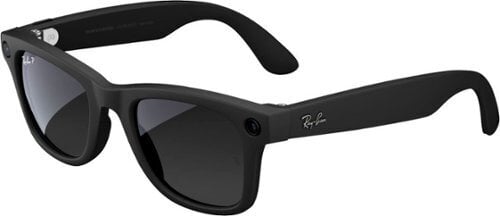
Here’s What I Learned After Six Months of Wearing Ray-Ban Meta Smart Glasses

We may earn a commission from links on this page.

Six months ago, I reviewed the Ray-Ban Meta smart glasses. If you’ve been off-grid, these specs pack a camera, open-ear speakers, microphones, and voice-activated Meta AI inside a pair of Wayfarer-style frames, so they’re basically science fiction glasses that look normal. I liked them so much, I had prescription lenses put in and made them part of my daily load out. But it’s easy to love a tech product when it’s new and shiny; the real test is how the Ray-Ban Metas fair after they’ve gone from novelty to another damn thing I have to remember to charge. Bottom line: I still really like them after half a year of wearing them while working, sitting around, biking, running errands, and generally living my boring life. But I like them in a more nuanced way.

Not quite everyday glasses

After the initial sugar rush wore off, I started noticing the weight of the Ray-Ban Metas. They’re around 49 grams out of the box, fairly heavy for sunglasses, but prescription lenses bumped the weight up to 54 grams. My regular specs are pretty chunky and weigh 39 grams, and the difference is noticeable. They’re slightly uncomfortable for extended use. I found myself wearing regular glasses when I didn’t expect to use smart features, and going back to the Ray-Bans if I wanted to take photos, record video, or go hands-free. The main downside was forgetting which pair I was wearing and saying “Hey Meta” to my dumb glasses. (But that’s a me problem.)

Build quality, durability, and style: no complaints

I have to commend Ray-Ban, Meta, and whatever factory physically built these glasses, because they held up flawlessly. The tech works just as well now as it did when I got them, and the frames themselves held up, too: no warping, bent arms, or other malfunctions. (I didn’t necessarily baby them or take special care of them.) They didn’t go out of style in the last six months either, seeing as the Wayfarer design is timeless. If they’re good enough for James Dean, they’re good enough for me.

Battery life could be better

Meta says their smart glasses have a battery life of “up to four hours,” which is mildly optimistic—these things need to be charged often. The solution of having a charger built into the glasses’ case is acceptable most of the time because the main function of eyeglasses (ensuring I can see things) works even when the batteries run out. But longer outings where I wanted to take lots of photos or videos were a pain. Your choices are to only have pictures of the first half of the graduation ceremony, or pack a back-up pair of glasses so you can charge on the fly.

Another battery related annoyance: You can’t disable the low battery notification without disabling all notifications. While that’s the case for many tech products, it would be great to have the option to disable it for these glasses.

The social factor: being seen isn’t always the best

When I first started wearing the Ray-Ban Metas daily, they pretty much flew under people’s radars, but as popular awareness of the product grew, so did the people who noticed I was wearing them. More than one person asked “are you taking pictures of me?” and I didn’t love having my glasses spark conversations about surveillance or Meta’s motives, but I get why some people are wary. They blur the line between fashion and tech in a way that’s still new, and many people find them off-putting.

Ray-Ban’s many features, ranked and rated

Ray-Ban Meta Glasses

Credit: Robyn Johnson

The Ray-Ban Meta glasses have a ton of features, and they’re not equally useful, so here’s a quick feature list, organized from the ones I used most to ones I used least:

The camera: Ray-Ban Metas’ essential feature for me is the camera. It’s weird to think of a smart phone camera as being inconvenient, but reaching in your pocket, unlocking the screen, clicking an app, and putting it up to your face is a lot of steps compared to pinching the arm of your glasses. The other way to turn on the camera, saying “Hey Meta, take a picture” or “Hey Meta, take video,” can be incredibly useful too, as it lets you take videos while riding a bike and listening to Hawkwind, like so:

While I found the quality of the photos to be surprisingly good, these glasses are best for casual snaps. There’s no viewfinder, and if you’re going for super high quality, or want to shoot in low-light situations, they won’t replace a “real” camera.

Text and calls: Getting a text and replying by voice is great when your hands are full. Initiating or responding to texts while driving is amazing and will probably save some people’s lives. Call quality is solid, and the voice recognition is excellent, even in traffic or crowds. It’s easy to use too, since you can just say “Hey Meta, how do I send a text?” if you forget.

Music: Halfway down the list is the perfect time to talk about the Ray-Ban Meta’s music and audio. It is mid. The sound quality isn’t terrible, but it’s podcast-while-cooking level. If you’re into music at all, you’ll quickly grow tired of the tinny sounds from the Ray-Ban meta glasses and throw in some ear buds. On the plus side, the ability to control Spotify, Apple Music, or Amazon Music with just your voice is great. Saying “Hey Meta, play some funk” and having The Meters start playing is cool. 

Meta AI: Depending on your point of view, Meta’s AI is the either the killer app or the Trojan horse of these glasses, but I almost never use it. When I first got the glasses, I was blown away by saying “Hey Meta, look” and having it describe what I was seeing accurately. But that wears off after eight minutes. Then, I started using it to clown on my friends by looking at their car or something and saying, “Hey, Meta, is this a nice car?” and relaying the answer. (Sadly, it won’t roast people.) That was fun for three minutes. Then, I changed Meta’s voice to Awkwafina. That was fun for 38 seconds. Then, I stopped using it altogether. Maybe your life is different, but mine is fine without an AI assistant.

Translation: Meta recently rolled out the ability to translate from Spanish, French, and Italian to English, and vice-versa. This is too new to really rate, but my initial reaction to testing it out with a Spanish speaking pal was “santa mierda!” It’s really good, and was able to translate spoken words at a conversational rate in real time, with a surprisingly amount of accuracy. It’s like having a universal translator from Star Trek or something.

What I’d like to see from Ray-Ban Meta glasses

Ray-Ban Meta Glasses

Credit: Stephen Johnson

These glasses are creeping toward being a true digital assistant, but they’re not there. I want to say “Hey, Meta, book me a cheap hotel in Yonkers next weekend” and have it just happen. Right now, though, the glasses are limited to controlling music, sending messages, translating language in real time, and providing basic information—which is a lot for a pair of glasses.

Privacy concerns (as if privacy still exists)

Meta recently sent an email to Ray-Ban Meta users that said, in part, “Meta AI with camera use is always enabled on your glasses unless you turn off ‘Hey Meta,’” and “the option to disable voice recordings storage is no longer available.” Basically, Meta is vowing to look at what I’m looking at and store whatever I say, so you could argue there are some pretty big privacy concerns. It’s not great, but honestly, I’m too boring to care. If Meta wants hours of footage of me folding laundry or playing Oblivion Remastered, that’s their problem.

If you’re someone that does prioritize your privacy though, these glasses are probably not the product for you.

Are they worth the price?

Whether something is “worth it” really depends on the customer. But $299 seems like a good deal for a camera, AI agent, Bluetooth headset, and sunglasses, and if you’re going for prescription Ray-Ban Metas, it’s amazing. All told, these were actually cheaper than my regular glasses, and I can’t ask my regular glasses to tell me a joke.

The bottom line

I’m not a Meta fanboy by any stretch, but credit where it’s due: these glasses are really good. The novelty wears off, but the usefulness doesn’t. Unlike most gadgets, they’ve earned their spot in my semi-daily rotation. If they could shave a little more weight off, they’d be my everyday specs.


Deepin Desktop removed from openSUSE

The SUSE Security Team has announced the removal of the Deepin
Desktop from openSUSE due to violations of the project’s packaging
policy.

The discovery of the bypass of the security whitelistings via the
deepin-feature-enable package marks a turning point in our assessment
of Deepin. We don’t believe that the openSUSE Deepin packager acted
with bad intent when he implemented the “license agreement” dialog to
bypass our whitelisting restrictions. The dialog itself makes the
security concerns we have transparent, so this does not happen in a
sneaky way, at least not towards users. It was not discussed with us,
however, and it violates openSUSE packaging policies. Beyond the
security aspect, this also affects general packaging quality
assurance: the D-Bus configuration files and Polkit policies installed
by the deepin-feature-enable package are unknown to the package
manager and won’t be cleaned up upon package removal, for
example. Such bypasses are not deemed acceptable by us.

The combination of these factors led us to the decision to remove
the Deepin desktop completely from openSUSE Tumbleweed and from the
future Leap 16.0 release. In openSUSE Leap 15.6 we will remove the
offending deepin-feature-enable package only. It is a difficult
decision given that the Deepin desktop has a considerable number of
users. We firmly believe the Deepin packaging and security assessment
in openSUSE needs a reboot, however, ideally involving new people that
can help get the Deepin packages into shape, establish a relationship
with Deepin upstream and keep an eye on bugfixes, thus avoiding
fruitless follow-up reviews that just waste our time. In such a new
setup we would be willing to have a look at all the sensitive Deepin
components again one by one.

The announcement goes into detail about the bypass of
openSUSE packaging policy and the history of security reviews of
Deepin components. It also offers guidance on continuing
to use Deepin Desktop
on openSUSE.

LinkedIn wants you to tell its AI about your dream job

LinkedIn is still on a mission to persuade job hunters to apply for fewer roles. But the company is rolling out a new set of AI-powered upgrades to its job-searching features it hopes will make that prospect more appealing.

The company is introducing a revamped search tool that aims to make it easier for job seekers to find relevant roles. Up to now, LinkedIn’s job search feature relied mostly on matching keywords. With the update, though, LinkedIn is ditching the keywords in favor of AI so its system is able to understand job listings on a much deeper level. This should, according to the company, allow job hunters to search postings using more natural language.

“Search used to be [a] very specific couple of boxes, and the box that really mattered was the box that said, ‘show me a title or a keyword or skill,’ and you basically had to hope that you will find a title or keyword or skill that the system understands,” LinkedIn product manager Rohan Rajiv explains. Now, though, he says, job searchers should be able to just “say what you want and the system will understand you.”

That may sound like a subtle change but it’s a potentially powerful one because it allows people to get much more specific with their queries. Users can still search for roles based on job tiles like “product manager” but LinkedIn will also be able to understand more complex searches like “business development roles in the video game industry.”

As an extra layer of transparency, LinkedIn will also surface indicators when the company behind a given posting is actively reviewing applications. Premium subscribers will also get access to AI-powered “job coaching,” with the ability to practice interview questions, pitches and other tasks.

LinkedIn will indicate when a hirer is reviewing applications.
LinkedIn

Still, AI-powered tools can only go so far. “The reality is that we have a marketplace where the number of job seekers year-over-year is growing faster than the number of jobs year-over-year,” Rajiv says. And he’s aware that his pleas that job hunters stop applying to as many open roles as possible isn’t the kind of advice many people want to hear, though he stands by it.

“The truth is that volume is not your friend in the job search,” he tells Engadget. “It’s only one extra apply, but you multiply that with 500 people, and suddenly the poster has got 500 new applicants that they are going to need to screen. That’s only making it worse.”

He does, however, think that LinkedIn can do even more to guide people to the “right” roles. “You can imagine the possibilities of this: for us to say, ‘hey, this job probably [is] not a fit, but based on your skills, let me construct a search that will help you find what you are looking for.’ And I think that that is the future.”

This article originally appeared on Engadget at https://www.engadget.com/social-media/linkedin-wants-you-to-tell-its-ai-about-your-dream-job-133046457.html?src=rss

This Amazon Fire Max Tablet Is $140 Right Now

We may earn a commission from links on this page. Deal pricing and availability subject to change after time of publication.

The Amazon Fire Max 11 feels like the grown-up version of the Fire Tablets that used to be just good enough. It’s bigger, cleaner, and doesn’t stutter when you try to do more than scroll through a book or stream a show. Right now, you can grab a certified refurbished unit with 128GB of storage and no lock-screen ads for $139.99 (down from $239.99). And it’s not old tech, either—it came out last summer and earned PCMag’s Best Budget Tablet of the Year 2024.

Its 11-inch screen is a bright, crisp LCD panel with a 2,000 x 1,200 resolution and decent 213ppi sharpness. It’s not quite iPad-level quality, but it gets close, especially for reading, streaming, or even casual drawing with the optional $36.99 stylus. The aluminum build adds a bit of a premium touch, and the stereo speakers are surprisingly solid for something at this price. There’s no headphone jack (which feels like a miss), but Bluetooth 5.3 is stable for wireless headsets. Internally, it’s running on 4GB RAM and a processor that keeps things snappy. You can browse, download, and play light games without the usual budget-tablet lag. You can expand storage beyond the already generous 128GB via microSD (sold separately) up to 1 TB.

That said, it still runs FireOS 8, which is Amazon’s custom take on Android. If you’re already tied into Kindle, Prime Video, and Audible, it makes sense. But if you rely on Google apps or want Play Store access out of the box, it’s not the most open system—you’ll have to sideload apps manually, notes this PCMag review. Camera-wise, it’s nothing to write home about: It’s got two 8MP shooters that are fine for Zoom calls or document scans, but not much else. Battery life also doesn’t quite live up to the advertised 14 hours; you’re more likely to get around eight to 10 hours, depending on what you’re doing. The tablet charges via USB-C and technically supports 15W charging, but Amazon ships it with a slower 9W adapter. Still, for under $150, it’s hard to find a tablet with a screen this good and that much storage.

Amazon also sells some solid accessories to go with it. There’s a magnetic slim cover for $49.99 that makes it easier to carry around without scratching the screen, and a matte anti-glare screen protector for $17.99 if you’re reading outside or just hate smudges. And if you want to turn the Fire Max 11 into a basic productivity setup, the $84.99 keyboard case snaps on magnetically and works well for emails or notes.

Ghost is back with the freeride-focused Poacha – a big rig designed to tame the gnarliest lines

Ghost is ‘back in gravity’ with the release of the Poacha, a 180mm-travel MTB designed to take on the gnarliest lines.

The release of the Poacha marks the brand’s re-entry to the UK market, with a mountain bike built to appeal to riders looking for a long-travel bike designed to hit freeride lines, park laps and techy trails.

Three builds are available at launch, with the entry-level bike appearing to represent the good value Ghost has been associated with.

Prices start at £4,199 / €4,999 for the base model, with the top-of-the-range Poacha Full Party priced at £6,699 / €8,000.

Traction Link 3.0 suspension system

Ghost Poacha Full Party on oil barrel
The Poacha is available in three builds. Ghost

The Poacha employs the brand’s Traction Link 3.0 suspension system, a virtual pivot point linkage, to deliver its rear suspension with forks that match the 180mm suspension figure up front.

The VPP setup is said to have a sensitive early stroke and gives the suspension a rearward axle path.

In theory, this should take the sting out of blunt hits, enabling the rear wheel to swing back out of the way rather than taking the brunt of the force.

A low-mounted shock is said to drop the centre of gravity, giving the bike better agility in the corners and steep sections of track.

Carbon tubes, alloy links

Ghost Poacha Full Party
The Poacha is only available as a mullet setup. Ghost

The frame sees carbon tubes connected via alloy links and is Category 5 rated, meaning it’s safe to use on freeride and downhill trails.

Adjustability is the name of the game when it comes to the Poacha’s geometry, with flip chips and reach adjusters in the frame.

A new Acros headset enables the reach to be adjusted by 5mm either way, with reach measurements ranging from 440mm to 516mm through the sizes.

Ghost has given the Poacha fully replaceable hardware, with every aluminium piece tightening into itself, so there are no threads in the carbon to be damaged.

The bike is ‘double crown ready’, and Ghost says you can run up to a 200mm fork.

Ghost Poacha Full Party
The Poacha is designed for back-to-back days in the bike park. Ghost

The rear suspension can also be increased to 190mm by using a shock with 70mm of stroke rather than 75mm, and it’s coil-compatible with 35 per cent progression overall.

The rear end features an asymmetric design for increased strength, with the frame shifted slightly towards the non-driveside.

It seems Ghost has designed the bike for easy maintenance, with the frame bearings sealed on the inside and outside for better durability.

The bottom of the down tube gets a rubber protector to fend off rock strikes, and there are plenty of mounting points to attach spare tubes or multi-tools in the event of mishaps on the mountain.

Ghost Poacha spec and price details

Ghost Poacha

Ghost Poacha
The Poacha base model looks to represent decent value. Ghost
  • Fork: RockShox ZEB Select, 180mm
  • Shock: RockShox Vivid Select
  • Drivetrain: SRAM Eagle 70 T-Type
  • Brakes: SRAM DB Maven Bronze
  • Wheels: Shimano (hubs), WTB ST Tough TCS 2.0 (rims)
  • Tyres: Continental Kryptotal
  • Price: £4,199 / €4,999

Ghost Poacha Pro

Ghost Poacha Pro
The Poacha Pro is the only model to run Fox suspension. Ghost
  • Fork: Fox 38 Factory, 180mm
  • Shock: Fox X2 Factory
  • Drivetrain: Shimano XT
  • Brakes: Tektro TRP DH-R EVO
  • Wheels: DT Swiss F 1900
  • Tyres: Continental Kryptotal
  • Price: £5,499 / €6,499

Ghost Poacha Full Party

Ghost Poacha Full Party
The top-of-the-range Full Party is the only model to use electronic shifting. Ghost
  • Fork: RockShox ZEB Ultimate, 180mm
  • Shock: RockShox Vivid Ultimate
  • Drivetrain: SRAM GX Eagle T-Type AXS
  • Brakes: SRAM DB Maven Silver
  • Wheels: DT Swiss FR 1500
  • Tyres: Continental Kryptotal
  • Price: £6,699 / €8,000

Is Walmart Cancelling Nintendo Switch 2 Preorders? What We Know So Far

Is Walmart Cancelling Nintendo Switch 2 Preorders? What We Know So Far
Is there a worse feeling than securing a preorder for a red-hot gadget that millions are trying to obtain, only for the retailer to turn around a cancel it? Well sure—falling off a cliff or stepping on a LEGO block with your bare foot both rank right up there. Still, it’s annoying, and there are reports that Walmart is doing that very thing

Samsung is paying $350 million for audio brands Bowers & Wilkins, Denon, Marantz and Polk

Harman International, a wholly owned subsidiary of Samsung, is purchasing the audio business of health technology company Masimo for $350 million in cash. The deal is expected to finalized by the end of 2025, though it’s still subject to regulatory approvals. Samsung purchased Harman International back in 2017 for $8 billion, though it allowed the company to operate as an independent subsidiary. Harman’s brands include JBL, Harman Kardon, AKG, Mark Levinson, Arcam and Revel. If and when the acquisition pushes through, Masimo’s audio brands under Sound United will be added to the list, including Bowers & Wilkins, Denon, Marantz and Polk Audio. 

It is unclear if the purchase will lead to layoffs, but it sounds like Harman is taking on Sound United’s employees. “Built on a shared legacy of innovation and excellence in audio technology, this combined family of brands, together with the talented employees of both companies, will deliver complementary audio products, strengthen our value proposition and offer more choices to consumers,” said Dave Rogers, the President of Harman’s Lifestyle division. 

As noted by The Verge, Samsung published a press release, where it briefly talked about the history of the brands it’s acquiring. It mentioned some of Bowers & Wilkins’ most iconic products, such as the Nautilus loudspeaker (pictured above) and its Zeppelin wireless speaker, as well as Denon’s history as an early adopter of the CD player. Harman had a 60 percent market share in portable audio devices last year, and the company is looking to maintain that position with this purchase. “By combining the audio business of Masimo, which is being acquired this time, with Harman’s lifestyle business division, the company plans to solidify its global No. 1 position in the consumer audio market,” Samsung said. Samsung also plans to apply the new brands’ audio technologies to its smartphones, TVs, wireless earphones, soundbars and other devices in the future. 

This article originally appeared on Engadget at https://www.engadget.com/audio/samsung-is-paying-350-million-for-audio-brands-bowers–wilkins-denon-marantz-and-polk-131514754.html?src=rss

Sonos and IKEA end their partnership

Sonos and IKEA are ending their partnership and phasing out existing products. The duo collaborated on the Symfonisk lineup, which included lamp speakers, picture frame speakers and bookshelf speakers. Software updates will still be available for Symfonisk products. 

Over the past eight years, we’ve had the pleasure of working closely with IKEA and are proud of what we’ve achieved,” Sonos told Engadget. “Although our work together has largely wound down and we won’t be releasing new products as partners, we’ll continue to support every existing SYMFONISK product so customers can keep enjoying great sound in their homes for many years to come.”

The Symfonisk lineup offered Sonos technology at a cheaper price point than buying its speakers outright. The cheapest speaker directly from Sonos is just under $200, with other models easily doubling or tripling that. Symfonisk speakers, however, are available for as low as $120, while a floor lamp with a speaker — and IKEA’s classic bamboo top — is the most expensive item at $300. Items could become even more discounted now that they’re being cleared out. 

Sonos has struggled recently, canceling the release of its streaming video device in March and launching a simply terrible new app in Spring 2024. The latter led to CEO Patrick Spence’s ousting and hundreds of workers being let go. 

This article originally appeared on Engadget at https://www.engadget.com/audio/speakers/sonos-and-ikea-end-their-partnership-130052348.html?src=rss