Google Is Expanding Its Use of AI to Protect You From Scams

Scammers and cyber attackers are always looking for new ways to steal your information, and even the most cautious among us can be at risk when using our mobile devices for everyday activities. Google is rolling out new security features for Android to help users protect against scams, fraud, and theft, and revealed a bunch of them during its mobile-focused event “The Android Show: I/O Edition,” leading up to this year’s Google I/O event starting May 20.

Here’s what’s coming soon to your Android device.

Expanded scam detection features

Google recently rolled out real-time, AI-powered scam detection that alerts users to possible fraud when suspicious conversational patterns are found in Google Messages and Phone by Google. The feature, available for Pixel devices, will now cover a wider net of scams, including package delivery scams, job seeking scams, toll road and billing fee scams, crypto scams, financial impersonation scams, gift card and prize scams, and tech support scams.

In-call scam protections are also expanding and will prevent users from taking actions that put their data at risk or open the door for malware. While on the phone with non-contacts, you won’t be able to disable Google Play Protect, sideload new apps from web browsers or messaging apps, or grant accessibility permissions. You’ll also get a notification to stop screen sharing at the end of a call. In-call protections for Google Play Protect are available for Android 6+, while sideloading and accessibility limits are available on Android 16.

Finally, Google is piloting in-call protections for banking apps. To protect against impersonation scams that compromise financial account information, your device will warn you if you launch a participating banking app while screen sharing with an unknown contact with a one-tap “End call” button. Android 11+ users in the UK will have first access to the feature in the coming weeks.

Improved theft protection features

In the last year, Google released a number of theft protection features to help secure your data if your device was lost or stolen. Remote Lock, which allows you to lock down your Android or wipe it remotely, will now have a security challenge question to prevent unauthorized access, and Factory Reset protections will be expanded.

Identity Check—originally rolled out to Pixel and Samsung One UI 7 device—will be available on more supported devices that upgrade to Android 16. This feature requires biometric authentication to access certain resources when you’re outside of trusted locations.

Finally, Android 16 will hide one-time passwords on your lock screen when your device is not connected to wifi and hasn’t been unlocked recently to prevent thieves from utilizing them to access your accounts.

Key Verifier for Google Messages

Google Messages is getting a new feature to help you confirm that you’re chatting with who you think you are (rather than a scammer impersonating someone you know). With Key Verifier, the person will have to confirm that your contact keys in the Google Contacts app match by scanning a QR code or comparing numbers, which will then mark them as verified.

If their number is compromised in some way, such as in a SIM swap attack, the verification will disappear, letting you know that your conversation may not be secure. Key Verifier will be available sometime this summer for devices running Android 10+.

Live threat detection for apps

Google Play Protect, which runs safety checks on apps before they’re installed on your device, is getting an upgrade. Live threat detection will run continuously on-device and in real time to quickly identify suspicious patterns or behavior that may indicate malware and alert you before apps are even installed. This update is available now for all Android users.

Device-level Advanced Protection

Google’s Advanced Protection program adds extra security for users who carry sensitive data or have greater privacy concerns, such as journalists, activists, and executives. When enrolled, you’re required to enter your passkey or security to access your account and may get more frequent alerts related to malware risks. Android 16 now has a device-level Advanced Protection security setting for anyone who prioritizes security in addition to account-level safeguards.

ESPN’s streaming service will cost up to $30 per month and be called… ESPN

Disney isn’t quite ready to reveal exactly when you’ll be able to start using ESPN’s long-awaited standalone streaming service, but it has announced some key details. For one thing, the company isn’t rocking the boat in terms of branding. The service will simply be called ESPN.

That was the best and most obvious option, especially considering that the unlimited plan includes all of ESPN’s offerings, albeit via the internet instead of satellite or cable. “As we thought about the name, we kept returning to the fact that, across every generation, ESPN is the most trusted, loved and recognized name in sports, and that we should keep it simple and double down on the power of ESPN,” ESPN chairman Jimmy Pitaro said in a statement.

There are two plans that will be available through the revamped ESPN app: an unlimited subscription for $30 per month and a select plan for $12 per month. The former includes all of ESPN’s linear networks. You’ll be able to watch (deep breath) ESPN, ESPN2, ESPNU, SECN, ACCN, ESPNEWS and ESPN Deportes live, as well as ESPN on ABC, ESPN+, ESPN3, SECN+ and ACCNX. ESPN’s press release does not mention the inclusion of ESPN8 The Ocho, a free ad-supported streaming channel that features all kinds of strange and wonderful sports.

Along with studio shows and original programming like the 30 for 30 films, the unlimited plan offers access to 47,000 live events every year plus on-demand replays, ESPN says. That includes games from the big four North American sports leagues, along with the NWSL, PGA Tour, UFC, Big 12, the College Football Playoff, dozens of NCAA championships, major European soccer leagues, three of the tennis grand slam tournaments and much more. The select plan, meanwhile, is basically what ESPN+ is now.

There are other payment options available. An annual unlimited membership will run you $300. If you also use Disney+ and/or Hulu, though, a bundle will likely be the best way to go. Disney is trying to sweeten the deal for newcomers with a launch offer that includes Disney+, Hulu and ESPN unlimited for $30 per month for 12 months. That effectively gets you Disney+ and Hulu for free for a year, but it’ll be the ad-supported version of each. After that, the bundle will cost you $36 per month for a plan with ads on Disney+ and Hulu. To go ad-free on those services, you’ll pay $45 per month for the bundle.

As for the select plan, that’s $120 for an annual subscription. The bundle of Disney+, Hulu and ESPN select will be $17 per month with ads on Disney+ and Hulu, and $27 to go ad-free. Bundle subscribers will be able to access ESPN content from the Disney+ app.

Current ESPN+ subscribers will be moved over to the ESPN service on the select plan (but expect a lot of attempts to upsell you on the unlimited offering). If you have a bundle with Disney+, Hulu and ESPN+, you’ll soon find yourself with the ESPN select bundle.

The transition will happen when the ESPN streaming service debuts sometime in early fall. Disney will announce more details, including the date when the service goes live, later this summer as the cable-ization of streaming TV continues.

The standalone ESPN service had been in the works for years, but it’s not the only sports streaming platform Disney had been putting together. The company teamed up with Warner Bros. Discovery and Fox with the intention to start a joint offering called Venu Sports, but that plan vaporized earlier this year amid legal challenges from competitors. Still, Fubo agreed to drop its case against Venu Sports after it reached a deal with Disney on a joint venture that combines FuboTV with Hulu + Live TV.

This article originally appeared on Engadget at https://www.engadget.com/entertainment/streaming/espns-streaming-service-will-cost-up-to-30-per-month-and-be-called-espn-164532920.html?src=rss

Wallace & Gromit Breakfast Making Rube Goldberg machine Built IRL

This is a video of Rube Goldberg machinist Joseph of Joseph’s Machines building and testing a real life version of Wallace & Gromit’s breakfast machine from the 1993 movie The Wrong Trousers. Wrong Trousers? Not a problem for me, I haven’t worn anything but sweatpants and athletic shorts for years. “It’s true, they had to crop him out of all my sister’s wedding reception photos.” Honey! “What?” I thought it was because I was puking.

Keep going for the video. Machine in action begins at 7:30, followed by a side-by-side comparison of the scene from the original movie.

Trump Administration Scraps Biden’s AI Chip Export Controls

The Department of Commerce officially rescinded the Biden administration’s Artificial Intelligence Diffusion Rule on Tuesday, just days before its May 15 implementation date. The rule would have imposed first-ever export restrictions on U.S.-made AI chips to dozens of countries while tightening existing controls on China and Russia.

Instead of implementing blanket restrictions, the DOC signaled a shift toward direct country-by-country negotiations. The department released interim guidance reminding companies that using Huawei’s Ascend AI chips anywhere violates U.S. export rules and warned about consequences of allowing U.S. chips to train AI models in China. Commerce Secretary for Industry and Security Jeffery Kessler criticized the previous administration’s approach, calling it “ill-conceived and counterproductive.”


Read more of this story at Slashdot.

Watch Nicolas Cage kick black-and-white butt in this trailer for Spider-Noir

We finally have some actual footage of the upcoming Spider-Noir series, thanks to a teaser trailer. This is a real boon for fans of the original Spider-Man: Into the Spider-Verse, as the show brings back Nicolas Cage as Spider-Man: Noir.

It’s also live action, so we get to see a real-life Nic Cage kicking butt as a down-on-his-luck private detective that’s bitten by a magical spider. You can likely guess what happens to him after that. Amazon says that the character will be “forced to grapple with his past life as the city’s one and only superhero.”

This is a short trailer, but it’s positively soaked in retro vibes. After all, the show’s called Spider-Noir. The teaser is in black-and-white, but it’s worth noting that the actual series will be available in both black-and-white and color. It’s all up to personal preference, but I’m digging the black-and-white.

Spider-Noir will first air on MGM+ before heading to Prime Video the next day. We don’t have a release date yet. In addition to Cage, the show stars Lamorne Morris, Brendan Gleeson, Li Jun Li and Karen Rodriguez, among others. Harry Bradbeer, who helmed most episodes of Fleabag, is directing the first two installments.

Phil Lord and Christopher Miller, the pair behind the Spiderverse franchise, are on-hand as executive producers. The show’s based on the comic book Spider-Man: Noir, which was first released back in 2009.

This article originally appeared on Engadget at https://www.engadget.com/entertainment/tv-movies/watch-nicolas-cage-kick-black-and-white-butt-in-this-trailer-for-spider-noir-163332837.html?src=rss

visionOS Is Getting Brain-Computer Interface (BCI) Device Support

Apple Vision Pro’s visionOS will get support for brain-computer interface (BCI) input devices later this year, starting with Synchron’s.

Apple says these devices will be supported via a new BCI HID protocol, and activated as part of Switch Control on iOS, iPadOS, and visionOS.

It comes as the company just announced other new accessibility features coming to Vision Pro later this year, including the ability to magnify passthrough, as well as to describe, find, or read anything in your view using on-device AI.

Apple Vision Pro Will Magnify, Describe, Find, Or Read Anything In View
For accessibility, Apple Vision Pro is getting the ability to magnify passthrough, as well as to describe, find, or read anything in your view using on-device AI.
UploadVRDavid Heaney

BCI company Synchron says its Stentrode implant will be the first to support Apple’s new protocol. Stentrode began trials in 2019, and it’s the first permanent BCI implant that does not require open brain surgery, being inserted through the jugular vein instead.

In August last year Synchron first demonstrated Stentrode as a replacement for the pinch on an Apple Vision Pro, using a not officially supported technique. The person, who has ALS, selected interface elements with their eye gaze as usual, but “clicked” by simply thinking about clicking.

0:00

/1:40

Synchron’s 2024 demo of visionOS BCI control.

And earlier this year, Synchron teamed up with Nvidia to demonstrate Stentrode being used with Apple Vision Pro to let another person with ALS control smart home devices such as speakers, fans, and robot vacuums.

That demo seems to have leveraged passthrough camera access, which Apple currently only provides for non-public enterprise apps “for use in a business setting only”, and getting this access requires a special license from Apple.

0:00

/1:52

Synchron and Nvidia’s 2025 demo of Vision Pro + BCI smart home control.

With the upcoming protocol from Apple, Synchron’s Stentrode will be an officially supported visionOS input device, letting people with one implanted easily click elements in Apple Vision Pro’s visionOS.

The combination of eye tracking for selection and non-invasive BCI for clicking seems like an ideal XR input system for people with severe mobility disabilities, and one we expect to be adopted widely as more standalone headsets incorporate eye tracking in coming years.

Intel Certifies Shell Lubricant for Cooling AI Data Centers

Intel has certified Shell’s lubricant-based method for cooling servers more efficiently within data centers used for AI. From a report: The announcement on Tuesday, which follows the chipmaker’s two-year trial of the technology, offers a way to use less energy at AI facilities, which are booming and are expected to double their electricity demand globally by 2030, consuming as much power then as all of Japan today, according to the International Energy Agency.

So far, companies have largely used giant fans to reduce temperatures inside AI data centers, which generate more heat in order to run at a higher power. Increasingly, these fans consume electricity at a rate that rivals the computers themselves, something the facilities’ operators would prefer to avoid, Intel Principal Engineer Samantha Yates said in an interview.


Read more of this story at Slashdot.

Letterboxd Will Soon Let You Stream Select Movies On Demand

Letterboxd is the social media app of choice for many movie fans out there—and for good reason. The service has long been a platform for rating movies, sharing and viewing recommendations, and organizing your watch lists. Now, however, the company is gearing up for a new business model: on-demand video streaming.

Letterboxd announced the news at the Cannes film festival on Tuesday. While the company’s reveal is lacking many details, we do have some idea of what to expect. The new streaming service will be called the Letterboxd Video Store, and will host “shelves” of select titles.

These movies are curated by Letterboxd, and are quite specific. According to the company, Letterboxd Video Store customers can expect to find movies in the film festival circuit, lesser-known movies, and films from around the world, as well as titles from new filmmakers. Letterboxd is making a point to offer movies that don’t have a wide distribution yet, which means the service might offer a way for people to see a movie they otherwise never would have.

You’ll be able to rent these movies on-demand, similar to other services like Prime Video, Apple TV, or Google Play, or during specified windows of time. As of yet, however, there is no release date or specific timeline for the feature. Letterboxd says that details on which movies they’ll release, which regions they will support, and launch dates will be announced in “the coming months.”

Hopefully, those months come sooner rather than later. This sounds like a great feature, and a complement to other non-traditional streaming services like Mubi. In the meantime, if you’re looking for ways to get more out of your Letterboxd experience, Lifehacker contributor Eric Ravenscraft recently offered five tips to make the most of the app—especially if you’re willing to pay for Letterboxd’s premium subscription tiers.

Microsoft is laying off 3 percent of its global workforce

As first reported by CNBC, Microsoft will be laying off 3 percent of its global workforce in an aim to streamline its operations and thin out its management structure. The layoffs will be felt across all teams, levels and regions within the company and are not performance-based.

In a statement to CNBC, a Microsoft spokesperson said, “We continue to implement organizational changes necessary to best position the company for success in a dynamic marketplace.” This latest round of layoffs follows deep cuts in 2023, when Microsoft laid off over 10,000 employees.

Microsoft and other large tech companies are doing all they can lately to weather a shaky economic environment, made more challenging by on-and-off-again tariffs, a bevy of FTC anti-trust activity, and the demand to burn billions in cash vying for pole position in the AI race.

Huge layoffs have become a regular occurrence over the last few years as giant companies seek to right-size from pandemic-era overhiring. Microsoft also recently raised prices on its Xbox consoles and removed entry-level Surface laptops to drive more profits.

Last quarter, Microsoft reported earnings that outperformed expectations for both revenue and profit.

This article originally appeared on Engadget at https://www.engadget.com/big-tech/microsoft-is-laying-off-3-percent-of-its-global-workforce-154755787.html?src=rss

Apple has teamed up with Synchron to develop tech that lets people control its devices with thoughts

Apple has partnered with brain-computer interface maker Synchron to develop tech that lets consumers control devices like iPhones with their thoughts, according to a report by the Wall Street Journal. This is primarily intended to help people with medical conditions that limit hand use, such as spinal cord injuries or diseases like ALS.

Here’s the gist. Synchron has been developing a stent-like implant that’s placed in a vein on top of the brain’s motor cortex. It’s called the Stentrode and it reads brain signals before translating them into the selection of icons on a screen. People can use the implant to select icons on Apple devices thanks to software called switch control, which is a feature in Apple’s OS that allows for the addition of new input devices.

Thoughts are now an input device.

Today, @Apple announced its new BCI Human Interface Device (#HID) protocol—and Synchron is proud to be the first brain-computer interface company to achieve native integration with iPhone, iPad, and Apple Vision Pro.

That means:

� No touch.… pic.twitter.com/7prNC3uoau

— Synchron (@synchroninc) May 13, 2025

Human trials of Stentrode have been successful and now the two companies are working to develop a new standard for the technology specifically for Apple devices. These implants are typically called brain-computer interfaces (BCI) and Apple looks forward to a day when this type of technology receives approval from the Food and Drug Administration.

That day, however, is likely years away, even if recent tests have shown a lot of promise. Apple does plan on releasing the new software standard for Synchron implants to third-party developers later this year.

An early tester used Apple’s new software along with a Stentrode implant to control the Apple Vision Pro and other devices. The ALS patient was able to peer over a mountain in the Swiss Alps in VR and communicate with his iPhone and iPad. It’s worth noting that the current tech has its limits. The tester couldn’t use the implant to mimic navigating a touch screen with fingers or moving a cursor with a mouse. Still, there are over 150,000 people in the US who suffer from serious upper-limb impairments that could be candidates for a BCI.

Apple has long been at the forefront of accessibility tech. It launched similar connectivity software for hearing aids all the way back in 2014 that has since become an industry standard. More recently, the company brought its accessibility-focused Magnifier reader to Macs and enhanced its Braille Access toolset.

This article originally appeared on Engadget at https://www.engadget.com/big-tech/apple-has-teamed-up-with-synchron-to-develop-tech-that-lets-people-control-its-devices-with-thoughts-154018858.html?src=rss

Why You Should Take the Peloton FTP Test (Even Though It’s Awful)

We may earn a commission from links on this page.

The Peloton functional threshold power test (known most often as the FTP test) is a brutal 20-minute slog that is, well, uncomfortable to do. It’s also important, especially if you want to start taking Power Zone classes on your Bike or Bike+. At the end of this miserable little ride, ideally, you’ll feel accomplished. You’ll also have some data about your general fitness level. Even though it’s not fun—unless you are one of those people who finds a lot of fulfillment in hard work and/or suffering—it is useful, which is why I want to encourage you to finally do it if you never have or redo it if it’s been a while.

What is the FTP test for?

The purpose of the much-feared FTP test is to gauge your general fitness level by figuring out a benchmark for your spinning sessions and customize what the company calls “power zones.” Peloton will set power zones from one to seven for you if you choose to engage in those types of classes. (Read more about this specific class type here.) Even if you’re not going to do Power Zone classes, knowing your functional threshold power and tracking it by repeating the test every four to six weeks can help you get a broader sense of how well you’re doing with your training.

During the test, you ride as hard as you can for 20 minutes. That’s really it. Your FTP, as the instructor will explain to you, is 95% of your average power during that test—it’s meant to represent what your average output would be if you were to actually go as hard as possible over the course of an hour. Honestly, be grateful it’s not an hour.

How to access the FTP test (and what to expect)

It’s actually a little tricky to find this devil. First, I found “Discover Your Power Zones” under the Programs tab on my bike’s touchscreen, but once I had enrolled in a Power Zone course, it didn’t even start with the test. That was to come after a few workouts—in that course, anyway—and the workouts only unlock week by week. I didn’t want to wait weeks, so I tried a different method. I just navigated to Classes, then filtered search results to “Power Zone” and “Length: 20 minutes.” A number of FTP tests came up.

Really, these are just 20-minute rides in the standard class format. There is an instructor, a playlist, and an on-screen display letting you know your cadence and resistance. If you’ve taken a single class on a Peloton bike, it will be familiar to you. If you have not taken a class on the Peloton bike, please do that a few times first so you know how the machine works. There’s also a meter across the bottom of the screen letting you know which power zone you’re in at a given time, but if it’s your first time taking the test, it’s going to be more of an estimate of what the zones should be, since it hasn’t really been customized to you and your fitness level yet. Let me explain a little more.

The zones range between one and seven, with one being easiest and seven being hardest, and represent your output, which is a number that combines your resistance (how hard it is to pedal) with your cadence (how fast your legs are moving). If your resistance is up and you’re pedaling fast, you’ll scoot yourself into a higher zone. This is especially relevant when taking a Power Zone class after completing your FTP test, since the zones will be automatically calibrated to your own fitness level. That is to say, your “zone four”—when you’re huffing and puffing but still able to operate just fine—might be a different output number from someone else’s. Some unfortunate news: No matter which instructor you choose for your FTP test, they’ll always encourage you to start in zone four and move up from there over the course of 20 minutes. This is why a warmup before the test is crucial, but we’ll get to that.

My first FTP experience

First of all, I want it on the record that this is a decently difficult endeavor. I am saying that as someone who teaches at least three cycling classes per week, has done so for four years, lifts about four times per week, and also rides the Peloton bike for at least 15 minutes every day (but usually more). I am not an exercise novice. Still, my first FTP test kicked my ass.

After finding it among my filtered class search results, I approached my FTP test, led by Olivia Amato, with a very foolish mindset of, “How hard can it be?” It can be hard. You start in zone four and are instructed to increase your resistance periodically, moving through the zones at a rate of about one every five minutes until you’re in zone seven, pushing as hard as you can. The FTP test I chose stuck with a cadence around 90, though I’ve checked out a few others using my Peloton app and noticed they vary. Christine D’Ercole’s FTP test, for instance, starts at a cadence of about 80. Each class has user-generated difficulty ratings, so check those if you’re unsure which instructor to choose. Denis Morton’s FTP test scores a whopping 9.8 out of 10 on the difficulty scale while Amato’s has a 9.2 and D’Ercole’s has a 9.3. Keep in mind that you don’t have to stay at the cadence they’re suggesting. This is a test of your abilities, so perform to your abilities only.

Peloton FTP test

Credit: Lindsey Ellefson

Over the 20 minutes, Amato said a lot of encouraging things. A few selections:

  • “Today is one of those days where we get to work hard, where we get to show up for ourselves, so do it with everything that you have, everything that you are. That’s what you deserve to give yourself.”

  • “Celebrate the fact that we get to do this together, that you’re capable, that you’re here, that you’re alive, that we’re breathing, that we’re moving, that we get to work hard. Celebrate the fact that you showed up today.”

  • “I want you to really start to step into your potential. We already know it’s there so let’s start to bring it to life.”

It went on like this for the full 20 minutes. Amato, for sure, is good at her job because by the end of this test I was not interested in continuing, but her peppy little encouragements did make me (begrudgingly) keep at it. Of note, participants are encouraged not to come out of the saddle unless they really need a break. I challenged myself to not lower my resistance even once, but only raise it every few minutes, so that was really tough.

In the end, my highest output over the course of 20 minutes was 394 watts. My best cadence was 124 rpm. Per my Apple Watch, my average heart rate was 144 bpm. Even if I didn’t get a bunch of data out of this that enables me to track my progress—which I certainly love to do—this was a damn fine workout.

You want me to reveal my ultimate FTP score, I know. I am not doing that. First of all, I’m not doing that because I scored lower than I expected to. (I partially attribute that to hubris and partially attribute that to first-time confusion and poor preparation. I’ll get to my prep tips in a minute.) But also because, for as structured as this test is, it’s also very subjective and is not a decisive or thorough overview of your health and fitness. This score is just one benchmark. It can be affected by so many things, from your age and experience level to how nutritious your breakfast was and how much sleep you got the night before. Don’t take your score as anything more than a benchmark upon which you can build some training plans. Don’t compare your score to mine (not that I’m allowing it) or to the hundreds of Peloton users who post theirs on Reddit. Only compare your score to the next score you get, and even then, do it with some grace for yourself. Like your weight or BMI, this is just a number in a big sea of numbers that, all together, still don’t paint the full picture of your health and wellness, let alone do that individually.

Preparing for your FTP test

To prepare for my FTP test—which I decided to do on the same day I even made up my mind to do it at all, which was my first mistake—I put on my all-time favorite workout set and drank a protein-powder smoothie while I relaxed for exactly 30 minutes, then drank some pre-workout mixed into a bottle of water and did a 15-minute warmup while I waited for it to kick in. That’s about it! A few critical errors were made by me right off the bat: I slept badly the previous night and woke up before the sun to… lift and teach a spin class. My breakfast was a granola bar I found in my bag on the way to the gym and, by the time I started my FTP test, I had already banged out 90 minutes of strenuous exercise earlier in the day. The good news is that if I can do it in unideal circumstances, we can all do it in great ones.

Here’s what you should do:

  • Because this is designed to be a test of your optimal output, do it on an optimal day! There’s no rush. Sometimes, I like to hop on my bike on a day I’m feeling down because it perks me up, but this is not the time for an FTP test. Instead, pick a day when you’re feeling good.

  • Be well rested. Don’t over-exert yourself beforehand and make sure you get sufficient sleep the night before.

  • Eat something nutritious. It doesn’t have to be right before you hop on the bike (and, for what it’s worth, I’m not a big believer in eating too soon before cardio), but you should have some fuel in the tank to perform well.

  • Hydrate before and during. It sounds obvious, but it’s key. I don’t love water so I find ways to trick myself into hydration. Right now, I’m obsessed with my Owala water bottle because it’s comfy in the hand and easy to grab from the cup holder, plus the unique sipper-and-straw combo makes it easy to swig from even if I’m riding hard. I also keep some SaltStick FastChews—chewable electrolyte tablets—with me when I’m spinning because they’re easier to gobble up and taste better than plain water. Whatever works for you and motivates you to stay hydrated, take advantage of it for this.

  • Do a warmup. There are FTP-focused warmups available on Peloton. You’ll see them when you filter your classes by “Power Zone” but before you filter for 20-minute rides, as they are either 10 or 15 minutes long. These are meant to ease you into the right physical and mental space since, again, the test starts in zone four.

  • Do whatever self-talk you have to. I’m not a flowery person. I don’t like inane platitudes and I never say corny motivational stuff when I’m teaching a class. We are trying to burn some calories and strengthen our cardiovascular systems here, not find nirvana or whatever. That said, this is the moment for some peppy self-motivation. Remind yourself, first of all, that you can do it, that you know you can do it, and that when, 16 minutes in, you want to stop, there’s no reason you should. Have a little plan in place for what, precisely, you’re going to say to yourself when you want to slow down or give up.

  • Remember this isn’t that serious. This is not the end-all, be-all final word on your overall health. I actually really like what D’Ercole said in Peloton’s blog post about the FTP test: “Riders should not be afraid of the FTP test because it is not a judgment on one’s fitness. It is simply about taking a moment to recognize where one is at that moment in time, on that particular day. Over time and retakes, it may go up and it may go down, either incrementally or dramatically. It is not a linear process. It is not a scale. It is not a compass. Understanding these things will help remove the fear from the experience.”

And don’t forget you can take it again. In fact, I’m going to again today. I’m interested in seeing if there’s any notable difference in my score when I better prepare. It’s just as instructive for me to understand how—or if—my body and capacity change in the span of 24 hours as it is to finish up a tough ride and be shown an FTP score. Try taking the test at a few different points. Try different times of day or after eating certain things. At the completion of an FTP test, you’re given the option to keep your score as your benchmark for Power Zone classes, but you don’t have to, so you might as well play around and see what you can discover.

Microsoft extends Office support on Windows 10 through 2028

For most users, Windows 10 will stop receiving security updates and other official support from Microsoft on October 14, 2025, about five months from today. Until recently, Microsoft had also said that users running the Microsoft Office apps on Windows 10 would also lose support on that date, whether they were using the continually updated Microsoft 365 versions of those apps or the buy-once-own-forever versions included in Office 2021 or Office 2024.

Microsoft has recently tweaked this policy, however (as seen by The Verge). Now, Windows 10 users of the Microsoft 365 apps will still be eligible to receive software updates and support through October of 2028, “in the interest of maintaining your security while you upgrade to Windows 11.” Microsoft is taking a similar approach to Windows Defender malware definitions, which will be offered to Windows 10 users “through at least October 2028.”

The policy is a change from a few months ago, when Microsoft insisted that Office apps running on Windows 10 would become officially unsupported on October 14. The perpetually licensed versions of Office will be supported in accordance with Microsoft’s “Fixed Lifecycle Policy,” which guarantees support and security updates for a fixed number of years after a software product’s initial release. For Office 2021, this means Windows 10 users will get support through October of 2026; for Office 2024, this should extend to October of 2029.

Read full article

Comments

Linus Torvalds Returns To Mechanical Keyboard After Making Too Many Typos

Linux creator Linus Torvalds has abandoned his six-month experiment with a quieter low-profile keyboard in favor of his old mechanical one with Cherry MX Blue switches. In a post about Linux 6.15-rc6 on LKML.org, Torvalds explained that his typing accuracy suffered without the tactile feedback.

“It seems I need the audible (or perhaps tactile) feedback to avoid the typing mistakes that I just kept doing,” Torvalds wrote. The famously outspoken developer couldn’t recall why he initially switched to the quieter keyboard, as he doesn’t work in a shared office where the noise would disturb others. After the failed experiment with the unnamed quiet keyboard, Torvalds has now returned to what he describes as a “noisy clackety-clack” input device. He joked that since he can no longer blame his keyboard for typos, “going forward, I will now conveniently blame autocorrect.”


Read more of this story at Slashdot.

Samsung reveals the super-slim Galaxy S25 Edge with a laughably small battery

Samsung released its Galaxy S25 series earlier this year to generally favorable reviews. It also teased the perplexingly thin S25 Edge, and now that phone is a reality. You can preorder Samsung’s thinnest smartphone-ever today, but you should know what you’re getting into. This $1,099 smartphone is incredibly slim, at just 5.8 mm, but it also steps down in the camera department and packs an anemic battery that may struggle to last all day.

This is a big, flat phone featuring a 120 Hz 6.7-inch OLED at 1440×3120. Like the S25 Ultra, it has a titanium frame with Gorilla Glass Victus 2 on the back. The front has Gorilla Glass Ceramic 2 for improved scratch protection. There’s almost no bezel around the display—in fact, there’s almost no phone around the display. The body is only 5.8 mm thick, a substantial reduction from the similarly sized S25+ at 7.3 mm. That’s really this phone’s claim to fame: It’s really thin. Everything else (and we do mean everything) is secondary to that.

Cramming premium camera modules into a smartphone is an engineering challenge even when you’re not trying to make the phone as slim as possible. Similar to foldables, there just isn’t enough space in the S25 Edge for a full suite of Samsung cameras. Therefore, this phone only has two rear camera modules: a 200 MP primary shooter that appears identical to the S25 Ultra’s and a meager 12 MP ultrawide. There’s a 12 MP selfie camera on the front as well. There is no telephoto lens at all, which you get even on the base model S25.

Read full article

Comments

Sony Unveils Xperia 1 VII, A Sexy Slim Android With Flagship Specs And Multi-Day Battery Life

Sony Unveils Xperia 1 VII, A Sexy Slim Android With Flagship Specs And Multi-Day Battery Life
Sony’s mobile business is somehow still hanging in there despite not struggling in sales and being not as popular as its South Korean, Chinese, and American competitors, by quite a margin in both cases. For 2025, the Japanese electronics giant has announced the Xperia 1 VII—a flagship that brings together the company’s own take on imaging,

I’ve Tested Robot Vacuums for Years, and Here’s What They Can (and Can’t) Do

We may earn a commission from links on this page.

When I bought my first robot vacuum, I thought my floors would thereafter be effortlessly spotless—endlessly patrolled by a 24/7 custodian, with absolutely no work required on my part. Today, there are never less than three robot vacuum cleaners installed in my small home at any given time. And yet I am definitely not doing nothing to keep my floors clean. While I’m certainly doing less daily upkeep, I would not say my floors are spotless, nor that I have been alleviated of all floor-related housework.

Here’s what I wish I’d known about what robot vacuums can and can’t do, and how much human effort they require.

You’ll have to rearrange your furniture

narwal freo navigating around furniture
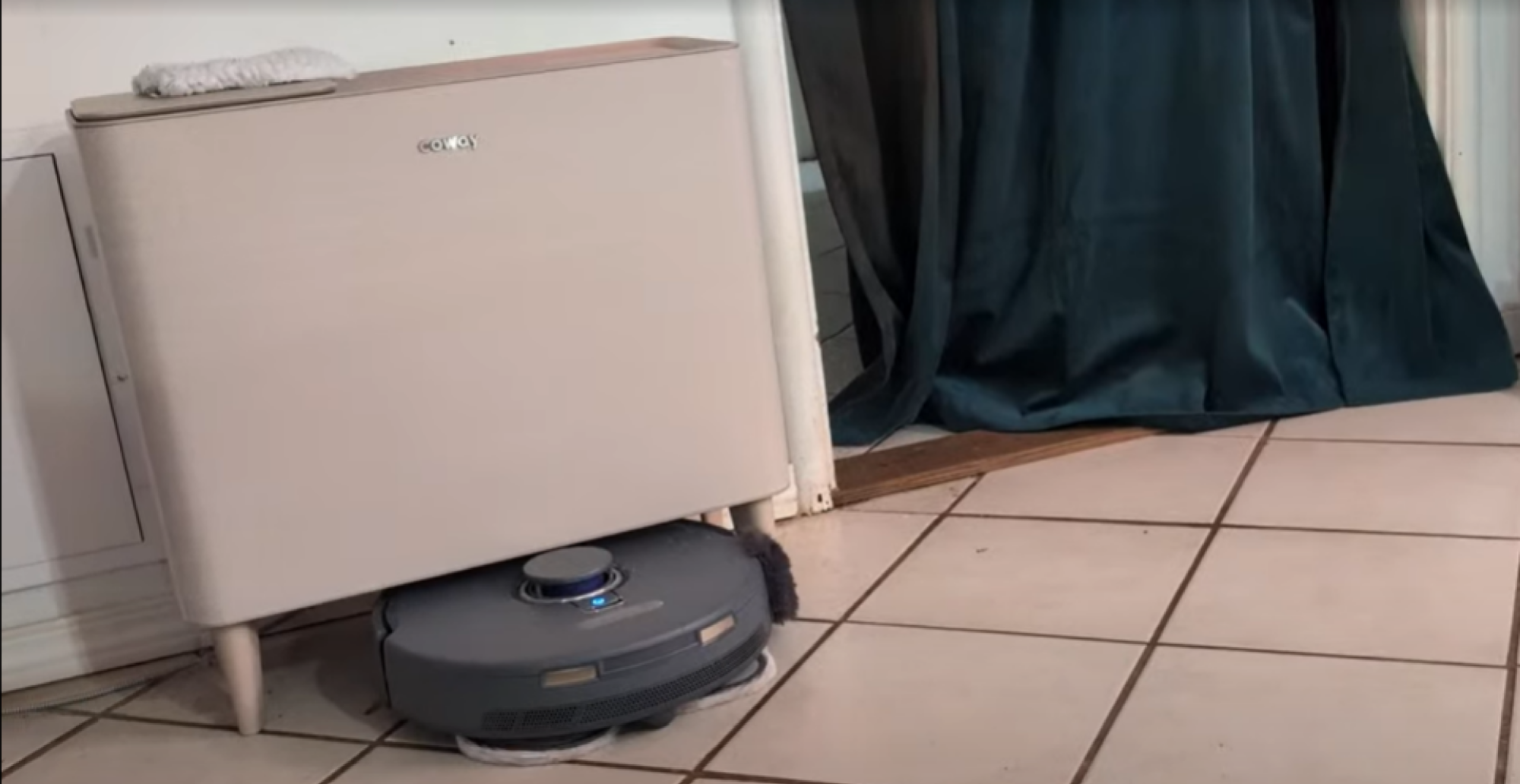
The Freo Z navigating around an air purifier on the floor
Credit: Amanda Blum

When you hire someone to clean your home, you typically don’t move furniture around yourself to make their job easier,. For your robot vacuum, you might have to. While these robots have gotten much better at navigation, the less there is on the floor, the easier it will be for them to clean. Each table leg, chair and floor lamp is another obstacle to be worked around, and it’s worth knowing that most robots can’t get as close to table legs and floor lamps as you would be able to with a stick vacuum. Nor can they move a piece of furniture aside to get under it. As such, you will have to make some changes to your floor plan if you want to make the most of your new robot friend. 

More important than furniture relocation is the trend of having less on the floor, generally. If you like to let a laundry pile accumulate, have potted plants or a stack of books, you’ll end up relocating those items to give your robot better access. Corded items are particularly tricky, so the less cords on the floor, the better. Over time, I’ve learned to suspend the cords from the wall, and keep them wound as much as possible so nothing trails on the floor. 

I was recently quite impressed with the Roborock 10R, which relied solely on AI assisted cameras. The navigation skills of the robot were great, allowing it to venture into tight and low spaces that other robots hadn’t.

Robot vacuums can’t clean near their docks

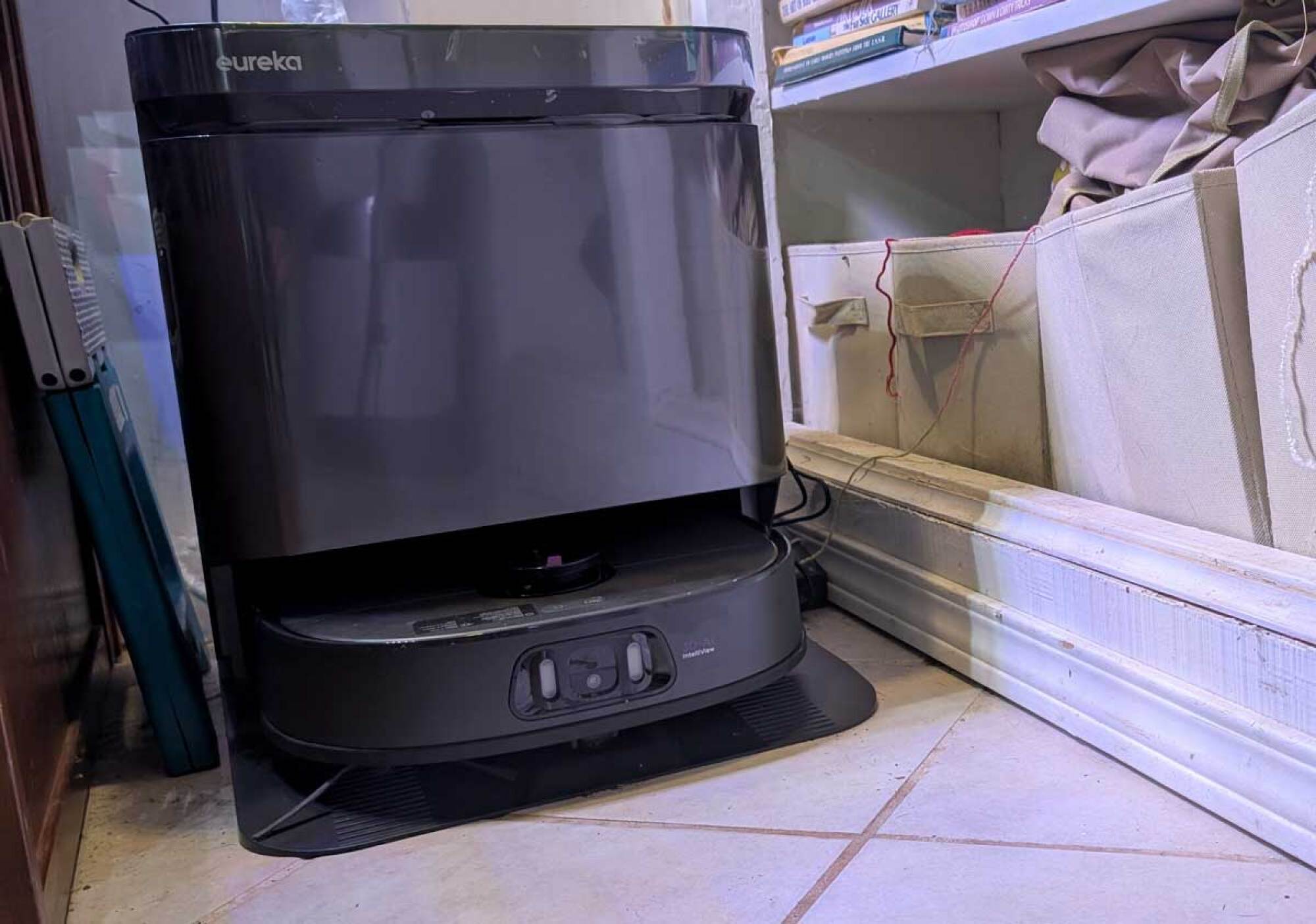
This Eureka is hard to navigate around
the robot can’t navigate around the Eureka tower, so debris accumulates around it
Credit: Amanda Blum

It’s an unsurprising fact that robot vacuums can only clean where they can reach. Where they can’t reach, you’ll still see dirt and debris. All robot cleaners have a dock of some sort, and many now come with self emptying towers, which usually work exceptionally well at emptying the robots of dirt so you don’t have to do it manually. Given all of this automation, it’s a bit ironic that the dirtiest place in your home might well be right around the tower or dock itself. As these towers are usually tucked into a corner or small space, detritus can easily accumulate around them, but the robot can’t move around the tower to clean it up. As the robot returns to the dock, it sweeps dirt with it, and it all eventually winds up at the foot of the tower. 

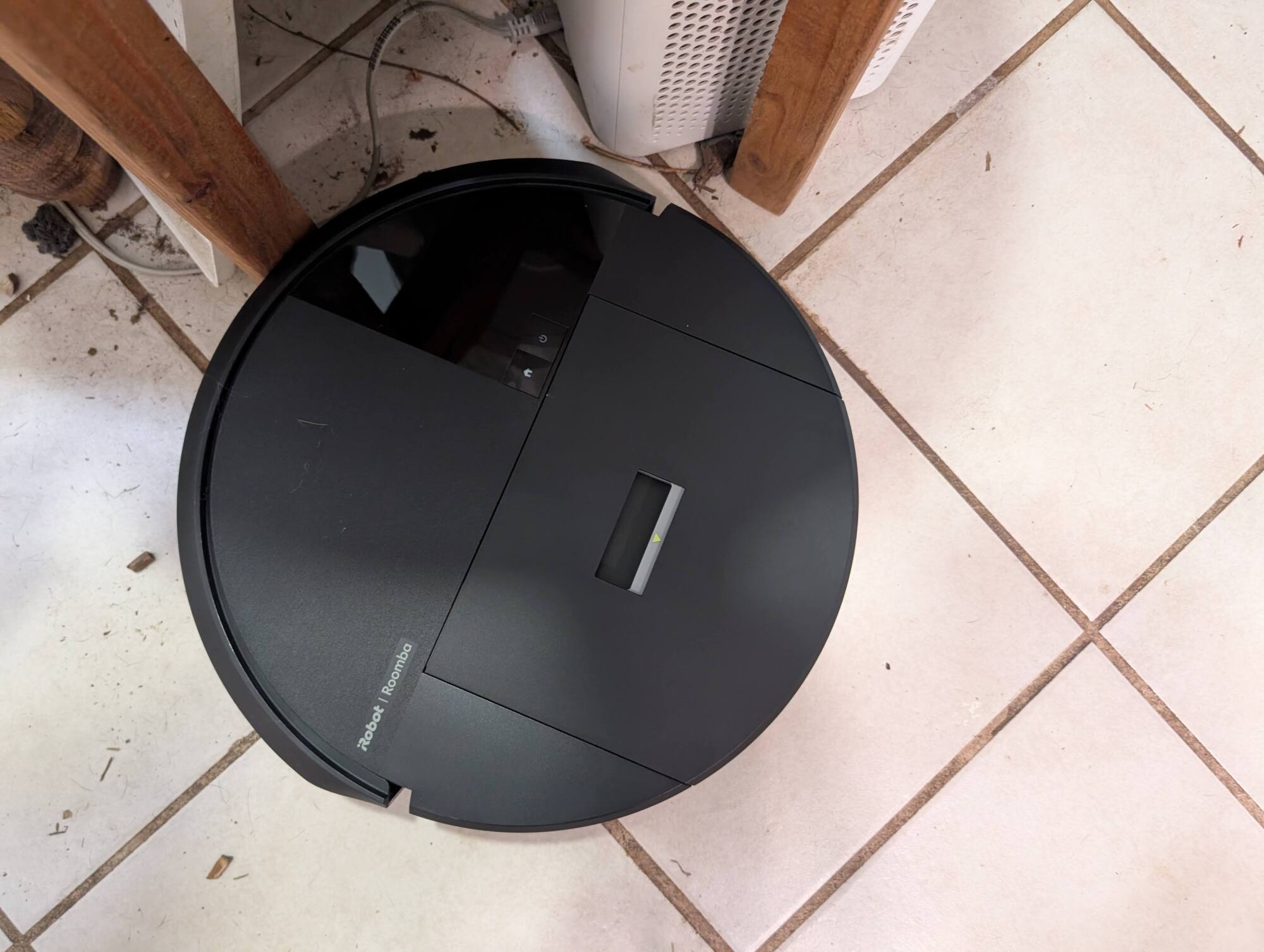
Roomba navigating space
This Roomba can’t navigate into the small space underneath this plant stand, so instead it just kicks debris into the space.
Credit: Amanda Blum

Only the latest robots (like the 3i S10 Ultra) are at all good at cleaning around the base of pieces of furniture and thresholds between rooms. With most robots, you’ll usually still find a band of dust and grime against the wall and around any items that the robot can’t easily clean. And then there are all the spaces too narrow or too low for the robot to slide into. While a few robots, like the Narwal Freo Z, have a fluffy pad that’ll occasionally rub against the base board to dust it, they don’t do any real cleaning, so you’ll need to clean your baseboards manually, too. Again, you can rearrange your space to allow the robot more autonomy by making sure any spaces you want to be cleaned allow clearance of at least 1.5 times the width of the robot, and enough vertical height that the robot can reach it.

This is always going to be a bit of a losing game, however, which is why I still have a stick vacuum I use to quickly suck up debris from narrow spots the robot can’t reach, the corners and edges that the robot can get close enough to, and against the wall and thresholds. 

Robots are best at vacuuming up only certain types of debris

The same way you might organize before a visit from a cleaning professional, you’ll find yourself pre-sweeping for your robot. While robots are reliable at getting up dust and small detritus like rice or cereal, they’re not great at large debris, which means anything larger than a standard dice cube. Pieces of mulch, pet toy fluff, kitchen scraps, bobby pins, and pocket change will all get caught in a robot’s rollers and need to be fished out. Pre-sweeping is a way to avoid that annoying task by getting up larger items of debris and leaving the rest for the bot. (But once again allow me to praise the 3i S10 Ultra, which has excelled at vacuuming up larger debris than any other robot vacuum I’d ever tested.)

Even if your robot vacuum has a mop, you’ll need to mop manually

Rooborock trying to get muddy pawprints out
This Roborock is starting to get up the muddy pawprints, but it takes many passes
Credit: Amanda Blum

Most robot vacuums are now combo vacuums and mops.Some models are great at mopping—sometimes even better than they are at vacuuming. The docking tower empties the mop of dirty water, fills it with clean water, and sanitizes everything afterward. With the combined functions of vacuuming and mopping your floors will surely be clean, right? Not necessarily. 

Robot mops are great at cleaning up surface spills. What they’re less good at is scrubbing away stains and compound floor messes like mud or spilled food. While most robots can mostly get muddy paw prints up after a number of passes, doing so requires a lot of water, battery life, and time, and I’ve yet to find a single robot mop that is good at getting grime out of tile or wood floors. The robot simply can’t put enough pressure on the mop to really scrub the floor.

For these reasons, you’ll need to keep an old-fashioned mop around, and you should expect to have to give the floor a good, hardy mop every few days and use real elbow grease to get out grime. Once the floor is clean, repeated patrols by the robot mop can help stave off new grime deposits, but they’re inevitable, so don’t assume your mopping days are over. 

If mopping is your priority, I recommend highly Roborock models that have a singular vibrating mop pad, versus twin spinning mops. The Roborock S8 MaxV Ultra remains one of my top recommendations.

Robot vacuums are slow

With most robot vacuums working with voice assistants like Google, Alexa, or Apple, its well within the realm of possibility to simply ask the robot to “clean up around the high chair” after dinner (presuming you’ve set up a zone around the high chair, and it is always in the same approximate spot). If you’ve got such a routine set up, the robot will begin whatever pre-deployment practices it has, whether that’s filling the water resivior or orienting or cleaning the mop head, and eventually will amble over to the intended spot and proceed to take its time cleaning.

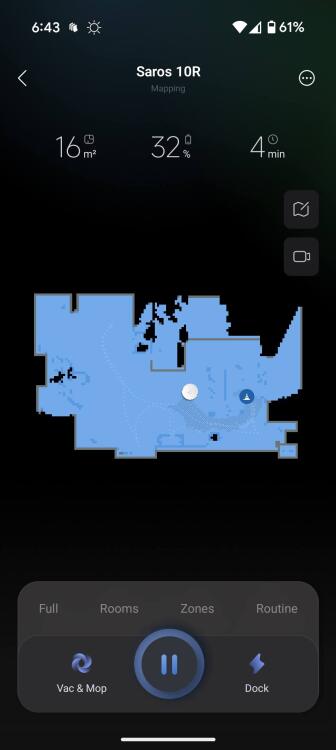
Though still not particularly fast in getting to the spot you pin, Roborock’s Pin and Go feature allows you to quickly place a pin on your floor map and the robot will proceed immediately to that spot to clean. This feature is available on all premium Roborock models, including the latest Saros 10 and 10R.

Pin and Go
Roborock lets you put a pin on the map for the robot to proceed to
Credit: Amanda Blum

If you’ve got the time to spare, great. But if your kid spills a cup of orange juice on the floor, you might not be willing to wait the five to 10 minutes it will take the robot to get to the spot in question and start cleaning when you could grab a mop or towel and be done in under a minute. 

For that reason, I’m still happy to have a Narwal S20, a newer model stick mop I can quickly grab, mop as needed, and then put back on the dock, all without having to get my hands dirty.  

Robot vacuums occasionally require human intervention

Robot vacuums can range wildly in price (from $200 to $2,500) and quality, and they are getting more intelligent and feature-rich all the time. Robots that have AI on board can actually learn about your home and get better at cleaning it over time. Despite all of that, however, your robot will need your intervention more than you’d like. 

Depending on how good a model you own, you will likely need to routinely unclog the rollers (the most common robot vacuum maintenance task). Your robot will also get stuck—sometimes because there is a new obstacle for it to navigate around, like a waylaid toy or sock, or a loose cord under the couch the robot gets stuck on it. Sometimes, it will simply gets lost. The bottom line is, even the best robots can’t be left on their own for weeks at a time. Most will require a human around eventually to get them back to the dock, clear the rollers, unclog it any clogs in the mopping system, and/or change the water in the dock.

If all of this hasn’t scared you away from getting one, your goal should be to choose a robot that matches your home and needs, and that enough features that you won’t be following it around every day, making sure it does its job.