Nextcloud claims Google is being anticompetitive

Nextcloud provides an
open-source collaboration platform called Nextcloud Hub, which includes file-sharing and syncing
features. The company has written
a blog post explaining that Google has revoked a critical permission
from the Nextcloud Files app for Android that allows it to sync files
to Nextcloud Hub.

Google is stating security concerns as a reason for revoking the
permission. This is hard to believe for us. Nextcloud has had this
feature since its inception in 2016, and we have never heard about any
security concerns from Google about it. Moreover, several Big Tech
apps as well as Google’s own still have this. What we think: Google
owning the platform means they can and are giving themselves
preferential treatment.

Despite multiple appeals since mid-2024, Google has refused to
reinstate the permission, blocking automated Nextcloud file uploads
for millions of users.

The Nextcloud
app
available via F-Droid does not have this limitation, but the
post notes that that is not an option for many users.

If Congress actually cancels the SLS rocket, what happens next?

The White House Office of Management and Budget dropped its “skinny” budget proposal for the federal government earlier this month, and the headline news for the US space program was the cancellation of three major programs: the Space Launch System rocket, Orion spacecraft, and Lunar Gateway.

Opinions across the space community vary widely about the utility of these programs—one friend in the industry predicted a future without them to be so dire that Artemis III would be the last US human spaceflight of our lifetimes. But there can be no question that if such changes are made they would mark the most radical remaking of NASA in two decades.

This report, based on interviews with multiple sources inside and out of the Trump administration, seeks to explain what the White House is trying to do with Moon and Mars exploration, what this means for NASA and US spaceflight, and whether it could succeed.

Read full article

Comments

I Created These Spreadsheets to Help Me Play Video Games (and Yes, This Is a Cry For Help)

Hades II introduces a new mechanic called Forget-Me-Not, which allows players to pin recipes they don’t have enough crafting reagents for. While they’re out in the world, the path to those resources will be highlighted, making it easier to keep track of what you need. I love this feature, in no small part because I’ve been making my own version of it for other games for years. It’s just one of the many ways I use spreadsheets to improve my gaming.

To be clear, I am not recommending that you follow in my footsteps and create a spreadsheet for every game you play. I am deeply unwell, the world is on fire, and creating little charts and tables is how I exert some semblance of control over a chaotic world. Also, not every game needs a spreadsheet.

For some games, though, it’s just more helpful to have your own goal tracker. Especially in sandbox games, where the quest markers are only the start of what you can do. For my purposes, I’ll either use a typical Google Sheet, or if I’m feeling real spicy, I’ll branch out to something like Notion for some more flexible tools. Here are just a few examples of what I do.

Tracking Tears of the Kingdom armor upgrades

There are so many armor sets in Tears of the Kingdom, and tracking down every piece is super rewarding both in terms of exploration and the powers you get from different sets. What’s less rewarding is upgrading the ones you already have. You need to visit Great Fairies with the right amount of ingredients, some of which are super rare or only drop from specific enemies. Some of which you might’ve otherwise walked right past if you didn’t know you needed them. (Looking at you, Lizalfos tails.) 

That’s why I made this armor upgrade tracker. I gave myself sections to mark off which sets I’m most interested in collecting, how many pieces I still have left to claim, what upgrade level each of them is currently at, and whether there’s a set bonus I haven’t unlocked yet. Most of this info is technically visible in the UI, but this way I don’t have to dig through menus to see whether I’ve finished upgrades on the Froggy armor before I go collect a bunch of sticky lizards.

I also gave myself space to write down what ingredients I need for an upgrade, which is low-key the most helpful part for me. Almost everything in Tears of the Kingdom is used to upgrade some armor set or another, but I don’t always remember which ones I care about. And the only way in-game to see what ingredients are needed for an upgrade are to visit the Great Fairy directly.

This saved me tons of wasted effort because, when I’m out adventuring, I can quickly look at my notes to see whether I still need a particular item when I come across it. Not only is this handy as reference, but it saves me from having to go on a farming run later for the five Thunderwing butterflies I walked right past hours earlier.

Running an outpost empire in Starfield

'Starfield' Notion spreadsheet

Credit: Eric Ravenscraft

I have my complaints about Starfield, but that didn’t stop me from spending dozens of hours building outposts to farm as many resources as possible. Is there a point to this? Not really. Most resources you need in Starfield, you can either buy or farm easily. But I like building my own mini-economies. The only trouble is, the game isn’t built to be the overseer of dozens of outposts.

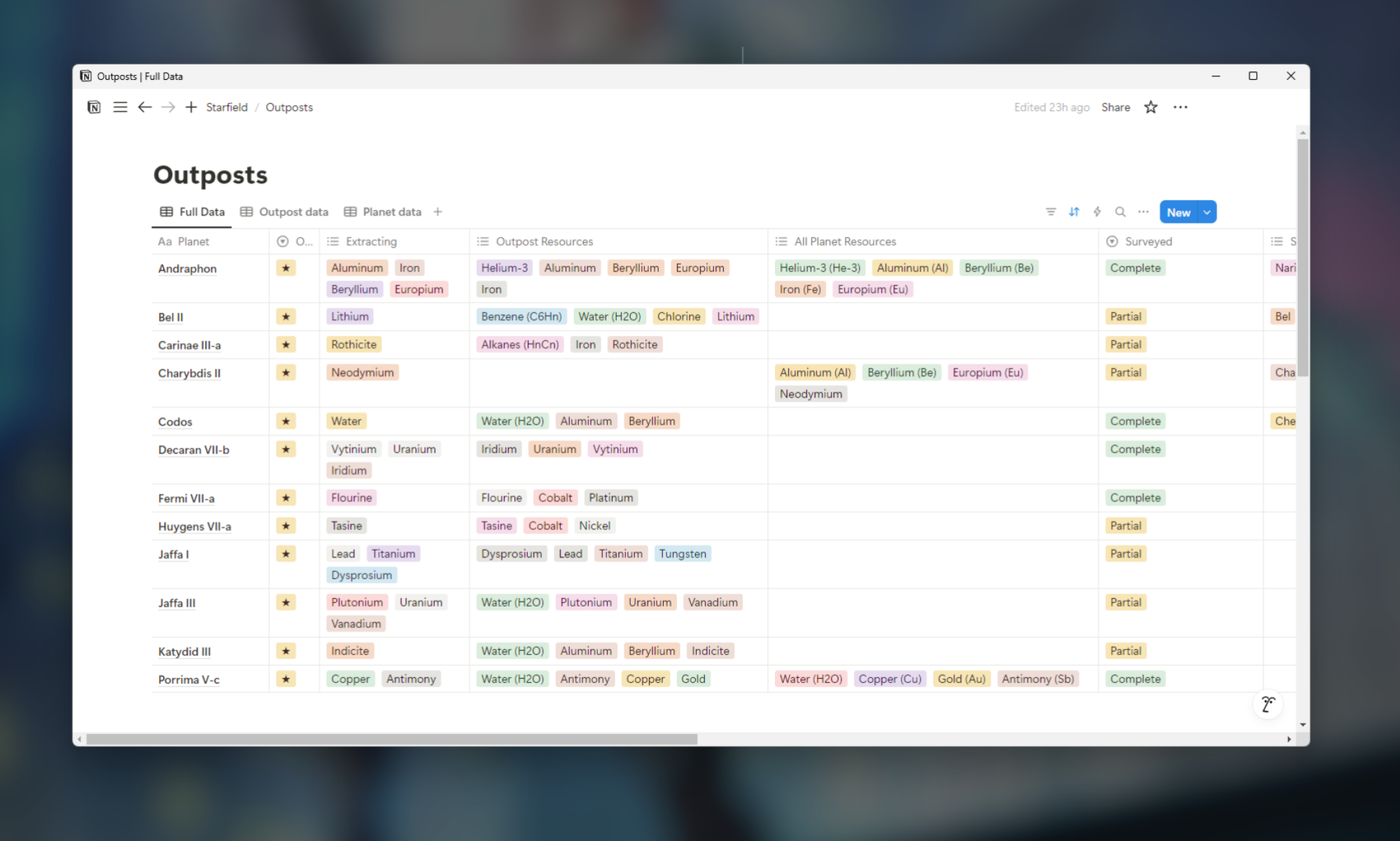
Enter my Notion table. For this one, I gave myself at-a-glance reference points for the resources each planet has, which of those resources are available at my outpost, and which of those I’m currently harvesting. Since you get a bonus when you’ve fully surveyed a planet, I’ve also marked whether I’ve completed that planet’s survey. (Note: I wasn’t able to easily make this into a template, so you’ll have to make your own version from scratch. This page from Notion will help you understand the basics, but there are plenty of other YouTube tutorials to check out if you need more guidance.)

Granted, this is my own personal Sisyphean boulder, since the only reason to spend this much effort organizing Starfield outposts is for the joy (?) of outpost organizing. However, I’ve done similar things for games like Stardew Valley, which are a bit more objective-oriented.

I used Notion for this one because I liked its approach to databases a little better than Google Sheets. You can create a full database with entries for all the data you need, but then create alternate views that only focus on some of the data you’ve created. For example, I also tracked what flora and fauna grew on each planet, but since I didn’t need that while managing my outposts, I decided to create a view that didn’t include it.

Quantifying my time wasted in Overwatch 2

Of all the spreadsheets I’ve made for the games I play, few have brought me as much pain as this one. Overwatch 2 switched to a battle pass system, with rewards that will disappear if you don’t claim them by the end of the season. I play a lot of this game already, but I wanted to know just how much time it would take to complete certain rewards.

So, I made myself a little calculator. I started by tracking the average amount of time it took to complete a game and how much XP I got for each game. Then I gave myself a few boxes that calculate how much time it would take to reach a reward tier, based on how much XP I’d earned so far. I got it down to a point where I only had to fill in three blocks (highlighted in blue in the sheet) to see how much more time I was planning to waste in a game for a cosmetic reward I wouldn’t even use.

Now, I don’t need to be told to play Overwatch 2. I love playing it with my friends, and I’ll gravitate to it regardless of how much it mistreats me. The real value here is that, sometimes, this spreadsheet discourages me from playing. If the game says “You’re just 50,000 XP away from getting a reward!” it might seem like a good idea. The game wants you to keep playing after all. Instead, my spreadsheet says “You will have to play 41 more hours of this game to reach that level. So I sigh and close the game.

This has actually helped me kick some of that “Just one more game” habit that’s so easy to fall into. Every online game these days has a litany of rewards and points and blips and bloops designed to give you just a little dopamine every time you decide to keep playing. My calculator tool wasn’t designed to save me time, but it did end up being more honest about it than Blizzard would ever be.

Other spreadsheet ideas

These are just a few of the many examples I’ve made over the years. I’ve made sheets that calculate how much my Stardew Valley crops will yield over time, taking the guesswork out of buying from Pierre’s store. (I’m also far from the first with this idea.) I’ve also made sheets similar to my Tears of the Kingdom tracker for upgrades in games from Skyrim to Horizon Forbidden West.

Even if you’re not into making your own, there’s a chance some enterprising gamer out there has made arcane spreadsheets for things like how much an armor buff affects your favorite hero. Any time there’s some math I want to do that the game doesn’t do for me, or resource requirements I’m sick of Googling over and over, I’ll turn to my trusty spreadsheets—and now you can (should?) too.

Doom: The Dark Ages is surprisingly playable on the Steam Deck

While working on our review of Doom: The Dark Ages last week, I was unable to test the game on the Steam Deck due to a bug that prevented it from launching on SteamOS. I didn’t consider this much of a loss at the time, since I figured the Deck’s 3-year-old portable hardware was rated way below the minimum PC specs for the game, which call for ray tracing-capable graphics cards at a minimum.

Over the weekend, though, Valve released a preview build of a new version of SteamOS that allows Doom: The Dark Ages to actually launch on the Steam Deck. And after a bit of testing, I found the game is surprisingly playable on Valve’s portable hardware, provided you’re prepared to turn down the graphics settings.

With all the graphical quality sliders set to “Low” (and FSR upscaling set to “Performance”), I was able to run Doom: The Dark Ages at the system’s native 1280×800 resolution and a reasonably steady 30 to 40 fps.

Read full article

Comments

YouTube will exclusively stream an NFL game for free

YouTube will be streaming an exclusive NFL game in its entirety for free worldwide for the first time ever. After becoming the official home of NFL Sunday Ticket in 2023, YouTube has been pushing to expand its reach in the high-stakes, multibillion-dollar world of NFL coverage and broadcast rights. 

The Google-owned streaming company has secured the exclusive rights to broadcast one of the NFL’s opening week games on Friday September 5 live from Brazil. The São Paulo spectacle will take place the day after the Thursday night NFL KickOff game between the Eagles and the Cowboys. The 2025 NFL regular season will feature seven international games, a record for the league.

In an NFL press release, YouTube’s chief business officer Mary Ellen Choe said, “Streaming the Friday night game to fans for free around the world will mark YouTube’s first time as a live NFL broadcaster – and we’ll do it in a way that only YouTube can, with an interactive viewing experience and creators right at the center of the experience.”

Last year, fellow streaming giant Netflix streamed its first live NFL games on Christmas Day as part of a three-year deal with the league, though Netflix doesn’t have a NFL specific product to sell its customers like YouTube has with NFL Sunday Ticket.

In the press release announcing YouTube’s coverage of Week 1 from Brazil, Mary Ellen Choe discussed the reach of NFL games on YouTube, saying, “Last year, people spent over 350 million hours watching official NFL content on YouTube, so it’s both fitting and thrilling to continue to build our relationship with our partners at the NFL.”

This expanded partnership comes against the backdrop of other team-ups between YouTube and the NFL aside from NFL Sunday Ticket, namely a multi-year deal for the annual Super Bowl Flag Football game as well as additional international flag football games.

The exact cost for the broadcast rights to the Brazil game is not known at this time, though it’s known that YouTube is paying over $2 billion per year over a seven-year deal for NFL Sunday Ticket.

This article originally appeared on Engadget at https://www.engadget.com/entertainment/youtube/youtube-will-exclusively-stream-an-nfl-game-for-free-191519460.html?src=rss

USENIX Sunsets Annual Technical Conference After 30 Years

New submitter Synonymous Homonym writes: This year’s USENIX ATC will be the last, but other USENIX conferences will keep happening.Since USENIX’s inception in 1975, it has been a key gathering place for innovators in the advanced computing systems community. The early days of meetings evolved into the two annual conferences, the USENIX Summer and Winter Conferences, which in 1995 merged into the single Annual Technical Conference that has continued to evolve and serve thousands of our constituents for 30 years.USENIX recognizes the pivotal role that USENIX ATC has played in the shaping of the Association itself as well as the lives and careers of its many attendees and members. We also realize that change is inevitable, and all good things must come to an end:
The last ATC will include both a celebration of USENIX’s 50th anniversary on the evening of Monday, July 7, and a tribute to USENIX ATC on the evening of Tuesday, July 8.


Read more of this story at Slashdot.

iOS Is About to Get a Lot More Accessible

Is your iPhone, iPad, or Mac a little hard to use? Lucky for you, Apple has announced key accessibility features coming to all its devices later this year. These include Accessibility Reader, which makes small fonts easier to read, and Vehicle Motion Cues, which prevent motion sickness while using Apple devices in vehicles. If some of these sound familiar, it’s because they may already be on one or two Apple devices, but are now set to come to others as well. While the company’s already tipped its hat as to what’s in the works, expect to hear more details during WWDC 2025, scheduled from June 9 to 13. That’s where Apple usually unveils all of its annual operating system updates and sometimes, even shows off new hardware.

In the meantime, here are all the new accessibility features we currently know are coming to Apple devices later this year:

Accessibility Reader makes text easier to read

Accessibility Reader

Credit: Apple

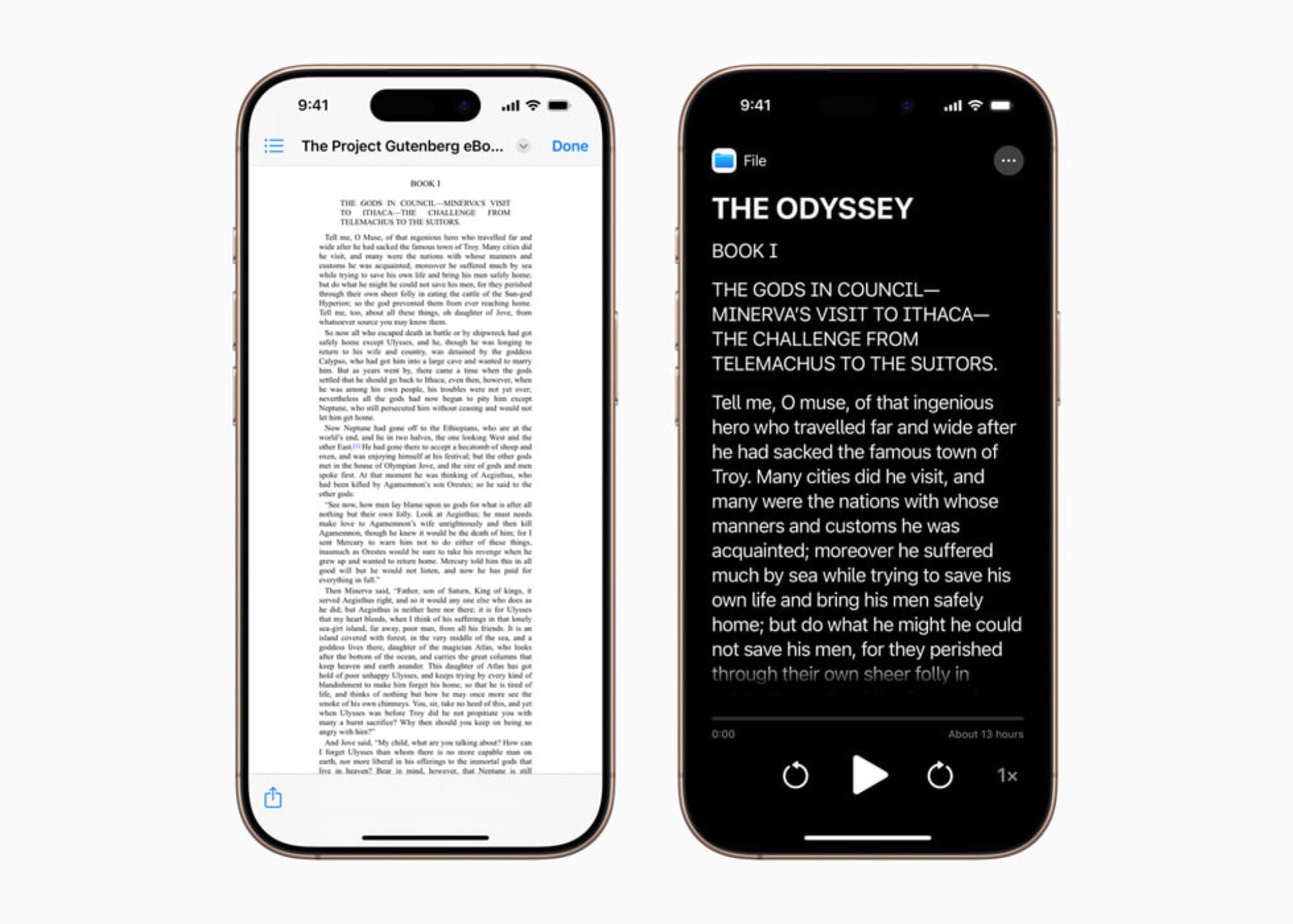
Lots of people find default text sizes or fonts difficult. Accessibility Reader is a new feature designed to help with that. It allows you to customize text on your Apple device to make it easier to read. You can change the font, color, spacing, and have your Apple device read out the text for you. You can think of it as reader mode for text in any file (or even in the real world, which I’ll touch on shortly), or as improved text-to-speech. This is because Accessibility Reader can be launched from any app, according to Apple. It can also be paired with the Magnifier app on your Apple devices, which means that you can zoom into text in the real world and use this feature to read it more easily. This feature will be available on the iPhone, iPad, Mac, and Apple Vision Pro.

Magnifier comes to the Mac

Magnifier on Mac

Credit: Apple

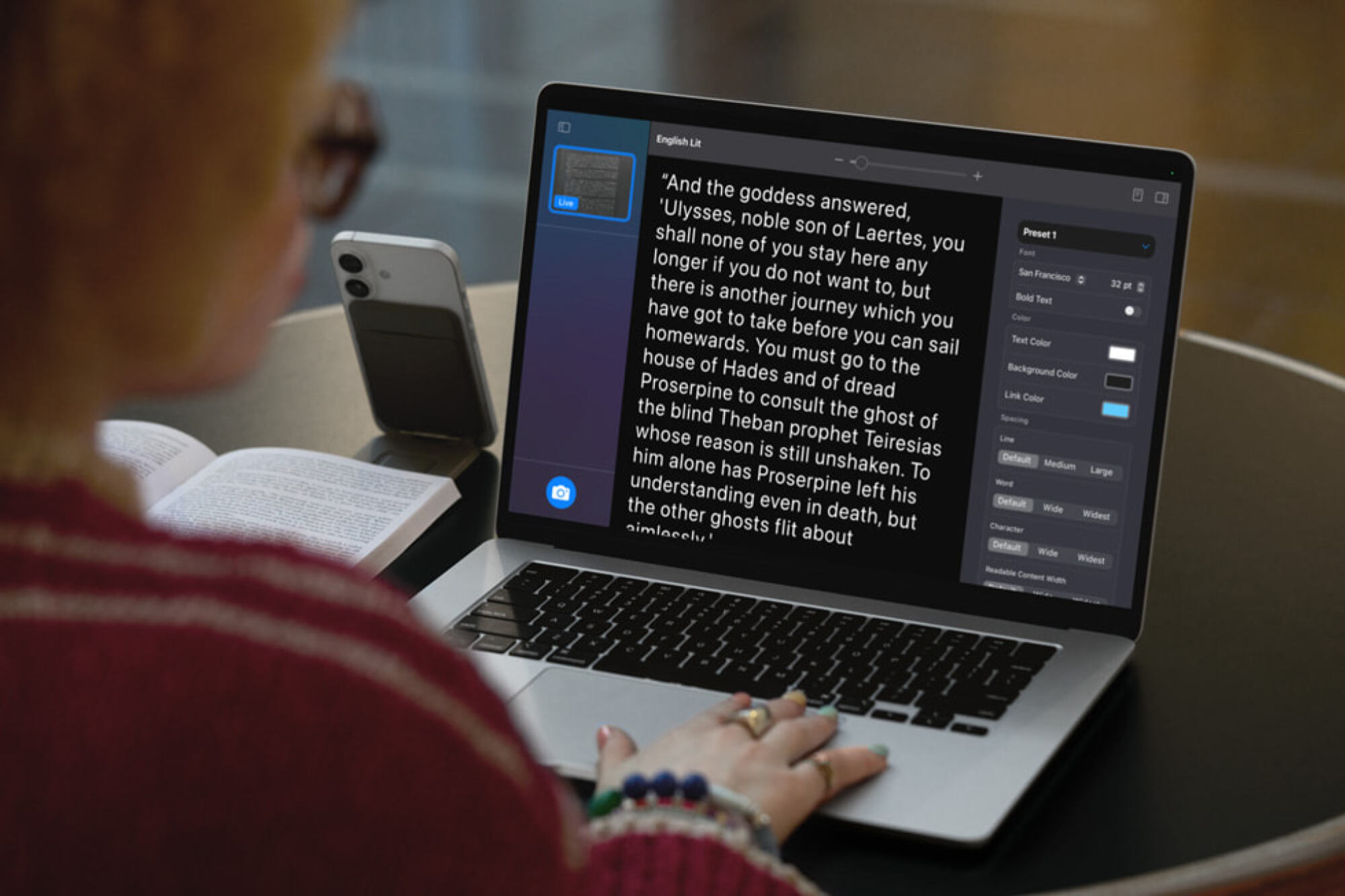
Your iPhone ships with a built-in magnifying glass, which is the Magnifier app. This is an important accessibility aid for many people who have low vision, and now Apple says it’s coming to the Mac. On the Mac, you’ll be able to connect Magnifier to external cameras as well, including your iPhone if you’re using it as a webcam via Continuity Camera. You’ll be able to tweak brightness, contrast, color filters, and perspective to make it easier to see things with Magnifier for Mac, according to Apple. 

Accessibility nutrition labels are coming to the App Store

Accessibility nutrition labels on the App Store in iOS 19.

Credit: Apple

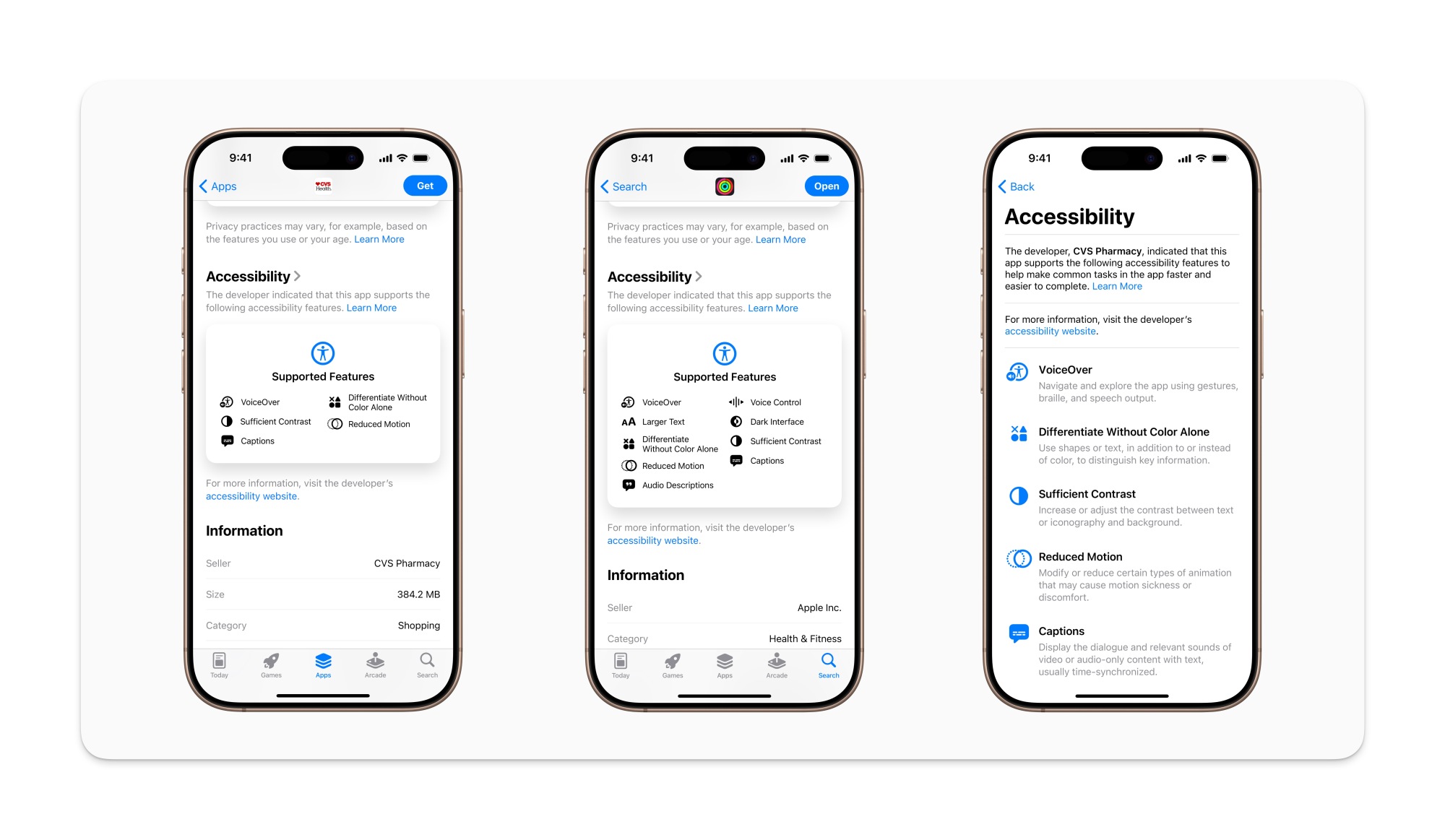
The App Store added ‘privacy nutrition labels‘ to app listings a few years ago, which helps you quickly see if apps are collecting your data. Now, the App Store is adding accessibility nutrition labels to help you check if an app supports the accessibility features you need. Apple says these labels will acknowledge whether an app supports VoiceOver, Voice Control, Larger Text, Sufficient Contrast, Reduced Motion, captions, and more. 

Still, I really wish Apple would add better search filters to the App Store. I’d love to filter out apps that collect data and lack support for specific accessibility features, and there’s currently no real way to do that.

Improved Braille support on Apple devices

Braile access on iPhone

Credit: Apple

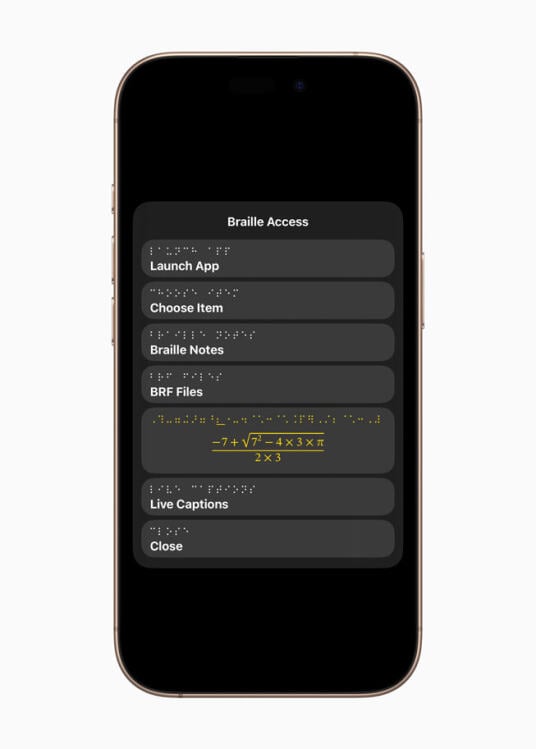
Apple also says that it’s adding Braille Access to your iPhone, iPad, Mac, and Apple Vision Pro. This feature adds a braille note taker to your devices, and can even perform calculations using Nemeth Braille (which is often used in math and science classrooms). Braille Access can also open BRF (Braille Ready Format) files, which will allow people to access books and files created on braille note taking devices. 

Live Captions are now on the Apple Watch

Live captions Apple Watch

Credit: Apple

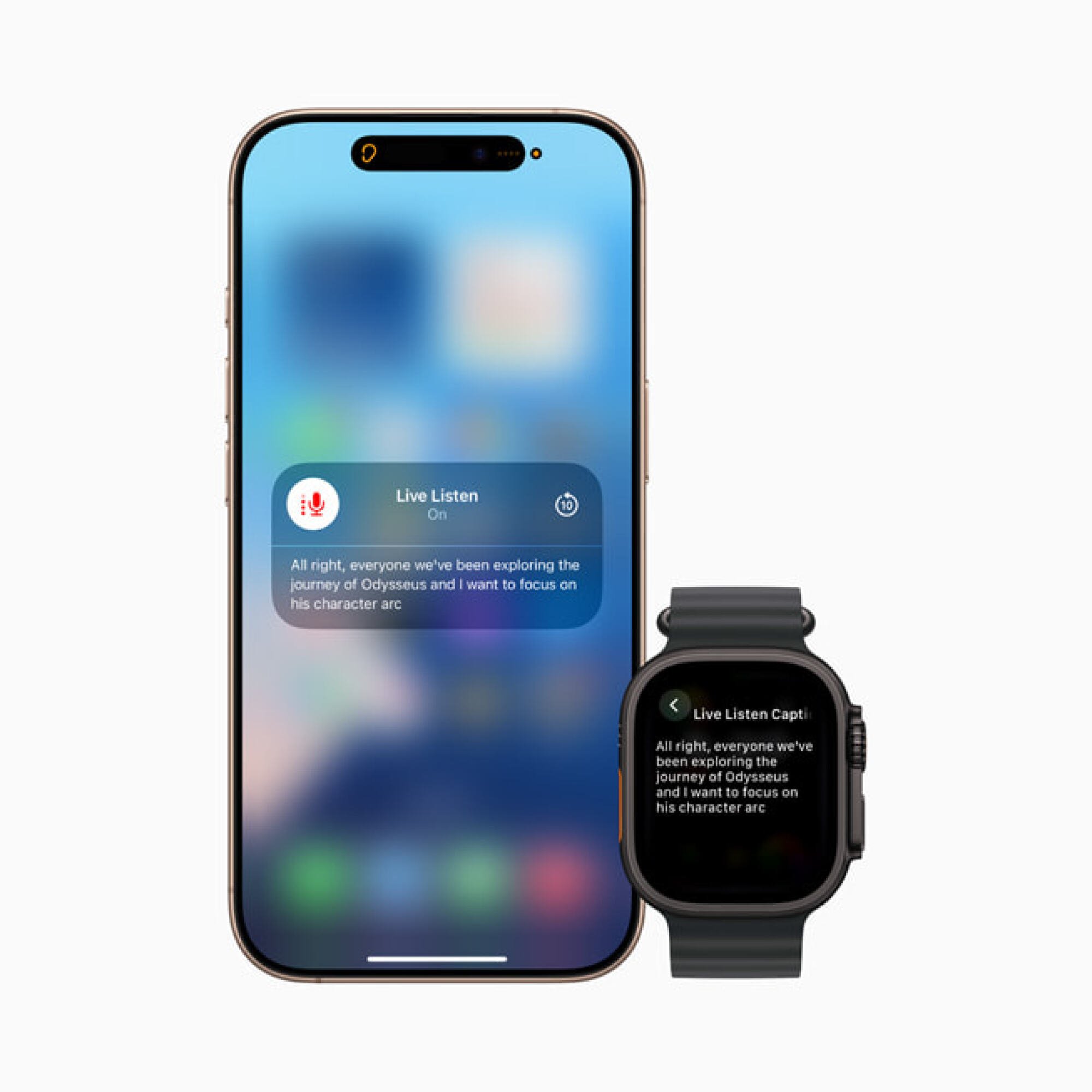
Live Listen is an Apple feature that makes things easier to hear for people who are deaf or hard of hearing. Apple says Live Listen controls will soon be added to your Apple Watch as well, and the device will be able to show real-time Live Captions. This works by turning your iPhone into a remote mic that streams directly to made-for-iPhone hearing aids, AirPods, or Beats headphones, and when this is active, you’ll be able to view captions directly on a paired Apple Watch, according to Apple.

The watch can start or end Live Listen sessions, which will allow you to place the iPhone near the person who’s speaking and follow the conversation from a short distance away on your Apple Watch. This could be great for learning in a classroom and other similar situations. 

Vehicle Motion Cues comes to the Mac

Vehicle motion cues on Mac

Credit: Apple

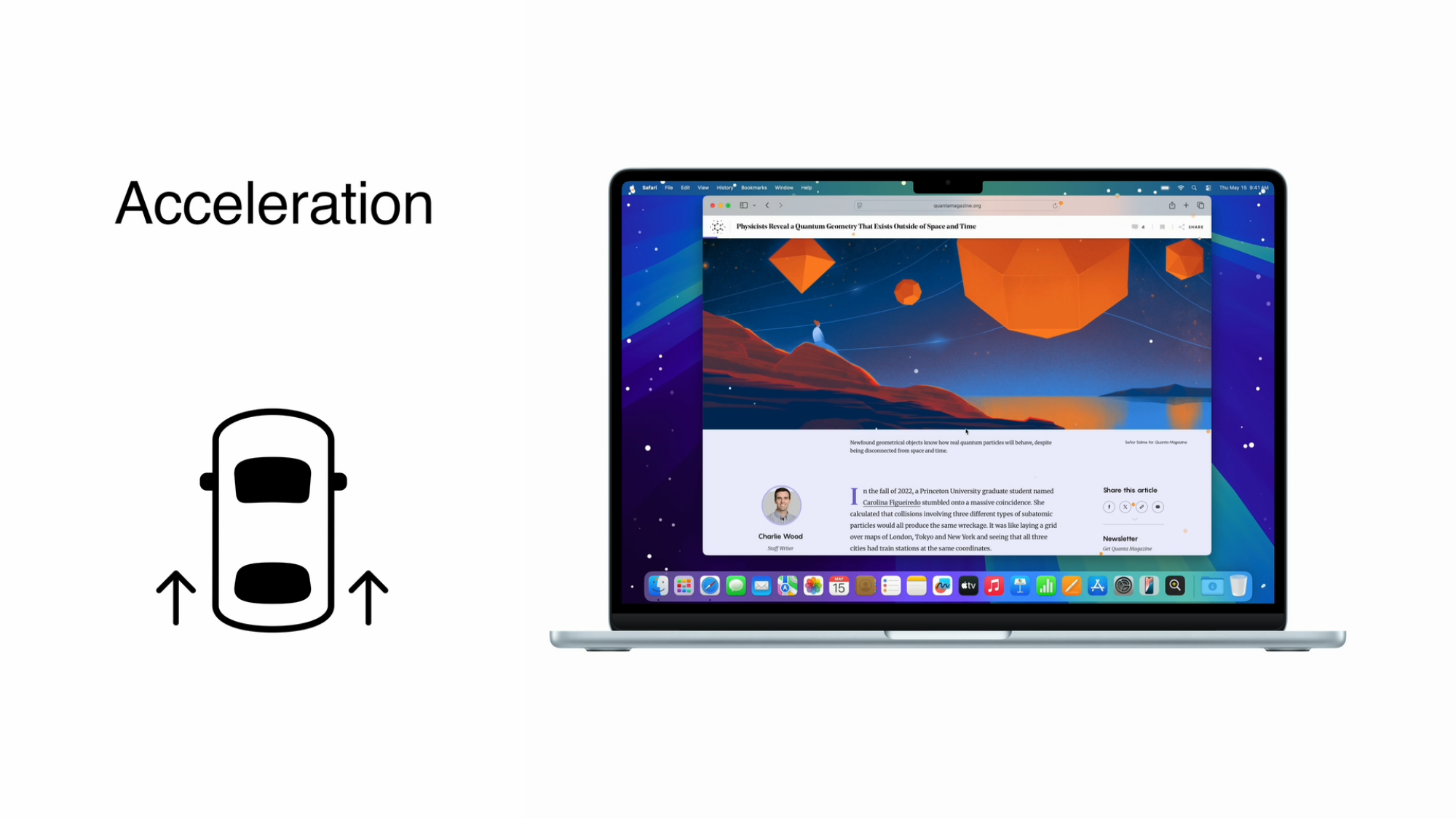
Ever since they launched last year on the iPhone, Vehicle Motion Cues have been indispensable for me. The feature works by displaying moving dots on the screen that correspond to the direction of a vehicle’s motion, and it’s now coming to the Mac, Apple says.

I’ve always suffered from motion sickness, which makes it hard for me to view screens while I’m in moving vehicles. Even if I’m otherwise fine in a car or a bus, I start to feel very nauseous if I look at a screen, read a book, or try anything that requires me to focus on a fixed object. Since Apple launched Vehicle Motion Cues last year, I’ve finally been able to use my iPhone when I’m a passenger in vehicles. If this feature works as well on the Mac, I’m excited to use it to watch videos when I’m riding in a car. The company also said that it’s planning to allow you more control over how these dots are displayed on your screen.

Improved accessibility features on the Vision Pro

Vision Pro Enhanced View

Credit: Apple

Apple Vision Pro is set to get a new Enhanced View, which will allow you to magnify everything that’s in view via the main camera on the device. Apple says the Live Recognition feature will use on-device machine learning to describe surroundings, find objects, read documents, and more. The company also plans to enable a new API to allow some apps to access the Vision Pro’s main camera, which will help developers create apps that make the most of these accessibility features.

Other important updates

Apple also revealed a bunch of other, smaller accessibility related features. Here are a few of my favorites:

  • Background Sounds, which lets you play nature sounds or dark noise, will get more customization options, a timer to stop playing after a while, and new actions for automation via Shortcuts.

  • Personal Voice, which recreates the voices of people who are losing the ability to speak, will be faster and easier to use, Apple says. The feature will be able to create a more natural sounding voice in under a minute with 10 recorded phrases, according to the company.

  • Share Accessibility Settings lets you temporarily share your accessibility tweaks with other Apple devices, such as when you’re using an iPad to place an order or borrowing a friend’s device for a bit.

You can check out the full list of accessibility updates and content on Apple’s website.

Amy Hennig’s ‘Marvel 1943: Rise of Hydra’ is delayed to 2026

The adventure game Marvel 1943: Rise of Hydra has been delayed until 2026, according to a statement by publisher Skydance Games. The title was supposed to come out sometime this year.

What’s the reason for the delay? The publisher says it’s to “add more polish,” which is never a bad thing. I’d rather a fully-finished game upon release than a buggy mess. The company does say it’ll be available in the early part of 2026, so that isn’t too long to wait. Still, it’s disappointing news for eager Marvel fans.

Marvel 1943: Rise of Hydra is a narrative-driven adventure game with four playable characters, including long-time icons like Black Panther and Captain America. As the name suggests, it’s set during World War II in occupied Paris.

It’s being developed by Amy Hennig and her new studio, which is a subsidiary of Skydance. If her name sounds familiar, that’s because she’s best known for being a creative director and writer at Naughty Dog. Hennig was the lead writer on all three Uncharted games and was creative director for the Legacy of Kain franchise. She’s got a fantastic pedigree, so this new Marvel game could be a heavy hitter.

This article originally appeared on Engadget at https://www.engadget.com/gaming/amy-hennigs-marvel-1943-rise-of-hydra-is-delayed-to-2026-185945301.html?src=rss

Google announces Material 3 Expressive, a colorful evolution of Android design

Google accidentally showed off its big Android design refresh last week, but now Material 3 Expressive is official. Google says the new interface will begin with Android OS, but it will eventually expand across the full Google app ecosystem, bringing a more lively vibe to Gmail, Google Photos, and more.

Material 3 Expressive won’t be entirely unfamiliar—it shares some basic design elements with the Material You system Google launched four years ago. Material 3 Expressive is a bolder take on the same aesthetic, featuring “springy” animations, brighter colors, and new shapes.

Material 3 Expressive

As we learned from Google’s slipup, Material 3 Expressive is the result of numerous user studies, which included more than 18,000 participants. Google explored how people parse information on their phone, finding design themes that supposedly support quicker and easier interactions. Often, that seems to result in making certain UI elements larger and easier to spot. Google claims people can find these important buttons four times faster than they can with older Material You interfaces.

Read full article

Comments

TikTok just added an AI-powered image-to-video feature and it did some weird things to my cat

TikTok hasn’t shoved generative AI features into every corner of its app the way Meta has with Instagram, but the company has still experimented with the tech in some interesting — if slightly unsettling — ways. Now, TikTok is introducing a new AI-powered feature that feels even more meme-worthy. It’s called AI Alive and it allows users to create short, stylized video clips from a static image.

Right now, the feature only exists for TikTok’s Stories feature, so it’s meant for more ephemeral sharing than what you might typically post on the app. You start with a still image Stories post (accessed from the app’s inbox) and choose the new “AI Alive” option, which prompts you to “make this photo come alive.” TikTok will surface suggested prompts, but you can also come up with your own.

You can see the feature in action in the video below. In all three cases, I started with an image of my cat standing on a railing and used prompts suggested by TikTok. The first was “bring this to life as an anime,” the second was for him to walk “carefully” along the railing and the last was “style this like a retro game.”

As you can see in the clip, the results were somewhat mixed. The anime-esque effect came out a bit creepy and erased my cat’s tabby stripes, though I suppose it more or less aligned with the prompt. The second animation also looks a bit odd: there are numerous AI artifacts and my cat’s tail and paws look unnatural. The final “retro game” style clip, though, is downright baffling. Why did TikTok’s AI decide that my cat should hold up two comically huge wine glasses? Nothing about it evokes any video game I’ve ever played.

Still, like many generative AI features, it’s a fun novelty and I can see TikTok users having a lot of fun coming up with their own, probably bizarre, creations.

This article originally appeared on Engadget at https://www.engadget.com/social-media/tiktok-just-added-an-ai-powered-image-to-video-feature-and-it-did-some-weird-things-to-my-cat-184630740.html?src=rss

President Biden’s rule restricting US AI chip exports has been rescinded

President Donald Trump‘s administration has undone one of the last regulations set by his predecessor. Today, the Department of Commerce rescinded the AI Diffusion Rule implemented by former President Joe Biden, a policy that restricted the export of US-made AI chips to select international markets. The rule was introduced by Biden’s administration in January and slated to take effect on May 15. Trump had previously walked back the broader AI guidelines adopted by Biden in October 2023 as part of his initial wave of executive orders upon taking office.

Although the Department of Commerce is not enforcing the previous AI Diffusion Rule, the Bureau of Industry and Security said it will release a replacement policy at a later date. The press release included three additional actions from the BIS: 

  • “Issuing guidance that using Huawei Ascend chips anywhere in the world violates US export controls.

  • “Issuing guidance warning the public about the potential consequences of allowing US AI chips to be used for training and inference of Chinese AI models.

  • “Issuing guidance to US companies on how to protect supply chains against diversion tactics.”

This sector may become increasingly relevant to the US’s international affairs, including ongoing tariff negotiations with China and potential deals in the Middle East. NVIDIA may be the bellwether for the current administration’s approach to the exports of AI infrastructure. The company revealed last month that the federal government is requiring a license for the export its H20 chips to some regions, including China, Macau, Hong Kong and countries designated as D:5 under the US Arms Embargo.

This article originally appeared on Engadget at https://www.engadget.com/ai/president-bidens-rule-restricting-us-ai-chip-exports-has-been-rescinded-183935847.html?src=rss

Google Says Over 1 Billion RCS Messages Sent in the US Daily

An anonymous reader shares a report: During the Android Show leading up to Google I/O, Google on Tuesday offered a brief update on the adoption of the RCS (Rich Communication Services) protocol, an upgrade to SMS that offers high-resolution photos and videos, typing indicators, read receipts, improved group chat, and more. The company shared that the messaging standard now supports over a billion messages per day in the U.S.

This metric is based on an average of the last 28 days, Google noted. The stat is notable because Google fought for years to get Apple to adopt support for RCS on iOS, allowing for better communication between Android and Apple devices. Previously, iPhone users who received texts from friends on Android had to deal with blurry videos and images, and couldn’t as easily manage group chats when their green-bubbled friends joined. Unlike with iMessage, group chats with Android users couldn’t be renamed, nor could people be added or removed, and you couldn’t exit when you wanted. Emoji reactions also didn’t work properly, leading to annoying texts to let you know how an Android user reacted, instead of just displaying their emoji reaction directly.


Read more of this story at Slashdot.

The JBL Xtreme 4 Outdoor Speaker Is $130 Off

We may earn a commission from links on this page. Deal pricing and availability subject to change after time of publication.

The JBL Xtreme 4 is massive, right at the limit of what I would consider a portable speaker, with a powerful sound that can handle a large backyard barbecue party. Right now, it’s $130 off, bringing its price down to $249.95 (originally $379.95). That’s a record low price for this particular speaker, according to price tracking tools.

I’ve been using the JBL Xtreme 4 outdoor speaker for months, taking it with me to hang out in my backyard, in my office, and to host soccer games with Street FC. Since I have other JBL speakers, I am able to take full advantage of the Aurocast feature, which lets me connect it to other JBL speakers for a fuller sound. I also found the full EQ customization and presets useful.

The speaker is powerful, which makes sense for a speaker of this size. What stands out the most is its powerful bass, which is typical of JBL speakers. Since it is IP67 rated, it can be submerged underwater and resists dust, making it perfect for the beach. It also comes with a detachable carrying strap that makes carrying it much easier.

The battery can go up to about 27 hours, depending on your use, but I’ve managed to stretch it past that point by being conservative with the volume. Speaking of volume, it’s a directional speaker, meaning it’ll project to wherever it’s facing. In my backyard, I try to place it as far back as I can and pump up the volume, which has worked well for my gatherings of about 12 people.

Forget GTA VI, Next Rockstar Release Could Be A Grand Theft Auto Classic Remaster

Forget GTA VI, Next Rockstar Release Could Be A Grand Theft Auto Classic Remaster
Gamers were deeply disappointed to learn that Grand Theft Auto VI wouldn’t be ready until May of next year, but Rockstar softened the blow by releasing a new trailer that managed to get the hype train back on track. However, it seems as if GTA fans will have something even more substantial to sink their teeth into before GTA VI hits if this

Google Teases Smart Glasses Demo For I/O Next Week

Google just teased a smart glasses announcement, or at least demo, for its I/O conference, which will take place next Tuesday.

Today Google streamed “The Android Show: I/O Edition”, wherein it detailed a design overhaul for Android and Wear OS, upcoming improvements to Gemini on Android platforms, and UWB support for its Find My Device network, which the company now calls Find Hub.

Near the end of the stream, Google’s President of Android Ecosystem Sameer Samat teased that Google I/O 2025, which takes place next Tuesday, will have “deep dives from developers, the latest on Google Gemini”, and, after putting on a pair of ostensibly smart glasses, “maybe even a few more really cool Android demos”.

“See you on May 20th”, he says as he walks off.

0:00

/0:17

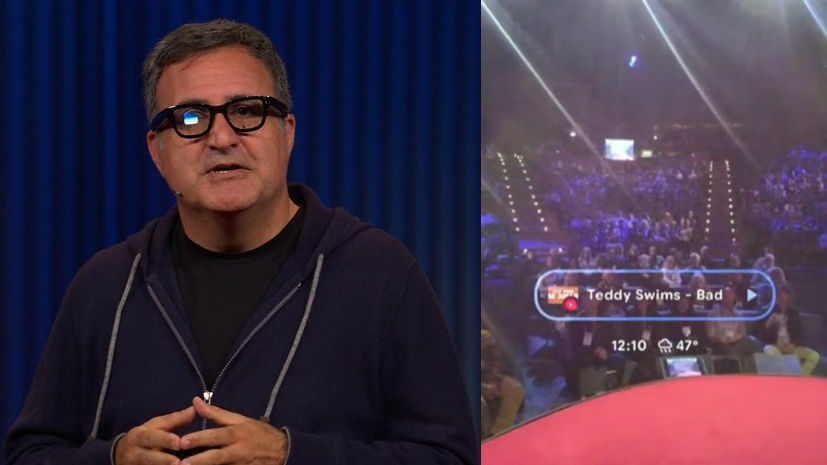
The tease comes one month after Google’s Android XR lead Shahram Izadi demonstrated sleek smart glasses with a small monocular HUD, which the company described as “ conceptual hardware”, on-stage at TED2025.

Google may be hoping to preempt Meta’s launch of its own smart glasses with a monocular HUD, reportedly set for October, though there’s no indication that Google will have an actual product ready before Meta.

In October The Information reported that Samsung is working on a Ray-Ban Meta glasses competitor with Google Gemini AI, though it’s unclear whether this product will have a HUD.

Google Shows Off Sleek AI Smart Glasses With A HUD
At TED2025 Google showed off sleek smart glasses with a HUD, though the company described them as ” conceptual hardware”.
UploadVRDavid Heaney

Google’s Senior Director of Product Management Guemmy Kim also confirmed that at I/O the company will share more about Android XR, its new operating system set to debut in Samsung’s upcoming standalone headset later this year.