After back-to-back failures, SpaceX tests its fixes on the next Starship

SpaceX fired six Raptor engines on the company’s next Starship rocket Monday, clearing a major hurdle on the path to launch later this month on a high-stakes test flight to get the private rocket program back on track.

Starship ignited its Raptor engines Monday morning on a test stand near SpaceX’s Starbase launch facility in South Texas. The engine ran for approximately 60 seconds, and SpaceX confirmed the test-firing in a post on X: “Starship completed a long duration six-engine static fire and is undergoing final preparations for the ninth flight test.”

SpaceX hasn’t officially announced a target launch date, but maritime warnings along Starship’s flight path over the Gulf of Mexico suggest the launch might happen as soon as next Wednesday, May 21. The launch window would open at 6:30 pm local time (7:30 pm EDT; 23:30 UTC). If everything goes according to plan, Starship is expected to soar into space and fly halfway around the world, targeting a reentry and controlled splashdown into the Indian Ocean.

Read full article

Comments

Google Wants To Make Stolen Android Phones Basically Unsellable

Google is enhancing Android’s Factory Reset Protection (FRP) to make stolen phones virtually unusable by detecting setup wizard bypasses and requiring a second factory reset until ownership is verified. Android Authority reports: You can factory reset an Android phone in several ways. However, triggering a reset through the Android recovery menu or Google’s Find My Device service activates Factory Reset Protection (FRP). During setup after such a reset, the wizard requires you to verify ownership by either signing into the previously associated Google account or entering the device’s former lock screen PIN, password, or pattern. Failing this verification step blocks setup completion, rendering the device unusable. […]

Factory Reset Protection (FRP) is a valuable feature that discourages theft by rendering stolen Android phones useless to potential buyers if wiped improperly. However, FRP isn’t foolproof; thieves have discovered numerous methods over the years to circumvent it. These bypasses typically involve skipping the setup wizard, allowing someone to use the phone without entering the previous owner’s Google account details or screen lock.

During The Android Show: I/O Edition, Google announced plans to “further harden Factory Reset protections, which will restrict all functionalities on devices that are reset without the owner’s authorization.” While the company didn’t elaborate much, a screenshot it shared suggests that Android will likely detect if someone bypasses the setup wizard and then force another factory reset, preventing unauthorized use until the user proves ownership. […] Google stated this FRP improvement is coming “later this year.” Since the stable Android 16 release is coming soon, this timeline suggests the feature won’t be part of the initial launch. It might arrive later in one of Android 16’s Quarterly Platform Releases (QPRs), but that remains to be seen.


Read more of this story at Slashdot.

Update Your iPhone to Make Sure FaceTime’s Mute Button Actually Works

Some software updates pack in a number of features and changes, while others fundamentally overhaul the experience of using the device in question. iOS 18.5 is neither: This is a minor update, but that’s to be expected. WWDC is next month, where Apple will almost assuredly announce iOS 19.

But iOS 18.5 isn’t an empty update. Once you install it on your iPhone, you will notice some changes—and some of the changes you don’t notice are the most important of all. Here’s everything that’s new in the latest iOS update:

An easy way to disable contact photos in Mail

With iOS 18.2, Apple upgraded the Mail app. For some, the changes made the Mail app more organized and efficient to use. For others, it was bloated and confusing. Contact photos didn’t help.

The idea is that if you have a contact photo for a sender, it’ll appear in the left side of the message in your inbox. However, if you don’t have such a photo, Mail will use an image from Apple’s stock library. Taste is subjective, but, frankly, these stock icons just don’t look good.

Luckily, you can disable them, but you’d never know that unless you’re someone who loves diving through your Settings app. iOS 18.5 fixes that with an easy option right in the Mail app itself. Lifehacker’s Khamosh Pathak explained the change in more depth here.

It just got more difficult to bypass Screen Time settings

Apple’s Screen Time feature is a great tool for parents—and, I can only image, a pain for kids. Parents can set a passcode to lock Screen Time settings, and ensure that kids can’t access aspects of their iPhone their parents don’t want them to. Of course, passcodes are an infamously futile restriction, as savvy kids will always figure out how to break in.

While Apple’s isn’t reinventing the passcode wheel with iOS 18.5, it is making Screen Time a bit more secure. Once you update, you’ll receive a notification whenever the Screen Time passcode is used on a child’s device. That won’t stop your kids from figuring out your Screen Time passcode, but it will nip their fun in the bud pretty quickly.

I imagine the kids will figure out some workaround to this feature in the future. But, for now, you have an additional tool to help ensure the restrictions stay in place.

A new “Pride Harmony” wallpaper

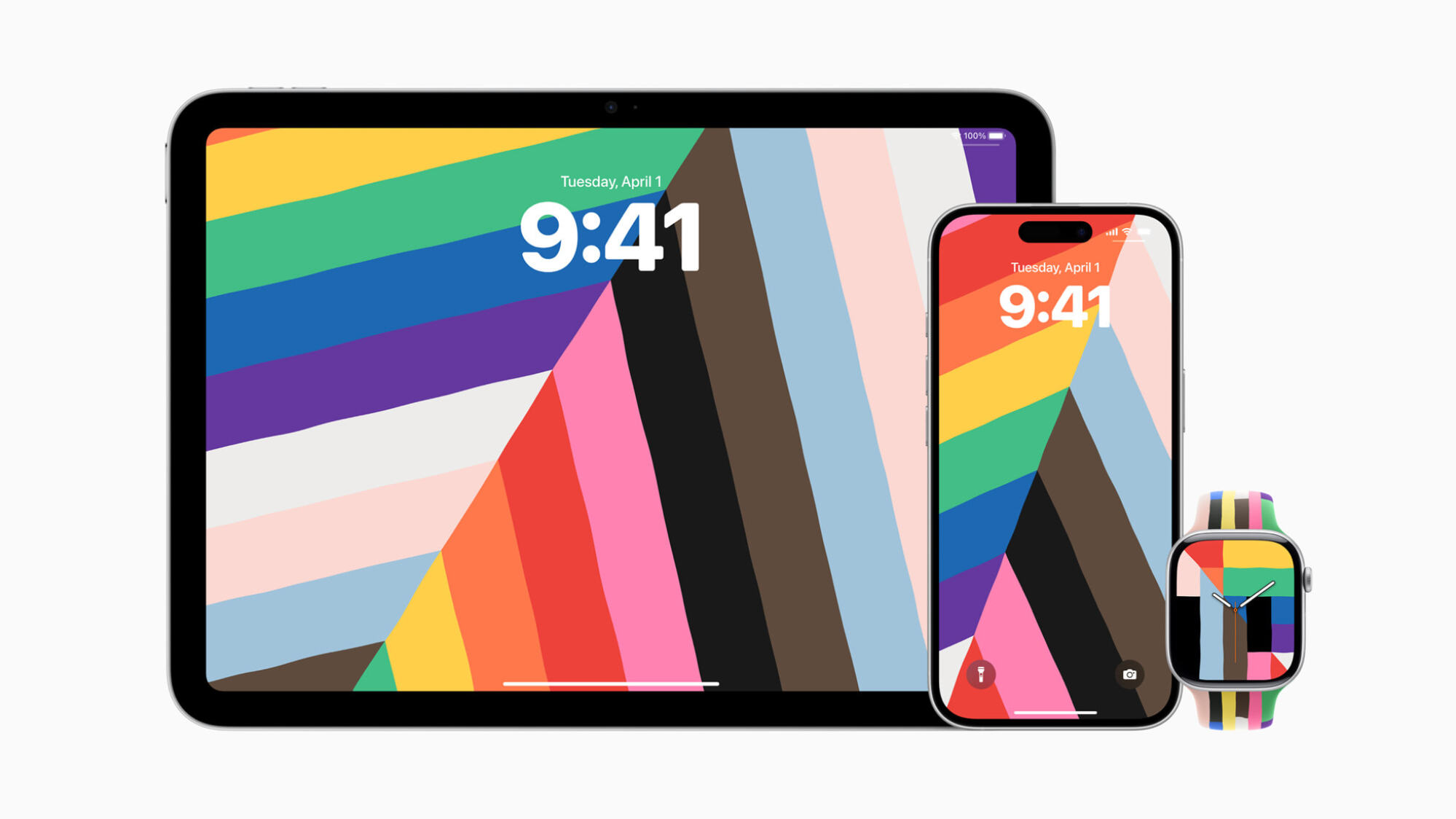
apple pride harmony wallpaper on ipad, iphone, and apple watch

Credit: Apple

In anticipation of Pride Month, Apple is rolling out a new “Pride Harmony” wallpaper for its various devices. The wallpaper features colors of the rainbow that adjust their positions as you move, lock, or unlock your iPhone or iPad. Apple also has a new Pride Edition Sport Band, which features a similar color scheme. Apple says its goal with the Pride Harmony design is to “celebrate the strength and beauty of LGBTQ+ communities around the world.”

It’s easy to be cynical about corporate pride, but considering the times we live in, it’s cool to see Apple continuing to be as openly supportive of the LGBTQ+ community as it has been in recent years. (Tim Cook’s donations aside.)

“Buy with iPhone” now available on third-party devices

When you buy something on the Apple TV’s TV app (say that three times fast), you have the option to approve that purchase with your iPhone. With iOS 18.5, that feature is coming to the TV app on non-Apple devices. That way, you don’t need to make the purchase on the TV app of another Apple device before being able to watch on your third-party device.

Carrier-provided satellite features are now available on the iPhone 13 series

Since 2023, Apple has officially supported satellite communications for all iPhones starting with the 14 series. If you’re out without cell services, you can connect to a satellite to reach out to the authorities for help—or even just text a friend.

Following this latest update, however, iPhone 13 users will be able to take advantage of satellite features as well.

Apple Vision Pro app gets a bug fix

The update also fixes an issue with the Apple Vision Pro app, where the app may sometimes display a black screen.

Security updates

iOS 18.5’s sleeper feature is the security boost it provides your iPhone. In all, the update patches over 30 bugs. Luckily, Apple isn’t aware of any exploits for these vulnerabilities, which means hackers have likely not used these flaws to target iPhone users. That said, the safest course of action is to update your iPhone as soon as possible, in case someone does figure out how to use these flaws against you.

Plus, there are some non-hacking vulnerabilities here you should patch. FaceTime’s mute button, for example, might not actually work, which should be more than enough reason to update to iOS 18.5. (Be careful when talking smack while on a FaceTime call.)

You can see the full list of updates here.

Carl Pei teases the ‘all-in’ Nothing Phone 3 with a flagship price

Buried in the blog posts and videos that accompanied Google’s The Android Show: I/O Edition announcements was a nugget of Nothing news: The Nothing Phone 3 is going to be expensive. In an Android marketing video showcasing the company’s phones, Nothing CEO Carl Pei shared that the new phone will cost around £800 when it launches this summer.

That new cost is thanks to Nothing’s decision to go “all-in” on the new device by including “premium materials, major performance upgrades and software that really levels things up,” according to Pei. The Nothing Phone 2 launched at £580 in the UK and $600 in the US, so selling the Phone 3 at £800 is a noticeable price jump. Assuming Nothing follows through on the premium upgrades it’s promising, though, maybe it’ll make sense that the Phone 3 costs as much as a Pixel 9 or iPhone 16.

Nothing made its name on affordable phones that have unique, premium designs. For example, the company launched the Phone 3a and Phone 3a Pro in March 2025, the budget and mid-range counterparts to the Phone 3. Both phones use mid-range chips and camera sensors, but feature a futuristic design and clever AI features that you’d expect out of a much more expensive device.

Switching to trying to compete with Apple and Samsung in terms of price suggests Nothing is confident, at the very least. We’ll have to wait until this summer when the Phone 3 is actually released to see if that confidence is justified.

This article originally appeared on Engadget at https://www.engadget.com/mobile/smartphones/carl-pei-teases-the-all-in-nothing-phone-3-with-a-flagship-price-213023983.html?src=rss

Your Spotify AI DJ Is Now Taking Verbal Requests

Spotify’s AI DJ is like if ChatGPT decided to switch careers. The DJ curates a playlist of music based on Premium subscribers’ previous play history, including new and old songs in the mix. Of course, the headline feature is the DJ’s voice, as the AI bot announces which songs are up next, as well as some information about each. Whether you love or hate AI, it’s a pretty harmless feature, and seems fun for those who pay for Spotify.

While DJ feels interactive, it really isn’t. Aside from skipping songs, it’s mostly a passive feature. That’s now changing: In a blog post on Tuesday, Spotify announced that you will now be able to make requests to the DJ with your voice. If you’re enjoying the personalized playlist, but want to listen to something in particular—whether that be a song, genre, or mood—you can now ask the DJ to play it.

In a video on the press release, Spotify demos a user asking, “DJ, morning motivation needed ASAP…give me some dance-pop vibes.” The DJ responds in kind: “No problem. Here’s some LISA.” In another example, the user asks, “play me something with a Y2K vibe to celebrate.” DJ decides to run with Tate McRae, “with that nostalgic sound you’ve had on repeat.”

Some other request examples Spotify highlighted include:

  • “Surprise me with some indie tracks I’ve never heard before.”

  • “Give me some electronic beats for a midday run.”

  • “Play me some cry-in-the-car songs.”

Spotify says that DJ requests are available in English for Premium users in over 60 markets. If you have access to the DJ, you have access to requests.

How to make a DJ request on Spotify

First, you’ll need to subscribe to Spotify Premium and live in an area where the DJ is available. If those two points are met, open Spotify and search for “DJ.” Press play to launch the DJ, then press and hold the DJ button in the right-hand corner. (Listen for a beep.) Now, place your request.

As usual, if you don’t have a specific request but want to hear something else, you can simply skip to the next track, which will likely be something totally different than what was just playing.

Nextcloud Cries Foul Over Google Play Store App Rejection

Nextcloud has accused Google of sabotaging its Android Files app by revoking the “All files access” permission, which the company says
cripples functionality for its 824,000 users and forces reliance on limited alternatives like SAF and MediaStore. The Register reports: Nextcloud’s Android Files app is a file synchronization tool that, according to the company, has long had permission to read and write all file types. “Nextcloud has had this feature since its inception in 2016,” it said, “and we never heard about any security concerns from Google about it.” That changed in 2024, when someone or something at Google’s Play Store decided to revoke the permission, effectively crippling the application. Nextcloud was instructed to use “a more privacy-aware replacement.” According to Nextcloud, “SAF cannot be used, as it is for sharing/exposing our files to other apps … MediaStore API cannot be used as it does not allow access to other files, but only media files.”

Attempts to raise the issue with Google resulted in little more than copy-and-pasted sections of the developer guide. “Despite multiple appeals from our side and sharing additional background, Google is not considering reinstating upload for all files,” Nextcloud said. The issue seems to stem from the Play Store. While a fully functional version is available on F-Droid, the Play Store edition is subject to Google’s imposed limitations. Regarding the All files access permission, Google’s developer documentation states: “If you target Android 11 and declare All files access, it can affect your ability to publish and update your app on Google Play.”

Nextcloud is clearly aggrieved by the change, as are its users. “This might look like a small technical detail but it is clearly part of a pattern of actions to fight the competition,” it said. “What we are experiencing is a piece of the script from the big tech playbook.” […] Are there nefarious actors at play here, an automated process that auto-rejects apps with elevated access requirements, or is it just simple incompetence? “Either way,” Nextcloud said, “it results in companies like ours just giving up, reducing functionality just to avoid getting kicked out of their app store.”

“The issue is that small companies — like ours — have pretty much no recourse,” it added. Nextcloud went on to criticize oversight processes as slow-moving, with fines that sound hefty but amount to little more than a slap on the wrist. “Big Tech is scared that small players like Nextcloud will disrupt them, like they once disrupted other companies. So they try to shut the door.”


Read more of this story at Slashdot.

The USDA will republish climate change information online following farmer lawsuit

In the early days of President Donald Trump‘s second administration, federal agencies including the US Department of Agriculture were ordered to remove information about climate change from their websites. Now, the USDA has committed to reinstating the deleted content following a lawsuit on behalf of the Northeast Organic Farming Association of New York, the National Resources Defense Council and the Environmental Working Group. According to a letter sent yesterday to a district court judge, the agency has already begun the restoration process and expects to “substantially complete” the effort in about two weeks.

The material removed from USDA sites in February included content about climate-smart agriculture, forest conservation, climate change adaptation and clean energy project investments in rural areas. The trio of plaintiffs sued on the basis that removing that information violated the Freedom of Information Act that allows public access to important federal records, as well as failing to provide advanced notice required by the Paperwork Reduction Act and without the reasoned decision-making of the Administrative Procedure act. The USDA said that it “will restore the climate-change-related web content that was removed post-Inauguration, including all USDA webpages and interactive tools enumerated in plaintiffs’ complaint.” 

“This is a major victory and an important first step. Members of the public, including our clients, rely on information from USDA to understand how climate change is affecting our nation’s forests, food supply, and energy systems,” said Stephanie Krent, staff attorney with Knight First Amendment Institute, which helped file the lawsuit. “USDA was wrong to remove these webpages in the first place, and it must comply with federal law going forward.”

This article originally appeared on Engadget at https://www.engadget.com/science/the-usda-will-republish-climate-change-information-online-following-farmer-lawsuit-211907357.html?src=rss

“Google wanted that”: Nextcloud decries Android permissions as “gatekeeping”

Nextcloud is a host-your-own cloud platform that wants to help you “Regain control over your data.” It contains products that allow for video chat, file storage, collaborative editing, and other stuff that reads a lot like a DIY Google Workspace replacement.

It’s hard to offer that kind of full replacement, though, if your Android app can’t upload anything other than media files. Since mid-2024, Nextcloud claims, Google has refused to reinstate the access it needs for uploading and syncing other file types.

“To make it crystal clear: All of you as users have a worse Nextcloud Files client because Google wanted that,” reads a Nextcloud blog post from May 13, attributed to its team. “We understand and share your frustration,” but there is nothing we can do.”

Read full article

Comments

How (and Why) to Connect Your Apple Watch to Your Peloton

I am someone who is borderline obsessed with monitoring my health and fitness data. I use a smart scale, a calorie- and nutrient-tracking app, smart workout equipment, and my beloved Apple Watch to create a picture of my overall physical well-being that is as complete as possible. The only time I take my Apple Watch off is when I’m dressing up to go somewhere nice and even then, it pains me deeply. Just imagine the heart rate and calorie-burning data I’m missing out on while I waltz around in my fancy dress. It’s sickening.

All of these apps and devices work in concert to keep tabs on my every heartbeat and footstep, but there is a notable exception. I am usually against linking my Apple Watch to apps that track my workouts, as this has caused headaches in the past by double-importing data into my food-tracking app and daily Apple Health summary—this defeats the purpose of the monitoring altogether by significantly inflating my burned calories and total active minutes. Today, reluctantly, I linked my Apple Watch to my Peloton Bike, expecting it to cause the same problems—but it only impressed me. Now, I’m a believer in linking these two devices. I’ll tell you why, plus how to do it.

How to link your Apple Watch and Peloton device

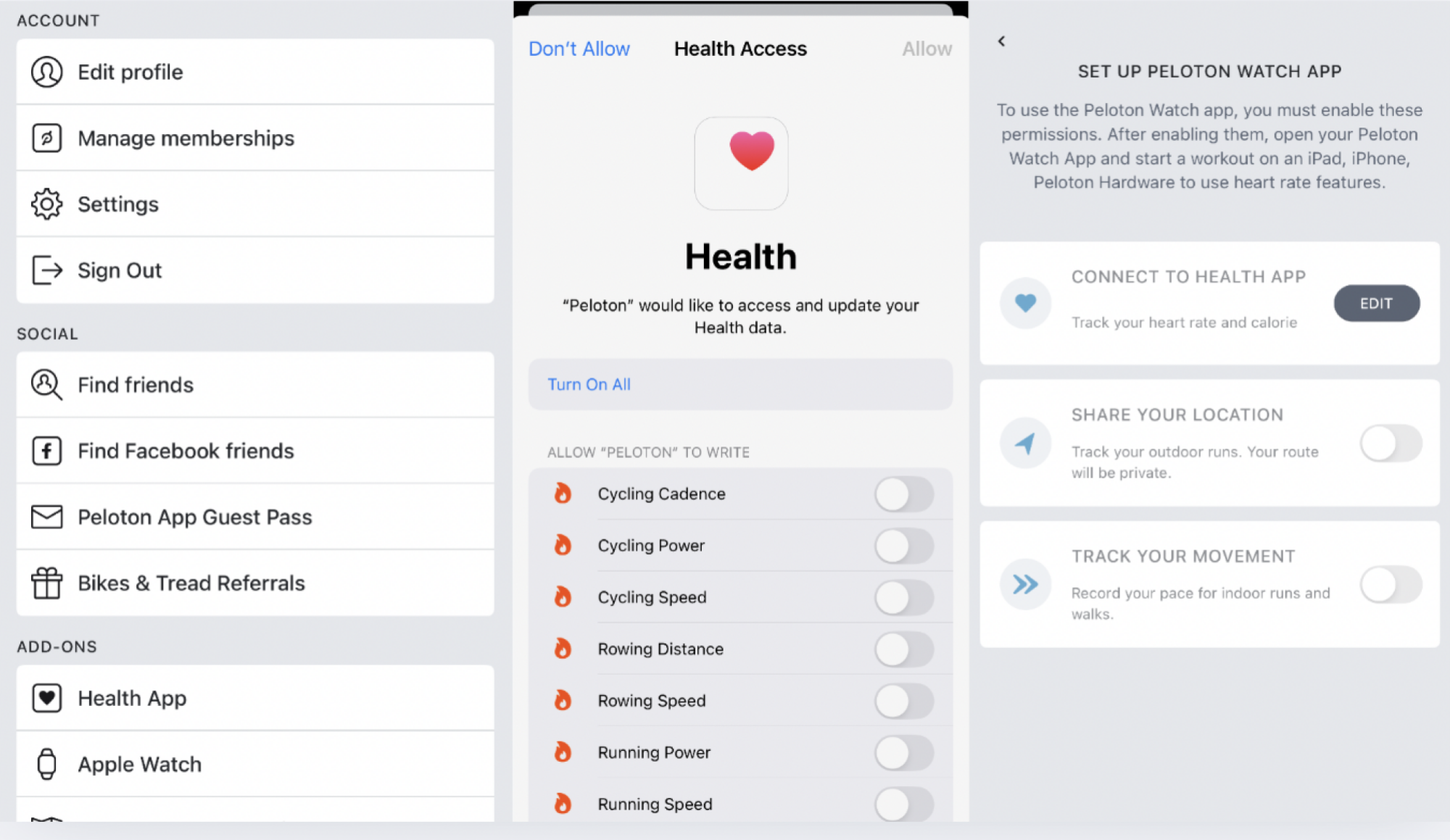
On your Peloton app, select your Profile (on the right of the menu at the bottom of the home screen), then find the hamburger menu on the top right of your profile screen. Selecting that will bring you to a page called More and right there, under Add-Ons, you’ll find Apple Watch.

Setting up Apple Watch in Peloton iOS app

Credit: Lindsey Ellefson

Tap that, grant the permissions in Apple Health when prompted, hit Set up, and you’ll see three choices: Connect to Health App, Share Your Location, and Track Your Movement. For our purposes, with the Bike and other at-home workout equipment, you’ll just toggle on that first one, but if you want your outdoor runs tracked privately, toggle on the second one, and if you want your pace for indoor runs and walks recorded, hit the third one, too.

From there, I just opened the Watch app on my phone to double-check that the Peloton app was included in the apps installed on the device. I scrolled to the bottom of the Watch app, selected Peloton from the list under Installed on Apple Watch, and toggled on Show App on Apple Watch.

Why I enjoy the link between the Apple Watch and Peloton

After that, I hopped on my stationary bike and started up a workout. I opened up the Workout app on my watch and selected “indoor cycle,” then opened the Peloton app on the watch. It showed me a blank screen with just a few words telling me to start a workout on the bike, so I did. Suddenly, the watch screen changed and began showing my heart rate. More interestingly, a small heart-rate tracker appeared on the upper left on my Peloton touch screen along with a power bar showing what “zone” I was in based on my heart rate. (My Peloton “power zones” are customized to my fitness level because I took the FTP test offered through the bike, which you should also do.)

There’s already plenty of information available on the screen, like cadence, resistance, and output, but I didn’t find this distracting. It was actually pretty helpful to get a sense of what “zone” I was in. I only selected a 10-minute workout, so I didn’t expect to be wiped out, but it was nice to gauge how much I was pushing myself so I could work to get the most out of those 10 minutes. When the class was over, I opened the Lanebreak app on the bike. Lanebreak is a virtual game offered by Peloton that I absolutely love and play every day, so I was interested in seeing if the heart rate monitor would pop up on the screen during a level, too. It did!

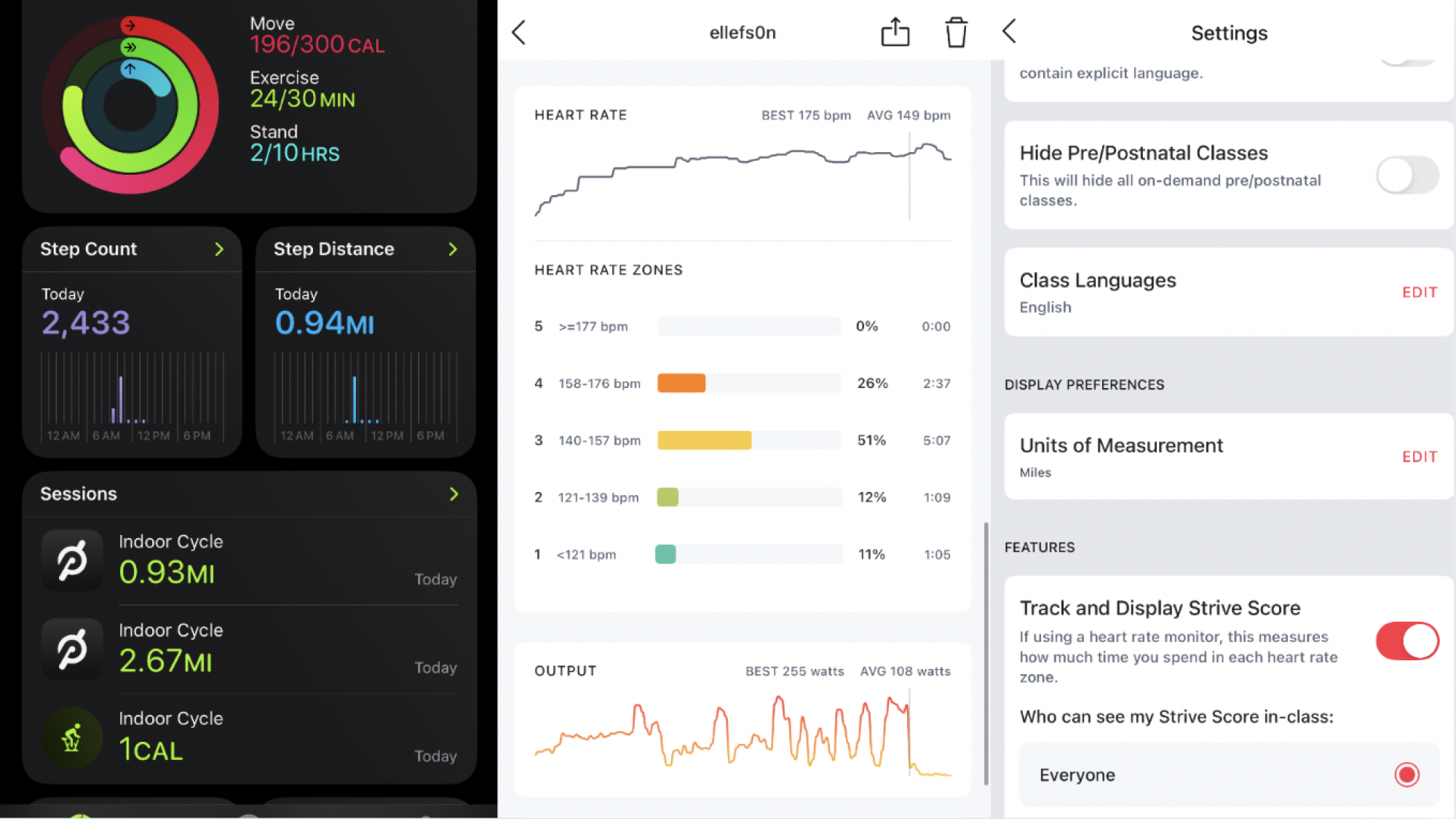
After my five-minute cooldown Lanebreak level ended, I opened the Workout app on the watch again to mark down that I was done, like I always do. To my surprise, the Peloton app actually overrode it; the Workout app had stopped tracking my indoor cycle session as soon as the Peloton app took over. That made me nervous because I was afraid that the workout wouldn’t be reflected in my Apple Health daily summary or Activity Rings, but when I opened that up on my phone, there they were: Two “indoor cycle” workouts under Sessions. Where they’d normally have the green Apple Workout logo next to them, they had the Peloton logo. They were tracked and categorized just like an indoor cycle session I would normally monitor using my watch. They counted toward the Move and Exercise portions of my Activity Rings and all.

I opened my nutrition-tracking app to make sure the burned calories hadn’t been double-entered. They hadn’t! The Peloton App succeeds where other apps have failed: It doesn’t make tracking your movement across various apps and devices a convoluted mess.

Finally, I opened the Peloton app to look at the summary of my workouts. They usually include estimates of your burned calories and output, plus which muscles you worked and how long you were at it, but now, they included more detailed breakdowns of how long I spent in each heart rate zone and provided more information on my total output.

What is the benefit of linking these devices?

Like I said, the Peloton app tracked the same things my Apple Watch would track on its own using the Workout function: My heart rate, my burned calories, and the duration of my workout. So, you might wonder, what’s the point of linking the bike (or Peloton Tread or Row) to the watch at all?

There are a few benefits that are evident here. First, it was convenient to see my heart rate and power zone reflected on the Peloton screen. I didn’t have to glance down at my wrist to see my heart rate like I usually do; I could stay focused on the screen, which is important for safety, and pace myself in real time to make sure I stayed in the zone I wanted to be in.

Second, linking the Apple Watch and Peloton device enables you to see something called you “strive score.” This is a personal metric that helps you understand and visualize how hard you worked during a class or ride, and it’s based on a combination of your heart rate and how long you spent in each of Peloton’s seven “power zones.” (Lower zones correspond with a lower heart rate and higher zones correspond with a higher one.)

Peloton Apple Watch data in iOS

Credit: Lindsey Ellefson

Be warned: You have to toggle on the strive score separately, which I didn’t know at first, so my 10-minute ride doesn’t have one, but my Lanebreak level does. Doing this is simple: From that same More menu in your profile, hit Settings and scroll all the way to the bottom. Toggle on Track and Display Strive Score and then choose whether in-class participants can see it or not. I was annoyed that the only strive score I got for the day was a measly 2.2 on my five-minute cooldown, but that only inspires me to, well, strive for a higher one tomorrow.

Overall, there is no downside to linking your Apple Watch and Peloton device, which isn’t always true when it comes to other fitness apps. In fact, you can get even more comprehensive workout data by doing it and I, for one, think it’s awesome.

Microsoft shares its process (and discarded ideas) for redone Windows 11 Start menu

Microsoft put a lot of focus on Windows 11’s design when it released the operating system in 2021, making a clean break with the design language of Windows 10 (which had, itself, simply tweaked and adapted Windows 8’s design language from 2012). Since then, Microsoft has continued to modify the software’s design in bits and pieces, both for individual apps and for foundational UI elements like the Taskbar, system tray, and Windows Explorer.

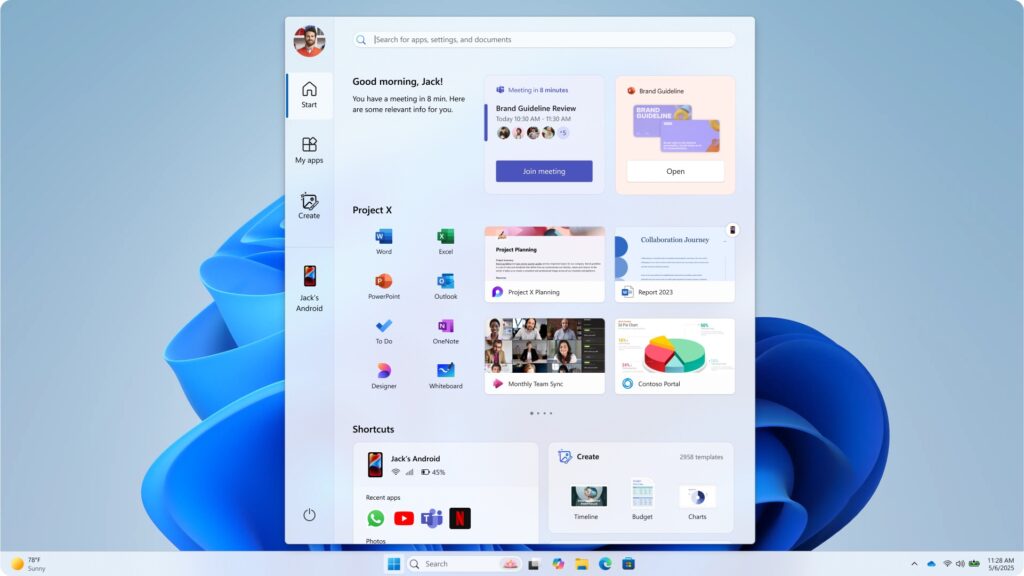
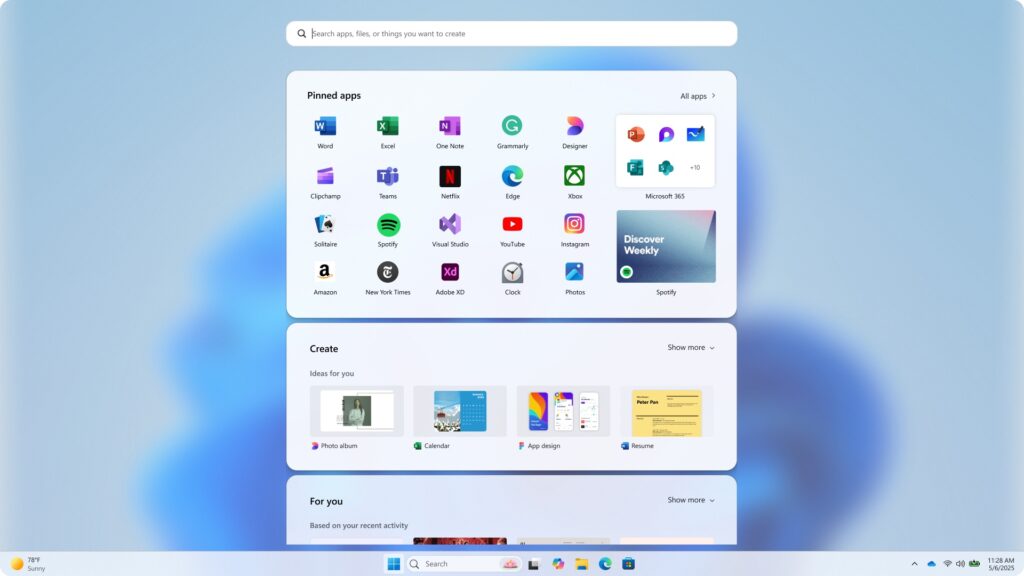
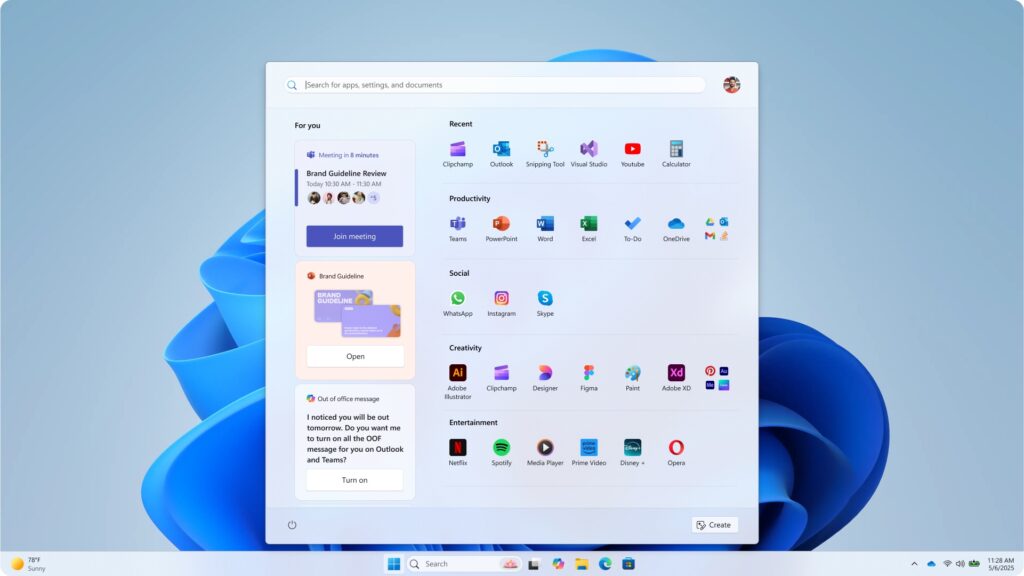
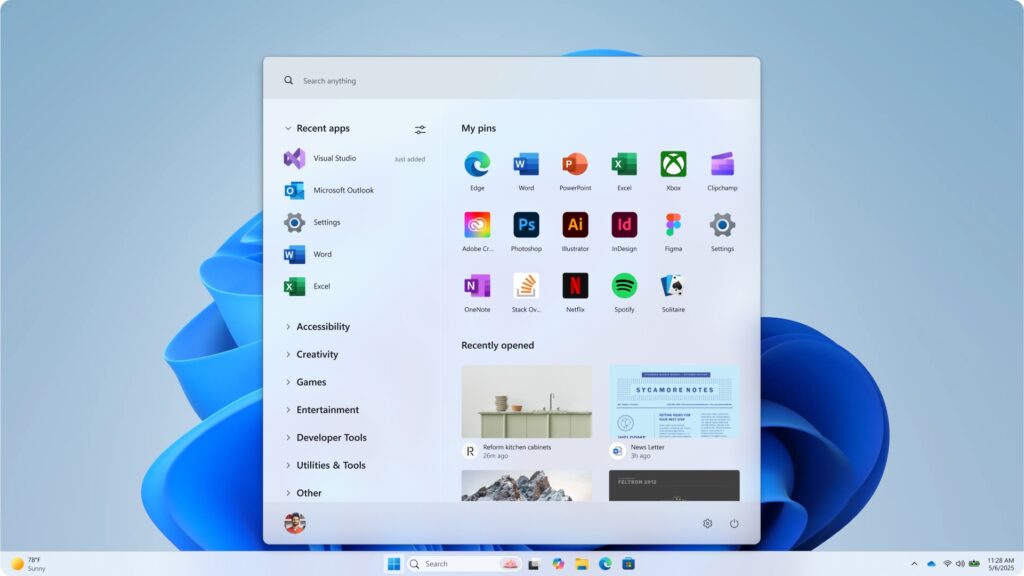
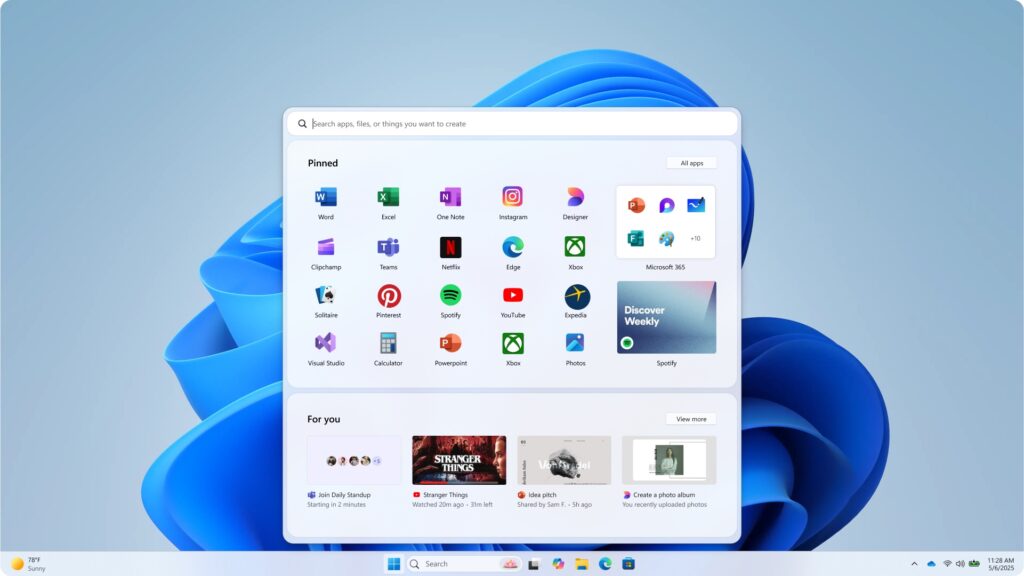
Microsoft is currently testing a redesigned version of the Windows 11 Start menu, one that reuses most of the familiar elements from the current design but reorganizes them and gives users a few additional customization options. On its Microsoft Design blog today, the company walked through the new design and showed some of the ideas that were tried and discarded in the process.

This discarded Start menu design toyed with an almost Windows XP-ish left-hand sidebar, among other elements.


Credit:

Microsoft

Some designs brings to mind the full-screen Start experience of Windows 8.


Credit:

Microsoft

Another big design with acres of icons and more space dedicated to non-app-icons.


Credit:

Microsoft

This design included thumbnail previews for recently opened files.


Credit:

Microsoft

Another discarded Start menu design.


Credit:

Microsoft

Microsoft says it tested its menu designs with “over 300 Windows 11 fans” in unmoderated studies, “and dozens more” in “live co-creation calls.” These testers’ behavior and reactions informed what Microsoft kept and what it discarded.

Read full article

Comments

[$] A look at what’s possible with BPF arenas


BPF arenas
are areas of memory where the verifier can safely relax its checking of
pointers, allowing programmers to write arbitrary data structures in BPF. Emil
Tsalapatis reported on how his team has used arenas in writing

sched_ext schedulers
at the 2025 Linux Storage, Filesystem,
Memory-Management, and BPF Summit. His biggest complaint was about the fact that
kernel pointers can’t be stored in BPF arenas — something that the BPF
developers hope to address, although there are some implementation problems that
must be sorted out first.

NASA Webb Reveals Breathtaking Detail And Mysterious Activity In Jupiter’s Auroras

NASA Webb Reveals Breathtaking Detail And Mysterious Activity In Jupiter's Auroras
As a planet that’s over 1,300 times larger than the Earth, Jupiter was dubbed King of the Planets for a reason. Recurring extraordinary phenomena in its atmosphere are also testimonies that it is truly the largest planet in our solar system. Scientists have reported that data captured by NASA’s JWST reveals stunning details about Jupiter’s

Republicans Try To Cram Decade-Long AI Regulation Ban Into Budget Reconciliation Bill

An anonymous reader quotes a report from 404 Media: Late last night, House Republicans introduced new language to the Budget Reconciliation bill that will immiserate the lives of millions of Americans by cutting their access to Medicaid, and making life much more difficult for millions more by making them pay higher fees when they seek medical care. While a lot of attention will be justifiably given to these cuts, the bill has also crammed in new language that attempts to entirely stop states from enacting any regulation against artificial intelligence.

“…no State or political subdivision thereof may enforce any law or regulation regulating artificial intelligence models, artificial intelligence systems, or automated decision systems during the 10 year period beginning on the date of the enactment of this Act,” says the text of the bill introduced Sunday night by Congressman Brett Guthrie of Kentucky, Chairman of the House Committee on Energy and Commerce. The text of the bill will be considered by the House at the budget reconciliation markup on May 13.

That language of the bill, how it goes on to define AI and other “automated systems,” and what it considers “regulation,” is broad enough to cover relatively new generative AI tools and technology that has existed for much longer. In theory, that language will make it impossible to enforce many existing and proposed state laws that aim to protect people from and inform them about AI systems. […] In theory none of these states will be able to enforce these laws if Republicans manage to pass the Budget Reconciliation bill with this current language.


Read more of this story at Slashdot.

Google introduces Advanced Protection mode for its most at-risk Android users

Google is adding a new security setting to Android to provide an extra layer of resistance against attacks that infect devices, tap calls traveling through insecure carrier networks, and deliver scams through messaging services.

On Tuesday, the company unveiled the Advanced Protection mode, most of which will be rolled out in the upcoming release of Android 16. The setting comes as mercenary malware sold by NSO Group and a cottage industry of other exploit sellers continues to thrive. These players provide attacks-as-a-service through end-to-end platforms that exploit zero-day vulnerabilities on targeted devices, infect them with advanced spyware, and then capture contacts, message histories, locations, and other sensitive information. Over the past decade, phones running fully updated versions of Android and iOS have routinely been hacked through these services.

A core suite of enhanced security features

Advanced Protection is Google’s latest answer to this type of attack. By flipping a single button in device settings, users can enable a host of protections that can thwart some of the most common techniques used in sophisticated hacks. In some cases, the protections hamper performance and capabilities of the device, so Google is recommending the new mode mainly for journalists, elected officials, and other groups who are most often targeted or have the most to lose when infected.

Read full article

Comments

How to Make Your First ‘Ninja Slushi’ (Without Ruining It)

We may earn a commission from links on this page.

Unboxing a new kitchen appliance is one of my favorite experiences—it’s a non-holiday present and I know what’s inside—how wonderful! But the instruction manual part really kills my vibe. I know tossing it aside will almost surely lead to failure, but I hate reading them anyway.

In fact, I did read the operation manual for the Ninja Slushi, and I still managed to screw up my first batch of slush. (You can read about that experience in my review of the Ninja Slushi.) To help you avoid the shame of a ruined slush, not to mention reading the tedious instructions, I’ve assembled this step by step guide on operating your new Ninja Slushi, from set-up to clean-up.

Notes on sugar and alcohol

Before getting started, know that what you put into the machine will directly affect your success. Specifically, the liquid you’re using must have at least 4% sugar content. If it doesn’t, it will become too icy, and the machine will have trouble scraping the frozen mixture out of the evaporator cylinder. (You can’t use artificial sweeteners or sugar substitutes either, unless you want to fall down a rabbit hole of allulose and xanthan gum and brightly hued, sugar-free prepackaged slushie mixes.)

Ninja provides a little chart indicating the minimum amount of sugar you need for a particular serving size. Make a simple syrup by mixing the amount of sugar with an equal amount of water and microwaving it until warm. Stir the mixture until the sugar dissolves. This simple syrup can be added to your greater recipe mixture before pouring it into the Ninja Slushi (make sure to account for the water from your simple syrup in your overall calculations).  

Even if you messed up and froze a cold brew mixture without any sugar by accident, you can fix it. (Maybe I know this first hand? Maybe I don’t.) The machine will stop if it detects a problem with your sugar content during the churning process. This is your chance to make a simple syrup with the correct amount of sugar and pour it in to the mix. Don’t add sugar directly to the chamber mid-freeze—it may have trouble dissolving into the partially frozen drink.

Alcohol has a similar stipulation—a minimum of 2.8% and a maximum of 16% alcohol must be present to make a spiked slush that will freeze properly. Again, there’s a helpful chart to guide you on your journey, but once you know these rules and abide by them, the machine will play nice.

Now, let’s make that slush.

1. Set up the Ninja Slushi

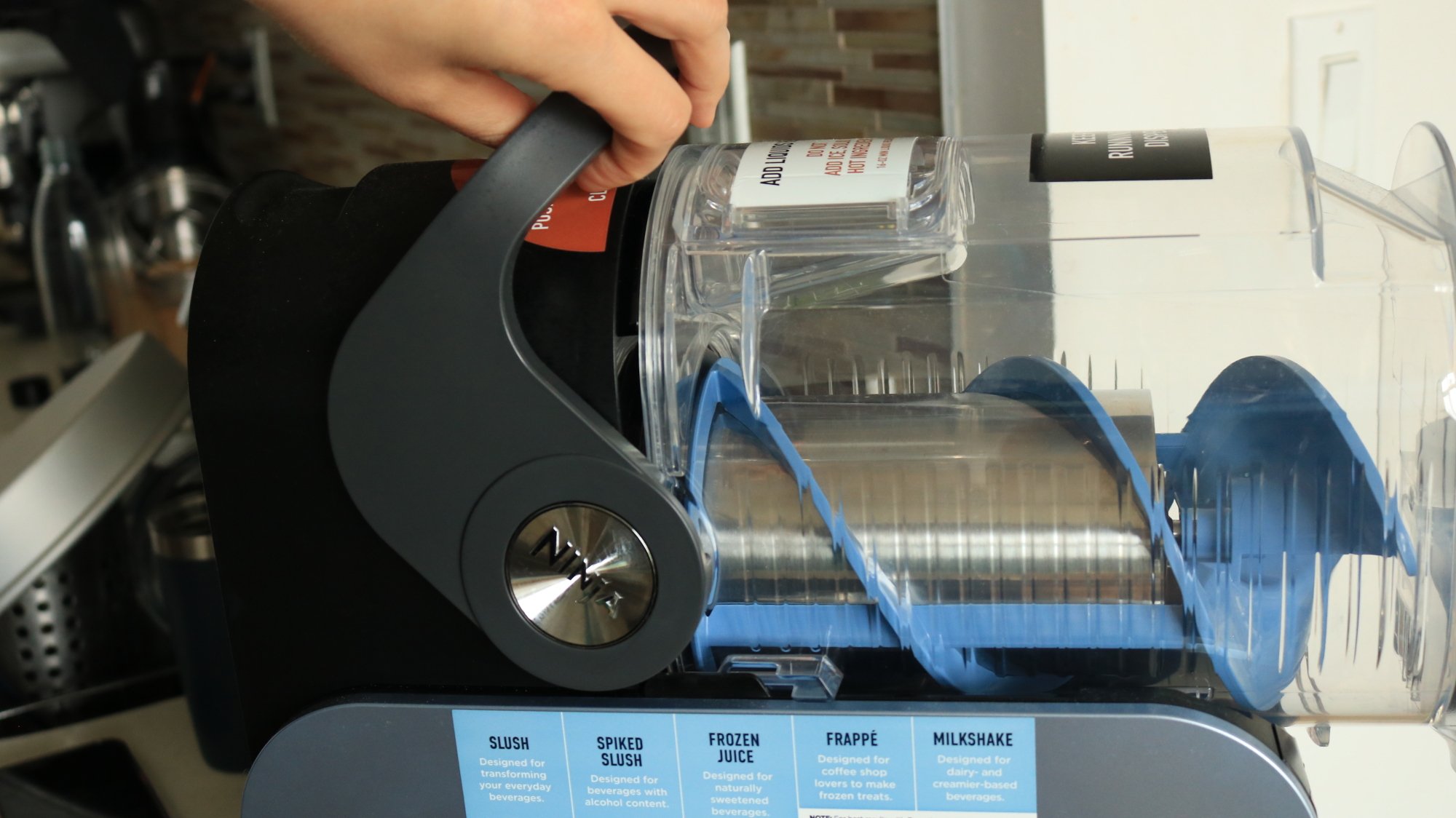
A person pulling the handle to secure the container on the Ninja Slushi.

Credit: Allie Chanthorn Reinmann

Like dishware, bakeware, and anything else from a dusty factory, it’s a good idea to take apart the Slushi and clean the parts with soapy water before you put food in it. That includes the drip tray, the main vessel, the condensation catch, and the auger (that spiral thingy). The silver evaporator is not removable, so just wipe it down with a soft cloth. Dry everything thoroughly.

It’s no small appliance, so make sure you clear off a nice section of your countertop. There are vents on the sides and back, so give those areas room to breathe too. Put the parts back in their respective areas. The main vessel sits into the bail handle in the back, as you pull it backward. It won’t make a clicking sound, but it will sit there securely secure. Once reassembled, plug in the machine.

2. Pour in the liquid mixture

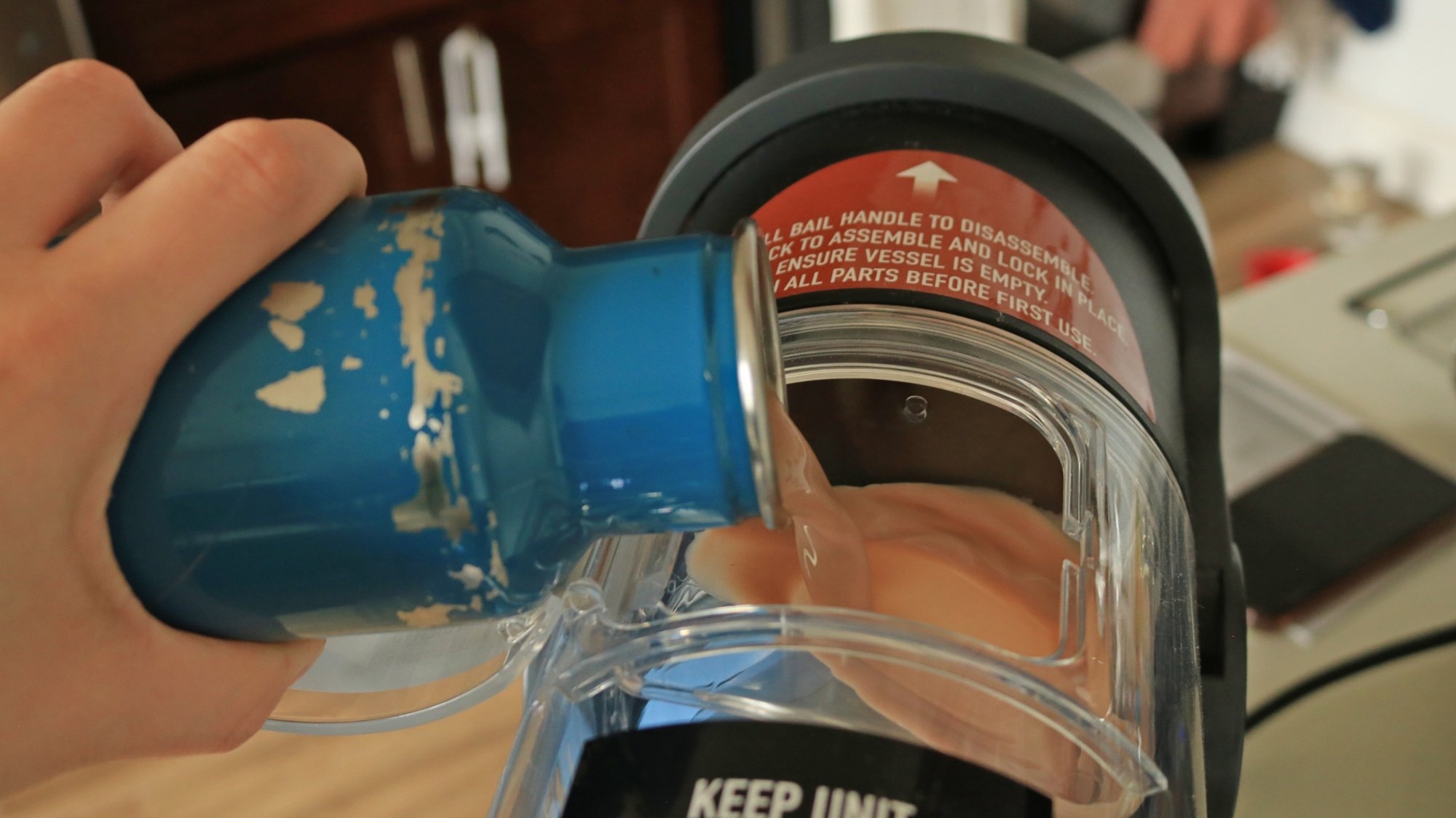
A person pouring a chocolate mixture into the Ninja Slushi vessel.

Credit: Allie Chanthorn Reinmann

The fun part is almost here! Open the hatch on the top of the main clear container. Pour the mixture in, all in one go. Depending on how your Ninja Slushi is situated on the countertop, this might be a little hard to do gracefully. I recommend using a pitcher or a bottle—any container with a somewhat narrow pour spout—for more precision. 

3. Power up

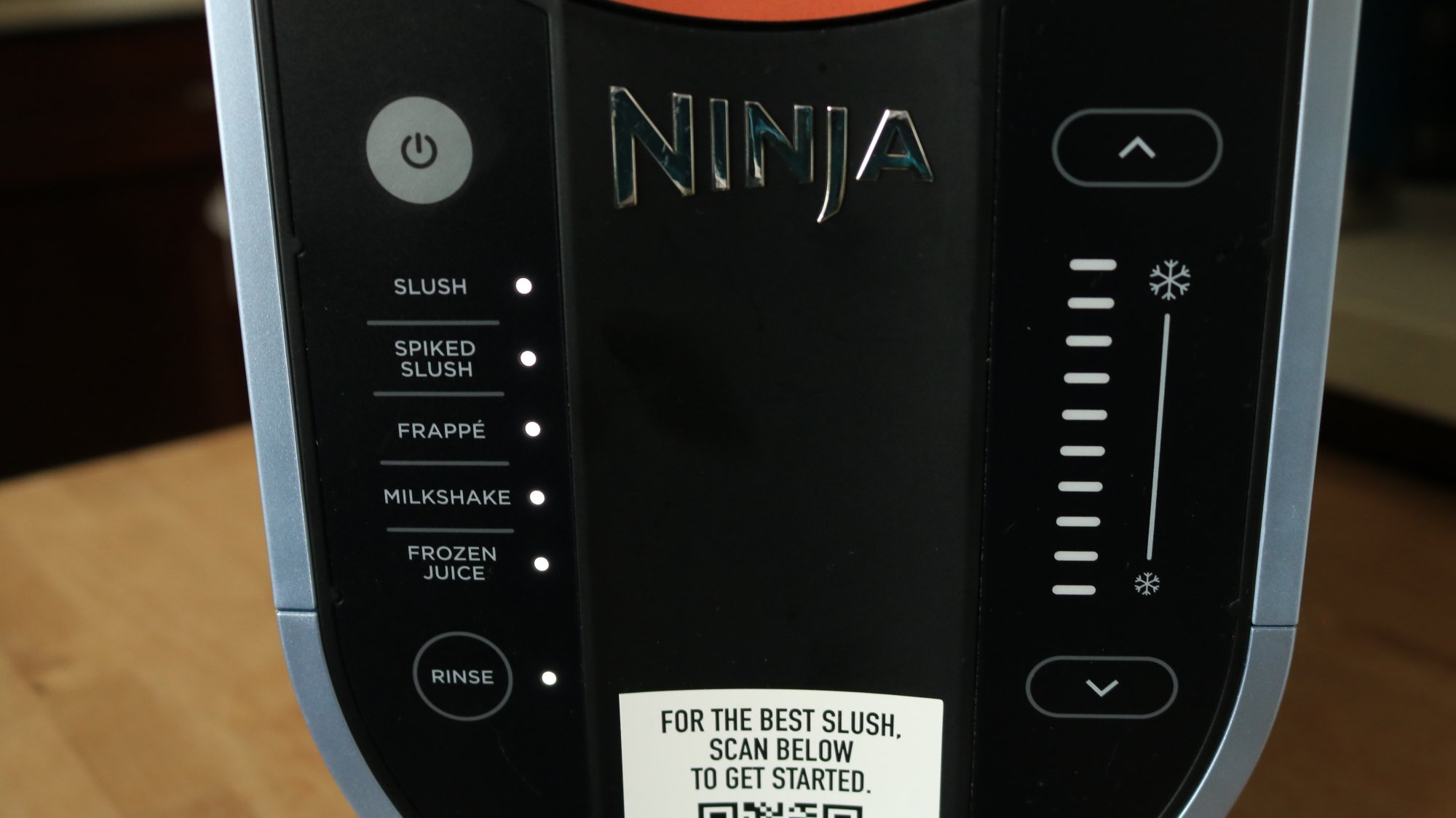
The panel of the Ninja Slushi.

Credit: Allie Chanthorn Reinmann

Click the power button on the control panel. All of the features should light up. On the left side, you’ll see the presets. Select the one that best matches the mixture you made: a regular soda slushie would be the “Slush” preset, an alcoholic slushie would be “Spiked Slush,” a coffee frappé would be the “Frappé” setting, and so on for milkshakes and frozen juices. This time, I decided to make a chocolate milkshake. Press the button you need and the right side panel should automatically light up with the number of bars that indicate the temperature. The machine should start churning, so all you have to do is wait. 

Note that this is the stage where the Ninja Slushi will alert you if you did not add enough sugar or if there’s a problem with the alcohol content. You know how to add more sugar, and more alcohol can go directly in the machine if needed—but if you added too much alcohol to start, you need to fix that by pouring in some water to dilute the mixture. If the tank is already at the Max Fill line, dispense some mixture before adding water to dilute it. 

4. Dispense and adjust consistency 

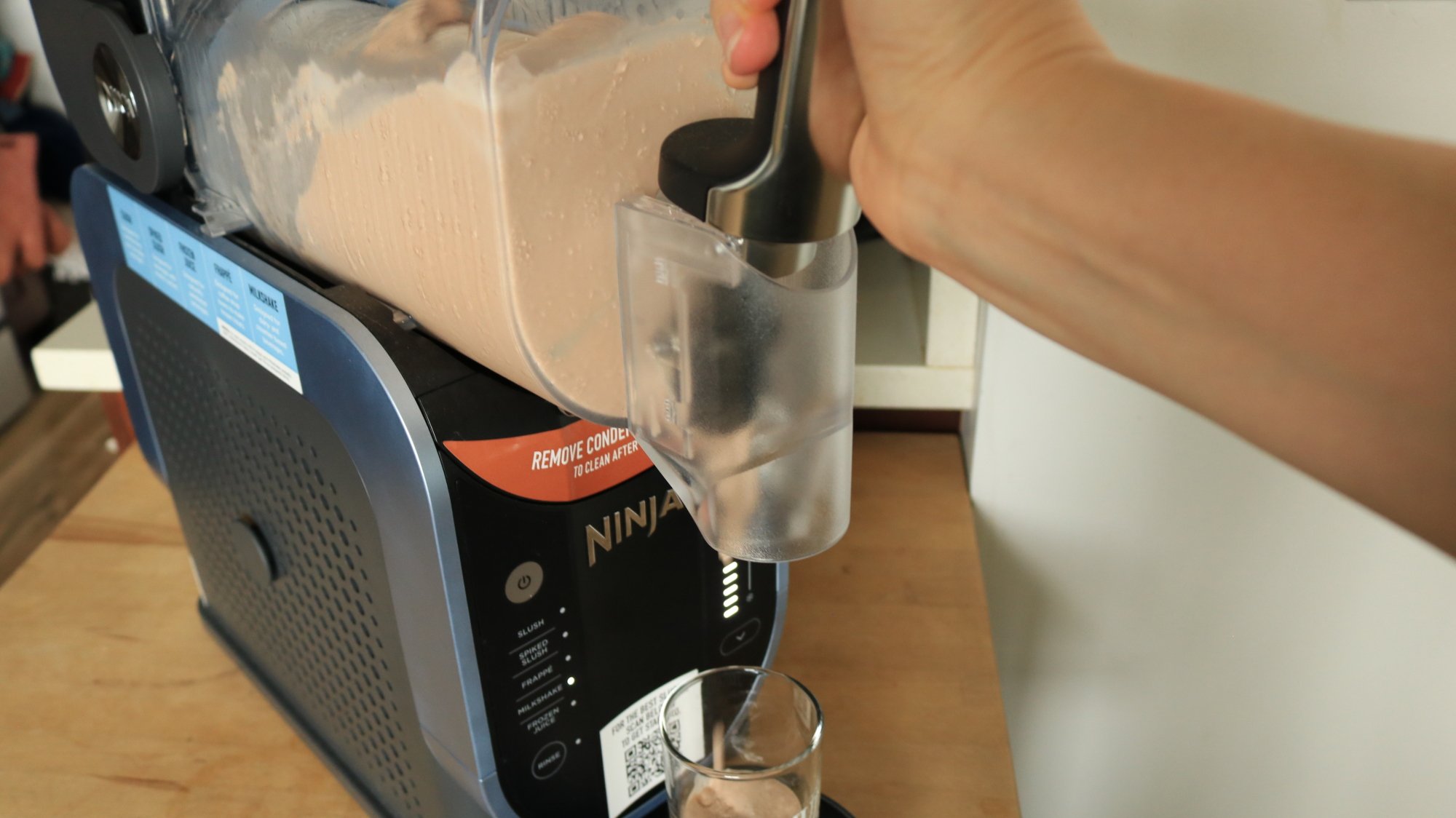
A person dispensing milkshake out of the Ninja Slushi.

Credit: Allie Chanthorn Reinmann

Once the Slushi has finished the setting cycle, it’ll play you a little ditty to signal it’s ready, but the auger will keep spinning. Grab a glass and hold it under the spout. Pull the handle toward you and hold it to dispense your slushie. The handle doesn’t have a locking mechanism while dispensing, so you have to keep pressure on it or it’ll spring shut. 

If you’re happy with your slushie’s consistency, hooray! If you aren’t, you can make it thicker or thinner by manually pressing the up arrow (for a thicker, colder slushie) or the down arrow (for a warmer, more liquid-y slushie). The machine will alert you when the new temperature has been reached.

5. Clean everything thoroughly

After the party is over, you’ll need to clean up your Ninja Slushi. If there is still slushie left in the container, dispense it all into a bowl or container. You have to do this with the preset running because it’ll push the mixture down and out of the spout. Discard it or save it to slush another day. 

Turn off the preset and select the rinse button. Have a big container handy—I use a 4-quart pot as my helper of choice. Pour hot water all the way up to the Max Fill line, then put the pot under the spout and slowly dispense all of the water. Liquid comes out way faster than slush, so only pull the dispensing handle toward you maybe 30%.

Once all of the water is out, stop the rinse cycle by pressing the rinse button again, then press the power button to turn the machine off. Unplug it and disassemble the same parts you washed earlier. I hand wash them with warm soapy water, but if you have a dishwasher, the directions say you can toss all the parts in there. Wipe down the evaporator with a warm, damp cloth. Dry everything off before assembling the pieces again for storage, or to make your next slushie.

Intel Arc B580 GPU With 24GB VRAM Spotted, Dual GPU Model With 48GB Inbound?

Intel Arc B580 GPU With 24GB VRAM Spotted, Dual GPU Model With 48GB Inbound?
If you asked us what we would want out of an upgraded Arc B-series (“Battlemage”) GPU, it probably wouldn’t have been “more video RAM,” but that’s because we’re primarily gamers, not primarily AI researchers. The B580’s 12GB of video RAM is more than sufficient for its needs as an entry-level gaming GPU, yet it’s quite clear now that the persistent

One of the tech industry’s sources of carbon credits is in conflict with Kenyan herders

A conservation program in Kenya that tech companies like Netflix and Meta rely on for carbon credits is in conflict with local herders, according to a report from The Wall Street Journal. The issue led to the program run by The Northern Kenya Rangelands Carbon Project to be put on hold, and could ultimately invalidate credits the organization has already sold.

This specific carbon capture program uses grass spread across 4.7 million acres of land communally owned by groups like the Maasai, to trap carbon in the soil. The project gets to use the land, and in exchange, the herders get a portion of the revenue from carbon credit sales. The issue that’s put the whole program at risk is a conflict over the herders’ farming practices. The local agricultural community has used the same grazing techniques for generations without issue, but the Northern Kenya Rangelands Carbon Project wants them to “rotate livestock grazing so grasses can recover and lock more carbon into the soil,” The Wall Street Journal writes. Some herders frustrated with the rules have gone as far as to claim that they were misled when they originally agreed to participate in the conservation program.

Many tech companies rely on purchasing carbon credits to help offset the negative environmental impacts of rapid technological development. You don’t get to run servers streaming movies or training AI models 24 hours a day without consuming a lot of electricity and water. Carbon offset projects plant trees or run agricultural programs like the one in Kenya to pull carbon from the atmosphere, selling credits to companies to absolve them of their sins. 

Clearly, these carbon projects haven’t always been actually beneficial for the people who live on the land they impact. The Wall Street Journal report is worth a read and gets into what the fallout of all of this could be, but at the very least, tech companies’ branding themselves as “carbon neutral” seems like its going to get trickier.

This article originally appeared on Engadget at https://www.engadget.com/big-tech/one-of-the-tech-industrys-sources-of-carbon-credits-is-in-conflict-with-kenyan-herders-201056081.html?src=rss

Kia debuts the PV5 WAV, a wheelchair-ready electric van

Kia has introduced a wheelchair-accessible vehicle (WAV) iteration of its first electric van. The PV5 WAV offers several accessibility features, such as a side-entry system so a wheelchair user can board the van from the sidewalk, and a quick-use entry ramp rated for 300kg (661 lbs). It’s equipped with a tip-up seat in the third row so other riders can assist a wheelchair passenger from the side. The PV5 WAV also has a wheelchair-specific belt fastening system.

The brand collaborated with Motability Operations on the debut of the PV5 WAV. Motability Operations is a long-term partner of the UK’s vehicle leasing plan that helps people with disabilities to have an accessible mode of transportation.

Promo image of the Kia PV5 WAV (wheelchair accessible vehicle)
Kia

“By integrating cutting-edge Platform Beyond Vehicle (PBV) technology with thoughtful design, we are paving the way for a future where everyone can enjoy the benefits of sustainable mobility, and our partnership with Motability Operations is a testament to our commitment to making this vision a reality,” Sangdae Kim, executive vice president and head of Kia’s PBV Division, said. The PBV tech has been the foundation for a few of Kia’s new vehicle announcements over the past year, including at CES 2024.

The standard model of the PV5, Kia’s first electric van, recently began pre-orders in the UK. Kia hasn’t shared pricing information yet about the WAV model, but the non-WAV version retails starting at £32,995 (about $44,000).

This article originally appeared on Engadget at https://www.engadget.com/transportation/evs/kia-debuts-the-pv5-wav-a-wheelchair-ready-electric-van-200554987.html?src=rss

Six Strategies to ‘Tariff-Proof’ Your Home Renovation Project

If you’re like most people, you’re getting a real-time crash course in tariffs, imports, and exports these days. Realizing that tariffs are going to increase costs for just about everything is just the beginning: The next phase of acceptance is realizing what “everything” means. We import so much of the stuff we use in our daily lives that it’s going to be impossible to avoid what is essentially a new tax on stuff.

That means that any plans you have to renovate, remodel, or repair your home are going to be a lot more expensive. How much more? Some experts suggest a blanket 25% increase in your budget, driven by an estimated increase in building materials costs of about $7,500 to $10,000 per house. That’s a lot of money no matter how big or modest your renovation plans are, and might make you think twice about your project. But there are strategies you can use to blunt the impact of those tariffs if you plan your home project carefully.

DIY thoughtfully

Your first step is to consider where you can offset those extra costs by doing some of the work yourself. Demolition is often an easy way to shave a bit of money from a renovation budget, and if you have any other applicable DIY skills (or the willingness to learn), you can offset extra costs by doing some tiling, painting, or installations yourself. Just be thoughtful about it—you won’t save anything if you screw up part of your renovation and have to pay someone to re-do the whole project.

Pad the budget

The worst outcome of a renovation or remodeling project isn’t extra costs, necessarily—it’s not being able to finish the job because you run out of money and finding yourself doomed to live in a half-finished house. To avoid that fate, review your renovation budget—which should already include some padding against unexpected costs—and add an additional “pad” to cover potential tariffs.

Since everything about these tariffs changes more or less constantly, you can’t accurately predict each and every impact. Assuming an additional blanket cost of about 20% on top of your current estimate is probably a pretty safe course.

Buy materials now

When, exactly, prices will start jumping due to tariffs is difficult to quantify; it depends on how large a supply remains, the specific country a material is sourced from, and when the last non-tariffed shipments arrived. But if you have plans for a renovation in the near future, it might be smart to buy your materials now, even if you’re not ready to engage contractors for a while. If you know you want imported marble tile, for example, chances are they’re as cheap right now as they’re going to be for a very long time. And if your kitchen reno involves all-new appliances, you’ll almost certainly pay less today than you will in a few weeks or months.

Go domestic

Of course, you also ask yourself if you need imported materials at all. While the U.S. isn’t a manufacturing powerhouse, you can identify domestic options for a wide range of renovation and remodeling materials. Costs still may go up if those companies need to import goods to produce those made-in-the-U.S. products, but this strategy may help mitigate costs. A few examples include:

  • Chasing Paper offers made-in-the-U.S. peel-and-stick tile and wallpaper.

  • Mohawk flooring offers laminate flooring and other flooring products that are free from tariffs.

  • Copeland Furniture manufactures collections that are mostly made in the U.S. (like most furniture makers, they import some machined parts, like nuts and bolts), so tariff impacts will be minimal.

  • Barker Cabinets makes kitchen cabinetry right here in the U.S. using domestic lumber.

A little research and consultation with your contractors can identify many domestic alternatives for materials that can help offset or eliminate tariff costs.

Work the contract

When you hire a general contractor or a subcontractor, there’s always a negotiation (or there should be). That means you might be able to claw back some of the extra tariff-related costs by pursuing some strategies in the renovation contract:

  • Price locks. If you’re relying on your contractor to supply the necessary materials for your project, ask to insert price locks in the contract. This is language that freezes the cost of those materials for a period of time (typically a few months). This at least insulates you from a sharp uptick in costs due to sudden shifts in trade negotiations and tariff rates.

  • Guaranteed Maximum Price (“GMP”). You can also ask to have the maximum cost of the project written into the contract. A GMP is the most the contractor will be able to collect from you, no matter what else might change in terms of their materials costs (or any other cost). It usually includes some padding to cover reasonable overages and their fees, but it can be a useful defense against uncertainty when it comes to the cost of the project.

  • Shared savings clauses. You can also suggest that you and the contractor “share savings,” which means that if they identify lower-cost options for materials, labor, or any other aspect of the job, you agree to pay them a percentage of the savings total. This incentivizes the contractor to evade tariffs, seek out domestically sourced alternatives, or find materials already sitting in a warehouse somewhere that don’t need to be imported new.

Wait for the off season

Another way to offset tariff increases in a reno project is to wait. Many renovation projects have a season, and contractors often go through skinny periods when business drops off. They’re often motivated to offer discounts or work with smaller budgets during these periods, so if you’re willing to endure some extra logistical problems (like having work done during the winter months), you can make up at least some of the difference in terms of tariff costs. Some examples of renovation “seasons” include:

  • Most kitchen, bathroom, and landscaping projects are done in the spring, as are most roofing and HVAC projects. These contractors may be more amenable to discounts in the fall or winter.

  • Window replacements and hardscaping projects like patios are usually done in the summer.

  • Exterior paint is typically done in the fall, when temperatures are cooler and humidity is lower, but you can have your house painted as long as temperatures are above 35 degrees, so painting companies may be motivated to offer discounted work in different seasons.

  • Many flooring installers run promotions during the winter, when business is slower.

If you buy your materials now to save some money and then start the project in the off-season, you can maximize your savings.