Try These Fixes If YouTube TV Stopped Working on Your Roku

The YouTube TV app has been disappearing for some Roku users. Luckily, if you are among those affected, there are a few fixes you can try for this issue.

Starting this week, several users on both Reddit and Roku’s forums have separately reported issues opening the YouTube TV app or even locating it on their Roku devices. Those who tried reinstalling the YouTube TV app were able to see an Open App button, but pressing it simply resulted in an error. What’s worse is that the issues seem isolated to Roku, with users of devices like the Google TV Streamer 4K not issuing the same complaints.

Luckily, this issue only seems to be impacting people with dedicated Roku devices and not smart TVs with Roku streaming built-in. Here’s how you can try to bring back YouTube TV if it’s disappeared from your Roku.

Fix disappearing YouTube TV app on Roku

Roku has acknowledged the problem and provided a temporary solution while it investigates. To restart using the YouTube TV app on your Roku, try manually updating the device. Follow these steps:

  1. Press the Home button on the remote.

  2. Select Settings.

  3. Click System.

  4. Go to Software update.

  5. Hit Check Now to start a manual update.

Once the software update is complete, Roku says you might be able to see the YouTube TV app on your Roku device, but it’s not guaranteed. If you’re still experiencing the problem, some Reddit users have also proposed just accessing YouTube TV from the standard YouTube app instead, which you can find on the very bottom-left of the app’s interface.

This little hiccup comes at a bad time for both Roku and YouTube. Recently, Roku has been in the news for experimenting with a new way to force users to watch ads, while YouTube TV’s pricing has also been going up quite a bit. So maybe the real solution to this issue is to just stop using YouTube TV. OK, we jest, but while the app has gotten a facelift, the service may not always offer value for your money if the content you need isn’t on it.

Five stand-out games revealed at today’s Triple-i Showcase

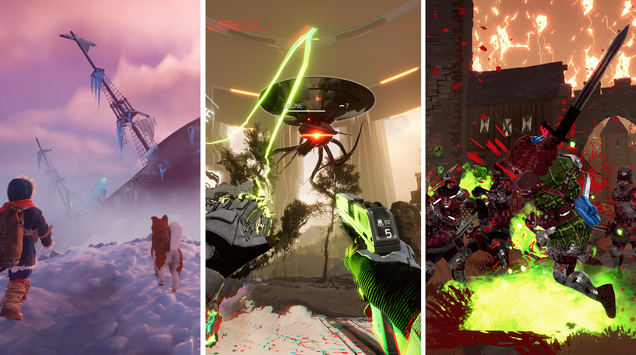
“No ads, no hosts, no sponsors, just games.” The Triple-i Initiative‘s pitch for its now-annual showcase of games, crafted by studios working somewhere between “Solo dev or very small team” and “Investor-minded conglomerate with international offices,” promises a lot of peeks at games without a lot of chatter, and once again it delivered.

Last year’s showcase debuted titles like Norland, Slay the Spire 2, and The Rogue Prince of Persia, along with updates from Darkest Dungeon 2, Palworld, and Vampire Survivors. This year featured looks at titles from the Deep Rock universe, the cloning-yourself-to-survive curiosity The Alters, an Endless Legend 2 that continues tweaking the 4X formula, and more.

Below are five selected highlights for the Ars crowd, along with some notable other announcements. The full list is not yet up on the Triple-i site, but you can see what jumped out from the full showcase.

Read full article

Comments

Wall Clocks That Look Like Transparent Mylar Balloons

The Luft Balloon Clock is a wall clock (also includes a desk stand) that looks like a transparent mylar balloon. Available from Lox in orange and beige for $146 apiece, the clocks measure approximately 13″ round and operate on a single AA battery. Me? I operate on veins full of espresso or I don’t operate at all. “Even a broken clock is right twice a day.” Then I am right twice a day while my seconds hand just twitches in place.

Mesa 25.1 Merges Support For Intel EU Stall Sampling As New Xe2 Profiling Feature

Merged to the Intel Xe kernel graphics driver for the current Linux 6.15 kernel cycle is EU Stall Sampling support as a new feature found with Xe2 Lunar Lake and Battlemage graphics. EU Stall Sampling is used for exposing information/reasons why execution units are stalled for helping to debug performance issues. Now that the kernel support is ready to go with Linux 6.15, merged to the Mesa 25.1 development code is the user-space support for this performance debugging feature…

New simulation of Titanic’s sinking confirms historical testimony

Back in 2023, we reported on the unveiling of the first full-size 3D digital scan of the remains of the RMS Titanic—a “digital twin” that captured the wreckage in unprecedented detail. Magellan Ltd, a deep-sea mapping company, and Atlantic Productions conducted the scans over a six-week expedition. That project is the subject of the new National Geographic documentary Titanic: The Digital Resurrection, detailing several fascinating initial findings from experts’ ongoing analysis of that full-size scan.

Titanic met its doom just four days into the Atlantic crossing, roughly 375 miles (600 kilometers) south of Newfoundland. At 11:40 pm ship’s time on April 14, 1912, Titanic hit that infamous iceberg and began taking on water, flooding five of its 16 watertight compartments, thereby sealing its fate. More than 1,500 passengers and crew perished; only around 710 of those on board survived.

Titanic remained undiscovered at the bottom of the Atlantic Ocean until an expedition led by Jean-Louis Michel and Robert Ballard reached the wreck on September 1, 1985. The ship split apart as it sank, with the bow and stern sections lying roughly one-third of a mile apart. The bow proved to be surprisingly intact, while the stern showed severe structural damage, likely flattened from the impact as it hit the ocean floor. There is a debris field spanning a 5×3-mile area, filled with furniture fragments, dinnerware, shoes and boots, and other personal items.

Read full article

Comments

Google takes advantage of federal cost-cutting with steep Workspace discount

Google has long been on the lookout for ways to break Microsoft’s stranglehold on US government office software, and the current drive to cut costs may be it. Google and the federal government have announced an agreement that makes Google Workspace available to all agencies at a significant discount, trimming 71 percent from the service’s subscription price tag.

Since Donald Trump returned to the White House, the government has engaged in a campaign of unbridled staffing reductions and program cancellations, all with the aim of reducing federal spending. It would appear Google recognized this opportunity, negotiating with the General Services Administration (GSA) to offer Workspace at a lower price. Google claims the deal could yield up to $2 billion in savings.

Google has previously offered discounts for federal agencies interested in migrating to Workspace, but it saw little success displacing Microsoft. The Windows maker has enjoyed decades as an entrenched tech giant, leading the 365 productivity tools to proliferate throughout the government. While Google has gotten some agencies on board, Microsoft has traditionally won the lion’s share of contracts, including the $8 billion Defense Enterprise Office Solutions contract that pushed Microsoft 365 to all corners of the Pentagon beginning in 2020.

Read full article

Comments

Hands-on: Handwriting recognition app brings sticky notes into the 21st century

For quick reminders and can’t-miss memos, sticky notes are effective tools, and I’d argue that the simplicity of the sticky note is its best attribute. But the ease behind propping up sticky notes also means that it’s easy for people to find their desks covered in the things, making it difficult to glean critical information quickly.

Rocketbook, a Boston-based company that also makes reusable notebooks, thinks it has a solution for sticky note overload in the form of an app that interprets handwriting and organizes reusable sticky notes. But not everyone has the need—or time—for a dedicated sticky notes app.

Rocketbook’s Reusable Sticky Notes

Like Rocketbook’s flagship notebooks, its Reusable Sticky Notes rely on erasable pens that allow you to use the paper repeatedly. The Reusable Sticky Notes work with the Rocketbook app (available for iOS or Android), which transforms the sticky notes into images that are automatically stored in the app and can be emailed to specified people (as a PDF) or shared with third-party apps.

Read full article

Comments

Ubisoft Insists You Don’t Own Your Games In The Crew Lawsuit Defense

Ubisoft Insists You Don’t Own Your Games In The Crew Lawsuit Defense
As Ubisoft continues to struggle to find its footing in the current gaming market, the company also finds itself embroiled in a legal battle with gamers that started late last year. The lawsuit stems from the decision to shut down the servers for its online racing game, The Crew. And the latest argument the company has presented to the court

FDA backpedals on RTO to stop talent hemorrhage after HHS bloodbath

The Food and Drug Administration is reinstating telework for staff who review drugs, medical devices, and tobacco, according to reporting by the Associated Press. Review staff and supervisors are now allowed to resume telework at least two days a week, according to an internal email obtained by the AP.

The move reverses a jarring return-to-office decree by the Trump administration, which it used to spur resignations from federal employees. Now, after a wave of such resignations and a brutal round of layoffs that targeted about 3,500 staff, the move to restore some telework appears aimed at keeping the remaining talent amid fears that the agency’s review capabilities are at risk of collapse.

The cut of 3,500 staff is a loss of about 19 percent of the agency’s workforce, and staffers told the AP that lower-level employees are “pouring” out of the agency amid the Trump administration’s actions. Entire offices responsible for FDA policies and regulations have been shuttered. Most of the agency’s communication staff have been wiped out, as well as teams that support food inspectors and investigators, the AP reported.

Read full article

Comments

Razer’s PC Remote Play app is now available

On the heels of Razer pausing direct laptop sales in the US (thanks to those on-again, off-again, yet still very much on for China tariffs), the company has officially launched its remote game streaming app. Razer PC Remote Play, which the company rolled out in beta at CES 2025, is now officially available for iOS and Android.

Razer may be a bit late to the party here, and its app is hardly the only way to stream your PC games to other devices. (For example, Steam’s version has offered similar functionality for six years.) But Razer’s app has a neat trick: It automatically adjusts the game’s resolution and frame rate to match your mobile device’s. So, you can avoid the black bars you get with services that only stream games in a fixed aspect ratio.

Closeup of a mobile device with a controller attached, using Razer's Remote Play app.
Razer

The company says it works with all iOS and Android gaming controllers, and the iPad version has keyboard, mouse and trackpad support. It works with titles from multiple storefronts (including Steam, Epic, PC Game Pass and more). The app uses the AV1 video codec, which Razer says boosts quality and lowers latency.

Setup requires the Razer Nexus and PC Remote Play apps on your mobile device and Razer Cortex on the host PC. After signing in with your Razer ID, the two should pair automatically, and you can get down to business. You can download the app now from Google Play and the App Store.

This article originally appeared on Engadget at https://www.engadget.com/gaming/pc/razers-pc-remote-play-app-is-now-available-182533832.html?src=rss

[$] Management of volatile CXL devices

Compute
Express Link (CXL)
memory is not like the ordinary RAM that one might
install into a computer; it can come and go at any time and is often not
present when the kernel is booting. That complicates the management of
this memory. During the memory-management track of the 2025 Linux Storage,
Filesystem, Memory-Management, and BPF Summit, Gregory Price ran a session
on the challenges posed by CXL and how they might be addressed.

Panic will showcase the second season of Playdate games on April 17

Panic has set a date for when it will share more about the second season of Playdate games. The company is hosting a Playdate Update event on April 17, at 1PM ET / 10AM PT where it plans to cover the developers participating in the season, how you can pre-order it and how much it’ll cost.

The Playdate’s season structure was one of the main things that made the tiny handheld unique when it was first released. Every week for 12 weeks you receive two new games automatically downloaded to your Playdate, free of charge. The list was curated, featuring games from prominent developers like Katamari Damacy creator Keita Takahashi, but also varied, with adventure games, platformers and more.

Given the difficulties Panic faced making and shipping the Playdate to customers, there was initially some uncertainty whether the company could afford to commission another season. Before season two became official, Panic introduce an on-device store, called Catalog, as a way to purchase games from a curated library of titles. Then in October 2024, Panic confirmed that season two was happening in 2025.

In a statement to press, Panic shared that through the Playdate and Catalog, they’ve been able to raise $1,043,186.85 for developers. The company has also sold over 70,000 Playdate handhelds since the device launched in 2022. The price of the Playdate was recently raised from $179 to $229.

You’ll be able to watch the Season Two Playdate Update on April 17 at 1PM ET / 10AM ET on Panic’s website and the company’s YouTube channel.

This article originally appeared on Engadget at https://www.engadget.com/gaming/panic-will-showcase-the-second-season-of-playdate-games-on-april-17-181556782.html?src=rss

It’s Surprisingly Easy to Customize Your Mac’s Folder Icons

Every folder on macOS looks the same—a boring blue representation of a paper file. That makes browsing a folder full of folders harder than it needs to be because everything looks identical. Unless, that is, you use custom icons for your most-used folders. You can do that pretty easily, but the feature is a little bit hidden.

And yes, this means you can use something silly for your folder icon. But it can also be practical. Having an important folder a different color than the rest, or all of your folders different colors depending on functionality, makes it easier to find and click on what you’re looking for. And the process isn’t difficult.

First things first: you need to find the image you want to use as an icon. I recommend going to macOSicons.com, which has thousands of icons sized just right. You can search for any color and find folder icons matching it. You can also search for random objects or applications and find icons. Find the images you want to use and click Download to get an .icns file which you can assign to any folder you like. Alternatively, you can just search the web for whatever image you want, right-click the image, and click Copy Image (note that you cannot click “Copy Image URL”—you need to copy the image itself).

Next, right-click the folder you want to change the icon for and click Get Info to pull up a window with information about the file. You will see a folder icon in the top-left corner of that window (not the one in the window’s toolbar). If you downloaded an .icns file, simply drag it to this icon in this panel—after a few moments the folder icon will be replaced.

If you copied an image from your browser, simply click the icon in the panel—you’ll see that it is highlighted. Now use the keyboard shortcut CMD-V and the folder icon will be replaced with the image you copied.

Want to switch back to the default folder icon? Open the Get Info* panel, click the icon, then press the Delete key. The icon will go back to the default.

It’s worth noting that this isn’t limited to folders. We’ve talked about changing Mac app icons before, and you can also edit how external hard drives look. This can make it easier to figure out which drive is plugged in at a glance, especially if you find an icon that resembles the drive itself.

Easily make your own macOS icons

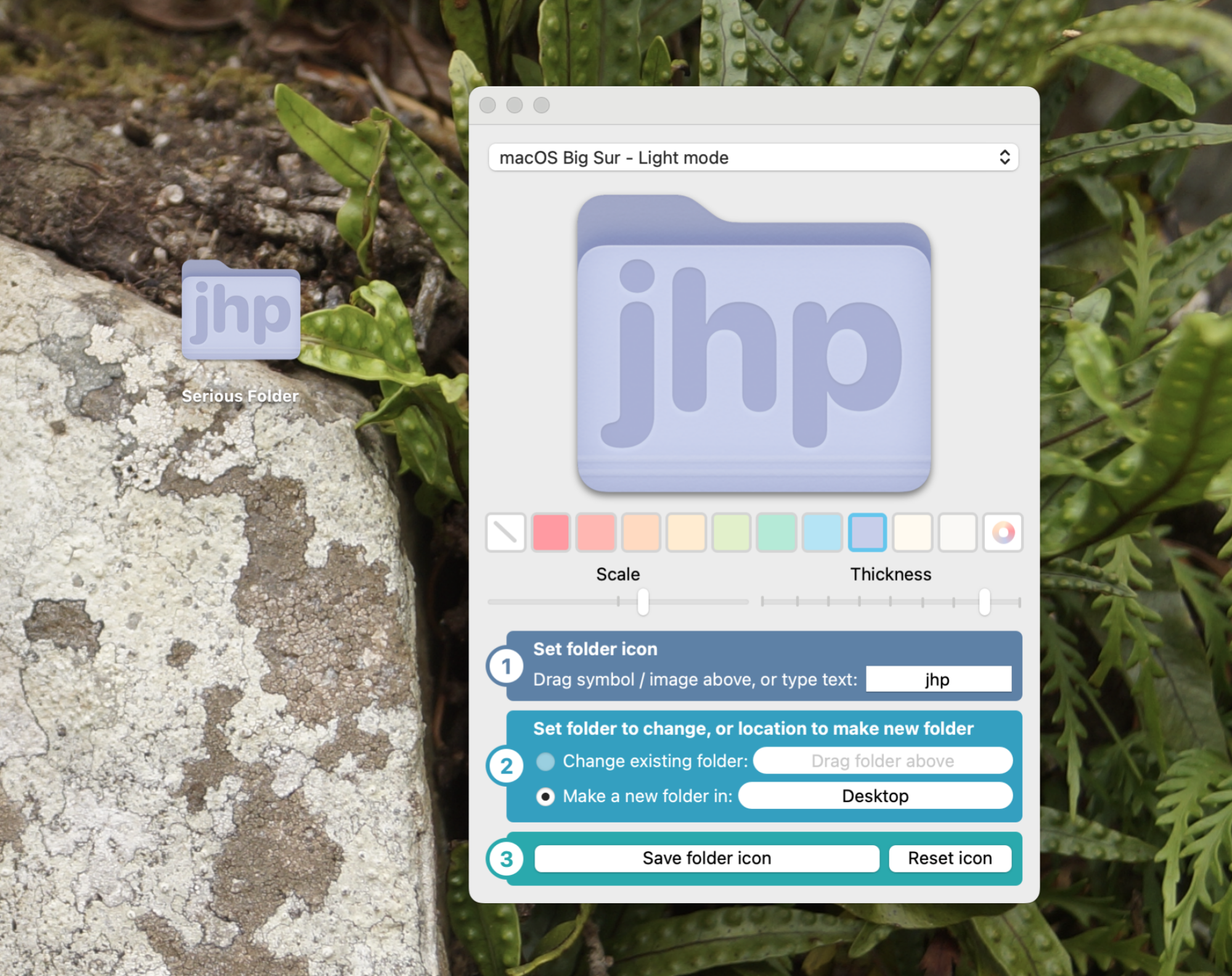
The application Fancy Folders is shown next to a purple folder on the desktop customized using it. The folder is now purple with the initials "JHP" on it.

Credit: Justin Pot

Finding an icon online is perfectly fine, but it’s pretty simple to design your own folder icons, too. You could copy the default icon, paste it into an image editor, and change it to look however you like. If you don’t have those skills, though, or would prefer something faster, Fancy Folders is a free application that can do the work for you.

This app lets you choose any color you want for your folder. It also lets you add an icon—this can be an image, if you want, or you can just type text. Choose which folder you want to browser, click Save folder icon, and the icon will change. Y


Nintendo may sell the Switch 2 at a loss in the US due to tariffs

The Nintendo Switch 2 is functionally similar to its predecessor. Sure, the detachable controllers can now each be used as a mouse (on your pants, no less), the screen is bigger, the hardware is more powerful and there’s a built-in mic for voice chat. But otherwise the company isn’t rocking the boat too much. At least not outside of its business model, as it may be preparing to sell the console at a loss.

For most countries, President Donald Trump has paused the harshest tariffs that he announced last week. Still, he increased tariffs on imports from China to 125 percent on Wednesday, while imports from elsewhere will still be subject to a levy of at least 10 percent.

Per Bloomberg, Nintendo may be looking to make as many Switch 2 units as it can in Vietnam (it’s manufacturing about a third of the consoles there) during the 90-day freeze on higher tariffs and ship as many as possible to the US. The US is a critical market for Nintendo as it accounts for about a third of sales. 

Still, with a 10 percent tariff, Nintendo may reluctantly eat that cost, even if that means losing money on each sale. “We believe the Switch 2’s bill of materials is around $400, meaning Nintendo would still be selling consoles at a loss in the US with the 10 percent tariff — but the loss would be something Nintendo would be able to absorb,” Hideki Yasuda of Toyo Securities told Bloomberg. “Sony is in a tougher situation as most of its PlayStation production is in China, and it may be forced to hike PS5 prices in the US in the near future.”

If the Switch 2 has about $400 worth of materials, that means Nintendo will also be taking a hit on a Japan-only edition of the console in its home country. It’s selling that variant for under $350.

Another analyst, Robin Zhu of Bernstein, also suggested that Nintendo will take the hit and keep the price at $450 if the tariff on Vietnamese imports remains at 10 percent. However, “At 46 percent Vietnam tariffs, I expected them to raise [the Switch 2 price] by $50 to $100.”

Unlike Sony and Microsoft, Nintendo has not historically sold its consoles at a loss with the aim of making up for that with sales of pricey software. The gaming side of the business is far and away Nintendo’s largest source of revenue. It’s diversifying more these days with things like movies and theme parks, but it still needs a thriving base of Switch and Switch 2 players. With the consoles critical to the company’s success, the suggestion that Nintendo may sell the $450 Switch 2 at a loss is somewhat surprising, even if it’s because of tariffs.

Nintendo formally revealed the Switch 2 just hours before Trump announced higher import tariffs on every country. Soon after, Nintendo delayed pre-orders for the console in the US (it later did the same in Canada, perhaps to reduce the risk of secondary-market price gouging) to assess the impact of the tariffs. With those now on hold, the company surely wants to get the ball rolling on pre-orders so it has a better sense of North American demand and can accordingly adjust its manufacturing plans if need be.

This article originally appeared on Engadget at https://www.engadget.com/gaming/nintendo/nintendo-may-sell-the-switch-2-at-a-loss-in-the-us-due-to-tariffs-175857327.html?src=rss