
Learn how to use the Linux cut command to extract text by fields, characters, or bytes with real-world examples and tips.
Monthly Archives: April 2025
Make the Most of Your Tax Refund With the ‘1/3 Rule’
Tax Day is here. Many of us high achievers have already received our tax refunds—and are perhaps enjoying slightly larger checks than expected this year. While it might be tempting to spend that entire sum on a vacation or shopping spree, I recommend a more balanced approach. Enter the “1/3 rule”: a simple and effective strategy to maximize the benefits of your tax refund.
The 1/3 rule is straightforward: Divide your tax refund into three equal portions and allocate them to three different financial priorities.
Allocate 1/3 for saving
Set aside the first third of your refund for your financial future. I’ve recommended before that dividing your money into multiple accounts helps you see all your saving goals separately so they’ll be easier to track. The money set aside for emergencies goes to a different account than your dream vacation fund, and so on. This could mean:
-
Adding to your emergency fund (aim for around six months of living expenses)
-
Contributing to your retirement accounts like an IRA or 401(k)
-
Saving for a major planned expense, like a home down payment
-
Opening a high-yield savings account for short-term goals
Allocate 1/3 for spending
It’s perfectly reasonable to enjoy some of your refund! A budget is like a diet—you need moderation, and you need to treat yourself here and there. Allow a portion of your refund to go to things that actually enrich your life, such as:
-
A modest vacation or weekend getaway
-
Home improvements or new furniture
-
That gadget or item you’ve been eyeing (for me, it’s this Garmin Forerunner)
-
Experiences such as concert tickets or classes
Allocate 1/3 for debt payments
It’s easy to feel paralyzed by your debts, but finding the right payment strategy will help. You’re no doubt feeling a major strain on your monthly budget, especially if you’re one of the millions of Americans carrying a growing balance on high-interest credit cards. Use the final third to improve your financial position by paying down debt:
-
Focus on high-interest debt first (typically credit cards).
-
Make an extra payment on your student loans.
-
Reduce your car loan or mortgage principal.
-
Consolidate smaller debts for easier management.
If you don’t know where to begin with paying down your debts, check out my guide here.
Alternative budgeting ideas for your tax refund
While the 1/3 rule is a great technique to make the most of your refund, your specific financial situation (or simple preferences) might call for a different approach. Here are some other popular strategies you can use.
The 50-30-20 rule
This is the go-to system for most first-time budgeters. The principle behind it can also be applied to your tax refund:
-
50% toward needs (debt repayment, home repairs, medical expenses)
-
30% toward wants (entertainment, travel, non-essential purchases)
-
20% toward savings and investments
The 80-20 rule
If you want to simplify the 1/3 rule into just two parts, I recommend you break it down with the 80-20 rule:
-
80% toward long-term financial goals (retirement, investments, education funds)
-
20% for immediate enjoyment
The debt avalanche method
If you’re struggling with significant debt, you should take advantage of this refund and tackle as much as you can:
-
70% toward paying off your highest-interest debt
-
20% for emergency savings
-
10% for something enjoyable to maintain motivation
Making the most of this year’s refund
With many taxpayers reporting slightly larger refunds this year, it’s an excellent opportunity to make meaningful financial progress. Remember that a tax refund isn’t “free money”—it’s your money that you overpaid throughout the year. Treat it with the same intentions as your regular income, and you’ll maximize its benefit.
The Real Reason Politicians Blame Video Games For Society’s Most Difficult Issues

Yesterday, House Speaker Mike Johnson attempted to justify planned backdoor cuts to Medicaid by claiming that it would “return the dignity of work to young men who need to be out working instead of playing video games all day.”
Zwift Update Version 1.88 (144046) Released
Zwift version 1.88 begins its phased rollout today. It’s a minor release, containing mostly visual tweaks and bug fixes. Read on for details…
Hilltop Hustle Opens Up
Not mentioned in Zwift’s release notes, the new “Hilltop Hustle” route which was released as event-only a few updates ago is now available to free ride in Watopia. Ready for some hill repeats?
“Close the Gap” Changes
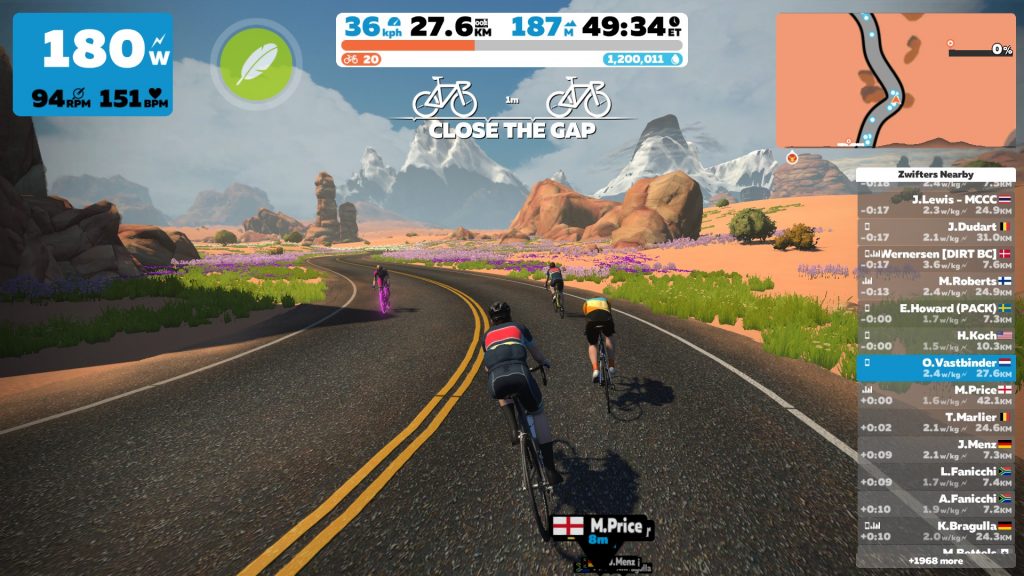
Zwift’s release notes say, “Visual improvements to the in-game ‘Close the Gap’ banner.” Here are more details of what has changed:
- Smoother transition between distance numbers if a closer bike comes into draft range
- Indicator now ignores players that aren’t moving
- Indicator will not appear if speed difference is outside limits (no more popup for bikes going too fast to draft)
New Climb Portals
Two new climbs have been added to the Climb Portal library:
- Cauberg (0.8km, 57m): featuring in the Amstel Gold Race on April 20
- Côte de la Redoute (1.5km, 153m): featuring in Liège–Bastogne–Liège April 27
These short climbs are scheduled in the coming days, and we’ll be building out their detail pages here on Zwift Insider ASAP.
Release Notes
Zwift provided notes on additional tweaks and bug fixes in this update:
- Fixed an issue that could potentially cause Bike Upgrade progress to be counted toward a non-equipped bike.
- Streak Flair is no longer visible in HoloReplays.
- Fixed gaps in the roadway in Watopia and London.
- Fixed an issue where Zwifters could get snagged on the Home Screen routes page when navigating between tabs if using a device with a mouse.
- The ‘Join a Zwifter’ card in the Home Screen is now placed at the end of the For You row if no friends are Zwifting at the moment.
- Improved readability of Bike Upgrade purchase dialog boxes in some languages.
- Various visual improvements in France.
- Various visual improvements in the Home Screen.
- Stability improvements.
Discuss this update in Zwift’s forum > (link coming soon)
Questions or Comments?
If you spotted any other changes or bugs in the update, please comment below!
FCC Chairman Tells Europe To Choose Between US or Chinese Communications Tech
FCC Chairman Brendan Carr has issued a stark ultimatum to European allies, telling them to choose between US and Chinese communications technology. In an interview with Financial Times, Carr urged “allied western democracies” to “focus on the real long-term bogey: the rise of the Chinese Communist party.” The warning comes as European governments question Starlink’s reliability after Washington threatened to switch off its services in Ukraine.
UK telecoms BT and Virgin Media O2 are currently trialing Starlink’s satellite internet technology but haven’t signed full agreements. “If you’re concerned about Starlink, just wait for the CCP’s version, then you’ll be really worried,” said Carr. Carr claimed Europe is “caught” between Washington and Beijing, with a “great divide” emerging between “CCP-aligned countries and others” in AI and satellite technology. He also accused the European Commission of “protectionism” and an “anti-American” attitude while suggesting Nokia and Ericsson should relocate manufacturing to the US to avoid Trump’s import tariffs.


Read more of this story at Slashdot.
The Elder Scrolls 4: Oblivion remake is real, according to developer screenshots
It looks like that long-rumored remake of Bethesda’s Elder Scrolls 4: Oblivion is actually real, according to a report by Eurogamer. There are actual screenshots of the game in action that were published on developer Virtuos’ website. Even cooler? Eurogamer suggests that the game will be shadow-dropped next week for PC, PS5 and Xbox Series X/S. The same report also indicates it’ll be available on Game Pass.
Fans on Reddit and elsewhere began poking around on the developer’s website and reportedly found a treasure trove of in-game images, which included comparison screenshots to the original game from 2006. Eurogamer has collected these images on imgur to preserve them for posterity. It has also been corroborated that the screenshots do come from Virtuos’ server. We’ve reached out to Bethesda and will update this post when we hear back.
Virtuos
This remake has been bouncing around the rumor mill since 2020. Initial reports pegged it as a simple remaster, but a former Virtuos employee claimed it was a full remake back in 2023. It’s reportedly being built using Unreal Engine 5. That same employee also suggested that several gameplay systems have been completely reworked, including stamina, archery, sneaking, blocking and hit reaction. The HUD has also supposedly been remade.
All we can do now is wait for next week and see if Microsoft does indeed surprise-drop the game. If not, there’s an Xbox summer showcase on June 8. Maybe we’ll get some clarity at that event.
This article originally appeared on Engadget at https://www.engadget.com/gaming/the-elder-scrolls-4-oblivion-remake-is-real-according-to-developer-screenshots-151955341.html?src=rss
ISPs and robocallers love the FCC plan to “delete” as many rules as possible
Industry groups have submitted deregulatory wishlists for the Federal Communications Commission’s “Delete, Delete, Delete” initiative that aims to eliminate as many regulations as possible.
Broadband providers that want fewer telecom regulations and debt collectors opposed to robocall rules were among those submitting comments to the FCC in response to Chairman Brendan Carr’s request for public input. The Carr-led FCC last month issued a public notice asking for help with “identifying FCC rules for the purpose of alleviating unnecessary regulatory burdens.”
The FCC said it opened the official proceeding—which is titled “Delete, Delete, Delete”—because “President Trump has called on administrative agencies to unleash prosperity through deregulation and ensure that they are efficiently delivering great results for the American people.” Initial comments were due on Friday, and there is an April 28 deadline for reply comments.
League of Legends Season 2: Hello Brawls, bye-bye Voracious Atakhan
Riot Games has unveiled details about the next season for League of Legends. This chapter of the MOBA is themed Spirit Blossom Beyond, and it will bring a temporary new look to Summoner’s Rift and several floral cosmetics for the champions. Season 2 will also involve some notable gameplay changes, as well as introducing an all-new game mode called Brawl.
LoL is a perpetual balancing act, and the team at Riot have pared back the emphasis on early- and mid-game objectives this season so players can focus more on laning at the start of a match. Void Grubs are getting nerfed, with only one trio of grubs spawning per game. The reward for securing all three will be a single Void Mite to aid in your tower takes. Rift Herald has been slightly retuned, removing the Shelly’s Gaze debuff to make the camp easier to solo.
Atakhan is getting overhauled for Season 2. With this streamlined approach, he will only have one form that expands on the Bloody Petals mechanic introduced in Season 1. Killing the new Thornbound Atakhan will grant a team all remaining Bloody Petals that have spawned on the map with an increased buff amount. The team will also get a permanent buff for the rest of the match called Spiritual Purification: when an enemy is killed, opponents in the surrounding area will be slowed and take damage. Riot intended this Atakhan design to match the seasonal theme as well as nixing the unpopular mechanics like the team-wide Withdraw buff from the Voracious version of this new neutral camp.
Riot Games
As the name implies, the new Brawl mode for LoL is all about fighting. It’s a 5v5 matchup that removes much of the strategic burden from typical bouts, with no towers and only a handful of neutral buffs available to claim. Instead, teams score points by taking down enemy champions and by shepherding minions into the rival gate on a new map designed just for this mode. Riot is positioning these bite-sized, 10-minute matches as on-ramps for newer players still building their basic skills or as a mental break from the regular solo queue grind.
As with any big new content release, there are plenty of other tweaks to balance and quality of life that will be fully detailed in the patch notes. Season 2 for League of Legends kicks off on April 30.
This article originally appeared on Engadget at https://www.engadget.com/gaming/league-of-legends-season-2-hello-brawls-bye-bye-voracious-atakhan-150028605.html?src=rss
Notion Mail is a powerful but lightweight email client for busy people
A few years ago, I gave up on my Gmail inbox. I used to be meticulous. I would assign labels to every new email that came in, starring those that I wanted to find later easily. But between a job in journalism and way too much spam, the volume of new messages became unmanageable. And as of this article, I have more than 21,000 unread emails. After trying Notion’s new email client, I might have a chance to reclaim my inbox.
With Notion Mail, Notion isn’t trying to reinvent email. “I feel like every email client has their own system, and many have a religious onboarding experience,” Notion Mail Lead Andrew Milich tells me over video chat. “You know, it’s either keyboard shortcuts, a screening feature, a chatbox or something else. We tried to do something more lightweight.”
Milich knows a thing or two about rigid email apps. Before joining Notion, he was the co-founder of Skiff, a startup that offered, among other things, end-to-end encrypted email. Notion acquired Skiff at the start of 2024. Since then, the Skiff team has been working on Notion Mail. For those keeping track, Notion Calendar was similarly born out of the company’s acquisition of Cron.
“We want Notion Mail to stand alone as an email product you would love and want to use independent of Notion, but also one that every existing Notion user will find familiar and enjoyable,” Milich says.
To that point, current Notion users will find much that’s familiar. For instance, in the compose window there’s support for slash commands, code blocks and Markdown shortcuts. However, it’s the new features Milich and his team created for Notion Mail that are what make the app interesting.
Notion
It starts with two related tools: AI labels and views. The first time you open Notion Mail, the software will analyze your inbox and suggest personalized labels for broad categories of messages, and create corresponding folders where those emails will be automatically sorted. You can filter, group and sort emails independently within each view for added flexibility. If you ever want to create additional AI labels, a button at the top of the interface to do so quickly. Additionally, any labels you create through Notion Mail will be preserved in Gmail, and your data won’t be used to train future AI models.
“We try to sync as much data as possible, so that means all these labels, even the ones that are applied by AI as the emails are received, get synchronized to Gmail too,” Milich says, adding, “we’ve deliberately moved drafts and sent lower and tried to focus users on the labeling, views and templates.”
The final pillar of Notion Mail revolves around scheduling. Provided you’ve granted Notion Calendar access to your Google Calendar, you can insert booking links directly within the compose window by typing “/schedule”. For the recipient, a single click will get them on your calendar.
Notion
Outside of those big features, Notion Mail offers the usual time savers you’ll find in its competitors, including suggested replies, keyboard shortcuts and a built-in AI editor for drafting and editing messages. There’s also a snippet library you can use to save yourself from writing the same section of text over and over again in different emails.
In the short time I’ve had with Notion Mail, I’ve noticed it’s incredibly flexible. According to Milich, the app isn’t designed to push users toward a goal like inbox zero that isn’t obtainable (or really useful) in a modern context. Instead, he says his hope is that Notion Mail limits how much the act of managing your inbox drains your time, energy and attention, and so far I can say it has done exactly that.
If you want to try Notion Mail for yourself, Notion is making the client available to everyone, including free users, at no additional cost. You will only need to pay for the app if you frequently use some of its AI features. At launch, it works with Gmail. Milich says support for Outlook and iCloud is on the roadmap, but didn’t share a specific date.
This article originally appeared on Engadget at https://www.engadget.com/ai/notion-mail-is-a-powerful-but-lightweight-email-client-for-busy-people-150007543.html?src=rss
You’re Missing Out on Hidden Android Updates
No matter how much Google has tried over the past couple of years, it’s never managed to make Android updates as seamless as iOS updates. On the iPhone, every compatible iPhone across the globe gets the same updates, at the same time.
On Android, it’s anyone’s guess. Google releases the latest and greatest Android updates for Developers and its Pixel devices, and then Android smartphone manufactures get started with developing their own versions. For instance, because Samsung’s version of Android 15 is different from what OnePlus is doing, that can sometimes mean key features don’t show up on your phone until quite a ways down the line.
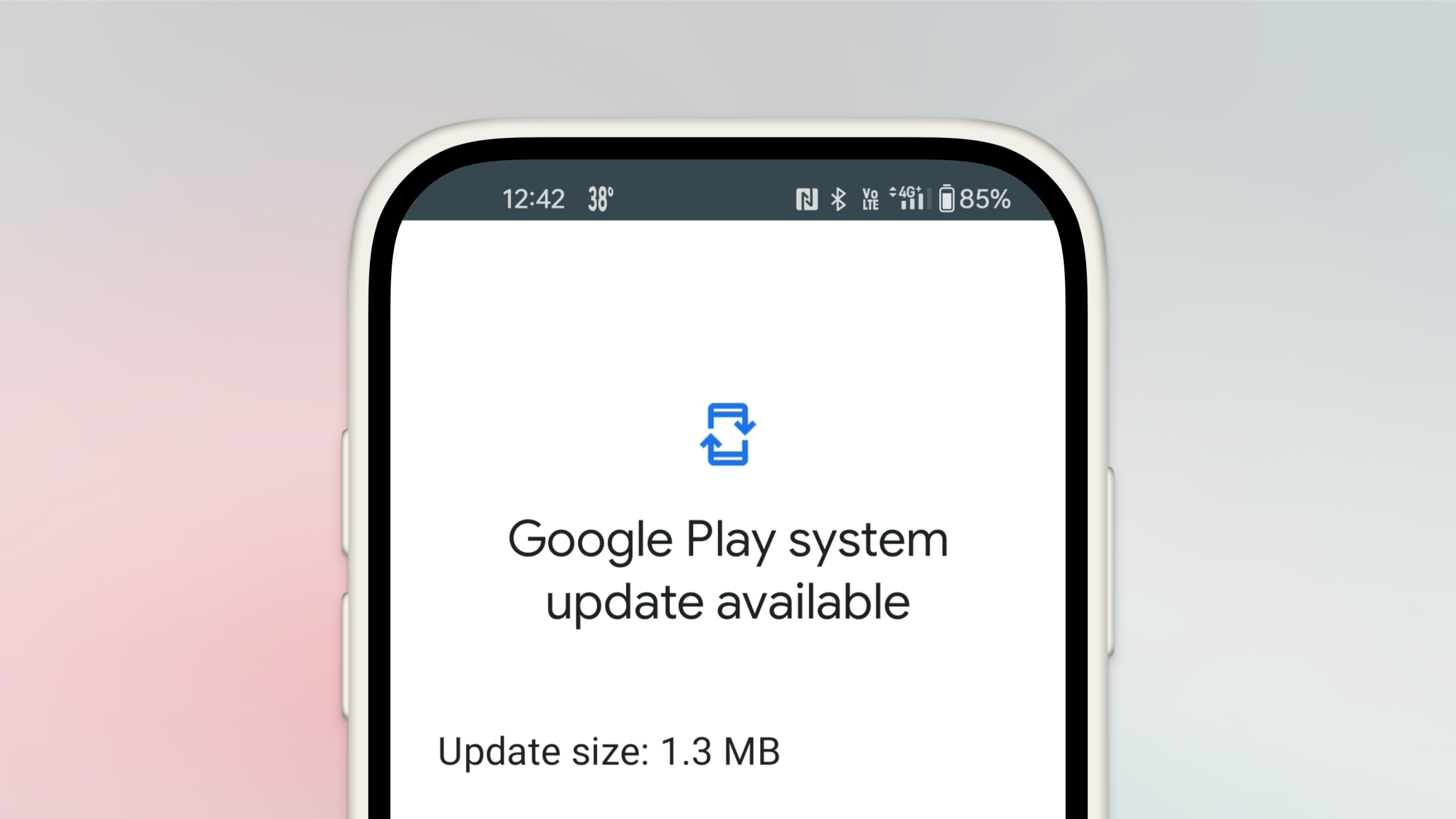
To mitigate this to some extent, Google has decided to take matters into its own hands, pushing out some security, privacy, and device tracking features to all Android devices at once, using a little known framework called Google Play system updates.
And yes, it’s confusing. It’s not just about the Google Play Store or services, and it’s something that you might never come across on your own. Google doesn’t send notifications about it, nor is it a part of the regular Software Update screen. So what is it, where is it, and why is it so important?
Why are Google Play system updates so important?
Credit: Khamosh Pathak
As I mentioned above, unless you’re on a Pixel, any regular Android update comes straight from your phone’s manufacturer, and not Google itself. This is usually where you get big Android updates, like how Samsung phones got updated to Android 15 with the One UI 7 update.
But the Google Play System updates are different.
It all started in 2019 with Project Mainline, where Google started to split some of the key components of the OS. With this project, Google can enhance Android’s security and privacy features without going through the regular channels. This is why, in the past, Google has been able to push features like Android Theft Detection, Remote Lock, and Offline Lock to all Android phones running Android 10 and above overnight. Something like this just isn’t possible with regular Android updates.
While these are small features, they’re not all that Play System updates give you. Google Play System updates are also responsible for Google Play Protect, the framework that scans and reports malicious apps on the Play Store, plus they add new features to the Google Play Store and Google Wallet.
Unlike a regular Android update, which might show up at any time, Google Play system updates show up every month without fail. You can check out Google’s website to see what’s new each month.
It’s important to make sure you’re getting these. Alongside their new features, they also introduce important security updates and bug fixes to the entire Google Play Services platform.
Why don’t you ever see Google Play system updates?
These updates are critical. But sometimes months can go by before you actually have the newest one. That’s because Google doesn’t promote these updates in any fashion. There are no notifications for them, and they aren’t even automatically installed when you perform a regular Android OS update.
Weirdly, they are only automatically installed when you reboot your smartphone. And give how smartphones are used these days, that can be months apart.
How to check for Google Play system updates
Credit: Khamosh Pathak
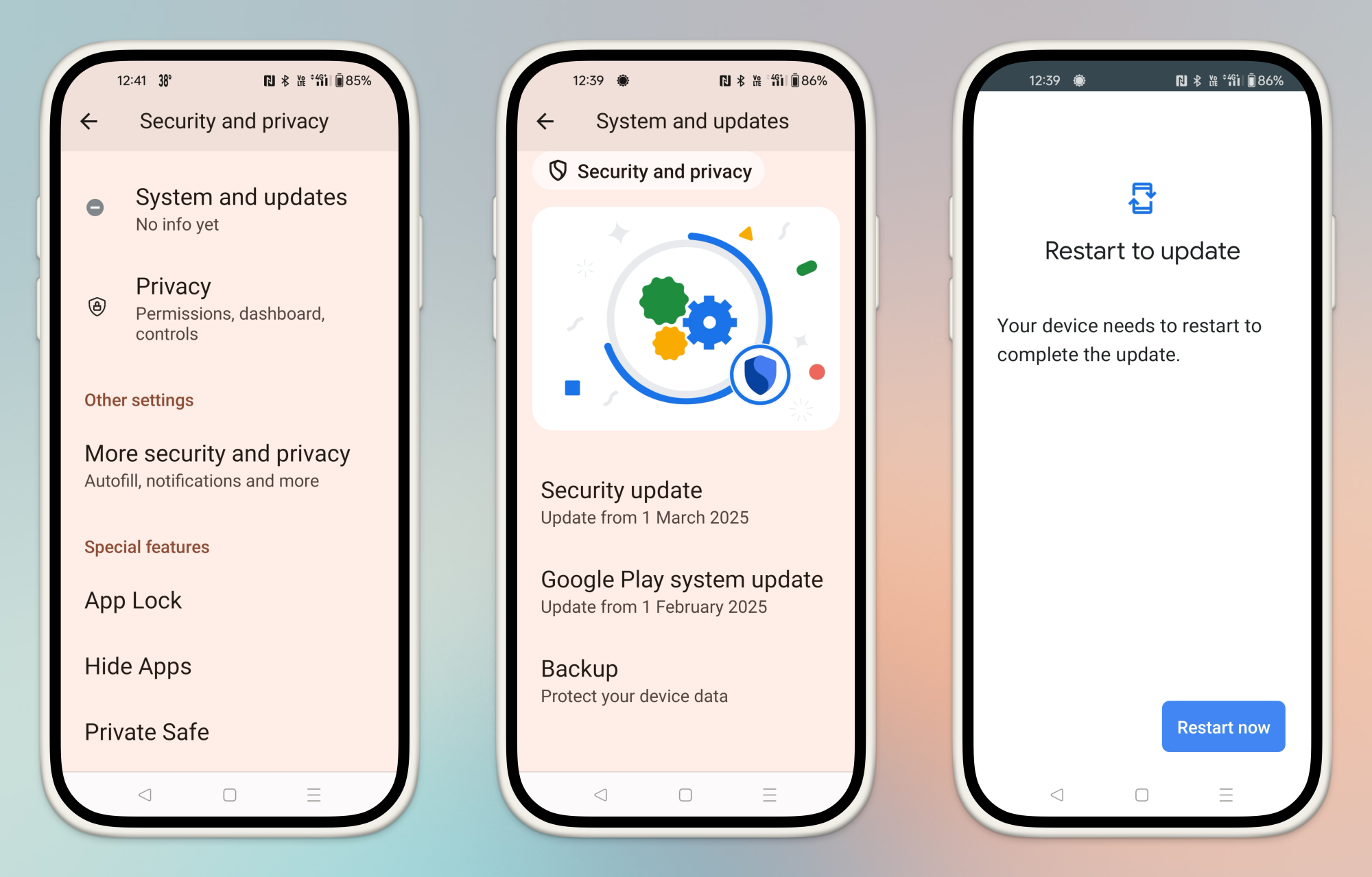
I can’t say if Google will eventually change its ways and make Play system updates more prominent. But for now, there’s only one way to check for them, and that is to manually install them in the Security updates section in the Settings app.
Different phones have different menus, so I’ll use Pixels as an example for how to find this page. If you’re using a Google Pixel phone, go to Settings > Security & privacy > System & updates. You’ll see two sections, Security update and Google Play system update. Tap the latter option to download and install the update. The update will be installed after your device reboots.
On any other smartphone, search is going to be your friend. In the Settings app, search for “Play system update,” which should help get you where you need to go.
Fedora Server 42 Is Performing Well On 5th Gen AMD EPYC “Turin”
Following the recent benchmarking of Ubuntu Server 25.04 in its near final state compared to prior Ubuntu Linux releases, I turned my attention to Fedora Server 42. On the same AMD EPYC 9005 “Turin” server I carried out some comparison benchmarks of Fedora Server 42 compared to the prior Fedora Server 41 and other Linux distribution releases for seeing how Fedora 42 is competing with other Linux distributions on this 5th Gen AMD EPYC dual socket server.
New Urinal Designs To Help Prevent Backsplash
Did you know an estimated 264,000 gallons of urine are splashed out of urinals daily? That is not a pool I would want to swim in. Not even dip my toes. To help prevent return fire, these are a few new urinal designs created and tested by scientists with the intention of minimizing backsplash. Granted, these won’t help at all if you close your eyes and pee on the floor directly.
To resolve these problems, the team created a fluid physics model of how a stream of liquid splashes when it hits a surface like the back of a urinal, and experimentally tested these models by spraying liquid at surfaces at various angles.
The researchers’ Cornucopia and Nautilus designs both achieved a significant reduction in urine splashing, with the Cornucopia performing best. However, the Nautilus was considered the most ideal design due to its height, which would allow shorter people — including children or those in wheelchairs — to more easily use it. Its larger gape would also be easier to clean, and would be more accepting of poor aim, and therefore would also be appropriate for use on boats or airplanes.
Personally, I prefer the camaraderie of trough urinals. Did I ever tell you about the time I accidentally blinked one of my contacts out into a trough urinal filled with ice in a New Orleans bar? I 100% would have popped it back in if I’d found it (and become patient zero for swamp eye), but I could not. The rest of the night was a blur, both literally and figuratively.
Manjaro Linux 25.0 released
Version
25.0 (“Zetar”) of the Arch-based Manjaro Linux
distribution is now available. This release includes Linux kernel 6.12,
GNOME 48, KDE 6.3, Xfce 4.18, and more.
The second-gen Kindle Scribe is back on sale for a record-low price
Amazon’s Kindle Scribe is a solid ereader and writing tablet that’s handy for things like scrawling on ebooks and taking notes. The device is back on sale for a record-low price. It’ll currently run you $325, which is $75 or 19 percent off.
This deal is for the second-generation model, which Amazon released last year. Our main qualm about the Kindle Scribe 2 was its high price of $400, which has been mitigated by this sale.
We gave the Kindle Scribe 2 a score of 86 in our review and it’s our pick for the best e-reader E Ink tablet. We appreciated, among other things, the slick design as well as the smooth reading and writing experience it offers.
The Scribe provides a low-latency writing experience with no real perceptible delay between making a mark on the screen with the companion pen and it showing up on the display. There are multiple brush types to choose from, such as a marker, pencil and fountain pen. You can create multiple notebooks and add pages or change the templates as you see fit.
You have a decent-sized canvas on which to make your notes and scrawls as the Scribe has a 10.2-inch display. Obviously, it hooks into Amazon’s Kindle ebook ecosystem, though you can borrow digital tomes from libraries and access them here. Moreover, you can listen to Audible audiobooks via Bluetooth.
Follow @EngadgetDeals on X for the latest tech deals and buying advice.
This article originally appeared on Engadget at https://www.engadget.com/deals/the-second-gen-kindle-scribe-is-back-on-sale-for-a-record-low-price-143105483.html?src=rss
How to Use Your Android Phone as a Webcam
Sometimes, the best way to solve a problem is sitting right in front of you. If your problem is that you need a webcam, you can try using your Android phone for the job instead of buying a dedicated device. This is especially useful if you have a spare Android phone lying around and you need it for video calls on your PC or Mac. You can also use your primary Android phone as a webcam, but its utility will be limited since you’ll have to keep unplugging it, remembering to put it into do not disturb, or turning on airplane mode to ensure that your video call isn’t interrupted. Here are all the ways you can use your Android phone as a webcam.
Use the webcam mode on your Android phone
As long as you have a phone running Android 14 or newer, you can use the built-in webcam mode on it. This is as easy as using a USB cable to connect your phone to a computer and enabling webcam mode. Here’s what you need to do:
-
Unlock your Android phone and use a USB cable that supports data transfer to connect it to your PC or Mac.
-
The moment your phone is connected, you’ll see a USB mode notification that will tells you the phone is currently charging. Tap this alert and select Webcam.
-
This puts your phone in webcam mode and displays a notification with additional info. Tap the notification to see the viewfinder and adjust the frame to your liking.
-
On your PC or Mac, open any video calling app, and under camera options, you’ll see Android Device or Android Webcam as an available camera. Select this to have your phone serve as your webcam.
Be sure to disable all notifications on your phone or put it in airplane mode in order to avoid interruptions. If someone calls your phone when it’s being used as a webcam, your video call will be paused, and it’ll only resume once the phone call has been disconnected.
Using third-party apps to turn your Android phone into a webcam
Credit: Camo
The built-in method works great on Pixel devices and other phones running stock Android, but it may not always work correctly if your phone has a heavily customized Android variant. It’s also not an option for people who use phones with older versions of Android, which is a good enough reason to turn to third-party apps to get the job done.
The good old DroidCam (free, ad-supported) or its paid variant, DroidCamX ($5), are both quite handy for this job. Install the client on your PC or Linux computer and follow the on-screen instructions to set up the app on both devices. The advantage here is that you can connect over wifi and a USB cable, whereas the built-in method is wired only. The free version has ads and limitations that don’t let you rotate or flip the camera, but otherwise, it’s good enough for most people. There are no watermarks or other usage-related limitations in the free version.
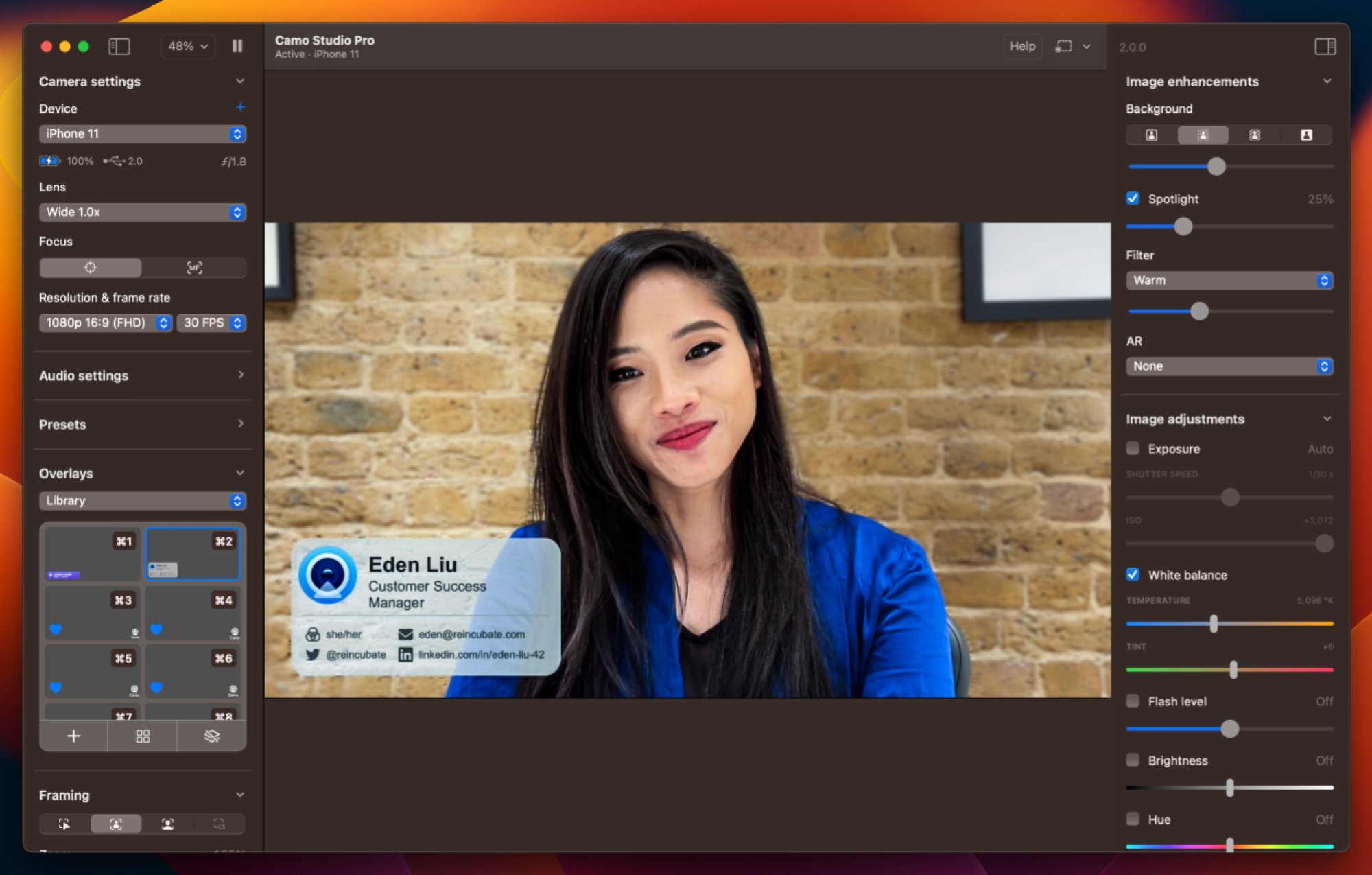
Camo is an extremely feature rich alternative for using your Android phone as a webcam. You can use this app with both Windows and Mac, which may appeal to a larger audience, since DroidCam lacks a Mac app. The app is free to use for up to 720p video, which is honestly good enough for video calls, but if you need up to 4K video for your webcam, you can subscribe to the pro tier ($50/year).
This app supports both wifi and USB connectivity, but the developers recommend USB for initial setup and better performance, including lower latency. The setup is quite straightforward—just install the app on your phone and on Mac or Windows, connect your Android phone to your computer via USB, and follow the on-screen instructions. The advantage of using Camo is that it’s not just a bridging app that connects your phone to the PC. It also works with dedicated webcams and features video effects such as Portrait mode (to blur the background) and lighting effects. It also lets you adjust the resolution, frame rate, and focus point in your videos. For more, read Camo’s official guide to adjusting video settings.
4chan, the internet’s most infamous forum, is down following an alleged hack
4chan, the controversial forum known for birthing early meme culture and Gamergate, is down, following an apparent hack. Per Downdetector, reports of an outage began circulating late Monday evening, with users sharing updates on connection issues through the early hours of Tuesday morning. As of the writing of this article, it’s possible to access the website following a long delay, but clicking on any of the board links leads to a timeout.
According to screenshots shared on Imgur (NSFW warning), it appears a hacker gained shell access to 4chan’s hosting server. They then went on to post images of the site’s phpmyadmin page, and appear to have doxed the entire moderation team alongside many of the site’s registered users. While it seems some users took steps to protect their identities, many appear to have used their primary email address to register for the forum, with .edu and even .gov addresses reportedly appearing in the list leaked emails.
It’s unclear what this means for the future of 4chan, but some social media and Reddit users are speculating this could be the end of the internet’s most infamous forum. In addition to doxing much of 4chan’s userbase, the hacker also appears to have leaked the site’s source code, revealing security holes that have existed since around the time Hiroyuki Nishimura bought the forum from creator Christoper Poole. It may take months to rebuild a more secure version of 4chan.
If this is the end of 4chan, it would be the most significant de-platforming of extreme right-wing internet users since Kiwi Farms temporarily went down in 2022.
This article originally appeared on Engadget at https://www.engadget.com/cybersecurity/4chan-the-internets-most-infamous-forum-is-down-following-an-alleged-hack-142516392.html?src=rss
Fedora Linux 42 released (Fedora Magazine)
The Fedora Project has announced
the release of Fedora Linux 42, with “what’s new” articles for Fedora Workstation
and Fedora KDE Plasma Desktop. There
is also a last-minute warning about the live media for the release:
We discovered a problem with the Live boot media at the last
minute, and since the release was already out of the airlock, we can’t
do much about it. It doesn’t damage anything, but is annoying: just
booting the Live media adds an unexpected entry to the UEFI boot
loader even when Fedora Linux 42 is not installed to the local
system.This is primarily a concern when you are dual-booting with a
different operating system, or if you’re just running the Live image
and not intending to actually install.
See the release
notes for more information, and LWN’s coverage of
Fedora 42.
Baldur’s Gate 3’s Final Patch Sends The RPG Off With A Bang
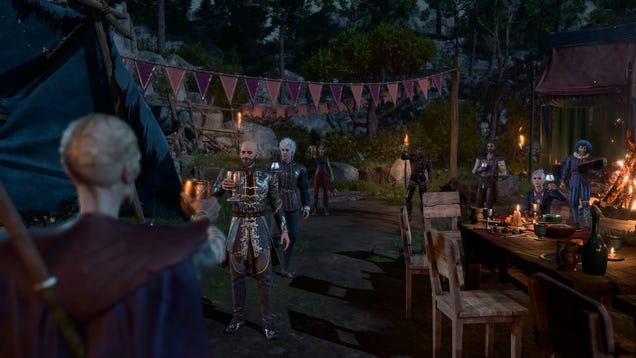
After almost two years, Larian Studios is finally done patching Baldur’s Gate 3. The team released the game’s eighth and final patch today, April 15, and it brings some long-awaited features like crossplay multiplayer, photo mode, and 12 new subclasses.
[$] Don’t panic: Fedora 42 is here
Fedora Linux 42 has been released with many
incremental improvements and updates. In this development cycle, the KDE Plasma Desktop
has finally gotten a promotion from a spin to an
edition, the new web-based
user interface for the Anaconda installer makes its debut, and the
Wayland-ification of Fedora continues apace. In all it is a solid
release with lots of polish.
Customize Your Samsung With Their Most Popular ‘Good Lock’ Modules
If you have a Samsung Galaxy phone, then you also have access to the Good Lock app from the Galaxy Store or the Play Store. This free app provides a host of extra ways to tweak and customize your handset, above and beyond what you get in One UI, and it covers everything from 3D wallpapers to advanced camera settings.
There’s a lot to explore in Good Lock, and you can pick and choose from its various modules (mini-apps) as needed. Samsung recently shared the three modules that have been most popular with users since Good Lock first launched back in April 2016, and they’re good starting points for anyone new to the app or wanting to explore it further.
When you open up Good Lock on your Galaxy phone, you’ll see all the various modules listed under the Plugins tab—tap any of the filters at the top of the list to narrow down your search. When you’ve found something you want to use, tap the download button (the downward arrow) next to it on the right.
Sound Assistant
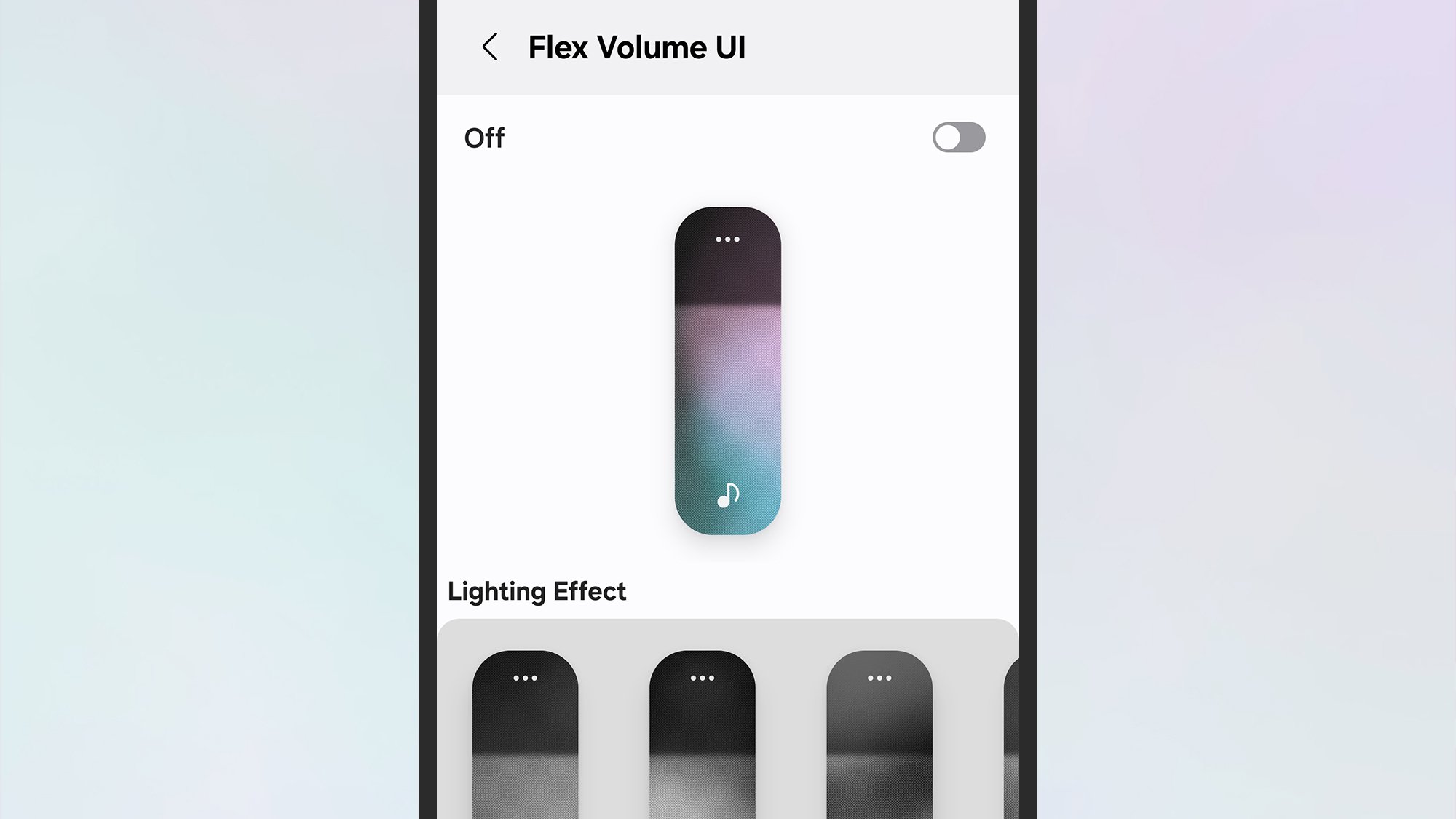
Tweaking the volume slider in Sound Assistant.
Credit: Lifehacker
Credit: Lifehacker
Sound Assistant gives you access to a host of different tweaks for the sound settings on your device. For example, you can change how the volume slider looks, change how much the volume increases and decreases by every time you press either of the volume buttons, set specific volume levels for specific apps, and have alerts (for notifications and alarms) only sound through headphones rather than the phone speaker.
Tap the top Customize volume panel option inside Sound Assistant to do just that. You’re able to change the layout, lighting effects, and colors used in the panel as you see fit. If you then go back to the previous screen, you can drag across the Change step volume slider to set volume increments to anything from 1 to 10.
The ability to set different volume levels for individual apps means that you can, say, keep your white noise app to a murmur while your podcast app is at full volume. Tap Individual app volumes to get started, then the + (plus) button to add an app. You then get a 0-100 percent slider for each of the apps you’ve selected.
Theme Park
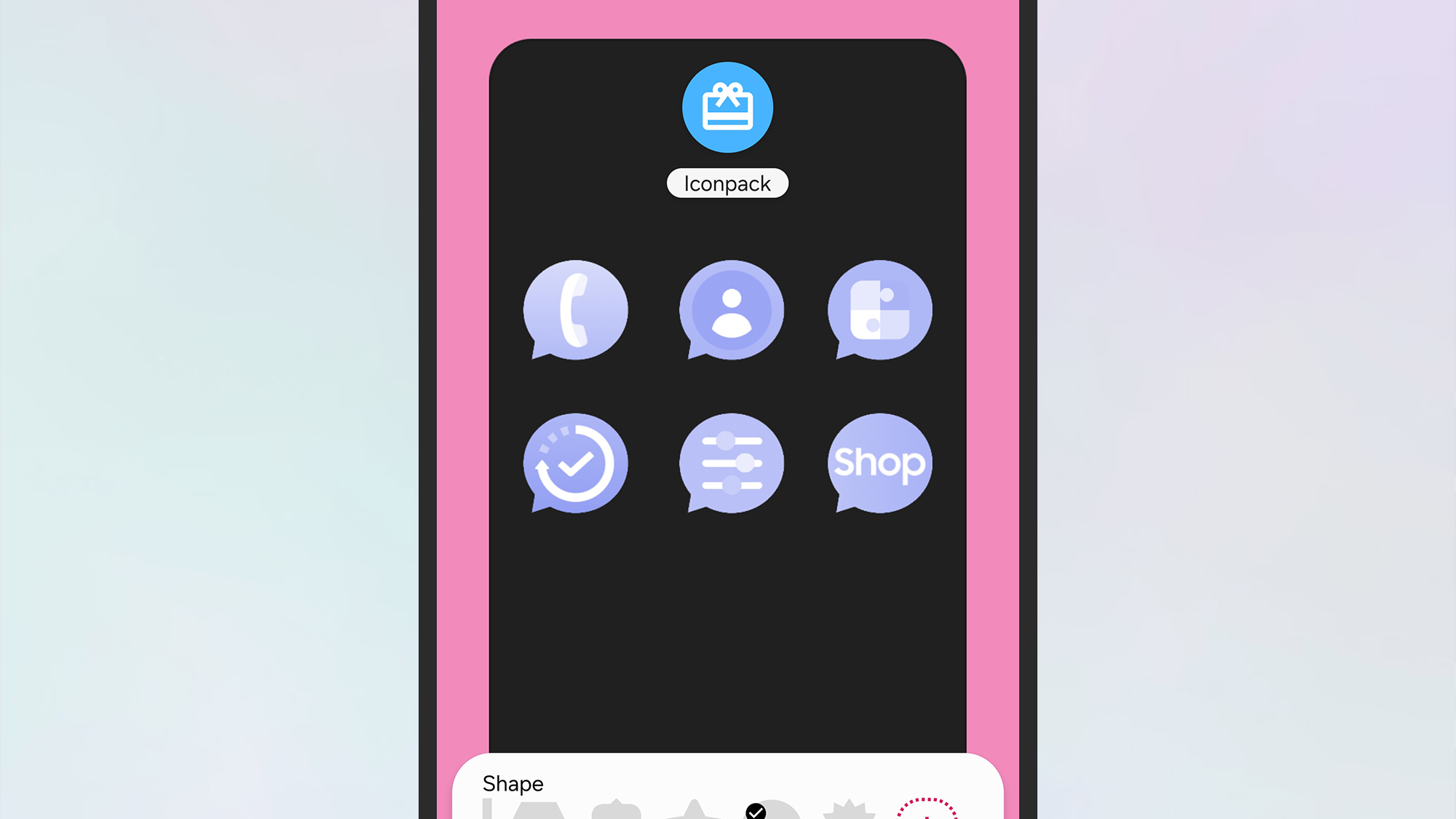
Theme Park lets you play around with icon shapes and colors.
Credit: Lifehacker
Credit: Lifehacker
The Theme Park module enables you to let loose when it comes to customizing the visual interface of your phone. You can edit the colors of your keyboard, the Quick Settings pane, and the volume panel, as well as change the shape and color of icons, and set up a gallery of wallpapers. You can switch between different theme options with a tap.
Choose Create New and follow the instructions on screen to pick out an image to use for your phone wallpaper, which you can crop as needed. You then get suggestions for color schemes based on the wallpaper you’ve picked, which you can override. To save your new theme, tap the downward arrow (top right) and give it a name.
The other tabs inside the module work in a similar way. It can take a little while to get a grip on everything in Theme Park, but most of it works intuitively, and if you invest some time and effort into your theme building, you can create something that looks quite different from the default One UI interface.
One Hand Operation+
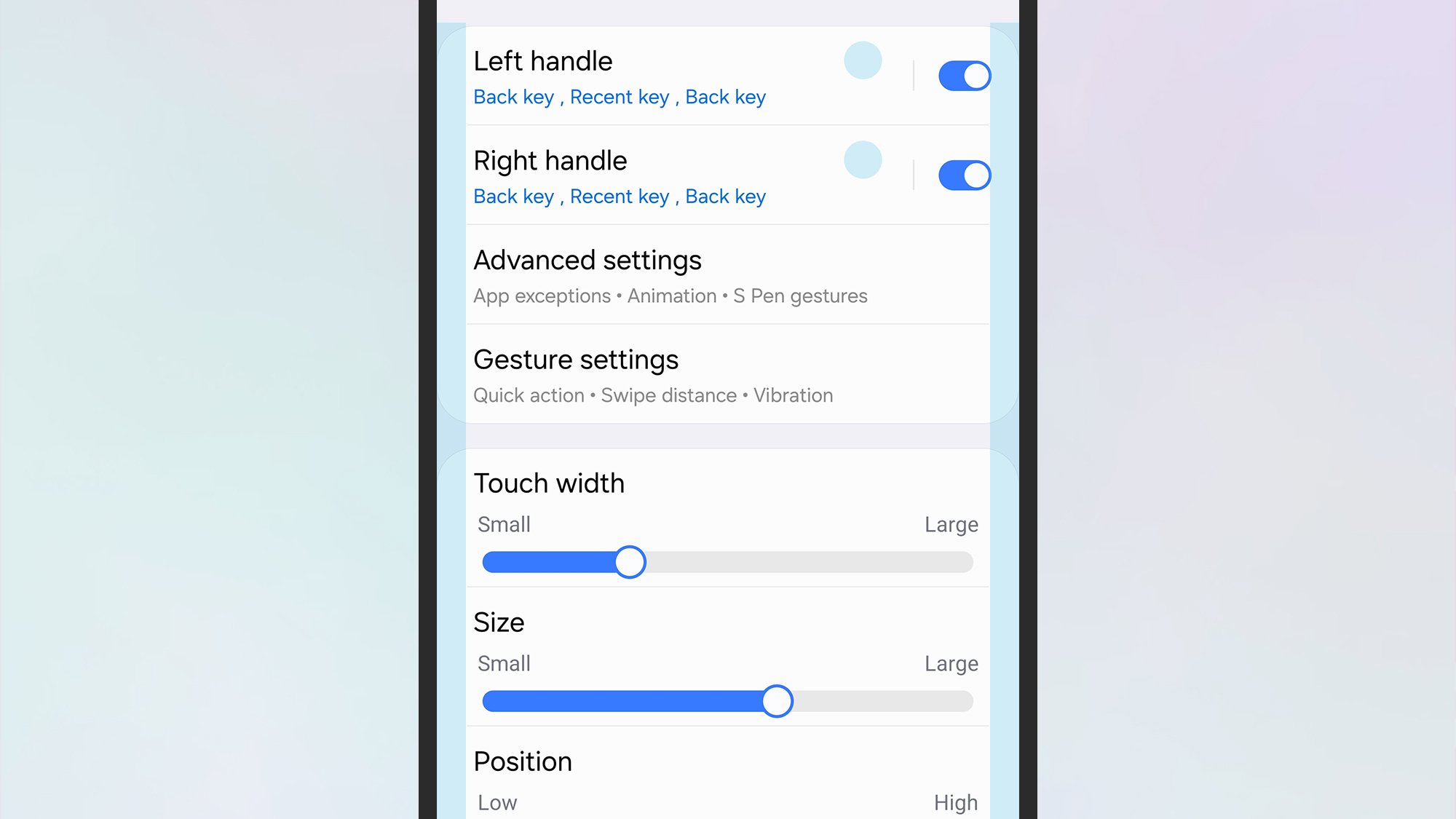
Setting up options in One Hand Operation+.
Credit: Lifehacker
Credit: Lifehacker
The third module showcased by Samsung is One Hand Operation+. As the name suggest, this enables you to control more actions on your phone with a single thumb, whether you’re right or left-handed, so it’s easier to operate One UI and your apps if you only have one hand free.
Once you’ve switched on the module, you get two “handles” at either side of the screen you can configure. You’re able to assign different gestures to different actions via these handles. So a quick swipe in from the right, for example, will take you back to the home screen. You can have just one handle on either the left or the right, or use both of them.
You can also change the size and touch sensitivity of the handles to make sure they work well for you, and there are additional settings to exempt specific apps from using the handles, and to disable the one-handed interface when certain conditions are met (such as you’re watching a movie in landscape mode).
Other modules
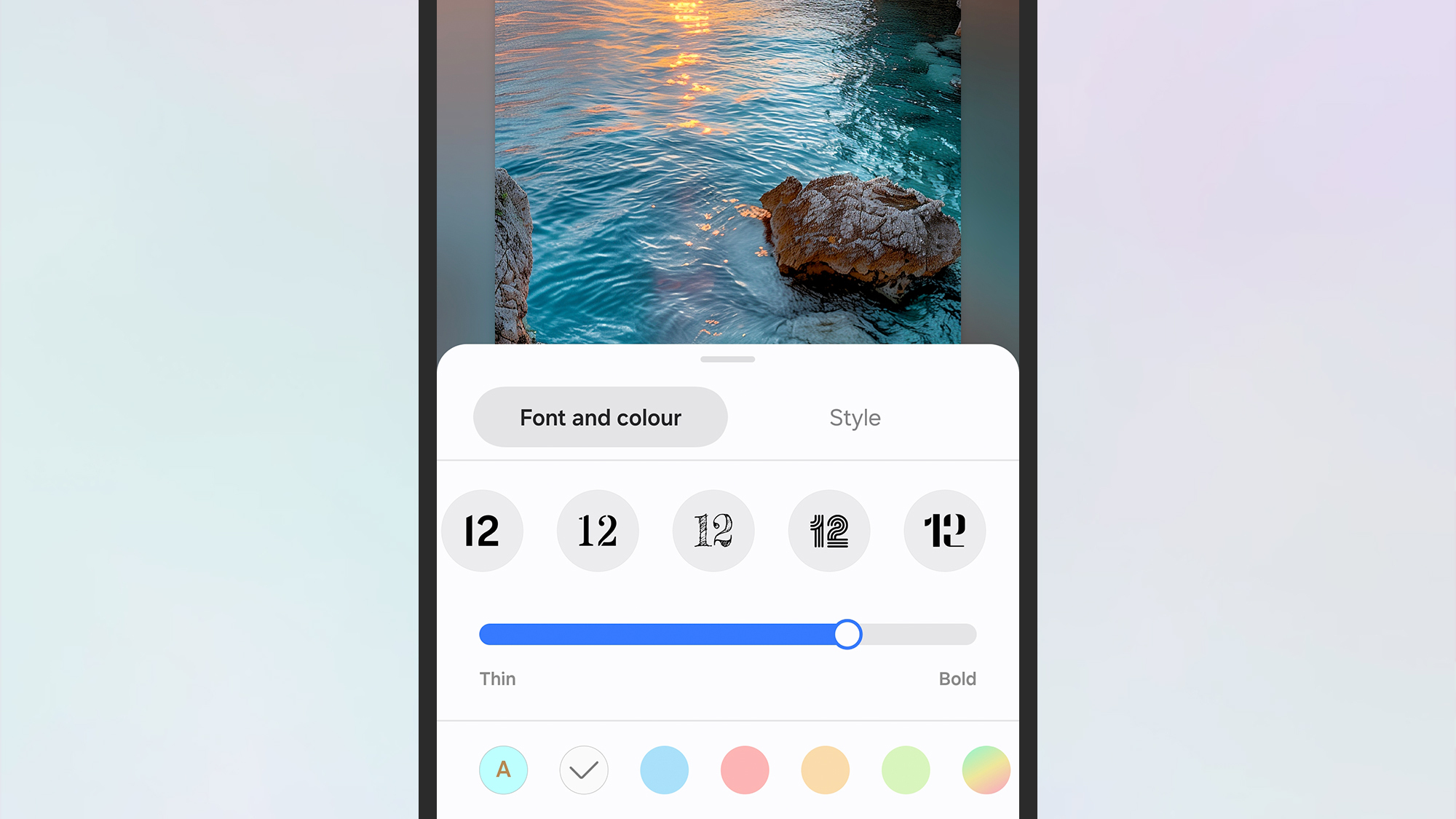
You can tweak the lock screen clock and widgets with LockStar.
Credit: Lifehacker
Credit: Lifehacker
Those are the three Good Lock modules that have proved popular with users down the years, but there are plenty of other ones to try. One I particularly like is LockStar, which gives you additional options for customizing how the lock screen looks: You can change the lock screen layout, switch between clock styles, and more.
Home Up is also well worth a look. It lets you build a freeform home screen layout with the widgets and app icons of your choosing, and you can add stickers, tweak the gesture controls for navigating around, and even adjust animation speeds and smoothness. You also get more control over the share panel and the recent apps view in One UI.
If you make a lot of use of the Camera app on your Galaxy phone, give Camera Assistant a look as well. The extra options it adds include zoom shortcuts, HDR handling, picture softening, switching between different camera lenses, and photo resolutions.