When I talked to Don’t Nod last year about why it was breaking its new paranormal adventure game, Lost Records: Bloom & Rage, into two parts, the team said it wanted to recapture the mystery and speculation generated by episodic releases of the past like the original Life Is Strange and Telltale’s catalog. After two…
Microsoft just announced that Xbox Series X/S and Xbox One owners can now stream select games they own directly from the console. This feature is exclusive to Game Pass Ultimate members.
What’s the point of this? It’s intended to save both time and hard drive space. Gamers can jump right in immediately, without having to download and install a giant file. It doesn’t work with every game. As of this writing, there are over 100 titles that enable this feature. They include standouts like Assassin’s Creed Shadows, Animal Well, Baldur’s Gate 3 and Hogwarts Legacy, among others.
Xbox
All you have to do is peruse your library and look for the cloud icon accompanying a game. Playable titles can also be filtered in search. The Store app even displays this icon, allowing you to start playing as soon as you hand over some digital cash.
Xbox players could already do this on devices outside of an official console. Throughout the past few months, the feature has been popping up on select smart TVs, Amazon Fire TVs and Meta Quest VR headsets. It also works on browser-supported devices like PCs, tablets and smartphones. A beta test for Xbox consoles started in December.
Microsoft also just announced that backward compatible games from the Xbox and Xbox 360 will now be streamable via remote play across all supported devices. That significantly increases the library of available titles. It’s worth noting that the company has removed remote play from the official Xbox app on mobile, but it still works via browsers.
This article originally appeared on Engadget at https://www.engadget.com/gaming/xbox/xbox-users-can-now-stream-games-they-own-on-their-consoles-173739687.html?src=rss
MIAMI—A decade after its first visit to the state, Formula E returned to Florida this past weekend. The even has come a long way since that first chaotic Miami ePrix: The cars are properly fast now, the racing is both entertaining and quite technical, and at least the trackside advertising banners were in place before the start of the event this time.
It’s not the same track, of course. Nor is it anywhere near the Hard Rock Stadium that Formula 1 now fills with ersatz marinas and high-priced hospitality packages during its visit to the area. Despite what the b-roll helicopter shots might have led viewers to believe, we were actually an hour south of the city at a mid-sized oval track next to a landfill in Homestead. Usually, a place that hosts NASCAR races, for Formula E, there was a 2.2-mile (3.5 km) layout that used the straights and infield but not the banked corners.
Formula E has begun to branch out from its original diet of racing exclusively on temporary city center street tracks, having visited Portland International Raceway in Oregon in 2023 and 2024. Despite the bucolic charm of PIR, with its easy bicycle and light rail access, enthusiastic crowd of attendees, and exciting racing, it was only a temporary patch for Formula E. The vast majority of Formula E’s fans live outside the US, and Portland means nothing to them, but they’ve heard of Miami, I was told last year.
We may earn a commission from links on this page. Deal pricing and availability subject to change after time of publication.
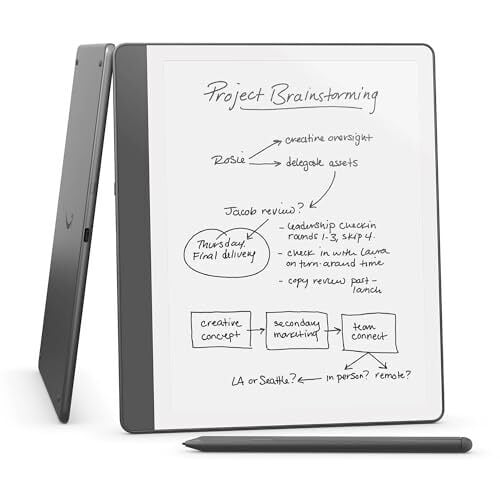
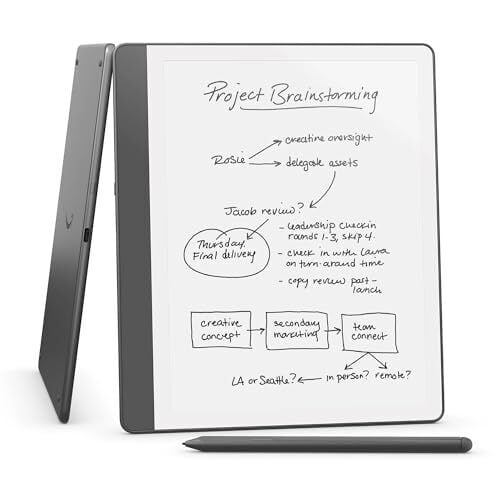
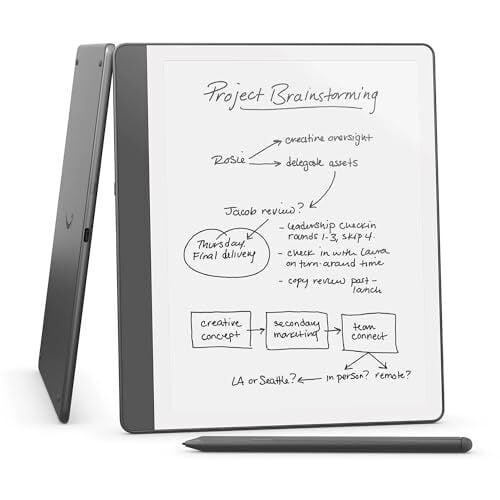
A new version of the Kindle Scribe, an upgraded version of the classic e-reader designed for note-taking, came out this past December, with some nice upgrades that make the device more pleasant to use. Those upgrades don’t come cheap, with prices on the new Kindle Scribe starting at $399.99. Right now, though, the 16GB version is discounted to $324.99, the 32GB version is going for $339.99 (originally $419.99), and the 64GB version is $364.99 (originally $449.99).
Dimensions: 9.0 by 7.7 by 0.22 inches, Weight: 15.3 oz, Screen Size: 10.2 inches, Storage: 16 GB
Amazon Kindle Scribe (16 GB)
$324.99 at Amazon
$399.99 Save $75.00
$324.99 at Amazon
$399.99 Save $75.00
Dimensions: 9.0 by 7.7 by 0.22 inches, Weight: 15.3 oz, Screen Size: 10.2 inches, Storage: 32 GB
Amazon Kindle Scribe (32 GB)
$339.99 at Amazon
$419.99 Save $80.00
$339.99 at Amazon
$419.99 Save $80.00
Dimensions: 9.0 by 7.7 by 0.22 inches, Weight: 15.3 oz, Screen Size: 10.2 inches, Storage: 64 GB
Amazon Kindle Scribe (64 GB)
$364.99 at Amazon
$449.99 Save $85.00
$364.99 at Amazon
$449.99 Save $85.00
The original Kindle Scribe first came out in 2022; that first version is currently $339.99 for the 16GB model, which puts how good of a deal this is in perspective.
If you already have the 2022 version, there really is no reason to upgrade. The main difference is the 2024 version comes with the Premium Pen instead of the Basic Pen stylus. The tablet itself is shorter, narrower, and slimmer, but not by much (you can even still use the same case). The new screen also has texture, which will add more resistance when you’re writing on it for a more natural feel, and the gap between the screen and the outer casing is smaller. But that’s where the differences end, at least according to PCMag’s 3.5-star review.
Otherwise, you’ll get the same book format compatibility, the same 15.3 oz weight, the same glare-free 300 ppi front-lit display screen, and the same 12-week battery life. Both tablets run the same software. Still, if you don’t own a Scribe at all and are considering getting one, the newer version is the better option, especially since it is currently cheaper than the older version.
Well, here’s even more evidence that Bethesda has a big Elder Scrolls IV: Oblivion remake coming out soon. An Xbox Support account on Twitter, when asked about the yet-to-be-announced RPG, seemingly confirmed it is a thing, and even announced it will be out next week.
Bloober Team has provided a first proper look at gameplay for its latest project, Cronos: The New Dawn, after a brief tease at the end of the initial reveal in October. The trailer has a very Dead Space-like feel, which shouldn’t be too surprising given that this is a third-person survival horror game, but that’s hardly a bad thing. There appear to be some other influences at play here, and there’s one particular feature that seems quite terrifying.
The game takes place across two time periods, a decayed post-apocalyptic future and 1980s-era Poland. As a Traveller, you’re sent back in time to rescue certain people before they die in an apocalypse. To do that, you’ll need to battle creatures known as Orphans, which Bloober describes as “twisted, body-horror monstrosities born from humanity’s darkest nightmares.” But you’ll need to be sure to burn the bodies of fallen monsters. If you don’t, that can spell a whole heap of trouble.
Living Orphans can absorb the bodies of their fallen ilk. This so-called Merging evolves the creatures. They become fast, stronger and tougher to take down, and they gain new abilities to boot. So yeah, you’ll want to torch any Orphans that you take out.
There’s a lot going on elsewhere in the trailer. Along with Dead Space, the action and visuals evoke games like The Last of Us Part 2 (if you know, you know), Returnal, Bioshock and Control — not least because of the shifting, fractured Brutalist architecture. The creature designs are reminiscent of those in last year’s Silent Hill 2 remake, a game that Bloober Team just happens to be behind.
Those aren’t criticisms in any way. There’s nothing wrong with drawing inspiration from others and fashioning them into something new. Cronos: The New Dawn is looking pretty compelling, and it’s already got a spot on my wishlist.
Cronos: The New Dawn is slated to arrive later this year. It’s coming to Steam, PS5 and Xbox Series X/S.
This article originally appeared on Engadget at https://www.engadget.com/gaming/cronos-the-new-dawn-seems-to-smush-dead-space-and-control-together-in-a-good-way-172611962.html?src=rss
When preparing for homemade pizza, it’s easy to hit the grocery store with mozzarella on your list. But what kind of mozzarella is best? Fresh, shredded, string? And is that really the best cheese for the pizza you’re craving? I sit here typing away when I should be nursing the burnt roof of my mouth because great pizza discoveries have been made in my kitchen today—my cheese-scorched mouth can wait.
Similar to why there are good and bad cheese options for the best grilled cheese sandwich, pizza requires one with good melting properties (a fatty cheese), with a good balance of water, and not an overload of protein (which can resist melting). There are some surprises here, including cheeses you’d normally find at the sandwich counter and cheeses you’ve probably seen on pizza before. Here are the best cheeses to try on your next pizza, and unexpected ones to avoid.
Muenster cheese (and fatty cheeses)
For the longest time, I thought shredded cheese was the only cheese for my homemade slice, but I auditioned sandwich slices of Muenster cheese and was blown away. Muenster is a semi-soft cheese that doesn’t break into oily pockets after cooking. I tore up a slice of muenster and scattered the irregular flats around my sauced pie. After 15 minutes or so in the oven, I removed a pizza that could stand up to even the most bougie Brooklyn pizzeria.
Fatty sandwich slices of cheese—the same ones you use for grilled cheese—make great melting cheeses for high oven temperatures. They don’t become greasy after they melt, and they reward you with a lovely gooey cheese pull after slicing. Since they really melt out far and wide, don’t load up the pie too much. You can leave some space between each island and still have a nice balance of cheese to sauce.
Other fatty cheeses like muenster: havarti, gouda, taleggio, and fontina.
Some mozzarella
Mozzarella is the pizza cheese. There’s no question that the flavor and stretchy consistency make for both the perfect centerpiece and a great canvas for toppings. However, there are a couple mozzarellas out there, and not all of them can stand up to the heat.
The fresh mozzarella starts to squeeze out water which is puddling in the middle of the pie. Credit: Allie Chanthorn Reinmann
Fresh mozzarella and the like. Fresh mozzarella, burrata, and buffalo mozzarella are these gorgeous, moist orbs of creamy white cheese. They’re usually wrapped with some moisture in the packaging or submerged and floating in liquid. While you might think these cheeses would be insanely creamy and wonderful on pizza, stay your eager cheese hand.
When fresh mozzarella cooks, especially at high temperatures like 350°F to 450°F, the protein network in the cheese begins to denature and tighten up, squeezing out the moisture that used to live in the network. Fresh mozzarella has a lot of moisture to give and it’ll end up on the surface of your pizza as a watery puddle. Besides the sadness of a floppy, wet pizza crust, you also have globs of rubbery cheese that pull off in one bite.
There is a way to avoid this unfortunate result: During my tests, after about five minutes, the fresh mozzarella was lovely and melted. But after 10 minutes in my 450°F oven, the water started to puddle up as the cheese began to take on some color. Pizza takes at least 15 minutes to cook in a screaming hot oven. If you must use fresh mozzarella, my advice is to add it to the pizza during the last five minutes of the cooking time.
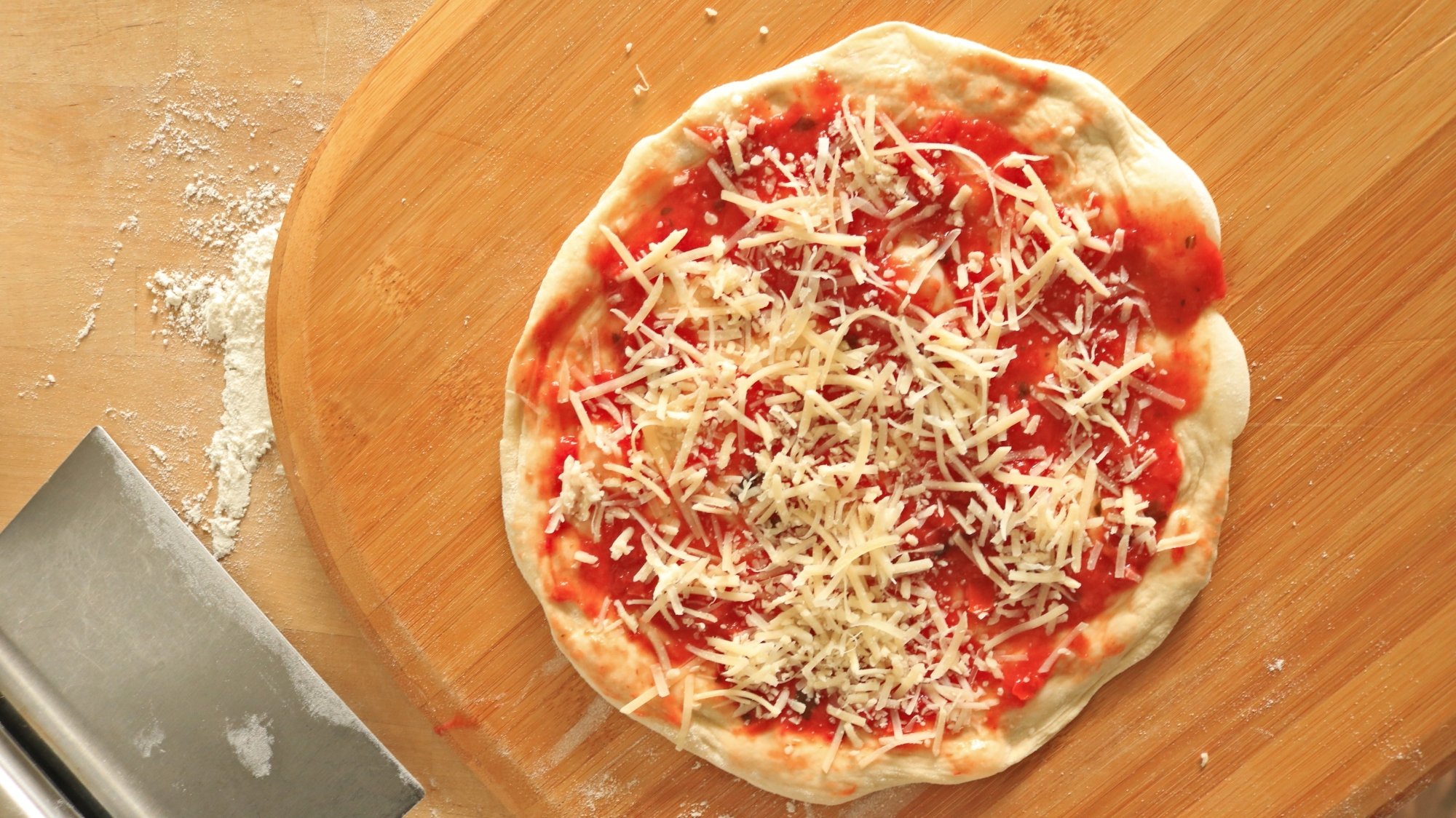
Low-moisture mozzarella. Fresh mozzarella, burrata, and buffalo mozzarella are expensive and decadent. I’d hate for you to ruin them by cooking them for too long on your pizza. Instead, rely on trusty low-moisture mozzarella. This cheese is produced with way less moisture captured and you won’t risk it ending up on your pizza. You can buy it shredded, in slices, or in big bricks. You can enjoy all the flavor and meltability of fresh mozzarella in a more pizza-friendly.
Parmesan (and hard cheeses)
Credit: Allie Chanthorn Reinmann
Parmesan and other aged, hard cheeses exhibit strong, bold flavors that are lovely on pizza. However, when cheeses age, they lose moisture, and that’s when they can become broken and greasy on a pizza. Cheeses melt best when they have a balance of fat, water, and protein, so when you have a hard cheese under a high temperature, it doesn’t do much except squeeze out fats and become even harder.
I added shredded parmesan to cover one of my pizzas, and when I took the pie out of the oven, the cheese stayed put in its shredded form, not really melting out but instead becoming rather translucent. It almost looked like I barely added cheese at all. That said, the flavor was bangin’. Parmesan has a presence; it’s not a mild cheese like mozzarella. I would recommend shredded parmesan if you prefer flavor over cheese pull. It’s important to note that parmesan actually might be better on the bottom of your pizza. It makes a crispy, cheesy frico crust if you make a cast iron skillet pizza. Check out the recipe here.
Flavor-packed hard cheeses like parmesan: Asiago, manchego, aged swiss, aged cheddars.
The winner is a mixture
It may not come as a surprise, but the best homemade pizza cheese will always be a mixture of cheeses. Each cheese has its strong suit, so don’t deprive yourself. Low-moisture mozzarella is stretchy but mild, so add some shredded asiago for a sharp touch of flavor. Love a good melty cheese pie? Skip the asiago and opt for something like fontina to mix in with your mozzarella. My favorite mixture so far has been mozzarella with pepper jack and a bit of muenster. The opportunities are only limited by your grocery store’s cheese section, so grab some sandwich slices and get experimenting. Once you’ve selected your cheese combo, you’re ready for more of my tips for making the best homemade pizza every time; to start with, you should ferment your dough.
In now-rarified comments from experts at the Centers for Disease Control and Prevention, an agency official on Tuesday evening said the explosive measles outbreak mushrooming out of West Texas will require “significant financial resources” to control and that the agency is already struggling to keep up.
“We are scrapping to find the resources and personnel needed to provide support to Texas and other jurisdictions,” said David Sugerman, the CDC’s lead on its measles team. The agency has been devastated by brutal cuts to CDC staff and funding, including a clawback of more than $11 billion in public health funds that largely went to state health departments.
Sugerman noted that the response to measles outbreaks is generally expensive. “The estimates are that each measles cases can be $30,000 to $50,000 for public health response work—and that adds up quite quickly.” The costs go to various responses, including on-the-ground response teams, vaccine doses and vaccination clinics, case reporting, contact tracing, mitigation plans, infection prevention, data systems, and other technical assistance to state health departments.
X DMs may soon be kaput. On Tuesday, a company software engineer posted on the platform that “the whole entire DM’s will be gone soon.” But the former Twitter isn’t getting rid of messaging; the company is said to be replacing it with a full-fledged chatting system called XChat.
X Software Engineer Zach Warunek replied to another user who asked whether XChat would replace message requests. “No, not like request messages but like the whole entire DM’s will be gone soon,” the engineer replied. Engadget contacted Warunek to ask about a timeframe for the feature, and we’ll update this article if we hear back.
No, not like request messages but like the whole entire DM’s will be gone soon
These aren’t the first rumors we’ve seen about XChat. Early this year, the X account @xDaily posted a screenshot showing an XChat icon instead of Messages in the platform’s sidebar. In February, owner Elon Musk wrote that, within a few months, he would discontinue his phone number and only use X for texts and calls. Then, @swak_12 (viaAndroid Headlines) posted screenshots this month showing a PIN verification screen (similar to secure messaging apps like Signal) for XChat.
Yet another alleged leak posted on Wednesday by @P4mui includes more screenshots and a list of XChat features, including fully encrypted end-to-end messaging, file transfers and the ability to unread messages and delete individual ones for all users.
This article originally appeared on Engadget at https://www.engadget.com/social-media/x-may-soon-replace-dms-with-its-upcoming-chat-platform-171006540.html?src=rss
Allowing directories to be modified in parallel was the topic of Jeff
Layton’s filesystem-track session at the 2025 Linux Storage, Filesystem,
Memory Management, and BPF Summit (LSFMM+BPF). There are certain use
cases, including for the NFS and Lustre filesystems, as mentioned in a patch set
referenced in the topic
proposal, where contention in creating multiple files in a directory is
causing noticeable performance problems. In some testing, Layton has found
that the inode read-write semaphore (i_rwsem) for the directory is
serializing operations; he wanted to discuss alternatives.
A mere two days after announcing GPT-4.1, OpenAI is releasing not one but two new models. The company today announced the public availability of o3 and o4-mini. Of the former, OpenAI says o3 is its most advanced reasoning model yet, with it showing “strong performance” in coding, math and science tasks. As for o4-mini, OpenAI is billing it as a lower cost alternative that still delivers “impressive results” across those same fields.
More notably, both models offer novel capabilities not found in OpenAI’s past systems. For first time, the company’s reasoning models can use and combine all of the tools available in ChatGPT, including web browsing and image generation. The company says this capability allows o3 and o4-mini solve challenging, multi-step problems more effectively, and “take real steps toward acting independently.”
At the same time, o3 and o4-mini can not just see images, but also interpret and “think” about them in a way that significantly extends their visual processing capabilities. For instance, you can upload images of whiteboards, diagrams or sketches — even poor quality ones — and the new models will understand them. They can also adjust the images as part of how they reason.
“The combined power of state-of-the-art reasoning with full tool access translates into significantly stronger performance across academic benchmarks and real-world tasks, setting a new standard in both intelligence and usefulness,” says OpenAI.
Separately, OpenAI is releasing a new coding agent (à la Claude Code) named Codex CLI. It’s designed to give developers a minimal interface they can use to link OpenAI’s models with their local code. Out of the box, it works with o3 and o4-mini, with support for GPT-4.1 on the way.
Today’s announcement comes after OpenAI CEO Sam Altman said the company was changing course on the roadmap he detailed in February. At the time, Altman indicated OpenAI would not release o3, which the company first previewed late last year, as a standalone product. However, at the start of April, he announced a “change of plans,” noting OpenAI was moving forward with the release of o3 and o4-mini.
“There are a bunch of reasons for this, but the most exciting one is that we are going to be able to make GPT-5 much better than we originally though,” he wrote on X. “We also found it harder than we thought it was going to be to smoothly integrate everything. and we want to make sure we have enough capacity to support what we expect to be unprecedented demand.”
That means the streamlining Altman promised in February will likely need to wait until at least the release of GPT-5, which he said would arrive sometime in the next “few months.”
In the meantime, ChatGPT Plus, Pro and Team users can begin using o3 and o4-mini starting today. Sometime in the next few weeks, OpenAI will bring online o3-pro, an even more powerful version of its flagship reasoning model, and make it available to Pro subscribers. For the time being, those users can continue to use o1-pro.
This article originally appeared on Engadget at https://www.engadget.com/ai/openais-new-o3-and-o4-mini-models-are-all-about-thinking-with-images-170043465.html?src=rss
Google may have finally found an application of large language models (LLMs) that even AI skeptics can get behind. The company just released its 2024 Ads Safety report, confirming that it used a collection of newly upgraded AI models to scan for bad ads. The result is a huge increase in suspended spammer and scammer accounts, with fewer malicious ads in front of your eyeballs.
While stressing that it was not asleep at the switch in past years, Google reports that it deployed more than 50 enhanced LLMs to help enforce its ad policy in 2024. Some 97 percent of Google’s advertising enforcement involved these AI models, which reportedly require even less data to make a determination. Therefore, it’s feasible to tackle rapidly evolving scam tactics.
Google says that its efforts in 2024 resulted in 39.2 million US ad accounts being suspended for fraudulent activities. That’s over three times more than the number of suspended accounts in 2023 (12.7 million). The factors that trigger a suspension usually include ad network abuse, improper use of personalization data, false medical claims, trademark infringement, or a mix of violations.
Intel open-source software engineers last week posted a set of patches for a new driver: iXD. The three letter acronym party continues and this time even more difficult to decipher than some of their other obscure driver names…
The semiconductor industry is bracing to potentially lose more than $1 billion once Donald Trump announces chip tariffs.
Two sources familiar with discussions between chipmakers and lawmakers last week told Reuters that Applied Materials, Lam Research, and KLA—three of the largest US chip equipment makers—could each lose about “$350 million over a year related to the tariffs.” That adds up to likely more than $1 billion in losses between the three, and smaller firms will likely face similarly spiked costs, estimating losses in the tens of millions.
Some chipmakers are already feeling the pain of Trump’s trade war, despite a 90-day pause on reciprocal tariffs and a tenuous exception for semiconductors and other electronics.
The BPF verifier is not magic; it cannot solve the
halting problem. Therefore,
it has to err on the side of assuming that a program will run too long if it
cannot prove that the program will not.
The ultimate check on the size of a BPF program is the
one-million-instruction limit — the verifier will refuse to process more than
one-million instructions, no matter what a BPF program does. Alexei Starovoitov gave
a talk at the 2025 Linux Storage, Filesystem,
Memory-Management, and BPF Summit about that limit,
why correctly written BPF programs shouldn’t hit it, and how to make the user
experience of large BPF programs better in the future.
Google has announced that it will begin phasing out country code top-level domains (ccTLDs) such as google.ng and google.com.br, redirecting all traffic to google.com. The change comes after improvements in Google’s localization capabilities rendered these separate domains unnecessary.
Since 2017, Google has provided identical local search experiences whether users visited country-specific domains or google.com. The transition will roll out gradually over the coming months, and users may need to re-establish search preferences during the migration.
The Common Vulnerability and Exposures, or CVE, repository holds the answers to some of information security’s most vital questions. Namely, which security issue are we talking about, exactly, and how does it work?
The 25-year-old CVE program, an essential part of global cybersecurity, is cited in nearly any discussion or response to a computer security issue, including Ars posts. CVE was at real risk of closure after its contract was set to expire on April 16. The nonprofit MITRE runs CVE and related programs (like Common Weakness Enumeration, or CWE) on a contract with the US Department of Homeland Security (DHS). A letter to CVE board members sent Tuesday by Yosry Barsoum, vice president of MITRE, gave notice of the potential halt to operations.
“If a break in service were to occur, we anticipate multiple impacts to CVE, including deterioration of national vulnerability databases and advisories, tool vendors, incident response operations, and all manner of critical infrastructure,” Barsoum wrote.
About 18% of songs uploaded to Deezer are fully generated by AI, the French streaming platform said on Wednesday, underscoring the technology’s growing use amid copyright risks and concerns about fair payouts to artists. From a report: Deezer said more than 20,000 AI-generated tracks are uploaded on its platform each day, which is nearly twice the number reported four months ago. “AI-generated content continues to flood streaming platforms like Deezer and we see no sign of it slowing down,” said Aurelien Herault, the company’s innovation chief.
With the A1, Sony was the first to introduce a high-resolution hybrid camera that was equally adept at stills and video — but boy was it expensive. Nikon and Canon followed that template with the R5 II and Z8 models that offered similar capabilities for less money, but those were still well north of $4,000.
Enter the S1R II. It’s Panasonic’s first camera that can not only shoot up to 8K video at the company’s usual high standards, but also capture 44-megapixel (MP) photos in rapid bursts. And unlike its rivals, the new model is available at a more reasonable $3,300 — half the price of Sony’s A1 II. At the same time, it’s a massive upgrade over the original S1R.
The main catch is the lack of a high-speed stacked sensor found in the other models, which can cause some skewing in both images and video. As I discovered, though, that tradeoff is well worth it for the lower price and picture quality that matches its competition. All of that makes the S1R II Panasonic’s best camera yet and a very tempting option in the high-resolution mirrorless category.
Design and handling
The S1R II is similar to other recent Panasonic models like the GH7 in terms of the design and control layout. It’s much lighter than the original S1R at 1.75 pounds compared to 2.24 pounds, so it’s less tiresome to carry around all day. As for handling, the massive grip has a ridge where your fingertips sit, making it nearly impossible to drop. The rubberized exterior is easy on the hands, though not quite as nice as the R5 II’s softer material.
I’ve always liked Panasonic’s controls and in that regard the S1R II may be the company’s best model yet. Along with a joystick and dials on the top front, top back and rear, it has lockable mode and burst shooting dials on top. You also get a dedicated button for photos, video and slow and quick (S&Q) modes, each with separate settings. There’s a dedicated autofocus switch, video record buttons both on top and front, a tally light and multiple programmable buttons.
The menu system is equally good, with logical color-coded menus and submenus. You can also rapidly find your most-used functions in the quick menu. All of that allowed me to shoot photos and video without fumbling for settings. You can also fully program buttons, dials and the quick menu to your own preferences.
Steve Dent for Engadget
The rear display is great for content creators and photographers alike. It tilts up and down to allow for easy overhead or shoot-from-the hip photography and also swivels out to the side so vloggers can conveniently film themselves. It’s very sharp and bright enough to use on sunny days. The electronic viewfinder is also excellent with 5.76 million dots of resolution and 100 percent magnification, matching Canon’s R5 II and beating the Nikon Z8.
Battery life isn’t a strong point, though, with 350 shots on a charge or just 280 when using the electronic viewfinder — far below the 640 shots allowed by the R5 II. It also only allows just over an hour of start-and-stop video shooting. However, Panasonic’s optional DMW-BG2 battery grip doubles endurance and also allows for battery hot-swapping.
The S1R II supports both SDXC UHS II and much faster CFexpress Type B cards, while also supporting SSD capture via the USB-C port like the S5 IIX and GH7. The latter two storage methods enable shooting in high-bandwidth RAW and ProRes to maximize quality.
Panasonic also included a full-sized HDMI port along with microphone and headphone jacks. For the best possible sound quality, the optional XLR2 accessory lets you capture four channels at up to 32-bit float quality to reduce the possibility of clipped audio. And finally, the S1R II is Panasonic’s first mirrorless model with a protective carbon fiber curtain that comes down to protect the sensor, just like recent Canon and Sony models.
Performance
Steve Dent for Engadget
Although the original S1R could only manage an anemic 6 fps burst speeds, its successor can hit 40 RAW images per second in silent electronic mode, beating all its rivals — though shooting at that speed limits quality to 12-bit RAW. To get 14-bit quality, you need to use the mechanical shutter for burst shooting which tops out at 9 fps.
However, the Panasonic S1R II doesn’t have a fast stacked sensor like rivals. The result is rolling shutter that can be a problem in some circumstances, like shooting race cars, propellers or golf swings. However, it does outperform many other non-stacked high-resolution cameras like Sony’s A7R V and Panasonic’s own S5 IIX in that area.
Pre-burst capture is now available and starts when you half-press the shutter. That lets you save up to 1.5 seconds of photos you might have otherwise missed once you fully press the shutter button.
With an overhauled phase-detect autofocus system and a new, faster processor, the S1R II features Panasonic’s fastest and smartest AF system yet. It can now lock onto a subject’s face and eyes quicker and follow their movements more smoothly, while also detecting and automatically switching between humans, animals, cars, motorcycles, bikes, trains and airplanes. I found it to be fast and generally reliable, but it’s still not quite up to Sony’s and Canon’s standards for speed and accuracy.
Panasonic boosted in-body stabilization to 8 stops. That’s nearly on par with rivals, though Canon leads the way with 8.5 stops on the R5 II. Still, it lets you freeze action at shutter speeds as low as a quarter second in case you want to blur waterfalls or moving cars when shooting handheld.
Image quality
Photo quality is outstanding with detail as good as rivals, though understandably short of Sony’s 61-megapixel A7R V. Colors are as accurate as I’ve seen on any recent camera, matching or even beating Canon’s excellent R5 II. My pro photographer friends took a number of shots with the S1R II and found it slightly superior to their Sony A1, noting that they rarely needed to white balance in post.
Thanks to the dual-ISO backside-illuminated sensor, low-light capability is excellent for a high-resolution camera, with noise well controlled up to ISO 12,800. Beyond that, grain becomes more problematic and shadows can take on a green cast. JPEG noise reduction does a good job retaining detail while suppressing noise, but gets overly aggressive above ISO 6,400.
If 44MP isn’t enough, the S1R II offers a high-resolution mode that captures eight images with a slightly offset sensor position and composes them into a single 177 megapixel file (either RAW or JPEG). It can supposedly be used without a tripod, though I found I had to remain very still to get decent images when doing so.
Video
The S1R II is Panasonic’s best mirrorless camera yet for video, albeit with some caveats I’ll discuss soon. You can capture up to 8K 30p 10-bit video at a reasonably high 300 Mbps, close to what Sony’s far more expensive A1 can do. Better still, it supports oversampled 5.8K ProRes RAW video internally with no crop for maximum dynamic range, or 4K video at up to 120 fps. Finally, the S1R II is capable of “open gate” 3:2 capture of the full sensor at up to 6.4K (and 8K down the road via a firmware update), making it easy to shoot all types of formats at once, including vertical video for social media.
Steve Dent for Engadget
Some of these resolutions, particularly the 5.9K 60 fps and 4K 120 fps modes come with a slight crop of about 1.1x and 1.04x, respectively. 4K 120 fps also uses pixel binning, which introduces a loss of resolution and other artifacts like rainbow-colored moire.
That takes us to the main downside: rolling shutter. The S1R II is actually a bit better than the S5 II in that regard, with a total readout speed of about 1/40th of a second, or about 25 milliseconds at any of the full sensor readout resolutions (8K or 5.8K). That can result in wobble or skew if you whip the camera around or film fast-moving objects. However, it’s acceptable for regular handheld shooting.
One complication is Panasonic’s dynamic range expansion (DRE) that boosts video dynamic range by a stop, mostly in an image’s highlights. Enabling that feature makes rolling shutter worse.
Should you need to reduce rolling shutter, you can simply disable DRE without a big hit in quality. And shooting 4K at 60p minimizes rolling shutter so that it’s nearly on par with stacked sensor cameras, while still offering high-quality footage with just a slight crop.
As for video quality, it’s razor sharp and color rendition is accurate and pleasing. Dynamic range is on the high end of cameras I’ve tested at close to 14 stops when shooting with Panasonic’s V-log, allowing excellent shadow and highlight recovery, especially in DRE mode. It’s still very good without DRE though, particularly if you’re not shooting in bright and sunny conditions.
Frame grab from Panasonic S1R II 8K video
Steve Dent for Engadget
Video AF is also strong, keeping even quick-moving subjects in focus. Face, eye, animal and vehicle detection work well, though again, the system isn’t quite as reliable as what I saw on Sony and Canon’s latest models.
The S1R II offers more stabilization options than its rivals, though. Optical stabilization provides good results for handheld video, while electronic stabilization (EIS) smooths things further . Cranking that up to the most aggressive high EIS setting provides gimbal-like smoothness but introduces a significant 1.5x crop.
Along with those, Panasonic introduced something called “cropless” EIS. That setting takes advantage of unused areas of the sensor to correct corner distortion typical with wide angle lenses while also fixing skew. I found it worked very well to reduce rolling shutter even for quick pans and walking, which may help alleviate such concerns for some creators.
So yes, rolling shutter wobble is worse on this camera than rivals like the R5 II. However, there are ways to work around it. If minimal skewing is a critical feature then don’t buy the S1R II, but it shouldn’t be an issue for most users, particularly at this price.
Wrap-up
Steve Dent for Engadget
The S1R II is Panasonic’s best hybrid mirrorless camera to date, offering a great balance of photography and video powers. It’s also the cheapest new camera in the high-resolution hybrid full-frame category, undercutting rivals like Canon’s R5 II and the Nikon Z8.
The main downside is rolling shutter that primarily affects video. As I mentioned, though, it won’t pose a problem for many content creators and there are workarounds. Aside from that, it delivers outstanding photo and video quality while offering innovative features like cropless electronic stabilization.
If you need even more resolution, Sony’s 61MP A7R V offers slightly better image quality. And if rolling shutter is really an issue then I’d recommend Canon’s R5 II (though that model does cost $1,000 more) or the Nikon Z8. Should you want to spend considerably less, the Canon R6 II or even Panasonic’s S5 II or S5 IIx are solid picks. For other hybrid shooters, though, Panasonic’s S1R II is a great choice.
This article originally appeared on Engadget at https://www.engadget.com/cameras/panasonic-s1r-ii-review-an-excellent-hybrid-camera-thats-cheaper-than-rivals-163013065.html?src=rss