
Monthly Archives: April 2025
[Industry Direct] From Founder to XR Newbie: Why I Bet on Immersed (and how you can too)
Industry Direct by Kit Navock
Industry Direct is our program for sponsors who want to speak directly to the Road to VR newsletter audience. Industry Direct posts are written by sponsors with no involvement from the Road to VR editorial team. Industry Direct sponsors help make Road to VR possible.
Hey friends, I’m Kit Navock, the new CMO at Immersed. Not long ago, I sold my company. And like a lot of founders post-acquisition, I was taking stock—trying to figure out what kind of work (and what kind of people) I actually want to build with next. Long story short: I joined Immersed as its new CMO because I now see the company’s vision. And now, those who can also see the vision can join our journey by becoming an investor before we continue to accelerate! But first, let me tell you how I ended up here.
Immersed had been on my radar for a while. I was an early investor years ago and got to know the team slowly, the organic way—movie nights, shared meals, and bouncing around ideas at their Austin office. At some point, I even hired someone from their friend group at my acquired company. What started as curiosity turned into deep respect. These weren’t just smart people — they were good people — gritty, ambitious, humble, and mission-driven.
Fast-forward to a couple of months ago, I texted Renji (Immersed’s founder) about some basketball news. His reply?
“You should come work with us.”
It wasn’t an obvious choice. I only took his call to amuse him. Even if I hadn’t known him for years, he’s a pretty compelling guy. The thought stuck with me. I thought about it for days. I called my inner circle—the friends and mentors I trust most. I told them I was living the good life: consulting 20 hours a week, fresh off selling a company, finally slowing down a bit. But this opportunity just felt… different.
And they all said the same thing: You should go for it.
I took a lower salary than I’ve had in years, with equity that might not be liquid for a while. But I wasn’t joining for a quick win—I was joining because I believed in the people and the product for something that might become the next tech giant. And when I finally got hands-on with what they’re building, my mind was blown. It all finally clicked.
Visor: The XR Device That Shouldn’t Exist, But Does
I’ll be real—I’m newer to XR.
Not to tech in general, but to this AR/VR world. I wasn’t the guy duct-taping sensors to my face and hacking OpenVR builds back in 2016. I’m a mainstreamer. A noob. I had bought an Apple Vision Pro just to see what spatial computing felt like.
It generally worked. I was more productive, more focused. Then I tried Visor—Immersed’s own headset—and it was everything I didn’t know I wanted.
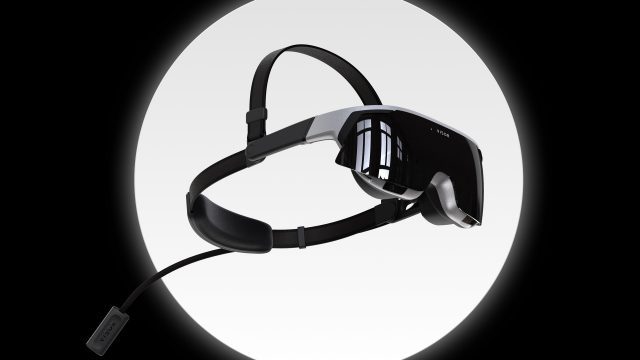
Visor weighs ~186g (lighter than my phone), looks like thick sunglasses, runs standalone with dual 4K micro-OLED displays and a 3-hour battery. But more importantly, it’s built for real tools: VS Code, Figma, email, Blender, terminal, tabs, Netflix. It didn’t feel like it was made as a posthumous add-on to my computer.
It’s not a devkit.
It’s not a toy.
It’s not heavy.
It’s not $3,499.
It’s just… the one that fits into an actual workday.
I may be new here, but even I can tell: this isn’t some prototype.
It’s the first headset that made me think, “Oh—this is ready for the rest of the world to get onboard.”
From App to Platform (and AI Co-Pilot)
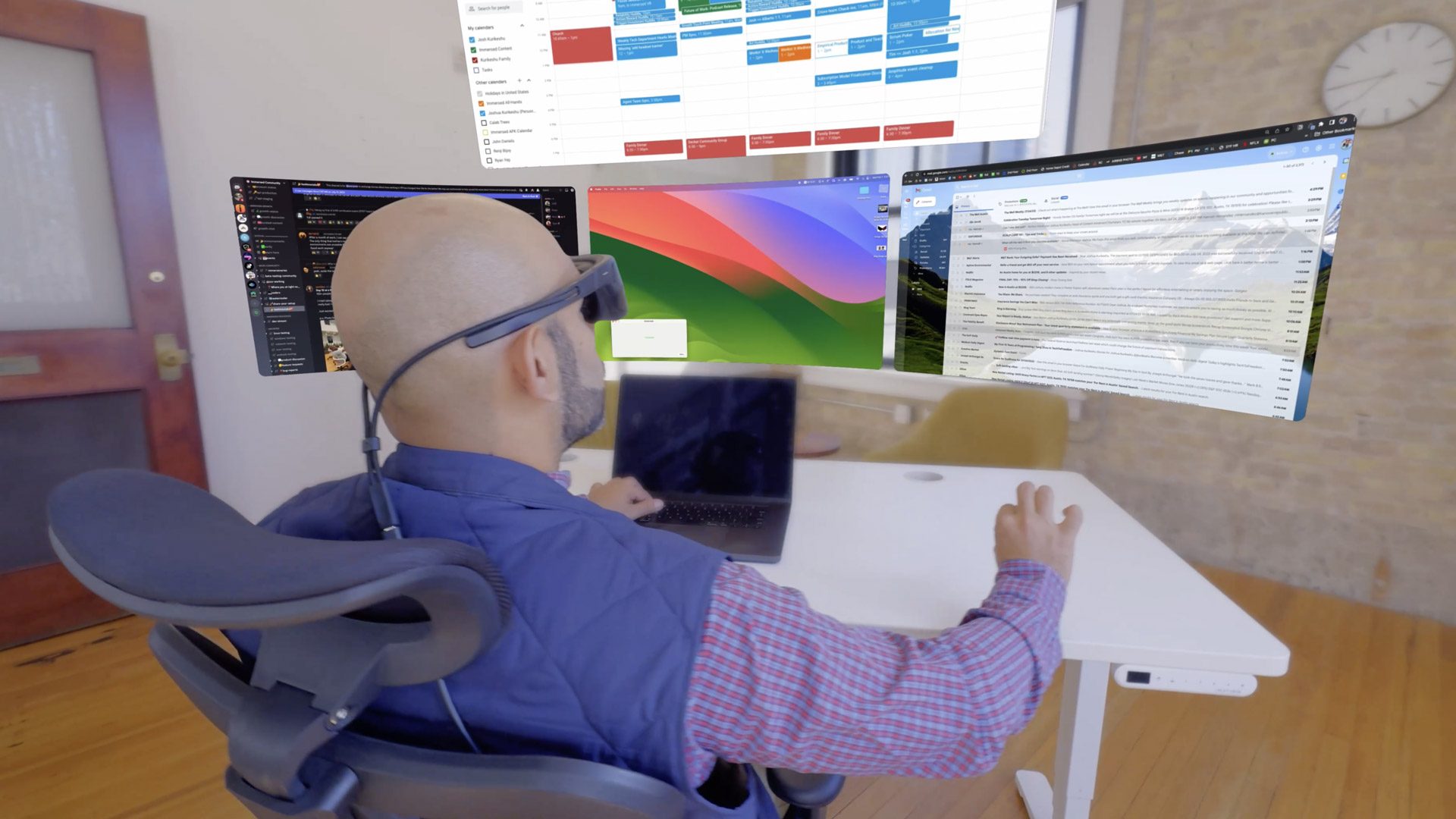 If you’ve used Immersed (and you probably have), you already know: it’s the most-used AR/VR productivity app in the world. Multi-monitor AR/VR workspaces. Low-latency streaming. Real-time collaboration across platforms. Tens of millions of sessions. Thousands of power users grinding through real work in XR.
Now, with Visor, we’re going beyond just an app. It’s the front door to a full spatial computing platform—an OS built for focus, deep work, and native 3D tools (not floating 2D windows). In my head, this is sort of how Steve Jobs thought about Apple; he wanted to build an entire ecosystem.
For me, what really sealed this line of thinking was Curator AI—a built-in co-pilot that understands my workflow, reduces context switching, and quietly boosts my productivity. It’s not a bolt-on gimmick—it’s the connective tissue of the platform. I don’t think I am alone in thinking this is also what I wanted Siri to be right now, but it’s not.
Moreover, the Immersed platform combined with the Visor and Curator AI —this moves us beyond just LLMs into the physical space. And because it’s OpenXR-compatible, devs can build right on top—whether it’s tools, agents, or entire apps.
This isn’t about porting your desktop into 3D. It’s about building spatial productivity from the ground up—with AI baked in from day one. It’s built for the builders.
Why This Matters Now
I didn’t join Immersed just to talk about screens floating in space and talking avatars. I joined because I believe spatial computing is going to reshape how we work and live. The combination of immersive environments, native tools, and always-on AI support is a powerful leap—and it’s arriving faster than most people think. I think the people at Immersed have the vision, the tech, and the people to make this happen. That’s why I joined.
This isn’t just for hobbyists. What Immersed is building is for engineers, designers, traders, artists, founders, filmmakers—anyone who works on a screen. And as AI agents and humanoid robotics continue to evolve, the value of an immersive spatial platform that just works is only going to grow.
Visor is more than a headset. The Immersed platform is more than just a virtual reality space where we can work. Curator is more than just an LLM AI agent. Together, they form an entire ecosystem for us to all level up.
We’re super pumped to share this with all of you.
If you’ve been waiting for someone to build the right headset—and the right company behind it—now’s your chance to be part of it. Join Immersed in bringing spatial computing to the masses.
 Own Stock in Immersed
Before the rest of the world catches up.
Let’s build the future—together.
— Kit
The post [Industry Direct] From Founder to XR Newbie: Why I Bet on Immersed (and how you can too) appeared first on Road to VR.
Trump Administration Plans To End the IRS Direct File Program for Free Tax Filing
The Trump administration plans to eliminate the IRS’ Direct File program, an electronic system for filing tax returns directly to the agency for free, AP reported Wednesday, citing two people familiar with the decision. From the report: The program developed during Joe Biden’s presidency was credited by users with making tax filing easy, fast and economical. But Republican lawmakers and commercial tax preparation companies complained it was a waste of taxpayer money because free filing programs already exist, although they are hard to use.


Read more of this story at Slashdot.
Phil Spencer Says Xbox Will Bring Games To Switch 2

Did you hear? The console wars are over. And here’s more evidence to prove it. During a recent interview, Xbox boss Phil Spencer made a point of explaining that the company was definitely going to support Switch 2 and bring its big games to the upcoming Nintendo console.
Government IT whistleblower calls out DOGE, says he was threatened at home
A government whistleblower told lawmakers that DOGE’s access to National Labor Relations Board (NLRB) systems went far beyond what was needed to analyze agency operations and apparently led to a data breach. NLRB employee Daniel Berulis, a DevSecOps architect, also says he received a threat when he was preparing his whistleblower disclosure.
“Mr. Berulis is coming forward today because of his concern that recent activity by members of the Department of Government Efficiency (‘DOGE’) have resulted in a significant cybersecurity breach that likely has and continues to expose our government to foreign intelligence and our nation’s adversaries,” said a letter from the group Whistleblower Aid to the Senate Select Committee on Intelligence leaders and the US Office of Special Counsel.
The letter, Berulis’ sworn declaration, and an exhibit with screenshots of technical data are available here. “This declaration details DOGE activity within NLRB, the exfiltration of data from NLRB systems, and—concerningly—near real-time access by users in Russia,” Whistleblower Aid Chief Legal Counsel Andrew Bakaj wrote. “Notably, within minutes of DOGE personnel creating user accounts in NLRB systems, on multiple occasions someone or something within Russia attempted to login using all of the valid credentials (e.g. Usernames/Passwords). This, combined with verifiable data being systematically exfiltrated to unknown servers within the continental United States—and perhaps abroad—merits investigation.”
Samsung Odyssey 3D monitor hands-on: This should be the new baseline for glasses-free 3D
It seems like every few years, gadget makers try to come up with something that will make us care about seeing things in 3D again. Without going all the way back to the 1800s, the first Avatar movie brought millions to theaters to watch blue cat people dance around in stereoscopic vision. Then came the flop that was 3D TVs in the early 2010s before things heated up again with the arrival of VR headsets like the HTC Vive and Oculus Rift. Soon, Samsung will release a new take on the tech with its glasses-free Odyssey 3D Gaming Monitor (model G90XF) and after trying it out, I feel like if 3D has been this good all along, people wouldn’t roll their eyes every time the idea gets brought up.
If this monitor looks somewhat familiar, that’s because Samsung actually demoed very early pre-production models at CES in both 2024 and 2025. In fact, I tried the first version in Las Vegas almost a year and a half ago, playing Lies of P back when it was a slightly larger 37-inch display. Regardless, the Odyssey 3D is finally going on sale later this month on April 28 for $2,000 and while I don’t think it’s an essential piece of tech, it’s definitely a fun way to experience both games and videos in a new dimension.
Sam Rutherford for Engadget
The G90XF features a 27-inch 4K LCD panel with a 165Hz refresh rate, which isn’t all that impressive considering its price. And in some respects, it gets even worse when the 3D effect is active. In addition to having two eye and face tracking sensors hidden beneath its bezels, the Odyssey 3D also uses a lenticular filter to create two slightly different versions of the same scene (one for each eye), which gets interpreted by your brain as a 3D image.
This lowers the perceived resolution of the screen, which results in a very faint screen door effect like you might get on a VR headset. For me, this meant I saw a little chromatic fringing around certain objects while individual pixels became more noticeable. Unfortunately, because the monitor is designed to be viewed with two eyes, the effect doesn’t come across in photos or videos as cameras typically only record with a single lens/sensor at a time. (Womp womp.)
Sam Rutherford for Engadget
That said, even with all of those limitations, I was still impressed by the Odyssey 3D. In games, the monitor can handle two different levels of integration. There is one for titles specifically co-developed with input from Samsung (denoted with a yellow badge) that take full advantage of the tech and another more general setting for games with basic 3D support.
The first game I played — Khazan: The First Berserker — is a fully certified title and it demonstrated a surprising level of immersion. Even without pushing the sliders for 3D effects like focal distance and depth factor all the way up, trees and foliage around the edge of the screen looked like they were popping out the display right at me, while little gameplay elements like floating orbs of blood just hovered in the space between my face and the monitor. There were also details like snowflakes that looked like they were flying past my head, which was a nice touch.
Importantly, the tech never felt oppressive and thanks to the built-in head tracking, I had the freedom to move around in my seat (just a little bit) without ruining the effect. So instead of being a distraction, it simply added a bit of atmosphere to the game. And it still looked quite sharp and ran as smooth as you’d expect. Sadly, I couldn’t play Octopath Traveler, which is another one of Samsung’s supported titles, as I think the combination of the 3D effect with the game’s retro HD-2D art style would be a great showcase of the tech.
As for other titles, the monitor can convert standard 2D graphics into 3D on the fly. Though, as you might imagine, the effect isn’t nearly as pronounced, particularly in more modern titles with fancier graphics. However, when I played Grand Theft Auto: Vice City, characters and vehicles still popped out in a very pleasing way that made a more than 20-year-old game feel brand new. Once again, it wasn’t a groundbreaking change, but added an extra level of fun and immersion to an already very nostalgic game.
Sam Rutherford for Engadget
But the Odyssey 3D’s abilities don’t stop at gaming because the monitor can also convert non-DRM-protected videos (like clips from YouTube) into 3D on the fly. Similar to games, more recent trailers like Avengers: Endgame had an obvious depth effect that made certain scenes shine, though I still wouldn’t call it a revolutionary experience. However, for other genres like anime, the display did an even better job of separating stuff in the background from characters up front. On top of all that, the monitor can also convert side-by-side stereoscopic footage into standard 3D videos as well, which is a nice, though rather niche, inclusion. I just wish I didn’t have to click on the notification to activate the 3D effect every time I pulled up a new video.
Of course, the big question is if the Odyssey 3D’s added dimensionality is worth an extra $1,000 or more compared to a more traditional monitor with similar specs. And to that I’d probably say no. But I don’t think that means this display is a failure, because I found that being able to turn this effect on and off at will without needing extra equipment like glasses made the whole experience rather enjoyable, instead of completely off-putting like so many devices in the past. And if Samsung can make this tech a bit more affordable, it would feel more like a nice bonus that has definite value when viewing certain games or movies. When you consider all the false starts and flops 3D gadgets have had throughout the years, that feels like a small but important win in my book.
Sam Rutherford for Engadget
Finally, while there are currently 12 games that are fully certified to work with the Odyssey 3D, Samsung says it hopes to bring that number closer to 50 by the end of the year. Currently support titles are listed below.
-
KHAZAN: The First Berserker
-
Dragon Ball Z: Kakarot
-
Lies of P
-
Psychonauts 2
-
Little Nightmares II
-
Palworld
-
F.I.S.T.: Forged In Shadow Torch
-
SpongeBob SquarePants: The Cosmic Shake
-
Like a Dragon: Ishin
-
Only UP
-
Darksiders Genesis
-
Octopath Traveler
The Samsung Odyssey 3D Gaming Monitor will be available for $2,000 starting on April 28, with pre-orders eligible for a $200 credit from select retailers like Samsung.com.
This article originally appeared on Engadget at https://www.engadget.com/computing/samsung-odyssey-3d-monitor-hands-on-this-should-be-the-new-baseline-for-glasses-free-3d-190015689.html?src=rss
arbee Is the Bartender Replacement I’ve Been Looking For
As someone whose job involves testing and writing about Mac apps, a crowded menu bar is an occupational hazard. Until its ownership change last year, my go-to recommendation for tidying up your menu bar was Bartender. But once it became clear that we don’t really know who owns Bartender now, I tried a few alternatives, and none of them had all the features I was looking for. So, I abandoned menu bar managers until recently, when the apps in my menu bar began extending more than halfway into my screen and I was finding it hard to even locate which app I was looking for.
That’s when I discovered Barbee, a powerful menu bar manager for Mac. It can do everything from hiding unnecessary menu bar icons to customizing the shape of your menu bar and even the look of the Apple logo in the top-left corner of your screen.
The app is a free download and comes with a three-day free trial for you to try all its features. Note that you won’t even get charged automatically at the end of the trial. You’ll simply lose access to the app’s features, and you can then either pay $7 for a one-time unlock or choose the annual subscription fee of $3. This allows you to try Barbee with no pressure to see if it works for you.
Barbee requires accessibility and screen recording permissions to allow you to use all its features. These permissions allow the app to show different menu bar layouts and let you set up and run automations, which is an invaluable feature for me. However, if you’re worried, know that the app is sandboxed, so it is limited in how much of its data it can access through those permissions.
Changing menu bar layouts in Barbee
Credit: Pranay Parab
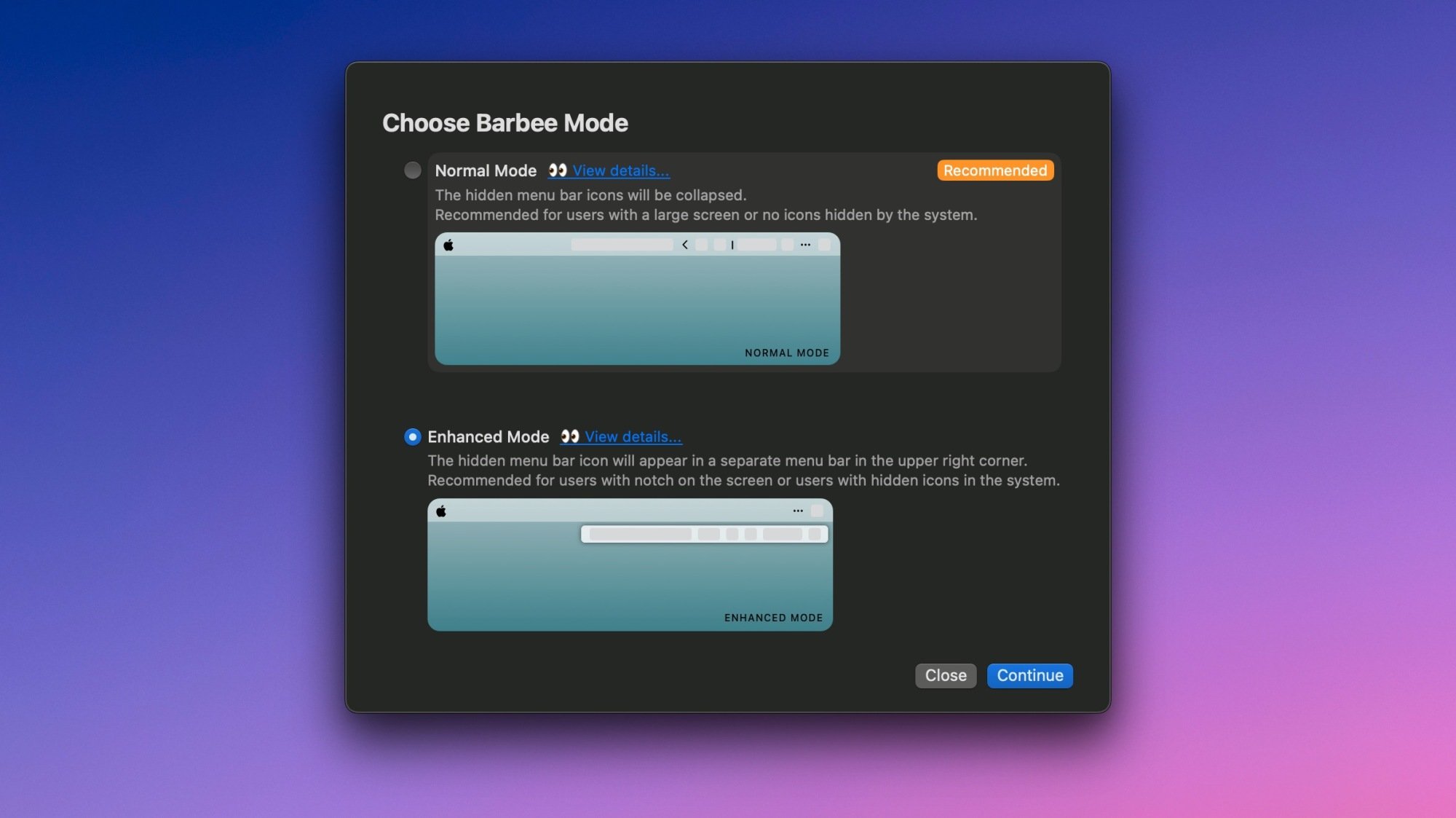
The Menu Bar Layout settings page is your best to place to get started in Barbee, since that’s where you’ll actually arrange which of your menu bar icons are hidden. Here, you can pick which apps you’d like to always see, such as calendar or performance monitoring apps, while moving the rest to the hidden section. There’s also an “Always Hidden” section, which is great for apps that can’t run if they’re not in the menu bar. In my case, one of these is Unclack, which mutes the Mac’s mic when I’m typing. I need to run this app all the time but I never actually want to see its menu bar icon. The difference? You can temporarily reveal hidden icons when needed, but not Always Hidden ones.
This app also has a lot of tweaks available in its settings menu, and I highly recommend going through them all to make the most of it. Under Barbee Settings > General > Mode, for instance, you can choose between Normal Mode and Enhanced Mode. In normal mode, when you reveal hidden icons, the app displays them within the menu bar, right next to the visible icons. But enhanced mode displays them in a small floating menu instead. For those who have a lot of menu bar icons (pretty much the entire target audience for this kind of an app), that is a great feature.
You can also customize the menu bar’s look and feel in the Menu Bar Appearance section. This lets you change the shape of the menu bar, and you can choose if you want it to have rounded corners, a different tint, and even if you want to use a separated layout where app menus appear in a separate menu bar on the left. I prefer a more unified look, so that’s not for me, but I couldn’t resist changing the Apple logo to the classic rainbow variant, which is maybe one of my favorite Barbee features.
Automation and other options
Credit: Pranay Parab
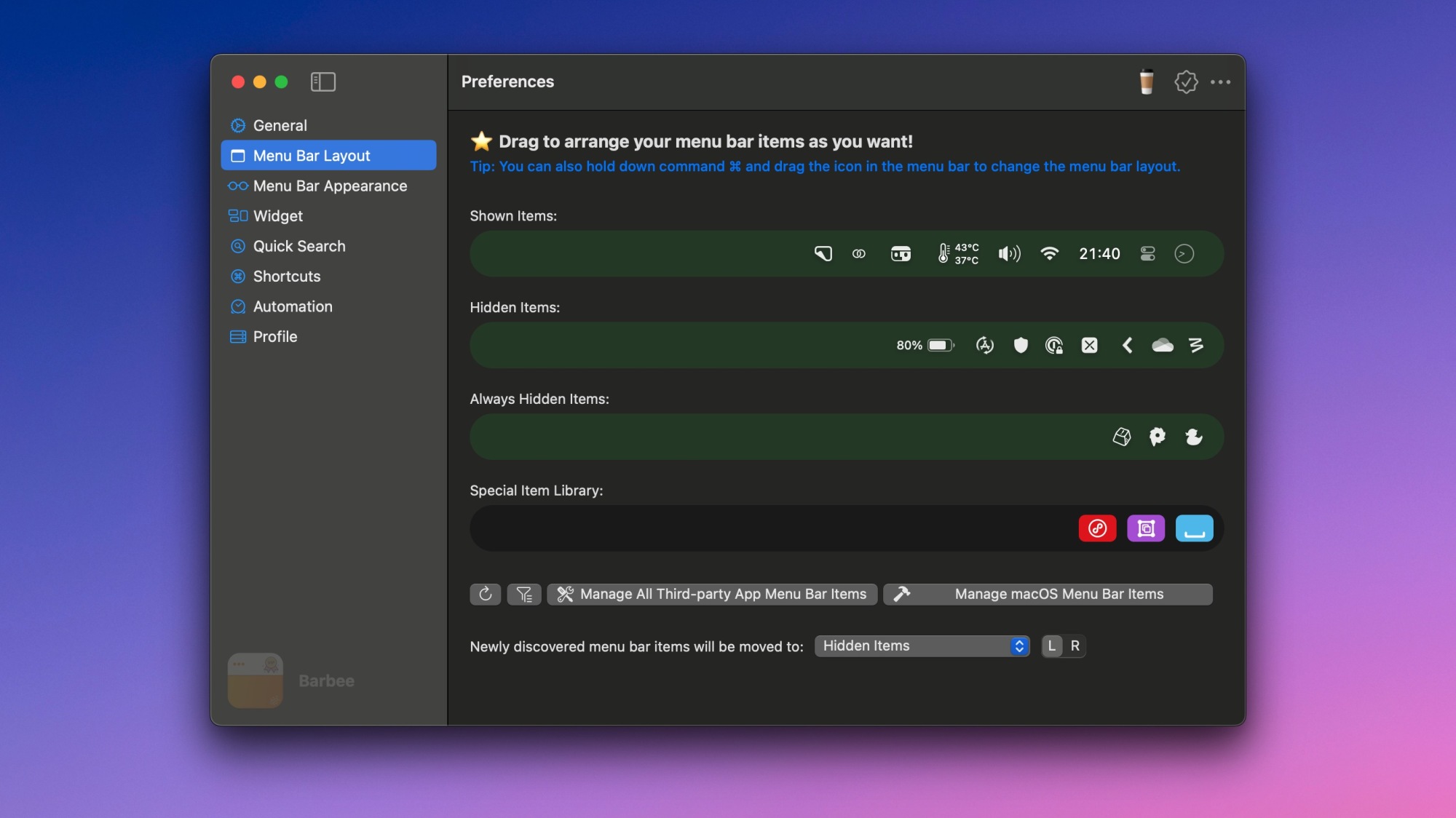
Barbee also has an automation section that allows you to show or hide certain menu bar icons based on triggers. The simplest example is the battery widget, which I only really want to see when the battery is low. So, I went to Barbee Settings > Automation and quickly added a new automation to make that happen. You can set up similar triggers with pretty much every menu bar icon, so feel free to set it up according to your needs.
I also added a custom keyboard shortcut to see hidden menu items, which speeds up my workflow quite a bit. You can do this by going to the Shortcuts section in the app’s settings. The General settings page has many other useful options, too. Be sure to enable Launch at login to make the app fire up each time you use your Mac, and also the Extend battery life option to ensure that Barbee doesn’t consume an inordinate amount of power. There are also niche, but useful features on this page, such as the ability to show all menu bar icons when you’re using an external display. This is nice to have, because my MacBook Air’s screen has limited real estate, but when I plug it in to my ultrawide monitor, I don’t need to hide any menu bar icons.
Vincent D’Onofrio Already Has Daredevil: Born Again Season 2 Updates

The blood is barely dry from the Daredevil: Born Again Season 1 finale and we already have big updates on what’s to come. In an interview with Variety, Vincent D’Onofrio, who plays skull-crushing NYC mayor Wilson “Kingpin” Fisk, reveals how certain parts of the first season’s finale will factor into the next season…
Armbian Introduces Optimized Cloud Images for x86 and aarch64 Deployments
Armbian has expanded its support for cloud infrastructure with a new line of dedicated cloud images designed for generic x86 and aarch64 platforms. These images are tailored for performance, efficiency, and streamlined deployment in virtualized and cloud-native environments. The new Armbian cloud image set aims to meet the growing demand for lightweight and reliable Linux […]
Hands-on: ‘PresenZ’ Tech Converts Cinema-quality CGI into Volumetric Video on PC VR & Quest


PresenZ is a professional-grade tool for converting cinema-quality CGI content for 6DOF viewing in VR. With the recently updated Immersix app for PC VR headsets, you can demo the tech with a fresh batch of newly released content. A streaming version made for Quest is also in development. We go to check out both versions first hand. The creators of the tech hope to give world-class CGI studios like Pixar and DreamWorks a streamlined way to make cinema-quality CGI content readily available to a VR audience.
So let’s get the easy part out of the way.
Immersix is a platform for playing back CGI content that’s been converted into volumetric video using the Presenz technology, which means it supports comfortable and immersive 6DOF viewing. The app was recently updated with new content: ‘Weightless’, a free-to-view music video with cosmic visuals; and ‘Sharkarma: Guardian of the Oceans (Part 1)’, a $4 in-app purchase that “puts you at the center of an underwater survival thriller.”
Now let’s talk about the more complicated part: what’s the tech behind this and why does it matter?
First, volumetric video (meaning any immersive video content supporting 6DOF) is inherently more comfortable and immersive than the usual stereoscopic 180 or 360 video. That’s because 180 and 360 video only responds when you rotate your head, but not when you translate your head (ie: move your head through space). On the other hand, volumetric video allows for both rotation and translation within the content, which makes it feel considerably more immersive.
Second, there’s some content that’s so visually detailed that it simply can’t be rendered in real-time, even on a high-end PC. If you think of your favorite Pixar movie, it looks so good because each frame takes ages to render. Because it’s not ‘real-time rendering’ like a videogame, it’s typically called ‘pre-rendered’. Pre-rendering gives computers time to do things like highly detailed ray-tracing, supersampling, and many render passes to enhance the look of each frame.
Presenz exists as a way to convert CGI content into a pre-rendered format which can be viewed on VR headsets while preserving the comfort and immersion of volumetric video.
I got to check out the latest iteration of the tech and was impressed to find that it indeed delivers on this promise. The volumetric content served up through Immersix really is proper 6DOF and it’s definitely more comfortable and more immersive than the same content in 180 or 360 video.
Here’s the caveat though: the content that’s currently available in Immersix is, arguably, better looking than what could be rendered in real-time on a suitably high-end PC. But it’s not obviously better. However, this is primarily a limitation of the currently available content, not the tech.
As a tech demo, Immersix is exciting, but what it really needs to shine is truly top-tier CGI content—the kind of stuff you see from major studios that release blockbuster CGI films.
I know for certain that the current quality level isn’t a limitation of the tech because I’ve seen unreleased content, converted with the Presenz tech, that truly felt like stepping into a Pixar or DreamWorks movie.
Presenz exists with the goal of becoming a streamlined pipeline for getting that kind of top-tier CGI content from major studios into VR headsets. But that content isn’t there just yet.
Going Deeper

Give your memory some serious props if Presenz sounds familiar… indeed we first wrote about the tech way back in 2016. Between then and now, it’s been a bumpy ride.
Originally owned by a company called Nozon, the Presenz tech was sold to developer and publisher Starbreeze in late 2016.
But when Starbreeze nearly went bankrupt in late 2018, Presenz was spun out as an independent entity. From there Presenz was eventually picked up by V-Nova, a company specializing in video compression.
According to Presenz creator Tristan Salomé—who is still heading the project after all these years—the partnership with V-Nova solves a crucial challenge the tech has long faced: large file sizes.
As you can imagine, cinema-quality CGI can take up a lot of space. Now add all the additional data needed to compute 6DOF views… and you can quickly end up with tens or hundreds of gigabytes for relatively short-form content.
V-Nova says that since its acquisition of Presenz the company has worked to refine the tech to make it more practical for major studios and consumers alike. As they put it, they’ve taken it from a ‘tech demo’ to a ‘real tool’.
On the studio side, V-Nova says it has built Presenz plugins for the rendering tools used by major CGI studios, like Pixar and DreamWorks, which allows a streamlined conversion of existing CGI into volumetric video. The idea is that these studios already spend lots of time and money making high quality CGI assets and content; if they had a way to easily convert that content into volumetric video, they could tap into an audience of millions of VR headsets as a new distribution platform.
On the consumer side, the improvements in compression have enabled the creation of the Immersix app which gives PC VR users a way to view Presenz content for the first time.
But even after compression and performance optimizations, Immersix still requires the power of a PC for playback.
However, V-Nova understands that accessibility is everything when it comes to video distribution. To that end, the company is also building a cloud-rendered version of the Immersix app for standalone headsets like Quest.
This cloud-rendered version is already in development and I got to see an early demo running on a Quest 3. What I saw looked and felt just like the desktop version, except it was being rendered in the cloud and beamed down to my Quest headset. This, of course, requires good bandwidth and a modern, well-optimized Wi-Fi setup. But it opens the door to millions, if not tens of millions, of potential viewers across Quest headsets.
We’ll have to wait and see if the release of Immersix for PC VR headsets (and eventually Quest headsets) creates a large enough demand for high-quality CGI content in VR. And while Presenz has been around at least 10 years at this point, the partnership with V-Nova and renewed interest in high quality spatial video (driven in a big way by Vision Pro) could be the moment the tech has been waiting for.
The post Hands-on: ‘PresenZ’ Tech Converts Cinema-quality CGI into Volumetric Video on PC VR & Quest appeared first on Road to VR.
Intel Bartlett Lake-S Gaming CPU May Pack More Performance Cores

Bartlett Lake is a real, confirmed CPU family for Intel’s LGA 1700 platform. The company confirmed its existence back at CES 2025. However, it’s designed by the company’s NEX group and aimed at edge compute and networking use, not high-end gaming. That may change according to the latest leaks and rumors, though, which suggest we could see
Elder Scrolls IV Oblivion Remaster Is Really Happening And These Screenshots Prove It

Gamers are living in an era of remasters and remakes as studios and publishers look for consisten return on their investments, with projects people are familiar with. The next modern glow up of a gaming classic has long been rumored to be Elder Scrolls IV: Oblivion. Although, the rumor appears to be confirmed, since screenshots leaked from
Here’s how to watch the Mario Kart-focused Nintendo Direct
There’s yet another Nintendo Direct coming our way, which is the third in less than a month. This one is entirely focused on the upcoming Switch 2 launch title Mario Kart World. It starts at 9AM ET and should last around 15 minutes.
It’s livestreaming on Nintendo’s YouTube page, but mega-fans can also open up that recently-launched Nintendo Today! app to follow along. We are embedding the YouTube link, so feel free to keep this tab open.
We have no idea what information Nintendo is going to spring on us as part of this Direct presentation. The company has already released a ton of info about Mario Kart World. It’s an open-world racer that can accommodate 24 plays at the same time.
However, there are still a couple of unknowns. Most of these involve the open-world aspect. Are there any rewards for exploration? Are there secret tracks that can only be unlocked by finding them? Can the same be said for unlockable characters? Again, we don’t know, but hope springs eternal.
There’s also the $80 elephant in the room. The exorbitant retail price of Mario Kart World has sent many fans into a tailspin. That’s a whole lot of money, and Nintendo only recently-released its first-ever $70 game. There’s a minuscule chance that the company will throw us a bone and knock $10 off the asking price, but this is highly unlikely given current economic uncertainty. At the very least, we could get some new data regarding the preorder date for US customers.
This article originally appeared on Engadget at https://www.engadget.com/gaming/nintendo/heres-how-to-watch-the-mario-kart-focused-nintendo-direct-184825796.html?src=rss
ChatGPT Now Has a ‘Library’ of Your AI-Generated Images
Like many AI chatbots, ChatGPT has offered image generation for some time now. You might be well acquainted with it, seeing as its latest image generation tools have recently gone viral.
Putting both the ethics of AI art as well as its errors, quirks, and inconsistencies aside for a moment, you may have noticed some issues with ChatGPT’s image generation, especially if you’ve been using a lot. Since each image is contained to the ChatGPT conversation in which it was generated, it’s quite difficult to keep tabs on all your images, unless you’re exporting and cataloging them somewhere else manually. OpenAI might not be able to solve the other issues with AI art yet, but it can offer a solution to the last point.
Introducing ChatGPT’s Image Library
On Tuesday, OpenAI announced Image Library, a new section of ChatGPT. The Image Library automatically stores all images you generate with ChatGPT’s 4o model across your various discussions. That way, you don’t have to scroll through past threads in search of a particular image you made. It sort of acts like the default image library on your smartphone: Any photos you take or save throughout the day end up in one centralized database.
This Tweet is currently unavailable. It might be loading or has been removed.
All ChatGPT account types now have access to Image Library—including Free, Plus, and Pro—and you can access it from both the app as well as the web app. You’ll find the option, “Library,” in the side panel on the left, under “Explore GPTs.” (While the web app should update on its own, you may need to update your ChatGPT app before the option appears, however.)
The Library itself is relatively straightforward. When you open it, you’ll see your previous image generations. It might not be all of your images, however: I was a bit confused to see two of my most recent generations, knowing I had definitely generated far more with ChatGPT in the past. However, OpenAI says legacy DALL-E images will not appear here. Only images generated with 4o are added to the library, so don’t expect your entire generation history to pop up. That said, OpenAI says it is currently backfilling all images for the new Library feature, so more of your older images may appear in your Library over the next couple days.
When you select one of your images in your Library, ChatGPT presents you with a series of options: Edit, Select, Save, and Share. You can choose “Edit” to launch a new chat along with the image, so you can prompt ChatGPT with the edits you want it to make. Similarly, “Select” lets you highlight a portion of the image you want to edit, so ChatGPT will only change that selection. You can choose “Save” to add the image to your device’s personal library, while “Share” lets you export the image to any destination you want.
I don’t use ChatGPT for much, especially image generation, so I can only imagine this feature will be a convenience for those that do. However, one pain point I see is the lack of a “delete” option. If you want to remove an image from your ChatGPT Library, you have to find the thread you generated it in and delete it from there. While Library lets you open the thread where that image was generated, you won’t be able to delete the image or the thread from here. Instead, you need to locate the thread from the conversation title in your sidebar, then delete the entire conversation to delete the image or images within. It’s pretty complicated, and I’m not sure why OpenAI does it this way, so here’s hoping it adds a simple “delete” button to each image in the Library sooner or later.
[$] What’s new in APT 3.0
Debian’s Advanced Package Tool (APT) is the suite of utilities that handle package
management on Debian and Debian-derived operating systems. APT recently received a
major upgrade to 3.0 just in time for inclusion in Debian 13
(“trixie”), which is planned for release sometime in 2025. The version bump is
warranted; the latest APT has user-interface improvements, switches to Sequoia to verify package
signatures, and includes solver3—a new solver that is designed to improve
how it evaluates and resolves package dependencies.
RoboBee sticks the landing
The RoboBee lands on a leaf. Credit: Harvard Microrobotics Laboratory
Several years ago, Harvard University roboticist Robert Wood made headlines when his lab constructed RoboBee, a tiny robot capable of partially untethered flight. Over the years, RoboBee has learned to fly, dive, and hover. The latest improvement: RoboBee has learned how to stick the landing, thanks to biomechanical improvements to its landing gear modeled on the crane fly, which has a similar wingspan and body size to the RoboBee platform. The details of this achievement appear in a new paper published in the journal Science Robotics.
As previously reported, the ultimate goal of the RoboBee initiative is to build a swarm of tiny interconnected robots capable of sustained untethered flight—a significant technological challenge, given the insect-sized scale, which changes the various forces at play. In 2019, Wood’s group announced its achievement of the lightest insect-scale robot so far to have achieved sustained, untethered flight—an improved version called the RoboBee X-Wing. In 2021, Wood’s group turned its attention to the biomechanics of the mantis shrimp’s knock-out punch and built a tiny robot to mimic that movement
But RoboBee was not forgotten, with the team focusing this time around on achieving more robust landings. “Previously, if we were to go in for a landing, we’d turn off the vehicle a little bit above the ground and just drop it, and pray that it will land upright and safely,” said co-author Christian Chan, one of Wood’s graduate students. The trick is to minimize velocity when approaching a surface and then quickly dissipating impact energy. Even something as small and light as RoboBee can generate significant impact energy. The crane fly has long, jointed appendages that enable them to dampen their landings, so the insect served as a useful model for RoboBee’s new landing gear.
“Côte de La Redoute” Climb Portal Details
Catanzaro: Dangerous arbitrary file read vulnerability in Yelp
GNOME contributor Michael Catanzaro has written a blog
post about a noteworthy vulnerability in GNOME’s help browser, Yelp.
I don’t normally blog about particular CVEs, but Yelp CVE-2025-3155 is
noteworthy because it is quite severe, public for several weeks now,
and not yet fixed upstream. In short, help files can read your
filesystem and execute arbitrary JavaScript code, allowing an attacker
to exfiltrate any files your Unix user has access to.
The vulnerability was first reported on December 25, and it
was made public on March 26 after the 90-day-disclosure deadline
was reached. Patches
have been proposed to fix the issue. The bug reporter has published a writeup
demonstrating the attack. Catanzaro asks that Linux vendors
“please consider applying the provided patches even though they
“.
have not yet been accepted upstream
Mesa’s Old OpenCL “Clover” Driver Removed For Mesa 25.2
Now that Mesa 25.1 is branched for this quarter’s Mesa 3D feature release, Mesa 25.2 has entered development on the main Git branch. One of the first merged changes for Mesa 25.2 is removing the old OpenCL Gallium3D “Clover” driver…
NASA Wants to Track Earth’s Gravity With a Cloud of Floating Atoms in Space

A suitcase-sized quantum sensor could soon reveal hidden water, oil, and even underground mountains—all by tracking how atoms fall.