Judge Rules Blanket Search of Cell Tower Data Unconstitutional

An anonymous reader quotes a report from 404 Media: A judge in Nevada has ruled that “tower dumps” — the law enforcement practice of grabbing vast troves of private personal data from cell towers — is unconstitutional. The judge also ruled that the cops could, this one time, still use the evidence they obtained through this unconstitutional search. Cell towers record the location of phones near them about every seven seconds. When the cops request a tower dump, they ask a telecom for the numbers and personal information of every single phone connected to a tower during a set time period. Depending on the area, these tower dumps can return tens of thousands of numbers. Cops have been able to sift through this data to solve crimes. But tower dumps are also a massive privacy violation that flies in the face of the Fourth Amendment, which protects people from unlawful search and seizure. When the cops get a tower dump they’re not just searching and seizing the data of a suspected criminal, they’re sifting through the information of everyone who was in the location. The ruling stems from a court case involving Cory Spurlock, a Nevada man charged with drug offenses and a murder-for-hire plot. He was implicated through a cellphone tower dump that law enforcement used to place his device near the scenes of the alleged crimes.

A federal judge ruled that the tower dump constituted an unconstitutional general search under the Fourth Amendment but declined to suppress the evidence, citing officers’ good faith in obtaining a warrant. It marks the first time a court in the Ninth Circuit has ruled on the constitutionality of tower dumps, which in Spurlock’s case captured location data from over 1,600 users — many of whom had no way to opt out.


Read more of this story at Slashdot.

Free GTA San Andreas Mod Adds Full PC VR Support To 2004 Classic

VR modder Holydh has released the GTA: San Andreas Definitive Edition – 6DoF UEVR Plugin, which adds modded PC VR support to the Steam release.

Last August, Meta and Rockstar delayed their Quest-bound Grand Theft Auto: San Andreas VR port indefinitely, leaving it up to Rockstar’s dedicated, ever-talented modding community to port GTA into VR themselves if they ever wanted to see Big Smoke’s fast food order in VR. That soft cancellation of Meta’s nearly three-year-long porting project capped off a turbulent time for Rockstar and the GTA franchise, as both had been plagued with massive leaks, layoffs, and shaky launches for the remastered “Definitive Editions” of previous titles, including San Andreas.

Holydh’s mod isn’t just a simple drag-n-drop of San Andreas’ pancake controls into a VR setting. Instead, the port offers full first-person support, 6DOF motion controls, plus camera improvements across both gameplay and cutscenes. This uses an upgraded version of modder Praydog’s UEVR injector, which offers VR support for a vast majority of PC games using Unreal Engine 4.8 or above.

You can see the mod in action here:

You can find more information about the mod, including information on UEVR, on its Nexus Mods page. For anyone interested in checking this out, it’s important to clarify (and warn) that this mod will only work with the Steam version of San Andreas Definitive Edition; the Epic Games Store and Rockstar Launcher versions are incompatible.

Rockstar has been litigious in the past, as we’ve seen with the Luke Ross VR mod for Grand Theft Auto 5. However, Holydh believes this “should be alright” and not at risk since you can access it for free and the files don’t belong to Rockstar, while the Luke Ross mod was initially behind a paywall.

Netflix CEO Counters Cameron’s AI Cost-Cutting Vision: ‘Make Movies 10% Better’

Netflix Co-CEO Ted Sarandos pushed back on director James Cameron’s recent assertion that AI could slash film production costs by half, arguing instead for quality improvements over cost reduction during Netflix’s first-quarter earnings call Thursday. “I read the article too about what Jim Cameron said about making movies 50% cheaper,” Sarandos said. “I remain convinced that there’s an even bigger opportunity to make movies 10% better.”

Sarandos pointed to Netflix’s current AI implementations in set references, pre-visualization, VFX sequence preparation, and shot planning. He said AI-powered tools have democratized high-end visual effects that were once exclusive to big-budget productions. The executive cited 2019’s “The Irishman” as a benchmark, noting its “very cutting-edge, very expensive de-aging technology that still had massive limitations.” In contrast, he referenced cinematographer Rodrigo Prieto’s directorial debut “Pedro Paramo,” which employed AI-powered de-aging at “a fraction” of The Irishman’s cost. “The entire budget of the film was about what the VFX cost on The Irishman,” Sarandos explained. “Same creator using new tools, better tools, to do what was impossible five years ago.”


Read more of this story at Slashdot.

Trump official to Katy Perry and Bezos’ fiancée: “You cannot identify as an astronaut”

This week’s flight of the New Shepard spacecraft, NS-31, and its all-female crew has stirred up a mess of coverage, from tabloids to high-brow journalism outlets. And why not? Six women, led by superstar Katy Perry, were flying into space!

By contrast, Ars Technica has been largely silent. Why? Because yet another suborbital flight on New Shepard matters little in the long arc of spaceflight history. Beyond that, I did not want to be too negative about someone else’s happiness, especially since it was privately funded. Live and let live, and all of that.

However, if I’m being frank, this flight and its breathless promotion made me uncomfortable. Let me explain. Perhaps the most important change in spaceflight over the last two decades has been the rise of commercial spaceflight, which is bringing down the cost of access to space and marks an essential step to humanity becoming a spacefaring species. This rising tide has been spurred in large part by billionaires, particularly Elon Musk, Jeff Bezos, and, to a lesser extent, Richard Branson.

Read full article

Comments

Google is trying to get college students hooked on AI with a free year of Gemini Advanced

Under no circumstances should you let AI do your schoolwork for you, but Google has decided to make that option a little bit easier for the next year. The company is offering a free year of it’s Google One AI Premium plan, which includes Gemini Advanced, access to the AI assistant in the Google Workspace and things like Gemini Live, to any college student willing to sign up.

The offer gives you a sample platter of Google’s latest AI features, which normally costs $20 per month, and is primarily focused on things you can do with Gemini. That includes experimental products like NotebookLM for analyzing documents, and Whisk for remixing images and videos. Because this is a Google One plan, you’ll also get 2TB of Google Drive storage for the parade of PDFs that make up college life.

You can sign-up for the free offer on Google’s website. You need to be 18 years or older, have a “.edu” email address and join before June 30, 2025, but once you do, you’ll have the Google One AI Premium plan through July 2026. Google says you’ll need to verify you’re still a student in 2026, but otherwise, the whole thing is a light lift. Even if you don’t care about AI, signing up is worth it for the free extra storage.

Google’s intentions here obviously aren’t pure. Free storage is nice, but If the company can normalize using AI for a generation of young minds, it can change what’s an occasionally useful novelty into an essential. That’s not likely to be good for critical thinking or test scores, even if it justifies the money the company is spending on AI research and development.

This article originally appeared on Engadget at https://www.engadget.com/ai/google-is-trying-to-get-college-students-hooked-on-ai-with-a-free-year-of-gemini-advanced-195706467.html?src=rss

Google Gives Students Free AI Tools And 2TB Storage, How To Claim Yours

Google Gives Students Free AI Tools And 2TB Storage, How To Claim Yours
Google is making college students a generous offer, and if you’re eligible, you can claim yours. The company announced that college students can now access premium Gemini Advanced features for free, not just for a month but for a whole year, waiving the usual $20 monthly subscription fee. For students to be eligible for this offer, they must

Marvel Rivals Fans React To Surprise Fee For Changing Costume Colors

Marvel Rivals Fans React To Surprise Fee For Changing Costume Colors
Marvel Rivals has found success in the competitive online gaming space where many others have failed, often catastrophically. It has managed to carve a place for itself in this crowded segment, raking in big time revenue for its publisher, NetEase. However, its player base hasn’t always been happy with the design decisions being made, and

Microsoft’s “1‑bit” AI model runs on a CPU only, while matching larger systems

When it comes to actually storing the numerical weights that power a large language model’s underlying neural network, most modern AI models rely on the precision of 16- or 32-bit floating point numbers. But that level of precision can come at the cost of large memory footprints (in the hundreds of gigabytes for the largest models) and significant processing resources needed for the complex matrix multiplication used when responding to prompts.

Now, researchers at Microsoft’s General Artificial Intelligence group have released a new neural network model that works with just three distinct weight values: -1, 0, or 1. Building on top of previous work Microsoft Research published in 2023, the new model’s “ternary” architecture reduces overall complexity and “substantial advantages in computational efficiency,” the researchers write, allowing it to run effectively on a simple desktop CPU. And despite the massive reduction in weight precision, the researchers claim that the model “can achieve performance comparable to leading open-weight, full-precision models of similar size across a wide range of tasks.”

Watching your weights

The idea of simplifying model weights isn’t a completely new one in AI research. For years, researchers have been experimenting with quantization techniques that squeeze their neural network weights into smaller memory envelopes. In recent years, the most extreme quantization efforts have focused on so-called “BitNets” that represent each weight in a single bit (representing +1 or -1).

Read full article

Comments

Amazon’s Fire TV Devices Might Soon Ditch Android in Favor of Vega

Amazon's Fire TV Devices Might Soon Ditch Android in Favor of Vega
For the longest time, Amazon’s tablet and TV devices used a slimmed, somewhat locked-down variant of Android called Fire OS. This was useful for end users for general familiarity and ease of use, and also for techies, who found the devices easy to hack to add functionality. All things must change and evolve though, and to that end, Amazon

How to Make Peanut Butter in the Vitamix Ascent X5

We may earn a commission from links on this page.

I typically hesitate to suggest making peanut butter in blenders, but the Vitamix Ascent X5 is the exception. It’s the best blender I’ve ever tried, and you should definitely make nut butters with it. Not only is it the absolute fastest nut processor I’ve ever tested (under a minute in some cases), but the resulting peanut butter is incredibly smooth. Here’s how to make any nut butter in the Vitamix Ascent X5.

How to use the nut butter function on the Vitamix

1. Prepare the nuts, if needed

I like to roast the nuts in the oven first, because I love the sweet, toasty flavor. To do it, spread out your nut of choice (I used walnut pieces today) on a baking sheet in a single layer, and put the sheet pan in a 350°F oven for five to 12 minutes. This time will vary depending on the nut, the size of the pieces, and thickness of the sheet pan, so use your nose as your guide. As soon as you start to smell toasted nuts, give them a stir with a wooden spatula and assess if you need a few more minutes. They should be golden with no burnt areas. Allow the nuts to cool on the sheet pan for at least 10 minutes. If you prefer raw nut butters, though, skip this step and start at step two.

2. Add the nuts to the Vitamix container

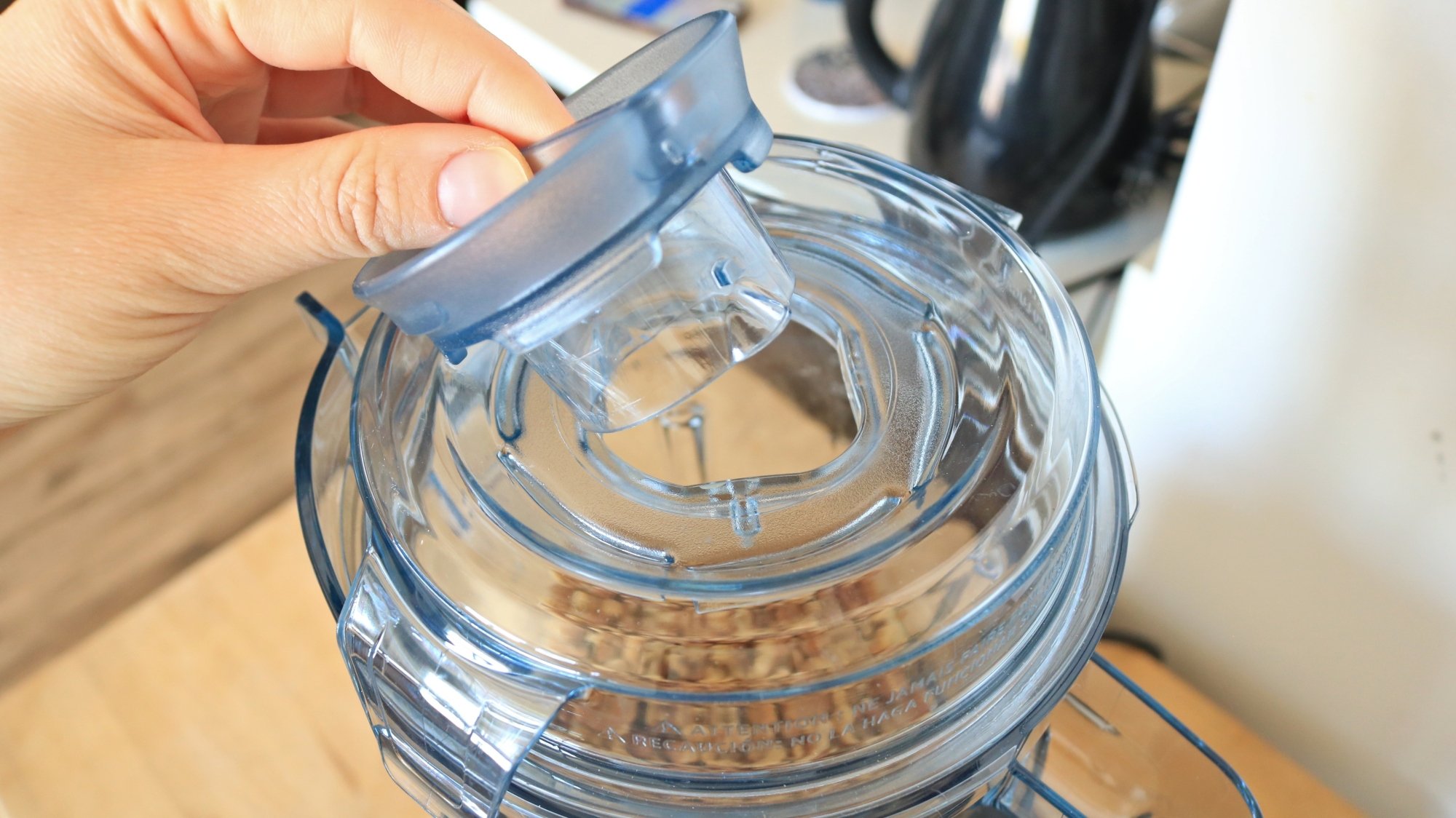
Hand unplugging stopper from blender lid.

Credit: Allie Chanthorn Reinmann

Pour the nuts into the container and snap the lid on, but keep the middle plug lined up with the notches (see picture) so it’s easy to un-stopper. You’ll need to use the tamper to assist the nuts (the tamper is that black plastic baseball bat-looking thing that came with the Vitamix Ascent X5), smashing them down toward the blade during the one minute blend time. It’s best to have it right next to the blender—the preset timer goes by before you know it. 

3. Select the nut butter preset 

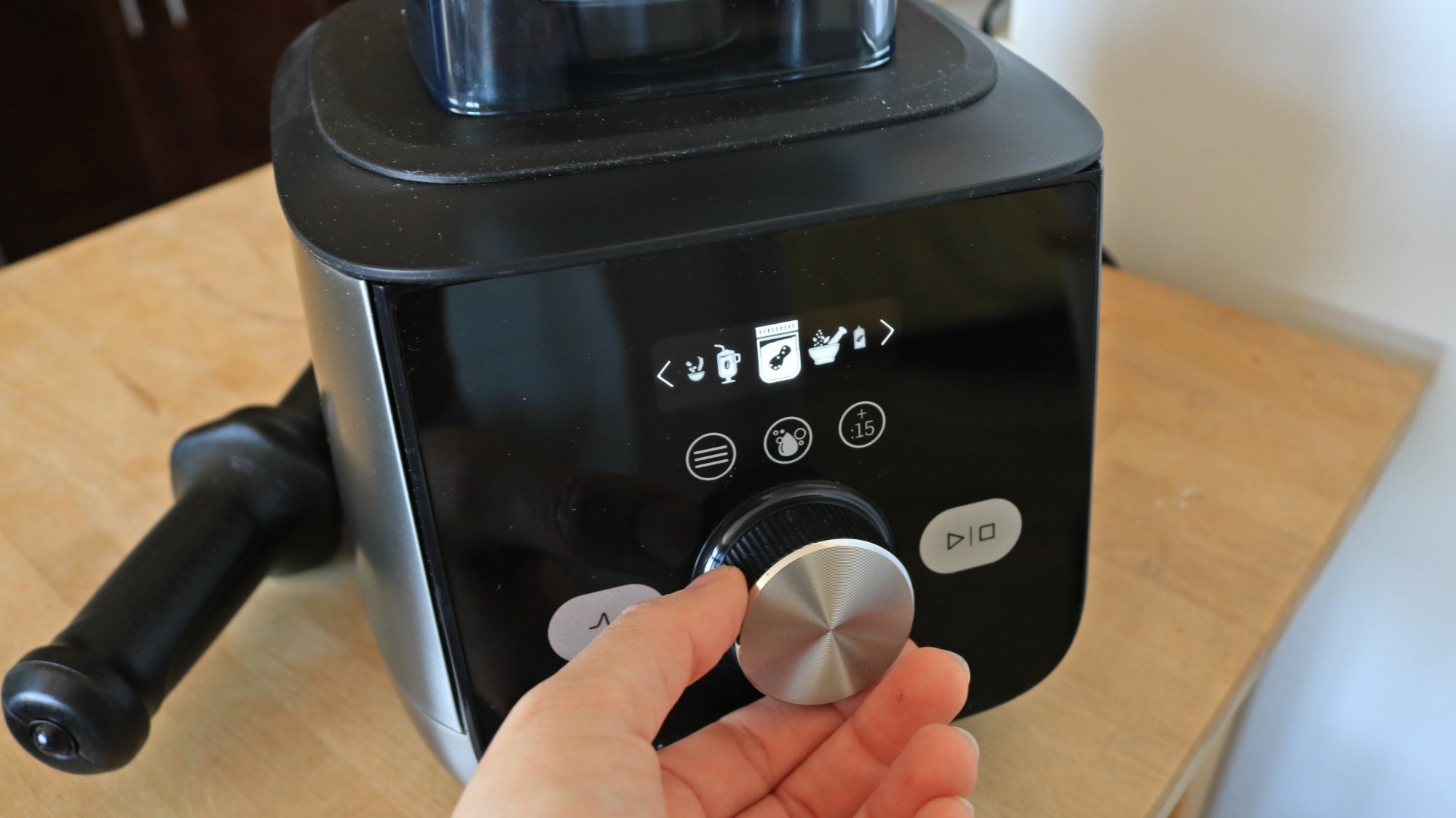
Hand selecting a setting on the Vitamix blender.

Credit: Allie Chanthorn Reinmann

Press the button on the left above the knob that has three horizontal lines. The screen will display several cute little cartoons of food. Rotate the knob until you see a jar with a peanut inside. Press the play button directly to the right of the knob.

4. Tamper for your life

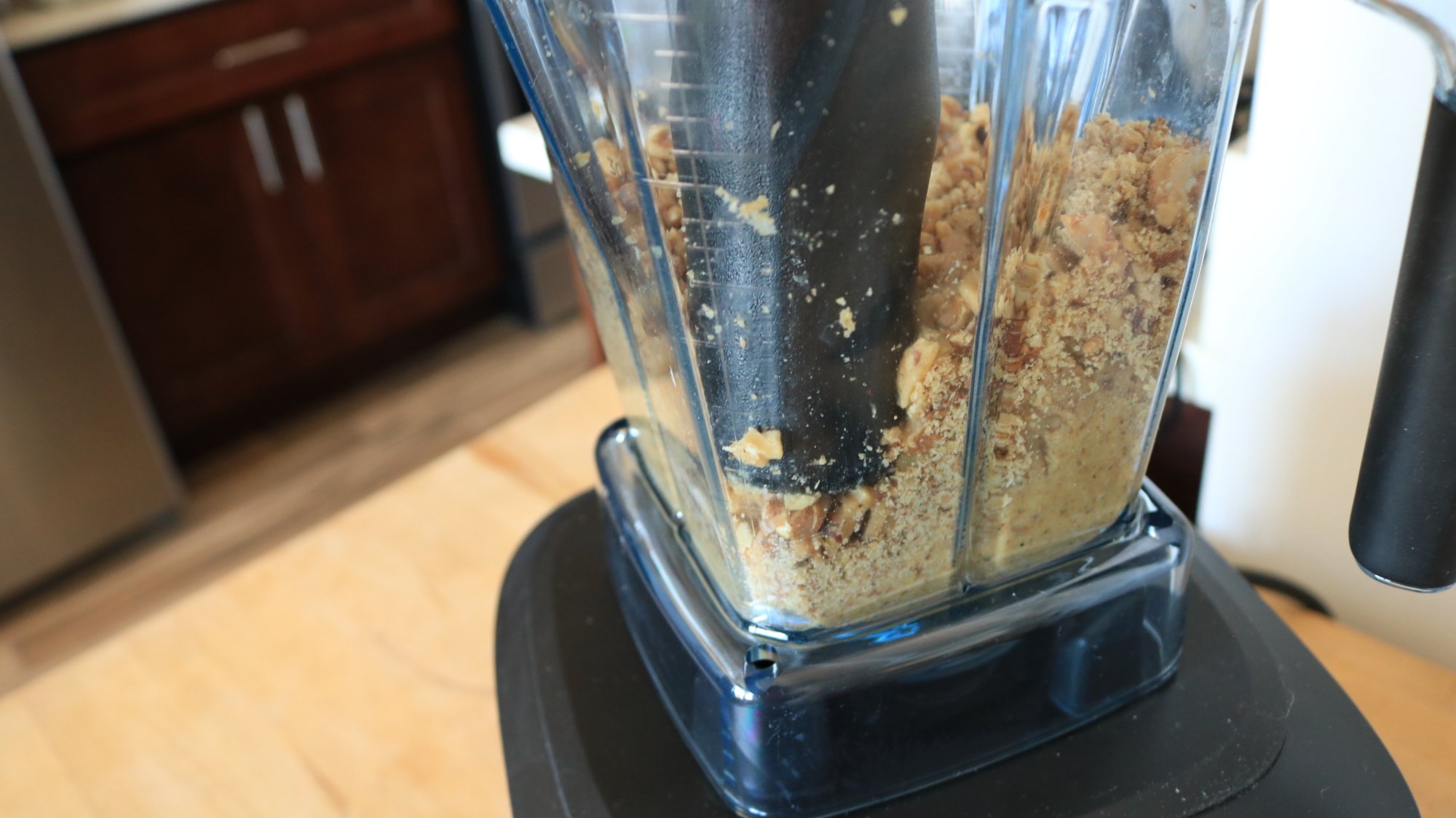
A plastic tamper pressing nut bits in a blender.

Credit: Allie Chanthorn Reinmann

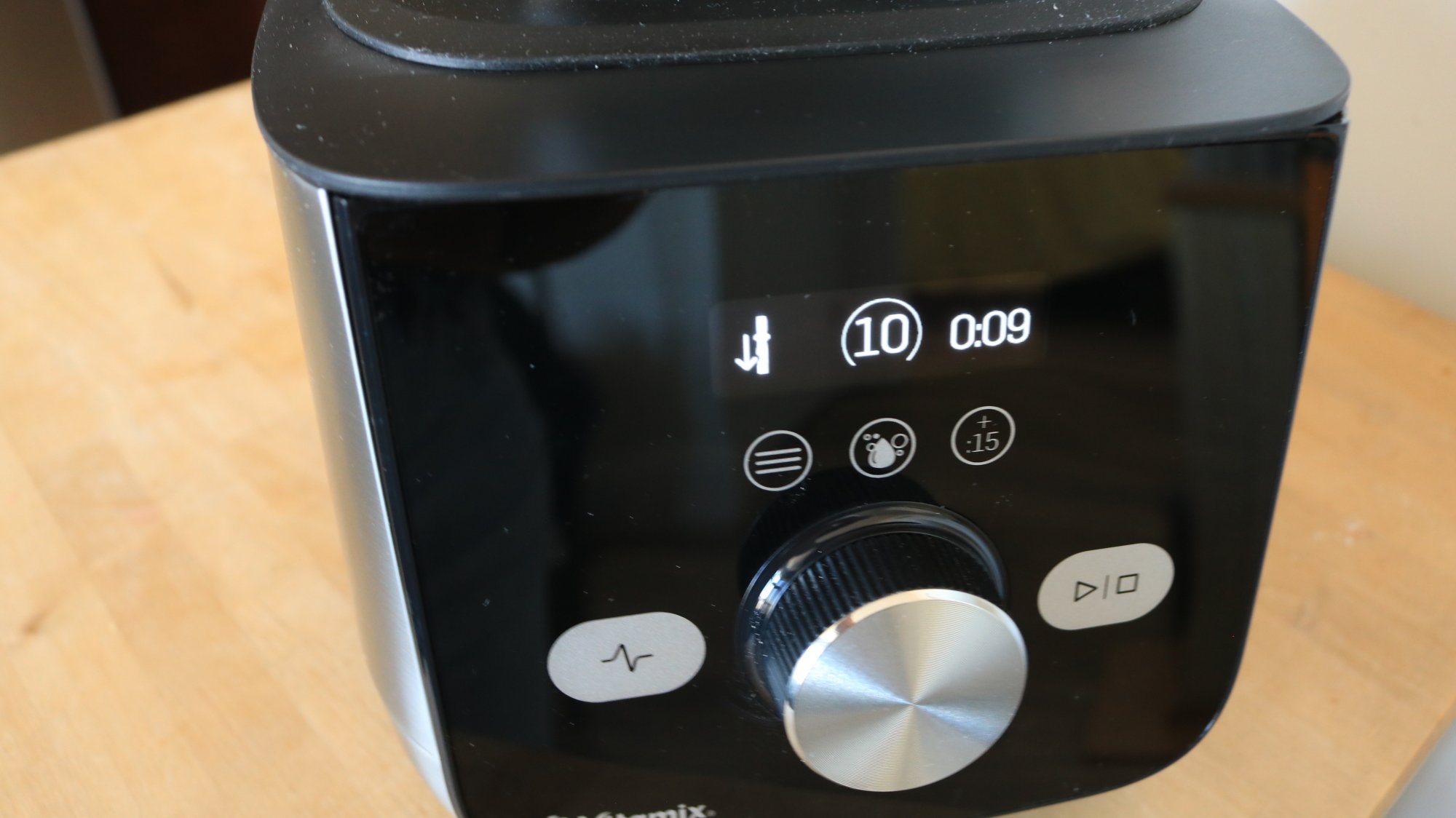
Once the engine kicks on, the initial kick-up of nut particles will pass after a second or two. Then you can unstopper the center plug and use the plastic tamper to jam the nuts down into the blades. The engine will kick up another speed level and you’ll hear it, but don’t let it stop your tampering. If you’re ever in doubt of when to start pressing, you can look at the screen. There’s a little tamper icon with a downward arrow signaling that tampering is necessary.

The tamper icon on the blender control display.
The tamper icon appears to the left of the timer.
Credit: Allie Chanthorn Reinmann

For a chunky butter, stop the machine after 30 or 40 seconds by pressing the same start/stop button to the right of the dial. Unplug the machine and stir the mixture to see if it’s the consistency you like. If you like a smoother nut butter, let it run for the full minute. To get an even silkier nut butter, you may want to add another 15 seconds by pressing the “+:15” button, which is on the right side above the rotating dial. But generally, once the initial minute is up, you have nut butter. That’s all it takes.

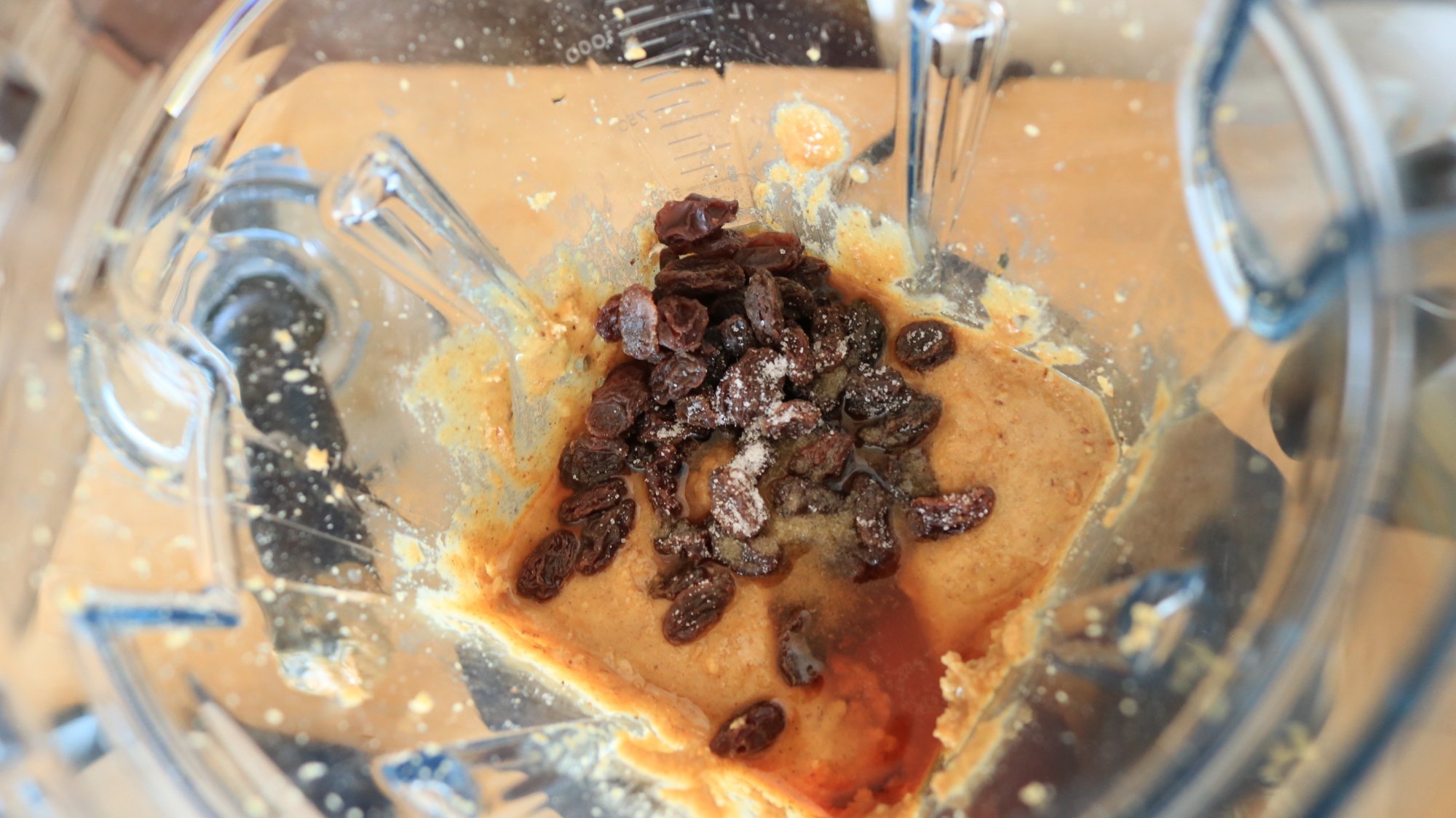
Walnut butter with rum and raisins in a blender container.

Credit: Allie Chanthorn Reinmann

If you want to get a little creative, you can add a few fun ingredients. I decided to make Rum Raisin Walnut Butter today, so after the first nut butter blend finished, I added some dark rum, raisins, a touch of honey, and a bit of salt. I selected the nut butter preset again, did some tamping, and stopped the blend after about 20 seconds to incorporate the new ingredients and smooth out my walnut butter. Of course, you could keep yours low key with just a pinch of salt and some cinnamon, for example.  

Once I emptied my walnut butter into a glass container, I added warm water and a drop of soap to the container. (Don’t go higher than half full, the blender will swish the water aggressively.) Click the little button in the center with the image of bubbles and let the blender clean itself. This setting is mostly meant to get the blades clean, so don’t get frustrated if some peanut butter smears are still hanging out on the sides of the container. Just bring it over to the sink and carefully wash the sides.

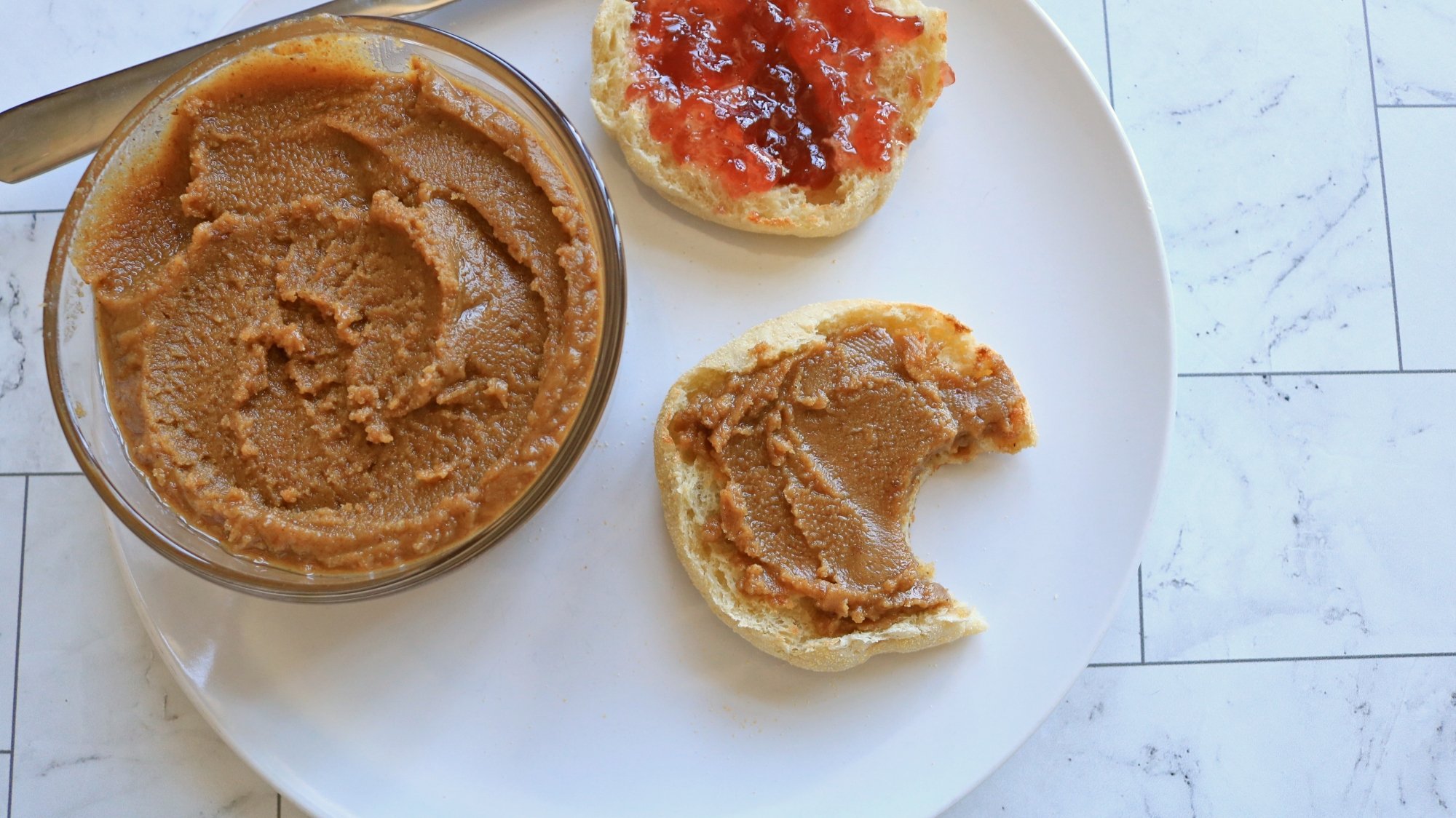
Walnut butter on an English muffin.

Credit: Allie Chanthorn Reinmann

If you’ve never made walnut butter before, I highly suggest it. This spread turned out buttery-smooth with a salty and bitter edge, and it makes an excellent partner for jam. You can also increase the honey or raisins if you want it to be sweeter. 

Rum raisin walnut butter recipe

Ingredients:

  • 350 grams (3 cups) walnut pieces

  • 35 grams (1/4 cup) raisins

  • 1 tablespoon dark rum

  • 1 teaspoon honey

  • ¼ teaspoon salt

1. Roast the walnut pieces in a 350°F oven for five to 12 minutes, or until lightly browned and fragrant. Allow to cool to room temperature for at least 10 minutes.

2. Pour the walnut pieces into the Vitamix Ascent X5, add the lid, and select the nut butter setting. 

3. Press start, remove the central stopper on the lid and use the tamper to press the nuts down into the blades.

4. With the machine off, add the raisins, rum, honey, and salt. Put the lid back on and start the nut butter setting again. Tamper the mixture as it blends for another 20 seconds. Stop the machine. Scoop the nut butter into a container with a tight-fitting lid. Enjoy your new nutty spread on toast, with cake, with yogurt, or over granola. 

Hard Drives Have Less Environmental Impact Than SSDs, Seagate Says

A new report from Seagate reveals that hard drives significantly outperform solid-state drives in environmental impact metrics, challenging common industry assumptions about storage sustainability. According to Seagate’s “Decarbonizing Data” report released this month [PDF], standard hard drives produce just 29.7 kg of embodied carbon dioxide compared to a staggering 4,915 kg for equivalently sized data center SSDs.

On a per-terabyte basis, hard drives generate less than 1 kg of CO2/TB versus 160 kg for SSDs. The power consumption difference is equally notable. Hard drives operate at 9.6 watts with 0.32 watts per terabyte efficiency, while SSDs consume 20 watts with 0.5 watts per terabyte. “Hard drives exhibit the least carbon footprint, both in total and on a per-TB basis, offering the most carbon-efficient sustainable storage solution,” the report states.


Read more of this story at Slashdot.

Why the Treadmill Can Feel so Much Easier Than Running Outside

Is the treadmill harder or easier than running outdoors? Survey runners, and you’ll get plenty of different opinions on which feels harder or easier, but the basic physics of running are the same on both. (I promise.) So why do people who are used to treadmills find that they’re slower when they run outdoors? I’m going to run through the factors that are at play here, and talk about how to adapt if you want to be able to enjoy both. 

If you find treadmill running harder, you probably already know the reason: it’s boring. You have nothing to distract you from your own effort and the glowing numbers telling you how little progress you’ve made. This is a problem that we can train our brains to solve for us over time, whether with distractions, mindfulness, or simply being grateful that we’re not outdoors in the bad weather. 

For those who find treadmill running easier, the biggest reasons have to do with the environment (heat, hills, etc.) and with your mindset (especially your ability to pace yourself). Training both indoors and outdoors will help you to make the transition a little easier. Let’s dig into the reasons. 

The treadmill is not literally easier

Before we get into the relevant factors, I want to dispel a few myths. Physics-wise, running on a treadmill is pretty much identical to running outdoors in the same conditions.

The treadmill does not move your feet

The first myth we need to bust is the idea that the treadmill “moves your feet” and thus makes running easier. That’s not true. You have to spend just as much effort to stay in place on a treadmill going (say) say 6.0 miles per hour, as you do to move forward at 6.0 miles per hour on flat, steady ground. Running is the action of pushing off the ground to move yourself forward. In both scenarios, you are asking your muscles to push off with a force that will keep you moving 6 mph faster than the ground. 

(If the “treadmill moves your feet” theory were correct, would we not have to consider the rotating Earth its own sort of treadmill? And thus it would be 2,000 times harder to run west than to run east? Come on.)

You only need to add a 1% incline if you are running very fast

Then there’s the issue of wind resistance. Some runners will say you need to set the treadmill’s incline to 0.5% or 1% to mimic outdoor air resistance. Even on a calm day, your body has to push into the air to keep moving. Adding a small incline to the treadmill is supposed to mimic that extra effort.

But that is only true if you run at a pace of 7:30 per mile (8.0 mph) or faster. Below that, “the difference is so small as to be meaningless,” a scientist who studied the question told Runner’s World. So if you’re jogging at 6 mph, you don’t have to worry about accounting for wind resistance. 

Now that we understand the physics, let’s talk about why treadmill runs often feel easier than outdoor runs. 

Pacing

This is probably the biggest factor (aside from weather) in why outdoor running feels harder for a person who is used to treadmill running. On the treadmill, you decide on a pace—say 6 mph, as in our example above—and then your body knows what to do. 

But outdoors, you just have to run, and then figure out later what pace you’re going. Even if you have a watch that tells you your pace, it takes a few seconds to minutes to work out what that number is. (You also may not be used to reading minutes-per-mile pace if you’re used to seeing mph on the treadmill, which makes it even harder to know how fast you’re going.) 

So you, the treadmill runner, head off on an outdoor run without a good sense of how fast you’re going. Perhaps you end up going a little too fast, but you don’t realize it until it’s too late and you’re pooped. 

Meanwhile, outdoor runners will develop a sense of pace out of necessity. You have to listen to your body, not just look at a number, to know how hard you’re pushing. 

The good news is that it’s easy for treadmill runners to learn a sense of pace—all you have to do is run outside from time to time. You’ll learn what your body feels like when you’re going at an easy pace versus a harder pace versus an unsustainable one. It just takes a little practice.

Heat, humidity, and other weather conditions

If all your treadmill runs are inside of a 68-degree gym, they’ll all feel pretty similar. But the great outdoors is fond of blessing us with heat, wind, humidity, rain, snow, ice, and similar complications. 

Heat slows us down a lot, especially if we aren’t used to it. (You do build up some heat adaptation throughout the summer.) Humidity, in combination with heat, makes this even worse. Your body can’t cool itself as well through sweating, so you get hot and stay hot. It’s normal for your pace on a hot day to be anywhere from a few seconds to a few minutes slower each mile. 

Heavy winds can also slow you down (when you’re running into the wind) or speed you up (when you’re running with the wind at your back). Ice can make you slow down to watch your footing. Snow can make you work harder as your feet sink into the ground and you have to fight to pull them back up again. 

On the other hand, a cool, dry day is better for your performance than the conditions inside a sweaty gym. Perfect running weather is (in my opinion) around 50 degrees, calm, and overcast. Most people will run a lot faster and feel better in those conditions than on a treadmill at room temperature.

Hills

If you live in a pancake-flat part of the country, you can skip this section. But many of us live where there are hills. Big ones, little ones, maybe some mountains. On the treadmill, you get to choose what incline to run with. Outdoors, your choices may be limited. 

I live in a hilly place, so even my “flat” outdoor routes aren’t entirely flat. A regulation running track is my only truly flat option. Even gently rolling hills can add up over the course of a long run, making you work harder on the uphills without ever fully giving you that speed back on the downhills. 

Different surfaces

A treadmill only has one surface. Every step meets flat ground. Every step is the same softness or hardness. Outdoors, there’s so much more variation. 

Even on a simple city run, you’ll find yourself traversing curbs, slightly tilted sidewalk slabs, cambered edges of roads, pebbles, stray garbage, and occasional patches of grass or dirt. Take your run to the trails and you’ll also hit packed dirt, mud, soft grass, leaf litter, rocks, sticks, logs, little streams you have to hop over, ruts carved by mountain bike wheels—you get the idea. Your feet have to land and push off just a little differently for each of these. 

The variety in outdoor running is good for your feet, but it can be fatiguing on the small muscles of your feet and lower legs if you’re not used to it. 

How to train for an outdoor race if you prefer to run on the treadmill

It’s OK to do plenty of your training on a treadmill, and in some situations it may be necessary. The treadmill can let you get your training in when the weather is bad, when you can’t line up child care at your running times, or any of a number of other reasons. 

The important thing is to still run outdoors at least sometimes. If you’re training for a marathon, try to do your long runs outdoors, even if some of your shorter runs and speedwork have to be on the treadmill. Get outside when you can. That way you’re adapting to the weather, training your feet on different surfaces, and building the muscles and mindset necessary to tackle hills. 

The rhythm-infused adventure Unbeatable has a new demo for PC and PS5

In the latest evidence that indie games are often where you find the boldest creative choices, look no further than Unbeatable. The hand‑drawn rhythm adventure title — announced in 2020 and crowdfunded the following year — oozes style and attitude. For example, look no further than its tagline: “a game where music is illegal and you do crimes.” (Nice.) Developer D‑Cell Games launched a new trailer and a much more robust demo on Thursday, letting you sample a slice of the full game.

One part of the “anime‑juiced” Unbeatable follows the protagonist, Beat, and her “band on the run.” (Nice to see that a Wings reference can still fly in 2025.) The game’s narrative‑driven segment includes dialogue around town with various people, baseball (played “the wrong way” with sledgehammers and katanas), graffiti tagging and bare‑knuckle brawls with the cops who enforce the draconian anti‑music laws. (Dicks!) And don’t forget some alone time to “think and write new songs.”

The rhythm-game portion of the game Unbeatable.
D-Cell

Another part of Unbeatable‘s gameplay involves rhythm mini‑games that only require two buttons: up and down. Although that mode is woven into the story, old‑school rhythm game fans can enjoy a separate arcade mode that stands as a “complete game experience,” including challenges and modifiers. (PaRappa the Rapper fans, rejoice.)

There’s no release date yet, but the trailer below shows that D‑Cell has put those five years of development time to good use. If it looks like your jam, you can take the demo for a spin on Steam and PS5. (The final version will also be available on Xbox.)

This article originally appeared on Engadget at https://www.engadget.com/gaming/the-rhythm-infused-adventure-unbeatable-has-a-new-demo-for-pc-and-ps5-185618354.html?src=rss

Synology confirms that higher-end NAS products will require its branded drives

Popular NAS-maker Synology has confirmed and slightly clarified a policy that appeared on its German website earlier this week: Its “Plus” tier of devices, starting with the 2025 series, will require Synology-branded hard drives for full compatibility, at least at first.

“Synology-branded drives will be needed for use in the newly announced Plus series, with plans to update the Product Compatibility List as additional drives can be thoroughly vetted in Synology systems,” a Synology representative told Ars by email. “Extensive internal testing has shown that drives that follow a rigorous validation process when paired with Synology systems are at less risk of drive failure and ongoing compatibility issues.”

Without a Synology-branded or approved drive in a device that requires it, NAS devices could fail to create storage pools and lose volume-wide deduplication and lifespan analysis, Synology’s German press release stated. Similar drive restrictions are already in place for XS Plus and rack-mounted Synology models, though work-arounds exist.

Read full article

Comments

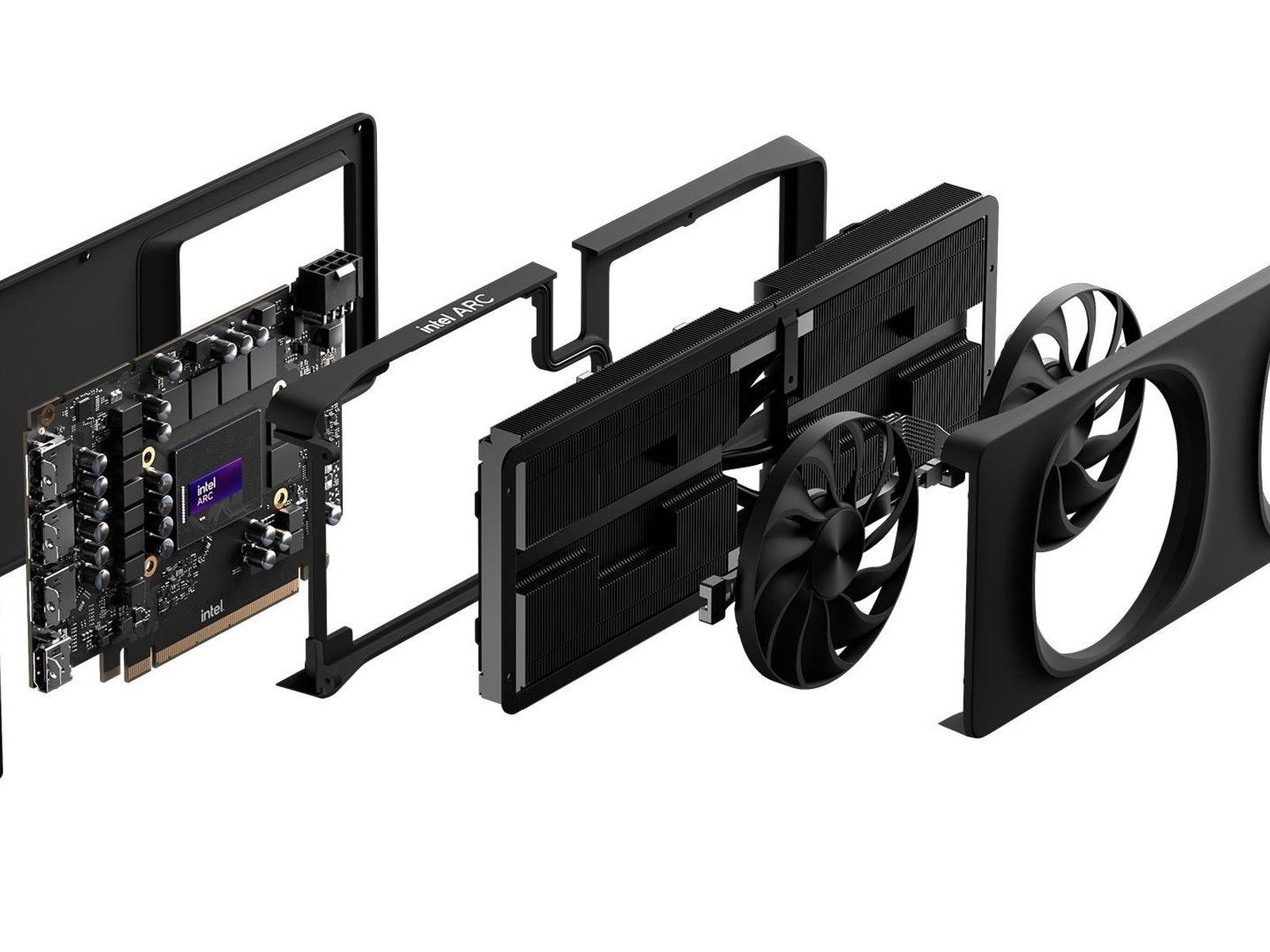
Key Fix Incoming For Intel Arc GPUs, Should You Consider One For Your Gaming PC?

Key Fix Incoming For Intel Arc GPUs, Should You Consider One For Your Gaming PC?
If you haven’t heard, Intel’s graphics cards are actually good. However, the veracity of that reality strongly depends on your system’s CPU. If you’re rocking an older-gen chip, chances are you might be significantly less impressed with a new Arc GPU’s performance. Fortunately, Intel has finally acknowledged this issue and notes that it is