
This is a video of brass instrument restorer Robinson’s Remedies repairing the absolutely mangled bell of a trombone, an injury likely suffered in the fight following somebody calling its owner a tromboner. Robinson says it’s the most damaged instrument he’s ever repaired, and the finished result, while by no means factory fresh, is worlds better than the crumpled mess he started with. A nice reminder that if we work on ourselves we might not end up perfect, but at least we won’t be giant pieces of garbage.
Monthly Archives: April 2025
You Can Now Create a Shortcut to Open Your Favorite iMessage Thread on Your iPhone
The Shortcuts app comes preloaded on the iPhone and can be used to set up quick automations; you can set up shortcuts that can execute multiple options at the same time. For example, you can connect to your HomePod and play instrumental music while dimming your smart lights, all at once, with a tap. If you’re new to the Shortcuts app, start here with seven recommended automations.
Strangely, Apple never offered a shortcut action for simply opening an iMessage thread. In iOS 18.4, though, Apple is fixing that mistake. And because Shortcuts is so well integrated across the entire iOS software, you can then add this shortcut to the Lock Screen, the Control Center, and even the Action button.
How to create the iMessage shortcut
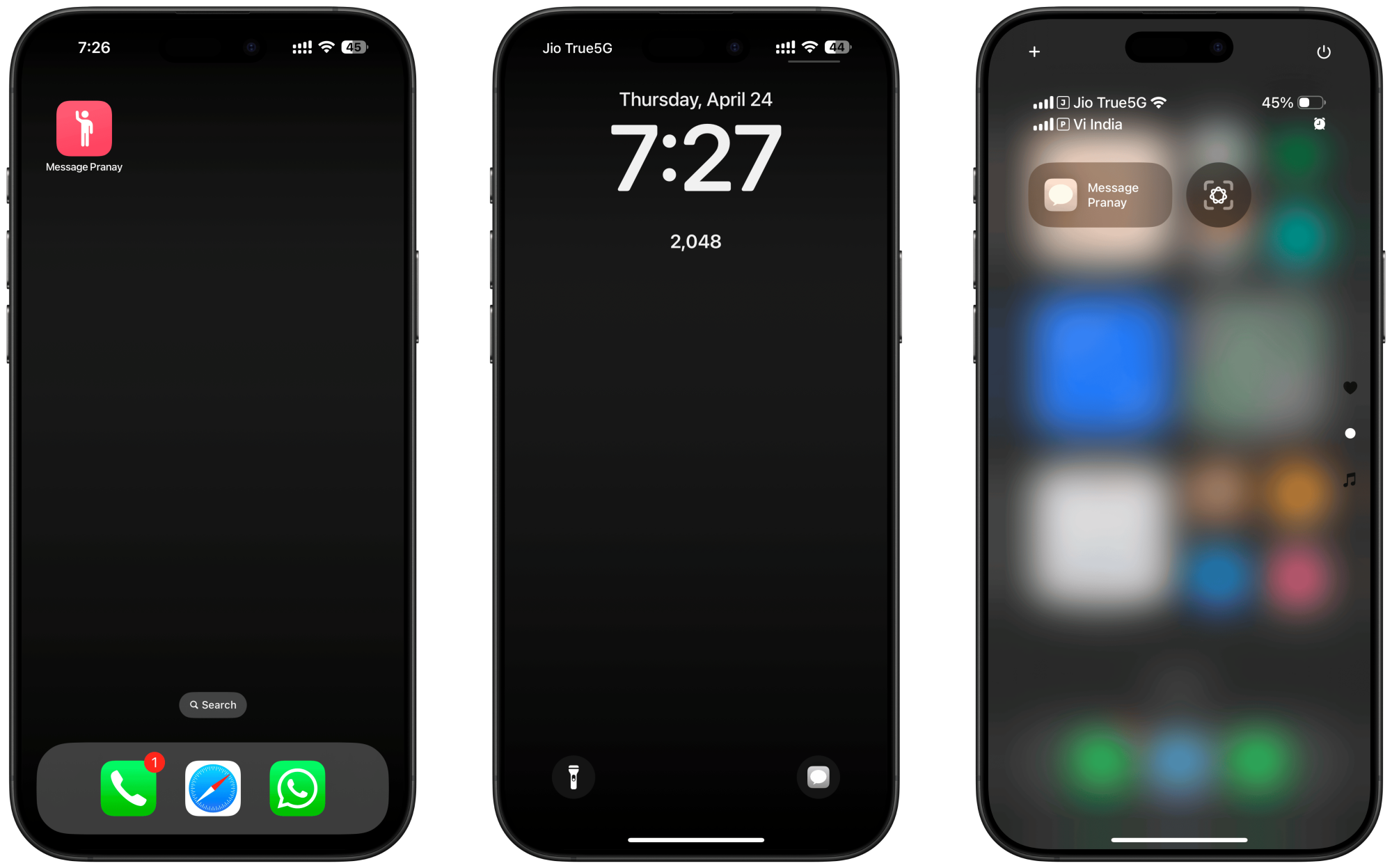
Credit: Khamosh Pathak
Open the Shortcuts app, and tap the Plus button at the top to create a new shortcut. Then, in the Search Actions bar, search for Open Conversation, and add the action.
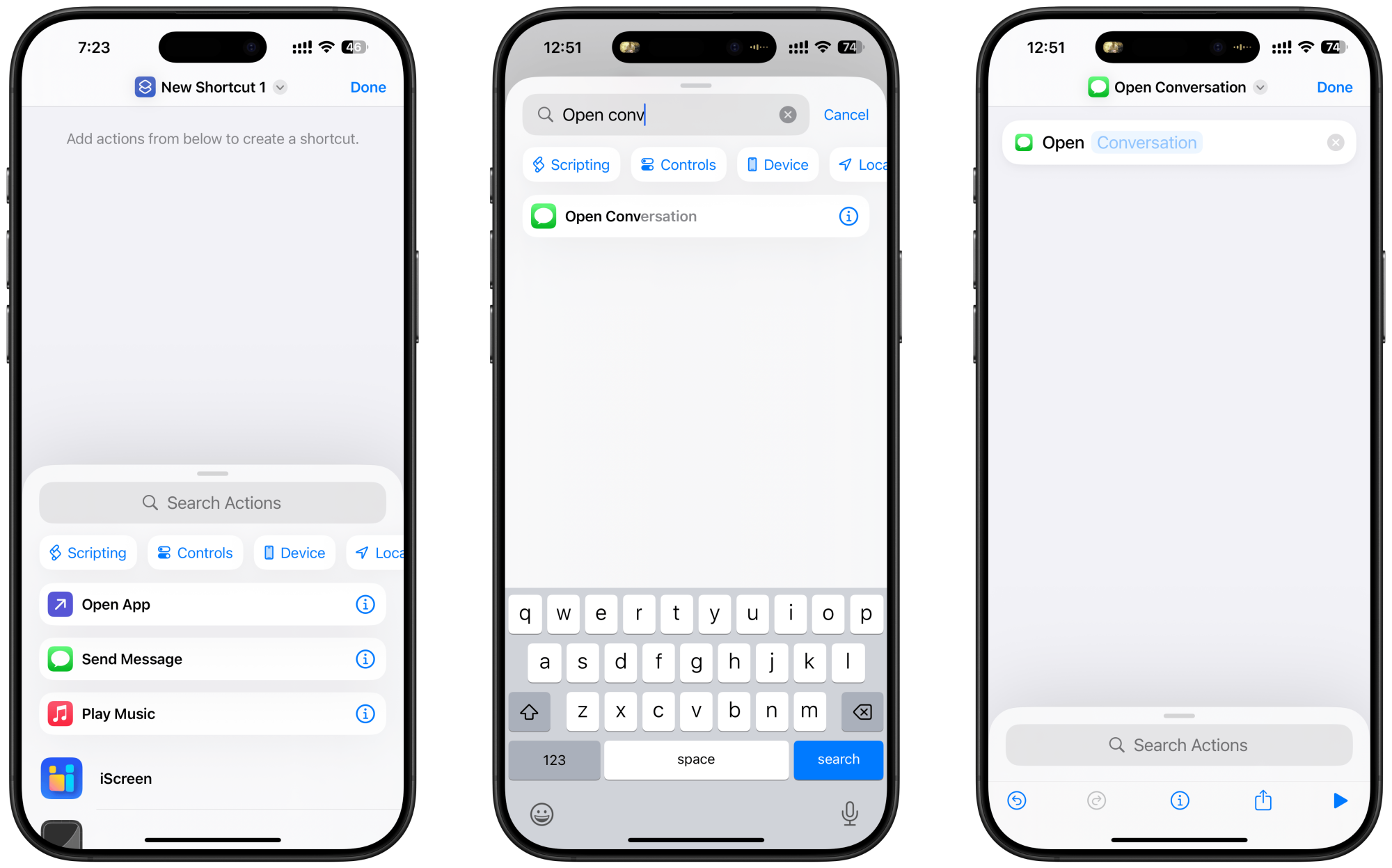
Credit: Khamosh Pathak
Tap the empty “Conversation” field, and choose the iMessage conversation you want to use for the shortcut. (It can be a group message thread or an SMS conversation.)
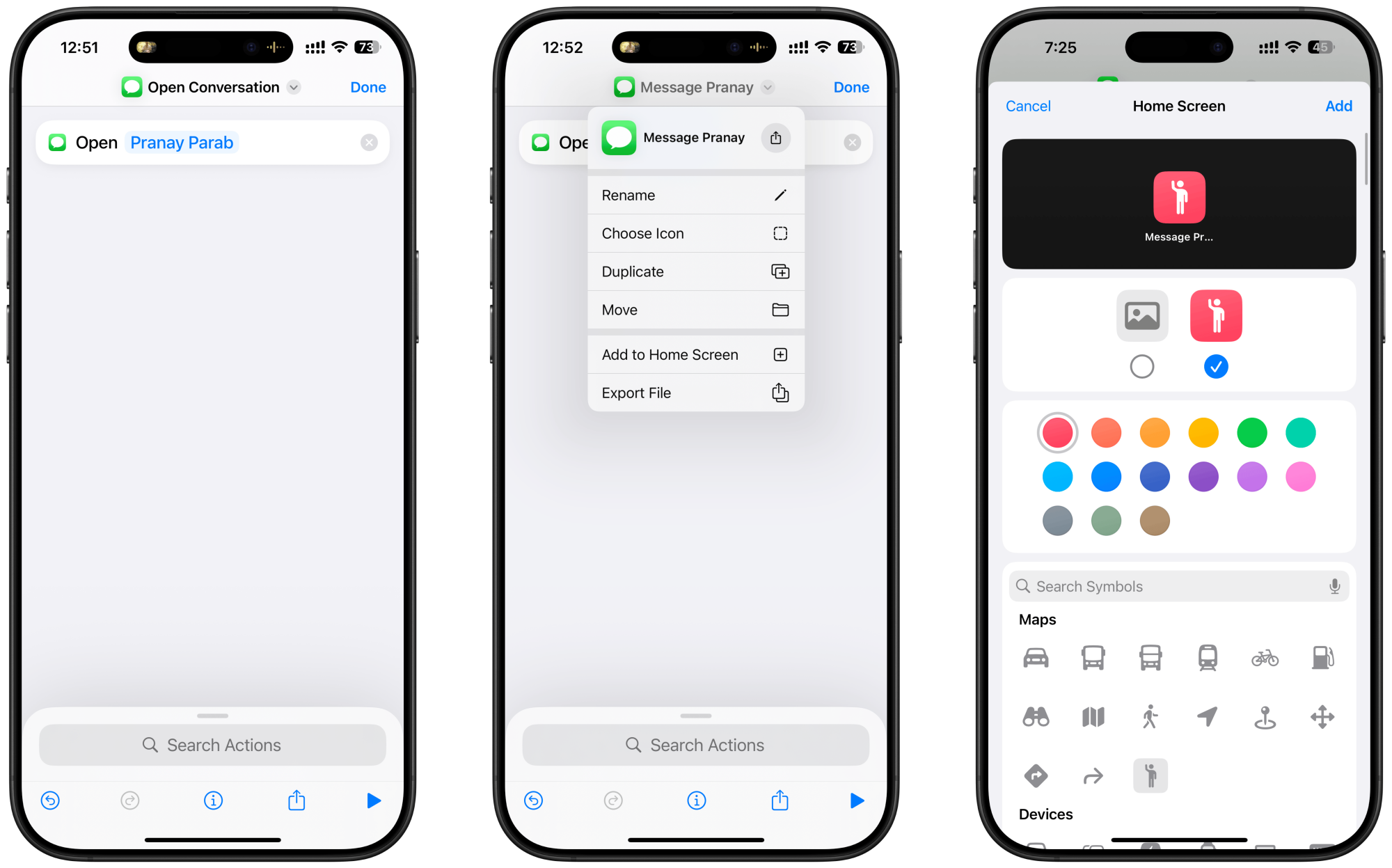
Credit: Khamosh Pathak
And there you have it. I would recommend you tap on the Shortcut name up top, and rename it something you’ll remember.
How to add the message shortcut to the Home and Lock Screen
You can add your message shortcut to the Home screen from the Shortcuts app itself. Tap the Shortcut name up top, and choose the “Add to Home Screen” option. Here, you can give the shortcut a name, and customize the icon with an image.
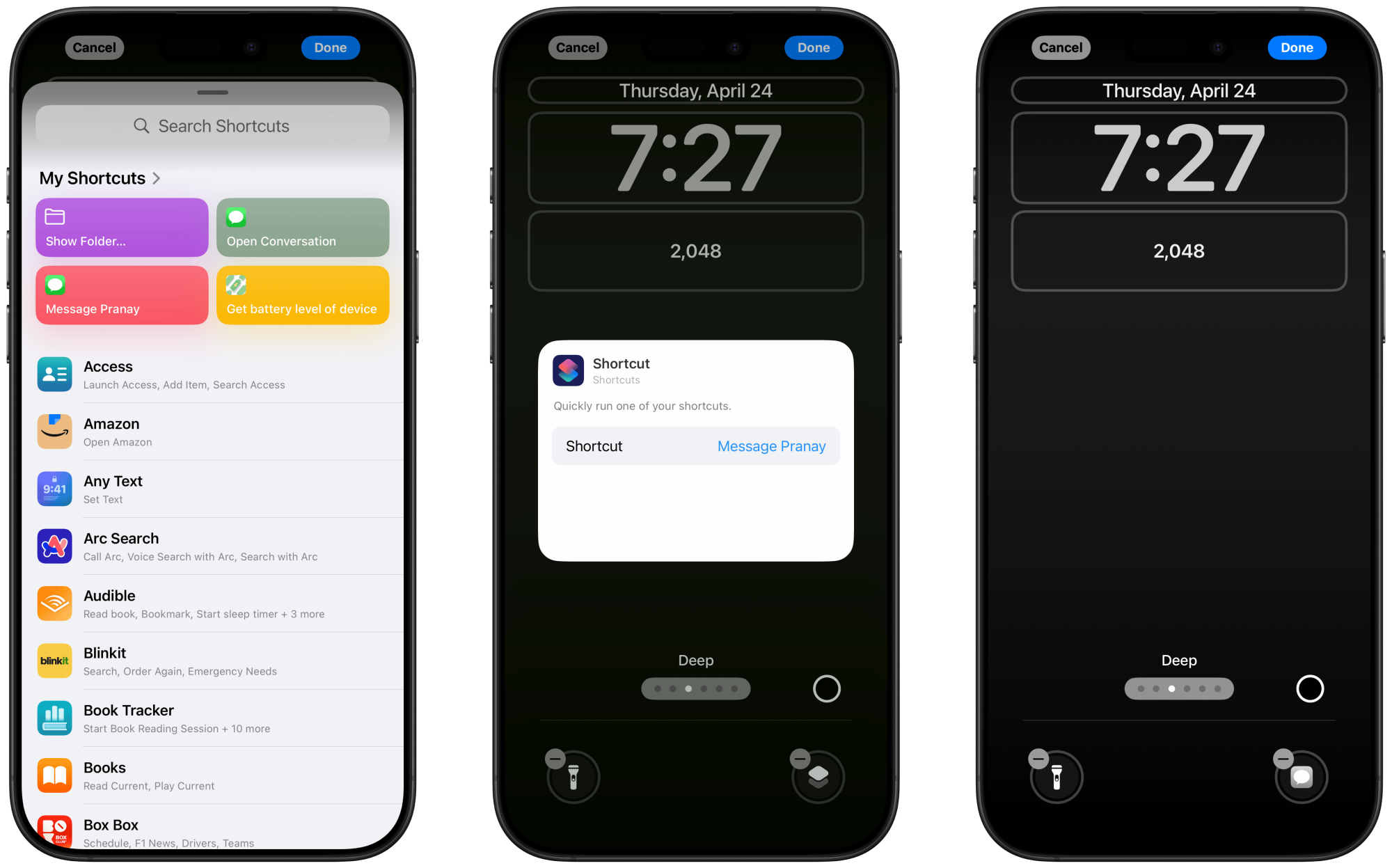
To add it to the Lock screen, first tap and hold the Lock screen. Then, tap on Customize, and choose Lock Screen.
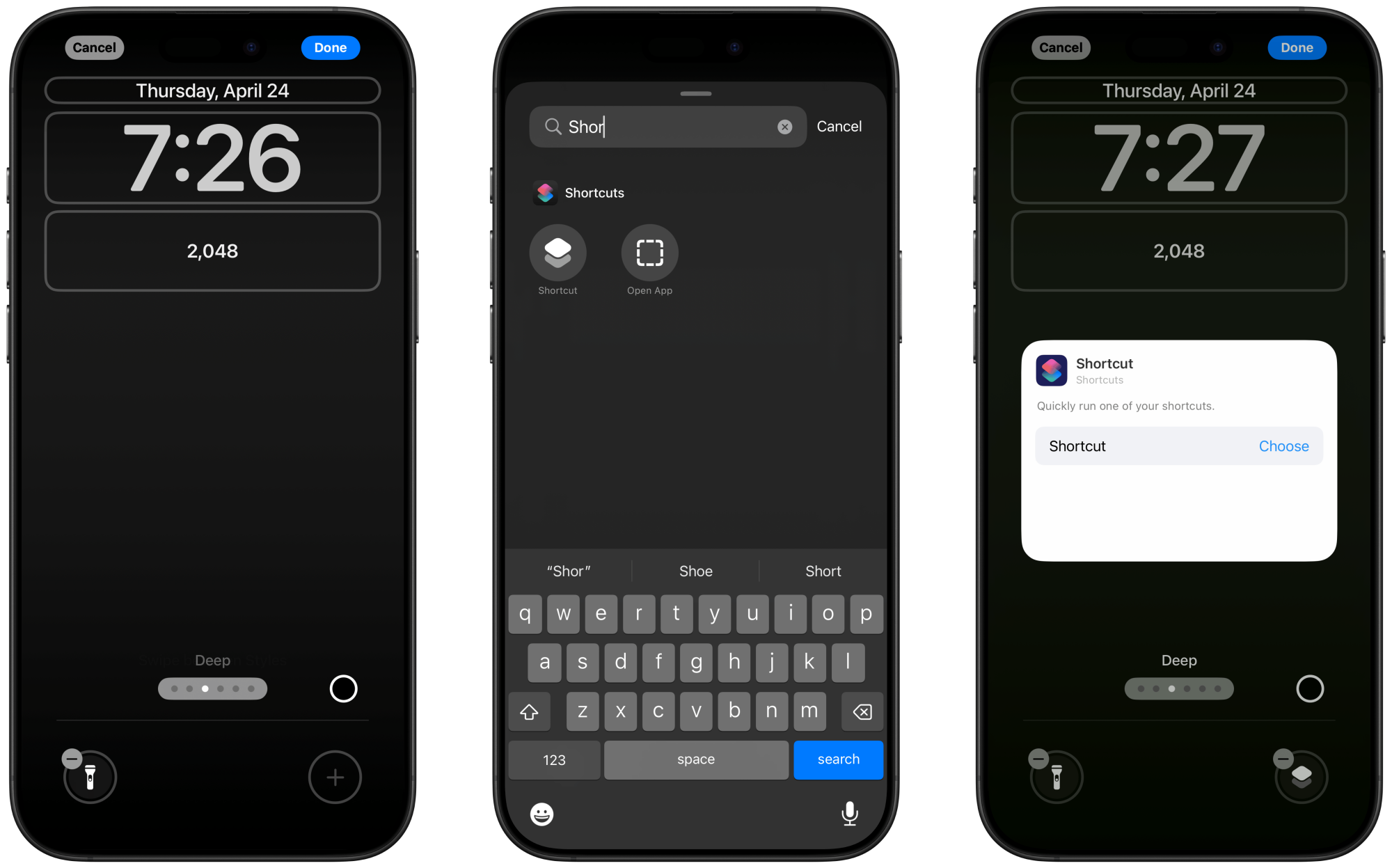
Credit: Khamosh Pathak
You’ll now see the two buttons below. First, tap the Minus button on a quick access button that you want to remove, then tap the Plus button in the empty space.
Credit: Khamosh Pathak
Here, search for and choose the “Shortcut” option. Next, tap the Choose button, and select the shortcut we just created. Tap Done, to save the Lock screen layout.
How to add a message shortcut to Control Center
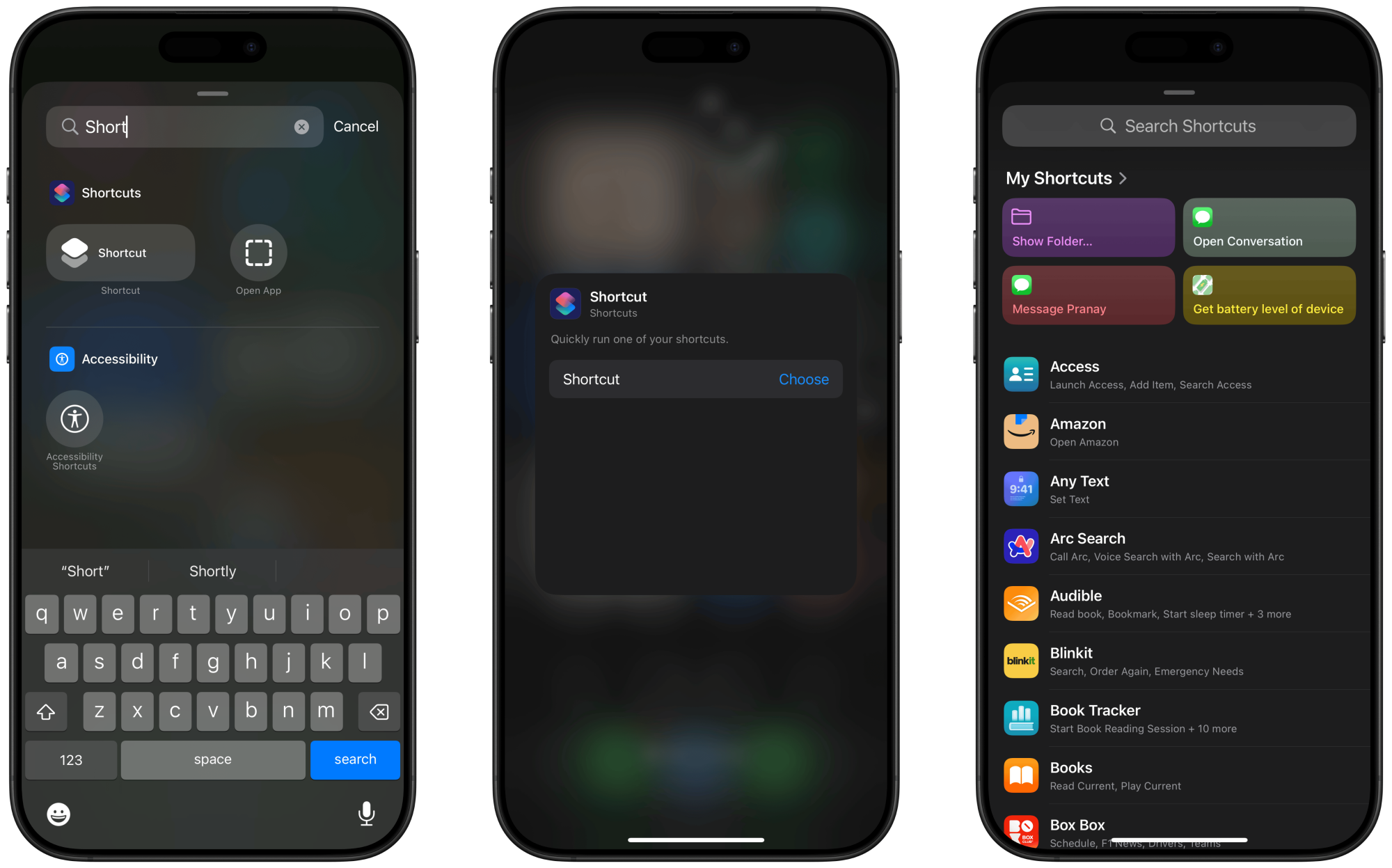
To add the shortcut to the Control Center, open the Control Center, press and hold to enter the editing mode, and tap the Add a Control button. Next, search for and add the Shortcut control.
Credit: Khamosh Pathak
In the customization screen, tap Choose, and select the shortcut that you just made. Go back to the Control Center and feel free to move the control as you wish.
How to add a message shortcut to the Action button
If you’re using the iPhone 15 Pro series or higher, you have access to the Action button. You can use it to quickly launch the Camera or any shortcut that you wish.
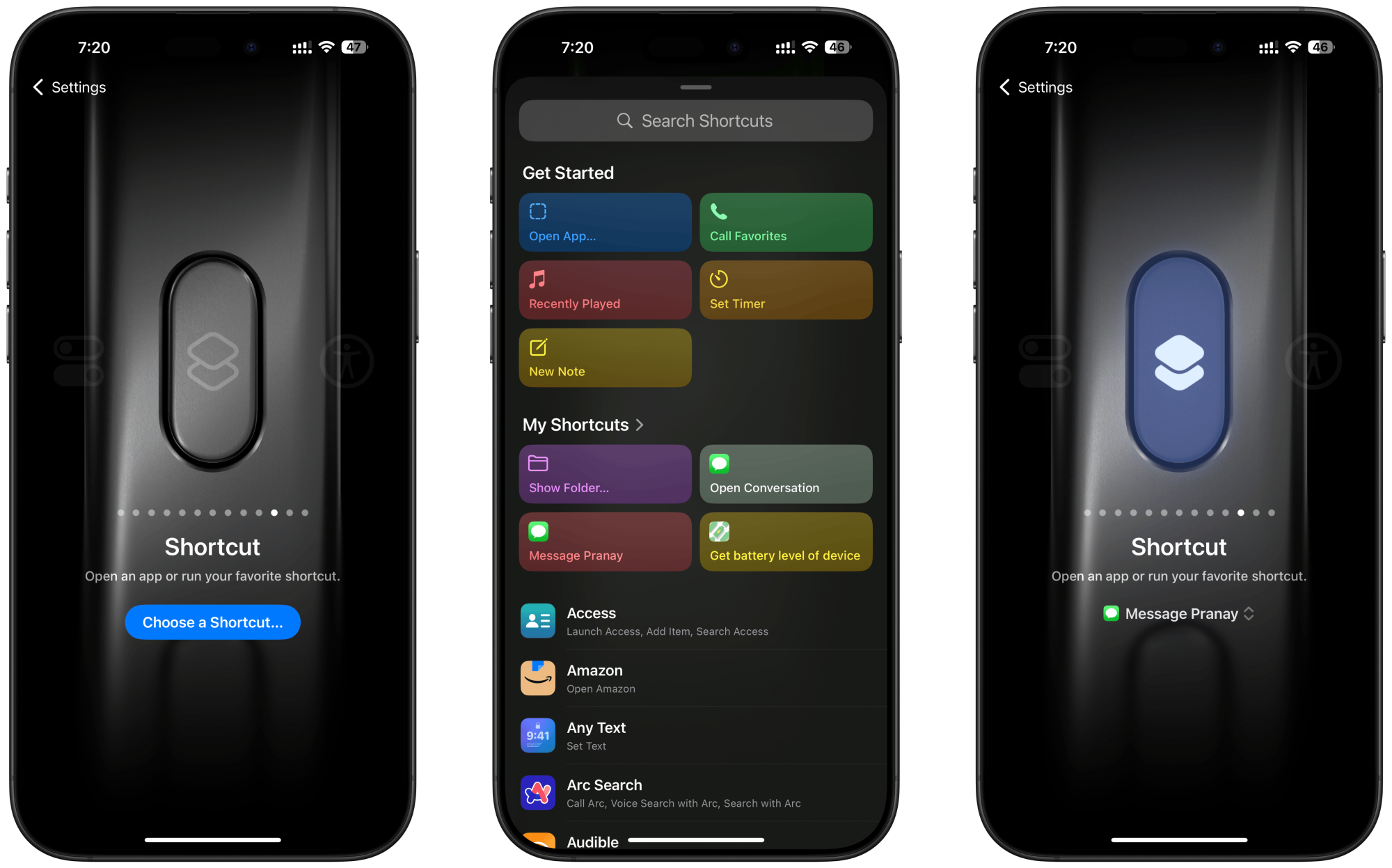
To set this up, go to Settings > Action Button and slide over to the Shortcuts option. Then tap on Choose a Shortcut, and select the shortcut just created.
Credit: Khamosh Pathak
Now, when you press and hold the Action button, it will instantly open the iMessage conversation of your choice.
This App Automatically Switches Your Mac to Dark Mode When You’re in a Dark Room
Dark or light mode: Some people prefer one over the other all day, every day, and they’re wrong. The enlightened among us know the truth: It’s best to use light mode when it’s light and dark mode when it’s dark.
That’s why macOS, in the Appearance section of System Settings, offers an Auto option, which switches to dark mode at sundown. This works well enough if you’re working in a room with windows, I suppose, but that’s not everyone’s workspace. There are all kinds of reasons you might be in a dark room during the day and a light room during the night.
These are the exact situations DarkModeBuddy solves. This tiny open-source application uses the light sensors built into every MacBook and iMac to automatically switch between dark and light mode, depending on your lighting conditions. The application is free to download (but you can contribute to the developer, if you’re generous).
There are only four settings to toggle. The first two checkboxes let you decide whether the application should start when your Mac does and whether you want to enable the automatic theme changing. You can also use two sliders to set the light level that will trigger dark mode—adjust these if the switch isn’t happening when you like. You can also adjust the delay between changing lighting conditions and your theme actually changing (the default is one minute). It’s a good idea to have at least some delay to prevent your laptop from flickering between the two themes at certain times of day.
The application takes up a mere 6MB of hard drive space. It also runs entirely in the background—there’s not even a menu bar icon. You can close the application at any time by launching it, which will open the settings, and then using the keyboard shortcut CMD+Q.
How to Search and Summarize With Gemini in Google Drive
Google is busy adding Gemini AI into just about every app it develops, and Google Drive is no exception. If you’ve got a Google One AI Premium subscription—or an organization you’re part of is paying its Gemini AI dues for Google Workspace—then you get Gemini integration for your Google Drive account and Docs, Sheets, and Slides.
There are a whole host of AI tricks you can do inside documents, spreadsheets, and presentations, but here I’m going to focus on what’s possible with your files and folders in Google Drive more broadly, including searches and summaries. Right now the best way to access these functions is through Google Drive on the web, though there is a Google Drive plug-in for Gemini on mobile as well.
All of this relies on you giving Gemini access to your Google Drive data—but Google has all of your data anyway, so it’s a question of extending your trust of Google even further. As with other Google apps, you can control the data Gemini keeps and delete existing records through your Google account.
The basics of Gemini in Google Drive
Load up Google Drive on the web, and you’ll see a Gemini star symbol up in the top right corner—click on this to bring up a Gemini side panel. Up at the top you’ve got arrows for expanding or shrinking the panel, and a button showing three dots that you can click to clear your Gemini conversation history inside Google Drive.
Depending on how recently you’ve used Gemini, you might see some suggestions for prompts you can run. You might also see a prompt that will give you a few examples of what Gemini can do inside Google Drive—you can also get some hints by clicking the three dots at the top of the side panel, and choosing More suggestions.
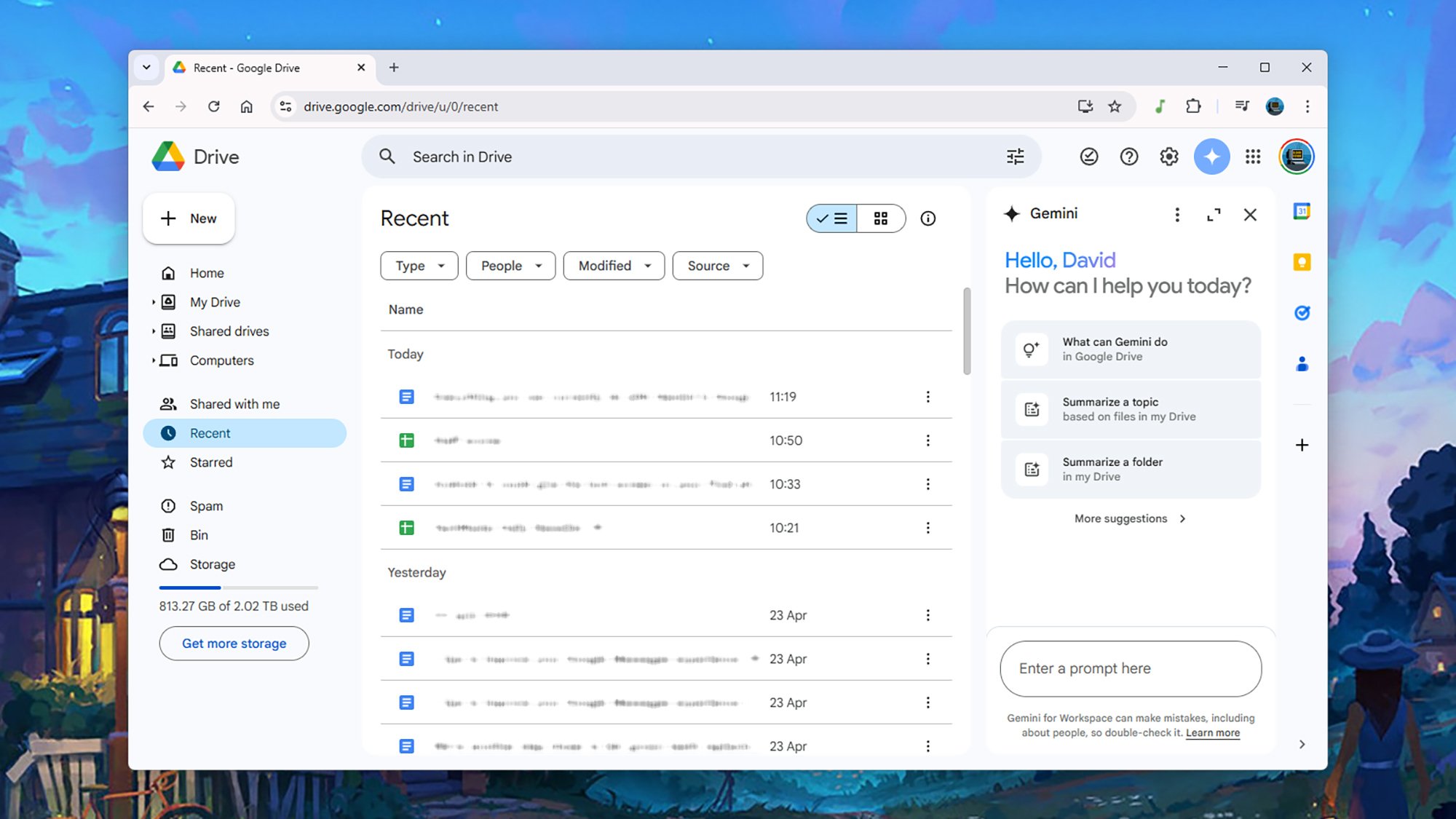
Gemini will offer suggestions for prompts if you need them.
Credit: Lifehacker
Credit: Lifehacker
On the most basic level, you can use Gemini to create files and folders inside Google Drive. Try something like “create a new folder called Travel” or “create a new document called Travel plans” as your prompt. This doesn’t really save you any time compared to the traditional way of carrying out these tasks, but it’s handy if you’re already chatting with the Gemini bot.
Based on the time I’ve spent playing around with Gemini in Google Drive, most of these prompts work as advertised, though the AI can sometimes lack precision in getting your files set up. Note that you can’t move or copy files at the moment, though this seems like the kind of feature it would make sense for Google to roll out eventually.
Search through files and folders
Google Drive already has a robust search tool, right up at the top of the web interface, but Gemini gives you some more flexibility in terms of the language of your queries and the kinds of information you can pull out. If you want to look at specific files or folders, use the @ symbol and then type out the file or folder name.
For example, you might ask “who scored highest in @staffreview” (if you have a spreadsheet with that name), and Gemini will tell you. Or, you could enter the prompt “which state is mentioned most in @travelplans” and get the answer. The prompts like these that I tried were all answered accurately, but double-check answers if your company’s annual budget or family vacation is relying on the information Gemini gives you.
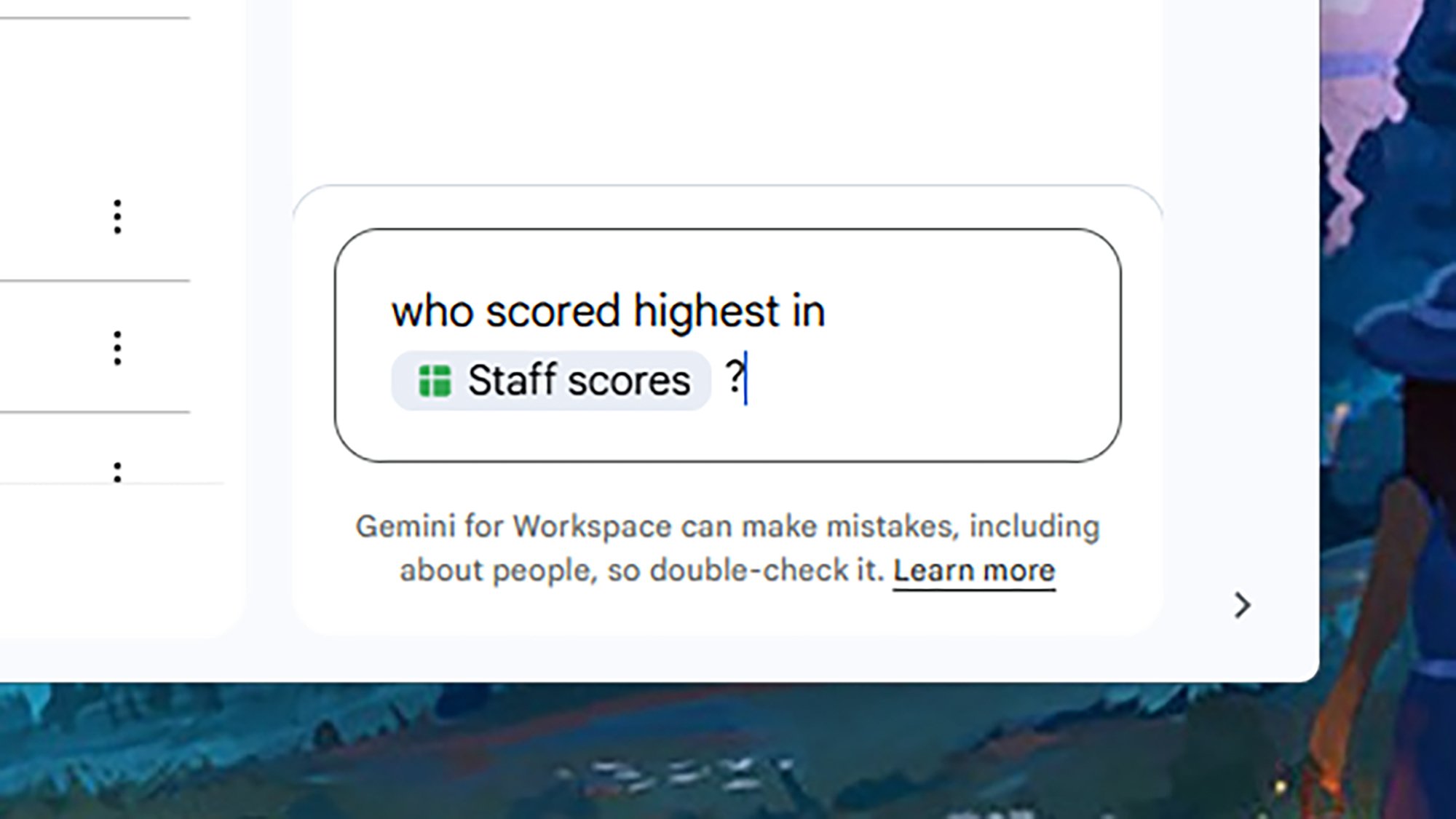
You’re able to tag and query files directly.
Credit: Lifehacker
Credit: Lifehacker
You can also get Gemini to search across files and folders, so you might ask for all the information it can find about a particular topic that you’ve covered in multiple essays. There’s a little more room for error here, because Gemini is looking across a bigger batch of data, and making more decisions about what is and isn’t relevant.
For now, at least, you can’t get Gemini to, for example, show you all your spreadsheets from yesterday, find the most recent file talking about apples or oranges, get the AI to count up files, or query your file editing history—these operations are still best performed using the standard Google Drive search box and its filters.
Summarize files and folders
Summaries have to be one of the best uses of modern generative AI, whether they’re summing up lengthy PDFs, multiple webpages, or giant spreadsheets—even if hallucinations also keep appearing here from time to time. This is something Gemini does well in Google Drive, based on the testing I’ve done.
You don’t need to open up the Gemini side panel for this one—just right-click on any file or folder in your Google Drive and choose Summarize this file or Summarize this folder. If you’re browsing a folder, you can also click the folder name at the top, then choose Summarize this folder.
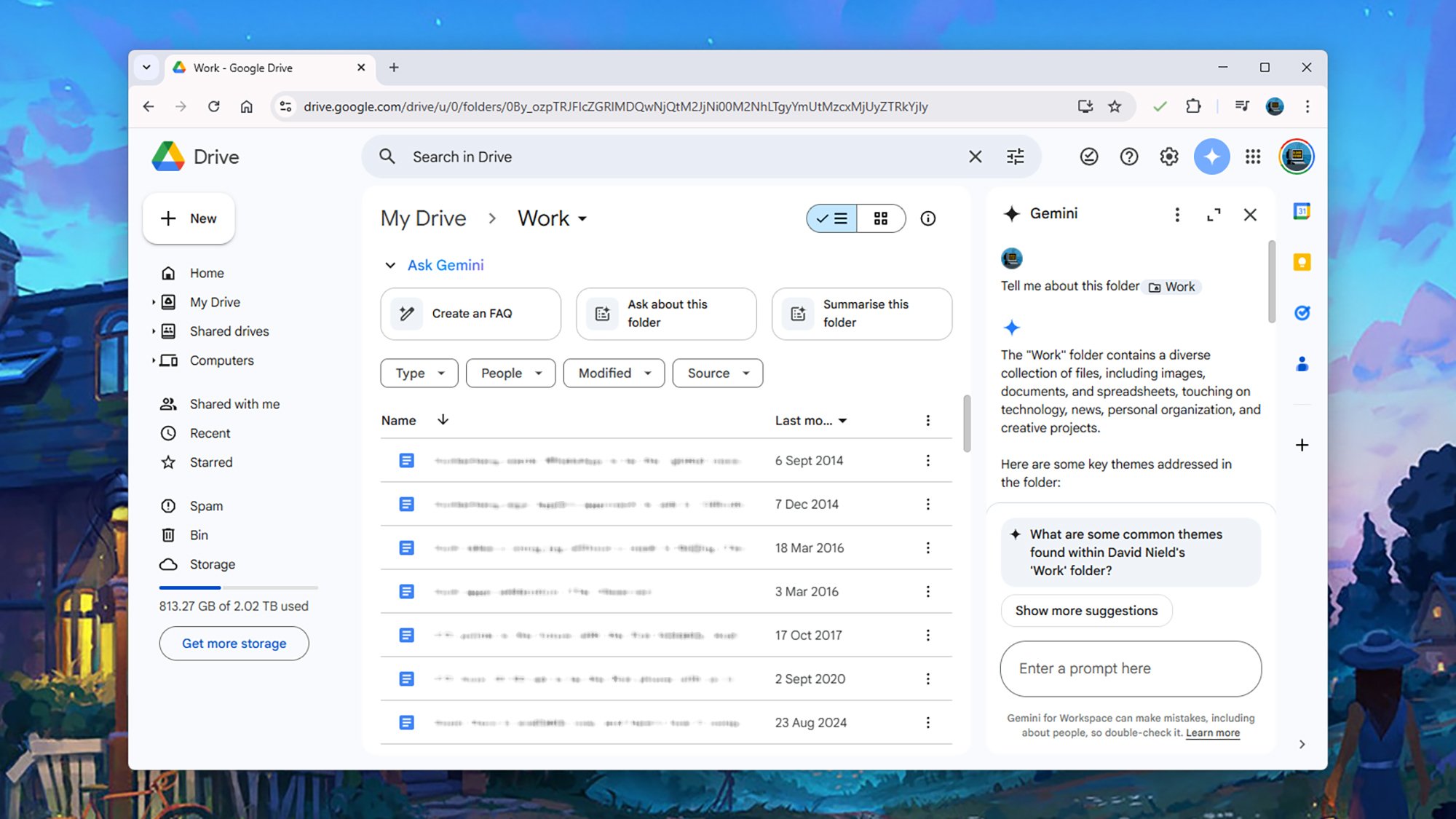
Gemini can give you broad summaries of folders.
Credit: Lifehacker
Credit: Lifehacker
Gemini springs into action and gives you a rundown of what’s in your selected file or folder. For folders with a lot of files in them, or large files, you get a broader overview—the AI is able to adapt its response based on the amount of information it has to sift through. You can then ask follow-up questions if you need more detail (you may see suggestions for follow-ups appear on screen).
Bear in mind that as soon as you close the Gemini side panel, the information Gemini has given you is gone: If you want to keep it, use the Copy buttons underneath the responses, then move it somewhere else (into a Google Docs file, for example). Your Google Drive chats aren’t synced over to the main Gemini app.
Meta Now Sells Quest 3S Refurbished For $270
Meta now sells Quest 3S refurbished, $270 for the 128GB base model or $360 for the 256GB model.
That’s a saving of $30 compared to buying the 128GB model new, and $40 over buying the 256GB model new – at least normally. The offering is available from the online Meta Store.
Meta’s refurbished Quest headsets come with the same one-year warranty as new headsets, and the company claims they “are inspected and thoroughly tested, professionally cleaned, and restored to original factory settings so they function and look like new and include the same accessories and cables as new devices”. Also like new Quest headsets, refurbished Quests bought from the Meta Store are eligible for return within 30 days.
Quest 3S Is $270 For The Next Two Weeks, A $30 Discount
Quest 3S is $30 off for the next two weeks, making the 128GB model $270 and the 256GB model $370.
 UploadVRDavid Heaney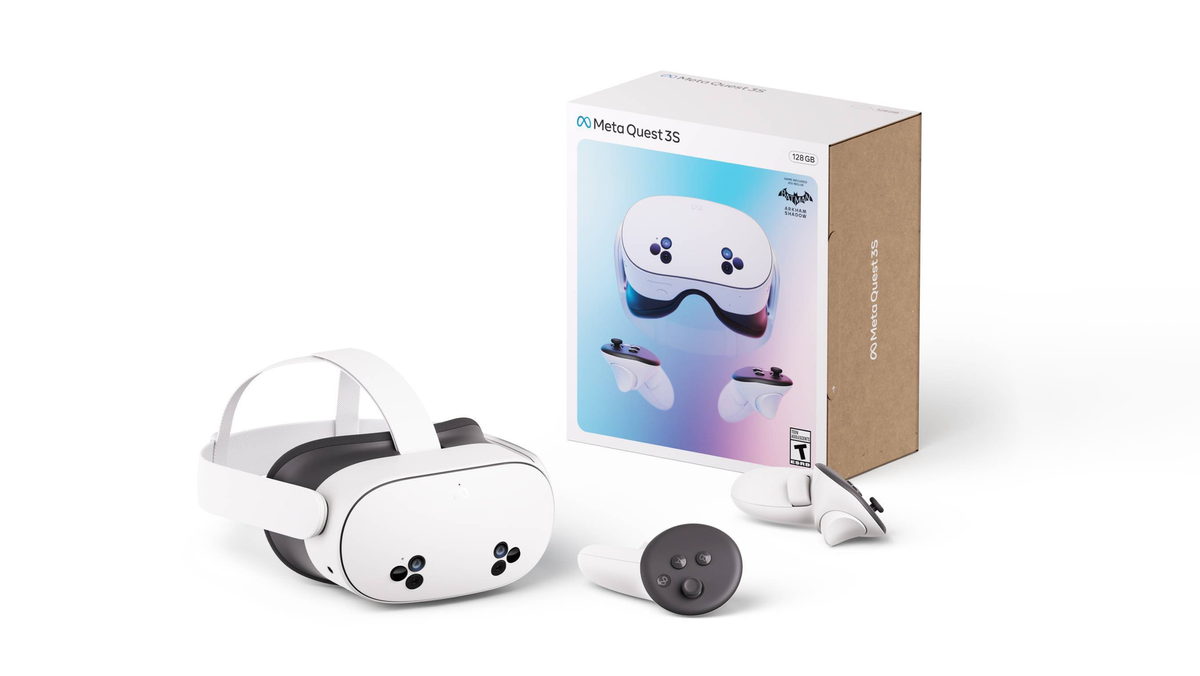
I say “normally” because until 8:59pm PT on Saturday, the 128GB Quest 3S is on sale for the same price new, and the 256GB model for just $10 more than the refurbished offering.
As such, until this sale ends you should take advantage of it if you’re in the market for a Quest 3S, rather than getting a refurbished unit.
Unlike a new Quest 3S, the refurbished offering isn’t listed as coming with Batman: Arkham Shadow, nor with the free 3 months of the Quest+ games subscription. Batman: Arkham Shadow is priced at $50, while Quest+ is $8/month.
Quest 3 Refurbished At $380 Is The Best Deal In VR
Meta is selling Quest 3 refurbished for $380, only $80 more than a new Quest 3S.
 UploadVRDavid Heaney
Meta also sells the higher-end Quest 3 refurbished from $380, under the same terms. While that only comes with 128GB storage, a quarter of a new Quest 3, we still describe it as the best deal in VR. The 512GB Quest 3 is available refurbished too, though, for $450.
You can get Quest 3S or Quest 3 refurbished from the Meta Store.
Nintendo Switch 2’s gameless Game-Key cards are going to be very common
US preorders for the Nintendo Switch 2 console went live at Best Buy, Target, and Walmart at midnight Eastern time last night (though the rush of orders caused problems and delays across all three retailers’ websites). The console listings came with a wave of other retail listings for games and accessories, and those listings either fill small gaps in our knowledge about Switch 2 game packaging and pricing or confirm facts that were previously implied.
First, $80 Switch 2 games like Mario Kart World will not cost $90 as physical releases. This is worth repeating over and over again because of how pernicious the rumors about $90 physical releases have been; as recently as this morning, typing “Switch 2 $90” into Google would show you videos, Reddit threads, news posts, and even Google’s own AI summaries all confidently and incorrectly proclaiming that physical Switch 2 releases will cost $90 when they actually won’t.
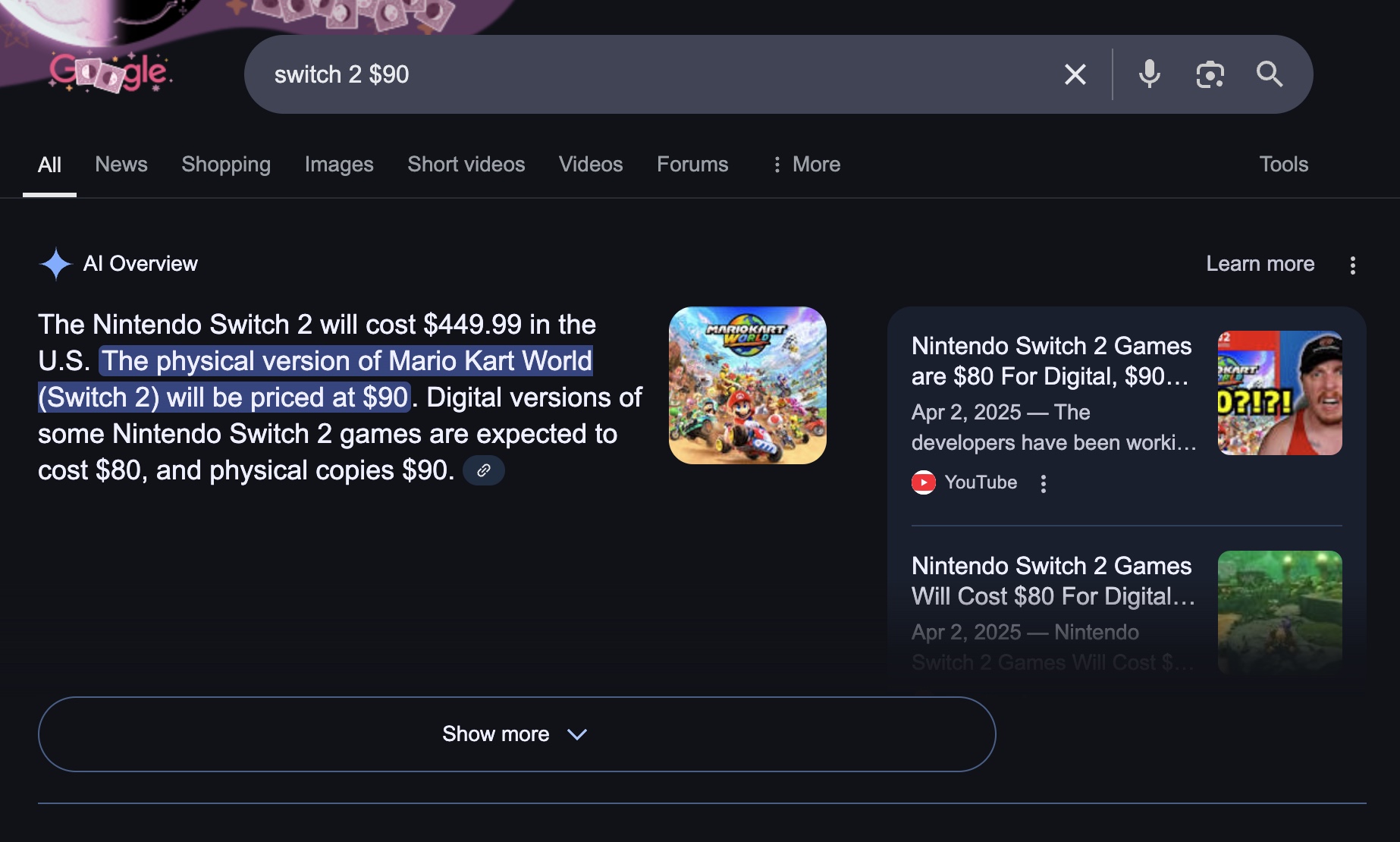
Google’s AI-generated search summary about $90 Switch 2 games as of this morning.
Credit:
Andrew Cunningham
While physical game releases in the European Union sometimes cost more than their digital counterparts, there was actually no indication that US releases of physical games would cost $90. The Mario Kart World website listed an $80 MSRP from the start, as did early retail listings that were published before preorders actually began, and this price didn’t change when Nintendo increased accessory pricing in response to import tariffs imposed by the Trump administration.
Arcade Fighting Game ‘FINAL FURY’ Coming to Quest & PC VR Next Month from ‘Synth Riders’ Studio


Kluge Interactive, the studio behind hit VR rhythm game Synth Riders (2019), announced its upcoming VR fighting game, FINAL FURY, is landing in early access on Quest and SteamVR headsets next month.
Coming to Quest 2 and above and PC VR headsets on May 8th, Final Fury is an arcade-style fighting game that brings classic 1v1 action to VR with a unique gesture-based gameplay system.
Developed with input from nine-time EVO champion Justin Wong, the early access title offers a mix of hand gesture input and actual room-scale movement, letting you embody six fighters with unique moves and stages, with more promised to come post launch.
“When the team at Kluge Interactive first approached me about FINAL FURY, I was intrigued by their vision of integrating classic fighting game mechanics into a first-person VR experience,” said Wong. “After playing and providing feedback on elements like dashes, grabs, and character play styles, I’m excited to see how players will engage with the game when it releases into Early Access.”
At early access launch, the game will include:
- You are the Fighter! – Fully immersive VR combat with real punches, dodges, and blocks
- Innovative VR Combat – Nostalgic fighter mechanics reimagined for physical gameplay
- Expanding Roster – Six fighters and counting, with unique powers, arenas, and styles
- Arcade Mode Unlocks – Take on the AI to unlock a new fighter, stage, and cosmetics
- Online Multiplayer – Cross-platform with rollback netcode for smooth, competitive play
- Pulse-Pounding OST- Original soundtrack from Zardonic (SUPERHOT: MCD)
You can wishlist Final Fury over on the Horizon Store for Quest 2 and above and Steam for PC VR headsets, coming on May 8th and priced at $9.99.
The post Arcade Fighting Game ‘FINAL FURY’ Coming to Quest & PC VR Next Month from ‘Synth Riders’ Studio appeared first on Road to VR.
2025 VW Golf GTI: Buttons are back on the menu, smiles never went away
Even in an alternate timeline in which the average new car didn’t cost more than $50,000 and weigh well more than two tons, Volkswagen’s Golf GTI would stand above the norm. Here on Earth Prime, nine years after a weasel met a particle accelerator and everything started to get weird, the GTI shines as almost the perfect blend of performance and everyday practicality while keeping the footprint small and the sticker price affordable.
The GTI has just had its midlife facelift, making this generation the Mk8.5 if you speak Golfnerd. Even if you don’t, you’re probably familiar with the idea. But to recap, in 1976, someone at VW had the bright idea of giving the Golf hatchback a more powerful engine and better handling. The original GTI wasn’t the first hot hatch, but it was the most influential, giving VW’s humble Golf a halo that shone brightly when seized upon by that most 1980s of species, the yuppie.
The GTI has been a constant in the Golf range ever since. Here in America, it is the Golf range, along with the all-wheel drive Golf R, but more on that car another day. Americans used to buy regular Golfs—I have not one but two neighbors with Golf Alltrack station wagons, in case anecdote will suffice in place of sales data—but no longer in numbers that make importing the other cars economical. On the other hand, the US is now one of the largest markets for the GTI, VW told me, and last year, it saw sales grow by almost 50 percent.
Sadly for China, rare Earth elements aren’t actually all that rare
As the trade war between China and the United States continues to escalate, Beijing is responding by turning to one of its favorite retaliation tactics: limiting the export of critical minerals used in many high-tech electronics, from fighter jets to wind turbines. While China’s mineral restrictions may sound scary, the reality is that they haven’t been very effective in the past and stand to become even less so if the US and other countries finally get their acts together.
It all started in July 2023, when the Chinese government announced it would restrict the export of gallium and germanium, two critical minerals that are mostly used in making solar panels and semiconductors. Over the following two years, China’s list of controlled products expanded to include antimony, graphite, and other materials. Earlier this month, the Chinese government escalated things even further, subjecting seven rare earth elements to a more comprehensive export licensing program that covers the whole world and is designed to further choke off American companies.
Rare earths are a subset of elements under the broader umbrella of critical minerals that China has long enjoyed monopoly control over. In the short term, companies that need these rare earths might be able to rely on existing stockpiles or even turn to recycled electronics to find them. But eventually, the US and other countries will be forced to either ramp up domestic mining or reduce their dependence on rare earths, both of which would make China’s policies sting less. “China has got one shot, and it knows it,” says Ian Lange, an associate professor of economics and business at the Colorado School of Mines.
Diablo 4 Doesn’t Sound Like It’s Headed To Switch 2 Anytime Soon

A lot of current-gen ports seem like a slam dunk for the Switch 2, and you might assume Diablo IV was one of them. But franchise boss Rod Fergusson recently appeared to pour cold water on the idea that the Blizzard game would be coming to Nintendo’s new console anytime soon. While it could run on the hardware, he…
Uber is adding Volkswagen ID. Buzz EVs to its US robotaxi fleet
Uber is expanding its robotaxi ambitions with the help of Volkswagen. The two companies are teaming up to offer autonomous rides in ID. Buzz vehicles. They plan to deploy thousands of the vehicles in multiple US markets over the next decade.
Testing is slated to start later this year with human safety drivers at the wheel. All going well, Uber and VW aim to start running ID.Buzz robotaxi rides in Los Angeles in late 2026. Volkswagen AG’s MOIA division is supplying its autonomous driving tech.
The ID.Buzz is an electric, modern version of VW’s classic Type 2 Microbus. The vehicle finally hit the US last year for a starting price of $59,995 for the base model.
Uber has been offering robotaxi rides in Waymo vehicles for a while. It’s gradually been expanding the number of markets in which it offers such rides. Waymo rides are currently available via Uber in the likes of San Francisco, Los Angeles, Phoenix and Austin.
This article originally appeared on Engadget at https://www.engadget.com/transportation/evs/uber-is-adding-volkswagen-id-buzz-evs-to-its-us-robotaxi-fleet-140919926.html?src=rss
Meta announces fresh looks and smarter AI features for Ray-Ban Smart Glasses

Meta is expanding the availability of its AI features to Ray-Ban Meta Smart Glasses while introducing new styles of headset.
The post Meta announces fresh looks and smarter AI features for Ray-Ban Smart Glasses appeared first on MIXED Reality News.
Spacetop AR is now an expensive Windows app instead of a useless screenless laptop
The Spacetop AR laptop made a splash when it debuted a few years ago with an intriguing pitch: What if you could have a notebook that works entirely through augmented reality glasses, without a built-in screen of its own? Unfortunately, we found the Spacetop experience to be underwhelming, and the hardware seemed like a tough sell for $1,900. Last Fall, Spacetop’s creator Sightful told CNET that it was abandoning the screen-less laptop altogether and instead focusing on building AR software for Windows PCs. Now, we have a clearer sense of what Sightful is up to.
Today, Sightful is officially launching Spacetop for Intel-powered Windows AI PCs, following a short trial launch from January. For $899 you get a pair of XREAL’s Air Ultra 2 glasses and a year of Spacetop’s software. Afterwards, you’ll have to pay $200 annually for a subscription. The software works just like the original Spacetop concept — it gives you a large 100-inch AR interface for doing all of your productivity work — except now you’re not stuck with the company’s middling keyboard and other hardware.
Spacetop might be compelling to AR fanatics who already own Intel AI PCs like the Surface Laptop Pro for Business, or a Dell XPS machine with the Core Ultra 7 chip. But if you don’t have one of those computers, you’ll have to add it to Spacetop’s already high cost. And don’t forget about prescription lenses: Those will run you $50 for single-vision and $150 for progressive.
Spacetop doesn’t support Intel chips without NPUs, as its AR interface requires constant AI processing. It doesn’t work AMD or Qualcomm’s AI CPUs, either. The company partnered with Intel to optimize Spacetop for its platform, which included help with understanding Intel’s NPU architecture as well as tweaking its chips to help the AR software run better. In a conversation with Engadget, Sightful CEO Tamir Berliner noted that the company might pay more attention to other chip platforms if it gets similar attention.
As for Mac support, Berliner said in a statement to Engadget: “Yes, we plan to create a version of Spacetop for Mac — the timing is still TBD based on a lot of different factors regarding laptops, silicon, compute power, glasses, and more. We will be excited to share more news when we are able.”
Given its price and the strict PC requirements for using it, Spacetop clearly isn’t meant for a wide audience. But there are potential benefits for early adopters. Its large AR screen could make it easier to multitask without large monitors, and it’s also easier to focus on your apps since Spacetop vastly simplifies the Windows 11 interface. There are some obvious privacy benefits, too, since no one else can see what you’re looking at in AR.
The big downside, though, is that you’ll have to get used to wearing Xreal’s large Air 2 Ultra glasses. When we demoed it at CES, we found it to be an improvement over previous Xreal frames, thanks to their sharp 1080p micro-OLED displays and wider field of view. The Air 2 Ultra are also notable for having 6DoF tracking, which allows you to move around AR objects. While sleeker than the Vision Pro, the glasses are still pretty clunky, and you’ll also have to snap in additional prescription frames if necessary.
I’ll need to see this latest iteration of Spacetop in action before making any final judgments, but it’s clearly a more viable concept as an app that can work on a variety of laptops. Nobody wants to buy bespoke hardware like the old Spacetop laptop, no matter how good of a party trick it may be.
This article originally appeared on Engadget at https://www.engadget.com/ar-vr/spacetop-ar-is-now-an-expensive-windows-app-instead-of-a-useless-screenless-laptop-140030911.html?src=rss
This Compelling Time Travel Adventure Is A Must-Play

Seven years ago, Wadjet Eye Games released Unavowed, a point-and-click adventure that took the industry by surprise. Incorporating ideas from BioWare RPGs, this was a game in which the companions you took with you for any mission changed not only how the puzzles were solved, but how the story was told. It was…
This Multi-Platform Gaming Headset Is at Its Lowest Price Ever Right Now
We may earn a commission from links on this page. Deal pricing and availability subject to change after time of publication.
For fans of The Mandalorian or anyone after a headset with cross-platform support, the Logitech Astro A30 (Mandalorian Edition) might be worth a closer look—especially now that it’s hit its lowest-ever price (according to price trackers) of $119.99 on Woot (down from $249). The same model is currently $175 on Amazon, making this Woot deal a solid choice if you’re in the contiguous U.S. (Woot doesn’t ship elsewhere). This deal is live for eight days or until its stock runs out. Free shipping applies to Prime members; others will need to cough up $6. The headset ships with a 90-day Woot limited warranty and includes everything you’d expect: a USB transmitter, a detachable boom mic, charging and audio cables, and a hard-shell carry case.

Design-wise, the Mandalorian theme isn’t just a slap-on sticker job. It’s finished to resemble Beskar Steel, with Din Djarin and the Mudhorn signet featured on the speaker tags. It’s a slick look, no doubt, but comfort-wise it’s more of a mixed bag. The rectangular earcups are padded with memory foam and faux leather that feels soft and breathable. However, the rubberized headband can press down a little harder than you’d like during longer sessions, especially compared to headsets with more suspension-style designs, notes this PCMag review. The controls are compact but can be tricky—the small four-way switch that lets you toggle volume and game/chat mix might not be the easiest to use if you have larger hands.
Performance is generally OK. The A30 supports both Bluetooth and 2.4GHz wireless through a USB-A dongle (USB-C transmitter sold separately if you want one for your Switch or PS5). It works with PC, Xbox, PlayStation, and mobile devices, but switching between systems can reportedly be a chore, especially when sound levels drop if you forget to change modes. There’s also no built-in spatial audio, so you’ll be relying on your system’s surround settings. Sound-wise, the A30 favors clarity over raw bass. Music and in-game audio sound detailed at moderate volumes, but things flatten out if you push the volume too high. The boom mic is fine for chat, but not sharp enough for streaming or recording. You can tweak the settings like EQ via the Logitech G app, but it only comes with two presets.
Nintendo’s Already Apologizing For Not Having Enough Switch 2s
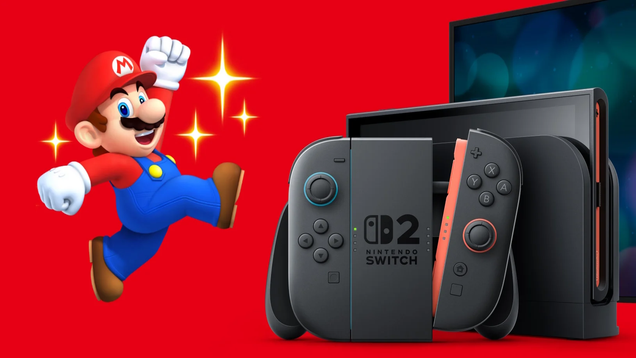
Switch 2 preorders don’t begin in the U.S. until late tonight (12:01 a.m. ET on April 24), but they’ve already been underway in other parts of the world and even Nintendo has been shocked by the level of demand so far. The company said that, with over 2.2 million fans seeking to preorder a Switch 2 directly from My…
Perplexity’s iOS app gets an AI voice assistant
Perplexity has rolled out an update for its iOS app, giving iPhone users access to its AI voice assistant that was initially released for Android users earlier this year. Its voice assistant can perform tasks for the user by browsing the web or accessing other apps for them. If they ask the assistant to find them a table for a specific restaurant, for instance, Perplexity can launch the OpenTable app with the number of people, the date and the time already filled out. The user still has to perform the final action and book a reservation, but it’s already laid out for them — all they have to do is click the button.
Users can also ask the assistant to draft emails for them for specific contacts, which they’ll have to send themselves, and create reminders for them on the calendar. They can ask it to recommend them spots they could visit, such as restaurants serving food they want to eat, and Perplexity will mark locations on the map. Of course, they can ask the assistant to do web searches for them, such as finding specific videos that Perplexity can open on the YouTube app.
As The Verge notes, Perplexity’s voice assistant works on older iPhones, unlike Apple Intelligence that only works on the company’s more recent models. The iOS assistant also doesn’t have the capability to look at the world for the user and tell them what they’re seeing yet, though the feature is already available on Android and could make its way to iPhones in the future.
Introducing Perplexity iOS Voice Assistant
Voice Assistant uses web browsing and multi-app actions to book reservations, send emails and calendar invites, play media, and more—all from the Perplexity iOS app.
Update your app in the App Store and start asking today. pic.twitter.com/OKdlTaG9CO
— Perplexity (@perplexity_ai) April 23, 2025
f
This article originally appeared on Engadget at https://www.engadget.com/ai/perplexitys-ios-app-gets-an-ai-voice-assistant-130035088.html?src=rss
The Fall Release Calendar Takes Shape As Ghost of Yotei Rushes Out Ahead Of Grand Theft Auto 6

Open-world samurai adventure Ghost of Yotei is the latest blockbuster to stake out a release date in a fall calendar overshadowed by the impending arrival of Grand Theft Auto VI. The sequel to Ghost of Tsushima will come to PlayStation 5 in October as we get more release dates for the second half of 2025.
Scientists Say They Can Calculate the Cost of Oil Giants’ Role In Global Warming
An anonymous reader quotes a report from the Washington Post: Oil and gas companies are facing hundreds of lawsuits around the world testing whether they can be held responsible for their role in causing climate change. Now, two scientists say they’ve built a tool that can calculate how much damage each company’s planet-warming pollution has caused — and how much money they could be forced to pay if they’re successfully sued. Collectively, greenhouse emissions from 111 fossil fuel companies caused the world $28 trillion in damage from extreme heat from 1991 to 2020, according to a paper published Wednesday in Nature. The new analysis could fuel an emerging legal fight.The authors, Dartmouth associate professor Justin Mankin and Chris Callahan, a postdoctoral researcher at Stanford University, say their model can determine a specific company’s share of responsibility over any time period. […]
Callahan and Mankin’s work combines all of these steps — estimating a company’s historical emissions, figuring out how much those emissions contributed to climate change and calculating how much economic damage climate change has caused — into one “end-to-end” model that links one polluter’s emissions to a dollar amount of economic damage from extreme heat. By their calculation, Saudi Aramco is on the hook for $2.05 trillion in economic losses from extreme heat from 1991 to 2020. Russia’s Gazprom is responsible for $2 trillion, Chevron for $1.98 trillion, ExxonMobil for $1.91 trillion and BP for $1.45 trillion. Industry groups and companies tend to object to the methodologies of attribution science. They could seek to contest the assumptions that went into each step of Mankin and Callahan’s model.
Indeed, every step in that process introduces some room for error, and stringing together all of those steps compounds the uncertainty in the model, according to Delta Merner, lead scientist at theScience Hub for Climate Litigation, which connects scientists and lawyers bringing climate lawsuits. She also mentioned that the researchers relied on a commonly used but simplified climate model known as the Finite Amplitude Impulse Response (FAIR) model. “It is robust for the purpose of what the study is doing,” Merner said, “but these models do make assumptions about climate sensitivity, about carbon cycle behavior, energy balance, and all of the simplifications in there do introduce some uncertainty.” The exact dollar figures in the paper aren’t intended as gospel. But outside scientists said Mankin and Callahan use well-established, peer-reviewed datasets and climate models for every step in their process, and they are transparent about the uncertainty in the numbers.


Read more of this story at Slashdot.
PlayStation’s ‘Big Games, Big Deals’ Sale Kicks off, Including Discounts on Some Top PSVR 2 Games


PlayStation has kicked off its big ‘Big Games, Big Deals’ promotion today, putting a massive number of PS5 and PS4 games on deep discount. While there are only a handful of PSVR 2 and PSVR games among the lot, you can still nab some pretty great games at a steal.
The sale varies by region, so make sure to check out the sales section to see whether these games are currently on discount for you.
As it is, in the US, the following games are currently on sale from today until May 7th.
PSVR 2 Games
| Game Title | Sale Price | Original |
Percent Off
|
| Arcade Paradise VR | $11 | $20 | 45% |
| cyubeVR | $24 | $30 | 20% |
| Five Nights at Freddy’s: Help Wanted 2 | $20 | $40 | 50% |
| Hubris | $12 | $30 | 60% |
| Phasmophobia | $15 | $20 | 25% |
| Red Matter 2 | $18 | $30 | 40% |
| Resident Evil 4 Gold Edition | $30 | $50 | 40% |
| Resident Evil Village | $16 | $40 | 60% |
PSVR Games
| Game Title | Sale Price | Original |
Percent Off
|
| Batman: Arkham VR | $5 | $20 | 75% |
| Car Mechanic Simulator VR | $10.39 | $26 | 60% |
| Five Nights at Freddy’s VR: Help Wanted | $9.89 | $30 | 67% |
| DOOM 3: VR Edition | $6.59 | $20 | 67% |
| Dreams | $8 | $20 | 60% |
| Resident Evil 7: Biohazard | $8 | $20 | 60% |
| Sniper Elite VR | $8 | $30 | 80% |
– – — – –
Note: PlayStation’s ‘Big Games, Big Deals’ sale is valid from today until May 7th at 11:59 PM PDT (local time here).
The post PlayStation’s ‘Big Games, Big Deals’ Sale Kicks off, Including Discounts on Some Top PSVR 2 Games appeared first on Road to VR.