23andMe Requiring Potential Bidders To Affirm They Will Uphold Data Privacy

The sale of bankrupt DNA data bank 23andMe is delayed as the company struggles to secure a lead bidder who can meet regulatory and privacy requirements, pushing the initial auction deadline from Friday to Monday. Seeking Alpha reports: 23andMe Holdings (OTC:MEHCQ), currently in Chapter 11 bankruptcy proceedings, is requiring that any potential bidders for the company’s assets “guaranty that they will comply with the Company’s privacy policies and applicable law.” The genetics company said this is necessary to protect customers’ data.

In addition, bidders will need to submit documentation of their intended use of any data, describe the privacy programs and security controls they have in place or would implement, and say whether they would ask for current privacy policies to be amended. 23andMe has also filed a motion asking for the appointment of an independent customer Data representative to review whether a proposed deal is in alignment with the company’s privacy policies and data privacy laws.


Read more of this story at Slashdot.

The New M4 MacBook Air Is $150 Off Right Now

We may earn a commission from links on this page. Deal pricing and availability subject to change after time of publication.

The new 2025 lineup of M4 MacBook Air laptops hit record-low prices last week, but today the prices got even lower. The 13-inch M4 MacBook Air with 16GB Unified Memory and 256GB SSD Storage is currently $849 (originally $999) after a $150 discount.

While we don’t condone panic buying because of tariffs, there are some sensible tech purchases you can make if you were planning on buying them anyway. Laptops are definitely one of them.

Although this is the entry level MacBook Air, it comes with 16GB of RAM, twice what the previous generation’s basic model came with. This is enough to take on intensive applications and projects right now and for many years to come. It also comes with a 13.6-inch “Liquid Retina” display, with a resolution of 2,560 by 1,664, a P3 wide color gamut, and a maximum brightness of 500 nits. You’ll also get an excellent backlit keyboard with Touch ID, Wi-Fi 6E support, and great speakers and microphones. Apple also decided to bring back MagSafe charging with this laptop.

The 12MP camera comes with Center Stage. You might’ve first seen this feature on iPads and on the M4 MacBook Pro, which follows your face as you move around the frame during video calls. The two USB-C ports are Thunderbolt 4 means you can extend to up to two 6K external monitors if you buy the equipment separately.

For a “basic” laptop, the 13-inch M4 MacBook Air offers an incredible value for its price, and actually a much better value than the Pro, according to Senior Tech Editor Jake Peterson. If you take into account the discount, it really is the best MacBook for most people.

Mycopunk is an upbeat love letter to extraction shooters

The extraction-shooter genre is getting a little more crowded and a lot more stylish with the announcement of Mycopunk, a four-player, first-person romp from indie studio Pigeons at Play and publisher Devolver Digital. Mycopunk is coming to Steam in early access this year.

Mycopunk stars four eccentric robots who’ve been hired by an intergalactic megacorporation to exterminate an invasive, violent fungus that’s taken root on a valuable planet. Each robot has a specific class and moveset, but players can use any weapon or loadout with any character — and that’s a huge benefit, because there are a ton of wacky guns, upgrades and ammo options in this game. For example, there are bouncing shotgun pellets, bullets that hover in place and then dive down when you press the trigger again, and a rocket launcher move that also makes you fly. Customization is a big part of the Mycopunk experience, and there are about 40 upgrades for every weapon, plus unique skill enhancements for each robot. A spatial upgrade system lets you activate abilities by placing their molecular strands on a honeycomb grid, combining effects in powerful and silly ways.

The main loop in Mycopunk involves gathering your team, setting mission modifiers, and then dropping onto a planet to kill hordes of massive, tentacled fungus monsters. With each run, you have to accomplish your corporate-directed goal, collect resources for future upgrades and generally survive the onslaught. Missions are fast-paced and the action shifts throughout, dropping new enemies, minibosses and environmental dangers until your final escape.

The hub world, where you hang out between missions, is surprisingly vast and packed with surreal touches, like a giant TV screen that only shows a sitcom about roaches. All abilities are unlocked in the hub so you can freely test out your character, plus there are vehicles to drive around, a sparring area, a recreation sphere, snack machines, and secret passageways to explore. It also has Roachard, your mission control contact who happens to be a big roach.

Mycopunk
Devolver Digital

Visually, Pigeons at Play took inspiration from your coolest friend’s favorite comic book artist, Moebius, which lends the game a gritty, hand-drawn vibe. Mycopunk looks like a living graphic novel, blending retrofuturism with slick mechanics to create a rich, tactile experience. It specifically reminds me of Rollerdrome, a gorgeous game that I will never stop talking about.

Mycopunk started out as a senior thesis project for the Pigeons at Play crew, but it’s transformed into something much larger (kind of like a well-fed fungus). Mycopunk is charming and surprisingly deep, with dozens of cute touches that come straight from the developers’ history of playing co-op shooters together. For instance, to revive a teammate you have to literally find and reconnect two halves of their broken robot body, instead of just pressing X over their corpse in the middle of a hectic battlefield. Each character also has their own dance moves, and one of the available upgrades lets you move a swarm of bullets through the air like a murderous orchestra conductor.

A demo for Mycopunk went live on Steam today and the game is set to enter early access later in 2025.

This article originally appeared on Engadget at https://www.engadget.com/gaming/pc/mycopunk-is-an-upbeat-love-letter-to-extraction-shooters-192337609.html?src=rss

What’s New on Prime Video in May 2025

Amazon hasn’t yet released a full list of what’s coming to Prime Video in May, but there are a handful of original titles ranging from documentaries to dark comedies.

First up is Another Simple Favor (May 1), a Paul Feig comedy-mystery film and sequel to 2018’s A Simple Favor. Anna Kendrick and Blake Lively reprise their roles as Stephanie Smothers and Emily Nelson, this time amid a murder that takes place at Emily’s wedding in Capri, Italy. Henry Golding, Andrew Rannells, Michele Morrone, and Allison Janney also appear.

At the end of the month, eight-episode thriller series The Better Sister (May 29) stars Jessica Biel and Elizabeth Banks as estranged sisters forced back together after one of their husbands is murdered. The show is an adaptation of Alafair Burke’s titular novel.

In between, Phoebe Waller-Bridge will narrate two-part nature doc Octopus! (May 8), which includes an appearance by Tracy Morgan, and Jeremy Clarkson will return for Clarkson’s Farm season 3 (May 23). There’s also a new special from David Spade (Dandelion, May 6) and Benito Skinner’s college comedy-drama Overcompensating (May 15), produced by A24.

Here are all the originals coming to Prime Video in May.

What’s coming to Prime Video in May 2025

Available May 1

  • Another Simple Favor

Available May 6

  • David Spade: Dandelion

Available May 8

  • Octopus!

Available May 9

  • Molly-Mae: Behind It All

Available May 15

  • Overcompensating

Available May 20

  • Motorheads

Available May 22

  • Earnhardt

Available May 23

  • Clarkson’s Farm

Available May 27

  • The Second Best Hospital in The Galaxy

Available May 29

  • The Better Sister

Kickstarter Introduces ‘Tariff Manager Tool’ To Add Charges To Already Fully Funded Projects

An anonymous reader quotes a report from 404 Media: Here’s an easy to understand example of how Donald Trump’s tariffs on imported products have completely screwed small U.S. businesses and entrepreneurs: the crowdfunding site Kickstarter is introducing a “Tariff Manager tool” that will allow creators to add extra charges to projects that were already fully funded in order to deal with the higher and unexpected costs of the president’s global trade war. “Over the past few weeks, we’ve been hard at work developing tariff-relevant resources to support our community. From guidance to help creators navigate rapidly changing policies, to tips on shipping logistics, and even information to help backers better understand the challenges creators are facing. Our focus has been supporting you through uncertain times, but we also know that information alone isn’t always enough,” Kickstarter said in a blog post published last week announcing the Tariff Manager tool. “Built specifically to address the financial challenges posed by U.S. import tariffs, Kickstarter’s Tariff Manager is designed to give creators more control, flexibility, and transparency at one of the most critical phases of your journey: fulfillment.”

Kickstarter’s Tariff Manager will allow some creators to apply per-item surcharges which will appear as a separate line item on the payment page for people who backed their project. “We understand that asking backers to pay an additional fee — especially after a campaign has ended — can be sensitive,” Kickstarter said. “If a backer chooses not to pay the tariff cost during the pledge manager process, they’ll need to reach out to you directly.” Backers can pay the additional fee to get the item they had already backed in order to still get it when it’s ready. If they decline, the creator can issue them a refund, or find “another resolution,” the blog post says. “While this tool helps offset rising costs, we recognize that every project and backer relationship is unique,” Kickstarter said. “Our goal is to provide you with the flexibility and transparency necessary to navigate those conversations with clarity and care.” “Creators continue to launch, adapt, and find success on Kickstarter, even as the external landscape shifts,” a Kickstarter spokesperson told 404 Media. “We know creators are navigating a lot right now, and we’re focused on giving them the tools and support to adjust as needed. Our role at Kickstarter is to help creators bring their projects to life, and that includes supporting them through moments of uncertainty. That’s why we’re doubling down on tools that help creators stay flexible and responsive: from our Tariff Manager within our integrated pledge manager — which we’re rolling out to all of our creators soon — to offering 24-hour support and expanding educational resources.”


Read more of this story at Slashdot.

How to delete your Twitter (or X) account

There are plenty of good reasons to delete your X account, whether it’s because of a general desire to not do anything to help Elon Musk, a distaste for the curdled culture of the platform or the allure of greener social pastures like Bluesky or Threads. Whatever your reason, the process of deleting your account is simple, and by design, pretty hands-off. In order to get rid of your X account, you’ll first have to deactivate it. Once you go 30 days without logging in, it will be permanently deleted.

How to deactivate your X account

The menu you have to head to in Twitter/X settings that lets you deactivate your account.
Ian Carlos Campbell for Engadget

Deactivating your X account makes your profile page, posts and associated username disappear, though posts you were tagged in before you shutdown in your account will still be viewable. Deactivating also makes it impossible for you to post or view your timeline, unless you reactivate. It’s one of the strongest ways to “take a break” from X, but also the only way you can get your account permanently deleted.

If you need any of your data before you deactivate and delete, you’ll want to make sure you initiate that process and receive your archive before you deactivate. X says it can’t send an archive from an account that’s been deactivated.  

  1. Open X.

  2. Click on the More section in the sidebar menu.

  3. Click on Settings and Privacy.

  4. In the Your account section of Settings, click on Deactivate your account.

  5. Read through X’s warnings and then click on Deactivate.

  6. Enter your account password to confirm you want to deactivate, then click Deactivate.

Now just make sure that you don’t log in for 30 days, and your account will be permanently deleted. This won’t necessarily delete web search results that mention your X account or your posts, but it will eliminate records of you on X itself.

FAQs

How do you reactivate your account?

If you have a change of heart before your 30 days are up, it is possible to reactivate your account so you can use it again. To reactivate your account, head to X.com or the X app and login with your credentials. You’ll be asked if you want to reactive your account. Once you confirm that you do, you’ll be logged in and be able to post and view your timeline. X notes that some of your account features like followers and likes may take a while to fully restore.

Is all of your information actually deleted when your X account is deleted?

While deactivating your X account and letting it be deleted does remove all of the public-facing parts of your social media presence, X does keep some of your information to “ensure the safety and security of its platform and people using X.” The full list of data X collects and how it uses it is available in X’s data processing explainer, as far as you should be concerned, though, a deleted account is gone.

This article originally appeared on Engadget at https://www.engadget.com/social-media/how-to-delete-your-twitter-or-x-account-185813976.html?src=rss

50 years later, Vietnam’s environment still bears the scars of war

When the Vietnam War finally ended on April 30, 1975, it left behind a landscape scarred with environmental damage. Vast stretches of coastal mangroves, once housing rich stocks of fish and birds, lay in ruins. Forests that had boasted hundreds of species were reduced to dried-out fragments, overgrown with invasive grasses.

The term “ecocide” had been coined in the late 1960s to describe the US military’s use of herbicides like Agent Orange and incendiary weapons like napalm to battle guerrilla forces that used jungles and marshes for cover.

Fifty years later, Vietnam’s degraded ecosystems and dioxin-contaminated soils and waters still reflect the long-term ecological consequences of the war. Efforts to restore these damaged landscapes and even to assess the long-term harm have been limited.

Read full article

Comments

Elder Scrolls IV: Oblivion Remastered Gamers Rejoice As Old Mods Still Work

Elder Scrolls IV: Oblivion Remastered Gamers Rejoice As Old Mods Still Work
The Elder Scrolls IV: Oblivion Remastered has been a big hit for Bethesda, managing to rack up over four million players since it launched last week. Gamers have been happy with all the improvements the remaster brings, and that Bethesda didn’t feel the need to squash a fan-made effort called Skyblivion. The one dark cloud, however, was the

DOGE could help Musk firms avoid $2.3B in government penalties, Democrats say

Elon Musk’s companies could avoid over $2.3 billion in potential fines and other liabilities thanks to Musk’s unusual government position as the head of DOGE, said a memo yesterday from the Democratic staff of the Senate Permanent Subcommittee on Investigations. The estimate is said to include potential liability from federal investigations, litigation, and other regulatory actions.

“Since his appointment, Mr. Musk has taken a chainsaw to the federal government with no apparent regard for the law or for the people who depend on the programs and agencies he so blithely destroys… Mr. Musk’s position may allow him to evade oversight, derail investigations, and make litigation disappear whenever he so chooses—on his terms and at his command,” the 44-page memo said.

The subcommittee’s investigation found that as of January 20, “Musk and his companies were subject to at least 65 actual or potential actions by 11 different federal agencies.” The memo said the subcommittee “was able to estimate potential financial liabilities for 40 of the 65 actions by eight federal agencies,” resulting in the $2.37 billion total.

Read full article

Comments

There’s a massive power outage cross Spain, Portugal and parts of France

Spain, Portugal and parts of France have experienced a massive power outage. The interruption of service extends to the capital cities Madrid and Lisbon, both of which have been left without electricity and internet. Seville, Barcelona and Valencia have also been impacted.

A grid operator in Portugal has attributed the outage to “extreme temperature variations” in a statement given to the Independent. Spain’s Prime Minister Pedro Sánchez has offered a slightly different take, stating that there is no “conclusive information” regarding the cause of the blackout.

The aforementioned grid operator also warned that it could take up to a full week to restore power, though others have suggested things could be up and running within ten hours. Spanish power company Red Electrica has stated that it has already restored power to some northern parts of the Iberian Peninsula.

Due to the outages, airports have been disabled and events like the Madrid Open have been cancelled. Spain’s major railway operator Renfe has noted that trains are stuck at stations or along their routes due to the lack of electricity.

The exact moment Spain, Portugal and other parts of Europe lost power. pic.twitter.com/B0O4oQDHfh

— The Tennis Letter (@TheTennisLetter) April 28, 2025

How exactly would extreme temperature variations cause such a severe blackout? It has been reported that the grid experienced “anomalous oscillations” that led to fluctuations in the amount of voltage carried to power lines. This could have forced these power lines out of sync with one another, according to a professor who spoke to The Times.

“These oscillations reportedly caused ‘synchronisation failures’ between the electrical systems, leading to successive disturbances across the interconnected European network,” Professor Chenghong Gu said. “This is why we are seeing many customers in different parts of the EU grid being cut off.”

This article originally appeared on Engadget at https://www.engadget.com/general/theres-a-massive-power-outage-cross-spain-portugal-and-parts-of-france-183025048.html?src=rss

Twitch Streamers Love the Elgato Stream Deck, but I Use It for Productivity

We may earn a commission from links on this page.

The Elgato Stream Deck sits on the desk of your favorite Twitch and YouTube streamers, just off camera. It’s there, trust me. I know, because using its customizable LCD buttons is one of the easiest ways to launch and manage apps without disrupting what you’re doing. In other words, what makes the Stream Deck useful for streamers also makes it a powerful productivity tool.

I’ve been advocating using gaming peripherals for productivity for—is it already almost a decade?—and the Stream Deck takes that advice to the next level. It’s is much more customizable than your typical gaming keyboard, allowing you to assign common tasks, launch apps, and automate complex workflows from a single button. And you can slap on your own colorful icon, too.

All models of the Stream Deck—I’ve explained the differences between all of them at the bottom of this article—rely on the same Stream Deck software for Windows and macOS to customize your keys. That app is where the real power lies, so here’s how to make the most of it.

Launch your essentials instantly

Sometimes, it’s easier for me to get started working when I have a visible reminder of where to start, and the Stream Deck can help me with that. My default Essentials layout gives me shortcuts to the apps and sites I use for work, and it can launch each with a quick button press.

The Stream Deck’s “Open” action (under System) lets you open commonly used apps, or even specific files. Pair this with the “Website” action to launch web-based tools like internal dashboards or project management tools and your entire workflow is easily accessible. You can even use Multi Action (more on that below) to launch all your tools at once with a single button press.

Control your meeting chaos

Every mic is always hot, or so my audio engineer friends keep trying to tell me. So, I am constantly, justifiably paranoid about whether my mic is muted. Fortunately, the Stream Deck makes it easier to avoid muting mixups. The official Elgato plugins for Zoom, Teams, and Discord give you buttons to mute your mic or toggle your camera. These buttons will also show you whether your mic or camera are on, even if the window isn’t in focus.

You can also access features like screen sharing, recording, or even leaving the meeting instantly, regardless of whether the meeting window is active. Because nothing’s more awkward than being the last two people still in the meeting, according to my persistent anxiety disorder.

Automate text snippets and replies

The best way I’ve ever found to automatically insert frequently used text snippets is, well, the Logitech G600 I’m still using. But if I didn’t have that, the Stream Deck would be my go-to. The “Text” action (under System) lets you pre-write 500-character blocks of text that you can insert with one button. There are even basic formatting options like font, alignment, bold, and italics that you can add to the text blocks.

If you want to take this further, you can use the SuperMacro plugin to create complex macros, though it might require a bit of comfort with basic scripting. You can store variables and paste blocks of text that change based on those variables, allowing you to make somewhat more customized text snippets.

Control your smart home

The one piece of smart home tech I can’t live without anymore is smart lights. Specifically, the ones from Philips Hue. They’re expensive, but I haven’t found a better software ecosystem. To wit, this Philips Hue Stream Deck plugin that lets you control individual lights or rooms from a single button. You can use this to set your lights’ brightness, activate specific scenes, or adjust color temperature without having to open an app or use a voice assistant.

If you don’t use Philips Hue, you can still get in on the action via the IFTTT plugin. This lets you connect your Stream Deck to the extremely powerful IFTTT service, which supports a ton of smart home devices. 

String it all together with Multi Action

This is where the real value of the Stream Deck truly resides. The “Multi Action” feature lets you chain multiple Stream Deck actions (already powerful in their own right) together to become powerful scripts. When you add one of these to your deck, you’ll then add other actions from the right-hand menu to run, in order. So, for example, you could have this one button launch Photoshop, Lightroom, and open up your email all at once.

The Multi Action Switch action takes it even further, letting you specify two separate lists of commands to run, swapping between them each time you press the button. Building on the previous example, you could have a switch also set to close your work apps at the end of the day. Multi Action builds on an already robust set of tools to automate tedious tasks that eat up your day.

What kind of Stream Deck do you need?

Most Stream Decks that Elgato offers have an array of customizable LCD buttons, but there are a few important differences that are worth considering:

  • Stream Deck MK.2 ($150): This is the basic model of Stream Deck that you’re most likely to have seen around. It has a three-by-five grid of customizable buttons, plus a removable stand to prop it up on your desk.

  • Stream Deck Neo ($100): If the price of the Stream Deck puts you off, the Neo is a bit cheaper, and still comes with eight buttons. It also has a small info bar with customizable clock designs.

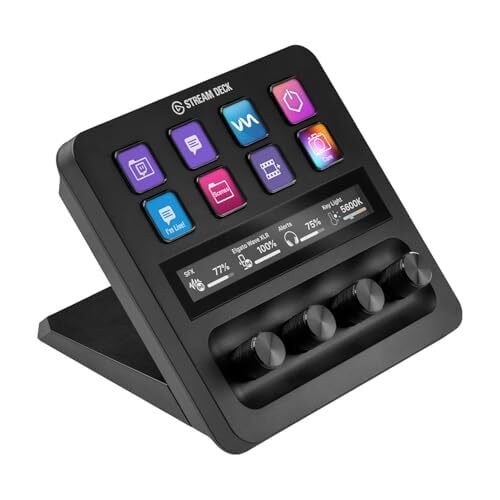
  • Stream Deck + ($200): This model drops some of the LCD keys (down to eight), but it adds four customizable dials that are helpful for media professionals. You can use these to adjust variable settings like brightness, saturation, or volume. Plus, there’s a touch strip that can display labels for these dials, as well as other useful widgets you can swipe through.

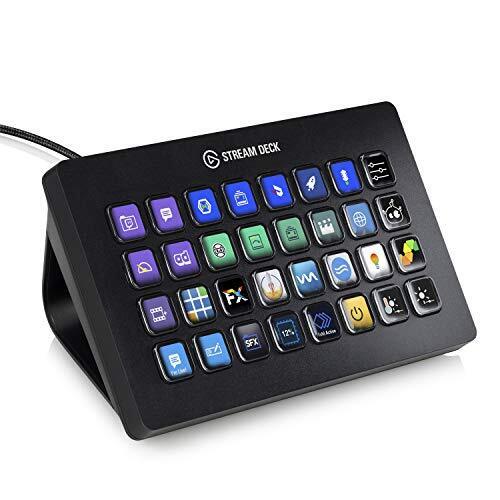
  • Stream Deck XL ($250): If you don’t think there can ever be enough buttons on your desk, the Stream Deck XL is for you. It packs a 32-key array of the customizable LCD buttons Stream Decks are known for. This is most useful if you need a lot of functions available at a glance (like while streaming) without having to jump through multiple pages and folders.

  • Stream Deck Mobile (iOS/Android): If none of these are appealing, you can still use Stream Deck tools without spending a dime. The Stream Deck mobile app gives you six customizable buttons (and up to 10 pages of them) for free. If you need more, a Pro subscription gives you up to 64 buttons for $3/month or $25/year. A lifetime subscription is also available for $50, if you’re using it regularly.

The Elgato Stream Deck markets itself as a streamer’s accessory, but anyone can benefit from its tools. It takes a bit of time to set up your actions, although Elgato has made it surprisingly fast for even basic users. And since you can try it free with the mobile app, there’s no reason not to take a few minutes and see if it can help you get your work done faster, too.

My Favorite Amazon Deal of the Day: The Sonos Ace Headphones

We may earn a commission from links on this page. Deal pricing and availability subject to change after time of publication.

You’ve probably heard of Sonos smart speakers and soundbars, which offer some of the best audio quality in the market. What you may not know, however, is that Sonos also makes the excellent Sonos Ace headphones, which released last summer. Right now, they’re on sale for $349 (originally $449), the lowest price they’ve ever been, according to price tracking tools.

The Sonos Ace are soft, comfortable, and adaptable to different head sizes, thanks to their plastic design. You actually get buttons to control the headphones (as opposed to touch controls), which I personally consider a huge plus. The battery life is impressive, with about 30 hours with either the Active Noise Cancellation (ANC) or Aware Mode settings active, or about 40 hours with both of those off. The Bluetooth multipoint connectivity means you can connect up to two devices at once and switch seamlessly between them.

The headphones perform well, according to PCMag’s “excellent” review. The sound is balanced with an EQ adjuster in the app, and the ANC and Aware Mode are top-tier, competing with the best headphones on the market. Unfortunately, the Sonos Ace aren’t wifi-enabled, meaning you can’t stream media into them like you can with Sonos speakers, but then again, not many headphones are. However, you can connect to Sonos speakers through Bluetooth and listen to your media that way (if you own Sonos speakers).

At their current price, the Sonos Ace are competitive with the best headphones for Apple users, the AirPods Max, and the best headphones for Android users, Sony’s WH-1000XM5. If you care about transparency mode or have Sonos speakers at home, the Sonos Ace headphones are your best choice. Otherwise, consider the AirPods Max or the WH-1000XM5.