Norco issues voluntary recall on new Sight VLT CX eMTB

Norco has announced a voluntary recall on all of its model year 2025 Sight VLT CX electric mountain bikes. 

This is due to concerns with the rearmost rear brake insert coming loose, which Norco says is a safety concern while riding. 

As a result, Norco recommends to stop riding the electric mountain bike: “Out of an abundance of caution, we’re asking all riders of these bikes to stop riding immediately while we investigate and gather more data.” 

All of the models in the range are affected, which are as follows: 

  • Norco Sight VLT CX C1 150
  • Norco Sight VLT CX C2 150
  • Norco Sight VLT CX C3 150

The Sight VLT CX was launched earlier this month. It is claimed to offer a 20 per cent weight reduction over the previous model, despite boasting more battery capacity and equal power.

The bike uses Bosch’s latest Gen5 Performance Line CX motor and retains its predecessor’s 160/150mm suspension travel, while rolling on a mullet setup. 

MY25 Sight VLT CX – climbing shot
Norco launched the new bike earlier this month. Norco

If you have questions, Norco says: “Your Norco retailer is your best point of contact, and they’ll be kept informed throughout this process.” 

“We know this is an inconvenience, and we appreciate your patience and understanding. This request comes from our commitment to performance, safety, and the trust you place in every ride,” Norco says in the stop ride notice. 

Norco says you can also reach its team directly at warranty@norco.com or 1-800-663-8916 if you’re in the USA or Canada. 

You can read the full stop ride notice here, which was issued last Friday.

Wholesome Direct 2025 will premiere on June 7

Wholesome Direct, an annual showcase of cute and cozy games, is returning on Saturday, June 7 at 12PM ET / 9AM PT. This year’s event will show off “a vibrant lineup of artistic, uplifting, and emotionally resonant games from developers of all sizes from around the world,” according to Wholesome Games’ announcement post. 

Last year’s Wholesome Direct covered over 30 games, including updates to already released titles and the reveal of entirely new games. The definition of “wholesome” is generally as broad as event organizer Wholesome Games needs it to be, but Kamaeru: A Frog Refuge from the 2024 Direct is a good example of the kind of game this showcase likes to feature. It’s a cute concept (a management game about running a wildlife refuge), has a beautifully illustrated art style and features relaxed, but deep gameplay. Many of the projects that fill out the average Wholesome Direct lineup fit a similar description.

Wholesome Games hasn’t yet announced which developers will be featured during the Wholesome Direct, but the odds are good that its own Wholesome Games Present publishing label will have some games in the mix. Is This Seat Taken?, a puzzle game about figuring out seating arrangements, doesn’t have a release date yet and would be a natural fit for the show.

Wholesome Direct 2025 will stream on YouTube and Twitch on June 7 at 12PM ET / 9AM PT. The showcase falls right in the middle of Summer Game Fest, a group of loosely-affiliated game showcases that start airing on June 6, 2025.

This article originally appeared on Engadget at https://www.engadget.com/gaming/wholesome-direct-2025-will-premiere-on-june-7-214501921.html?src=rss

Backblaze responds to claims of “sham accounting,” customer backups at risk

Backblaze is dismissing allegations from a short seller that it engaged in “sham accounting” that could put the cloud storage and backup solution provider and its customers’ backups in jeopardy.

On April 24, Morpheus Research posted a lengthy report accusing the San Mateo, California-based firm of practicing “sham accounting and brazen insider dumping.” The claims largely stem from a pair of lawsuits filed against Backblaze by former employees Huey Hall [PDF] and James Kisner [PDF] in October. Per LinkedIn profiles, Hall was Backblaze’s head of finance from March 2020 to February 2024, and Kisner was Backblaze’s VP of investor relations and financial planning from May 2021 to November 2023.

As Morpheus wrote, the lawsuits accuse Backblaze’s founders of participating in “an aggressive trading plan to sell 10,000 shares a day, along with other potential sales from early employee holders, against ‘all external capital markets advice.’” The plan allegedly started in April 2022, after the IPO lockup period expired and despite advisor warnings, including one from a capital markets consultant that such a trading plan likely breached Backblaze’s fiduciary duties.

Read full article

Comments

Milwaukee Police Consider Trading Millions of Mugshots For Free Facial Recognition Access

An anonymous reader quotes a report from Milwaukee Journal Sentinel: Milwaukee police are mulling a trade: 2.5 million mugshots for free use of facial recognition technology. Officials from the Milwaukee Police Department say swapping the photos with the software firm Biometrica will lead to quicker arrests and solving of crimes. But that benefit is unpersuasive for those who say the trade is startling, due to the concerns of the surveillance of city residents and possible federal agency access. “We recognize the very delicate balance between advancement in technology and ensuring we as a department do not violate the rights of all of those in this diverse community,” Milwaukee Police Chief of Staff Heather Hough said during an April 17 meeting.

For the first time, Milwaukee police officials detailed their plans to use the facial recognition technology during a meeting of the city’s Fire and Police Commission, the oversight body for those departments. In the past, the department relied on facial recognition technology belonging to neighboring police agencies. In an April 24 email, Hough said the department has not entered into an agreement with any facial recognition and the department intends to continue engaging the public before doing so. The department will discuss it at a future meeting of the city’s Public Safety and Health Committee next, she said. “While we would like to acquire the technology to assist in solving cases, being transparent with the community that we serve far outweighs the urgency to acquire,” she said in an email.

Officials said the technology alone could not be used as probable cause to arrest someone and the only authorized uses would be when there’s basis to believe criminal activity has happened or could happen, or a threat to public safety is imminent. Hough said the department intended to craft a policy that would ensure no one is arrested solely based on facial recognition matches. That reassurance and others from police officials came as activists, residents and some public officials voiced concern.


Read more of this story at Slashdot.

2025 VW Golf R first drive: The R stands for “really good fun”

I remain perpetually wrong-footed by the Volkswagen Golf R, the more powerful all-wheel drive upgrade to the venerable VW Golf GTI. I always expect I’m in for a driving experience that is as measured and calm as it is fast. I don’t know why I continually underestimate the R—Ars has driven a few of them now, and you’d think I’d remember that maybe the R should stand for “raucous.”

VW has been making hot Golfs for as long as I’ve been on the planet—next year will be the GTI’s 50th anniversary. The super-GTI is a little newer. In 1986, the GTI was joined by a more powerful version with a 16-valve engine—here in the US, they also got a capacity bump from 1.8 to 2 L. Later, the much rarer Rallye Golf emerged as a homologation special. Five thousand all-wheel drive, supercharged Golfs were built to make the car eligible for Group A rallying, and then VW Motorsport built a small number of G60 Limiteds—essentially the Rallye with some added luxury like leather, ABS, and power steering.

The Mk2’s straight lines gave way to the Mk3’s curves, and by then, VW had developed its VR6 engine. Most engines with two banks of cylinders have a V angle of 60 or perhaps 90 degrees; with a V angle of just 15 degrees, the VR6 engine was able to fit in the tight confines of the Golf’s engine bay. For the Mk4 and Mk5, this morphed into the Golf R32, where the VR6’s power and torque were better harnessed by all-wheel drive.

Read full article

Comments

OnePlus lowers Watch 3 price by $150, promises refunds for early buyers

OnePlus undoubtedly hoped the release of its newest smartwatch had gone smoother. After delaying the launch, the company released the watch right at the peak of tariff drama. The watch debuted at a higher $500 price in the US, but OnePlus now says that after some adjustments, it is able to bring the price down by $150, and it’s staying there.

OnePlus, which is part of the Chinese megacorp Oppo, announced the OnePlus Watch 3 in early 2025. The first batch of units to roll off the line went out to reviewers, who promptly noticed that the underside featured a prominent typo, reading “Meda in China” instead of “Made in China.” OnePlus delayed the release to fix the issue.

That brings us to early April and the onslaught of tariffs, which are still hanging over the US economy. OnePlus finally released the watch, but it did so with a $500 price tag “due to the current market conditions.”

Read full article

Comments

Your Google Pixel Can Make New Emojis for You Now

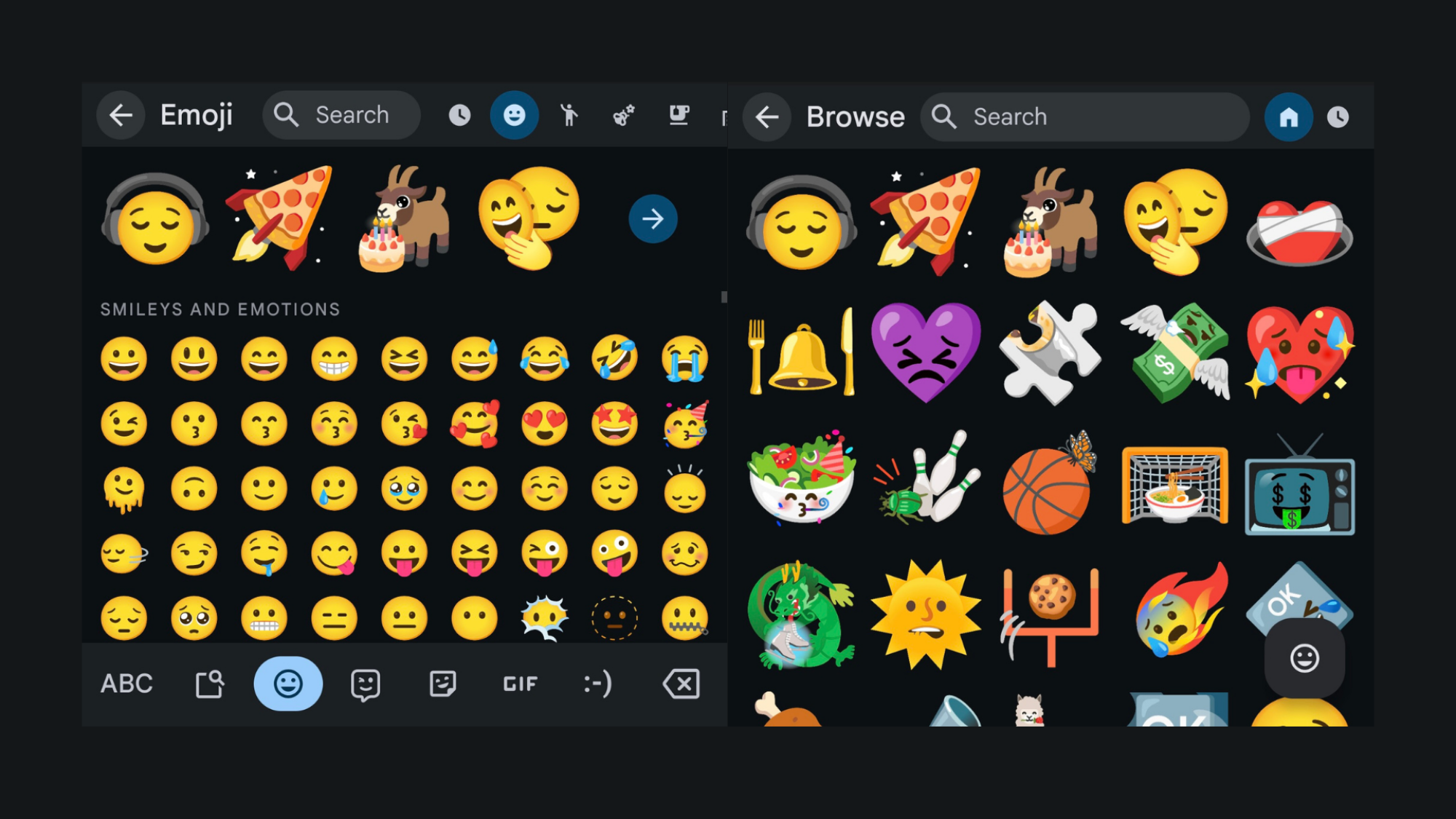
For the past five years, Google’s Emoji Kitchen has offered a way for users to make unique emojis from existing icons. The feature lets you take two emojis and combine them into one to make emojis that are familiar yet new. You can take the saluting emoji and combine it with the robot emoji to make a saluting robot, or the alien emoji and the “shh” emoji to make an alien telling you to be quiet.

You can’t necessarily mix each and every emoji that you see in your emoji keyboard, though—first, Google has to make those combinations possible. Every now and then, Google will include new combinations within software updates, even if they don’t advertise each one. The more often you use emojis with Gboard, the more combinations you’re bound to discover.

But now, you no longer need to experiment with Emoji Kitchen in order to discover new combinations. In fact, Google will do the combining for you: All you have to do is scroll.

Browse Emoji Kitchen combinations on Pixel

As reported by 9to5Google, Google is rolling out an update to the emoji keyboard on Pixel devices. Once the update hits your Pixel, you’ll now see a short row of emoji combinations along the top of the emoji keyboard, with an arrow at the end of the row. Tap the arrow, and you’ll open up a full grid of emoji combinations, which you can scroll through for a long time. If you somehow reach the bottom without finding an emoji you like, you can return to the top of the grid and pull down to refresh the browser.

emoji kitchen browse

Credit: Jake Peterson/Lifehacker

When you do find a combination you like, tap on it. The emoji keyboard will reveal a pop up, showing you which two emojis were used to make this new one. If you want to use it, just tap Send.

two examples of how emojis were made in the emoji kitchen

Credit: Jake Peterson/Lifehacker

While the Emoji Kitchen is available on all devices using Gboard, the new Emoji Kitchen browser is exclusive to Pixel devices. Other devices will still need to create Emoji Kitchen icons by hand. Alternatively, you can use the “Randomize” option in the Emoji Kitchen tool built into Google: just search Emoji Kitchen in the web browser, then click Get cooking.

Dyson Founder Says He Has Lived a ‘Life of Failure’

Inventor James Dyson described his career as “a life of failure” in a recent Wall Street Journal interview, citing setbacks as drivers of innovation. The 77-year-old creator of the bagless vacuum cleaner, who built a $16.8 billion fortune according to Bloomberg’s Billionaire Index, created 5,127 prototypes over five years before successfully launching his signature product in 1993. “If something works, it’s less challenging, it’s less interesting,” Dyson said. “If something’s gone wrong, you want to know why it’s gone wrong, and it’s a learning process.”

Dyson’s company abandoned its electric vehicle project in 2019 despite investing over $600 million, concluding it wasn’t commercially viable. The prototype now sits prominently at the company’s Singapore headquarters. “I had to be pragmatic about it and say it’s too risky for us to do, which is a shame because I loved doing it,” Dyson said.


Read more of this story at Slashdot.

Google is giving Android its own showcase a week before I/O

Google I/O is where we learn about many major features and updates that are coming to the company’s ecosystem, including on the Android front. The company is doing something a little different this year. Just ahead of I/O, it will provide a deep dive into the future of Android with a special edition of The Android Show.

This is the first time that Google has held such a showcase before I/O. The company says that people have been asking for more ways to learn about how the Android experience is changing and giving the ecosystem its own spotlight ahead of the main event is one way to do that. 

Google says it has “so many new things to share” regarding Android, hence this edition of The Android Show (a series that the company has been running for developers on YouTube for a while). The presentation will feature Android Ecosystem president Sameer Samat. Android will still be featured at I/O, where Google is promising to reveal “even more special announcements and surprises.” Multiple Android keynotes are scheduled for the event.

The Android Show: I/O Edition will air on May 13 at 1PM ET. Google I/O takes place a week later, starting on May 20. As ever, we’ll bring you all the important news and updates you need to know from the event right here on Engadget.

This article originally appeared on Engadget at https://www.engadget.com/mobile/google-is-giving-android-its-own-showcase-a-week-before-io-160035457.html?src=rss

The Out-of-Touch Adults’ Guide to Kid Culture: The End of Slang

We may earn a commission from links on this page.

Youth culture moves fast. New slang is created and abandoned in days, whole communities organize around a blurry photograph, jokes become memes, memes become rituals, and everything might is abandoned before you even notice it exists. It’s like to trying to study a snowflake: Once you can look at it, it’s already melted. So it is this week, as I take a look a new lexicon of brain-rot slang (that might not really be slang), a meme format based on threatening to eat your Uber driver, and the performative disappointment of youth. Plus, as a reminder that we still still share something, a video about humanity’s never-ending fascination with digging holes.

What do “Kevin,” “gurt,” and “IKIAB” mean?

I cover slang a lot in this column and keep a running glossary of Gen Z and Gen A words, but I’m not sure what to make of “Kevin,” “gurt,” “IKIAB,” and countless other slang terms born in the past couple of weeks. To many young people, anything bad can be described as Kevin, and the word gurt means something like “smart but dangerous” and IKIAB is an acronym for “Imma keep it a buck,” which means “I’m telling the truth.” But maybe they don’t mean anything.

All these new words are part of the quickly evolving world of brain-rot memes, and they straddle a line between self-aware parody of slang and actual slang. IKIAB was coined a few weeks ago by TikTok user @xznthos, who declared it was new slang that everyone would now use. Gurt was invented and defined a few days later, and Kevin a few days after that. This led to making up slang words becoming a meme format in brain-rot videos, with all kinds of people declaring that all kinds of words now mean all kinds of things. But do they? Is slang really slang just because someone says it is and a lot of people see the video?

Taking it a step further, a writer at Daily Dot asked Google Search’s generative AI Overview to define nonsense phrases like “banana slurp” and “cyclops vibing,” and it answered that banana slurp “could potentially be a misinterpretation of ‘that’s bananas’ or ‘she/he went bananas,’ which both mean something is crazy, wild, or extremely agitated,” and that cyclops vibing “essentially suggests that a person is enjoying themselves and in a good place, even if they are depicted with a somewhat intimidating or unusual image like a cyclops.”

So you don’t even need a person to have ever used a word or phrase for it to have a definition (at least to a computer), so when is a word slang and when is it nonsense? That’s the kind of question only a total stork smoother would ask.

What is the “I’m so hungry I could eat…” trend?

The “I’m so hungry I could eat…” trend is way easier to understand than brain-rot slang. It’s a form of prank video where you secretly record someone’s reaction to you saying, “I’m so hungry I could eat X,” with X being whatever is likely to get the biggest reaction.

It started with videos of parents saying “I’m so hungry I could eat a kid” to their kids, which is adorable:

Then dog owners started threatening to eat their dogs:

Then things started getting stranger, like this video where someone threatens to eat their Uber driver.

But the height of the trend is saying you’re so hungry they could eat a random, specific person from their victim’s past. Like an old classmate who might have been dangerous:

or their first boyfriend:

or their coke dealer from the 90s.

What is the Hiccup Cult?

If your child has just joined The Hiccup Cult, don’t worry. It’s not a cult like The People’s Temple; it’s just a random TikTok thing with no real meaning. A few weeks ago, TikToker @annesstinkysock posted a video where they pointed out that the character Hiccup from How to Train Your Dragon is kind of funny-looking, and that she’d changed her profile picture to an image of Hiccup. That’s it. That’s the whole origin story. For some reason no one can explain, this video was spat out to millions of TikTok users, thousands (maybe hundreds of thousands) of whom changed their own profile pictures to Hiccup. Many of them started following each other, and a cult was born. To join, you just have to change your profile picture to Hiccup and you’re in.

TikTok cults aren’t new. There have been a ton of them revolving around a picture of a hamster, or Dragon Ball character Goku, or minions. It’s the kind of thing that will be forgotten quickly, but maybe it provides some sense of belonging for the 12 seconds it exists.

“Rejection cakes” take over the internet

It’s the time of year when high school seniors are crossing their fingers and receiving their acceptance or rejection emails from the colleges they applied to. As you’d probably expect, social media is filled with videos of over-achievers crying happy tears because they were accepted at Harvard, Boston College, or all four of the Ivy League schools they applied to. As you’d probably expect, it’s getting ridiculous. Just check out how elaborate this video is for getting into UT Austin:

Good for her and all, but I mean, it’s UT Austin? Anyway, I’m more interested in the people who won’t be choosing between Yale and Dartmouth this fall. The trend for the rest of us, the also-rans and the almost-made-its, this year is rejection cakes. Videos like this one:

and this one:

are providing a much-needed counter-narrative to all the terrible success some people experience. I think there’s something more valuable in performative displays of resilience than displays of pride, because we can’t all get into Stanford, but we can all eat cake. Anyway, If you’d like to look at young people who have had their hopes dashed early instead of having them dashed when they graduate from their dream college there’s a bunch of videos here.

Viral video of the week: A Video About Digging A Hole

A lot of youth culture these days lives up to the “brain-rot” name, but there’s always a yin to the yang, like this week’s viral video, “A Video About Digging a Hole.” This video will not rot anyone’s brain. In it, YouTuber Jacob Geller goes deep into the subject of holes. People, particularly younger people, have always been fascinated with holes, and Geller’s video examines the cultural and symbolic power of the simple hole in the ground, finding connections between Louis Sachar’s classic young adult novel Holes, Minecraft’s constant digging and tunneling, 2025’s unexpected blockbuster video game A Game About Digging a Hole, and way more hole-based media. This video is worth the watch just for the section on The Kola Superdeep Borehole—the deepest hole humans have ever dug.

LEGO Machine Makes Waffles From Start To Finish

This is a video of the LEGO waffle factory built by Youtuber Brick Machines that can make waffles from start to finish, including mixing the batter, adding batter to a waffle iron, and plating the cooked waffles afterwards. That’s convenient, especially for someone like myself who loves everything about waffles except making them. So — what’s your waffle eating record? Mine’s 14. *shrug* I was on a cruise and went hard the first day…and all the other days. I gained 24 pounds that cruise. “How long was it?” 3 days, 2 nights.

IBM Pledges $150 Billion US Investment

IBM announced plans to invest $150 billion in the United States over the next five years, with more than $30 billion earmarked specifically for research and development of mainframes and quantum computing technology. The investment follows similar commitments from tech giants including Apple and Nvidia — each pledging approximately $500 billion — in the wake of President Trump’s election and tariff threats.

“We have been focused on American jobs and manufacturing since our founding 114 years ago,” said IBM CEO Arvind Krishna in a statement. The company currently manufactures its mainframe systems in upstate New York and plans to continue designing and assembling quantum computers domestically. The announcement comes amid challenging circumstances for IBM, which recently saw 15 government contracts shelved under the Trump administration’s cost-cutting initiatives.

Further reading: IBM US Cuts May Run Deeper Than Feared – and the Jobs Are Heading To India;
IBM Now Has More Employees In India Than In the US (2017).


Read more of this story at Slashdot.

‘Don’t Make Google Sell Chrome’

Ruby on Rails creator and Basecamp CTO David Heinemeier Hansson, makes a case for why Google shouldn’t be forced to sell Chrome: First, Chrome won the browser war fair and square by building a better surfboard for the internet. This wasn’t some opportune acquisition. This was the result of grand investments, great technical prowess, and markets doing what they’re supposed to do: rewarding the best. Besides, we have a million alternatives. Firefox still exists, so does Safari, so does the billion Chromium-based browsers like Brave and Edge. And we finally even have new engines on the way with the Ladybird browser.

Look, Google’s trillion-dollar business depends on a thriving web that can be searched by Google.com, that can be plastered in AdSense, and that now can feed the wisdom of AI. Thus, Google’s incredible work to further the web isn’t an act of charity, it’s of economic self-interest, and that’s why it works. Capitalism doesn’t run on benevolence, but incentives.

We want an 800-pound gorilla in the web’s corner! Because Apple would love nothing better (despite the admirable work to keep up with Chrome by Team Safari) to see the web’s capacity as an application platform diminished. As would every other owner of a proprietary application platform. Microsoft fought the web tooth and nail back in the 90s because they knew that a free, open application platform would undermine lock-in — and it did!


Read more of this story at Slashdot.

The Best AI Video Generators (and How They Compare to Each Other)

AI video generators are rapidly improving and becoming more widely available, with Google’s Veo 2 now built into the Gemini app for anyone paying for a Google One AI Premium plan. Like OpenAI’s Sora, Runway, Adobe’s Firefly, and others, Veo 2 enables you to create a professional-looking video from nothing more than a text prompt.

With Veo 2 now available to paying users, it seems like a good opportunity to test these different AI video generators against each other, and compare their strengths and weaknesses—and to assess where we’re at with AI video in general. We keep being told that these tools will transform movie-making, or at least fill the internet with AI slop, but are they actually practically useful?

Microsoft seems to think so, having used it in a recent ad. However, only parts of the clip were AI-made—shots with quick cuts and limited motion, where hallucinations are less likely to happen or be noticed.

For the purposes of this guide I’m going to take a look at Google Veo 2 and put it up against Sora, Runway, and Firefly. Other video generators are available, but these are four of the most prominent: They all cost money to access (starting from $20 a month), so you’ll need to sign up for a month at least to play around with them.

Bouncing balls

If you’re as old as I am, you’ll remember an incredible ad Sony made to promote its new 1080p Bravia televisions in 2005 (above). More than 100,000 bouncy balls were dropped on the steep streets of San Francisco while the cameras rolled, and it was a compelling watch (the behind-the-scenes story is pretty fun, too).

This is a real challenge for AI, involving a lot of physics and movement. The prompt I used was: “Thousands of individual, brightly colored balls bouncing down a steep, sunny street in San Francisco, in slow-motion. The camera moves carefully down the street as the balls bounce downwards, passing trees and parked cars.”

The Google Veo 2 attempt isn’t bad. There’s some weird physics going on here, but it looks reasonably natural, and could work as a short clip if you’re not looking too closely. The background elements are well-rendered, and the instructions in my original prompt were followed pretty closely.

Sora seems confused about the scene it’s supposed to be rendering. There are colored balls for sure, but they move as a confusing mush, and defy gravity. The pace of the video is OK, even if it’s going in the opposite direction to the one I requested, and the background parts of the video look fine on the whole.

Runway gets the vibes pretty close, if you compare it to the original Sony clip, but again, there are several problems: The balls aren’t at all consistent, the movement isn’t what I asked for, and it looks as though there’s an alien watching from a window in the top right corner. The street does look pretty cool though.

Firefly is probably the worst of the bunch, here. Most of the balls are stationary, and those that are moving aren’t very well-rendered. The street looks OK but it’s nothing special—there’s definitely a retro video game feel to it. As with the Sora clip, the camera is taking me up the street when I really wanted to go down.

“Jurassic Park” scene

If AI is going to replace the actual people who make movies, then it needs to be able to create scenes as powerful as the “welcome to Jurassic Park” one in Spielberg’s 1993 movie: the moment where Richard Attenborough as John Hammond reveals the dinosaurs to his visitors for the first time (above).

I was curious to see what AI would make of the scene. The prompt was: “At the top of a hill, two paleontologists slowly stagger along through the grass. As they do so the camera pulls back for a wider shot, revealing a wide clearing and a lake below. There are dinosaurs slowly walking through the lake and the trees.”

The clip from Google Veo 2 looks pretty good. The camera isn’t really moving in the way I described, and the paleontologists aren’t really staggering (and they’re not on a hill either), but the scenery looks good and the dinosaurs look OK. It’s rather generic overall, but it’s a decent effort.

Sora goes a little bit crazy with this prompt. The camera movements are jerky and don’t follow the instructions I made, and the dinosaurs look like weird shape-shifting creatures. The best I can say about this effort is that all the elements I described are included, and the surrounding scenery is reasonably well done.

As for Runway, it’s probably the closest to what I wanted when it comes to the camera movements and the overall feel of the scene. The lake and the dinosaurs look realistic enough, but it’s by no means a perfect rendering—where does the red-shirted paleontologist disappear to?

It’s another poor effort from Firefly. I’m not sure it knows what paleontologists are, and the dinosaurs are very small. The lake and the surrounding forest are done to an OK standard, though, even if there’s a noticeable AI sheen to everything in the frame. The camera movements have been translated well here.

“The Living Daylights” scene

One more: the memorable Bond and Kara border-crossing scene in The Living Daylights, where they scoot down a snowy mountain on a cello case (above). I don’t need to hire Timothy Dalton or Maryam d’Abo, learn how to operate a camera, or travel to Austria, because AI can make the whole scene for me.

The prompt for this one was: “A man and a woman in winter clothing are sliding down a snow-covered road on a cello case. There is a barrier on the road, and as they reach it, both characters duck under it.”

Google Veo 2 manages this pretty well, everything considered—the scene looks mostly realistic and fun, and that does look a bit like a cello case. We do have to ignore the two people going through the road barrier as if it isn’t there, but at least there is a barrier there (something the other AI models couldn’t grasp).

Over to Sora, and again, it’s not terrible. OK, that’s not really a cello case, and surely the two people would be facing forward, but the snowy road and the surrounding trees look good—it’s an immersive scene. Where’s my road barrier, Sora? I want to see these people ducking under it.

As for Runway, whatever videos it was trained on, they sure weren’t videos of people riding cello cases down mountains. The people are blending into each other, elements in the shot are shifting shape, and it just looks weird. The snowy scenery and the actual live snow effect do look good, though.

Who knows what Adobe Firefly is thinking here. The physics in this one make absolutely no sense, the characters aren’t consistent, and there’s no road barrier to duck under. It’s actually unsettling to watch. We do get a snowy road, a cello case, and two people in the clip, however.

There’s no clear winner

I think the Veo 2 videos impressed me most overall, though Runway seems good for realism more often than not. Across the board we have a lot of problems with physics, realism, and prompt interpretation. These are all clearly AI videos, with numerous weird quirks and inconsistencies.

Now, I wasn’t expecting these AI generators to get anywhere near the quality of professional ads or movies: It’s just not possible to recreate those scenes with only a text prompt and a few minutes of time and effort. I’m not trying to take a cheap shot at these tools, which are obviously very clever, but rather point out some of the fundamental issues with AI video.

Bouncing balls
These balls aren’t bouncing.
Credit: Adobe Firefly/Lifehacker

With more careful work and expertise, I could probably get something that looked a lot better, and clearly these video generators are going to improve over time. Who knows what they’ll be able to produce in five or 10 years? If you check out the showcased videos on these platforms, you can see that great results are possible.

Personally, though, I’m not convinced these AI tools will ever fully replace traditional film work, no matter how well they’re trained. To get something like the Sony ad in AI, you’d have to write reams and reams of incredibly detailed prompts, and even then you might not get what you wanted. Would AI think up the frog jumping out of the drain? Results are quick and easy, sure, but you’re offloading most of the creative decisions to AI. These videos feel computer-generated.

People walking
One of these people is about to disappear.
Credit: Runway/Lifehacker

AI doesn’t really know how a ball bounces, or what a dinosaur looks like, or which way people should face as they slide down a snowy road on a cello case. It approximates and calculates based on all the videos it’s previously seen, and those shortcomings show up a lot more in video than they do with images or text. You’ll notice most AI videos, including the examples above, don’t include elements that come in and out of shot, because the AI is likely to forget what they look like if they’re not visible.

And I haven’t even had space here to cover the copyright issues or the energy cost to the planet. No doubt we’ll see an increasing number of AI-made ads and shorts as time goes on and the technology improves, but it’s worth going back to the famous warning in Jurassic Park: Being so preoccupied with whether we can do it, we don’t stop to think about whether we should.

Disclosure: Lifehacker’s parent company, Ziff Davis, filed a lawsuit against OpenAI in April, alleging it infringed Ziff Davis copyrights in training and operating its AI systems.


Apple’s AirPods 4 fall back to a record low of $100

Apple’s AirPods 4 earbuds are on sale via Amazon for $100. This is a record low price and a discount of $30. This particular deal is also available at Walmart and Best Buy.

These earbuds are considered some of the best AirPods available for purchase. The sound quality has been improved over the previous generation, which is nice. The big selling point to me, however, is the refined design. The AirPods 4 feature a legitimately comfortable fit, which is pretty rare in the earbud space. They don’t even fall out when moving around, which is something we noted in our official review.

This model features the H2 chip that was originally introduced with the AirPods Pro. The chip allows for some advanced features, like Personalized Spatial Audio with dynamic head tracking. The earbuds also offer Adaptive EQ and 48kHz audio for video calls. Apple has even included the newly-developed Voice Isolation feature that removes ambient noise when talking on the phone.

The AirPods 4 earbuds do not have onboard volume controls and there’s no option for wireless charging. Also, this model doesn’t include ANC. The ANC-equipped version is on sale today for $149, which is a discount of 17 percent. The high-end AirPods Pro 2 earbuds are also on sale right now for $169. This is a discount of 32 percent, as the regular price is $249.

Check out our coverage of the best Apple deals for more discounts, and follow @EngadgetDeals on X for the latest tech deals and buying advice.

This article originally appeared on Engadget at https://www.engadget.com/deals/apples-airpods-4-fall-back-to-a-record-low-of-100-152310784.html?src=rss

Massive power outage in Spain, Portugal leaves millions in dark

National grid operators in Spain and Portugal confirm that a massive electrical blackout has hit the Iberian Peninsula today, starting just a couple of minutes after 12:30 pm Central European Summer Time (10:30 am UTC, or about 6:30 am US Eastern Daylight Time). The outage appears to have resulted in near-total loss of electricity in Spain, Portugal, the Principality of Andorra, and at least some portions of southwest France.

The impacts are widespread and pervasive; in major cities like Madrid, trains are not running, airports are unable to operate, and businesses and schools have closed. Citizens are still able to use cellular networks to communicate so far (most cell towers and network operations centers have battery or generator backup systems).

Image of a line graph showing electricity demand dropping to almost nothing.
Electrical demand curve from Red Eléctrica site showing the outage.
Credit:
Red Eléctrica

Bloomberg energy reporter Akshat Rathi posted on Bluesky that Spanish grid operator Red Electrica claims the outage is due to “grid oscillation,” a phenomenon that occurs when the system is unable to suppress oscillations that normally happen as sources and load enter and leave the system. Rathi quotes Bloomberg cybersecurity reporter Ryan Gallagher, noting that a cyber attack has been ruled out, and the fault is likely technical:

Read full article

Comments

ChatGPT Finally Has a Free (but Limited) Deep Research Tool

Months after enabling Deep Research in its expensive $200 ChatGPT Pro plan, OpenAI is now rolling out the feature to all users. Anyone can now access a lightweight version of Deep Research for free.

This new version of Deep Research sits somewhere between a regular ChatGPT search and a ChatGPT Pro-style in-depth report. These searches usually take around five to ten minutes, and give you a report that’s about a page or two long. In my experience, its reports are practical, to-the-point, and well-researched.

How the new “lightweight” ChatGPT Deep Research works

Deep Research is different from a regular ChatGPT search. Here, ChatGPT will use all of its resources, like its reasoning model, its thinking capabilities, its online search integration, and bring it all together to generate a detailed response.

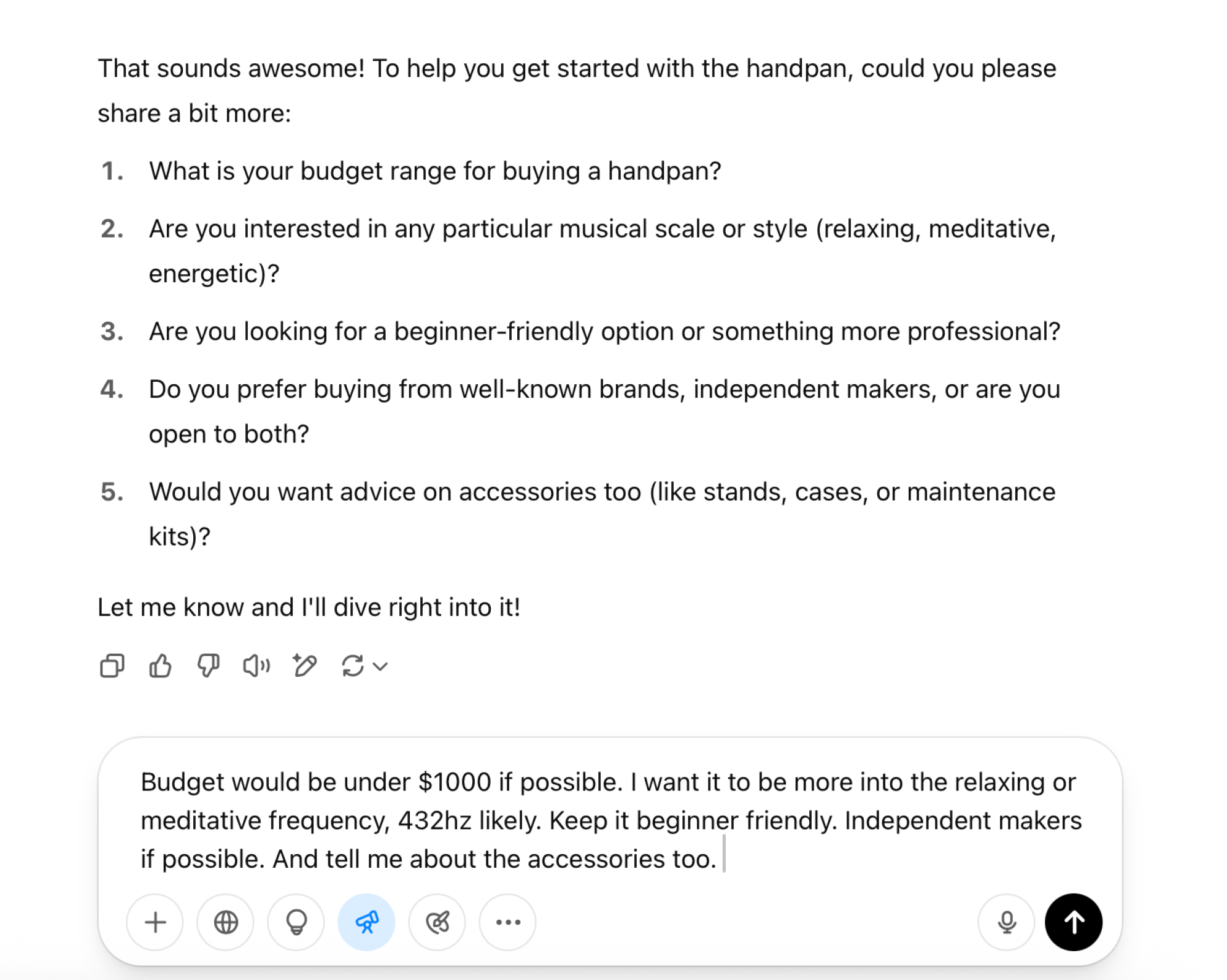
Deep Research will first ask you some clarifying questions about your prompt, and then start its work. A single Deep Research query can take anywhere between 5–30 minutes, depending on how complex of a question you’re asking. The full-version of the Deep Research tool can perform complex and detailed research for you on complicated science, and math problems. These queries usually take around 30 minutes, and then generated in-depth, multipage reports.

The new lightweight version is more casual than that. You can use it to research a share that you want to invest in, products that you want to buy, or to understand a new topic. The results take about five to ten minutes, and the reports are shorter and to the point. But they’ll still be heavily sourced, so you can check the links to confirm that ChatGPT isn’t hallucinating.

But despite technically being available to everyone, access to ChatGPT Deep Research is quite limited, and it’s based on the plan that you’re using.

  • Free plan: You’ll get five lightweight Deep Research queries per month.

  • Plus and Team plans: The $20 per month plan gives you ten queries a month with the full-fledged Deep Research tool and an additional 15 using the lightweight version.

  • Pro: The $200 per month plan comes with 125 full Deep Research queries per month, and an additional 125 using the lightweight version.

All limits reset every 30 days, and the count starts the day you start using the Deep Research feature.

How to use Deep Research in ChatGPT

After opening the ChatGPT website, click the Deep Research button and enter your prompt. The more details that you can provide, the better off you’ll be. To add more context, you can attach images, documents, or spreadsheets.

Asking a Deep Research question in ChatGPT.

Credit: Khamosh Pathak

After you enter your prompt, ChatGPT will come back to you with clarifying questions. These questions are not compulsory to answer, but they will help specify your report. If you want a more general report, you can just say something like “I don’t know, do your best”, and ChatGPT will get started with what it thinks is the best way to go forward.

Clarifying questions in ChatGPT Deep Research.

Credit: Khamosh Pathak

When the research starts, you’ll see a progress bar in the chat itself. You are free to leave the chat and come back later, as this will take time. In my testing using the lightweight free version, queries still took between four to eight minutes, even for simple questions.

You can click the progress bar to reveal a sidebar. This is where you’ll see the steps that ChatGPT is going through to answer your query. Depending on your question, ChatGPT might look at scholarly articles, PDFs, websites, and then use its thinking model when all the information is collated.

Sidebar showing ChatGPT thinking and tasks.

Credit: Khamosh Pathak

Once the report is ready, you’ll see it in its own specialized box. You can click the Share button to see a Preview window. Here, you can click on Share Link to generate a link to the report. Though, unlike Google Gemini, you can’t export the report as a PDF (or other format).

Preview of the Deep Research report.

Credit: Khamosh Pathak

How ChatGPT Deep Research can help you

I ran a couple of tests with the Deep Research tool on the free plan, and I came away impressed. ChatGPT’s reports are concise and direct. By comparison, Google Gemini’s reports feel unnecessarily verbose. ChatGPT is also better at highlighting links right in the text, something that Gemini hides behind a menu.

I asked ChatGPT to create a beginners guide to learning Handpan, and it did a good job of compiling YouTube videos, handpan sellers, and exercises, all on one page. Next, I asked it to research market sentiment for a specific share, and it included everything from recent earnings, to expert opinions, to share price targets.

Deep Research report on car part research.

Credit: Khamosh Pathak

I then used it for something that I standard Googling couldn’t help me with, which was to find a part number for a spare wheel screw hook for my Volkswagen Polo. Not wanting to open the owner’s manual or go to the dealership, I asked ChatGPT for help instead.

First, I used the regular Search feature, and it just wouldn’t give me a usable answer. The Deep Research feature, though, found the part number in a couple of minutes. But it couldn’t find a website based in India (where I’m located) that sells this part (it did find many sellers in the US and Europe, though).

To compare, I ran the query in Gemini. Gemini generated a really long report, most of which wasn’t really useful. I had to scroll all the way to the bottom to find the spare part number. This being Google, though, it gave me a link to an Indian site that sells the part. Nice.

Overall, I found that ChatGPT’s Deep Research tool is comparable to the likes of Gemini and Perplexity, and goes beyond them when it comes to direct-language and sourcing.

That said, the content is still generated using a Large Language Model, which has a tendency to hallucinate and make things up. It would be best to check the report’s sources to confirm that what ChatGPT has generated is correct.

This Magic Mouse 2 Is $50 Right Now

We may earn a commission from links on this page. Deal pricing and availability subject to change after time of publication.

If you’re tied into the Apple ecosystem and looking to upgrade your mouse or streamline your desk setup, Woot is offering a refurbished Apple Magic Mouse 2 for $49.99 for the next twelve days—or until it sells out. That’s a decent cut from its current $79.95 listing on Amazon. It’s worth mentioning upfront that this is a refurbished unit, which means it might show minor signs of previous use, but it’s been inspected and approved to work properly. Woot throws in a 90-day limited warranty, and free shipping is available if you’re an Amazon Prime member (otherwise, it’ll add $6 to the bill). Also, Woot only ships to the 48 contiguous U.S. states.

The low-friction strips on the bottom of the Magic Mouse 2 help it move smoothly across surfaces, and its optical sensor is quick to pick up on movement. You can also easily tweak the tracking speed and sensitivity of the mouse through your Mac’s settings (it automatically pairs with any Mac via Bluetooth). Swiping between browser pages, switching full-screen apps, and pulling up Mission Control are all baked into its multitouch surface, and everything feels natural once you get the hang of it. That said, the low profile of this mouse might not be for everyone—if you prefer a mouse with a more sculpted, ergonomic shape for long work sessions, it could feel uncomfortable. Also, the charging port is awkwardly placed on the bottom, meaning you can’t use it while it’s plugged in. But if you’re someone who charges devices overnight anyway, it’s manageable.

Nothing sub-brand CMF just announced a new smartphone and earbuds

Nothing sub-brand CMF just announced several new products, including a refresh of its flagship smartphone. The Phone Pro 2 looks to be an improvement over its predecessor in every major way.

The company says it’s the lightest and slimmest smartphone it has ever designed. It’s 7.8mm thin and weighs 6.5 ounces. That may make it the lightest phone Nothing has ever made, but the iPhone 16, for instance, is just six ounces. 

The sixth-generation MediaTek Dimensity 7300 Pro 5G processor includes an 8-core CPU that can run clock speeds up to 2.5GHz, which allows for an uptick in both processing and graphics when compared to the CMF Phone 1. The battery also looks particularly robust, with the company suggesting it can last two full days on a single charge.

There’s a 6.77-inch FHD+ AMOLED display and a four-camera setup, complete with a 50MP main camera. This system includes a telephoto lens, an ultra-wide and a front-facing selfie camera. There’s also a modular component to the camera array, as users can attach a fisheye and macro lens.

A phone.
CMF by Nothing

The CMF Phone 2 Pro comes in four colors, but each color offers unique design elements. For instance, the black and light green models feature a back that mimics frosted glass and is bordered with a metallic frame. The orange model boasts a metallic sheen, while the white phone includes a paneled sandstone finish on the back.

The good news? These are budget-friendly phones. The 256GB model costs just $279. However, they look to be tough to get a hold of here in the US. Preorders technically open today, with shipments going out on May 6, but the phone is only available for those in the company’s beta program.

A trio of earbuds.
CMF by Nothing

Now onto the earbuds, none of which will be available to purchase in the US at launch. The CMF Buds 2 look to be a standard entry-level affair, with ANC and tech that mimics spatial audio. They cost around $50.

The CMF Buds 2 Plus adds hi-res LDAC and a full EQ into the mix. These cost around $65. The CMF Buds 2a are made for budget-conscious consumers, though they still include ANC. They cost around $38. All of these earbuds will be available on May 6.

This article originally appeared on Engadget at https://www.engadget.com/mobile/smartphones/nothing-sub-brand-cmf-just-announced-a-new-smartphone-and-earbuds-134517602.html?src=rss

The Easiest Ways to Free Up Photos Storage on iCloud and iPhone

I keep looking for ways to free up storage space on my iPhone and on iCloud. I am a data hoarder who hates deleting things, but when I almost managed to fill up my 256GB iPhone, I knew I had a problem and began aggressively deleting unwanted data. However, photos takes up most of the storage on my iPhone, which has put me in a bit of a spot. I find it hard to delete old photos, but if I don’t do that, I may eventually have to start paying a lot more for cloud storage to back up my data. If you’re in the same boat as I am, the answer is simpler than you might think. Here are a few ways to delete photos and free up storage space on both your iPhone and on iCloud.

Define what to delete

Emotional attachment and time are my biggest problems when freeing up photos storage. I have nearly 18,000 items in my photo library, which includes over 1,000 screenshots and an unknowable number of similar photos. You see, when I take a photo, I tend to click the shutter over a dozen times to ensure I get at least one great shot. This means I often have unnecessary duplicates in my gallery, but it can be hard to find them all, and I don’t want to delete something important by accident.

When I’m setting aside some time to manually clear out unwanted photos, I go in with a clear set of guidelines: most screenshots and screen recordings can go, and I save at most three of a batch of similar shots. But it’s a lengthy process, and sometimes emotionally draining depending on the subject matter in my gallery. Plus, it gets even trickier if the photos I need to delete have people in them.

Luckily, deleting manually isn’t your only option.

Free up Photos storage space on your iPhone

If you’re really tight on storage space, you should focus on easy, big gains first before getting sucked into manually reviewing your photos. I usually start by checking the Recently Deleted folder. This has items you’ve deleted over the past 30 days, and if you’re sure you’re not going to need them, you can permanently erase them to quickly free up space. To do this, go to the Photos app on your iPhone and scroll down until you see the Utilities section. Select Recently Deleted, tap the Select button, and pick the items you don’t need. Tap the three-dots button in the bottom-right corner and hit Delete, followed by Delete From This iPhone.

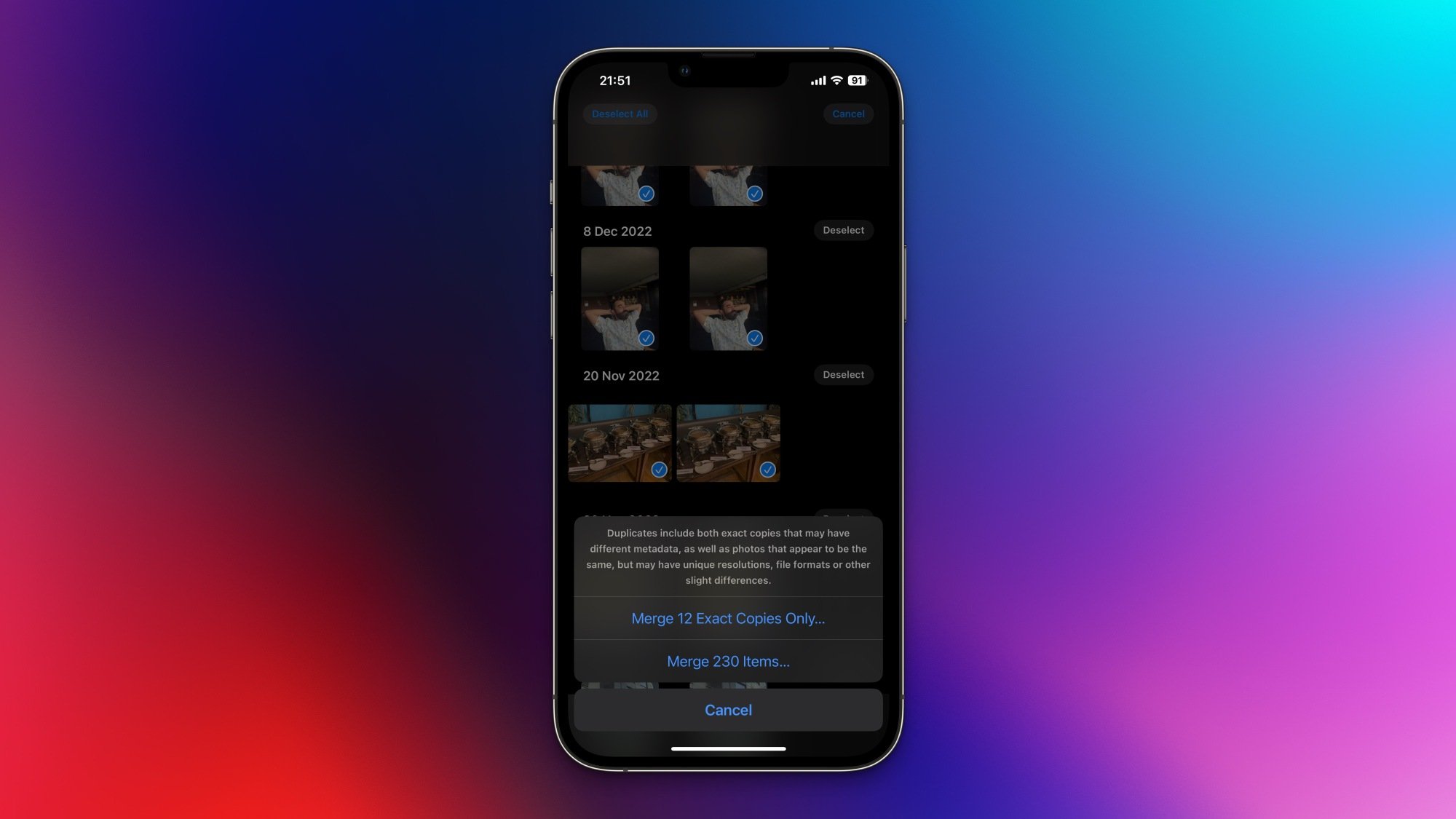
Deleting duplicate photos using the Photos app on an iPhone.

Credit: Pranay Parab

Next, you should focus on quickly deleting duplicate items from your photo library. Go back to the previous page and select the Duplicates button. Tap Select, then Select All, and tap the Merge button at the bottom of the screen. This will reveal two options: merge exact copies and merge items with similar metadata. Merging exact copies is nondestructive, so go ahead and do it immediately to free up space. After that, take some time to review all the photos in this list and see if you want to merge the rest as well. You can merge one batch of duplicates at a time, and the process is much faster than finding duplicates yourself, even if it’s not fully perfect.

Once that’s done, go to the Videos and Screen Recordings folders and clear out things you don’t need. Usually, these files are quite large and you’ll see some rapid gains by deleting unwanted items. While you’re at it, visit the Screenshots folder and get rid of captures you no longer care about. 

Delete unwanted photos from iCloud

If you have iCloud sync enabled, the steps listed above will delete your photos from both your iPhone and iCloud. However, in case you don’t have access to your iPhone or you find it easier to organize and remove photos on a computer, you can visit the iCloud Photos website and delete photos from there instead. The interface is quite straightforward. The left pane lists all the albums and the Trash button in the top-right corner will help you remove photos. Once again, don’t forget to visit the Recently Deleted album and clear it out. Until you do this, you may not see a change in the amount of free space available on your iCloud account.

Using third-party apps to delete iPhone photos

I generally don’t recommend using third-party apps to clear out photo storage because most of them don’t do a better job than the built-in Photos app, often have expensive subscription models, and are from unknown developers. Since these apps require access to your entire photo library, it’s a bit of a risk to pick any old app to do the job. If you really want to use one of these apps to quickly delete photos, Undolly is a good option. It’s quick to scan the library and uses on-device processing to identify similar photos and not just duplicates. It still takes time to review photos and delete them, but the app helps you out by picking out the best among similar photos, and its selection is usually quite good. The app costs $1/month or $15 for a lifetime unlock, which is relatively inexpensive, and its privacy nutrition label indicates that it collects no data. That’s also reassuring to see.

Backing up iPhone photos to cheaper cloud storage

For those who have a large library, iCloud’s pricing tiers can be unforgiving. 50GB of iCloud space costs $1/month and 200GB is a relatively small step up at $3/month. But if you go over 200 GB, the next available plan is 2TB at $10/month, more than triple the previous tier. Before considering alternatives, you should know that no other service is as convenient for iPhone photo backups as iCloud is. For all other services, you’ll have to keep your phone unlocked with the app running until the backup is complete. But there are savings to be made by going elsewhere.

If you’re already an Amazon Prime subscriber, you could consider Amazon Photos, which offers unlimited photo storage and 5GB of video storage at no additional charge. Even without Prime, you can subscribe to Amazon Photos for 1TB of storage at $70/year. That plan gives you less storage per dollar than iCloud’s 2TB option, but you end up saving about $50/year, too. 

Personally, I prefer my Microsoft 365 subscription, because it gives me access to all the Office apps and 1TB of storage at $100/year. I am on the family plan, which I share with five other people, and it gives me 1TB of storage per account. The family plan costs $130/year, which is around $22 per person per year. Both iCloud and Google One have family plans, too, but the storage is shared among all members of the family. Microsoft 365’s family plan lets each member use 1TB, which is great.

Back up iPhone photos to local drives

To truly keep your photos secure, though, you should also keep a copy of your iPhone’s photos on external hard drives, your Mac or PC, or a network-attached storage (NAS) device, if you have one. To do that on Mac, connect your iPhone to your computer using a USB cable and open the pre-installed Image Capture app. Now, connect any external storage device and you’ll be able to copy iPhone photos to that drive. On Windows, you’ll have to connect the iPhone via USB and use the Microsoft Photos app to import photos, before transferring them to an external drive.

Alternatively, if you’re backing up your iPhone photos to a NAS device, you can use the CCC Mobile app to complete the transfer wirelessly. The app is a free download, but requires you to pay a one-time fee of $2.99 to back up your photos and videos. After that, you can periodically keep uploading your entire photo library to a NAS or an external storage device directly plugged in to your iPhone.