Amazon’s Alexa+ AI Assistant Starts Rolling Out With Some Big Caveats

Amazon's Alexa+ AI Assistant Starts Rolling Out With Some Big Caveats
Apple isn’t the only company struggling in its efforts to integrate AI into its various products and services. Amazon’s launch of Alexa+, for example, falls well short of what the company promised during its initial announcement. The Washington Post shared insights into this new offering, which is currently in early access. It was able to

Larry Fink Says Bitcoin Could Replace the Dollar as the World’s Reserve Currency Because of National Debt

With America’s national debt sitting comfortably over the $36.2 trillion mark, BlackRock CEO Larry Fink is warning the burden could one day be the reason the dollar is dethroned as the reserve currency of the world.
From a report: He argues that decentralized currencies like Bitcoin could replace the dollar as worldwide organizations lose faith in national currencies and seek an independent solution. Fink explained his theory in his 2025 letter to shareholders, writing: “The U.S. has benefited from the dollar serving as the world’s reserve currency for decades. But that’s not guaranteed to last forever.

“The national debt has grown at three times the pace of GDP since Times Square’s debt clock started ticking in 1989. This year, interest payments will surpass $952 billion — exceeding defense spending. By 2030, mandatory government spending and debt service will consume all federal revenue, creating a permanent deficit. If the U.S. doesn’t get its debt under control, if deficits keep ballooning, America risks losing that position to digital assets like Bitcoin.”


Read more of this story at Slashdot.

Virtual Desktop’s New macOS Update Is Smoother Than Apple’s Mac Virtual Display

Virtual Desktop rewrote its macOS streamer from scratch, letting you spawn extra monitors and offering higher framerate and lower latency than even Apple’s Mac Virtual Display.

While Virtual Desktop doesn’t support its now-flagship PC VR streaming feature on macOS, since neither Meta’s PC VR runtime nor Valve’s SteamVR even support macOS, it does stream your monitors as 2D virtual surfaces, which was actually the app’s original feature before VR streaming.

Since June of last year, Virtual Desktop has even been able to spawn extra monitors for Windows PCs, but doing so on macOS required using third-party solutions like BetterDisplay. Now, with the new update, Virtual Desktop, can do this on macOS itself.

Virtual Desktop Now Supports Multiple PC Monitors
Virtual Desktop now supports multiple monitors, including virtual extra monitors. But how many you can use at once depends on your headset.
UploadVRDavid Heaney

The new macOS streamer also brings significantly improved quality, frame rate, stability, and latency. Virtual Desktop developer Guy Godin tells UploadVR that the old solution was subcontracted, and over the past six months he learned low-level macOS development to build his own much better streamer.

In fact, with this new update, Godin says Virtual Desktop on a Quest 3 or Pico 4 Ultra actually offers higher framerate and lower latency than Apple’s own Mac Virtual Display feature of the Apple Vision Pro headset.

Testing the update out, I found Godin’s claim to be accurate. Using an M2 MacBook Air via Virtual Desktop on Quest 3 truly is noticeably smoother than via Mac Virtual Display on Vision Pro. This makes it more suitable for gaming, too.

However, the cornerstone feature of Mac Virtual Display is that it creates a direct wireless connection between your Mac and the Vision Pro headset, entirely independent of your home Wi-Fi network. This means that as long as you’re next to your Mac, it doesn’t matter where the router is. In fact, you don’t need a network at all; Mac Virtual Display will even work on a plane or train. Given that macOS isn’t open-source, though, third-party developers probably can’t even build such a feature. And even if they could, it likely wouldn’t be seamless.

Mac Virtual Display on Vision Pro also does still seem to have the edge in sharpness, too. But it’s unclear whether this is down to software differences or just Vision Pro’s much higher resolution panels.

visionOS 2.2 Brings Ultrawide Mac Virtual Display
The Wide and Ultrawide modes for Mac Virtual Display have now arrived for all Apple Vision Pro owners in visionOS 2.2.
UploadVRDavid Heaney

Another notable difference is that with Virtual Desktop, you have a total of three virtual monitors, while Mac Virtual Display gives you one but lets you decide how wide it is. Which of these two approaches you prefer will be up to you.

Of course, this comparison I’ve been providing will be of no current use to those who already own a headset. Mac Virtual Display is limited to Apple Vision Pro, and Virtual Desktop is limited to Android-based headsets like Quest and Pico.

A more direct comparison for Quest owners would be to Meta’s free Remote Display feature and Horizon Workrooms app. Meta also offers the ability to spawn virtual extra monitors, but I found the quality to be noticeably inferior to the new Virtual Desktop update.

As for Apple Vision Pro owners, Godin announced work on a visionOS port of Virtual Desktop well over a year ago, and confirmed to UploadVR that he’s still “slowly” working on it, but has no launch estimate to announce just yet.

Virtual Desktop & iVRy Both Building For Apple Vision Pro
Virtual Desktop and iVRy are both working on Apple Vision Pro ports for wirelessly streaming VR from your gaming PC.
UploadVRDavid Heaney

To get the new macOS streamer, existing Virtual Desktop users will need to download and install it from the Virtual Desktop website. Future updates will be automatic, but this one is manual.

Dave Täht RIP

[Dave Täht]

From the LibreQoS site comes the sad
news
that Dave Täht has passed away. Among many other things, he bears
a lot of credit for our networks functioning as well as they do. “We’re
incredibly grateful to have Dave as our friend, mentor, and as someone who
continuously inspired us – showing us that we could do better for each
other in the world, and leverage technology to make that happen. He will be
dearly missed
“.

Searching through LWN’s archives will turn up many references to his work
fixing WiFi, improving queue management, tackling bufferbloat, and more. Farewell,
Dave, we hope the music is good wherever you are.

(Thanks to Jon Masters for the heads-up).

Cheap TVs’ incessant advertising reaches troubling new lows

TVs offer us an escape from the real world. After a long day, sometimes there’s nothing more relaxing than turning on your TV, tuning into your favorite program, and unplugging from the realities around you.

But what happens when divisive, potentially offensive messaging infiltrates that escape? Even with streaming services making it easy to watch TV commercial-free, it can still be difficult for TV viewers to avoid ads with these sorts of messages.

That’s especially the case with budget brands, which may even force controversial ads onto TVs when they’re idle, making users pay for low-priced TVs in unexpected, and sometimes troubling, ways.

Read full article

Comments

How to Discover Which Apps Drain Your Laptop’s Battery the Most

If you’re out and about with your laptop, or just in a different room than your charging cable, you want to eke out as much time as possible before the next recharge—and an important part of that is knowing which apps are draining the battery the quickest.

Once you know who the worst offenders are as far as battery drain is concerned, you can do something about it. Maybe you can use the programs in question less often, enable any battery-saving features (if they’re available), or uninstall them altogether and switch to less power-hungry alternatives.

Take Google Chrome, for instance—not a program known for its light touch on system resources. If you find it’s putting a lot of stress on your battery, you can turn on the Energy Saver feature, or perhaps just be more careful about how many tabs you’ve got open at any one time.

Here’s how to track down the apps using most battery life on Windows and macOS.

Tracking apps on Windows

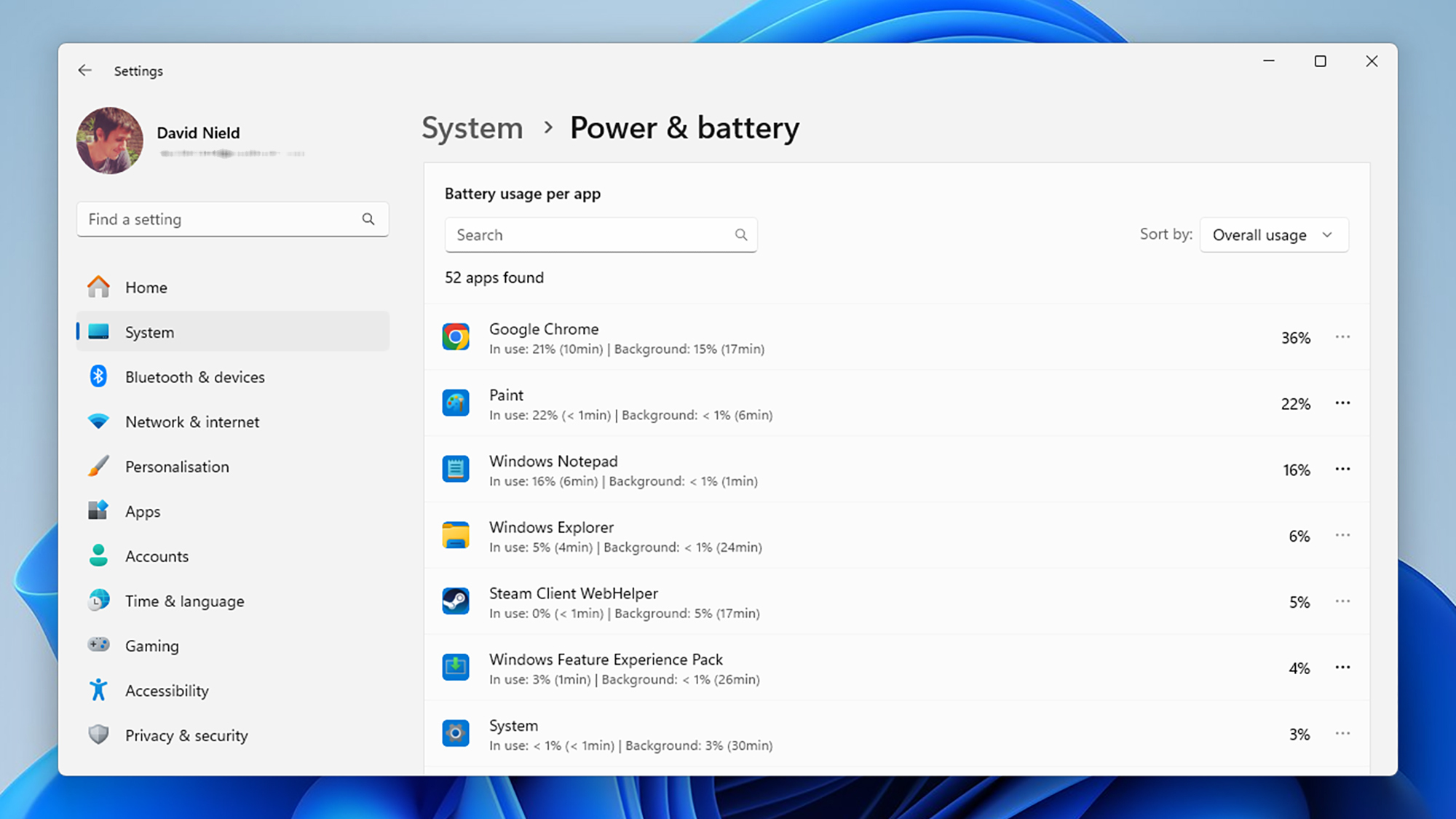
Load up the Settings screen from the Start menu, then choose System and Power & Battery. If you click Battery Usage, you’ll see how your laptop battery level has dropped over the last 24 hours or the last seven days (open the drop-down menu on the right to switch between the two time periods).

Underneath the main graph, you should see a list of the programs that have been responsible for the battery drain over the last day or the last week, with the biggest battery hogs listed at the top. If you can’t immediately see an app you want to check up on, scroll down the list or use the search box just above the list. If an app doesn’t show up, then it hasn’t affected the battery level for the chosen time period.

Battery life on Windows
Windows will list apps by battery usage.
Credit: Lifehacker

The drop-down menu under Sort by lets you order the apps by name rather than by battery usage. You can also choose to see programs based on how much battery life they’ve used up while in use, while running in the background, or both together (which is probably the most useful metric).

With certain apps, you can click the three dots next to them and choose Manage background activity to reduce the demands they place on the battery when they’re not being used. This feature is mostly available with native Windows applications, including Notepad and Paint, and will take you to the settings for that app.

Tracking apps on macOS

Over on macOS, you can start your investigations by clicking on the battery icon on the menu bar up in the top right corner of the screen. This will tell you which of the apps that you currently have open are “using significant energy”—so you’re most likely going to see your web browser or your video editing software here.

Click Battery Settings from the same pop-out dialog and you can see how your MacBook’s battery has drained over the last 24 hours or the last 10 days (use the tab switcher just above to change between these two views). You can also turn on Low Power Mode and other battery options (like dimming the screen when on battery power).

Battery life on macOS
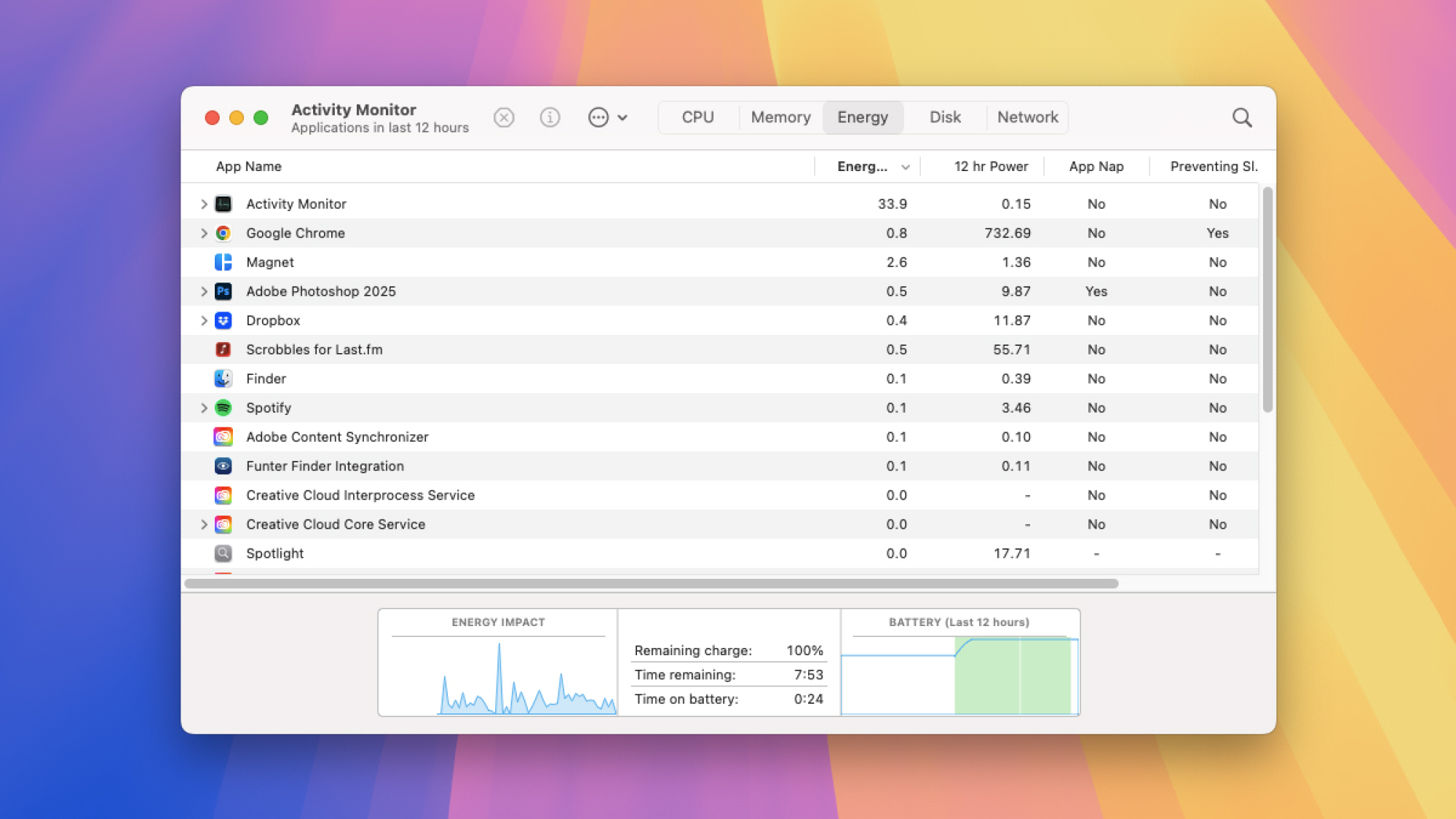
Head to Activity Monitor on macOS to check battery usage.
Credit: Lifehacker

What you can’t do from this screen is see any more about which apps are using up battery—there’s no simple list as there is on Windows. Instead, load up Activity Monitor from Spotlight or the Utilities folder in Finder, then switch to the Energy tab: You get to see which apps are currently using up most battery life, and which have been the most demanding in terms of energy use over the last 12 hours.

To limit which apps can run in the background as well as in the foreground on your MacBook—which again can affect battery life—you need to go back to System Settings (via the Apple menu). Open the General tab, then click Login Items & Extensions, and you’ve got a series of permission toggle switches for all the installed programs that have requested to run in the background.

Woman Racer Spotlight: Sharon Byun

Name: Sharon Byun  

Hometown: Born and raised in Philadelphia, PA, USA, currently living in Gainesville, FL, USA 

How did you get into cycling? I guess you could say I’m a bit of a late bloomer. I started competing in triathlon at age 43 in 2012 as a way to cross-train to manage running injuries. That was the first time I raced on a road bike and then eventually a TT bike. Prior to that, I had done some recreational mountain biking but it had been about 15 years since I had ridden. 

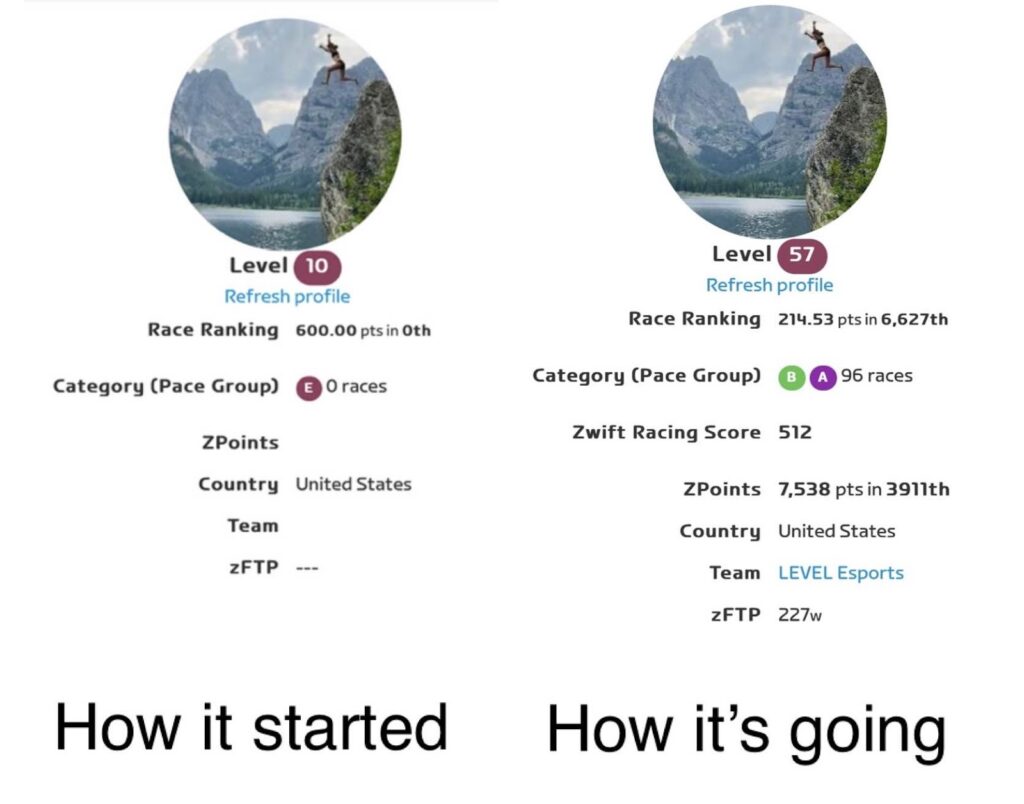
How many years have you been racing on Zwift? My first official Zwift race was in November 2023! I had no idea what I was doing at the time. When I started, I was at Level 10, Cat E with zero races and didn’t have many options in my garage. So I did a few races to get assigned to a category and build a ZwiftPower profile. It took me about a year to get a Tron bike, and I was so excited that day. That felt like a HUGE milestone accomplishment. I’ve since done 96 “races” (some of which are just group recon rides or organized training events and practice TTTs), am now Level 57 and have managed to move from Cat C to Cat A, although I bounce back and forth between A and B and really consider myself to be a Cat B rider.

Are you part of a Virtual team? I joined the Level Racing Team thanks to Elyse Gallegos who introduced me to the team. She was incredibly helpful in getting me onboarded and racing on Zwift. She connected me to our team Captain Mim Taylor and Richy Howell who runs our sprint training sessions and is DS for many of our races among many other team responsibilities. Pam Schamber coordinates our weekly TTT sessions. Lisa Hopkins has been instrumental in helping to create more women’s race opportunities and encouraging us all to race in women’s events. I also race on a ladder racing team captained by Scott Farrow. I absolutely love the Level team. Everyone is so encouraging and welcoming and hilarious. I love being part of a team that has so many strong riders yet they are humble and don’t take themselves too seriously.

What do you love most about racing? Definitely the team camaraderie. It’s so strange to feel connected to people who I have only interacted with in a virtual format yet I feel as if I know them IRL. I’ve been so happy to get other women and friends who I’ve trained and raced with IRL to join Level as well as connect with women from other teams. It’s been fun to send and receive messages of “well done” after a race with people from other teams. 

What is your favourite style of race (e.g. points, scratch, iTT, TTT, Chase, duathlon)? My favorite is definitely TTT because that is the format that makes racing feel the most like a team effort. Surely we also race as a team in other formats but there is something about a TTT that makes me find that extra gear to push myself for the team. My second favorite is a scratch race mainly because I don’t have the sprinting or climbing legs to ever be FAL or FTS to earn any intermediate points for the team. I also really enjoy ladder racing on a mixed team with the men.

What is your favourite Zwift women’s race series? So far, I have mostly raced in the women’s league in ZRL, but I did do the Warrior Games Tour de Boudicca at the beginning of this year which was loads of fun, and I have also done one Mini Race Series, and a couple of FRR events. 

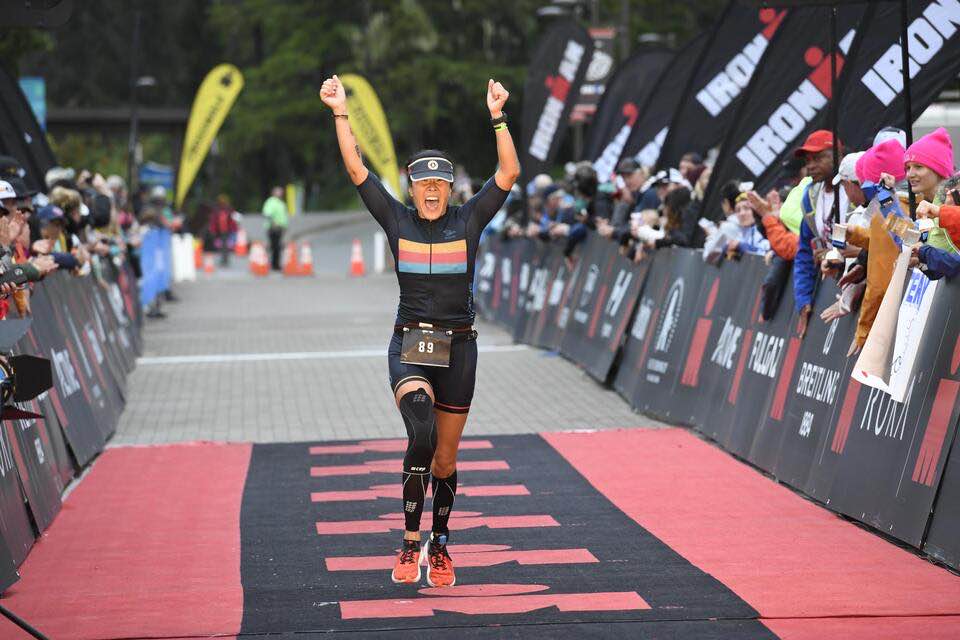
What is your most memorable racing experience, inside or outside or BOTH? My very favorite Zwift racing experience so far has been the Women’s EMEA-E Central A1 Triple Flat Loops TTT race 4 during round 2 of ZRL. Our team of mixed Cat A and B riders surprised a lot of people to come away with 3rd place. As for outside, all of my racing IRL has been in triathlon. I have many favorite race experiences including Ironman Alaska, the 70.3 World Championships in St. George, UT, Escape from Alcatraz, and also competing in age group World Triathlon Championships in short course draft legal racing and mixed team relays over the years.

What is your favourite food to eat post race? Immediately post-race or workout typically I have a scoop of protein powder and creatine in almond milk in a shaker bottle. I eat a pretty healthy predominantly plant-based diet so maybe some veggies with tofu or tempeh, lentils and/or beans over rice or farro or quinoa. I also love sweet potatoes and avocados. 

What advice would you give to a woman entering her first Zwift race? There is a very steep learning curve, so don’t worry about feeling like you don’t know anything in the beginning or don’t have the fastest bike or wheels. You will catch on very quickly! I actually got DQ’d in my very first race because I raced Cat C and I guess I was able to push myself just above the Cat C limit into B. Racing on Zwift has made me a stronger rider in terms of power, and you will get stronger also! Most importantly, you get the chance to race with and interact with a like-minded and fun group of people! 

Any upcoming race you are looking forward to? So far on my 2025 calendar, I’m racing IRL at the iconic Wildflower Triathlon in May and World Triathlon Age Group Championships in Wollongong, Australia in October. Of course, I’m looking forward to racing on Zwift with the Level Team. 

Where can people follow your racing adventures? I don’t have a social media account strictly dedicated to racing, but I am on Strava and Instagram @sbyun9.

Sam’s Club Investigating Data Breach After Ransomware Gang Shops For Buyers On Dark Web

Sam's Club Investigating Data Breach After Ransomware Gang Shops For Buyers On Dark Web
The Clop ransom gang, notorious for masterminding sophisticated cyberattacks and exploiting zero-day vulnerabilities, is back in the news, and for the usual reason- – targeting the security systems of big companies and causing large-scale data breaches. The gang is claiming to have carried out an attack that breached Sam’s Club and exposed

FTC: 23andMe buyer must honor firm’s privacy promises for genetic data

Federal Trade Commission Chairman Andrew Ferguson said he’s keeping an eye on 23andMe’s bankruptcy proceeding and the company’s planned sale because of privacy concerns related to genetic testing data. 23andMe and its future owner must uphold the company’s privacy promises, Ferguson said in a letter sent yesterday to representatives of the US Trustee Program, a Justice Department division that oversees administration of bankruptcy proceedings.

“As Chairman of the Federal Trade Commission, I write to express the FTC’s interests and concerns relating to the potential sale or transfer of millions of American consumers’ sensitive personal information,” Ferguson wrote. He continued:

As you may know, 23andMe collects and holds sensitive, immutable, identifiable personal information about millions of American consumers who have used the Company’s genetic testing and telehealth services. This includes genetic information, biological DNA samples, health information, ancestry and genealogy information, personal contact information, payment and billing information, and other information, such as messages that genetic relatives can send each other through the platform.

23andMe’s recent bankruptcy announcement set off a wave of concern about the fate of genetic data for its 15 million customers. The company said that “any buyer of 23andMe will be required to comply with our privacy policy and with all applicable law with respect to the treatment of customer data.” Many users reacted to the news by deleting their data, though tech problems apparently related to increased website traffic made that process difficult.

Read full article

Comments

My Favorite Fitness Watch Is Getting Walking Workouts and a Smart Alarm

We may earn a commission from links on this page.

Garmin announced a new fitness watch today, the Vivoactive 6. Its predecessor, the Vivoactive 5, is my pick for the best smartwatch to replace a Fitbit (beating out the Pixel Watch 3), and, if you ask me, it’s the most underrated device in the Garmin lineup. The Vivoactive 6 is poised to be even better, adding a few new features, including a “smart wake” alarm and on-watch coaching for walking and strength training. 

The Vivoactive 6 will be available for preorder on April 4, with a suggested retail price of $299.99, the same initial price as the Vivoactive 5. (If you’re looking to save money by going with the older model, the Vivoactive 5 is currently on sale for around $219—an excellent deal on what is still a great fitness watch.)

What kind of watch is the Vivoactive 6?

The Vivoactive 6, like the 5 before it, is best described as a fitness watch. It’s not as sport-specific as something like a Forerunner, which is made specifically for runners, or an Instinct, which is made for people who are out hiking in the woods all the time. 

The Vivoactive 6 is more of a modern, everyday watch, with an AMOLED (smartphone-like) touchscreen and a lightweight plastic body that strikes a middle ground between sporty and fashionable. It measures 42 millimeters diagonally, which is on the smaller side for smartwatches. It’s roughly the same size as the Venu 3S and the Forerunner 265S, which are the smaller versions of their respective lines.

In addition to the touchscreen, the Vivoactive 6 still has two buttons, so you’re not dependent on the touchscreen during activities. (This is a major plus for any fitness or sports watch.) It’s definitely more fitness-focused than a true smartwatch (like an Apple Watch), with its built-in fitness features available just a swipe or button press away from the home screen.

What’s new on the Vivoactive 6? 

The size, shape, and general specs of the Vivoactive 6 are very similar to the Vivoactive 5. Colors have been slightly updated: there are still black and white models, but lavender and navy are out and peach and olive green are in. The new Vivoactive 6 has 8 GB of storage, double what the Vivoactive 5 had. It also has a gyroscope, the better to detect movement.

Beyond those changes, there are a few really excellent features that are entirely new to the Vivoactive 6. Here’s a tour. 

Smart wake alarm

Instead of just setting a time you’d like to wake up, the new smart wake alarm feature will let you set a window of time, and the watch will look for “lighter sleep stages” during that window to wake you with a vibration. (The manual for the Vivoactive 6 is not online yet, but that’s how it was described in a press release.)

Daily suggested workouts for walking

Garmin’s running watches have long offered “daily suggested workouts” (DSW, we Garmin-heads call them) for running and cycling. The Vivoactive 5 didn’t have any DSW, and the Vivoactive 6 still doesn’t have them for running or cycling—but it does have DSW for walking. 

Coached running and strength programs

The Vivoactive 6, unlike the 5, gives you access to Garmin Run Coach and Garmin Strength Coach. The running coach is similar to the DSW for running, but they’re viewable on your phone. (I have thoughts on Garmin’s run coaching.) From my experience with the Forerunner watches, you cannot use both a run coach and a strength coach at the same time. 

The Vivoactive 5 only had run coaching through the “expert” plans (where you choose Coach Amy, Coach Greg, or Coach Jeff). The Vivoactive 6 still has those too.

Improved navigation

The Vivoactive 6 can navigate with Beidou and QZSS networks, in addition to the usual GPS/GLONASS/GALILEO.

Red shift mode

If you need to use your watch in low-light environments, you can shift the display to a dim red-on-black mode to give your eyes a rest. 

More activity modes

The new activity modes include (this is not a full list) mobility, track run, trail run, obstacle running, horseback riding, golf, mountaineering, disc golf, archery, gravel biking, cyclocross, kayaking, surfing, snorkeling, motorcycling, ATVing, snowmobiling, ice skating, and inline skating.

Starliner’s flight to the space station was far wilder than most of us thought

As it flew up toward the International Space Station last summer, the Starliner spacecraft lost four thrusters. A NASA astronaut, Butch Wilmore, had to take manual control of the vehicle. But as its thrusters failed, Wilmore lost the ability to move Starliner in the direction he wanted to go.

He and his fellow astronaut, Suni Williams, knew where they wanted to go. Starliner had flown to within a stone’s throw of the space station, a safe harbor if only they could reach it. But already, the failure of so many thrusters violated the mission’s flight rules. In such an instance, they were supposed to turn around and come back to Earth. Approaching the station was deemed too risky for Wilmore and Williams, aboard Starliner, as well as the astronauts on the $100 billion space station.

But what if it was not safe to come home, either?

Read full article

Comments

Review: Amazon’s Kindle Colorsoft is something less than “a Paperwhite with color”

It has been a bumpy start for Amazon’s $280 Kindle Colorsoft, the company’s first E-Ink book reader with a color screen. The company delayed shipments for a few weeks to correct a problem where a faint yellow band would appear across the bottom of the screen, something that has apparently been fixed for current versions of the reader (Amazon says it has made “the appropriate adjustments” to fix the problem but hasn’t been specific about what those adjustments are).

Amazon didn’t send us a Colorsoft for review at the time, maybe in part because of this problem early reviewers had, but we finally got one a few weeks ago and have been using it since then.

My main takeaway is that I don’t mind the Colorsoft, but it also doesn’t solve any problems I was having with the monochrome Kindle Paperwhite, and it doesn’t meaningfully solve the big problems with color E-Ink. It also makes the experience of reading regular text subtly worse, which accounts for the vast majority of my Kindle activity. I’m curious to see future riffs on the idea, but this initial implementation leaves me cold.

Read full article

Comments

Making A Giant Mario Entirely Out Of Chocolate

Because who wouldn’t want to eat a squat Italian plumber, chocolatier and pastry chef Amaury Guichon (previously) constructed Mario entirely out of chocolate, complete with a warp pipe, piranha plant, and question block. I loved watching the process. There’s just something about watching someone who knows what they’re doing while they work their craft that’s so satisfying. Don’t get me wrong, I’ll never get tired of watching people who have no clue what they’re doing but think they do bungle it all horribly and hurt themselves, but this is good too.