Systemd is a widely used Linux software suite that also provides an init (also known as “initialization“), the first process that loads when you boot your Linux system.
Nintendo has officially revealed Mario Kart 9 and it’s actually called Mario Kart World. Players will race across new courses staged all over the world and in a series first be able to drive all around the map in-between races. The game will feature 24 players per match and include new racers like Paulina and new…
In a highly anticipated Nintendo Direct presentation this morning, the company revealed new information about the Nintendo Switch 2 hardware and software ahead of a newly announced June 5, 2025, release date. The system will be available on its own or in a bundle with Mario Kart World, for $449 and $499 respectively.
<em>Mario Kart World</em> taking off.
Credit:
Nintendo
The presentation led off with an extended look at a new exclusive launch title, Mario Kart World, which features 24 racers at once on “various regions across the globe” where “you can drive off the race track and go virtually anywhere” in a new “free roam” mode. Characters were shown doing jumps off of walls and wearing multiple different costumes. A new level themed after the original Donkey Kong featured prominently, as did one reminiscent of the Hyrule Castle level of Super Smash Bros. You can also go on “scenic drives with friends” and take photos with them in a new photo mode.
Switch 2 Editions of classic games, purchased as “Upgrade Packs” for original owners.
Credit:
Nintendo
Certain original Switch games will be re-released in new “Switch 2” editions that add new features and improved visuals. In the Switch 2 edition of Mario Party Jamboree, for instance, players will be able to take part in mouse- and camera-controlled games. And Switch 2 Editions of the two Switch Zelda games will allow access to a new smartphone-powered note-taking feature.
The 2025 Audi e-tron GT RS Performance has a special way of welcoming you. As you approach, it does the usual show of blinking headlights and tail lights, plus puddle lamps projecting red RS logos on the ground. That’s nothing special these days. But when you get to the door and reach for the handle the car literally rises to meet you, springing up two full inches to ease your entry into this ultra-low, extremely long sport tourer.
At least, it will do that if you spend the extra $11,000 for the new active suspension, a very worthy add-on to this $167,000 sports car and just one of the dozens of upgrades Audi made to the big performance machine for 2025. And it’s good that those upgrades are so substantial, because from the outside, the car looks barely different than what came before.
Audi slightly massaged the front grille, while the diffuser projecting from beneath the rear bumper looks far cleaner than before. Still, you’d be hard-pressed to tell new from old from a distance — or up close, for that matter. The biggest exterior change is probably the roof of the e-tron GT, which is now available in your choice of shiny or matte carbon fiber. Or, if you’re more interested in sunshine than weight savings, you can opt for a new glass roof with nine separate integrated liquid crystal panels that turn opaque at the touch of a button.
That makes for a fun talking point if you feel the need to impress your friends, but the 912 horsepower on tap will surely take care of that. Fire up launch control, and even the most jaded motorheads will be left utterly breathless. The e-tron GT RS Performance rockets from zero to 60 mph in just 2.4 seconds, which is a world-class figure, but what’s more impressive is how it just keeps on going. I had a chance to run the car up past 130 mph (on a closed track) and the feeling was right on the border between thrilling and terrifying. The forces squeezing me into the (thankfully quite supportive) sport seat made my animal brain scream for sweet release.
Audi
That wasn’t the only mindjob happening here, though. That new active suspension can be set to actually make the car lean into corners while also dipping the nose under acceleration and lowering the tail when you hit the brakes. It’s all in an effort to create a more stable, predictable platform, enabling you to drive the car hard without your passengers losing their patience — or their lunches.
The capabilities of the RS e-tron GT Performance are definitely remarkable in any condition. A quick twitch of your right toe is enough to send it leaping forward, and for those special moments, you can get about an extra 94 horsepower by pressing the big red BOOST button on the steering wheel.
Unfortunately, that’s about the only thing good about the wheel. For this new e-tron GT, Audi shifted to the type of capacitive touch buttons that everybody hates on the Volkswagen ID.4, which are both challenging to use by touch and yet easy to accidentally trigger. I kept raising the volume on the stereo every time I made a left turn. That’s no good.
The rest of the interface is much the same as before, with the 10.1-inch touchscreen angled in the middle of the dashboard. It’s running Audi’s MMI software though, which is a bit sluggish at times. Still, between the touchscreen, the Virtual Cockpit digital gauge cluster behind the wheel and the HUD projected on the windscreen, you have no shortage of displays to admire.
The rest of the cabin is largely unchanged as well, which isn’t a bad thing. Seats up front are supportive yet comfortable, power-adjustable in all the right ways, heated and ventilated, and sit low enough in the car to offer plenty of headroom. Seating in the back isn’t bad either, with a bit of extra legroom provided by a division in the battery pack, creating space for rear passenger feet.
That rear-seat layout is the same as before, but while the battery pack shape is the same, crack it open and you’ll find all sorts of newness. Audi changed the chemistry of the cells and that, plus some design revisions, has boosted energy density, which means more capacity in the same space.
The battery now offers 105 kWh of total capacity (95 net), which is up from 93.4 before, while other changes have boosted charging speed. The maximum charging current is up to 320 kW from 270 kW before, and the battery can now maintain that speed at a wider range of temperatures. The result is an 80 percent charge in just 18 minutes. That’s about 240 miles worth of range in the time it’ll take to make a pit stop yourself.
All those battery upgrades provide up to 300 miles of range on the 670 horsepower S e-tron GT or 278 miles of range on the faster RS e-tron GT Performance. Those figures represent a gain of between 29 and 51 miles over the old car, depending on which spec you choose. That’s a major boost in longevity, and since that new suspension is equally good at being soft and cosseting as it is sharp and exciting, the GT makes for a remarkably good touring car. I spent most of a day idling my way in and out of Las Vegas in one, and I would’ve gladly done many more miles without complaint.
But with all that power and handling, the GT is happiest when it’s pushed to its limits. The only challenge is your budget will be pushed, too. The 2025 S e-tron GT costs $125,500, while the faster RS e-tron GT Performance starts at $167,000. That means all the new battery tech and brain-scrambling power have added about $20,000 to the sticker prices of the previous year’s car. And you’ll spend even more if you want all the toys.
So, the RS e-tron GT Performance is expensive, but impressive too. We’re still barely a decade into seeing what high-performance EVs can do, an engineering journey that will surely take us to new heights in the years to come. But what this car can do today is remarkable, with acceleration so strong that it’s uncomfortable, suspension so advanced it can dance, and yet all the comfort and poise befitting an Audi.
This article originally appeared on Engadget at https://www.engadget.com/transportation/evs/audis-refreshed-rs-e-tron-gt-performance-brings-shocking-speed-for-a-premium-price-130154710.html?src=rss
LAS VEGAS—Audi’s sleek four-door electric sedan, the e-tron GT, has just received its midlife refresh. Usually, a midlife refresh is mostly cosmetic, intended to prevent the model from feeling too stale in the marketplace. But this time Audi has kept the visual changes to a minimum. There are new wheels and a new interior, as well as redesigned front and rear fascias, although the changes are quite subtle. Instead, there’s been a comprehensive reengineering effort under the skin.
Perhaps not quite as comprehensive as the Polestar 2 refresh—which swapped front-wheel drive for rear—but there are now new motors and a new battery pack, which bring with them increased range, a reduced 0–60 mph time, and even faster fast-charging. Audi says it has also worked on the driving dynamics, including adding the same active suspension system we recently experienced in the Porsche Panamera.
As before, the e-tron GT comes in two specifications, but now the base model is the $125,500 S e-tron GT. This now offers 670 hp (500 kW), a 148 hp (110 kW) improvement on last year’s model. That drops the 0–60 mph time from 4 seconds down to 3.3, but the 51-mile ( 82 km) increase to its range—now 300 miles (482 km) on a single charge—is probably going to be the most enticing improvement for potential buyers. That’s courtesy of a new 105 kWh (gross, 97 kWh usable) battery.
An anonymous reader quotes a report from TechCrunch: Zelle is shutting down its stand-alone app on Tuesday, according to a company blog post. This news might be alarming if you’re one of the over 150 million customers in the U.S. who use Zelle for person-to-person payments. But only about 2% of transactions take place via Zelle’s app, which is why the company is discontinuing its stand-alone app.
Most consumers access Zelle via their bank, which then allows them to send money to their phone contacts. Zelle users who relied on the stand-alone app will have to re-enroll in the service through another financial institution. Given the small user base of the Zelle app, it makes sense why the company would decide to get rid of it — maintaining an app takes time and money, especially one where people’s financial information is involved.
Whether you attach it to a dog’s collar, put in on a set of keys or throw it in your purse, there’s no denying that AirTags save you a lot of hassle. They get rid of the mental stress that is, “Where on Earth did I put that?” Thankfully, Apple’s AirTags are not only convenient, but they’re currently on sale.
Right now, you can get a four-pack of AirTags for just $68, down from $99. For context, a single AirTag normally retails for $29 (currently $24 each), so you’re getting four for just over the price of two. This 31 percent discount brings the set to just $3 more than its all-time low.
There’s not much to say about AirTags that hasn’t already been said. They use the Find My network to locate your missing belongings and can do so with incredible accuracy. Their main fault is the lack of a key hole, but we’ve rounded up the best Apple AirTag accessories for 2025 to fix that problem.
This article originally appeared on Engadget at https://www.engadget.com/deals/a-four-pack-of-apple-airtags-is-back-on-sale-for-68-125334495.html?src=rss
There has been increasing attention in recent weeks on travelers being hassled at the U.S. border with searches of their digital devices—and in some cases, denied entry as a result of what was found. Therefore, it’s worth keeping in mind that there is a possibility when you arrive to the U.S. from abroad that law enforcement will pull you aside and request to search your phone, computer, and other electronics.
There are, of course, some serious privacy concerns with granting them access to this data, but there’s not a simple answer as to whether you should. Here’s what you need to know about protecting your digital privacy when crossing the U.S. border.
Can my device be searched at the border?
U.S. Customs and Border Patrol (CBP) has long been able to conduct electronic device searches without warrants at the U.S. border, though the rules governing these searches have evolved over time. Prior to 2018, CBP guidance allowed agents to search any device at random, even if they didn’t suspect the traveler of any wrongdoing.
A new policy issued in January 2018 amended that to permit “basic” or manual searches—tapping through a device and opening files or apps with your device on airplane mode—at any time, while requiring “advanced” forensic searches that use other devices or software to analyze data to have reasonable suspicion. (There’s a broad “national security concern” loophole for advanced searches.)
According to reporting from The Verge, though, this is complicated by the fact that courts across the U.S. have issued various rulings on border searches, so whether you can be subjected to a basic and advanced search may be different depending on your port of entry.
But as an analysis from the Electronic Frontier Foundation (EFF) notes, any device search is intrusive and a privacy violation, as a manual search can still reveal everything from to-do lists and family photos to sensitive information like health records and financial data.
So what can you do? If you’re a U.S. citizen, you cannot be denied entry into the country even if you decline to unlock your device, though CBP may detain you temporarily or seize your device and hold it for weeks or months. Lawful permanent residents (green card holders) have the same right of entry, while visa holders and tourists may not be admitted if a search is refused.
Additionally, law enforcement can require you to unlock devices with biometrics, but cannot force you to enter passwords and passcodes.
What has changed?
While there have been recent reports of travelers, including valid visa holders, being detained or denied entry to the U.S., EFF senior staff attorney Sophia Cope says CBP has always been an aggressive agency when it comes to device searches—so in that regard, not much has changed.
“What seems to be a bit different is that particularly for non-citizens, the U.S. government seems to be a lot more aggressive in being willing to look at people’s devices and actually also just deny them entry into the United States, even if they have a visa,” she says.
Device searches have also consistently risen year over year (with a few exceptions), so that’s not new either. In fiscal year 2024, CBP conducted 47,047 border inspections of electronics—4,322 of which were forensic searches—with the majority (36,506) on devices owned by non-citizens. That’s less than 0.01% of international arrivals, though a big jump from the 19,051 total device searches conducted in fiscal year 2016.
How to assess your risk
Cope recommends that anyone anticipating a border crossing assess the risk of being searched and decide in advance whether to comply with a secondary inspection rather than try to figure it out when stressed in real time. Some risk factors have to do with you personally, and others with the technical aspects of your devices and data.
Immigration status is one of the most important factors to weigh, according to Cope. For U.S. citizens, a secondary screening is an inconvenience and may cause travel delays, and declining a device search may cause you to temporarily lose access to data as well as possession of device(s) that you may need to replace. For visa holders or non-citizens, data found on your device and noncompliance with a search can be used to deny entry. For green card holders, actions at the border may be used to challenge lawful status.
Sensitivity of data on your device (such as confidential sources or patient information)
Data access needed while traveling (and whether you have a backup for any data lost if your device is seized)
Internet availability while traveling for accessing cloud services
Device ownership (personal vs. work, for example)
Steps to protect your digital privacy
At all risk levels, the simplest way to protect your privacy is to limit how much data you carry across the border.
EFF advises leaving devices you don’t need at home. You may consider selectively deleting sensitive or extraneous data or moving it to the cloud to re-download once you’ve cleared the border (or on a different device if yours is confiscated). You should also log out of apps and browsers that give access to cloud-based data and online accounts—including social media—and remove any stored credentials, or uninstall apps temporarily.
Alternatively, you could get a separate phone or computer that contains only what you need while traveling, although this may not be realistic for some due to the cost or logistics of carrying additional devices. Further, using a blank burner phone that has no data at all may raise suspicion in a search.
You should also back up your data and encrypt your device using full-disk storage encryption secured by a strong password. Turn off biometrics and lock your device with a password instead, and power your devices down before arriving at the border to block high-tech attacks. The Intercept has a helpful guide to encrypting your devices as well as other digital privacy best practices.
If you do comply with a search and need to enter a password, do it yourself rather than supplying it to an agent, and be sure to change it as soon as your device is returned.
Finally, while tempting, wiping your device completely may raise suspicion if you are searched, and attempting to hide data may be interpreted as lying to border agents, which can be a crime.
Wikimedia has seen a 50 percent increase in bandwidth used for downloading multimedia content since January 2024, the foundation said in an update. But it’s not because human readers have suddenly developed a voracious appetite for consuming Wikipedia articles and for watching videos or downloading files from Wikimedia Commons. No, the spike in usage came from AI crawlers, or automated programs scraping Wikimedia’s openly licensed images, videos, articles and other files to train generative artificial intelligence models.
This sudden increase in traffic from bots could slow down access to Wikimedia’s pages and assets, especially during high-interest events. When Jimmy Carter died in December, for instance, people’s heightened interest in the video of his presidential debate with Ronald Reagan caused slow page load times for some users. Wikimedia is equipped to sustain traffic spikes from human readers during such events, and users watching Carter’s video shouldn’t have caused any issues. But “the amount of traffic generated by scraper bots is unprecedented and presents growing risks and costs,” Wikimedia said.
The foundation explained that human readers tend to look up specific and often similar topics. For instance, a number of people look up the same thing when it’s trending. Wikimedia creates a cache of a piece of content requested multiple times in the data center closest to the user, enabling it to serve up content faster. But articles and content that haven’t been accessed in a while have to be served from the core data center, which consumes more resources and, hence, costs more money for Wikimedia. Since AI crawlers tend to bulk read pages, they access obscure pages that have to be served from the core data center.
Wikimedia said that upon a closer look, 65 percent of the resource-consuming traffic it gets is from bots. It’s already causing constant disruption for its Site Reliability team, which has to block the crawlers all the time before they they significantly slow down page access to actual readers. Now, the real problem, as Wikimedia states, is that the “expansion happened largely without sufficient attribution, which is key to drive new users to participate in the movement.” A foundation that relies on people’s donations to continue running needs to attract new users and get them to care for its cause. “Our content is free, our infrastructure is not,” the foundation said. Wikimedia is now looking to establish sustainable ways for developers and reusers to access its content in the upcoming fiscal year. It has to, because it sees no sign of AI-related traffic slowing down anytime soon.
This article originally appeared on Engadget at https://www.engadget.com/ai/wikipedia-is-struggling-with-voracious-ai-bot-crawlers-121546854.html?src=rss
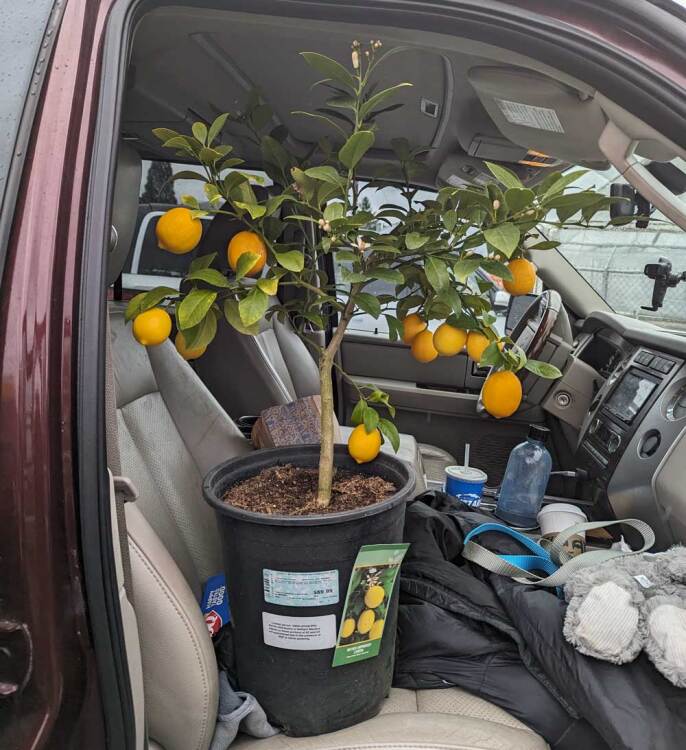
Every year around this time, I prepare to move my living room lemon tree outside for the season. In the fall, when temperatures drop below 40 degrees overnight, Daisy (yes, she has a name) gets rolled into my living room, where she winters under a grow light, and then as soon as the overnight temperatures stabilize in spring, back out she goes to live on the patio. Since I live in the Pacific Northwest, this is the only way to keep a lemon tree; they simply aren’t built to withstand a real winter outside. But, even if you are unwilling or unable to host your trees inside your home or greenhouse over the winter, you may still be able to turn your patio into a mini orchard.
Generally, when you buy trees or shrubs, you plant them in the ground, and the expectation is that these plants will grow to get quite large. But if you don’t have the room to plant a large tree or shrub, you can consider getting a tree or shrub small enough to remain in a pot. Smaller and smaller dwarf type trees and shrubs are being cultivated all the time, and regardless of what kind of fruit you like, it is almost guaranteed that there will be a variety that is small or micro enough to remain in a pot.
My potted lemon tree is not expected to get much larger than this, so I roll the pot into my living room each winter. Credit: Amanda Blum
These potted plants, which should remain under six feet, can live on your patio, so long as they get enough sunlight, water and heat in the summer. In fact, your patio can provide the opportunity to better control the environment for your potted plant. You can provide shelter from storms, control the moisture level to help prevent disease, and move it around if the original location doesn’t suit it.
At least for spring and summer, you and your micro trees should be very happy on your patio. The problem comes in winter. When you purchase plants you should always pay attention to their winter hardiness rating. For instance, cacti can’t survive a cold winter outside, but a pine tree has no issue. Plants generally go dormant over the winter, which means they focus on root growth, and not leafing, fruiting, or flowering. These small trees and shrubs are particularly vulnerable, since their roots are not in the ground, but a pot, so they lack the insulation the ground can offer.
The first way to ameliorate the winter hardiness issue is to bring your plants into a greenhouse during winter—that’s what nurseries do. Of course, most people (including me) lack a greenhouse. The second best option is a spot in your home where the plant will be able to get enough light, water, and heat to survive the winter. Since your home is inevitably heated enough for the temperatures to remain above forty degrees at night, your tree is fine. Remaining situated near a window or under a grow light is sufficient for these plants. A third location might be the garage, or another unheated building, because even though temperatures will drop below forty degrees, if they consistently stay between 20 and 40, the plant will remain dormant, isn’t exposed to wind or freeze, and should be able to survive. Just because the plant is dormant doesn’t mean it won’t require care; you’ll need to check moisture levels every few weeks. You can’t allow the soil in the pot to get too dry.
My lemon tree stays warm inside all winter under a grow light and some natural sunlight from a nearby window. Credit: Amanda Blum
If you can’t bring your plants inside, you’ll need to find ways to insulate them outside, and you have a few options. Remember, the walls of your home provide some shield from the wind, and give off some heat, so relocating the plant next to the wall is a good start. You can create a cage around the plant using chicken wire and fill the cage with straw. The straw provides the insulation, while allowing for air flow, and the straw is unlikely to transmit disease or virus to the plant. You can also mound up compost or wood chips around the pot itself; this will recreate the insulation the ground offers to protect the roots. You can even purchase tree blankets, which provide a layer of breathable insulation. The thing to remember is that, like a blanket, this insulation only helps temper the winter conditions, not ameliorate them. For some trees, like citrus, this simply may not be enough warmth. For that reason, choose your patio fruit carefully, depending on what growing zone you live in and whether you have the ability to make these plants your roommates over winter. There are very winter-hardy citrus now, but you might be better suited to a patio blueberry or apple.
If your plants are going to live outdoors, you’ll want to choose a heavy ceramic or concrete planter—one that provides some insulation from the cold. But if your plant is moving indoors with you all winter, you may be impressed by how good-looking plastic planters have become. Modern, self-watering, and—most importantly—light, they can make moving your patio tree indoors and out a lot easier.
To find the right variety tree or shrub for your yard, you should start with a local nursery. However, don’t be afraid to buy a plant that will be shipped to you; I’m constantly surfing through the One Green World catalog, because they carry varieties of cold hardy trees my local nursery doesn’t.
Samsung is releasing two Fan Edition models of the Samsung Galaxy Tab S10, and they’re both more affordable than their standard counterparts. The Galaxy Tab S10 FE and the Galaxy Tab S10 FE+ are powered by the Samsung Exynos 1580 chipset instead of MediaTek processors like the standard versions. Samsung’s Galaxy Tab S10 FE+ model has a 13.1-inch display, which is bigger than the Tab S10+’s 12.4-inch screen but smaller than the 14.6-inch one on the Tab S10 Ultra. Take note that both models have a refresh rate of up to 90Hz, which is lower than the standard versions’ 120 Hz refresh rate.
That means the standard Tab S10 models are still the better options if gaming is your primary use for a tablet. But again, the new Fan Editions cost substantially less than they do. The Galaxy Tab S10 FE’s prices start at $500, and it comes with 128GB and 256GB storage options. Meanwhile, the Galaxy Tab S10 FE+ will cost you at least $650 and come with the same storage options. The standard Galaxy Tab S10’s prices start $999, while the Tab S10 Ultra will cost you at least $1,200.
Like the the standard models, the Fan Edition versions come with AI capabilities, including Circle to Search with Google that makes it easy to look for information simply by encircling elements on your device. Their Samsung Note app also features Math Solver, which can do calculations based on handwriting and text, as well as Handwriting Assist, which can help you tidy up handwritten notes. Both Fan Edition devices will be available in the US starting on April 10. You’ll get a $50 credit if you reserve a unit now, and you can buy a Book Cover Keyboard Slim for 50 percent off if you purchase one by May 11.
This article originally appeared on Engadget at https://www.engadget.com/mobile/tablets/samsungs-galaxy-tab-s10-fe-and-galaxy-tab-s10-fe-will-be-available-on-april-10-120019555.html?src=rss
Roblox is again updating its parental control features in an effort to give parents more visibility into (and control over) their children’s activities on the platform. The company is updating its in-app “Safety Center” to counter concerns that Roblox, which unlike social media apps allows children under 13, puts its youngest users at risk.
The company added the centralized hub for parental controls last year, in an update that also added new restrictions on younger kids’ ability to exchange private messages with other users. But while that update gave parents the ability to control some of their children’s settings from their own devices, it was missing some key features like blocking.
With the latest update, parents can now view their child’s friend list and block users on their behalf. Once another user has been blocked, they’ll no longer be able to exchange direct messages with the child and kids will need to get parental approval to unblock the person.
Similarly, parents will now be able to block specific experiences within Roblox. Parents have already had the ability to limit in-app content based on its age rating, but parents have still at times complained about inappropriate content surfacing in certain games. Now, parents can block their young kids from participating in certain experiences. (Importantly, Roblox notes that kids will be able to remove apps from the blocked experiences list once they turn 13.)
Finally, Roblox is adding more “granular insights” to the in-app screen time metrics that allow parents to see how their kids are spending their time on the platform. The Safety Center will now list “the 20 experiences in which their child has spent the most time over the last week, sorted by total time.” Parents can then opt to block specific games or experiences directly from the screen time menu if something seems off.
Roblox’s recent push to beef up safety features for younger users come amid a broader reckoning about the effect that online platforms can have on teens. Platforms have tried to address these concerns by enhancing parental controls and dedicated safety features for teens. But lawmakers are also pushing for change, with multiple states passing measures requiring some form of age verification (some of which have since been struck down). There’s also a bipartisan bill in the Senate to ban all preteens from social media entirely.
This article originally appeared on Engadget at https://www.engadget.com/gaming/roblox-parental-controls-now-include-a-block-button-120005897.html?src=rss
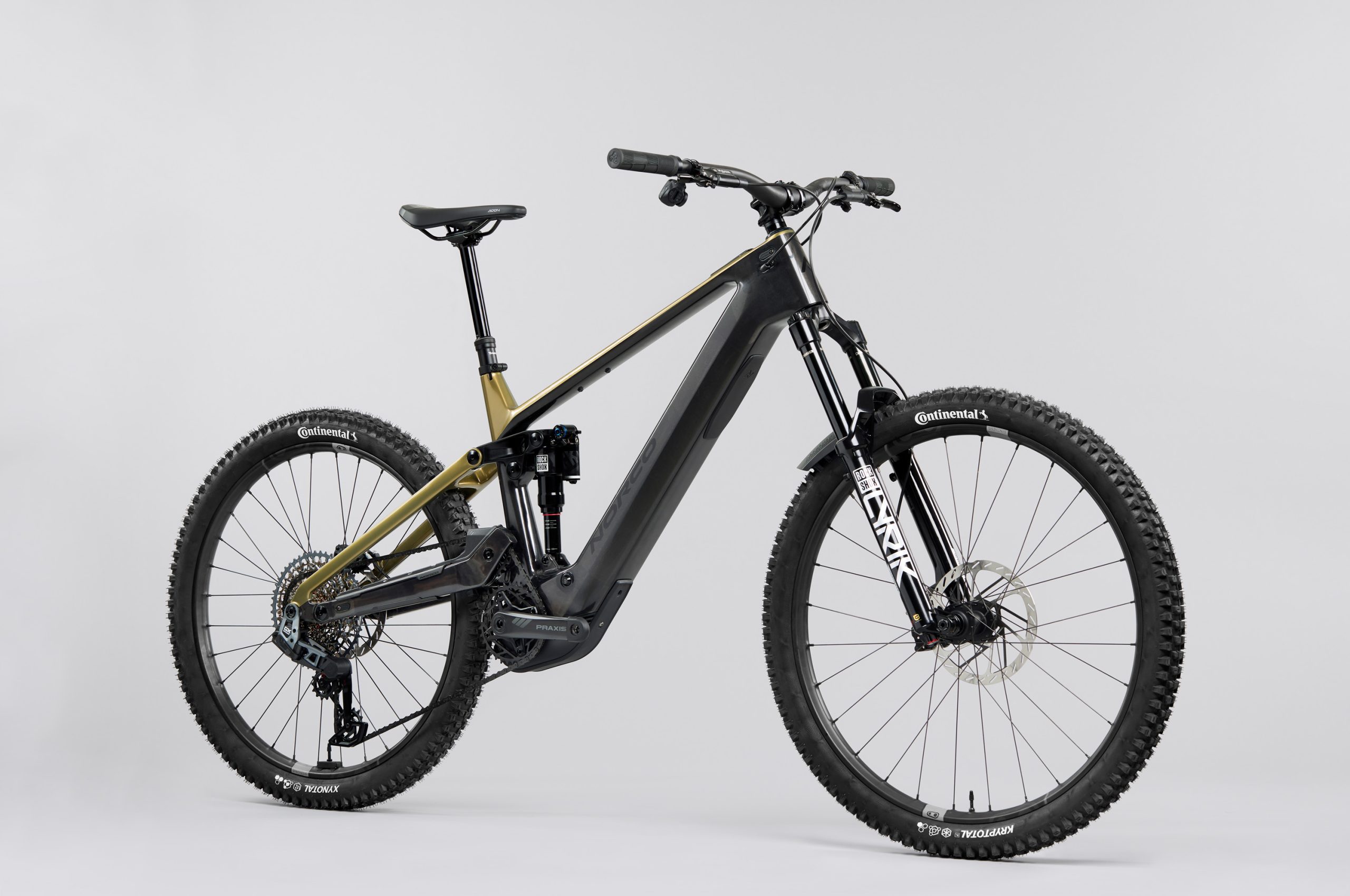
The new Bosch CX Performance motor system is lighter and more powerful. Norco
Norco’s headline claim for the new Sight VLT is its twenty percent weight saving, despite boasting more battery capacity and equal power to the previous model.
However, the latest motor’s torque, power and assistance levels remain unchanged, sitting at 85Nm, 600w and 340 per cent respectively.
Bosch’s latest drive unit is also claimed to be less rattly than before – a common issue with most eMTB motors.
Its redesigned gearbox “decouples” the bike’s drivetrain from the motor, meaning that pedal kickback, chain growth, and micro-inputs caused by the bike’s suspension compression, or the rider rotating the cranks, shouldn’t cause the motor’s freewheel to constantly engage and disengage, reducing on-trail rattle.
The Sight VLT pairs the new Bosch motor with a PT800Wh battery that has more capacity (800 Wh compared to 750 Wh) than previously without growing in size.
In fact, the PT800 boasts an energy density of 205Wh per kilogram – up on the 174Wh per kilogram of the 750Wh model – meaning it’s lighter, too.
Made to last
The bike comes with a lifetime warranty. Norco
Norco is also keen to stress the Sight VLT’s focus on longevity. The Bosch motor and battery housing is made of powder-coated magnesium battery, which Norco tout to be corrosion- resistant, strong, and built to withstand harsh conditions.
Backing up its claims is the brand’s limited lifetime warranty, which promises to have your back should anything go wrong.
Smart setup
Even the best bike won’t reach its full potential if it’s not set up correctly for its rider. However, with the depth of adjustment offered on today’s mountain bike suspension, setup can be a daunting topic for many riders.
Norco wants to make it easy to find a great baseline setting with its Ride Alligned setup assistant.
The online tool uses metrics like rider height, weight, positioning on the bike and other modifiers such as preferred suspension feel, trail grip and trail type to generate setup suggestions for suspension and cockpit setup, as well as tyre pressures for all stock Norco models.
This takes the guesswork out of setting up your new bike and gives you a confident starting point to take to the trails. The tool also offers a function to save multiple setups for varying trail types, conditions and ride-feel.
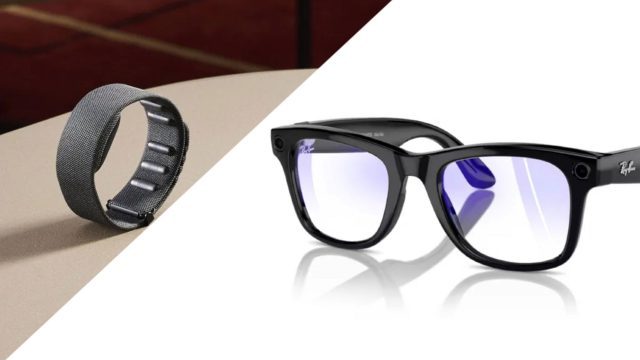
Meta is reportedly working on a version of its Ray-Ban smart glasses which will include a single display for viewing photos and apps. Now, according to a new Bloomberg report from Mark Gurman, the company is aiming to introduce it sometime later this year alongside its wrist-worn XR controller for hand-gesture input.
As per a previous Bloomberg report from January, the device is allegedly codenamed ‘Hypernova’. Citing Meta employees, the device could cost between $1,000 and $1,400, although the final price likely still hasn’t been decided.
The price increase over the company’s $300 Ray-Ban Meta Glasses, which don’t include displays of any sort, is reportedly driven by the inclusion of a single display visible in the lower-right quadrant of the right lens.
Bloomberg’s latest report now maintains Hypernova will include dedicated apps for taking pictures, viewing photos and accessing maps. This also includes notifications from phone apps, such as Messenger and WhatsApp, the report maintains.
Ray-Ban Meta Glasses, Image courtesy Meta, EssilorLuxottica
It’s said Hypenova will rely “heavily on the Meta View phone app,” and may not include its own on-board app store despite running a customized version of Android—suggesting it’s more akin to a smartphone peripheral and not a standalone platform as such.
It is however said to include many of the same features of Ray-Ban Meta Glasses, such as capturing images and video, accessing AI via built-in microphones and pairing with a phone for calls and music playback.
Additionally, it’s said Hypernova is getting a spec bump in the camera department. The latest version of Meta Ray-Ban comes with a 12-megapixel camera, similar to an iPhone 11 (2019) in quality. Instead, Hypernova is hoping to “rival the iPhone 13 from 2021,” according to people familiar with the matter.
Like the company’s display-less Ray-Ban Glasses, the report maintains users can control Hypernova using capacitive touch controls located on the temples, allowing to scroll through media.
Wrist-worn XR Controller seen with Orion | Image courtesy Meta
It seems however Meta is looking to finally productize its wrist-worn XR controller, which uses electromyography (EMG) sensors to detect things such pinching and hand rotation for UI selection. Hypernova is said to come bundled in the box with the wrist-worn controller, which we’ve also seen in action with the company’s internal Orion AR glasses.
Bloomberg maintains a second-gen ‘Hypernova 2’ is already in the works, which is said to include a binocular heads-up display system (again, smart glasses, not AR) with people familiar with the matter maintaining it’s currently planned for release in 2027.
Granted, anything could happen. Meta regularly shelves products late in development, such as its allegedly canceled variant the device without a camera—a move targeting lower costs and increased user privacy.
Still, Hypernova likely won’t be the next smart glasses device Meta releases. The report maintains Meta is finalizing ‘Supernova 2’, which function like Ray-Ban Meta Glasses, but houses inside a sportier Oakley design.
All of this is leading up to the release of Meta’s first true AR glasses. The company revealed its internal developer kit Orion in late 2024; Meta CTO and Reality Labs chief Andrew Bosworth has said an AR device based on their work with Orion could come before 2030, priced “at least in the space of phone, laptop territory.”
Co-hosts Rebecca Charlton and Dave Towle are back to explore the result of this year’s Zwift Academy finals.
Friend of Zwift, ex-pro, and the ever-entertaining Matt Stephens drops in for a chat about his role in the process and his impressions of the finals for 2025.
Emily Dixon discusses the moment she won as a 17-year-old and her gratitude for what’s coming next.
Noah Ramsay discusses his fascinating background, giving us the scoop on his journey into the peloton.
And finally, Dave is off to Zwift Community Live to rub shoulders with Sir Chris Hoy, Kristin Armstrong, and many members of the Zwift community to bring us all the best chats in two weeks’ time.
01:22 Matt Stephens delves deep into the Zwift Academy finals
18:33 Dave chats to Zwift Academy female winner Emily Dixon
33:37 Dave chats to Zwift Academy male winner Noah Ramsey
46:07 Rebecca and Dave look forward to Zwift Community Live
For those interested in the Qualcomm Snapdragon X1 powered laptops, there’s another option to consider for Linux use soon with pending patches: the ASUS Zenbook A14…
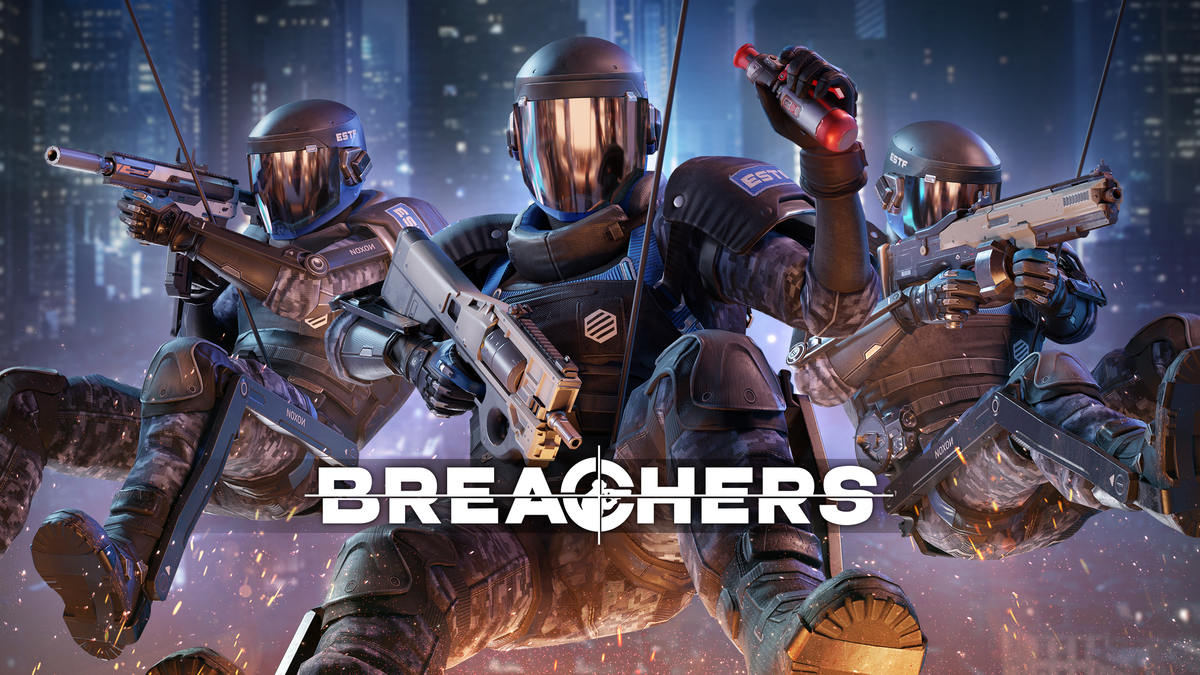
Breachers and Thrasher are the Meta Quest+ monthly redeemable titles for April 2025.
What Is Meta Quest+?
The Meta Quest+ subscription lets you redeem two pre-selected games each month as well as access the titles in its Games Catalog.
Redeeming these monthly games lets you play them while your subscription remains active. Should you cancel the subscription, previously redeemed games won’t be playable until you resubscribe.
Quest+ is available on Quest 2, Quest Pro, Quest 3, and Quest 3S.
Last month’s monthly games were GOLF+ and The Light Brigade.
Breachers
Breachers is a 5v5 team-based FPS available on Quest, PlayStation VR2, Pico, and PC VR. It sees one team defend a bomb until it detonates while the other tries to defuse it, reminiscent of Counter-Strike and Rainbow Six.
We were highly impressed with Breachers in our review, describing it as “a fine effort that delivers on its promise, offering a thrilling tactical VR shooter with satisfying gunplay” with “a strong future ahead”, and subsequent updates have proven us right about that, while crossplay has kept its playerbase strong even two years after launch.
Trasher is an aesthetic abstract puzzler with a superb soundtrack.
In our review, we described how it “combines the exhilaration of chasing moving targets with a unique visual style and a superb soundtrack”, stating that its “uncompromising vision and challenging but approachable gameplay are to be admired”.