The Nintendo Switch 2 Is Boring, and That’s OK

The Nintendo Switch 2 is the first Nintendo console to be a direct successor to a predecessor, number and all. Sure, everyone knew what “Super Nintendo” meant, but now more than ever, Nintendo is looking to competitors like Sony for cues, aiming for a simpler and more straightforward next-gen upgrade this time around. It makes sense—the Switch was its most successful home console yet, and when Nintendo tried to follow up the Wii with the more out-of-left-field Wii U, it flopped. So why mess with success?

But that strategy does leave the Switch 2 in a precarious position, especially given its hefty $450 price point. Is there really enough new here to justify an upgrade? After going hands-on, I’d say yes, but with a disappointing caveat.

The Switch 2 is a lot like the Switch 1
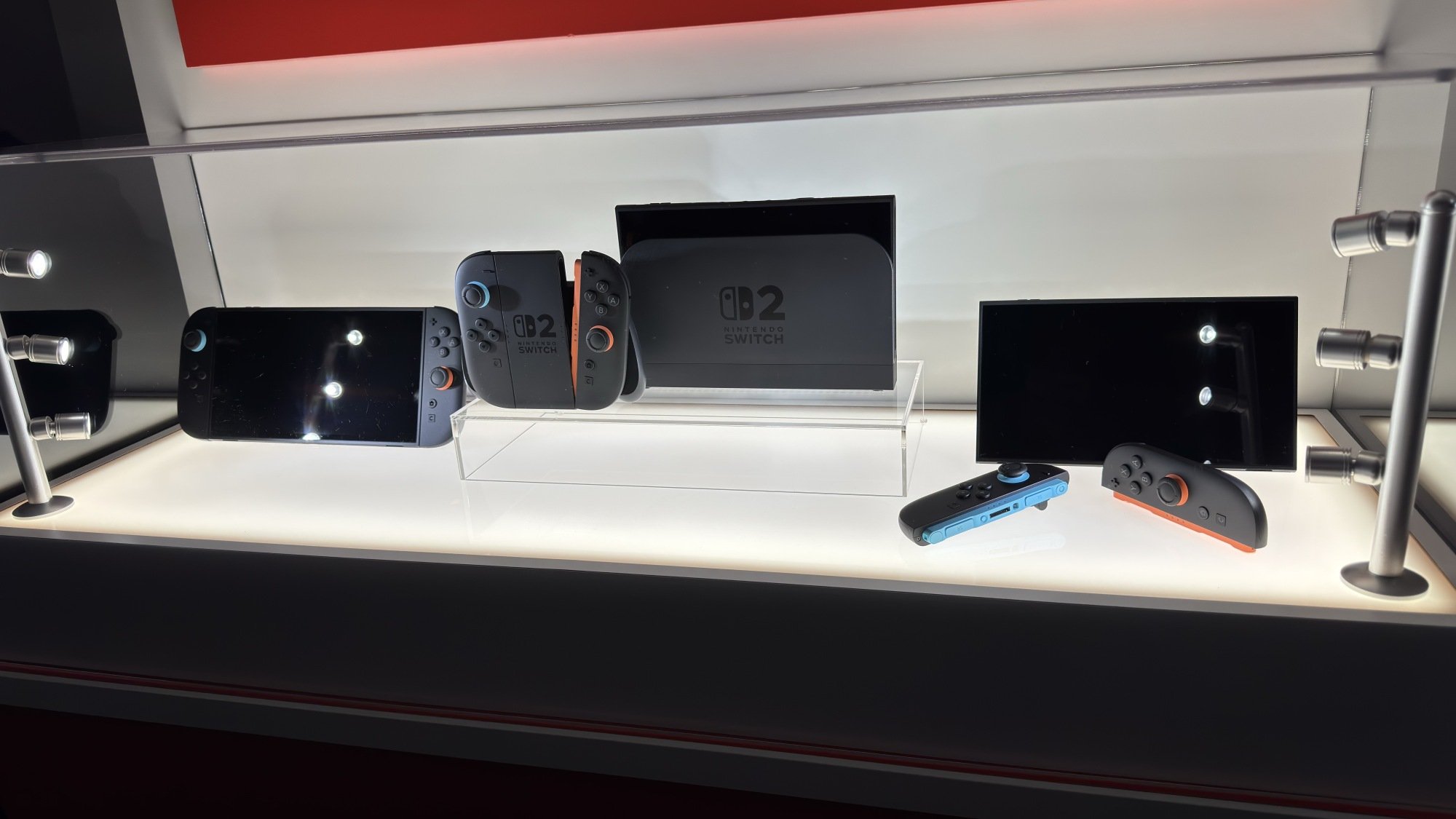
Nintendo Switch 2 console and accessories
The Nintendo Switch 2 console and a few selected accessories.
Credit: Michelle Ehrhardt

Unlike how the Wii or Nintendo DS changed how we played games, if you already have a Nintendo Switch, then you are mostly already familiar with the core experience of using the Switch 2. 

It’s still, essentially, a tablet with removable controllers that can optionally hook up to your TV to display on the big screen. There are a few new bells and whistles, but Nintendo hasn’t strayed far from that vision here.

It’s a good vision, but sticking to it means that listing the improvements here involves relying more on specs than the new experiences I’m used to with Nintendo products, and the results don’t exactly work out in Nintendo’s favor.

Once again, the company is using old hardware. Nintendo hasn’t been upfront about the chip the Switch 2 uses (although there are rumors that it’s already five years old), but to cut it short, there’s nothing here you haven’t already seen in competitors like the Steam Deck or, more charitably, the Lenovo Legion Go.

Starting with the good: The screen is now 1080p instead of 720p, and a roomy 7.9-inches—an increase from both the 6.2-inches on the original model and 7-inches on the OLED model. It can also support up to 120 fps, and when plugged into a dock, is theoretically capable of playing 4K games at 60 fps or lower-resolution games at 120 fps (this will vary based on the title, which I’ll get to later). There’s even ray-tracing, according to a roundtable I attended with the hardware designers, although I wasn’t able to confirm whether I saw it in action while I played.
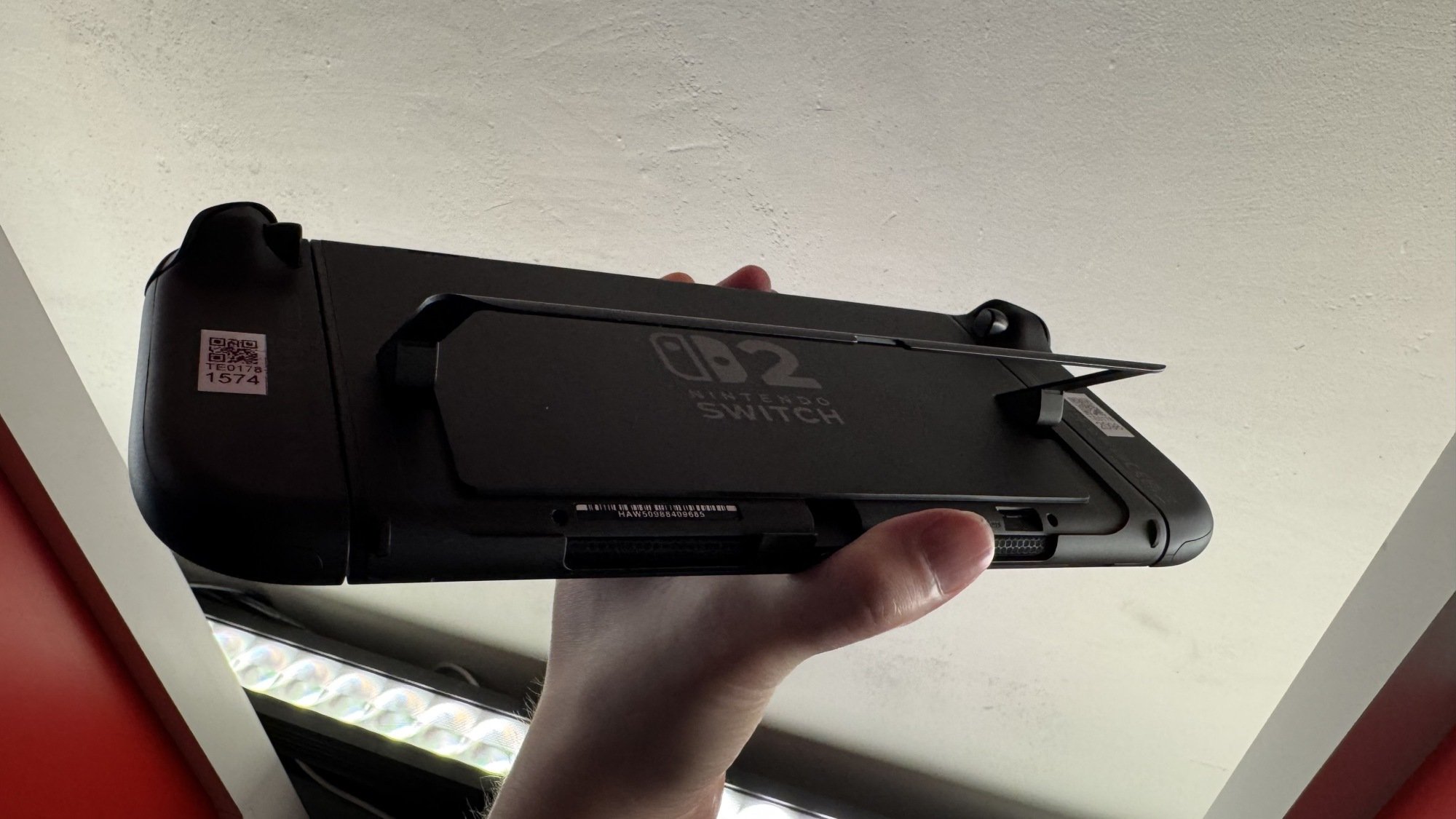
Nintendo Switch 2 kickstand
The Nintendo Switch 2 boasts an improved kickstand.
Credit: Michelle Ehrhardt

There’s an extra USB-C port up top, too, which is convenient, plus a built-in microphone for the GameChat feature (which I didn’t get to demo, just like the GameShare feature). The kickstand has also been redesigned to be sturdier and allow more angles, and the dock has a fan that cools your console to help keep performance stable over long sessions. (I wasn’t able to hear it in person, which is good, but the event where I got to play the Switch was pretty loud.)

Perhaps the best improvements, though, are to the Joy-Cons. They now connect magnetically and feature larger thumbsticks and trigger buttons, plus more prominent SL and SR buttons, all of which makes them far more comfortable to use. I considered the original Switch Joy-Cons pretty much unusable, but with these, I actually wouldn’t feel much pressure to buy a Pro controller. Plus, they have a couple of new secrets, which I’ll discuss a little bit later.
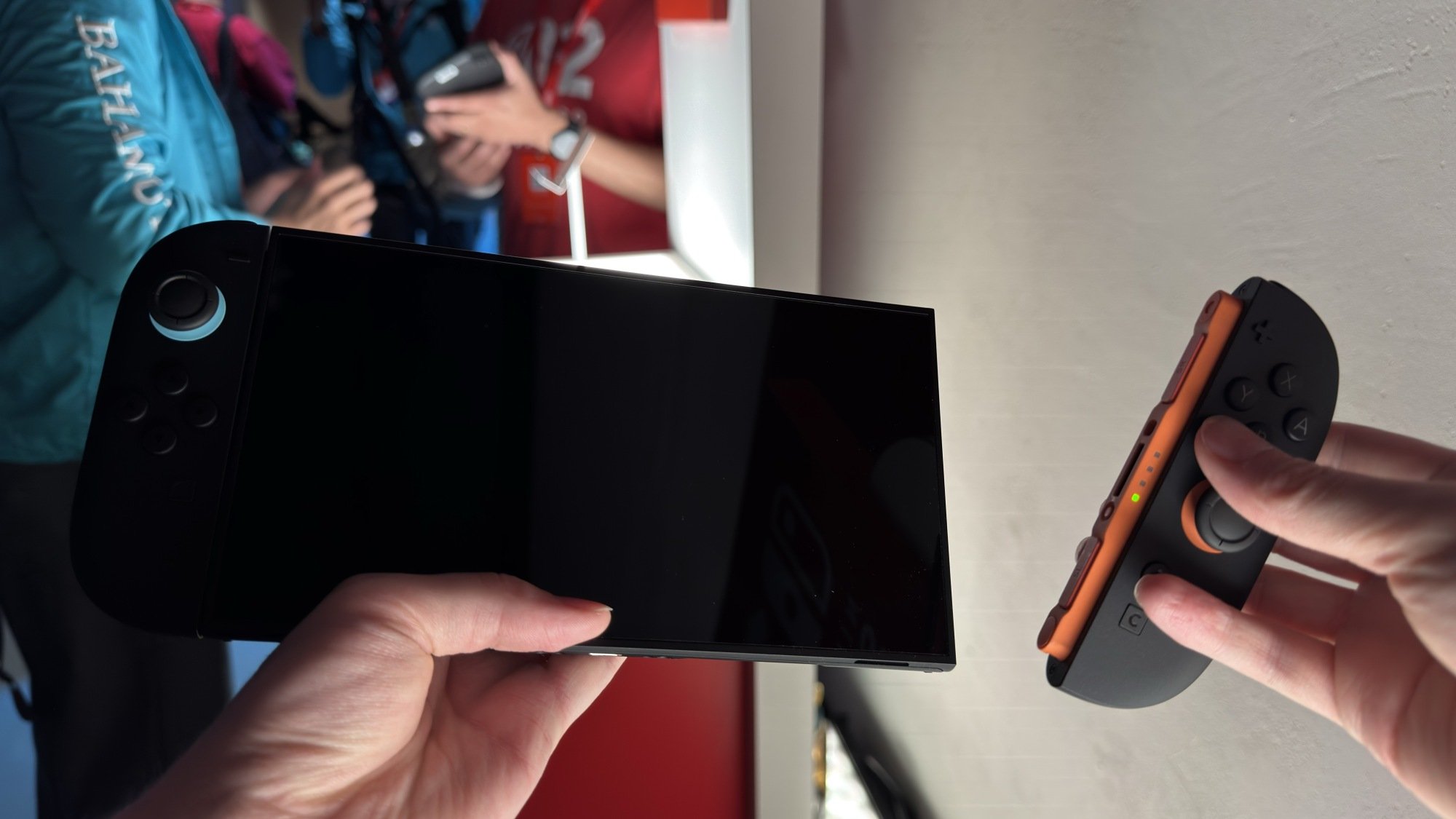
Nintendo Switch 2 magnetic controllers
The Nintendo Switch 2 has magnetic controllers.
Credit: Michelle Ehrhardt

As for the negatives, the Switch 2 is a little bigger and a little heavier than the Switch 1, although I wouldn’t have really noticed without putting the spec sheets side by side. The screen is also an LCD, which means owners of the Switch OLED might actually notice a bit of a downgrade here. It’s a tradeoff for cost and the increased size and frame rate, but it’s worth keeping in mind. Honestly, as much as I love OLED, I don’t actually mind this too much. The screen’s still plenty bright and colorful, and it’s small enough that I’m willing to accept the balancing act Nintendo is playing here. The company will almost certainly release an OLED version down the line, anyway.

Really, the device itself is plenty sleek, but it definitely reads as “more Switch” rather than “new Switch.” Just looking at the improvements on paper, I’m not sure there’s much reason to upgrade just for the new tech alone, which is concerning given that it’s the only real change that doesn’t rely on future developer support. Even if you’re a hardware nerd, the differences here aren’t as stark as they were between, say, the PS4 and the PS5. Rather, they more so just bring Nintendo in line with the competition, although perhaps still remaining a few years behind.

That means that, more than ever, it’s up to the games to sell the Switch 2.

But first, mouse controls!
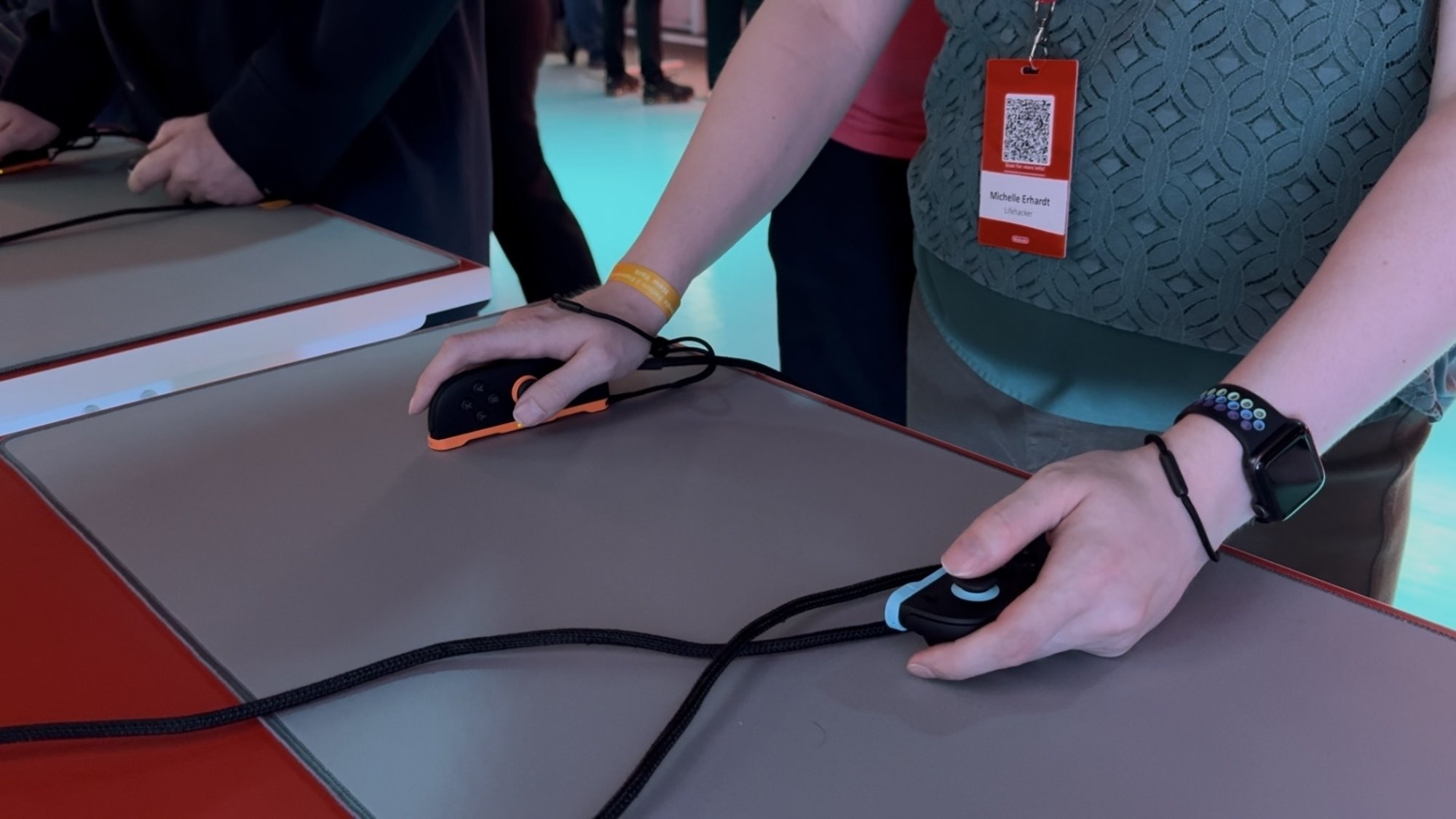
Mouse controls on the Nintendo Switch 2
You can play the Nintendo Switch 2 while using the Joy-Con 2 like a mouse.
Credit: Michelle Ehrhardt

But before I talk about those games, I do have to address the one big new feature here. While it’s not as flashy as motion controls on the Wii or the gamepad on the Wii U, the Switch 2 does have one new standout feature that other consoles don’t—mouse controls.

In theory, I love these. By simply turning a Joy-Con 2 on its side, you can suddenly slide it around and use it like a mouse. A cursor will show up in your game if it’s compatible, and suddenly, it’ll be like playing on a PC.

There are a few tradeoffs. The grip needed here is a bit more claw-like than I’m used to, and pressing the face buttons while the Joy-Con 2 is on its side can be pretty uncomfortable. But when I tested mouse controls in Civilization VII and, yes, Metroid Prime 4, they immediately felt like the natural way to play. I simply can’t go back.

This gives the Switch 2 a lot of potential, but it’s really up to developers to capitalize on it. It could become the de facto way to release shooters, RTS, or MOBA games on console going forward, which is a bit funny as those games tend to be more associated with older gamers and the Xbox. But it could also easily fall by the wayside as a tech demo, like in Drag X Drive, a game I tried that has you using both Joy-Con 2 as mice simultaneously to control a wheelchair. I’ll leave it to people who actually use wheelchairs to comment on the accuracy here, but it certainly was novel—and very tiring after just about five minutes.

The potential here has me excited, perhaps more than anything about this system. Competitive shooter players could potentially play out of their living room here. Heck, you could easily use this to enable more accurate DS or Wii U backwards compatibility. But with actually implementing these being left up to individual developers, I am still a bit skeptical for now. How many games actually used Wii MotionPlus, anyway?

Metroid Prime 4 makes the case for Switch 2
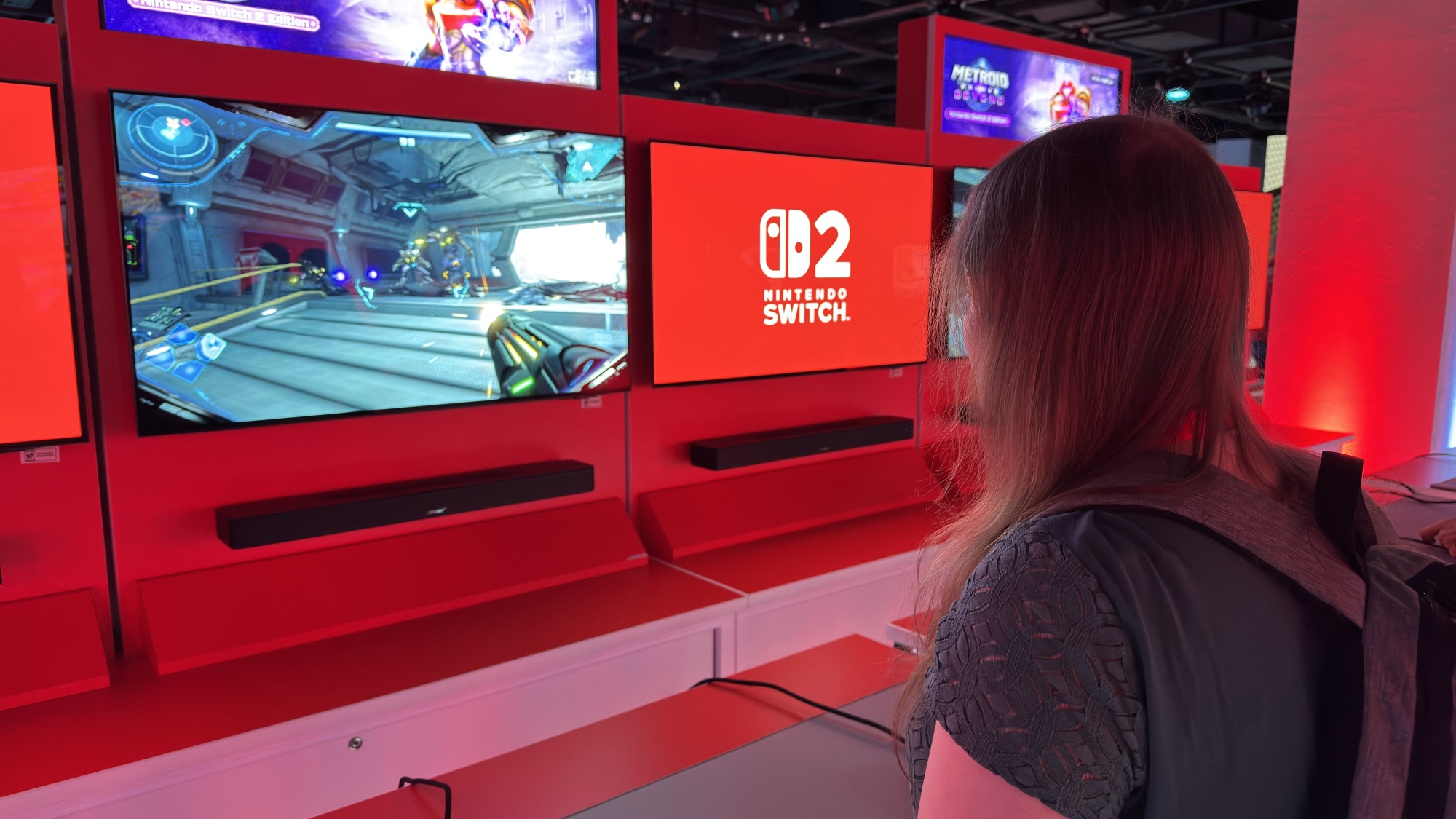
Metroid Prime 4 gameplay
Metroid Prime 4 is improved for the Nintendo Switch 2
Credit: Michelle Ehrhardt

Easily, the game that sold me most on the Switch 2 was Metroid Prime 4, and I’m not even much of a Metroid Prime person. (I liked the first game well enough, but generally prefer the 2D titles.)

The game, however, was gorgeous, and played like a dream. Sitting down with it was one of the few moments where I thought “this wasn’t possible on Switch 1.” Funny, because the game is technically cross-gen.

Still, Nintendo made a point of saying that Metroid Prime 4 runs at 1080p/120 fps on the Switch 2, and while that’s fairly modest compared to what I’ve gotten used to on the console’s contemporaries, dang if it didn’t feel great to see that level of technical polish and fidelity combined with Nintendo’s trademark “show, don’t tell” design. And the fidelity actually serves a gameplay purpose here, too, as the increased frame rate makes keeping up with the action much easier.

And that’s without getting to the controls, which are certainly not possible on any other console. I’ve played prior Metroid Prime games with just a controller, and with the motion controls in their rereleases, but mouse controls are easily the best way to move Samus in 3D. Aiming for weak points on bosses is immediate and snappy, and being able to quickly jerk your mouse to a vantage point makes taking in the scenery, whether for scanning or just eye candy, a breeze.

All this does come with a bit of a risk, as a less skilled developer could easily lean too far into these improvements, and turn Metroid into what is essentially a Halo clone. But even in the brief demo I played, I noticed the same thoughtful level and encounter design I’d come to expect from the rest of the series (not to diss Master Chief too much).

If the Switch 2 needs a lawyer, Metroid Prime 4 should be it, because it makes a convincing case for the console, even if it’s still representing its older sibling too.

Mario Kart World and Donkey Kong Bananza feel like more of the same
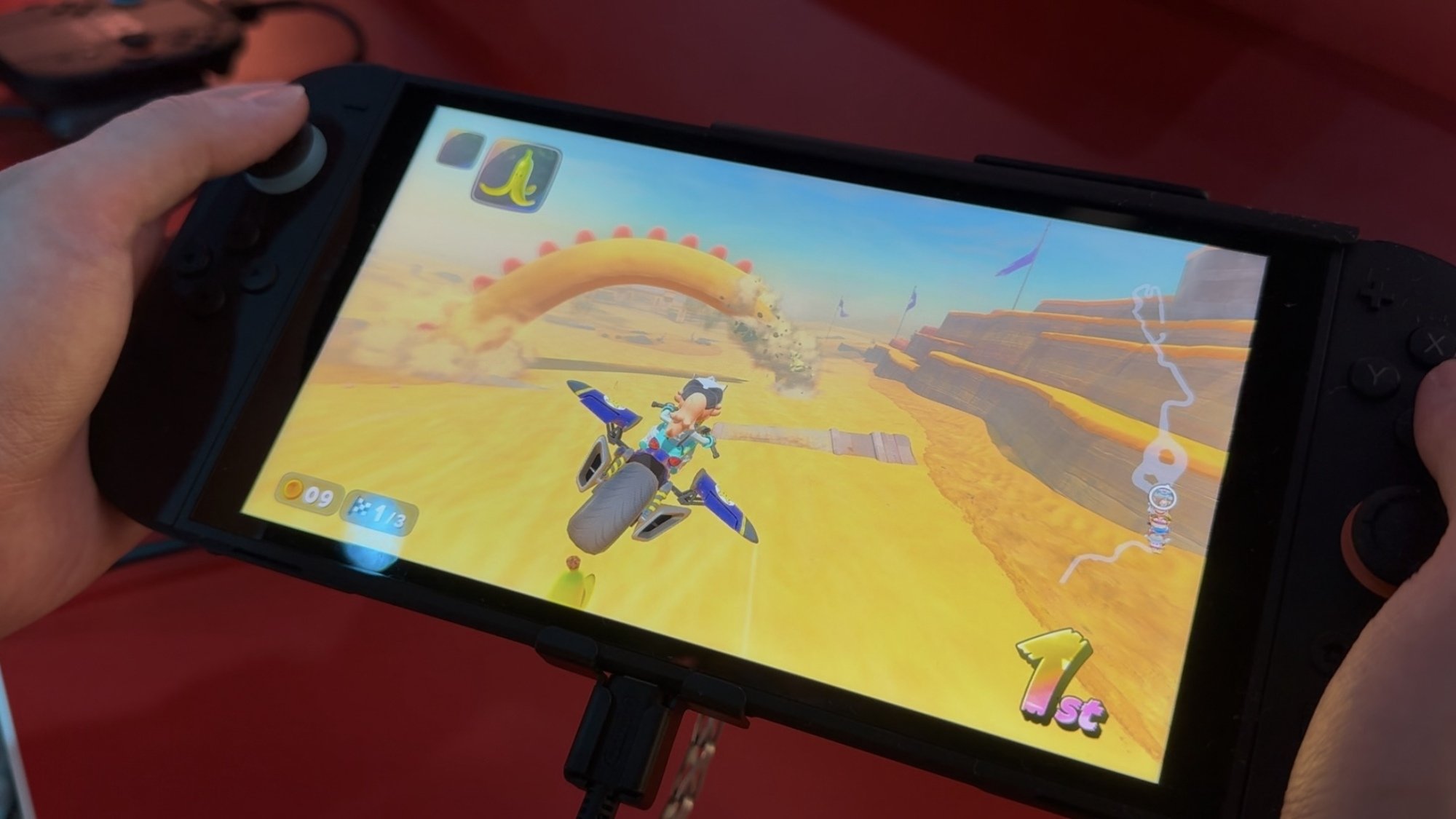
Mario Kart World
Gliding is back in Mario Kart World
Credit: Michelle Ehrhardt

If Metroid Prime 4 feels like a game that needs the Switch 2, then the console’s other big first-party titles, or at least the ones I’ve played so far, land in more dangerous waters.

Put simply, Mario Kart World and Donkey Kong Bananza feel like games that could have released for the Switch 1. They’re both pretty, don’t get me wrong, but there’s nothing so novel about the gameplay here that requires a new console to power it. They use art styles that are pleasant, but so similar to what you’d find on the Switch 1 that I’m not sure the average person could pick them out from Mario Kart 8 or Super Mario Odyssey if you put them in a lineup.

Of these two games, Mario Kart World suffers more from this. Playing it was just like playing Mario Kart 8, for better and worse. The good: Mario Kart 8 is a good game! The bad: Mario Kart 8 is a good game.

Frankly, it feels like Mario Kart World has little reason to exist, and little reason to be exclusive to the Switch 2, except to sell the console. Its few new additions, being grinding, wall jumping, and a battle royale style multiplayer mode, are all things that could have been achieved without forcing players to spend at least $500 to get them, and are pretty easy to not even notice during play. Again, it’s “Mario Kart 8, but more,” and players would be just fine not swapping over to it.

Granted, there’s one elephant in the room with all of this, in that I didn’t get to try out the Forza Horizon style free roam mode much. This, I could have seen struggling on the original Switch. But I’m also skeptical how necessary it is. This could either be a full-blown map worthy of sinking hours into so you can find every detail, or a glorified lobby to drive around in while waiting for online matchmaking. But as for the core Mario Kart experience, it’s still strong but not a system seller, and not an appreciable improvement over what came before beyond some only very slightly better visuals.
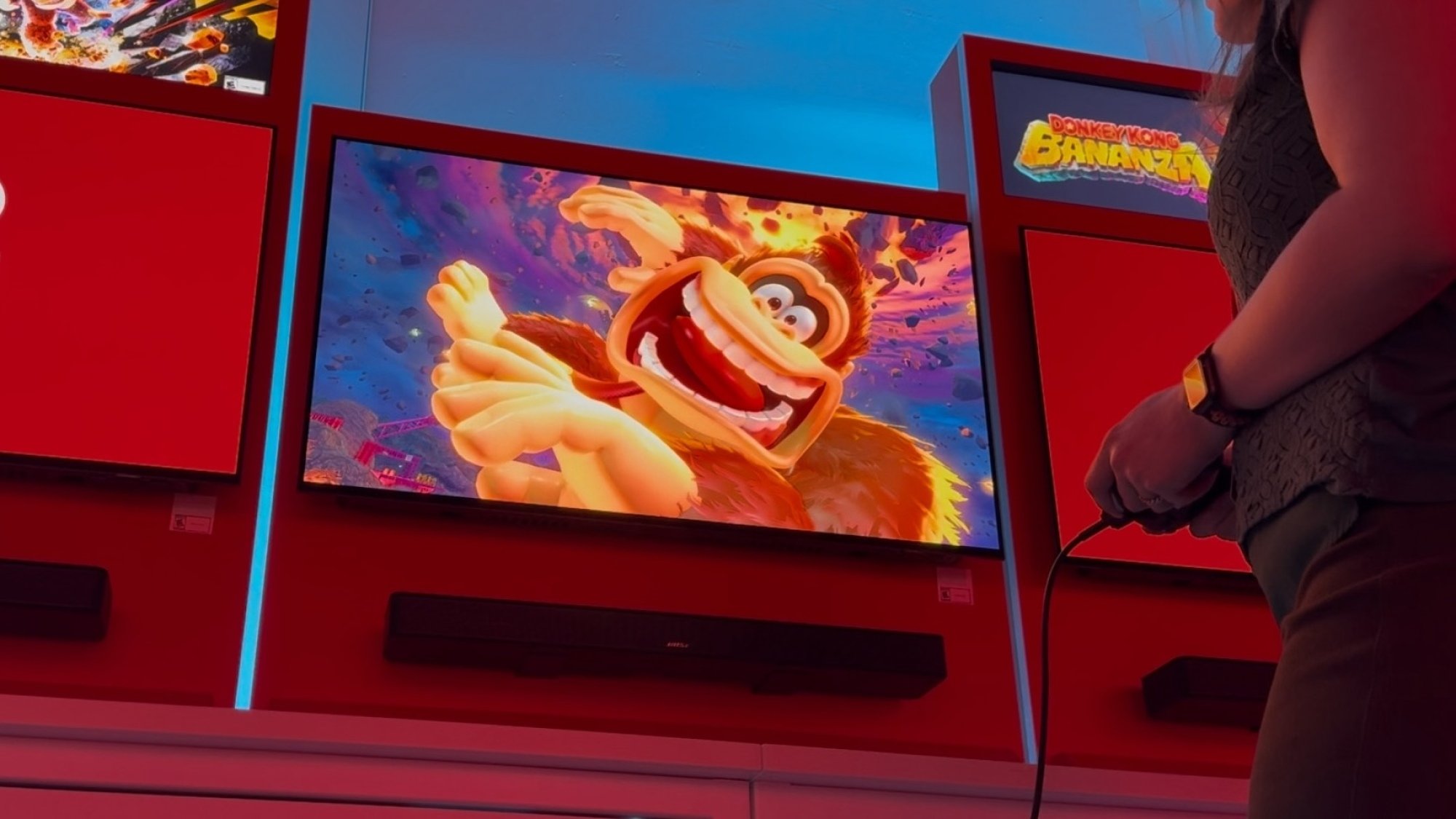
Donkey Kong Bananza
Is it me, or does this Donkey Kong design look more like he did in the movie?
Credit: Michelle Ehrhardt

Donkey Kong Bananza, meanwhile, is the big 3D platformer holding up the Switch 2’s launch window (it’ll be available about a month after the console itself). Again, a lot of what I said about Mario Kart World holds true here. It looks good, but doesn’t exactly stand out from a good looking Switch 1 game. Mechanically, it’s also mostly something that doesn’t require the upgrade, so it could have been a Switch 1 game if Nintendo really wanted.

That is, except for the destructible environments. Donkey Kong is recast as a bit of a miner in this game, and you can pretty much tear the whole map apart, polygon by polygon, with debris flying everywhere. I’m convinced that if you made enough compromises to the visuals, this could have worked on Switch 1, but still, it is noteworthy that Bananza is both very pretty and never chugged while I was playing.

Still, and this hurts to say as a fan of Donkey Kong, Bananza is kind of a chore to play. Maybe it’ll get better further into the game, but Donkey Kong’s first 3D platformer since the Nintendo 64 weirdly falls into the same trap that game did: too many collectibles.

Because you can tear the whole map apart polygon by polygon, and because almost every one of those polygons reveals a reward, it makes maintaining the same kind of flow state that Super Mario Odyssey, a game the Bananza is taking clear influence from, so heavily encouraged near impossible. Rather than focusing on fluid movement through an obstacle course, you’re instead incentivized to smash and destroy nearly every part of the map, making worlds a bit of a slog to actually get through as you slowly pick them apart.

Or you could accept that you don’t have to get absolutely everything, if you don’t suffer from the same kind of optimization sickness I do. It is fun to simply play as Donkey Kong, but even in that case, I feel the game could be better designed to support this, since the courses here do seem to be laid out more for Mario than DK. A less linear design might support the penchant to go ape more, but to be fair, I only saw the first world.

Third party games are a mixed bag

Nintendo has a few more first party Switch 2 games announced for later on, although I didn’t get to play tantalizing titles like Kirby Air Riders yet. Instead my pre-release experience with the Switch 2 was rounded out by third-party developers.

The games I tried were, sadly, the biggest reason I remain skeptical of the Switch 2. From Cyberpunk 2077 to Street Fighter 6, it was a grab bag of quality. Given how old most of these games are, and that they all run well on devices like the Steam Deck, that really shouldn’t be the case.

Case in point: Cyberpunk is just flat out ugly on the Switch 2. It’s pixelated, the frame rate dips constantly, and I found myself frequently disoriented in combat. It’s clearly an example of the Switch 2 reaching above it means, which goes to show that while the system is prettier than its predecessor, it’s not the fix for the typical Nintendo performance issues some were hoping for.

To be fair to Cyberpunk, the build I played was only seven weeks old, and I didn’t seem able to swap out of quality mode and into performance mode despite trying, but it puts a pretty clear cap on this system’s performance at about the PS4 level. That is impressive for a handheld, but it’s also something we previously saw with the cheaper and older Steam Deck. If the Switch 2 sticks around for as long as the Switch 1 did, it could also start to feel long-in-the-tooth pretty quick, as other companies are already on the verge of leaving that era behind.

Civilization VII also chugged a little bit, although this was less of an issue given its turn-based nature. But on the plus side, Street Fighter 6 and Yakuza 0 Director’s Cut ran without hiccups and at high-enough resolutions. The latter should be expected given that game’s age, but as for the former, it’s nice to know that Capcom knows how to work with Nintendo’s hardware. Even so, Street Fighter was still noticeably pixelated at times, so it’s not like the Switch 2 is the best way to play Street Fighter 6. It’s the best way to play it without compromises if you don’t own any other modern gaming machines.

That’s an improvement on the Switch 1, and might be enough for now. But given Cyberpunk’s performance, even knowing how demanding that game famously was at launch, I do worry that it won’t be long until the Switch 2 falls into the same trap as its predecessor: Third party developers will either skip the console entirely (I was hoping Monster Hunter Wilds would be here, given that series’ history with Nintendo platforms, but it’s MIA for now), or their games will be more and more compromised here as time moves on.

The best games on the Switch 2 are Switch 1 (and GameCube) games
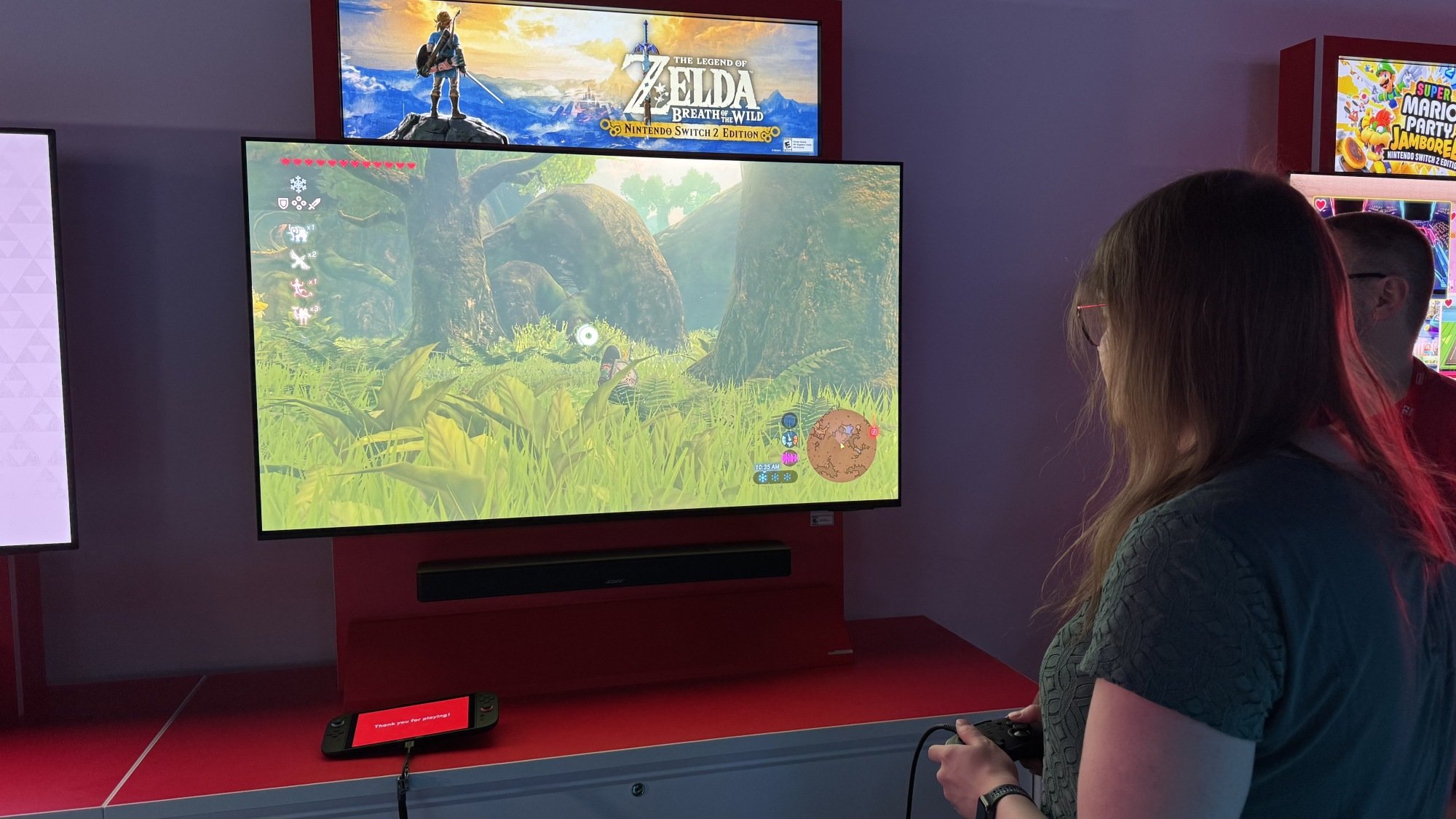
Breath of the Wild for Switch 2
Breath of the Wild’s Switch 2 Edition is buttery smooth
Credit: Michelle Ehrhardt

Which brings me to maybe my saddest realization of my time with the Switch 2. The games I enjoyed playing most on Nintendo’s new console are all games for the Switch 1.

Breath of the Wild. Kirby and the Forgotten Land. Metroid Prime 4. Even Mario Party Jamboree. All of these run flawlessly on the Switch 2, at high resolutions and even higher frame rates. It’s really such a breath of fresh air, especially given that some of Nintendo’s more ambitious Switch 1 games didn’t always perform the best on that system. (I didn’t get to play Tears of the Kingdom, but it is planned for a Switch 2 upgrade, and it sorely needs it.)

In a vacuum, this is eye-opening. One of Nintendo’s strongest game libraries, now with no technical chains around its ankles. But it also comes with three of the Switch 2’s strongest downsides.

The first, and most obvious, is that a Switch 1 game does not make for a good Switch 2 killer app. Even Metroid Prime 4, the game I praised as being the best reason to get a Switch 2, will still technically be playable on the Switch 1. And that means that thrifty gamers are plenty likely to just live with not having mouse controls, or with occasional frame drops, since they can still get the same core experience without spending hundreds of dollars for it.

The second, and most obnoxious, is that you have to pay to get these improvements. Even if you already own Kirby and the Forgotten Land for Switch, and you buy a Switch 2 for $450, you’ll need to pay once again for the Nintendo Switch 2 Enhanced Edition version of the game to play it using the power the Switch 2 already has. Otherwise, you’re going to get a similar experience as you would on the Switch 1, barring some potential slight improvements like marginally faster loading times. To Nintendo’s credit, you can upgrade your existing Switch 1 library for a smaller fee than you’d have buying the new version outright, but it’s still a hard pill to swallow. “It plays your existing Switch games, but better” would have been a reason to buy here, especially if the launch lineup doesn’t do anything for you, but alas.

Third, it’s not guaranteed that the Switch 2 will play your existing Switch games at all. According to Nintendo’s hardware developers, the new console does not contain any Switch 1 components in it, which means that it plays the non-enhanced versions of Switch 1 games using emulation. This isn’t an immediate killing blow, and Microsoft is in fact fairly well respected for how it handles a similar approach on the Xbox. But it does mean that Nintendo has found issues with running over 120 games on the Switch 2, some of which have difficulty even starting up. Out the gate, the Switch 2 is going to take some time to be an appropriate Switch 1 replacement, as Nintendo goes through all 10,000+ Switch titles “one by one” to ensure they work on the new console. Don’t throw away your old Switch quite yet.
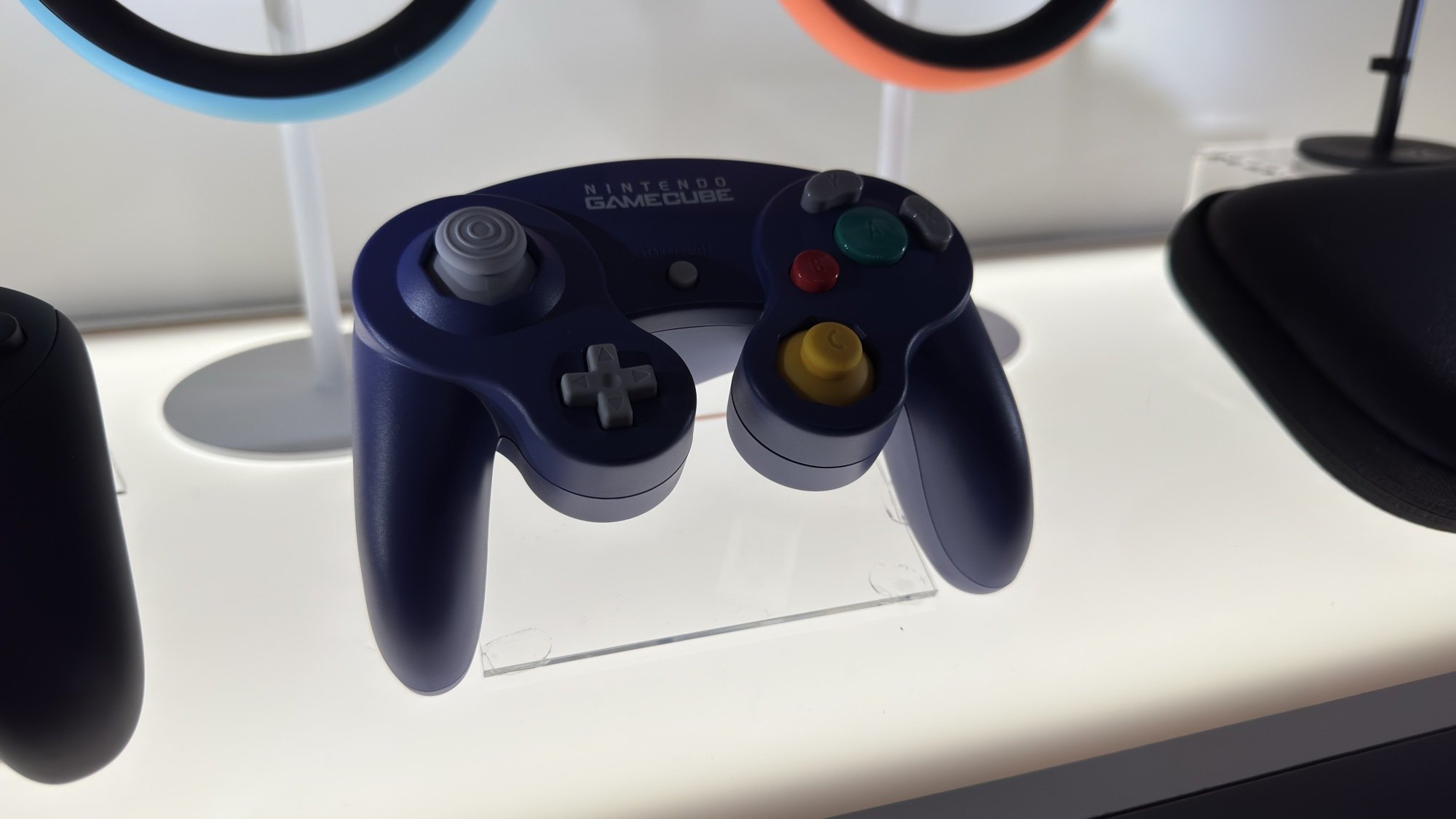
GameCube controller for Switch 2
The GameCube controller for the Nintendo Switch 2
Credit: Michelle Ehrhardt

There is one bright spot to Switch 2 emulation, though: GameCube support. Starting with The Legend of Zelda: The Wind Waker, F-Zero GX, and Soul Calibur II, Nintendo is going to start adding GameCube games to the Nintendo Switch Online + Expansion Pack plan, exclusively playable on Switch 2 (and compatible with an optional GameCube style controller, sold separately exclusive to Switch Online members). Wind Waker was flawless for me in my hands-on, and suspending and resuming was instant. $50 a year is a lot to pay for such a small selection of titles, especially when there are, ahem, other ways to get them, but it is convenient. And hey, as a bonus, the Expansion Pack membership does at least include the Switch 2 Edition upgrades for Breath of the Wild and Tears of the Kingdom.

The Switch 2 is boring, and that’s OK

So where does all this leave the Switch 2? Well, truthfully, it’s not as grim as I’ve made it sound.

At its core, the Switch 2 is a polished piece of hardware with a good deal of quality-of-life improvements and one new control gimmick (one I really like, but am unsure of whether it’ll catch on). It doesn’t push the hardware envelope, and like the GameCube or Wii U (eventually), it relies on its games to sell it. And before I learned that it was $450 (why didn’t we say that during the Direct, Nintendo?), this article was originally much kinder to it.

But with that price point, which is $150 higher than the original Switch’s price at launch, higher than a Steam Deck, and on par with Sony’s entry-level PS5, I have no choice but to get a bit choosier. It isn’t necessarily a problem, but it means I have to give this the same boring advice I would give almost any console launch, rather than the advice I would have normally given for a prior Nintendo launch.

Unless your banana hoard is overflowing, or if you absolutely need the new Mario Kart on day one, or if you can’t accept any compromise when you don Samus Aran’s helmet, you should wait to buy the Nintendo Switch 2. There simply aren’t enough compelling reasons to upgrade right now, and given that Switch 1 support is either paid or prone to glitching, I doubt there will be for a good while. Wait for a sale (or at least until the exclusive FromSoft game comes out).

That’s fine. That’s what I’ll probably say for the PS6, and it was probably the right move for Nintendo. The Wii U famously failed for throwing aside the strengths of its predecessor, so it makes sense for the Switch 2 to aim for “Switch but more,” and the only way to do that while staying anywhere in a family console’s budget in the age of tariffs is to do roughly the same thing again, but with some slight improvements.

But it is still a slight disappointment. For something like the original Switch, I actually would have been fine recommending buying it at launch. It was novel and it was affordable, so you didn’t lose out on much by going for it right away. Now, though, it seems even the Nintendo can’t avoid the homogenization stomping all over the rest of the tech industry. Every phone is a candy bar now, and increasingly, every gaming console is just a featureless black box.

Microsoft, Amazon Execs Call Out Washington’s Low-Performing 9-Year-Olds In Tax Pushback

Longtime Slashdot reader theodp writes: A coalition of Washington state business leaders — which includes Microsoft President Brad Smith and Amazon Chief Legal Officer David Zapolsky — released a letter Wednesday urging state lawmakers to reconsider recently proposed tax and budget measures. “I actually think it’s an almost unprecedented outpouring of support from across the business community,” said Microsoft’s Smith in an interview. In their letter, which reads in part like it could have been penned by a GenAI Marie Antoinette, the WA business leaders question whether any more spending is warranted given how poorly Washington’s 4th and 8th graders compare to children in the rest of the nation on test scores. The letter also laments the increase in WA’s homeless population as it celebrates WA Governor Bob Ferguson’s announcement that he would not sign a proposed wealth tax.

From the letter: “We have long partnered with you in many areas, including education funding. Despite more than doubling K-12 spending and increasing teacher salaries to some of the highest rates in the nation, 4th and 8th grade assessment scores in reading and math are among the worst in the country. Similarly, we have collaborated with you to address housing and homelessness. Despite historic investments in affordable housing and homelessness prevention since 2013, Washington’s homeless population has grown by 71 percent, making it the third largest in the nation after California and New York, according to HUD. These outcomes beg the question of whether more investment is needed or whether we need different policies instead.”

Back in 2010, Smith teamed with then-Microsoft CEO Steve Ballmer and then-Amazon CEO Jeff Bezos to fund an effort to defeat an initiative for a WA state income that was pushed for by Bill Gates Sr. In 2023, Bezos moved out of WA state before being subjected to a 7% tax on gains of more than $250,000 from the sale of stocks and bonds, a move that reportedly saved him $1.2 billion in WA taxes on his 2024 Amazon stock sales.


Read more of this story at Slashdot.

AMD’s Latest MLPerf Results: A Landmark Achievement in AI Inference

The AI landscape is rapidly evolving, and performance benchmarks are crucial for understanding the capabilities of various hardware solutions. Among these, MLPerf has emerged as a widely respected and standardized suite of tests, providing valuable insights into machine learning performance.   

AMD’s recent performance scores exceed, sometimes substantially, NVIDIA’s, and given NVIDIA is having trouble meeting demand, this provides the dual benefits of availability and increased ability to meet end customers’ performance needs. 

The Significance of MLPerf

MLPerf (https://mlperf.org/) is an industry-standard benchmark that measures the speed and efficiency of machine learning hardware, software and services. It provides a transparent and objective way to compare the performance of different systems across a range of AI workloads. These benchmarks are vital for developers, researchers and enterprises looking to optimize their AI deployments.   

MLPerf encompasses various tests, including training and inference, covering diverse applications like image classification, object detection, natural language processing and recommendation systems. Its importance stems from its ability to:   

  • Provide a level playing field: MLPerf eliminates the ambiguity of vendor-provided performance claims, offering standardized metrics for comparison.
  • Drive innovation: The competitive nature of MLPerf encourages hardware and software vendors to optimize their solutions, leading to advancements in AI performance.   
  • Inform purchasing decisions: Businesses can use MLPerf results to make informed decisions about hardware and software investments for their AI initiatives.   

Inference: Where the Volume Lies

While training is essential for developing AI models, inference—the process of deploying trained models to make predictions on new data—is where the vast majority of AI hardware volume resides. Inference is crucial for real-world applications, such as autonomous driving, recommendation engines and medical diagnostics. This stage demands high throughput and low latency, making it a critical area for hardware optimization.   

AMD’s recent MLPerf inference results have shown significant gains, often outperforming NVIDIA in specific workloads. This is notable because NVIDIA has long been considered the dominant player in the AI hardware space. AMD’s success can be attributed to several factors.   

AMD’s Hardware and Customer Focus

One key advantage for AMD is its focus on custom hardware solutions. Unlike NVIDIA, which typically offers a more generalized architecture, AMD has a reputation for developing highly specialized hardware tailored to specific AI workloads. This approach allows AMD to achieve superior performance in targeted applications.

Furthermore, AMD is known for its strong customer-centric approach. It prioritizes close collaboration with clients, offering dedicated support and customized solutions. This level of personalized service can be a significant differentiator in the competitive AI market.   

AMD’s Instinct MI300X accelerators, for example, have shown impressive performance in large language model (LLM) inference. This is a critical area, as LLMs are becoming increasingly prevalent in various applications. AMD’s focus on memory bandwidth and efficient data transfer has contributed to these strong results.   

AMD’s Executive Leadership and Strategic Acquisitions

AMD’s recent success in the AI space is also a testament to its strong executive leadership. Under the guidance of CEO Lisa Su, AMD has made strategic investments in AI hardware and software, positioning itself as a formidable competitor. AMD’s ability to execute on its roadmap has been particularly impressive.   

Additionally, AMD’s strategic acquisitions are set to further strengthen its position in the AI market. The purchase of Xilinx, for example, has provided AMD with access to advanced FPGA technology, which can be used to accelerate AI workloads. The acquisition of Pensando adds strong capabilities in data center infrastructure, further enhancing AMD’s offerings.   

These acquisitions, combined with AMD’s focus on custom hardware and customer care, are contributing to its growing success in the AI space. The company’s ability to consistently deliver impressive MLPerf results demonstrates its commitment to innovation and its potential to become a major player in the AI market. AMD is proving that it is capable of impressive gains and is a serious contender in the AI market.

Wrapping Up:

The success of AMD in the AI inference market is not just a product of advanced technology; it is also a result of exceptional leadership and strategic execution. AMD’s executive team has consistently demonstrated an ability to anticipate market trends, invest in innovation, and deliver solutions that exceed expectations. Its commitment to excellence and visionary approach has been instrumental in AMD’s rise as a preferred AI vendor.

The market has been continually surprised by AMD’s ability to execute flawlessly, even in challenging circumstances. Its strategic decisions, from product development to market positioning, have been spot on, earning it accolades from industry experts and customers alike. AMD’s leadership has proven that it’s not just capable of competing with NVIDIA; it’s redefining the standards of performance and reliability in the AI hardware industry.

AMD’s latest MLPerf results mark a significant milestone in AI inference performance. Its advancements have not only surpassed NVIDIA but have also positioned AMD as the preferred vendor in the market. With superior custom capabilities and excellent execution, AMD continues to set new benchmarks and drive the industry forward. The future of AI inference is bright, and AMD is leading the way.

VR Therapy for Seniors Rolls Out to 150 Living Communities Across the US

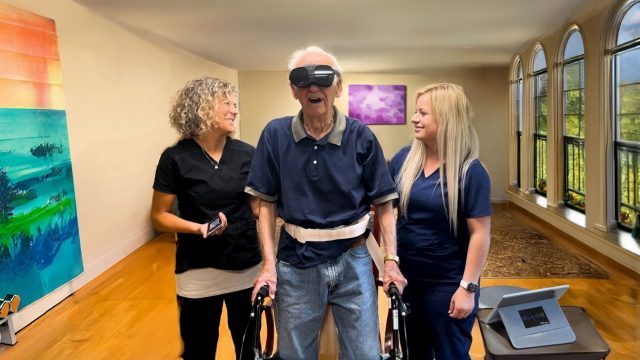
Mynd Immersive, the immersive healthcare provider, announced its expanding its XR services to an additional 150 senior living communities across the United States.

The company says its recent milestone represents the largest deployment of XR therapies in senior care history, which it hopes will advance treatment options across physical, occupational, and speech therapy.

Founded in 2016 and operating the US, Canada and Australia, the Texas-based company has developed over 200 XR experiences which support HTC Vive Flow, the lightweight, compact VR headset released by HTC in 2021.

“We envisioned early on that Virtual Reality would profoundly enhance the quality of life and health outcomes for seniors,” said Chris Brickler, co-founder and CEO of Mynd Immersive. “Today, we’re seeing Mynd become an essential part of healthcare delivery, driving real-world gains in functional therapy, cognitive engagement, and staff training.”

Mynd Immersive has also partnered with Select Rehabilitation, the US-based contract therapy company, using the company’s platform to support cognitive, physical, emotional, and spiritual well-being of elders.

“Our partnership with Mynd empowers therapists to engage patients in meaningful, motivating experiences that support real clinical outcomes,” said Anna Wolfe, CEO at Select Rehabilitation. “With these tools, we are creating the therapy room of the future – today. Our therapists can now work on improving range of motion, strength building, gait training, spatial awareness, and Activities of Daily Living (ADLs) through immersive environments that make rehabilitation both effective and enjoyable.”

The company says it’s deploying the Mynd platform and training staff in 25 communities per-week on average now. Its 150-community expansion is set to bring XR therapy to more than 45,000 residents, which it notes is just the “beginning phase.”

The post VR Therapy for Seniors Rolls Out to 150 Living Communities Across the US appeared first on Road to VR.

This App Can Search Maps and Addresses Right From the Menu Bar

Whether you want to quickly check where a particular city is or grab an address to share with a friend, opening a full-blown maps app sometimes feels like overkill. Mappa Mini is a free Mac app by developer Lucas Raggers that lets you do a quick search without taking up all of your attention.

Just click the menu bar icon and search for any business or location. You’ll see right where it is in a small pop-up, without having to load any application or website. If there are multiple matches, you’ll see them all in a list—click any of them to see the location in context. This is perfect for when you quickly need to check where something is.

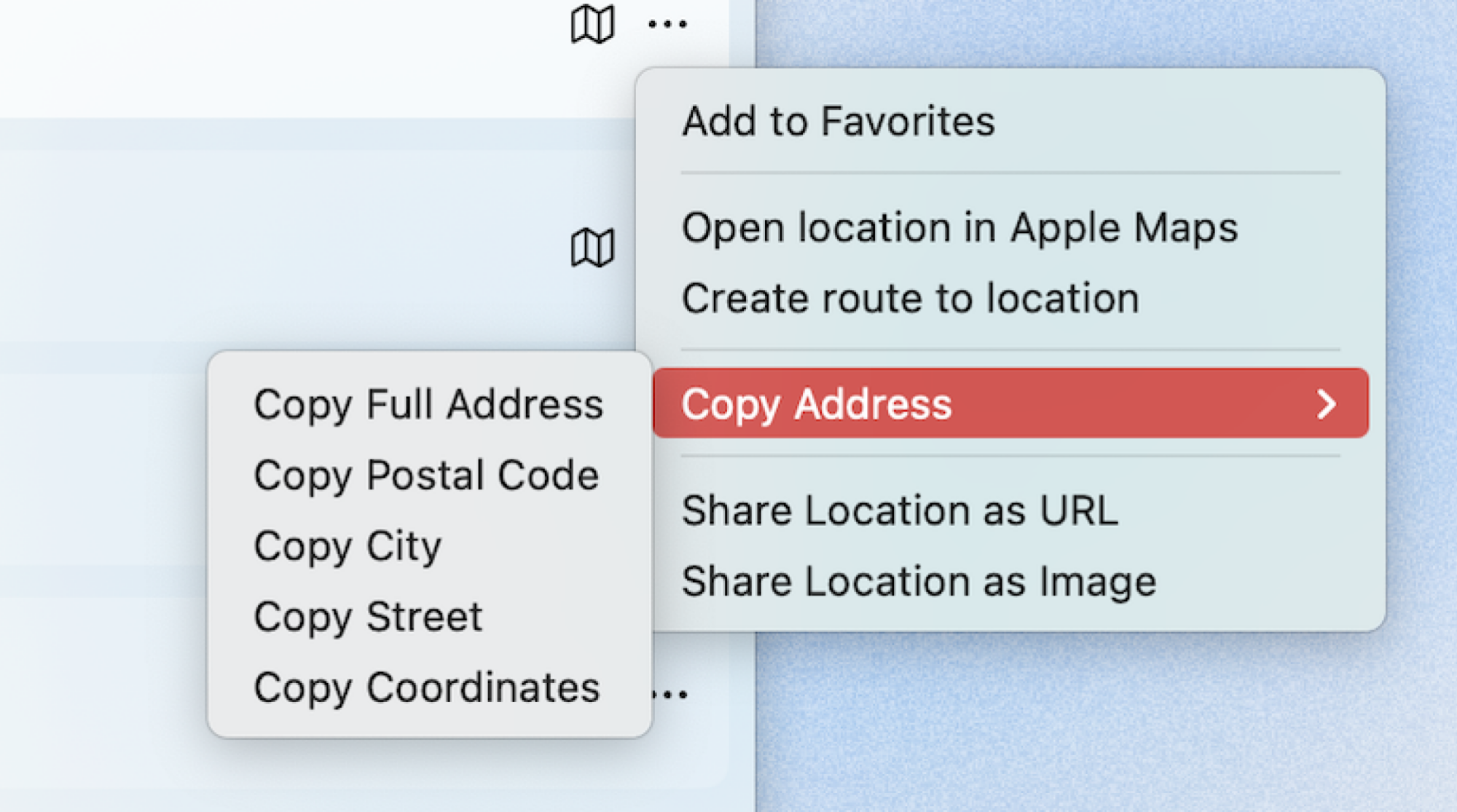
You can get more details by clicking the three dots to the right of the location. This allows you to add the location to your favorites, open the location or create a route to it, or copy the address.

The menu for an item in the application allows you to add it to favorites, open or create a route in Apple Maps, copy the address, copy the postal code, copy the city, copy the street, copy the coordinates, share the locaion as a URL, share the location as an image.

Credit: Justin Pot

You can choose to copy the full address or just a part of it, such as the full address, postal code, city, or street. You can also copy the coordinates, or just copy a link or picture of the map. All of this is useful if you’re texting a friend about where to meet and want to provide some quick context.

By default, opening a location will launch Apple Maps. You can change this, if you like, so that locations open in your choice of Google Maps, OpenStreetMap, Waze, or HERE WeGo. Note that the initial map will always be an Apple Map—the setting only changes what happens when you choose to open the location or get directions to it. There’s not much more in the way of settings—you can change the size of the pop-up window, the map radius, and whether the application launches in the menu bar when your Mac boots.

It’s not an application that’s going to replace your map app of choice, nor is it trying to be. It’s great at what it does, though, and that’s doing quick map searches before getting out of your way.

Amazon will start launching its Project Kuiper Starlink rival next week

Following recent tests, Amazon is finally ready to launch its Project Kuiper space internet project in a bid to rival Elon Musk’s Starlink, the company announced. The first batch of 27 satellites on the KA-01 (Kuiper Atlas 1) mission are set to launch into low earth orbit (LEO) aboard a United Launch Alliance Atlas V rocket on April 9th next week from Cape Canaveral if conditions allow. Amazon hopes to start offering the high-speed internet service “later this year,” it said.  

Amazon’s network will eventually comprise 3,200 satellites launched from partners including ULA, Arianespace, Blue Origin and even SpaceX. Much like that company’s Starlink, Project Kuiper’s service will cover the entire planet when completed. It will work with a dish as small as seven inches that will deliver speeds up to 100Mbps, smaller than Starlink’s Mini, or up to 1Gbps with larger dishes. The company said the cost of terminals will be under $400. 

The satellites will cruise at 17,000 mph at 392 miles above earth, circling the planet in about 90 minutes. They’ll use a dialectic mirror film coating that’s supposed to scatter light and make them less visible to ground-based astronomers, Amazon said. SpaceX’s constellation currently uses over 7,000 satellites, so the Project Kuiper and Starlink fleet will use over 10,000 LEO satellites once Amazon’s network is complete. 

Amazon will start launching its Project Kuiper Starlink rival next week
Amazon

Amazon launched two test satellites in October 2023 and proclaimed its early tests a success, with the pair sending and retrieving data at speeds of up to 100 gigabits per second. Later in December, it bolstered the network with a network of high-speed laser cross-links that promise further speed boosts. The company claims its mesh network can move data about 30 percent faster than terrestrial fiber optic cables. 

Project Kuiper’s first launch will be the heaviest payload yet for the Atlas V, which will fly in its most powerful configuration. The rocket will include five solid rocket boosters in addition to the main booster, and a payload fairing 77 feet high and 16.4 feet wide.

Despite past successful tests, the mission isn’t without risk. “We’ve done extensive testing on the ground to prepare for this first mission, but there are some things you can only learn in flight, and this will be the first time we’ve flown our final satellite design and the first time we’ve deployed so many satellites at once,” Project Kuiper vice president Rajeev Badyal wrote. “No matter how the mission unfolds, this is just the start of our journey, and we have all the pieces in place to learn and adapt as we prepare to launch again and again over the coming years.”

This article originally appeared on Engadget at https://www.engadget.com/science/space/amazon-will-start-launching-its-project-kuiper-starlink-rival-next-week-123011012.html?src=rss

You Should Grow Snacking Peppers Instead of Bell Peppers

We may earn a commission from links on this page.

Peppers are one of the best vegetables to grow. They are expensive to buy, even when in season; they don’t take up a lot of garden space; and although there are a limited number of peppers available in stores, there are thousands of varieties are out there that you can grow. Plus, you can choose precisely when to harvest them. 

The pepper most people choose to grow in their garden—full size bell peppers—are a waste, though, in my opinion. Each plant only yields a few peppers, and because of their size, bell peppers take a while to grow and then to ripen. In that time, the pepper is susceptible to pests and disease. Even in the most perfect circumstances, you’ll likely only get a few big peppers. 

Snacking peppers on a tray
You can roast or char snacking peppers just like large bells, or just eat them raw.
Credit: Amanda Blum

Instead, try growing snacking peppers, a miniature version of the bell pepper. Each plant grows heaps of peppers, which ripen in a shorter time span. You can use them in the same way you would large size bell peppers (except for stuffing). Available in red, yellow, chocolate, purple, and orange, these peppers light up the garden with color. I’ve pulled in excess of fifty peppers off each of my plants the last two years. 

When to start growing snacking peppers

Peppers are part of the trio of nightshades that almost everyone grows each summer (tomatoes, eggplants, peppers). Because these three require the sun and heat you usually only find in the summer months, they truly are a once-a-year treat. Usually, seeds for peppers need to start early because they take longer to germinate than other nightshades. In my area (the Pacific Northwest), that means I start pepper seeds at the beginning of March. If you haven’t started your pepper seeds yet, you’ll want to do so immediately, so you’ll have time to grow starts before outdoor temperatures reach fifty degrees overnight and you can place them outside. I don’t know anyone who direct-seeds peppers outside; gardeners generally start from seedlings they’ve bought or grown themselves because you need the jumpstart seedlings offer. 

How to encourage branching and support the plant

As your pepper plant grows, you want to encourage as much branching as possible, since this will result in more peppers. When the first set of true leaves appear on the plant, pinch them off using your fingers to encourage the plant to produce two branches, each with their own set of leaves. You can continue pinching off twin leaves to encourage the plant to produce more sets of branches. When the first flower appears on your plant, many gardeners will strip the plant of the flower and every branch and leaf below the flower, all the way to the soil line. Removing the first flower encourages the plant to produce more, which will result in fruit. Stripping the leaves below the flower will encourage airflow and make the plant focus energy on the plant above the flower. 

The most common mistake I see people make is expecting their pepper plant to support itself. Your plant should reach two to three feet in height, but snacking pepper plants will be heavy with fruit, and top heavy at that. At the least, support the plant with a single stake for the main stem. But it would be better to consider a trellis that will offer branches support as well. Peppers don’t achieve the same width as tomatoes, so tomato trellises are often too wide to offer real support. Instead, consider pepper trellises.

Protect against disease and pests

Peppers are mostly susceptible to fungal problems. The solution for this is to ensure good airflow around your pepper plant and water only at the base of the plant. Make sure when you are touching your plant that your hands are clean, and cut out leaves with noticeable issues immediately. You can purchase seeds that are resistant to bacterial leaf spot, another common pepper malady, but if the seeds aren’t resistant, you’ll need to watch for signs: green and brown spots on the leaves. While you can try to treat bacterial leaf spot with copper treatments, you may decide to cull the plant, instead, so it does not spread to the rest of your garden. 

The biggest threat to your pepper plant is snacking pests as the fruit ripens. Peppers are colorful and easy to spot. The best solution is to get them off the plant as soon as possible, which is why snacking peppers are a good idea. Peppers won’t ripen on their own inside, so you want to pick them when some color has developed on them, but you don’t need to wait until they are fully developed, either.  

How to eat snacking peppers

You can eat snacking peppers raw, just like bell peppers. You can roast or broil them, char and peel them, or use them in any way you might larger varieties. I roast and freeze them each year. The only limitation is their size, so stuffing these small peppers makes for great appetizers, if not a main course.

There are a number of seeds to consider, and if you’ve missed the window on starting seeds, you can find snacking peppers at your local nursery, or order them online to be shipped.

Nintendo Switch 2 Won’t Support the Original ‘Labo VR’ Kit

Despite wide-ranging backwards compatibility with Nintendo’s previous consoles, we can’t say we had high hopes for this one. As we suspected, Nintendo has now confirmed that its Labo VR Kit won’t work on the newly unveiled Nintendo Switch 2.

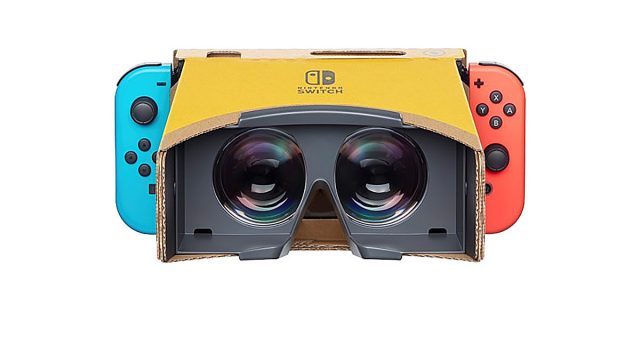
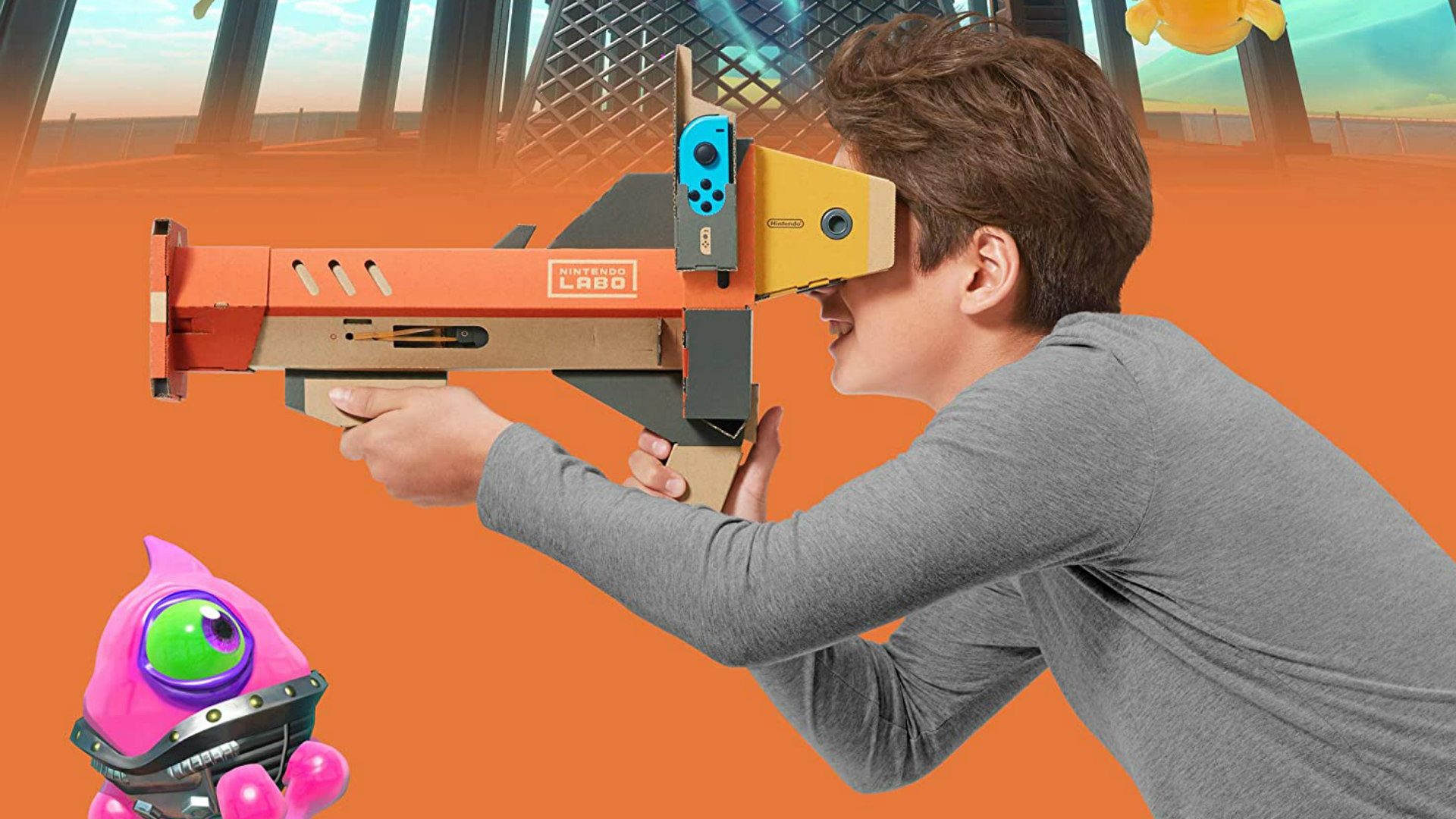
Released in 2019, Nintendo’s Labo: Toy-Con 04 VR Kit was the company first public experiment in modern VR, which included a cardboard holder and lenses, letting Switch owners slot in the handheld console to play a variety of interesting mini-games, many of which included their own one-off DIY cardboard gadgets.

Now, after the company’s big Nintendo Direct livestream yesterday, which included the unveiling on its $450 Switch 2 handheld, the company says Labo VR simply won’t work on its next-gen console—fairly obvious, since Switch 2’s 7.9 inch (~20cm) display is larger than the original’s 6.2 inch (15.75cm) display.

“The Nintendo Switch 2 console cannot be inserted into the Toy-Con VR Goggles accessory, so this game cannot be played,” Nintendo confirms in its official Switch 2 game compatibility guide.

Image courtesy Nintendo

That also means you won’t be able to play any of the Nintendo titles that support basic VR viewing on that higher-res (but larger), higher frame rate display, which included The Legend of Zelda: Breath of the Wild, Super Mario Odyssey, and Super Smash Bros. Ultimate.

That said, the company introduced Labo VR well after the launch of the original Switch, which came out in 2017, so it’s possible the Japanese gaming giant could have something else up its sleeve, again moving in its usual slow and deliberate manner.

For now, there are only really a few measly crumbs of hope. In 2024 Nintendo published a patent for a VR add-on similar to Labo VR, which seems closer to a Cardboard-like design that would slot into a Nintendo handheld. Granted, all products have patents, but not all patents have products, so it could just be another case of Nintendo marking territory rather than creating a product as such.

There was also a rumor in late 2023 that Nintendo was partnering with Google to create a standalone headset, although we’ve heard nothing since. Instead, Google seems to be focusing on developing its Android XR operating system for the upcoming Samsung Project Moohan mixed reality headset.

To dive a little deeper, check out why we think Nintendo hasn’t made a real VR headset yet. And nope, Virtual Boy definitely doesn’t count.

The post Nintendo Switch 2 Won’t Support the Original ‘Labo VR’ Kit appeared first on Road to VR.

Nikon’s Z5 II is the cheapest full-frame camera yet with internal RAW video

After years of lagging behind rivals when it comes to video capture (and then suddenly buying cinema camera manufacturer RED), Nikon is pushing new boundaries in that area. Its latest salvo is the $1,699 24-megapixel full-frame Z5 II, perhaps the cheapest mirrorless camera so far to support internal RAW video. It also offers improved autofocus with new AI powers, cleaner images and enhanced image stabilization. 

The Z5 II is a wholesale remake of the original Z5 and that starts with video. While still limited to 4K 30 fps and cropped 4K 60 fps, it can now capture those formats internally using the company’s 12-bit N-RAW format with N-log, along with 10-bit H.265 and 8-bit H.264. Interestingly, it will record in N-RAW to SDXC UHS-II cards, since the camera lacks high-speed CFexpress slots. That likely means you’ll need to buy very fast (and expensive) cards and that the N-RAW video will be highly compressed. Still, it’s a feature available on no other camera in this price range. 

Nikon's full-frame Z5 II is one of the cheapest mirrorless cameras yet with internal RAW video
Nikon

Nikon is also promising much-improved autofocus bolstered by a new image-processing engine and tech borrowed from its high-end Z9 and Z8 models. The Z5 II can now lock onto subjects more quickly, particularly human eyes, faces and bodies, and works in lower light down to -10 EV, compared to -3 EV before. Meanwhile, the AI system can detect up to nine subject types ranging from animals (including a Bird Detection mode) to bicycles. When working in Auto-Area AF, these subjects can be detected, focused on, and tracked automatically. 

Native ISOs have been boosted to 100-64000 (50-204,800 in expanded modes), up from a maximum 51,200 before. That should improve noise levels across the ISO ranges, the company said. However, resolution is still limited to 24 megapixels. 

Nikon's full-frame Z5 II is one of the cheapest mirrorless cameras yet with internal RAW video
Nikon

In-body stabilization has been boosted to 7.5 stops with supported lenses, way up from five stops on the Z5. That’s paired with electronic stabilization designed to keep handheld video steady. 

The Z5 II’s viewfinder still offers a decent 3.69-million dots of resolution, but brightness has been boosted to 3,000 nits with 13 levels of brightness control. And it now comes with a 1.7-million-dot vari-angle display that’s a big improvement from the previous model’s tilt-only screen. The body now has a deeper grip to improve handling and comes with a one-touch Picture Control button for previewing and switching between color profiles in real time, matching a recent trend started by Fujifilm’s X100 VI.

Other features including dual SD UHS-II card slots, 3.5mm headphone and mic jacks, camera to cloud connectivity via Nikon’s Imaging Cloud and a new weather-proof build “on par with the Z6 III,” according to Nikon. 

The Z5 II looks to be an impressive hybrid full-frame camera for the money and rivals Sony and Canon don’t really have anything in the same price range that can match it. However, it also comes at a price $300 higher than the Z5 was at launch. Still, it could tempt filmmakers and others away from similarly priced crop sensor cameras from the likes of Fujifilm and Sony. The Z5 II is now on pre-order for $1,699 (body only) or $1,999 with a 24-50mm f/4-6.3 kit lens. 

This article originally appeared on Engadget at https://www.engadget.com/cameras/nikons-z5-ii-is-the-cheapest-full-frame-camera-yet-with-internal-raw-video-113041486.html?src=rss

Open-Source Tool Designed To Throttle PC and Server Performance Based On Electricity Pricing

Robotics and machine learning engineer Naveen Kul developed WattWise, a lightweight open-source CLI tool that monitors power usage via smart plugs and throttles system performance based on electricity pricing and peak hours. Tom’s Hardware reports: The simple program, called WattWise, came about when Naveen built a dual-socket EPYC workstation with plans to add four GPUs. It’s a power-intensive setup, so he wanted a way to monitor its power consumption using a Kasa smart plug. The enthusiast has released the monitoring portion of the project to the public now, but the portion that manages clocks and power will be released later. Unfortunately, the Kasa Smart app and the Home Assistant dashboard was inconvenient and couldn’t do everything he desired. He already had a terminal window running monitoring tools like htop, nvtop, and nload, and decided to take matters into his own hands rather than dealing with yet another app.

Naveen built a terminal-based UI that shows power consumption data through Home Assistant and the TP-Link integration. The app monitors real-time power use, showing wattage and current, as well as providing historical consumption charts. More importantly, it is designed to automatically throttle CPU and GPU performance. Naveen’s power provider uses Time-of-Use (ToU) pricing, so using a lot of power during peak hours can cost significantly more. The workstation can draw as much as 1400 watts at full load, but by reducing the CPU frequency from 3.7 GHz to 1.5 GHz, he’s able to reduce consumption by about 225 watts. (No mention is made of GPU throttling, which could potentially allow for even higher power savings with a quad-GPU setup.)

Results will vary based on the hardware being used, naturally, and servers can pull far more power than a typical desktop — even one designed and used for gaming. WattWise optimizes the system’s clock speed based on the current system load, power consumption as reported by the smart plug, and the time — with the latter factoring in peak pricing. From there, it uses a Proportional-Integral (PI) controller to manage the power and adapts system parameters based on the three variables. A blog post with more information is available here.

WattWise is also available on GitHub.


Read more of this story at Slashdot.

NaNoWriMo To Close After 20 Years

NaNoWriMo, the nonprofit behind the annual novel-writing challenge, is shutting down after 20 years but will keep its websites online temporarily so users can retrieve their content. The Guardian reports: A 27-minute YouTube video posted the same day by the organization’s interim executive director Kilby Blades explained that it had to close due to ongoing financial problems, which were compounded by reputational damage. In November 2023, several community members complained to the nonprofit’s board, Blades said. They believed that staff had mishandled accusations made in May 2023 that a NaNoWriMo forum moderator was grooming children on a different website. The moderator was eventually removed, though this was for unrelated code of conduct violations and occurred “many weeks” after the initial complaints. In the wake of this, community members came forward with other complaints related to child safety on the NaNoWriMo sites.

The organization was also widely criticized last year over a statement on the use of artificial intelligence in creative writing. After stating that it did not support or explicitly condemn any approach to writing, including the use of AI, it said that the “categorical condemnation of artificial intelligence has classist and ableist undertones.” It went on to say that “not all writers have the financial ability to hire humans to help at certain phases of their writing,” and that “not all brains have same abilities … There is a wealth of reasons why individuals can’t ‘see’ the issues in their writing without help.” “We hold no belief that people will stop writing 50,000 words in November,” read Monday’s email. “Many alternatives to NaNoWriMo popped up this year, and people did find each other. In so many ways, it’s easier than it was when NaNoWriMo began in 1999 to find your writing tribe online.”


Read more of this story at Slashdot.

Five VPN Apps In the App Store Had Links To Chinese Military

A joint investigation found that at least five popular VPN apps on the App Store and Google Play have ties to Qihoo 360, a Chinese company with military links. Apple has since removed two of the apps but has not confirmed the status of the remaining three, which 9to5Mac notes have “racked up more than a million downloads.” The five apps in question are Turbo VPN, VPN Proxy Master, Thunder VPN, Snap VPN, and Signal Secure VPN (not associated with the Signal messaging app). The Financial Times reports: At least five free virtual private networks (VPNs) available through the US tech groups’ app stores have links to Shanghai-listed Qihoo 360, according to a new report by research group Tech Transparency Project, as well as additional findings by the Financial Times. Qihoo, formally known as 360 Security Technology, was sanctioned by the US in 2020 for alleged Chinese military links. The US Department of Defense later added Qihoo to a list of Chinese military-affiliated companies […] In recent recruitment listings, Guangzhou Lianchuang says its apps operate in more than 220 countries and that it has 10mn daily users. It is currently hiring for a position whose responsibilities include “monitoring and analyzing platform data.” The right candidate will be “well-versed in American culture,” the posting says.


Read more of this story at Slashdot.

Anthropic Launches an AI Chatbot Plan For Colleges and Universities

An anonymous reader quotes a report from TechCrunch: Anthropic announced on Wednesday that it’s launching a new Claude for Education tier, an answer to OpenAI’s ChatGPT Edu plan. The new tier is aimed at higher education, and gives students, faculty, and other staff access to Anthropic’s AI chatbot, Claude, with a few additional capabilities. One piece of Claude for Education is “Learning Mode,” a new feature within Claude Projects to help students develop their own critical thinking skills, rather than simply obtain answers to questions. With Learning Mode enabled, Claude will ask questions to test understanding, highlight fundamental principles behind specific problems, and provide potentially useful templates for research papers, outlines, and study guides.

Anthropic says Claude for Education comes with its standard chat interface, as well as “enterprise-grade” security and privacy controls. In a press release shared with TechCrunch ahead of launch, Anthropic said university administrators can use Claude to analyze enrollment trends and automate repetitive email responses to common inquiries. Meanwhile, students can use Claude for Education in their studies, the company suggested, such as working through calculus problems with step-by-step guidance from the AI chatbot. To help universities integrate Claude into their systems, Anthropic says it’s partnering with the company Instructure, which offers the popular education software platform Canvas. The AI startup is also teaming up with Internet2, a nonprofit organization that delivers cloud solutions for colleges.

Anthropic says that it has already struck “full campus agreements” with Northeastern University, the London School of Economics and Political Science, and Champlain College to make Claude for Education available to all students. Northeastern is a design partner — Anthropic says it’s working with the institution’s students, faculty, and staff to build best practices for AI integration, AI-powered education tools, and frameworks. Anthropic hopes to strike more of these contracts, in part through new student ambassador and AI “builder” programs, to capitalize on the growing number of students using AI in their studies.


Read more of this story at Slashdot.

India Set For $100 Billion Startup IPO Surge By 2027

According to Bloomberg, India is set for a surge in tech startup IPOs valued at around $100 billion by 2027, with major players like Flipkart, PhonePe, and Oyo preparing to go public. From a report: A report from Indian investment bank The Rainmaker Group suggests that the new wave of IPO hopefuls is in a stronger financial position than their predecessors. Many of the startups that were listed during the 2021-2022 boom struggled post-IPO, with fintech firm Paytm losing roughly 63% of its value and beauty retailer Nykaa slipping 4% since going public.

“The financial health of companies set to list in the next two years is significantly better than those that went public earlier,” said Kashyap Chanchani, managing partner at Rainmaker. He noted that two-thirds of the firms eyeing IPOs are already profitable and have improved transparency, making them more attractive to investors.


Read more of this story at Slashdot.

RFK Jr.‘s bloodbath at HHS: Blowback grows as losses become clearer

Last week, Health Secretary and anti-vaccine advocate Robert F. Kennedy Jr. announced the Trump administration would hack off nearly a quarter of employees at the Department of Health and Human Services, which oversees critical agencies including the Food and Drug Administration (FDA), the Centers for Disease Control and Prevention (CDC), the National Institutes of Health (NIH), and the Centers for Medicare and Medicaid Services (CMS).

The downsizing includes pushing out about 10,000 full-time employees through early retirements, deferred resignations, and other efforts. Another 10,000 will be laid off in a brutal restructuring, bringing the total HHS workforce from 82,000 to 62,000.

“This will be a painful period,” Kennedy said in a video announcement last week. Early yesterday morning, the pain began.

Read full article

Comments

I Wore Two Oura Rings to See If the Finger You Use Actually Matters

We may earn a commission from links on this page.

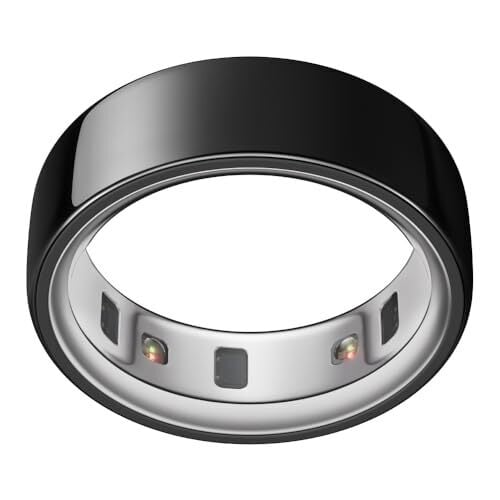
I’ve always preferred to wear my Oura ring on my ring finger. The company says that “for optimal performance and accuracy,” it’s best to wear it on your index finger, but that any finger can work. And if you ask longtime Oura users, you’ll get a variety of opinions. Does it really matter which finger you use? I realized I have the perfect way to test this—I have two gen 3 rings that fit my index and my ring fingers. I wore both for nearly two weeks to compare their readings and answer the question once and for all. 

How I set up my experiment

As I explained in my four-year retrospective, I’ve worn quite a few Oura rings over the years. My current unit is a gen 3 ring (the slightly older model) that I wear on my ring finger. I also had a gen 3 that fit my index finger, so I could wear both to bed for a few days and compare their readings. 

I actually wore three rings, but left one of them off my results because it turned out to be redundant. This one was a duplicate of the one I had on my ring finger, so I wore it on the other hand’s ring finger. It was a nearly-dead one that I had replaced when its battery wore out. It still had just enough juice to make it through each night’s sleep so long as I charged it the next day. The readings were pretty much the same as my other ring finger, though, so I left this data off my results chart for clarity’s sake. 

For this experiment, I needed to pair each ring to a different account on a different phone. The things I do for you, dear readers. Since the accounts were all working from different (or nonexistent) baseline data, I avoided any scores that the app calculates based on your personal history. I stuck with readings like resting heart rate, heart rate variability, and sleep time. The one score I kept was sleep efficiency, since that combines multiple measurements from the same night.

My results

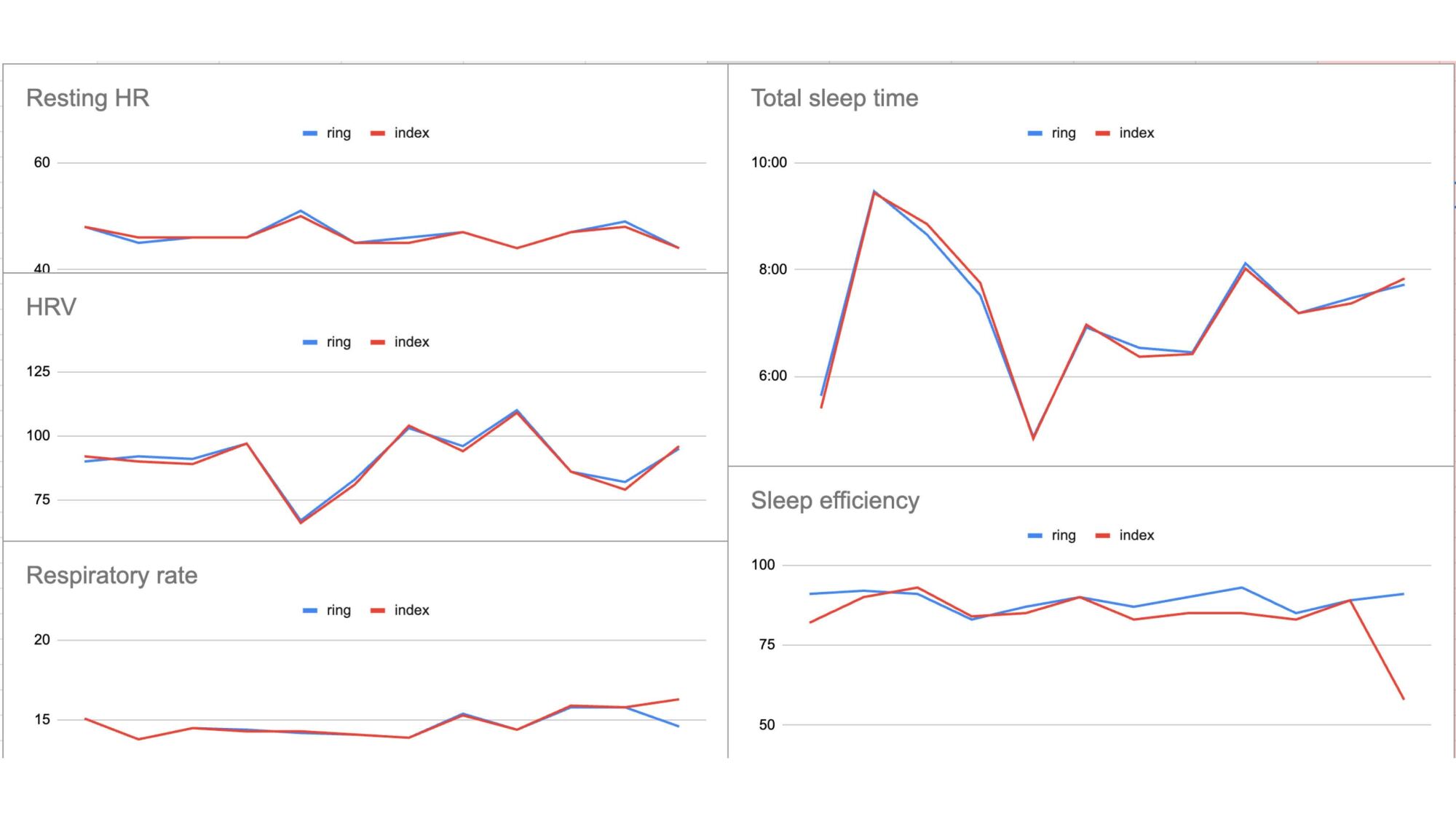
Five graphs showing RHR, HRV, respiratory rate, sleep time, and sleep efficiency. The lines from both rings are nearly identical.

Credit: Beth Skwarecki

I’ve always felt like my ring finger readings are as good as my index finger readings, but now I have data to prove it. Look at these charts! The readings are often identical, and always close. There was one day where the two readings differed—it’s the very last day, with different respiratory rates and sleep efficiency. On that day, my second ring-finger ring (data not shown) matched the other ring-finger ring, suggesting that it’s the index finger that was the outlier.

Overall, the different fingers give readings that are much closer to each other than the different devices from this comparison (for that experiment, I wore Oura, Garmin, Whoop, Apple, and Fitbit devices at the same time).

Any of the three placements I used would be perfectly good for daily wear. So why does Oura say your index finger is best? I reached out to the company for more information.

What Oura says 

The gen 3 and 4 Oura rings work on any finger, an Oura spokesperson told me by email, so long as the ring fits “tightly and securely” around the base of the finger. So why the preference for the index finger? It turns out that’s the finger where most people have the easiest time getting a good fit. 

Specifically: “We suggest avoiding fingers with large knuckles where the base is significantly narrower, which can affect fit and sensor contact. This is why we generally recommend the index finger. If that’s not comfortable or preferred, the middle or ring finger are also good alternatives. All three fingers have larger blood vessels, which help optimize PPG pulse monitoring.” (PPG refers to photoplethysmography, the optical sensor system that picks up your pulse from your finger.)

So if your ring finger has a big bony knuckle, you’ll need a larger size ring to get over the knuckle, and that ring won’t be able to sit snugly against the base of your finger. I have no problem getting a secure fit on my ring finger, but I can see that my thumb has a large enough knuckle it probably wouldn’t work well with the ring. 

Another issue with sizing is that the Oura ring doesn’t come in half sizes, so you may not be able to find the perfect size for your preferred finger. That said, the gen 3 rings feel about a half-size smaller than the gen 4 rings at the same numbered size, so playing around with both sizing kits may help you to find the perfect fit if you’re not picky about which version of the ring you end up with.

Bill Gates Celebrates Microsoft’s 50th By Releasing Altair BASIC Source Code

To mark Microsoft’s 50th anniversary, Bill Gates has released the original Altair BASIC source code he co-wrote with Paul Allen, calling it the “coolest code” he’s ever written and a symbol of the company’s humble beginnings. Thurrott reports: “Before there was Office or Windows 95 or Xbox or AI, there was Altair BASIC,” Bill Gates writes on his Gates Notes website. “In 1975, Paul Allen and I created Microsoft because we believed in our vision of a computer on every desk and in every home. Five decades later, Microsoft continues to innovate new ways to make life easier and work more productive. Making it 50 years is a huge accomplishment, and we couldn’t have done it without incredible leaders like Steve Ballmer and Satya Nadella, along with the many people who have worked at Microsoft over the years.”

Today, Gates says that the 50th anniversary of Microsoft is “bittersweet,” and that it feels like yesterday when he and Allen “hunched over the PDP-10 in Harvard’s computer lab, writing the code that would become the first product of our new company.” That code, he says, remains “the coolest code I’ve ever written to this day … I still get a kick out of seeing it, even all these years later.”


Read more of this story at Slashdot.

Linux 6.15 Further Improves AMD P-State Driver, Intel Dev Tackles A ~50% SPEC Regression

Linux power management and ACPI subsystems maintainer Rafael Wysocki last week sent out the assortment of ACPI/PM material for the new Linux 6.15 kernel cycle. The AMD P-State driver continues to be heavy with its code churn and there have been various other optimizations and code clean-ups. The CPUIdle Menu governor also received some performance tuning worth mentioning…