Snow storms in the northern Rockies are depositing metal contaminants from mines in the Pacific Northwest, according to new research.

Snow storms in the northern Rockies are depositing metal contaminants from mines in the Pacific Northwest, according to new research.
Midjourney has released the alpha version of V7, which it says is an “entirely new” AI image generation model and is much smarter at processing your text prompts. The image quality of its output is noticeably higher, the Midjourney team says, and can create better textures, bodies and hands. AI image generators typically struggle with creating accurate depictions of hands, but based on photos posted by some users on their socials, V7 is capable of spitting out some photorealistic images of human hands.
The new model comes with a feature called “Draft Mode,” which can render images at half the speed the program usually takes. Its results are rougher and less detailed, but it will cost half of what a standard generation costs. Midjourney says Draft Mode is the best way to iterate on ideas. You can use it, say, if you’re collaborating with someone and just spitballing ideas with them — it works with voice, so you don’t even have to type out each other’s suggestions — or if you’re unsure what kind of vibe you’re going for. If you like an image Midjourney creates in Draft Mode, you can click “enhance” or “vary” on it to re-render it at full quality.
At launch, V7 will have Turbo and Relax modes for standard rendering, with the former costing twice as much as a normal speed job on the V6 model. Midjourney needs more time to optimize its standard speed mode for V7, but it will make the option available in the future. The new mode is missing more capabilities, as well, including upscaling, editing and retexturing, which will fall back to the program’s V6 model for now. Midjourney promises to roll out new updates for the model every week or two over the next two months.
To be able to test the alpha version of V7, you’ll have to unlock your personalization profile first. Midjourney describes personalization as “a style assistant for your image creations,” since it teaches the AI your visual preferences. You’ll have to rank at least 200 pairs of images to create a V7 Global Personalization Profile and test the model. Personalization is switched on by default for the V7, but you’ll be able to switch it off if you want.
One of the most exciting new features for our new V7 model is something we call “Draft Mode”. Draft mode is half the cost and 10 times the speed and it might be the best way to iterate on ideas ever. Try it with voice, think out loud and let our ideas flow like liquid dreams. pic.twitter.com/ANfTMC6Ej1
— Midjourney (@midjourney) April 4, 2025
This article originally appeared on Engadget at https://www.engadget.com/ai/midjourney-launches-its-new-v7-ai-image-model-that-can-process-text-prompts-better-134546883.html?src=rss
At last year’s
Linux Storage, Filesystem,
Memory-Management, and BPF Summit (LSFMM+BPF), there was a discussion about atomic writes that was
accompanied by patches to support the feature in the block layer, and for
direct I/O on XFS. That
work was merged, but another piece of that discussion concerned adding the
feature for buffered I/O, in part because the PostgreSQL database currently
has to jump through hoops to ensure that its writes are not “torn”
(partially written) when there is an error or crash. Luis Chamberlain led
a combined storage and filesystem track at this year’s summit to revisit
the idea of providing atomic (or untorn) writes for buffered I/O.
We may earn a commission from links on this page.
While I was a total pizza hater as a child, I’ve come around as an adult—maybe a little too far around. It’s one of my favorite things to make at home. I use pizza as a vehicle for using up leftovers, and as a way to save money on lunch. Through years of pizza trials, I’ve collected some sure-fire tricks that ensure the best homemade pizza possible. Flavorful crusts, balanced toppings, and even browning—you don’t need to have a home kitchen outfitted with a giant stone kiln to reach pizza perfection. But you do need to know a few things.

When you have a meal with as few as three components, you want to ensure each one is bringing excellent flavor to the table. Crust may be humble, but it doesn’t have to be bland. The most reliable way to ensure your crust is flavorful is to build in a cold-fermentation period of 24 to 72 hours. Like a good sourdough bread, the flavors that develop during fermentation are what give the dough that characteristic tang.
Read here for the details on aging your dough in the fridge. This simple cold fermentation method is the easiest way to achieve a bubbly, chewy crust with lots of flavor.
The most abandoned pizza element is the outer crust ring, and there’s nothing sadder than seeing a plate with a bunch of bald, gnawed-on bread. But with all the flavor in the middle of the pie, no one can be blamed for jettisoning bland, dry carbs. Instead, make the crust a point of interest.
Since the outer ring of crust is essentially a colossal breadstick, think of the tastiest bread stick you’ve ever had and get inspired. Brush the crust with some olive oil, sprinkle on some salt and raid your spice cabinet. Read here for some crust-centric inspiration, like using garlic powder, sesame seeds, garam masala, or a thin layer of mayonnaise along the edge. Heck, you can even try this method and stuff your crust with hot dogs. Avoid dried herbs, however, as they may burn in the high-temperature oven.
There’s a reason you see pizza advertised as “brick oven” and “wood fired.” The texture and flavor is best when cooked at high temperatures where humidity doesn’t stand a chance. The most indispensable tool in your pizza creator toolkit is a pizza stone or steel. Using either one is going to work considerably better than squishing your 72-hour fermented dough onto a thin metal sheet pan.
Using one of these surfaces is ideal for pizzas (and breads) because they can withstand extremely high temperatures and retain even heating for the duration of the cooking time. Both surfaces will vaporize moisture and leave you with that sought-after crispy, charred bottom.
Although it’s completely a matter of preference, the stone and steel each have a few unique qualities, and one might suit you better than the other. Read here to see the details on both and which one might be better for your needs. I’ve used both for pizza and I’ve never been disappointed.
In order to get as close as possible to a wood-fired brick oven, make sure your home oven and the baking steel, stone, or cast iron skillet have had ample time to come to temperature. Preheat the oven with the skillet or stone inside for at least 20 minutes. These baking surfaces are thicker and more dense than sheet trays, so they take longer to heat up. Once they have had plenty of time in a 450℉ to 500℉ oven, the material will hold onto that heat even after you slide a cold pizza on top of it. Ensuring the surface is as hot as the rest of the oven will guarantee a crispy bottom crust and generous rise.
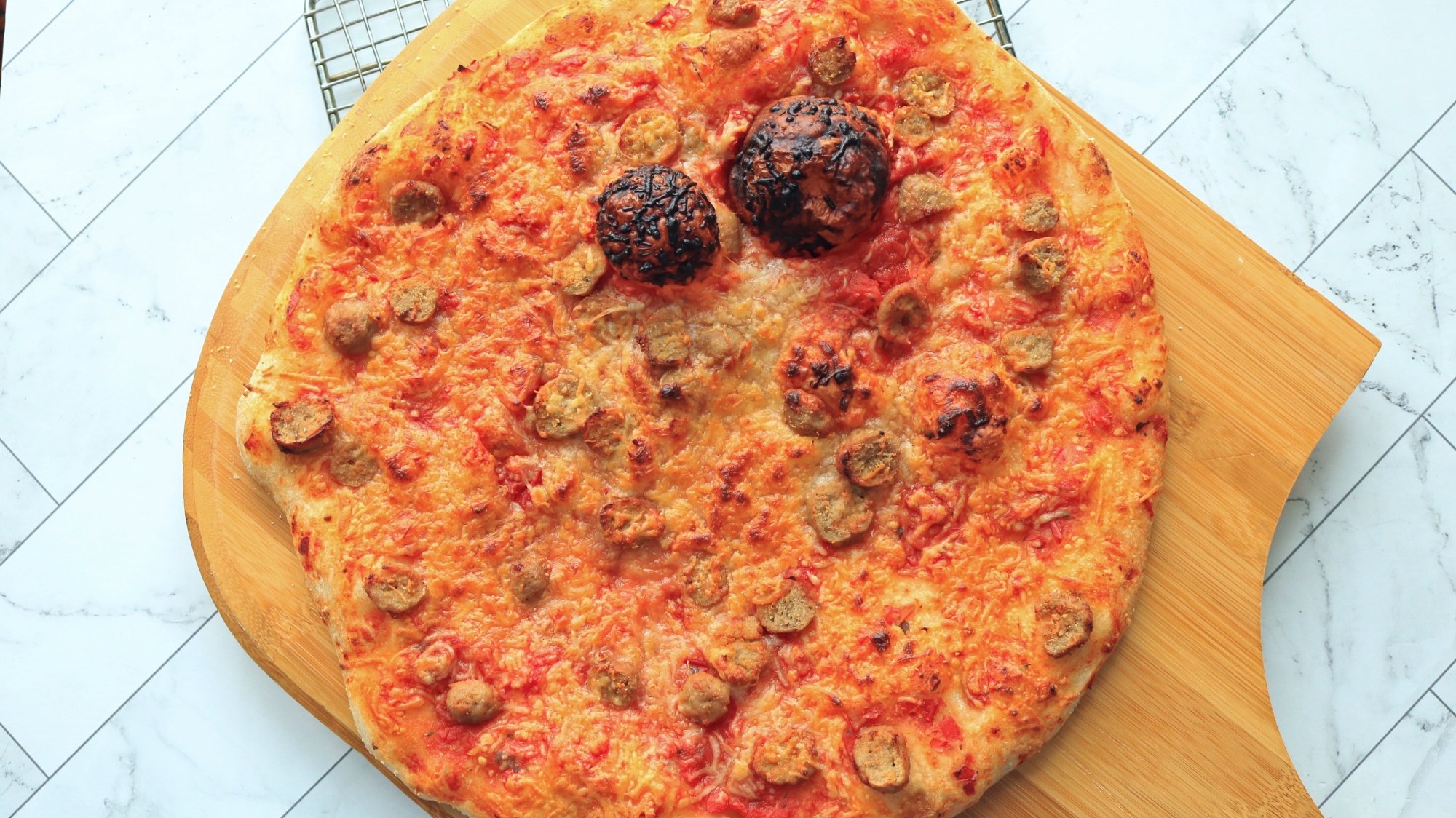
You can craft the most flavorful dough and top it with premium toppings, but if you can’t get that pizza safely onto your baking stone without it crumpling into a heap, then you’ve only made a plate of disappointment for dinner. Just like a baseball player wouldn’t go up to bat with a broomstick, you shouldn’t be slingin’ pies with the wrong equipment. Get a pizza peel. A pizza peel is that wood or metal thing you’ve probably seen the staff at pizzerias use to slide the pie in and out of the oven.
Conceptually simple, a pizza peel is just a thin, flat, wide surface with a handle. You’ll want a peel that’s wide enough for the biggest pizza you think you’ll make (you can always make a smaller pizza, but you can’t go bigger). The handle makes controlling the peel easier and keeps your hands safe from the oven heat. For a home oven, choose one with a shorter handle, around 9 to 12 inches; those extra long handles are for deeper industrial ovens. They can be made of different materials, like wood or metal, but they function equally, so, batter’s choice. Be sure to transfer your finished pizza onto a cutting board for slicing to ensure the longevity of your peel.
The best slices strike a balance–highlighting every ingredient without overloading the crust. Seems easy enough, but when you’re at home, faced with a naked circle of dough, it’s easy to get excited and black out. Once you finally come to, there are four cups of mushrooms and a ream of bacon drowning in Rao’s. Where did the dough even go?
It’s normal to be a toppings enthusiast—you want to make sure that every bite has every ingredient. Sadly, overloading the dough can lead to misfortune. For one thing, it can become too heavy for the yeast-leavened crust to rise to its potential. Lots of toppings, especially sauce, add to the moisture content and can lead to a soggy crust. Worst case scenario, heavy toppings with a lot of liquid can actually make your crust stick to the peel, causing your pizza to rip on its way into the oven.
The best solution is to use a light hand. A modest smear of sauce goes a long way, scatter your toppings mindfully, and don’t forget to season the outer crust. You’d be surprised how these small choices make a perfectly balanced pie.
Whether you’re dining out or cooking at home, pizza should be fun and affordable. I totally stand by cooking on a budget, but that is not the same thing as cooking with low-quality ingredients.
In order to make the best pizza, you should use ingredients that taste amazing because once the high oven heat evaporates the water away, those flavors are going to be more concentrated. When considering cost, remember that we’re going light on the toppings, so any ingredients you buy are probably going to stretch out for multiple meals. A fancy jar of sauce can be used for tonight’s pizza, tomorrow’s pasta, and Saturday’s shakshuka breakfast.
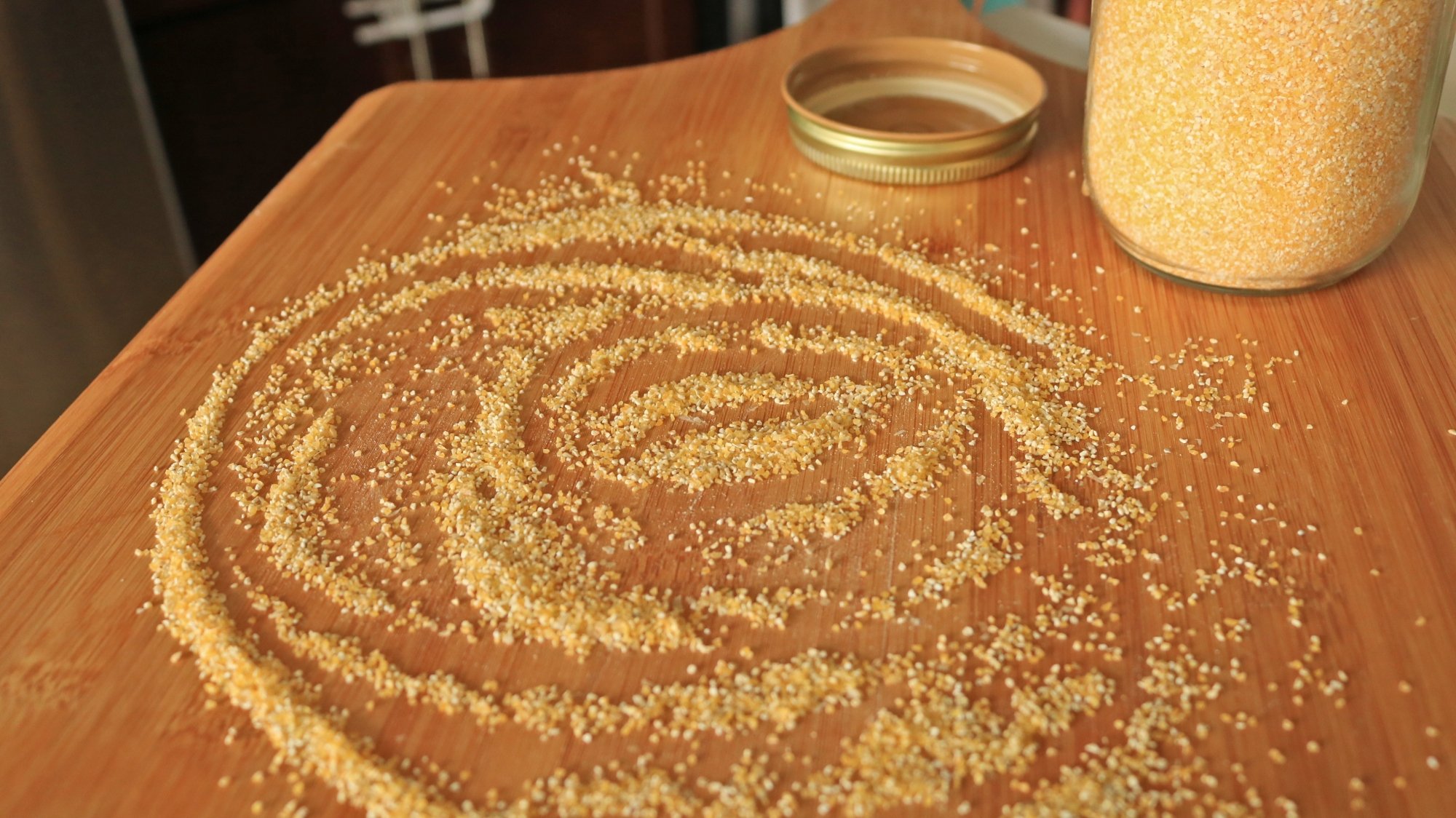
The first few times I tackled a homemade pizza, they morphed into misshapen, broken piles with cheese and sauce burned onto my baking stone. The error was not enough cornmeal.
Although it’s not an ingredient many people consider when pondering pizza, it is one of the most important. Coarse ground cornmeal creates a barrier between the sticky pizza dough and the pizza peel, functioning like spilled marbles on the ground–anything on top of them is just gonna roll right off, creating a fluid transfer of pizza from the peel onto the hot baking surface. (Unless you’re using a cast iron skillet, then you might want to frico cheese the bottom of your crust instead.)
Although you can use a few different ingredients for this purpose, cornmeal is the most widely used. Scatter a generous layer of cornmeal onto your pizza peel before you start stretching out your dough. Once you’ve stretched it to the desired size, place it on top of the cornmeal lined peel, grab the handle and give it a firm horizontal shake. The dough should slide freely. If it doesn’t, gently lift the dough, maybe use a bench scraper if it’s really stuck, and sprinkle some more cornmeal in there. Begin applying toppings, and as you go along, periodically stop and shake to make sure you’re not stuck.
Partially cooking certain toppings is what separates the “OK” home pizzas from the “you should open a pizzeria” home pizzas. Oh, and it can also prevent you from possibly eating undercooked meat.
Not all ingredients have to be par-cooked (cheese), but if you are a fan of sliced veggies, consider what happens when you put them on raw. Peppers, onions, mushrooms, and many other vegetables will become desiccated, shriveled and chewy in a 475℉ oven. Some vegetables, like tomatoes or zucchini carry excess moisture and will create a big puddle on your pie.
Sautéing watery vegetables briefly with oil and salt while your dough is proofing will ensure excess moisture comes out, and the coating of oil will prevent dryness occurring with other ingredients. Meats, on the other hand, aren’t in danger of drying out in the oven, but will release excess water and fat while cooking. Par-cooking bacon or sausage beforehand will allow you to control how much grease ends up on your pizza, while also ensuring the thicker cuts are completely cooked through.

China said Friday that it will impose reciprocal 34% tariffs on all imports from the United States from April 10, making good on a promise to strike back after US President Donald Trump escalated a global trade war. CNN: On Wednesday, Trump unveiled an additional 34% tariff on all Chinese goods imported into the US, in a move poised to cause a major reset of relations and worsen trade tensions between the world’s two largest economies.
“This practice of the US is not in line with international trade rules, seriously undermines China’s legitimate rights and interests, and is a typical unilateral bullying practice,” China’s State Council Tariff Commission said in a statement announcing its retaliatory tariffs. Since returning to power in January, Trump had already levied two tranches of 10% additional duties on all Chinese imports, which the White House said was necessary to stem the flow of illicit fentanyl from the country to the US. Combined with pre-existing tariffs, that means Chinese goods arriving in the US would be effectively subject to tariffs of well over 54%.


Read more of this story at Slashdot.
Sci-fi shooter-smasher Harpagun expands to PlayStation VR2 and Steam next week with a full campaign.
Already available in Early Access on Quest, Something Random’s sci-fi shooter Harpagun allows you to interact with a post-post-apocalyptic environment in on-rails levels. As a space junker armed with Magnetic Rays in both arms, you have a plethora of industrial artifacts and mushroom-like aliens at your disposal to toss around. You can find the trailer below.
0:00
Touted as a full campaign, Harpagun’s distance-grabbing lends itself to physics-based action while uncovering what transpired on this desolate, retro-futuristic planet that was once heavily populated. With plenty of dark humor, upbeat music, and cartoon-inspired animations once the story concludes, the arcade and arena modes await those craving more combat challenges.
No PlayStation VR2-specific enhancements have been announced yet, but it’s worth noting that Something Random’s last entry on the system, Toy Trains, took advantage of the Adaptive Triggers. Harpagun represents a strong departure from cozy track-building; however, after three years in development, this wacky action game promises satisfying first-person smashing designed exclusively for VR.
Harpagun arrives on PlayStation VR2 and Steam on April 10, and it is already available in Early Access on Quest.
Yonghong Song brought a story about tracking down the cause of a strange verifier error
message to the 2025 Linux Storage, Filesystem, Memory-Management, and BPF
Summit. He then presented some possible ways to improve Clang’s user experience for
anyone running into the same class of error in the future. Toward the end of his
allotted time, he also discussed the problems with optimizations that change the
signature of functions — a problem that José Marchesi had also brought up in
the previous session.
You have to go all the way back to the Nintendo 64 to play the most recent 3D Donkey Kong game. But without a new mainline Zelda or Mario title (Mario Kart World doesn’t quite count) queued up for the Switch 2’s launch in June, Nintendo’s favorite ape is getting some time to shine in Donkey Kong Bananza. And after getting a chance to play a demo of the game prior to its release on July 17, I have to say I’m loving this glowed-up gorilla.
Now, I’m not entirely sure how DK went from the jungle to being stuck in the banana mines because the demo just kind of dropped me in without a ton of context. Regardless, there’s no doubt that this is the best the gorilla has ever looked. He’s got a fresh, almost cell-shaded look not entirely dissimilar to the art style seen in recent Zelda games, along with a more youthful and expressive appearance. And it seems his time spent digging has garnered him some new skills as well, which include the ability to punch, dig and butt stomp his way below, into and through all sorts of terrain, with dirt flying everywhere as you do it.
This opens up a world (cave?) of exploration because now DK can tunnel through to new locations or shape his surroundings with a ground pound, though there’s also the usual assortment of actions like running and jumping. This type of freedom immediately changes the way you tackle obstacles compared to a standard platformer. Nearly everything is destructible in some way, and between digging, rolling or simply chucking giant rocks at foes, it feels like there are multiple ways to get where you need to go.
Granted, you still have familiar tropes like collecting jeweled bananas and of course, a companion in the form of a friendly purple rock monster that rides on DK’s shoulder. But make no mistake, this ain’t the same country DK has swung through before. Thanks to all of its new traversal mechanics, in a lot of ways, Bananza reminds me more of Mario Galaxy than Odyssey. It’s just swapped out the gravity-bending physics for bombastic spelunking.
That said, while the game looks great and handles well, I do have some initial concerns. After a while, the constant digging and rock smashing felt a bit button-mashy. Plus, all the ricks and detritus that gets kicked up becomes a distraction, as I would kind of like to actually see where I’m going. There really is a ton of earth that needs moving. This makes me wonder if the game is aimed at a slightly younger audience similar to a lot of Kirby games rather than something meant to appeal to older players.
But even though I only had a brief time with the game, I saw more than enough to make me want to come back. And alongside Mario Kart World, it’s exceedingly clear that Donkey Kong Bananza is part of Nintendo’s giant punch that will carry the Switch 2 through its launch window.
This article originally appeared on Engadget at https://www.engadget.com/gaming/nintendo/donkey-kong-bananza-hands-on-a-funky-fresh-take-on-nintendos-favorite-ape-130057272.html?src=rss
Windows has a rather patchy history when it comes to native photo viewing and editing, but the latest Photos app is quietly becoming genuinely useful. It may not be a full-blown Photoshop alternative, but it does now offer a variety of basic editing functions, and even some generative AI to help get your images looking their best.
Photos combines a photo viewer and a photo editor, so the first job it takes on when you load it up is cataloging all the pictures you’ve got on your system. Use the gear icon at the top to change the configuration of this photo viewer, and the buttons just above the images to alter the order that pictures are shown in.
When you’re ready to start editing, double-click on any image in your library. This brings up a larger view, with links to OneDrive and Microsoft Designer, but we’re interested in the built-in editing tools—click the Edit button (on the top left).

The screen you’ll see first is for cropping and rotating. Click and drag the handles at the corner of the selected picture to change how it’s cropped (hold down Shift to maintain the aspect ratio), or click and drag along the degrees slider to alter the angle. You’ve got buttons along the bottom for 90-degree rotations, horizontal and vertical flips, and specific aspect ratio crops (like 4:3 or 16:9).
At any point during your editing, you can click the undo button (the backwards arrow, top left) to go back a step, or the Reset button to go all the way back to the beginning—a reassuring safety net if you’re worried about ruining a favorite photo. Your save options, meanwhile, are up in the top right: You can overwrite the existing image, save a new image, or copy the image to the clipboard.
The icons along the top (which come with text labels, if the app window is big enough) will guide you to the other parts of the program: You’ve got Crop, Adjustment, Filter, Mark-up, Erase, and Background. Any changes you make on one panel will be kept as you move to other panels, but aren’t committed to disk until you save the file.
Switch to the Adjustment screen and you’ll see a familiar row of sliders, covering attributes like Brightness, Exposure, and Contrast—make changes to any of these sliders and the results are shown straight away. For example, increase the Shadows value to see more detail in the dark areas of an image, or lower the Highlights value to get more clarity in the brighter areas.
You’ve also got color-related sliders, so you’re able to adjust the image Saturation, Warmth, Tint, and Sharpness too. For more precise control on any of these sliders, click the slider you want to adjust, then use the arrow keys on the keyboard (either left and right or up and down) to change the values.

Beyond the basics, there’s more you can do with your images in Windows Photos. On the Filter screen you’ve got a variety of preset filters you can apply to your image, just like the original Instagram—everything from Punch to Vintage. There’s also an Auto Enhance button, which tells Photos to use its best judgment in tweaking the image characteristics so that it’s looking its best.
The next tab is Mark-up, which lets you scribble all over your selected image, using the different pens and highlighters you’ll find down underneath the image (click and hold on any of the pen icons to change the line thickness and color). It’s not the most sophisticated of tools, but it lets you quickly annotate images (such as screenshots).
Then there’s the Erase screen, where you can remove objects from the photo using generative AI. Draw across the part of the picture you want to remove, and the tool will do the rest, drawing in a new background based on the surrounding pixels and other visual clues. Toggle off the Auto apply button for more control over the selection mask and when the removal is applied.
The last screen is Background. Photos will attempt to highlight the object and the people in the foreground, and you’re then able to apply a blur to the background or remove it completely. If the background isn’t detected well enough automatically, enable the Background brush tool option, and you can make minor adjustments.
Without offering any sort of selection tools, healing brushes, or layer editing, Photos does cover most of the tweaks that most people are going to want to do with their images—with no extra downloads or payment required once Windows is installed. If you need something different that isn’t Adobe’s market leading software, try our other Photoshop alternatives.
An anonymous reader quotes a report from Reuters: Visa has offered Apple roughly $100 million to take over the tech giant’s credit card partnership from Mastercard, the Wall Street Journal reported on Tuesday, citing sources familiar with the matter. Visa has made a bold push to secure the Apple Card, offering an upfront payment typically reserved for the largest card programs, WSJ reported. American Express is also trying to unseat Mastercard to win the Apple card. Amex is looking to become the card’s issuer as well as the network, the report said, citing the sources. Goldman Sachs ended its partnership with Apple in late 2023 as the Wall Street bank retreated from consumer lending.


Read more of this story at Slashdot.
Did you know you can get off-road SPD cleats for 3-bolt road cycling shoes? I didn’t, but it turns out Chinese pedal brand Wellgo makes them.
I knew adaptors existed to enable you to fit 2-bolt SPD cleats to 3-bolt cycling shoes, but until recently, I didn’t realise anyone made cleats specifically for this purpose.
Priced at around £20 to £30, depending on where you shop, Wellgo’s RC-8 cleats are a little pricier than standard cleats. They might save you from needing to buy a new set of shoes, though.

It makes sense when you think about it – most road-style cycling shoes come with holes for 3-bolt cleats nowadays, but there’s a huge market out there for spin bikes (from brands such as Peloton), which often have pedals designed for 2-bolt SPD cleats.
Given this, there’s clearly also demand for adaptors to make 3-bolt cycling shoes compatible with spin bike pedals.
If you’re wondering why all of this is relevant, let me fill you in.
Last week, my colleague Warren wrote a deep dive on the subject of road pedals and the lack of innovation in that space recently.
Having just spent a week away at Bike Connection’s Spring 2025 road and gravel event, where I used a set of Shimano RX801 gravel shoes and Favero’s Assioma PRO MX SPD power meter pedals for both on- and off-road riding, it begged the question, why do I bother with single-sided ‘road’ pedals at all?

Sure, they’re a little lighter, but it’s unlikely that makes any difference to my performance on the bike.
In my experience, SPD pedals also offer just as much ‘retention’ as road pedals, yet are much easier to clip into because they’re dual-sided.
Of course, one thing causing inertia to switching from 3- to 2-bolt cleats is that few of my cycling shoes will accommodate them (why all cycling shoes aren’t drilled for both kinds of cleats will forever be a mystery to me).
As noted, I could use adaptors (such as Shimano’s SM-SH41 Cleat Adapters), but their cheap plastic construction would feel out of place on high-end road shoes, such as my favourite Specialized S-Works 7 Lace.
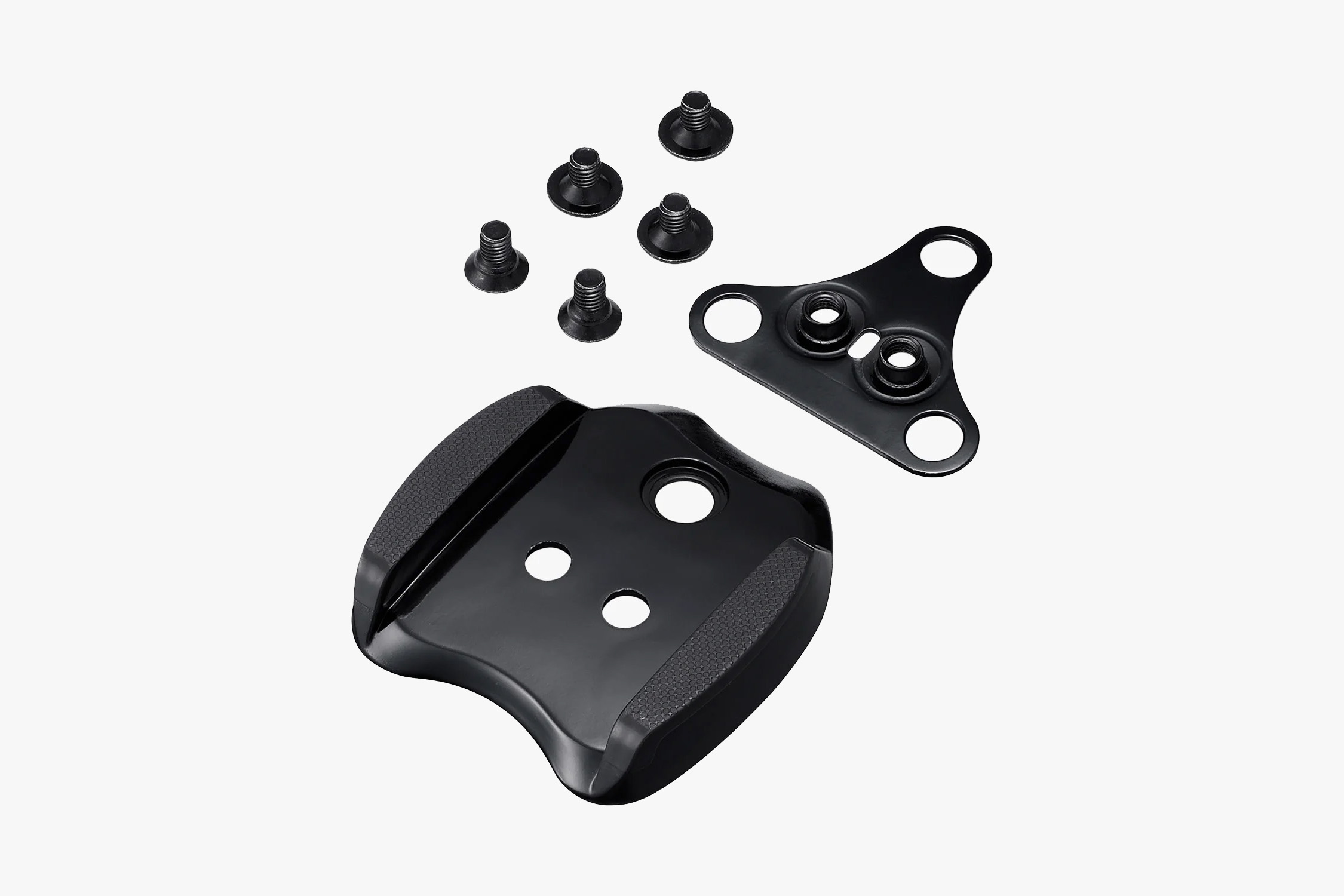
These all-metal Wellgo cleats, on the other hand, look much slicker (although a quick read of some online reviews reveals they might not be as durable as you’d hope).
Because the cleats aren’t recessed, it appears they’d increase your shoe stack height somewhat, but perhaps that would be a worthwhile trade-off for the increased ease of use.
Will I be switching to SPD pedals for all my riding, then? Probably not – for better or worse, I’ve got too many sets of power meter pedals (a first-world problem if ever there was one), making a wholesale switch impractical.
Whether you should switch systems is another question, though – if you’re not heavily invested in expensive 3-bolt pedal systems, there doesn’t seem to be much to lose.
SQUIRREL_13201497


Alta, the studio behind A Township Tale (2021), showed off the latest work on its upcoming dungeon-crawler extraction game REAVE, revealing more about its various systems in addition to a new dungeon and enemy—all of it very much still a work-in-progress.
The game’s latest dev log (seen below) shows off a number of newly updated systems and areas, the largest in the game so far, a massive room called ‘The Fallen Bastion’.
“What we have here is a blend of open space, tight spaces, as well as well-lit areas and those pitch black areas to ambush other players, and […] hide from enemies,” says lead environment artist Sean Ellis.
At its center is a magical pedestal, where the player can summon a boss battle—in this case a giant spider, which is currently being used for testing purposes.

“Don’t worry, [the spider] won’t be around forever, but it helps us get a feel for a real boss battles while we work on something more specific,” the studio says.
Many of the previously revealed areas are already receiving “lots of changes and improvements,” the studio says in the latest dev log, noting that some may be replaced entirely in the future.

The studio also teased a new enemy model that will replace the previous placeholder skeleton models, which come in a range of difficulty levels depending on their weapon and armor type.
As an extraction game, Reave is also making heavy use of its in-world currency called ‘Echoes’ (likely a placeholder name) that can be collected in a vessel that fills up over time.
Killing enemies releases Echoes, however they can also be found in the environment, essentially spurring the player to slay, search and use their Echoes to access loot rooms in addition to spending them to extract from dungeons, returning you back to the social space so you can sell your loot.
You can get a chance to become a tester by joining the game’s Discord (invite link), which periodically offers up limited slots. There’s no word on when the game will release, however the studio has confirmed it’s targeting Quest 2 and above and PC VR headsets at this time.
The post ‘Township Tale’ Studio Shows Off Latest Work on Upcoming Dungeon-crawler ‘REAVE’ appeared first on Road to VR.
The trailer for M3GAN 2.0 is here and if you were expecting a copy-paste of the original’s horror vibe, you may be surprised. Instead, the sequel is embracing a turn towards action in vein of Terminator 2 complete with upgrades to the original doll, a robot showdown and… a wing suit?
Set to arrive in theaters only on June 27, the film is once again directed by Gerard Johnstone and features returning cast members Allison Williams, Violet McGraw, Brian Jordan Alvarez and Jen Van Epps, along with newcomer Ivanna Sakhno (Pacific Rim: Uprising) as Amelia.
It’s two years after the original M3GAN doll went on a murderous rampage (including that wild dance sequence) and was eventually destroyed. Since then, its designer Gemma has become an author and voice for more robust AI oversight, while Gemma’s niece Cady (who M3GAN 1.0 swore to protect) is now a teenager.
Meanwhile, M3GAN’s AI tech was stolen by a defense contractor to build super robot solidier Amelia. However, the experiment went awry and Amelia seeks murderous revenge against the AI’s creators, particularly Gemma and Cady. Despite misgivings (mostly over the fact that M3GAN tried to murder her), Gemma decides to resurrect the OG doll to combat Amelia, and even adds updates to make her faster, stronger and, well, taller.
That sets up a showdown between M3GAN and Amelia, complete with guns, a Teletubby version of M3GAN, catchphrases (“hold on to your vagina”) and the aforementioned wingsuit sequence. It has strong shades of Terminator 2 with the original robot doll protecting a key character from a new upgraded model. That’s married with a camp aesthetic, lots of blood and even a creepy usage of Britney Spears’ Oops I did it Again.
This article originally appeared on Engadget at https://www.engadget.com/entertainment/watch-m3gan-switch-from-horror-to-action-in-the-new-sequel-trailer-125749110.html?src=rss
Boosted human-computer interface promises better communication for patients who lost ability to speakSome smart cookies have implemented a brain-computer interface that can synthesize speech from thought in near real-time.…
Andrew Cunningham and Lee Hutchinson have spent decades of their lives with Robert Jordan and Brandon Sanderson’s Wheel of Time books, and they previously brought that knowledge to bear as they recapped each first season episode and second season episode of Amazon’s WoT TV series. Now we’re back in the saddle for season 3—along with insights, jokes, and the occasional wild theory.
These recaps won’t cover every element of every episode, but they will contain major spoilers for the show and the book series. We’ll do our best to not spoil major future events from the books, but there’s always the danger that something might slip out. If you want to stay completely unspoiled and haven’t read the books, these recaps aren’t for you.
New episodes of The Wheel of Time season 3 will be posted for Amazon Prime subscribers every Thursday. This write-up covers episode six, “The Shadow in the Night,” which was released on April 3.
Amazon has started testing another AI-powered feature called “Buy for Me,” which allows the e-commerce company to make purchases for you from other websites. Specifically, from the actual website of a brand you’re looking looking up. The experience is built into the Amazon app. When you search for an item from a particular brand, you may see a section of results labeled “Shop brand sites directly” separate from the results you’ll get from Amazon and its third-party sellers.
If you click on the “Buy for Me” button underneath an item in the separate results section, you’ll be taken to a product detail page right inside the Amazon app. The company says the page will provide relevant product information similar to the product details in Amazon’s own listings. Amazon will purchase the item for you from the brand’s website if you decide to go through with the transaction. It uses agentic AI, a type of AI that doesn’t need human intervention, to provide your name, address and payment details for the checkout process. Your details are encrypted, Amazon says, and it will not be able to see your previous and future orders from brands’ websites. You’ll receive a confirmation email from the brand store itself for your purchase, but you can track your order within the Amazon app through the new Buy for Me Orders tab in the Your Orders page.
The company didn’t say whether it’s getting a commission from your purchases made through the experimental feature, but that’s probably the end goal for it. For now, the feature is still in beta and will only be available to a subset of customers on the US on its iOS and Amazon apps. The test will also only feature a limited number of brand stores and products for now. Just a few days ago, Amazon also released an AI-powered feature called “Interests,” which can process prompts in every day language related to your, well, interests. You can, for instance, type in “Brewing tools and gadgets for coffee lovers” to get relevant notifications for Amazon’s deals and offerings.
This article originally appeared on Engadget at https://www.engadget.com/ai/amazons-buy-for-me-ai-will-purchase-stuff-from-third-party-websites-123036361.html?src=rss
We may earn a commission from links on this page. Deal pricing and availability subject to change after time of publication.
A factory-reconditioned Garmin Venu 2 Plus is on sale for $259.99 on Woot for the next five days or until it sells out—whichever comes first.
Now, it’s important to note—this is a refurbished unit. That means it may show signs of use, but it’s been serviced and tested to work as it should, and it comes with a 90-day manufacturer warranty. If you’re particular about buying brand-new gadgets, this might not be your pick. Still, considering new ones usually go for $449, it’s a solid $190 in savings. Shipping is free if you have Prime, and while most places are covered, they won’t deliver to Alaska, Hawaii, or P.O. boxes.
This model snagged CNET’s Editor’s Choice award in 2022, and even now, it holds up well in the growing crowd of fitness-smartwatch hybrids. Building on the original Venu 2 (read its in-depth review here), it adds phone call capabilities and voice assistant support (when paired with a smartphone). You can send messages, ask questions, or schedule a reminder, all without pulling out your phone. That said, it’s not fully hands-free—you’ll need to tap a shortcut on the watch to activate the assistant. There’s also wifi support, which means your data syncs automatically when you’re back in range, plus you can download playlists from Spotify or Amazon Music straight to the watch. It can store a few hundred songs, if you prefer running without your phone. Battery life clocks in at about nine days, even with GPS workouts and sleep tracking running daily.
Fitness-wise, it covers the bases and then some. It supports over 25 workout modes, from yoga and pilates to HIIT and strength training, with guided animations that are surprisingly useful—especially if you’ve ever half-guessed your way through a new move. Garmin added HIIT-specific workouts too, with categories like EMOM and AMRAP broken down by muscle group and intensity. There’s also the Health Snapshot feature, which gives you a quick two-minute scan of heart rate, respiration, and stress levels. For Android users, the watch plays especially nice with notifications—giving you per-app control. iPhone users don’t get that same level of customization, notes this ZDNet review.

Steam is currently offering up to 85% off top VR games such as No Man’s Sky, Superhot VR and Arizona Sunshine 2.
The post Some must-play VR Games are dirt cheap right now appeared first on MIXED Reality News.
Following the release of rival Anthropic’s Claude for Education, OpenAI has announced that its $20 ChatGPT Plus tier will be free for college students until the end of May. The offer comes just in time for final exams and will provide features like OpenAI’s most advanced LLM, GPT-4o and an all-new image generation tool.
“We are offering a Plus discount for students on a limited-time basis in the US and Canada,” the company wrote in a FAQ. “This is an experimental consumer program and we may or may not expand this to more schools and countries over time.”
On top of the aforementioned features, ChatGPT Plus will offer students benefits like priority access during peak usage times and higher message limits. It’ll also grant them access to OpenAI’s Deep Research, a tool that can create reports from hundreds of online sources.
AI tools have been widely adopted by students for research and other uses, with open AI recently saying that a third of young adults aged 18-24 already use ChatGPT, with much of that directed toward studies. Anthropic is going even farther than OpenAI to tap into that market with Claude for Education, by introducing a Learning mode specifically designed to guide students to a solution, rather than providing answers outright.
Where Anthropic is positioning itself more as a tutor to students, OpenAI is simply giving them access to its most powerful research tools. That brings up the subject of academic integrity and whether AI tools are doing work that students should be doing themselves. Anthropic’s approach may be more palatable to institutions — along with its Claude for Education launch, the company announced that it partnered with several universities and colleges to make the new product free for students.
This article originally appeared on Engadget at https://www.engadget.com/ai/openais-20-chatgpt-plus-is-now-free-for-college-students-until-the-end-of-may-120037778.html?src=rss