Iconic Lick From Weezer’s ‘Buddy Holly’ Played On 31 Unusual Instruments

Because percussion makes everything better (besides a headache), this is a video of musician Joe Porter (previously) performing the iconic guitar lick from Weezer’s ‘Buddy Holly’ on 31 unusual instruments. “In a row?” IN A ROW. It was a fun watch. Personally, I’m only master of one instrument: my voice. I try to think of it as the sort of rumbling bass God might sing with, but it’s been likened to a dog farting on a pleather sofa.

Learn How to Train Your Dragon in Pet Simulator ‘Eggy’, Coming to Quest 3 Next Month

Spunge Games, the studio behind VR action-shooter Dead Second (2022), announced a mixed reality pet simulator called Eggy, letting you take care of your very own pet dragon.

Coming to Quest 3/S on April 17th, Eggy opens a rift in your house, putting you between the Dragon Realm and your boring old dragon-less living room.

In Eggy, a glowing egg and an ancient Book of Lore appears—essentially a manual on how to train your dragon (no relation).

The book only has clues on how to care for your bouncy little dragon bud though, including recopies for elemental teas, and which magical spells you’ll use to nurture your dragon from hatchling to flight.

Spunge Games says in Eggy you’ll learn to feed, train, and bond with your dragon, with every choice affecting how your dragon grows and what skills it attains as they prepare for its inevitable return to the Dragon Realm.

In the meantime, you can wishlist Eggy over on the Horizon Store for Quest 3 and 3S before it launches on April 17th.

The post Learn How to Train Your Dragon in Pet Simulator ‘Eggy’, Coming to Quest 3 Next Month appeared first on Road to VR.

Meta Is Experimenting With AI-Generated Comments, for Some Reason

It’s no surprise that companies continue to experiment with new AI features. Artificial intelligence has been the center of emerging tech for nearly three years now, and it’s not going anywhere anytime soon. But whether you love generative AI or you find it useless, I think we can all agree that using AI to write Instagram comments is pretty stupid.

And yet, Meta appears to be testing exactly that. As reported by SocialMediaToday, some Instagram accounts are now seeing a new icon to the left of the text field after choosing to leave a comment on a post. When you tap this icon (a pencil with a star), you pull up a new Meta AI menu, which presents a series of comment choices, presumably based on whatever content you happen to be looking at. In one example, the bot offers three choices: “Cute living room setup,” “Love the cozy atmosphere,” or “Great photo shoot location.” Could there be anything lazier than this?

I’ll admit: This news took me a bit off guard. I know Meta is comfortable shoving its AI experiments down our throats—often with no way to turn them off. But even as it becomes more difficult to avoid AI-generated content on Meta’s platforms, I didn’t think the company would offload the “effort” of having to write comments to the bots.

I can’t imagine many (or perhaps any) Instagram users are so busy or exhausted that they’d rather scroll through an AI’s idea of what to say rather than say something themselves. The human-generated comments on Instagram pages are already low-effort as it is; not to mention, there are too many comments from bots on social media platforms. Do we really want more bots in the comments, only this time sent to us by real people?

We need to stop letting AI make the decisions

This is just an experiment, and likely a limited one at that. For what it’s worth, I do not have the option on my Instagram account, so I guess I’m forced to think up my own comments for now. (Or at least open another app to ask a different AI to generate a comment for me.) But this experiment speaks to the current state of AI in tech: offering solutions to problems that don’t exist. Writing comments isn’t hard, and yet, someone at Meta thought there was a usefulness—a market—for AI-generated comments. They probably want more training data for their AI machine, which tracks, considering companies are running out of internet for models to learn from. But that doesn’t mean we should be okay with outsourcing all human tasks to AI.

That’s what bugs me most: ceding so many of our cognitive tasks and decisions to the machines. If you’re on Instagram, you’re already letting the algorithm choose the content you see. Please don’t hand over even more decisions to the machines, as low-effort as those decisions may be. If you do see the experiment on your end, I encourage you not to use it; both for your own sake, as well as depriving Meta of any more training data generated by its user base for free.

Heads Up, AMD’s Ryzen 7 9800X3D Is Finally Back In Stock At MSRP

Heads Up, AMD's Ryzen 7 9800X3D Is Finally Back In Stock At MSRP
If you’ve been itching to build a new gaming PC (or upgrade an existing one) around AMD’s Ryzen 7 9800X3D, we have good news—it’s finally back in stock at multiple retailers, and priced at MSRP. Yes, availability and MSRP pricing are things we celebrate these days, as stock shortages, price hikes (whether due to tariffs or anything else),

Real-time Space Strategy Game ‘BattleGroupVR’ Sequel Announced for Quest & PC VR Headsets

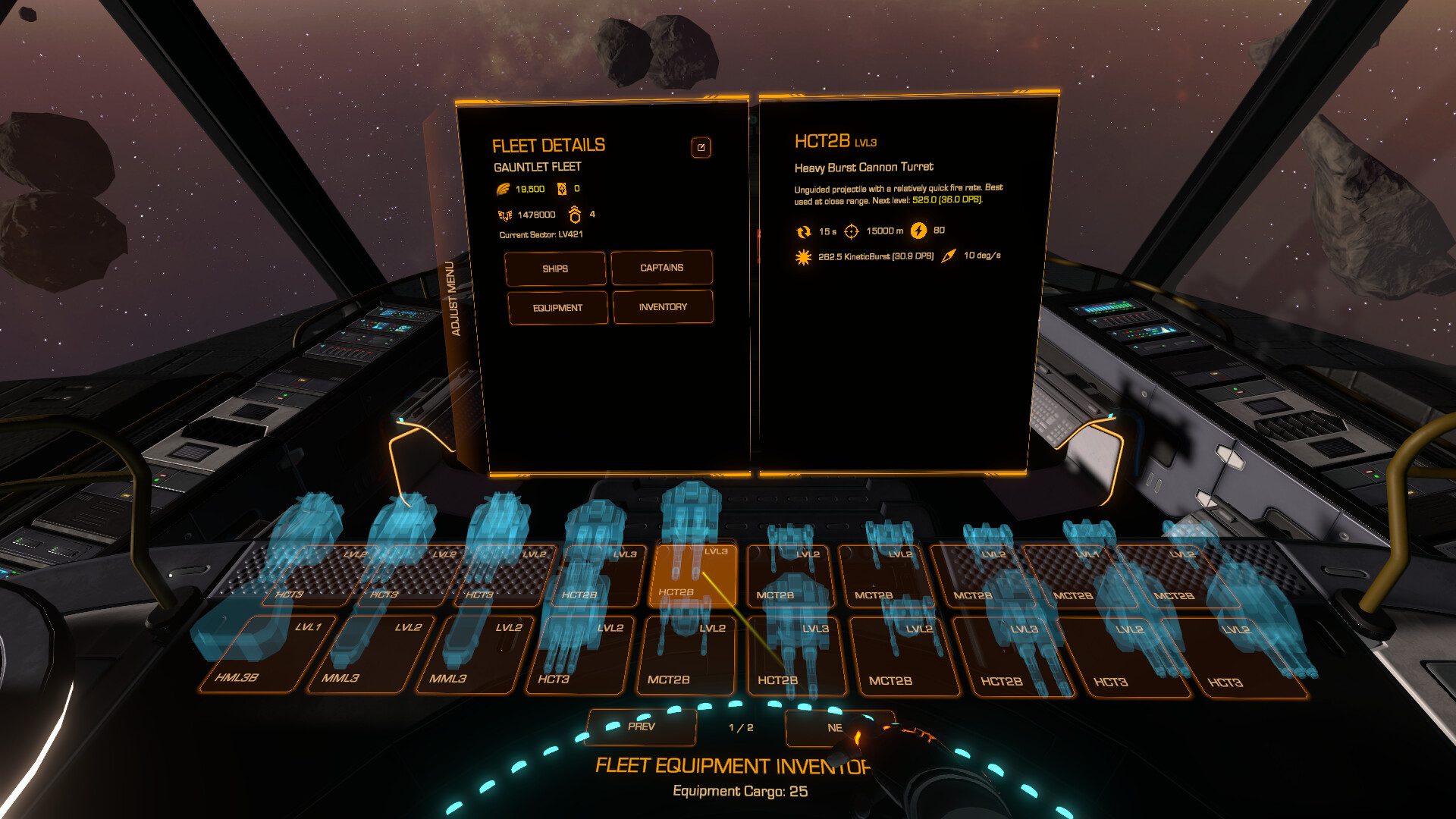
Indie studio SpaceOwl Games announced the upcoming sequel to real-time strategy game BattleGroupVR (2022).

Developed by solo dev ‘KommanderKen’, BattleGroupVR2 is coming to Quest and SteamVR headsets soon, promising to be a “bigger, better sequel” to the single player real-time space strategy game.

Space Owl says BattleGroupVR2 adds a heap of new features, including open-world exploration, missions, mining, trading, and fleet-building.

1 of 4


Image courtesy SpaceOwl Games


Image courtesy SpaceOwl Games


Image courtesy SpaceOwl Games


Image courtesy SpaceOwl Games

Here’s how Space Owl describes the action:

Take command of your fleet in a vast galaxy where strategy, skill, and cunning determine your fate. In this real-time space strategy game, you don’t just command from above — you lead from the bridge of your own flagship, making tactical decisions in the heat of battle. Choose your path across multiple game modes, each offering unique challenges and ways to expand your power.

BattleGroupVR2 is said to include a fully 3D space battlefield, letting you direct your forces, coordinate fleet formations, and execute precise attacks against increasingly difficult AI enemies.

There’s no release window yet, although you can now wishlist the game on the Horizon Store for Quest 2 and above, and on Steam for PC VR headsets.

The post Real-time Space Strategy Game ‘BattleGroupVR’ Sequel Announced for Quest & PC VR Headsets appeared first on Road to VR.

TikTok Has a New Security Checkup Dashboard

Social media apps aren’t exactly known for their privacy and security features, but TikTok users are getting a little bit of help with a built-in tool to monitor their account security and keep their information safe. The new Security Checkup dashboard shows you where your TikTok security is lacking with step-by-step guidance to update your settings.

How to use TikTok’s Security Checkup

To get to your security dashboard on TikTok, go to your profile and tap Settings and privacy > Security and permissions. Security Checkup will show you which settings have been completed and which need attention, with guidance on how to update each:

  • Adding an email and/or phone number for account recovery

  • Enabling two-step verification

  • Creating a passkey with device-based authentication like Face ID or Touch Unlock

  • Checking which devices are logged into your account (and removing any that are unauthorized or aren’t in use)

TikTok will also flag “unusual account behavior” and log it in your Security Checkup for you to review.

TikTok isn’t the only social media platform with this kind of security feature. Meta, for example, has a Security Checkup on Instagram that guides users through improving their password strength, enabling two-factor authentication, and adding account recovery information. You can find this in your profile settings (tap the three vertical lines) and go to Accounts Center > Password and Security > Security Checkup to select the account you want to evaluate.

Google has a similar dashboard that shows you where you are signed in with your Google account, apps and services you’ve connected, recent security activity, sign-in and recovery settings, and recommendations for improving your account security.

How to Add Your Passport to Google Wallet

Airport security will probably always be somewhat of a hassle, but one friction point you can potentially minimize is utilizing a digital ID in place of a physical one—and if you’re an Android user, your passport added to Google Wallet’s ID pass is officially accepted by TSA.

It’s certainly convenient to not have to carry or keep track of your physical passport when you travel, and a digital passport in ID pass can get you through security screening if you don’t have a REAL ID after the requirements take effect on May 7. That said, your digital passport doesn’t completely replace your physical document, which you’ll still need when traveling internationally and in situations where you have to present identification outside of TSA.

Here’s how to digitize your passport and other forms of identification for the next time you fly.

How to add your passport to Google Wallet

To add your passport to ID pass, open Google Wallet on your Android device and tap the + icon. Tap ID > ID pass, then hit the Get Started button. The app will guide you through a series of instructions to scan your passport and your face, which will take several minutes to complete and approve.

You can also add a state-issued ID (like your driver’s license) to Google Wallet using this same process—just select ID > Driver’s license or state ID instead of ID pass.

How to use other digital IDs for travel

At the time of writing, Apple Wallet and Samsung Wallet do not support passports, and ID pass for Google Wallet is the only digital passport accepted at TSA for domestic travel. However, your driver’s license or identification card stored in Apple Wallet, Google Wallet, Samsung Wallet, or a state-specific mobile app can also get you through security screening if issued by one of the following states:

  • Arizona

  • California

  • Colorado

  • Georgia

  • Hawaii

  • Iowa

  • Louisiana

  • Maryland

  • New Mexico

  • New York

  • Ohio

  • Puerto Rico

  • Utah

  • Virginia

  • West Virginia

To add an ID to Apple Wallet, tap the + icon in the app and hit Driver’s License or State ID. Select your eligible state, and follow the prompts. For Samsung Wallet, click the + icon, tap Digital IDs > Driver’s License/State ID, and follow the instructions to scan your ID and face and authenticate with your fingerprint or a PIN. Note that some of the states listed (like New York and Utah) require you to use a state-specific app for digital IDs instead of your device’s digital wallet.

Even if you have a digital ID, don’t count on being able to use it at every airport. Check TSA’s digital ID map before you leave home to make sure any airport you are traveling through accepts eligible digital IDs.

(On the flip side, TSA PreCheck members traveling on Delta Airlines, United Airlines, and Alaska Airlines out of a select number of airports can clear security solely on facial recognition—no physical or digital documents required.)


Varjo XR-4 To Require $2500/Year Subscription For Advanced Mixed Reality Features

From next week, Varjo XR-4 headsets will require a $2500/year subscription for certain advanced mixed reality features.

Who Are Varjo? What Is XR-4?

Varjo is a Finland-based startup that sells ultra-high-end tethered PC VR headsets with very high central angular resolution, mainly intended for enterprise and government users.

The Varjo XR-4 series is the company’s latest offering, launched at the very end of 2023. The standard Varjo XR-4 is priced at $3990, while the XR-4 Focal Edition with camera autofocus costs $9990.

The subscription will come with the launch of the revamped Varjo Base, the Windows software required to use and manage Varjo headsets, on March 25. It will see the feature set split into the free Varjo Base and paid Varjo Base Pro.

Varjo Base Pro will support advanced mixed reality features such as chroma key, blend-control mask, developer access to the passthrough cameras, passthrough post-processing shaders, environment cubemap for realistic lighting of virtual objects, 3D reconstruction, and programmatic control of the camera settings. It will also be required to use third party tracking systems other than the built-in inside-out tracking or SteamVR base station tracking, to use motion platforms, and to use eye tracking for purposes other than foveated rendering.

Varjo says that XR-4 headsets purchased before March 25 will still retain all features they previously had, but new purchases will need the Pro subscription for these features.

Varjo Base Pro will be available for $2500/year per headset, or $5000 for a perpetual license.

Separately, Varjo plans to add built-in controller-free hand tracking for all XR-4 headsets for free, not requiring the current Ultraleap hardware accessory, and will share more details on this “soon”.

Varjo XR-4: Stunning VR With Disappointing Passthrough
Read our hands-on impressions of Varjo XR-4 Focal Edition, which the company claimed provides VR and MR “indistinguishable from natural sight”.
UploadVRDavid Heaney

You can read our hands-on impressions of Varjo XR-4 here, wherein we describe how the headset lives up to its VR promises, while its mixed reality is disappointing given the price.

Even the worst mass extinction had its oases

About 252 million years ago, volcanic eruptions triggered the End-Permian Mass Extinction, also known as the Great Dying. About 96 percent of marine species were wiped out—but were things just as grim on land?

Scientists have debated whether this event caused nearly as much terrestrial destruction. Now, researchers from the Nanjing Institute of Geology and Paleontology (NIGPAS) of the Chinese Academy of Sciences suggest that terrestrial ecosystems did not suffer nearly as much as the oceans.

Led by paleontologist Feng Liu, the NIGPAS team found evidence for refugiums, oases where life thrived despite the devastation. Not only did these refugiums give life a chance to survive the mass extinction event, which lasted 200,000 years, but they are now thought to have been crucial to rebuilding ecosystems in much less time than was previously assumed.

Read full article

Comments