
The Marvel anti-hero’s cameo in Daredevil: Born Again teases what’s to come for the character.

The Marvel anti-hero’s cameo in Daredevil: Born Again teases what’s to come for the character.
The Hearth Helper offered a way for Hearth Display users to text or email customer service to upload a list of events on their behalf, like bulk uploading a school calendar worth of events. But as of March 19, the feature has also been integrated into the Hearth mobile app.
Hearth Display, the modern family management tool that functions as a shared digital calendar and to-do list tracker, used to include a feature called “Hearth Helper” directly in the 27-inch tablet. When I reviewed the Hearth Display to see if the device was worth the hype (and the $699 price tag, often on sale for $599), I found the feature odd. You might assume that the “Helper” would be a direct line to customer service support, but pressing the “Helper” option only offered a pop-up giving users a phone number and email address if they wanted AI to bulk upload a list of events. You could send the Helper a picture of your kid’s school calendar, for example, and the AI would import the data onto your Hearth calendar. I thought little of the feature since then—personally, the last thing I would want is for AI to bulk upload something like a school calendar and clog my calendar—but when Hearth moved the feature into the mobile app, I became curious again.
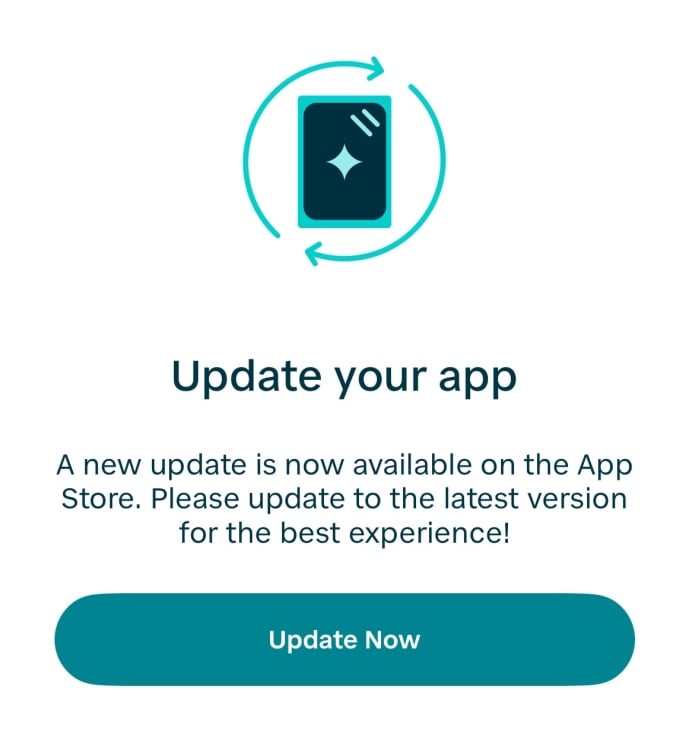
To use the Hearth Helper in the mobile app, start by updating the Hearth app on your device. You may not even be able to use your Hearth app without having this latest update: When I opened the app, a full-screen notification prompted me to update to the latest version. It was the first time I was ever forced to update the app; in the past, I manually updated the app for bug fixes and newer features, like the ability to update Routines directly from my phone or to add custom to-do lists.
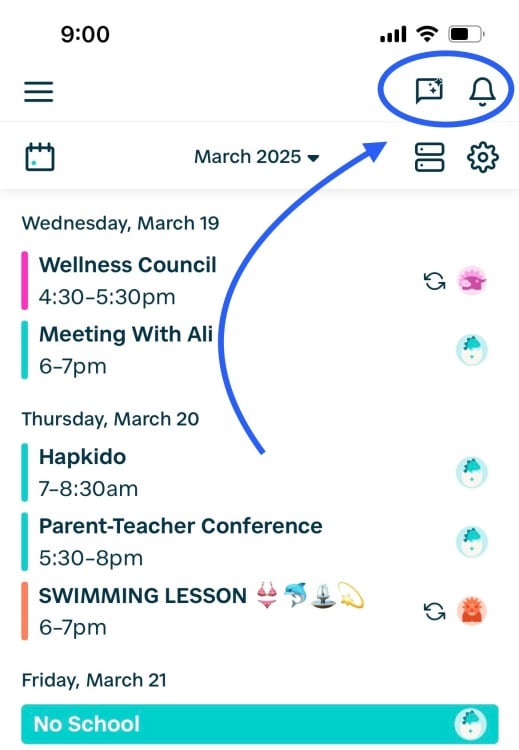
After updating the app, the Hearth Helper can be found as a chat box icon on the top-right of the screen, next to the notification bell. It’s an intuitive spot for a “Helper” feature, and much better placed than before: Prior to this latest update, Hearth Helper had a prominent tab on the Hearth Display right next to the Calendar, Lists, and Routines menus. Since the update, my Hearth Display tablet pushed a pop-up announcement that read, “Hearth Helper has moved!” with an explanation that their AI calendar companion now lives on the app.
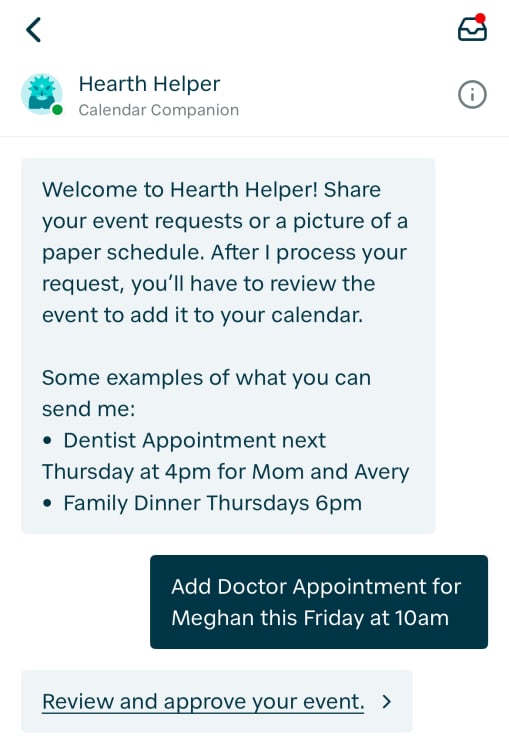
Testing the new mobile-based Hearth Helper was straightforward enough: The AI prompt gives examples of the types of wording you can use to have calendar events created for you, or you can simply press the camera icon to take a picture of a schedule or upload one that you already have saved on your phone. I was mostly curious how long it would take to process a request. Here’s how the Hearth Helper looks when you click the icon on the mobile app:
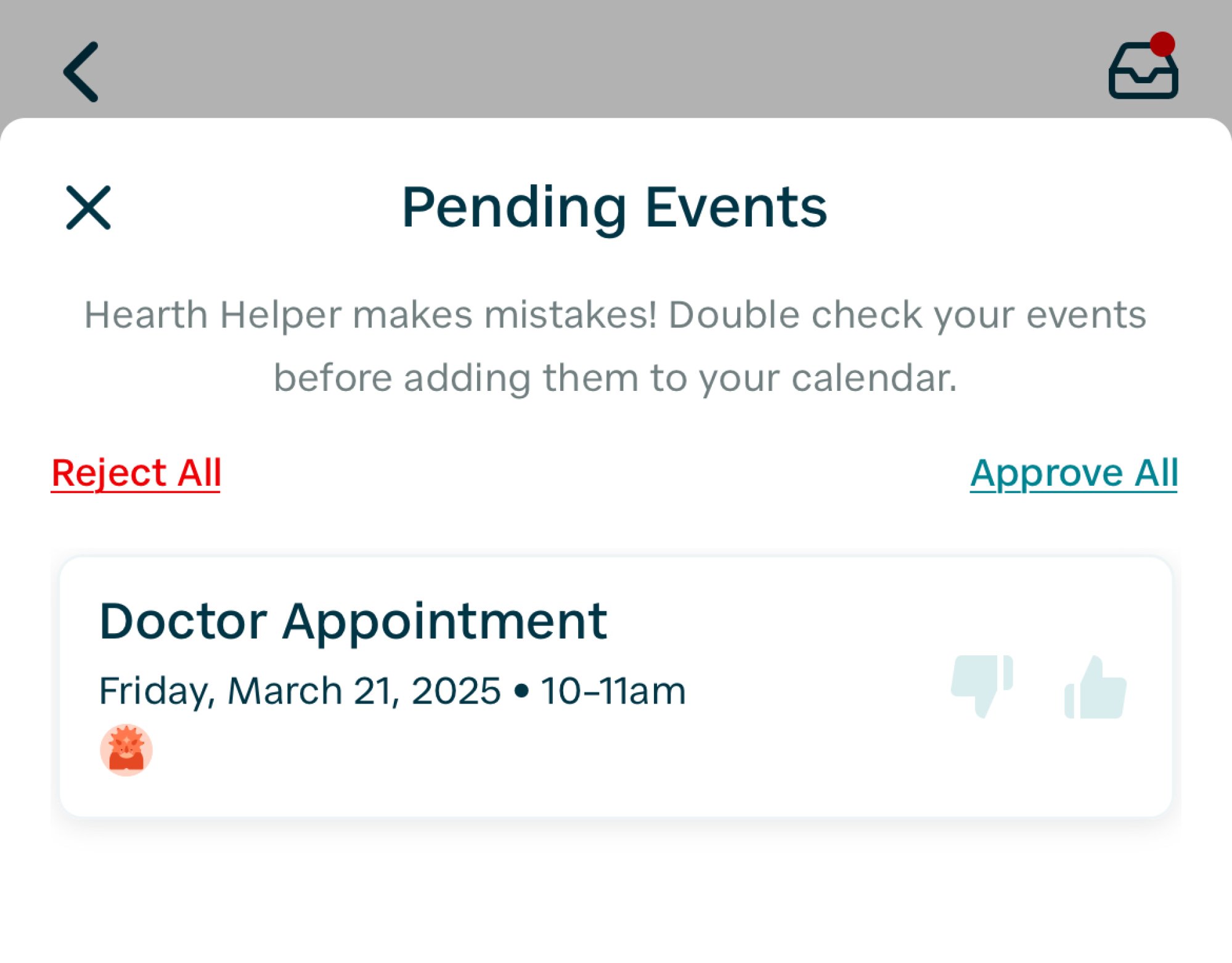
When I asked Hearth Helper to create a basic appointment, it took under a minute for the AI to send me a “Pending Event” for approval. It comes with the option to “Accept All” or “Reject All” for users who submitted multiple events, or a basic thumbs up or thumbs down for each pending event.
To give it a more complicated task, I downloaded a PDF of the New York City Department of Education 2024-2025 School Year Calendar to see how long it would take to upload a full calendar. Then I realized the Hearth Helper can’t upload PDFs. I took a picture of my screen instead—not a screenshot, but a lazy, grainy photo of my laptop screen that I took from my phone camera—which included eight events across two months. Surprisingly, it still took under a minute for the events to process, and the AI sent me a list of Pending Events that were formatted much better than I expected. Of course, though, if I actually wanted a full calendar of events then I would need to send multiple pictures to span the year.
There are a few notable limitations of the Hearth Helper though, which include:
You can’t upload Lists (like to-do or grocery lists) or Routines with the Hearth Helper.
You need to stick with basic pictures: Hearth Helper can’t upload from URLs, Word docs, Google sheets, or other formats like those.
Hearth Helper is fully run by AI. If you need help with something from a real person, you should contact support@hearthdisplay.com.
Candidly, I never expected to use the Hearth Helper for its intended purpose. One of the problems that I mention in my initial review is that I feel the premise of the Hearth Helper is pretty shaky. Call me old fashioned, but I want a “helper” to answer my customer service questions, preferably by a human, instead of bulk uploading events that I could do myself in my preferred formats. I tend to be nit-picky about calendar organization and event formats, and I assume most people who use an expensive family management device to run their home are too. But looking at these results from the Hearth Helper bulk uploader, I may have changed my mind for two reasons.
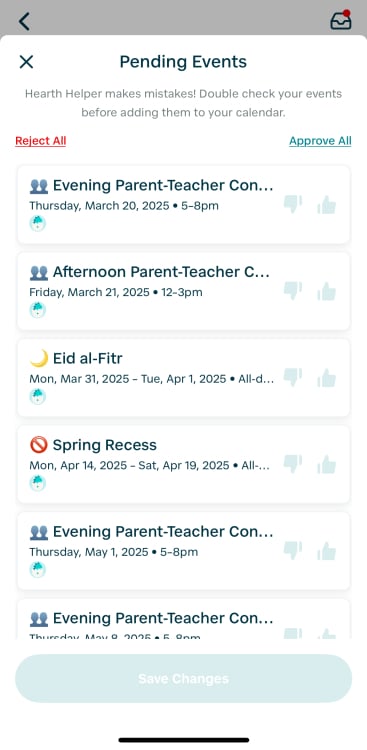
First, the events are accurate and consistently formatted; and second, the list of imported events are clickable and easy to manually edit or outright reject. My main concern was uploading an overwhelming list of poorly formatted clutter into my calendar, but that seems like less of a concern than I thought: I can just bulk upload calendars that serve as optional event suggestions that I can edit, thumbs up to approve, or thumbs down to reject. Overall, it does feel like this latest update to the Hearth Display will mean faster event management and fewer manual steps, and the Hearth Helper will be useful at back-to-school time, during planning for a new year, or whenever my kids join a new extracurricular or club.
Last year, we reported on an exciting hint of new physics in the first data analysis results from the Dark Energy Spectroscopic Instrument (DESI)—namely that the dark energy, rather than being constant, might vary over time. Granted, those hints were still below the necessary threshold to claim discovery and hence fell under the rubric of “huge, if true.”
But now we have more data from DESI, combined with other datasets, and those hints have gotten significantly stronger—so much so that Mustapha Ishak-Boushaki of the University of Texas at Dallas, who co-chairs one of the DESI working groups, said that “we are getting to the point of no return” for confirming dynamical dark energy. Ishak-Boushaki and several other DESI team members presented their results at the American Physical Society’s Global Physics Summit today in Anaheim, California. Several relevant papers have also been posted to the physics arXiv.
Einstein’s cosmological constant (lambda) implied the existence of a repulsive form of gravity. (For a more in-depth discussion of the history of the cosmological constant and its significance for dark energy, see our 2024 story.) Quantum physics holds that even the emptiest vacuum is teeming with energy in the form of “virtual” particles that wink in and out of existence, flying apart and coming together in an intricate quantum dance. This roiling sea of virtual particles could give rise to dark energy, giving the Universe a little extra push so that it can continue accelerating. The problem is that the quantum vacuum contains too much energy: roughly 10120 times too much.

If you have a tight budget but still want the best when it comes to VPNs, this deal is perfect for you!
Hasbro’s Wizards of the Coast has laid off 30 people who built Sigil, its recently released virtual tabletop experience, Polygon reports. The app allows Dungeons & Dragons players to build virtual, 3D game boards, complete with miniatures and dice, so they can play the classic tabletop roleplaying game remotely.
News of the layoffs were first shared on March 18 in a LinkedIn post from Andy Collins, the design lead on Sigil. “Today, approximately 30 talented developers (90 percent of the team) were laid off from the Sigil (virtual tabletop) team at Wizards of the Coast, including yours truly,” Collins wrote. “I wish my former colleagues success in their future endeavors. I’ll also be pulling for the crew left behind who’ll do their best to keep improving and iterating the experience we shipped last month.”
The layoffs leave Sigil with a skeleton crew of three people to support the app, Rascal reports. Sigil launched in early access on February 28, 2025 as a perk for subscribers to D&D Beyond, and early reviews found it to be both limited and a little broken.
The problems may have started even earlier, though, according to at least one Wizards of the Coast employee Rascal spoke to. Management at Hasbro, the parent company of Wizards of the Coast, were reportedly uninterested and “constantly moving goalposts.” There may have also been a fundamental misunderstanding over what Sigil was: Hasbro didn’t know the difference between a video game and the VTT (virtual tabletop) app it ultimately got.
Sigil remains live and will continue to be a perk of paying for a D&D Beyond subscription, Wizards of the Coast’s tool for playing Dungeons & Dragons virtually.
This article originally appeared on Engadget at https://www.engadget.com/gaming/hasbro-laid-off-the-team-behind-its-virtual-tabletop-app-only-weeks-after-it-was-released-214024876.html?src=rss
Lionsgate dropped a new trailer for Ballerina—or, as the studio is now calling it, From the World of John Wick: Ballerina, because what every film needs is a needlessly clunky title. There’s nothing clunky about this new trailer, however: It’s the stylized, action-packed dose of pure adrenaline one would expect from the franchise, and it ends with Ana de Armas’ titular ballerina facing off against none other than John Wick himself (Keanu Reeves).
(Spoilers for 2019’s John Wick Chapter 3: Parabellum.)
Chronologically, Ballerina takes place during the events of John Wick Chapter 3: Parabellum. As previously reported, Parabellum found Wick declared excommunicado from the High Table for killing crime lord Santino D’Antonio on the grounds of the Continental. On the run with a bounty on his head, he makes his way to the headquarters of the Ruska Roma crime syndicate, led by the Director (Anjelica Huston). That’s where we learned Wick was originally named Jardani Jovonovich and trained as an assassin with the syndicate. The Director also trains young girls to be ballerina-assassins, and one young ballerina (played by Unity Phelan) is shown rehearsing in the scene. That dancer, Eve Macarro, is the main character in Ballerina, now played by de Armas.
Typing with a keyboard is second-nature to most of us at this point. Typing on a game controller, however, is not. For as long as I’ve played games, I’ve loathed having to slowly hover my on-screen cursor over each key with a joystick. It just isn’t fun.
It seems Microsoft agrees with the challenges of game controller to keyboard inputs—especially when using a typical on-screen keyboard design for PC. As a result, the company is planning to roll out an on-screen keyboard designed for use with an Xbox controller with an upcoming version of Windows. This should, in theory, make interacting with Windows much easier when you’re locked into your controller, and away from your mouse and (physical) keyboard.
As reported by The Verge, the new on-screen keyboard has shortcuts that incorporate the buttons on your Xbox controller. As you can see from the screenshot below, “X” activates backspace, “Y” activates the space bar, the menu button activates “enter,” the left trigger activates the “&123” menu, the screen share icon actives the microphone, the left button actives the left arrow, the right button activates the right arrow, and clicking in the left stick activates caps lock.
Microsoft also notes that the keys in this mode have been aligned vertically, which it believes will support “better controller navigation patterns.” Players can be the judge when this rolls out in full, but I imagine it’ll be easier that dragging the cursor around the horizontally-aligned design of the existing on-screen keyboard. In fact, the overall experience is likely similar to the on-screen keyboard Xbox players are already used to—if you’re coming from Microsoft’s console.
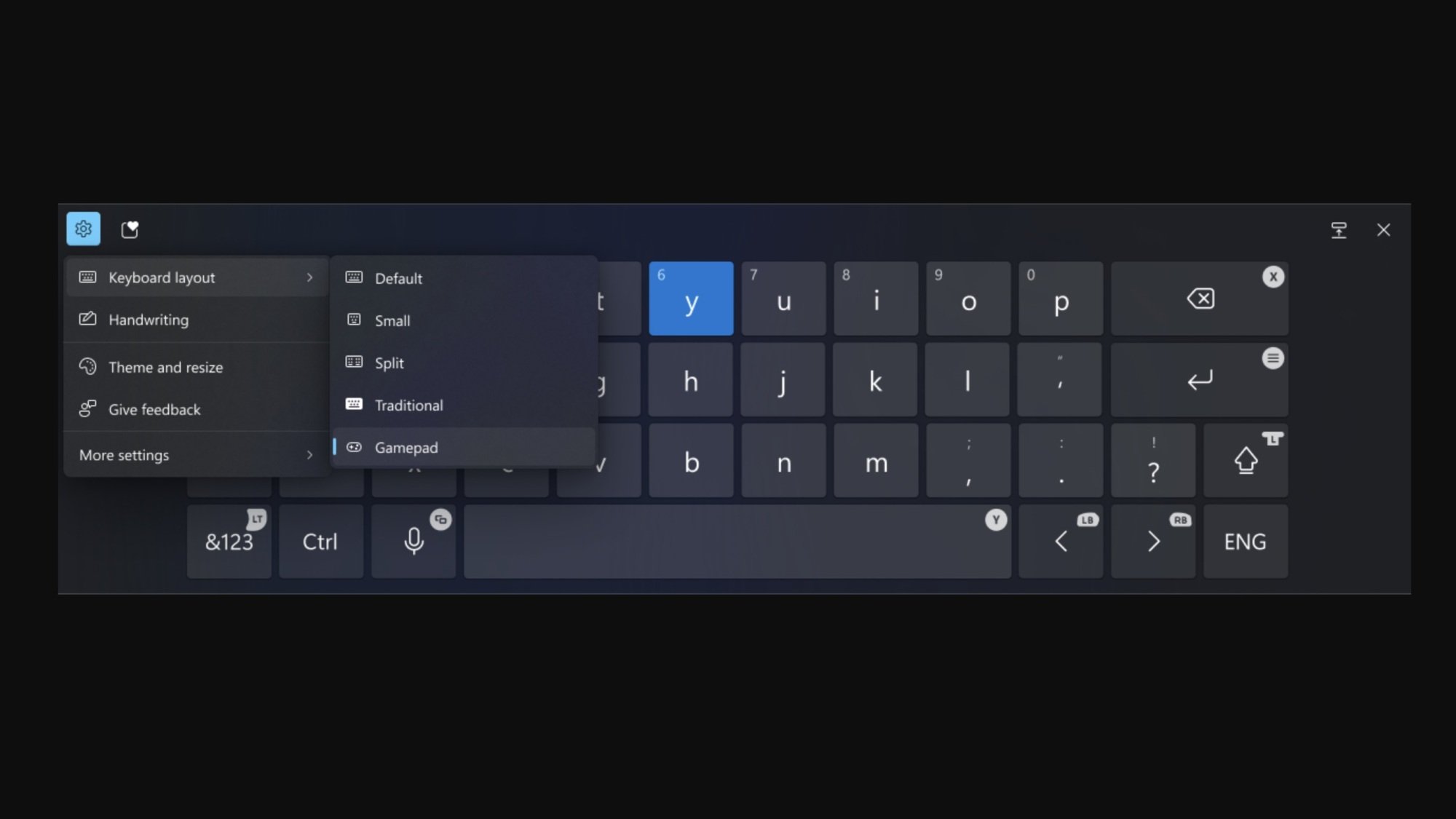
Microsoft added the new on-screen keyboard to the Windows 11 Release Preview Channel. That means PC users will be able to experience it whenever Microsoft drops the next official update for Windows 11.
However, you don’t have to wait until the official update if you really want to try out this keyboard today. You can enroll your PC in the Windows Insider program to try out early builds of upcoming versions of Windows. This is, essentially, a beta program, which I don’t tend to recommend users install on their main devices. However, if you’re going to enroll in the Insider program, the Release Preview Channel is the most stable option to choose, as Microsoft seeds the version of Windows the intend to release to the general public—as long as no Insiders discover any device-breaking bugs that need to be addressed.

Stephen Gardner is leaving to ensure Amtrak has “the full faith and confidence of this administration.”
War Thunder has been updated with the first major expansion of 2025. Titled Hornet’s Sting it adds in Ray Tracing support for AMD and Intel GPUs. There’s but coming though.
Boston Dynamics has treated us to a lot of impressive videos over the years and the company is back today with the latest example of its robotics mastery. In the clip above, its Atlas robot demonstrates several types of full-body movement, starting with a walk and advancing to a cartwheel and even a spot of break dancing. The different actions were developed using reinforcement learning that used motion capture and animation as source materials. At this rate, our future robot overlords will be able to out-dance and out-tumble us humans as well as out-think us one day.
The video is part of Boston Dynamics’ research with the Robotics and AI Institute, but it has multiple partners aiding its work. For instance, NVIDIA CEO Jensen Huang touched on the company’s GR00T model for robotics during the GTC 2025 keynote earlier this week. Yesterday, Boston Dynamics announced that it is deepening its collaboration with the company focused on AI in robotics. It is using NVIDIA’s Jetson Thor computing platform to run “complex, multimodal AI models that work seamlessly with Boston Dynamics’ whole-body and manipulation controllers.”
This article originally appeared on Engadget at https://www.engadget.com/science/watch-the-atlas-robot-bust-a-move-in-boston-dynamics-latest-video-211329951.html?src=rss
A United States District Court for the Northern District of California judge has signed off on a settlement agreement between HP and its customers who sued the company for issuing firmware updates that prevented their printers from working with non-HP ink and toner.
In December 2020, Mobile Emergency Housing Corp. and a company called Performance Automotive & Tire Center filed a class-action complaint against HP [PDF], alleging that the company “wrongfully compels users of its printers to buy and use only HP ink and toner supplies by transmitting firmware updates without authorization to HP printers over the Internet that lock out its competitors’ ink and toner supply cartridges.” The complaint centered on a firmware update issued in November 2020; it sought a court ruling that HP’s actions broke the law, an injunction against the firmware updates, and monetary and punitive damages.
“HP’s firmware ‘updates’ act as malware—adding, deleting or altering code, diminishing the capabilities of HP printers, and rendering the competitors’ supply cartridges incompatible with HP printers,” the 2020 complaint reads.

Say goodbye to the ‘metaverse’ as even a cheap Meta Quest hasn’t turned things around. Instead, say hello to the return of ‘glassholes.’

A surprise trailer for Ark: Survival Evolved teased its new water-based expansion Aquatica this week and fans are livid. That’s because the video appears to make generous use of AI-generated footage to show a bland and incoherent mashup of underwater scenes that have nothing to do with the game.
We may earn a commission from links on this page.
You can now pre-order a brand-new Pebble Watch, which is a sentence that will confuse a lot of people and excite others. Pebble was one of the first smartwatches, launching even before the first Apple Watch. We wrote about it here on Lifehacker in 2013. Now it’s back in two versions, running $149 and $225, both expected to ship later this year.
Pebble was an early smartwatch brand whose devices featured an e-ink display (like the kind you might see on an e-book reader). Its Kickstarter launches broke records for the platform. I had heard that the Pebble Time was the most successful Kickstarter project ever at the time of its launch, so I checked Kickstarter’s list of its 12 most funded projects to see if it still holds that title. Pebble’s three generations hold the #2, #6, and #12 spots. People loved this watch.
And they continued to love it, even after the company was bought by Fitbit in 2016. A project called Rebble did its best to maintain the old watches’ functionality over the years, providing app store updates and replacing some of the old cloud services. As the years went by, it got harder and harder to keep using Pebble watches. Both the Android and iPhone apps disappeared from phones’ official app stores, and “how to set up a new Pebble” guides got more complicated, but some users persisted.
Google now owns Fitbit and Pebble users managed to successfully lobby Google to open-source the Pebble OS, opening the doors to new Pebble watches.
Pebble founder Eric Migicovsky is leading this project. He wrote: “I’ve tried pretty much every other smartwatch on Earth, yet I still wear my Pebble every day—nothing else matches its features and long battery life. I really, really, really hoped someone else would create a proper replacement, but no one has stepped up, and my stash of old Pebbles is dwindling!”
In an AMA on the Pebble subreddit, Migicovsky mentioned several times that the team is small and that they’re trying not to bite off more than they can chew. Since the OS is now open source, several questions about features were met with answers like “No, but that sounds like a nice feature for someone to add to the open source PebbleOS!”
The new watches aren’t going to be sold under the Pebble name, though, since Google still owns that trademark. They are called the Core Time 2 and the Core 2 Duo. A redditor asked what is “duo” about it, and Migicovsky replied: “Du-over 😉”
The Core 2 Duo will have a black-and-white screen and a plastic (polycarbonate) frame in either black or white, and is expected to start shipping in July. Its look and feel are intended to be just like the old Pebble 2, although some of the internals are upgraded and it has more durable buttons.
Other specs include the following (I’ve bolded differences from the Core Time 2):
1.2-inch, always-on e-paper screen
30-day battery life
A microphone and speaker, although voice calls won’t be natively supported
IPX8 water resistance (the 8 typically means the device can go at least 3 meters underwater, but the X indicates that it isn’t tested for dust resistance)
Step tracking and sleep tracking
Physical buttons
22-millimeter standard watch strap
Bluetooth connectivity
No wifi or cellular connectivity
No GPS
No NFC payments (“Too hard to do as a small company, sorry.”)
No heart rate monitor
This model has a barometer and compass, where the Core Time 2 does not.
The Core Time 2 is larger than the Core 2 Duo and will have a color touchscreen and a metal frame. Not only is the screen bigger than its sibling, it’s also “53% bigger and [has] 88% more pixels” than its predecessor the Pebble Time 2. It’s expected to ship in December 2025.
The Core Time 2 has almost all the features of the Core 2 Duo listed above, except that it will not have the compass and barometer (those were included in the Core 2 Duo as a favor to a friend, Migicovsky said in the AMA). On the bright side, it will have a heart rate monitor.
1.6-inch, always-on e-paper screen
64-color display
Touchscreen
30-day battery life
A microphone and speaker, although voice calls won’t be natively supported
IPX8 water resistance (same as Core 2 Duo)
Step tracking and sleep tracking
Physical buttons
22-millimeter standard watch strap
Bluetooth connectivity
No wifi or cellular connectivity
No GPS
No NFC payments
No barometer and compass
This model has a heart rate monitor, where the Core 2 Duo does not.
You can find full specs for both watches here. Note that while the watches will not have GPS, Migicovsky noted that developers could choose to use phone GPS for mapping or fitness purposes. This is a common approach for minimalist wearables, including Whoop and some Fitbits.
Migicovsky noted in the AMA that the new watches will use the same charger as previous Pebble watches. (“Take that, everyone who said I should throw out my box of 10-year-old chargers,” said one redditor.)
The charger that ships with the new watches will be a connector that plugs into a USB-C cable, so you’ll still need to bring that connector with you when you travel, but you won’t need to carry a whole special charging cable. This is the same approach that Coros took for its Pace Pro, and I even bought a similar style of charging adapter for my Garmin watch—it’s a convenient format.
In response to questions about other colors, features, or future products, Migicovsky repeatedly said they were going to focus on what they were able to do for now. He isn’t making any promises about when more units will be available to order, so if you want to be sure of getting one of the new watches, it makes sense to pre-order now.
The new watches’ operating systems will be open source, and developers are invited to add the features they’d like to see. There is a Discord to organize efforts, and Migicovsky linked to it, saying: “All development is happening on the discord (https://discordapp.com/invite/aRUAYFN) and github (https://github.com/pebble-dev/pebble-firmware).”
“We’re a gadget company,” Migicovsky said. “We make cool gadgets that we ourselves want and then sell them. No plans to make them for a wider audience.” But he also added: “The goal is sustainability—the company is designed to potentially last forever.”
An anonymous reader shares a report: PCI Express 7 is nearing completion, the PCI Special Interest Group said, and the final specification should be released later this year. PCI Express 7, the backbone of the modern motherboard, is at the stage 0.9, which the PCI-SIG characterizes as the “final draft” of the specification. The technology was at version 0.5 a year ago, almost to the day, and originally authored in 2022.
The situation remains the same, however. While modern PC motherboards are stuck on PCI Express 5.0, the specification itself moves ahead. PCI Express has doubled the data rate about every three years, from 64 gigtransfers per second in PCI Express 6.0 to the upcoming 128 gigatransfers per second in PCIe 7. (Again, it’s worth noting that PCIe 6.0 exists solely on paper.) Put another way, PCIe 7 will deliver 512GB/s in both directions, across a x16 connection.
It’s worth noting that the PCI-SIG doesn’t see PCI Express 7 living inside the PC market, at least not initially. Instead, PCIe 7 is expected to be targeted at cloud computing, 800-gigabit Ethernet and, of course, artificial intelligence. It will be backwards-compatible with the previous iterations of PCI Express, the SIG said.


Read more of this story at Slashdot.

Peter Dinklage, Kevin Bacon, and Elijah Wood star in the horror comedy out this August.
Human speech arises courtesy of some significant neural horsepower. Different areas of the brain are involved in determining the meaning that’s desired, finding the words to express it, and then converting those words to a specific series of sounds—and all that comes before the correct sequence of nerve impulses is sent to the muscles that produce the final output. Humans are far from alone in the animal kingdom with an impressive range of vocalizations, though. That raises the prospect that we can understand a bit more about our own speech by studying how vocalization is managed in different animals.
One group of species that’s especially interesting is birds. They’re distant relatives compared to other animals with interesting vocal capabilities, like whales and elephants, and their brains have some notable differences from ours. They also show a range of behaviors, from complex songs to vocal mimicry to whatever it is that you want to call what parrots do. Thanks to a newly released study, however, we now have evidence that these different types of vocalization are the product of different control systems in the brain.
The study relied on electrodes placed in the brains of parrots and songbirds and tracked the behavior of neurons in a region that controls vocalization. It showed that the two relied on different types of control, with parrots having a system that operates similarly to the one used by humans.

Spiderman pointing at Spiderman meme.

Multiplayer is one of the staples of Monster Hunter. It’s a far different game when playing alone, and the game doesn’t make it terribly easy to understand the nuances of its co-op system. So let’s go through the (unfortunately) convoluted “friend” system in Wilds so you don’t have to suffer wandering alone.
A big Vivaldi web browser update is rolling out with a set of appreciable improvements long-time users will like, and would-be users may be tempted to try.