Get $120 off our favorite mesh Wi-Fi system with this Amazon Spring Sale deal

If you’re looking to boost the Wi-Fi coverage in your home without spending too much, the Amazon Spring Sale has you covered. The TP-Link Deco mesh Wi-Fi system is $120 off as part of the Big Spring Sale. While not a record-low, it’s close to it and a great deal considering how expensive mesh Wi-Fi systems can be.

The Deco XE75 Pro comes with three nodes (or satellites) offering coverage up to 7,200 square feet, which is especially beneficial for large family homes or home office setups. Each node has one 2.5 Gbps and two Gigabit ports which offer a stable and reliable wired connection for devices such as your PC, laptop and game consoles. Thanks to AI-driven mesh technology, your mesh Wi-Fi system uses the same user name and password, meaning you can move from room to room switching nodes in the background and on the fly for an uninterrupted wireless connection.

If you’ve never used a mesh Wi-Fi system (or have limited experience with them), setup is fairly simple using the Deco app. You’ll have access to three wireless network bands as well: 6 GHz (2402 Mbps), 5 GHz (2402 Mbps) and 2.4 GHz (574 Mbps). We ranked the Deco XE75 Pro “best mesh Wi-Fi system for most” in our best mesh Wi-Fi system buying guide because of its excellent performance, comprehensive coverage and user-friendliness. This three-pack gives you everything you need (and arguably more than you need) to enjoy fast and reliable whole-home coverage.

You can set up a separate guest Wi-Fi network, meaning your friends and family can easily join your Wi-Fi without having to grant them access to your devices or data. Although the app could do with a bit of polish in places, it does support voice commands via Alexa, so you can conveniently turn your guest Wi-Fi on or off with voice commands.

TP-Link’s HomeShield is built into the Deco XE75 Pro, which gives you access to a suite of customizable security features. You can set parental controls to block specific websites, strengthen your network security, or program “no internet” bedtimes for your kids. With this deal, you get a lot of bang for your buck, future-proofing your home Wi-Fi at a fraction of the usual cost.

This article originally appeared on Engadget at https://www.engadget.com/deals/get-120-off-our-favorite-mesh-wi-fi-system-with-this-amazon-spring-sale-deal-133030064.html?src=rss

How to Enable ‘Notification Cooldown’ on Your Google Pixel

While it’s generally useful to get notifications on your phone, there are times when it’s too much, too fast, such as after you disable Airplane Mode or when your family text thread is blowing up while you’re in the middle of a meeting. On Android, you can turn on silent mode or snooze or disable notifications entirely—or you can rely on the new Notification Cooldown feature, which temporarily lowers the literal and figurative volume on your alerts so you don’t have to manage those modes yourself.

We’ve known this feature was coming for a while, and it finally arrived on Android 15 with the March 2025 update.

How Notification Cooldown works

Notification Cooldown manages a deluge of alerts that come in over a short period of time by temporarily lowering your device’s volume and minimizing on-screen pop-ups. The cooldown can last up to two minutes.

Notifications don’t disappear entirely when Notification Cooldown is enabled, so you don’t need to worry about missing important alerts. You can still view them in the notification shade by pulling down from the top of your phone’s screen. Calls, alarms, emergency alerts, and priority conversations will still come through during a cooldown.

Unfortunately, there’s no option to customize Notification Cooldown—such as the alert threshold that triggers it, how long it lasts, and which apps are cooled—other than turning the feature on or off.

How to enable (or disable) Notification Cooldown

To turn Notification Cooldown on or off on your Pixel device, open Settings and go to Notifications > Notification cooldown (under General). Use the toggle next to “Use notification cooldown” to enable or disable the feature. Notification Cooldown may be on by default, so you can opt out if you prefer not to use it.

If you don’t see this option in your phone’s settings, make sure you’ve updated your device to the latest version of Android 15.

‘There Are Two Kinds of Credit Cards’

The credit-card market has quietly split in two, Atlantic argues in a new story: one offering generous benefits to wealthy Americans, the other offering expensive debt to the poor. Credit-card balances have reached an all-time high of $1.2 trillion, with serious delinquency rates climbing to their highest point since the Great Recession.

“Transactors” pay off balances monthly and earn valuable rewards worth up to $3,000 annually in taxable income equivalent, while “revolvers” carry balances at a brutal 21.5% average APR. The poor subsidize the rich through two mechanisms: swipe fees that drive up retail prices by $1,700 annually for the average family, and late fees and interest charges that finance rewards programs. Interest revenue for credit-card companies has ballooned from $76 billion in 2020 to $170 billion in 2024.

The economy now appears to be slowing down. High-income families are increasingly resembling working-class families in credit data, with three in five households earning over $80,000 annually carrying balances for more than a year. Card companies are now offering fewer cards to subprime borrowers, creating a troubling dilemma – while expensive credit cards are harmful, having no credit access might be worse. Bipartisan legislation now aims to cap interest rates and lower swipe fees.


Read more of this story at Slashdot.

The Discord app is getting video ads in June

Discord is officially launching Quest ads on mobile and will start showing users videos in exchange for rewards starting in June 2025. The messaging service has been testing its advertising experience called “Quests” on mobile for a while now after they were officially launched on desktop a year ago. But next month, video Quests will become widely available on its mobile application. Discord frames the experience as as “a way for players to discover games and new content while earning rewards for playing, streaming, or watching videos.” 

For advertisers, though, it’s a way to get people to watch their trailers for new games, as well as video announcements for things like DLC drops. Some Quests even ask users to stream games to unlock rewards, potentially gaining advertisers new players for their titles. Discord says companies have used the format for advertising campaigns for some of the most recognizable video game franchises out there, including Diablo, Street Fighter, World of Warcraft and Genshin Impact. Other non-video game companies have also used the format, so you can expect movie trailers and other kinds of video announcements, as well. Max, for instance, made users watch a trailer of Dune: Prophecy before it premiered. Like on desktop, users will get a notification when a Quest is available, and they can choose to accept it to perform the task that it requires. 

This article originally appeared on Engadget at https://www.engadget.com/apps/the-discord-app-is-getting-video-ads-in-june-130054000.html?src=rss

‘LikeTones’ Is a Guitar Tuner With No Ads or Upsells

I’ve been trying to get back into playing guitar and I’ve noticed one thing: Both the App Store and Google Play are replete with guitar-tuning apps that are full of either upsells or advertisements. Isn’t there any application that helps tune your guitar without bothering you?

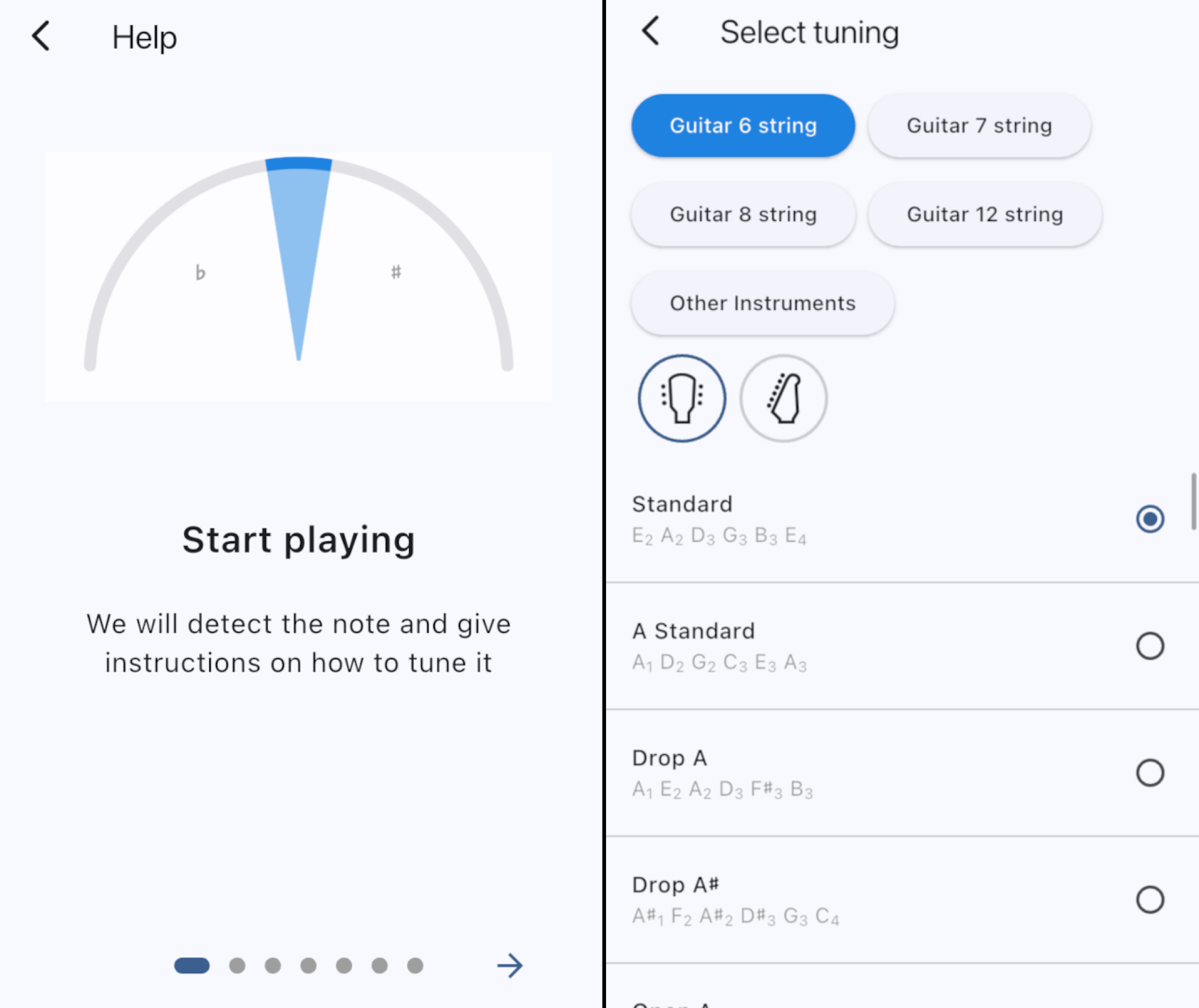
It turns out, there is. LikeTones, a music-education company, offers a guitar tuner for Android and iPhone that’s both free to use and free of ads and upsells. You can open this application, play a string on your guitar, and start tuning. The application automatically detects which string you’re trying to play and tells you whether to tune up or down.

If you’d rather not use this automated tuning, or find that it doesn’t quite work, you can tap a string to tune it specifically. This also plays the note from your phone’s speakers, giving you an idea of how the string should sound.

Because not every guitar is the same, this application offers support for six, seven, eight, and 12 string guitars in the settings. There’s also support for various alternative tunings. You can also configure the reference frequency, if you want—this is useful if you need to tune to a piano or other instrument that isn’t quite standard.

Two screenshots. The first shows the tutorial whne you open the application. The second shows the menu offering different kinds of guitars and alternative tuning schemes

Credit: Justin Pot

It’s a well-thought-out application, and the best I could manage to dig up in my capacity as an amateur guitarist and professional app recommender. It even has a built-in metronome.

There are other solid options out there. Jon’s Tuner for iPhone also works quite well, and is clean, but doesn’t offer the same flexibility in terms of alternative tuning schemes. The Android version of Jon’s Tuner, which I found reference to online, seems to be missing from Google Play. There is a solid Android alternative, though: Tunerly, which is completely open source. This app offers a simple user interface and settings, allowing you to choose specific tuning schemes.

For most people, though, LikeTone Guitar Tuner is currently the best option. It works on both Android and iPhone, it’s clean, it works well, and it stays out of your way. Try it if you’re even a little unhappy with your current guitar tuning application.

One of our favorite air fryers is $30 off in the Amazon Spring Sale

Make light work of meal times and enjoy a saving of $30 to boot with this 9-in-1 Cosori TurboBlaze air fryer. It’s currently on sale for $90 in the Amazon Spring Sale, reduced from its usual price of $120. We’ve seen similar price drops for this product in the past, but this is still a great deal that’s well worth a look.

The Cosori TurboBlaze air fryer is one of the top picks in our best air fryers guide. We loved its spacious basket and easy-to-use touchscreen controls, and were impressed with its built-in safety features, like the handy basket-release button. Plus, for anybody who’s stuck for a bit of inspiration in the kitchen, it comes with a Cosori recipe book with more than 100 tasty recipes to try.

The Cosori TurboBlaze air fryer boasts nine preset cooking modes, making it a versatile kitchen companion for air frying, roasting, baking, broiling and more. With a roomy six-quart capacity, there’s ample space to easily feed the whole family or whip up an appetizer for social gatherings. It sports an efficient five-speed fan, has a top temperature of 450 degrees Fahrenheit and can deliver crisp, juicy chicken wings up to 40 percent faster than conventional ovens.

This compact air fryer is ideal for busy families or anyone who values the program-and-go convenience that it provides. It’s small enough to be stowed away when not in use, and thanks to its dishwasher-safe design, clean up is a breeze, too. The non-stick basket is built for daily use, whether you’re batch cooking or whipping up a last-minute meal, making it a reliable go-to option for people with hectic lives.

The Amazon Spring Sale ends on March 31st, so if you don’t want to miss out on this discounted rate, you should grab hold of this deal now while you can.

This article originally appeared on Engadget at https://www.engadget.com/deals/one-of-our-favorite-air-fryers-is-30-off-in-the-amazon-spring-sale-123016888.html?src=rss

This Highly Rated 65-Inch 4K QLED TV Is Less Than $500 Right Now

We may earn a commission from links on this page. Deal pricing and availability subject to change after time of publication.

Hisense 65U6N, a PCMag Editor’s Choice winner (that also made it into Lifehacker’s “Best 65-inch TVs to Buy in 2025” roundup in the budget category) is currently on sale for $498, down from its regular $734 price tag. This 65-inch 4K QLED TV uses a mini-LED backlight system to deliver solid contrast and color accuracy—something you’d expect from pricier models. It supports Dolby Vision, HDR10, and HLG—meaning whatever you stream will look sharp and vibrant.

That said, it’s a 60Hz panel, so motion won’t be as smooth as on higher-end 120Hz or 144Hz models. Gamers might also want to think twice—while it does support VRR (variable refresh rate), it lacks AMD FreeSync and Nvidia G-Sync, which could be a dealbreaker for serious competitive gaming. But at an input lag of just 3.6 milliseconds, casual gaming is still solid, according to this PCMag review.

Hisense went with Google TV for the software, which is a win if you like a clean interface and easy access to all major streaming apps like Netflix, Disney+, HBO Max, and Apple TV. Plus, hands-free Google Assistant support means you can control your 65U6N and compatible smart home devices just by talking. Apple users will appreciate its AirPlay 2 support, making it easy to stream directly from an iPhone or Mac. Android users, of course, get Google Cast. One notable omission is that this TV only has an ATSC 1.0 tuner, meaning it won’t support over-the-air 4K broadcasts with ATSC 3.0. However, if that’s not a dealbreaker, its smart features still make it a strong pick.

The remote feels surprisingly premium, with a brushed-metallic plastic design and a shiny navigation pad. Dedicated buttons for Netflix, Prime Video, and YouTube make it easy to jump into your favorite apps, and the built-in mic means you don’t have to shout across the room to give voice commands. Connectivity-wise, you get four HDMI ports (one with eARC), two USB ports, an Ethernet port, an optical audio output, and multiple 3.5mm jacks. It also comes with sturdy metal legs for tabletop placement or VESA compatibility if you want to mount it. If you’re after a step up, the Hisense 65U7N ($698, down from $998) offers a brighter display, 144Hz refresh rate, and ATSC 3.0 tuner; but at this price, the 65U6N is hard to beat for everyday streaming and casual gaming.

ChatGPT reportedly accused innocent man of murdering his children

It has been over two years since ChatGPT exploded onto the world stage and, while OpenAI has advanced it in many ways, there’s still quite a few hurdles. One of the biggest issues: hallucinations, or stating false information as factual. Now, Austrian advocacy group Noyb has filed its second complaint against OpenAI for such hallucinations, naming a specific instance in which ChatGPT reportedly — and wrongly — stated that a Norwegian man was a murderer. 

To make matters, somehow, even worse, when this man asked ChatGPT what it knew about him, it reportedly stated that he was sentenced to 21 years in prison for killing two of his children and attempting to murder his third. The hallucination was also sprinkled with real information, including the number of children he had, their genders and the name of his home town. 

Noyb claims that this response put OpenAI in violation of GDPR. “The GDPR is clear. Personal data has to be accurate. And if it’s not, users have the right to have it changed to reflect the truth,” Noyb data protection lawyer Joakim Söderberg stated. “Showing ChatGPT users a tiny disclaimer that the chatbot can make mistakes clearly isn’t enough. You can’t just spread false information and in the end add a small disclaimer saying that everything you said may just not be true..” 

Other notable instances of ChatGPT’s hallucinations include accusing one man of fraud and embezzlement, a court reporter of child abuse and a law professor of sexual harassment, as reported by multiple publications. 

Noyb first complaint to OpenAI about hallucinations, in April 2024, focused on a public figure’s inaccurate birthdate (so not murder, but still inaccurate). OpenAI had rebuffed the complainant’s request to erase or update their birthdate, claiming it couldn’t change information already in the system, just block its use on certain prompts. ChatGPT replies on a disclaimer that it “can make mistakes.” 

Yes, there is an adage something like, everyone makes mistakes, that’s why they put erasers on pencils. But, when it comes to an incredibly popular AI-powered chatbot, does that logic really apply? We’ll see if and how OpenAI responds to Noyb’s latest complaint. 

This article originally appeared on Engadget at https://www.engadget.com/ai/chatgpt-reportedly-accused-innocent-man-of-murdering-his-children-120057654.html?src=rss

Nine Ways to Build Financial Intimacy in Your Relationship

On a good first date, you want chat about hobbies, and siblings, and dream jobs. Nobody wants to kill the vibe by inquiring how much student debt the other person has. But as a relationship progresses, you’ll find yourself assessing a lot about your partner: Their values, emotional management, political leanings, and so much more. The subject of money, however, often gets pushed to the side—sometimes, until it’s too late.

We all have different relationships with money. Some of us are cautious-minded savers, others are profligate spenders. Some are always padding their rainy day fund; others can’t resist purchasing new stuff every paycheck. When you’re in a relationship, it’s paramount to find out how your partner operates when it comes to money—because if the relationship continues for the long haul, it will come up. A lot. Here’s how to lay the foundation for ongoing financial intimacy.

Do it early on (and ramp up gradually)

It’s easy to let the subject of money slide due to discomfort. But if you want to avoid a large, emotional misunderstanding down the line, cut to the chase early on. Within your first few weeks or months of dating, start asking questions to uncover their financial situation. It can begin casually with questions like, “Are you more of a saver or a spender?” or “Do you pay attention to the stock market?” or “What’s your favorite thing to splurge on?” to get a glimpse into their general money perceptions, and ramp up to more specific questions about their credit score, salary, and debt as time passes.

Keep in mind, disclosure isn’t a one-way street. Be prepared to share your own behaviors, habits, debts, and financial history in due time.

Give advance notice

While some conversations will arise organically, if they don’t, make it known you want to have a conversation involving money. Rather than ambushing them over sushi with, “So, how much do you contribute to your 401(k) every month?” try something like, “When we have some free time next week, I’d love to touch base on this money goal I’m working towards and get your thoughts.”

Ask about their childhood

We all come with a money “story” or particular set of beliefs and fears around money that we absorbed from our families while growing up. Asking how they were raised is one of the easiest ways to gain insight into their attitudes about money. Some grew up in households where discount shopping reigned, every receipt was saved, and Ziploc bags were washed and re-used. Others were allowed to spend hundreds on trendy clothes for the first day of school and went to a different island every winter break.

To find out more about the money attitudes they absorbed, ask questions like:

  • How was money handled when you were growing up?

  • Were you encouraged to save from a young age?

  • Did your parents give you money when you went to the mall, or did you have to use your own?

  • Did your parents fight about money often?

  • Where did your family take vacations?

Use a personal financial goal to start the conversation

To make it more subtle and less awkward, use one of your own money goals to get the conversation going. Share your desire to get better at budgeting, save enough that you can quit your job to freelance, pay down debt, or buy a new car. Saying something like, “I’m working towards saving enough to make this down payment. Do you have any suggestions?” can open up a candid conversation and lend insight into their money behaviors without putting them on the spot. This can (and should) eventually segue into questions about their short-term and long-term financial goals.

Ask hypothetical “what if” questions

If it’s early on in a new relationship, or you’re not sure where to start, try framing questions as “what if” scenarios to get an idea of where their financial opinions stand. Things like:

  • What if you won the lottery—what would you do with the money?

  • Would you rather spend your life at a job you don’t love but pays really well, or one you’re passionate about, but will never make you rich?

  • If you had to save 50% of your salary in one year, how would you do it?

But also ask real-world questions…

Some conversations will revolve around general opinions and attitudes about money, but others should be designed to reveal answers to specific questions you have. Whether you want to know if they save for retirement, ever gamble, have an emergency fund, how often they invest in the stock market, or simply their daily spending habits, devise those questions beforehand. These specifics will round out the more general picture you’re getting of their overall relationship with money.

Mention an article or statistics

If you want to understand where your partner stands financially but you’re scared to broach the topic, you can take some of the heat off yourself by foisting the attention on a third party. Try something like, “I read this online article about having a money talk with your partner. Why don’t we just play along and try it out?”

Seeing as how money disagreements and “financial incompatibility” are one of the leading causes of divorce, it’s a topic that shouldn’t be ignored.

Discuss future real-life scenarios

While you won’t want to do this in the first month of dating, as you get more serious and begin to broach subjects like marriage and children, don’t leave money talks out. This is the time to get specific on how the two of you would handle money as a long-term team, with questions like:

  • “When you’re married, do you want to keep a joint family account, separate personal accounts, or both?”

  • “If you wanted to make a large purchase, would you consult your spouse beforehand?”

  • “How do you feel about setting joint financial goals?”

  • “If your kids wanted to do an extracurricular or take a trip you couldn’t afford, what would you do?”

  • “What age would you ideally like to retire?”

Have regular money talks

A couple’s discussion about finances should never be a one-off. Once you’ve laid the foundation for open and honest communication about money, make it a habit. If you’re living together, engaged, or married, set up monthly “money dates” to review bills, budgeting, spending and savings, or large purchases. You can use the time to review current expenditures, air any worries, discuss goals, and create long-term financial plans. Here’s how you can take a good, hard look at exactly where your money is going.

All About Zwift’s New Specialized S-Works Tarmac SL8 Frame

This week’s big Zwift update includes the welcome addition of several new bike frames, including two versions of the highly respected Tarmac SL8 from Specialized. Today we’ll look at the in-game performance of the S-Works Tarmac SL8, since it’s the fastest of the four “production” frames added this week.

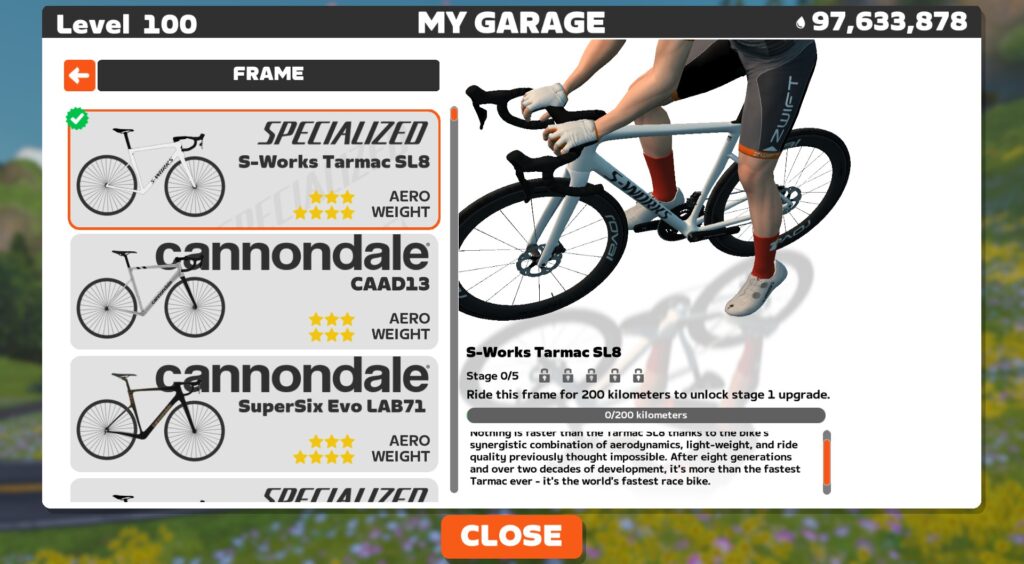
You’ll need to be updated to game version 1.86+ to see the S-Works Tarmac SL8 in Zwift’s Drop Shop. You’ll also need to be at level 40+ with 1,750,000 Drops to buy it. Here’s how it’s described in the Drop Shop:

“Nothing is faster than the Specialized Tarmac SL8 thanks to the bike’s synergistic combination of aerodynamics, light weight, and ride quality previously thought impossible. After eight generations and over two decades of development, it’s more than the fastest Tarmac ever – it’s the world’s fastest race bike.”

Those are big words, and while cyclists doubtless have differing opinions as to their veracity, what we’re concerned about here is in-game performance. Just how fast is this bike in Zwift, and how does it compare to other frames?

See our master list of all frames in Zwift >

It’s rated 3 stars for aero, 4 stars for weight, like a handful of other top newish all-arounders. But a 4-star system isn’t the most granular of performance measurements, so we ran this frame through our precise tests to measure performance at nerd-level detail. Let’s dive in!

Note: test results below are from a 75kg, 183cm rider holding 300W steady using Zwift’s stock 32mm Carbon wheelset.

Aero (Flat/Rolling) Performance

The S-Works Tarmac SL8 is very slippery, trimming 61.9s off our baseline Zwift Carbon frame over an hour of flat riding.

That puts it within 1.1 seconds of the game’s fastest frames, and when you consider that our tests have a 1-second margin of error, one could reasonably lump this frame in with the other fastest frames in terms of performance on flat roads.

Climb Performance

If you thought the S-Works Tarmac SL8 was fast on the flats, wait until you see how it climbs!

This Tarmac shaves 56 seconds off of our baseline Zwift Carbon’s time on an hourlong climb, which means it beats the S-Works Aethos (which was the fastest climbing bike in Zwift until this week) by 1.6 seconds.

That’s right, folks. We have a new top climber, and it’s super aero. There’s a new king in town.

Upgrading Your S-Works Tarmac SL8

Like all frames in Zwift, the S-Works Tarmac SL8 can be upgraded in five stages. As a high-end race bike, each of the five stages results in a performance improvement. The S-Works Tarmac SL8 upgrade stages are as follows:

  1. Ride 200km, pay 100,000 Drops for an aero upgrade
  2. Ride 260km, pay 200,000 Drops for a weight reduction
  3. Ride 320km, pay 350,000 Drops for a drivetrain efficiency improvement
  4. Ride 380km, pay 500,000 Drops for an aero upgrade
  5. Ride 440km, pay 750,000 Drops for a weight reduction

You can expect a fully-upgraded S-Works Tarmac SL8 to be approximately 28 seconds faster on a flat hour and 36 seconds faster on an hourlong climb vs the “stock” S-Works Tarmac SL8.

Conclusions

What we’ve seen in IRL road cycling, we’re seeing on Zwift: the industry moved away from the pure (but heavy) aero bikes and toward all-arounders that are nearly as slippery but weigh much less.

The Scott Addict RC was the first strong all-arounder on Zwift to give the Tron bike a run for its money. But in the past several months, Zwift added the Canyon Aeroad 2024 and Pinarello Dogma F 2024, which both outperform the Addict RC. And now the S-Works SL8 comes along, setting a new benchmark.

These fast all-arounders are within 1 second of the “pure” aero bikes (think S-Works Venge, Felt AR, Cervelo S5 2020) over an hour on flat ground in Zwift, but climb much faster. And that’s why we’re seeing them replacing the pure aero frames in Zwift race pelotons.

Other frames are within a few seconds of the S-Works SL8, so riders have the luxury of picking from a handful of top performers without feeling like they’re on a slow bike that will cost them the race. That said, if you want the frame that turns in the best all-around performance in Zwift, it’s the S-Works SL8.

And no: it doesn’t come with a color slider. (You can have any color frame you want… as long as it’s white.)

Questions or Comments?

To answer one question: no, it doesn’t come with a color slider. (You can have any color S-Works Tarmac SL8 you want, as long as it’s white!) What other questions or comments do you have? Share below…

Important note: this post contains speed test results for Zwift frames or wheels. These results may change over time, and a bike’s performance relative to others may also change. We don’t always revise posts when performance rankings change, but we do keep current, master versions of our speed test results which are always available. See the frame charts, wheel charts, and Tron vs Top Performers for current performance data.

Meta AI is coming to Europe this week

Meta is rolling out its AI assistant across 41 European countries, including to members of the European Union, starting this week. It will also extend its access to 21 overseas European territories. In its announcement, Meta said that it has taken the company longer to bring its AI technology to European users as it continues to “navigate its complex regulatory system.” 

The company was planning to make its AI technology available in the region last year, but it had to put its plans on pause after the Irish Data Protection Commission asked it to delay training its Large Language Models on content posted by adult European users on Facebook and Instagram. A month after the Irish regulator’s request, Meta said that it wasn’t going to release its new multimodal Llama models in the region “due to the unpredictable nature of the European regulatory environment.”

Meta will start its AI rollout in Europe by incorporating the technology into its messaging apps across Facebook, Instagram, WhatsApp and Messenger, which will soon show a blue circle on their interface. It will be available in six languages from the region and will have limited capabilities that revolve around text queries for now, but the company says it hopes to expand its AI’s offering over time until its finds “parity with the US.” 

European users will be able to call Meta AI in group chats by typing @MetaAI followed by their prompt or question. Users will also be able to use the chatbot to surface relevant posts and Reels by typing in queries, such as “show me Vancouver Island content.” They will be able to look up information from all over the web within the chatbot, as well. 

This article originally appeared on Engadget at https://www.engadget.com/ai/meta-ai-is-coming-to-europe-this-week-113019014.html?src=rss