Apple greenlights Severance season three

After a season that resolved a few key mysteries but still perplexed fans and raised the personal stakes for everyone’s favorite macrodata refiners, it’s not a huge shock that Apple has renewed one of its most successful shows. Just as the second season finale hit Apple TV+, the company confirmed Severance will be returning for a third season.

The company says Severance became the most-watched show on its streaming service during the second season. The sci-fi thriller took the crown from Ted Lasso, which Apple also recently renewed.

Season 3 of Severance is available upon request.
– Tim C. https://t.co/bNig41qs9t pic.twitter.com/cnctZIRDNF

— Tim Cook (@tim_cook) March 21, 2025

All going well, the wait shouldn’t be quite as long between seasons of Severance this time around. Fans had to remain patient for three years for the second season, in large part because of filming delays due to writers’ and actors’ strikes in 2023.

This week, The Information reported that Apple slashed its initial content budget for Apple TV+ by 10 percent from $5 billion to help reign in costs. The company is said to be losing over $1 billion per year on Apple TV+ — purportedly making it the only Apple subscription service that isn’t turning a profit despite reaching 45 million subscribers last year. Still, the company is evidently willing to keep supporting expensive projects like Severance if they keep performing well.

There’s no release window for season three of Severance as yet. In the meantime, I’ll be pretending I’m an innie so I can hopefully forget any spoilers I see until I have a chance to watch the season two finale.

This article originally appeared on Engadget at https://www.engadget.com/entertainment/tv-movies/apple-greenlights-severance-season-three-140954214.html?src=rss

The Wheel of Time delivers on a pivotal fan-favorite moment

Andrew Cunningham and Lee Hutchinson have spent decades of their lives with Robert Jordan and Brandon Sanderson’s Wheel of Time books, and they previously brought that knowledge to bear as they recapped each first season episode and second season episode of Amazon’s WoT TV series. Now we’re back in the saddle for season 3—along with insights, jokes, and the occasional wild theory.

These recaps won’t cover every element of every episode, but they will contain major spoilers for the show and the book series. We’ll do our best to not spoil major future events from the books, but there’s always the danger that something might slip out. If you want to stay completely unspoiled and haven’t read the books, these recaps aren’t for you.

New episodes of The Wheel of Time season three will be posted for Amazon Prime subscribers every Thursday. This write-up covers episode four, “The Road to the Spear,” which was released on March 20.

Read full article

Comments

You Can Finally Change Your Default Feed on Threads

It finally happened: Threads officially allows you to choose a default feed to see when you open the app, whether that be “Following” or a custom feed you’ve created yourself. This means that when you open Threads, you’ll be able to view posts from the accounts you chose to follow, instead of seeing what the algorithm wants you to. Meta has been testing this feature for a few months, and is now rolling it out to everyone—in addition to a few other new features. 

How to change Threads’ default feed to Following

The process of changing your default feed is straightforward. Follow these steps:

  1. Open the Threads app on your phone and go to the Home tab. 

  2. You’ll see all your feeds in different tabs at the top of the screen, just below the Threads logo. Tap and hold any of these feeds and select Edit Feeds. 

  3. This will reveal all your feeds in a list. Hold any feed here and drag it up or down to reorder the list. The first one in the list will automatically become your new default feed. 

Feel free to set it to Following or any custom feed you’ve created. Note that this feature is being rolled out slowly, so it may take a while before you see it on your phone.

Other updates to Threads

With the same update, Threads has added a few more useful features to the app. My personal favorite is the new video player, which finally has basic playback controls and a progress bar that you can easily access. There’s a new play/pause button in between the rewind and forward buttons. You can use those buttons to skip back or forward by 10 seconds at a time. The progress bar appears below each video and it’s big enough to scrub through videos. It’s a great change: Without these features, watching videos on Threads often felt like watching looping gifs.

You can also limit replies and quotes of your posts. When you compose a new post in Threads, tap the Anyone can reply & quote button, located to the left of the Post button. This lets you limit replies and quoting to your followers, mentioned accounts, or accounts you follow. 

Separately, Meta is testing the ability to add up to 10 topics to your Threads profile. Tapping these topics leads you to conversations around those subjects, similar to how hashtags work on other social media platforms. When you compose a new post in Threads, you may see a button that lets you add a trending topic to the post. If you use it, your post could reach a larger audience than usual.

Why ‘Soil Blocking’ Is a Better Way to Grow Your Seeds

We may earn a commission from links on this page.

Although the practice of making solid blocks of soil for growing seeds isn’t new (it may go back over 2000 years), soil blocking has gained popularity in the last few years.  It’s not a complicated process: You form blocks of compressed seedling mix, lay them out on a tray, then plant into them. It works much like growing seeds in a plastic seed tray, without the tray. Using less plastic is only one benefit—the real reason people love soil blocking is that it creates seedlings with incredibly strong root systems, without getting root-bound. The air around the block acts as a pruning mechanism; the roots grow to the edge of the soil and then stop. The roots hold the soil block together, and can be easily up potted to continue growing inside, or transplanted directly into the garden. 

The drawbacks to soil blocking

In order to make seed blocks, you need soil that will compress well and hold together, and most often, that involves peat. Peat, a byproduct of swamps and bogs, is controversial because the harvesting has a dramatic environmental impact. Some people have had success with other mediums like coconut coir, but those people do not include me. I’ve tried coconut coir a few years in a row and have suffered from lack of germination and blocks falling apart, so I have gone back to seedling mixes with peat. 

The other major drawback to soil blocking is the actual blocking: It’s a pain in the ass. My first year, I was inspired by one of my gardening mentors, Meg Cowden of Seed to Fork, who speaks of the calm and meditative nature of blocking. Now, I regard blocking as a necessary evil each year that takes a lot of energy and soil. Still, the results speak for themselves. Soil blocks perform exceptionally well in tests against seed trays.

Step one: Get a soil blocker

soil blocker

Credit: Amanda Blum

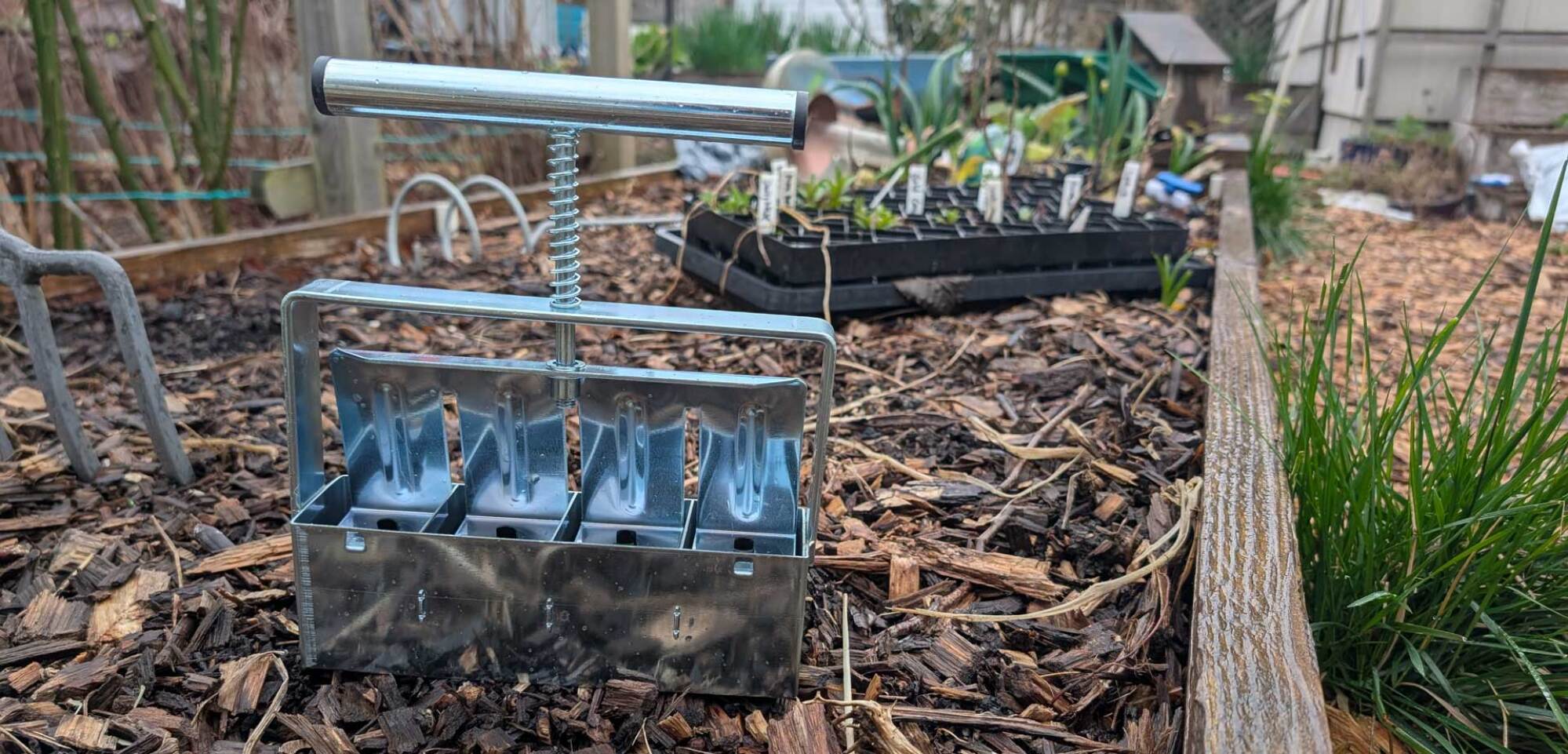
The first thing you’ll need is a soil blocker. There are all kinds of blockers on the market now, and many are inexpensive. Soil blocking is similar to making a sand castle or snow castle: You pack the soil tightly into a cube; the soil blocker compresses the cube, and helps spit it out. Soil blockers come in different sizes and layouts. There are mini blocks, which are an inch or so large (for flowers), and maxi blocks, which are four by four inches. But most people are going to want to start with two-by-two-inch blocks. A basic blocker will spit out four of these blocks at once. 

Step two: the right seed mix, at the right moisture level

Soil prep

Credit: Amanda Blum

Next, you’ll need the soil. Different kinds of plants at different stages all need different soil. When starting seeds, you want seedling mix, which is devoid of nutrients, has a lot of moisture retention, and is made of fine particles, so it can compact into seed trays. This is perfect for seed blocking, as long as that mix also includes peat or coconut coir. Get more soil than you think you’ll need, since by compressing the soil to make the block, you use more soil than you might with seed trays. I was able to make 100 blocks from a 12-quart bag.

Empty the bag into a bin or other watertight container, and mix it with water. You want to use roughly three times the amount of water as soil, adding it slowly, and stopping to mix the water in two to three times. Soil can absorb an absurd amount of water; you want the soil wet, but not sopping. Grab a handful of the mix, and squeeze it in your hand. Does it clump together? If so, you’ve got enough water. If not, add more until it does.  

Step three: Have a tray for the soil blocks

The blocks will live on a tray, and it doesn’t matter much what kind of tray, as long as it can hold an inch or so of water, and is watertight. If you were using seed trays, they’d still need something to sit on like a bottom tray, so you’ve likely got some around. I’ve seen setups with standard 1020 trays and setups with cafeteria trays. The blocks sit right next to one another, so a 1020 tray can hold 50 blocks. A cafeteria tray, depending on its size, can hold much more. 

Step four: Set up your dibbles

interchangeable dibbles
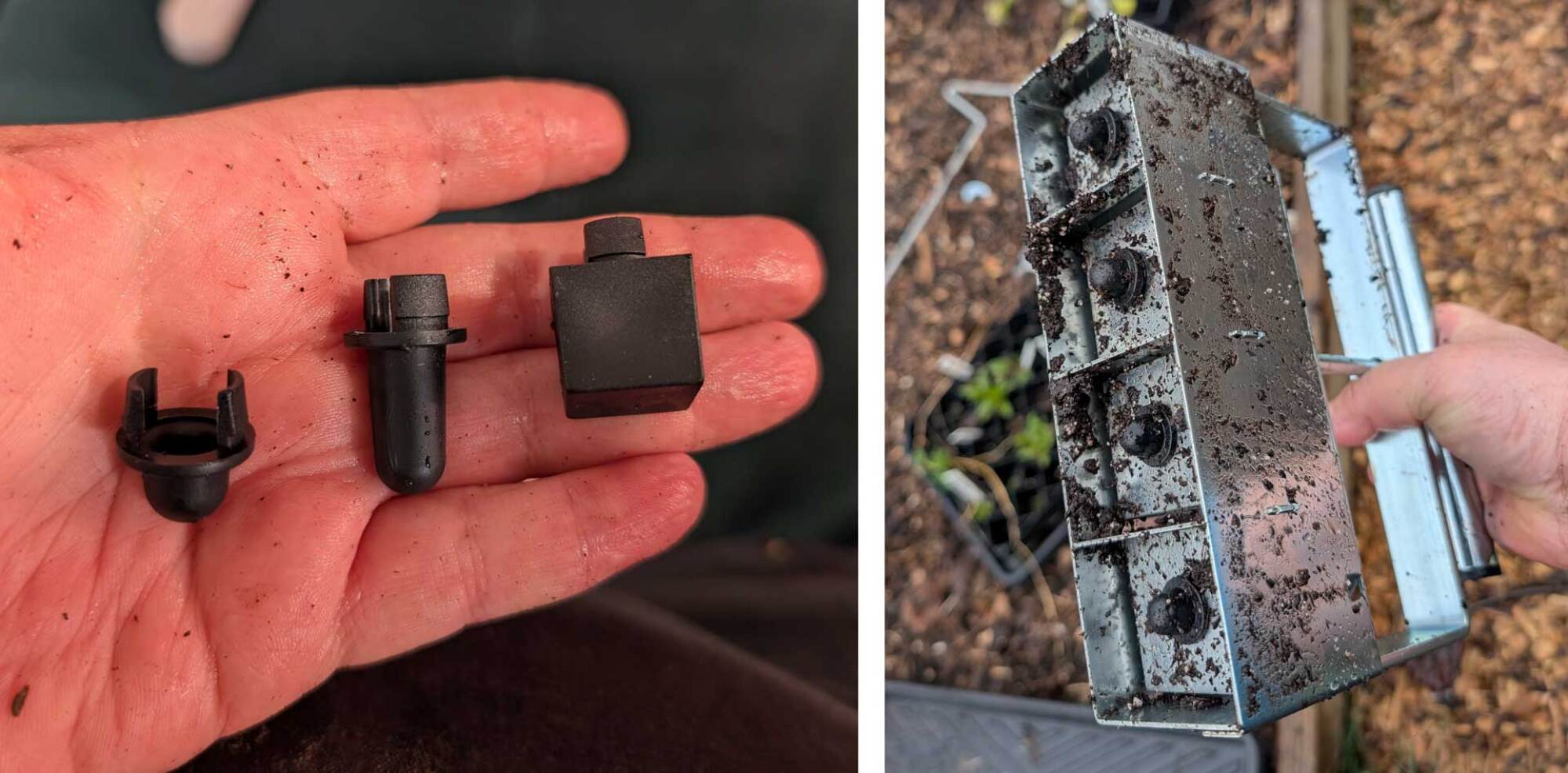
On the left, interchangeable dibbles, and on the right, dibbles installed on the blocker.
Credit: Amanda Blum

Before we start making blocks, you want to set up your dibbles. When you plant seeds, you have to plant them at the right depth, depending on the kind of seed. Sunflower seeds are buried very deep, for instance, while carrot seeds sit close to the surface of the soil. Your seed blocker has different dibbles you can add to your blocker, and they’ll make corresponding indentations in the soil block, so you can insert a seed more easily. 

Step five: Start blocking

Making blocks

Credit: Amanda Blum

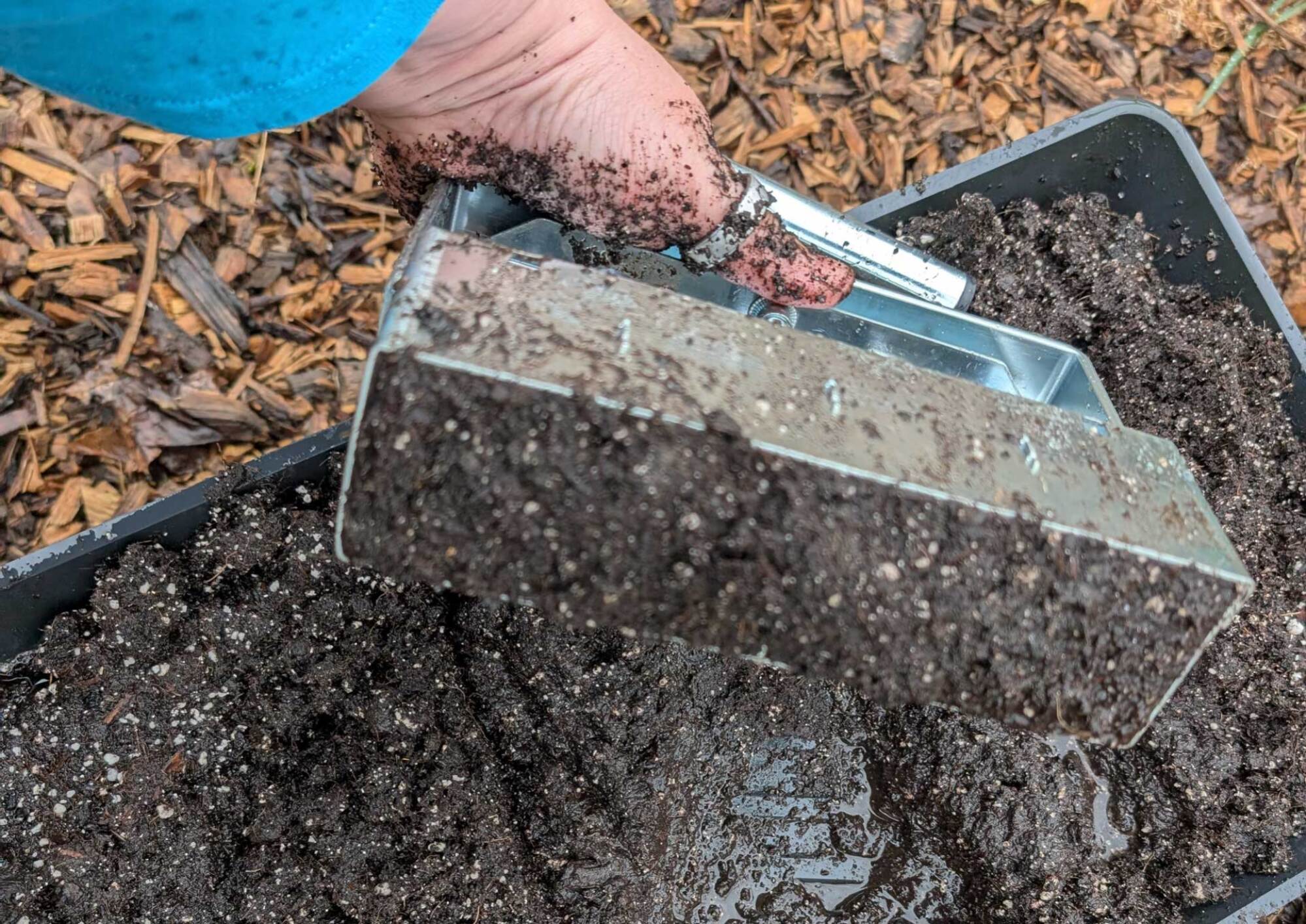
Now let’s get down to actual blocking. Again, if you’ve ever made a sand castle, this won’t seem foreign, but the technique requires a little finesse. Holding the blocker upright, push it into the seedling mix over and over, rocking it back and forth, until you hit the bottom of the bin. This pushes soil into the blocker. Swiveling the blocker left and right while pressing against the bottom of the bin compresses the soil. After a few passes, lift the blocker upside down, and check that the four chambers are full.  If they’re not, keep taking passes, or you can just keep the blocker upside down and pack soil in with your other hand. 

Step 6: Line up the blocks on the tray

trays of blocks

Credit: Amanda Blum

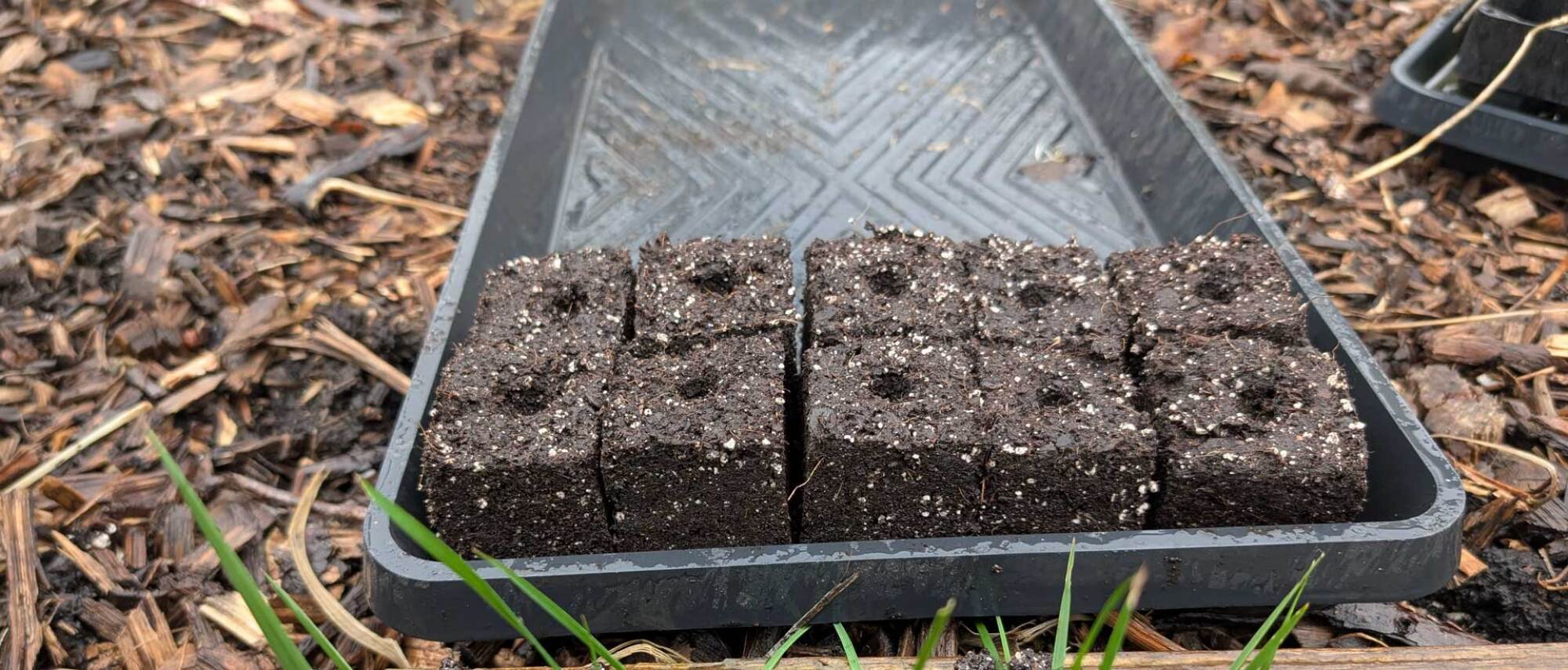
To dispense the blocks, move to the tray that will hold them. Push the blocker against the tray, while slowly depressing the handle and lifting up. This process should product four perfect blocks, but that doesn’t always happen, and if a block looks like it will fall apart, pick it up and toss it back into the bin. It’s just soil; it will crumble apart. The blocks are delicate at this stage but not immovable, if you’re gentle. 

Make more blocks

Credit: Amanda Blum

Now, start all over, and dispense more blocks. Keep going until you have as many as you’d like on that particular tray. At this point, it’s time to plant some seeds. Treat each block like a cell in a seed tray. Plant one or two tomato seeds, or a bunch of carrot seeds, or a single pumpkin seed. Cover the seed up with some extra seed mix. 

Step 7: Seed the blocks

From here on it, the process is just like growing in seed trays. The soil needs heat, so place your tray on a heated seed mat. The blocks need water, so you should fill the tray every few days with just enough water to cover the bottom of the tray entirely. The blocks will soak up the water and remain moist, ensuring germination. The seeds need humidity, so covering the blocks with a plastic dome will ensure there’s enough moisture. Finally, the blocks need light, so ensure there’s enough light on the tray, especially after the seeds germinate. 

Tomatoes grown in seed blocks
Credit: Amanda Blum

The seeds will grow just as they would in a seed tray scenario, and at some point, will be too big for the blocks. Along the way you’ll want to choose one seedling per block, and cut the other seedling away. You can choose to up-pot the blocks into containers or paper pots, or plant the blocks right in the garden, if it’s not too early. Usually I up-pot the seedlings after a few weeks, and they’ll remain in four-by-four-inch pots until it’s time for them to go in the ground. Blocks that don’t germinate for some reason can be recycled for next year by simply tossing the block back into the bin of seedling mix.

‘Hey Siri, What Month Is It?’

DaringFireball: Whole Reddit thread examining this simple question: “What month is it?” and Siri’s “I’m sorry, I don’t understand” response (which I just reproduced on my iPhone 16 Pro running iOS 18.4b4). One guy changed the question to “What month is it currently?” and got the answer “It is 2025.” More comments from that thread:”I ask Siri to play a podcast and she literally says, “I’m trying to play from Apple Podcasts but it doesn’t look like you have it installed.” I didn’t even know you could delete that app. I certainly haven’t. So I have to manually do it every time now. It used to work.”

“I asked Siri last night to set a reminder for 3:50, so naturally she set it for 10:00.” Further reading:
Apple Shakes Up AI Executive Ranks in Bid to Turn Around Siri;
‘Something Is Rotten in the State of Cupertino’.


Read more of this story at Slashdot.

How the language of job postings can attract rule-bending narcissists

When companies advertise job openings, they often use buzzwords like “ambitious” and “self-reliant” to describe their ideal candidate. These traits sound appealing—what hiring manager wouldn’t want a driven employee?

But there’s a catch. In my latest study, published in the journal Management Science with co-authors Scott Jackson and Nick Seybert, I found that these terms may attract job applicants with more narcissistic tendencies.

As behavioral researchers in accounting, we are interested in executives who bend the rules. We decided to study job postings after noticing that the language used to describe an “ideal candidate” often included traits linked to narcissism. For example, narcissists tend to see themselves as highly creative and persuasive. Prior research also shows that narcissistic employees are more innovative and willing to take risks to get the success and admiration they crave, even if it means bending the rules.

Read full article

Comments

Why Anthropic’s Claude still hasn’t beaten Pokémon

In recent months, the AI industry’s biggest boosters have started converging on a public expectation that we’re on the verge of “artificial general intelligence” (AGI)—virtual agents that can match or surpass “human-level” understanding and performance on most cognitive tasks.

OpenAI is quietly seeding expectations for a “PhD-level” AI agent that could operate autonomously at the level of a “high-income knowledge worker” in the near future. Elon Musk says that “we’ll have AI smarter than any one human probably” by the end of 2025. Anthropic CEO Dario Amodei thinks it might take a bit longer but similarly says it’s plausible that AI will be “better than humans at almost everything” by the end of 2027.

A few researchers at Anthropic have, over the past year, had a part-time obsession with a peculiar problem.

Can Claude play Pokémon?

A thread: pic.twitter.com/K8SkNXCxYJ

— Anthropic (@AnthropicAI) February 25, 2025

Last month, Anthropic presented its “Claude Plays Pokémon” experiment as a waypoint on the road to that predicted AGI future. It’s a project the company said shows “glimmers of AI systems that tackle challenges with increasing competence, not just through training but with generalized reasoning.” Anthropic made headlines by trumpeting how Claude 3.7 Sonnet’s “improved reasoning capabilities” let the company’s latest model make progress in the popular old-school Game Boy RPG in ways “that older models had little hope of achieving.”

Read full article

Comments

ViewSonic’s New 27-Inch 4K IPS Monitor Can Boost The Refresh Rate At 1080p

ViewSonic's New 27-Inch 4K IPS Monitor Can Boost The Refresh Rate At 1080p
I’m old enough to remember to when PC monitors weren’t exactly known for innovating. These days, however, it’s a challenge keeping up with all of the fancy new display technologies and their various tricks. One of the latest innovations gaining traction is the advent of dual-mode displays, and ViewSonic has officially entered the conversation

Microsoft Claims Game-Changing Performance Boost With DirectX Raytracing 1.2

Microsoft Claims Game-Changing Performance Boost With DirectX Raytracing 1.2
Gaming graphics have been on a constant improvement trajectory since the early days, with new technologies leveling up the experience. Ray tracing has been one such focus that brings gorgeous lighting, better shadows, and more realistic game worlds to the forefront of gaming. Not without hurdles, the primary bottleneck has been performance,

Mac Users Should Be on the Alert for This New Phishing Scheme

Mac users take note: A well-known (and relatively sophisticated) phishing scheme previously targeting Windows is now being redirected at macOS and Safari in an attempt to obtain login credentials (your Apple ID).

On Windows, this scam worked by displaying fake security alerts on compromised websites claiming that the user’s device had been “compromised” or locked” at the same time that malicious code caused the website itself to freeze (making the scam more convincing). The notification prompted users to enter their Windows credentials to regain access—obviously handing them directly to the attackers to take over their accounts. Users were also advised to call a fake hotline, where they were pressured to pay a ransom or allow remote access to their machines.

According to a post by LayerX Labs covering the scam, this attack was successful for over a year—in part because the alerts impersonated real Microsoft notifications so well, with sophisticated phishing sites hosted on a legitimate Microsoft domain (windows[.]net) and randomized subdomains that rotated frequently.

How this phishing campaign works on Mac

As 9to5Mac notes, the campaign quickly pivoted to targeting macOS and Safari after anti-scareware was released for Edge, Chrome, and Firefox in February. It works similarly with pages and text modified for Mac. You can be targeted on Safari if you mistype a URL while trying to access a legitimate website, after which you’ll be redirected through a compromised “parking” page to a phishing attack page. As with Windows, you may be prompted to enter your Apple credentials to fix the problem.

LayerX Labs states that phishing campaigns targeting Mac “have rarely reached this level of sophistication,” though the screenshots of the security pop-ups included in the report contain spelling errors and don’t fit Apple’s style. As always, bring a critical eye to any communication or alerts that seem urgent or request sensitive information, as you’ll usually be able to spot such discrepancies.

Otherwise, make sure you type in the correct URL for the sites you want to visit, or search for them on Google and scroll past the ads to the real results before clicking through. And keep an eye out for security updates from Apple so you can download and install patches as soon as they are released.

Guinness World Record Pinball Machine Collection (Official Count: 1,041)

This is a video highlighting the pinball machine collection of Rob Berk, the current Guinness World Record holder for most pinball machines. The official record is 1,041, but Rob says he’s up to around 1,150 since the count. Damn! Rob has been involved in the pinball community for quite some time (even launching Pinball Expo in Chicago in 1985), but says he started seriously collecting the machines during COVID, which is impressive because I didn’t collect anything during that time but extra weight. Although, just like Rob’s pinball machine collection, it’s still around and seems to be growing.

Clearview Attempted To Buy Social Security Numbers and Mugshots for its Database

Controversial facial recognition company Clearview AI attempted to purchase hundreds of millions of arrest records including social security numbers, mugshots, and even email addresses to incorporate into its product, 404 Media reports. From the report: For years, Clearview AI has collected billions of photos from social media websites including Facebook, LinkedIn and others and sold access to its facial recognition tool to law enforcement. The collection and sale of user-generated photos by a private surveillance company to police without that person’s knowledge or consent sparked international outcry when it was first revealed by the New York Times in 2020.

New documents obtained by 404 Media reveal that Clearview AI spent nearly a million dollars in a bid to purchase “690 million arrest records and 390 million arrest photos” from all 50 states from an intelligence firm. The contract further describes the records as including current and former home addresses, dates of birth, arrest photos, social security and cell phone numbers, and email addresses. Clearview attempted to purchase this data from Investigative Consultant, Inc. (ICI) which billed itself as an intelligence company with access to tens of thousands of databases and the ability to create unique data streams for its clients. The contract was signed in mid-2019, at a time when Clearview AI was quietly collecting billions of photos off the internet and was relatively unknown at the time.


Read more of this story at Slashdot.

Trump Signs Order Aiming To Close the Education Department

President Trump signed a long-expected executive action on Thursday calling on U.S. Education Secretary Linda McMahon to “take all necessary steps to facilitate the closure of the Department of Education and return authority over education to the States and local communities.” From a report: “We’re going to be returning education, very simply, back to the states where it belongs,” Trump said. “And this is a very popular thing to do, but much more importantly, it’s a common sense thing to do, and it’s going to work, absolutely.”

The move has been expected since early February, when the White House revealed its intentions but withheld the action until after McMahon’s Senate confirmation. It now arrives more than a week after the Trump administration has already begun sweeping layoffs at the Education Department. According to the administration’s own numbers, Trump inherited a department with 4,133 employees. Nearly 600 workers have since chosen to leave, by resigning or retiring. And last week, 1,300 workers were told they would lose their jobs as part of a reduction in force. That leaves 2,183 staff at the department — roughly half the size it was just a few weeks ago.

The order instructs McMahon to act “to the maximum extent appropriate and permitted by law,” an acknowledgement that the department and its signature responsibilities were created by Congress and cannot legally be ended without congressional approval. That would almost certainly require 60 votes in the U.S. Senate to overcome a Democratic filibuster.


Read more of this story at Slashdot.

LG’s NFT Marketplace For TVs is Shutting Down

LG is shutting down Art Lab, its NFT marketplace for TVs. From a report: In a notice posted to its website, LG says it has made the “difficult decision” to close the platform on June 17th. LG launched its Art Lab app during the NFT craze in 2022, billing it as a way to “buy, sell and enjoy high-quality digital artwork” from your TV. It added new digital art to the platform through “groundbreaking” NFT drops, which users could purchase by scanning a QR code to complete transactions through Wallypto, LG’s crypto wallet app.


Read more of this story at Slashdot.

The ax has become an important part of the Space Force’s arsenal

This is Part 1 of a two-part series on the military’s secretive Space Rapid Capabilities Office.

ALBUQUERQUE, New Mexico—For decades, America’s big defense contractors have known they can count on a steady flow of business from the Pentagon. You win some, and you lose some. But don’t fret. Inevitably, there’s a new opportunity to get money from the world’s largest military.

This paradigm is shifting with the launch of a wave of startups eager to deliver software, missiles, drones, satellites, and other services. It’s no surprise that the US military is often the core market for these companies.

Read full article

Comments