Remedy Entertainment has been on a hot streak these last few years, releasing Control and following it up with the critically acclaimed Alan Wake 2. After putting out these stellar single player experiences the studio is now looking to replicate that success in the multiplayer space, with its cooperative first-person shooter that’s set in
Following a slew of hardware announcements in the past few months like the RP2350 shipping, Raspberry Pi 5 16GB, Raspberry Pi Monitor, and Raspberry Pi 500, today they have a new software announcement. Today they formally announced “rpi-image-gen” as a new tool to help customers in crafting customized software OS images…
If your child has their own Android device, you no longer need to worry about loaning them your credit card or keeping cash on hand for purchases when you’re not present. Kids can now use Google Wallet for tap-to-pay—with some parental oversight, of course, so they can’t get into too much financial trouble without you knowing.
Google teased this feature last fall and in February announced its inclusion in an anticipated update to Google Family Link. Google Wallet and tap-to-pay for kids is now live and available to families in the United State, United Kingdom, Australia, Spain, and Poland.
How Google Wallet works for kids
Kids can use tap to pay when checking out in stores that accept Google Pay or contactless payments. They must have a supervised Google Account and an NFC-enabled Android device (or a tethered Wear OS watch) with the Google Wallet app and screen lock enabled.
Importantly, kids cannot use Google Wallet for online or in-app purchases or for Google services, such as Play and YouTube. While there are no additional spending controls, you’ll get an email every time there’s a successful transaction, so you can keep an eye on payments. Transaction history is also available in the Family Link app.
Kids can also store passes, such as loyalty cards, gift cards, boarding passes, and event tickets, in Google Wallet. These can be added without parental approval, and you won’t be notified if and when they are used.
How to set your child up with tap-to-pay
To add a payment card to your child’s Google Wallet, open the Wallet app on their phone and tap Add to Wallet > New credit or debit card, then hit More > Next after reading the prompt. You’ll need sign into your Google account, after which you can snap a photo of the card or enter the information manually. You’ll also need to accept both Google’s and the card issuer’s terms to proceed, and you may be prompted to verify the payment method with a code sent via email or text or by calling or logging into your bank app.
Parents can also remove cards from Google Wallet, either from a specific device or via Family Link. Open Family Link, select your child’s account, and go to Controls > Wallet > Payment methods and transactions. Then select the card and tap Remove > Remove. You cannot remove other types of passes from your child’s wallet unless you block access to passes entirely in your Family Link settings.
Note that your child must be the cardholder or an authorized user for cards added to Google Wallet.
It’s been six months (yes, really) since we were first introduced to the Zen 5 CPU architecture with the Ryzen 9000 series desktop CPUs, and it’s been nearly a year and a half since AMD unveiled the Threadripper Pro 7000 series processors. Isn’t it about time for a new Threadripper generation? Apparently so, because those parts are seemingly
Microsoft’s newest open-source contribution to the Linux kernel being proposed is… Hornet, a Linux security module (LSM) for providing signature verification of eBPF programs…
A federal judge yesterday issued a temporary restraining order blocking DOGE’s access to Social Security Administration records, saying the DOGE agency created by President Donald Trump “is essentially engaged in a fishing expedition at SSA, in search of a fraud epidemic, based on little more than suspicion.”
Plaintiffs are likely to win their case alleging that DOGE (Department of Government Efficiency) and other government defendants are violating the Privacy Act and the Administrative Procedure Act, said a ruling by US District Judge Ellen Lipton Hollander in the District of Maryland. Social Security officials “provided members of the SSA DOGE Team with unbridled access to the personal and private data of millions of Americans, including but not limited to Social Security numbers, medical records, mental health records, hospitalization records, drivers’ license numbers, bank and credit card information, tax information, income history, work history, birth and marriage certificates, and home and work addresses,” Hollander wrote.
Trump and Musk have claimed there is widespread Social Security fraud, with Musk calling it “the biggest Ponzi scheme of all time.” But there’s no evidence to justify the DOGE access purportedly needed to root out fraud, Hollander wrote:
There was a time when we all had dedicated alarm clocks on our nightstands to wake us up in the morning. Now, I’d wager a smartphone does the job for most of us (whether we like it or not).
The thing about alarms, though: They kind of need to work every time they’re scheduled to go off. There’s no acceptable percentage of failure, as, presumably, you’re setting that alarm at a specific time for a good reason. You might have work, an interview, an appointment, any number of other important obligations, and not all of them are going to tolerate “my alarm didn’t go off” as an excuse. So, alarms need to work, and right now, alarms set on a Google Pixel can’t be trusted.
Alarms aren’t reliable on Pixel at the moment
Something screwy is going on with Pixel alarms, as evidenced by this Reddit thread on r/GooglePixel. One user shared that their alarm on their Pixel 9 did not go off that morning, which caused them to be late to work. This wasn’t a one-off alarm, either (not that it would make the situation any better if it was); rather, this was the user’s prescheduled Monday-through-Friday alarm that had been working for years, according to the poster.
Scrolling through the thread, you’ll find posts from other users experiencing similar alarm issues. Some actually received notifications from Android saying the alarm failed to sound, which is at least a bit helpful. (You don’t have to spending the day wondering if it was your phone that messed up, or if you turned off the alarm in your sleep.) However, not all affected users were so lucky: Another user claims they have five alarms set each morning and none of them went off, with zero notification about a failure on Android’s end. Curiously, one user says they woke up late, but their Pixel said there was an upcoming alarm for a time that was already in the past—as if the phone thought it was currently earlier than it actually was.
It’s possible this isn’t just affecting Pixel phones, either. One commenter believes this is an issue with the alarms in Google’s Clock app on Android 15, which the user experienced on their OnePlus device. All that said, Android Authority hasn’t been able to replicate the issue on their end, so it’s possible this isn’t an issue affecting all Pixel phones or all Google Clock users. Still, there are enough reports to warrant some concern.
Before any Apple fans get too smug, the same complications are present over on iOS. Last year, Apple confirmed there were issues with its iPhone’s alarms, as users reported their alarms weren’t going off. Some even say issues are still occurring.
The short answer is there’s likely a bug that’s causing Pixel or Google Clock to not sound the alarms you set. Google hasn’t publicly commented on this issue as of this writing, but the Reddit poster did say Google Support has reached out to them. If this is a bug, hopefully Google patches it fast.
How to get around a broken Pixel alarm
While we wait for a potential fix from Google, it seems safe to say the Google Clock app isn’t the best option at the moment for anyone who wants to be sure they’ll wake up on time. Luckily, there are a surprising number of alarm clock apps out there for you to switch to if you don’t trust Google’s built-in solution. Give one a shot, at least until we get some more clarity from Google about the situation.
Alternatively, you could rely on a different device entirely for your morning alarms. If you don’t have a true alarm clock these days, you might have another piece of tech that isn’t running Google Clock to rely on, like, say, a smart speaker. It’s definitely a pain though, seeing as setting alarms are a basic feature you expect a smartphone to be able to handle.
The U.S. Treasury Department’s sanctions watchdog removed cryptocurrency mixing tool Tornado Cash from its global blacklist on Friday, following a federal appeals court ruling last November that the Office of Foreign Asset Control couldn’t sanction its smart contracts. Despite the delisting of over 100 Ethereum addresses from the Specially Designated Nationals list, Treasury Secretary Scott Bessent emphasized continuing concerns about North Korea’s digital asset theft operations.
“We remain deeply concerned about the significant state-sponsored hacking and money laundering campaign aimed at stealing, acquiring, and deploying digital assets for the Democratic People’s Republic of Korea,” Treasury stated. Roman Storm, Tornado Cash co-founder, still faces a July criminal trial for his alleged development role. A Treasury court filing Monday had warned that completely lifting sanctions could have “significantly disruptive consequences for national security.”
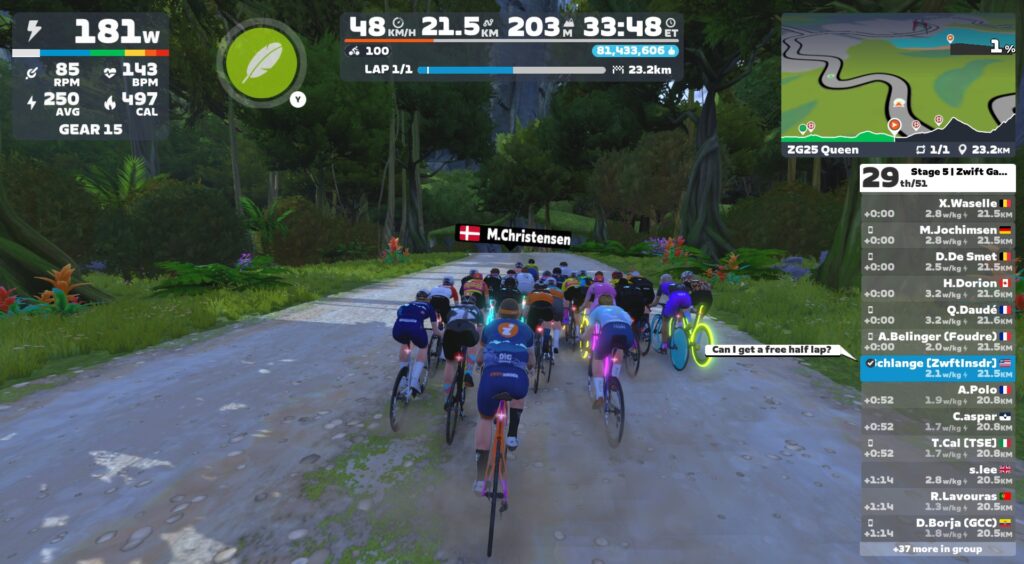
With the Zwift Games wrapping up, I found myself with just one stage left to finish. But it was a big one! With a name like “ZG25 Queen” I knew it wasn’t going to be easy, but then again, I’m always up for a longer race effort. So I entered the 450-570 group once again…
The Warmup
It was Tuesday, and the biggest Zwift update in months had just dropped. I was about two weeks into the busiest week of my life at Zwift Insider, buried in speed tests and putting together posts to help folks wrap their minds around Bike Upgrades.
But that wasn’t going to stop me. I’d raced the first four stages of Zwift Games. Now I needed to race the final stage. And it was a tough one! Held on the new ZG25 Queen route, this race would take me up the Jarvis KOM Reverse, into the Jungle, up the Mayan+Itza KOMs, up the upper half of The Grade, and finally, up the Epic KOM Reverse.
With 44.8km to cover and nearly 900 meters to climb, I knew it would be a sufferfest for my “overmuscled” body. But suffering is good for the soul. So here we go!
The Easy First Half
Looking at the route profile, you can see that the first half of this route is quite tame:
We started the race with 51 riders, and the first real effort for me came as we hit the base of the Epic KOM Reverse 14km into the route. I’ve been dropped here on many a race, but today I was able to hang with the front pack up the twisty climb, across False Flat Bridge (I just made that name up), and onto the continued climb up to the Jungle Pens.
From there it was smooth sailing. Just a dusty descent through the Jungle before hanging a left to make our way out to the Mayan Mountainside KOM, where the real work would begin.
The second half of the route begins with the Mayan Mountainside KOM. I was able to hang with the group to the top of this climb, setting a Strava segment PR in the process. But by the time we went through the arch, I was dangling off the back.
I pulled the plug and stopped chasing the front group’s wheels before we even began the Itza KOM, just a few hundred meters up the road.
Now sitting 25th out of 51, I rode easy until a small group of 5 caught me from behind. We rode together up the Itza at a perfect “tough but doable” pace, then we turned left and began the upper half of The Grade.
This climb is steep – the steepest climb on the route, in fact. It was every man for himself as we negotiated The Grade’s snaking road. There was no hiding in the wheels here! Over the top the rider list now showed me in 25th out of… 35 riders? Did we really lose that many?
Supertucking down the Epic KOM descent, I caught a couple of riders up the road. And soon enough, it was time to begin the final climb: the upper portion of the Epic KOM Reverse. This climb takes me around 20 minutes to complete, so I just tried to pace myself evenly while making good use of the flat spots and short descents on this side of the mountain.
I began the climb in 25th… and finished in 25th. How’s that for consistency? ZG Queen route badge earned, in just under 90 minutes.
I did this one in the middle of a busy workday, and to be honest, my mind was struggling to find the fortitude to push hard. And it showed.
That said, in the end, I was happy I did it. (Isn’t that always how it goes?) I finished all 5 Zwift Games stages, and the fancy new leaderboards show me at 926 out of 59178 overall. Hey, that’s the top 2%! #winning
My final results (as of 2:30pm PDT on March 20, 2025):
Sprint Classification: 1456 of 44597
Climb Classification: 2527 of 35395
Epic Classification: 3832 of 12225
Overall Classification: 926 of 59178
Overall, I enjoyed racing this year’s Zwift Games, and would certainly do it again. I liked how routes were broken into flatter “sprint” routes, punchy “climb” routes, and a longer “epic” route. I like the new leaderboards and the GC component.
One thing I would change, though, is I’d allow steering in these races. I think it adds a fun dimension to the events, and it feels silly to have it disabled when Zwift is selling Play Controllers.
Your Thoughts
Did you race the final big stage? How did it go? Share your experience below!
As a system runs and its memory becomes fragmented, allocating large,
physically contiguous regions of memory becomes increasingly difficult.
Much effort over the years has gone into avoiding the need to make such
allocations whenever possible, but there are times when they simply cannot
be avoided. The kernel’s contiguous memory
allocator (CMA) subsystem attempts to make such allocations possible,
but it has never been a perfect solution. Suren Baghdasaryan is is trying
to improve that situation with the guaranteed
contiguous memory allocator patch set, which includes work from Minchan
Kim as well.
We may earn a commission from links on this page. Deal pricing and availability subject to change after time of publication.
If you’re looking for tools to up your DIY game, you’ve probably noticed that they can be expensive. Buying new tools to expand a set or replace worn-out ones adds up quickly, but having the right tool for the project you’re working on can cut your work time in half and get you better results. DeWalt tools are on sale right now on Amazon for up to 57% off, so you can build out your toolkit without spending your whole DIY budget.
Cordless tools sets
If you’re building out a new set of cordless tools, a combo set is a good way to get started. Sets will come with the chargers and batteries you need to run your tools, along with the tools themselves. These sets are on sale to make starting a cordless tool set cheaper.
The DeWalt 20-volt drill and driver combo set is on sale for $124.00, 48% off its regular price. The set includes a 20-volt drill, a 20-volt, quarter-inch impact driver, two 1.5-amp batteries, a 20-volt charger, and a tool bag. This is a good starter kit for doing beginner DIY projects like hanging shelves or mounting a TV on the wall.
The DeWalt 20-volt 9-tool set comes with a 20-volt drill, a 20-volt impact driver, a 6-½ inch circular saw, a reciprocating saw, a 4-½ inch angle grinder, an oscillating tool, a ⅜ inch right angle drill/driver, a work light, a Bluetooth speaker, two 20-volt, 2-amp-hour batteries, a 20-volt charger, and two tool bags. It’s on sale for $599.99, 37% off its regular price. This kit is a good foundation for a robust DIY tool set, but it only comes with two batteries, so if you plan to use multiple tools at a time, you might consider getting one or two more batteries and an extra charger so you can keep going while your spare batteries charge.
If you already have a DeWalt cordless tool set, you can still get a good deal on expanding your kit. Tool-only deals are great if you already have batteries and chargers and need a specific tool since you likely don’t need more batteries or chargers to use it.
The DeWalt 20-volt, hand-held flashlight/work light is on sale for $35.84, 57% off its typical price. The flashlight is small, but you can also use the ring at the top to hang it and use it as a work light.
The DeWalt 20-volt, 6 ½ inch circular saw is on sale for $99, 38% off its usual price. The saw comes with one fast-cut wood blade included, but no battery.
The DeWalt 20-volt, 4 ½ inch angle grinder is on sale for $121.25, 45% off its typical price. It comes with a side handle, but no grinder wheel, so you’ll need to pick out an appropriate wheel or blade to use it.
The DeWalt 20-volt reciprocating saw is on sale for $119.99, 50% off its regular price. It doesn’t come with blades or batteries, so you’ll need those to use your saw.
The DeWalt 20-volt, 18GA narrow-crown stapler is on sale for $224.95, 47% off its usual price. This tool can drive staples without the need for a pneumatic air tank.
The DeWalt self-leveling laser is on sale for $166.99, 37% off its typical price. It has a 100-foot throw and can be used for leveling decking, shelves, drywall, grading gravels, and plumbing posts.
If you already have a DeWalt set and you need bits or to replace or expand your batteries, there are some good deals on these tools as well. Having the right bits and adapter can help you get your DIY projects finished without so many trips to the hardware store.
The DeWalt 40-piece impact bit set is on sale for $24.53, $39% off its regular price. This set includes several driver tip types, a bit extender for hard-to-reach spots, and a quarter-inch adapter for sockets.
A set of two DeWalt 20-volt, 5-amp-hour Powerstack batteries is on sale for $187.49, 46% off its regular price. These batteries are lighter and smaller than traditional lithium-ion batteries, so they can be helpful on longer jobs where you need to use your tools for several hours.
In this tutorial, we will show you the process of data migration from Magento 1 to 2 in a handful of steps. This aims to avoid using the end-of-life Magento 1 and the new, more reliable Magento 2 software. The risks of using the EOL Magento 1 are the following: security loopholes, outdated features, PCI compliance, and limited support.
It’s been over three years since the last ReactOS open-source operating system release for this platform working on API/ABI compatibility with Microsoft Windows. Today ReactOS 0.4.15 was finally published…
About five years ago, the Trump-appointed administrator of NASA, Jim Bridenstine, revealed the name of the program that would return humans to the Moon. It was to be Artemis, from a Greek goddess who was the twin sister of Apollo.
The symbolism was clear. NASA’s second human program to the Moon would be different: We were going to stay this time, there would be more international partnership, and instead of being all-male, the crews would include women. Shortly thereafter, NASA began to refer to Artemis as a program that would land the “first woman” on the Moon. Soon, an additional bit of diversity was added: “and the first person of color.”
One of the very last acts of the first Trump administration in regard to space was to name a cadre of astronauts that would fly as part of the Artemis Program. This subset of 18 people within NASA’s corps of four dozen active astronauts skewed significantly more female and minority than the general corps.
Just 15 weeks ago, EA and Hazelight announced sci-fi co-op game Split Fiction. Earlier this month, the game launched to rave reviews and is a massive success. And reportedly there’s now a bidding war between different studios all interested in turning hit game into a movie.
The kitchen tends to be the heart of the home—it’s where we gather to share meals, nibble on snacks, and talk about our day. It’s also a pretty dangerous place. Aside from open flames, slippery floors, and flammable gas that is literally pumped into our homes, the innocuous little appliances that crowd our countertops can also represent real dangers.
More than 150,000 people head to their local emergency room every year after an accident involving a household appliance of some sort. Small appliances might seem safe enough sitting on your kitchen counters, but they can be extremely dangerous if defective, misused, or placed in the wrong spot. Aside from the danger of hurting yourself, a misplaced countertop appliance can actually damage your home, as well. Here’s what you need to think about when you’re deciding where to place everything in your kitchen.
General rules to keep in mind
If you want your kitchen to be as safe as possible, there are a few basic safety rules that apply to any countertop appliance:
Keep stuff away from water. Don’t operate any electric appliances near sinks, pot-fillers, or any other sources of running water. This protects against electrical dangers and keeps the dangerous bacteria growing in your average sink from infiltrating your food.
Plug into ground-fault circuit interrupters (GFCIs). All your kitchen appliances should be plugged into GFCIs. Before 2023 only appliances located near water sources were required to be plugged into GFCIs, but the National Electrical Code was changed to include any kitchen appliance. These special outlets are designed to cut off to prevent electric shock, and using them reduces the chances that your countertop appliance will hurt you or damage your home.
Never use extension cords. Even if the cord is plugged into a GFCI outlet, it’s a bad idea. Many countertop appliances like air fryers or microwaves pull a lot of juice, and can melt most standard home-use extension cords, leading to serious fire danger.
Keep away from the stove. You shouldn’t place any countertop appliance near (or, lord help us, on) your stove. The heat and open flames can melt power cords, increasing the risk of a fire or other accident.
Keep away from the edge. If your countertop is crowded and something has to sit right on the outer edge, it’s time for a reorganization. Having any appliance right near the edge of the counter is just an invitation to disaster.
While these rules apply to any appliance, there are specific placement considerations for several countertop appliances.
Toasters and toaster ovens
The heating element in a toaster oven can reach 1,000 degrees Fahrenheit, and some toaster ovens can heat up to 600 degrees under specific settings. That’s pretty hot, and while even the cheapest toaster has some built-in safety features, placement matters. Never place a toaster or toaster oven on anything flammable, like a towel. If you’re concerned about your countertop being damaged from the heat (though most toasters and toaster ovens are designed to be placed safely on standard countertop materials, even wood), you can place it on a nonflammable surface like a silicone mat or even a piece of stone tile.
You should also never put anything on top of your toaster oven (or toaster). Yes, it’s taking up valuable counter space, but whatever you put on top could potentially be damaged from the heat, or even catch fire.
Coffee maker
You might think that your humble coffee maker is pretty safe, but it might be doing long-term damage to your kitchen cabinets and walls because of one by-product of the coffee-making process: Steam. That hot, moist stuff drifts up and if it regularly interacts with your cabinets, it can cause a lot of damage, warping and staining wood and discoloring other materials. Since the most affected area will be under the cabinets, you can cause a lot of damage before it’s easily noticeable.
Always place your coffee maker away from the upper cabinets when you use it, and make sure your kitchen always has robust ventilation, especially when using any heat- or moisture-producing appliances.
Pressure cookers
Aside from being a time bomb if misused, pressure cookers pose the same steam threat as coffee makers: As they work, they emit steam, and continuous exposure to that steam can damage your cabinetry and walls. You can try aiming the pressure valve away from the cabinets, and you can buy steam diverters that redirect the steam. But your best bet is to operate the pressure cooker away from your cabinets.
Air fryers
Air fryers are very popular, and just like the other appliances on this list, they can damage your walls or cabinets with superheated fumes. Aside from the damage that steam can do, they can also scorch walls and cabinets if placed too close or with insufficient ventilation, so always place them with plenty of space around them.
Air fryers also get pretty hot, so just like toaster ovens, you shouldn’t place them on top of towels or anything else that could conceivably catch fire.
Slow cookers
Slow cookers pose the same steam dangers as pressure cookers, but can be even more damaging because of the “slow” part. While occasional use of a pressure cooker or other steamy appliance probably won’t destroy a cabinet or stain a wall, occasional use of a slow cooker is more likely to because of the duration of operation.
It’s best to place your slow cooker away from the walls and cabinets, and never place it on or near anything flammable. And because of the duration of use, you should place your slow cooker on a metal trivet or heat-resistant mat to protect the surface underneath.