Apple Finally Made the New AirPods Max Worth Buying

Last year, I advised readers that the “second-generation” AirPods Max were actually a worse deal than the original pair. Apple was charging $549 for headphones that were virtually identical to the pair that launched in 2020, only with USB-C instead of Lightning. What’s more, Apple actually took away a feature with the USB-C pair: Unlike the Lightning AirPods Max, the USB-C model was not compatible with 3.5mm adapter, meaning you couldn’t use them for wired playback.

Seeing as the Lightning AirPods Max are frequently on sale by around $150, it seemed silly to recommend the newer, more expensive AirPods Max—unless you really couldn’t live without USB-C. That is, until today, when Apple made an excellent AirPods Max announcement. When Apple releases iOS 18.4 next month (as well as macOS Sequoia 15.4), the company will issue a rare AirPods Max update: These headphones will support both lossless audio and ultra-low latency audio, as Apple will now allow for a wired connection over USB-C.


Lossless audio vs. Bluetooth

Let’s start with lossless audio. While AirPods’ wireless quality is excellent, it isn’t perfect. In order to beam music from a device like your iPhone or Mac to your AirPods over Bluetooth, those files need to be compressed. While compression has come a long way since the days of MP3 files, you do lose information in the process. You might not notice, especially with a good pair of wireless headphones, but if you’re directly comparing a lossy codec like AAC (what Apple uses for Bluetooth streaming) and ALAC (Apple Lossless Audio Codec) over high quality headphones, you may hear a difference.

AirPods Max will support ALAC streaming and downloads via a USB-C connection. You can plug your AirPods into your Mac, iPhone, or iPad, and listen to music without data loss. That said, be warned: These files will be much larger than the compressed music you might be used to, so keep that in mind before downloading or streaming large amounts of lossless music.

Apple wants professionals making music with AirPods Max

The other big update here is ultra-low latency audio. Traditionally, wireless headphones have been impossible to use for anything that requires real-time audio feedback. That’s because Bluetooth audio comes with “latency,” or a delay between the audio source and the target output. This isn’t an issue when streaming music or audiobooks, or even when watching shows and movies, because the delay is minute enough to be inconsequential.

However, if you’re a professional musician, this delay is unworkable. Try recording a track when listening to real-time feedback on a pair of wireless headphones, and you’ll have a bad time.

Now that AirPods Max with USB-C can be used with a wired connection, that’s changing. With iOS 18.4, you can plug your AirPods Max directly into a source, like your Mac, via USB-C, and take advantage of ultra-low latency audio. Apple even says that this AirPods Max model is the only headphone to offer musicians the ability to create and mix music with Personalized Spatial Audio with head tracking in mind. I’ve never been a big fan of this feature, but perhaps once artists can design tracks with head tracking while using AirPods Max, it may improve.

The company also touts the benefits of this reduced latency for gaming and livestreaming. Apple says there is zero response delay here, and the experience is “on par” with the built-in speakers on your iPhone, iPad, or Mac.

OG AirPods Max are left behind

If you’re an original AirPods Max owner (like me), none of this news applies to you. Unfortunately, both lossless wired playback and ultra-low latency audio are exclusive to the USB-C AirPods Max—even though the original AirPods Max supports wired playback over a 3.5mm to Lightning adapter.

Apple didn’t specify why this was the case—perhaps there’s a technical limitation between Lightning and USB-C—but I imagine it also helps that the company now has two new perks to highlight with its “new” AirPods Max. Remember, these headphones were basically the same, minus the port and some new colors, so now Apple can point to these features as exclusives, and reasons to buy the AirPods Max over the, well, older AirPods Max.

If you’re an audiophile entrenched in the Apple ecosystem, then, yeah: It’s a reason to buy the new model. Lossless audio support is awesome, especially if you have the lossless audio files to play. And if you have interest or need for a pair of headphones for music creation, all the better.

However, barring these needs, I’d still recommend comparing prices between the Lightning and USB-C AirPods Max. Stores are cutting the price of the new model more than they used to, but if you find a significantly good deal on the Lightning headphones, consider them. If you don’t care about USB-C, lossless audio, or ultra-low latency, and you just want a pair of high-quality wireless headphones that work well with your Apple devices, you’ll be well-served by the original pair—especially if you can shred some digits off the price tag.

Oops: Google says it might have deleted your Maps Timeline data

The Google Maps Timeline has long been a useful though slightly uncomfortable feature that maintains a complete record of everywhere your phone goes (and probably you with it). Google recently changed the way it stored timeline data to improve privacy, but the company now confirms that a “technical issue” resulted in many users losing their timeline history altogether, and there might not be any way to recover it.

Timeline, previously known as Location History, is very useful if you need to figure out where you were on a particular day or if you just can’t remember where you found that neat bar on your last vacation. Many Google users grew quite fond of having access to that data. However, Google had access to it, too. Starting in 2024, Google transitioned to storing Timeline data only on the user’s individual smartphone instead of backing it up to the cloud. You can probably see where this is going.

Users started piping up over the past several weeks, posting on the Google support forums, Reddit, and other social media that their treasured Timeline data had gone missing. Google has been investigating the problem, and the news isn’t good. In an email sent out over the weekend, Google confirmed what many already feared: Maps has accidentally deleted Timeline data on countless devices.

Read full article

Comments

China Unveils a Powerful Deep-sea Cable Cutter That Could Reset the World Order

schwit1 writes: A compact, deep-sea, cable-cutting device, capable of severing the world’s most fortified underwater communication or power lines, has been unveiled by China — and it could shake up global maritime power dynamics.

The revelation marks the first time any country has officially disclosed that it has such an asset, capable of disrupting critical undersea networks. The tool, which is able to cut lines at depths of up to 4,000 metres (13,123 feet) — twice the maximum operational range of existing subsea communication infrastructure — has been designed specifically for integration with China’s advanced crewed and uncrewed submersibles like the Fendouzhe, or Striver, and the Haidou series.


Read more of this story at Slashdot.

Did Red Bull build an undriveable car? Questions from the Chinese Grand Prix.

Formula 1 spent this past weekend in Shanghai for the 2025 Chinese Grand Prix. There was a little something for everyone: entertaining racing on-track, different winners for the sprint and Grand Prix, some driver and team intrigue, rumors of a potential technical shakeup happening soon, and a bit of an argument that exposes the entertainment side of the sport.

Once out in the countryside, skyscrapers are starting to fill in the backdrop behind the Shanghai International Circuit. One of the mid-2000s crop of race tracks designed by Herman Tilke, it’s characterized by the neverending decreasing radii that are turns 1 and 2, plus the longest straight on the calendar. It was freshly resurfaced for this year, eliminating the bumps and increasing the grip level to fix a botched job performed ahead of last year’s F1 race the process.

China was home to the first sprint weekend of the year, with a 19-lap race on Saturday in place of that morning’s practice session ahead of the 56-lap race on Sunday. Lewis Hamilton, now clad in bright Ferrari red, led from start to finish, showing the kind of ability that has led him to 105 race wins. Hamilton’s last year with Mercedes was better than the winless 2022 and 2023, but his new Ferrari already appears to suit him better.

Read full article

Comments

Nothing’s Essential Spaces is an AI-powered app done right

The most notable feature of Nothing’s latest phones may be its combo of distinct hardware design and Android software tweaks. However, after using the Nothing Phone 3a for a few weeks, the Essential Space app has kept me hooked on what is ostensibly a lower-mid-range smartphone.

It’s also a hard app to explain in a single sentence. It’s a little bit of a screenshot gallery, a little bit of a notes app, a little bit of a to-do list app, a little bit of country, a little bit of rock-and-roll. It’s all sewn together with similar AI features to what we’ve seen on most new smartphones.

However, compared to the disjointed apps and features of Google AI, Galaxy AI, or Apple Intelligence, Essential Space keeps everything in one place. The utility is helped by having a dedicated launcher button (the Essential Key): A single press will screenshot your phone (and file it in Space), while a long press starts recording your voice — and files it away in Space, too, initiating AI-powered transcription. A double press of the Essential Key launches the app, which seems odd. The screenshot should also be a double press, but maybe that’s just me.

It’s not an entirely new premise. We raved about Google’s Pixel Screenshot app, which also does a good job of organizing your screenshots to make things easier to find. However, Google’s Screenshots app is limited to only that — screenshots. Nothing, on the other hand, already announced it’ll bring a similar-seeming Smart Collections feature to the Space app in the future.

Inside Nothing’s Space app, the phone extracts dates, attempts to create to-do lists, analyzes screenshots and associates them with time, date, and location data. In short, it makes it easier to remember why I took a screenshot when I did, and it even attempts to create actionable items and reminders. I’ve started taking voice notes and mulling over everything I must do on a workday morning. It’ll summarize it into a to-do list with goals I can check off when completed.

With Essential Space, Nothing doesn’t seem to be meddling with AI for the sake of it. While image generation, rewriting emails, and writing guidance on my smartphone are occasionally fun, Essential Space removes many roadblocks to using these functions. I don’t have to ask the Phone 3a to transcribe your voice recordings; it just gets to work. There are limitations, perhaps predictably, given the middleweight processor of a mid-range phone, and AI processing happens on the cloud. Nothing says it deletes processing requests from its servers after they’re completed. However, phones that cost over twice as much as the Phone 3a can handle AI processing on-device for most things that Essential Space can do.

There is also no way to share something with Space, whether a photo or a recording unless you initiate the recording through that pesky Essential Key. Of course, you can take screenshots of old screenshots, photos, and websites, but then you’re back to the same disjointed process as other Android devices and iPhones.

Nothing’s Essential Space manages to streamline AI into many of the features I use most, like transcription and reminders. The company has teased further functionality, like a focused search for use inside the Space app, and cutesy gimmicks like flip-to-record for your voice notes, which should only bolster what I thought would be weird software curio. It isn’t earth-shattering, but put all together, it’s one of the best integrations of AI aimed at making your life easier.

This article originally appeared on Engadget at https://www.engadget.com/mobile/smartphones/nothing-phone-3a-essential-spaces-ai-powered-app-done-right-163042976.html?src=rss

I’m Obsessed With Grilling Shrimp on My Waffle Iron

We may earn a commission from links on this page.

For lean protein that’s tasty, low fat, and affordable, you can’t go wrong with shrimp, especially if you buy frozen. I like to do just that, and stretch it out over many meals. I think we can all agree that when you’re eating a lot of one particular thing, the best way to keep things interesting is to try new recipes and to find different cooking methods for it. And my latest shrimp obsession is to “grill” it using my waffle iron. 

Why waffled shrimp works

The waffle iron is one of the most versatile appliances in your kitchen—it’s good for so much more than making waffles. The benefits of using a waffle maker to cook your wee sea bugs is four-fold: speed, ease, space, and a dry cook (which compares to grilling).

When I waffle my shrimp, I always start with a cleaner counter space; as the prep is all done beforehand, and my particular waffle maker is not very large, I need some room to have all my skewers ready to go. Then it’s just a matter of switching out the skewers of shrimp in the appliance; once cooked, they’re ready to snack on or lay across a pile of rice. 

The “dry cook” is the biggest selling point for me. I love shrimp, but I don’t always love eating wet shrimp, and the waffle iron remedies this. (I’m a sometimes seafood lover, so I can get easily grossed out by too much ocean; my fiance historically makes too much saucy shrimp, so I’ll switch to waffling when I’m in charge of dinner.) Similarly to grilling, where you have grates, the divots and grooves of the waffle press allow the excess juices to drain away from the meat. (This is also why you should waffle some meat.) That, coupled with the high heat of the waffle plates, means you can quickly concentrate the flavor without much moisture collecting around the seafood.

Skwered shrimp on a waffle iron.

Credit: Allie Chanthorn Reinmann

How to waffle your shrimp

1. Thaw the shrimp 

Waffling your shrimp is especially good if you’re in the mood for a quick shrimp snack. Since the waffle iron cooks from both sides simultaneously, my medium shrimp finished cooking in three minutes. If you have frozen shrimp or you’re marinating it, thaw them in the fridge overnight and give them a seasoning dry rub in the morning so you’ll be ready to waffle them just before eating. 

2. Marinate

A good marinade can be nearly any seasoning mix, spice blend, or even salad dressing. As I mentioned, I prefer dry but flavorful shrimp, so after thawing I’ll pat them dry with paper towel and add them to a bowl with dry seasonings like old bay, cayenne pepper powder, a curry powder mix, and salt. Then I’ll drizzle on a teaspoon or so of cooking oil. This makes it easier to coat the shrimp with the seasonings but also prevents them from sticking to the iron. 

3. Skewer

Raw shrimp on a skewer.

Credit: Allie Chanthorn Reinmann

You don’t need to skewer the shrimp, but I like to because it’s so much easier to remove them from the waffle maker and switch in the next batch. Also, you must consider how fun it is to eat shrimp straight off the skewer. Use bamboo skewers and poke through the centers of the shrimp—they don’t need soaking or any special treatment. You can skewer as many as will fit, but don’t add more than the length or width of your waffle iron.

4. Waffle

My waffle iron only has an on-off toggle, but if you have temperature controls, then put them up to the highest setting. Shrimp cook easily, and large or medium shrimp will cook through in three to four minutes. When your iron is fully preheated, lay down as many skewers as you can fit with about a half-inch of space between them. Press the lid down and keep some pressure on it for the first minute or so. Peek in the side to see if they’re looking opaque after three minutes, and remove them if so. Swap in the next skewers. 

If you don’t have a waffle iron already or you’re looking to buy a new one, I highly recommend one that has removable plates for easier cleaning. It’s such a relief to let the waffle iron cool down while I eat my snack shrimp, then come back and pop out the plates; the appliance goes into its storage spot and I take care of plates with the rest of the dishes. 

While your waffled shrimp may not have the grill marks or the smoky flavor of actual grilled shrimp (perhaps you can add some smoked paprika?), heating up the waffle iron is a lot easier than firing up a real grill. Plus, if you live in an apartment (like I do), or you simply don’t have a grill, this waffle-griddled shrimp gives you lots of flavor and a lot less mess.

The Crivit Peak 709 is a new middle-of-Lidl eMTB – and I think it looks pretty good

Lidl (yes, the supermarket) has an intriguing middle-of-Lidl item on sale in mainland Europe this week – a punchy-looking electric mountain bike called the Crivit Peak 709.

The supermarket isn’t exactly synonymous with selling bikes, although its occasional middle-of-Lidl lines of workshop tools, accessories and clothing are always popular (and returning to UK stores from 27 March).

So, we were surprised to see this €1,699 eMTB popping up mid-store in France and the Czech Republic – full credit to notebookcheck.net for spotting it.

Lidl’s electric mountain bike

Top tube detail reading 'Peak 709' of Lidl Crivit Peak 709 electric mountain bike.
The Peak 709 is a new eMTB from Lidl, but will it be any good? Lidl

The Crivit Peak 709 is a hardtail electric mountain bike with a mid-mounted motor that packs a real punch.

While brands such as Shimano and Bosch are pumping out ebike motors with around 85Nm of torque, the Peak 709’s Mivice X700 motor boasts 100Nm of torque.

While the Wattage figure is often shouted about, it’s motor torque that makes the real difference on the trail. The torque helps keep the wheel turning when you’re pointed up a steep slope, or trying to accelerate with pizzazz.

Neither the information from Mivice nor Lidl talks clearly about peak power figures, but it hits the legal maximum continual power output of 250W.

Three modes – Eco, Tour and Race – are provided, along with a time-limited, 20-second Boost mode, although at the time of writing we can’t ascertain what gets boosted in this mode, over the Race setting.

Keeping the bike rolling is an integrated, removable 709Wh battery, neatly concealed in the down tube.

Lidl Crivit Peak 709 electric mountain bike product shot.
The removable battery sits neatly in the down tube. Lidl

This should mean there’s enough juice to keep you rolling over a good distance, or up plenty of hills. Lidl claims a range of up to 120km, although I think you’ll be lucky to achieve that off-road.

Interestingly, the motor has an IPX5 rating – this means it’s able to withstand jets of water (although not continuous submersion).

Comparatively, Shimano’s EP801 motor has no IP or IPX rating, while Bosch’s Performance CX Motor ‘only’ has an IP54 rating. This protects it from water spray and dust, but presumably not jets.

Impressive stuff.

The full package?

Lidl Crivit Peak 709 electric mountain bike being ridden by man along trail.
Maxxis’ Rekon tyres seem a good fit for a bike such as this. Lidl

We can’t say too much about the bike’s frame details and geometry, because there aren’t many details about the bike on Lidl’s website.

However, picture snooping reveals this isn’t some hastily constructed, featureless bike.

The proportions look ‘good’. The seat tube seems short for the length of the bike, implying that the reach figures might not be horribly short and nervous, and the top tube is low-slung. It’s aimed directly from the head tube to the rear axle, resulting in what looks like a low standover height.

The fork certainly doesn’t leave the frame at a near-verticle angle, either.

I’d wager the bike’s geometry is pretty good.

Three sizes are offered, for riders ranging from 154cm to 200cm.

Spec selections

Your €1,699 buys you a fair bit of bike, considering the inclusion of a motor and battery.

At the front, there’s an SR Suntour XCM34 fork with 120mm of travel. It’s a coil-sprung suspension fork, so sadly less adjustable than an air-spung fork.

The bike is driven by a Shimano Cues 10-speed drivetrain – this groupset is built to a budget, but still with performance at its heart, so it’s a great option on a pocket-friendly eMTB, in my eyes.

You also get Shimano MT200 brakes with either 180mm or 200mm rotors, depending on which bit of Lidl’s website you look at.

Somewhat embarrassingly, I can’t make out whether the bike has 29in or 27.5in wheels, although I think the hot-patches on the side of the specced Maxxis Rekon read ‘27.5×2.6’.

Regardless, they’re fast-rolling tyres, in either wheel size.

The bar comes in at 760mm, while the stem looks nice and stubby.

There’s also a Fidlock baseplate on the frame – a nice high-spec touch.

Will we see Lidl’s eMTB in the UK?

Woman riding Lidl Crivit Peak 709 electric mountain bike.
If there’s one thing I’d love to see on the Crivit Peak 709, it would be an air-sprung fork. Lidl

At present, the Crivit Peak 709 is only listed for sale in two European countries – France and the Czech Republic.

It’s possible we’ll see the bike offered in other EU territories in the coming weeks or months. Lidl operates on a quick turn-around system, where items only appear for a few weeks at a time.

This could open the doors to the Peak 709 being sold elsewhere soon.

I’m not convinced we’ll see it here in the UK though.

It’s a high-value item, which could make it expensive to import in the relatively low numbers I would expect Lidl to bring here, thanks to the associated costs of taxes and duties.

Would I like to see it here? Of course. More mountain bikes seen in more places that non-riders frequent can only bring benefits to the UK riding scene.

And, I’d love to sling a leg over one to see just how punchy that motor really is.

China Bans Compulsory Facial Recognition and Its Use in Private Spaces Like Hotel Rooms

China’s Cyberspace Administration and Ministry of Public Security have outlawed the use of facial recognition without consent. From a report: The two orgs last Friday published new rules on facial recognition and an explainer that spell out how orgs that want to use facial recognition must first conduct a “personal information protection impact assessment” that considers whether using the tech is necessary, impacts on individuals’ privacy, and risks of data leakage. Organizations that decide to use facial recognition must data encrypt biometric data, and audit the information security techniques and practices they use to protect facial scans. Chinese that go through that process and decide they want to use facial recognition can only do so after securing individuals’ consent. The rules also ban the use of facial recognition equipment in public places such as hotel rooms, public bathrooms, public dressing rooms, and public toilets. The measures don’t apply to researchers or to what machine translation of the rules describes as “algorithm training activities” — suggesting images of citizens’ faces are fair game when used to train AI models.


Read more of this story at Slashdot.

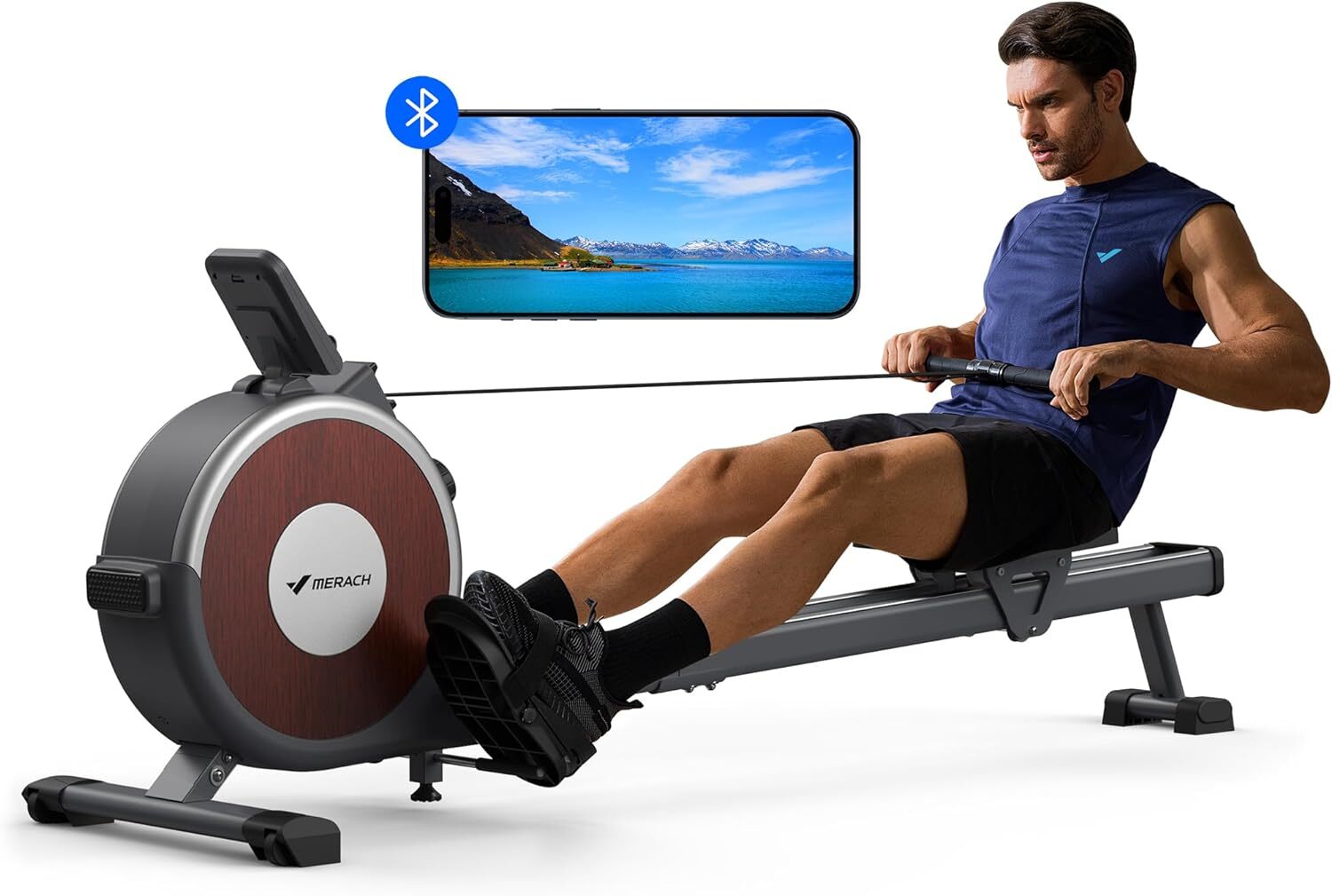
My Favorite Amazon Deal of the Day: This Merach Rowing Machine

We may earn a commission from links on this page. Deal pricing and availability subject to change after time of publication.

A rowing machine can be a great workout option for people looking to target multiple major muscle groups at once (legs, back, core, and arms) while getting their cardio going at the same time.

If you’re looking for a rowing machine that’s light, portable, and quiet, the Q1S Merach is worth checking out. Right now, Merach’s Magnetic Rowing Machine is on sale for $179.99 (originally $299.99), a 40% discount. This is the machine’s lowest price ever, according to price-checking tools.

As I said in my review, this machine is practical, silent, and affordable even before the current discount. I really like the ability to prop it up against the wall and keep it from taking up too much space in my dining room. The machine is also silent enough that I can get workouts done while watching TV and without annoying my partner.

The Merach app is a great companion for the rowing machine, with different workouts, tracking metrics, optional classes, and other paid options to unlock. The screen itself is disappointing, but you can very easily use your phone’s screen and prop it in front of you to get a much better idea of what you’re doing.

Where this machine might fall short for some people is in its size. I’m 5’7″, and I feel that the handlebars sit very low to the ground and don’t come out far enough at the start of the drive, giving me that cramped, small rowboat feel. To get any tension on my arms at the beginning of the stroke, I have to lean back—which isn’t good form. If you’re just trying to get a workout in, though, it likely won’t bother you.

Bigscreen Beyond 2 Sold the Equivalent of 6 Months of Beyond 1 Sales in First 24 Hours

Bigscreen Beyond 2 orders flooded in last Thursday at a surprising pace. Now, the PC VR headset maker notes that its next slim and light headset outsold the original in 24 hours by an impressive margin, making its first day or sales equivalent to six months of what it did with Beyond 1.

We’ve already heard some impressive stats following Bigscreen’s launch for Beyond 2 orders. In 25 minutes, Beyond 2 outsold the first day of Beyond 1 sales. In the first hour, they doubled Beyond 1 launch day sales. Within 10 hours of launching orders, Beyond 2 sold more than the first four months of Beyond 1 sales.

In an X post on Friday, Bigscreen founder and CEO Darshan Shankar revealed the most impressive sales stat yet:

“In the first 24 hours, Beyond 2 has sold 10 TIMES as many Beyond 1s sold on its launch day 2 years ago. In the first 24 hours, Beyond 2 has sold as much as Beyond 1 did in its first 6 months of sales. That’s exceptional.”

Shankar says the company did this with zero ad spend, noting “[w]e didn’t pay influencers to pump our product. We didn’t pay an agency for an expensive video. No advertising.”

The company did however send a few early Beyond 2 units to reviewers, which Shankar says was “[l]ike 10 units,” which, among others, included Tested, Thrillseeker, MRTV and VR Flight Sim Guy.

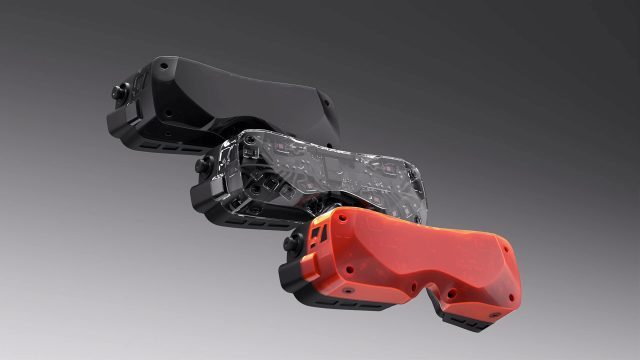
In case you missed the news—you check out the specs, price and launch schedule here—Beyond 2 comes in two flavors, one with eye-tracking (Beyond 2e) and one without (Beyond 2), priced at $1,019 and $1,219 respectively.

While it’s packing in the same dual 1-inch 2,560 × 2,560 micro-OLED displays as the original Beyond, the biggest improvement overall is the headset’s larger field-of-view (FOV) and better clarity thanks to the inclusion of a new pancake lens design. This bumps Beyond 2 to a 116-degree diagonal FOV over the original’s 102-degree diagonal FOV, and also includes an adjustable IPD mechanism in a lighter 107g design.

Although the first batches were quoted to ship in April (Beyond 2) and May (Beyond 2e), at the time of this writing new orders of Beyond 2 and Beyond 2e are quoted to ship in June.

The post Bigscreen Beyond 2 Sold the Equivalent of 6 Months of Beyond 1 Sales in First 24 Hours appeared first on Road to VR.

You Can Get Lifetime Access to Microsoft Office 2024 for Just $160 Right Now

We may earn a commission from links on this page. Deal pricing and availability subject to change after time of publication.

If you’re tired of subscription-based software but still need Microsoft Office, this lifetime license for Office 2024 (Home & Business for Mac or PC) might be worth considering. It’s currently on sale for $159.97 on StackSocial until March 30 (down from $249.99) and is a one-time purchase that gives you access to Word, Excel, PowerPoint, Outlook, and OneNote without the recurring fees of Microsoft 365. After buying, the license ties to your Microsoft account, not a specific device, so you can reinstall it if you switch computers. The catch is that this version won’t get future upgrades, meaning once Microsoft moves on to the next version, you’ll still be stuck with this one. Of course, that might not be an issue if you just need core productivity tools without chasing every new feature.

This Office 2024 edition is faster and has some notable improvements over Office 2021, particularly in Excel, where handling large datasets is noticeably smoother. PowerPoint’s got some solid upgrades, too, including the ability to record presentations with live camera feeds—useful for remote work or online courses. The newer Outlook offers better search functionality and an updated accessibility checker to flag emails that may not be easily readable for everyone. Microsoft also gave the whole suite a Fluent Design facelift, making everything look more polished and consistent across its apps. Unlike Microsoft 365, this version works entirely offline, which is a plus for users who don’t want cloud dependency.

There are also some AI-powered features baked into this 2024 version. Word’s Smart Compose can predict and suggest text, making writing faster, while Excel’s AI Data Insights can analyze trends and recommend visualizations for your spreadsheets. PowerPoint has improved storytelling tools to make presentations more engaging with smoother transitions and built-in media support. And if you need real-time collaboration, Office 2024 does allow co-authoring within Word, Excel, and PowerPoint. However, it’s not as seamless as the cloud-based version of Microsoft 365. Also, no Microsoft Teams subscription is included, so if that’s part of your workflow, you’ll need to factor that in. This deal makes sense if you want a no-subscription Office suite that works offline. But if you’re after continuous updates and deep cloud integration, Microsoft 365 might still be the better choice.

AI Will Impact GDP of Every Country By Double Digits, Says Mistral CEO

Countries must develop their own artificial intelligence infrastructure or risk significant economic losses as the technology transforms global economies, Mistral CEO Arthur Mensch said last week.

“It will have an impact on GDP of every country in the double digits in the coming years,” Mensch told the A16z podcast, warning that nations without domestic AI systems would see capital flow elsewhere. The French startup executive compared AI to electricity adoption a century ago. “If you weren’t building electricity factories, you were preparing yourself to buy it from your neighbors, which creates dependencies,” he said.


Read more of this story at Slashdot.

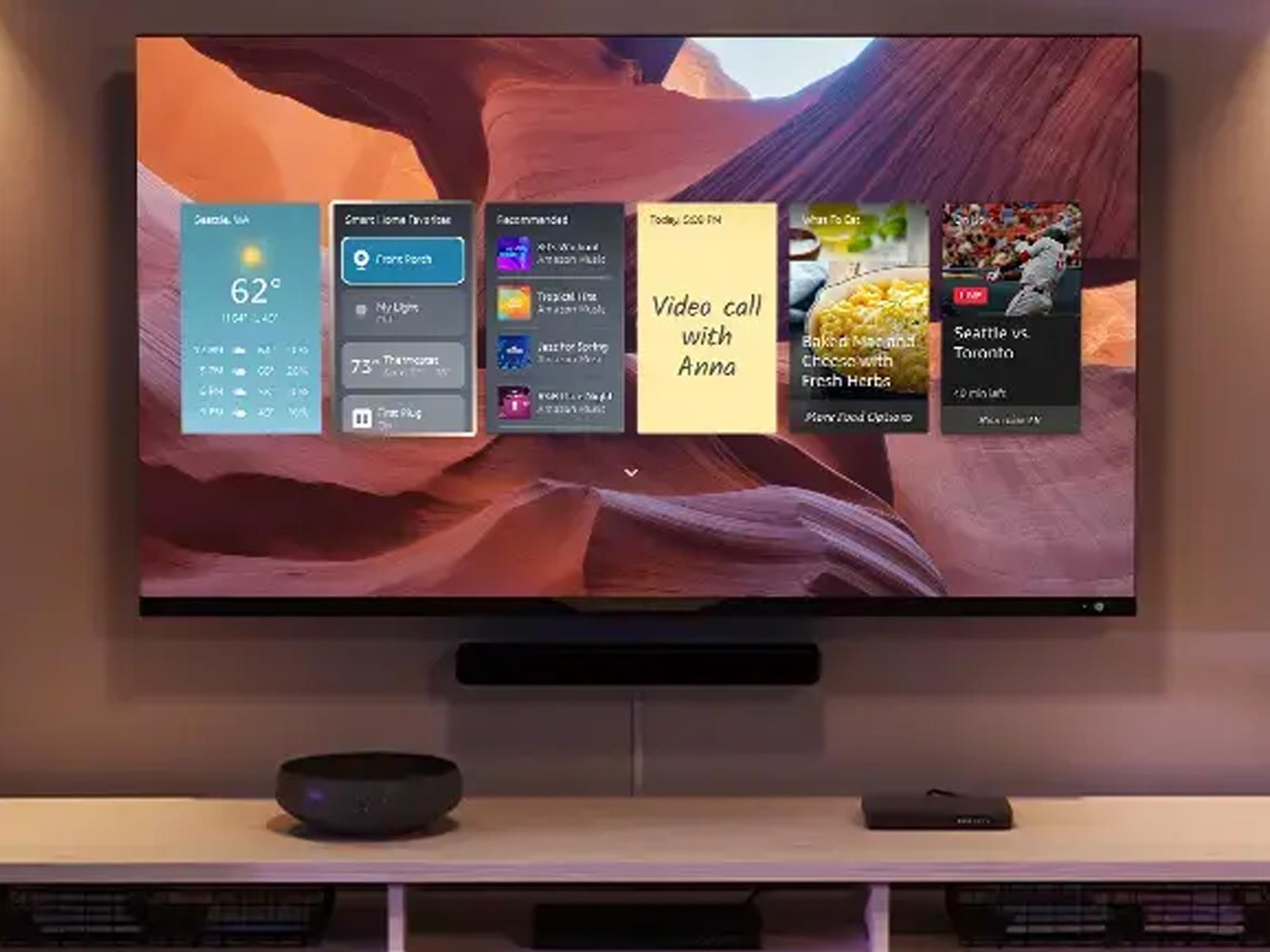
This 4K Fire TV Slashed To Just $199 Is A Great Deal But You Have To Be Quick

This 4K Fire TV Slashed To Just $199 Is A Great Deal But You Have To Be Quick
We live in some wild times, folks. Pricing on things like eggs and other staples are going through roof, and let’s not even get started with the situation on current-generation graphics cards. However, if it’s a new big (or semi-big) television you’re after, pricing has never been better. Go figure! To wit, we recently highlighted a 65-inch

Quest’s Horizon OS Could Soon Let You Screenshare 2D Windows

Quest’s Horizon OS could soon let you share 2D windows with others, datamining reveals.

VR enthusiast Luna regularly inspects the code of Meta’s Horizon OS to discover new features and changes in development. Now, Luna has discovered references to contextual “Share” and “Unshare” buttons on the menu bar for windows, with a description of “Shares a panel so that other users in your world see it”.

Strings in Quest/Horizon OS v76 PTC suggest that Meta is working on the ability to share windows with other users in Horizon Home (and possibly Worlds).

This will likely work similarly to SharePlay on visionOS. pic.twitter.com/ZudymM05XJ

— Luna (@Lunayian) March 22, 2025

This could potentially let you share your web browser with another Quest owner visiting your virtual home, for example, though it likely wouldn’t support DRM’d video content such as streaming services.

Currently, YouTube VR is the only 2D app which supports co-watching on Quest, through what appears to be a custom implementation developed with Meta. Co-watching certain content is also available in immersive apps though, such as Bigscreen and VRChat.

Official YouTube Co-Watching On Quest Finally Arrives In Beta
Official YouTube co-watching in the Horizon OS home space has finally arrived as a beta.
UploadVRDavid Heaney

To be clear, 2D window sharing is separate from the first person view sharing that Horizon OS already supports in WhatsApp and Messenger view calls. That feature sends your view of everything you’re seeing in VR and mixed reality, while this upcoming feature would share the contents of a specific 2D window, such as your web browser.

Window sharing is a fundamental feature of Apple Vision Pro’s visionOS, where it’s branded as SharePlay. SharePlay is also supported on other Apple devices via FaceTime, letting you watch supported content with people who don’t yet own a headset.

Quest Update Reveals More Vision Pro Features Are Coming, Including FaceTime-Style Selfie Cam

Meta’s upcoming Horizon OS release is bringing a few more of Vision Pro’s most useful features to Quest, including a video chatting selfie cam for avatars and possibly the ability to share windows with other users when in its Horizon Home social space.

Discovered by serial dataminer ‘Luna’, a beta version of Horizon OS v76 is packing in a few new features, including the very Facetime-inspired avatar selfie cam which can be used in video chatting apps.

Quest’s v76 update is currently available on the Public Test Channel (PTC), although Luna went a bit further to implement the avatar selfie cam in a sideloaded version of Discord.

Meta Quest/Horizon OS v76 PTC – Avatar Selfie Cam running in sideloaded Discord. The call backgrounds aren’t enabled yet though.

Thanks @Phene420 for reminding me to test in other apps lol. https://t.co/6WkehJra8B pic.twitter.com/EzTeYPAop1

— Luna (@Lunayian) March 23, 2025

Backgrounds currently aren’t available, Luna notes, however they’re said to include multiple default options, such as Abstract, Beach, Greenhouse, Home Office, Light, Loft, and Office.

Luna also uncovered a hidden tutorial for an upcoming ‘Navigator’ system user interface overhaul on Horizon OS. Teased at Meta Connect 2024 in September, the new UI system restyles the current dock-based UI to a more traditional launcher overlay—putting it more in line with the sort of icon-based app selection you see in Vision Pro and mobile devices today.

NEW: I’ve datamined a tutorial for the upcoming “Navigator” system UI overhaul on Meta Horizon OS.

This was discovered in v76 PTC. You can find my previous reporting on this in the quoted post below, but TL;DR this is currently planned for v77+ https://t.co/mTtVv2KtSu pic.twitter.com/xIWTd2GQsP

— Luna (@Lunayian) March 22, 2025

While the tutorial was discovered in v76 PTC, Luna suspects the Navigator feature will arrive in v77 or beyond, possibly as an Experimental feature.

Furthermore, Luna’s datamining revealed that strings in the v76 PTC of Horizon OS “suggest that Meta is working on the ability to share windows with other users in Horizon Home (and possibly Worlds),” which they maintain “will likely work similarly to SharePlay on visionOS.”

The string in question states it “[s]hares a panel so that other users in your world can see it”.

Granted, Quest users have been asking for these features since well before Vision Pro was released, although it was Apple’s $3,500 mixed reality standalone that has ultimately been the key driver in the company’s quest to further mold the console-style Quest into a general computing device.

To boot, since Vision Pro’s launch in early 2024, Meta has released a number of features in effort to bring Quest’s software closer to parity with visionOS, including spatial video playback, pinch-style gesture controls, and better passthrough on Quest 3.

Still missing in action though is Meta’s long-promised photorealistic Codec Avatars though, which the company first teased in 2019.

Codec Avatars | image courtesy Meta

Like Vision Pro’s photorealistic avatars, Meta researchers demonstrated that Codec Avatars could use smartphones to scan and recreate a user’s face—much like Vision Pro does today.

The key limiter though is Quest 3’s lack of eye or facial tracking, which could mean Meta is waiting to release Codec Avatars with its next high-end headset—the totally hypothetically and still unconfirmed Quest Pro 2. And if we were betting, probably some more Vision Pro-inspired features too.

The post Quest Update Reveals More Vision Pro Features Are Coming, Including FaceTime-Style Selfie Cam appeared first on Road to VR.

Indiana Jones and The Great Circle hits PS5 on April 17

The PlayStation 5 release date for Indiana Jones and the Great Circle has been revealed. MachineGames’ latest Nazi-thwacking simulator will hit Sony’s console on April 17, just four months after it debuted on Xbox and PC. If you pony up for the digital premium edition or physical collector’s bundle, you’ll get early access to the game on April 15 (plus some other goodies). Digital pre-orders are open now and physical pre-orders go live tomorrow, March 25.

Microsoft confirmed last August that it would bring a port of the tremendously enjoyable blockbuster to Sony’s console this spring as part of its shift away from platform exclusivity. We’ve seen a number of notable former Xbox exclusives come to PS5 (and Switch in some cases) over the last year or so. Among them are Sea of Thieves, Hi-Fi Rush, Pentiment and Grounded. Forza Horizon 5 is also PS5-bound on April 29.

Meanwhile, Doom: The Dark Ages will hit PS5 on May 15, the same day it’s set to land on PC and Xbox. Rumors suggest that a remastered collection of the first three Gears of War games is coming to Sony’s system. The rebooted Fable and even Xbox’s flagship Halo series could make the leap over to PlayStation as well, as the walls around Microsoft’s gaming garden continue to crumble.

This article originally appeared on Engadget at https://www.engadget.com/gaming/indiana-jones-and-the-great-circle-hits-ps5-on-april-17-150021622.html?src=rss

Google’s Pixel 9a Misses Out on a Couple of Pixel AI Features

Google’s budget phone for the masses, the Pixel 9a, will retail at $499 when it launches in April. That’s a full $100 less than the iPhone 16e and $300 less than the Pixel 9. Even so, the 9a has many of the same features as the Pixel 9. It carries over the same Tensor G4 chip, and promises to feature most of the Pixel 9’s AI suite.

Most, but not all. Ars Technica is now reporting that the Pixel 9a will be missing some crucial AI features at launch. That’s because the Pixel 9a features 8GB RAM, while the Pixel 9 has 12GB RAM, and the Pixel 9 Pro models feature 16GB RAM.

While the Pixel 9a comes with on-device Gemini Nano, Ars Technica confirmed with Google that it’s going to be using the Gemini Nano 1.0 XXS (“extra extra small”) model. This is the company’s lightest available model, and the one that runs on the Pixel 8. The rest of the Pixel 9 series phones, by comparison, all run the Gemini Nano XS (extra small) model.

While you can still use Gemini AI on Pixel 9a using the power button, being limited to the XXS model means it will lack some of the Pixel line’s tentpole AI features. The 8GB RAM is not enough to run the Gemini AI models in the background, and the XXS model is text-only.

Because it can’t run in the background, and it can’t process images, it therefore can’t support features like Pixel Screenshots app, which require image processing in the background. It also won’t support Call Notes, a feature that uses audio analysis to provide on-device AI summaries of phone conversations. Additionally, it’s possible that the Pixel line’s newly announced spam detection feature might not be available on the Pixel 9a, but that’s not confirmed as of yet.

Luckily, the Recorder app will still work, because the app creates a transcript first (not using Gemini AI), and then uses AI on the transcribed text, something that Pixel 9a can pull off.

That’s all we know so far. More details on what works and what doesn’t will only be available once the Pixel 9a is available in the wild, sometime in April. With this Pixel 9a release, the gap between the flagship Pixel and the budget Pixel is widening. Luckily, it’s limited to AI features for now. If you don’t intend to use these on-device AI features, you won’t feel the pinch.