Ubisoft spins out subsidiary with a billion-dollar investment from Tencent

Ubisoft is continuing its efforts to course-correct after several challenging years. Today, the video game company announced that it will launch a subsidiary centered around three of its most familiar franchises: Assassin’s Creed, Far Cry and Tom Clancy’s Rainbow Six. The as-yet-unnamed subsidiary will fold in the teams working on those three series, including Ubisoft studios in Montréal, Quebec, Sherbrooke, Saguenay, Barcelona and Sofia.

This new business will receive an investment of €1.16 billion (roughly $1.25 billion) from its longstanding partner Tencent, granting the conglomerate a minority ownership stake. Following the transaction, Ubisoft will narrow focus to its other franchises, such as The Division and Tom Clancy’s Ghost Recon.

“Today Ubisoft is opening a new chapter in its history,” CEO and Co-Founder Yves Guillemot said. “As we accelerate the company’s transformation, this is a foundational step in changing Ubisoft’s operating model that will enable us to be both agile and ambitious.”

Ubisoft has been cutting costs and jobs over the past several months after several of its new projects flopped. There have been hints for a while that the company’s leaders were interested in either finding a buyer or exploring a joint venture with Tencent to help reverse its fortunes. It’s encouraging that the recent Assassin’s Creed: Shadows has already reached 3 million players, but Ubisoft will probably need a few more wins to fully stabilize.

There is some extra good news in the announcement. The description of the new subsidiary does specify that “it will drive further increases in quality of narrative solo experiences.” So while we can expect to also see multiplayer and free-to-play offerings from the Ubisoft umbrella, they aren’t giving up on single-player games.

This article originally appeared on Engadget at https://www.engadget.com/gaming/ubisoft-spins-out-subsidiary-with-a-billion-dollar-investment-from-tencent-183516992.html?src=rss

Discord is planning an IPO this year, and big changes could be on the horizon

As previously rumored, Discord, a popular communications platform, is working with Goldman Sachs and JP Morgan Chase to plan an IPO as soon as this year, according to a recent report by Bloomberg. The report cites people familiar with the matter and notes that more advisors may come on board as the talks progress.

This isn’t the first we’ve heard about plans for an IPO; an article in The New York Times claimed that Discord had begun exploratory meetings with bankers earlier this month. Even way back in 2022, Discord was exploring the option of a direct listing, but it now seems the company plans to go with a traditional IPO.

Launched in 2015, Discord was initially conceived as an improved way to facilitate communication while playing video games—and gaming-related uses still account for more than 90 percent of its activity. While some previous tools focused mainly on in-game voice chat, Discord supports text, voice, and video, as well as game streaming. It also has robust features for managing communities outside the game and has developer APIs for developing bots, tools, and games that can be used within its channels.

Read full article

Comments

New Windows Scheduled Task Will Launch Office Apps Faster

Microsoft plans to roll out a new Windows scheduled task in May that launches automatically to help Microsoft Office apps load faster. From a report: The company says the “Startup Boost” task will launch in the background on logon, with the roll-out to start in mid-May and worldwide general availability to be reached by late May 2025. On systems where it’s toggled on, users will see new Office Startup Boost and Office Startup Boost Logon tasks in the Windows Task Scheduler, which will ensure that Office apps can preload “performance enhancements.”

“We are introducing a new Startup Boost task from the Microsoft Office installer to optimize performance and load-time of experiences within Office applications,” Microsoft says on the Microsoft 365 message center. “After the system performs the task, the app remains in a paused state until the app launches and the sequence resumes, or the system removes the app from memory to reclaim resources. The system can perform this task for an app after a device reboot and periodically as system conditions allow.”


Read more of this story at Slashdot.

This Is the Air Fryer I Use Every Day, and It’s 40% Off Right Now

We may earn a commission from links on this page. Deal pricing and availability subject to change after time of publication.

A good air fryer doesn’t need to have a ton of bells and whistles. For the most part, the convection heating function is highly effective in both cheap and pricey models. So if you have few demands like I do—just make the food hot and crispy—then you’ll enjoy a reliable basket-style air fryer that consistently churns out crunchy snacks and roasts meats without asking for too much from you. The Instant Vortex is a great pick for that, and it’s on sale right now during Amazon’s Big Spring Sale. 

While I’ve reviewed a few different air fryers (read here for my best overall air fryer suggestion), the Instant Vortex is actually my go-to air fryer for daily use and it’s 40% off right now. This particular model of the Instant Vortex has a 5.75-quart capacity which has allowed me—someone who’s constantly testing out bizarre recipes in the air fryer—to flourish. I’ve made cheesecakes in this air fryer, a number of pies and even blind baked some crusts, not to mention normal dinner stuff, like roasting whole pork tenderloin, and game day snacks like biscuit cheese balls. 

You can (and should) check out my full review of the Instant Vortex here, but what makes this air fryer so versatile is that even with the unit’s overall compact size, you still have plenty of depth to work with in the basket. Not only does this allow for plenty of air flow to help food cook more evenly, but you have the head room to roast and bake taller items too. The control panel is easy to navigate with a twist knob so you can increase and decrease time and temperature, and the Vortex gives you a helpful nudge to flip your food halfway through the cooking time. 

This handy air fryer is also lighter and more compact than the toaster oven variety, which makes it ideal for those in smaller kitchens or situations where you don’t want the air fryer living on the counter top. For $83.99, down from its usual $139.99, you’re looking at a great bargain for an air fryer that won’t let you down, day in and day out. 

The Best Amazon Spring Sale Deals You Can Get Now


Apple AirPods Pro 2 Wireless Earbuds


—
$169.99

(List Price $249.00)


Ecobee Smart Thermostat Enhanced


—
$169.00

(List Price $189.99)


Blink Mini 2 (White, 2-Pack)


—
$37.99

(List Price $69.99)


Sonos Era 100 Wireless Speaker – White


—
$199.00

(List Price $249.00)

Deals are selected by our commerce team

The Samsung Galaxy Watch Ultra Is $253 Off Right Now

We may earn a commission from links on this page. Deal pricing and availability subject to change after time of publication.

If you need a sturdy watch to meet all your athletic and adventurous needs, good news: You can save big right now on the LTE Samsung Galaxy Watch Ultra. The watch is currently 39% off during Amazon’s Big Spring Sale. Normally priced at $649.99, the current discount brings the smartwatch down to $396.94. This is as low a price as this watch ever gets, according to price-tracking tools.

Samsung announced the Galaxy Watch Ultra last summer, marketing it as competition for the Apple Watch Ultra—with an emphasis on outdoor and exercise features. And as Lifehacker’s deals expert Daniel Oropeza explains, the Galaxy Watch Ultra does in fact excel in those areas above other watches.

The watch is built to weather tough conditions. It’s made out of Grade 4 titanium, and has an IP68 water- and dust-resistant rating. You can also take it up high altitudes (up to 9,000 meters), and it can withstand up to 10ATM of pressure (about 330 feet underwater). There’s also a built-in siren option, which you can set to go off in case of emergencies. And since this watch uses LTE, you don’t rely on wifi or Bluetooth for a satellite signal. And yes, you can take calls on it. Another huge perk: battery power. If you don’t use any power-saving modes, it’ll last 60 hours, but it can go up to 100 hours if you’re conservative.

However, if you’re not looking for a rugged (read: big) smartwatch, then the biggest downside is that the Galaxy Ultra only comes in one size, 47mm. The 1.47-inch Super AMOLED display is brighter than previous Samsung AMOLED smartwatches.


Shopping for tech? Lifehacker can help you make the right decision. Browse our tech reviews and head-to-head comparisons for everything from laptops and smartwatches to e-bikes and home gyms. Subscribe to our deals newsletter, Add to Cart, for the best sales sent to your inbox, or browse our best-of lists directly on Amazon, including:

Mark Zuckerberg decides content from your actual friends is an ‘OG’ Facebook feature

Meta has spent the last few years remaking Facebook’s main feed into a “discovery engine” that primarily serves up recommended content from pages, groups and accounts users don’t already follow. But while the company has said the change is necessary to compete with TikTok, it’s also frustrated Facebook users who miss seeing posts from people they actually know.

Now, Meta is trying to remedy this with a revamped “Friends” section of the app that will only show posts and content related to your Facebook friends. The company says the update is the first of many meant to bring “OG” features back into the 21-year-old social network.

With the update, the “Friends” tab of the Facebook app that used to only be for friend requests will now be home to a feed exclusively made up of content related to your friends. This includes feed and Story posts, as well as Reels, birthdays, friend requests and “people you may know suggestions.”

While Meta is spinning the change as a part of a larger push to make Facebook feel more “social,” it’s not the first time the company has offered dedicated feeds for “friend only” content. In fact, Mark Zuckerberg showed off dedicated “friends” feed in 2022 amid the company’s push to bring more recommendations to users’ “home” feeds. That feed, which surfaces posts from friends in reverse chronological order, is still available, though it’s somewhat buried in the app.

It’s not clear what else Meta has in store for other “OG” Facebook features that could play on nostalgia for the 21-year-old social network. (Facebook’s once infamous “poke” feature already had a brief resurgence last year.) But it’s apparently a priority for Zuckerberg.

“I actually think that there’s this whole opportunity that I think is going to be pretty fun to to go after and build which is just to kind of go one-by-one and build up a a bunch of these things that used to be these joyful experiences that people had as part of Facebook that just kind of don’t exist on the internet today,” Zuckerberg said in a podcast appearance promoting the change.

This article originally appeared on Engadget at https://www.engadget.com/social-media/mark-zuckerberg-decides-content-from-your-actual-friends-is-an-og-facebook-feature-180803853.html?src=rss

Here’s Everything You Get With Garmin’s New Connect+ Subscription

We may earn a commission from links on this page.

Garmin is now offering a $6.99/month subscription called Connect+ that provides “premium features,” including AI, on top of what you already get for free with the Garmin Connect app. So far, nothing is being paywalled, but it feels like the end of an era. Garmin watches were some of the last few wearables where you pay for a device and then all of its features are free to use forever. (The hardware has impressively long lifespans, too.) I signed up for Connect+ to see what’s inside, so let’s take a look. 

Subscription details

The new Connect+ subscription costs $6.99/month or $69.99/year. It only adds features on top of what you already get with the Garmin Connect app; no existing features are being paywalled. 

Garmin did tease that “premium enhancements may be made to existing features,” leading users to speculate that any new features that come down the line may be limited to paid members. Garmin is in the habit of adding new features pretty frequently, and often enables them even on older watches. In the past year alone, we’ve gotten strength coaching, a new type of run coaching, and the ability to detect your lactate threshold heart rate without a chest strap—all things that just appeared on my watch or in my app one day. I wouldn’t expect watch firmware updates to be affected—this is a premium subscription for the phone app—but I have to wonder if there will be fewer of those new app feature rollouts for free users going forward. 

Connect+ is not Garmin’s first subscription offering, by the way. They have long offered a slate of services for various special purposes, including hiking and hunting maps, marine charts, search and rescue insurance, dog tracking, kids’ smartwatch tracking, and more. But this is definitely Garmin’s first foray into a premium subscription for health and fitness features, in the same vein as, say, Fitbit.

Garmin says the Connect+ subscription will come with: 

  • Active Intelligence (an AI analysis of your activities; this requires opt-in)

  • Enhanced LiveTrack (also available with an Outdoor Maps+ subscription), allowing you to text contacts when you start an activity, or set up a public tracking page

  • Live Activity, which lets you follow a workout from your phone and not just your watch

  • A new Performance Dashboard on the web with new charts and comparison features

  • Social features, including double points on badges and the ability to earn badges from anywhere in the world (some badges are only available in certain locations). Immediately upon signing up for Connect+, I noticed a little yellow star on the corner of my profile pic on the app. 

  • Extra training guidance if you’re following a Garmin Coach program

What you get with Live Activity

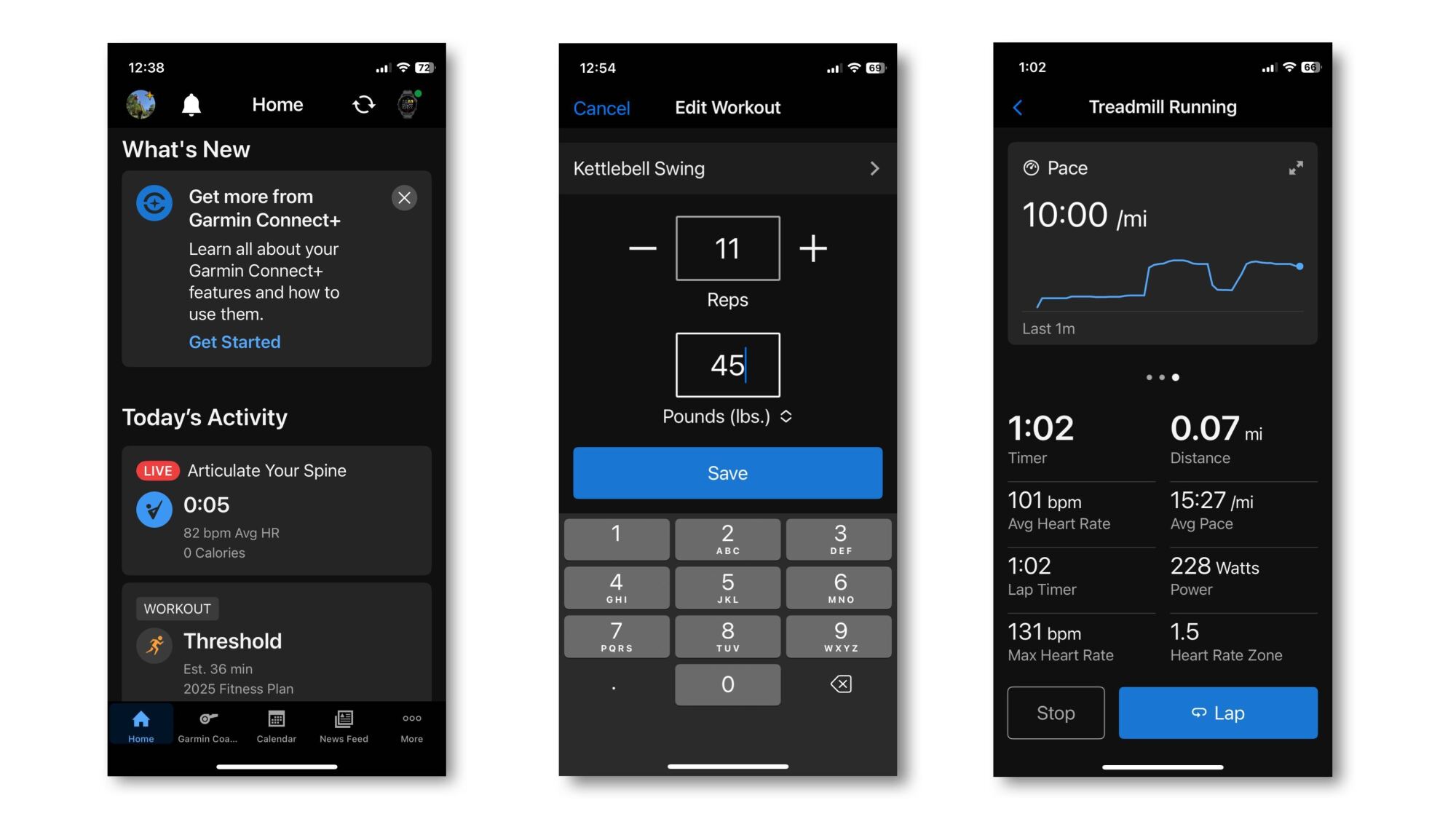
Screenshots of a live activity on the home screen, editing sets and reps, and what you see when you do a treadmill workout.
Credit: Beth Skwarecki

Until now, a workout you do on your Garmin watch stays on your Garmin watch, at least until you finish the activity. At that point, it syncs to your phone, where you can view and edit the details. 

But with Live Activity, you can now use the Garmin Connect app while you’re doing an activity on your watch. That’s especially useful for strength workouts, which previously required you to edit weights and reps through an awkward interface on the watch after each set. 

To test this out, I did a few quick workouts on my Garmin Forerunner 265S. One was a mini workout of kettlebell swings and sit-ups that I created on the app, and sent to the watch. 

I started the workout on my watch. Nothing happened on the phone—I might have expected a notification—but when I opened the Garmin Connect app on my phone, there was a tile on the home screen for a Live Activity. I tapped it, and there was the same workout I was doing on the watch. I could see my heart rate, the time elapsed, and which exercise I was supposed to be doing. 

I didn’t see the promised exercise videos right away, but it turns out you need to swipe left on the heart rate graph. There you can see an exercise video (or a rest timer, if appropriate). Swipe again, and you’ll see your heart rate zone. The bottom half of the screen shows your stats in progress, including your reps, sets, heart rate, and a timer. 

Importantly, if you’ve turned off rep counting or weight editing on your phone (because they’re so annoying in normal use), you’ll want to turn them back on for this. The watch counted my kettlebell swings, and at the end of each set prompted me to edit my reps and weight. This editing screen came up on both the watch and my phone, and of course it was easier to edit that information from the phone. 

With Live Activity, you can do the following from the watch or phone:

  • Pause or unpause the workout

  • Edit reps or weight in a strength workout

  • Advance to the next set (strength), or start a new lap (in activities like running)

  • View stats like your heart rate, time elapsed, reps, pace, and so on

But only the watch can do the following: 

  • Start the workout

  • Finish and save the workout

  • Create custom data screens

Live Activity definitely improves the usability of the watch for strength workouts. I don’t entirely see the point for running workouts, but maybe there’s a use case I haven’t thought of yet.

What’s in the Performance Dashboard

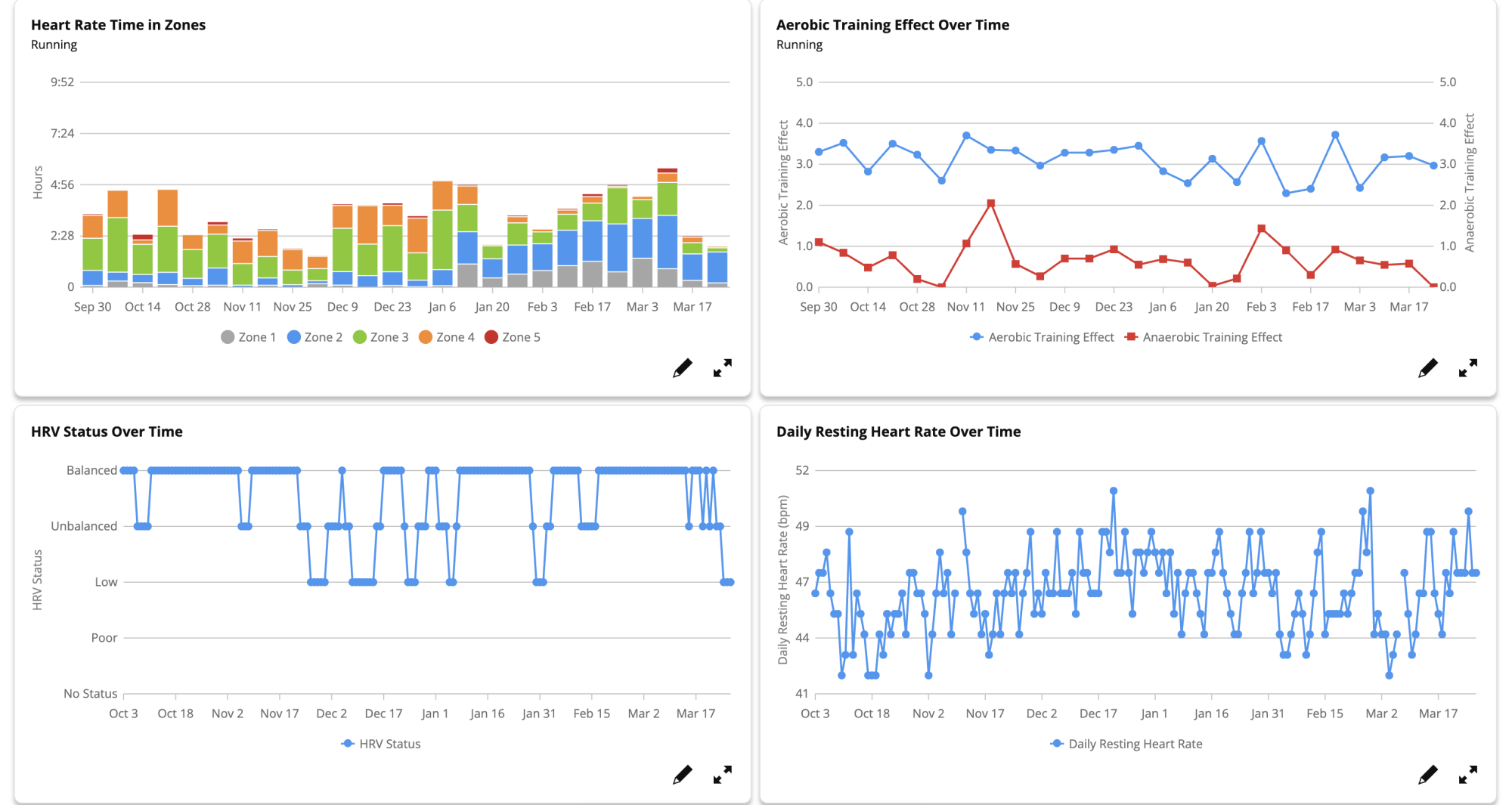
Four charts from the Performance dashboard: HR time in zones, aerobic training effect over time, HRV status over time, daily resting HR over time.
Four of the charts I can view in my Performance Dashboard
Credit: Beth Skwarecki/Garmin

One of Garmin’s better-kept secrets is its web dashboard. You can log in here and view all your activities and data—essentially a web view of everything that’s in the app. 

The Performance Dashboard is a new item in the sidebar of the web dashboard. To set it up: 

  1. Mouse over the black sidebar at the left side of the screen. 

  2. Select Performance Dashboard, which I see as the last blue item, just under Reports.

  3. Click Add dashboard, and choose whether you want a running, cycling, multisport, or custom dashboard. (You can have more than one.) 

Some of the charts on the performance dashboard are also available from the free Reports tool, although Reports will only show you one chart at a time. The Performance Dashboard is definitely a better tool if you’re looking to really nerd out about your data. 

For example, I can get a simple report from the Reports tool that shows my running mileage over the past six months. It gives me a bar chart with one bar per month. The Performance Dashboard, on the other hand, can give me a bar for each week, and I can select a custom timeframe instead of just selecting one of a few options. There are also more options for types of data you can view. Do you know how your watch will ask you at the end of each run how hard it felt? You can now see that on a graph called “perceived effort over time.”

What you get with Active Intelligence

There’s good news here for people who want AI in everything, and for those of us whose reaction is “oh god, not here too” (this meme sums up my personal stance). The AI (“active intelligence”) is the one feature of Connect+ that requires you to opt in, even after you have subscribed to the whole package. 

But I did it, dear readers. I opted in for you, so I could let you know what the AI can actually tell you about your training—and whether it’s any better than Strava’s notoriously clueless AI. 

Unfortunately, there’s not much to say at the moment. My home screen “insight” (which you can turn off, by the way, even with AI enabled) at first just told me to check back later. My recent runs don’t have any AI commentary attached. Garmin says that “As customers use Garmin Connect+ more, the insights will become more tailored to them and their goals.” 

As I was finishing up this article, I noticed that I now have a home screen insight. It tells me that I achieved 255 intensity minutes this week, exceeding my goal of 150. (I guess I set a goal for that at some point? OK.) Then it tells me consistency is good (not wrong) and gives a few sentences of encouragement. 

The AI feature is labeled as a “beta,” with a thumbs up/thumbs down icon that lets me rate the insight I just read. I can say that it’s interesting, not interesting, or “report a concern” if it’s inaccurate, discouraging, or poorly written. (You can also give a custom response.) I’ll keep an eye on these notes and report back as the AI gets to know me better.

Garmin asks your permission to train its AI on your data

To turn on the AI features, you need to click through an agreement where you allow the AI to access your training and health data (so that it can run its analyses). This also allows your data to be used as training data for the AI. 

I asked Garmin if this means that the AI is only trained on people who opt-in. A spokesperson confirmed: “We only train with data from users who have consented.” The existing model was trained on users who previously granted permission for their data to be used for product improvements. Garmin has a brief AI transparency policy here. 

You can revoke permission at any time in your Connect+ settings, which will also turn off your access to AI features. 

Top 5 Zwift Videos: New Pain Caves, First Races, and Outdoors vs Indoors

Thinking of putting together an indoor cycling space? In this week’s top video, watch as one Zwifter converts his packed garage to an impressive Zwift setup.

Also included in this week’s top videos are videos about a Zwifter’s first race, a comparison of indoor and outdoor FTP tests, an overview of the TrainerRoad and Zwift integration, and fitness gains from Zwift racing.

New “Paincave” Setup & Zwift Ride Unboxing

Ryan Condon has finally made the move to upgrade his paincave. Watch as he puts together his new setup in his garage. 

Sprinter Tries His First Zwift Race

Jeff from Norcal Cycling tackles a Zwift race with Dylan, who has never raced on Zwift before. Can Jeff help Dylan win his first Zwift race?

Zwift FTP Test vs Outdoors FTP Test

To accomplish one of his cycling goals, Nathan must increase his FTP to be more competitive in the higher Zwift categories. In this video, Nathan does an FTP test both indoors and outdoors to see how the numbers compare.

TrainerRoad x Zwift: The Ultimate Indoor Training Combo?

J Dirom covers the TrainerRoad and Zwift integration and shares his thoughts on the topic.

I tried Zwift racing for 4 months – this is what happened

After racing consistently for the last four months, Henry shares his takeaways from the experience and the progress that he has made.

Got a Great Zwift Video?

Share the link below and we may feature it in an upcoming post!

Death Game Hotel Will Adopt A Freemium Model Next Month On Quest

Death Game Hotel, a VR multiplayer game inspired by Squid Game, goes free-to-play next month on Quest, and we interviewed the developer to learn more.

Released last year on Quest, Death Game Hotel is the debut VR game from White Owls, the studio led by Deadly Premonition director Hidetaka ‘SWERY’ Suehiro. Originally a premium title for $19.99, the studio confirmed its gambling social horror game will relaunch as a free-to-play title on April 10, 2025, and SWERY provided UploadVR with the following video.

0:00

/0:41

The multiplayer component will be free for all players, while the single-player story with original characters is becoming DLC. Optional cosmetic items and “specific in-game content” will also be available for purchase. New features alongside this relaunch include a solo ‘Death Slot’ game for earning currency and items, new avatars, and a new zero gravity playroom called ‘Space Room.’

Before today’s announcement, UploadVR interviewed Suehiro via email to learn more. With increasing concerns being raised by developers about the growing prevalence of free-to-play experiences on Quest, I queried if this factored into the decision. White Owls is aware of these reports, though Suehiro states the VR market is constantly evolving and that every platform needs you to adapt.

“On any platform, the business model needs to adapt to user trends and demand. As a developer, I always want to deliver my creations, which I see almost like my own children, to as many players as possible. That’s why I believe in embracing new trends, technologies, and business models with flexibility. That said, we’re deeply committed to preserving the essence of our work—the “SWERY-ness” and “White Owls identity.” No matter the model, we won’t compromise on that.”

The studio recognizes that free-to-play and social experiences are “gaining traction” on Quest, and we’ve recently seen other multiplayer titles like Mannequin also adopting a freemium model. However, Suehiro called the freemium move a community-driven decision to open up Death Game Hotel to more players.

“Regardless of Meta’s broader strategy, this was an internal decision rooted in community input and the moment’s opportunity.”

New ‘Space Room’ environment

Death Game Hotel will offer existing owners various rewards such as an early supporter badge, 10 premium cigars, a specially engraved lighter, and in-game currency. However, White Owls also wants to ensure that new players similarly feel welcomed. With the relaunch, everyone will receive new stash items that include a laser gun, a selfie camera, and 2000 gold nuggets.

“While expanding our community is a big goal, we don’t want to leave our original supporters behind. That’s why we’ve prepared special in-game items and rewards for those who’ve been with us since launch as our way of saying thank you. At the same time, we’re making sure new players feel welcomed. We’re planning things like first-login bonuses and stash item gifts to lower the entry barrier and avoid any “this isn’t for newbies” vibe.”

As Death Game Hotel is White Owls’ first free-to-play title, the studio is relying on community feedback to help guide its evolution since launch. Though Suehiro couldn’t reveal too many details yet about upcoming plans, he confirmed that the team is planning seasonal events and content updates throughout the year.

The new Death Game Hotel slot machine

Touching upon our initial interview back in July, Suehiro previously informed me he’d like to create “a multiplayer experience that no one has ever seen before.” Should he ever get the chance to make this game, would White Owls go free-to-play from the start?

Suehiro believes this experience will present new challenges as they expect Death Game Hotel’s multiplayer base to grow significantly. Describing VR as a “young medium full of untapped potential,” he considers this anticipated growth and live service management to be “all part of the learning curve,” so nothing is set in stone for future titles.

“I believe that managing this free-to-play experience will help us unlock even more possibilities for VR multiplayer games in the future. So yes, I can absolutely see us choosing VR again, and potentially the F2P model, but it all comes down to the nature of the experience or concept we want to create and deliver through our game.”

Death Game Hotel is available now on the Meta Quest platform, and the free-to-play relaunch commences on April 10, 2025 at 10am PT.

Elon Musk and Trump win fight to keep DOGE’s work secret

Elon Musk and the Department of Government Efficiency (DOGE) don’t have to turn over information related to their government cost-cutting operations, at least for now, a federal appeals court ruled yesterday.

A federal judge previously ruled that 14 states suing the federal government can serve written discovery requests on Musk and DOGE. Musk, DOGE, and President Trump turned to the US Court of Appeals for the District of Columbia Circuit in an attempt to block that order.

A three-judge panel at the appeals court granted an emergency motion for a stay in an order issued yesterday, putting the lower-court ruling on hold pending further orders from the appeals court. “Petitioners have satisfied the stringent requirements for a stay,” the panel ruling said. “In particular, petitioners have shown a likelihood of success on their argument that the district court was required to decide their motion to dismiss before allowing discovery.”

Read full article

Comments

The Apple Watch SE (2nd Gen) Is 27% Off Right Now

We may earn a commission from links on this page. Deal pricing and availability subject to change after time of publication.

If you’re in the market for a budget-friendly Apple Watch, the SE 2nd Gen is currently $80 off during Amazon’s Big Spring Sale. Normally priced at $299, the current discount brings the smartwatch down 27% to $219. This is as low a price as this watch ever gets, according to price-tracking tools.

Apple currently sells three Apple Watch models: the Series 10, Ultra 2, and second-generation SE. The SE line comes with the smallest size option and bare minimum specs, making it the go-to budget option for most smartwatch wearers. Its aluminum body packs a 1,000 nit display, a battery that’s advertised to hold up to an 18-hour charge, the S8 chip (powering features like Siri and Find my iPhone), and an optical heart rate monitor. You’ll get water resistance up to a 164 feet depth, and for a $50 up-charge, you can add in the ability to connect a cellular plan. For more details, check Apple’s site.

Lifehacker’s associate tech editor Michelle Ehrhardt confirms that the SE line has all the essentials you need. So, if you prefer a small, lightweight device with a minimal interface, now is the time to snag yourself the 2nd Gen SE.

If you’re looking for the something with a few more bells and whistles, but without sacrificing comfort and convenience, the Series 10 is 25% right now and is the best option for most people.


Shopping for tech? Lifehacker can help you make the right decision. Browse our tech reviews and head-to-head comparisons for everything from laptops and smartwatches to e-bikes and home gyms. Subscribe to our deals newsletter, Add to Cart, for the best sales sent to your inbox, or browse our best-of lists directly on Amazon, including:

Seven Ways to Make Your Home’s Entryway More Secure

We may earn a commission from links on this page.

While you might assume that thieves would prefer to find less visible, less public ways of breaking into your house, your front door and entryway are actually prime targets for anyone who wants inside without your permission—more than a third of burglars use the front door when gaining entry to a home.

If you want to sleep a little better at night, securing your home’s entryway is a good first step. Even if you have a security system in place, stopping a home invasion from taking place at all is a much better outcome. Doing just a few of these things will make it a lot harder for anyone to break into your home and compromise your property and your safety.

Select a front door made of a secure material

Your first step towards securing your entryway is the door itself. A solid-core wood door provides decent security, but an upgrade to a steel door will make it even more difficult for a would-be home invader to cut, kick, or break the door itself. Aluminum or fiberglass are also solid choices to increase the security of your door, though they’re also generally more expensive.

Whatever material your front door is made of, you can enhance its security by installing a metal security door, which is like a storm door that adds an extra lockable barrier over your front door, making it even less likely that someone can gain access without your permission.

Reinforce the door’s frame

If you can’t install a security door, you can still add some security to your existing door by reinforcing the frame. The locks on your door (and the door itself) will only be as good as the frame the door is attached to—the best lock in the world will be useless if one well-placed kick will crack the frame.

You can purchase simple kits like this one that will reinforce your door frame and make it a lot more difficult to kick or pry the weak points on your door—the hinges and jamb. Typically made from steel, these plates stiffen the existing frame material and deflect tools away from weak spots.

Reconsider those decorative glass windows

Entryways with a lot of glass are popular because they let in natural light, but if your front door has a lot of glass inserts or sidelights (the narrow areas on either side), that’s a huge security risk because glass is so easily broken (see any film or TV show depicting a burglary, ever). Reducing or eliminating glass in your entryway is an easy way to increase security simply because it removes the weak point.

If you can’t remove the glass (or simply don’t want to sacrifice the light), you can replace it with security glass. If that’s too expensive, you can also install a security window film. Security films won’t necessarily stop a determined thief from smashing their way into your home, but they can slow them down and make the job more challenging, increasing the chances they’ll give up before gaining entry.

Upgrade your locks

Just as your door locks will only be optimally effective if your door frame is hardened, your door will only be secure if you use a high-quality lock with an appropriate security grade. The American National Standards Institute (ANSI) applies a grade of 1 to 3 to all locks that describes their security level—Grade 1 is the best. Installing Grade 1 locks (make sure they actually have the official ANSI seal on them) will give you the best security for your front door.

Adding a deadbolt to the door is an easy way to make it more difficult for someone to break in. A single-cylinder deadbolt (with keyed entry on the outside and a thumbturn on the inside) are best for residential doors, because needing to use a key on the interior will make it a lot harder to get out in an emergency.

Upgrade hardware

Another way to make your entryway more secure is to do some small upgrades to the door’s other hardware—the hinges and strike plate:

  • Deeper screws. Most screws supplied with door hinges will be about 1 to 2.25 inches long. That’s certainly sufficient, but a deeper screw will be more difficult to tear out, increasing the overall strength of the door. Replacing your hinge screws with 3-inch (or deeper) is a cheap, simple way to make the entryway more secure. Just be sure to check that there’s enough depth to handle the longer screws, and that the screws won’t interfere with nearby windows or wiring in the walls.

  • Hinge bolts. Hinge bolts install between the door hinges (see them in action here) and make it difficult for someone to lift the door off the frame even if they manage to push the pins out of the hinges. These are mainly useful if your door swings outward (most residential doors swing inward) but certainly can’t hurt, especially as they’re cheap and easy to install.

  • Strike box. The strike plate is the strip of metal where the bolt and latch from the door connects with the frame. It’s typically just a flat piece that doesn’t provide much by way of reinforcement, so installing a strike box instead is a good idea. A strike box inserts into the hole drilled for the latch or bolt and helps absorb and spread any impact from an attempt to break the door frame.

Rework your landscaping for maximum visibility

A simple way to enhance the security of your entryway is to clear away landscaping that hides your front door from the street. While privacy is always nice, if you have a lot of lush landscaping around your front door it could be an opportunity for someone to work on your door unobserved. This combined with plenty of light at night will make even the most determined thief think twice about assaulting your door.

Get rid of that spare key in the front yard

Even if you make your front door a marvel of strength and security, it means nothing if you leave a spare key under the doormat—or hidden in one of those obvious fake rocks. Everyone needs some spare keys seeded around their lives to prevent being locked out of their own home, but be thoughtful about where those keys are. A trusted neighbor or nearby friend (or relative) or tucked in a desk at your job are good ideas. Don’t hide the key anywhere near the door, however, as it’s too easy for a cursory check to turn it up.

Of course, going keyless with a smart lock is another option that removes the possibility of losing your key—though it still might be a good idea for someone you trust who lives nearby to have the code in case you ever need someone to get into your house.

Satya Nadella Says DeepSeek Is the New Bar For Microsoft’s AI Success

Microsoft CEO Satya Nadella has told employees that DeepSeek’s R1 AI model has set “the new bar” for his company’s AI ambitions, citing the startup’s ability to reach the top of app store rankings. “What’s most impressive about DeepSeek is that it’s a great reminder of what 200 people can do when they come together with one thought and one play,” The Verge cited Nadella as saying.

“Most importantly, not just leaving it there as a research project or an open source project, but to turn it into a product that was number one in the App Store. That’s the new bar to me,” he added. Microsoft quickly deployed DeepSeek’s R1 on its Azure platform in January. The AI model gained recognition for its optimization below Nvidia’s CUDA layer, enabling greater efficiency.


Read more of this story at Slashdot.

Pillars of Eternity is getting turn-based combat, all but demanding replays

I played a lot of Obsidian’s Avowed after it came out. I appreciate that the game offers both a whole lot of world-building lore if you want it, but also the ability to skip it all if you want to get back to grimoires, guns, and scarfing food while dodging attacks. But all those gods and races and islands must have sunk in. As I neared the end of Avowed‘s journey, I find myself wondering about the earlier games in Obsidian’s world of Eora in its Pillars of Eternity series, which passed me by entirely.

The same thing happened with Baldur’s Gate 3, which pulled me in deep and left me wondering if I’d dig the earlier titles. But after an hour or two in the first entry, I was done, for much the same reason as with the first Pillars: I just can’t hack it (pun intended) in real-time-with-pause combat.

“Real-time-with-pause” has never been a perfect descriptor; technically, Avowed plays out in real time, as do most games, which also offer pausing. But look at a couple videos and you’ll get the gist: Your party hacks, slashes, and casts largely on its own, but you can interject to redirect, re-equip, or force a potion on one of your crew. If you have control issues, or don’t have the clicking speed you had as a younger gamer, real-time-with-pause can be a humbling experience.

Read full article

Comments