Apple’s new Mac Studio comes with the long-awaited M3 Ultra chip

Apple just unveiled its latest Mac Studio desktop PC promising improved performance over the previous model thanks to the long awaited M3 Ultra, the company’s highest performing processor to date. The new machine is primarily aimed at content creators, so on top of the faster chips, it offers the latest high-speed SSD storage, Thunderbolt 5 technology and an updated Neural Engine. 

It’s been a bit of a wait for a new Mac Studio as the last one came out at WWDC 2023, nearly two years ago. As before, you can think of it as like a “Mac mini Pro,” a bigger and significantly more powerful version of Apple’s budget desktop. Like the last two models, it comes in two configurations with either the M3 Ultra or M4 Max chips and physically looks the same as the previous M2 model. 

Apple's new Mac Studio comes with the long-awaited M3 Ultra chip
Apple

The M4 Max version is aimed at “video editors, colorists, developers, engineers, photographers and creative pros,” according to Apple. To that end, it comes with up to a 16-core CPU and 40-core GPU, from 36GB to 128GB of RAM, four Thunderbolt 5 ports with 15 GB/s throughput (triple the previous model’s speed) and over 500 GB/s of unified memory bandwidth. It also includes Two USB-A ports (up to 5Gb/s), an HDMI port, 10Gb ethernet and a 3.5mm headphone jack. 

All that makes it up to 3.5 times faster than the original Mac Studio M1 Max. Apple noted that with the M4 Max chip, the latest Mac Studio is the first with Apple’s advanced graphics architecture that allows features like hardware-accelerated mesh rendering and a second-generation ray-tracing engine to boost content creation and gaming. For AI processing, it offers triple the speed of the M1 Max version.

The M3 Ultra model ups the ante considerably with a 32-core CPU with 24 performance cores, “50 percent more than any previous Ultra chip and the most CPU cores ever in a Mac,” Apple said. Meanwhile, the GPU packs up to 80 cores, another record for Apple silicon, along with a 32-core Neural Engine for on-device AI and machine learning. It also supports from 96GB to a record 512GB of unified memory, plus up to 16TB of SSD storage. 

Apple's new Mac Studio comes with the long-awaited M3 Ultra chip
Apple

You may be wondering why Apple is just now releasing the M3 Ultra chip when every other Mac (including the all-new MacBook Air) has some kind of M4 processor. The answer is that it’s apparently not easy to design and build the Ultra processors because they’re effectively two chips mated together using Apple’s “Ultrafusion” bridge technology. Despite not having “M4” in the name, though, the M3 Ultra is still approximately twice as fast as the best M4 Max processor under taxing workloads and 2.5 times quicker than the Mac Ultra M1, according to Apple.

Considering its power, the Mac Studio with an M4 Max chip is reasonably priced starting at $1,999 with 32GB of memory and 512GB of storage. The Mac Studio with M3 Ultra is another story, though, doubling that to $3,999 base, with 96GB of unified memory (up from 64GB before) and 1TB of storage. Orders are now open with shipping set to start on March 12th.

This article originally appeared on Engadget at https://www.engadget.com/computing/apples-new-mac-studio-comes-with-the-long-awaited-m3-ultra-chip-140005216.html?src=rss

MacBook Air gets the M4, a new blue color, up to 32GB of RAM, and a $100 price cut

As expected, Apple has officially refreshed its MacBook Air lineup with its M4 chip, the same silicon we’ve already seen in products like the MacBook Pro, the iMac, and the Mac mini. And in most ways, it’s a straightforward update, with no major changes to the laptop’s physical design, screen specs, keyboard, or ports.

The most important update is the price. The 13-inch M4 MacBook Air will start at $999, a $100 price cut compared to the M3 Air and the same price that Apple set for the M2 Air last year when the M3 models came out. The 15-inch model will also get a $100 cut, from $1,299 to $1,199. These baseline configurations still come with 16GB of RAM and 256GB of storage.

The M2 version will continue to be sold as a budget model in some countries, but the US isn’t one of them. Apple will also continue to sell a cheaper version of the M1 MacBook Air through Walmart, which it has been doing since March 2024.

Read full article

Comments

The Passengers Is A Colorful VR Narrative About Connecting With Strangers

The Passengers is a new narrative VR experience with multiple art styles, and it’s out now on Quest and Steam.

Co-developed by Couzin Films and Les Produits Frais, The Passengers tells a 40-minute story of four strangers united on a train while traveling. Published by Astrea (Mobile Suit Gundam: Silver Phantom, Astra), events are influenced by “your voice, your gaze, and your gestures,” and each character is brought to life using volumetric scanning and motion capture.


0:00

/1:24


The four chapters dive into the individual worlds of each character as you hear their inner voice. Notably, each of these chapters also uses a different visual style for its presentation based on the character: oil paint, watercolor, pencil and colored pencils. It’s appeared previously at various festivals, though this marks the first time it’s come to home platforms.

As seen on its official website, here’s the synopsis.

The Passengers is the story of four strangers traveling together in a train. Discover the inner world of each of them: a woman questions her motherhood, a man must overcome his shyness, a lady is struggling with her memories and a kid feels guilty about his parents’ separation. Enter the thoughts of one character at a time, to hear their inner voice, see their memories and live their emotions.

The Passengers is now available on the wider Meta Quest platform and Steam for $4.99.

AMD Radeon RX 9070 XT And 9070 Review: Competition Heats-Up For Gamers

AMD Radeon RX 9070 XT And 9070 Review: Competition Heats-Up For Gamers
AMD RDNA 4 And Radeon RX 9070 Series: Radeon RX 9070 – $549, 9070 XT – $599 MSRP AMD’s Radeon RX 9070 and 9070 XT target the high volume, mid-range PC gaming market, are priced aggressively, and take the fight to NVIDIA. Competitive Overall Performance Improved Ray Tracing Aggressive MSRPs Many Software Updates Overclocking Potential…

You Can Add These New Gemini Widgets to Your iPhone Lock Screen

You can now use Siri with added ChatGPT on your iPhone, but Google is keen for you to use its Gemini AI bot instead: A few months ago, an official Gemini iPhone app was launched, and now we have some lock screen widgets to go with it.

While you can’t swap out the iPhone’s default digital assistant entirely, as you can on Android, these six new lock screen widgets do give you easier access to Gemini on iOS, and are handy shortcuts if you prefer Google’s AI. The widgets are available to you whether or not you’re paying $20 a month for Gemini Advanced.

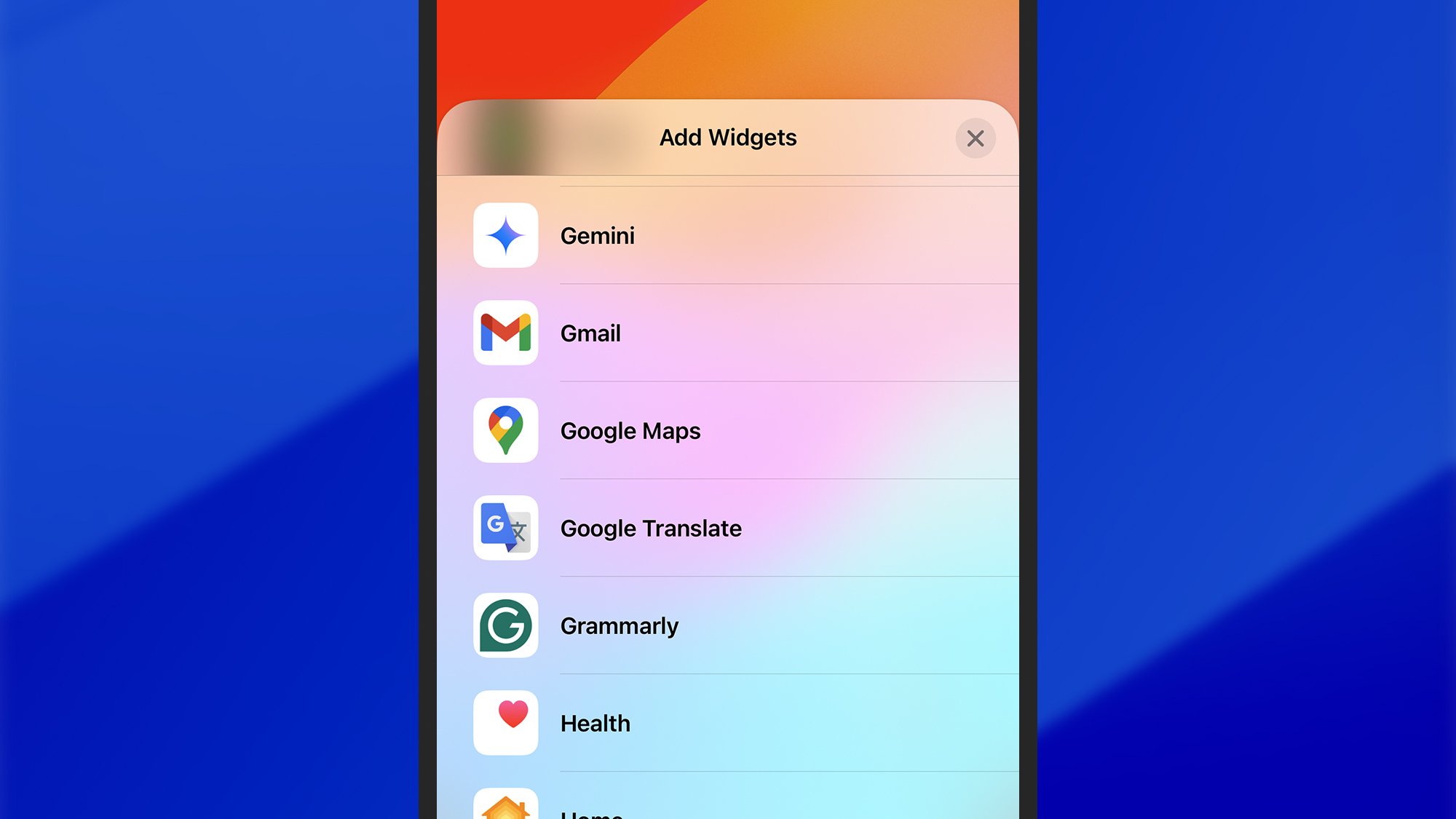
To make use of these widgets, you first need Google Gemini for iOS installed. Launch the app after it’s been downloaded, and you’ll be asked to sign into your Google account. Next, switch to the lock screen, long press on a blank part of it, then choose Customize.

Google Gemini
Gemini now shows up in the lock screen widgets list.
Credit: Lifehacker

Tap inside any of the widget spaces—just below the clock, or in the lower corners—to find all of your widgets options, including the Gemini ones. Choose Gemini from the list, swipe left or right to scroll between the widgets on offer, then tap on the one you want to use or drag it into place on screen.

First up there’s Type prompt, which does exactly what its name suggests: It brings up the Gemini app and lets you start a new conversation with a text prompt. For a voice chat instead, you can add Talk Live, which launches the Gemini Live experience—designed to mimic talking to a person as much as possible.

Open mic leads you to the more basic voice interaction mode in Gemini, while Use camera sends you straight to the camera interface: You can snap a picture of something and ask Gemini questions about it (like what species of flower you’re looking at, or how to fix something that’s broken).

Google Gemini
You’ve got six widgets to pick from, including Talk Live.
Credit: Lifehacker

Share image lets you pick an image from your iPhone for Gemini to work with—to ask a question about it, for example, or to create new AI art—and finally there’s Share file, which lets you give Gemini a file to analyze. One way to use this would be to have the AI assistant summarize a PDF.

All these widgets worked as advertised during my testing, and do indeed allow quick and easy access into the Gemini interface. You’re only saving a couple of taps each time, but those taps can add up if you’re using Gemini a lot—even if it’s not quite as simple to get to Gemini as it is to Siri.

The widgets should be available now in version 1.2025.0762303 of Google Gemini in the App Store. The release notes also mention improvements to the user interface, bug fixes, the option to share text, images, and links directly to Gemini from any other app, and access to Deep Research for Gemini Advanced users.

Turing Award Winners Sound Alarm on Hasty AI Deployment

Reinforcement learning pioneers Andrew Barto and Richard Sutton have warned against the unsafe deployment of AI systems [alternative source] after winning computing’s prestigious $1 million Turing Award Wednesday. “Releasing software to millions of people without safeguards is not good engineering practice,” said Barto, professor emeritus at the University of Massachusetts, comparing it to testing a bridge by having people use it.

Barto and Sutton developed reinforcement learning in the 1980s, inspired by psychological studies of human learning. The technique, which rewards AI systems for desired behaviors, has become fundamental to advances at OpenAI and Google. Sutton, a University of Alberta professor and former DeepMind researcher, dismissed tech companies’ artificial general intelligence narrative as “hype.”

Both laureates also criticized President Trump’s proposed cuts to federal research funding, with Barto calling it “wrong and a tragedy” that would eliminate opportunities for exploratory research like their early work.

Read more of this story at Slashdot.

AMD Radeon RX 9070 Series Linux GPU Compute Performance

In addition to the Radeon RX 9070 series Linux gaming/graphics benchmarks with today’s embargo lift, I’ve also spent some time working on some GPU compute benchmarks for these first RDNA4 graphics cards. Here is a look at some initial GPU compute benchmarks of the Radeon RX 9070 and Radeon RX 9070 XT graphics cards, mostly on cross-vendor OpenCL benchmarks, and a few words on the GPU compute stack support for the Radeon RX 9070.

‘TREKS’ Brings Immersive Walking Tours of Iconic Destinations to Omni One VR Treadmill

Virtuix announced it’s releasing an immersive tourism app for its Omni One VR treadmill system that lets you walk through some of the world’s most iconic destinations.

Coming to the company’s Omni One all-in-one system on March 6th, TREKS matches immersive video up with physical walking, bringing you to locations like the Grand Canyon, New York’s Central Park, or the ancient halls of Riyadh’s Fort Masmak.

Set to arrive from the company’s first-party studio, Virtuix Studios, Treks will be available exclusively on the Omni One Game Store, prices at $30.

When it arrives, the app’s initial release is slated to include four main locations:

  • Grand Canyon – Walk the trails and gaze over the majestic cliffs of this natural wonder.
  • Niagara Falls – Experience the power of the falls from both the American and Canadian sides.
  • New York City ​– Tour famous landmarks including the Statue of Liberty, Times Square, Central Park, and the Brooklyn Bridge.
  • Saudi Arabia – Step into the rich history of Fort Masmak and the stunning architecture of Al Rajhi Mosque.

Virtuix Studios says it plans to release additional locations in the coming months as DLC content, which is said to include new landmarks, historical sites, and natural wonders. Additionally, the company claims that one hour of walking in Treks burns about 500 calories.

“With TREKS, you’re not just watching these destinations—you’re moving through them,” said Jan Goetgeluk, CEO of Virtuix. “It’s a great way to stay active while exploring some of the world’s most iconic places. Fitness and adventure go hand in hand, and TREKS brings that to life in a whole new way.”

The Omni One system, which is priced at $3,495, includes the titular VR treadmill, as well as a customized Pico 4 Enterprise headset, which supports both native apps via its internal chipset, or tethered to a VR-ready PC both wired or wirelessly.

This follows an announcement last month that Omni One now supports over 55 titles, with notable additions including Arizona Sunshine Remake, Arizona Sunshine 2, and Into The Radius.

Omni One’s all-in-one system also compatible with SteamVR games, owing to its Omni Connect PC Driver, which lets you to create custom bindings and adjusting settings to tune games not specifically designed for immersive walking.

The post ‘TREKS’ Brings Immersive Walking Tours of Iconic Destinations to Omni One VR Treadmill appeared first on Road to VR.

Anker charging gear is up to 35 percent off right now

Anker’s latest sale has brought prices down on a number of power banks and wireless charging gear. One of the best discounts of the bunch is 35 percent off the Anker 621 magnetic power bank, bringing it down to $26. The discount applies to all color options, too, so you can choose the one that best matches your personality. You can pick this one up either at Amazon or from Anker direct.

This model is MagSafe-compatible, meaning it’ll attach magnetically to an iPhone 12 and above (but, annoyingly, not the new iPhone 16e unless you resort to a workaround) and charge your phone wirelessly. However, if you plug a cable into the Anker 621’s USB-C port, you can top up your phone’s battery a little faster — at a rate of 12W vs. 7.5W for wireless charging. The power bank has a capacity of 5,000mAh, which Anker says is enough to charge an iPhone 15 to 85 percent of its capacity from zero and an iPhone 14 to 80 percent.

Anker makes some of the best power banks and best portable chargers around, in our opinion. There are lots of options to consider as part of this sale.

A new power bank that Anker introduced at CES has a large enough capacity to top up an M3-powered MacBook Air’s battery approximately 1.3 times, per the brand. This model has dropped by 18 percent from $110 to $90. This particular power bank can charge four devices simultaneously — it has two built-in USB-C cables, another USB-C port and a USB-A port. It supports fast charging at up to 100W as well.

Elsewhere, a 3-in-1 charging cube is down to $104, which marks a 31 percent discount given that it usually costs $150. This compact device can charge your iPhone, Apple Watch and AirPods at the same time.

There are a few other deals that caught our eye. An Anker Zolo power bank with a built-in USB-C cable is just $13, which is half off. It has a capacity of 10,000mAh, which Anker says is enough to fully charge an iPhone 15 Pro twice over. Meanwhile, Prime members can pick up a travel-friendly 3-in-1 charging station (that can top up your iPhone, Apple Watch and AirPods batteries simultaneously) for $88, which is a $21 discount.

Follow @EngadgetDeals on Twitter and subscribe to the Engadget Deals newsletter for the latest tech deals and buying advice.

This article originally appeared on Engadget at https://www.engadget.com/deals/anker-charging-gear-is-up-to-35-percent-off-right-now-155626425.html?src=rss

This Refurbished iRobot Roomba Is $250 Right Now

We may earn a commission from links on this page. Deal pricing and availability subject to change after time of publication.

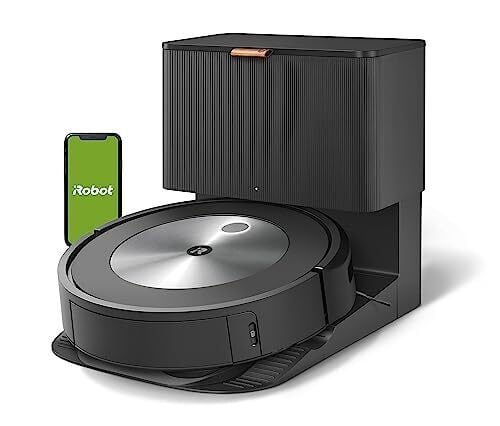
If you don’t mind going the renewed route for automated home cleaning, you can now grab a refurbished iRobot Roomba j7+ for $249.99—a fraction of the cost compared to the $799 price tag on a new unit at Amazon or Best Buy. This deal gets you a Refurbished Premium model, meaning it’s been tested, inspected, and reconditioned to meet Amazon’s “Renewed” standards, so you can expect it to work as intended. PCMag gave this vacuum an Editor’s Choice award for its ability to detect and avoid common household obstacles like power cords using its PrecisionVision Navigation system and machine learning technology. Plus, iRobot backs this model with its P.O.O.P. (Pet Owner Official Promise) guarantee, which means they’ll replace it for free if it fails to dodge solid pet waste in its first year. Also, it learns from your feedback to improve over time.

Beyond the smart navigation, this Roomba takes convenience up a notch with self-emptying capabilities. Once it’s done cleaning (or when its bin is full), it returns to its base and dumps the dirt into an allergen-sealed bag—holding up to 60 days’ worth of debris, depending on how often you vacuum, making upkeep a lot simpler. Just a note, though, that it does get a bit loud during that process, but only for about 15 seconds. It’s also smart enough to resume cleaning after recharging, so if its 86-minute battery life isn’t enough for one run, it’ll pick up where it left off. If you are considering alternatives, the Eufy RoboVac G30 is a solid choice at $199.99. (Here is our full list of the best robot vacuums.)

The Roomba j7+ moves efficiently across hard floors, carpets, and rugs, adjusting suction as needed, notes this PCMag review. Additionally, it works seamlessly with Alexa and Google Assistant, meaning you can start or stop a cleaning session by speaking your commands. The mapping feature of the J7+ takes a few runs to learn the layout, but once set up, you can enable targeted room cleaning, scheduled cleanings, customized clean zones for high-traffic areas, set up no-go zones, and more in the companion app. The app also tracks its cleaning runs, showing you exactly where it’s been, how much dirt it found, and whether it automatically emptied its bin when it docked.

Court denies Elon Musk’s attempt to block OpenAI’s for-profit transformation

US federal judge Yvonne Gonzalez Rogers has denied Elon Musk’s request for an injunction that would have immediately stopped OpenAI’s conversion into a for-profit entity. Musk filed for an injunction late last year after suing OpenAI and Microsoft and accusing them of telling investors not to fund rival AI companies, such as his own xAI. According to the Financial Times, the judge dismissed his request based on that claim of anticompetitive behavior. Gonzalez Rogers cited a previous statement by OpenAI CEO Sam Altman, saying that the company only warned certain investors who were granted access to sensitive information that their rights would be terminated if they made a non-passive investment in rival companies. 

The judge also reportedly rejected the request based on Musk’s claim that OpenAI and Altman broke their contract with him and violated the company’s founding mission of building AI “for the benefit of humanity.” Musk, who helped found OpenAI and funded it when it was just starting out, said Altman and his fellow OpenAI co-founder Greg Brockman “took advantage of [his] altruism in order to lure him into funding the venture.” In a statement sent to Bloomberg, OpenAI said that the lawsuit has “always been about the competition.” The company added that “Elon’s own emails show that he wanted to merge a for-profit OpenAI into Tesla. That would have been great for his personal benefit, but not for [OpenAI’s] mission or US interests.” 

After Musk filed his original lawsuit against OpenAI last year, the company published old emails between Musk and other people in the company. OpenAI revealed that Musk was not only aware that it was taking the for-profit route, he wanted majority equity, control of the initial board of directors and the CEO position. Anoter email from Musk suggested making the organization a part of Tesla. In February this year, Musk launched a bid to buy OpenAI for $97.4 billion, but the company gave him a firm “no thank you” in response.

As Bloomberg noted, the judge’s rejection of Musk’s request is significant, because OpenAI is already in the process of talking with government officials about taking on a more typical corporate structure. While the judge has rejected Musk’s request, she is fast-tracking his lawsuit and will hold an expedited trial later this year on the basis of public interest and on his claim that OpenAI’s transformation has a “potential for harm if a conversion contrary to law occurred.”

This article originally appeared on Engadget at https://www.engadget.com/ai/court-denies-elon-musks-attempt-to-block-openais-for-profit-transformation-133025600.html?src=rss

The 7 best cordless vacuums for 2025

Old-school, upright vacuums left a lot to be desired, and cordless models are here to right many of those wrongs. These types of vacuums tend to be thinner, lighter and easy to maneuver around a home, and you don’t really have to sacrifice suction power anymore to get those benefits. Dyson isn’t your only option anymore either — like the robot vacuum space, there are dozens of cordless vacuums to choose from today.

Variety is great, but it can also lead to decision fatigue and confusion. We at Engadget can help make that decision a bit easier. After testing a bunch of the best cordless stick vacuums available today, we’ve come up with our top picks, plus loads of buying advice to help you figure out which is the best cordless vacuum for you.

Most of the cordless models you’ll find today have stick designs, with a handle at the top attached to a debris bin, which has a space to connect different attachments at one end. These designs are more versatile than old-school, upright vacuums of yesteryear because, while you may use the long stick attachment most of the time to clean your floors, many cordless vacuums come with other attachments as well. Some allow you to clean hard to reach spaces like the interior of your car, while others make it easier to vacuum furniture and clean inside crevices.

Bin volume is worth keeping in mind when you’re choosing a cordless vacuum. The larger the bin, the more debris it can hold, but it might also mean a heavier machine. All of the cordless vacuums we tested had a bin size between 0.1 and 0.8 gallons and all were able to handle cleaning an entire one-pet home (roughly 2,000 square feet) in a single run without needing to be emptied. Anything smaller and you may have to deal with more frequent emptying during each cleaning session.

Some cordless models also have removable, replaceable battery packs, which is super handy. That means you can buy a replacement battery and install it easily, without needing to seek out professional assistance. Also, these extra batteries cost around $150-$200 a pop — expensive, yes, but nowhere near as costly as buying a whole new cordless vacuum.

Cordless vacuum suction power is typically measured in air wattage (AW), but you’ll see some that list the power of the motor in wattage (W) instead. Typically the higher the air or motor wattage the stronger the suction power, offering improved cleaning performance. And often strength is proportional to price — more expensive cordless vacuums tend to have stronger suction power. A general rule of thumb is that those with precocious pets or mess-making children would benefit from a cordless vacuum cleaner with stronger-than-average suction power.

Most cordless stick vacuums will have two different power modes: a “normal” or default power mode that balances suction power with battery life, as well as a “max” or stronger mode that kicks suction strength up a notch. Some vacuums, like those from Dyson, also have an “eco” mode, or one that prioritizes run time over strength.

Separate from power modes you can select yourself, some cordless vacuums will automatically adjust motor strength depending on the detected floor type or the amount of mess in its wake. This not only improves ease of use but ensures the vacuum is working as efficiently as possible.

The best cordless vacuums will be able to clean any standard floor type — hardwood, tile, carpet and everything in between. As mentioned previously, some can even detect floor type and adjust suction power accordingly. That said, it’s still worth thinking about the types of flooring you have in your home. If you primarily have carpet, you may want to consider a cordless vacuum with the most powerful suction you can afford, since there are more nooks and crannies for debris to get suck in with carpet.

Obviously, battery life is important since you’ll probably want to clean more than one room in a shot. All of the cordless vacuums we tested had a battery life of at least 40 minutes in standard cleaning mode. I tested each by cleaning all three floors of my home (upstairs, downstairs and basement) on a single charge with the machine running in its standard (“auto”) mode and none of them ran out of juice before I could finish the third floor. That said, extra battery life can come in handy if you’re switching between power modes since “max” or high-power programs use more energy.

Most cordless stick vacuums come with some sort of base or mount where the machine lives when you’re not using it. Wall mounts are the most common, but some have free-standing bases where you dock and charge the vacuum. Consider the space in your home where you want the cordless vacuum to live, since it will have to have an outlet or another power source nearby.

Some high-end cordless vacuums come with self-emptying bases that act much like those included with expensive robot vacuums. After cleaning and returning the vacuum to the base, it will automatically empty the dustbin into a larger dustbin that you can then detach from the base when you need to empty it. This is great for anyone concerned about allergens, as you’ll only need to empty the larger dustbin every month or two, reducing your contact with dust and debris.

Yes, some cordless vacuums have “smart” features like Wi-Fi and app connectivity. But before we get into those, let’s talk about the extra perks scattered among these devices. Some models, like the latest from Dyson, include particle sensors that show you how many different sized pieces of debris it’s sucking up in real time. Dyson’s, for example, is a piezo acoustic sensor that detects particle size and frequency and displays that information on the vac’s LCD screen. Tineco’s iLoop sensor is similar, controlling its vacuums’ automatic suction power adjustment and changing a circle on the display from red to blue as you fully clean an area.

Higher-end cordless vacuums may also have companion apps that show things like battery level, filter status and cleaning logs. It’s an added level of convenience, but by no means necessary. Unlike the best robot vacuums, or even the best budget robot vacuums, which rely on their apps to set cleaning schedules, manually control the machines and more, cordless vacuums that you operate yourself really don’t need Wi-Fi or an app connectivity.

Cordless stick vacuums range in price from $150 all the way up to over $1,000. The best ones for most people lie in the middle, in the $400 to $700 range. You’ll notice most of our picks land in the higher end of that range, but for good reason: More expensive machines tend to have more sucking power, which means less time wasted going over the same spots over and over. But does that mean everyone needs the most premium cordless vacuum? Definitely not. We’ve come up with top picks at various price points that should work well for people with different budgets, lifestyles, home sizes and more.

Engadget doesn’t have a dedicated lab in which we can test cordless vacuums, but I used each model in my home for weeks. I ran them over hardwood and tile flooring, as well as low-pile carpet. And my first runthrough consisted of cleaning all three floors of my home on a single battery charge. I performed the same cleaning job as many times as possible, but also intermittently cleaned a single floor as needed, or sucked up isolated messes like crumbs, cat litter spills and tufts of pet fur. Over the course of many cleanings with each model, I made note of how loud the machine was, how easy it was to maneuver around my home, how easily it sucked up pieces of large debris (or if it pushed it around my floor instead) and if they got warm or hot.

The Dyson Gen 5 Detect has a single-button start and stronger suction power than our top pick, but it’s otherwise quite similar. However, since the Gen 5 Detect is more expensive at $950 (although it does receive discounts at Dyson online), the V15 Detect still provides greater value for your money. The Gen 5 Detect is arguably best for those who want the latest Dyson, or care about getting a more future-proof machine, since it came out just last year.

The Shark Detect Pro provides a lot of value for the money, but it was ultimately beat by the Tineco Pure One S15 Pet for our runner-up slot thanks to the Tineco’s stronger suction power. The kicker for the Detect Pro is that it includes a self-emptying base in its $450 price, which is super handy. It’ll automatically dump the contents of the vacuum into the larger bin in the base after every cleaning, and you only need to empty the base’s container every month or so. The Detect Pro did a good job cleaning up messes across different types of flooring, and it’ll auto-adjust suction power depending on the amount of debris and whether you’re cleaning hard or carpeted floors. However, it’s not as smooth to use as any of our top picks and its main cleaner head is a bit tall, making it difficult to use to clean under low furniture.

Most cordless vacuums will run for at least 30-40 minutes on a single charge, but you can find cordless vacuums with battery lives of up to 60 or 70 minutes. Manufacturers will outline an estimated battery life for each model, and they’re usually based on using the vacuum’s standard power mode for the entire runtime; if you switch between modes or prefer to use a higher-powered program for improved suction, you’ll drain the battery faster.

Cordless vacuums do sacrifice a bit in overall power when compared to corded models, but that doesn’t mean they can’t handle everyday messes just as well. If suction power is your biggest concern, we recommend springing for a high-powered, high-end cordless vacuum since, typically, the more expensive a cordless vacuum is, the stronger the suction. Also, cordless vacuums have the edge over corded models when it comes to weight and convenience: cordless vacuums are much lighter than their corded counterparts, and you’ll never have to worry about placement or picking a fight with a cord while cleaning your living room.

Yes, cordless vacuums can handle pet hair well, but we recommend getting a model with strong suction power to get the best results. It’s also wise to get one with a larger bin, since pet hair can quickly fill up smaller bins, which may force you to stop cleaning to empty the vacuum before finishing.

Maintaining a cordless vacuum is super easy and helps to keep it running like new. First, make sure to empty the dustbin regularly — don’t let it overfill, as this can impact suction. Many models have washable filters, so rinse them out every few weeks (check your manual for specifics) and let them dry completely before putting them back.

Next, take a look at the brush roll — hair and debris can get tangled up in there over time. Most vacuums make it simple to remove the brush roll, so you can snip away any tangles with scissors. If your vacuum has a replaceable battery, try not to let it fully drain too often, as this can reduce its lifespan. A quick wipe-down of the vacuum’s exterior and attachments will also keep everything looking fresh.

Lastly, keep an eye on the sensors and charging contacts, as dust can build up there too. A gentle wipe with a dry cloth every now and then will do the trick.

Cordless vacuums are surprisingly versatile, and many come with attachments specifically designed for surfaces like curtains, upholstery and even mattresses. A handheld vacuum mode, which is common in cordless models, makes it easy to tackle these areas. Look for a soft brush or an upholstery tool in the attachments for the vacuum you’re considering — it’ll help remove dust and pet hair without damaging fabrics. For curtains, it’s a good idea to use a lower suction setting if your vacuum has adjustable modes. This prevents the fabric from getting pulled into the nozzle.

This article originally appeared on Engadget at https://www.engadget.com/home/smart-home/best-cordless-vacuum-130007125.html?src=rss

This Tool Turns Any Wikipedia Topic Into an Interactive Timeline

It can be useful, while studying any topic, to get an overview of when major events happened relative to each other. History textbooks commonly use a timeline for this—a chronological chart that shows when various events happened. WikiTimeline is a free website that uses a large language model to turn any Wikipedia article into a visual timeline you can use to see major events in a sequence.

Wikipedia’s open nature means there’s all kinds of third party tools that use the articles in interesting ways. There’s WikiTok, a sort of TikTok for Wikipedia, which allows you to scroll through articles to learn topics at random. WikiTimeline is another tool like that, putting the free and open information into a new context. To get started, just head to the home page and search for anything—you will see suggested articles.

Select the article you want to turn into a timeline. WikiTimeline will scan the article, note everything in the article that happened on a particular date, then compile it all into a timeline. You can start exploring right away. You can click any item to read a few more details, typically the year and a one-sentence summary of the event. You can zoom in and out, depending on how crowded the timeline is, and you can use the arrows on the side to jump between events. You can also add multiple articles to one timeline, allowing you to compare the relative history of two people or organizations.

The history of the Toronto Maple Leafs and Montreal Canadians alongside each other.

Credit: Justin Pot

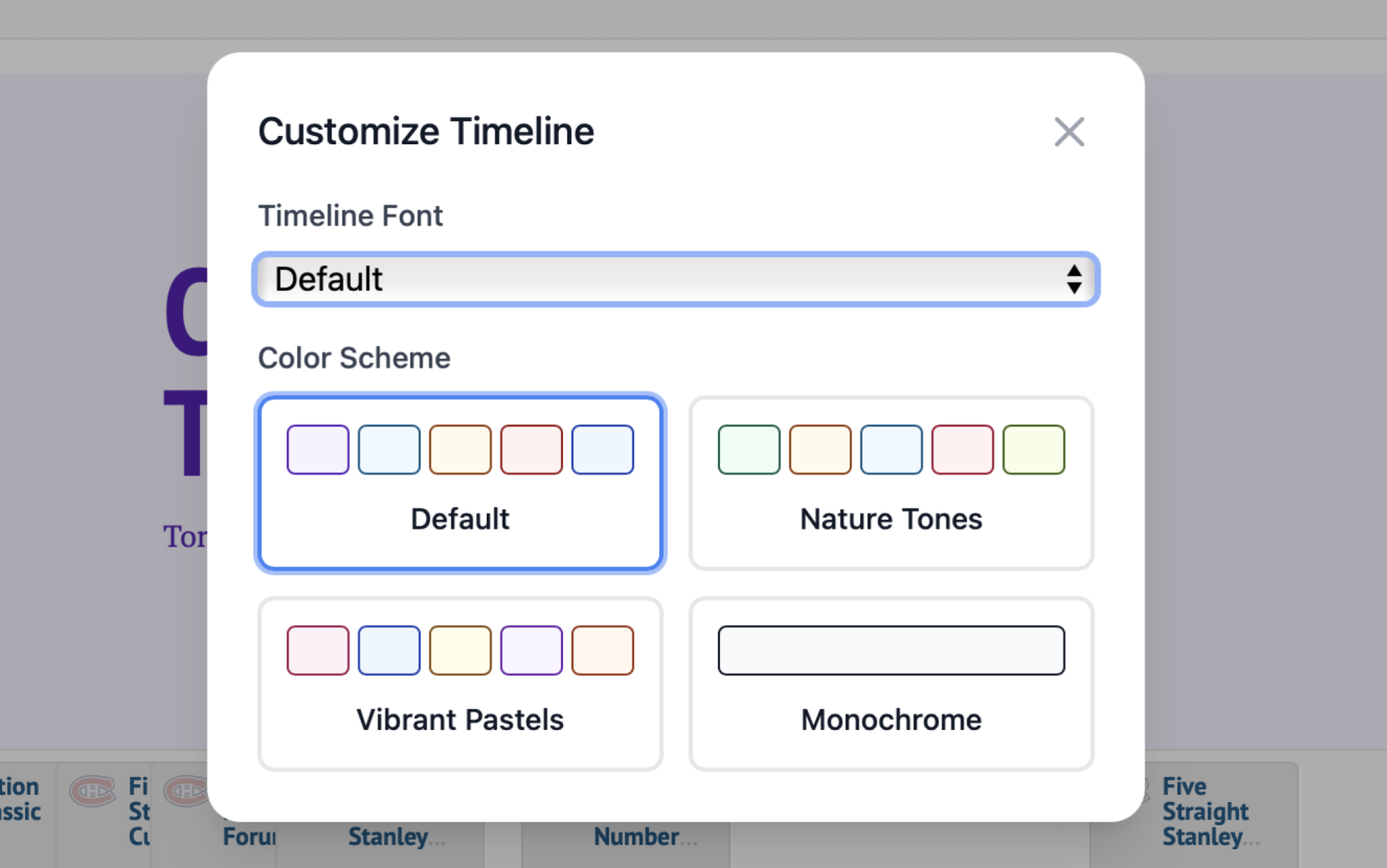
You can then copy the URL to your timeline and share it. An embed code is offered if you want to put the timeline on a website. There’s even the option to customize the color scheme, if you want.

The option to choose between pre-existing color schemes or design your own

Credit: Justin Pot

As for the timelines themselves, they’re pretty good. I’d say they’re useful as a quick study aid than anything as authoritative as the timelines in a history textbook. And all of the usual nuances that apply to large language models are relevant here—it might get facts wrong or miss certain things. The product’s about page recommends actually reading the Wikipedia article: “Our tool is meant to be a visual aid and should not be used as the sole source of information.”

In other words, it’s probably best to think of this tool as a visual supplement. It’s a potentially useful one, though.