Apple’s latest iPad Air isn’t a massive leap in performance compared to 2024’s version with M2.

Apple’s latest iPad Air isn’t a massive leap in performance compared to 2024’s version with M2.

The new MacBook


Save 40% on the latest model of the Amazon Fire TV Stick 4K for a limited time.
If you’ve picked up an iPad in the last five years or so, the new iPad Air will not surprise you. It is, in every way but one, identical to the iPad Air that Apple released last spring. The only difference is that the latest iPad Air has the M3 chip inside, instead of the already-capable M2. Even the (extremely muted) colors appear identical this year. Besides the 13-inch screen option Apple added last spring, the iPad Air is barely different from the one that was released way back in 2020.
That makes this iPad exceedingly easy to review — everything I wrote last May when I reviewed the 13-inch iPad Air M2 applies here. I like that it has a long-lasting battery, plenty of power, a reasonable amount of base storage and a front-facing camera on the landscape edge. The 13-inch model is still fairly large, but it’s thin and light enough to hold without issue — though if you prefer holding an iPad to using it with a keyboard, you’re probably better off with the 11-inch model. The Apple Pencil Pro released last year is a nice upgrade for serious visual artists. I don’t like that it still relies on Touch ID instead of Face ID, and I think it’s time the iPad Air had a better display.
Given that the M3 chip is the main change here, it’s worth giving it a little more attention. Geekbench 6 scores show that the iPad Air with the M3 is about 16 percent more powerful in both single- and multi-core scores. That’s pretty impressive given that the M2 iPad Air is less than a year old, but it’s not something that’ll radically change how you use the device. It does mean it’s a little more future-proof, though, and I’m always happy about that. In real use, the iPad Air handled multitasking through my workday, playing games, transcoding video and trying out various Apple Intelligence features with absolutely no hiccups and slowdowns.
Apple has been aggressive about putting extremely powerful chips in the iPad Air and Pro lineups for a few years now, and it’s nice that you basically never have to worry about slowdowns. And the newer chip had no ill effects on battery life — I easily got eight hours during a workday with the Magic Keyboard connected the whole time, and close to the 10 hours Apple promises when doing more causal activities or watching video.
Apple also fixed one of my two major complaints about the last iPad Air. It has a new Magic Keyboard modeled after the much-improved one that was introduced alongside the iPad Pro M4. It’s thinner and lighter than the old iPad Air keyboard, has a row of useful function keys and the trackpad is a bit bigger. These aren’t major changes, but they are enough to make me much happier with the keyboard experience this year. It doesn’t have a few niceties you’ll find on the iPad Pro Magic Keyboard, though: The top case is smooth plastic rather than aluminum, the keys aren’t backlit and the trackpad has a physical click rather than haptic feedback. However, this keyboard is also $30 cheaper than the one it replaces. It’s still wildly expensive — $269 for the 11-inch Air and $319 for the 13-inch model.
In fact, this whole package I’m trying is wildly expensive. The 13-inch iPad Air with 1TB of storage and 5G connectivity costs $1,449, and that’s not including the keyboard. However, a comparably specced iPad Pro costs, wait for it, $2,099 without its keyboard. The 13-inch Air starts at $799 with 128GB of storage, a price that seems fair to me. Similarly, the 11-inch Air at $599 feels like a great value and has numerous meaningful improvements over the basic iPad.
With the new iPad Air so similar to last year’s model, I started thinking about the compromises that Apple makes to keep the price of the Air at a more approachable level, and whether those are reasonable in 2025. The major advantages the iPad Pro M4 has over the iPad Air M3 are: a much better OLED display with a higher refresh rate, more storage space on the base model, a more powerful chip, better speakers and microphones, Face ID instead of Touch ID, a thinner and lighter design, a LiDAR sensor and a few extra photo and video capture capabilities. The iPad Pro also offers a nano-texture front glass option (to reduce screen glare) on the 1TB and 2TB models, and those models with more storage also have 16GB of RAM instead of 8GB.
In almost all cases, I don’t have any issue with those features staying exclusive to the iPad Pro. But after using the iPad Air for a bit, I think it’s time Apple finds a way to improve on the screen. In fact, I think there’s a solid solution waiting in the wings: deploy the mini-LED display that Apple used in the iPad Pro from 2021 and 2022. That screen refreshes at up to 120Hz, the same as others that Apple brands as ProMotion-capable, and max brightness when watching movies was 1,000 nits — and could jump up to 1,600 nits for HDR content. Brightness when not watching video maxed out at 600 nits, like the iPad Air, but given how popular iPads are for watching video, this would be a major improvement.
Chances are that between the higher refresh rate and improved brightness, Apple feels the mini-LED screen would still be too close to the iPad Pro’s OLED panel (which remains shockingly nice, probably the best portable screen I’ve ever seen). And Apple never made a mini-LED display for the 11-inch iPad Pro, so it would have to develop something new for the smaller iPad Air.
There are plenty of reasons not to do it, but I think the iPad Air deserves a better screen. In fact, I’d be happy enough if Apple just gave me the same screen with a higher refresh rate. The company still reserves that feature for its most expensive “Pro” devices, but the landscape is a lot different in 2025 than it was in 2020. Plenty of midrange phones have 90Hz or 120Hz screens. Of course, Apple has never really cared about what other manufacturers do; it has pretty consistent rules about what devices get what tech. The iPad Air’s screen is essentially the same as the one on the MacBook Air, while the more expensive iPad Pro, MacBook Pro and iPhone Pro lines all get higher refresh rates. That’s just where we’re at, but I’m ready for it to change.
Of course, I also need to admit that the iPad Air’s screen remains quite lovely. Apple has fine-tuned its LCD tech to within an inch of its life, and it shows in the vibrant colors, overall sharpness and great viewing angles. Sure, I notice that blacks aren’t as “truly black” as they could be with an OLED or mini-LED, but I’m not sitting around thinking about that when I watch movies or play games. I just enjoy what I’m doing without fussing over screen specs.
The lower refresh rate is more noticeable in day-to-day usage — you’re constantly touching, swiping and scrolling through content on an iPad, and it just does not feel as fluid. My main devices are a MacBook Pro, iPhone 14 Pro and iPad Pro, all of which use ProMotion. Stepping down to the iPad Air is just a bit of a bummer. And while Apple clearly feels it doesn’t always have to respond to larger industry trends, it’s hard to imagine it sticking with 60Hz screens for most of their products much longer.
My other major quibble with the iPad Air is Touch ID. At this point, Face ID really does not feel like a “Pro” feature. Excluding the iPhone SE lineup, every new iPhone since 2018 has had Face ID, but you still need to spend $1,000 or more to get it on an iPad. That feels a little extreme! Touch ID is fine, but there are a lot of sites and services I often need to log in to for work and having to constantly reach up and touch the top button is a bit of a hassle. Especially compared with just making sure my face is in frame with the front camera. This probably felt like more of a pain during my review, since the iPad Air is brand new and setting up requires a ton of logging in to various apps. Still, Face ID definitely does not feel like a feature that needs to be locked to Pro devices at this point.
Everything else you need to know about the new iPad Air is covered in my review from 10 months ago, but I’ll sum it up. I think the Air remains a clear upgrade over the base iPad — I appreciate its improved display, stronger performance, more robust multitasking experience and better accessories. Not to mention the 13-inch Air is the only way to get a big-screen iPad without breaking the bank. I’m glad Apple built a better keyboard too, and if you have an older iPad Air, the new keyboard will work with it.
But the new iPad with the A16 chip is also better than its predecessor because Apple has fixed a number of issue with it since 2022. The price is lower, storage is doubled and the dumb Lightning Pencil charging situation is now gone. If you don’t care about Apple Intelligence, more advanced multitasking and a better or bigger screen, a lot of people looking for “just a good iPad” won’t miss the Air’s upgrades, especially if they’re saving $250.
However, for people who want more from their iPad, the Air is just as easy for me to recommend as it was last year. You can get 80 percent of the iPad Pro experience for a lot less money, and the vast majority of buyers aren’t going to miss the Pro’s extra features.
My main caveat is that this iPad Air feels like a slightly-upgraded stopgap ahead of a bigger redesign, much as the iPad Pro was in 2022. That iPad went from an M1 to an M2 and got some nice software updates, but was largely the same as its predecessor — and then Apple gave it a massive update a year and a half later. The iPad Air M3 feels like it’s in a similar place, just waiting for a big refresh. I don’t think it’ll be too long before Apple has to update some of its older bits, particularly the display. If you’re the kind of person who really loves a good screen, it might be worth waiting another year to see if Apple finally brings faster refresh rates to more iPads.
This article originally appeared on Engadget at https://www.engadget.com/mobile/tablets/ipad-air-m3-review-a-modest-update-thats-still-easy-to-recommend-130045196.html?src=rss

Plus, could Charli XCX be headed to Greta Gerwig’s Narnia?
We may earn a commission from links on this page. Deal pricing and availability subject to change after time of publication.
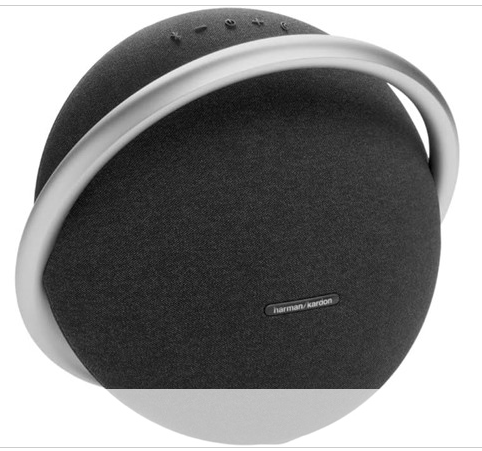
The Harman Kardon Onyx Studio 8 is currently $129.99 on Woot, a massive drop from its usual $499.95 price tag. According to price trackers, this is its lowest price ever—and if you’re a Prime member, you get free shipping (otherwise, it’s $6). This deal is set to last for the next 27 days or until it sells out, but note that you can’t have it shipped to Alaska, Hawaii, or a PO box address.
The asymmetrical shape of this speaker might make it seem wobbly at first glance, but there are rubber feet to keep it stable. One of the standout features of this speaker is its room calibration technology, which automatically adjusts the sound to your space. Whether you’re in a small apartment or an open loft, the speaker fine-tunes its output for the best possible experience.
The sound profile of the Onyx Studio 8 is well-balanced, particularly in the midrange, making it great for podcasts and general listening. However, if you love deep, thumping bass, this isn’t the speaker for you. It lacks serious low-end punch, so while bass lines are present, they won’t shake the walls. It also doesn’t have an EQ or sound customization options, so what you hear is what you get. Also, its controls are a bit of a mixed bag—they’re simple but suffer from inconsistent tap recognition, which could easily get frustrating when trying to adjust volume or playback. The Bluetooth multipoint pairing feature of this wireless speaker lets you connect two devices at once, but there’s noticeable latency with video playback (so if you’re planning to use this for movies or YouTube, expect some sync issues).
While the Onyx Studio 8 improves in sound quality over its predecessor, the Onyx Studio 6, it drops its water resistance entirely, making it more suited to a safe, dry living room setup. That said, it does come with a one-year manufacturer limited warranty for added peace of mind. Battery life is advertised at eight hours, but real-world use is closer to seven, depending on usage (your mileage may vary). Also, there’s no auto-off function, so if you forget to power it down, you’ll lose battery even when the speaker’s idle.

This month marks the eighth anniversary of the Nintendo Switch’s release. With the Switch 2 looming later in 2025, this is likely the last year we’ll see Nintendo develop and publish most of its games on the handheld hybrid that revolutionized how we play console-quality games. Over those eight years, Nintendo has put…
Last week was a busy one filled with Apple announced news, with the company refreshing its Mac and iPad lineups. Now, we’re starting to see deals on some of the older models that will soon be discontinued. One of the best sales is on the 10th-gen iPad, which is down to $269 at Amazon for the blue and silver colorways. It briefly dropped to a record low of $260 at the end of last week, but now you’ll find the $269 price more readily.
The 10th-gen iPad arrived in late 2022. At least until we put the new model through its paces, this is our current pick for the best budget iPad — a recommendation that automatically becomes a little stronger whenever it gets this kind of discount.
We gave this model a score of 85 in our review. We felt that the screen was somewhat lacking compared with those found in the likes of the iPad Air. However, we appreciated several updates such as the switch to a USB-C charging port and improved performance compared with the previous base iPad. Apple also moved the front-facing camera to the landscape edge, making video calls much more palatable when you’re using the tablet in that orientation.
If you just want an iPad to help you catch up on reading and email, control your smart home devices, watch videos and stream music, this is probably the one to go for. More resource-intensive tasks will require a more powerful tablet, but this one will handle the basics.
Meanwhile, if you’re interested in picking up the latest base iPad, you can pre-order one now. Amazon even has a small discount on the latest iPad, dropping it from $349 to $329. Apple has upgraded the chipset to an A16 and doubled the base storage to 128GB, but there’s no support for Apple Intelligence in the 11th-gen iPad.
Check out our coverage of the best Apple deals for more discounts, and follow @EngadgetDeals on X for the latest tech deals and buying advice.
This article originally appeared on Engadget at https://www.engadget.com/deals/apples-10th-gen-ipad-drops-to-a-near-record-low-price-171121239.html?src=rss

It’s time for a smartwatch upgrade, and these major Apple Watch savings are well worth your time.

Hazelight Studios has made a name for itself with thrilling co-op adventures that have captured the hearts of gamers worldwide. Its newest outing is Split Fiction, which tasks two players with exploring two worlds at the same time—one person battling through a high fantasy setting and the other working their way…
You have to be patient if you want to take advantage of the best streaming deals because they don’t come around as often as discounts on laptops and smartphones. One of the best deals as of late is a new one from Disney: new and returning subscribers can get four months of the Disney+ Hulu Duo Basic bundle for only $12.
You’ll pay $3 per month for four months, and that represents a 72-percent discount off the standard $11-per-month price. For the whole period, you’ll save a total of $32. The deal is available through March 30, but just keep in mind that the Duo Basic plan includes advertisements on both Disney+ and Hulu content.
At a time when it feels like every streaming service, audio and video, is pushing their subscription costs ever-higher, it’s a treat to get any amount of entertainment access for a discount. That’s why we’re big fans of the Disney+ Hulu Duo plans; even at the normal rate, it unites two of our favorite standalone content libraries in a single package that’s a solid deal at its normal rates.
Snagging the basic tier for an even lower cost feels like a no-brainer, especially if you’re invested in any facet of the Marvel Cinematic Universe, if you’re counting the days until the second season of The Secret Lives of Mormon Wives or if you just like to hum along with Encanto in the background while you work.
Keep in mind that the ad-free Duo Premium plan isn’t covered in this promotion, nor is the option that also bundles ESPN into the package. Access to Duo Premium will still run you $20 a month, while the Trio bundles begin at $17 a month.
Check out our coverage of the best streaming deals for more discounts, and follow @EngadgetDeals on X for the latest tech deals and buying advice.
This article originally appeared on Engadget at https://www.engadget.com/deals/get-four-months-of-the-disney-hulu-duo-basic-streaming-bundle-for-only-12-right-now-123511048.html?src=rss
Saturday, March 8, was International Women’s Day. March is a whole women’s month, even if Google erased it from its calendar. So I’m taking a look at young women—and not in a creepy way. I want to know: what’s up with young women? What are they about? What are their dreams? How are they feeling deep in their hearts? So I’m checking out Reddit’s woman-centric corners, listening to Doechii and “Call her Daddy,” and consulting some “coochie doctors.”
To try to get some insight on young women between the ages of 18 and 25 or so, I took a look at some Reddit communities ostensibly made for, by, and about women.
I started at Reddit’s TwoXChromosomes. at over 13 million subscribers: This is by far Reddit’s largest woman-centric community, and it’s bleak. The top posts of the week are dominated by tales of creepy dudes, sexual violence, violence–violence, and more creepy dudes. There’s an occasional “here’s something funny/cute that happened” to lighten the mood a little, but overall, it’s bad out there: “Growing up is realising how much the world hates you” is how redditor gaycat21 puts it.
For a way less depressing and way more interesting women’s subreddit, check out NSFW meme subreddit R/LetGirlsHaveFun. At only around 100,000 subs, it’s much smaller than TwoX, but it’s proof that crudeness and no-censorship vibe of online culture doesn’t have to be misogynistic, and it’s much funnier that way. According to its creator, Let Girls Have Fun is a place for “girls to post their deranged thoughts, from a girl perspective,” because “Girls can also like edgy and crude humor.” Posts like this, this, or this seem like open rebellion against society’s endless set of rules and expectations for women, expressed in the most explicit way possible.
Almost everyone who listens to the Call Her Daddy podcast is a young woman. According to research firm Edison Research, 70% of CHD’s audience are women, and 70% of them are under 35. A full 93% of its listeners are under 45. The podcast made news when it scored an interview with Vice President Kamala Harris in October, but politics isn’t the show’s usual subject matter. Host Alex Cooper has been described as “Gen Z’s podcast queen” and “the female Howard Stern” by The Hollywood Reporter, tends to focus on sex and relationships when she’s not interviewing celebrities like Miley Cyrus and John Mayer. Like Stern, Cooper is frank, open, and raunchy. In the early days of her show, she focused more on sex, but the subject matter has expanded into topics like female empowerment, self-love, and pop culture. Unlike boy’s top podcaster Joe Rogan, Call Her Daddy‘s host doesn’t regularly fall victim to believing in crap that isn’t true.
When someone describes themselves as a “coochie doctor,” it’s probably safe to ignore any medical advice they offer, especially when they’re online and they’re not actually human. For the last few months, weirdos and/or algorithms have been using an app called “Caption” to spam TikTok with hundreds of videos featuring lifelike, AI-generated avatars who call themselves “coochie doctors,” “booty doctors,” “tata surgeons,” “booby doctors,” and “Korean butt doctors” followed by terrible medical advice. These videos generally start with a variation of the phrase, “13 years a coochie doctor and no one believes me when I say this,” followed by some questionable health tips geared toward women like “rubbing fig seeds on your breasts will make them go from saggy to perky” and “sea moss is a great way to cleanse your gut.”
It’s worth noting that these tips are about neither coochies nor butts, so these medical professionals are working outside their area of expertise. These videos generally end with exhorting viewers to search out a specific “wellness” product on Amazon. It’s like all these medical professionals are only offering advice to get money out of the gullible!
A few weeks ago, TikToker @myak.tt posted the video you see above, a short, random clip with the caption “Dating a GM.” It’s been viewed over 11 million times since then, and sparked an online debate over what a GM is.
My first thought is “game master,” the more inclusive form of “dungeon master,” but I’m a damn nerd, and that’s almost definitely not what Myak.tt meant. Others have suggested “gang member,” “gun man,” or “grand master.” It’s frustrating because the video gives no information, and as of yet, the young woman who posted the video has offered no explanation.
The video has inspired “99% accurate” reenactments like this one:
and this one:
But these give no indication of what a GM is either. Maybe as big a mystery is: Why did this video get popular? Why did the TikTok algorithm choose to share this over the millions of other short, meaningless clips posted all day on the site? I have no answers.
(For a glossary of slang words I’m pretty sure I do know the definition of, check out ‘Mewing,’ ‘Sigma,’ and Other Gen Z and Gen Alpha Slang You Might Need Help Decoding‘)
Rapper/singer/songwriter Doechii, born Jaylah Ji’mya Hickmon, has been blowing up over the past couple months. Aided by a legion of fans using her song “Denial Is a River” on their TikTok videos and a stand-out performance at the Grammy Awards, Doechii has become so popular that her older songs are being dug out of mothballs and getting huge. This week’s viral video, Anxiety (Visualizer), was posted on Doechii’s YouTube with no fanfare, and almost three million people watched it in its first two days online alone. The original video for the song was posted back in 2020, and features COVID-era Doechii rapping in her bedroom over Gotye’s “Somebody That I Used to Know.” But part of Doechii’s “Anxiety” was also sampled on a track from rapper Sleepy Hallow, for his song called “Anxiety.” You know what: Here’s Doechii explaining the deep lore around this song:
This Tweet is currently unavailable. It might be loading or has been removed.

Save a ton on Nintendo Switch games like Super Mario Bros. Wonder, Mario + Rabbids Sparks of Hope, and Mario Party Superstars.


Apple is planning a “feature-packed release” for visionOS 3.0, reports Bloomberg’s Mark Gurman, who says that Vision Pro’s operating system—and not new XR hardware—is going to be a focus at this year’s World Wide Developer Conference (WWDC).
Despite its high price and premium appeal, Apple hasn’t slowed down software updates for Vision Pro, which launched in February 2024 for $3,500.
Recently, the Cupertino tech giant has released a host of productivity features, including the long-promised ultra-wide Mac Virtual Display and the full suite of Apple Intelligence features in developer preview.
Now, Gurman reports Apple is gearing up to showcase visionOS 3.0 at WWDC, which typically takes place in June.
“All signs are pointing to the company’s Vision Products Group shifting its resources to other form factors,” Gurman maintains. “But Apple can’t just let the Vision Pro die out. It has invested too much and needs to keep churning out the device’s visionOS updates (the third edition will be a pretty feature-packed release, I’m told).”
There’s no indication yet what visionOS 3.0 could contain, although if it’s anything like visionOS 2.0, which was announced at WWDC 2024 last June, developers will likely be able to go hands-on as soon as it’s announced.
That said, information is still thin. One possible candidate for visionOS 3.0 could address the headset’s lack of motion controllers; Gurman reported last month Apple is currently working with Sony to adopt PSVR 2’s Sense Controllers as Vision Pro’s officially supported motion controller.
As for hardware reveals (or the lack thereof) at WWDC 2025, Gurman echoes previous claims made by Apple supply chain analyst Ming-Chi Kuo late last year, who reported that multiple Vision Pro follow-up are currently planned.
Gurman notes that Apple is planning a headset containing a new M-series chip (possibly M5), as well as cheaper versions of the headset. Contrary to Kuo’s report, which maintains an upgraded M5 version of Vision Pro is coming this year, Gurman claims we won’t see a follow-up headset from Apple in 2025.
The post Apple Reportedly to Reveal “feature-packed” visionOS 3.0 Update at WWDC in June appeared first on Road to VR.
Robot vacuums have become ubiquitous over the past few years, in the sense that there are more options to choose from now than ever before. In their early years, you’d have to dish out $500 or more to get a decent robot vacuum, but that’s not the case anymore. Sure, you could pick up a $1,000 cleaning behemoth with mopping features, but it would be incorrect to assume that you need to spend that much money to get a good machine.
Now, you can get an autonomous dirt-sucker to do one of your least favorite chores (and do it pretty well) by spending $300, or less in some instances. But you get what you pay for in this space; don’t expect affordable robot vacuum cleaners to have all of the bells and whistles that premium machines do, like self-emptying capabilities or advanced dirt detection. Engadget has tested dozens of robot vacuums at various price points over the years and we’ve narrowed down the best budget robot vacuums you can get right now.
Since I’ve tested dozens of robot vacuums, I’m often asked if these gadgets are “worth it” and I’d say the answer is yes. The biggest thing they offer is convenience: just turn on a robot vacuum and walk away. The machine will take care of the rest. If vacuuming is one of your least favorite chores, or you just want to spend less time keeping your home tidy, semi-autonomous robotic vacuum is a great investment. Many models, albeit more expensive ones, even come with features like self-emptying bases to further reduce maintenance.
There are plenty of other good things about them, but before we dive in let’s consider the biggest trade-offs: less power, less capacity and less flexibility. Those first two go hand in hand; robot vacuum cleaners are much smaller than upright vacuums, which leads to less powerful suction. They also hold less dirt because their built-in bins are a fraction of the size of a standard vacuum canister or bag. Fortunately, some models include features like an empty station, which helps with dirt capacity, especially in homes with pet hair.
When it comes to flexibility, robot vacuums do things differently than standard ones. You can control some with your smartphone, set cleaning schedules and more, but robo-vacs are primarily tasked with cleaning floors. On the flip side, their upright counterparts can come with various attachments that let you clean couches, stairs, light fixtures and other hard-to-reach places.
When looking for the best cheap robot vacuum, one of the first things you should consider is the types of floors you have in your home. Do you have mostly carpet, tile, laminate, hardwood? Carpets demand vacuums with more suction power that can pick up debris pushed down into nooks and crannies. Unfortunately, there isn’t a universal metric by which suction is measured. Some companies provide Pascal (Pa) levels and generally the higher the Pa, the stronger. But other companies don’t rely on Pa levels and simply say their bots have X-times more suction power than other robot vacuums.
So how can you ensure you’re getting the best cheap robot vacuum to clean your floor type? Read the product description. Look for details about its ability to clean hard floors and carpets, and see if it has a “max” mode you can use to increase suction. If you are given a Pa measurement, look for around 2000Pa if you have mostly carpeted floors. Pay attention to the brush roll mechanism as well, especially if you’re dealing with dog hair or other stubborn debris that can cause tangles. Many of these machines also feature side brushes to help clean edges and corners.
You may find some budget robot vacuums also offer vacuum/mop combo capabilities. These bots feature a water tank, which means they can offer mopping functionality, enhancing debris pickup, and resulting in shiny floors. However, these are less common when you’re shopping in the lower price range.
Size is also important for two reasons: clearance and dirt storage. Check the specs for the robot’s height to see if it can get underneath the furniture you have in your home. Most robo-vacs won’t be able to clean under a couch (unless it’s a very tall, very strange couch), but some can get under entryway tables, nightstands and the like. As for dirt storage, look out for the milliliter capacity of the robot’s dustbin — the bigger the capacity, the more dirt the vacuum cleaner can collect before you have to empty it.
You should also double check the Wi-Fi capabilities of the robo-vac you’re eyeing. While you may think that’s a given on all smart home devices, it’s not. Some of the most affordable models don’t have the option to connect to your home Wi-Fi network. If you choose a robot vac like this, you won’t be able to direct it with a smartphone app or with voice controls. Another feature that’s typically reserved for Wi-Fi-connected robots is scheduling because most of them use a mobile app to set cleaning schedules.
But Wi-Fi-incapable vacuums usually come with remote controls that have all the basic functions that companion mobile apps do, including start, stop and return to dock. And if you’re concerned about the possibility of hacking, a robot vac with no access to your Wi-Fi network is the best option.
Obstacle detection and cliff sensors are other key features to look out for. The former helps the robot vacuum navigate around furniture while it cleans, rather than mindlessly pushing its way into it. Many also offer no-go zones, letting you block off areas you don’t want the robot to enter. Meanwhile, cliff sensors prevent robot vacuums from tumbling down the stairs, making them the best vacuum for multi-level homes.
When we consider which robot vacuums to test, we look at each machine’s specs and feature list, as well as online reviews to get a general idea of its capabilities. With each robot vacuum we review, we set it up as per the instructions and use it for as long as possible — at minimum, we’ll use each for one week, running cleaning cycles daily. We make sure to try out any physical buttons the machine has on it, and any app-power features like scheduling, robot mapping and more.
Since we test robot vacuums in our own homes, there are obstacles already in the machine’s way like tables, chairs and other furniture — this helps us understand how capable the machine is at avoiding obstacles, and we’ll intentionally throw smaller items in their way like shoes, pet toys and more. With robot vacuums that include self-emptying bases, we assess how loud the machine is while emptying contents into the base and roughly how long it takes for us to fill up the bag (or bagless) base with debris.
First and foremost, always empty your robot vacuum’s dustbin after every cleaning job, or use a self-emptying base if the model supports it. Simply detach and empty the dustbin as soon as the robot is done cleaning, and then reattach it so it’s ready to go for the next time. It’s also a good idea to take a dry cloth to the inside of the dustbin every once in a while to remove any small dust and dirt particles clinging to its insides.
In addition, you’ll want to regularly examine the machine’s brushes to see if any human or pet hair has wrapped around them, or if any large debris is preventing them from working properly. Some brushes are better than others at not succumbing to tangled hair, but it’s a good idea to check your robot’s brushes regardless — both their main brush and any smaller, side brushes or corner brushes they have. These parts are often easy to pop off of the machine (because they do require replacements eventually) so we recommend removing each brush entirely, getting rid of any tangles or other debris attached to them and reinstalling them afterwards. If you have a robot vacuum with mopping capabilities, you’ll need to wash the bots’ mop pads too, to avoid any unpleasant smells or tracking mess around your home. Similarly, if your robot vacuum has a water tank, it’s worth washing this out regularly to keep it clean.
Robot vacuums also have filters that need replacing every couple of months. Check your machine’s user manual or the manufacturer’s website to see how long they recommend going in between filter replacements. Most of the time, these filters cannot be washed, so you will need to buy new ones either directly from the manufacturer or from other retailers like Amazon or Walmart.
This article originally appeared on Engadget at https://www.engadget.com/home/smart-home/best-budget-robot-vacuums-133030847.html?src=rss
JBL just announced a pair of portable speakers that take advantage of the company’s AI Sound Boost technology. This software analyzes the signal and maxes out the driver while minimizing distortion. The company says this creates a boost in sound quality.
The Flip 7 features an interchangeable strap and carabiner and an updated control placement when compared to the previous generation. The Flip 6 easily made our list of the best portable Bluetooth speakers, so any improvement is just icing on the cake. It also includes an upgraded woofer with more output power, which should further improve the sound.
The battery life is solid, at 14 hours of use per charge. There’s a Playtime Boost feature that dials back the bass to add another two hours of use. The Flip 7 offers the ability for multi-speaker output that’s powered by Auracast and it can play lossless audio over USB-C, just like the Beats Pill. Preorders are open right now, with shipments going out on April 6. This speaker costs $150.
The Charge 6 also includes a new design with an updated button layout and a detachable and reconfigurable strap. Just like the Flip 7, it includes a redesigned woofer for an audio upgrade. The battery life here is astounding, at 24 hours of use per charge. This is several hours more than the Charge 5. It also includes Playtime Boost, for even more juice, and a quick-charge feature.
This speaker can be used as part of a larger system via Auracast. Preorders are available right now and shipments go out on April 6. That extra battery life does tick the price up a bit, as the Charge 6 costs $200.
This article originally appeared on Engadget at https://www.engadget.com/audio/speakers/jbl-just-announced-two-new-portable-speakers-that-support-ai-sound-boost-technology-120052295.html?src=rss