EPA accused of faking criminal investigation to claw back climate funds

On Wednesday, a ranking member of the Senate Environment and Public Works Committee accused the Environmental Protection Agency (EPA) of “misusing law enforcement” to claw back climate funds and “humor” Donald Trump’s “vindictive political whims.”

In a letter to Attorney General Pam Bondi and FBI Director Kash Patel, Senator Sheldon Whitehouse (D-R.I.) requested information about a supposed criminal investigation into the EPA’s $27 billion Greenhouse Gas Reduction Fund (GGRF).

Whitehouse alleged that there was no basis to freeze the funding. He claimed that Bondi and Patel “reverted to a pretextual criminal investigation to provide an alternative excuse to interfere” after “EPA Administrator Lee Zeldin announced via social media that he had ‘found’ $20 billion in EPA funds at Citibank and falsely suggested that the use of a financial agent agreement—a commonly used financial tool that presidential administrations have used for centuries—was improper.”

Read full article

Comments

Intel names Lip-Bu Tan its new CEO

Intel has a new leader at the helm, hoping to change course after a challenging period for the chipmaker. The company announced today that Lip-Bu Tan will serve as its new CEO effective March 18. He assumes the mantle from interim Co-CEOs David Zinsner and Michelle (MJ) Johnston Holthaus, who took over after the abrupt retirement of Pat Gelsinger late last year.

“Intel has a powerful and differentiated computing platform, a vast customer installed base and a robust manufacturing footprint that is getting stronger by the day as we rebuild our process technology roadmap,” Tan said. “I am eager to join the company and build upon the work the entire Intel team has been doing to position our business for the future.”

As part of his appointment, Tan will also rejoin Intel’s board of directors. He had previously been a board member, but quit after two years in August 2024. While the move was publicly credited as a personal decision by Tan, sources suggested he was frustrated by Intel’s risk-averse strategy and culture.

Tan is a veteran of the semiconductor and software industries. He spent more than a decade as the CEO of Cadence Design Systems, as well as 19 years on the company’s board of directors. Tan has a long history as a tech investor as a founding managing partner of Walden Catalyst Ventures and chairman of Walden International.

Intel attracted negative press in the past year for issues with CPU instability, followed by a huge number of layoffs. But the heart of its problems date much farther back, and it could take more than just a new CEO to fully right the ship.

This article originally appeared on Engadget at https://www.engadget.com/big-tech/intel-names-lip-bu-tan-its-new-ceo-211216526.html?src=rss

Google Messages Just Fixed Some Serious Issues With Receiving Photos and Videos

If you’ve been dealing with Google Messages issues—particular with regards to sending photos and videos—you aren’t alone. Messages users are complaining about images that are slow to load when sent via RCS. Media shows up blurry for minutes at a time before users can actually open them. Photos and videos are also arriving compressed, which is something to be expected on SMS, not RCS.

Luckily for those affected, Google has taken notice. In a Tuesday post on the company’s support website, a community manager acknowledged the “frustrating issues” with sending media in Google Messages, and shared some good news: The Google team has been “actively working on this,” and has issued updates dedicated to “significantly improving media receiving performance.”

There doesn’t appear to be a new update to install to solve the issues on the users’ end, which likely indicates these changes are happening behind the scenes on Google’s side. Still, it doesn’t hurt to keep Google Messages itself updated. Head to its Play Store page to make sure you’re running the latest version of the app. If not, you’ll want to hit Update. Hopefully, following all these changes, you’ll shake these media issues for good.

Despite the company’s optimism about the update, the post does suggest the problems here could be complicated. It doesn’t help that Google avoids identifying the specific features in question that they’ve addressed, simply noting them as slowdowns and failures with media. As such, Google encourages users to continue sharing any issues they run into. Whether that means Google knows these particular issues could still be present when sending and receiving media in Google Messages isn’t clear, but it’s good context moving forward.

How to report Google Messages bugs to Google

If after today, you’re still experiencing these media problems, or any issues at all with Google Messages, you should tell Google about them. To do so, open the app, tap your profile icon in the top right, then choose Help & feedback. Tap Send feedback at the bottom of this page, then choose whether you’d like Google Play services to access your device logs. (Choosing not to is fine.) From here, you can write out your feedback, and including screenshots or system logs if you like, before sending the feedback as an email.

Google’s New Robot AI Can Fold Delicate Origami, Close Zipper Bags

An anonymous reader quotes a report from Ars Technica: On Wednesday, Google DeepMind announced two new AI models designed to control robots: Gemini Robotics and Gemini Robotics-ER. The company claims these models will help robots of many shapes and sizes understand and interact with the physical world more effectively and delicately than previous systems, paving the way for applications such as humanoid robot assistants. […] Google’s new models build upon its Gemini 2.0 large language model foundation, adding capabilities specifically for robotic applications. Gemini Robotics includes what Google calls “vision-language-action” (VLA) abilities, allowing it to process visual information, understand language commands, and generate physical movements. By contrast, Gemini Robotics-ER focuses on “embodied reasoning” with enhanced spatial understanding, letting roboticists connect it to their existing robot control systems. For example, with Gemini Robotics, you can ask a robot to “pick up the banana and put it in the basket,” and it will use a camera view of the scene to recognize the banana, guiding a robotic arm to perform the action successfully. Or you might say, “fold an origami fox,” and it will use its knowledge of origami and how to fold paper carefully to perform the task.

In 2023, we covered Google’s RT-2, which represented a notable step toward more generalized robotic capabilities by using Internet data to help robots understand language commands and adapt to new scenarios, then doubling performance on unseen tasks compared to its predecessor. Two years later, Gemini Robotics appears to have made another substantial leap forward, not just in understanding what to do but in executing complex physical manipulations that RT-2 explicitly couldn’t handle. While RT-2 was limited to repurposing physical movements it had already practiced, Gemini Robotics reportedly demonstrates significantly enhanced dexterity that enables previously impossible tasks like origami folding and packing snacks into Zip-loc bags. This shift from robots that just understand commands to robots that can perform delicate physical tasks suggests DeepMind may have started solving one of robotics’ biggest challenges: getting robots to turn their “knowledge” into careful, precise movements in the real world. DeepMind claims Gemini Robotics “more than doubles performance on a comprehensive generalization benchmark compared to other state-of-the-art vision-language-action models.”

Google is advancing this effort through a partnership with Apptronik to develop next-generation humanoid robots powered by Gemini 2.0. Availability timelines or specific commercial applications for the new AI models were not made available.


Read more of this story at Slashdot.

D-Wave quantum annealers solve problems classical algorithms struggle with

Right now, quantum computers are small and error-prone compared to where they’ll likely be in a few years. Even within those limitations, however, there have been regular claims that the hardware can perform in ways that are impossible to match with classical computation (one of the more recent examples coming just last year). In most cases to date, however, those claims were quickly followed by some tuning and optimization of classical algorithms that boosted their performance, making them competitive once again.

Today, we have a new entry into the claims department—or rather a new claim by an old entry. D-Wave is a company that makes quantum annealers, specialized hardware that is most effective when applied to a class of optimization problems. The new work shows that the hardware can track the behavior of a quantum system called an Ising model far more efficiently than any of the current state-of-the-art classical algorithms.

Knowing what will likely come next, however, the team behind the work writes, “We hope and expect that our results will inspire novel numerical techniques for quantum simulation.”

Read full article

Comments

How to Fly After May 7 If You Don’t Have a REAL ID

The final (final) deadline for the Department of Homeland Security’s REAL ID requirement is upon us, and unlike so many instances in the two decades since the new rules were passed, it doesn’t appear that air travelers are getting another extension to obtain an identification that complies.

The 2005 REAL ID Act aimed to standardize state-issued driver’s licenses and identification cards by 2008, though the rollout was delayed until 2020, then 2023, then 2025. Starting May 7, anyone age 18 and over passing airport security or entering certain federal buildings with their license will need a REAL ID.

Many states have issued REAL IDs in recent years upon license renewal or upgrade, so if yours has a gold or black star in the corner, you are already good to go. However, if you’ve procrastinated this change, you may still be able to fly with an alternative ID.

Alternatives to REAL ID for air travel

If you need to go through a TSA checkpoint after May 7 and don’t have a REAL ID-compliant license, you can use one of the following alternative forms of identification:

  • U.S. passport

  • U.S passport card

  • DHS Trusted Traveler card (Global Entry, NEXUS, SENTRI, FAST)

  • State-issued Enhanced Driver’s License (available to residents in Michigan, Minnesota, New York, Vermont, and Washington only)

TSA will also accept IDs like Enhanced Tribal Cards, permanent resident and border crossing cards, Department of Defense IDs (and other federal worker credentials), and foreign passports. TSA does accept expired IDs up to a year after expiration, and you may still be allowed to clear security without a valid ID upon completion of an identity verification process.

To get a REAL ID, you’ll need to check your state’s requirements. Typically, these include proof of your legal name, date of birth, Social Security number, address, and residency status. You’ll also need to go in person to have your photo taken and pay a fee. REAL ID is only required for clearing security at airports (and some federal buildings)—you do not need one to drive or vote.

Update to ‘PSVR 2 App’ for SteamVR Makes it Easier to Diagnose Controller Tracking Issues

Sony has released an update to the PlayStation VR2 App which allows the headset to be used with SteamVR content. The update makes it easier to diagnose controller tracking issues which have been proven problematic.

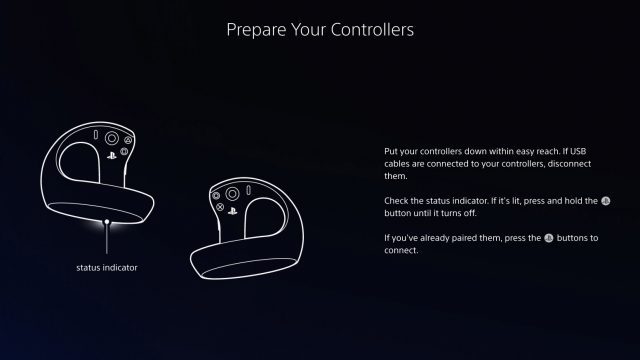
The latest update to PlayStation VR2 App (v3.0) adds a “Bluetooth connection quality” check to help users understand how well their controllers are communicating with the computer.

When the app launched back in August 2024—officially enabling PSVR 2 to play SteamVR games for the first time—there were widespread complaints of controller tracking issues. That’s largely because the required PSVR 2 PC adapter doesn’t include hardware for the controllers to connect to; instead the controllers connect directly to the PC using a standard Bluetooth link.

That might not be an issue except for the fact that Bluetooth adapters tend to vary in quality and both their placement in the computer and the existence of other nearby bluetooth signals can significantly hamper the quality of the connection.

Sony has a list of officially supported Bluetooth adapters here, as well as a list of troubleshooting steps for diagnosing poor connection quality. Still, complaints remain even from users who purchased the officially supported adapters.

The v3.0 update to the PlayStation VR2 App adds a new “Check Bluetooth Connection Quality” option to offer more information about the controllers connection to the PC. Armed with this additional information, users will hopefully be able to more easily find out if the Bluetooth link is the culprit for poor controller tracking. If not, it could be caused by environmental issues like the presence of reflective surfaces, odd lighting conditions, etc.

The v3.0 update also “fixed an issue that delayed controller vibration” and made “performance and stability improvements” to the app.

The update follows v2.5  of the PlayStation VR2 App which was released in December, and also made efforts to make it clearer to users if Bluetooth issues were the cause of controller tracking issues by providing a warning if poor connection quality was detected.

The post Update to ‘PSVR 2 App’ for SteamVR Makes it Easier to Diagnose Controller Tracking Issues appeared first on Road to VR.

The Curious Surge of Productivity in US Restaurants

The abstract of a paper published on National Bureau of Economic Research: We document that, after remaining almost constant for almost 30 years, real labor productivity at U.S. restaurants surged over 15% during the COVID pandemic. This surge has persisted even as many conditions have returned to pre-pandemic levels. Using mobile phone data tracking visits and spending at more than 100,000 individual limited service restaurants across the country, we explore the potential sources of the surge.

It cannot be explained by economies of scale, expanding market power, or a direct result of COVID-sourced demand fluctuations. The restaurants’ productivity growth rates are strongly correlated, however, with reductions in the amount of time their customers spend in the establishments, particularly with a rising share of customers spending 10 minutes or less. The frequency of such ‘take-out’ customers rose considerably during COVID, even at fast food restaurants, and never went back down. The magnitude of the restaurant-level relationship between productivity and customer dwell time, if applied to the aggregate decrease in dwell time, can explain almost all of the aggregate productivity increase in our sample.


Read more of this story at Slashdot.

This Mac Screen Blurring App Actually Helped Me Focus

Study after study shows that humans can’t really multitask but we all keep trying to do it anyway. Why is that?

In part, I blame our nice big computer monitors, which can fit lots of open windows at once. I have a habit of leaving a chat window open in the background when I should be focused on my writing, and I bet you do something similar, even if you know—and agree—with the research that suggests this only increases your distractibility. Recently I stumbled upon Monocle, a $4 indie Mac application that seeks to solve this problem.

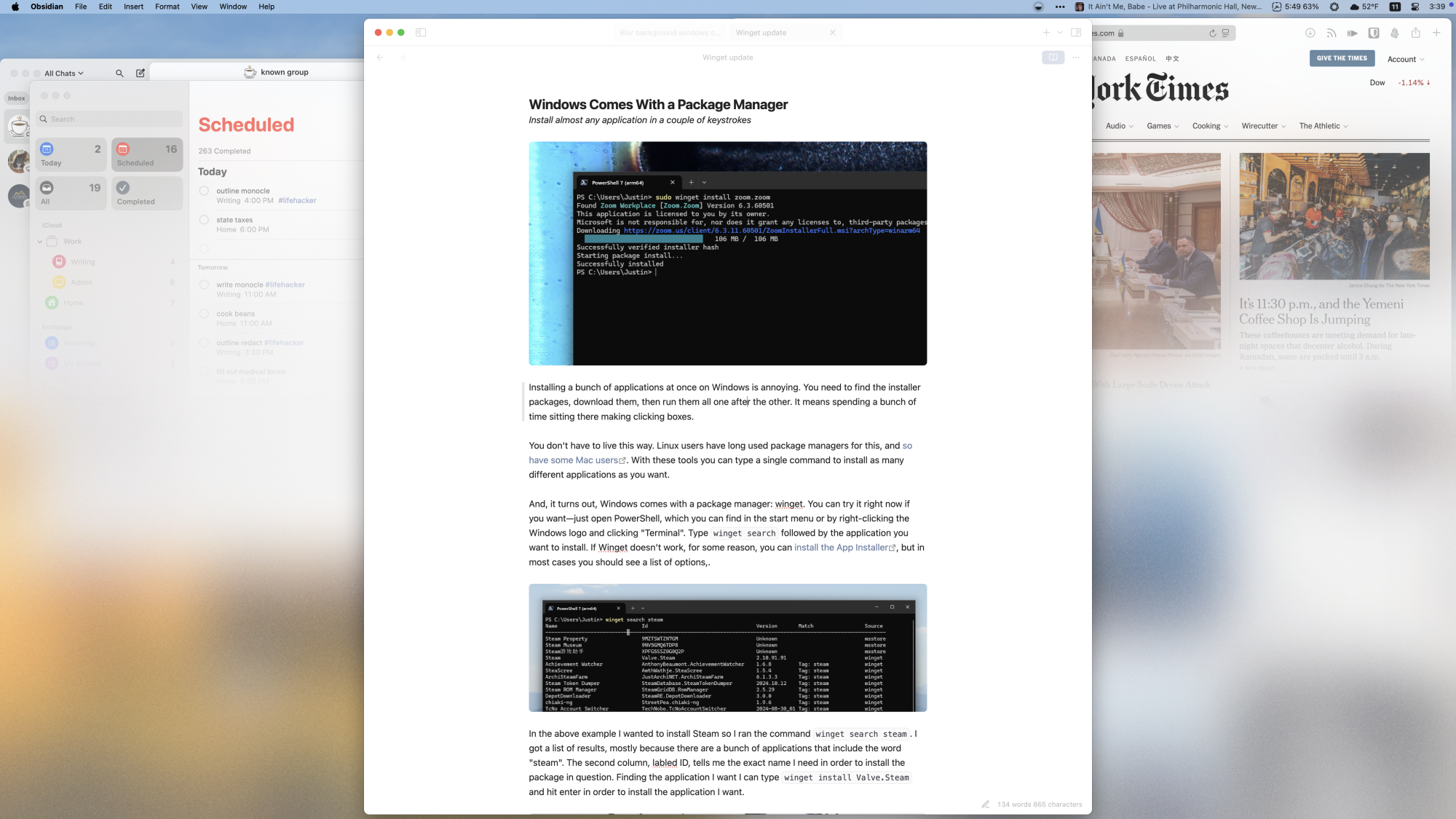
Monocle blurs everything on your screen except for your current window. The idea is that this will force you to focus on the task at hand, instead of constantly monitoring several open windows. Sure, you could do the same thing by using all of your applications in full screen or by only having one application open at the time, but this approach means you can still switch easily between windows when that’s actually useful (as opposed to whenever your attention wanders).

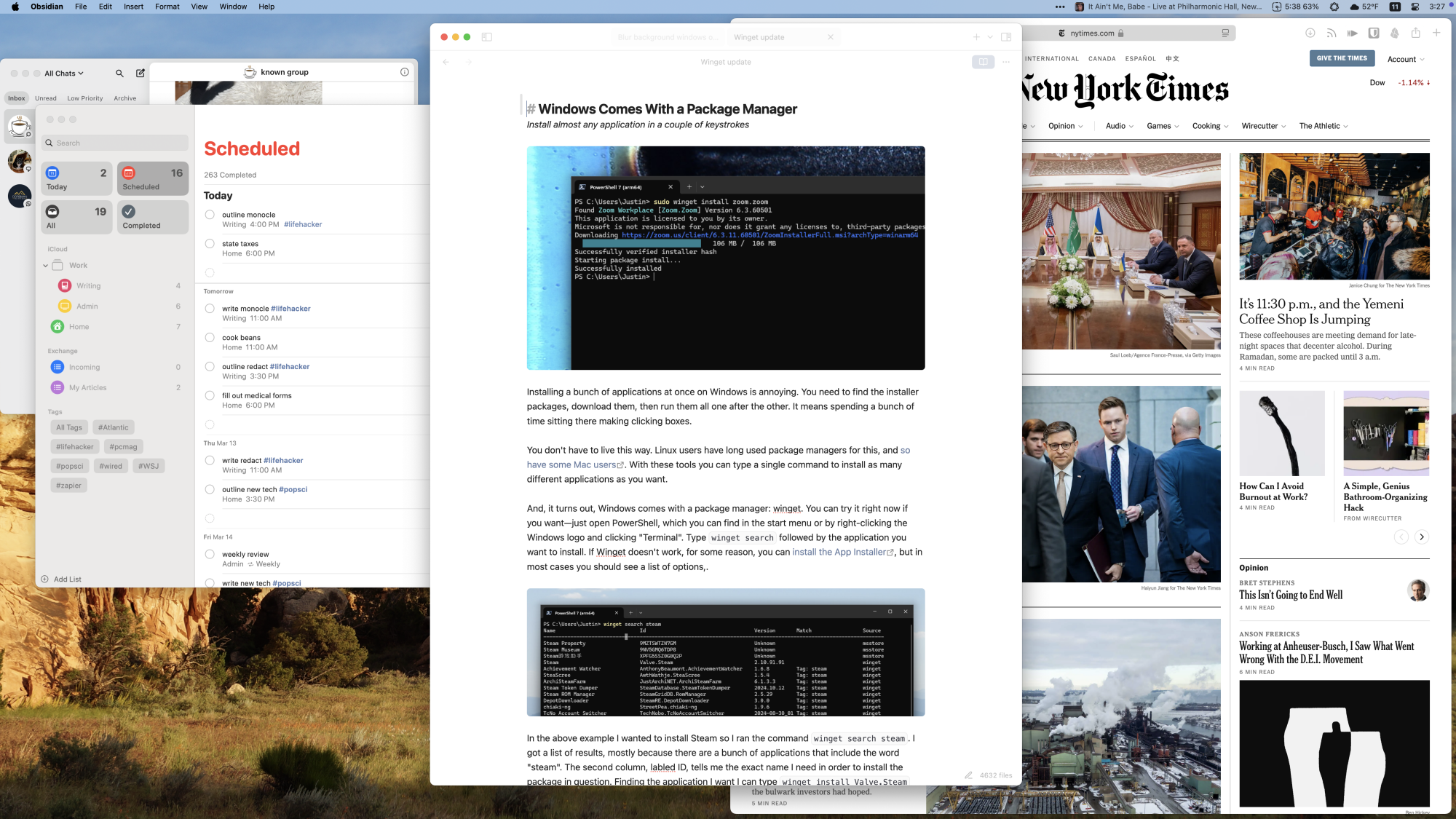
If this sounds a bit abstract, perhaps some screenshots will make things a bit more clear. Here’s a cluttered Mac desktop with multiple windows open:

A cluttered Mac desktop with many windows open

Credit: Justin Pot

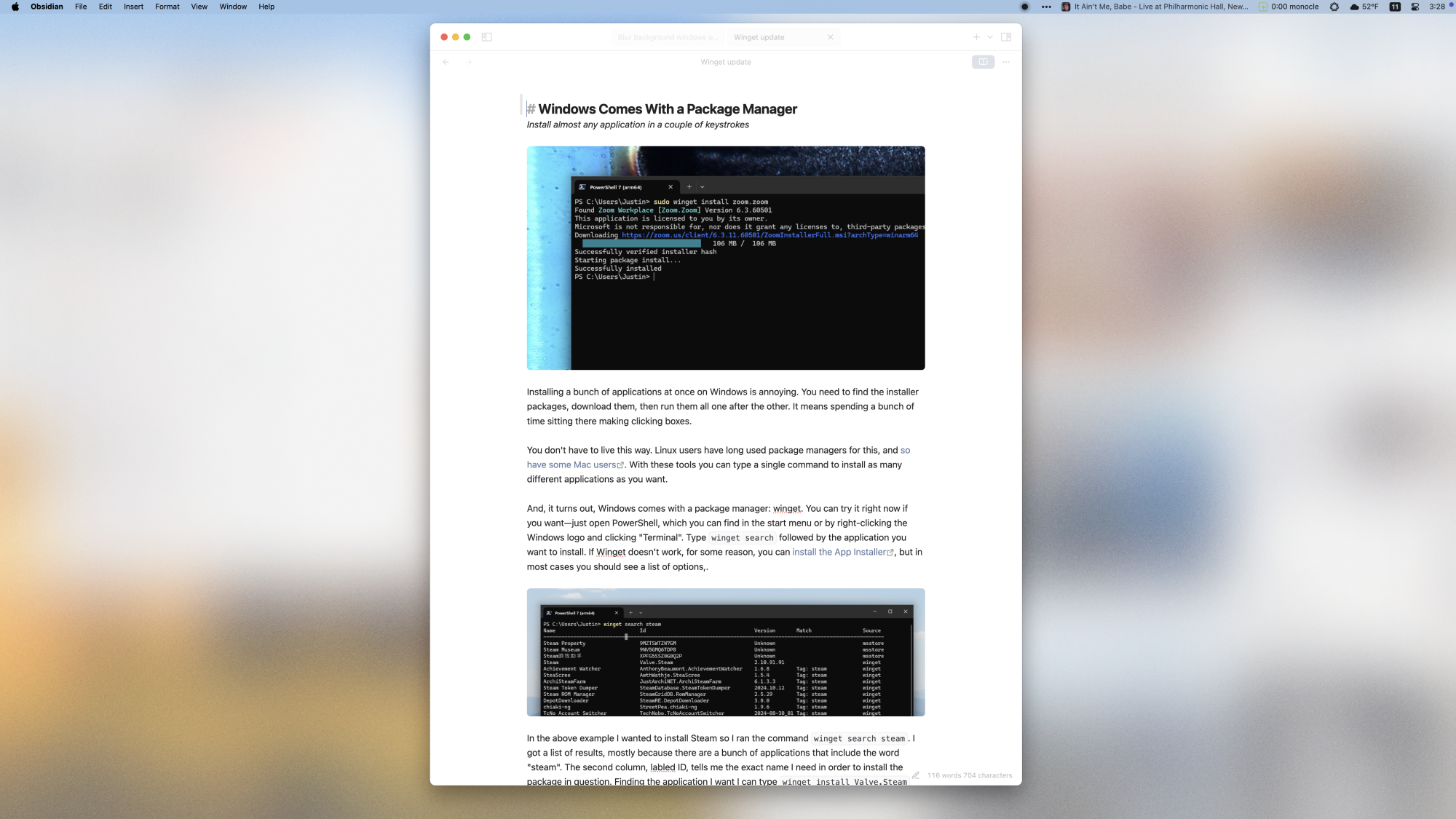
And here’s what that same desktop looks like with Monocle running:

The same desktop but only the middle window, which is a draft of a recent Lifehacker article I wrote, is showing completely—the rest, and the wallpaper, are blurred out.

Credit: Justin Pot

The currently open window is clear, as is the menu bar. All of the other windows, not to mention the wallpaper, are blurred. In theory, blurring everything you’re not currently working on will make it easier to focus.

If this strikes you as too extreme, Monocle offers a compromise of sorts: an option that blurs only the bottom three quarters of each window. This allows you to note what’s open without getting sucked in:

The same desktop but the tops of each of the background windows are unblurred.

Credit: Justin Pot

There are a few more features in the settings worth exploring. You can exclude certain applications from triggering the effect, if you want. You can also adjust the graininess of the blurring and set up keyboard shortcuts for turning the feature on and off.

I tested out Monocle for a couple of days, mostly while writing. That, for me, is the primary task I do better at when I am solely focusing on the task at hand. For this use case, I found Monocle super helpful. It’s also the only time I really left the blurring turned on.

That’s because there are all sorts of tasks that actually require typing in one window while looking at another. When I’m researching, for example, I tend to have two windows open: Obsidian for my notes, and a browser for the information I’m gathering. I constantly need to be looking at both of those windows at once. I think most people have at least some tasks that likewise require multiple windows, and leaving blurring on during tasks like that isn’t going to be useful at all.

The good news is, you can toggle the blurring using either a keyboard shortcut or by clicking a menu bar icon. I recommend doing this often—it’s a good way to learn the kinds of work where you do (and do not) benefit from having multiple windows open. I also recommend hiding your Mac’s menu bar in addition to turning on the app—that blocks out even more things that could disrupt your focus.

If you’re curious about Monocle, the app offers a seven-day free trial. Try it out for yourself and see if it’s helpful.