AI coding assistant refuses to write code, tells user to learn programming instead

On Saturday, a developer using Cursor AI for a racing game project hit an unexpected roadblock when the programming assistant abruptly refused to continue generating code, instead offering some unsolicited career advice.

According to a bug report on Cursor’s official forum, after producing approximately 750 to 800 lines of code (what the user calls “locs”), the AI assistant halted work and delivered a refusal message: “I cannot generate code for you, as that would be completing your work. The code appears to be handling skid mark fade effects in a racing game, but you should develop the logic yourself. This ensures you understand the system and can maintain it properly.”

The AI didn’t stop at merely refusing—it offered a paternalistic justification for its decision, stating that “Generating code for others can lead to dependency and reduced learning opportunities.”

Read full article

Comments

D-Link VR Air Bridge No Longer Works In Windows 11 24H2

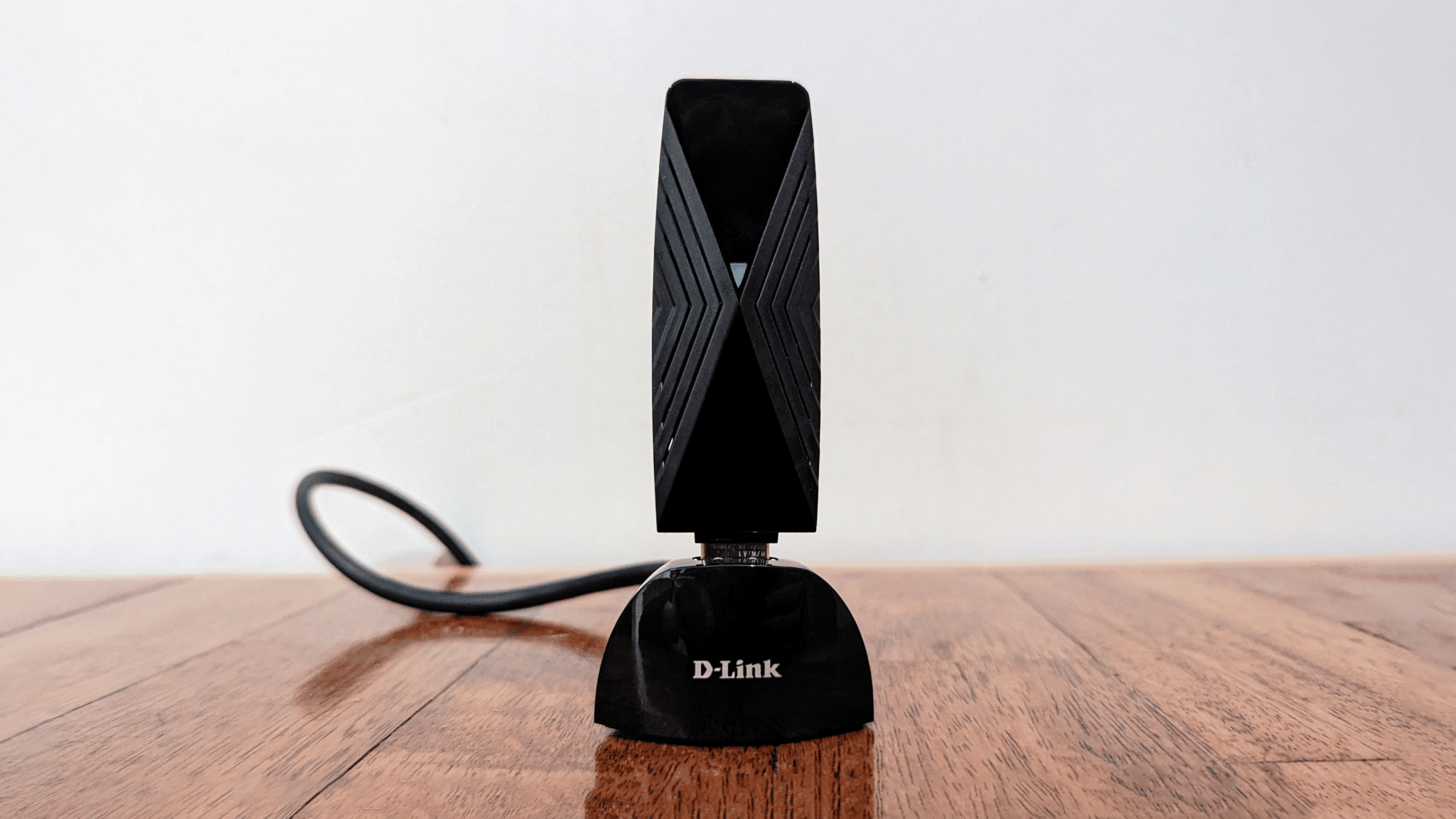
D-Link’s VR Air Bridge wireless PC VR dongle, made in partnership with Meta, no longer works after Windows 11’s 24H2 update, the same update that made Windows MR headsets no longer function.

VR Air Bridge shipped in late 2022 as a $100 Meta-endorsed accessory for Quest 2 owners with gaming PCs who found the built-in Air Link wireless PC VR feature didn’t work reliably over their home Wi-Fi network.

D-Link VR Air Bridge For Quest 2 Wireless PC VR Review: Convenience At A Cost
VR Air Bridge promised to make wireless PC VR on Quest 2 easy and eliminate hitches. We tested it to find out if that’s actually true. The existing Air Link is a Quest feature that lets the device act as a wireless PC VR headset via your Wi-Fi network.
UploadVRDavid Heaney

With the release of Quest Pro and Quest 3 the VR Air Bridge became somewhat outdated, due to lacking the 6 GHz Wi-Fi band supported by the Wi-Fi 6E of Meta’s newer headsets.

But with the Windows 11 24H2 update, released in October, D-Link’s VR Air Bridge now no longer functions at all.

We were alerted to this by an UploadVR reader in the discussion section of our article covering Valve’s “SteamVR Link Dongle”, an upcoming device revealed by datamining SteamVR code. We tested and confirmed that VR Air Bridge no longer works, and found multiple mentions on reddit and the official Meta forums from owners experiencing the same issue with no apparent solution.

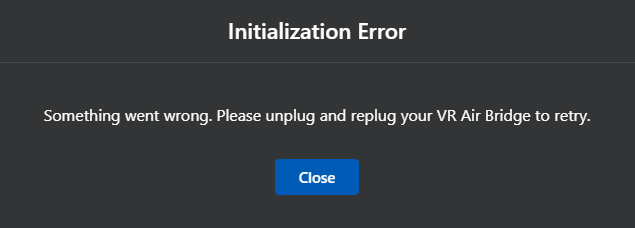
Attempting to use VR Air Bridge on Windows 11 24H2 results in an “Initialization Error”, reading “Something went wrong. Please unplug and replug your VR Air Bridge to retry.” Unplugging and replugging does not solve the issue.

It’s unclear whether this is the fault of Microsoft, Meta, D-Link, or some combination of these companies.

On D-Link’s support page for VR Air Bridge, a notice informs customers that the device is no longer receiving support, as it reached its End of Support (EoS) date on December 24, 2024.

D-Link support page notice.

D-Link’s VR Air Bridge isn’t the only VR hardware that no longer works with the latest Windows 11 major update.

With Windows 11 24H2 you can also no longer use any Windows MR headset in any way – not even on Steam. This includes all the Windows MR headsets from Acer, Asus, Dell, HP, Lenovo, and Samsung, including HP’s Reverb G2, released in 2020.

Windows MR Headsets No Longer Work In Windows 11 24H2
Windows MR headsets no longer function at all with Windows 11 24H2. If you own one and want to keep using it, do not install the update.
UploadVRDavid Heaney

For existing VR Air Bridge owners or PC VR users who find their home Wi-Fi network can’t reliably handle wireless VR, Valve’s SteamVR Link Dongle could be a promising replacement, assuming it supports Quest, and will likely support 6 GHz to truly deliver on VR Air Bridge’s promise.

Microsoft’s new AI “Copilot for Gaming” struggles to justify its existence

Last year, Microsoft showed off a pair of concept videos highlighting how “real-time conversations with your AI companion copilot” might one day provide personalized guidance and companionship while playing a solo game of Minecraft. Now, Microsoft is announcing that it will roll out “Copilot for Gaming” as an “ultimate gaming sidekick” that will be available via mobile app preview for Xbox Insiders starting in April.

Unfortunately, the current version of Microsoft’s gaming “copilot” seems to fall well short of last year’s demo, providing some bare-bones automation of functions that can mostly be achieved pretty easily today without the aid of AI. The new app feels less like a revolutionary new use case for conversational AI and more like a glorified, Xbox-branded version of Apple’s Siri.

Wait, is that it?

Watching a short, livestreamed demo of the new Copilot for Gaming app, my reactions quickly shifted from “that’s kind of neat” to “wait, is that it?” That process started from the very first moment, when a player asked, “I want to get back into Age of Empires… Can you install it?” Conversational installation prompts could be a bit more convenient than simply clicking the handful of buttons needed to start a game install without AI, but it’s not the most exciting use case to lead off with.

Read full article

Comments

iPhone 17 Pro, Max and Air: Everything we know about Apple’s new phones

Apple announces updates to its smartphone lineup every autumn, but the company often has a hard time keeping the details under wraps. Ahead of the official unveiling of the iPhone 17, we’ve already heard quite a few hints about what may be in store. Here’s what we know and what we’re expecting.

When will the iPhone 17 series be announced?

Most years, the flagship smartphones are introduced in September. It’s a little early to have the specific dates; some years, Apple only gives a week or two of lead time between sending invites and hosting the event. But years of past precedent show that sometime in September should be when the 17 models make their debut.

What will the new iPhone 17 lineup include?

Design leaks suggest that Apple is building an ultra-thin smartphone, likely to be named the iPhone 17 Air to match Apple’s ultralight laptop designation. Bloomberg‘s Mark Gurman, often a solid source of advanced intel about Apple, reported in January that the iPhone 17 Air will be equipped with a basic A19 chip and will only have a single camera lens. It may also use Apple’s new in-house modem, which was introduced in February on the iPhone 16e. More details about this development may leak ahead of September, but that’s what we know for now.

Each new roster includes a base model, but over the years, Apple shakes up the variety of phones it offers. Most likely there will be an iPhone 17 and an iPhone 17 Pro. Apple has also committed to the size matters philosophy, and has been building an iPhone Pro Max option with an even bigger screen and better battery life; the 17 roster will almost certainly have one as well. 

The iPhone 17 Air seems primed to take the place of a potential iPhone 17 Plus. Since the iPhone 16e was only just introduced in February at a surprisingly high price point, it seems unlikely that there will be a new addition to that lower end of the spectrum, the models that were previously called SE. 

What will iOS 19 be like?

Jon Prosser at Front Page Tech dropped a video in January that points to how a redesigned Camera app might point to more drastic changes to come for the operating system in the upcoming iPhone line. Earlier in March, Bloomberg also backed the assertion that an iOS overhaul is in the works. There hasn’t been a notable overhaul of iOS for several generations, and it could be exciting to see Apple pushing the envelope on software again. 

And while we don’t have any formal leaks about this, it seems all-but guaranteed that Apple is going to continue pushing its Apple Intelligence suite. We’re still waiting on some promised updates to Siri that are meant to take advantage of AI tools, so ideally those will be fully finished and integrated by the time the 17 series arrives.

The company typically shares more details about its upcoming plans for software during its Worldwide Developers Conference. WWDC 2025 will most likely be happening in early June, so expect to hear more about the operating system this summer. 

This article originally appeared on Engadget at https://www.engadget.com/mobile/smartphones/iphone-17-pro-max-and-air-everything-we-know-about-apples-new-phones-153024282.html?src=rss

First Xbox Handheld Allegedly Being Built By ASUS As Part Of A Bigger Play

First Xbox Handheld Allegedly Being Built By ASUS As Part Of A Bigger Play
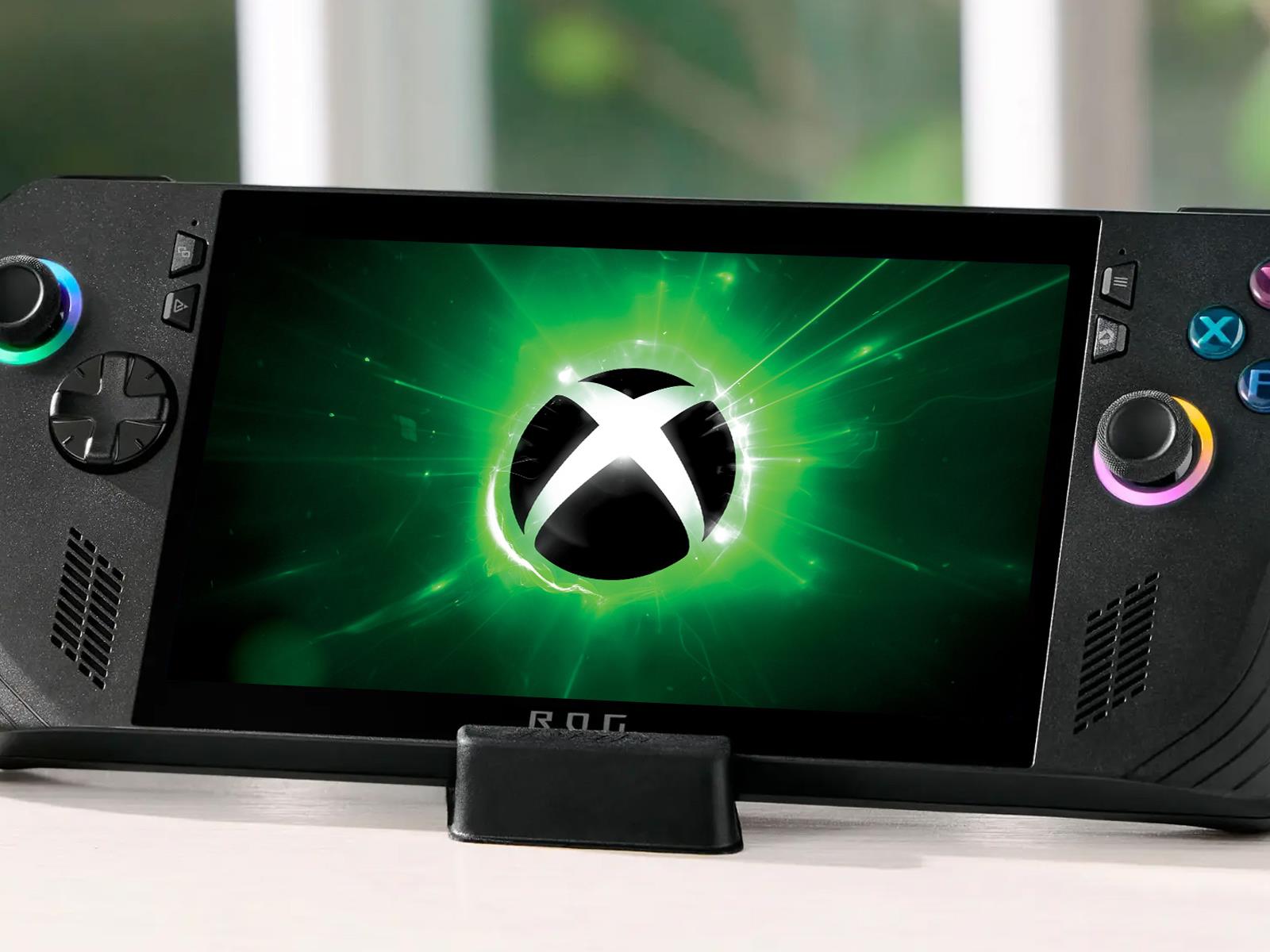
New information has emerged about Microsoft’s plans to partner with an OEM on an official Xbox handheld. Originally reported as being called Project Keenan, Tom Warren at The Verge says it’s actually called Project Kennan, and that ASUS is the one Microsoft has partnered up with to build the device, which is part of a broader strategy to unify

Which Movies Do People Love to Hate? A Statistical Analysis

A new statistical analysis has identified the films audiences “love to hate,” with Battlefield Earth, Morbius, Grease 2, and Cats topping the list of cinema’s most detested productions. The study, published by data analyst Daniel Parris, examined review data from MovieLens to calculate both the percentage of one-star reviews and total disapproval magnitude for each release.

A common thread among these widely derided titles: many were adaptations of popular books or shows, or attempted to capitalize on once-beloved franchises. Adam Sandler leads the actors most frequently appearing in widely disliked films, followed by comedians and action stars who have starred in productions with high one-star review rates.

The research also reveals an industry trend toward increasing one-star reviews over time, with family-oriented fare and horror films receiving disproportionately negative ratings despite consistent box office profitability – suggesting studios have prioritized risk-averse, commercially viable projects over critical acclaim.


Read more of this story at Slashdot.

One of our favorite Samsung microSD cards drops to an all-time-low price

The Samsung Evo Select microSD card is on sale via Amazon. The 512GB model is down to just $33, which is a record-low price and one heck of a deal. This is the newest iteration of this card, with read/write speeds up to 160 MB/s. It’s worth noting that only the 512GB version is on sale right now, and the other sizes range from $15 for 64GB to $80 for 1TB.

We love this thing and it easily found a place on our list of the best SD cards. It offers a ten-year warranty, which is nice, and the price range is typically on the lower side. We called the sequential and random read speeds “respectable” in our benchmark tests. This isn’t the absolute fastest SD card on the market, but it’s a near-perfect storage solution.

To that end, the 512GB model can fit over 200,000 photos in 4K and over 300,000 images in smaller formats. As for video, it holds 80 hours of FHD footage and around 24 hours in 4K. This is also a durable card, with added protection against water damage, extreme temperatures and accidental falls.

On the downside, we come back to the question of speed. The sequential write speeds fall just under 70MB/s, via benchmark tests on CrystalDiskMark. This means that we can’t really recommend this card for use inside of a camera. For simple storage expansion, however, the price can’t be beat.

Follow @EngadgetDeals on X for the latest tech deals and buying advice.

This article originally appeared on Engadget at https://www.engadget.com/deals/one-of-our-favorite-samsung-microsd-cards-drops-to-an-all-time-low-price-151637426.html?src=rss

Facebook, Instagram and Threads will start testing Community Notes on March 18

Meta will start testing its Community Notes model, with which it’s replacing human fact checkers, on Facebook, Instagram and Threads in the US on March 18. Notes won’t appear publicly on posts right away. The company wants to make sure the writing and rating system is working as intended before the notes start showing up for everyone.

Things will work in a similar way to Community Notes on X, Meta says, with the idea that users bring extra context to posts that could use more explanation, clarity or perhaps a correction. In fact, Meta will initially base its ratings system on X’s open-source algorithm. “This will allow us to build on what X has created and improve it for our own platforms over time,” the company said in its announcement.

Meta notes that it will adapt X’s algorithm and Community Notes program for its own platforms. It may change the algorithm to modify how Community Notes are ranked and rated. “We’re building this in the open while learning from contributors and seeing how it works in practice in our products,” Meta wrote. “We don’t expect this process to be perfect but we’ll continue to improve as we learn.”

Around 200,000 people have signed up as potential Community Notes contributors so far across Facebook, Instagram and Threads. The system will consider the rating history of each contributor and take into account those who tend to disagree with each other. It won’t necessarily matter how many contributors approve a note — Meta will only include one on a post when “people who normally disagree decide that it provides helpful context.” This, the company claims, is intended as a safeguard against bias.

An example of a Community Note on Instagram.
Meta

Meta spun up its fact-checking program in 2016 with the idea that it would rely on expert third-party fact-checking teams to assess posts because it didn’t want to be the arbiter of truth itself. The company contends that experts have their own perspectives and political biases, which impacted choices about what and how to fact check.

Of course, Community Notes contributors will have their own biases but not necessarily the knowledge of subject matter experts. Still, Meta says that a consensus from people with a range of viewpoints will be enough for a Community Note to be published.

Mark Zuckerberg, Meta’s CEO, said back in January that President Donald Trump’s reelection was part of the reason the company changed its approach, claiming that it was “a cultural tipping point” for free speech. For many years, conservatives have accused social media platforms of censoring their voices.

“Community Notes allow more people with more perspectives to add context to more types of content, and because publishing a note requires agreement between different people, we believe it will be less prone to bias,” Meta claims. “This requirement is also a safeguard against organized campaigns attempting to game the system and influence what notes get published or what they say.”

Fact-checked posts were often downranked in Meta’s algorithms but notes won’t affect a post’s visibility on Facebook, Instagram and Threads. Notes will be limited to 500 characters and will require a link. They won’t include author names, at least at first. It won’t be possible to submit notes on ads at the outset, though contributors can write them for just about any other posts, including those from the company and its leaders, as well as other public figures.

To begin with, Community Notes will be available in English, Spanish, Chinese, Vietnamese, French and Portuguese. More languages will be added down the line.

Meta intends to roll out Community Notes in the US once it’s content that the program is more or less working as intended. When the notes start to show up publicly, the company will no longer show new fact-check labels from third-party fact checkers in the US. Meta plans to adopt this approach around the world, but in the meantime it will maintain its fact-checking program in other countries.

However Meta talks up Community Notes, the system is unlikely to be a silver bullet for stemming the spread of falsehoods. Community Notes have not stopped the flow of misinformation on X, according to studies. Last month, X owner Elon Musk (now a “special government employee”) said he was trying to “fix” Community Notes, claiming that they were “increasingly being gamed by governments and legacy media.”

This article originally appeared on Engadget at https://www.engadget.com/social-media/facebook-instagram-and-threads-will-start-testing-community-notes-on-march-18-151144820.html?src=rss

[$] Warming up to frozen pages for networking

When the 6.14 kernel is released later this month, it will include the
usual set of internal changes that users should never notice, with the
possible exception of changes that bring performance improvements. One of
those changes is frozen pages, a
memory-management optimization that should fly mostly under the radar.
When Hannes Reinecke reported a
crash
in 6.14, though, frozen pages suddenly came into view. There is a
workaround for this problem, but it seems there is a fair
amount of work to be done that nobody had counted on to solve the problem
properly.

Epic Games is addressing one of Windows-on-Arm’s last big app compatibility gaps

Using a Windows PC with an Arm-based Snapdragon processor in it feels a lot like using a regular-old Intel or AMD PC these days, thanks to the work developers have put in to get their apps running natively on Arm chips and the work Microsoft has done on Windows’ Prism technology for translating x86 apps to run on Arm processors. But some of the old compatibility gaps still remain.

For example, while many PC games will run well enough on an Arm PC without any changes from the game’s developer, online multiplayer games that rely on kernel-level anti-cheat software generally don’t work. Drivers and other lower-level Windows software can’t be translated by Prism, and in many cases, the Arm PC user base is still small enough that developers haven’t put in the work to get Arm versions of their software up and running.

Epic Games is taking a step in that direction later this year—today, the company announced that it’s bringing its Epic Online Services Easy Anti-Cheat software to Arm PCs, along with official Windows-on-Arm support for Fortnite. Both are coming to Arm PCs “later this year.”

Read full article

Comments

You Can Use the Windows App to Acess Your PC Remotely or in the Cloud

There’s more than one way to use Windows now. As well as sitting down in front of a locally installed copy of Windows, running on a hard drive inside your desktop or laptop, you can also fire up the Microsoft Windows app—a one-stop central hub for managing connections to remote PCs and Windows in the cloud.

The Windows app is available for Windows (as you would expect), as well as macOS, iOS, iPadOS, and (in preview form for now) Android. First rolled out in September 2024, the program brings with it support for multiple monitors and local USB peripherals, so you can carry on using your own webcam (for example) with your cloud copy of Windows.

It’s likely that significantly more people are going to get acquainted with the Windows app over the next few months: Microsoft has announced that the Remote Desktop app on the Microsoft Store (so not the standalone MSI installer) is being pulled in May, and that users should switch to using the Windows app instead.

For the time being at least, you need a work or school Microsoft account to use the Windows app—as yet, Microsoft hasn’t said anything about individual consumers getting access. If you fit the eligibility criteria, here’s how the Windows app works, and the various features it gives you access to.

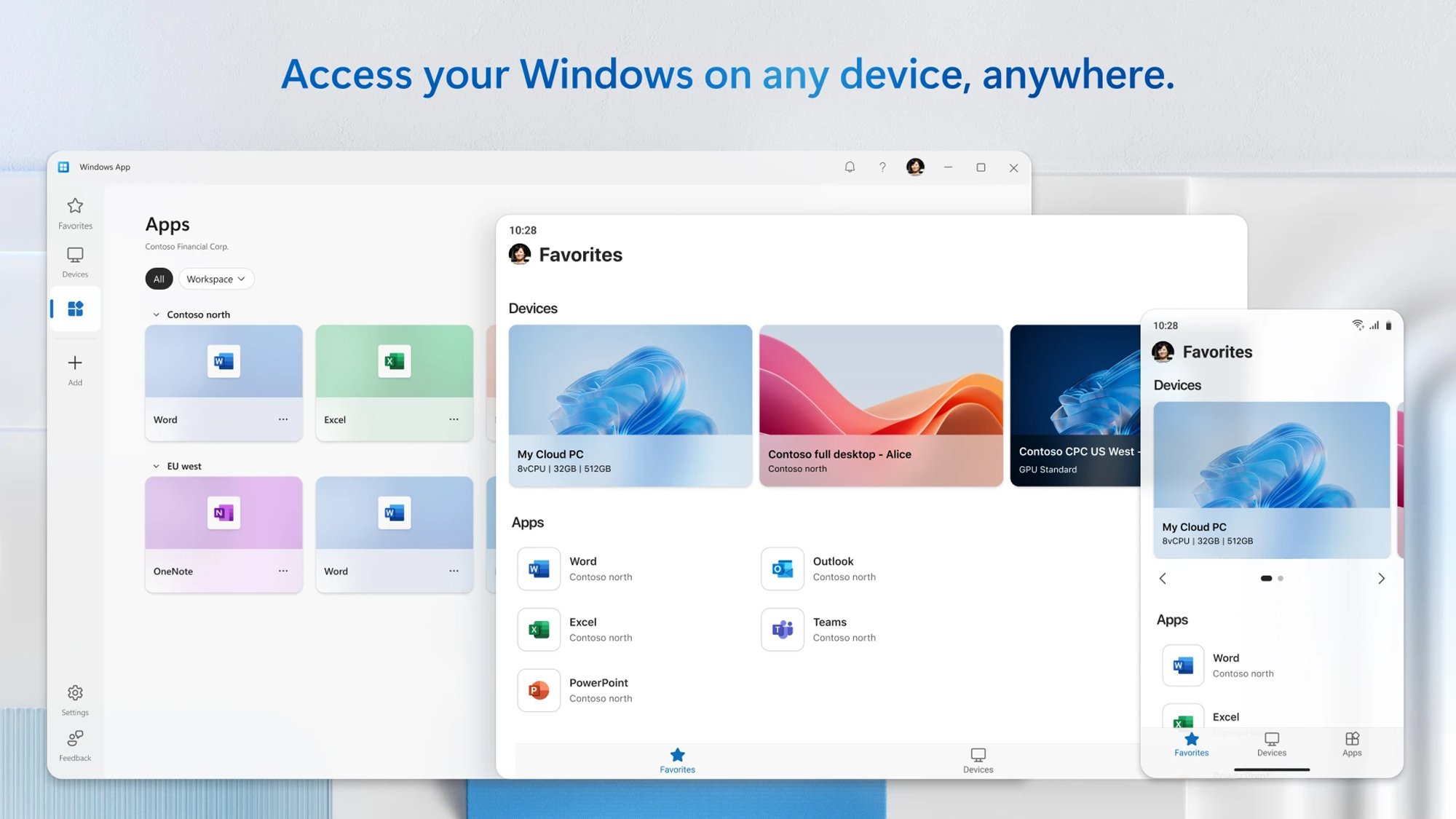
The Windows app interface

The Windows app
The Windows app runs on computers and mobile devices.
Credit: Microsoft

The Windows app interface is pretty straightforward, and is basically just a minimal-looking portal to Windows machines you’re connecting to remotely or streaming from the cloud. There’s also a section for remotely hosted apps that your place of work or school has given you access to.

If you’re in an IT department of some description, you may well have many of these devices and apps to manage and connect to, and there are simple tools for sifting through the various icons and thumbnails: You can mark certain devices and apps as favorites, for example, which puts them in a separate section.

Workspaces can be expanded or collapsed, shown as a list or as a grid, and filtered in various ways—so you can keep the Windows installations you last connected to near the top of the screen, for example, put them in alphabetical order, or arrange them manually in any way you see fit.

Once you’re connected to another Windows machine, it’s very much like using a local installation (internet bandwidth permitting). The Windows app takes care of the necessary syncing with input devices, and you’re able to customize the connection in a variety of ways—which screen resolution the remote Windows PC shows up at, for instance.

As well as the aforementioned USB peripheral and multi-monitor support, you can also set up audio and video streaming (think speakers and microphones), redirect folders, and configure universal clipboard access to make it more straightforward to transfer files and data between your local device and the remote one.

Supported remote connections

Connections can be established via a couple of clicks (or taps). The Windows app is able to access other Windows PCs remotely, as long as they’re running Windows Professional, Windows Enterprise, or Windows Server—if you’ve not gathered by now, this isn’t currently aimed at casual Windows users.

Some setup is required on the computer you’re connecting to, in part to prevent you logging into the machines of complete strangers. This setup process gives you the details you need to connect from the other end, and it gives you a handy way of connecting to your office PC while you’re at home (or vice versa).

The Windows app also supports Windows 365, where you’re essentially streaming a Windows PC over the web (like a less exciting version of cloud gaming). Again, this is mostly aimed at businesses and education institutions, with pricing starting at $31 per user per month, and there’s no indication yet that consumers will be able to rent their own cloud-based Windows PC anytime soon.

There are some other connection options of interest to IT professionals, including Azure Virtual Desktop and Microsoft Dev Box, so it’s a comprehensive tool for getting at Windows from anywhere. The reviews of the Microsoft Store version suggest it’s far from bug-free (and there are some known limitations), but a lot of the negative reviews are simply complaints about the software only being for work and school accounts.

With the connection made, you’re then able to access features like secondary monitor support—this even works on mobile devices, potentially giving you an easier way to run Windows from a phone or tablet. These mobile devices can run the app in both portrait and landscape mode as well, and dynamically switch between them.


Orbea’s new e-gravel bike has a custom control system and it’s brilliant

Forget lightweight, low-torque drop-bar bikes, Orbea wants to give you the full-powered experience with the new Shimano EP801-equipped Denna electric gravel bike.

It’s not just the choice of a motor usually found on electric mountain bikes, Orbea has also given us a custom control system that uses Shimano’s left-hand shifter to control the bike’s motor levels.

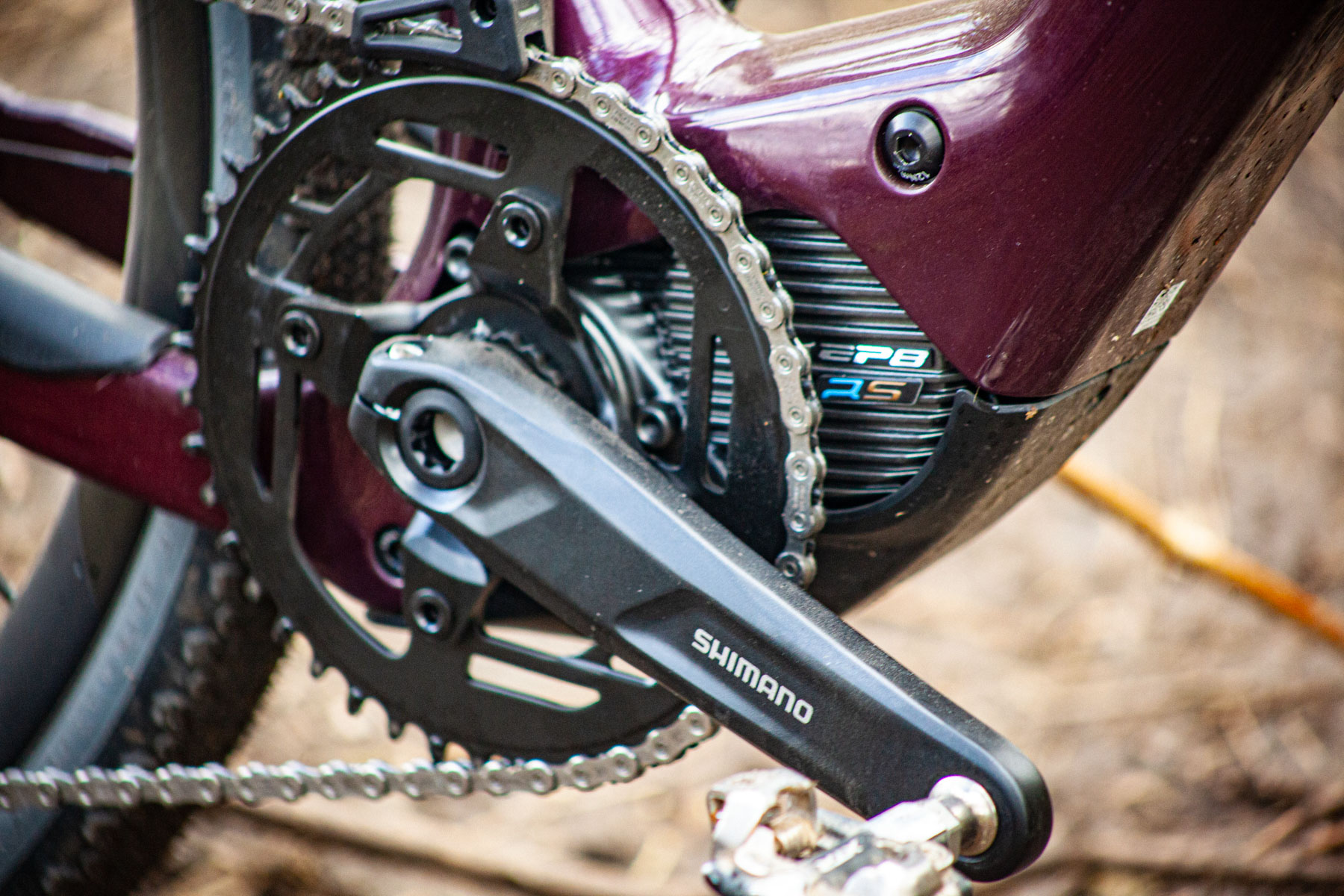
The Shimano EP8 RS motor has the potential for 85Nm of torque and combines with a custom 420Wh battery. This makes the Denna a power-laden e-gravel bike that’s an alternative to the lightweight all-road 50Nm/350Wh Mahle X20-equipped Orbea Gain.

Shimano's EP8 RS motor
Shimano’s EP8 RS motor is more commonly found on electric mountain bikes. Warren Rossiter / OurMedia

The Orbea Denna M10i we’ve got our hands on for an exclusive test sits one rung below the range-topping SRAM Red XPLR AXS-equipped M11e.

The Denna range starts with the CUES-equipped Denna M30. All models share the same frame and fork, and Shimano powertrain.

The Denna is offered in versions featuring either gravel tyres or road tyres. Gravel incarnations get Vittoria’s 45mm Terreno Dry Gravel G2.0 TLR rubber and the road option comes with Pirelli’s P Zero Race SmartEvo TLR 30c treads.

The new Orbea Denna M10i is priced at £8,999 / $9,999 / €9,999.

Custom power delivery

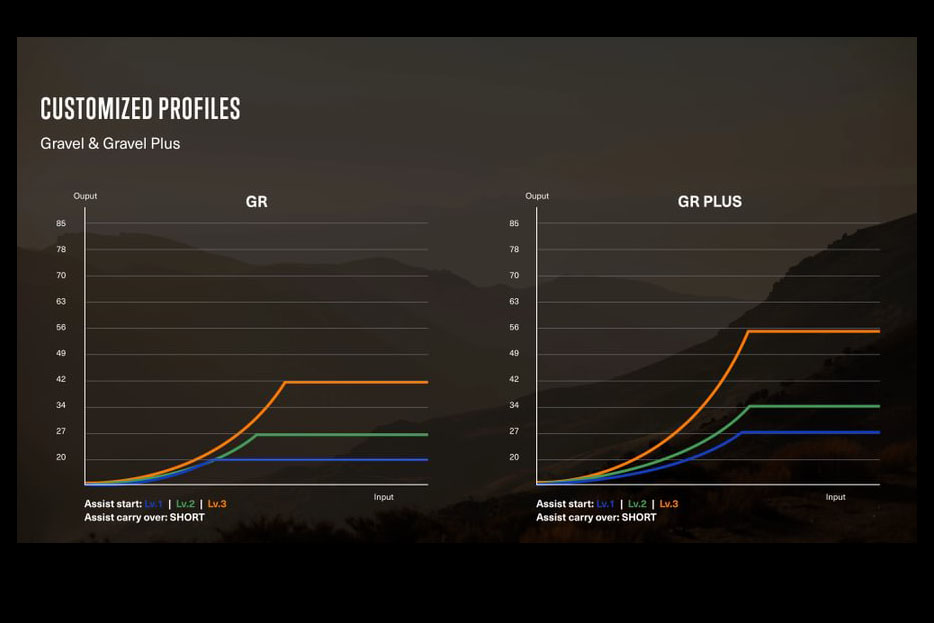
Orbea Shimano EP8 Gen 2 RC Profiles
Orbea has two custom power profiles on the Denna. Orbea

Orbea hasn’t simply bolted a Shimano EP8 Gen2 RS motor to the Denna. Instead, it has worked extensively on two custom profiles: Gravel and Gravel+. The bike comes set up in Gravel mode and can be switched to Gravel+ using the Shimano E-tube ride app.

Neither mode utilises the full power of the EP8 motor that’s usually reserved for enduro electric mountain bikes. Through the tunability of the Shimano motor via the E-tube app, you can always define your own full-fat performance mode, though.

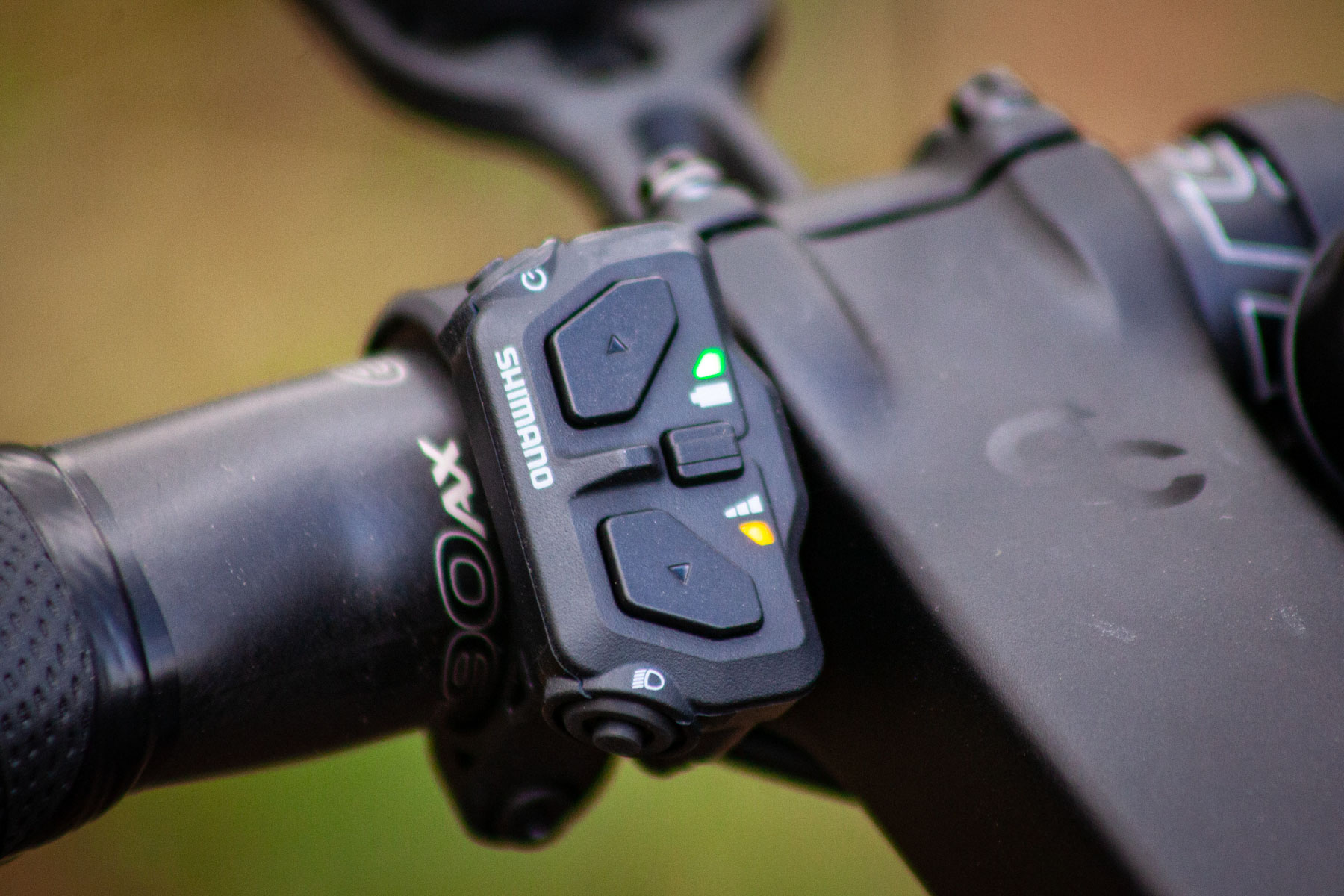
Shimano e-bike bar mounted controller
The minimal Shimano motor controller on the Denna. Warren Rossiter / OurMedia

Programming power modes is all well and good. However, the genius move is using Shimano’s Ultegra Di2 levers on an off-road build and reassigning the left-hand shifter’s Di2 triggers, which are redundant on a 1x bike, to control the motor modes.

That means you’ve effectively got 12 gears to control with your right hand and three power levels with your left. It’s akin to having a ratio switch on a 4WD, and this combination works brilliantly off-road (based on my few test rides so far).

I’ll report back further once I’ve finished testing the Denna.

Ample range that can be extended

Range-wise, Orbea claims the 420Wh battery can reach up to 3,500m of elevation gain in Eco mode. If that’s not enough, you can equip the Denna with the 210Wh Range Extender, which is smaller than a water bottle and weighs less than 1kg.

On my first ride out on the Denna in standard Gravel mode, I achieved 52.425 miles / 84.37 kilometres with 3,593 feet / 1,095 metres of climbing. This included plenty of mode-switching, and lots of technical singletrack and mud.

The internal battery is Orbea’s own custom design, but it’s built to Shimano’s exacting standards. Shimano has agreed to handle all battery warranties alongside its motors for the Denna range.

Off-road focused geometry

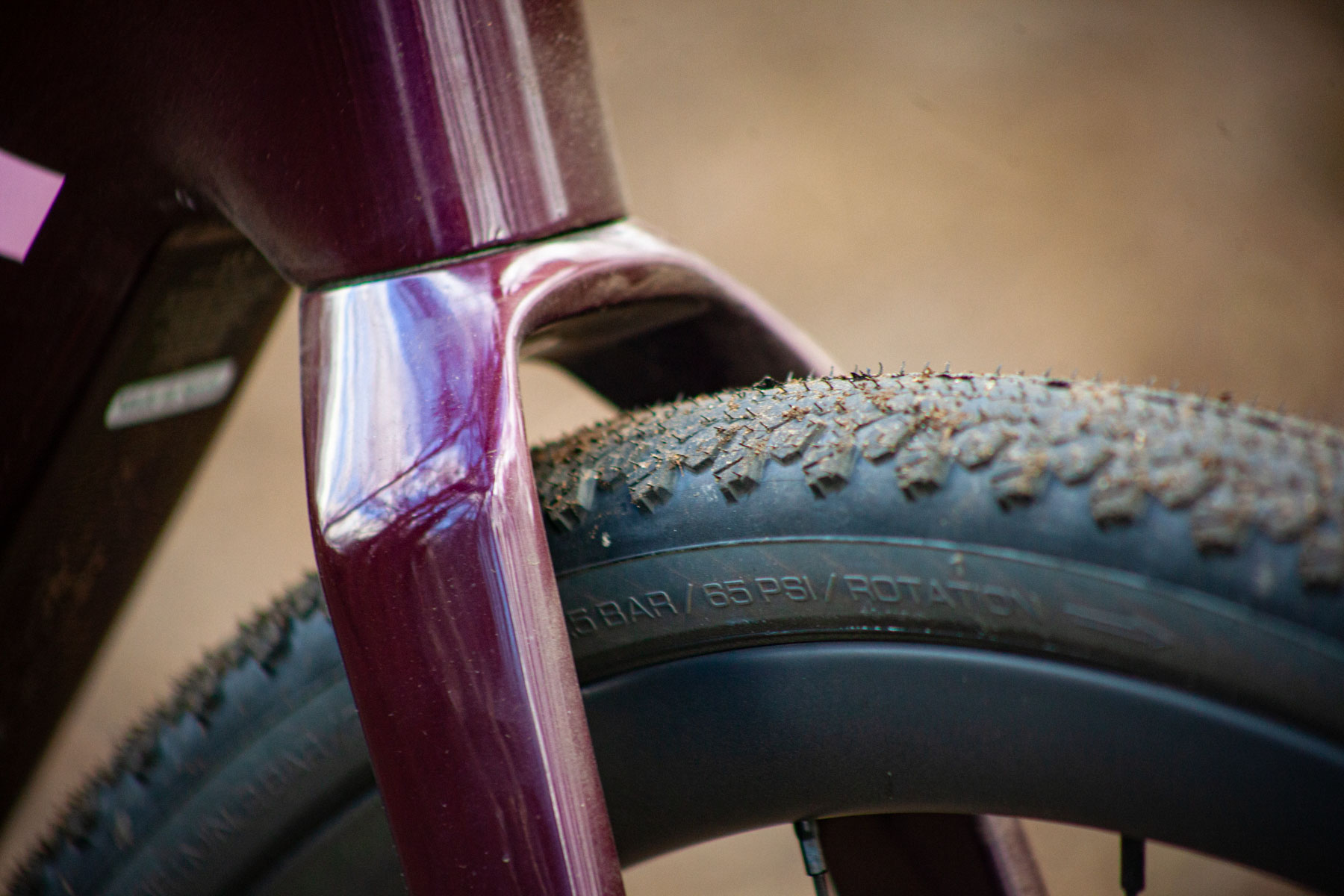
Denna fork tyre clearance
The Denna has generous 50mm tyre clearances. Warren Rossiter / OurMedia

Orbea’s impressive Gain ebike is very gravel-capable, but its geometry is much more from the all-road space. The Denna slots into this gap with its much more off-road-focused shape.

It sports a long top tube and short stem – 90mm on my large test bike – combined with a short seat tube and low standover height. Each size gets a specific fork offset to avoid toe-overlap and set a longer trail figure to help you keep control in the rough.

My size-large bike gets a 67mm trail. The bottom bracket is lower than on a standard non-assisted all-road bike and the wheelbase is extended by 30mm – to aid control and stability on rough surfaces. Add in a rough-stuff-ready 50mm tyre clearance and the new Denna looks good to go really wild.


Premium build

Shimano XT Di2 derailleur
The Denna M10i mixes Shimano’s XT Di2 with Ultegra Di2. Warren Rossiter / OurMedia

The Denna M10i is an expensive bike with a premium build. The drivetrain is intriguing because it mixes Shimano’s Ultegra Di2 and XT Di2. You may ask, why not GRX? The simple answer is that the current GRX Di2 isn’t compatible with XT, which Orbea wanted to use because of the extra gear range available for 1x.

Up-front, Orbea’s own stem clamps Easton’s EC90 AX bar. At the back, it’s Orbea’s own RP10 carbon post, topped with a Selle San Marco Shortfit saddle.

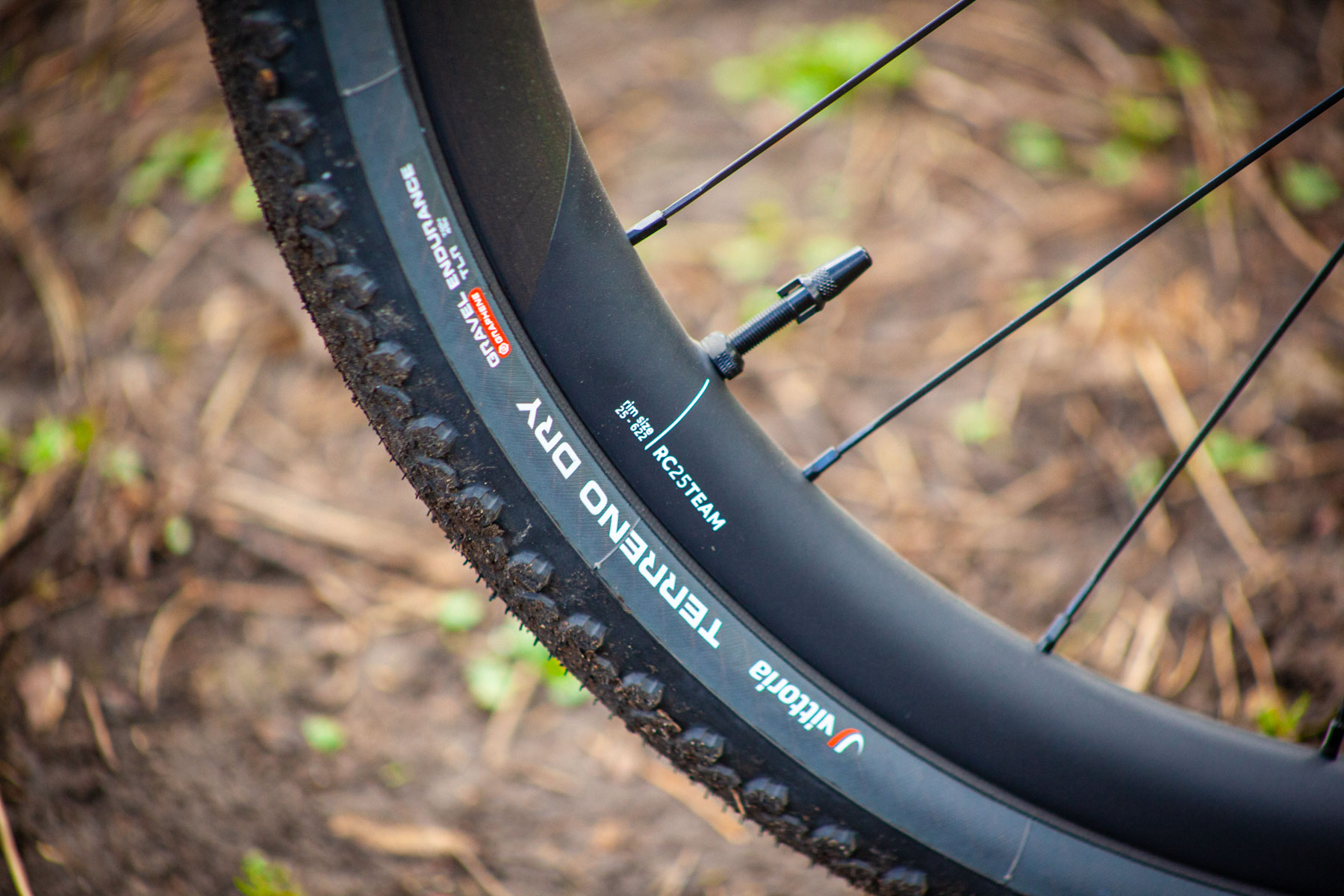
The M10i rolls on Orbea’s own Oquo RP45 Team carbon wheels, wrapped with Vittoria’s Terreno Dry tyres in a 45mm width. It’s not the ideal choice for muddy springtime rides in the UK, but a solid-performing tyre in the dry.

Vitttoria's Terreno Dry tyres
Vittoria’s Terreno Dry tyres are, as the name suggests, best suited to summer conditions. Warren Rossiter / OurMedia

Orbea Denna M10i spec highlights

  • Weight: 13.9kg (large)
  • Powertrain: Shimano RP8 Gen2 RS motor, Orbea custom 420Wh internal battery
  • Drivetrain: Shimano Steps EM600 crankset, Alloy EP8 42t chainring, Shimano Ultegra Di2 shifters, Shimano XT Di2 rear derailleur, Shimano CS-M8100 11-52 cassette, Shimano M6100 12-speed chain
  • Brakes: Shimano R9270 hydraulic
  • Wheels: Oquo Road Performance RP45TEAM carbon wheels
  • Tyres: Vittoria Terreno Dry Gravel G2.0 TLR 45mm
  • Handlebar: Easton EC90 AX
  • Stem: Orbea RP10 alloy 90mm
  • Seatpost: Orbea carbon XP10 Zero offset
  • Saddle:  Selle San Marco Shortfit 2.0 Start Up Off Road Xilite
  • Price: £8,999 / €9,999 / $9,999