The FCC is creating a new Council for National Security within the agency

The Federal Communications Commission (FCC) said on Thursday it’s creating a new Council for National Security within the agency. The FCC’s announcement doesn’t go into much detail about what the group will do, but a list of its broader goals focuses on US competition with China, including in AI and other tech sectors.

The FCC’s statement on the Council for National Security says its three-part agenda includes:

  • “Reduce the American technology and telecommunications sectors’ trade and supply chain dependencies on foreign adversaries”

  • “Mitigate America’s vulnerabilities to cyberattacks, espionage, and surveillance by foreign adversaries”

  • “Ensure the US wins the strategic competition with China over critical technologies, such as 5G and 6G, AI, satellites and space, quantum computing, robotics and autonomous systems, and the Internet of Things”

Although the statement mentions foreign adversaries several times, it only calls out China specifically.

Photo of Adam Chan of the FCC Council.
Council for National Security Director Adam Chan
America in the World Consortium

The Council will include representatives from eight Bureaus and Offices within the FCC, an arrangement the agency says will foster cross-agency collaboration and information sharing. Adam Chan, who serves as the FCC’s security counsel, as the director of the Council on National Security.

“Today, the country faces a persistent and constant threat from foreign adversaries, particularly the CCP,” FCC Chairman Carr wrote in the agency’s press release. “These bad actors are always exploring ways to breach our networks, devices and technology ecosystem. It is more important than ever that the FCC remain vigilant and protect Americans and American companies from these threats. Because these threats now cut across a range of sectors that the FCC regulates, it is important that the FCC’s national security efforts pull resources from a variety of FCC organizations.”

In FCC Chair Carr’s thus far brief tenure the agency, has been aggressive, controversial and aligned with President Donald Trump’s goals — not surprising given Carr wrote Project 2025’s chapter on the agency. His moves in the first (not yet) two months of the administration have included investigating media outlets, probing Comcast over its DEI practices and seeking public opinion on which regulations the agency should “delete, delete, delete.”

This article originally appeared on Engadget at https://www.engadget.com/big-tech/the-fcc-is-creating-a-new-council-for-national-security-within-the-agency-184417942.html?src=rss

Google has a fix for your broken Chromecast V2 unless you factory reset

Google’s venerable 2015 Chromecast attempted to self-destruct earlier this week, upsetting a huge number of people who were still using the decade-old streaming dongles. Google was seemingly caught off guard by the devices glitching out all at the same time, but it promised to address the problem, and it has. Google says it has a fix ready to roll out, and most affected devices should be right as rain in the coming days.

Google is still not confirming the cause of the Chromecast outage, but it was almost certainly the result of a certificate expiring after 10 years. It would seem there was no one keeping an eye on the Chromecast’s ticking time bomb, which isn’t exactly surprising—Google has moved on from the Chromecast brand, focusing instead on the more capable Google TV streamer. Even if Google is done with the Chromecast, its customers aren’t.

If you left your 2015 Chromecast or Chromecast Audio alone to await a fix, you’re in good shape. The update should be delivered automatically to the device soon. “We’ve started rolling out a fix for the problem with Chromecast (2nd gen) and Chromecast Audio devices, which will be completed over the next few days. Users must ensure their device is connected to WiFi to receive the update,” says Google.

Read full article

Comments

Whoop Can Now Estimate Your VO2 Max

We may earn a commission from links on this page.

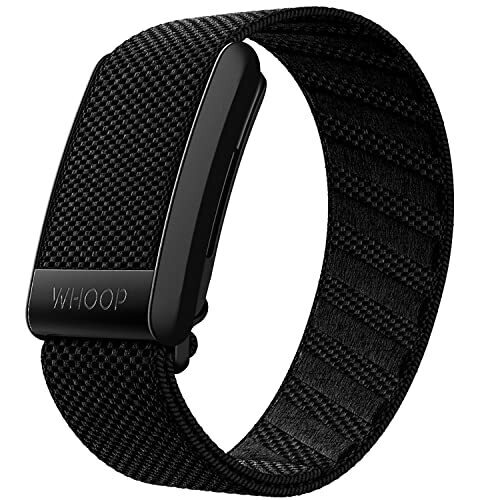
Whoop, the screenless watchband-like wearable that beat out Oura in my non-watch fitness tracker showdown, has just added a VO2 max feature to its app. Now, just like Garmin, Apple Watch, and others, it can put a number on your cardio fitness and tell you how it changes over time. 

What is VO2 max again? 

VO2 max is a measure of cardiovascular (or aerobic) fitness. There are other types of measurements that can give you a sense of how fit you are, but VO2 max is one of the simpler metrics to follow. It’s a two-digit number, and the higher it is, the fitter you are. A sedentary person might have a VO2 max around 20; an athlete might have one over 50. 

The technical definition is that it’s the maximum amount of oxygen your body can use per minute while exercising, divided by your body weight. The higher that number, the better your heart and lungs are at getting oxygen to your muscles, and the better your muscles are at using energy for exercise. 

How is VO2 max measured? 

To get a true VO2 max reading, you need to take a test in an exercise lab with a max that measures the amount of oxygen you’re breathing. Obviously, a wearable can’t provide that on its own. But wearables like Whoop, Garmin watches, and Apple Watches can estimate your cardio fitness through other means. 

Most commonly, they’ll compare your heart rate to how quickly you can run or walk. If you can jog along at a pretty fast clip while your heart rate is low, you’re probably pretty fit and have a high VO2 max. On the other hand, if your heart rate soars when you’re just trying to go out for an easy walk, you probably have low cardio fitness and thus a low VO2 max. That’s the general idea, anyway—the exact calculation will vary from one device to another. 

How Whoop uses VO2 max

I expected Whoop to use the same walking/running-based type of calculation as the other wearables I’m familiar with, but the company’s description makes it sound like something more complicated (and harder to verify) is going on. 

“Whoop estimates your VO2 Max using a proprietary algorithm trained on gold-standard laboratory data from a diverse set of Whoop members,” it says. That’s not very helpful. It continues: “To calculate your score, the algorithm factors your continuous physiological data (including resting heart rate and heart rate variability), your exercise patterns, and GPS-tracked performance metrics (when enabled). It also accounts for how VO2 Max naturally changes with age and incorporates physical factors that influence oxygen utilization, like height, weight, and biological sex.”

So GPS-tracked activities can be included in the calculation, but apparently aren’t necessary. This makes me wonder what the Whoop band is actually measuring to determine your VO2 max—or is it just doing some kind of AI-powered guess at what people with your metrics tend to have as their VO2 max? I’ve reached out to the company and will update if it is able to give me more information. 

I don’t have a VO2 max in my Whoop app at the moment, since it requires 14 recoveries (nights of sleep, basically) to give you that information, and I haven’t been wearing my Whoop lately.

Where to find your VO2 max in the Whoop app

According to Whoop support, you can find this feature on the Strain tab. By tapping “VO2 max” you can view monthly or six-month trends. Users on Reddit have reported that it’s been rolling out over the past few days, and that Whoop has told them everybody should have it by March 13 (today). 

Meta plans to test and tinker with X’s community notes algorithm

Meta plans to test out X’s algorithm for Community Notes to crowdsource fact-checks that will appear across Facebook, Instagram, and Threads.

In a blog, Meta said the testing in the US would begin March 18, with about 200,000 potential contributors already signed up. Anyone over 18 with a Meta account more than six months old can also join a waitlist of users who will “gradually” and “randomly” be admitted to write and rate cross-platform notes during initial beta testing.

Meta claimed that borrowing X’s approach would result in “less biased” fact-checking than relying on experts alone. But the social media company will delay publicly posting any notes until it’s confident that the system is working.

Read full article

Comments

In one dog breed, selection for utility may have selected for obesity

Labrador retrievers are common pets, but they also work as service dogs, aiding people with sight or hearing impairments. Unfortunately, the breed is particularly prone to getting overweight, and this tendency apparently is more severe in Labradors purpose-bred for service. To figure out the reasons behind this, researchers at Cambridge University investigated potential obesity genes in Labrador retrievers’ DNA.

It turned out increased obesity risk in Labradors was linked to the same genes and mechanisms that cause obesity in humans. These gene variants were more common in purpose-bred dogs we carefully selected, generation after generation, to maximize the results of the demanding training programs service animals must go through.

We thought we were picking the smartest Labradors to become guide dogs. But we might have been picking the ones that just wanted the snacks given as rewards the most.

Read full article

Comments

Epic is bringing Fortnite to Arm-based Windows systems

Fortnite will be available on Arm-based Windows machines later this year. In a blog post, developer Epic Games said that it is working with Qualcomm to get the hugely popular game compatible with the new Windows architecture by offering Windows on Snapdragon support for Epic Online Services Anti-Cheat, also known as Easy Anti-Cheat.

Microsoft has making a big push to convert its computing ecosystem to Arm-based hardware with Windows 11, especially as it puts more resources behind its line of Copilot+ PCs. While Qualcomm said last year that most games should be compatible with its Snapdragon chips, titles with kernel-level anti-cheat tech would pose a problem. And that’s the approach Epic takes to prevent cheating in Fortnite and with its Easy Anti-Cheat program.

Epic didn’t offer any more specific timeline other than “later this year,” but having support for the company’s games and services will be important for getting gamers and game developers to convert to the Arm systems.

This article originally appeared on Engadget at https://www.engadget.com/gaming/pc/epic-is-bringing-fortnite-to-arm-based-windows-systems-181528822.html?src=rss

‘Something Is Rotten in the State of Cupertino’

Apple’s announcement that “more personalized Siri” features of Apple Intelligence would be delayed until “the coming year” reveals a troubling departure from the company’s hard-earned reputation for reliability, long-time commentator John Gruber writes. Unlike other Apple Intelligence features that were demonstrated to media in June, the personalized Siri features — promising personal context awareness, onscreen awareness, and in-app actions — were never shown working to anyone outside Apple. Yet Apple prominently featured these capabilities in the WWDC keynote and even created TV commercials (now pulled) touting these functions to sell iPhone 16.

This represents a dangerous shift toward the pre-Jobs-return Apple that promised vaporware it couldn’t deliver. Gruber writes. Apple has squandered its credibility, built meticulously over decades through consistently shipping what they promised, he writes. Gruber’s post cites the following excerpt from a 2011 story: Apple doesn’t often fail, and when it does, it isn’t a pretty sight at 1 Infinite Loop. In the summer of 2008, when Apple launched the first version of its iPhone that worked on third-generation mobile networks, it also debuted MobileMe, an e-mail system that was supposed to provide the seamless synchronization features that corporate users love about their BlackBerry smartphones. MobileMe was a dud. Users complained about lost e-mails, and syncing was spotty at best. Though reviewers gushed over the new iPhone, they panned the MobileMe service.

Steve Jobs doesn’t tolerate duds. Shortly after the launch event, he summoned the MobileMe team, gathering them in the Town Hall auditorium in Building 4 of Apple’s campus, the venue the company uses for intimate product unveilings for journalists. According to a participant in the meeting, Jobs walked in, clad in his trademark black mock turtleneck and blue jeans, clasped his hands together, and asked a simple question:

“Can anyone tell me what MobileMe is supposed to do?” Having received a satisfactory answer, he continued, “So why the fuck doesn’t it do that?”

For the next half-hour Jobs berated the group. “You’ve tarnished Apple’s reputation,” he told them. “You should hate each other for having let each other down.” The public humiliation particularly infuriated Jobs. Gruber adds: Tim Cook should have already held a meeting like that to address and rectify this Siri and Apple Intelligence debacle. If such a meeting hasn’t yet occurred or doesn’t happen soon, then, I fear, that’s all she wrote. The ride is over. When mediocrity, excuses, and bullshit take root, they take over. A culture of excellence, accountability, and integrity cannot abide the acceptance of any of those things, and will quickly collapse upon itself with the acceptance of all three.


Read more of this story at Slashdot.

Choi: announcing Casual Make

Charles Choi has announced
the release of the Casual
Make
: a menu-driven interface, implemented as part of the Casual
suite of tools, for Makefile
Mode
in GNU Emacs.

Emacs supports makefile editing with make-mode which has a mix of
useful and half-baked (though thankfully obsoleted in 30.1)
commands. It is from this substrate that I’m happy to announce the
next Casual user interface: Casual Make.

Of particular note to Casual Make is its attention to authoring and
identifying automatic variables whose arcane syntax is
un-memorizable. Want to know what $> means? Just select it in the
makefile and use the . binding in the Casual Make menu to identify
what it does in the mini-buffer.

Casual Make is part of Casual
2.4.0
, released on March 12 and is available from MELPA. The 2.4.0 update to
Casual also includes documentation in the Info format for the first time.

Auracast support is coming to Android

Google is updating Android to support Auracast, a Bluetooth LE technology that makes it possible to create, listen to and switch between public broadcasts of Bluetooth audio on the devices you already own. At its simplest, Auracast could let you to tune your Bluetooth earbuds to a muted TV in a public space and hear its audio. For Google, though, it sounds like the company is primarily interested in using the feature to make hearing aids even more helpful.

Google plans to use Auracast as a way to get Bluetooth audio streaming to hearing aids paired to your phone or tablet. If a TV or streaming device supports Auracast, you’ll be able to use your Android device to connect the hearing aids directly to the source and hear what’s playing. The company says any presets you’ve tweaked to customize how your hearing aids sound will carry over to audio you hear through Auracast, too. On Pixel 9 devices, you can even skip diving into settings to switch to the broadcast and instead scan a QR code to immediately connect your hearing aids.

The feature is coming to the Pixel 9 via the third Android 16 beta, which is also getting released today. Besides Auracast, the pre-release software includes a new accessibility option that lets you outline text to make it easier to read and a “Local Network Protection” feature that will give anyone with an Android 16 device “more control over which apps can access devices on their local network,” Google says.

The final version of Android 16 is still a ways off, but the developer beta is available to download today on supported devices. If you don’t want to experiment with the beta, Google says you can try out Auracast with a Samsung Galaxy device running One UI 7 and compatible hearing aids from GN Hearing or Starkey.

This article originally appeared on Engadget at https://www.engadget.com/mobile/auracast-support-is-coming-to-android-180050425.html?src=rss

Why You Might Want to Avoid the Latest Chromecast Update

Chromecast as a brand has been going through it. Second-gen Chromecast and Chromecast Audio have been plagued with a strange glitch that essentially leaves these devices unusable. Users are not happy. Google, for their part, has advised not to factory reset the devices as a workaround, saying that the company is working on an official fix.

In the meantime, Google rolled out an unrelated update for Chromecast with Google TV. The company no longer sells this device, but even still, issued a long-awaited Android 14 update for Chromecast with Google TV. The release notes say, with this update, “The Google TV Streamer Voice Remote supports Find My Remote and Customizable Button,” which should be welcome additions to users of this remote. In addition, Chromecast with Google TV users now have security patch updates up through January of this year, as well as various system stability and improvements.

On the surface, this update appears minor, but genuinely useful, so it’d only make sense to install it right away. However, Google might have been a bit overconfident with its claim of “stability and improvements” here. Chromecast with Google TV users are complaining that this update is breaking critical features on their devices. On the 9to5Google news post about this update, one commenter says this update broke their local media implementation, saying the device was utilizing too little power, even though their setup should provide plenty of input and worked with Android 12 without issue. Other users say it broke their USB drive detection: No matter what they do, their drives are identified as “safely ejected,” but won’t be read. One user explicitly says they’ll avoid this update, because of the other commenters’ experiences.

A post about the update on r/AndroidTV reveals other complaints, as well. Some users’ devices crash when scrolling through the “Display and Sound” settings. Another user can’t cast on from Chrome on their desktop machine following the update.

It’s a tricky situation for Chromecast with Google TV users: On the one hand, they now have access to an extra couple months of security updates, which is always important to install when available. On the other, however, the update breaks key features you might frequently use your Chromecast with Google TV device for, including casting, USB drives, and running media locally. The update is still quite new, so there might even be more bugs yet to be discovered.

If you have to update

As it stands, you might be better off waiting to install this update until Google can address these issues. If you feel you should update, or you’re reading this at a time when Google has issued a new update, you’ll find the option from Settings > System > About > System.

New Breakthrough Transistor Tech Claims To Leave TSMC And Intel In The Dust

New Breakthrough Transistor Tech Claims To Leave TSMC And Intel In The Dust
For decades, the semiconductor industry has been laser-focused on shrinking silicon transistors, but Peking University researchers believe the future might lie in changing materials entirely. In a newly published paper, the team presents a 2D gate-all-around (GAA) transistor that they claim beats the latest silicon-based designs from Intel