
The upcoming Linux 6.15 kernel is set to finally introduce a standardized way of informing user-space of GPUs becoming hung or otherwise unresponsive. This is initially wired up for AMD and Intel graphics drivers on Linux so the user can be properly notified of problems and/or user-space software taking steps to address the hung/unresponsive graphics processor…
Monthly Archives: February 2025
Best Buy Slashed JBL 5.1 Soundbar With Subwoofer to Nearly 60% Off, Cheaper Than Amazon

Save $340 on the JBL 5.1 channel soundbar with a wireless subwoofer at Best Buy.
Amazon Gains Creative Control Over James Bond In Shocking New Deal

Long-time producers Barbara Broccoli and Michael G. Wilson have formed a new joint venture with Amazon MGM that will see them step back from creative control of the venerable spy-fi series.
MemSed – New Cheat Engine Alternative App for Linux
Looking for a Cheat Engine like application to search and edit memory in Linux Desktop? Here’s a free open-source app work in process!
Netflix in Trouble After Using AI to Clone Murder Victim Gabby Petito’s Voice

Another AI voice scandal is upon us.
Logitech’s Awesome G502 Wireless Mouse Is $70 Off And More Great Deals For Gamers

There comes a time when the right thing to do is to put your gaming mouse out to pasture. Maybe the buttons stopped working and are beyond repair or perhaps it’s so old that kids with their fancy new mice have a competitive advantage in your favorite online shooter. You can level the playing field with a gaming mouse upgrade, and one of our
Ring beefs up the image quality on its new Outdoor Cam Plus
If there’s one downside to the sheer number of security cameras Ring makes, it’s the sheer darn volume of them. Joining the mob today is the Outdoor Cam Plus, packing a new high-quality lens and 2K imaging sensor promising “a clear, colorful view even in near dark conditions.” It’s clad in a weather-resistant body and can run from mains power, via a rechargeable battery or with one of Ring’s custom solar panels. The company adds the Plus is just as comfortable working indoors as out in the open, and ships with a new mount that will even hold the camera in place on ceilings.
Unfortunately you might have to spend some time poring through the specs to work out where this one will sit in Ring’s camera firmament. After all, there’s already the Stick Up Cam, Stick Up Cam Pro and Stick Up Cam Elite available to buy in the US, and that’s before you get to the models with built-in floodlights. Not to mention the Stick Up Cam Pro, with 3D motion detection and Bird’s Eye Zones, is arguably a better product than the Elite which costs almost a hundred dollars more. Perhaps it’s time for Ring to trim down the excesses in its line up to make everything a lot cleaner for consumers.
Ring’s new Outdoor Cam Plus is available for pre-order today from Ring and Amazon for $100 and is shipping on March 26.
This article originally appeared on Engadget at https://www.engadget.com/home/smart-home/ring-beefs-up-the-image-quality-on-its-new-outdoor-cam-plus-140049128.html?src=rss
Daniel Craig Is No Longer Part of DC’s Sgt. Rock Plans

Plus, the next film in Legendary’s Godzilla/Kong ‘Monsterverse’ has found another human star.
Lenovo Legion Go S review (Windows version): Not so fast
Lenovo has already teased the second-gen version of its flagship gaming handheld. But that won’t be out until much later this year, so in the meantime, it’s come out with the Legion Go S, a slightly sturdier and more portable way to frag while you’re out and about. Now the tricky thing about this device is that it will be available in a bunch of different configurations including one that comes pre-installed with SteamOS — a first for any portable PC not made by Valve. Frankly, that’s the version we’re most interested in. However, the one running Windows 11 is out now, so it’s a good time to get familiar with it and see if it’s worth the money or if you should just wait for the variant that comes with Valve’s OS instead.
Design and display: A mid-cycle streamlining
Regardless of what platform they’re based on, both models feature the same design with the only difference being that the Windows 11 version comes in white while the SteamOS variant features a dark purple shell. However, unlike the original Legion Go, the Go S doesn’t have detachable controllers. But aside from that, many of the highlight features from its predecessor are still there. It sports a 1,920 x 1,200 display with a 120Hz refresh rate. At 8 inches, that’s larger than most handhelds, though it is a slight downgrade from the 8.8-inch panel on its predecessor. You also get joysticks with precise Hall effect sensors, an assortment of face and shoulder buttons, dual USB 4 ports (which both support power and data), 3.5mm audio and a microSD card reader.
Another small tweak is that instead of four paddles in back, you only get two, with Lenovo trading out the second pair for a set of toggle switches that let you adjust how deep you want the handheld’s triggers to go. It’s a nice touch for people who enjoy things like racing games where a bit of extra analog sensitivity can go a long way, but still want the freedom to have a shorter pull when playing stuff like fighting games, where longer triggers hurt more than they help. And while the touchpad on the Legion Go S is much smaller than the one on the original, I’m really glad Lenovo didn’t axe it altogether as it makes navigating through settings and menus in Windows so much easier than relying strictly on the joysticks or touch support.
Sam Rutherford for Engadget
The one feature I wish Lenovo had included is an onboard fingerprint sensor. Without it, you need to use a PIN or password to get into Windows 11. On a system without a keyboard, that means every time you pick up the system, you have to shift your hands away from the joysticks and tap the middle of the touchscreen, because the tiny touchpad doesn’t even work for this. Frankly, it’s just kind of awkward and could have been avoided entirely if Lenovo had opted for a power button with a built-in finger scanner like many of the Legion Go’s rivals including the ROG Ally X and the MSI Claw 8 AI+. Finally, while the Go S does have a built-in rumble motor, the vibrations it puts out are hilariously one-note, especially when it’s set to buzz anytime you use the touchpad. So I ended up turning it off entirely.
Performance: Not as fast as you might expect
The Legion Go S will eventually support a handful of processors and configurations, but right now it comes with an AMD Ryzen Z2 Go chip along with 32GB of RAM and 1TB of storage. And if you’re comparing it to its predecessor, you might think this thing would offer better performance. After all, the original Legion Go has less RAM and an older Ryzen Z1 Extreme APU, and two is higher than one, right? Well not so fast, because the Z1 Extreme features a base clock of 3.3GHz with eight cores and 16 threads compared to the Z2 Go’s base clock of 3GHz with just four cores and eight threads. Furthermore, the older Z1 Extreme also has a GPU based on AMD’s newer RDNA 3 architecture compared to RDNA 2 for the Z2 Go. So in actuality, the Legion Go S with this chip is about 10 to 15 percent less powerful than the model that came before it.
Sam Rutherford for Engadget
This becomes a lot more obvious when looking at benchmarks where the Legion Go S delivered 45 fps in Cyberpunk 2077 at 800p and medium settings with FSR upscaling set to performance, while the original Legion Go hit 51 fps with both systems set to the same 15-watt performance mode. Meanwhile in Returnal, we saw a similar pattern with the Go S reaching 23 fps on medium graphics at 800p compared to 34 fps for the older Legion Go, once again with both devices set to 15 watts.
Seeing poorer performance on the new model might set off alarms for some people, but before anyone panics, consider this: The Legion Go S is supposed to be a more streamlined and affordable take on the original, so in some respects not being able to achieve the same or higher framerates is to be expected. To me, the real issue is that 32GB of RAM is sort of overkill for this chip, which means you’re paying more for memory that can’t be fully utilized. And remember, while the Go S’ launch config comes with a Z2 Go, there are other versions that are expected to get a Z1 Extreme and possibly a vanilla Z2 at some point in the future.
Of course, if you want higher framerates, you can always adjust how much power you’re sending to its processor. Lenovo’s default balanced setting uses 15 watts, while performance mode pumps things up to 30. But if you want more precise control, the custom mode can go from as little as 5 watts all the way up to 40, though you’ll want or need to be plugged into the wall to utilize its full TDP (thermal design power).
Battery life: Good enough
Naturally, whatever performance mode you choose will ultimately impact your battery life. I found that when playing Metal Slug Tactics using the 15-watt balanced setting, the Legion Go S lasted for around two and a half hours, which is pretty solid. When playing more demanding titles, longevity wasn’t quite as good, with runtimes closer to an hour and a half. Though, with the Go S featuring a 55.5WHr battery compared to something like the 80WHr pack in the ROG Ally X, that kind of discrepancy isn’t entirely unexpected.
Software: Better, but still clunky
Sam Rutherford for Engadget
Lenovo has done a lot to improve the Legion Space app since it came out a couple years ago. Not only is it much better as a general place to launch games from, it’s a lot easier to adjust settings or download new drivers or software updates. Even the UI is more spacious and intuitive. However, at the end of the day, the handoff between Legion Space and the rest of Windows 11 still feels awkward. Depending on what you’re trying to tweak, you have to jump between menus from Lenovo and Microsoft while switching between joystick and touchpad to navigate. I also noticed some bugs like when trying to install Steam from the Legion Space app. It failed every time, which meant I had to download the app directly from Valve and do things manually. In a lot of respects, this is where Windows-based handhelds lag behind the most, so it’s a shame it’ll be another few months before the SteamOS model goes on sale sometime in May.
Wrap-up
The Legion Go S has all the makings of a solid portable gaming PC. It’s got a straightforward design with good ergonomics, Hall effect joysticks and a sensible button layout. Lenovo also includes some nice perks like dual USB-C ports, a decent-sized battery and a handy little touchpad for navigating Windows. I just wish there was a built-in fingerprint scanner too. And while its 8-inch OLED display is a touch smaller than the one on its predecessor, there’s not much to dislike about it. You even get more storage (1TB) than a base Legion Go (512GB).
Sam Rutherford for Engadget
The hard thing to come to terms with is that right now a Legion Go S costs $730 for worse performance, no detachable controllers and the lack of bonuses like an included carrying case or vertical mouse functionality like on the original Legion Go, which can be had for $30 less ($700). Normally, that would be a death sentence for a new system because that value proposition simply doesn’t make sense.
But in this case, the issue is that Lenovo hasn’t fully rolled out all of its variations. I still think 32GB of RAM on this device is excessive; not even the ROG Ally X has that much. But more importantly, the Legion Go S’ other configs aren’t available yet. So even if you aren’t holding out for the SteamOS variant, you’d be silly not to wait for less expensive versions to come out with starting prices closer to $600 (or even $500 for the one with Valve’s platform), which will instantly make this handheld a lot more attractive.
This article originally appeared on Engadget at https://www.engadget.com/gaming/pc/lenovo-legion-go-s-review-windows-version-not-so-fast-140002828.html?src=rss
‘Beeftext’ Is the Best Free Text Replacement Tool for Windows
Text replacement tools, also called snippet managers, are one of those productivity tools everyone needs even if they don’t know it. They let you paste any text you want in just a couple of keystrokes and are perfect for anyone who finds themselves typing the same information again and again (so basically, anyone who uses a computer). Whether you answer the same customer question multiple times a day for work or find yourself constantly telling friends about the parking situation at your house, it’s handy to have a quick way to paste long bits of information.
The Mac has a decent text replacement tool built in, which I mentioned when I talked about how I fixed my worst writing habits. Windows, it turns out, doesn’t. So I’m glad I found Beeftext. This is a completely free and open source application that makes it easy to store and trigger snippets.
To get started just download and install the tool (or, if you prefer, use the portable version). Now you can start creating “Combos.” You can enter any text you want in the Snippet box. Note that there’s also support for variables, meaning you can automatically include things like the date, time, or the contents of the clipboard.
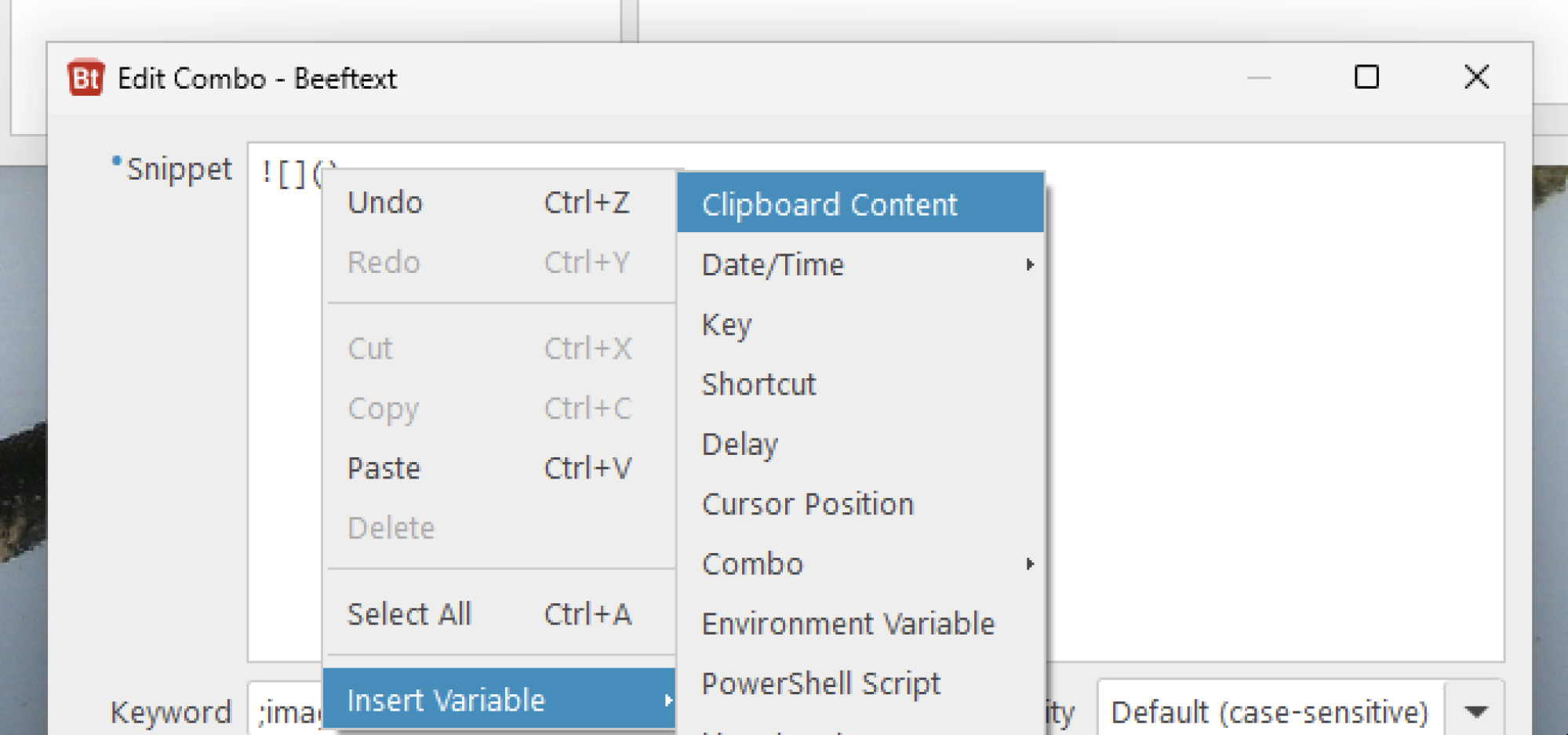
Credit: Justin Pot
Finish writing the snippet and you can optionally choose a keyword that will trigger the snippet, replacing the word. This will work in every application on your computer so don’t use a word that you might need to type in some other context. I like using short words starting with a semicolon, for example ;word, because I never type words that begin with semicolons otherwise.
If you’d rather not create a bunch of keywords you don’t have to—you can use the keyboard shortcut Ctrl-Shift-Enter from any application to launch the “picker window,” which lets you search for and paste any of your snippets.

Credit: Justin Pot
There’s a lot more this application you can do. For example, there’s a checkbox in the settings for emoji shortcodes, allowing you to use the tool to quickly insert emojis. The variables allow you to emulate keystrokes or even PowerShell scripts to your snippets, meaning you could use this to set up automations if you really spent some time on it. All of this and more is outlined in the documentation. It’s one of those tools you’ll set up once and then wonder how you lived without.
China’s Electric-Vehicle-To-Humanoid-Robot Pivot
“[O]ur intrepid China reporter, Caiwei Chen, has identified a new trend unfolding within China’s tech scene: Companies that were dominant in electric vehicles are betting big on translating that success into developing humanoid robots,” writes MIT Technology Review’s James O’Donnell. “I spoke with her about what she found out and what it might mean for Trump’s policies and the rest of the globe…” An anonymous reader quotes an excerpt from the report: Your story looks at electric-vehicle makers in China that are starting to work on humanoid robots, but I want to ask about a crazy stat. In China, 53% of vehicles sold are either electric or hybrid, compared with 8% in the US. What explains that?


Price is a huge factor — there are countless EV brands competing at different price points, making them both affordable and high-quality. Government incentives also play a big role. In Beijing, for example, trading in an old car for an EV gets you 10,000 RMB (about $1,500), and that subsidy was recently doubled. Plus, finding public charging and battery-swapping infrastructure is much less of a hassle than in the US.
You open your story noting that China’s recent New Year Gala, watched by billions of people, featured a cast of humanoid robots, dancing and twirling handkerchiefs. We’ve covered how sometimes humanoid videos can be misleading. What did you think?
I would say I was relatively impressed — the robots showed good agility and synchronization with the music, though their movements were simpler than human dancers’. The one trick that is supposed to impress the most is the part where they twirl the handkerchief with one finger, toss it into the air, and then catch it perfectly. This is the signature of the Yangko dance, and having performed it once as a child, I can attest to how difficult the trick is even for a human! There was some skepticism on the Chinese internet about how this was achieved and whether they used additional reinforcement like a magnet or a string to secure the handkerchief, and after watching the clip too many times, I tend to agree.
President Trump has already imposed tariffs on China and is planning even more. What could the implications be for China’s humanoid sector?
Unitree’s H1 and G1 models are already available for purchase and were showcased at CES this year. Large-scale US deployment isn’t happening yet, but China’s lower production costs make these robots highly competitive. Given that 65% of the humanoid supply chain is in China, I wouldn’t be surprised if robotics becomes the next target in the US-China tech war.
In the US, humanoid robots are getting lots of investment, but there are plenty of skeptics who say they’re too clunky, finicky, and expensive to serve much use in factory settings. Are attitudes different in China?
Skepticism exists in China too, but I think there’s more confidence in deployment, especially in factories. With an aging population and a labor shortage on the horizon, there’s also growing interest in medical and caregiving applications for humanoid robots.
DeepSeek revived the conversation about chips and the way the US seeks to control where the best chips end up. How do the chip wars affect humanoid-robot development in China?
Training humanoid robots currently doesn’t demand as much computing power as training large language models, since there isn’t enough physical movement data to feed into models at scale. But as robots improve, they’ll need high-performance chips, and US sanctions will be a limiting factor. Chinese chipmakers are trying to catch up, but it’s a challenge.
Read more of this story at Slashdot.
Historic Ocean Liner Departs Philadelphia On Voyage To Become the World’s Largest Artificial Reef
The SS United States, a historic ocean liner that once held the transatlantic speed record of 36 knots (41 mph / 66 kph), has departed Philadelphia to be transformed into the world’s largest artificial reef off Florida’s Gulf Coast. The move is part of a $10 million project to boost tourism by creating a unique diving attraction while preserving the ship’s legacy as a symbol of American innovation and engineering. The Associated Press reports: The SS United States, a 1,000-foot vessel that shattered the transatlantic speed record on its maiden voyage in 1952, is being towed to Mobile, Alabama, for planned prep work before officials eventually sink it off Florida’s Gulf Coast. The move comes about four months after the conservancy that oversees the ship and its landlord resolved a years-old rent dispute. Officials initially planned to move the vessel last November, but that was delayed due to concerns from the U.S. Coast Guard that the ship wasn’t stable enough to make the trip.


Officials in Okaloosa County on Florida’s coastal Panhandle hope it will become a barnacle-encrusted standout among the county’s more than 500 artificial reefs and a signature diving attraction that could generate millions of dollars annually in local tourism spending for scuba shops, charter fishing boats and hotels. Officials have said the deal to buy the ship could eventually cost more than $10 million. The lengthy process of cleaning, transporting and sinking the vessel is expected to take at least one-and-a-half years.
Read more of this story at Slashdot.
Murena Released a De-Googled Version of the Pixel Tablet
Murena has launched the Murena Pixel Tablet, a de-Googled version of the Pixel Tablet that removes Google’s apps and services to enhance user privacy. Priced at $549, it offers /e/OS, an alternative app store, and privacy-focused productivity tools, but lacks Google’s speaker dock and direct access to the Play Store. The Verge reports: First announced last December, the Murena Pixel Tablet is available now through the company’s online store for $549. That’s a steep premium given Google currently sells the same 128GB version of the Pixel Tablet for $399, or $479 as part of a bundle with the charging speaker dock that Murena isn’t including. Part of Murena’s de-Googling of the Pixel Tablet includes the removal of the Google Play Store. You can still download apps through /e/OS’ App Lounge which acts as a front-end for the Play Store allowing you to browse and get free apps anonymously without Google knowing who you are. However, downloading paid apps requires a login to a Google account. Google’s various productivity apps aren’t included, but the Murena Pixel Tablet comes with privacy-minded alternatives for messaging, email, maps, browsing the web, calendar, contacts, notes, and even voice recordings. In 2022, Murena launched its first smartphone with no Google apps, Google Play Services, or even the Google Assistant.


Read more of this story at Slashdot.
Valve Releases Team Fortress 2 Full Client and Source Code
Valve has made Team Fortress 2’s full client and server code public, allowing fans to modify, extend, or rewrite the game as long as their projects remain non-commercial. Game Rant reports: Valve has made Team Fortress 2’s server and client code fully public, with the studio encouraging fans to explore the game’s files and make it what they want. The game’s code is now available thanks to a new update to the Source SDK, which dropped earlier this week. Fans have already been creating TF2 mods for years, but what this essentially means is that fans can make brand-new games. However, there’s one catch: any and all TF2 mods must be released for free. “The majority of items in the game now are thanks to the hard work of the TF2 community.” Valve wrote. “To respect that, we’re asking TF2 mod makers to continue to respect that connection and not to make mods that have the purpose of trying to profit off Workshop contributors’ efforts.”


“TF2 mods may be published on the Steam Store, and after publication will appear as new games in the Steam game list,” Valve continued. The new SDK update also includes new 64-bit binary support and fixes for multiplayer Source games like Half-Life 2: Deathmatch, Counter-Strike: Source, and Day of Defeat: Source. Time will only tell what fans come up with as they dig deep into the inner workings of the game, but given how passionate and talented the Team Fortress 2 community has proven to be, players can expect to see some incredible creations.
Read more of this story at Slashdot.
MSI GeForce RTX 5070 Ti Gaming Trio Review: Hot-Clocked Blackwell GB203

MSI GeForce RTX 5070 Ti Gaming Trio Review: MSRP $799 The MSI GeForce RTX 5070 Ti Gaming Trio takes NVIDIA’s GB203 GPU and gooses up its clock speeds to improve performance over standard cards. Blackwell Architecture Hot-Clocked From The Factory Easy Overclocker Relatively Power Friendly Cool And Quiet DLSS 4 + RTX Neural Rendering Upgraded…
Ubuntu 24.04.2 LTS Now Available With Initial HWE Stack
Following last week’s delay due to a packaging mishap, Ubuntu 24.04.2 LTS is available today as the newest point release for this current Long Term Support version of Ubuntu Linux…
Alexa Built-in LG C3 OLED 65-Inch Smart TV Is $500 Off Now on Amazon, Lowest Price Ever

A brighter, crisper screen that can handle anything you throw at it, for a great price.
A four-pack of Chipolo One Bluetooth trackers is on sale for 32 percent off
If you’re constantly losing your keys, wallet and other important stuff, Bluetooth trackers could be a big help. Attach them onto your things and you can monitor their location directly from your phone. Our current favorites are the Chipolo One trackers, and right now you can snag a pack of four for just under $68. Chipolo’s having a sale that brings the pack down to $75, but you can use the code ENGADGET10 at checkout to get an extra 10 percent off and bring the price down to $67.50. That code works across Chipolo’s site as well, giving you an additional 10 percent off anything else you want to purchase.
This gadget not only made our list of the best Bluetooth trackers, but it’s our favorite release in the product category. The One is a near-perfect tracker. The battery lasts two full years, it works great with both Android and iOS devices and the ringer is incredibly loud. This is great news for those who tend to misplace items under mountains of linens or between couch cushions.
There’s also no perceptible lag between pressing the Ring to Find button and hearing the trill. This isn’t true of many rival trackers. It even has a handy hole for attaching to keychains and the like. This may seem like an obvious design element, but Apple AirTags lack this hole.
The only downside involves the finding network. Chipolo isn’t a big name like Apple or Samsung, so there are fewer people on the network. This could be an issue if you don’t live in a major metropolitan area. Basically, the One is perfect for looking for lost items in or near the home, but not as useful when searching for misplaced stuff (like luggage at an airport) out in the wild.
And don’t forget: remember that coupon code from before? It works across the entire site, so feel free to grab a ten percent discount on everything else Chipolo makes using the code ENGADGET10. This includes wallet trackers that are shaped like credit cards and smaller tracking rings.
Follow @EngadgetDeals on Twitter and subscribe to the Engadget Deals newsletter for the latest tech deals and buying advice.
This article originally appeared on Engadget at https://www.engadget.com/deals/a-four-pack-of-chipolo-one-bluetooth-trackers-is-on-sale-for-32-percent-off-130015389.html?src=rss
DJI’s RS4 Mini stabilizer can now track subjects automatically
Shortly after introducing subject tracking with its latest smartphone gimbal, DJI has done the same with its new lightweight camera gimbal. The RS4 Mini is now available with DJI’s RS Intelligent Tracking Module to keep a human subject in frame and also offers the latest features from its flagship RS4 gimbals like auto-axis locks and 4th-gen stabilization.
The RS4 Mini is a major redesign from the previous RS3 Mini and is slightly heavier (2 pounds compared to 1.8 pounds) to accommodate some of the new features. It boasts the same 4.4 pound payload as before, meaning it can carry nearly every mirrorless camera on the market and many lightweight cinema cameras to boot.
DJI
An important new feature for ease of use is the addition of automatic axis locks absent on the previous model. And in fact, the RS4 Mini is the first of DJI’s gimbals to use 2nd-Gen axis lock tech that can unlock the gimbal in just one second. It also has DJI’s 3rd-Gen Native Vertical Switch that that offers the fastest switch experience to date in the RS series. Another new addition is Teflon interlayers and a fine tuning knob that allows “more precise millimeter balancing” when installing a camera. DJI also introduced a new Responsive mode (alongside the regular Smooth mode) that allows the gimbal to react better to fast hand movements.
DJI
For solo vloggers, the coolest new feature is the DJI RS Intelligent Tracking Module (included in the RS 4 Mini Combo), that’s much like the “Multifunctional Module” on the Osmo Mobile 7P gimbal, minus the fill light. When attached to the gimbal, the tiny device enables ActiveTrack on any phone or camera, keeping a human subject in frame within 33 feet. Tracking can be enabled with a pull of the trigger or an open palm visual command.
The RS 4 Mini also has DJI’s latest 4th-Gen Stabilization that strikes a better balance between stabilization strength and tactile feel, promising an “enhanced user experience” and improved stability for vertical shooting. Other improvements include 30 percent better battery life (now up to 13 hours) and charging speeds, a next-gen RS Briefcase Handle and a quick-release magnetic mount. The RS4 Mini is now available for $369 by itself or $459 in the Combo package, which includes the RS Intelligent Tracking Module and RS Briefcase Handle.
This article originally appeared on Engadget at https://www.engadget.com/cameras/djis-rs4-mini-stabilizer-can-now-track-subjects-automatically-134045771.html?src=rss
It’s Raining SpaceX Debris in Poland

A SpaceX Falcon 9 rocket crashed down near Komorniki, Poland.