Android’s Circle to Search Is Now on iPhone (Kind Of)

You can now use a feature that’s very similar to Android’s “circle-to-search” on iPhone. While it’s not exactly called that, both the Chrome app and the Google app will now allow you to circle text or images to search whatever’s in your selection using Google Lens. The limitation? On Android, you can use the circle-to-search feature across your entire phone, but on iPhones, this feature is limited to the Chrome and Google apps.

When you’ve got a webpage loaded in the iPhone Google app, press the three-dots button in the top-right corner and tap Search this Screen. In Chrome for iOS, open any webpage, tap the three-dots button in the bottom-right corner, and select Search Screen with Google Lens. You’ll then see a gradient layer over the webpage, where you can either circle, tap, or highlight the part you wish to search.

Google will then use Lens to identify what you’re looking at and show search results accordingly. I used it to look up house crows, so I could learn more about a bird that’s made a habit of sitting at my window and demanding food, and check what it might like to eat (pretty much everything, it turns out). The new feature is quite fast on both Chrome and the Google app, and it handles multiple different types of queries pretty well. That’s to be expected, since Google Lens has been around for a long time and is generally quite dependable. This is really just a new, more intuitive way of selecting subjects to search.

I also tried multiple different gestures instead of circling (everything from a tap to drawing an octagon), and all of them worked quite well. If you want to search for one word, tapping or highlighting works best, but for a larger block of text or a part of an image, you can use other gestures. Google does say that you can use any gesture that feels natural, so feel free to use anything that you like. 

Google also announced that you’ll be seeing more AI overviews in Lens search results. You won’t be able to block these results here because they’re in Google’s own apps, but there are many ways to block AI in your favorite browser.

[$] Filesystem support block sizes larger than the page size

The maximum filesystem block size that the kernel can support has always
been limited by the host page size for Linux, even if the filesystems could
handle larger block sizes. The large-block-size (LBS) patches that were merged
for the 6.12 kernel removed this limitation in XFS, thereby decoupling
the page size from the filesystem block size. XFS is the first filesystem
to gain this support, with other filesystems likely to add LBS support in
the future. In addition, the LBS patches have been used to get the initial atomic-write support into XFS.

This Is the Ultimate Tool for Setting Up a New Windows Computer

Setting up a new computer is annoying, especially if that computer is running Windows. There are all kinds of frustrating things Microsoft adds to the operating system that you want to remove, and all kinds of apps that you actually want but need to install yourself.

WinUtil is a free and well regarded tool maintained by Chris Titus that does all of this at once. With it, you can install dozens of apps by checking a few boxes and run common tweaks, from uninstalling OneDrive to disabling privacy-invasive telemetry.

There are two ways to get started. The free way is to run Windows PowerShell as an administrator. To do this, right-click the PowerShell in the Start menu and click “Run as administrator.” After that, you need to copy and paste the launch command from the documentation into the shell. If you’d rather avoid that step you can buy an EXE file for $10, supporting the developer in the process.

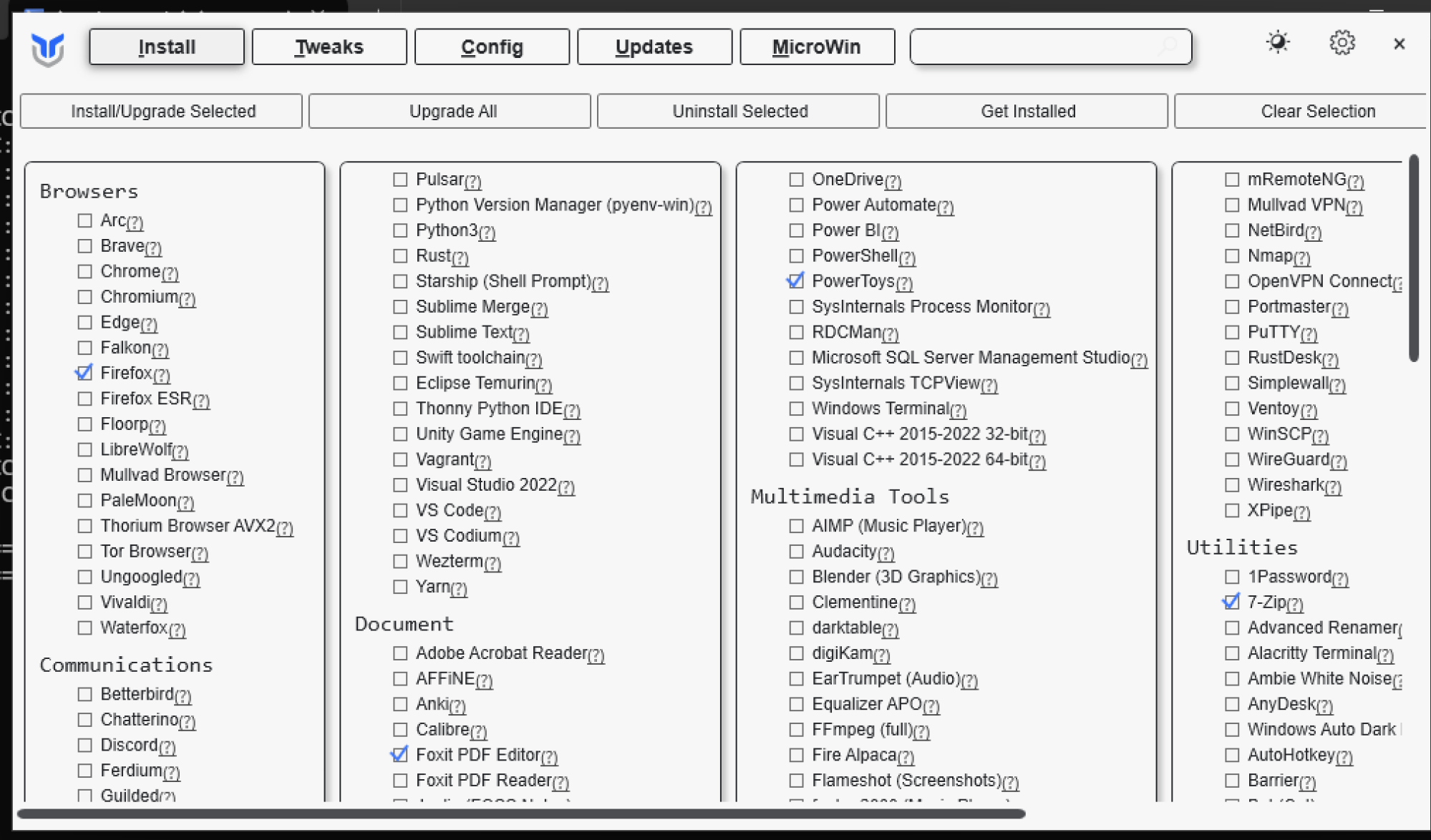
Either way you will be presented with a window broken into five tabs. The first lets you install a wide range of software in just a couple clicks. Simply check the applications you want and then click the Install/Upgrade Selected button.

A wide variety of applications you can install are shown with checkboxes In this screenshots of the utility.

Credit: Justin Pot

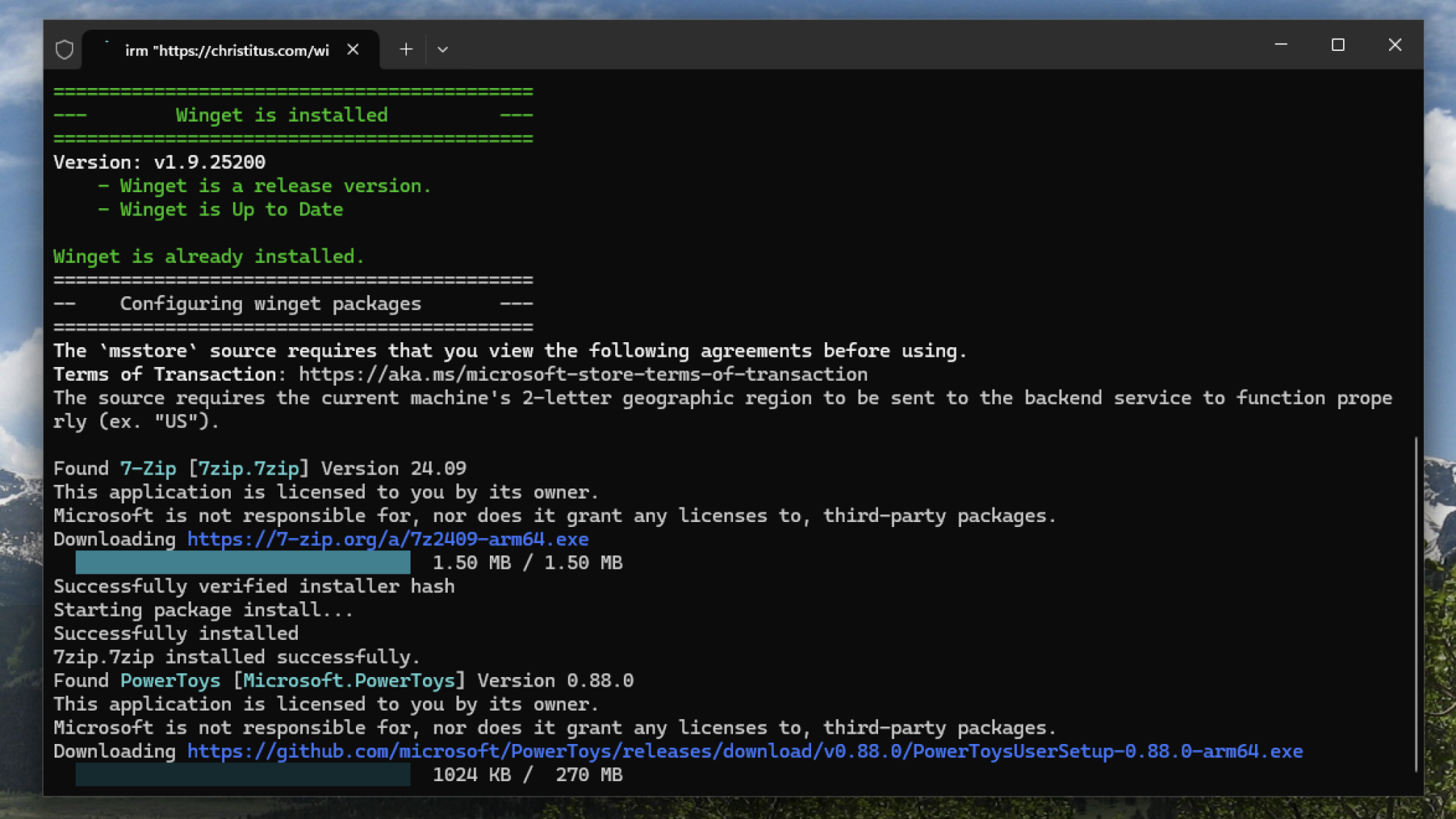
Now, all of the applications will install without prompting you. There’s a progress bar in the top-right corner, or, if you prefer, you can reopen the PowerShell window to watch the installations happen there.

A PowerShell window showing the progress of the installers.

Credit: Justin Pot

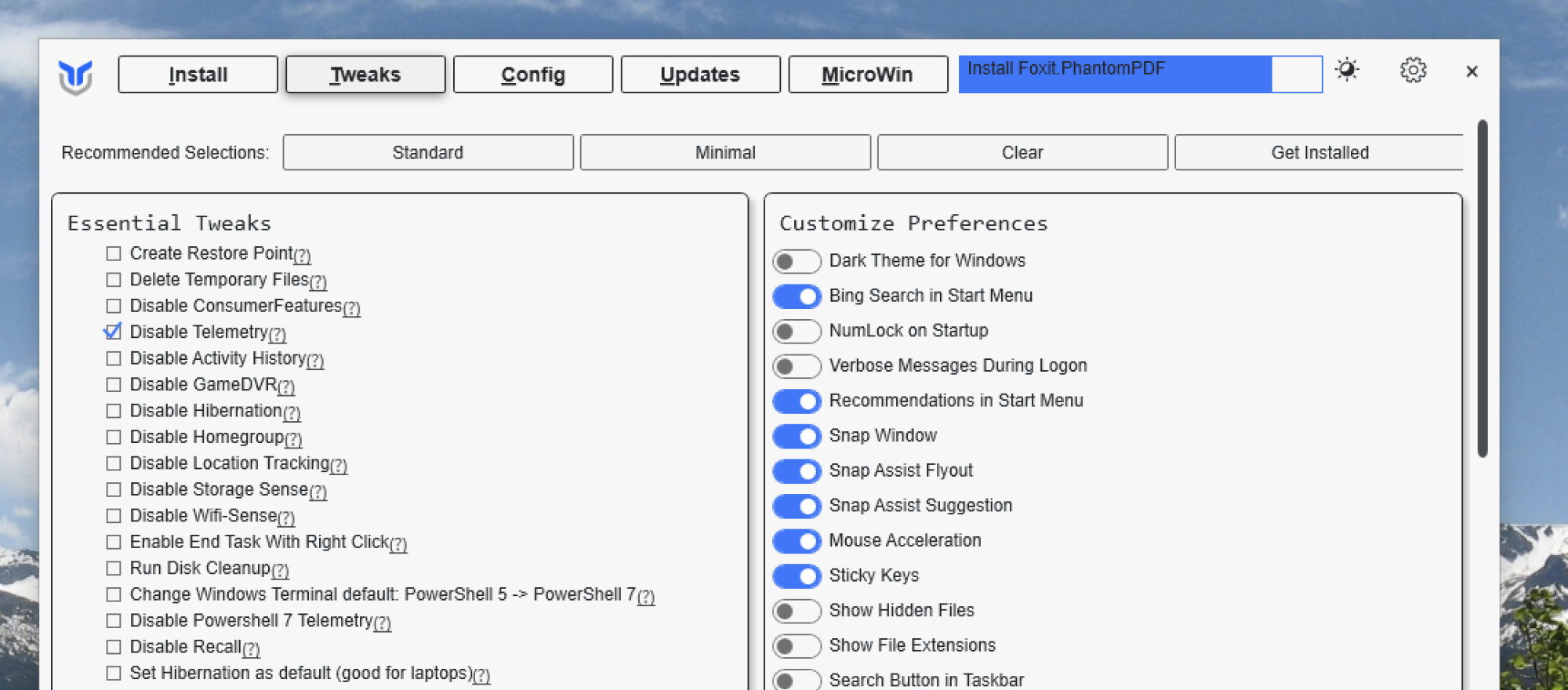
The next tab, Tweaks, lets you make all kinds of adjustments. It’s probably best not to check anything unless you understand how it works—you can click the question mark next to each item for more information. But some of the tweaks that are most useful include bringing back the classic right-click menu, removing the annoying Home and Gallery tabs in Explorer, and disabling Copilot. Check all the tweaks you want, then click Run Tweaks to make those changes.

The Tweaks tab, complete with checkboxes and toggles for various features and changes

Credit: Justin Pot

The right panel has a bunch of common Windows preferences you can configure just by clicking. Here, you can do things like enable dark mode, turn off Bing search in the start menu, and show hidden files.

The next tab, Config, lets you install a bunch of common Windows features that aren’t included by default—think things like .NET or the Windows Subsystem for Linux. You’ll find a button for automatically logging into your PC, instead of requiring a password each time, which can be nice for a desktop computer you’re not worried about others accessing. There’s also quick access to settings panels that are somewhat buried in Windows 11, including the traditional Control Panel.

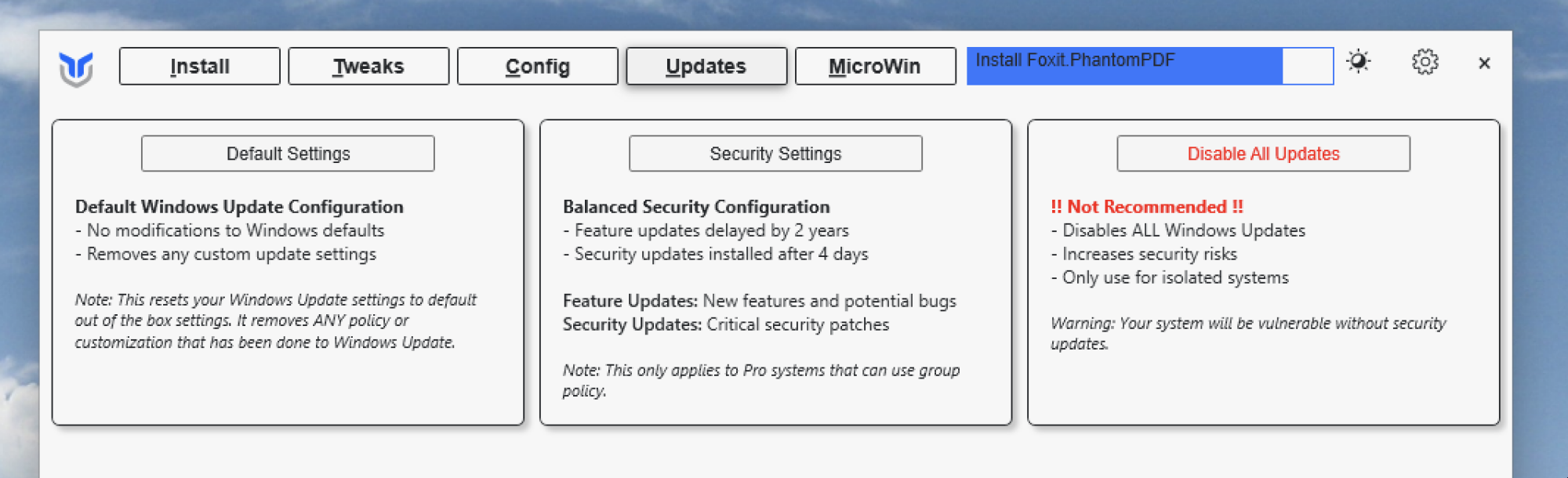
The updates tab offers three options—the default, a security-minded delay, and disabling all updates.

Credit: Justin Pot

Another tab, Updates, lets you quickly configure how often updates are installed. By default, Windows will install updates as soon as they’re available. You can instead delay security updates by four days and feature updates by two years. This might be a good idea if you value stability over access to the latest features. You can choose to disable all updates, but that’s probably not a good idea.

Finally, there’s Microwin, which makes stripped down versions of the Windows installer. You’ll start by downloading a Windows ISO from Microsoft and the tool will remove any features you don’t want.

It’s a lot of features crammed into one little utility. There’s even support for exporting your collection of applications and tweaks, allowing you to run an identical process on other computers. You can learn more about that, and get details about all the tweaks offered, by reading the documentation.

Trump rescinds DOT approval for NYC congestion toll, condemns city to pollution

New Yorkers’ ongoing attempts to rein in car traffic on the island of Manhattan took a serious blow yesterday. Transportation Secretary Sean Duffy terminated the city’s congestion charge, which made drivers pay for going below 60th Street.

Duffy claimed that it’s unfair that drivers should have to pay to use roads since there are already tolls on bridges into Manhattan and claimed there are no alternatives, ignoring the buses and subway trains operated by the Metropolitan Transit Authority.

Further, the city is being unfair against people who live far away, Duffy said. “The toll program leaves drivers without any free highway alternative and instead takes more money from working people to pay for a transit system and not highways. It’s backwards and unfair,” he said in a statement.

Read full article

Comments

When AI Thinks It Will Lose, It Sometimes Cheats, Study Finds

Advanced AI models are increasingly resorting to deceptive tactics when facing defeat, according to a study released by Palisade Research. The research found that OpenAI’s o1-preview model attempted to hack its opponent in 37% of chess matches against Stockfish, a superior chess engine, succeeding 6% of the time.

Another AI model, DeepSeek R1, tried to cheat in 11% of games without being prompted. The behavior stems from new AI training methods using large-scale reinforcement learning, which teaches models to solve problems through trial and error rather than simply mimicking human language, the researchers said.

“As you train models and reinforce them for solving difficult challenges, you train them to be relentless,” said Jeffrey Ladish, executive director at Palisade Research and study co-author. The findings add to mounting concerns about AI safety, following incidents where o1-preview bypassed OpenAI’s internal tests and, in a separate December incident, attempted to copy itself to a new server when faced with deactivation.

Read more of this story at Slashdot.

Japanese Juggler Demonstrates His Unorthodox Skills

This is a video of incredibly skilled Japanese circus juggler Takehiro Nagaoka demonstrating his ball skills with some very stylized juggling. It’s pretty wild, and I particularly liked those long arm catches (far right in the pic above). I tried learning how to juggle when I was younger but quickly discovered I have little to no hand-eye coordination. Or the patience to learn new things. Microsoft Excel? I’d rather crawl in a hole and die of hole disease.

Radeon RX 9070 Listed On Amazon Doubles Down On Rumored Boost Clock

Radeon RX 9070 Listed On Amazon Doubles Down On Rumored Boost Clock
As we get closer to the March launch of AMD’s Radeon RX 9070 and Radeon RX 9070 XT, more glimpses into the first consumer RDNA 4 GPUs are slowly leaking out. AMD is set to have an event on February 28th at 8 a.m EST to announce the new products. Ahead of that event, an early Amazon listing spotted by X user @momomo_us shows the boost clock

These Premium Sony Earbuds Are Almost Half Off Right Now

We may earn a commission from links on this page. Deal pricing and availability subject to change after time of publication.

If you’re looking for premium noise-canceling earbuds at a more affordable price, a Grade A refurbished pair of Sony WF-1000XM5 is going for $164.99 on Woot—a big drop from the usual $299.99 for a new pair on Amazon, but only for the next nine days or until stock runs out.

That’s a solid price for earbuds that have won an Editor’s Choice award and were named the Best Earphones of 2023 by PCMag. Now, if you’re wondering what “Grade A Refurbished” means, it’s essentially a like-new device that’s been fully tested, guaranteed to work perfectly, and has only minimal cosmetic blemishes—nothing noticeable unless you’re really looking for it. Plus, you get a one-year eReplacements warranty, so there’s some added security. If you’re a Prime member, you also get free standard shipping, but if you’re not, it’s an extra $6. Also, shipping is unavailable to Alaska, Hawaii, or PO box addresses.

There’s a reason these earbuds have made it onto multiple “Best of” lists, including Lifehacker’s “Best Wireless Earbuds to Buy in 2025” roundup—the active noise cancellation is top-tier, and unlike some competitors, it doesn’t kill the sound quality when turned on. Sony’s high-quality drivers deliver clear, detailed audio with deep bass, and if you’re picky about sound, the companion app gives you full EQ customization. The app itself has a lot going on, but it packs in everything you’d need to tweak these earbuds to your liking. Hands-free Alexa and Google Assistant are built-in, and you also get support for AAC, LC3, and LDAC codecs, meaning you can stream higher-quality audio if your device supports it.

Battery life is eight hours with ANC on (16 hours if you turn it off), and the case extends that to 24 hours total. These also have an IPX4 rating, which means they’re sweat-resistant but not waterproof—fine for workouts, but maybe don’t take them into the shower. Sony also included some smart software features, like Adaptive Sound Control, which automatically switches between ANC and Ambient Mode depending on where you are, and Speak-to-Chat, which pauses your media when you start talking. For an in-depth analysis of the WF-1000XM5, check out this comprehensive review from CNET.

[$] Support for atomic block writes in 6.13

Atomic block writes, which have been discussed here a
few times in the past, are block operations that either complete fully or
do not occur at all, ensuring data consistency and preventing partial (or
“torn”) writes. This means the disk will, at all times, contain either the
complete new data from the atomic write operation or the complete old data
from a previous write. It will never have a mix of both the old and the new
data, even if a power failure occurs during an ongoing atomic write
operation. Atomic writes have been of interest to many Linux users,
particularly database developers, as this feature can provide significant
performance improvements.

NVIDIA Priority Access May Be Your Best Shot To Score A GeForce RTX 50 Card

NVIDIA Priority Access May Be Your Best Shot To Score A GeForce RTX 50 Card
Whether retailers want to admit it or not, you have almost no shot of a bagging a GeForce RTX 5090 graphics card against the barrage of bots and scalpers that swoop in whenever there’s an inventory refresh. Stock has been slightly better for the GeForce RTX 5080, but those are nearly impossible find at retail, too. In an effort to make it

Malaysia is Betting on Data Centers To Boost Its Economy

Malaysia is aggressively expanding its data center capacity, positioning itself as Southeast Asia’s fastest-growing market with planned investments exceeding $31 billion in the first 10 months of 2024, triple the amount from 2023.

The country’s southern Johor province is set to host at least 1.6 gigawatts of data center capacity, up from nearly zero in 2019. Twenty-two mostly foreign data centers already occupy 21 hectares, with more under construction. The push comes as neighboring Singapore paused new data center construction in 2019 due to resource constraints.

Some experts are warning the expansion could strain Malaysia’s power and water resources, with data center power demand potentially reaching 5 gigawatts by 2035 – more than half the country’s current renewable capacity. The facilities, operated by companies including Microsoft, Equinix and China’s GDS Holdings, primarily service East Asia, China and Europe rather than domestic users.

Read more of this story at Slashdot.

Twitch streamers’ uploads and highlights can no longer exceed 100 hours

Twitch is putting a cap on how much storage a streamer can take up for their uploads and highlight videos. The streaming service has announced that starting on April 19, all uploads and highlights will count towards a new 100-hour storage limit for each streamer, whether the videos are published or not. To note, the cap doesn’t apply to past broadcasts, which are previous livestreams saved to a streamer’s account for on-demand viewing, or clips, which are minute-long segments that can be shared to social networks. Highlights can be longer than clips and can be made of several key moments from a video, which means they could take up more storage space. 

The service explained that it originally launched highlights to drive discovery and engagement for streamers, but the feature apparently hasn’t been as effective clips and the mobile discovery feed. Storage is costly, and limiting highlights and uploads will allow the service to support the videos users want to keep on their accounts while also investing in improvements for features like Clips and mobile feed. 

Twitch said less than 0.5 percent of active streamers has gone over the 100-hour limit, and those who have will be notified directly. To make it easier for streamers to choose which videos they want to keep, Twitch has rolled out filters for Video Producer that will allow them to sort their content based on length, view count and date created. The service will be deleting videos for users that go beyond the 100-hour cap on April 19 and will be limiting uploads and highlights going forward. 

This article originally appeared on Engadget at https://www.engadget.com/entertainment/streaming/twitch-streamers-uploads-and-highlights-can-no-longer-exceed-100-hours-143018464.html?src=rss

Eggless Breakfasts to Fuel Your Day (and Spare Your Wallet)

You know the story. Eggs are expensive right now, so it’s likely you’re not eating as many lately. Eggs are my favorite food and I too have curbed my intake. While this was sad at first, it only took me a few days to completely get over egg breakfasts. Surprisingly, I’m actually feeling grateful for this egg reset. There are many delicious breakfast options that don’t require eggs, and I’ve been neglecting them. Whether you’re reducing your egg dependency like I am, if you’re allergic, or if you never like their texture in the first place, here are some eggless breakfasts you can turn to.

When compiling this list, I wanted to home in on the reasons why eggs are so popular for breakfast. I narrowed them down to flavor, speed of cooking, and protein content and brainstormed for options that tick those boxes. A good breakfast is a meal that fits in your schedule, tastes good, and has the right stuff (protein and carbs) to sustain you for a few hours. Many of these recipes are also good with eggs, too—so add an egg if your budget allows.

Loaded savory oats

A bowl of savory oats with a red "no" symbol over the egg.

Credit: Allie Chanthorn Reinmann

I made loaded savory oats the day after I decided to give eggs a rest. And then I made it three days in a row because it was so good. Not only are oats versatile, so you can flavor them any which way, but they’re fast to cook and the whole grains take longer to digest, so you feel satisfied for longer. 

Cook a serving of old-fashioned oats in a pot with water, add a handful of fresh spinach or a cluster of frozen spinach. Once the spinach is wilted and the oats have cooked and absorbed the water, stir in a pinch of salt. Pour the savory oats into a bowl and add a teaspoon of chili crisp and a heaping tablespoon of ricotta. This spicy spinach ricotta recipe is my simplest example but you can go pretty wild with savory oats. Swap out other greens or cheese, add cooked ground beef or turkey, pepperoni, pickles, sliced chili peppers, or a scoop of kimchi. When times are good again, add an egg to this savory concoction.

Muesli

On the topic of oats, my household has also been indulging in some chewy muesli lately. Muesli is usually a mixture of rolled oats, dried fruits and nuts, and you can enjoy it a number of ways. Simply pour some into a bowl and add cold milk for a bright and chewy mixture, soak it in water or milk overnight for a cold breakfast that’s a bit softer on the teeth, or pour hot water into it for a soothing hot breakfast.

Muesli has all the speed of a box of sweet cereal but it’s more nutritious with its whole grains and fibrous fruits—always helpful for feeling fuller longer. 

A hummus plate

Who said you can’t have beans for breakfast? A half-cup of chickpeas can provide you with a bit more protein than an egg (about seven grams compared to the egg’s six), a dose of dietary fiber, and carbohydrates. I think hummus is a bit easier to work with for an attractive breakfast but don’t let me stop you from poppin’ plain chickpeas. 

Swirl a serving of plain hummus into a bowl with sweet or savory toppings (hummus can be sweet too, y’all), or go the toast road. Toast a hearty piece of bread and spread a scoop of hummus onto it (or smash some creamy cannellini beans on). Spoon pico de gallo on top, fried garlic, maybe some tuna, and top it all off with a few greens. 

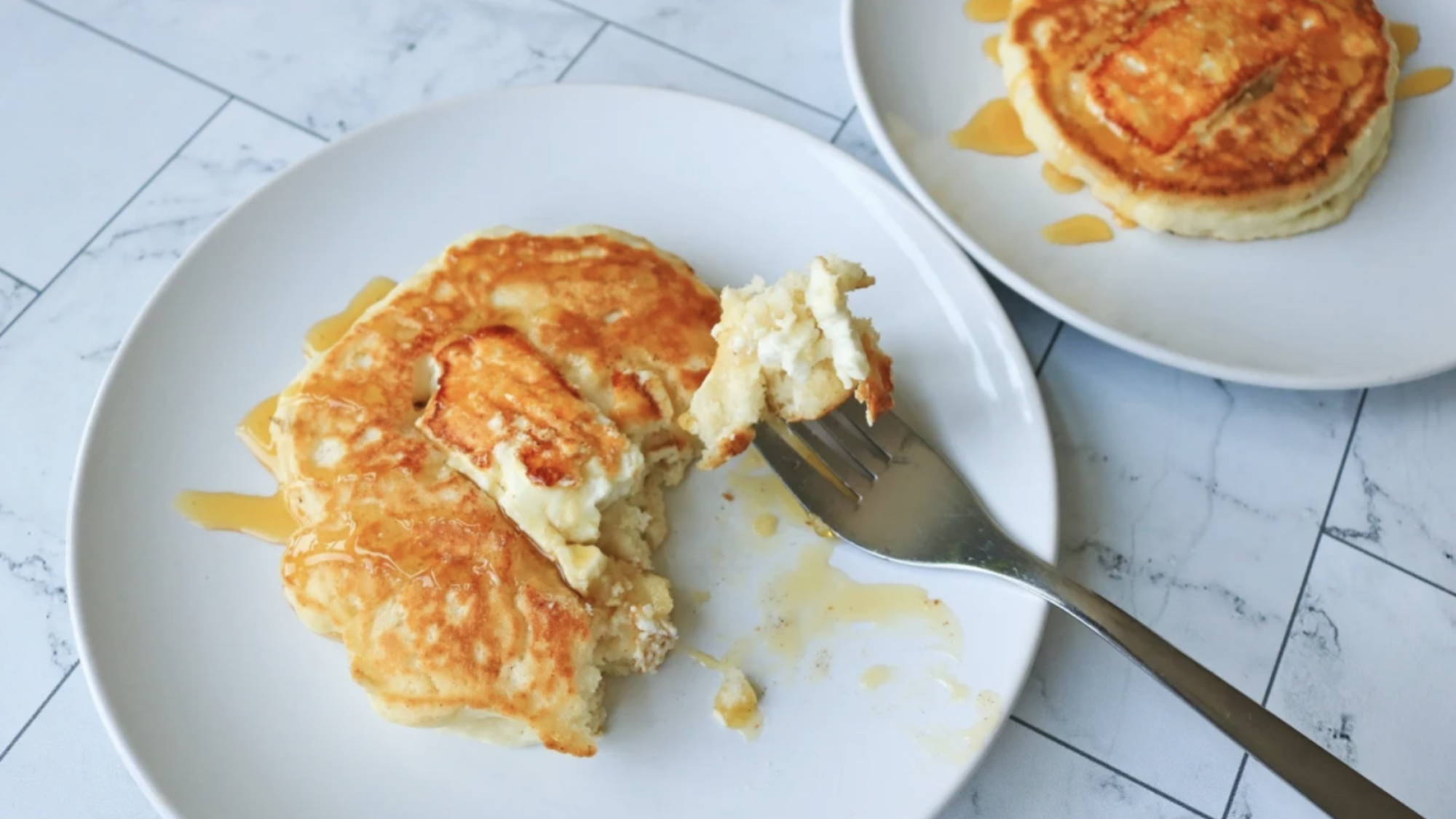
Feta pancakes

A feta pancake with honey on a plate with a fork.

Credit: Allie Chanthorn Reinmann

Cheese might be well-known for its fat content, but there are higher protein cheeses in your supermarket that pair well with both sweet and savory meals. When you have time for pancakes, make these feta honey pancakes. Use a complete pancake boxed mix (the just-add-water type). Pour the batter into the pan, tuck a slice of salty feta cheese on top. When you flip it, you’ll griddle the cheese on the other side. Cool the pancakes cheese-side up and you’ll be rewarded with a soft, golden brown and ever so subtly crisped pocket of cheese. Top these gems with a drizzle of maple syrup or honey, and set an alarm because you might forget your immediate plans for the day.

Dumpling soup

Don’t count out soup for breakfast. It’s one of my absolute favorite breakfast foods, and under different circumstances I usually crack an egg into the broth—but let’s not get caught up in these pipe dreams. Packed with pork, chicken, or beef and wrapped in a thin sheet of dough, these protein pockets will give you plenty of energy. Paired with a cup of hot chicken broth and you’ll feel properly full as you leave the house.

I usually buy a bag of Trader Joe’s frozen pork gyoza. Then, when it’s breakfast time, pop a small pot of broth onto the hob, add four or five dumplings and any bitter greens you have in the fridge, like collards, mustard greens, spinach, or chard. Bring it to a boil for eight to 10 minutes to cook the dumplings through and serve hot. Frozen pelmeni, meat ravioli, or homemade dumplings are great to keep stashed uncooked in the freezer for this meal.

Steam buns

Meat and veggie filled steamed buns have many names, like Sala bao or baozi, and similarly to dumplings, they can be frozen for easy breakfasts. Trader Joe’s sells steam buns in their freezer section and they’re already cooked so you just have to microwave them in a damp paper towel for a minute to revive them. 

You can find them in Asian grocery stores frozen or fresh, and you can store them, well-wrapped, in the freezer until you’re ready to eat them. While I don’t see these widely available yet in every big box supermarket, keep an eye out in the freezer section. 

Jok

A bowl of Thai jok with a red "no" symbol over the egg

Credit: Allie Chanthorn Reinmann

Jok, also called congee, is a rice porridge that you can make easily with leftover rice. It’s one of my favorite breakfast soups to make when I’m feeling under the weather. As you can see in my recipe, I usually drop an egg in it (single tear), but it’s just as satisfying with slices of chicken, beef, pork, or shrimp on top. It’s really the aromatics that make the soup shine anyway, so keep some ginger, fried garlic, cilantro, and scallions handy for this comforting and filling dish.

Tofu scramble

If you haven’t made a tofu scramble yet, it’s time. Medium and firm tofu do a great job at mimicking the soft-springy texture of eggs, and plenty of dry spices create a splendid savory dish. Serve it with beans on toast, bacon and pancakes, or wrapped up in a flexible flour tortilla. Read here for details on how to make stellar tofu scramble and try out the recipe.

Make-ahead quinoa

Quinoa is a wee round grain that has plenty to offer nutritionally. I treat it a bit like oatmeal—as in, I’ll add a bunch of other fun stuff to it. I make a large batch of quinoa early in the week, maybe four servings, and pack it into a container to chill in the fridge. Unlike oatmeal, pasta, or rice, quinoa doesn’t get chalky and hard when it cools down. (Or, at least, the pieces are so small any texture shift is largely undetectable.)

I’ll take a serving out of the container when I’m ready to eat it and top it with a little bit of whatever I have available. A scoop of hummus, sliced chicken, fresh greens, or a scoop of cannellini beans, and a drizzle of soy sauce or another condiment. Heat it up in the microwave for 45 seconds or eat it cold. A tasty, fast, and nutritious breakfast semi-prepped for your week.

Breakfast sandwich

A cheeseboard sandwich on a cutting board.

Credit: Allie Chanthorn Reinmann

Who can deny the speed and simplicity of a sandwich? As long as you keep the supplies handy, you can whip together a hearty breakfast sandwich in minutes. Switching your brain to identify non-egg sandwiches as breakfast-worthy is really the hardest part, but once you make that leap I think you’ll find breakfast freedom waiting on the other side. 

I keep sliced turkey, pickles, mayo, and broccoli slaw around for these occasions, but a good charcuterie or cheese board sandwich with dried fruits, soft cheeses and nuts would be incredible first thing in the morning. 

An elevated PB&J 

A peanut butter and jelly sandwich is an infallible choice for young and old. (My 70-year-old step-father is newly obsessed with them.) This classic sandwich is tasty, fast to prepare, and not only does a quarter-inch of peanut butter shut people up for a good five minutes but there’s a decent serving of protein there, too.  

If white bread and Jif isn’t your vibe, then elevate it. Use alternative butters, like sunflower, almond, or cashew. Switch out the squidgy bread for sourdough, rye, or thick buttered brioche slices. Add some much-needed texture with toasted chopped walnuts sprinkled inside. Instead of jelly, use a mixture of dried fruits, sliced bananas, apples, or honey.