Here Are All the New Features in iOS 18.4

The new iOS 18.4 beta is still missing an AI-overhauled Siri, on-screen awareness, and the app integrations feature we were promised all the way back in June at WWDC. If you’re waiting for those features, try your luck with iOS 18.5.

However, 18.4 isn’t an empty update. The first beta introduces Priority Notifications, and Apple Intelligence now supports more languages—which is great news for Apple users across the globe. In addition, Apple Intelligence is now accessible in the European Union for the first time. Here’s everything that’s new with iOS 18.4.

Priority Notifications

One of the new highlight features in iOS 18.4 is Priority Notifications. When enabled, your iPhone will use on-device intelligence to figure out which notifications are truly important, and will highlight them in a new Priority Notifications box at the top.

However, in this beta, it’s not enabled by default. Go to Settings > Notifications > Prioritize Notifications and then enable the feature.
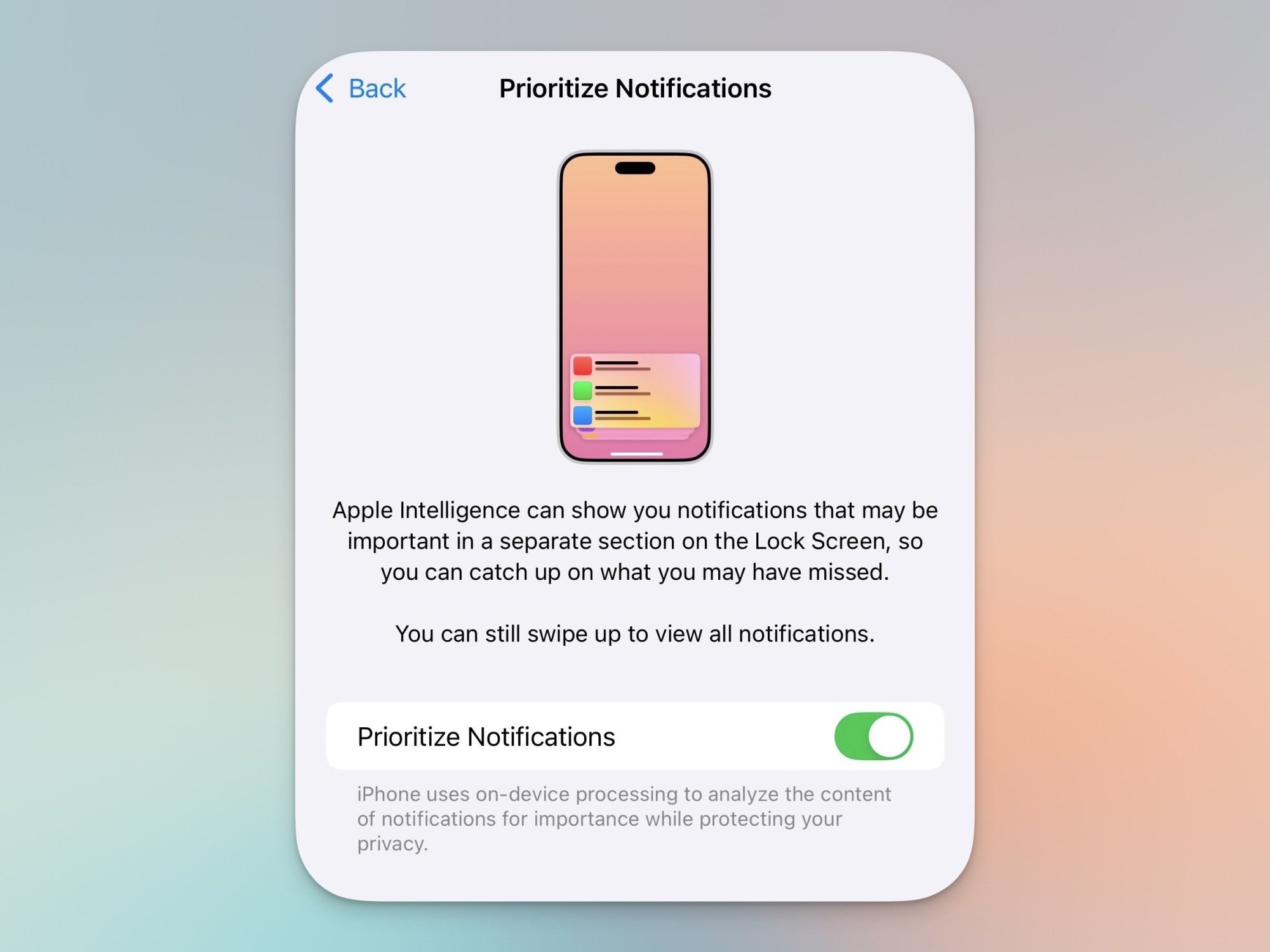
Prioritize Notifications settings on iPhone.

Credit: Khamosh Pathak

Sketch style in Image Playground
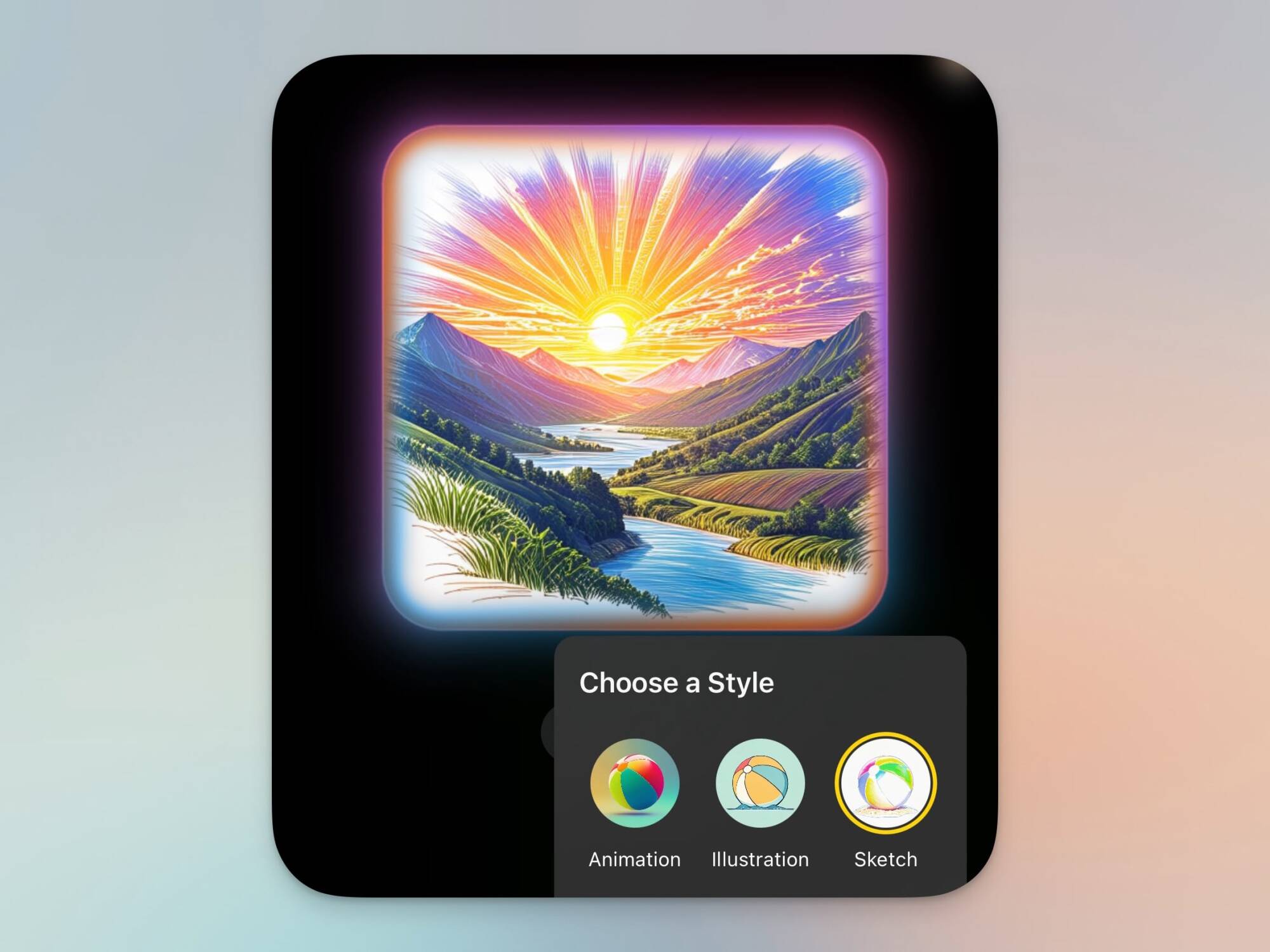
Sketch style in Image Playground.

Credit: Khamosh Pathak

When you’re creating an image in Image Playground, you’ll see a new style option called Sketch. This style makes it look like your AI-generated image was sketched on a paper. If that sounds familiar, that’s because we also saw this back at WWDC, but Apple only just added it to iOS with this update.

New Ambient Music feature in Control Center
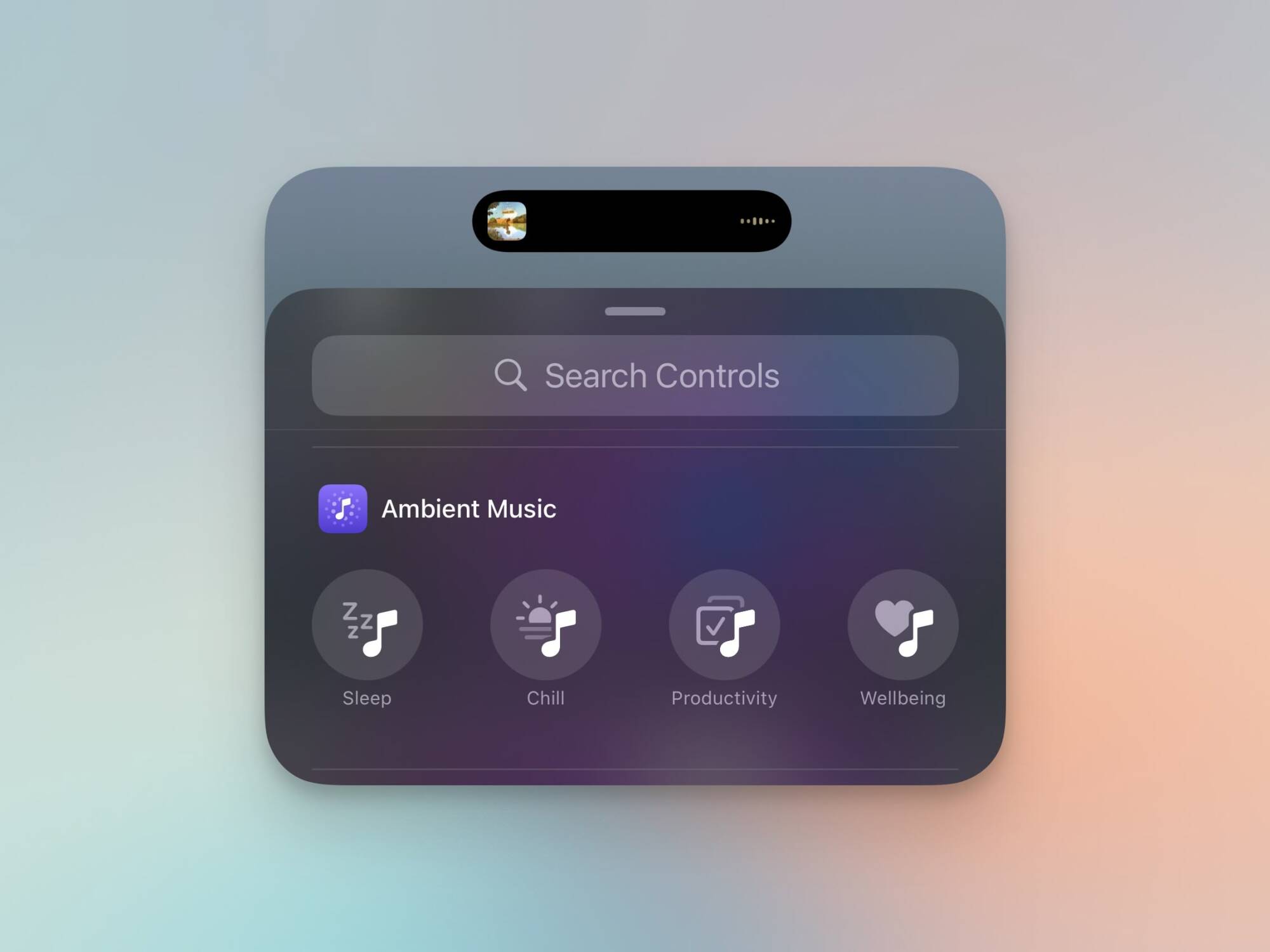
Ambient Music in Control Center.

Credit: Khamosh Pathak

Apple already has a background sounds feature that generates nature sounds for ambient playback. However, in iOS 18.4, you’ll find a new Ambient Music section in Control Center. There are four options: Sleep, Chill, Productivity, and Wellbeing. Tap one, and it’ll play a corresponding playlist from Apple Music.
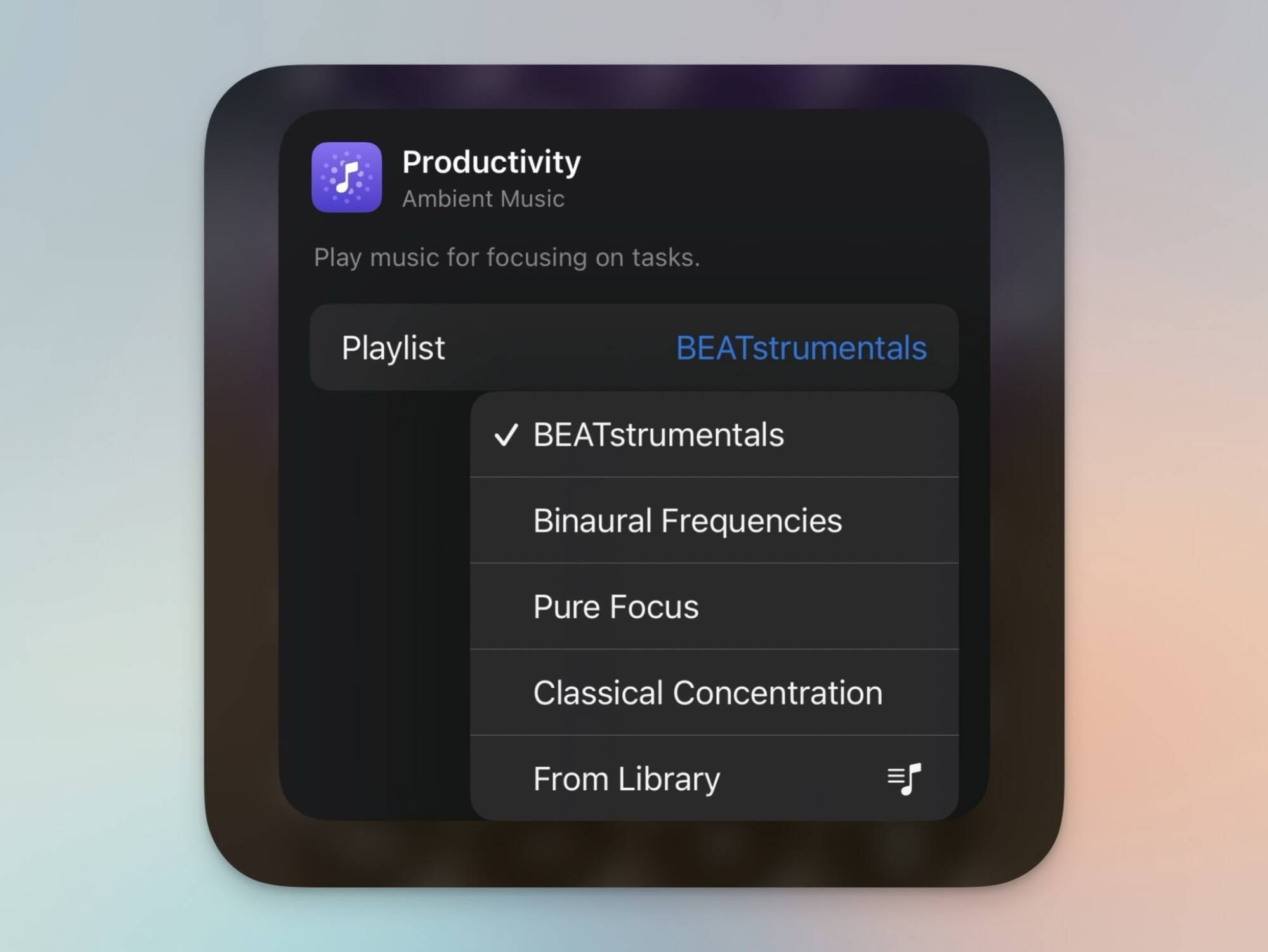
Customizing playlist in Ambient Music.

Credit: Khamosh Pathak

Apple has mapped a playlist to each button by default, but you’re not locked to any. If you go into the editing view and then tap on a control, you can choose a different playlist (Apple gives you four different options for each control), or you can choose any playlist from your own collection.

Apple Intelligence comes to the EU

Apple Intelligence now supports French, German, Italian, Portuguese (Brazil), Spanish, Japanese, Korean, and Chinese (simplified), plus there’s now support for localized English language in both India and Singapore.

Recipes come to the News+ app

The News app has a new Apple News Food+ section for paying subscribers. Here, you can access tens of thousands of aesthetically pleasing recipes. There are also stories, restaurant reviews, and more.

The new Mail app comes to iPad and Mac

With iPadOS 18.4 beta and macOS 15.4 beta, the redesigned Mail app is coming to the iPad and the Mac. Once you update, you’ll get access to email categories and other AI features on your tablet and computer.

A much better Genmoji button
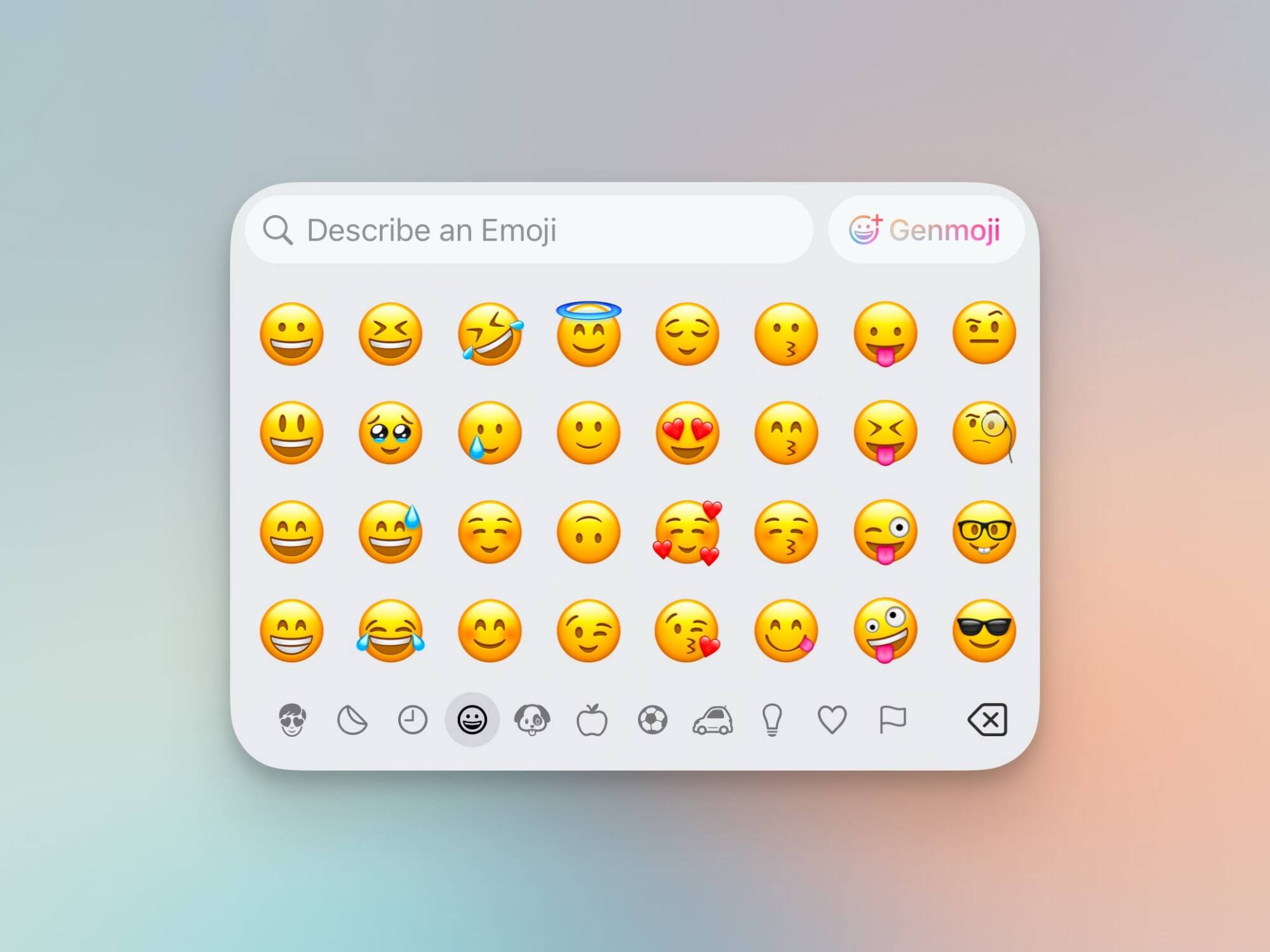
Genmoji button in Emoji keyboard.

Credit: Khamosh Pathak

When I wrote about Genmoji, I was tempted to call it a hidden feature, because that’s what it felt like. Genmoji was just a multicolor smiley face tucked in the corner of the Emoji keyboard.

Apple seems to have learned its lesson: With 18.4, the new icon says “Gemoji” right next to the smiley face rainbow icon.

New Podcasts widgets
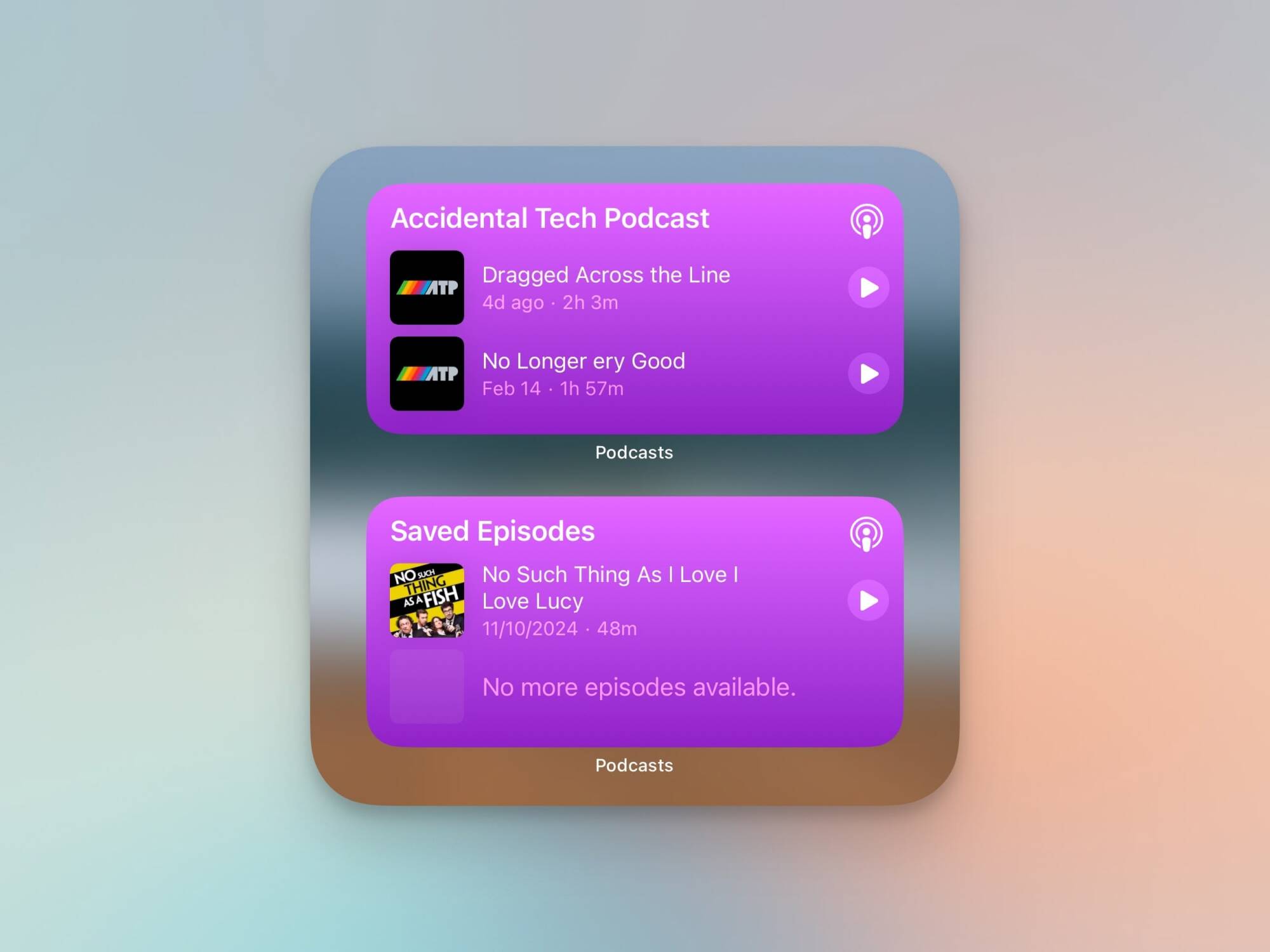
Podcasts widgets.

Credit: Khamosh Pathak

The Podcasts app has two new widgets: one for Library, and for Shows. The Library widget can show you all saved episodes, downloaded episodes, or latest episodes. The Shows widget is for highlighting all episodes from a single show. You can choose a show, and then access all the latest episodes from the show from the Home Screen.

More choices for default apps

Apple’s selection of default apps options is growing. You can now set a different Translate app by default, and if you’re in the EU, there’s now support for choosing a default navigation app, too. (If you’re not in the EU, try using Map Redirect as a workaround.)

CarPlay changes

For some users, it looks like CarPlay is adding a third row of app icons on the Home screen.

Other small changes

Major app updates like iOS 18.4 typically include a number of smaller changes in addition to more notable ones. Here’s what else iOS 18.4 updates on your iPhone:

  • When you’re setting up a new device with iOS 18.4, you’ll be prompted to select an age range. You can choose between Child (12 or younger), Teen (13 to 17), and Adult (18 or older). Apple says that it will use this data only to help set up parental controls.

  • There are two new Shortcuts actions for the Messages app: Open Conversation, and Send Message.

  • When you go to edit your Albums, you’ll see a new List View option, hopefully making it easier to rearrange albums.

Gmail will stop using SMS for two-factor authentication

Google is planning to end support for SMS-based two-factor authentication in Gmail, Forbes reports. Sending a code to your personal phone via text message has long been an option Google offered to verify your identity, but it has unavoidable security issues the company wants to address.

The goal is to “reduce the impact of rampant, global SMS abuse,” Gmail spokesperson Ross Richendrfer tells Forbes, and the solution, at least for now, is QR codes. Instead of entering your number and receiving a text with a code you need to enter, Google will throw up a QR code you need to scan with your phone. The reliance on your smartphone is still present, but now you don’t have to rely on the lax security of SMS messages.

Using SMS two-factor authentication is better than nothing, but text messages aren’t as secure as other methods. Criminals can intercept your message just by convincing your carrier to port your number to a new phone. By tricking a provider to send multiple SMS messages to a number a criminal operation controls in a process called “traffic pumping,” they can even make money on each text, Google says. Considering the volume of SMS messages the company sends to both verify users and make sure people aren’t bulk-creating accounts to send spam, it’s not hard to see how SMS could be problem.

Ultimately, the goal for Google and other companies like it is to use passkeys and move away from passwords entirely, but adoption is slow, and making the current, much more familiar process secure is still meaningful. 

This article originally appeared on Engadget at https://www.engadget.com/cybersecurity/gmail-will-stop-using-sms-for-two-factor-authentication-185615193.html?src=rss

Disney+ just dropped an explosive trailer for Andor season 2

It’s been well over two years, but the wait is almost over. The second season of Andor hits Disney+ on April 22. The platform just dropped a juicy trailer to get all of us Star Wars fans pumped and ready.

The footage shows plenty of cool stuff, including the return of Rogue One’s chief antagonist Orson Crennic and the beloved droid K-2SO. The Death Star makes an appearance, which isn’t surprising given the ending of the first season. Mon Mothma also attends an extravagant “let them eat cake” type of party. 

There are a few bombastic explosions and several shots of the titular Cassian Andor walking down hallways. One thing this trailer doesn’t spoil is the plot. The footage is just a hodgepodge of cool moments, so we still have no idea what our favorite rebel spy will be getting up to in season two. To me, this is a good thing.

For the uninitiated, Andor is a prequel to Rogue One: A Star Wars Story and is set after the rise of the empire but before the events of the original Star Wars movie. It’s very good, with a tone that can only be described as “prestige Star Wars.” It stars Diego Luna, Stellan Skarsgård, Kyle Soller, Denise Gough and, sometimes, Forest Whitaker. Season two brings new actors into the fold, like Adria Arjona.

Disney+ is doing something unique with the release schedule here. Three episodes premiere on April 22, followed by another trio each week for a month. That adds up to 12 episodes. April is a big month for returning genre TV, as season two of The Last of Us premieres on April 13.

This article originally appeared on Engadget at https://www.engadget.com/entertainment/tv-movies/disney-just-dropped-an-explosive-trailer-for-andor-season-2-184842360.html?src=rss

Remembering Viktor Antonov, Beloved Artist Behind Half-Life 2 And Dishonored

It was announced earlier this week that video game artist Viktor Antonov had died at the unreasonably young age of 52. With stints working at big-name studios like Valve and Arkane, Antonov’s work was a key part of some of the most loved games of all time. It was his unmistakable style that defined Half-Life 2’s City…

Read more…

Ellison’s Half-Billion-Dollar Quest To Change Farming Has Been a Bust

Oracle founder Larry Ellison’s agricultural technology venture Sensei Ag has largely failed to deliver on its ambitious goals despite costing more than half a billion dollars, more than he spent to purchase Hawaii’s Lanai island itself. Eight years after its founding, little of the revolutionary technology Sensei promised – including AI crop breeding, robotic harvesting, and advanced sensors – is being utilized in its six greenhouses on Lanai, according to WSJ.

The company has faced numerous setbacks, including greenhouses that weren’t built to withstand Lanai’s strong winds, solar panels that malfunctioned, and executives with limited agricultural experience. Far from its original mission to “feed the world,” Sensei currently grows lettuce and cherry tomatoes primarily for Hawaii’s local market, while its Canadian operations supply some East Coast supermarkets. The company has pivoted to focus on developing software and robotics at test centers in Southern California, aiming to eventually license technology packages to other indoor farms.

Read more of this story at Slashdot.

This Budget Motorola Phone (With Premium Touches) Is at Its Lowest Price Right Now

We may earn a commission from links on this page. Deal pricing and availability subject to change after time of publication.

If you’re looking for a budget-friendly phone that gets the job done, the Motorola Moto G Power 5G (2024, Unlocked) is currently $179.99 (down from $299.99)—its lowest price ever, according to price-trackers. Available in midnight blue and pale lilac, this PCMag Editor’s Choice winner features a vegan leather finish, which while giving it a premium feel tends to attract dust and pet hair (so a case might be a smart investment). On the upside, the textured surface provides a secure grip, making accidental drops less likely. It also packs a side-mounted fingerprint scanner in the power button, a decent single speaker with Dolby Atmos support, and a 3.5mm headphone jack for those who prefer wired audio.

For an affordable device, it performs surprisingly well, thanks to its MediaTek Dimensity 7020 processor and 8GB of RAM. Everyday tasks feel smooth, and its 6.7-inch 120Hz display makes scrolling and animations feel more fluid than you’d expect at this price point. Additionally, its 128GB of storage (expandable up to 1TB via microSD), gives you plenty of space for apps and media. And with NFC support for mobile payments, it adds a small but significant convenience that’s often missing in budget phones. Battery life is another strong point, with a 5,000mAh capacity lasting well over 12 hours. And when it’s time to charge, 30W wired charging and 15W wireless charging ensure you’re not stuck waiting for too long.

Where the Moto G Power 5G (2024) starts to show its budget roots is in the camera department: Its 50MP main sensor with optical image stabilization sounds promising, but the results can be inconsistent, with oversaturated colors and pixel blurring, notes this PCMag review. If capturing crisp, high-quality shots is a priority, the OnePlus Nord N30 5G ($299.99) might be a better option.

Perplexity wants to reinvent the web browser with AI—but there’s fierce competition

Natural-language search engine Perplexity will launch a web browser, joining a competitive and crowded space that has for years been dominated by Google.

The browser will be called Comet, but we know nothing at all about its features or intended positioning within the browser market at this stage. Comet was announced in an X post with a flashy animation but no details.

Perplexity followed up the X post with a link and an invitation to sign up for beta access to the browser. Those who follow the link will find a barebones website (again with no details) and a simple form for entering an email address.

Read full article

Comments

Apple plans to invest $500 billion in the US over the next four years

Apple plans to ramp up its US hiring and investments. On Monday, the company said it will hire around 20,000 workers and spend over $500 billion in the US over the next four years.

In 2021, several months after former President Biden took office, Apple said it would invest $430 billion domestically over the following five years. Bloomberg notes today’s announcement marks an added $39 billion in spending and an extra 1,000 jobs annually over its previous numbers.

The newly announced package will include a new manufacturing facility in Houston to build servers for Apple Intelligence, which has increasingly become central to the company’s plans and advertising campaigns. The Private Cloud Compute servers that handle Apple Intelligence’s more complex server-AI queries use Apple M-series chips, which are still produced in Taiwan.

Apple said most of the 20,000 new jobs will focus on R&D, AI and machine learning, silicon engineering and software development. The company will also expand its data center capacity in North Carolina, Iowa, Oregon, Arizona and Nevada to help meet Apple Intelligence’s growing backend needs.

The company will also open an Apple Manufacturing Academy in Detroit, where its engineers will work alongside “experts from top universities such as Michigan State” to consult with small and medium-sized businesses on implementing AI and smart manufacturing techniques. Apple will also offer free in-person and online skills development courses. It already runs a Developer Academy in the Motor City.

The announcement follows a meeting between Tim Cook and President Donald Trump last week at the White House. Trump implied that Apple was making additional investments to avoid tariffs due to the iPhone maker’s heavy reliance on manufacturing in China. “They don’t want to be in the tariffs,” Trump said after the meeting.

Apple hasn’t said whether investments are related to tariffs, instead framing them as a sign of confidence in the nation’s ability to innovate. “We are bullish on the future of American innovation, and we’re proud to build on our long-standing US investments with this $500 billion commitment to our country’s future,” Cook said in a press release.

This article originally appeared on Engadget at https://www.engadget.com/big-tech/apple-plans-to-invest-500-billion-in-the-us-over-the-next-four-years-181217017.html?src=rss

The Acura ZDX is an example of badge engineering for the software age

Acura is gearing up to build its first entirely in-house battery-electric vehicles, but it has gotten a head start with the ZDX SUV. Built in collaboration with General Motors, the ZDX is a comfortable and competent luxury EV. More than that, it’s a shining example of what badge engineering looks like in the digital age.

Automakers have long collaborated with each other. Sometimes that means working together on a powertrain or vehicle platform for use in quite different products. Sometimes, it’s a little less involved—the Dodge Hornet differs very little from the Alfa Romeo Tonale, for example.

In the case of the Acura ZDX, the vehicle platform and the battery-electric powertrain are all thoroughly GM, what used to be called Ultium, until the American automaker retired that branding. It is, in essence, Acura’s take on the Cadillac Lyriq and is similar, if not identical, in terms of power output and pricing.

Read full article

Comments

This App Lets You Create Automations Your Mac Usually Doesn’t Support

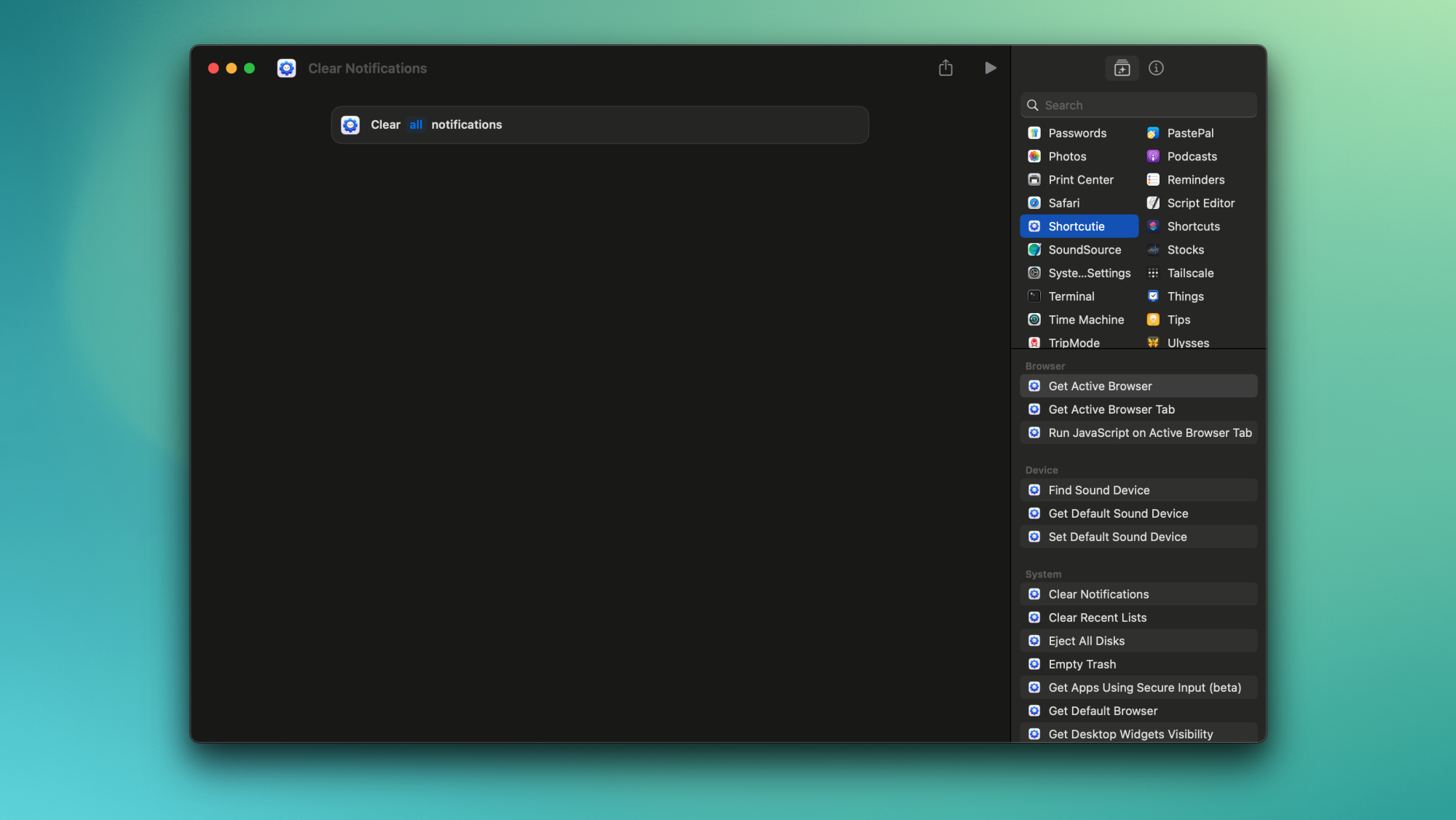
To create automations using Apple’s Shortcuts app on your Mac, you’re dependent on Apple’s support for various actions. While Shortcuts supports an array of useful actions, some aren’t in the app yet, such as clearing all notifications or quitting all apps. If you want to add a few more helpful actions to your Mac automations, consider Shortcutie ($6), a powerful extension for Shortcuts that lets you execute actions Apple doesn’t yet support.

Shortcutie itself has no interface. Once installed, all of its actions will appear in Apple’s Shortcuts app on your Mac. To access them, install the app, open Shortcuts, and select Shortcutie from the Apps tab in the right pane. The app requires Accessibility permissions to function, which is necessary because macOS’s strict sandboxing rules prevent apps from running many of the actions this app supports. (Note: only grant apps you trust, like Shortcutie, this permission.) Once you grant it access, you’ll find new, useful tools in Shortcuts, such as changing your default browser, clearing all notifications, hiding all windows, quitting all apps, and checking if your screen is being recorded, mirrored, or shared.

macOS supports all of these actions, but they aren’t available in Shortcuts, which prevents you from creating automation routines around these actions. Once you have Shortcutie, you can add these triggers to your shortcuts and execute complex automations that your Mac doesn’t otherwise support. Don’t forget that the Shortcuts app appears in the menu bar and you can run automations directly from the menu bar, too. That can make it much quicker and easier to run certain actions, such as the dreaded “clear all notifications.” When you combine this app with Shortery, which lets you run Mac automations based on various triggers, you can automate pretty much everything.

Actions from Shortcutie in the right pane of Apple's Shortcuts app for Mac.

Credit: Pranay Parab

Without Shortcutie, you can open the Notification Center and clear notifications, but macOS doesn’t always show the clear all button, forcing you to clear notifications one-by-one. With Shortcutie, I set up a simple automation, and in two clicks, I’m now able to clear all alerts. Similarly, quitting all apps is quite easy with the action added by this app. You normally don’t need to do this, but if your Mac has slowed down due to a memory leak or high ambient temperatures, Shortcutie’s quit all apps action offers a one-click method to reduce the burden on your computer. Here are some more useful actions from the app:

  • Empty Trash

  • Eject all disks

  • Clear recent lists (from menus)

  • Set grayscale mode

  • Show/hide desktop widgets

  • Get URL and title of the active browser tab

At the time of writing, Shortcutie supports 29 actions, and the developer, Sindre Sorhus, has promised to add more. The biggest concern is that Shortcutie relies on private APIs to access these actions and those can change at any point. The developer has promised to keep a tab on these changes and to support the app, but it does leave the app vulnerable to losing features. Regular updates should be able to fix any issues that may crop up in the future, but it’s something to keep in mind.

I’m not worried though, knowing the developer: Sorhus has created over 50 apps and utilities for Mac and iPhone (Lifehacker has covered many), so I expect he will continue to keep Shortcutie updated.

An enhanced version of Sayonara Wild Hearts for PS5 is out now

My dream of a Sayonara Wild Hearts sequel might never be fulfilled, but the sudden arrival of an enhanced version for PS5 just filled my heart on a dreary Monday. Publisher Annapurna Interactive announced the upgrade for the 2019 rhythm action game during its latest showcase.

The PS5 edition includes support for 4K visuals, 120 fps gameplay and haptic feedback via the DualSense controller. There’s also a new unlockable mode called Remix Arcade that’s only available on this PS5 version. Here, you’ll try to nail high scores across random chunks of levels with no loading time between each. Developer Simogo notes that the mode will get progressively faster to add to the challenge. 

Simogo had some downtime while figuring out its next big project after Lorelai and the Laser Eyes and the opportunity came up to bring Sayonara Wild Hearts to PS5. The PS4 version already works on the console and the team wasn’t really interested in only upgrading the fidelity. 

However, the studio “thought about the hardware and what type of experience that would only be possible on it and remembered that PlayStation 5 has a very fast SSD, which would allow for the type of quick loading we needed for our long lost Infinite Shuffle mode.” Along with adding some new art and sound assets, the renamed Remix Arcade has “a random element that [will] sometimes mirror the level visually to keep players on their toes,” the studio said.

Best of all, the enhanced edition for PS5 is a free upgrade from the PS4 version. Sayonara Wild Hearts is also available in the PlayStation Plus Game Catalog. Otherwise, it costs $13.

Sayonara Wild Hearts is one of my favorite games of all time, so I’m more than happy to have an excuse to play through its riotously fun, heart-mending story yet again. I’m tempted to plug my PS VR2 headset back in to let the stylized art and signature neon purple wash over my eyes as the dreamy pop soundtrack fills my ears.

Here’s hoping Annapurna brings the game back to iOS as well — it left Apple Arcade a few months ago. I need to have Sayonara Wild Hearts available at all times. It’s not enough to have it on PS5, Steam Deck, Switch and PC (can you tell I like this game a whole lot?).

This article originally appeared on Engadget at https://www.engadget.com/gaming/playstation/an-enhanced-version-of-sayonara-wild-hearts-for-ps5-is-out-now-174752837.html?src=rss

PSA: Amazon kills “download & transfer via USB” option for Kindles this week

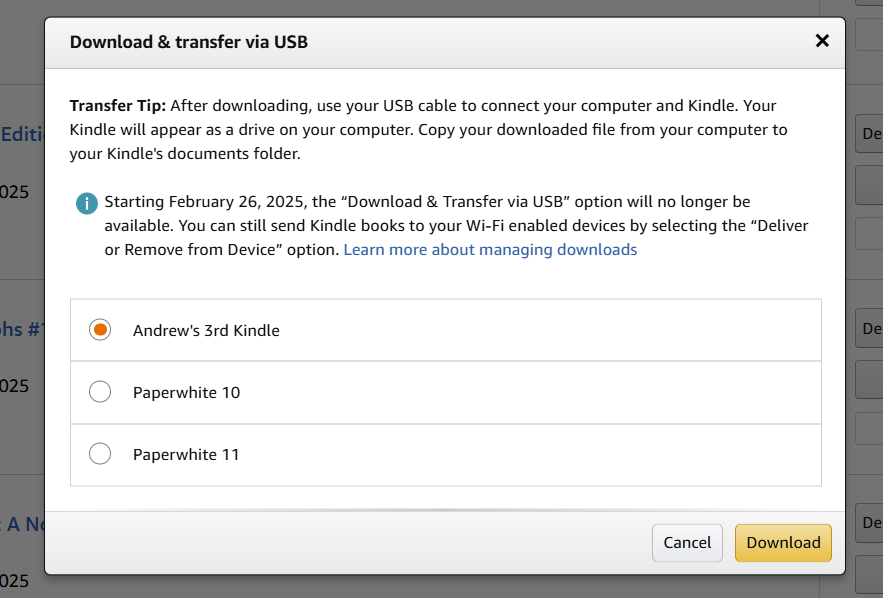
Later this week, Amazon is closing a small loophole that allowed purchasers of Kindle books to download those files to a computer and transfer them via USB. Originally intended to extend e-book access to owners of very old Kindles without Wi-Fi connectivity, the feature has also made it easier for people to download and store copies of the e-books they’ve bought, reducing the risk that Amazon might make changes to their text or remove them from the Kindle store entirely.

The “Download & transfer via USB” option on Amazon’s site is going away this Wednesday, February 26. People who want to download their libraries to their PC easily should do so within the next two days. This change only affects the ability to download these files directly to a computer from Amazon’s website—if you’ve downloaded the books beforehand, you’ll still be able to load them on your Kindles via USB, and you’ll still be able to use third-party software as well as the Send to Kindle service to get EPUB files and other books loaded onto a Kindle.


Downloading files to your PC through Amazon’s site is still possible, but it’s going away later this week.
Credit:
Andrew Cunningham

For typical Kindle owners who buy their books via Amazon’s store and seamlessly download them to modern or modern-ish Kindle devices over Wi-Fi, you likely won’t notice any change. The effects will be noticed most by those who use third-party software like Calibre to manage a local e-book library and people who have hopped to other e-reader platforms who want to be able to download their Kindle purchases and strip them of their DRM so they can be read elsewhere.

Read full article

Comments