Photoshop Is Officially Available on iPhone

“Photoshop” is synonymous with image editing, and for good reason. The app is an industry standard, and has been for over 30 years. But while Photoshop has been available on computers and tablets for some time now, those looking to edit images on their smartphones have had to make due with alternative programs—or simply stick to their other devices instead.

That changes today. As of Tuesday, Feb. 25, Photoshop is officially on iPhone. You can go to the App Store, search “Photoshop,” and see not just the usual alternatives—like Lightroom, Canva, and Facetune—but the real deal, too. Plus, the app itself is free, in addition to a number of “core imaging and design tools.” According to the company, that includes the following, free of charge:

  • Selections, layers and masks

  • Tap Select tool

  • Spot Healing Brush

  • Adobe Firefly AI features, like Generative Fill and Generative Expand

  • Integration with Adobe Express, Adobe Fresco, and Adobe Lightroom

  • Access to “hundreds of thousands” of free Adobe Stock assets

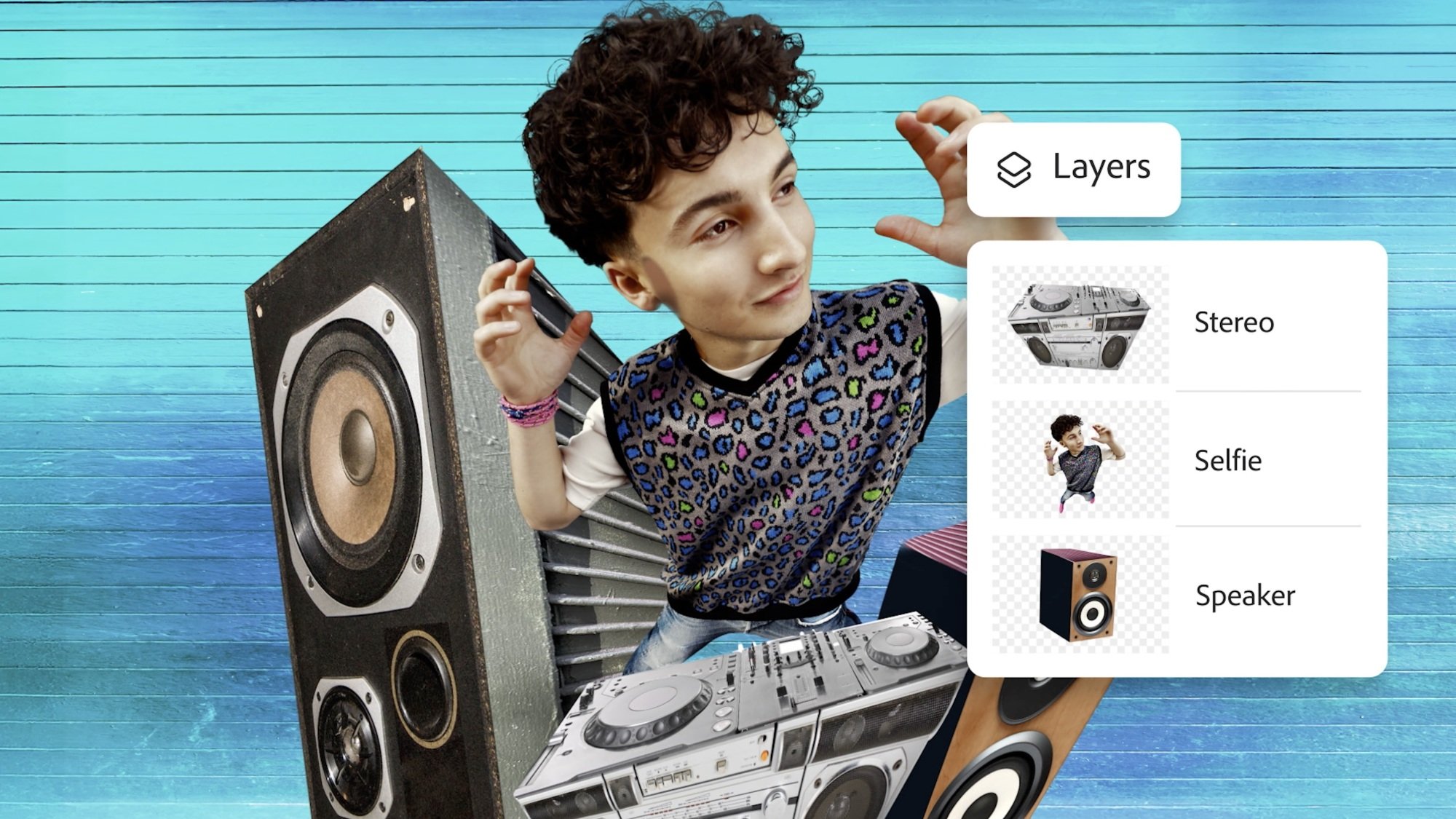
photoshop layer tools

Credit: Adobe

The company showed off a number of edit examples one might use the app for: using a masking tool to copy a subject from one image and paste it to another; using a “quick select brush” to isolate parts of an image from the final product; layering multiple images over one another to create a dramatic but realistic assortment of items around the subject; changing the color of one element of an image, while preserving the rest; and selecting objects to quickly remove them from the scene.

Of course, Adobe is also pushing its AI features, as well—namely, Generative Fill. In one demo, a rep wants to insert an island onto an image of an ocean. They use the lasso tool to highlight where in the image they want that island to be, then use Generative Fill to create a grassy piece of land with AI. In another, Generative Fill is used to remove a background, replacing it with the sky seen in a different part of the image.

Obviously, if you have previous Photoshop experience, you should be quite familiar with the tools and features of this version of the app. However, it may take you a moment to get your bearings: Based on press images and videos, this is definitely a mobile app, meaning its UI looks like many other image editing apps you might have used before. As such, it might take some trial and error before you understand where all of your usual options and features are. But based on what I see, this is the typical Photoshop experience—just distilled into mobile form.

There are more features (if you pay for them)

While Photoshop and its “core” features are free to download and use on iPhone, there are more features and perks if you choose to pay. Adobe now has a “Photoshop Mobile and Web plan” for customers who want more on the iOS, iPadOS, and web versions of the app. That includes:

  • Access to Photoshop on the web

  • Expanded access to Firefly-powered AI tools, like Generate Similar and Reference Image

  • Access to over 20,000 fonts (or import your own)

  • Object Select for precise selections

  • Magic Wand for targeted adjustments

  • Remove Tool

  • Clone Stamp

  • Content-Aware Fill

  • Advanced blend modes for styling your image

  • “Lighten” and “Darken” to lighten or darken different parts of an image

This plan costs $7.99 per month, or $69.99 per year. If you already pay for Photoshop, you now have all of these perks included in your plan.

A new Adobe Photoshop app is coming to iPhones

Adobe has launched a brand new Photoshop app for iPhones, which it’s also releasing for Android later this year. While there’s already a Photoshop Express for mobile, the company says the new app was “designed from the ground up” with more features and has an easy-to-use mobile interface. The app, which is free to download and use, comes with Photoshop’s core imaging and design tools. Users can make selections, layers and masks in the app to combine or blend images. They can also replace parts of an image with the Tap Select tool, remove elements from a photo with the Spot Healing Brush and add new elements by using its generative AI tools, such as Generative Fill and Generative Expand. 

Users will have access to free Adobe Stock assets and can link their apps with other Adobe applications, including Express, Lightroom and Fresco. Adobe is, as expected, offering premium upgrades to the app’s capabilities for those willing to pay for the new Photoshop Mobile and Web plan. The $8-a-month service will add features to the app on mobile and iPad and will also include access to Photoshop on the web. Users who already have an existing Photoshop subscription, however, will also be able to enjoy the new Photoshop app’s premium features. 

The premium features included with the new plan include the ability to transition editing from Photoshop mobile to the web if a user needs a bigger screen or more precise controls. Users are also getting extra generative AI features, including Adobe Firefly’s Generate Similar, which allows users to create new variations of an existing image. Subscribers will get access to 20,000 fonts, be able to make precise selections of people and objects with the Object Select too, isolate objects with the Magic Wand, erase elements with the Remove Tool, copy and clone certain elements with the Clone Stamp and fill portions of an image with Content-Aware Fill. They will also be able to control an image’s transparency and lighten or darken certain areas of an image. The new app for iPhones is already available from the App Store worldwide.

This article originally appeared on Engadget at https://www.engadget.com/apps/a-new-adobe-photoshop-app-is-coming-to-iphones-140003461.html?src=rss

Qualcomm Unveils Dragonwing Brand For Intelligent IoT, Networking And More

Qualcomm Unveils Dragonwing Brand For Intelligent IoT, Networking And More
If you are reading this, there’s a pretty good chance that you are already familiar with Qualcomm’s Snapdragon branding. Snapdragon is the dominant mobile chip platform in Android-based smartphones and Arm-based Copilot+ PCs, with solutions running the gamut from flagship silicon (we’re looking at you, Snapdragon 8 Elite) to entry-level chips,

Chegg Sues Google For Hurting Traffic With AI

Chegg has filed suit in federal district court against Google, claiming that AI summaries of search results have hurt the online education company’s traffic and revenue. From a report: The legal move come nearly two years after former CEO Dan Rosensweig said students engaging with OpenAI’s ChatGPT assistant were cutting into Chegg’s new customer growth. Chegg is worth less than $200 million, and in after-hours trading Monday, the stock was trading just above $1 per share. Chegg has engaged Goldman Sachs and will look at strategic options, including getting acquired and going private, President and CEO Nathan Schultz told analysts on a Monday earnings call. Chegg’s shares have fallen 99% since its peak in 2021.

Read more of this story at Slashdot.

NVIDIA Issues Statement On RTX 5080 And 5070 As More ROPs Go Missing

NVIDIA Issues Statement On RTX 5080 And 5070 As More ROPs Go Missing
It’s official—following the first user report of a GeForce RTX 5080 Founders Edition graphics card to display missing render operation pipeline (ROP) hardware in the popular GPU-Z utility, NVIDIA has confirmed that it too is affected by a rare “production anomaly” affecting half a percent (0.5%) of all GeForce RTX 50 series cards. The confirmation

Educational tech company Chegg sues Google over AI Overviews

Educational tech company Chegg has sued Google in federal court claiming that its “AI Overviews” that appear ahead of search results have hurt its traffic and revenue. In order to be included in Google’s search results, Chegg alleges, it must “supply content that Google republishes without permission in AI-generated answers that unfairly compete for the attention of users on the internet in violation of antitrust laws of the United States.” 

Previously, publishers like The New York Times have sued AI companies over copyright infringement, accusing them of training large language models (LLMs) on IP material without permission. However, Chegg is taking another approach, instead accusing Google of abusing its monopoly position to force companies to supply materials for its “AI Overviews” on its search page. Failing to do so, it says, means it could effectively be excluded from Google Search altogether. 

Chegg included a screenshot of a Google AI Overview that takes details from Chegg’s website without attribution, though the page in question appears lower down in the search results.

Google told CNBC that it would defend itself against the suit. “Every day, Google sends billions of clicks to sites across the web, and AI Overviews send traffic to a greater diversity of sites,” a spokesperson said.

Google’s use of its monopoly power in this way “amounts to a form of unlawful reciprocal dealing that harms competition in violation of the Sherman Act,” Chegg claimed, while citing a federal judge’s ruling from last year that Google is a monopolist in search. The tech-ed company said that it is particularly affected by these practices because the “breadth, depth, quality and volume of Chegg’s educational content holds enormous value for artificial intelligence applications.” 

Chegg is the latest in a long list of companies suing Google over alleged misappropriation of IP content, though as mentioned, using the Sherman Act is a novel approach. As of January 2025, 38 copyright lawsuits related to AI have been filed in the US, according to a site keeping track of the claims — so far with mixed results. 

This article originally appeared on Engadget at https://www.engadget.com/ai/educational-tech-company-chegg-sues-google-over-ai-overviews-133017759.html?src=rss

What People Are Getting Wrong This Week: The Gold at Fort Knox

We may earn a commission from links on this page.

Last week during an interview on Air Force One, a reporter asked Donald Trump whether Elon Musk was planning to cut the Pentagon’s budget when he’s finished with the National Park Service and other departments. Trump responded that Musk will instead be looking at Fort Knox.

I’m assuming there was a uncomfortably long pause before the reporter asked why. “To make sure the gold is there,” Trump responded.

Whether the gold is actually at Fort Knox is a question Musk had posed a few days previously in this post on X:

This has led many to believe that something happened to the gold at Fort Knox. No one knows exactly what happened, but something. Those people are (probably) wrong.

Of course the gold is still at Fort Knox

The most likely (and boring) Fort Knox scenario: all 147.3 million ounces of U.S. gold are sitting there, waiting for you to dive in like Scrooge McDuck. All the bars, half of the U.S. total gold reserves, are safe in a heavily guarded, secretive vault on a Kentucky military installation, just as they’ve been since the 1940s. According to Treasury Secretary Scott Bessent, there is an audit of Fort Knox every year and that “all the gold is present and accounted for.”

“The only gold removed has been very small quantities used to test the purity of gold during regularly scheduled audits. Except for these samples, no gold has been transferred to or from the Depository for many years,” confirms the U.S. Mint.

But isn’t that exactly what the U.S. Mint would say? Maybe someone has been stealing all the gold, or the government has been secretly selling the people’s bullion for years! Yeah, probably not.

Conspiracy theories about Fort Knox

Musk and Trump are not saying anything new—murmurs of “the gold is not really there” have been common among conspiracy theorists since the 1940s, soon after construction was completed on The United States Bullion Depository and the gold was shipped from the coasts to the heartland to protect it from theoretical invaders.

Here are only some of the conspiracy theories about Fort Knox:

  • 1952: The Daughters of the American Revolution allege that the gold has been stolen from Fort Knox. President Truman invites them to inspect the vault but they decline.

  • 1973: Dr. Peter Beter (his actual name) published The Conspiracy Against the Dollar: The Spirit of the New Imperialism, a book that contends “powerful Americans have secretly permitted $20 billion worth of gold to be removed from Ft. Knox. According to Beter, they took it out through a secret tunnel in the vault.

  • 2009: Online cranks assert that Fort Knox’s gold bars were replaced with tungsten-filled forgeries so the real gold could be sold by the Clinton administration.

  • 2010: Ron Paul questions whether there is gold at Fort Knox.

  • Unknown: There are aliens there.

These conspiracy theories spring from a weird mix of monetary policy disagreements that date back to the 1800s, hucksters trying to get people to invest in gold schemes, and the questions some people have about anything secret that “the government doesn’t want you to know.” Like everything else, the internet gives people time and space to spread and modernize ideas, but the Trump/Musk quotes are just warmed-over bullshit. And this isn’t even the golden age of Fort Knox conspiracy theories. That was during the 1970s, when fear about our nation’s gold was so pervasive, the Treasury Department had a brief moment of transparency.

That time the press was allowed into Fort Knox

It’s not on many people’s shelves in 2025, but Dr. Peter Beter’s (again, really his name) The Conspiracy Against the Dollar was influential enough in the early 1970s that tabloids picked up on his claims, and soon members of Congress were getting calls from constituents, calling for proof that the Fort Knox gold reserves were still there. So in 1974, the Treasure Department sighed and said, “fine,” then invited members of Congress and the press to visit Fort Knox to see for themselves. This was the first time anyone other than treasury employees had been allowed inside the vault since a limited audit was conducted in 1953.

A handful of congresspeople and about 120 members of the media were escorted behind 20-ton steel doors and shown the gold bars. They picked them up. Weighed them. They even got to see the secret tunnel, an escape hatch that ends in the building, a failsafe for anyone accidentally locked in the vault.

The press took pictures and shot film of all of it:

Even the most skeptical congresspeople who toured the vault basically concluded “looks like the gold’s there,” and so, it seems, did most Americans. But for diehard conspiracy theorists (and dummies) no amount of evidence is enough. Some derided the visit as a “show audit” that proved nothing, and others concocted “the bars are filled with tungsten” theories because even if people saw it and took pictures, it’s still not true.

Trump’s Treasury Secretary’s 2017 visit to Fort Knox

Treasury Secretary Scott Bessent recently has said he would arrange an inspection for any senator who is interested in seeing the vaults. Steven Mnuchin, Trump’s first treasury secretary, had a similar policy. In 2017, Mnuchin, Mitch McConnell, and other officials visited Fort Knox to review the bullion. Their visit included a viewing of the total eclipse as an added bonus. What good timing.

Here’s Mitch McConnell with gold bars. Adorable!

Mitch McConnell at Fort Knox

Credit: US Treasury Department

Apparently you can sign your name when you visit Fort Knox, as Mnuchin does here.

Steven Mnuchin at Fort Knox

Credit: US Treasury Department

The exact purpose of Mnuchin and company’s Fort Knox outing isn’t clear, but I’m sure they were conducting important governmental business, not just sightseeing, and if they had noticed any missing bars, they would have alerted the proper authorities.

Documents, crowns, and lots of narcotics: strange things stored at Fort Knox

While the gold seems to be there, alien bodies are (probably) not stored at Fort Knox, but that doesn’t mean we don’t put weird things down there sometimes.

Back in the 1940s, with World War II ravaging Europe, the U.S. government moved the signed original Constitution of the United States, Declaration of Independence, Articles of Confederation, Lincoln’s Second Inaugural Address, and drafts of Lincoln’s Gettysburg Address into the vault for safe-keeping. The vault was used to store the Crown of St. Stephen, until we sent it back to Hungary in 1978.

Until recently, Fort Knox was home to the U.S.’s strategic reserves of pain-killers: At one time, 68,269 pounds of opium and morphine were stored in the vault—that’s a lot of narcotics! It isn’t stored there any longer, and where it went is not public. Why don’t you look into that, Elon Musk?

Still in the vault are ten 1933 Double Eagle gold coins, a 1974-D aluminum cent, and twelve gold (22-karat) Sacagawea dollar coins that flew on the Space Shuttle Columbia in 1999.

Does the gold in Fort Knox even matter?

It’s cool that we have a great huge Smaug-sized treasure trove in the U.S., but does it do us any good? The gold bars stored in Fort Knox have been gathering dust since the early 1940s, and we don’t do anything with them and they don’t affect anything tangible. Our money hasn’t been directly tied to gold since the 1930s (or 1970s; it’s complicated) so in a sense it doesn’t matter whether all the bars are filled with tungsten. The piles of gold serve mainly as a symbolic representation of our nation’s wealth and stability—gold is very shiny, after all. Consider this: Fort Knox’s gold is worth $435 billion, total. The U.S. nation debt is $36.22 trillion. So even if we were to sell it all tomorrow, it would be a drop in the bucket. Like the cash hidden under the nation’s blanket, Fort Knox gold is our “if things get really bad, we still have this.” It’s the money in the banana stand. If Elon Musk opens the vault doors and does find nothing there, I hope he’s smart enough to keep it to himself.

Teaching about AI – Teacher symposium

AI has become a pervasive term that is heard with trepidation, excitement, and often a furrowed brow in school staffrooms. For educators, there is pressure to use AI applications for productivity — to save time, to help create lesson plans, to write reports, to answer emails, etc. There is also a lot of interest in using AI tools in the classroom, for example, to personalise or augment teaching and learning. However, without understanding AI technology, neither productivity nor personalisation are likely to be successful as teachers and students alike must be critical consumers of these new ways of working to be able to use them productively. 

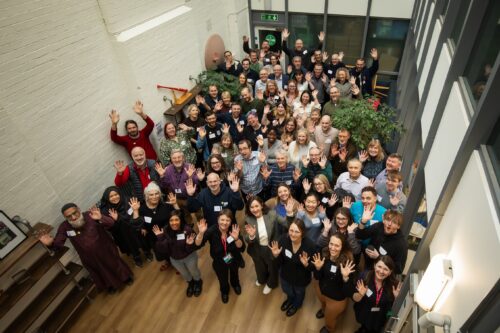
Fifty teachers and researchers posing for a photo at the AI Symposium, held at the Raspberry Pi Foundation office.
Fifty teachers and researchers share knowledge about teaching about AI.

In both England and globally, there are few new AI-based curricula being introduced and the drive for teachers and students to learn about AI in schools is lagging, with limited initiatives supporting teachers in what to teach and how to teach it. At the Raspberry Pi Foundation and Raspberry Pi Computing Education Research Centre, we decided it was time to investigate this missing link of teaching about AI, and specifically to discover what the teachers who are leading the way in this topic are doing in their classrooms.  

A day of sharing and activities in Cambridge

We organised a day-long, face-to-face symposium with educators who have already started to think deeply about teaching about AI, have started to create teaching resources, and are starting to teach about AI in their classrooms. The event was held in Cambridge, England, on 1 February 2025, at the head office of the Raspberry Pi Foundation. 

Photo of educators and researchers collaborating at the AI symposium.
Teachers collaborated and shared their knowledge about teaching about AI.

Over 150 educators and researchers applied to take part in the symposium. With only 50 places available, we followed a detailed protocol, whereby those who had the most experience teaching about AI in schools were selected. We also made sure that educators and researchers from different teaching contexts were selected so that there was a good mix of primary to further education phases represented. Educators and researchers from England, Scotland, and the Republic of Ireland were invited and gathered to share about their experiences. One of our main aims was to build a community of early adopters who have started along the road of classroom-based AI curriculum design and delivery.

Inspiration, examples, and expertise

To inspire the attendees with an international perspective of the topics being discussed, Professor Matti Tedre, a visiting academic from Finland, gave a brief overview of the approach to teaching about AI and resources that his research team have developed. In Finland, there is no compulsory distinct computing topic taught, so AI is taught about in other subjects, such as history. Matti showcased tools and approaches developed from the Generation AI research programme in Finland. You can read about the Finnish research programme and Matti’s two month visit to the Raspberry Pi Computing Education Research Centre in our blog. 

Photo of a researcher presenting at the AI Symposium.
A Finnish perspective to teaching about AI.

Attendees were asked to talk about, share, and analyse their teaching materials. To model how to analyse resources, Ben Garside from the Raspberry Pi Foundation modelled how to complete the activities using the Experience AI resources as an example. The Experience AI materials have been co-created with Google DeepMind and are a suite of free classroom resources, teacher professional development, and hands-on activities designed to help teachers confidently deliver AI lessons. Aimed at learners aged 11 to 14, the materials are informed by the AI education framework developed at the Raspberry Pi Computing Education Research Centre and are grounded in real-world contexts. We’ve recently released new lessons on AI safety, and we’ve localised the resources for use in many countries including Africa, Asia, Europe, and North America.

In the morning session, Ben exemplified how to talk about and share learning objectives, concepts, and research underpinning materials using the Experience AI resources and in the afternoon he discussed how he had mapped the Experience AI materials to the UNESCO AI competency framework for students.

Photo of an adult presenting at the AI Symposium.
UNESCO provide important expertise.

Kelly Shiohira, from UNESCO, kindly attended our session, and gave an invaluable insight into the UNESCO AI competency framework for students. Kelly is one of the framework’s authors and her presentation helped teachers understand how the materials had been developed. The attendees then used the framework to analyse their resources, to identify gaps and to explore what progression might look like in the teaching of AI.

Photo of a whiteboard featuring different coloured post-it notes displayed featuring teachers' and researchers' ideas.
Teachers shared their knowledge about teaching about AI.

Throughout the day, the teachers worked together to share their experience of teaching about AI. They considered the concepts and learning objectives taught, what progression might look like, what the challenges and opportunities were of teaching about AI, what research informed the resources and what research needs to be done to help improve the teaching and learning of AI.

What next?

We are now analysing the vast amount of data that we gathered from the day and we will share this with the symposium participants before we share it with a wider audience. What is clear from our symposium is that teachers have crucial insights into what should be taught to students about AI, and how, and we are greatly looking forward to continuing this journey with them.

As well as the symposium, we are also conducting academic research in this area, you can read more about this in our Annual Report and on our research webpages. We will also be consulting with teachers and AI experts. If you’d like to ensure you are sent links to these blog posts, then sign up to our newsletter. If you’d like to take part in our research and potentially be interviewed about your perspectives on curriculum in AI, then contact us at: rpcerc-enquiries@cst.cam.ac.uk 

We also are sharing the research being done by ourselves and other researchers in the field at our research seminars. This year, our seminar series is on teaching about AI and data science in schools. Please do sign up and come along, or watch some of the presentations that have already been delivered by the amazing research teams who are endeavouring to discover what we should be teaching about AI and how in schools

The post Teaching about AI – Teacher symposium appeared first on Raspberry Pi Foundation.

Apple Music deal: Get six months of access for only $3

If you’re currently in the market for a music streaming subscription, have we got a deal for you. Pick up six months of Apple Music for just $3. That’s not a typo. This discount brings the price down to, checks math, $0.50 per month. The cost is typically $11 per month, so this sale represents a savings of more than $60. You’ve got a few more days to grab it as well, since the deal runs through February 27.

The usual caveats apply. This is an enticement to bring in new subscribers, so current members are out of luck (myself included.) It’s also not available for those who currently qualify for a three-month free trial of the service. Finally, this deal must be redeemed on an Apple device, and only iPhones running iOS 16 and later, Mac computers running MacOS 13 and later and the Vision Pro headset are applicable here.

Apple Music is a fine little streaming platform. The audio quality is on point, with lossless streaming available at no charge, and the UI is easy-to-navigate. It may not allow exclusive access to Joe Rogan episodes, like Spotify, but that’s because Apple Music seems dedicated to, well, music.

To that end, the app places a heavy emphasis on curation. There are all kinds of playlists that were created by actual humans, and they receive regular updates. Many artist pages include playlists of deep cuts, essential hits and more. Albums are often accompanied by a review or synopsis, which is a nice touch. The app also gives access to several live radio stations that are hosted by actual DJs, and not AI simulacrums.

Apple Music still uses an algorithm for many of its custom playlists unique to each user, but the human touch is still appreciated. The Spotify algorithm for discovering new music is a bit more adventurous, but the Apple algo gets the job done.

On the downside, the service works best on Apple devices. There’s also no free tier, which is something of a bummer. To that end, make sure you cancel before the six months runs out, if it’s not your bag. Otherwise, you’ll start getting charged $11 each month.

Follow @EngadgetDeals on Twitter and subscribe to the Engadget Deals newsletter for the latest tech deals and buying advice.

This article originally appeared on Engadget at https://www.engadget.com/deals/apple-music-deal-get-six-months-of-access-for-only-3-130027527.html?src=rss

The best security cameras for 2025

Security cameras can give you peace of mind by watching things when you’re out of the house. They can also help keep tabs on your pets’ actions or let you check in on other parts of your property like your backyard. Set them up outdoors or at a window and you can get notifications when someone’s delivering a package or heading to your door.

Of course, anything that takes footage in and around your home is a privacy risk, so you’ll want to look for security cameras with proper privacy features. And if you’ve already got some smart devices, it’s important to know whether your new camera will work with them. Some cameras are practically useless without a subscription, while with others, the subscription is just nice to have. There’s a lot to consider — so we tried out over a dozen well-regarded models, filming our cats, dogs and other household members for weeks to help you pick the best security camera for your home.

One of the first things you’ll want to consider before buying a security camera is where you intend to put it. Do you want an outdoor or indoor setup, or cameras that can work in both environments? That’s the first decision to make, since not all cameras are designed to be weatherproof. Next, consider where those cameras will live: do you need ones that can easily mount to the side of your home or above your garage? Do you want cameras in every room of your house, installed up in a ceiling corner out of reach? Should those cameras be able to swivel and turn on their own to track subjects or give you a wider field of view?

Check the specifications for the cameras you’re considering to see if they come with any mounting hardware in the box, or if you’ll need special attachments to get the capabilities you want. For example, an extra feature like solar power for outdoor cameras typically requires buying the solar panel separately, or buying a configuration of the camera that includes the panel in the box.

Another hardware component to consider is the proper connection for local storage. Many security cameras give you the option to save footage locally by connecting a thumb drive or a microSD card either to the camera itself or to its base station. If you don’t intend on using cloud storage (which typically comes with a subscription cost), choosing a security camera system that allows for local storage will be key.

Battery life considerations will only apply to wireless cameras, so you’ll want to make note of the expected battery life of any wireless camera you’re considering. For most that use rechargeable lithium-ion batteries, it will come down to how “busy” the camera will be on a regular basis recording video. Some could estimate a minimum battery life of a couple weeks to one month with high usage, but you could get even more than that if the camera is in a low-traffic area.

I personally think you should be getting at least three weeks of battery life out of any rechargeable-battery security camera — anything less and it becomes a hassle just to keep the device in working order. Also, be prepared to access your cameras (including those mounted in high places) whenever you need to recharge their batteries. Scant few options today (looking at you, Blink), run on AA or AAA batteries, and those tend to last up to two years before you need to replace them.

Nearly every security camera can send you a notification when it detects motion. Most also offer more sophisticated alerts, like person, package, pet and vehicle detection, though those sometimes require a subscription. You can decide under which conditions you’d like to be alerted as well. Many cameras will let you set location preferences, using your phone to discern where you are, so you’re only alerted when you’re away. Some can then be programmed to turn off completely when you’re home, or you can decide to keep the camera recording without alerting you of activity. Systems without location tracking can be armed on a schedule or manually turned on and off.

Almost every security camera can listen as well as see — some can send you an alert when specific sounds are detected, such as breaking glass, barking dogs or fire alarms. Those microphones also let you hear what’s going on in the room, while built-in speakers allow for two-way conversations.

If viewing events at night is important to you, you’ll want to consider a camera’s ability to see in the dark. Most use infrared LEDs to detect motion and record events after the sun goes down. Infrared will work in total darkness, but can only produce a black and white image. A few cameras can capture color video at night through a combination of larger sensors and onboard image processing, but they won’t work in total darkness. A couple of the options we tried have an onboard spotlight you can manually turn on to light up a space for a better picture.

Without exception, every camera we tested has an optional subscription component. These typically run between $3 and $15 per month, though some offer a discount if you pay for a year up front. Advanced (and sometimes basic) features are paywalled behind these subs, so if you’re looking for things like person detection, extended live feeds, cloud storage, event labeling and longer event history, you’ll want to check whether you get those for free or only if you pay up.

Cloud storage for video clips beyond a day or so is the most common subscription-only feature, but some cameras have the option of using local storage with a microSD card or flash drive. Cameras that work with Apple’s HomeKit will usually let you store clips using your iCloud+ plan, so you might not need a separate subscription for those. To help make sense of whether you need to pay for a plan or not, we detail the monthly prices and membership features for each pick below so you can gauge the full cost of the level of monitoring you want.

The majority of security cameras use cloud storage for clips. Even those that store your footage locally on SD cards or USB drives are usually connected to the world at large through Wi-Fi. Anything that’s in communication with other networks has the potential to be accessed by bad actors. Manufacturers take measures such as encrypting video before it’s sent to the cloud and requiring two-factor authentication to sign into any account to make systems safer. Users can go one step further by regularly installing security updates and making sure the passwords they use are strong and not reused elsewhere.

As for keeping your personal activity private, all cameras have a disarm feature, but some can automatically turn off when you are home if you share your location. Others will also let you set privacy zones and won’t capture footage or send alerts for movements in designated areas. That could be a part of the house you don’t want recorded or, for outdoor coverage, parts of your neighbor’s yard or driveway.

All the units we tested have indicator lights that turn on when a live view is being accessed or recording is taking place. But you’ll have to check what your particular camera’s LEDs mean, as nearly every one is different. Recording in progress is sometimes indicated with a red light, sometimes that light is blue, and on other cameras, it’s green. Some security cameras let you disable the recording light too, if you don’t want to alert would-be intruders that you’re watching them.

If this is your first foray into smart home gear, you just need to ensure that the camera you buy will work with your phone — and all of our top picks here have apps that work with both iOS and Android. If you already have TVs, smart monitors, home hubs, doorbells and other smart devices, check that what you buy now will work with what you already have if you want the most seamless system.

We’ve listed which of the three major smart home ecosystems each of our picks will work with, but in general, Alexa has the widest compatibility with third party brands, followed by Google. Apple’s HomeKit has a smaller number of compatible cameras on the market, but the list is still sizable enough and includes well-regarded brands like Ecobee, Logitech and Aqara, so you’ll likely be able to find one with the features you want.

This article originally appeared on Engadget at https://www.engadget.com/home/smart-home/best-security-camera-130035012.html?src=rss

This Outdoor-Friendly JBL Speaker Is $90 Right Now

We may earn a commission from links on this page. Deal pricing and availability subject to change after time of publication.

The JBL Flip 6 is currently $89.95 on Woot (and will remain so for the next four days or until stocks last)—$40 off its usual $129.95 price tag, and if you’re a Prime member, you also get free standard shipping (otherwise, it’s $6). It’s available in black, white, teal, gray, and green, giving you a decent range of options to match your vibe. The design is classic JBL—cylindrical, durable, and built to be tossed into a bag without worry. Its passive radiators on both ends let you feel the bass in your hands (earning itself a place in PCMag’s “Best Outdoor Speakers for 2025” roundup). Just don’t expect a true subwoofer experience; it’s still a compact speaker, after all.

Inside, the Flip 6 packs a 20-watt woofer and a 10-watt tweeter, covering a frequency range of 63Hz to 20kHz. It connects via Bluetooth 5.1 and supports AAC and SBC Bluetooth codecs, but not AptX, so audiophiles looking for higher-quality streaming may want to look elsewhere. The top panel houses volume and playback controls, though the multi-function button weirdly only lets you skip forward—not back. JBL’s PartyBoost feature is also here, letting you link multiple compatible JBL speakers for a bigger sound. Battery life is estimated at around 12 hours, but that depends on how loud you like your music. Crank it up, and you’ll burn through that charge much faster. There’s no speakerphone function or aux input, which might be a dealbreaker if you like having wired options.

Durability is where the Flip 6 shines—with an IP67 rating, it’s fully dust-proof and waterproof, meaning it can survive a pool dunk and even float (though don’t expect Bluetooth to work well underwater). It also comes with a 90-day Woot Limited Warranty for added peace of mind. JBL’s companion app gives you access to customizable three-band EQ and PartyBoost controls, though the app itself is pretty barebones. Sound-wise, the Flip 6 delivers impressive low-end depth, and at moderate volumes, the bass is strong without distortion. Push it too high, though, and its digital signal processing (DSP) kicks in, thinning out the lows, according to this PCMag review. If you considering alternatives, the Sony SRS-XB23 might be worth checking out at around $95.

Note: This item can’t be delivered to Alaska, Hawaii, and PO Box addresses.