
KiCad, the free open-source suite for electronic computer-aided design, announced new 9.0.0 release a few days ago.
Monthly Archives: February 2025
OSI’s Continually Changing Election Story
As OSI attempts to do damage control on social media without admitting that it made a mistake that needs to be rectified, more evidence surfaces indicating that the organization might be trying to change facts after the fact.
The post OSI’s Continually Changing Election Story appeared first on FOSS Force.
DOGE workers quit rather than help Musk “dismantle critical public services”
Upheavals within the US government continued today as a group of technology experts announced their resignations. These federal employees had originally worked for the United States Digital Service, a tech-focused department created under the Obama administration. About 40 people from the original Digital Service staff were fired by the Elon Musk-led team known as DOGE earlier this year, and the remaining 65 employees were incorporated into his unit. Today, 21 of those people resigned.
“We will not use our skills as technologists to compromise core government systems, jeopardize Americans’ sensitive data, or dismantle critical public services,” the former employees wrote in a resignation letter obtained by the Associated Press. “We will not lend our expertise to carry out or legitimize DOGE’s actions.”
The Digital Services director, Anne Marshall, also resigned from her post last week, stating in a public letter that “This is not the mission I came to serve.”
Both Marshall and the participants in today’s group resignation raised concerns that people from Musk’s outfit do not have the knowledge or desire to continue Digital Services’ mission of developing and maintaining digital resources for Americans.
This article originally appeared on Engadget at https://www.engadget.com/cybersecurity/doge-workers-quit-rather-than-help-musk-dismantle-critical-public-services-194237479.html?src=rss
New Lego T-Rex Is Over 3 Feet Long And Contains 3K+ Pieces

Lego and Universal just announced a new Jurassic Park Lego set, and this one is a biggie. In a few months you’ll be able to own and build a massive T-Rex skeleton complete with moving tail and jaw. You’ll just need to make some space for this three-foot monster.
Most US Workers Avoid AI Chatbots Despite Productivity Benefits, PEW Finds
Most American workers are not embracing AI chatbots in their jobs, with 55% rarely or never using these tools and 29% completely unfamiliar with them, according to a Pew Research Center survey released Tuesday.


Only 16% of workers report regular use of AI chatbots like ChatGPT, Gemini or Copilot. Adoption is highest among younger workers (23% of those aged 18-29) and those with post-graduate degrees (26%). Among users, research (57%), editing content (52%), and drafting reports (47%) top the list of applications. While 40% find chatbots extremely or very helpful for working faster, just 29% say they significantly improve work quality.
For the majority who don’t use AI chatbots, 36% cite lack of relevance to their job as the primary reason. Employer attitudes remain largely neutral, with half neither encouraging nor discouraging usage. The technology sector leads in workplace adoption, with 36% of employers actively promoting chatbot use, followed by financial services (24%).
Read more of this story at Slashdot.
Wheel of Time‘s Rosamund Pike and Josha Stradowski on Season 3’s Sky-High Stakes

The Last Battle looms closer when the Prime Video series returns, and Moiraine and Rand are at the center of it.
You Can Finally Set a Passcode to Lock Your Garmin Watch
We may earn a commission from links on this page.
Garmin is introducing a feature to many of its watches that Apple Watch users have been able to enjoy for a while. That’s a device passcode, so you can lock your data when your watch isn’t on your wrist. The feature will be rolling out to Fenix, Forerunner, Venu, and Vivoactive users, or you can get it right now with the beta program.
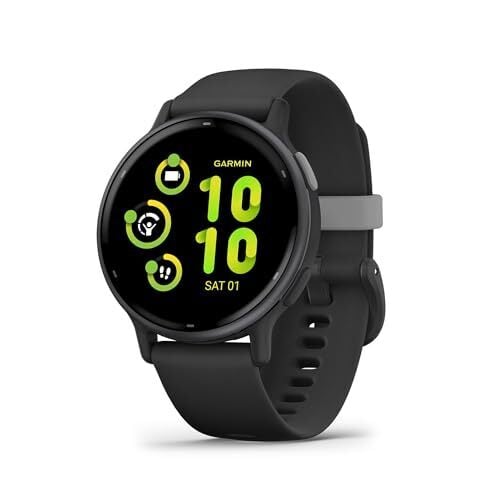
How the Garmin device passcode works
In the old setup—what you have right now if you aren’t on the beta program—devices that have a “wallet” feature will ask you to set up a passcode to use the wallet. Then, when you tap your watch to use Garmin Pay at a store checkout, you’ll have to enter a four-digit code.
The new update adds the ability to lock your entire watch, not just the wallet. Here’s how to turn it on:
-
Enroll in the beta program (more about that below)
-
Go into your Settings menu
-
Select System
-
Under Passcode, you’ll have the option for “On” or “Wallet only.” Select “On” if you want to have to enter the passcode each time you put your watch on.
What you can and can’t do with a Garmin passcode
With the passcode enabled, you’ll have to punch in your code when you put your watch on, but otherwise things will work as usual—for you.
For someone who doesn’t know the code, they can pick up the watch and look at it, but most things beyond the watch face will be locked behind the passcode. To a stranger who doesn’t know the code, here’s what is still available:
-
The watch face is visible as usual
-
The light button works to turn the watch face or light on and off
-
If an activity was running when you took the watch off, it will remain running
-
You can still answer a phone call
-
The flashlight and emergency assistance shortcuts still work
And here is what is not:
-
The glances (data you reach by scrolling down from the watch face) are locked
-
The settings menu is locked
-
The activity menu is locked, so you can’t start a new activity
-
The shortcuts menu (hold the top left button on a Forerunner) only contains five options: power off, lock device, turn the touchscreen on or off, flashlight, and emergency assistance.
-
Everything else that might be on that menu, like your wallet, timers, find my phone, etc.—all are missing.
Which Garmin watches are getting the device passcode feature?
Garmin says that the following watches are getting the device passcode feature, so long as you are enrolled in the beta, you have the latest beta software installed, and you have the most recent version of the Garmin Connect app:
-
Enduro 3
-
Fenix 8 (AMOLED or Solar) and Fenix E
-
Forerunner 165, 255, 265, 955, and 965, and their variations (including S and Music)
-
Venu 3 and 3S
-
Vivoactive 5
How to enable the beta to get the passcode feature
If you like getting new Garmin features, I’d recommend signing up for the beta. I haven’t found things to be buggy, although that’s always a risk with any beta program.
Garmin’s instructions for enrolling in the beta program are here. Basically, you’ll use your Garmin Connect app to select your device, then tap Join Beta Software Program, and agree to the terms.
Within an hour, you should be able to install the latest software. To check for an update at any time, go into the Settings menu on your device, then System, Software Updates, and Check for Updates.
Boomers Are Still Reacting To Kendrick Lamar’s Super Bowl Performance On TikTok

DoorDash Paying Drivers $17M for Stolen Tips

The payment is part of a settlement with the New York Attorney General.
Ubisoft Responds To Game Footage Leak Of Assassin’s Creed Shadows

Ubisoft can’t seem to catch a break. The last few months have seen the storied publisher shut down one of its live service game efforts, while its Star Wars game floundered despite the popularity of the franchise. The company needs a big win with its upcoming release of Assassin’s Creed Shadows, but things aren’t off to a great start with
Framework teases a low-cost 2-in-1 convertible version of its modular laptop
Framework, the company making an ever-wider range of modular, endlessly repairable machines is showing off its next big project. Today, it previewed the Laptop 12, an affordable 12.2-inch touchscreen convertible built with the same ethos as its bigger siblings. Laptop 12 is targeted as an entry-level machine for young people, students and folks on low incomes. But, rather than the usual compromises inherent in such a machine, it will be just as repairable, modular and crucially upgradeable as the rest of the Framework lineup.
Framework
“Few categories are as emblematic of the problems with consumer electronics as entry-level laptops,” explained founder Nirav Patel, “they tend to be janky, locked-down, disposable, underpowered and frankly, boring.” Laptop 12 takes the general design language of the Laptop 13, but trimmed to suit the smaller footprint and screen. It ships in five colors, with an optional color matched stylus, each one clad in TPU with a metal skeleton for rigidity. Patel said if users are able to break it, repairs are even easier than on the Laptop 13.
Framework
The company emphasized the Laptop 12 won’t use the same sort of no-name bargain-bin parts you often find on entry-level machines. It hasn’t released a full spec list yet, but said you will see options for a 13th-generation i3 or i5 Core Processor supporting up to 48GB DDR5 RAM. You can also opt for an NVMe SSD up to 2TB and Wi-Fi 6E, with the usual pick of Windows 11 or Linux. Patel added the 1,920 x 1,200 display has been customized to push out 400 nits of peak brightness with touch and stylus support.
Framework says we’re likely to see all of the gory details arriving at some point in April, which is also when pre-orders will open. Shipments are expected to begin at some point in the summer, and we’re looking forward to seeing how this operates out in the real world.
This article originally appeared on Engadget at https://www.engadget.com/computing/laptops/framework-teases-a-low-cost-2-in-1-convertible-version-of-its-modular-laptop-191231244.html?src=rss
Framework builds its own modular desktop
Framework is today announcing a raft of new products, the most intriguing of which has to be the Framework Desktop. Like the rest of the company’s wares, it’s a modular desktop PC with a focus on modularity, upgradeability and repairability. Naturally, the first question is why, given PCs are already modular, upgradeable and repairable, but the focus here is on making it accessible for the sorts of folks who might see the words “thermal” and “paste” and need an urgent trip to the ER. It’s not the first time something like this has been mooted: In 2014, Razer pitched Project Christine, a gaming PC with standalone components clad in cartridges that could be swapped in and out.
Framework
The second reason for this machine existing was AMD’s new Ryzen AI Max chip, which was shown to the public at CES in January. Ryzen AI Max is an all-in-one APU, packing a CPU and GPU in the same package mirroring how Apple Silicon chips are designed. Ryzen AI Max promises some fairly spectacular performance despite the lack of a discrete GPU, like 1440p gaming and local AI. But there is one downside to all of these gains — the RAM is soldered to the mainboard to enable its staggering 256GB/s memory bandwidth, which Framework says isn’t feasible with standard RAM. To compensate, Framework has pledged to ensure to play fair with memory pricing, making it “more reasonable than you might find with other brands,” i.e. Apple.
Framework knows it’s swimming in different waters with this product, and so has pledged to use as many standard components as possible. Inside that Mini-ITX case you’ll find a custom mainboard with ATX headers, a PCIe x4 slot, two USB4, two DisplayPort, one HDMI and 5G ethernet ports. The PCIe NVME slots will let you spec up to 16TB storage, and the case has two forward-facing expansion card slots that will let you plug in your own Framework Expansion Cards. The case is equipped with a semi-custom 400W power supply that uses standard 120mm CPU fans or, again, you can bring your own fans if you’d prefer. The case has either black or clear sides, and the front is made up with 21 tiles you can design yourself, or 3D-print an alternative if you’d prefer.
Of course, you can also just buy the mainboard and cram it into your own case, should you prefer to roll your own.
Framework
Pre-orders for the Framework Desktop are opening now, but shipping won’t begin until Q3 of 2025. You can order the mainboard on its own for $799, or get the base model with an AI Max 385 and 32GB RAM for just $1,099. Should you want the flagship AI Max+ 395 with 128GB RAM, you’ll need to fork over $1,999. All of the systems are sold as “DIY Editions” with users able to grab their storage and OS from whatever supplier they prefer, too.
This article originally appeared on Engadget at https://www.engadget.com/computing/framework-builds-its-own-modular-desktop-191211936.html?src=rss
Framework updates its 13-inch laptop with AMD’s Ryzen 300 AI series chips
It’s a little weird to talk about Framework “launching” a new laptop given it just makes the same machine over and over again. That, of course, is the point, since it’s building a fleet of modular, upgradeable and repairable machines that eliminate unnecessary e-waste. Let’s agree that while launching isn’t the right word, it is how we’ll describe the advent of the updated AMD edition of the Framework 13, which now comes with the Ryzen AI 300 on board.
Naturally, the big news is the fancier AMD unit welded to the mainboard, which boasts dramatically improved AI performance for Microsoft Copilot+. But Framework has made its usual series of nips and tucks, adding Wi-Fi 7, a new thermal system, improved keyboard and new color options. As usual, all of these features can be bolted onto any existing Framework 13 when required.
One of the biggest issues for every Framework 13 so far has been the cooling — the tiny fans have to work overtime whenever the system gets taxed. So the advent of the new mainboard also sees a(nother) attempt at keeping the silicon far cooler than it has been before. Open this up and you’ll find a new single 10mm heat pipe paired with Honeywell’s PTM7958 thermal paste which, it’s hoped, will ensure you can hear yourself think over your laptop.
If you recall from the previous AMD Framework 13, there was an issue with what standards each port supported. The situation is a little clearer here, since the rear ports support USB 4, while the forward ones both have USB 3.2 plus DisplayPort. We explored this in greater detail at the time, but the situation remains mildly annoying if you forget what can go where.
Framework has also very gently tweaked the keyboard to address an issue with rigidity with the wide keys, like shift and the spacebar. If you buy a Windows 11 model, you’ll also have a Copilot key printed on it — but Framework reminds you it’s possible to buy a DIY edition without one, too.
Framework
Rounding out the changes is the advent of injection molded packaging, which enables Framework to sell you transparent hardware. It will now sell you a transparent bezel, as well as translucent purple, green and black options for greater customization. Plus, you’ll be able to pick up many of the expansion cards clad in transparent plastic, too, not just the ethernet expansion card — letting you relive your dream of owning the coolest Game Boy ever made.
The new Framework Laptop 13 with AMD’s Ryzen AI 300 series starts at $800 for the DIY edition and $1,099 for pre-built. Naturally, that price can go all sorts of places depending on how much gear you choose to throw on top of what comes as standard. Pre-orders are open today with shipments due to begin in April. Plus, the company will sell you the older Ryzen 7040 model for $749 — with CEO Nirav Patel saying this isn’t just a while stocks last deal, but as a way to lower the entry price for new buyers.
This article originally appeared on Engadget at https://www.engadget.com/computing/framework-updates-its-13-inch-laptop-with-amds-ryzen-300-ai-series-chips-191128145.html?src=rss
Framework gives its 13-inch Laptop another boost with Ryzen AI 300 CPU update
Framework announced two new systems to its lineup today: the convertible Framework 12 and a gaming-focused (but not-very-upgradeable) mini ITX Framework Desktop PC. But it’s continuing to pay attention to the Framework Laptop 13, too—the company’s first upgrade-friendly repairable laptop is getting another motherboard update, this time with AMD’s latest Ryzen AI 300-series processors. It’s Framework’s second AMD Ryzen-based board, following late 2023’s Ryzen 7040-based refresh.
The new boards are available for preorder today and will begin shipping in April. Buyers new to the Framework ecosystem can buy a laptop, which starts at $1,099 as a pre-built system with an OS, storage, and RAM included, or $899 for a build-it-yourself kit where you add those components yourself. Owners of Framework Laptops going all the way back to the original 11th-generation Intel version can also buy a bare board to drop into their existing systems; these start at $449.
Framework will ship six- and eight-core Ryzen AI 300 processors on lower-end configurations, most likely the Ryzen AI 5 340 and Ryzen AI 7 350 that AMD announced at CES in January. These chips include integrated Radeon 840M and 860M GPUs with four and eight graphics cores, respectively.
Framework’s first desktop is a strange—but unique—mini ITX gaming PC
The original Framework Laptop’s sales pitch was that it wanted to bring some of the modularity and repairability of the desktop PC ecosystem to a functional, thin-and-light laptop. For nearly half a decade, the company has made good on that promise with multiple motherboard upgrades and other tweaks for the original 13-inch Framework Laptop; with the Framework Laptop 16 and Laptop 12, the company has tried to bring the same ethos to gaming/workstation laptops and budget PCs for students.
One of Framework’s announcements today was for the company’s first desktop PC. Unsurprisingly dubbed the Framework Desktop, it’s aimed less at the general-purpose PC crowd and more at people who want the smallest, most powerful desktop they can build and will pay extra money to get it. Pre-orders for this system start today, and Framework says it should ship in Q3 of 2025.
Here was my first question: What does a company trying to build a more desktop-like laptop have to bring to the desktop ecosystem, where things are already standardized, upgradeable, and repairable?
Framework Laptop 12 is a cheaper, more colorful take on a repairable laptop PC
Framework has been selling and upgrading the upgrade-and-repair-friendly Framework Laptop 13 for nearly four years now, and in early 2024 it announced a larger, more powerful Framework Laptop 16. At a product event today, the company showed off what it called “an early preview” of its third laptop design, the convertible, budget-focused Framework Laptop 12.
This addition to Framework’s lineup centers on a 12.2-inch, 1920×1200 convertible touchscreen that flips around to the back with a flexible hinge, a la Lenovo’s long-running Yoga design. Framework CEO Nirav Patel said it had originally designed the systems with “students in mind,” and to that end it comes in five colors and uses a two-tone plastic body with an internal metal frame rather than the mostly aluminum exterior Framework has used for the 13 and 16. Framework will also sell the laptop with an optional stylus.
For better or worse, the Framework Laptop 12 appears to be its own separate system, with motherboards, accessories, and a refresh schedule distinct from the 13-inch laptop. While the Laptop 13 already offers first-generation Intel Core Ultra-based and (as of today) AMD Ryzen AI 300-based processors, the first Framework Laptop 12 motherboard is going to use Intel’s 13th-generation Core i3 and i5 processors, originally launched back in late 2022. Despite the age of these chips, Framework claims the laptop will be “unusually powerful for its class.”
Warner Bros. Cancels Wonder Woman Game And Shuts Down Shadow Of Mordor Studio

Monolith Productions revealed it was making a Wonder Woman game back in 2021. Now,publisher Warner Bros. Games has announced that the project has been canned, and the studio best known for the Middle-Earth: Shadow of War games is being shut down as well as part of larger cuts. The shakeup comes after 2024’s Suicide…
Google Is Ditching SMS Code Verification, and That’s a Good Thing
Two-factor authentication (2FA) is a fantastic security measure, but not all 2FA is created equal. SMS-based 2FA is by far the least secure authentication option, and yet, far too many companies use this method as default. Hackers know this, which is why they target users’ 2FA codes to commit fraud and steal access to Google accounts. All that said, any 2FA is better than no 2FA, so it’s worth tolerating SMS-based authentication if it’s the only 2FA option offered.
Now, however, the winds are changing: Google is the latest company looking to switch from SMS codes to an alternative method. As reported by Forbes, the company is planning to shift from SMS codes to QR codes. This is a good thing, even if it changes how you sign into your Google Account.
SMS 2FA isn’t secure enough
It’s surprisingly easy to get hold of an SMS code. If someone steals your smartphone, for example, they’ll be able to access all of the SMS codes it receives. But scammers don’t need physical access to intercept your SMS codes. In fact, they can do this while sitting in another part of the globe.
Scammers can trick carriers into taking over your phone’s SIM card. From here, they can disable your SIM card, and transfer all the services over to their own, so they can remotely access all SMS codes sent to your number. If your bank account is protected by SMS-based 2FA, for instance, they’ll receive the code on their own device, authenticate themselves, and break into your account. Some scammers are even engaging in a practice know as traffic pumping, where they fool organizations into sending a large number of SMS messages to numbers the scammers own. They make a profit from those messages, while the rest of us deal with a deluge of spam. By moving away from SMS-based 2FA, Google hopes to limit this scam.
Instead of relying on SMS-based authentication, I’ve recommended using a dedicated authenticator app, or the password-less Passkeys system that Google itself is pushing quite a bit. When using an authenticator app, the code generates every 30 seconds on a secure service that is controlled by you, not by carriers. Authenticator apps themselves require biometric authentication, and can be password protected as well, which adds an extra layer of security. You can use a physical key for maximum authentication security, but a properly setup authenticator app will be plenty secure.
If you’re game to ditch passwords altogether, passkeys are even more secure. Passkeys are cryptographically generated keys for each login, and they are unique to the device or passwords app. A passkey generated for Google, on your Mac, never leaves the device. Even if someone gets their hands on the key file, it can’t be hacked as it’s encrypted.
Google is shifting default 2FA to QR codes
Passkeys are the future, but in the meantime, Google is shifting to QR codes as the default verification method for phone numbers.
When users log in on a new device, they’ll be prompted with a QR code that they can scan using their smartphone to authenticate. Using a QR code for verification stops phishing attacks, as there’s no code to share. And because the QR code scanning is happening in person, between two devices in proximity, there are no carrier codes involved, or online servers.
There’s no timeline for this yet, as all that Google has said is to “look for more from us on this in the near future.” As the feature rolls out, I’ll detail those steps here.
SpaceX Wraps Up Probe Into Starship Failure That Scattered Debris Over Vacation Spots

While part of the seventh test launch of the super heavy-lift rocket was a success, stress on the propulsion system led to debris raining down on Turks and Caicos.
James Gunn Doesn’t Want His DC Universe Held Back by Post-Credits Scenes

Gunn explained how teasing Adam Warlock in Guardians of the Galaxy Vol. 2 hurt the third film.