Marvel Rivals‘ recent mid-season patch brought with it a new map, and the inadvertent return of one of Moon Knight’s most famous memes.

Marvel Rivals‘ recent mid-season patch brought with it a new map, and the inadvertent return of one of Moon Knight’s most famous memes.
We may earn a commission from links on this page.
Sony’s PlayStation VR 2 headset is getting a permanent price price drop this March, down to $400 from $550. That’ll include the headset, the controllers, and a pair of wired earbuds—but is that a deal worth getting excited over?
Well, for Sony, maybe. The price cut comes a year after Bloomberg reported that Sony had stopped making new PSVR 2 units and shifted efforts towards getting rid of excess stock. That points to lower-than-expected sales for the peripheral, and it’s easy to see why.
Sony’s VR loyalists were surprised to hear when the headset came out, for instance, that it would not work with the existing library of games built for PSVR 1. That’s because the PSVR 2 uses improved tracking technology and controllers compared to Sony’s first crack at virtual reality, but still, the difference meant gamers had to rebuy their entire libraries, or just ditch games that hadn’t been ported to the new headset altogether. This means PSVR 2 gamers have a slightly smaller selection of games than on other systems, with little assurance that their games will continue to work as hardware gets upgraded. Even Sony mascot Astro Bot has yet to come to the new system, with Astro Bot Rescue Mission still being stuck on the PSVR 1.
That doesn’t mean the headset is totally unworthy of the upgrade, though. It has a higher resolution than the PSVR 1, with a higher field-of-view, more precise controllers, and the addition of eye tracking. Having tried it myself, I was pretty happy with the experience, but I didn’t see much to use it on with the PS5.
Luckily, in the time sense its release, Sony has made the PSVR 2 available for PC, with the release of a $60 adapter. That just about fixes the library issue, assuming you have a VR-compatible PC, but it also opens the headset up to increased competition. Namely, while the PSVR 2 is well-priced compared to luxury PCVR headsets like the Valve Index (which can reach upwards of $930), it still has to compete with the likes of the Meta Quest 3 and 3S, which also work with PC.
Compared to those other devices, whether this price drop is a good deal comes down to your priorities. It’s still more expensive than the Quest 3S ($300), but it has higher-resolution displays and a built-in halo strap, something that I find more comfortable than the default Quest strap. On the other hand, it doesn’t have a processor for standalone gaming and loses out on Meta exclusives like Batman: Arkham Shadow.
The PSVR 2 is cheaper than the regular Quest 3 ($500), but you do get those same downsides plus slightly lower-resolution screens. However, the PSVR 2’s screens are OLED, and again, it’s pretty comfortable right out of the box (I’ve swapped the default Quest 3 strap for an aftermarket halo strap, which cost me $50).
Personally, I’d prefer to see another $50 chopped off before I start recommending it, but it could work in the niche case where you don’t care about standalone play and just want a comfortable PCVR headset that can occasionally also come to the living room to play the odd Sony exclusive, like Horizon Call of the Mountain. Bloomberg has also reported that Apple might soon adopt the PSVR 2’s controllers for use with the Apple Vision Pro, so getting a set now could get you ahead of the game if you plan to upgrade later on.
Note that the exact start date for the price drop might vary based on region, according to Sony’s blog, so be sure to check your local retailer before purchasing.
It took a couple of years, but it happened: Microsoft released its Copilot AI assistant as an application for macOS. The app is available for download for free from the Mac App Store right now.
It was previously available briefly as a Mac app, sort of; for a short time, Microsoft’s iPad Copilot app could run on the Mac, but access on the Mac was quickly disabled. Mac users have been able to use a web-based interface for a while.
Copilot initially launched on the web and in web browsers (Edge, obviously) before making its way onto iOS and Android last year. It has since been slotted into all sorts of first-party Microsoft software, too.
“For me, seeds are about hope,” Ubalijoro said. “They’re about moving beyond survival, particularly when you come from places that have gone through really difficult times. When I think of my country of Rwanda and what happened in 1994, seed banks were critical when it came to rebuilding after the genocide.” Ubalijoro said countries that had experienced disaster and conflict could emerge as leaders in the fight against climate breakdown.


Read more of this story at Slashdot.

DARPA must have gotten super into Megalopolis.
On Thursday, Inception Labs released Mercury Coder, a new AI language model that uses diffusion techniques to generate text faster than conventional models. Unlike traditional models that create text word by word—such as the kind that powers ChatGPT—diffusion-based models like Mercury produce entire responses simultaneously, refining them from an initially masked state into coherent text.
Traditional large language models build text from left to right, one token at a time. They use a technique called “autoregression.” Each word must wait for all previous words before appearing. Inspired by techniques from image-generation models like Stable Diffusion, DALL-E, and Midjourney, text diffusion language models like LLaDA (developed by researchers from Renmin University and Ant Group) and Mercury use a masking-based approach. These models begin with fully obscured content and gradually “denoise” the output, revealing all parts of the response at once.
While image diffusion models add continuous noise to pixel values, text diffusion models can’t apply continuous noise to discrete tokens (chunks of text data). Instead, they replace tokens with special mask tokens as the text equivalent of noise. In LLaDA, the masking probability controls the noise level, with high masking representing high noise and low masking representing low noise. The diffusion process moves from high noise to low noise. Though LLaDA describes this using masking terminology and Mercury uses noise terminology, both apply a similar concept to text generation rooted in diffusion.
In a fitting crossover, Roblox is getting a big speed boost on Chromebooks. Google said on Thursday that a new x86 version of the online game platform and creation system is twice as fast as the Android version, which was previously the only way to play Roblox on ChromeOS.
Given the overlap between Chromebooks (popular in education) and Roblox (popular with kids, for better or worse), a better-performing version on ChromeOS seems like a good match. Although there are more ARM-based Chromebooks than before, most still use x86 architecture.
Google says the new Roblox build provides smoother gameplay, quicker load times and “an overall better Roblox experience.” More specifically, you should see a 99 percent framerate increase in the virtual pet game Adopt Me! and a 67 percent boost in the role-playing sim Brookhaven RP. Load times are up to 29 percent faster when going from a fresh start to the login page.
Alongside the x86 launch, Google and Roblox have some speed-themed in-game swag for Chromebook users. You can redeem a jetpack with a Chrome logo (of course!) for your avatar to fly around like a Google-sponsored Buzz Lightyear. You can also redeem a “hoverboard” (which looks suspiciously like a OneWheel) for faster ground travel. You’ll find both on Google’s perks page.
This isn’t the first mashup between the two companies. Last year, they teamed up on a weird game that teaches kids about online safety, the, uh, “interestingly” named Be Internet Awesome World.
Google told Engadget that you can install the x86 version of Roblox directly through the Play Store. Although that’s typically where you find the Android version, the storefront should automatically deliver the right build for your laptop.
This article originally appeared on Engadget at https://www.engadget.com/gaming/roblox-is-now-much-faster-on-chromebooks-210030799.html?src=rss
Obsidian is the Winamp of productivity tools. If you’re as ancient as I am, you might remember that the best part of that once-ubiquitous music player extension was the massive number of plugins and themes you could install to make it better, all of them built by enthusiasts.
Obsidian is a good note-taking application on its own, stuffed with all kinds of features: You can organize notes in folders, link to notes from other notes, and even use advanced options like Mermaid diagrams. But like Winamp, Obsidian truly shines once you dig into its extensive plugin ecosystem. There are over 2,000 Obsidian plugins available as of this writing, and you can use them to basically turn Obsidian into whatever you can dream up.
Many of these plugins are small in scope, granted, but not all of them. Some of the extensions are extensive enough to replace entire applications you might otherwise be using. Here’s how I used Obsidian plugins to replace four different productivity tools.
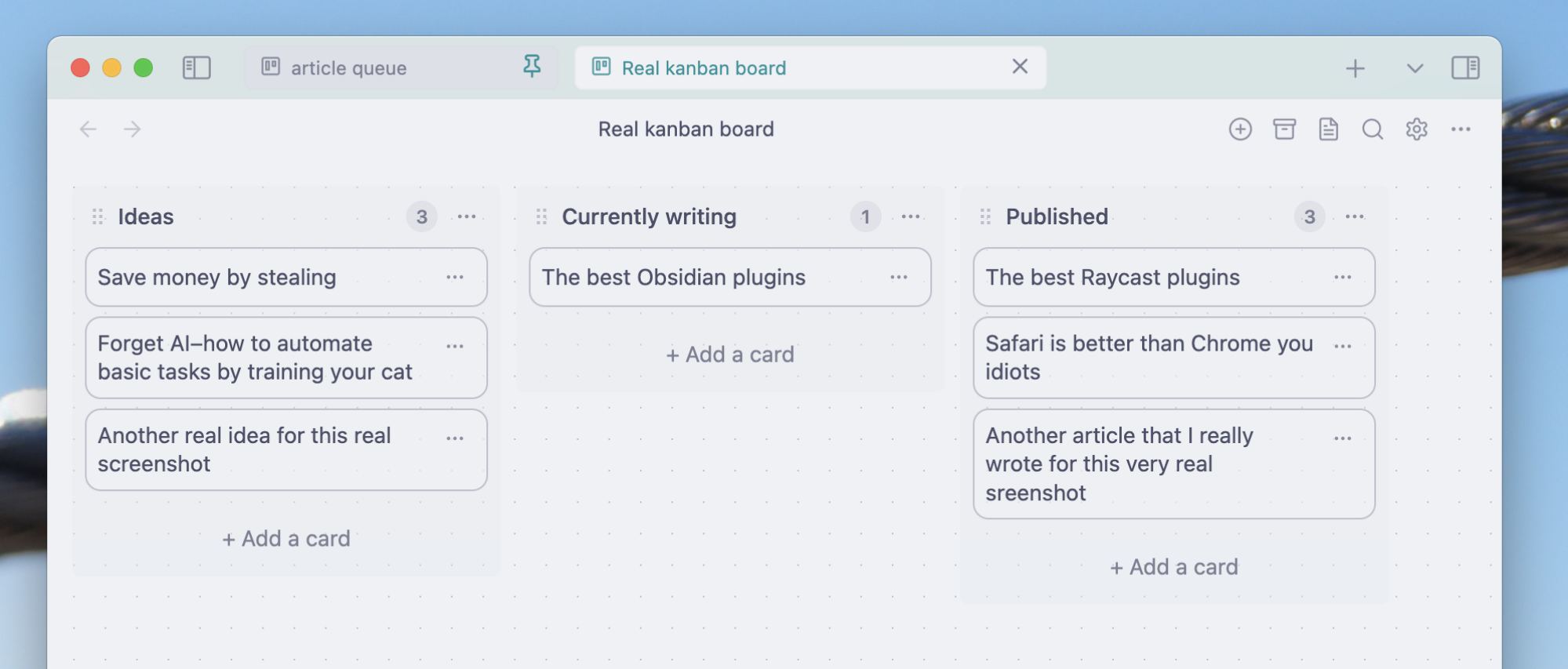
I used to be a big fan of Trello, once a humble personal kanban planner. Fifteen years of bloat and upselling mean that application is unrecognizable today, which I’m fine with, because Obsidian works better for me than Trello ever did. I owe it all to the Obsidian Kanban plugin.
Install it, and you can create as many Kanban boards in Obsidian as you like. Every card can include as much text as you want, formatted the same way you would anything else in Obsidian. That includes links—every card can link to the pages you’re using to manage your projects.
I’m a freelance journalist who writes for a handful of publications, including the one you’re reading now. I typically write around 20 articles a month, meaning I always have multiple projects on the go. I use an Obsidian Kanban board to keep track of everything. I have columns for “Plan to write this month,” “Plan to write this week,” “Outlined,” “Submitted need edits,” “Edited not invoiced,” “Invoiced not paid,” and, finally, “Paid.” This system allows me to see everything I’m working one in one place, and track my progress on all of them. I honestly don’t know if I could manage my workflow without it. And, because I also do all of my writing directly in Obsidian, I can jump straight to a project from my dashboard.
This is just one example—I’m sure you can think of other uses. But perhaps my favorite part of this system is that every kanban board in Obsidian is, in reality, just a markdown document that combines a few lists, meaning I can export them and keep an archive, even if I stop using Obsidian.
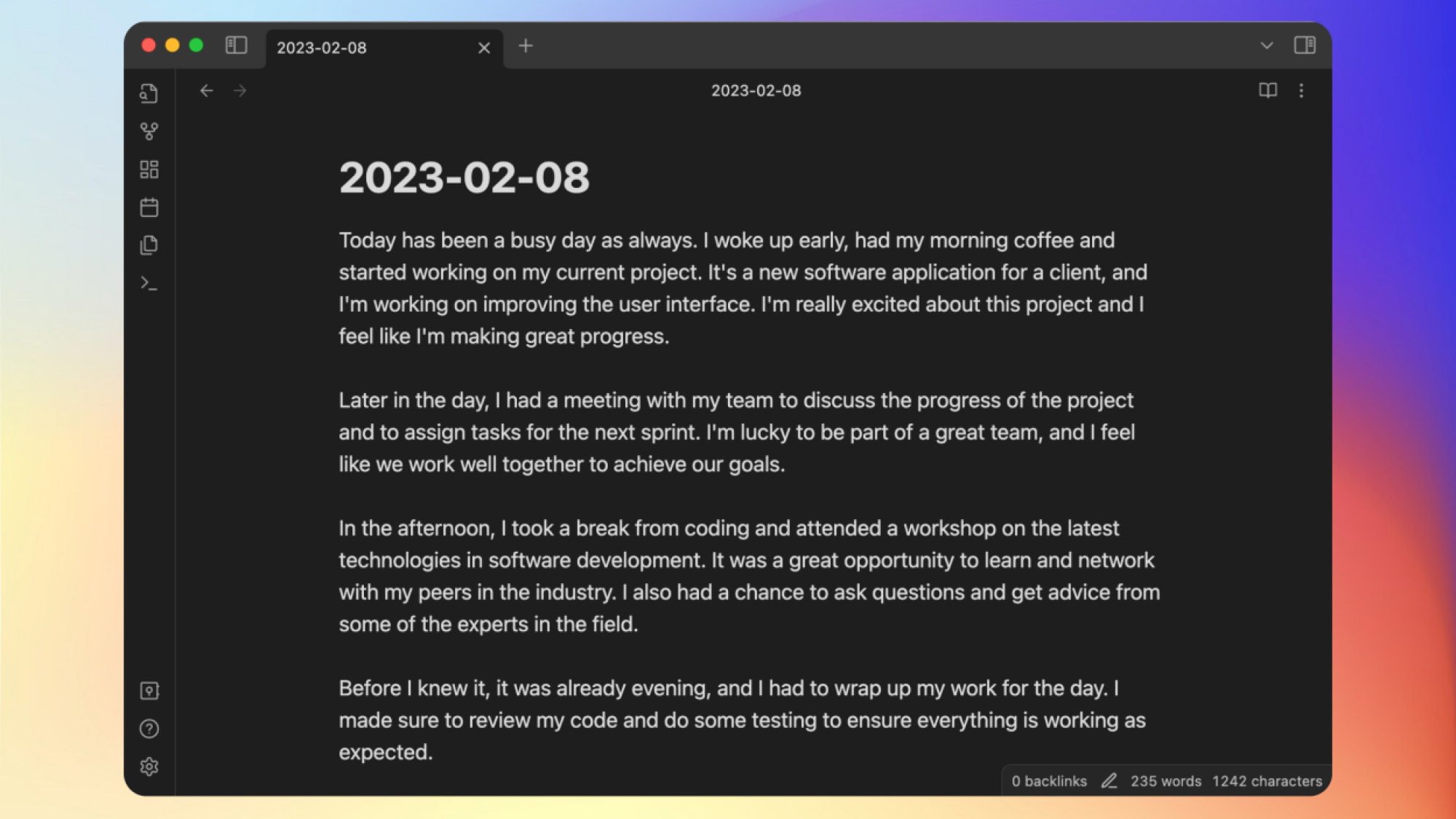
Lifehacker has written a lot about journalling apps over the years, and I personally have extensively tested every example you can think of, multiple times. All of them have pros and cons, and I’m not going to pretend that Obsidian is the best tool for everyone. What I will say is that I use Obsidian for my personal journal, and I can’t imagine using anything else.
My colleague Kamosh has already written about using Obsidian as a journalling app, so I’ll refer you to him for more on how to get started. But I’ll add that I recommend installing the journal review plugin so that you can regularly look back at previous entries. You can also look into Obsidian’s templates feature if you want to use the same outline for your journal every day. I used it to create something similar to a bullet-journal, with questions about my day.
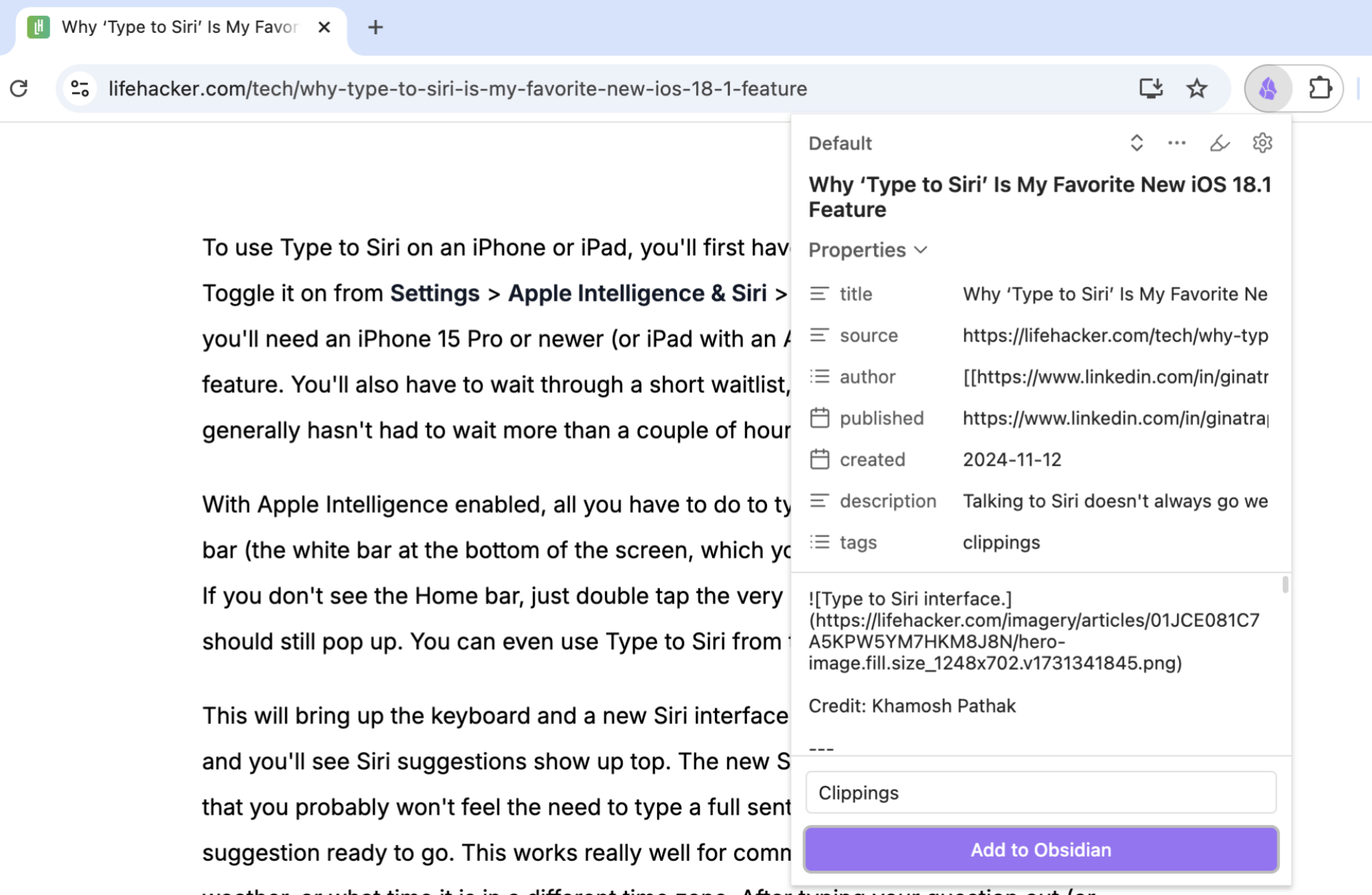
A few months ago, Obsidian launched Obsidian Clipper, which saves webpages to your personal “vault.” This is an extension for every major browser that allows you to save entire articles from the web. This is useful for research, but it also means you can use Obsidian as a replacement for read-it-later applications like Pocket or Instapaper. Just set up a dedicated vault for articles you want to read later, point the plugin toward that vault, and open your read-it-later vault every time you want to catch up on your backlog. You can even do things like highlight or add your own notes while you read, all without having to pay for a subscription.
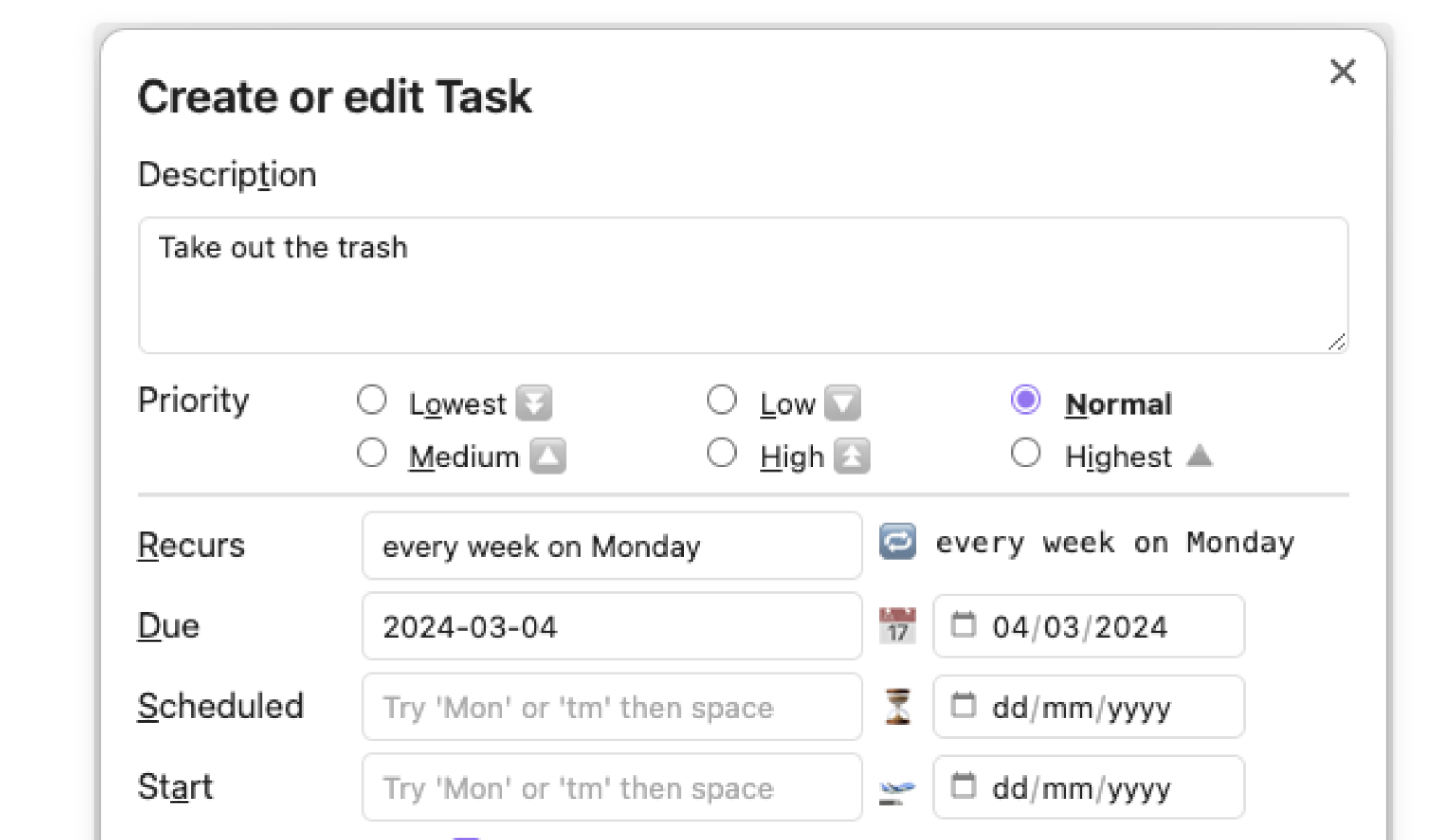
The problem with many to-do apps—and the reason Lifehacker will seemingly never stop writing about them—is that everyone has different productivity needs and no single app can serve them all. If you have never found a to-do system that’s perfect for you, that’s understandable.
But if that’s you, and you’re a fan of Obsidian generally, look into the tasks plugin. This tool goes through every single note in your vault and collects all of the markdown task lists you’ve created. It’s a perfect add-on if you already use Obsidian to outline your projects. The extension also allows you to add due dates, including recurring tasks, and set your priorities.
Google’s Pixel phones include numerous thoughtful features you don’t get on other phones, like Now Playing. This feature can identify background music from the lock screen, but unlike some similar song identifiers, it works even without an Internet connection. Sadly, it has been broken for months. There is some hope, though. Google has indicated that a fix is ready for deployment, and Pixel users can expect to see it in a future OS update.
First introduced in 2017, Now Playing uses a cache of thousands of audio fingerprints to identify songs you might encounter in your daily grind. Since it works offline, it’s highly efficient and preserves your privacy. Now Playing isn’t a life-changing addition to the mobile experience, but it’s damn cool.
That makes it all the stranger that Google appears to have broken Now Playing with the release of Android 15 (or possibly a Play Services update around the same time) and has left it that way for months. Before that update, Now Playing would regularly list songs on the lock screen and offer enhanced search for songs it couldn’t ID offline. It was obvious to Pixel fans when Now Playing stopped listening last year, and despite a large volume of online complaints, Google has seemingly dragged its feet.
At some point in 2025, Twitch plans to offer monetization tools like subscriptions and Bits for all streamers, according to an open letter from Twitch CEO Dan Clancy. Monetizing Twitch streams previously required reaching “Affiliate” status on the platform.
Having viewers subscribe to a Twitch channel or cheer with Bits (Twitch’s digital currency) during a stream are the two most prominent ways the average streamer can make money from their streams, outside of passive ad revenue or sponsorships. Currently, each subscription earns you a 50/50 split on subscription revenue after processing fees and taxes, while each Bit earned during a stream translates to around $0.01.
Opening up subscriptions and Bits to “most streamers, from day one,” should serve to make streaming on Twitch more enticing to anyone worried about the long process of becoming a Twitch Affiliate or Partner. Reaching either status on Twitch requires earning a certain amount of followers and streaming a certain amount of hours, on top of other criteria. With at least some monetization tools becoming available to everyone, climbing Twitch’s ladder seems like it could become more about unlocking access to tools rather than the ability to earn money at all. (Thought novice streamers should keep in mind they must get a minimum of $50 to withdraw their earnings from Twitch at all.)
Alongside these changes, Clancy also announced that Twitch will introduce more ways for streamers to earn money together, new editing tools for creating clips of streams and expanded moderation tools on mobile. Twitch’s has been rethinking its approach to moderation and policy violations over the last few months. Earlier in February, the company tweaked how it enforces community guideline violations, making it so violations can “expire” after a certain amount of time.
This article originally appeared on Engadget at https://www.engadget.com/entertainment/streaming/twitch-will-open-some-monetization-tools-to-even-first-time-streamers-204805004.html?src=rss

Subtle, this movie is not—have you seen Jason Momoa’s ‘ironic’ wig, for instance? The movie arrives April 4.

Over 300 indie creators have pooled their games to create the California Fire Relief Bundle on itch.io to get funds into the hands of survivors of the recent devastating wildfires in Southern California. You can help a great cause and play some incredible games for just $10.
We may earn a commission from links on this page. Deal pricing and availability subject to change after time of publication.
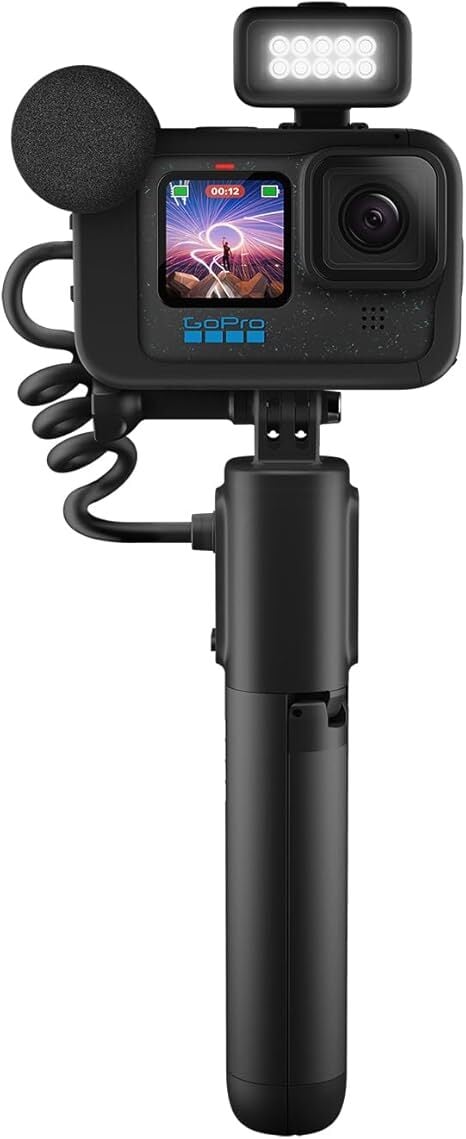
GoPro is the indisputable king of small outdoor action cameras. Its latest flagship camera, the GoPro Hero13 Black came out this past September, but the older GoPro Hero12 (released in 2023) has a good bundle deal you should consider. The Black Creator Edition bundle offers the Volta pack, a media and light mod, extra battery, and carrying case all for just $55 more than the camera alone. You can get the bundle for $399 (originally $499), its lowest price yet, according to price-tracking tools.
GoPro releases a new camera just about every year, so the changes aren’t always ground-breaking. There’s not much you can do with just a GoPro, since they heavily rely on their accessories, so the bundles are usually where the best offers are. That’s what makes the GoPro HERO12 Black Creator Edition a great deal in 2025. Here is what you get: HERO12 Black, Carrying Case, Enduro Battery, Curved Adhesive Mount, Mounting Buckle + Thumb Screw, USB-C Cable, Volta, USB-C Pass-Through Door, Lanyard, Media Mod, Vertical Mounting Buckle, Light Mod, Light Diffuser, and 2-Finger Adapter.
The Volta handle is arguably the most valuable item. The handle is a portable battery, has built-in buttons for easier control, lets you use the GoPro wirelessly with a remote, and doubles as a tripod. The media mod and light mod also offer useful tools, giving you a microphone with audio ports and an LED light so you can see better in the dark.
The GoPro Hero 12 Black received an “outstanding” review from PCMag upon its 2023 release, and the bundle is almost the same price as the GoPro Hero 13 Black, so it makes it a great deal for anyone looking to get a good GoPro with all the important accessories at a discounted price.

Forza Horizon 5, which launched over four years ago on Xbox and PC, is making the leap to PlayStation 5 soon, but because it’s 2025, the game will lock “early access” to Xbox’s open-world driving sim behind a pricey special edition. It’s the next evolution in publishers holding games hostage for extra money.
Initially available as a “research preview,” access is limited to software developers and users who pay $200 monthly for ChatGPT Pro subscriptions. The company plans to gather feedback before wider distribution. According to OpenAI’s blog post, GPT-4.5 will be the company’s last model that doesn’t use additional computing power to analyze queries before responding. Future releases will incorporate the reasoning approach already used in its newer models like o1 and o3.


Read more of this story at Slashdot.
Amazon announced that it has created its own quantum computing chip, joining Microsoft and Google in a push to take this potentially transformative technology from the theoretical to the practical. Ocelot is a prototype that’s intended to test the effectiveness of Amazon Web Services’ quantum error correction architecture. Compared with other chip methods, the company claims Ocelot can reduce the cost of implementing quantum error correction by up to 90 percent.
Quantum computing could solve complicated problems exponentially faster than standard computers by using quantum bits, or qubits, rather than traditional bits that store a computer’s information as 1s and 0s. Rather than representing only a 1 or a 0, qubits can represent a proportion of both 1 and 0 at the same time. Ocelot takes this a step farther with its use of “cat qubits,” named for the famous Schrödinger’s cat thought experiment, which can “intrinsically suppress certain forms of errors,” according to Amazon.
Error rate is one of the key limitations of current quantum computing, because the qubits are so sensitive to minute changes in their environments. Electromagnetic interference from a WiFi network can be enough to disturb a qubit and cause it to make mistakes. Adding more qubits to a chip means faster calculations, but also more mistakes.
Ocelot consists of five data qubits (the cat qubits), five “buffer circuits” to stabilize them and four qubits for detecting errors on the cat qubits. “We selected our qubit and architecture with quantum error correction as the top requirement,” said Oskar Painter, director of quantum hardware at AWS. “We believe that if we’re going to make practical quantum computers, quantum error correction needs to come first.”
Google claimed that its Willow chip, announced in December, was able to reduce errors as more qubits were added. Ocelot is another step toward reducing errors and making useful quantum computers a reality.
This article originally appeared on Engadget at https://www.engadget.com/computing/amazon-joins-the-quantum-computing-race-with-a-chip-designed-for-error-correction-201501075.html?src=rss

After a year of waiting, we finally got our first look at Pokémon Legends: Z-A during the annual Pokémon Presents showcase. The Switch game seems like a significant departure from the untamed open zones of Pokémon Legends: Arceus, which is exciting because we don’t know what to expect. The stream gave us a trailer as…