It Looks Like Rumors About the Switch 2’s ‘Mouse Mode’ Might Be True

When the Nintendo Switch 2 was officially announced, it was hard to feel like it wasn’t just more of the same. With no weird 3D gimmicks and no absurd naming scheme, did it even really feel like a new Nintendo device? But eagle-eyed viewers picked up on something else—Nintendo, it turns out, might be the first console maker to build a mouse right into its default controller.

At about 1:01 into the announcement trailer, you can see what looks like an optical sensor pop up on the side of one of the Switch 2’s Joy-Con controllers (or whatever they end up being called), and just a few seconds later, those same two controllers glide along a desk on their side, as if they’re being used like mice. 

The moment followed weeks of rumors and supposed leaks, but nothing concrete had surfaced…until now. 

In a patent filed on August 1 of last year and published on Feb. 6, Nintendo describes an “input device” that looks and sounds a lot like a Switch 2 Joy-Con (that’s what I’m going to call it for now) being held on its side and includes a “sensor for mouse operation.” Finally, it seems like Nintendo’s Switch 2 might not be so boring after all.

Nintendo Switch 2 patent diagram

Credit: Nintendo via World Intellectual Property Organization

In a diagram included with the patent, a hand seems to be using the Joy-Con’s shoulder and trigger buttons as mouse buttons, and perhaps using the thumbstick as a scroll wheel. A button does seem to be missing from the Joy-Con in the diagram, the mysterious new C button seen in the Switch 2 trailer from the end of last month, but aside from that, everything seems to be depicted exactly as expected.

Technically, Nintendo isn’t the first to have this idea. A similar feature, albeit with slightly clunkier implementation, is already available on the Lenovo Legion Go, with that device’s “FPS mode.” But with Nintendo giving mouse control to its entire user base, developers will likely feel much more comfortable supporting the control scheme.

So, what could a mouse on the Switch 2 mean? Well, more natural PC ports and easier aiming in shooting games, for sure. But I’ve got a slightly more out-there theory.

I think Nintendo wants to bring DS games to the TV for the first time since the Wii U’s virtual console. The company recently added Game Boy Advance games to an upgraded tier of the Switch Online library, but with a mouse, Nintendo could easily bring over DS games to the Switch 2 as well. Yes, technically, the Joy-Con’s motion controls could mimic a touchscreen stylus to a degree, but a mouse will much more easily provide the speed and precision needed for DS classics like The World Ends With You, which has never really translated well to any other systems (despite multiple attempts from Square Enix). Finally, there will be a good official method for playing these games that doesn’t involve actually breaking out the old DS Lite (or, yes, a 3DS).

But even if I’m wrong and the mouse just becomes an optional control feature for certain games, it is funny to imagine a future where the Nintendo Switch has better support for shooters than the Xbox.

Bluesky Now Has Its Own Version of TikTok

Bluesky is setting itself up to be a social media jack of all trades. There’s the main experience, of course, which replaces something like X or Threads. But it’s not all about the text posts: Soon, you’ll be able to use an app like Flashes to transform Bluesky into a kind of Instagram. Before that drops, however, you can use a different app to turn Bluesky into TikTok. It’s not quite there yet, but it’s a fascinating look into a unique kind of social media client—an app that turns one platform into something else entirely.

Introducing Bluescreen for Bluesky

Bluescreen is a Bluesky client with one singular purpose: It identifies the videos from your Bluesky feed and delivers them to you in a TikTok-style endless scrolling interface. You don’t interact with text-based posts, nor do you see still images. It’s as if Bluesky offered a “video only” feed. But, since they don’t, Bluescreen exists.

It’s a cool idea, and it’s also the idea behind Flashes. Instead of isolating the videos in your Bluesky feed, Flashes isolates the images, which lets you turn Bluesky into an Instagram alternative. If you’re surprised to hear two different Bluesky clients using the same strategy to achieve two similar outcomes, that’s because they’re both developed by the same person: Sebastian Vogelsang.

Vogelsang announced Flashes before Bluescreen, but released the video app ahead of the photo app. While we wait for the Instagram of Bluesky to get here, we can try out the TikTok of Bluesky instead.

Using Bluescreen to watch videos on Bluesky

using bluescreen on bluesky

Credit: Lifehacker

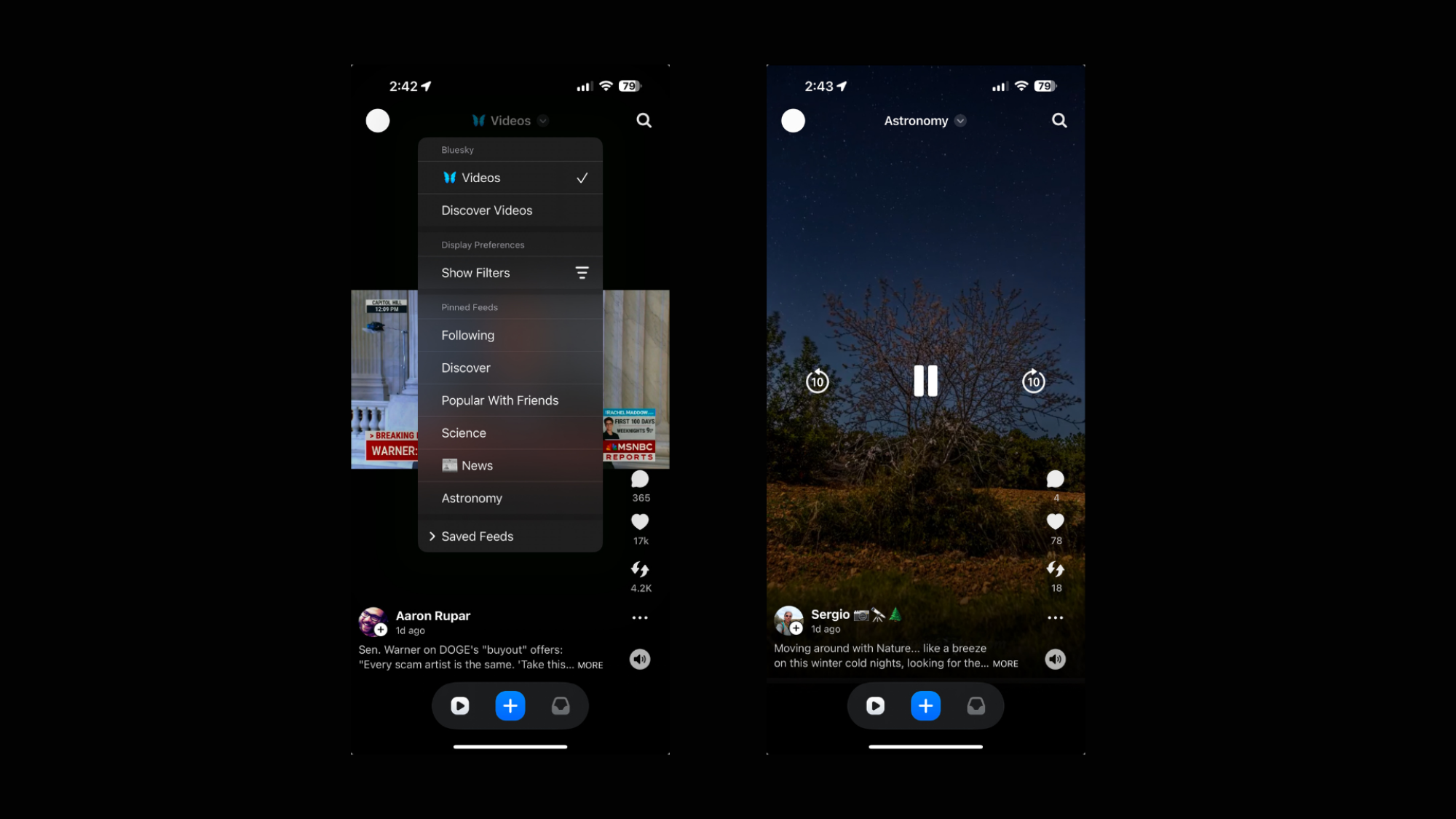
In execution, Bluescreen does it what’s it’s supposed to, though there is definitely some room to grow. Once you connect your Bluesky account to the client, you’ll be presented with a video—just as you are when opening an app like TikTok, or when using Instagram Reels or YouTube Shorts. As with these services, there are multiple options to interact with the video: Tapping the heart button gives the video a like, without having to leave the video feed itself. If you tap on the comment button, however, Bluescreen leaves the video feed, and shows you the comments in a different window. You can tap the button with the two arrows to repost the video, and the three dots icon to access additional controls, like Translate, Share, and Report. There’s also a general mute button available in the bottom right corner.

If you tap the video itself, you’ll pull up the standard iOS video control menu. From here, you can play and pause, rewind or jump ahead, AirPlay, or control the volume of the video, if you’d rather not mess with your iPhone’s general volume setting. Speaking of volume, that is my one main criticism of Bluescreen as it exists right now: Each video is muted by default, even though the mute button says the volume should be on. You have to tap this mute button twice; once to mute the video, then again to unmute it, before it starts playing. You need to do this for each video you swipe through. Oddly, this is only a problem when watching through your phone’s speakers: Connect a pair of Bluetooth headphones, and the videos sound off as they should. I imagine this is a bug that Vogelsang will work out in due time.

At the top of the page, you can choose which feed to pull videos from. The App Store page says you can choose from thousands of feeds, but if that sounds overwhelming, you can stick with video from your main feeds, such as the Following or Discover tabs, or any of your pinned feeds. It’s neat to choose the Astronomy feed I follow, for example, and see videos specifically about this topic. (It also shows me I might need to drop some of my pinned feeds, due to low-quality content.) You can also use the search icon in the top right to search for whatever content you like, in addition to finding trending topics. Again, if you’ve used a social media platform before, you’ll be familiar with this.

In theory, this could be an awesome experience. If you curate your Bluesky feeds well enough, you could have a varied filter of all short-form videos posted to the platform. It’s still an early concept, so the UI isn’t quite as fluid or polished as established video apps, but I can totally see the potential here.

Uploading your own videos via Bluescreen

This isn’t just a passive experience, however: You can use Bluescreen to upload videos to Bluesky. If you hit the (+) on the bottom of the screen, you can choose a video from your library to post on Bluesky via Bluescreen. You can access light editing tools along the way, add a caption for your video, choose who can reply to the post, and the language of the post before publishing. Remember: You’re not posting on Bluescreen; rather, Bluesky. While it’ll look like you’re posting on a new platform, all you’re really doing is posting a video to your existing Bluesky account.

uploading videos via bluescreen

Credit: Lifehacker

Boeing has informed its employees that NASA may cancel SLS contracts

The primary contractor for the Space Launch System rocket, Boeing, is preparing for the possibility that NASA cancels the long-running program.

On Friday, with less than an hour’s notice, David Dutcher, Boeing’s vice president and program manager for the SLS rocket, scheduled an all-hands meeting for the approximately 800 employees working on the program. The apparently scripted meeting lasted just six minutes, and Dutcher didn’t take questions.

During his remarks, Dutcher said Boeing’s contracts for the rocket could end in March and that the company was preparing for layoffs in case the contracts with the space agency were not renewed. “Cold and scripted” is how one person described Dutcher’s demeanor.

Read full article

Comments

Microsoft Edge Can Now Block Annoying Full Screen Pop-Ups

Have you ever been scrolling along, minding your own business, when an ad suddenly hijacks your page with a full-screen warning about a computer virus or account insecurity? These are invariably scams, but to the untrained eye, they could look like a genuine pop-up from a firewall. That’s why Microsoft Edge is using AI to help users spot when someone’s trying to frighten them into downloading malware or giving up sensitive information.

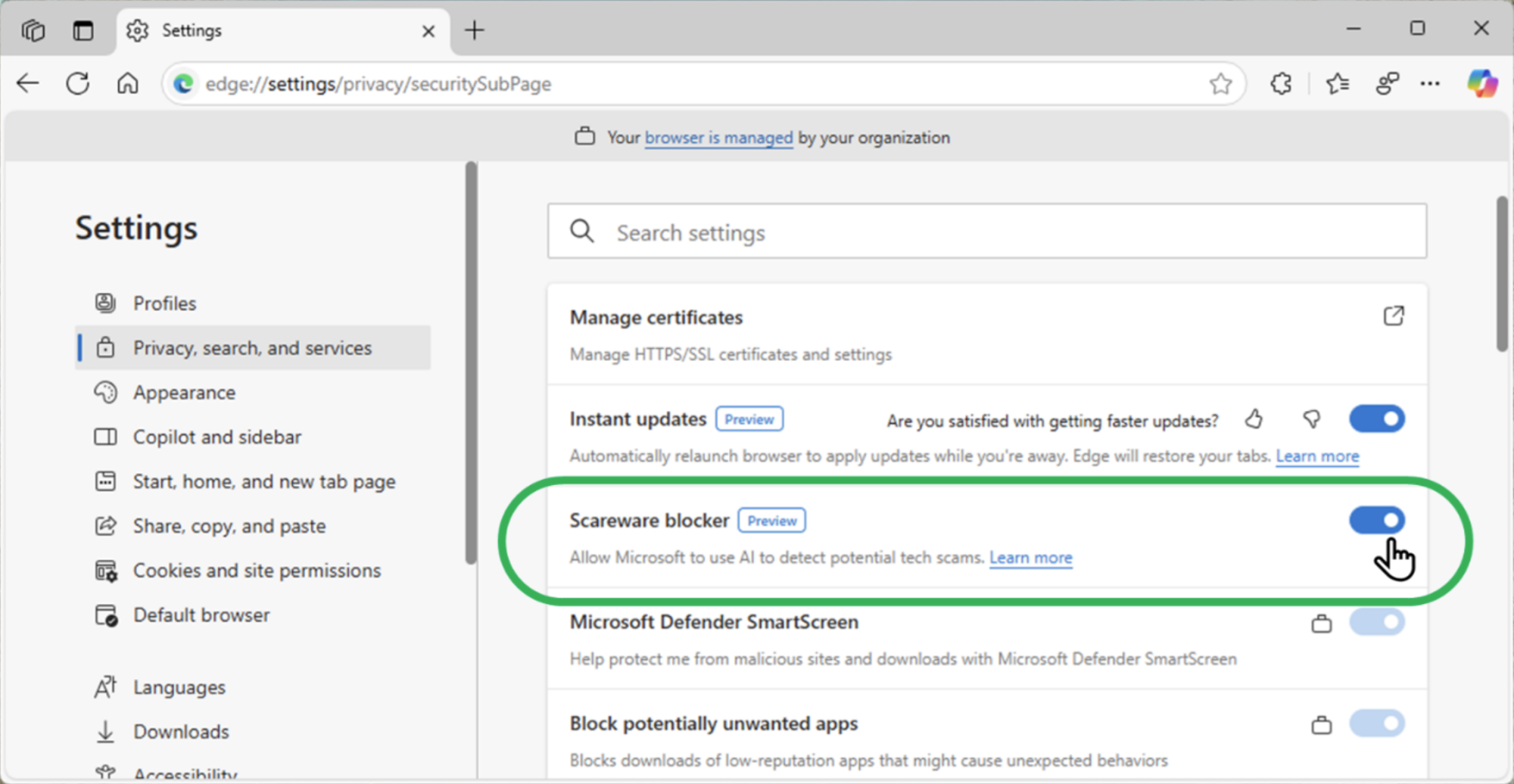
Available now to all users via a preview, the browser’s new “Scareware blocker” is an AI-based tool for dismissing and navigating away from these troublesome interruptions. While Edge’s built-in Defender SmartScreen tool already blocks known scams, the idea is for Scareware blocker to help address new threats.

The tool uses a local AI model to detect when your browser enters full screen mode, a staple of scareware pop-ups, and then examines what you’re looking at to see if it resembles a scam. It’s been trained on “thousands of sample scams that the scam-fighting community shared” with Microsoft, and supposedly doesn’t save images or send them to the cloud at any point.

While users can manually hold the ESC key to exit full screen mode at any point, the model will do this for you, taking a screenshot of the site and moving you over to a page that warns you that it looks suspicious. You’ll then have the option to either close the page or continue.

In addition to helping protect users susceptible to scams, Scareware blocker also sets out to reduce some of the panic of coming across one of these ads, as they’ll often also play loud noises and hide the mouse cursor. By quickly closing them out and taking you to a warning page, the feature aims to help you regain your senses.

How to enable Microsoft Edge Scareware blocker

Credit: Microsoft

While I have encountered these ads before, I wasn’t able to summon one up while trying to test out the feature, but it’s easy enough to enable. Simply navigate to Settings > Privacy Search and Services and scroll down a bit until you see the Scareware blocker toggle. Switch it on, and you’ll be prepared the next time a scammer tries to scare you into selling yourself out.

If you don’t see the toggle, it’s possible you might need to update Edge (in Settings > About Microsoft Edge) or restart the browser.

Measles outbreak erupts in one of Texas’ least vaccinated counties

Health officials in Texas are battling a growing measles outbreak in an area that has some of the state’s lowest vaccination rates and highest non-medical exemptions.

On January 30, officials reported two measles cases in unvaccinated, school-aged children in Gaines County, which sits at the border of New Mexico and is around 90 miles southwest of Lubbock, Texas. Both children were hospitalized in Lubbock and had been discharged.

As of mid-day February 7, the outbreak total reached nine confirmed measles cases in the South Plains Public Health District (SPPHD) that includes Gaines, according to Zach Holbrooks, Executive Director for SSPHD. In an interview with Ars, Holbrooks reported that there were three additional probable cases that are linked to the confirmed cases. These are cases in the same household or family—maybe a cousin or sibling—that are showing measles symptoms but haven’t been tested yet or gotten their test results back yet, Holbrooks said. So far, there have been no other reports of hospitalizations besides those in the first two cases.

Read full article

Comments

These Tile Bluetooth Trackers Are Just $17 Right Now

We may earn a commission from links on this page. Deal pricing and availability subject to change after time of publication.

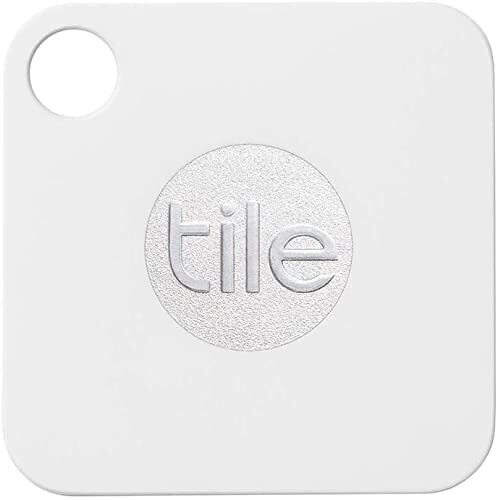
The Apple community has been finding their lost keys since 2021 with the AirTag, but Tile has been helping both Android and Apple users locate their missing devices since 2013. Over a decade later, their latest tracker (after being acquired by Life360), the Tile Mate, is just $16.95 (originally $27.99) for a single tracker, $33.99 (originally $44.99) for a two-pack, and $55.99 (originally $79.99) for a four-pack, the lowest prices, according to price-tracking tools. If you’re an Android user, this is a good opportunity to stock up.

(If you’re an Apple user, you can use Tiles, but you’re better off waiting for the AirTags to drop to $19 to stock up, or get the 4-pack for $69.99 right now; they’re much better than Tile’s tracker.)

The concept of Tile trackers is the same as AirTags and their usefulness extends to your creativity. Most people use them to find purses, keys, and travel bags, but you can use them to train your dog or as a device to know if people are near a specific spot you want to keep tabs on. (Anyone else want to keep tabs on their abandoned cabin in the woods?)

Once the Tile tracker is outside of Bluetooth range (up to 350 feet in direct line-of-sight conditions, but PCMag’s review says it realistically gets about 30 feet), the device uses the Tile community of about 20 million people (according to Tile) to update the location of the tracker by using their phone’s Bluetooth. (Apple’s community is much larger, with about a billion users, according to Apple).

The back of the Tile Mate has a QR code that people can scan to notify you when they find it. There is a sealed battery inside that is not replaceable that Tile says will last about three years. There is an optional premium subscription that starts at $2.99 per month for more features, if you’re interested in that.

Developer creates endless Wikipedia feed to fight algorithm addiction

On Wednesday, a New York-based app developer named Isaac Gemal debuted a new site called WikiTok, where users can vertically swipe through an endless stream of Wikipedia article stubs in a manner similar to the interface for video-sharing app TikTok.

It’s a neat way to stumble upon interesting information randomly, learn new things, and spend spare moments of boredom without reaching for an algorithmically addictive social media app. Although to be fair, WikiTok is addictive in its own way, but without an invasive algorithm tracking you and pushing you toward the lowest-common-denominator content. It’s also thrilling because you never know what’s going to pop up next.

WikiTok, which works through mobile and desktop browsers, feeds visitors a random list of Wikipedia articles—culled from the Wikipedia API—into a vertically scrolling interface. Despite the name that hearkens to TikTok, there are currently no videos involved. Each entry is accompanied by an image pulled from the corresponding article. If you see something you like, you can tap “Read More,” and the full Wikipedia page on the topic will open in your browser.

Read full article

Comments

The Five Worst Reasons to Buy a House

Thanks to a tight market, sky-high prices, and elevated interest rates, the path to home ownership is more littered with obstacles than ever, but buying property remains a key goal for most Americans—nearly 70% of us still consider it part of the American Dream.

But as much as you might think you want it, it’s important to weigh all the financial and emotional factors that go into buying a huge. While it sounds impossible, considering the size of the commitment, it’s surprisingly easy to get so focused on the anxiety of never being able to find the right house that you buy the wrong house for the wrong reasons. If you don’t want to wind up with a money pit or a house that simply doesn’t serve your needs (or your budget), it’s essential to take a step back from the brink and really examine your reasons for buying a particular property. If it’s one of the five listed below, you should reconsider.

The view

Some homes offer spectacular views—of nature, of a city skyline, or maybe the ocean. But buying a home for the view it offers is generally a bad idea, for several reasons:

  • Cost. Homes that offer attractive views almost always come at a premium, meaning you’ll spend more for the same amount of house you could buy in the same area without the spectacular view. And some views come with even more additional costs, like a house with an ocean view that comes with a flood insurance premium.

  • Impermanence. While some views are unlikely to change, you often can’t guarantee that someone won’t build something to obstruct your view in the future, or that other changes to the environment around your house won’t conspire to ruin your view.

  • Imperfections. Amazing views can be distracting—if you focus too much on the incredible skyline, you might overlook other problems with the home or things that aren’t going to work with your lifestyle just so you have a nice view while sipping coffee in the morning.

Because “it’s time”

It’s easy to compare yourself to other people around your age, and if those folks are all buying houses, you might feel pressure to catch up. Or maybe you suddenly realize you’re the only person in your group of friends who’s still renting. Or just you’ve more or less arbitrarily made home ownership a box to check on your list of accomplishments.

But buying a house before you’re financially and emotionally ready for it can be a disaster. Buying a house isn’t just about coming up with a down payment and calculating a monthly mortgage—there are a lot of financial factors you need to consider, including whether you’re ready to make hard choices if find yourself facing an unexpected repair bill. You’ll also need to think about your readiness to tackle the truly endless home maintenance tasks a home requires—or to pay someone else to do them for you.

To save on rent

It used to be a golden rule: Paying a mortgage is cheaper than renting—or, if it’s about the same cost, at least you’re not throwing money into a hole every month, but building equity in an investment. The equity part is true enough—your mortgage buys you more and more direct ownership of your property, while rent merely buys you one more month living in that space.

But thanks to elevated prices and higher interest rates, the cost part isn’t true anymore, generally speaking: While you might find a specific house in a specific area that’s cheaper to buy than the local rents (particular if it’s in a larger city with a hot rental market), nationwide averages show that renting is cheaper than home ownership, and will probably stay that way for the immediate future. Plus, there are those pesky insurance and maintenance costs, as well. If you’re buying a house because you think it will save you money, forget it.

You’re betting on the neighborhood to improve

Homes in neighborhoods with a lack of services, high crime rates, or lots of unmaintained houses are generally cheaper, and if you have reason to believe that robust improvements are coming to the area, it can be tempting to buy low and then celebrate as your property values rise and rise. The problem with this plan, of course, is that nothing is guaranteed: Whether it’s business investment, a government-sponsored redevelopment plan, or you think you see the signs of simple gentrification, any number of factors—canceled contracts, local elections, stalled construction projects, a faltering economy—can change the course of events and leave you holding the bag.

Relying on a neighborhood turnaround also comes with plenty of other downsides:

  • Time. Until your hoped-for revitalization comes to pass, you’ll be living in a crappy area and dealing with all the associated downsides, which might include higher crime, nastier neighbors, and worse schools.

  • Taxes. If your property values go up, so do your taxes (eventually).

  • Fewer options. If your life takes a turn you might have trouble selling that house or finding reliable renters due to its location. And if it’s cheap to buy, your equity in it will be relatively low until things pick up (if they pick up), meaning you’ll have limited resources for improvements and repairs.

It’s a fixer-upper

If you’re buying a house because it’s a “fixer-upper” at a bargain price, think twice. If you have experience in home renovation and construction and you have a solid plan for renovating the place, that’s one thing. But if you’re buying a run-down place with a vague idea that you’ll fix it up over time, there are a lot of reasons to hesitate:

  • The unknowns. You really have no idea how bad that house is, why it’s been priced so attractively, and how much it will really cost to fix up until you get in there and start opening walls and floors. Your budget? Fiction until you actually see the wiring, plumbing, foundation, and other essential aspects of the house.

  • Living in a construction zone. Whole-house renovations can take as long as a year to complete, and that’s if you’re working nonstop and don’t encounter any soul-chilling problems once you dig into the property. If you’re going to do it piecemeal, the renovation could stretch on for years, and you’ll be dealing with dust in your cereal bowl and splinters everywhere during the entire experience.

  • Price uncertainty. You can buy a cheap house and put quality work into it, but that doesn’t mean the market will cooperate and raise your home’s value enough for you to get the return on that investment you’re hoping for. Keep in mind that the money you spend fixing up a house is part of the total cost of ownership; if you buy a bargain for $200,000 and spend $100,000 fixing it, you really spent $300,000 on that house—not counting mortgage interest, insurance premiums, and other incidental costs. Adding it all up can transform a bargain into a non-bargain pretty fast.

Only you can decide if buying a house is the right move—but if your reasons appear anywhere above, you owe it toy ourself to think again.

Trump Has Paused an Order That Would Have Made Shein and Temu Purchases More Expensive

After a brief scare on February 4, the USPS has lifted the world’s shortest shipping suspension, confirming that it will continue to deliver packages from China and Hong Kong to the U.S., although those packages might still get more expensive soon.

The news follows a temporary halt on Chinese parcels resulting from President Trump’s February 1 executive order that applied a 10% tariff to Chinese goods and lifted the de minimis exemption for shipments from China. The USPS says it’s currently working on a plan to implement these fees with the “least disruption to package delivery,” but that it will continue to accept impacted packages in the meantime.

While other shipping services like UPS or FedEx have yet to announce their own responses to the president’s order, all will have to come up with some sort of plan. Still, it seems your grandparents overseas will still be able to send you care packages. But that doesn’t mean we’re out of the woods yet. While packages will continue to flow, expect delays as shippers learn how to navigate new fees, as well for prices to jump.

While a 10% tariff is fairly self-explanatory (goods from the tariffed country will be 10% more expensive to import), the loss of the de minimis exemption is a little harder to understand, and is likely to be a major thorn in the side of low-cost online Chinese marketplaces like Shein and Temu. Note that these will apply in addition to the 10% tariff, however, their application has been temporarily paused following an executive order issued on the morning of February 7.

Enacted in 1930, the de minimis exemption was intended as a way for the U.S. to save itself some hassle, by waiving duties and fees on international shipments where the collected revenue would take more effort to charge than the government would get out of them. It typically applies to all packages worth less than $800, which has been a boon for online e-commerce, as overseas companies were essentially able to ship small packages directly to U.S. consumers duty-free. According to a 2023 U.S. Congressional committee report cited by Reuters, almost half of all de minimis exemptions to this point have been for Chinese packages, with 30% of daily de minimis shipments coming from Temu and Shein.

With those protections going away at some point in the future, said stores would now be subject to customs on all goods, in addition to the 10% tariff, which could raise prices and shipping times. American stores that rely on Chinese warehouses, such as Amazon Haul, could also be impacted.

It’s unclear at this point how much of that additional pain will be passed on to customers. Speaking to Reuters, the CEO of warehouse management software ShipHero, Aaron Rubin, said the fees are “probably about 5 points of margin difference, using de minimis or not, and e-commerce businesses usually have a 10% or 15% margin, so this is a very significant impact”

Conversely, University of Delaware fashion and apparel studies professor Sheng Lu told the outlet that the new rules might only add a few cents to each product. However, despite sounding like a modest price hike, it could still greatly impact smaller Chinese businesses who don’t have the cost-absorbing resources Temu or Shein do.

Note that the de minimis exemption as a whole is not gone—Trump’s new rules are currently only directed at China (originally, they would have also impacted Canada and Mexico, but the President’s recent deals with those countries have given them a 30-day stay on enforcement for now). With that in mind, it’s possible another country’s own version of Temu could dethrone the e-commerce giant, or that Chinese shippers could set up international warehouses to slightly reduce their fees.

However, it’ll now take some time to feel the full impact of the changes. While the 10% tariff against China is proceeding as usual, China will still enjoy a de minimis exemption until the Secretary of Commerce determines that “adequate systems are in place to fully and expediently process and collect tariff revenue.”

How to Livestream the Super Bowl, Even If You’re Not in the US

Kickoff for the Super Bowl LIX matchup between the Kansas City Chiefs and the Philadelphia Eagles is set for 6:30 p.m. ET on Sunday, Feb. 9. Fox is broadcasting the game live from Caesars Superdome in New Orleans, so anyone with a cable or broadcast TV subscription (or an OTA antenna) can view the game via Fox, Fox Deportes, or Telemundo.

If you don’t have cable, you can still stream the game to your computer, mobile device, or smart TV—even if you’re outside the U.S. Here’s how.

Where to stream Super Bowl LIX in the U.S.

Fox-owned Tubi is streaming Super Bowl LIX for free in the U.S. and Canada. The platform supports a wide range of streaming devices and smart TVs as well as Android, iOS, and web browsers, so you can watch from (almost) anywhere, including on your laptop or mobile device. The game will also be available in 4K on Roku, Fire TV, Android TV, and Apple TV. You have to create a Tubi account and be logged in at game time, no credit card required.

Alternatively, Fox is available to many U.S. viewers via live TV streaming services like DirectTV Stream, FuboTV, Hulu + Live TV, YouTube TV, and Sling TV. If you’re not already a subscriber, most of these platforms offer limited free trials, so you can sign up to watch the game and cancel before you are actually billed.

While not free, you can also watch the game using the Fox Sports app (if you pay for Fox via cable, satellite, or live TV streaming) or through the NFL+ app (with a $7 subscription) on mobile.

Where to stream Super Bowl LIX outside the U.S.

The NFL has a full list of international broadcasts for Super Bowl LIX audiences located outside the U.S. An NFL Game Pass will get you full coverage via DAZN in any country except the U.S. and China. DAZN is available on most game consoles, smart TVs, and streaming sticks, as well as mobile devices, and prices vary by country.

The game will also be available on ESPN in many countries and on local sports networks in select areas. For example, UK viewers can stream the game for free on ITV1 (or with a subscription to Sky Sports), and Australian fans can tune in on 7mate and 7plus.

How to use a VPN to watch Super Bowl LIX

If you have a streaming subscription (or want to watch via one of the free options) but are in an area where that service is blocked, you can use a VPN to connect back to the country where broadcast rights are available. We’ve got a list of the best free VPNs, which let you select IP addresses in specific locations so you can stream content even when you’re abroad.

Football Manager 25 canceled in a refreshing show of concern for quality

There are only two licensed professional sports games included in Wikipedia’s “List of video games notable for negative reception.” Do not be fooled, however: WWE 2K20 and eFootball 2022 are just the outliers, arriving so poorly crafted as to cause notable outcry and an actual change to development plans. Most licensed professional sports games come out yearly, whether fully baked, notably improved, or not, and fans who have few other options to play with their favorite intellectual property learn to make do with them.

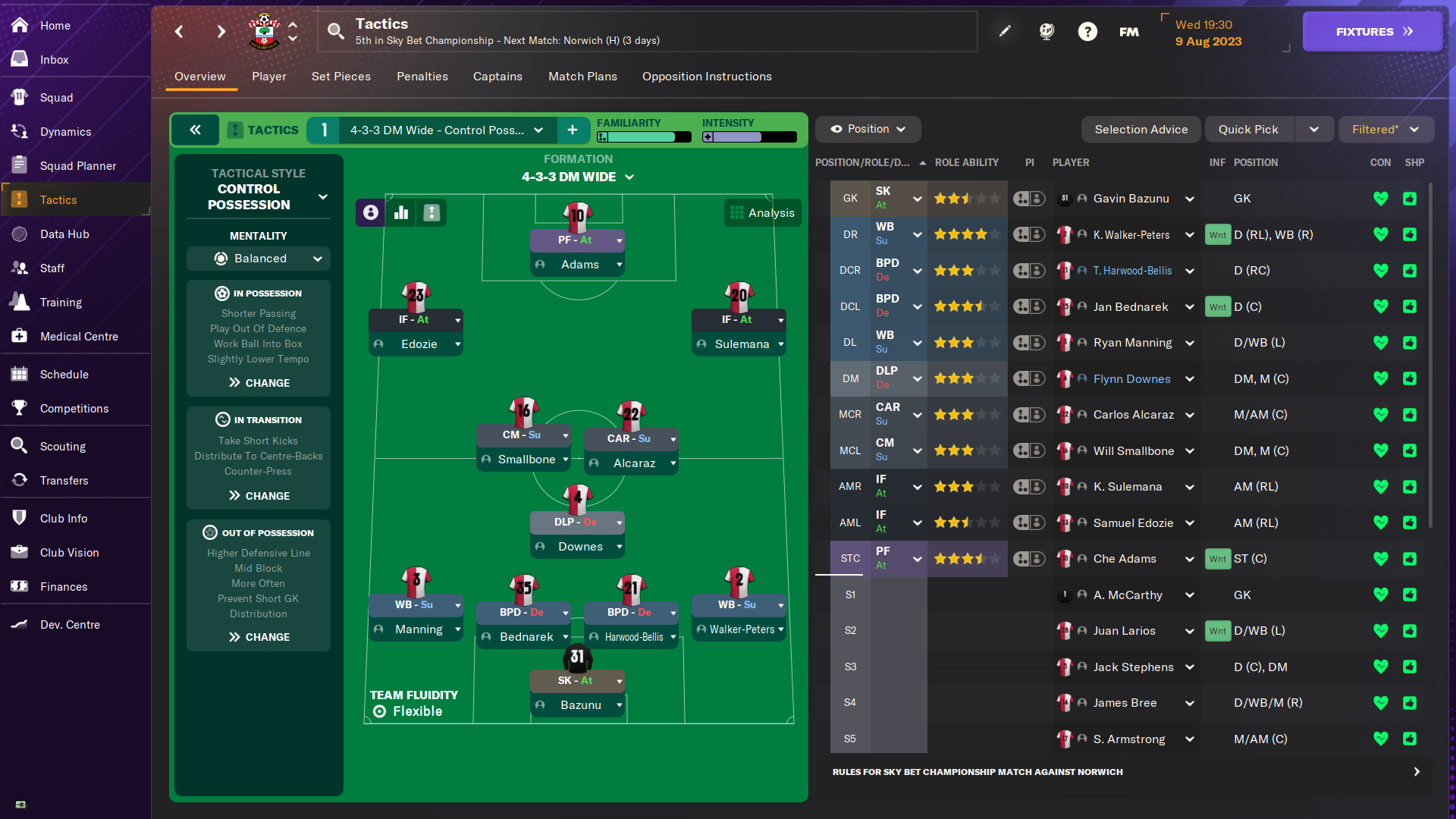
Not so with fans of Football Manager, a series that can be traced back in some form to 1992 that has released a game almost every year, minus one ownership shift in the early 2000s. Sports Interactive, the company behind the franchise, released a statement on Thursday (in British time) that says that “following extensive internal discussions and careful consideration,” Football Manager 25 is canceled. The game was “too far away from the standards you deserve,” so they are focusing on the 2026 version.

Trying not to make “the same bloody game every year”


Credit:
Sports Interactive

Football Manager 2025 was already delayed twice and is now quite late—as we are now midway into the European football (or what Americans call soccer) season. The game was intended to be a major overhaul.

Read full article

Comments

Use This App to Curate Your Own Custom Timeline for the Whole Internet

As convenient as the internet is, when big tech companies chase endless growth, that can mean bloat. Nowadays, it feels like every company wants to lure me into an algorithm trap, convince me to use their AI services, or try to make me pay a premium to browse like I used to. One of my favorite tools for fighting back against these trends is Tapestry. It’s a timeline app for iPhone and iPad that lets you combine multiple feeds from blogs, YouTube, podcasts, and social media, then view them in chronological order, with a beautiful interface. Essentially, you can use it to make your own curated version of (nearly) the entire internet.

Tapestry is designed by The Iconfactory, which also developed the excellent (but now-defunct) Twitter client Twitteriffic.

What is a timeline app?

Timeline apps are a new genre of app that lets you take back control from big tech’s algorithms and decide what you want to see and when you want to see it. These apps allow you to create your own personalized timelines with posts from multiple websites. You could use these apps to follow a blog you like, a YouTuber you enjoy, and even a subreddit or social media feed that you like seeing. It’s like using an RSS reader, but with support for content from many more types of sources.

Making the most of Tapestry on your iPhone

Installing Tapestry will start you off with a very useful sign-up flow. This shows you a list of various recommended feeds you can add to your timeline with just one tap, which allows you to populate the app in record time. If you’re big on customization, you can also skip the recommendations and manually add your feeds to the app by going to the Settings tab and tapping the Add Feed button. After that, you can just paste the URL of the website, YouTube channel, podcast, or Mastodon/Bluesky account you want to follow, and Tapestry will look for the feed and add it to your timeline. There’s a bit more than that going on in the back end, but Tapestry’s Feed Finder feature is pretty good at locating and loading feeds for you from a simple URL. Once your feeds are added, you’ll be able to view them all in a neat, chronological timeline.

The app’s free tier is quite generous. It allows you to add multiple feeds and follow them all on one infinite scrolling timeline. If you like a post, tap the flag icon below the post to mark it (aka bookmark it) or use the share button to send it to your friends or social media accounts.

Without a subscription, Tapestry will show you ads in your timeline. However, these are some of the least intrusive ads I’ve come across. They follow the design language of the app, and most of the ads I saw were either asking me to add a feed to Tapestry or to install another app. The app is beautifully designed and reminds me a lot about the best of Twitteriffic. A unified timeline can easily get very messy, very fast, but Tapestry handles this well by color-coding posts from various sources and prominently displaying a logo for each feed. It picked up the logos of two newsletters I loaded, too, which is a very nice touch. You can customize this experience by going to the Appearance settings page within the app, where you can change the font and the length of post previews. This lets you make your timeline look neater, and you can make it even better by tapping the three-lines icon in the bottom-left corner of the timeline. That lets you choose different sizes for each post— I find the collapsed view is best for quickly browsing, but the expanded view is better for skimming through newsletters.

Reading a newsletter called Advisorator in Tapestry.

Credit: Pranay Parab

Each post in your timeline is truncated by default, and even the expanded view only shows a few paragraphs at most. However, you can tap the Read More button on any post to read it in full in a new page. This view is free of ads and clutter, loads quickly, and the background retains the color scheme Tapestry assigned to it on your timeline. Tapestry also has two types of filters to help you clean up your feeds—muffles and mutes. Muffles will collapse posts containing specific keywords and are useful when you want to avoid spoilers from a new movie or TV show. Mutes will hide posts containing certain keywords entirely—great for blocking politics, sports, or other subjects from your feed, as an example.

The biggest limitation of Tapestry’s free tier is that it lets you add just the one timeline. You do have access to certain timeline filters that let you view marked posts, only posts from today, or posts from a single feed at a time. However, if you want to create more than one timeline, you’re going to have to upgrade to the paid tier, which costs $2/month or $20/year. There’s also a one-time lifetime unlock option at $80, in case you want to avoid subscriptions.

Once upgraded, you’ll no longer see ads and you can create as many timelines as you like. I’ve used this to separate social media feeds, newsletters, and other types of feeds, but the good news is that you can craft a timeline to suit your needs.

Some people would prefer to combine posts from Bluesky and Mastodon into one chronological feed, and Tapestry allows you to do that, too. One of my biggest complaints about Bluesky is that it doesn’t save your reading position, which means that it refreshes to the top of the feed whenever I open the app. I like it when apps remember where I stopped reading and then allow me to scroll to catch up on all the posts that came after the last one I read. Tapestry shows you a nice counter in the top-right corner, which says how many posts are above what you’re reading, and it remembers where I paused scrolling. This is great for timeline completionists like me, and I’ve been using Tapestry to read my Bluesky feed in chronological order, and to follow a few accounts from Bluesky.

Filtering your timeline in Tapestry.

Credit: Pranay Parab

Note that you can’t use Tapestry to post anything to social media, to like posts, repost, or interact with them directly. You can tap a button to open the post in the site it’s hosted on, and interact with it there. Still, Tapestry is great for creating a timeline and reading, watching videos, or listening to podcasts. This app lets you listen to entire podcast episodes without leaving it if you like, and it also loads YouTube videos in the company’s own player. It’s a fairly seamless experience if you want to follow a few of your favorite creators. You’re going to enjoy Tapestry the most if you’re careful about the feeds you add. If you add a high-volume news feed, it could drown out low-frequency feeds, but if you find the right balance, it could become your own cozy corner of the web.

The Iconfactory has delivered a very polished app considering it’s just version 1.0 at this point. I’m excited to see where Tapestry goes and I hope that it heads to desktop at some point, too. At the moment, there aren’t too many timeline apps that do the job that Tapestry does. The best alternative I’ve come across is Reeder, which is another beautifully designed timeline app with a similar feature set and pricing model. Ideally, you’ll try both apps and decide which one works best for you, and I suspect the decision will come down to which design language you like more. Tapestry’s bright and colorful design appeals to me, while others may prefer Reeder’s subtler tones and animations.


DOGE can’t use student loan data to dismantle the Education Dept., lawsuit says

The Department of Education (DOE) was sued Friday by a California student association demanding an “immediate stop” to Elon Musk’s Department of Government Efficiency (DOGE) “unlawfully” digging through student loan data to potentially dismantle DOE.

“The scale of the intrusion into individuals’ privacy is enormous and unprecedented,” the lawsuit said.

According to the University of California Student Association (UCSA)—which has over 230,000 undergraduate students as members—more than 42 million people in the US have federal student loans and face privacy risks, if DOGE’s access to their information isn’t blocked. Additionally, parents and spouses of loan borrowers share private financial information with the DOE that could also be at risk, the lawsuit alleged.

Read full article

Comments