FriendlyElec NanoPi M5 Offers RK3576, Dual LAN, MIPI-CSI, and 6 TOPS NPU

FriendlyElec has introduced the NanoPi M5, a compact single-board computer based on the Rockchip RK3576 processor. It features a 6 TOPS INT8 NPU, supports LPDDR4X or LPDDR5 memory, and offers UFS 2.0 storage along with dual Gigabit Ethernet and MIPI-CSI/DSI interfaces. Compared to recently launched boards such as the NanoPi Zero2 (RK3528A), NanoPi M6 (RK3588S), […]

Understanding dev null: The Linux and Unix Data Black Hole

In the world of Linux and Unix, dev-null is a unique and powerful feature often referred to as a data sink or “black hole”. It’s technically a character special file that silently discards all data written to it.

When you redirect output to dev-null, the system simply throws it away, making it especially useful during script debugging or when you want to suppress command outputs. For a broader context on Linux security, including recent threats like ClickFix attacks, you can read this article.

Understanding how and when to use dev-null can improve your workflow, especially when dealing with verbose programs or background scripts. It’s often used to keep terminal outputs clean, redirect errors for analysis, or even mute logs in automated scripts.

Familiarity with output redirection also ties into important security practices, such as those discussed in this article about a critical SMB module vulnerability or the privacy features in Brave’s private window with Tor.

The post Understanding dev null: The Linux and Unix Data Black Hole appeared first on Linux Today.

How to Manually Create a User in Linux and Unix (Step-by-Step Guide)

Creating users manually in Linux or Unix is a valuable skill that provides a deeper understanding of how user management works under the hood. While the useradd command offers a quick way to add users, doing it by hand teaches you what changes are made behind the scenes. This method can be particularly useful in minimal environments or custom configurations. For a broader look at foundational commands that help you navigate the terminal more effectively, check out this list of 15 basic Linux commands.

Let’s walk through how to manually create a new user called DarthVader. This process includes editing essential system files such as passwd, shadow, and group, all of which are located in the /etc folder. We’ll also set up a home directory and assign the proper permissions. If you’re also interested in path manipulations or retrieving system info via CLI, refer to this guide on basename and dirname or this article on gathering computer information.

The post How to Manually Create a User in Linux and Unix (Step-by-Step Guide) appeared first on Linux Today.

[$] Safety certification for open-source systems

This year’s

Linaro Connect
in Lisbon, Portugal featured a number of talks about the use of
open-source components in safety-critical systems. Kate Stewart gave a keynote on the topic
on the first day of the conference. In it, she highlighted several projects that
have been working to pursue safety certification and spoke about the importance of
being able to trace software’s origins to safety. In a talk on the second day, Roberto
Bagnara shared his experience with working on one of those projects, the Xen
hypervisor, to conform to a formal set of rules for safety-critical code.

Young tech creators take over Bradford at Coolest Projects UK

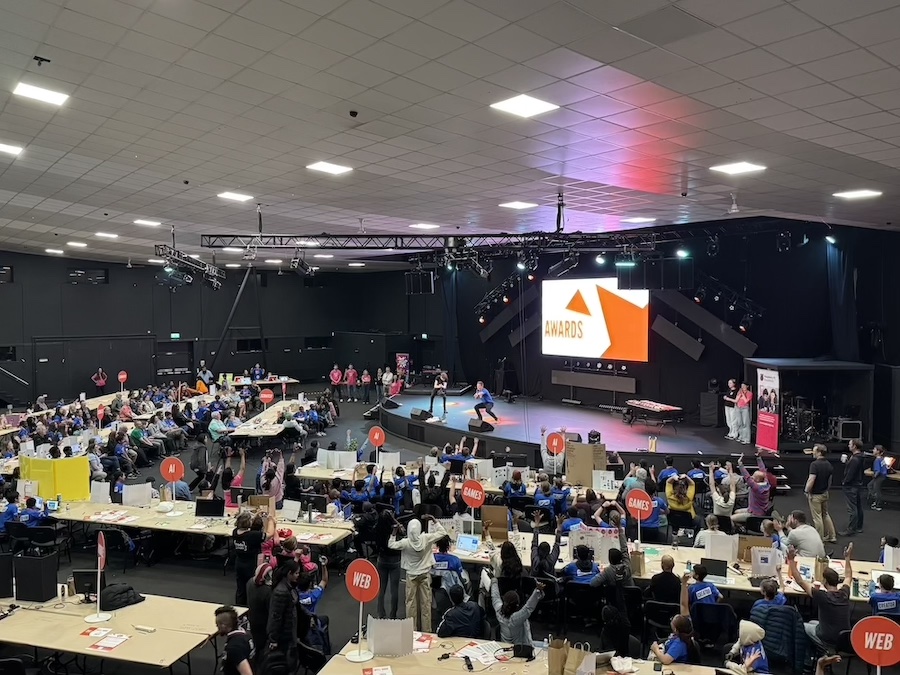
Bradford was buzzing with excitement this May as over 170 young digital makers from across the UK gathered for Coolest Projects UK 2025 at the Life Centre to celebrate the amazing things young people create with technology. Run by the Raspberry Pi Foundation and hosted by BBC science presenter Greg Foot, the free, in-person event brought together budding creators, families, mentors, and even a few troops of Scouts for a fun-filled day.

From AI tools and advanced programming to Scratch games and hardware builds, the showcase featured an incredible range of projects from 113 Coolest Projects participants and 58 scouts. Every young person received thoughtful feedback from industry professionals, the chance to try hands-on coding challenges, and the thrill of sharing what they built with a welcoming crowd and other creators.

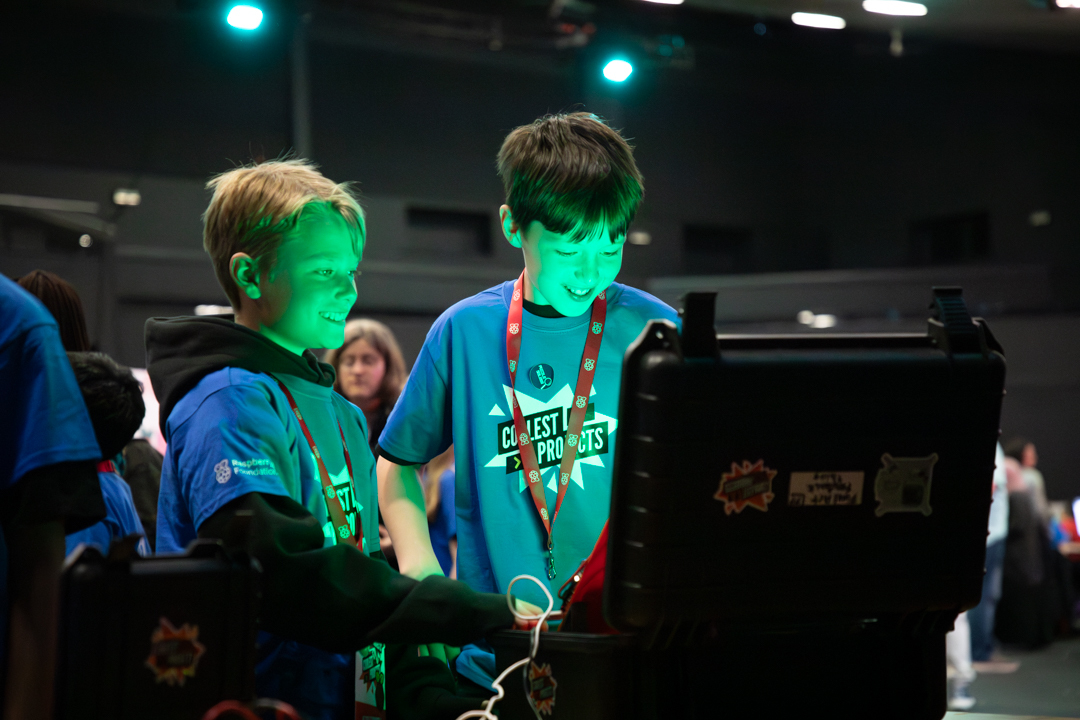
Two young creators connecting on the day over a project.

A day of discovery and digital making

Coolest Projects UK 2025 wasn’t just about showcasing finished products; it celebrated every part of the creative journey. Many creators shared works-in-progress or prototypes, sparking conversations around design, problem-solving, and learning through code.

One of the day’s highlights was an interactive escape room designed just for the event, giving attendees a chance to flex their logical thinking and collaboration skills. And for 58 visiting Scouts, the day was a chance to earn their Digital Maker Badge and share their creations with the showcase participants.

Two young scouts getting hands-on at a workshop.

Greg Foot is known for BBC Radio 4’s Sliced Bread and other popular science shows. He brought energy and enthusiasm as host, sharing stories and celebrating young people’s creativity on stage.

Greg hosting the awards ceremony where every participant received an award along with a few being given the extra recognition of judges’ favourite.

A platform for everyone

Many of this year’s participants came from local Code Clubs, CoderDojos, and schools across the UK. Others had worked independently to bring their ideas to life. The event encouraged collaboration and connection, with creators exchanging feedback, learning from each other, and celebrating shared interests.

Earlier this year, young people from Bradford also had the chance to take part in hands-on workshops. Held at the National Science and Media Museum, they were guided on getting started with digital making and developing their own project ideas for the showcase.

Featured projects

Here are a few of the projects that were showcased on the day. Each one demonstrates the power of digital tools and the fun and creativity that young people bring to their Coolest Projects journeys. Here’s what the creators had to say about their work, what inspired them, and their experiences of the day:

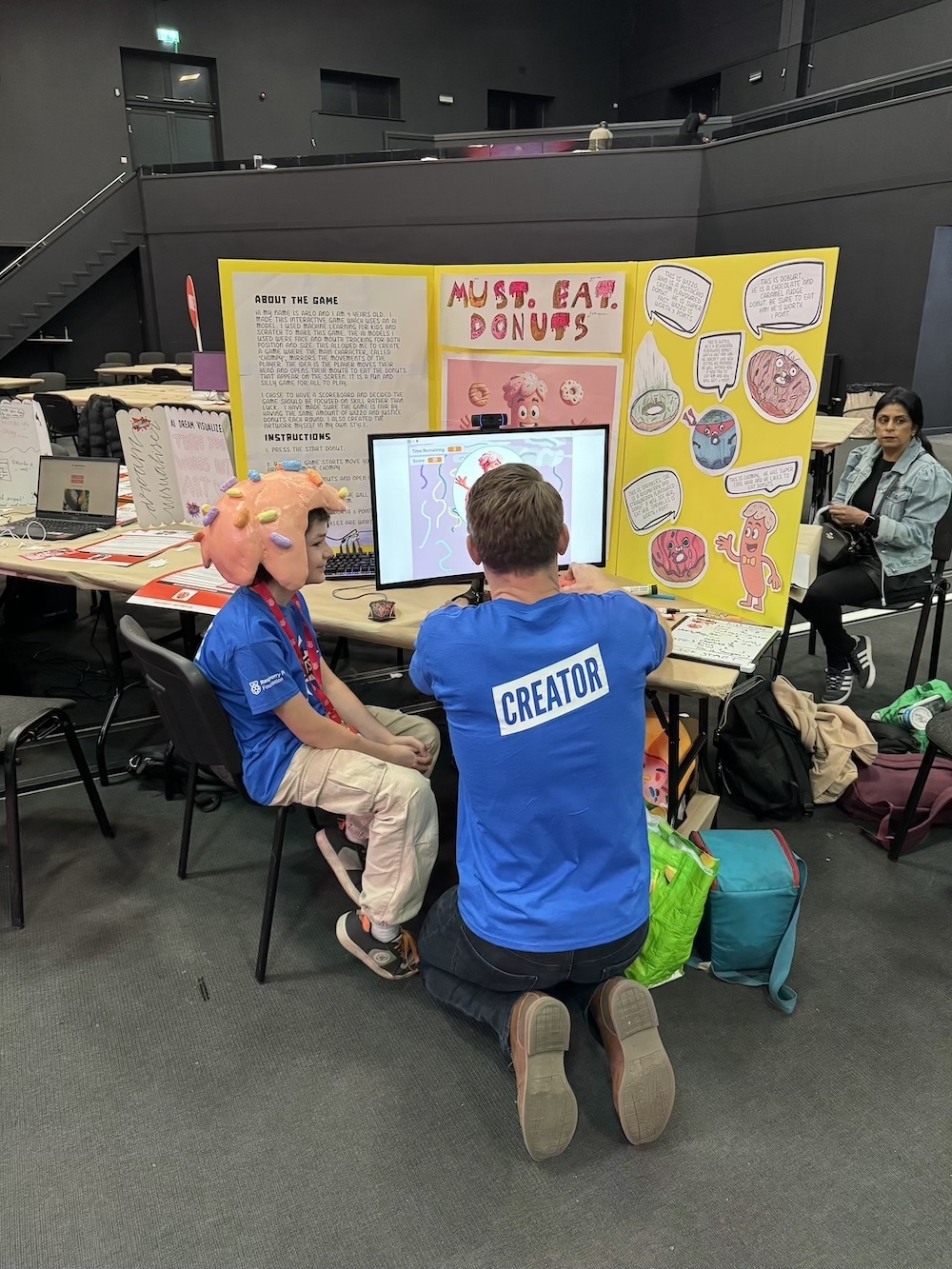
Arlo | MUST. EAT. DONUTS., AI

Arlo’s interactive game featured AI models that used face and mouth tracking to make the main character, called Chompy, mirror the movements of the player. Arlo’s game was inspired by a session at his Code Club. He came across a video sensing motion plug-in and realised he could make a game that used the player’s head as the controller. 

“It is a fun and silly game for all to play. I also created the artwork myself in my own style, as drawing is another one of my passions, alongside coding. I would love to come back next year, maybe in a different category. I wanted to enter because I got the chance to share my coding and drawing skills, and I was excited to think others may play a game I created.”

Arlo showing his project to the event host Greg Foot.

Felicia and Francesca | The Silent Forest, Scratch

Felicia and Francesca created a top-down, Zelda-style RPG in Scratch, where the player explores a pixel world and interacts with characters and objects. Instead of using the keyboard, the game is controlled with a Micro:bit. Felicia shared with us why they wanted to showcase the game at Coolest Projects.

“I went to Coolest Projects UK because I love making things with Scratch and wanted to show my game to other people. It was a fun way to share what I built, see what other kids made, and learn new ideas. I wanted to challenge myself and be part of something really cool!”

Eesa, Yahya and Yusha | Let’s Speak Arabic!, Scratch

Let’s Speak Arabic is an interactive program designed to help people learn conversational Arabic. Eesa, Yahya, and Yusha are home educated and study a book called Al Arabiyyah Bayna Yadayk together. This inspired them to think about fun ways to upgrade their study, and the idea for gamifying their learning through Scratch was born. The team shared a little about their experience:

“The event was awesome. Actually, it was even better than we imagined! We loved meeting people from all over the country, really enjoyed playing other people’s games, and got lots of ideas for what we could code in the future. And, our parents were so proud we got judge’s favourite!”

Jay | J Bot, Hardware

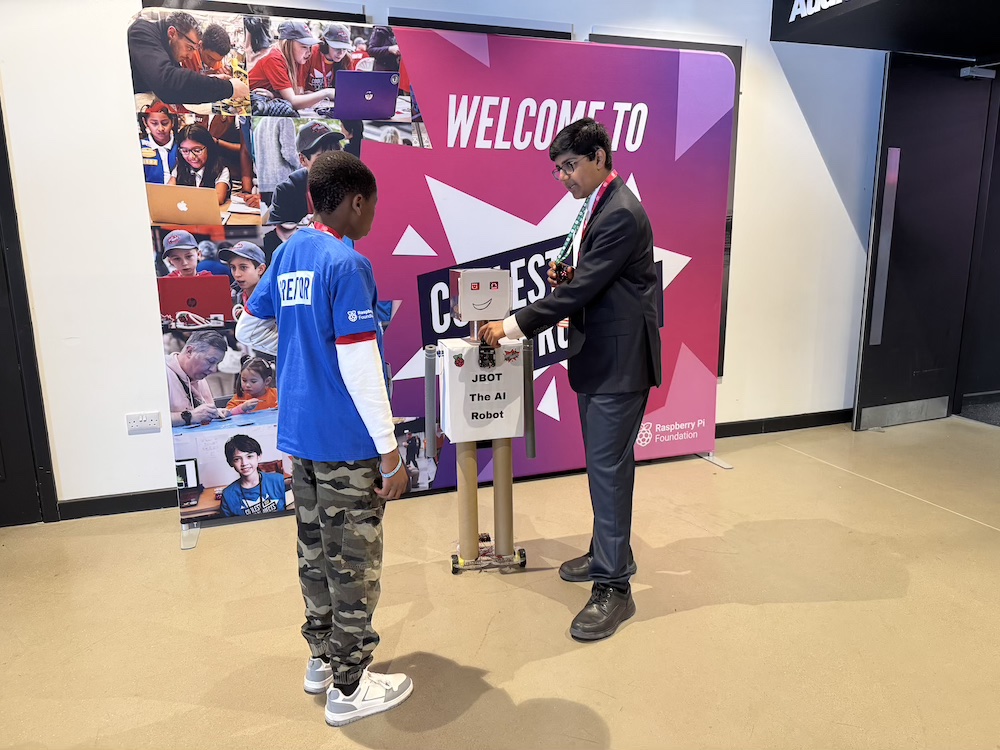
Jay is a long-time friend of the Foundation and has been taking part in Coolest Projects online and in person for the past few years. He wowed again this year with his life-sized J Bot and shared with us why he thinks Coolest Projects is such an important event for the young creator community.

“I know it might seem a bit intimidating to come and showcase in front of all these people, but I feel more and more people should try and get involved [in Coolest Projects] because it’s a really good community of people. And they are really supportive as well. So I would just say, give it a go. Don’t be nervous because people are here to help you along the way.”

Jay showing his project, J Bot, to another young creator.

What’s next?

Coolest Projects UK continues to grow as a platform for the next generation of changemakers. We can’t wait to see what they create next!

Although the online showcase and Foundation-led events are now closed for this year, there are still many more partner events happening globally throughout 2025.

Visit coolestprojects.org to learn more.

A young creator showcasing her hardware project.

Code Club: A place to keep creating

Coolest Projects is just one part of the Raspberry Pi Foundation’s work to help young people explore computing. Across the UK and Ireland, over 2000 free Code Clubs offer sessions where young people build digital skills, grow in confidence, and work on creative projects with others. Across the world, there are nearly 6000 more clubs running.To find your local Code Club or get involved as a volunteer, head to codeclub.org.

The post Young tech creators take over Bradford at Coolest Projects UK appeared first on Raspberry Pi Foundation.

ByoWave Modular Proteus Controller Kit Support Lands In Linux 6.16

Valve engineer Pierre-Loup A. Griffais contributed ByoWave Proteus controller support to the Linux kernel. ByoWave Proteus are some modular controller designs that can be adapted based upon the needs of the gamer and even what title you may be playing at the moment. The triggers and buttons are all repositionable for a very customized controller experience. The only downside is the modular gaming controller kit retails for $299 USD, but at least now works off the mainline Linux kernel…

Top 15 VsFTP Server Interview Questions with Detailed Answers

FTP stands for File Transfer Protocol and is one of the most widely used and standard protocols over the Internet, which works on a client-server model and is used to transfer files between a client and a server.

Originally, FTP clients were command-line based, but now most platforms come with FTP clients and servers built-in, and many third-party FTP client/server programs are available.

Here we present 15 Interview Questions based on VsFTP (Very Secure File Transfer Protocol) running on Linux servers, explained in a simple and beginner-friendly way.

The post Top 15 VsFTP Server Interview Questions with Detailed Answers appeared first on Linux Today.

Understanding the $SHELL Environment Variable in Unix and Linux

In Unix and Linux systems, the $SHELL environment variable indicates the parent shell that initiated your current session. This can be useful for understanding the runtime environment, particularly when troubleshooting or scripting. It’s important to know that this value doesn’t always reflect your default login shell—it shows the shell that started your current session.

For example, if you start a new shell within your login shell, $SHELL still shows the original one. For more system-related insights, see our guide on how to install Kernel 6.15 on Ubuntu, learn useful grep tricks for ps, or explore the Linux yes command for automating responses.

The post Understanding the $SHELL Environment Variable in Unix and Linux appeared first on Linux Today.

Beware of the Browser-in-the-Middle Attack: What It Is and How to Protect Yourself

A new security threat called the browser-in-the-middle (BITM) attack has recently been uncovered, exposing users—especially those using Apple’s Safari browser—to potential exploits that could compromise their privacy and security.

Reports from BleepingComputer and GBHackers highlight how attackers can take advantage of browser fullscreen features to trick users into revealing sensitive information.

For users interested in broader Linux security concerns, check out our coverage of a critical Linux kernel zero-day vulnerability in the SMB module and how hackers are now testing Clickjacking Fix (ClickFix) attacks on Linux systems.

The post Beware of the Browser-in-the-Middle Attack: What It Is and How to Protect Yourself appeared first on Linux Today.

The Fragmentation Dilemma: Is Linux Its Own Worst Enemy?

Linux’s openness has led to a rich variety of distributions (“distros”) – different variants of the operating system tailored to diverse preferences. This fragmentation of desktop Linux is often seen as a double-edged sword. On one hand, it provides users and developers with choice and fosters innovation; on the other, it can pose challenges for software compatibility, user adoption, and developer effort. In this report, we delve into the current state of Linux fragmentation with recent statistics, developer insights, commentary from Linux leaders, and a look at efforts to standardize the ecosystem.