The Aikido blog describes
an apparently ongoing series of phishing attacks against NPM package
maintainers, resulting in the uploading of compromised versions of heavily
used packages:
All together, these packages have more than 2 billion downloads per
week.
The packages were updated to contain a piece of code that would be
executed on the client of a website, which silently intercepts
crypto and web3 activity in the browser, manipulates wallet
interactions, and rewrites payment destinations so that funds and
approvals are redirected to attacker-controlled accounts without
any obvious signs to the user.
Kickstarter recently featured the Photonicat 2, a portable ARM-based computer aimed at travelers, vehicle setups, and homelab users needing reliable connectivity and long runtime. Building on the original Photonicat launched two years ago, the new model delivers higher performance, extended battery life, and added flexibility while staying fully open-source. Photonicat 2 is built around the […]
Framework Computer is a US-based
computer manufacturer with a line of Linux-supported, modular, easily
repairable and upgradeable laptops. In February, the company announced
a new model, the Framework Laptop 12,
an “entry-level” 12.2-inch convertible notebook that can be
used as a laptop or tablet. The systems were made available for pre-order
in April, I received mine in mid-August. Since then, I have been
putting it through its paces with Debian 13 (“trixie”) and
Fedora Linux 42. It’s a good choice for users who want a
Linux-friendly, lightweight, 2-in-1
device—if they are willing to make a few concessions on storage
capacity, RAM, and CPU/GPU choices.
Expect more ‘slush funds’ of this sort, analyst tells El RegAI upstart Anthropic has agreed to create a $1.5 billion fund it will use to compensate authors whose works it used to train its models without seeking or securing permission.…
Catch up on the latest Linux news: Debian 13.1, Mint 22.2, KDE Linux, LKRG 1.0, COSMIC beta release date, Mozilla drops 32-bit support, GNOME 49 brings back X11, and more.
The European Astro Pi Challenge, an ESA Education project run in collaboration with the Raspberry Pi Foundation, is back for its tenth year! This special anniversary year marks a decade of inspiring young people to code and have their programs run aboard the International Space Station (ISS). We are delighted to announce that registration for both Astro Pi missions is now officially open for the 2025–26 challenge.
Figure 1: Astro Pi is 10 illustration
Meet the new Astro Pi Ambassador
We are thrilled to introduce you to the Astro Pi ambassador for 2025–26, ESA Astronaut Sophie Adenot. Sophie is from France and has had an incredible journey to becoming an astronaut. She holds a Masters in Engineering, has been a helicopter test pilot, and was awarded the French National Order of Merit (Chevalier) for her public services in gender equality in the sciences. Sophie is one of the new “Hoppers” cohort of ESA astronauts who graduated in 2023. She will be going on her first mission to the ISS in Spring 2026.
Figure 2: Sophie Adenot
Choose your space mission
Not sure where to start? The European Astro Pi challenge, or Astro Pi for short, has two missions that young people can participate in depending on their coding abilities. Both Missions use Python programming to create short computer programs that will be run on the ISS. Which one will you choose?
Mission Zero: Your pixel art in space
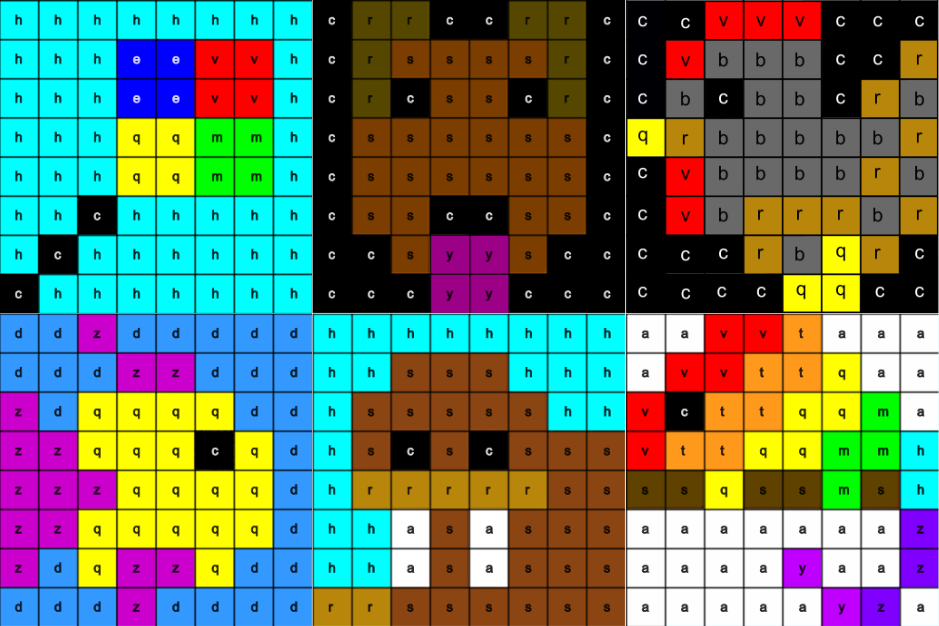
Mission Zero offers a chance for young people to create a nature-inspired piece of pixel art using Python and have it displayed for astronauts to see on special Raspberry Pi computers, called Astro Pis, aboard the ISS. We wanted to share some of our favourite pixel art creations from last year’s mission — you can find them as new examples in our project guide. If your team needs some inspiration to get started, they can choose to recreate or remix one of these examples, or create their own.
The deadline for Mission Zero submissions is 23 March 2026.
Figure 3: New code examples
Mission Space Lab: Become a space scientist
For our more experienced coders, Mission Space Lab returns with a real-world scientific task: calculate the speed of the International Space Station as accurately as possible. Teams of between two and six young people will write a Python program that collects data from the Astro Pi computers on the ISS to perform this calculation.
This year, we’ve made some user improvements to the Astro Pi Replay tool, which allows teams to test their programs with a real-time simulation using historical ISS data and images. This updated online tool makes it even easier to see how your program would perform in orbit and troubleshoot any errors.
The submission deadline for Mission Space Lab is 16 February 2026.
Figure 4: EO images from Mission Space Lab teams
Celebrating a decade of your programs in space
For ten years, the European Astro Pi Challenge has given young people the unique opportunity to explore computer science and space. Ever since the first Astro Pis arrived on the ISS with ESA astronaut Tim Peake on his Principia Mission, young people have been writing programs to run in space. This year, we’re excited to see what new ideas you have for your pixel arts creations, and how you approach the speed challenge.
Ready to send your programs to space? Visit astro-pi.org to learn more and register for the challenge today.
Don’t forget to sign up for our newsletter to stay up to date on all the latest Astro Pi news,resources and events. We can’t wait to see your programs!
P.S. We’d love to hear from some previous participants about how Astro Pi has impacted them. If you or someone you know would like to share a story, please email us at contact@astro-pi.org.
Learn how to install VirtualBox on Debian 13 “Trixie” with our step-by-step guide. Simplify your virtualization setup today and enhance your productivity.
Discover the ASRock Industrial NUC BOX-255H, powered by the Intel Core Ultra 7 Processor 255H, optimized for seamless Linux performance and efficiency.
Thanks to work by open-source Intel software engineers over the past few months, the upcoming Linux 6.18 kernel is expected to add support for Embedded USB2 Version 2.0 “eUSB2V2” for supporting next-generation, higher-resolution laptop web cameras…
Asahi Linux’s lead developer steps down, marking a significant transition for the project. Discover the implications and future direction of this innovative initiative.
Discover the best open-source PDF editor tools you can host on your own server. Enhance your document management with customizable and secure solutions.
The i18n team is testing changes for Fedora Linux 43 (Use COLR for Noto Color Emoji, Set Default Monospace Fallback Font , and many more). As a result, the i18n and QA teams organized a test week to run from Tuesday, September 09, 2025, to Monday, September 15, 2025. The wiki page in this article […]
Discover the latest enhancements in QEMU 10.1, featuring new CPU capabilities and Nested KVM support for ARM. Elevate your virtualization experience today.
The HTTP 416 (Range Not Satisfiable) status code is returned by a server when the client requests a portion of a resource (using the Range header) that the server cannot provide.
The Range header is typically used when downloading larger files in chunks, when resuming interrupted downloads, or when streaming audio or video.
The XFS file-system is ready to declare their online file-system checking “fsck” support in good enough shape for enabling by default in new kernel builds. Plus other XFS alterations ahead of Linux 6.18 that is expected to be this year’s LTS kernel version…
Bitwarden is a password management application that is increasingly popular among internet users. This application allows users to store their passwords securely and easily access them from various devices. Bitwarden also allows users to securely share passwords with others. We can choose to share access to our Bitwarden account or only share specific passwords with people we trust. This feature is especially useful for families or teams working together. In this article, we will show you how to install Bitwarden on Debian 13.