Substack updated its app to make it even more like TikTok

Substack is taking one more step towards becoming an all-in-one social media / creator platform by adding a vertical video feed to its app. Technically, the new TikTok-style feed is a redesign of the existing Media tab that the company added to the app in 2024, but either way Substack’s intentions are clear: It wants a piece of the short-video pie currently being shared by Instagram, TikTok and YouTube.

The feed features scrollable videos from creators you’re subscribed to and others that have been algorithmically suggested. Multiple forms of short-form content can be included, like videos posted through Substack Notes, the company’s Twitter-esque microblogging feature, clips from longer video posts and eventually previews of podcasts.

Adding multimedia features like podcasts and videos has been a boon to creators, according to Substack. The company says that “82% of Substack’s top-earning writers are using multimedia, up from just over 50% last April.” Supporting short-form videos is an attempt to push things even further.

Substack added support for native video in 2022, expanded those features in 2023 and more recently, gave creators the ability to host live video streams in 2024. The company has been pretty upfront that it views Substack as a home for more than just newsletters, and it’s been trying to court TikTok creators specifically since at least 2024. 

Redesigning the Substack app gives subscribers a new way to find creators to follow, and makes the platform a better home for a whole new type of creator. The timing of Substack’s change is purposeful. The extra breathing room President Trump gave TikTok by not enforcing the app’s ban is supposed to end in April, meaning there could be room for alternative vertical video apps.

This article originally appeared on Engadget at https://www.engadget.com/social-media/substack-updated-its-app-to-make-it-even-more-like-tiktok-193415204.html?src=rss

Lithium-ion battery waste fires are increasing, and vapes are a big part of it

2024 was “a year of growth,” according to fire-suppression company Fire Rover, but that’s not an entirely good thing.

The company, which offers fire detection and suppression systems based on thermal and optical imaging, smoke analytics, and human verification, releases annual reports on waste and recycling facility fires in the US and Canada to select industry and media. In 2024, Fire Rover, based on its fire identifications, saw 2,910 incidents, a 60 percent increase from the 1,809 in 2023, and more than double the 1,409 fires confirmed in 2022.

Publicly reported fire incidents at waste and recycling facilities also hit 398, a new high since Fire Rover began compiling its report eight years ago, when that number was closer to 275.

Read full article

Comments

This Refurbished 2020 MacBook Air Is on Sale for $440 Right Now

We may earn a commission from links on this page. Deal pricing and availability subject to change after time of publication.

If you’re looking for a MacBook without dropping over a grand, this refurbished 13″ 2020 Apple MacBook Air is going for $439.99 on StackSocial right now. That’s a fraction of the original price, and it comes with 8GB of RAM, a 256GB SSD, and a 1.1GHz dual-core Intel Core i3 processor. It’s not the latest and greatest, but it holds up surprisingly well for students, freelancers, or anyone who needs a decent everyday laptop for web browsing, emails, documents, and streaming. You’re also getting that bright 13.3-inch Retina display with True Tone, which still looks sharp and vibrant in 2024.

This model comes with the backlit Magic Keyboard and Touch ID, which makes unlocking your Mac or making secure purchases easy. The build is sleek, and at just under three pounds, it’s light enough to carry around all day. Battery life is also solid—you can expect up to 11 hours of wireless web use or 12 hours of video playback. Your mileage may vary depending on usage. You’ll get two Thunderbolt 3 (USB-C) ports for charging and accessories, and while that can feel limiting, a simple hub can easily expand your setup. It runs macOS and is compatible with updates to macOS Sonoma 14, so you’re not locked out of modern apps or features.

It’s rated Grade-A refurbished, so you might see minimal cosmetic wear, but performance should be unaffected. It ships with a MagSafe charger and comes with a 30-day parts and labor warranty from a third party, not Apple. That’s something to factor in if long-term support matters to you. It also won’t blow you away with speed or handle heavy creative work like video editing or 3D rendering. Still, this deal checks the right boxes for writing, streaming, Zoom calls, and basic productivity—especially if you just want a clean, modern MacBook without paying full price.

Seven Ways to Save More Money on a DIY Home Renovation Project

We may earn a commission from links on this page.

We all know that renovating and remodeling a house is expensive. An average kitchen renovation costs more than $27,000, and a bathroom will run you more than $25,000 even if your plans are relatively modest. A lot of that cost is labor, which runs anywhere from $20 to $150 per hour depending on the trade involved and the specific contractor. If you’re looking to save some money on your home project, doing it yourself is one of the most obvious ways to go.

But there are other, less obvious ways you can trim costs on your DIY renovation or remodel. To save money on a house project, it’s not always about buying cheaper materials or scaling back your design. Sometimes there are indirect actions you can take that lead to lower costs in surprising ways. Here are some unexpected strategies for reducing the overall costs of your next DIY project.

Reuse demo

The demolition phase of a renovation project is something just about anyone can take care of themselves, and it saves a little money on labor. Plus, it’s cathartic to take a hammer to those outdated aspects of your house that you’ve hated since moving in.

But if your goal is to save as much money as possible, hit pause before you swing that hammer and ask yourself if you can re-use any of the materials. Sanding and painting existing cabinetry instead of buying brand-new replacements is an obvious way to re-use materials instead of smashing them up, but think deeper:

  • Tile. If your floor or backsplash tile is in good shape and still fits your new design, removing it carefully and cleaning it up instead of smashing it into pieces is a great use of existing resources.

  • Decking. If you’re removing an old composite deck, consider using some of the composite materials as framing for the replacement. This works best with roof decks or ground-level decks where you only need a slight elevation, but it can save you money on fresh timber—and the composite materials will last longer.

  • Removable stuff. All the things that can be easily removed instead of smashed up could be repurposed. Doors, cabinet hardware, and light fixtures don’t need to be replaced unless they’re crucial to your design (or no longer work properly). If you’re not going to re-use your doors, remember that they’re made of high-quality wood that could be cut up and repurposed elsewhere—as headboards or furniture, for example, instead of buying new.

  • Walls. Taking a sledgehammer to the walls is fun, but ask yourself if you actually need to replace the walls. Drywall can be repaired and rehabbed, even if the paper has been peeled away or damaged (using a specialty primer like this), and once fresh paint, tile, or wallpaper is applied no one will know it’s the same wall that’s always been there.

  • The Domino Effect. Consider whether you can save money on other projects by salvaging what you have. Old kitchen cabinets could be transferred to a garage or basement instead of buying new storage solutions for those areas, for example.

If your dream involves fresh, brand-new everything, go for it. But spending a little time thinking about what you can salvage and re-use can add up to serious savings.

Mix-up materials

Buying cheaper materials is one of the first things DIYers think of when trying to cut costs—and it works! But there’s a price to be paid, sometimes, in terms of the final look and durability of the finishes. One solution is to think about form and function separately. For example, cheap kitchen cabinets are usually not the most attractive, but a cabinet is essentially a wooden box. Cheap cabinets combined with high-end doors, drawer faces, hardware, and counter materials will look luxe but cost a lot less.

You can also use different materials in different areas of a room. In the kitchen, for example, you can use different counter materials on the base cabinets and an island, going high-end in one area and mid-range in another. This not only saves you a little money, it adds a spice of variety to the design as well.

Dry-fit everything

You’ve heard the expression “measure twice, cut once.” Planning and taking your time are some of the easiest ways to save a little money on any home project. Before you start drilling, nailing, and driving screws into cabinets, for example, make sure they fit the way you expect and that there are no unexpected problems. Dry-fitting everything also lets you ensure your measurements for fill pieces and trim are correct, that all power cords will reach outlets, and that you haven’t overlooked anything that’s going to be costly to fix.

This concept applies to your skill set, as well. If you’re planning to learn how to do something in real-time while you’re actually doing it, be prepared to waste a lot of time—and expensive materials. Practicing things you’ve never done before will save you money in the long run. When I decided to remodel my bathroom, I bought small squares of drywall and practiced cutting and installing tile a few times before tackling the actual job, and it paid off because I’d gotten basic mistakes out of the way before they could turn into tear-out-an-entire-wall-of-fresh-tile mistakes.

Seek out deals

Things cost what people are willing to pay for them. If you can find high-end materials at discount prices, they’re still high-end, so before you break out the credit card to buy new, check out some options for lightly-used stuff, like

  • Recycling centers. Stores like Habitat for Humanity’s ReStore chain take donated materials and sell them at steep discounts. You can find everything from flooring to kitchen cabinets at these stores, ranging from used-but-functional to brand new.

  • Floor models. You can often find high-end appliances and furniture at steep discounts because of the relatively light wear-and-tear they suffer. It pays to make some calls or in-person visits to see what might be available. Your best bets for floor models are when new models come out, which is usually September/October for washers, dryers, and dishwashers, January/February for ovens, and May for refrigerators.

    Also, if you need framing material, you can look for the imperfect lumber at your local lumberyard or big box store. These pieces may not be perfectly straight, but can often be cut down to usable portions that might save you a lot of money.

  • Remnants. Search for remnant stores to find leftover countertops, tile, and other renovation materials. When stone slabs are cut for custom countertops, for example, the remnants are often oddly-shaped or nonstandard size, so you can buy them cheap.

Keep in mind, if you bought a full-sized slab that is cut down to fit your design, you can keep the remnants from that slab and use them as well. Often there’s enough material left over to use as a small vanity countertop in your bathroom, for example.

Keep the layout

One of the easiest ways to add costs to your kitchen or bathroom renovation is to move the plumbing. It costs nearly $1,100 on average per piping run to relocate your plumbing, and can run much higher if you’re making dramatic changes as opposed to shifting something a few feet this way or that. If you plan your design around the existing plumbing and electrical outlet layout, you can save a fair amount of money without losing any functionality.

Tool libraries

DIY projects often require tools you’ve never heard of before and may never use again. Renting those tools instead of buying them can save you some money—but first check if your local library has a tool library. You might be able to use an expensive tool for a few days or weeks at zero cost, and you get to avoid trying to find a place to store something you’ll probably never need again.

Camp in

Simply by choosing to live in your house during your renovation you’re saving money by not renting an apartment or hotel room. Yes, the dust and disorder can be stressful, but the savings will be significant.

If you’re renovating your kitchen or only bathroom, however, this can be a challenge. Not having a functioning kitchen probably means a fortune in food delivery bills, and not having a working bathroom is simply no way to live. Setting up a temporary kitchen is relatively easy. With a few small appliances like an air fryer, microwave, toaster oven, hot plate, and mini-fridge, you can do some basic cookery. A dish-washing station outside, in the bathroom, or by a utility sink in the laundry room or basement might not be an ideal experience, but it will get the job done.

It’s also possible to set up a usable temporary bathroom—even without plumbing. How fancy your bathroom accommodations have to be is entirely up to you, but as you shower in a makeshift stall in the basement, remind yourself how much money you’re not spending on a hotel room.

Netflix CEO Says Movie Theaters Are Dead

An anonymous reader shares a report: The post-Covid rebound of live events is all the more evidence that movie theaters are never coming back, Netflix co-CEO Ted Sarandos told Semafor in an interview at the Paley Center for Media Friday.

“Nearly every live thing has come back screaming,” Sarandos said. “Broadway’s breaking records right now, sporting events, concerts, all those things that we couldn’t do during COVID are all back and bigger than ever. The theatrical box office is down 40 to 50% from pre-COVID, and this year is down 8% already, so the trend is not reversing. You’ve gotta look at that and say, ‘What is the consumer trying to tell you?'”


Read more of this story at Slashdot.

Even Trump may not be able to save Elon Musk from his old tweets

Back in December, Elon Musk accused the Securities and Exchange Commission (SEC) of launching a purely politically motivated probe into his Twitter purchase. In a letter from his lawyer, Alex Spiro, Musk alleged that the SEC gave him 48 hours to accept a settlement or face fraud charges. Musk refused to pay the fine, demanding to know “who directed these actions,” suspecting either former SEC Chair Gary Gensler or Joe Biden’s White House.

Once the SEC lawsuit was filed in January, Musk’s condemnation of the settlement was echoed in his claims that the SEC was “totally broken.” These comments seemed to further his feud with the agency following a contentious 2018 Tesla settlement over Musk’s tweets that resulted in the Supreme Court declining to hear Musk’s arguments against his tweets being monitored by the SEC.

But after Donald Trump issued a February executive order declaring sweeping powers over independent agencies—including the SEC, which was accused of launching politically motivated investigations—it appeared that Musk might instead have been setting up the narrative to possibly get the probe squashed.

Read full article

Comments

WD’s 1TB C50 Xbox storage card is 30 percent off in the Amazon Spring Sale

The only real way to increase the storage of an Xbox Series X/S is to use a specialized expansion card. Luckily, a really good one is heavily discounted right now. The WD 1TB C40 storage card is down to $110 as part of the Amazon Spring Sale. This is a discount of 30 percent, as the regular price is around $158.

This is an officially-licensed product, so it’ll be a plug-and-play experience. It also delivers roughly the same performance as the internal drive. It’s important to note that this allows for both the storage and playing of games. Most external drives can only store, and not play, titles on an Xbox Series X/S.

Most modern AAA games require at least 50GB of available space. In other words, this drive will accommodate around 20 of these titles. Indie games tend to be much smaller, so the drive could conceivably house hundreds of smaller releases. The 2TB model is also on sale, for $200 instead of $260. The 512GB version is still at the original $80 asking price.

This is a handy drive that gets the job done. The only drawback is the price. Most 1TB external drives are cheaper than $110. It sucks that Microsoft went this weird route with storage, but that’s certainly not WD’s fault. On the positive side, this is a small and light card that won’t add any real weight to the already bulky Xbox consoles.

This article originally appeared on Engadget at https://www.engadget.com/deals/wds-1tb-c50-xbox-storage-card-is-30-percent-off-in-the-amazon-spring-sale-184918803.html?src=rss

Ryzen 9 9950X3D Delidded With Clothes Iron And Fishing Line Flirts With 6GHz

Ryzen 9 9950X3D Delidded With Clothes Iron And Fishing Line Flirts With 6GHz
Back when AMD’s Ryzen 7000 processors first came out, enthusiasts theorized that the extra-thick heatspreader used on Socket AM5 CPUs—required to maintain AMD heatsink compatibility that extends all the way back to Socket AM2—would harm cooling performance. Enthusiasts quickly popped the top on some AMD chips and found that, yeah, it does.

GTA 6 Trailer #2 And Launch Date: Take-Two CEO Details Timing Strategy

GTA 6 Trailer #2 And Launch Date: Take-Two CEO Details Timing Strategy
The entire gaming world is waiting with bated breath for more information about Grand Theft Auto VI. Fans have been looking forward to the game’s second trailer, leading to some rather interesting ways of trying to deduce when Rockstar will finally make it available. Unfortunately for these devout fans, it seems as if they’ll likely be waiting

Why I Always Leave My Pizza Dough in the Fridge for Three Days

Making a pizzeria-quality pizza at home is completely achievable, but it does take a little bit of know-how to make this happen. You can read my nine tips to get started, but you should know that there’s one very special tip on that list. Doing this one thing makes a huge impact on your pizza, requires literally no work on your end, and costs no money.

In short: You should be aging your pizza dough. I do it every time I make pizza now and I haven’t looked back. 

Homemade pizza makes for a fun, shareable family dinner, but I actually love making personal pizzas for lunch. I’ll buy a pound of pizza dough from Trader Joe’s or Shoprite and cut it into four equal parts. I wrap the quadrants separately and start making personal pizzas for lunch—one small dough ball gets used each day, while the others sit in the fridge and wait for their turn. That’s four days in a row of personal pizza. 

As the dough aged, I noticed a change. The first day’s crust would be more difficult to stretch out, the dough would feel more firm, and the finished pizza crust would be more dense, with tiny, close-set air bubbles. With each subsequent day, the texture of the crust would improve. By day four, the crust would have big, irregular bubbles, stretch easily, and bake with a more pizzeria-like quality. Plus, the crust would be more flavorful.

Stretched out pizza dough with bubbles.
Great bubbling action happening here on my aged dough.
Credit: Allie Chanthorn Reinmann

Why aging your pizza crust gives you better results

Whether you’re making your own homemade crust recipe or you’re buying raw dough from the supermarket, pizza dough is a yeast-leavened bread, and yeast breads develop flavor as they ferment. That’s why many sourdough recipes suggest letting the dough cold-ferment in the fridge overnight, and why others suggest 72-hour fermentation periods for pizza dough. 

This extra time gives the yeast time to eat and release carbon dioxide to make those lovely air pockets. Additionally, the gluten in the dough gets time to relax, so you can actually stretch it without a fight. My favorite thing about pizzeria pizza is when those gigantic air bubbles blossom around the pie. The only way I’ve been able to duplicate that at home is after aging my pizza dough in the fridge for three or four days. 

How to age (ferment) your pizza dough

Aging your pizza dough is so easy you might have done it by accident a few times already. If you buy your dough frozen from the supermarket, simply pop it into the fridge for at least three days. The first day is to thaw the dough, so it’s more like Day 0. Add 48 to 72 hours of additional time in the fridge for the dough to ferment. 

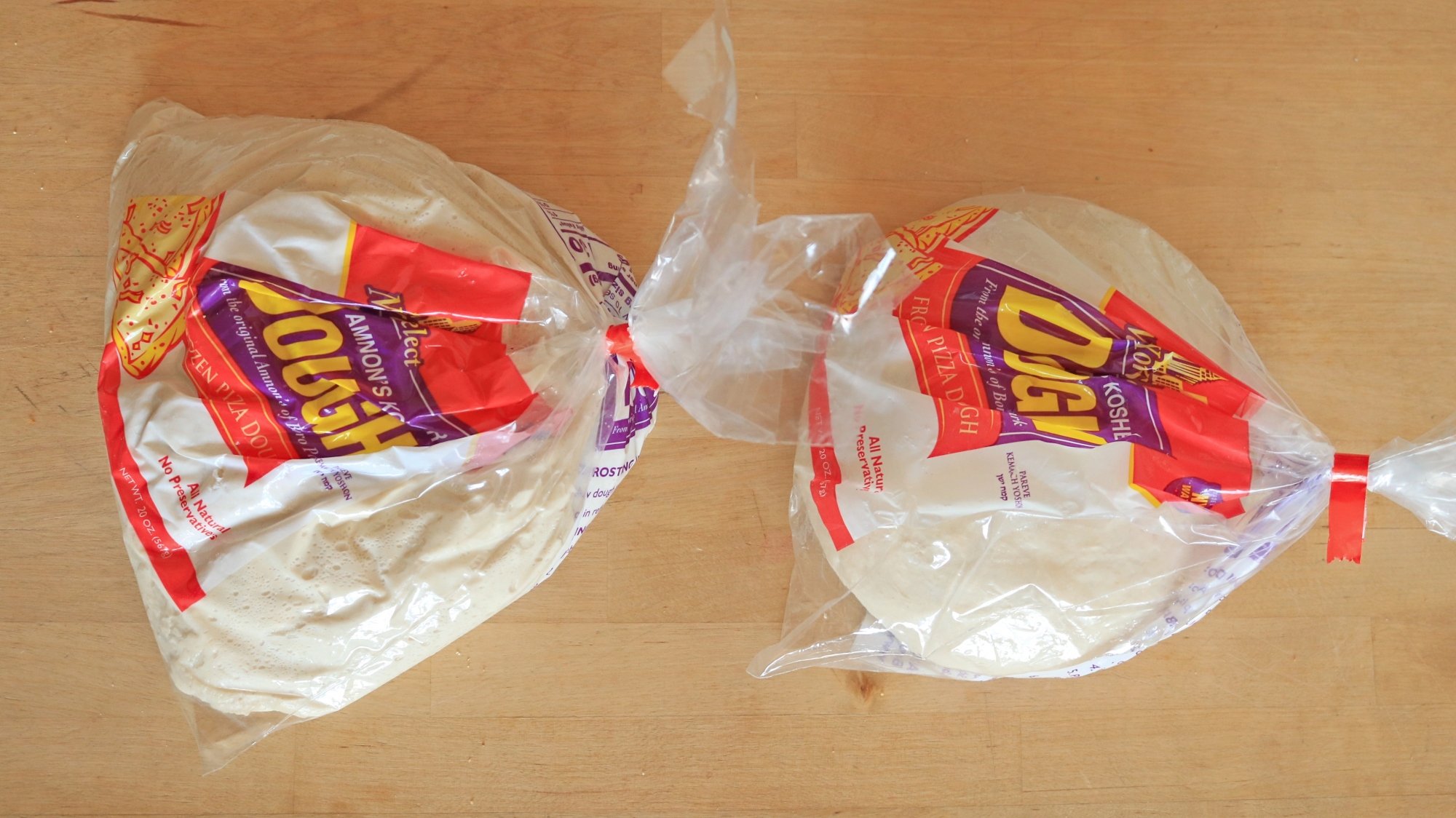
Two balls of raw pizza dough in plastic bag packaging.
Left: 72-hour aged dough. Right: Un-aged dough.
Credit: Allie Chanthorn Reinmann

You can see the difference in the picture. The dough on the left has been fermenting for three days and the one on the right is just thawed—technically ready to use but unfermented. There are tons of air bubbles on the aged dough, visible against the plastic. You can also see a difference in the overall elasticity, the aged dough is much looser while the un-aged dough on the right still maintains a tight shape with a smooth, un-bubbled surface.

If you make your own pizza dough, mix the recipe as usual. After the dough is completely mixed, shape it into a smooth ball and put it into a plastic bag or in a lightly oiled large bowl and cover it with plastic wrap. Put it in the fridge for 48 to 72 hours.

A meatball pizza on a wooden board.

Credit: Allie Chanthorn Reinmann

Once it’s finished fermenting, scrape the dough out onto a floured surface and stretch the dough like you normally would. Slather it with tomato sauce (or one of these adventurous pizza sauces), top it and bake it until bubbling and crispy. And keep in mind, if you like big bubbles, make sure you don’t pop them while you stretch the dough. You shall be rewarded.

This 2019 iPad With Beats Flex Headphones Is on Sale for Just $160 Right Now

We may earn a commission from links on this page. Deal pricing and availability subject to change after time of publication.

If you’ve been waiting for a low-stakes opportunity to buy an iPad, this $159.99 bundle on StackSocial could check enough boxes. It includes a refurbished 7th-gen Apple iPad (2019) with 32GB of storage and wifi in Space Gray, plus a pair of refurbished Beats Flex headphones. The refurbished condition means it’s been tested and certified to work as expected, though you might spot some cosmetic wear. You’re also getting a solid handful of accessories—a case, screen protector, stylus, charger, and cable—all generic but usable.

This isn’t the newest iPad on the block, but it still runs iPadOS and handles the basics like email, Netflix, YouTube, and Zoom calls just fine. If you’re not running Photoshop or editing videos, it does what most people need. That said, the 32GB of internal storage is tight—after system files and apps, you’re not left much room. And since iPads don’t support microSD cards, cloud storage or streaming is your best workaround. Battery life is around 10 hours, which is fine for a day of use. The front and rear cameras are both 8MP and 1.2MP, so don’t expect Instagram-ready shots, but they’re fine for FaceTime.

The inclusion of Beats Flex wireless headphones makes this bundle a little better. They’re not high-end, but they get the job done for casual music, calls, or blocking out noise while watching a show. The neckband design isn’t for everyone, but they stay in place and have a 12-hour battery life. All things considered, this bundle makes sense if you’re looking for a reliable tablet for the kids, for travel, or just as a backup screen for light tasks.

Micron Hikes Memory Prices Amid Surging AI Demand

Micron will raise prices for DRAM and NAND flash memory chips through 2026 as AI and data center demand strains supply chains, the U.S. chipmaker confirmed Monday. The move follows a market rebound from previous oversupply, with memory prices steadily climbing as producers cut output while AI and high-performance computing workloads grow.

Rivals Samsung Electronics and SK Hynix are expected to implement similar increases. Micron cited “un-forecasted demand across various business segments” in communications to channel partners. The price hikes will impact sectors ranging from consumer electronics to enterprise data centers.


Read more of this story at Slashdot.

Alexa+ is out, but missing a lot of features Amazon demoed last month

If there’s one thing you can count on with AI tools is that they’ll launch without most of the promised features. It happened with Apple Intelligence. It happened with Galaxy AI. Now, it’s happening with Alexa+, Amazon’s AI-heavy upgrade to its virtual assistant. The tool is officially available but it doesn’t do a whole lot, according to reporting by The Washington Post.

The paper reviewed a number of internal company documents that noted the delay of many features. These documents suggest that a bunch of tools won’t be available for two months or longer. Alexa+ users won’t be able to use the platform to order takeout on Grubhub or identify family members via camera to remind them to do chores.

The same goes for that neat-sounding tool that the company says will auto-generate a story to entertain kids. Also, Alexa+ cannot be used to brainstorm gift ideas or order groceries. Finally, there isn’t a browser-based version available. The company says these delays are because the features do not “meet Amazon’s standards for public release.”

So what can Alexa+ do right now? I haven’t gotten a chance to fool around with it, but the early access page suggests customers can use it to order an Uber, identify objects and draft emails. That’s something, I guess.

Alexa+ is included with Amazon Prime but non-members have to pony up $20 per month. It may not be accessible to everyone just yet, as availability is expanding over the coming weeks and months. Also, it only works on devices with screens. These include the Echo Show 8, 10, 15 and 21.

This article originally appeared on Engadget at https://www.engadget.com/ai/alexa-is-out-but-missing-a-lot-of-features-amazon-demoed-last-month-180741504.html?src=rss

Oura’s ‘AI Advisor’ Is Out of Beta Testing, but Is It Worth Using?

We may earn a commission from links on this page.

The Oura Advisor, an AI feature formerly tucked away in Oura’s beta testing program, is now rolling out to all Oura Ring customers. It takes the form of a chatbot that you can start a conversation with at any time from within the Oura app—plus the Advisor promises to “check in” with you daily, weekly, or three times a week, depending on what you request. But do you actually want it to do any of those things?

What does the Oura Advisor do? 

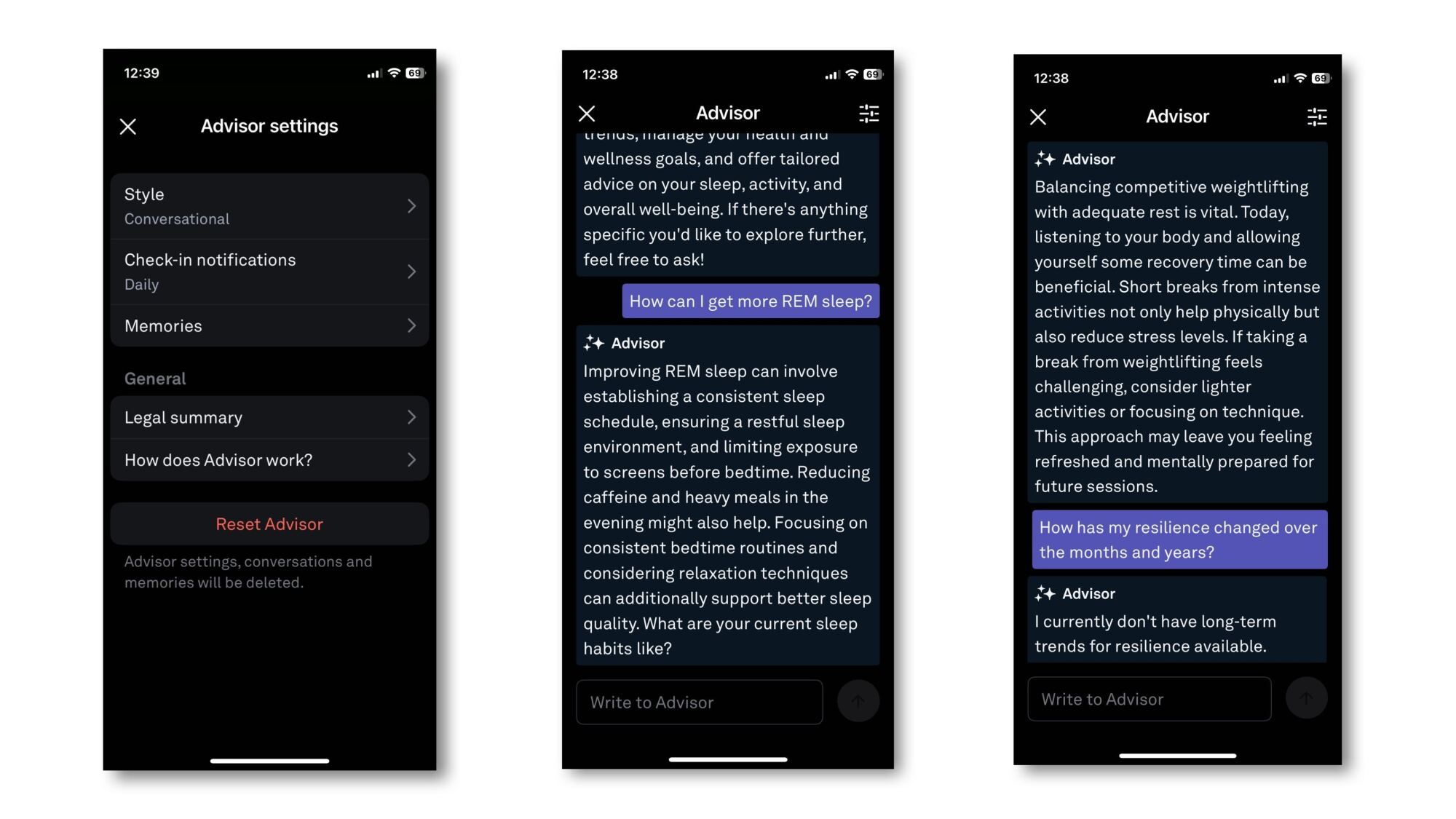
A side by side screenshot of the app features as described below

Credit: Beth Skawrecki

Honestly, this seems to be a pretty standard fitness app AI—meaning that all it really does is restate metrics from the app in a more conversational tone. The Advisor itself told me that it “analyze[s] your Oura data to provide insights and guidance tailored to your health goals.” Its language is in the same style as the little encouraging sentences you get on the Oura home screen, and it tends to repeat the same kinds of advice. 

When you open a chat with the Advisor, it asks what you’d like to talk about. So far I haven’t gotten it to tell me anything that wasn’t already obvious from other screens of the app. When I asked why my resting heart rate has been high lately, it gave a generic list of reasons that a resting heart rate might be high for anyone. When I asked it for an “insight” (since it told me that its job is to provide insights), it told me my cardiovascular age, which is a metric that also appears on my app home screen. 

How to turn on the Oura Advisor

Until recently, you had to opt in to Oura Labs (the beta testing program) to access the Advisor. It’s still rolling out to all users, so if you want to try it in the meantime, you can turn on any Oura Labs features you like by going to the menu in the top left corner, selecting Oura Labs, and choosing what “experiments” you’d like to turn on. (There is currently a meal tracking feature, and a “heart check-in.”)

You do have to use the app in English, although Oura says they’re planning to offer the Advisor in other languages in the future. Once the Advisor is enabled, you can tap the “+” in the bottom right corner (the same place you would add an activity or start a meditation session) and choose Advisor. This opens up the chat, and from this screen you can also adjust the Advisor’s settings. 

How to change settings and delete “memories” on the Oura Advisor

In the chat, you can tap a settings icon in the upper right corner of the screen. The available settings are: 

  • Style: Conversational, conversational, or direct. I can’t tell if the two “conversational” options are different, or if the duplication is an error on Oura’s part. 

  • Check-in notifications: Daily, three times a week, or weekly; you can also set whether your preferred time of day is morning, afternoon, or evening (or any combination)

  • Memories: The Advisor remembers things you’ve told it about yourself. My Memories section has “The user participates in competitive weightlifting,” and “the user has been sick,” both things I told it directly in our conversations. You can delete a memory by tapping the trash can icon next to it.

There is also a button to “reset” the advisor, which means all settings, conversations, and memories will be deleted.

To test what it’s getting from its memories, I asked the advisor if its data suggested I was getting sick. With the “memory” of my illness, it said yes, and suggested I might want to focus on recovery today. After deleting that memory, I asked the same question again. It said that my resting heart rate suggests I’ve been under some stress, and that I might want to focus on recovery today. 

Is the Oura Advisor worthwhile?

So far I haven’t seen the Advisor hallucinate data or say anything inappropriate, but it also hasn’t told me anything I would consider an “insight.” I tried asking it about data that I can’t easily read from the app—like my long term resilience trends—and it said it didn’t have that data available. On the Oura subreddit, most posts about the Advisor seem to be complaints that it isn’t doing anything interesting, but one user said they were able to get the Advisor to talk to them about their meal choices logged with the Meals feature, which is still in beta.

One user said the Advisor helped them to improve their resilience score, but they didn’t provide much information about how it did that, just that they gave the advisor specific information about things like their sleep schedule. Now that the feature has rolled out to more users, perhaps we’ll find out whether more people find it useful.

iOS 18.4 is available now with new emoji, Apple News+ Food and priority notifications

Apple has released iOS 18.4, iPadOS 18.4, macOS 15.4 and visionOS 2.4, bringing a grab bag of new features to the companies devices and expanding Apple Intelligence to new countries and languages.

As previously announced by Apple iOS 18.4, iPadOS 18.4 and macOS 15.4 include a new Apple News+ Food section in the News app that collects recipes and food-oriented articles, including exclusive recipes for Apple News+ subscribers. The updates also introduce new emoji, AI-sorted Priority Notifications in Notification Center, new ways to filter photos in the Photos app and lossless audio on the AirPods Max. That’s on top of a random assortment of other quality-of-life features like:

  • AI-generated summaries of App Store reviews

  • An Ambient Music tool in Control Center

  • The ability to add and control Matter-compatible robot vacuums to the Home app

  • New widgets for the Podcasts app

  • A new “Sketch” style for images in Image Playground

The Writing Tools features in visionOS on the Vision Pro.
Apple

The update to visionOS 2.4 will add Apple Intelligence features like Writing Tools and Image Playground to the Vision Pro for the first time, on top of a streamlined process for sharing your headset with another person, a new Apple Vision Pro app for the iPhone to download apps and experiences to your Vision Pro remotely, and a Spatial Gallery app for the headset itself that features a rotating collection of spatial videos and photos curated by Apple.

After a bit of a delay, Apple says Apple Intelligence will be available in the European Union for the first time on iPhone and iPad. The suite of AI features will now also work in several new languages “including French, German, Italian, Portuguese (Brazil), Spanish, Japanese, Korean, and Chinese (simplified) — as well as localized English for Singapore and India,” Apple says.

This article originally appeared on Engadget at https://www.engadget.com/mobile/smartphones/ios-184-is-available-now-with-new-emoji-apple-news-food-and-priority-notifications-175358845.html?src=rss

France fines Apple €150M for “excessive” pop-ups that let users reject tracking

France’s competition regulator fined Apple €150 million, saying the iPhone maker went overboard in its implementation of pop-up messages that let users consent to or reject tracking that third-party applications use for targeted advertising.

The App Tracking Transparency (ATT) framework used by Apple on iPhones and iPads since 2021 makes the use of third-party applications too complex and hurts small companies that rely on advertising revenue, said a press release today by the Autorité de la concurrence (Competition Authority). The system harms “smaller publishers in particular since, unlike the main vertically integrated platforms, they depend to a large extent on third-party data collection to finance their business,” the agency said.

User consent obtained via the ATA framework “authorizes the application in question to collect user data for targeted advertising purposes,” the agency said. “If consent is given, the application can access the Identifier for Advertisers (‘IDFA’), the identifier by which each device can be tracked through its use of third-party applications and sites.” The French investigation was triggered by a complaint lodged by advertising industry associations.

Read full article

Comments

Microsoft Shutters AI Lab in Shanghai, Signalling a Broader Pullback From China

An anonymous reader shares a report: Microsoft has closed its IoT & AI Insider Lab in Shanghai’s Zhangjiang hi-tech zone, marking the latest sign of the US tech giant’s retreat from China amid rising geopolitical tensions.

The Shanghai lab, meant to help with domestic development of the Internet of Things (IoT) and artificial intelligence (AI) technologies, closed earlier this year, according to people who work in the Zhangjiang AI Island area. Opened in May 2019, Microsoft’s IoT & AI Insider Lab was touted as a flagship collaboration between the global tech giant and Zhangjiang, the innovation hub of Shanghai’s Pudong district, where numerous domestic and international semiconductor and AI companies have set up shop. The lab covered roughly 2,800 square meters (30,000 square feet).


Read more of this story at Slashdot.

There’s a new benchmark in town for measuring performance on Windows 95 PCs

If you’re still using a computer you bought during the Clinton administration, interesting news: Crystal Dew World, developers of apps like CrystalDiskInfo and CrystalDiskMark, have released an update to their CrystalMark Retro benchmark (as spotted by Tom’s Hardware). The most interesting aspect of the update for retro computing enthusiasts is expanded operating system support: the app will now run on Windows 95, Windows 98, and old versions of Windows NT like 3.51 and 4.0. The previous version of the app only went as far back as Windows XP.

The app spits out benchmarking scores for five things: single-core CPU performance, multi-core CPU performance, 2D graphics performance using GDI, 3D graphics performance using OpenGL, and disk speed (broken into four sub-benchmarks for sequential and random read and write performance).

The app will also run on current systems, including 64-bit x86 and Arm-based PCs, and the results database is dominated by those modern systems. But searching by operating system allows you to zero in on those retro results, including nine (as of this writing) for Windows 95, six for Windows 98, and five for Windows NT 3.51.

Read full article

Comments

You Can Get a 1-Year Sam’s Club Membership for $25 Right Now

We may earn a commission from links on this page. Deal pricing and availability subject to change after time of publication.

If you like to buy in bulk or just want one less thing to worry about during weekly errands, this sale might be worth the look: You can get a one-year membership to Sam’s Club for $25 right now on StackSocial. It’s half the usual price, but the catch is that it’s only for new members in the U.S. If you’re eligible, though, the sale opens up access to warehouse prices on groceries, household staples, electronics, furniture, and even tires. It’s not just bulk cereal and 40-roll packs of paper towels anymore—there’s a surprising amount of variety on the shelves. You’ll need to activate your membership within 30 days of buying the code (and definitely before May 28, 2025, or the promo becomes invalid). Also, the code is non-transferable, so make sure you’re signing up for yourself.

Sam’s Club uses a limited-item business model, meaning fewer brands per category but carefully selected products across the board. From what regular members say, the quality holds up well, especially in categories like meat, produce, and household cleaning. The membership also includes perks like discounts on travel, rental cars, concert tickets, and even movie nights—so there’s some value beyond groceries. You can shop in-store at one of their 597 U.S. locations or browse online through mobile and desktop platforms. Just be prepared for the occasional treasure hunt feel—inventory can vary.

That said, this deal includes auto-renewal, which means your card will be charged yearly (currently $50 for Club members, plus taxes) unless you cancel. If you like buying snacks for months in one go, finding discounts on random big-ticket items, or just having one place to cover most of your shopping list, this might be a practical pick. If you’re more of a once-a-week, two-bags-max kind of shopper, it may not be worth the warehouse dive.