Wikipedia is struggling with voracious AI bot crawlers

Wikimedia has seen a 50 percent increase in bandwidth used for downloading multimedia content since January 2024, the foundation said in an update. But it’s not because human readers have suddenly developed a voracious appetite for consuming Wikipedia articles and for watching videos or downloading files from Wikimedia Commons. No, the spike in usage came from AI crawlers, or automated programs scraping Wikimedia’s openly licensed images, videos, articles and other files to train generative artificial intelligence models. 

This sudden increase in traffic from bots could slow down access to Wikimedia’s pages and assets, especially during high-interest events. When Jimmy Carter died in December, for instance, people’s heightened interest in the video of his presidential debate with Ronald Reagan caused slow page load times for some users. Wikimedia is equipped to sustain traffic spikes from human readers during such events, and users watching Carter’s video shouldn’t have caused any issues. But “the amount of traffic generated by scraper bots is unprecedented and presents growing risks and costs,” Wikimedia said.

The foundation explained that human readers tend to look up specific and often similar topics. For instance, a number of people look up the same thing when it’s trending. Wikimedia creates a cache of a piece of content requested multiple times in the data center closest to the user, enabling it to serve up content faster. But articles and content that haven’t been accessed in a while have to be served from the core data center, which consumes more resources and, hence, costs more money for Wikimedia. Since AI crawlers tend to bulk read pages, they access obscure pages that have to be served from the core data center. 

Wikimedia said that upon a closer look, 65 percent of the resource-consuming traffic it gets is from bots. It’s already causing constant disruption for its Site Reliability team, which has to block the crawlers all the time before they they significantly slow down page access to actual readers. Now, the real problem, as Wikimedia states, is that the “expansion happened largely without sufficient attribution, which is key to drive new users to participate in the movement.” A foundation that relies on people’s donations to continue running needs to attract new users and get them to care for its cause. “Our content is free, our infrastructure is not,” the foundation said. Wikimedia is now looking to establish sustainable ways for developers and reusers to access its content in the upcoming fiscal year. It has to, because it sees no sign of AI-related traffic slowing down anytime soon. 

This article originally appeared on Engadget at https://www.engadget.com/ai/wikipedia-is-struggling-with-voracious-ai-bot-crawlers-121546854.html?src=rss


You Can Grow a Mini Fruit Tree on Your Patio

We may earn a commission from links on this page.

Every year around this time, I prepare to move my living room lemon tree outside for the season. In the fall, when temperatures drop below 40 degrees overnight, Daisy (yes, she has a name) gets rolled into my living room, where she winters under a grow light,  and then as soon as the overnight temperatures stabilize in spring, back out she goes to live on the patio. Since I live in the Pacific Northwest, this is the only way to keep a lemon tree; they simply aren’t built to withstand a real winter outside. But, even if you are unwilling or unable to host your trees inside your home or greenhouse over the winter, you may still be able to turn your patio into a mini orchard. 

Generally, when you buy trees or shrubs, you plant them in the ground, and the expectation is that these plants will grow to get quite large. But if you don’t have the room to plant a large tree or shrub, you can consider getting a tree or shrub small enough to remain in a pot. Smaller and smaller dwarf type trees and shrubs are being cultivated all the time, and regardless of what kind of fruit you like, it is almost guaranteed that there will be a variety that is small or micro enough to remain in a pot. 

Small lemon tree in car
My potted lemon tree is not expected to get much larger than this, so I roll the pot into my living room each winter.
Credit: Amanda Blum

These potted plants, which should remain under six feet, can live on your patio, so long as they get enough sunlight, water and heat in the summer. In fact, your patio can provide the opportunity to better control the environment for your potted plant. You can provide shelter from storms, control the moisture level to help prevent disease, and move it around if the original location doesn’t suit it. 

At least for spring and summer, you and your micro trees should be very happy on your patio. The problem comes in winter. When you purchase plants you should always pay attention to their winter hardiness rating. For instance, cacti can’t survive a cold winter outside, but a pine tree has no issue. Plants generally go dormant over the winter, which means they focus on root growth, and not leafing, fruiting, or flowering. These small trees and shrubs are particularly vulnerable, since their roots are not in the ground, but a pot, so they lack the insulation the ground can offer. 

The first way to ameliorate the winter hardiness issue is to bring your plants into a greenhouse during winter—that’s what nurseries do. Of course, most people (including me) lack a greenhouse. The second best option is a spot in your home where the plant will be able to get enough light, water, and heat to survive the winter. Since your home is inevitably heated enough for the temperatures to remain above forty degrees at night, your tree is fine. Remaining situated near a window or under a grow light is sufficient for these plants. A third location might be the garage, or another unheated building, because even though temperatures will drop below forty degrees, if they consistently stay between 20 and 40, the plant will remain dormant, isn’t exposed to wind or freeze, and should be able to survive. Just because the plant is dormant doesn’t mean it won’t require care; you’ll need to check moisture levels every few weeks. You can’t allow the soil in the pot to get too dry. 

My lemon tree, inside for winter
My lemon tree stays warm inside all winter under a grow light and some natural sunlight from a nearby window.
Credit: Amanda Blum

If you can’t bring your plants inside, you’ll need to find ways to insulate them outside, and you have a few options. Remember, the walls of your home provide some shield from the wind, and give off some heat, so relocating the plant next to the wall is a good start. You can create a cage around the plant using chicken wire and fill the cage with straw. The straw provides the insulation, while allowing for air flow, and the straw is unlikely to transmit disease or virus to the plant. You can also mound up compost or wood chips around the pot itself; this will recreate the insulation the ground offers to protect the roots. You can even purchase tree blankets, which provide a layer of breathable insulation. The thing to remember is that, like a blanket, this insulation only helps temper the winter conditions, not ameliorate them. For some trees, like citrus, this simply may not be enough warmth. For that reason, choose your patio fruit carefully, depending on what growing zone you live in and whether you have the ability to make these plants your roommates over winter. There are very winter-hardy citrus now, but you might be better suited to a patio blueberry or apple.

If your plants are going to live outdoors, you’ll want to choose a heavy ceramic or concrete planter—one that provides some insulation from the cold. But if your plant is moving indoors with you all winter, you may be impressed by how good-looking plastic planters have become. Modern, self-watering, and—most importantly—light, they can make moving your patio tree indoors and out a lot easier. 

To find the right variety tree or shrub for your yard, you should start with a local nursery. However, don’t be afraid to buy a plant that will be shipped to you; I’m constantly surfing through the One Green World catalog, because they carry varieties of cold hardy trees my local nursery doesn’t.

Samsung’s Galaxy Tab S10 FE and Galaxy Tab S10 FE+ will be available on April 10

Samsung is releasing two Fan Edition models of the Samsung Galaxy Tab S10, and they’re both more affordable than their standard counterparts. The Galaxy Tab S10 FE and the Galaxy Tab S10 FE+ are powered by the Samsung Exynos 1580 chipset instead of MediaTek processors like the standard versions. Samsung’s Galaxy Tab S10 FE+ model has a 13.1-inch display, which is bigger than the Tab S10+’s 12.4-inch screen but smaller than the 14.6-inch one on the Tab S10 Ultra. Take note that both models have a refresh rate of up to 90Hz, which is lower than the standard versions’ 120 Hz refresh rate. 

That means the standard Tab S10 models are still the better options if gaming is your primary use for a tablet. But again, the new Fan Editions cost substantially less than they do. The Galaxy Tab S10 FE’s prices start at $500, and it comes with 128GB and 256GB storage options. Meanwhile, the Galaxy Tab S10 FE+ will cost you at least $650 and come with the same storage options. The standard Galaxy Tab S10’s prices start $999, while the Tab S10 Ultra will cost you at least $1,200. 

Like the the standard models, the Fan Edition versions come with AI capabilities, including Circle to Search with Google that makes it easy to look for information simply by encircling elements on your device. Their Samsung Note app also features Math Solver, which can do calculations based on handwriting and text, as well as Handwriting Assist, which can help you tidy up handwritten notes. Both Fan Edition devices will be available in the US starting on April 10. You’ll get a $50 credit if you reserve a unit now, and you can buy a Book Cover Keyboard Slim for 50 percent off if you purchase one by May 11. 

This article originally appeared on Engadget at https://www.engadget.com/mobile/tablets/samsungs-galaxy-tab-s10-fe-and-galaxy-tab-s10-fe-will-be-available-on-april-10-120019555.html?src=rss

Roblox parental controls now include a block button

Roblox is again updating its parental control features in an effort to give parents more visibility into (and control over) their children’s activities on the platform. The company is updating its in-app “Safety Center” to counter concerns that Roblox, which unlike social media apps allows children under 13, puts its youngest users at risk.

The company added the centralized hub for parental controls last year, in an update that also added new restrictions on younger kids’ ability to exchange private messages with other users. But while that update gave parents the ability to control some of their children’s settings from their own devices, it was missing some key features like blocking.

With the latest update, parents can now view their child’s friend list and block users on their behalf. Once another user has been blocked, they’ll no longer be able to exchange direct messages with the child and kids will need to get parental approval to unblock the person.

Similarly, parents will now be able to block specific experiences within Roblox. Parents have already had the ability to limit in-app content based on its age rating, but parents have still at times complained about inappropriate content surfacing in certain games. Now, parents can block their young kids from participating in certain experiences. (Importantly, Roblox notes that kids will be able to remove apps from the blocked experiences list once they turn 13.)

Finally, Roblox is adding more “granular insights” to the in-app screen time metrics that allow parents to see how their kids are spending their time on the platform. The Safety Center will now list “the 20 experiences in which their child has spent the‬ most time over the last week, sorted by total time.” Parents can then opt to block specific games or experiences directly from the screen time menu if something seems off.

Roblox’s recent push to beef up safety features for younger users come amid a broader reckoning about the effect that online platforms can have on teens. Platforms have tried to address these concerns by enhancing parental controls and dedicated safety features for teens. But lawmakers are also pushing for change, with multiple states passing measures requiring some form of age verification (some of which have since been struck down). There’s also a bipartisan bill in the Senate to ban all preteens from social media entirely.

This article originally appeared on Engadget at https://www.engadget.com/gaming/roblox-parental-controls-now-include-a-block-button-120005897.html?src=rss

Fade To Black: Microsoft Is Killing Some Blue Screens Of Death In Windows

Fade To Black: Microsoft Is Killing Some Blue Screens Of Death In Windows
A few days ago, Microsoft redesigned its login UX to facilitate the use of passkeys, but more recently, it released Windows 11 Insider Preview Build 26120.3653 (KB5053658) with a new UI design for an unexpected restart screen. Newly added features included Quick Machine Recovery and speech recap in Narrator. Members of the Windows Insider

King Of Kong’s Billy Mitchell Scores Massive Payday In Defamation Lawsuit

King Of Kong's Billy Mitchell Scores Massive Payday In Defamation Lawsuit
An Australian court has ruled that YouTuber Karl Jobst’s video contained false and damaging allegations that defamed Billy Mitchell. The court awarded a massive payout of about $237,000 against Jobst in favor of Mitchell for the defamatory comments.

The ruling was predicated on a lawsuit following a video in which Karl Jobst, a Youtuber

Why Watts Should Replace mAh as Essential Spec for Mobile Devices

Tech manufacturers continue misleading consumers with impressive-sounding but less useful specs like milliamp-hours and megahertz, while hiding the one measurement that matters most: watts. The Verge argues that the watt provides the clearest picture of a device’s true capabilities by showing how much power courses through chips and how quickly batteries drain. With elementary math, consumers could easily calculate battery life by dividing watt-hours by power consumption. The Verge: The Steam Deck gaming handheld is my go-to example of how handy watts can be. With a 15-watt maximum processor wattage and up to 9 watts of overhead for other components, a strenuous game drains its 49Wh battery in roughly two hours flat. My eight-year-old can do that math: 15 plus 9 is 24, and 24 times 2 is 48. You can fit two hour-long 24-watt sessions into 48Wh, and because you have 49Wh, you’re almost sure to get it.

With the least strenuous games, I’ll sometimes see my Steam Deck draining the battery at a speed of just 6 watts — which means I can get eight hours of gameplay because 6 watts times 8 hours is 48Wh, with 1Wh remaining in the 49Wh battery. Unlike megahertz, wattage also indicates sustained performance capability, revealing whether a processor can maintain high speeds or will throttle due to thermal constraints. Watts is also already familiar to consumers through light bulbs and power bills, but manufacturers persist with less transparent metrics that make direct comparisons difficult.


Read more of this story at Slashdot.

OpenAI Accused of Training GPT-4o on Unlicensed O’Reilly Books

A new paper [PDF] from the AI Disclosures Project claims OpenAI likely trained its GPT-4o model on paywalled O’Reilly Media books without a licensing agreement. The nonprofit organization, co-founded by O’Reilly Media CEO Tim O’Reilly himself, used a method called DE-COP to detect copyrighted content in language model training data.

Researchers analyzed 13,962 paragraph excerpts from 34 O’Reilly books, finding that GPT-4o “recognized” significantly more paywalled content than older models like GPT-3.5 Turbo. The technique, also known as a “membership inference attack,” tests whether a model can reliably distinguish human-authored texts from paraphrased versions.

“GPT-4o [likely] recognizes, and so has prior knowledge of, many non-public O’Reilly books published prior to its training cutoff date,” wrote the co-authors, which include O’Reilly, economist Ilan Strauss, and AI researcher Sruly Rosenblat.


Read more of this story at Slashdot.

Amazon’s Alexa+ AI Assistant Starts Rolling Out With Some Big Caveats

Amazon's Alexa+ AI Assistant Starts Rolling Out With Some Big Caveats
Apple isn’t the only company struggling in its efforts to integrate AI into its various products and services. Amazon’s launch of Alexa+, for example, falls well short of what the company promised during its initial announcement. The Washington Post shared insights into this new offering, which is currently in early access. It was able to

Larry Fink Says Bitcoin Could Replace the Dollar as the World’s Reserve Currency Because of National Debt

With America’s national debt sitting comfortably over the $36.2 trillion mark, BlackRock CEO Larry Fink is warning the burden could one day be the reason the dollar is dethroned as the reserve currency of the world.
From a report: He argues that decentralized currencies like Bitcoin could replace the dollar as worldwide organizations lose faith in national currencies and seek an independent solution. Fink explained his theory in his 2025 letter to shareholders, writing: “The U.S. has benefited from the dollar serving as the world’s reserve currency for decades. But that’s not guaranteed to last forever.

“The national debt has grown at three times the pace of GDP since Times Square’s debt clock started ticking in 1989. This year, interest payments will surpass $952 billion — exceeding defense spending. By 2030, mandatory government spending and debt service will consume all federal revenue, creating a permanent deficit. If the U.S. doesn’t get its debt under control, if deficits keep ballooning, America risks losing that position to digital assets like Bitcoin.”


Read more of this story at Slashdot.

Cheap TVs’ incessant advertising reaches troubling new lows

TVs offer us an escape from the real world. After a long day, sometimes there’s nothing more relaxing than turning on your TV, tuning into your favorite program, and unplugging from the realities around you.

But what happens when divisive, potentially offensive messaging infiltrates that escape? Even with streaming services making it easy to watch TV commercial-free, it can still be difficult for TV viewers to avoid ads with these sorts of messages.

That’s especially the case with budget brands, which may even force controversial ads onto TVs when they’re idle, making users pay for low-priced TVs in unexpected, and sometimes troubling, ways.

Read full article

Comments

How to Discover Which Apps Drain Your Laptop’s Battery the Most

If you’re out and about with your laptop, or just in a different room than your charging cable, you want to eke out as much time as possible before the next recharge—and an important part of that is knowing which apps are draining the battery the quickest.

Once you know who the worst offenders are as far as battery drain is concerned, you can do something about it. Maybe you can use the programs in question less often, enable any battery-saving features (if they’re available), or uninstall them altogether and switch to less power-hungry alternatives.

Take Google Chrome, for instance—not a program known for its light touch on system resources. If you find it’s putting a lot of stress on your battery, you can turn on the Energy Saver feature, or perhaps just be more careful about how many tabs you’ve got open at any one time.

Here’s how to track down the apps using most battery life on Windows and macOS.

Tracking apps on Windows

Load up the Settings screen from the Start menu, then choose System and Power & Battery. If you click Battery Usage, you’ll see how your laptop battery level has dropped over the last 24 hours or the last seven days (open the drop-down menu on the right to switch between the two time periods).

Underneath the main graph, you should see a list of the programs that have been responsible for the battery drain over the last day or the last week, with the biggest battery hogs listed at the top. If you can’t immediately see an app you want to check up on, scroll down the list or use the search box just above the list. If an app doesn’t show up, then it hasn’t affected the battery level for the chosen time period.

Battery life on Windows
Windows will list apps by battery usage.
Credit: Lifehacker

The drop-down menu under Sort by lets you order the apps by name rather than by battery usage. You can also choose to see programs based on how much battery life they’ve used up while in use, while running in the background, or both together (which is probably the most useful metric).

With certain apps, you can click the three dots next to them and choose Manage background activity to reduce the demands they place on the battery when they’re not being used. This feature is mostly available with native Windows applications, including Notepad and Paint, and will take you to the settings for that app.

Tracking apps on macOS

Over on macOS, you can start your investigations by clicking on the battery icon on the menu bar up in the top right corner of the screen. This will tell you which of the apps that you currently have open are “using significant energy”—so you’re most likely going to see your web browser or your video editing software here.

Click Battery Settings from the same pop-out dialog and you can see how your MacBook’s battery has drained over the last 24 hours or the last 10 days (use the tab switcher just above to change between these two views). You can also turn on Low Power Mode and other battery options (like dimming the screen when on battery power).

Battery life on macOS
Head to Activity Monitor on macOS to check battery usage.
Credit: Lifehacker

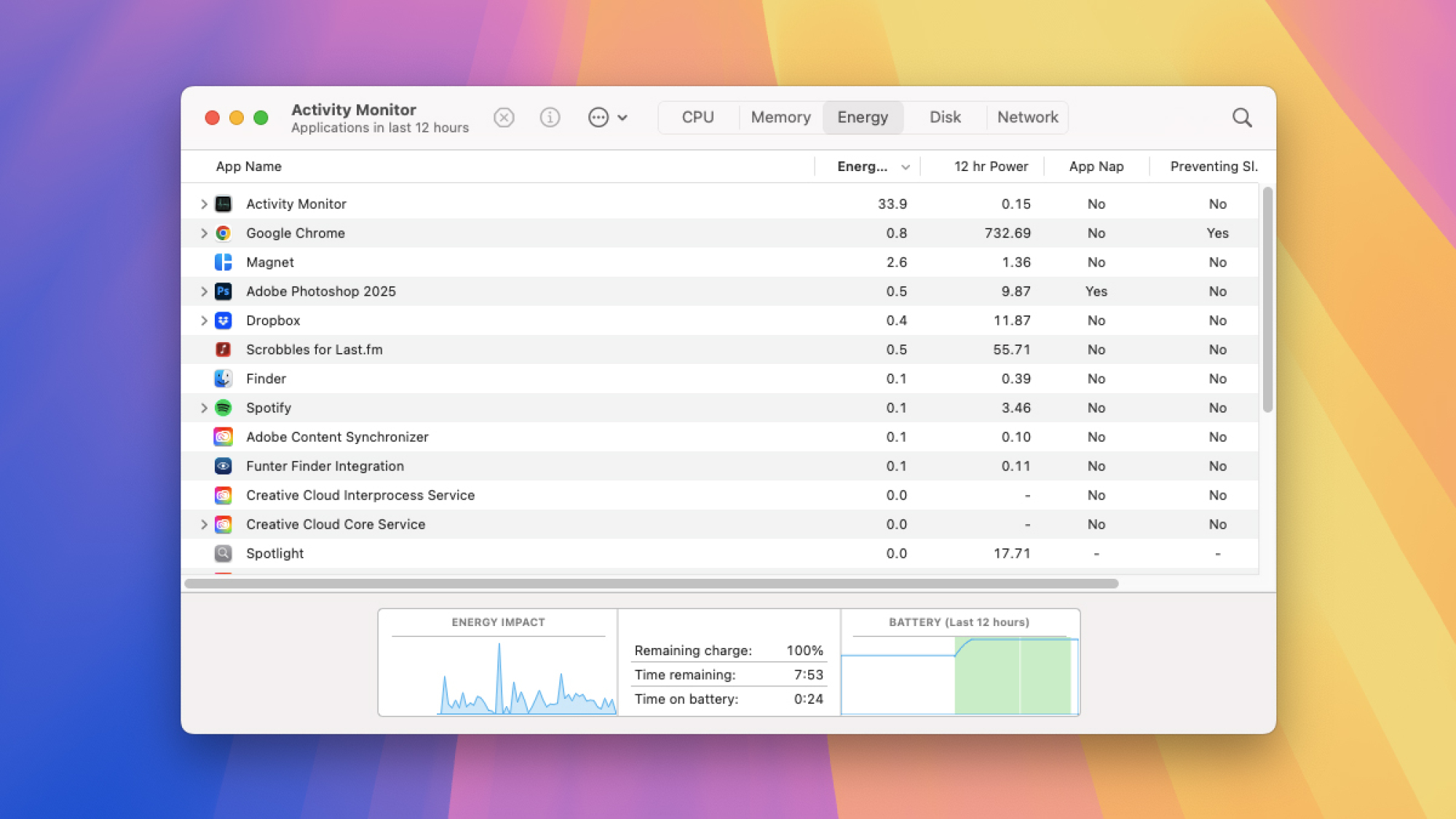
What you can’t do from this screen is see any more about which apps are using up battery—there’s no simple list as there is on Windows. Instead, load up Activity Monitor from Spotlight or the Utilities folder in Finder, then switch to the Energy tab: You get to see which apps are currently using up most battery life, and which have been the most demanding in terms of energy use over the last 12 hours.

To limit which apps can run in the background as well as in the foreground on your MacBook—which again can affect battery life—you need to go back to System Settings (via the Apple menu). Open the General tab, then click Login Items & Extensions, and you’ve got a series of permission toggle switches for all the installed programs that have requested to run in the background.

Sam’s Club Investigating Data Breach After Ransomware Gang Shops For Buyers On Dark Web

Sam's Club Investigating Data Breach After Ransomware Gang Shops For Buyers On Dark Web
The Clop ransom gang, notorious for masterminding sophisticated cyberattacks and exploiting zero-day vulnerabilities, is back in the news, and for the usual reason- – targeting the security systems of big companies and causing large-scale data breaches. The gang is claiming to have carried out an attack that breached Sam’s Club and exposed

FTC: 23andMe buyer must honor firm’s privacy promises for genetic data

Federal Trade Commission Chairman Andrew Ferguson said he’s keeping an eye on 23andMe’s bankruptcy proceeding and the company’s planned sale because of privacy concerns related to genetic testing data. 23andMe and its future owner must uphold the company’s privacy promises, Ferguson said in a letter sent yesterday to representatives of the US Trustee Program, a Justice Department division that oversees administration of bankruptcy proceedings.

“As Chairman of the Federal Trade Commission, I write to express the FTC’s interests and concerns relating to the potential sale or transfer of millions of American consumers’ sensitive personal information,” Ferguson wrote. He continued:

As you may know, 23andMe collects and holds sensitive, immutable, identifiable personal information about millions of American consumers who have used the Company’s genetic testing and telehealth services. This includes genetic information, biological DNA samples, health information, ancestry and genealogy information, personal contact information, payment and billing information, and other information, such as messages that genetic relatives can send each other through the platform.

23andMe’s recent bankruptcy announcement set off a wave of concern about the fate of genetic data for its 15 million customers. The company said that “any buyer of 23andMe will be required to comply with our privacy policy and with all applicable law with respect to the treatment of customer data.” Many users reacted to the news by deleting their data, though tech problems apparently related to increased website traffic made that process difficult.

Read full article

Comments

My Favorite Fitness Watch Is Getting Walking Workouts and a Smart Alarm

We may earn a commission from links on this page.

Garmin announced a new fitness watch today, the Vivoactive 6. Its predecessor, the Vivoactive 5, is my pick for the best smartwatch to replace a Fitbit (beating out the Pixel Watch 3), and, if you ask me, it’s the most underrated device in the Garmin lineup. The Vivoactive 6 is poised to be even better, adding a few new features, including a “smart wake” alarm and on-watch coaching for walking and strength training. 

The Vivoactive 6 will be available for preorder on April 4, with a suggested retail price of $299.99, the same initial price as the Vivoactive 5. (If you’re looking to save money by going with the older model, the Vivoactive 5 is currently on sale for around $219—an excellent deal on what is still a great fitness watch.)

What kind of watch is the Vivoactive 6?

The Vivoactive 6, like the 5 before it, is best described as a fitness watch. It’s not as sport-specific as something like a Forerunner, which is made specifically for runners, or an Instinct, which is made for people who are out hiking in the woods all the time. 

The Vivoactive 6 is more of a modern, everyday watch, with an AMOLED (smartphone-like) touchscreen and a lightweight plastic body that strikes a middle ground between sporty and fashionable. It measures 42 millimeters diagonally, which is on the smaller side for smartwatches. It’s roughly the same size as the Venu 3S and the Forerunner 265S, which are the smaller versions of their respective lines.

In addition to the touchscreen, the Vivoactive 6 still has two buttons, so you’re not dependent on the touchscreen during activities. (This is a major plus for any fitness or sports watch.) It’s definitely more fitness-focused than a true smartwatch (like an Apple Watch), with its built-in fitness features available just a swipe or button press away from the home screen.

What’s new on the Vivoactive 6? 

The size, shape, and general specs of the Vivoactive 6 are very similar to the Vivoactive 5. Colors have been slightly updated: there are still black and white models, but lavender and navy are out and peach and olive green are in. The new Vivoactive 6 has 8 GB of storage, double what the Vivoactive 5 had. It also has a gyroscope, the better to detect movement.

Beyond those changes, there are a few really excellent features that are entirely new to the Vivoactive 6. Here’s a tour. 

Smart wake alarm

Instead of just setting a time you’d like to wake up, the new smart wake alarm feature will let you set a window of time, and the watch will look for “lighter sleep stages” during that window to wake you with a vibration. (The manual for the Vivoactive 6 is not online yet, but that’s how it was described in a press release.)

Daily suggested workouts for walking

Garmin’s running watches have long offered “daily suggested workouts” (DSW, we Garmin-heads call them) for running and cycling. The Vivoactive 5 didn’t have any DSW, and the Vivoactive 6 still doesn’t have them for running or cycling—but it does have DSW for walking. 

Coached running and strength programs

The Vivoactive 6, unlike the 5, gives you access to Garmin Run Coach and Garmin Strength Coach. The running coach is similar to the DSW for running, but they’re viewable on your phone. (I have thoughts on Garmin’s run coaching.) From my experience with the Forerunner watches, you cannot use both a run coach and a strength coach at the same time. 

The Vivoactive 5 only had run coaching through the “expert” plans (where you choose Coach Amy, Coach Greg, or Coach Jeff). The Vivoactive 6 still has those too.

Improved navigation

The Vivoactive 6 can navigate with Beidou and QZSS networks, in addition to the usual GPS/GLONASS/GALILEO.

Red shift mode

If you need to use your watch in low-light environments, you can shift the display to a dim red-on-black mode to give your eyes a rest. 

More activity modes

The new activity modes include (this is not a full list) mobility, track run, trail run, obstacle running, horseback riding, golf, mountaineering, disc golf, archery, gravel biking, cyclocross, kayaking, surfing, snorkeling, motorcycling, ATVing, snowmobiling, ice skating, and inline skating.

Starliner’s flight to the space station was far wilder than most of us thought

As it flew up toward the International Space Station last summer, the Starliner spacecraft lost four thrusters. A NASA astronaut, Butch Wilmore, had to take manual control of the vehicle. But as its thrusters failed, Wilmore lost the ability to move Starliner in the direction he wanted to go.

He and his fellow astronaut, Suni Williams, knew where they wanted to go. Starliner had flown to within a stone’s throw of the space station, a safe harbor if only they could reach it. But already, the failure of so many thrusters violated the mission’s flight rules. In such an instance, they were supposed to turn around and come back to Earth. Approaching the station was deemed too risky for Wilmore and Williams, aboard Starliner, as well as the astronauts on the $100 billion space station.

But what if it was not safe to come home, either?

Read full article

Comments

Review: Amazon’s Kindle Colorsoft is something less than “a Paperwhite with color”

It has been a bumpy start for Amazon’s $280 Kindle Colorsoft, the company’s first E-Ink book reader with a color screen. The company delayed shipments for a few weeks to correct a problem where a faint yellow band would appear across the bottom of the screen, something that has apparently been fixed for current versions of the reader (Amazon says it has made “the appropriate adjustments” to fix the problem but hasn’t been specific about what those adjustments are).

Amazon didn’t send us a Colorsoft for review at the time, maybe in part because of this problem early reviewers had, but we finally got one a few weeks ago and have been using it since then.

My main takeaway is that I don’t mind the Colorsoft, but it also doesn’t solve any problems I was having with the monochrome Kindle Paperwhite, and it doesn’t meaningfully solve the big problems with color E-Ink. It also makes the experience of reading regular text subtly worse, which accounts for the vast majority of my Kindle activity. I’m curious to see future riffs on the idea, but this initial implementation leaves me cold.

Read full article

Comments

Making A Giant Mario Entirely Out Of Chocolate

Because who wouldn’t want to eat a squat Italian plumber, chocolatier and pastry chef Amaury Guichon (previously) constructed Mario entirely out of chocolate, complete with a warp pipe, piranha plant, and question block. I loved watching the process. There’s just something about watching someone who knows what they’re doing while they work their craft that’s so satisfying. Don’t get me wrong, I’ll never get tired of watching people who have no clue what they’re doing but think they do bungle it all horribly and hurt themselves, but this is good too.

Lazarus review: Wildly stylish, but it’s no Cowboy Bebop

You could call Shinichiro Watanabe’s Lazarus a retread of his masterpiece, Cowboy Bebop. That’s not to say the show is bad — based on the five episodes I’ve seen so far, Lazarus is still an entertaining and stylish ride. But I’ve just come to expect more from a legendary creator like Watanabe.

It’s set in the year 2052, a near-future when a renowned neuroscientist released Hapna, a drug that can erase all pain. If that sounds too good to be true, it is: Hapna’s creator Dr. Skinner reveals to the world that everyone who took the drug will eventually die. And then he disappears. Like an evil Willy Wonka, he announces one hope for survival: Find him in 30 days, or humanity is doomed.

To help find Skinner, the government sets up a covert group named Lazarus made up of convicted criminals. And that’s where the similarities come in. There’s the lead, Axel Gilberto, a parkour junkie who resembles Bebop’s reckless and carefree Spike Spiegel. Rounding out the team is Christine, a gorgeous femme fatale; Eleina, a bright young hacker; and Doug, a gruff investigator who has little patience for Axel’s shit. Those are all clear analogs to the Bebop crew of Faye, Ed and Jet. The one new element of the team is Leland, a cute college student who takes on various roles during the show (perhaps he’s just an anthropomorphized version of Bebop’s adorable pup Ein).

There’s a bit of Suicide Squad in the idea of using criminals to find humanity’s greatest villain, but Lazarus doesn’t really justify why that’s the case (that may be answered later in the show’s 13-episode run). And you’d think there would be more government efforts beyond a group of misfits to accomplish a humanity-saving mission. The Lazarus crew get a few chances to bond throughout each episode, but their interpersonal dynamics feel less organic than the Bebop characters, whose relationships were enriched by the pressure-cooker environment of an interplanetery spaceship, ever-present economic struggle and compelling backstories. By episode five of Lazarus, I didn’t have any real understanding of these characters, whereas Bebop delivered the seminal episode Ballad of the Fallen Angels by then.

Like Watanabe’s Samurai Champloo, Lazarus is best enjoyed if you don’t look too closely at its plot holes or contrivances (Axel’s inhuman parkour abilities make Spike Spiegel’s antics seem tame in comparison). It’s better to sit back and enjoy the incredibly stylish vibes. That includes wonderfully fluid animation by Mappa; a catchy soundtrack by Kamasi Washington, Floating Points and Bonobo (with a great ending theme, “Lazarus” by The Boo Radleys); and bone-crunching action choreography by John Wick director Chad Stahelski. It’s hard not to appreciate all of the talent involved.

Lazarus on Adult Swim
Adult Swim

But again, I just wish the whole project felt more original. Lazarus’s premise isn’t far off from Cowboy Bebop: The Movie, which involved a terrorist plot to deploy nanomachines that would kill everyone on Mars. It’s also funny to see the show arrive alongside a more inventive show like Max’s Common Side Effects, which deals with the real-world consequences of miracle drugs that could heal any illness or injury. That show’s characters are more grounded and relatable, and it explores why pharmaceutical companies would stop at nothing to kill such a miracle drug.

“The story began with Dr. Skinner… Is he a saint or a devil?” Watanabe said on the Engadget podcast via a translator (while he relaxed in shades with a mountain of records behind him, like the absolute boss he is). “Exactly what does he want to do? That was a big initial driving part of the story. … What you initially thought of Skinner at [the] start may change throughout the 13 episodes.”

Lazarus on Adult Swim
Adult Swim

It’s not a huge spoiler to say that Dr. Skinner isn’t always portrayed as a villain in the show. Before the release of Hapna, he was a famous neuroscientist who pushed humanity to respond to the climate crisis. But instead of listening to him, the world’s countries chose to pursue profit over the future of humanity. With that in mind, it’s no shock Watanabe says the inspiration for Hapna was, in part, the opioid crisis.

Throughout flashbacks and short opening monologues, Lazarus gives us glimpses into Hapna’s effect on our main characters, all of which is more compelling than the actual quest to find Dr. Skinner. Did the pill really heal everyone’s pain, or did it just close off their ability to feel true emotions? 

I’m sure newcomers to Watanabe’s work won’t have the same reservations with Lazarus as I do, I just wish the show had the same distinctive identity as his other series. Cowboy Bebop is a jazz-soaked noir; Space Dandy is a hilarious riff on the space opera genre; and Carol and Tuesday is a touching story of two young girls pursuing a pop music career. Lazarus is basically another action thriller, but this time it’s scored to modern jazz and electronic music.

I’m holding out hope that Lazarus matures into a more thoughtful show in its second half. But even if it doesn’t, it’s still worth celebrating anything new from Shinichiro Watanabe. There aren’t many anime directors and writers with his sense of style and excellent taste in music and action cinema. Even if it’s a lesser Watanabe project, it’s still more entertaining and creative than the vast majority of shows bombarding us in the streaming TV era, anime or otherwise.

Lazarus premieres on April 5 on Adult Swim, and it’ll be available on Max the day after. Subtitled episodes will be available 30 days after their English dubbed versions.

This article originally appeared on Engadget at https://www.engadget.com/entertainment/tv-movies/lazarus-review-wildly-stylish-but-its-no-cowboy-bebop-170300198.html?src=rss